Shared posts

29 Nov 20:32

Top Bitcoin exchange explains virtual currency in simple web tutorial

by Amar Toor

Leading Bitcoin exchange Mt. Gox has released a new website that provides a simple explanation of what Bitcoin actually is. The site, Bitcoins.com, is essentially a tutorial on the virtual currency, a single unit of which last week reached the price of $1,000 for the first time ever last week. Mt. Gox's site walks users through the basics — what Bitcoin is, why people use it, and how it works — before leading into a step-by-step guide on how to get started. It's certainly not a comprehensive rundown, but the site could prove useful for the uninitiated or those who struggle to understand the Bitcoin concept.

Mt. Gox also released a new one-time password (OTP) card this week as part of an effort to strengthen the security of user...

Continue reading…

29 Nov 20:28

Carphone Warehouse unveils Cyber Monday deals

by Alex Dobie

Samsung devices

Many Samsung devices discounted until next Tuesday in 'Flash Sale'

British retailer Carphone Warehouse is jumping on the Black Friday and Cyber Monday bandwagon, announcing the opening of a "Flash Sale" for Samsung mobile devices today. Many handsets that previously required an upfront payment on-contract — including the Galaxy S4, Galaxy S4 Mini and Galaxy Ace 3 — are free for the duration of the sale. Others, are free on certain contracts and include a free gift — the Galaxy Note 3, for instance, comes with a free Galaxy Tab 3 7-inch tablet on contracts from £33 per month.

The Carphone Warehouse sale runs until 11:59pm GMT next Tuesday, Dec. 3. Elsewhere, rival retailer Phones 4u announced its Black Friday deals yesterday.

More: Carphone Warehouse Flash Sale

read more


29 Nov 20:27

Sherlock Series 3 Announces Release Dates

Sherlock Series 3 Announces Release Dates

Sherlock lives again on January 1

sherlock series 3 sherlock lives air date uk

Come January 1, 2014, it'll have been two long years since the premiere of Sherlock Series 2. That's right, 'A Scandal in Belgravia' was broadcast way back on January 1, 2012. It makes sense, then, that Team Sherlock have picked New Year's Day as the airdate for the first episode of Series 3, The Empty Hearse. In other words: happy new year, Sherlockians! 

Die-hard Cumberbabes and Freemaniacs will already have worked out that the title of the Mark Gatiss-written The Empty Hearse is a play on the title of an original Conan Doyle story, The Empty House, as well as Mr. Holmes' 'death' - a fact in dispute considering his later appearance by his own grave, of course, and the way there's a third season at all.

The BBC have also announced that episode 2, 'The Sign Of Three' (written by Stephen Thompson), will air on Sunday January 5 and episode 3, 'His Last Vow' (written by Steven Moffat), will air on Sunday January 12. 12 days, three Sherlock episodes. It's going to be a bad fortnight in the ovary explosion department of your local A&E.

Again, there are plenty of clues as to what to expect from these three episodes, with the second almost certainly involving Dr. Watson's marriage, something reinforced by the clues issued over a year ago: "rat, wedding, bow". That's "bow" as in Conan Doyle's story "His Last Bow", rather than something an elf might wield in The Hobbit.

And on the topic of The Hobbit, The Desolation Of Smaug (featuring Freeman as Bilbo and Cumberbatch as both The Necromancer and the titular dragon) will hit cinemas December 13, 2013, which should serve as a decent fix before #SherlockLives takes over Twitter on January 1. 

P.S. If you're a fan of the show, you'll definitely want to get your hands on an iPad and download the lastest issue of Empire (the one with Transformers: Age Of Extinction on the front). In it, you'll enjoy a 360 degree tour of 221B Baker Street, with audio bonus features whenever you tap on a prop. Plus, an exclusive photoshoot with show creators Gatiss and Moffat, which happens to only mention hardcore porn once. Here's a taster - of the feature, not the hardcore porn - below.


29 Nov 20:25

Winter-Proof Your Chapped Cheeks With DIY, Natural Chapsticks

by Mihir Patkar

Winter-Proof Your Chapped Cheeks With DIY, Natural Chapsticks

Winter is coming. And for a lot of people, especially kids, that means chapped cheeks. Over at One Good Thing By Jillee, there's a DIY solution to make your own, natural chapstick for cheeks, since the store-bought chapsticks for lips won't do much for your cheeks. It's not too difficult either:

1/4 cup organic coconut oil

1/4 cup olive oil

2 Tablespoons beeswax pastilles

20 drops Lavender essential oil

Melt the coconut, olive oil and beeswax in a warm bath, stirring every few minutes until melted. This will take at least 15 min, you want a slow melt.

After the oils & wax are completely melted, add the Lavender essential oil and stir.

Using a pipette (or whatever means you can to pour the liquid into the tubes) carefully fill the tubes with the melted liquid. Allow to cool until hardened.

This should give you enough to fill 10-12 chapstick tubes, a pack of which costs around $4 on Amazon. It'll be quite handy to make a batch and have them on you, as well as in your car, home and office for the winter.

A Natural Remedy for Chapped "Winter Cheeks" | One Good Thing By Jillee

29 Nov 13:07

Giant cat sofa

by Cory Doctorow


From "Habitat," a 2010 installation in the Luchtbal district of Antwerp, UNFOLD's "Felis Domesticus." It's a 3.5 meter soft sculpture of a sleeping cat that visitors can lounge upon (finally, the lap-sitting tables are turned!). Pity this never went into production as a piece of furniture; it'd make a fabulous beanbag alternative.

Habitat: Felis Domesticus (via Geekologie)


29 Nov 13:01

Black Friday game and app sales for Android

by Simon Sage

Black Friday app sales

The Black Friday insanity kicks off today, and we're here to point you to the best deals on Google Play. We'll be updating this list all day long, so feel free to let us know in the comments about any sales on Android apps you find. If you're looking for hardware, be sure to check out our massive round-up over here!

Without further ado...

read more


29 Nov 13:01

Amazon Appstore giving away free Android games for Thanksgiving weekend

by Alex Dobie

Amazon Appstore

Eight games free in the UK, nine in the U.S. until Sunday

Amazon has announced that its Appstore for Android will be giving away a selection of top Android games this weekend. The "Ultimate Game Collection" promotion runs from today, Nov. 29, through until Sunday, Dec. 1. Free titles include the paid versions of Sonic the Hedgehog, Angry Birds Space Teenage Mutant Ninja Turtles: Rooftop Run and Fruit Ninja. Here's a breakdown of the sales on Amazon.com and Amazon.co.uk — the only major difference is U.S. buyers get Battle Bears Fortress as part of their promotion.

Amazon US Amazon UK

In addition, Amazon's free app of the day is The Adventures of Mosaica, which was previously $0.99.

Google Play also has several popular titles at reduces prices today — check out our post for more details.


29 Nov 13:00

The Internet has killed CDs and newspapers… but not books

by Brad Reed
eBooks Versus Printed Books SurveyGiven what digital media options have done to CDs and newspapers, you probably assumed that the rise of eReaders such as Kindle and Nook would be doing the same thing to printed books... but you'd be wrong. Per The Guardian, a new survey of people between the ages of 16 to 24 shows that 62% of young adults prefer reading printed books over eBooks.

Continue reading...
29 Nov 13:00

Money Dashboard Gets $4.4M To Tell UK Bank Users What They Spend On

by Mike Butcher

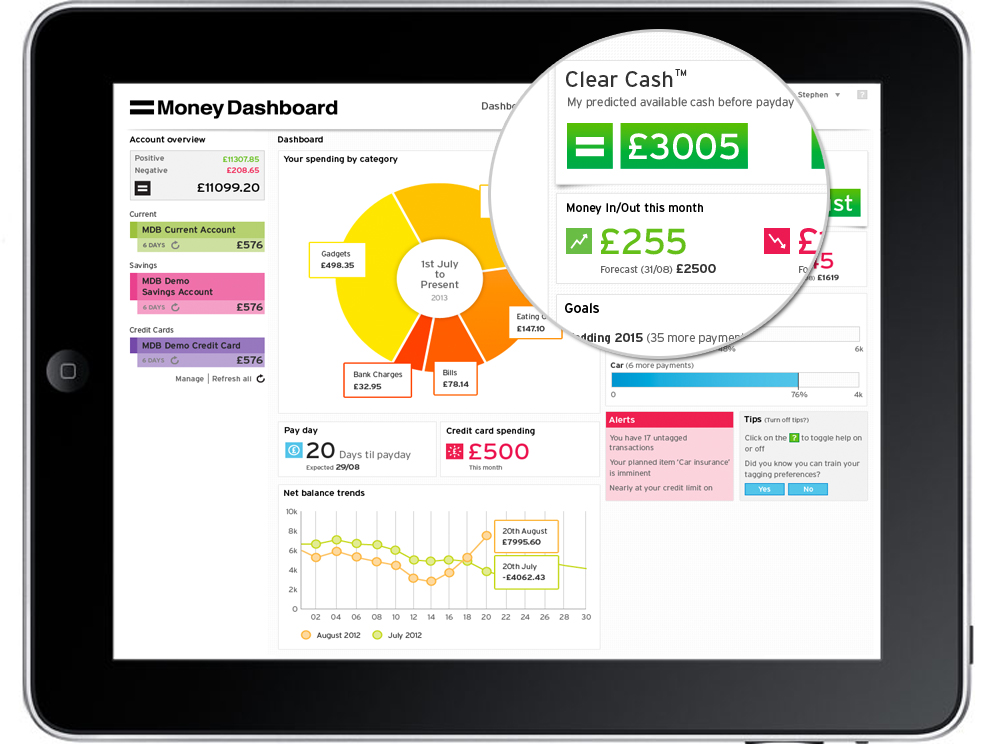
One thing the UK, a huge finance market, has been lacking in recent years is something equivalent to Mint.com. Now Money Dashboard hopes to fulfil at least part of that role. It's a ‘smart' account aggregation service that automatically analyses online banking statements. It's now secured a £2.7 million ($4.4 million) investment round, led by Calculus Capital, a fund which manages private equity funds for individuals. Money Dashboard aims to now develop new services, including launching mobile apps.

In addition, ZAG, a venture-led branding agency under BBH, it to become a shareholder now that it will handle the launch and marketing of the new products.

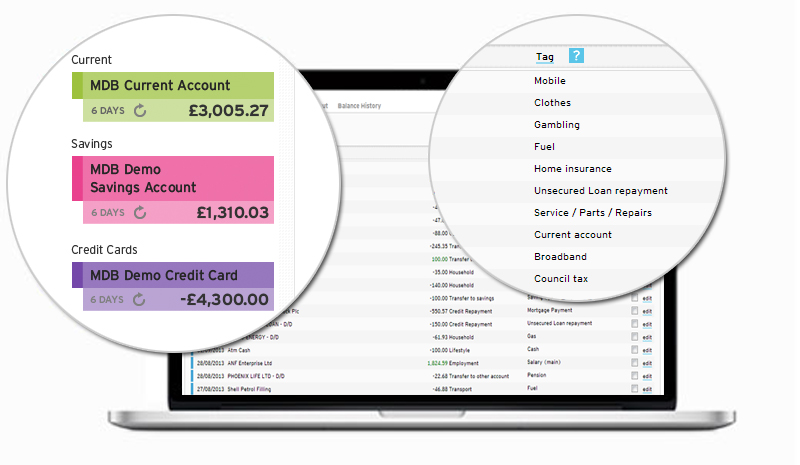
Money Dashboard – going since 2010 – tells UK consumers how much they spend each month on food, leisure and many other categories, for free. It aggregates current, savings and credit cards accounts together in one place, with the same security levels as online banking.

The result are some pretty cool charts showing you spot areas where you could make savings. It also provides spending forecasts and can make consumer aware of their ‘Clear Cash' figure that is available to spend before pay day.

Alerts can also be set, including notifications when balances fall to the point where they risk triggering annoying bank charges. The technology is ‘read-only' therefore no money can be moved or transactions processed through the site.

The business model is generating the majority of revenues by harnessing data to offer ‘switching services' , whereby Money Dashboard gets paid for funnelling users towards energy, broadband, fixed line and satellite TV packages, loans and other services. Not unlike Uswitch.

Susan McDonald, chairman of Calculus Capital, says: "This is a genuinely exciting business with huge potential.” Founder Gavin Littlejohn says: Money Dashboard's rich vein of data and insights will also be further developed.”

Dashboard Ipad 300dpi

Transactions With Magnify 300dpi


29 Nov 12:57

Court Orders Google, Microsoft & Yahoo to Make Pirate Sites Disappear

by Andy

google-bayLast week turned out to be yet another hectic seven days for the copyright enforcement obligations of Google. The search engine received requests to de-list 6.51 million allegedly infringing URLs, yet another new record in a piracy battle that seemingly has no end.

If the entertainment companies had their way, however, things would be handled differently. The general line coming out of the MPAA, RIAA and their UK-based counterparts BPI, is that by now Google knows which domains are infringing copyright. On this basis action should be taken to render their indexes harder to find. Or better still, have them de-listed from search engines altogether, the rightsholders say.

While Google has shown zero interest in the latter proposal, over in Europe a case underway since 2011 has now concluded, with a thought-provoking outcome for the entertainment industries.

The case dates back to December 2011 when L’Association des Producteurs de Cinéma (APC), a group which in itself represents more than 120 companies including Paramount and Sony, teamed up with La Fédération Nationale des Distributeurs de Films (FNDF) and Syndicat de l’Edition Vidéo Numérique (SEVN). Adding to the already formidable lineup, the groups were later joined by the Union of Film Producers (UPF) and the Union of Independent Producers (SPI).

The film and TV companies’ complaint, rooted in Article 336-2 of the Intellectual Property code, targeted 16 domains connected to the popular Allostreaming, Fifostream and DPstream video portals. The aim was to force the world’s largest search engines – Google, Bing and Yahoo – to completely delist the sites from their search results and to have local ISPs block them.

After previously obtaining emergency interim measures, yesterday the studios received good news from the High Court of Paris.

The court ruled that the film industry had clearly demonstrated that the sites in question are “dedicated or virtually dedicated to the distribution of audiovisual works without the consent of their creators,” thus violating their copyrights.

As a result the search services of Google, Microsoft, Yahoo and local company Orange are now under orders to “take all necessary measures to prevent the occurrence on their services of any results referring to any of the pages” on these sites.

Several ISPs – Orange, Free, Bouygues Télécom, SFR, Numéricable and Darty Télécom were also ordered to “implement all appropriate means including blocking” to prevent access to the infringing sites.

Rightsholders have been celebrating the decision in the case which was concluded after almost two years of legal wrangling.

“The ruling today by the High Court in this case recognized the merits of the approach forcing ISPs and search engines to cooperate with right holders in the protection of the law of literary and artistic property on the Internet,” they said in a statement.

But despite the big win, the cards didn’t all fall in favor of the movie companies. PCInpact reports that they had demanded that the search engines and ISPs foot the bill of the blocking and censorship, but the court decided otherwise.

“The cost of the measures ordered can not be charged to the defendants who are required to implement them,” the decision reads.

Google, Microsoft, Yahoo and the ISPs now have two weeks to implement the measures, which come on the heels of the EU Advocate General’s advice earlier this week on the blocking of infringing sites.

Source: TorrentFreak, for the latest info on copyright, file-sharing and VPN services.

29 Nov 00:01

Xbox Video service launches on the web

by Chris Smith
Xbox Video Web Service LaunchesMicrosoft on Wednesday launched its Xbox Video service on the web at XboxVideo.com, allowing users to watch movies and TV shows in the browser, using the Silverlight plug-in. There are “more than 300,000 movies and TV episodes” to choose from, the company announced, and they can be watched on the Xbox 360, Xbox One, Windows 8.1 tablets and PCs, but also on other operating systems, Macs included. A Windows Phone application for the service isn’t available at this time, but the company says it’s coming soon.

Continue reading...
28 Nov 18:13

Lewis Collins Dies

Lewis Collins Dies

The star of The Professionals was 67

He blazed across our TV screens as one part of The Professionals team in the 1970s, but Lewis Collins was more than just Bodie. So it’s sad to report that the star of stage and screen, has died at the age of 67.

Collins, who was born in Cheshire, didn’t immediately embrace acting as a career. He started his working life as a hairdresser and played with various music acts including The Mojos before deciding to try his luck treading the boards. He trained at the London Academy of Music and Dramatic Art and then segued into rep theatre in Chesterfield and Glasgow before a touring session with Prospect Theatre Company.

His first TV break was in Z-Cars in 1974, which kicked off a run of guest star parts in a variety of other series. But in 1977, he got the role that he’d be best remembered for: tough nut copper Bodie in The Professionals. The ITV series, which also starred Martin Shaw and Gordon Jackson, became an institution, and ran until 1983.

“We spent a very tough four years together in making The Professionals’ and shared in the production of what has become an icon of British television,” Shaw told the BBC. “He will be remembered as part of the childhood of so many people, and mourned by his fans. I send my love and condolences to his family, and the great many who will miss him.”

Outside of work, Collins was every bit the action man, even delaying production of the show once after breaking his leg skydiving. He even auditioned to play James Bond, though he’s since said he was considered “too aggressive” for the role. But he did work on the big screen, most famously appearing in Who Dares Wins. Collins, who moved to Los Angeles and started a computer business after retiring from acting, had been battling cancer for five years. He’s survived by his wife and three sons, and our thoughts are with them.


28 Nov 15:45

The 50 Free Apps We're Most Thankful For

by Whitson Gordon

It’s the time of year where we all give thanks, and among many other things, we here at Lifehacker are thankful for all the free apps out there that improve our lives (and the developers that make them!) Here are 50 of our favorites.

Every year we ask you which free apps you’re most thankful for, and every year you offer a ton of suggestions both classic and new. Here, we’ve taken your votes (and added a few of our own) and ranked our 50 apps using those votes as a (rough) guide. So without further ado, here are 50 free apps for your downloading feast. (Be sure to check out the 2016 version of the thread, too—there are a ton of apps in there we didn’t mention!)

The 50 Free Apps We’re Most Thankful For, In 2016

1. Feedly

Category: News Readers
See also: The Best Extensions and User Scripts to Power Up Feedly, The Best New Features Feedly Has Added for Google Reader Switchers, Five Best Google Reader Alternatives, and more Feedly coverage Alternatives: The Old Reader, Tiny Tiny RSS

2. Google Maps and Waze

Category: Maps
See also: The Best Extensions to Make Google Maps Even More Awesome, How to Turn Waze Into the Ultimate Navigation App, The Best Ways to Use Google’s New(ish) My Maps Tool, How to Set Up the Ultimate Personal Google Maps, Make your GPS App Give You Better Directions, Wean Yourself Off Your GPS Dependency, Waze Helps You Find the Nearest Gas Station and Avoid Road Closures, Google Maps Can Find Places to Stop On Your Route, Shows Gas Prices, and more maps coverage

3. Dropbox

Category: Cloud Storage
See also: The Cheapskate’s Guide to Getting Free Dropbox Space, How to Get 8GB+ Extra Dropbox Space for Free with Google AdWords, Seven Downloads and Extensions to Make Dropbox Even More Awesome, Top 10 Clever Uses for Dropbox, How to Supercharge Your Dropbox with Wappwolf, The Start-to-Finish Guide to Securing Your Cloud Storage, and more Dropbox coverage

4. Gmail

Category: Email
See also: Top 10 Gmail Labs and Features You Should Enable, How to Master Gmail with These Tips, Shortcuts, and Add-Ons, Top 10 Clever Tricks Built Right Into Gmail, Fix Gmail’s Newest Annoyances with These Userstyles and Userscripts, Everything You Need to Know About Gmail’s New, Super-Confusing Layout, and more Gmail coverage

5. Google Chrome

Category: Web Browsers
See also: The Always Up-to-Date Power User’s Guide to Chrome, The Best Packaged Apps for Chrome, The Best Chrome Apps You’re (Probably) Not Using, The Secret Powers of Chrome’s Address Bar, Speed Up Chrome for Android with this Settings Tweak, Lifehacker Pack for Chrome, Why Chrome Uses So Much Freaking Ram, and more Chrome coverage

6. Firefox

Category: Web Browsers
See also: The Always Up-to-Date Power User’s Guide to Firefox, The Best About:Config Tweaks for Making Firefox Better, Lifehacker Pack for Firefox, Speed Up Firefox By Enabling Its New HTTP Cache, Firefox Adds Tracking Protection, Tab Audio Indicators, and More, Fuck It, I’m Going Back to Firefox, and more Firefox coverage

7. Mint.com

Category: Personal Finance
See also: How to Create (and Stick to) a Realistic Budget with Mint, How I Used Mint Bills to Finally Simplify My Bill Payments, An Intermediate’s Guide to Getting More out of Mint, Is Mint Ready for Your Money?, Four Ways Mint Can Make Your Tax Season Easier, You Can Now Check Your Credit (for Free) with Mint, and more Mint coverage
Alternatives: Five Best Personal Finance Tools

8. Plex

Category: Media Centers
See also: How to Stream Your Media Anywhere with Plex, Plex vs XBMC, RasPlex Puts Plex on the Raspberry Pi, Create a Home Server with Plex, Plex Media Player Replaces Plex Home Theater, Looks Awesome, and more Plex coverage

9. Kodi

Category: Media Centers
See also: Create a Kickass, Seamless, Play-Anything Media Center: The Complete Guide, How I Built the Media Center of My Dreams for Under $500, XBMC Renames and Rebrands to Kodi Entertainment Center, Turn a Raspberry Pi Into an XBMC-Based Media Center, How to Make XBMC Easier to Use (Especially for Non-Geeks), XBMC vs Plex, Top 10 Ways to Power Up Your Home Theater PC, and more XBMC coverage

http://lifehacker.com/5908682/how-to-make-xbmc-easier-to-use-especially-for-non+geeks

10. Outlook

Category: Email
See also: Outlook Is a Completely New, Feature Filled Webmail Service from Microsoft, Outlook Comes to Android and iOS, Office for Android Leaves Preview, Outlook for Android and iOS Adds Calendar Features from Sunrise, and more Outlook coverage

11. Pocket

Category: Reading
See also: How to Use Technology to Get Through Your Reading List, The Best Way to Save All the Useful Articles You Come Across Online, How to Use Pocket Like a Pro to Save Everything from the Web, Pocket Now Recommends Articles Based on the Ones You Save, and more Pocket Coverage
Alternatives: Instapaper and Readability

12. Authy

Category: Security
See also: Here’s Everywhere You Should Enable Two-Factor Authentication Right Now, Authy is a PIN-Protected Manager For Your Two-Factor Authentications, Authy Brings Two-Factor Authentication to Your PC, No Need for a Phone, The Best Two-Factor Authentication App for Android and iPhone, and more Authy coverage

13. Crashplan

Category: Utilities
See also: Set Up an Automated, Bulletproof File Backup Solution, There’s No Excuse for Not Backing Up Your Computer. Do It Now., Speed Up Crashplan Backups and Free Up CPU Power with These Scripts, How to Move Your Crashplan Backups to a New Computer, The Best Online Backup App for Windows and Mac, and more Crashplan Coverage

14. F.lux

Category: Utilities
See also: Flux Changes Your Screen Brightness by Time of Day, Make Your Computer and More Friendly to Use at Night, Prevent Eyestrain at Your Computer, Top 10 Ways to Improve Your Monitor, the Screen You Stare at All Day, and more Flux coverage

15. OneNote

Category: Notes
See also: How to Jump Ship From Evernote and Take Your Data With You, How to Master Microsoft Office OneNote, Seven Tips and Tricks to Get More Out of OneNote, Transfer Your Evernote Notes Into Microsoft OneNote With the Importer Tool, and more OneNote coverage.
Alternatives: OneNote vs Evernote, Simplenote

16. LastPass

Category: Security
See also: The Beginner’s Guide to Setting Up LastPass, You Can Now Use LastPass On Multiple Devices for Free, LastPass Authenticator Simplifies Two-Factor Authentication For LastPass Users, Is LastPass Secure? What Happens if It Gets Hacked?, What To Do If You Lose the Master Password to Your Password Manager, Behind the App: The Story of LastPass,
Alternatives: Five Best Password Managers

17. Trello

Category: To-Do Lists
See also: How to Organize Your Entire Life with Trello, Get Both a Focused and a Bird’s Eye View of Your Tasks with Trello, Use Trello as a Flexible, Visually Organized GTD System, Trello Makes Project Collaboration Simple and Kind of Enjoyable, How Can I Turn My Mess of Ideas Into Something Organized and Useful? and more Trello coverage

18. Any.DO

Category: To-Do Lists
See also: Five Best To-Do List Managers, The Coolest “Extra” Features in Any.DO, Any.do Adds a Smart Assistant To Help Plan and Complete Your To-Dos, Any.do 2.0 Adds New Tools to Collaborate, Plan Your Day, and More, Any.do Finally Unveils a Webapp, Brings Your To-Dos to Any Browser, and more Any.DO coverage
Alternatives: 2016 To-Do App Showdown: Wunderlist vs. Any.do

19. Google Keep

Category: Notes
See also: Not Just Another Notes App: Why You Should Use Google Keep, Google Keep Adds Reminders So You’ll Never Forget to Act on Your Notes, The Best Note Taking App for Android, Google Keep Adds Labels and Recurring Reminders, and more Google Keep coverage

20. Spotify

Category: Music Streaming
See also: The Best Spotify Tips and Tricks You’re Probably Not Using, Why Spotify Apps Are Actually Pretty Useful, How to Automatically Mute Ads on Spotify, How to Stop Spotify from Posting Every Song You Listen to on Facebook, Spotify Offers 50% Discount Off Premium Subscriptions to Students, The Lifehacker Work Playlists: Your Ideal Music for Getting Things Done, and more Spotify coverage
Alternatives: Five Best Streaming Music Services

21. Pandora

Category: Music Streaming
See also: How to Discover New Music in the Post-MP3 Age, Pandora Premieres Streams New Albums Weeks Before They Launch, Five Best Internet Radio Services, Pandora Will Let You Stream 24 Hours of Ad-Free Music for 99 Cents, Free Music Showdown: What $0 Gets You on the Best Streaming Services, and more Pandora coverage

Alternatives: Five Best Streaming Music Services

22. Google Play Music

Category: Music Streaming
See also: How to Make Google Music Your Secondary Media Player (and Why You Should), All of Google’s Confusing, Intertwined Music Services Explained, Google Music All Access: Should It Be Your New Streaming Service?, Cloud Music Comparison: What’s the Best Service for Streaming Your Library Everywhere?, Music Plus Makes Google Music Awesome, and more Google Play Music coverage

23. Skype

Category: VoIP
See also: Get Better Quality Video Chat, How to Make Sure Your Voice Calls and Audio Chats Are Crystal Clear, Disable Skype’s Ads, Skype Is Now Available in Your Browser, The Five Best Webcams, Phone-ify Your Computer for Considerably Improved At-Home Calls and Texts, and more Skype coverage Alternatives: Five Best Mobile VoIP Apps

24. Google Drive

Category: Cloud Storage/Office Suites
See also: 8 Extensions That Make Google Drive More Powerful than Dropbox, How to Stream Your Media Anywhere with Dropbox and Google Drive, How to Make Google Drive Work Like a Desktop Suite, Access Most Google Drive Commands with One Keyboard Shortcut, Four Skills That Will Turn You Into a Spreadsheet Ninja, and more Google Drive coverage

25. Google Calendar

Category: Calendars
See also: The Coolest Things You Can Add to Google Calendar, Manage Your Money with Google Calendar, How to Use Google Calendar as a Project Management Tool, 8 Great Experimental Features to Enable in Google Calendar’s Labs, Google Calendar Now Adds and Updates Events for You Based on Gmail, and more Google Calendar coverage

26. Google Assistant

Category: Personal Assistant
See also: All the Things You Can Do With Google Assistant That You Couldn’t Do Before, How to Get Google Assistant On Any Phone Running Android Marshmallow or Higher, Everything You Didn’t Know You Could Do with Google’s Voice Commands, Top 10 Awesome Features of Google Now, How to Train Google Now to Give You Better Suggestions, Google Now On Tap Is Cool, But It’s Not That Useful Yet, and more Google Assistant coverage

27. Swiftkey

Category: Keyboards
See also: How to Improve Your Predictive Keyboard, SwiftKey Adds Custom Keyboards You Can Resize and Move, Improve Your Typing with SwiftKey’s Heat Map, and more SwiftKey coverage Alternatives: Five Best Android Keyboards and iOS Keyboards

28. Google Photos

Category: Photo Manager
See also: How the New Google Photos Makes Your Picture Library Awesome, This Flowchart (and Audio Guide) Will Help You Finally Conquer Your Photo Clutter, Lifehacker Faceoff: Google Photos vs. Flickr, Google Photos Can Now Free Up Space on Your Phone, and more Google Photos coverage
Alternatives: Five Best Image Hosting Web Sites

29. Signal

Category: Messaging/Video Chat
See also: Signal, the Encrypted Chat App, Is Now Available on the Desktop, The Best and Worst Encrypted Messaging Apps, and more Signal coverage

30. Overcast

Category: Podcast Apps
See also: Overcast Goes Free, Improves Streaming, Adds Chapter Support, and More, Overcast Is a Free, Powerful Podcast App with a Syncing Web Player, The Best Podcast App for iPhone

31. VLC

Category: Media Players
See also: The Best Hidden Features of VLC, Master Your Digital Media with VLC, Set a Video as Your Wallpaper with VLC, How to Fix Movies that Are Really Quiet, then REALLY LOUD, and more VLC coverage
Alternatives: PotPlayer, Five Best Desktop Video Players

32. IFTTT

Category: Automation
See also: How to Supercharge Your Favorite Services with IFTTT, How to Post to Facebook, Twitter, and Google+ at the Same Time with IFTTT, IFTTT’s Maker Channel Connects Your Electronics Projects to Nearly Everything, 15 Clever Recipes to Try With IFTTT’s New Do Apps, All the New Stuff in IFTTT for iOS and Android, and What You Can Do with Them, Make Your iOS Notifications Smarter, The Best Uses for IFTTT’s Location and Feed Channels, and more IFTTT coverage

33. Vysor

Category: Remote Access
See also: Vysor Controls Your Android Phone From Chrome, No Android App Necessary and more Vysor coverage

34. TeamViewer

Category: Remote Access
See also: Use Your Home Computer from Anywhere: A Comprehensive Guide to Remote Controlling Your PC, How to Get the Best Experience from TeamViewer, How Do I Troubleshoot My Parents’ PC Remotely? and more TeamViewer coverage

35. Avira

Category: Antivirus
See also: The Best Antivirus App for Windows, The Best Antivirus App for Mac, How to Get Rid of a Virus (Even When Your Computer Won’t Boot), and more Avira coverage
Alternatives: Five Best Antivirus Programs

36. Ubuntu (and other Linux Distros)

Category: Operating System
See also: Getting Started with Linux: The Complete Guide, How to Find the Perfect Linux Distribution for You, Five Best Linux Distributions, Build a Killer Customized Arch Linux Installation (and Learn All About Linux in the Process), Ubuntu vs. Mint: Which Linux Distro Is Better for Beginners?, Turn an Old Computer into a Networked Backup, Streaming, or Torrenting Machine with Ubuntu, the Lifehacker Pack for Linux, and more Linux coverage

37. BitTorrent Sync

Category: Cloud Storage
See also: Should I Use BitTorrent Sync Instead of Dropbox?, How (and Why) to Ditch Dropbox and Sync Files with BitTorrent Sync, Roll Your Own Dropbox Clone with a Raspberry Pi and BitTorrent Sync, BitTorrent Sync 2.0 Brings Pro Version with Selective Sync, More, BitTorrent Sync Mobile Can Now Create, Edit and Share Files, and more BitTorrent Sync coverage

38. Flipboard

Category: News Readers
See also: Flipboard Is a Digital “Magazine” Based on What Your Friends Are Reading, Flipboard Adds Custom Magazines, a Web-Based Bookmarklet for Adding Stories, and More, Flipboard Officially Arrives for Android, Offers Magazine-Style News Reading to All, Lifehacker Faceoff: The Best Digital Digests for iPad and iPhone

39. uTorrent

Category: BitTorrent Client
See also: How to Completely Anonymize Your BitTorrent Traffic with a Proxy, How to Disable Ads in uTorrent, How to Monitor Your BitTorrent Downloads from Any Computer or Mobile Device, How Do I Torrent Safely Now That Demonoid Is Down?, How to Add Automatic Virus Scanning, Video Conversion, and Remote Downloading to uTorrent for Free, Five Best BitTorrent Clients, and more uTorrent coverage
Alternative: Transmission, qBitTorrent

40. CCleaner

Category: Utilities
See also: What Should I Be Cleaning with CCleaner?, Uninstall Built-In Windows 10 Apps with CCleaner, The Maintenance You Need to Do on a Windows PC, Run CCleaner on a Schedule to Keep Your PC Crap-Free, CCleaner Enhancer Makes CCleaner Even Better, Now Cleans 270 New Apps, and more CCleaner coverage

41. HandBrake

Category: Video Conversion
See also: How to Rip a DVD to Your Computer, The Hassle-Free Guide to Ripping Your Blu-Ray Collection, Calculate the Perfect HandBrake Video Encoding Settings for Your Device, and more Handbrake coverage

42. VirtualBox

Category: Virtualization
See also: The Power User’s Guide to Better Virtual Machines in VirtualBox, The Beginner’s Guide to Creating Virtual Machines with VirtualBox, How to Safely Test Software Without Messing Up Your System, Should I Run a Second Operating System in a Virtual Machine or Dual Boot?, How to Run Mac OS X Inside Windows Using VirtualBox, and more VirtualBox coverage

43. GIMP

Category: Image Editing
See also: Top 10 Photoshop Tricks You Can Use Without Buying Photoshop, How to Make GIMP Work More Like Photoshop, Build Your Own Adobe Creative Suite with Free and Cheap Software, Is GIMP better than Photoshop?, The Simplest, Free Tools for Common Photo Edits (That Aren’t Photoshop), and more GIMP coverage
Alternatives: Five Best Photoshop Alternatives

44. LibreOffice

Category: Office Suite
See also: LibreOffice Updates, Doesn’t Look Like Crap Anymore, Libre Office Viewer Reads Nearly Any Office File Type, Battle of the Office Suites: Microsoft Office and LibreOffice Compared, LibreOffice 4.0 Adds Better Collaboration and Text Comments, Plus a Ton More, Four Skills That Will Turn You Into a Spreadsheet Ninja, and more LibreOffice coverage

45. Twitter

Category: Social Networking
See also: Top 10 Uses for Twitter (That Aren’t Self-Indulgent), How to Fix Twitter’s Biggest Annoyances, How to Mute Retweets from Any User on Twitter, Navigate the New Twitter Like a Pro with Keyboard Shortcuts, How Twitter’s 140-Character Limit Made Me a Better Writer, How to Save Money Everywhere with Social Media, Don’t Quit the Social Networks You Hate. Bend Them to Your Will, and more Twitter coverage

46. AutoHotkey

Category: Utilities
See also: Turn Any Action into a Keyboard Shortcut, The Best Time-Saving AutoHotkey Tricks You Should Be Using, Why I Started Using a Gaming Mouse and Keyboard to Get Real Work Done, Switch Between Two Audio Devices In a Snap With AutoHotKey, Show Us Your Best AutoHotkey Script, and more AutoHotkey coverage

47. Pushbullet

Categories: Utilities
See also: How to Use Pushbullet to Bridge the Gap Between All Your Devices, Pushbullet Adds a Full SMS Client For Texting From the Desktop, Huge Pushbullet Update Adds Instant Messaging, Chat Heads, and More, Pushbullet Can Now Retrieve Files Remotely From Your Other Devices, Pushbullet Now Lets You Send Text Messages From Your Computer, and more Pushbullet coverage

48. Launchy

Category: Utilities
See also: Why You Should Be Using an App Launcher (and How to make It Do More Than Launch Apps), How to Create a Shortcut for Any “Modern” Windows App, The Best Application Launcher for Windows, and more Launchy coverage

49. Office Lens

Category: Utilities
See also: Microsoft Office Lens Scans Notes and Documents into Office Format, Note-Taking Showdown: Evernote vs. OneNote (2016 Edition), Free Document Scanning Apps Are Sleazy and Gross, Don’t Download Them, and more Office Lens coverage

50. Dark Sky

Category: Weather
See also: Dark Sky Tracks the Weather Down to the Minute and Warns You When It’s About to Rain, Dark Sky Adds Advanced Notifications, Crowd-Sourced Weather, and More, Dark Sky, the Up-to-the-Minute Weather App, Finally Arrives on Android, Dark Sky, the Up-to-the-Minute Weather App, Now Works In Your Browser, and more Dark Sky coverage


28 Nov 13:58

The Avengers: Age of Ultron script is finished according to Mark Ruffalo!

https://twitter.com/Mruff221/status/405062121719078912

He tweeted the news the other day.

28 Nov 13:52

50-foot circle of ice found spinning in North Dakota river

by Rich McCormick

A vast circle of ice has been found slowly rotating in North Dakota's Sheyenne river. Perfectly circular ice disks form on outer bends of rivers, where faster-running currents break chunks of surface ice away during cold weather. The rotational shear of the river's current pulls chunks of ice together and spins the resultant mass around, grinding its edges into a neat circle.

Retired engineer George Loegering captured the phenomenon on camera. Some 50-feet in diameter, the Sheyenne disk is larger than those discovered in recent years, including a ten-foot example in the UK. Allen Schlag, National Weather Service hydrologist in Bismarck, North Dakota, told io9 that the larger the river, the bigger the ice circle likely to form on it....

Continue reading…

27 Nov 23:15

CyanogenMod Installer Removed From Play Store At Google's Insistence, Still Available For Sideloading [Update: CM Installer Is Now Open Source]

by Ryan Whitwam

sAs part of an effort to expand adoption of CyanogenMod, the developers recently released the CyanogenMod Installer app in Google Play. All was well for a few weeks, but today Google contacted the CyanogenMod team to explain that the installer app was in violation of Google Play’s policies. So, the CM folks agreed to take the app down.

cm

The app acts as a tool to help users get their devices connected to a computer over ADB – it doesn't actually do any of the heavy lifting of unlocking and flashing the device.

Done With This Post? You Might Also Like These:

CyanogenMod Installer Removed From Play Store At Google's Insistence, Still Available For Sideloading [Update: CM Installer Is Now Open Source] was written by the awesome team at Android Police.


27 Nov 22:10

PDF Convert Instantly Turns an Email Into a PDF

by Thorin Klosowski

PDF Convert Instantly Turns an Email Into a PDF

PDFs are by no mean tough to make these days, but you might not always have access to the software you need to turn something into a PDF. For those moments, PDF Convert is a service that'll turn anything you email them into a PDF in a matter of minutes.

PDF Convert is pretty simple. Just send an email to any of the PDF Convert emails (pdfconvert@pdfconvert.me, webconvert@pdfconvert.me, attachconvert@pdfconvert.me, or noheaders@pdfconvert.me), and it'll return the content of that email back to you in the form of an attached PDF. It's a pretty simple process all around and if you need to create a PDF on the go it's a great tool. As far as privacy is concerned, they claim they only keep your emails on there servers as long as necessary to perform the conversion.

PDF Convert | via Digital Inspiration

27 Nov 22:09

Image Comics now available in Google Play

by Jerry Hildenbrand

Image Comics

Read award winning titles in Google Play Books on your HD Android tablet or phone

Publisher Image Comics has brought their library single edition and series comics to Google Play Books. Titles you know and love, like Saga and The Walking Dead (yes, it started as a comic) are now found right in Google Play and available to read today from your Android phone or tablet.

Over 500 titles, including numerous Eisner Award winners and New York Times best sellers are available for purchase, and to kick things off with a bang Image is making the first issues of The Walking Dead, Saga, Chew, Invincible and Super Dinosaur series for free to Google Play customers.

The comics are still available through other venues, such as Comixology and the Amazon Kindle. Publisher Eric Stephenson says:

It’s exciting to bring digital versions of Image Comics titles to the Google Play Store. Our philosophy toward digital content is expanding as the market evolves and grows, and this is just one of many steps we're taking as we continue to move into the future.

Check out the full list of titles from your browser or your Android at Google Play.


27 Nov 21:07

Facebook is testing a read-it-later feature to take on Pocket and Instapaper

by Andrew Webster

Both Instapaper and Pocket offer an easy way to save articles and other content so you can check it out later, but soon Facebook might be offering up a third option: the social network is currently testing a new feature that lets you save links posted to Facebook for later reading. The feature is showing up for some users in Facebook's mobile app — when you use it, articles show up in a "saved" menu listed alongside your Facebook apps.


Whether or not the read-it-later tool becomes a permanent part of Facebook remains to be seen, as the company is known for experimenting with features that are ultimately abandoned. In fact, Facebook previously tested a similar feature last year. "We're constantly testing new features, but we have...

Continue reading…

27 Nov 18:14

AllCast Streams Your Videos to All Your DLNA Devices, Chromecast-Style

by Eric Ravenscraft

Android: One of the neatest things about the Chromecast is the ability to launch videos on your phone and then stream them to your TV. If you don't want to use the Chromecast, though, AllCast allows you to stream local videos from your Android device to any DLNA-compatible player.

Currently, the app is available for download as a self-destructing beta that will end in a few days, but a newer version should come out fairly soon afterwards. In the meantime, the app allows you to play your own videos on the big screen (which should be helpful when you have family over this week), and in the future, support for other video types is planned.

AllCast - Beta 7 | Google+

27 Nov 18:13

Google admits that Youtube/Google Plus integration increased ASCII porn, spam and trolling

by Cory Doctorow

Earlier this month, mathematics vlogger Vi Hart posted a ringing denunciation of the new integration of Youtube comments with Google Plus, arguing that the ham-fisted change had brought Youtube comments to an even lower low. Hart said that the new system gave precedence to people who were able to provoke lots of replies with trollish and insulting behavior, crowding out good commenters.

Now, Youtube has officially recognized that the new system has led to an increase in spam, flaming, and the posting of ASCII art pornography.

It's part of a wider program through which Google is attempting to drive all its users into Google Plus (largely because advertisers are willing to pay higher rates for "social" ads, this being the latest industry mania). Googlers' annual bonuses are being paid out based on Google Plus's success, meaning that across the business, Google Plus is being crammed into every possible corner. The latest Android system, KitKat, tries to force users into Google Plus accounts for sending and receiving SMSes, and makes you opt out of Google Plus about six times during setup.

When Google Plus came in, its company proponents insisted that forcing people to use their real names would improve civility. As is often the case when doctrine fails to line up with reality, they have now doubled down on their folly. If Google Plus hasn't made the Internet "civil," the problem can't be that Real Names don't work -- the problem must be that Google Plus hasn't been wedged into enough corners of the Internet.

It's hard to believe that Google managed to make Youtube comments worse, but there you have it. It turns out that if you provide Google engineers and product designers with sufficient motivation, there's no limit to how bad things can get.

The Google+ integration has also proven unpopular in a broader sense for a couple of reasons. The change constitutes a) meddling with a well-understood, if broken, system in the interest of creating engagement and more data affiliated with real people, thus creating more business for Google, and b) doing so using Google’s social network, which sits somewhere on a spectrum between reviled and ignored. Google seems to be counting on the outcry against Google+ itself to eventually settle down. The company’s response to the newly bad YouTube comments has been to finally introduce better content moderation at a high level. The update to the system will have “better recognition of bad links,” according to the YouTube blog post, as well as “improved ASCII art detection” and altering the display of long comments.

The next step will be to add bulk comment moderation, a long-requested feature that YouTube has avoided until now. The post also mentions briefly that the team is “working on improving comment ranking.” However, no details are provided on how the system will overcome YouTube’s ability to co-opt the definition of “engaged” and turn it into, specifically, “controversial.”

The Google+ integration, though, appears to be here to stay. That’s despite the fact that the strongest user-based case for its use—that accountability will prevent trolls from trolling—has been killed, drowned in a sea of ASCII penises.

YouTube hilariously impotent against ASCII comment pornographers [Casey Johnston/Ars Technica]


27 Nov 18:11

Fresh Meat: 10 new Android apps worth checking out

by Steve Raycraft

New apps need lovin’ too, right? Every day there are thousands of new entries on the Google Play store, but many go unnoticed and never receive the attention they deserve. We’ve shown in the past that this community can discover great apps and launch them to new heights. Our weekly column Fresh Meat highlights new apps with less than 100k installs. Browse our new Android app picks below and let us know which ones you enjoy.

App Ops 4.3/4.4 KitKat

 App Ops

Description: This is the newest way to launch the native App Ops on your Android 4.4 KitKat phone and tablet, or (for rooted users) of installing the extended version of App Ops! App Ops X Installer will install an eXtended version of AppOps on your Android 4.3 or 4.4 (KitKat) phone.

Cox Contour

Cox Contour

Description: With the Contour App from Cox, you can watch live TV and On Demand shows on your Android tablet anywhere in your house. It also offers access to mobile apps from popular TV networks to watch anywhere.

FlightTrack 5

FlightTrack 5

Description: Now all FlightTrack users get push notifications with flight updates and can view terminal maps to help navigate to the gate. With FlightTrack, you can search flights by number or route in a single search field, create trips with multiple flights and travelers, and view the progression of an entire trip within a single workflow.

Branches for Twitter

Branches for Twitter

Description: Branches offers a unique Twitter reading experience. Tweets by the same author over a period of time are grouped in a single branch. Follow anyone on Twitter without fear of resulting in a noisy timeline.

Student Budget

Student Budget

Description: Student Budget is a new, simple application designed to help students manage their finances. Calculate a weekly balance to ensure that you’ll never spend more money than you have.

Spendee

Spendee

Description: Spendee is an awesome new app for managing your personal finances on the go. It gives you the power of unique data analysis in an adaptable environment that automatically and thoroughly analyzes your income and expenses, giving you intelligent advice on how to make the most of your money.

Flipagram

Flipagram

Description:  Create beautiful short video stories using your Instagram and Gallery photos, set to music you love!

F-Secure Key

FSecure

Description: The personal assistant for all your login needs. F-Secure Key safely stores your passwords, user names and other credentials so that you can access them wherever you are through one master password. Your personal data is strongly encrypted to keep it safe, and all F-Secure Key servers are owned and operated by F-Secure within the European Union.

assignIt

assignIt

Description: Assign Task[s] to your Facebook friends and yourself (provided they have this app too) and relax! They would receive the notification and can Accept/Reject your tasks in real time.

Disney Infinity: Action!

DI Action

Description:  Use the power of imagination to bring Disney Infinity characters to life! Create your own movies starring Jack Skellington, Mr. Incredible, Sulley, Jack Sparrow and you!

27 Nov 18:09

Play this: 'The Walking Dead' turns into a strategy game for your browser

by Andrew Webster

In all of its various incarnations, The Walking Dead is always about the same thing: how we cope with the end of the world. Usually the desperate humans are even scarier than the zombies. Browser game The Narrow Path goes in a different direction: your goal is simply to kill as much as possible, without discriminating between people and the undead. But you don't kill with a shotgun, instead you have an army of zombies to do your dirty work for you. The Narrow Path plays like a simple real time strategy game, letting you guide your zombified soldiers around the screen; once they get close enough to attack someone, they'll do it automatically.

You'll gather resources as you progress thanks to a helpful dog (which, for some reason, has a...

Continue reading…

27 Nov 18:09

Hollywood asks Obama for support on anti-piracy treaty in private meeting, says WSJ

by Adi Robertson

On Tuesday, Barack Obama spent an hour with major Hollywood executives, encouraging them to strengthen relationships with Silicon Valley while attempting to address concerns over copyright protections, The Wall Street Journal reports. Sources say that Obama met with, among others, Disney CEO Robert Iger and CBS CEO Les Moonves as part of a trip to California, where he also visited the DreamWorks Animation studio and delivered a public speech calling entertainment "one of America's biggest exports."

Obama has generally seen strong support from Hollywood, though after coming out against the entertainment industry-backed SOPA and PIPA copyright bills, he drew ire from people like MPAA CEO Chris Dodd, who saw his opposition as a betrayal....

Continue reading…

27 Nov 15:55

[New Game] The BBC's Doctor Who: Legacy Comes To Android With Fun That's Bigger On The Inside

by Ryan Whitwam

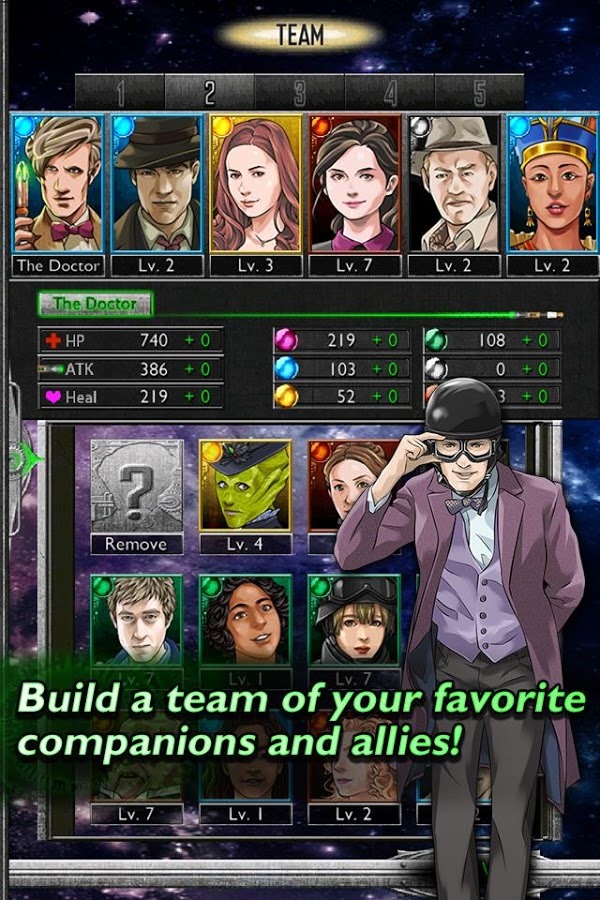
gGrab your sonic screwdriver because the BBC's official Doctor Who: Legacy game has just materialized on Android. You are invited to play The Doctor and do battle with his most fearsome enemies in this turn-based puzzler-strategy hybrid.

2 3 4

The basic gameplay is a bit like Bejeweled with a turn-based strategy component. You play through various episodes and take on bad guys from the show – it almost goes without saying, but don't blink.

Done With This Post? You Might Also Like These:

[New Game] The BBC's Doctor Who: Legacy Comes To Android With Fun That's Bigger On The Inside was written by the awesome team at Android Police.


27 Nov 15:54

Unchecky Ensures You Never Accidentally Install Bundleware Again

by Eric Ravenscraft

Unchecky Ensures You Never Accidentally Install Bundleware Again

Windows: Even with apps we really like—for example, crowd-favorite bittorrent client uTorrent—bundle ware can sneak in if you're not extremely careful when checking those boxes. Unchecky makes this much easier but automatically deselecting bundle ware.

For most Lifehacker readers, you're probably used to the basics of avoiding bundle ware: custom installs, saying "no" to bonus offers, and so on. It's still annoying and occasionally something slips through. An even better use might be to install Unchecky on your less tech savvy family or friends' computers. Nothing replaces a good safety education (Unchecky could miss something), but you might feel a bit safer knowing that Grandma has some protection on that new laptop she just bought.

Unchecky | via Ghacks

27 Nov 13:46

Pratchett's "Raising Steam": the magic of modernity

by Cory Doctorow


Terry Pratchett's Raising Steam is the 40th (!) novel in the Discworld series. It's just come out in the UK (the US edition comes out in March) and it's a tremendous synthesis of everything that makes Pratchett one of the world's most delightful writers. It's a curious thing: a fantasy novel about modernity and reactionaries, a synthesis of technological optimism and a curious sort of romantic mysticism.

Raising Steam follows on from 2007's Making Money, and features the delightful Moist von Lipwig, as well as the characters who often accompany him, such as Lord Vetinari, William de Worde, Adora Belle Dearheart, and, notably, Harry King. It's the story of an inventor, Dick Simnel, who masters steam, invents the railroad, and comes to Ankh-Morpork to make it a reality. Working against Simnel and his "railroading time" is a faction of reactionary dwarfs, deep-down grags who hate modernity and the mixing of dwarfs with the Discworld's other species. The grags inspire a wave of terrorist violence, starting with attacks on the clacks towers and moving onto the railroad itself.

Longstanding Pratchett fans know that the series started off with a light (even slight), silly tone -- one that deepened, book by book, into something altogether more serious. Raising Steam has a lot more of the feel of that early Pratchett, with some very silly wordplay (the Marquis of Aix en Pains!) and a serious quantity of funny/silly footnotes. Even the dwarfish names tilt more towards Snow White jokes than references to Icelandic lore. But as the synopsis above implies, this is also one of the darkest of the Pratchett novels, a thoughtful and often graphically violent story about modernity, terrorism, and technology's discontents.

Longrunning fantasy series have a (deserved) reputation for tedium and repetition, but that's not the case with Pratchett. The Discworld story has steadily moved towards this point, through a narrative that suggests that, at every turn, the march of technology is a force for liberation and human dignity. Raising Steam is, among other things, a novel about universal suffrage, driven by technological change. As communications and transport technology bring the Discworld's distant regions ever closer, the personhood of every species, from golems to goblins, and every gender, is presented as an inevitable consequence.

Pratchett's dallied with the theme of technology as a force superior to mysticism and magic before (see, for example, Pyramids), but never with such a keen enthusiasm. Paradoxically, Pratchett gives technology a kind of mystical spirit -- his railroad is a kind of living god (a kind of positive version of the "gonne" in Men at Arms or the films in Moving Pictures) that ensnares the imaginations of the people who behold it, driving them to spread it far and wide. And unlike the previous anthropomorphized technologies of Discworld, the railroad is a great liberator, a greater magic than that of the wizards.

Most of the Discworld novels stand alone, but not this one. From the intertextual references (Dick Simnel is the son of Ned Simnel, a minor but crucial character in Reaper Man) to the complex relationship between Commander Vimes and the dwarfs (not to mention the military mystery of Koom Valley, presented in Thud), this is a book that practically requires you to have read all 39 of the previous volumes before you can get to grips with it.

But it's worth it. This is a surprisingly layered and sneaky sort of book. Pratchett's trick of presenting technophilia as a kind of magic is not to be missed. And this is a long book, with an oddly paced second act that includes a literal whistle-stop tour of many new places on the Discworld, places that Pratchett clearly has vividly imagined but where he's never taken us before. Many of these are, strictly speaking, unnecessary to the story, but on second reading, they give a sense of the world's vastness and a sharp contrast to the collapse of distance created by technological shifts.

Pratchett's health is poor (he has rare, early onset Alzheimer's), and according to the author's note, he dictated this book to his computer with text-to-speech software. It retains an unmistably Pratchettesque voice, but there's something altogether new here -- an oddly purer form. He's never quite balanced whimsy and gravitas as carefully as this, and it works beautifully. This is a spectacular novel, and a gift from a beloved writer to his millions of fans.

Raising Steam [UK]

Raising Steam [US, pre-order]


27 Nov 13:42

Carphone Warehouse reveals orange, pink and purple Galaxy S4 Minis

by Alex Dobie

Galaxy S4 Mini

Pink and purple available now, orange due December 6

UK retailer Carphone Warehouse has announced that it'll sell the Samsung Galaxy S4 Mini in three exclusive colors — orange, pink and purple. The brightly-colored Minis can be had for £379.95 SIM-free, as well as being available for free on 24-month contracts starting at £21 per month from Talkmobile or Vodafone. Carphone Warehouse is also selling the S4 Mini on-contract with EE, O2, T-Mobile and Orange.

Besides the fresh coat of paint, this is the same Galaxy S4 Mini we reviewed over the summer, powered by a 1.7GHz Snapdragon 400 processor, with a 4.3-inch qHD display, an 8-megapixel rear camera and 4G LTE connectivity. It's not the most capable "mini" phone out there, but it's a decent all-rounder all the same.

The Galaxy S4 Mini is available from Carphone Warehouse now in purple and pink, in addition to the standard white and black; orange is expected to follow by Dec. 6.

More: Carphone Warehouse


26 Nov 22:57

Google Voice Search hotword detection extension comes to Chrome

by Jerry Hildenbrand

Android Central

Saying 'OK Google' will now get your Nexus phone and your computer ready for input

Google is first and foremost a search company, so we can never act surprised when they extend functionality of their search platform. That's what we're seeing today, with the release of a new Chrome Extension that enables the OK Google hotword detection via your computer microphone while on the Google Search page.

Using it should be familiar — say "OK Google," followed by a string to search for or a command. Things like setting timers or asking math problems seem to work well, and we have no doubt folks will soon discover all manner of cool things you can do here — like barrel rolls.

Getting it is easy enough. You'll need a microphone, and Google Chrome on your computer. Then just visit the Chrome Store and install the extension. Have fun, and try to be at least a little productive, OK?

Via: +Google


26 Nov 18:04

Grand Theft Auto: San Andreas Coming To Android In December

by Ryan Whitwam

GTASABOXDo you have an affinity for the early 90s? Rockstar Games is preparing to take you back in time with GTA: San Andreas, which is coming to Android in December. This isn't just a straight port, though. Rockstar is doing some work to make the experience of playing San Andreas (which is a massive game) better on a mobile device.

actual_1385081357

GTA: San Andreas was by far the biggest GTA game of the PS2 era, so the developers have reworked the checkpoints to make it easier to advance.

Done With This Post? You Might Also Like These:

Grand Theft Auto: San Andreas Coming To Android In December was written by the awesome team at Android Police.