Shared posts

26 Nov 18:06

ISPs Can Be Required to Block Access to Pirate Sites, EU Court Hears

by Andy

stop-blockedNotorious movie and TV show streaming site Kino.to has long since closed and its operators punished, but its legacy lives on in the legal realm.

The current dispute involves Austrian ISP UPC Telekabel Wien and movie companies Constantin Film Verleih and Wega Filmproduktionsgesellschaft. The film companies complained that the ISP was providing its subscribers with access to Kino.to which enabled them to access their copyrighted material without permission.

Interim injunctions were granted in the movie companies’ favor which required the ISP to block the site. However, the Austrian Supreme Court later issued a request to the Court of Justice to clarify whether a provider that provides Internet access to those using an illegal website were to be regarded as an intermediary, in the same way that the host of an illegal site might.

In his opinion handed down today, Advocate General Pedro Cruz Villalón said that the ISP of a user accessing a website said to be infringing copyright should also be regarded as an intermediary whose services are used by a third party, such as the operator of an infringing website.

This means that the ISP of an infringing site user can be subjected to a blocking injunction, as long as it contain specifics on the technicalities.

“The Advocate General is of the view that it is incompatible with the weighing of the fundamental rights of the parties [freedom of information, freedom to do business, copyright protection] to prohibit an internet service provider generally and without ordering specific measures from allowing its customers to access a particular website that infringes copyright,” the opinion reads.

“However, a specific blocking measure imposed on a provider relating to a specific website is not, in principle, disproportionate only because it entails not inconsiderable costs but can easily be circumvented without any special technical knowledge. It is for the national courts, in the particular case, taking into account all relevant circumstances, to weigh the fundamental rights of the parties against each other and thus strike a fair balance between those fundamental rights,” the adviser notes.

The Advocate General also notes that operators of piracy-related websites and their hosts often base themselves outside Europe or take steps to mask their identities. This, he says, makes it difficult to bring cases before the courts. Nevertheless, whenever possible rightsholders must first issue claims directly against site operators or their providers.

The legal opinion is not legally binding and the Court of Justice is entitled to disregard it, but the Court often follows the AG’s advice in such cases. Deliberations in the Kino.to case are just beginning and a judgment will be handed down at a later date.

Source: TorrentFreak, for the latest info on copyright, file-sharing and VPN services.

26 Nov 18:05

YouTube Addresses Massive Spam Problem Following Rollout Of Much-Maligned Google+ Commenting System

by Sarah Perez

Google says it's taking steps to address the increase in YouTube comment spam that arose from the recent shift to the new commenting system powered by Google+. YouTube users have already been fairly displeased with the new system for reasons related to privacy, confusion, and the ability to leave anonymous comments, having already left over 31,000 comments of their own on a video post announcing the changes, many negative. In addition, the most popular petition begging Google to reconsider a move back to the old system has over 215,000 signatures today.

Google+, which is both a destination website and social layer meant to stretch across all Google-owned properties, has been seeping into everything Google puts out, including Search, Gmail, Calendar, Drive, Blogger, and more. It has also sucked up properties like Picasa and Places, which are now Google+ Photos and Google+ business pages, respectively, into the Google+ identity machine.

But YouTube, Google's already successful and profitable social networking site, is another matter. Here, users had long established identities of a sort – ones they don't necessarily want linked to their real names, and ones where they've connected with and messaged other YouTube users over the years.

On the YouTube video detailing the change to Google+ comments, there's an overlay reading: “Thanks for your feedback. We know there are issues with spam and abuse in the new system and we're working hard to fix them. Click here to learn more.” That link has been directing viewers to a November 6 post on the official YouTube Creators blog, which was updated mid-November with a further acknowledgement of the spam and abuse problems and a promise that fixes were in the works.

It was close as Google got to an admission of failure in terms of its implementation of Google+ comments on YouTube. It's clear the company didn't think through the ramifications of a system which would allow Google+ users to include links or other random text in their YouTube comments.

For instance, some commenters are now using ASCII text to leave picture comments, which isn't abusive as much as it is disruptive – it's probably not the “high quality” feedback Google had in mind when making this change.

Screen Shot 2013-11-26 at 12.09.15 PM

As security researcher Graham Cluley explains today, YouTube may have been home to “some of the most unpleasant, purile and single-braincelled comments in the universe” but it never before had a problem with link spam, because the older commenting system prevented users from leaving messages which included clickable links. But that changed when Google+ comments arrived.

Google had positioned the change as one which would lead to better feedback for publishers since it was doing away with the negativity that inevitability arises when anonymous commenting is supported. (Google+ users have to set up accounts using their “real name,” which should have cut down on the abuse.) But better comments were not the result, as it turned out.

Google quickly realized that the system was not as well-guarded against those who would leverage the link-posting capability for less than reputable purposes. Spammers, scammers and those posting malware in link format took advantage of the new system. In his post, Cluley notes that there was so much abuse that some YouTube publishers, including video games reviewer PewDiePie for example, disabled Google+ comments completely after the front pages of its comments sections on videos were filled with links to viruses and spam.

youtube-comments-off

Part of the problem with the abuse is that Google+ favors those whose comments get the most replies. Since many on the web don't know the ol' web adage “don't feed the trolls,” spamming and abusive comments would rise to the top as other angry commenters responded.

On Monday, Google finally issued a progress report on the efforts it has made at addressing the spam and abuse. Again on the YouTube Creators blog, the company announced that the video site has now made a number of changes to combat the increase in spammy comments. These include: “better recognition of bad links and impersonation attempts”; “improved ASCII art detection”; and “changing how long comments are displayed,” the post explains. 

“We know the spam issues made it hard to use the new system at first, and we're excited to see more of you getting involved as we've fixed issues,” reads the post signed by the “YouTube Comments Team.”

The company also promised other changes were in the works, too, such as threaded conversations, formatted comments, and the much-requested option of bulk moderation. And the comments team added also that it's still working on “improving comment ranking,” which will continue to be necessary as scammers try to find workarounds to the new system and get their comments moved up to the top yet again.

[Image credits: YouTube, GrahamCluley/PewDiePie]


26 Nov 16:40

NSA malware reportedly infects more than 50,000 computers worldwide

by Chris Smith
NSA Malware Computer InfectionsThe NSA-related cover surveillance operations are further detailed in a report by Dutch publication NRC that claims that more than 50,000 computers worldwide have been infected with NSA-operated malware. The software, hidden in computer networks belonging to organizations such as mobile operators across the globe, can remain dormant for years and be activated at will for personal data collection. The publication says it had access to documents provided by NSA employee turned whistleblower Edward Snowden that prove the agency’s complex hacking operation.

Continue reading...
26 Nov 16:37

Google brings Street View inside more than 65 airports and train stations, calls it a 'first effort'

by Aaron Souppouris

Foreign airports and train stations can often be confusing places to find your way around. Perhaps with that in mind, Google today launched an interactive map featuring Street Views of over 65 mass-transit hubs. The map features some locations you may have already explored, like Emirates' A380 or London's Gatwick Airport, alongside some new sites across Europe, South America, and Asia.

Continue reading…

26 Nov 16:36

Music Player doubleTwist Gets A Big Update To v2.3 With A New Tablet-Friendly UI, Better Radio Station Creation, And More

by Ryan Whitwam

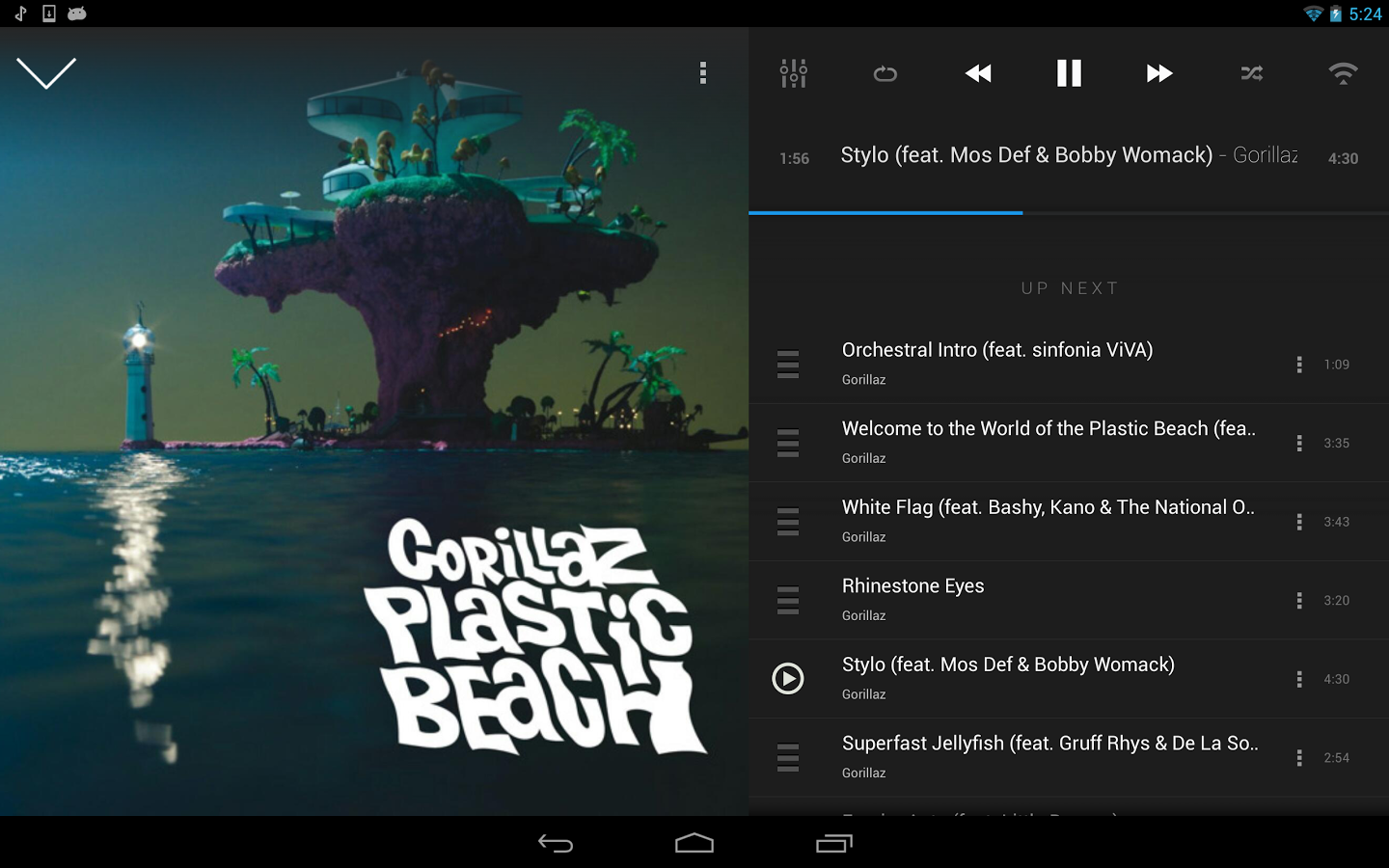
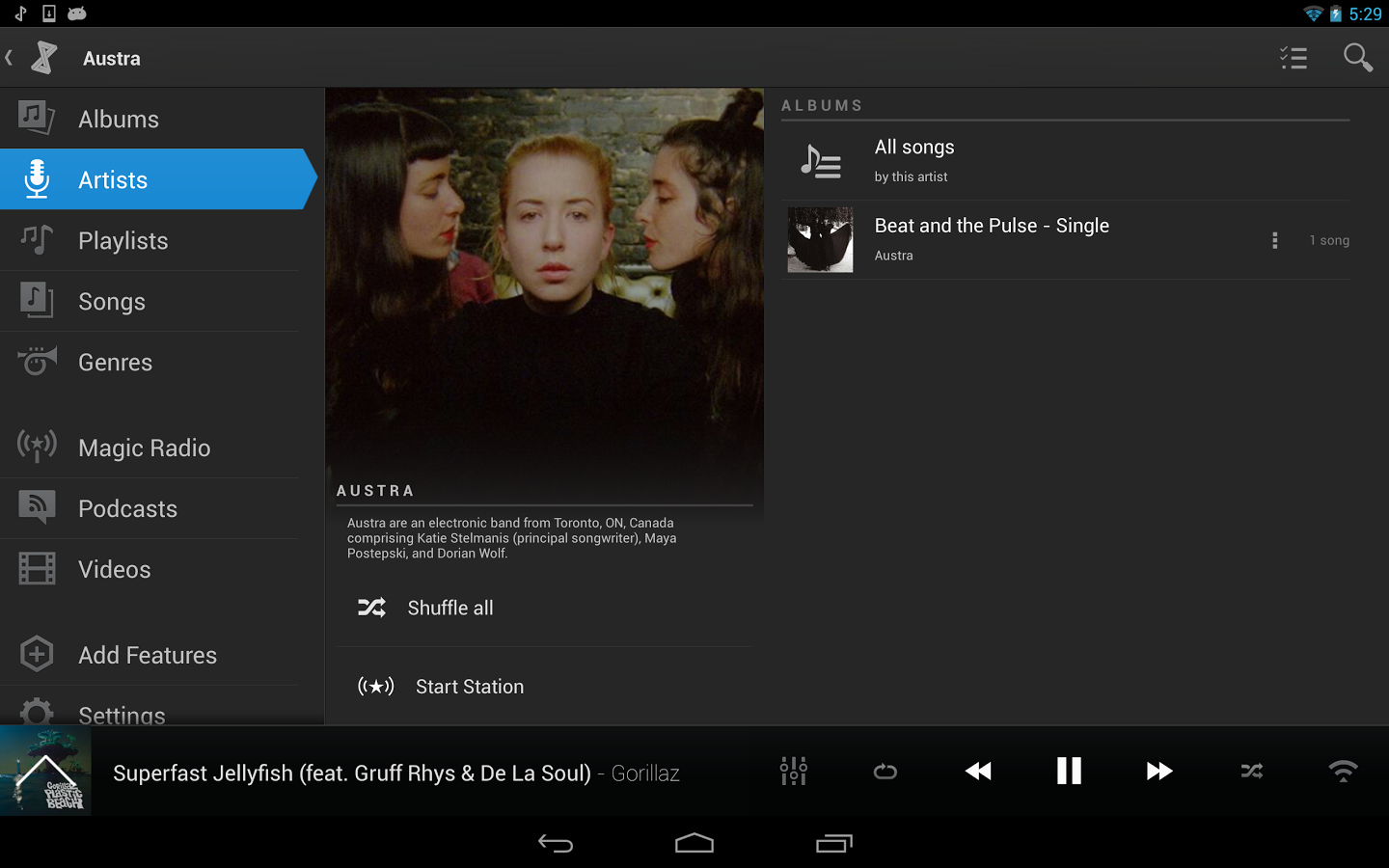
dfsThird-party music players are a little less important ever since Google cleaned up Play Music, but there's still something to be said for the venerable old doubleTwist. This app has gone through several UI iterations and adjusted its feature set to better serve Android users as time went on. With the newest update, the app improves support for tablets with a UI overhaul, among other improvements.

1 2 3

Here's the full changelog straight from doubleTwist v 2.3:

  • Redesigned UI, including new UI for 7" and 10" inch tablets.
Done With This Post? You Might Also Like These:

Music Player doubleTwist Gets A Big Update To v2.3 With A New Tablet-Friendly UI, Better Radio Station Creation, And More was written by the awesome team at Android Police.


26 Nov 16:35

DoubleTwist updated to support Android 4.4, clean up design

by Andrew Martonik

DoubleTwist

Improved tablet layout makes better use of the extra screen real estate

One of the most popular music player apps on Android over the years, DoubleTwist, is receiving an update today to be compatible with Android 4.4 and improve its overall design. The newest design improvement focuses on having a consistent look and feel across the entire app, which also fits better with Android's design guidelines to look great on devices up to and including the latest KitKat release.

The new app looks great on tablets as well, taking advantage of the extra screen real estate to reveal hidden menus and show more information in landscape mode. This all comes together to offer a great experience whether you're listening to local files, managing playlists that were synced from your computer or listening to the new Magic Radio service.

The latest update is available now in the Play Store, and because DoubleTwist makes its money with add-ons to its core app, it can be had for free.


26 Nov 16:35

O2 Wifi arrives at 735 Argos stores in UK and Ireland

by Alex Dobie

O2

Free Wifi access in-store for shoppers

British mobile network O2 continues to build out its own nationwide Wifi network, having ditched BT Wifi earlier in the year. Today the carrier has announced that it's partnered with catalog outlet Argos to light up O2 Wifi in 735 of the chain's stores across the UK and Ireland. O2 Wifi access will be made available for free in Argos stores to all customers "regardless of their network provider," the operator says, with the launch timed to coincide with the start of the Christmas shopping season.

O2's Wifi network now boasts 9,000 access points across the UK, according to today's press release, including hotspots in other big high street names like Debenhams, Subway and McDonalds.

Source: O2


26 Nov 00:19

30 Best New Android Games From The Last 2 Weeks (11/12/13 - 11/25/13)

by Jeremiah Rice

gameroundup_icon_largeWelcome to the roundup of the best new Android applications, games, and live wallpapers that went live in the Play Store or were spotted by us in the previous 2 weeks or so.

Please wait for this page to load in full in order to see the widgets, which include ratings and pricing info.

Looking for the previous roundup editions? Find them here.

Featured App

Strategy & Tactics:USSR vs USA

Today's roundup is presented by Strategy & Tactics:USSR vs USA from HeroCraft.

Done With This Post? You Might Also Like These:

30 Best New Android Games From The Last 2 Weeks (11/12/13 - 11/25/13) was written by the awesome team at Android Police.


26 Nov 00:18

Why Upgrading Your RAM Is No Longer a Silver Bullet

by Whitson Gordon

Once upon a time, upgrading your PC's RAM was one of the best ways to increase its performance. These days, that's less true. Linus from Techquickie explains why, and how to know whether a RAM upgrade will help your PC.

These days, most computers—even if they're two or three years old, Linus says—probably come with enough RAM for most people. We've mentioned this before: 4GB is plenty for a lot of us. If you're running really heavy programs like Photoshop or using virtual machines, then you'll probably need more, but if you just want to speed things up, chances are RAM isn't your bottleneck. An SSD might be a better use of your money.

Of course, all this depends on your specific situation, so Linus details a few ways to check RAM usage on your computer (which, again, we've covered before) to tell whether a RAM upgrade is worth your time and money. After all, RAM's a little more expensive these days, so it's not something you want to go out and buy willy-nilly. Check out the video above for more.

When to Upgrade Your RAM as Fast as Possible | Techquickie

25 Nov 21:34

Google Gives Business Owners A Single Place Online To See All Their Customers' Reviews

by Frederic Lardinois
business_review_large

Google now makes it easier for business owners to see who is reviewing them across the web. Verified business owners who are already using the recently updated Places for Business user interface can now go to their profiles, where they'll find a new “Reviews” section. There, they will find all of their customers' online reviews and be able to respond to them. The service also offers some basic review analytics so businesses can track how their reputation changes over time.

The service doesn't just pull in reviews from Google properties, by the way. It also aggregates data from around the web, too. This makes it a pretty comprehensive tool for business owners who want to manage their online reputations. Google will pull in data from most of the review sites that currently allow it to snippet their content, including TripAdvisor, Zagat, UrbanSpoon, Insider Pages and others.

Unsurprisingly, Google gives ratings on its own sites first billing and separates them out from other properties, but this tool still offers businesses an easy and free way to see what people are saying about their cupcakes or car repair services.

Google isn't the first company to start tracking online reviews for small and medium business. Services like ReviewTrackers, Bazaarify and others offer similar services – though often with more additional features. Most companies don't make use of these tools, though, but a free Google service for managing online reputations will likely attract quite a few users.


25 Nov 21:23

An inside look at the construction of London's massive new railway system

by Katie Drummond

It's been billed as the biggest infrastructure project in Europe, will cost more to complete than the London Olympics, and promises to drastically boost the speed and capacity of mass transit in that city and its surrounding area. Already, the half-finished construction of Crossrail — a mammoth railway system that will add 26 miles of underground tunnels to London — is yielding both disruption and development in affected communities.

Continue reading…

25 Nov 21:22

Elizabeth Olsen Officially Confirmed For Avengers Sequel

Elizabeth Olsen Officially Confirmed For Avengers Sequel

Alongside Aaron Taylor-Johnson. But we knew that...

This will come as little surprise to anyone who has followed recent casting news, saw Elizabeth Olsen on The Daily Show or listened to Samuel L. Jackson. Marvel, however, has clearly waited until all the contractual letters have been dotted and crossed to make the official announcement that the actress will be playing Scarlet Witch in The Avengers: Age Of Ultron.

Her casting (well, confirmation) is accompanied by Marvel announcing Aaron Taylor-Johnson as her brother, Quicksilver, even though his participation has been official for a few weeks now. It’ll mark the second time the pair share the screen, after they briefly crop up as a husband and wife in Gareth Edwards’ new Godzilla.

In case you’re not sure who the characters are, they’re Pietro (Quicksilver) and Wanda (Scarlet Witch), the twin children of Magneto and his gypsy wife, Magda. She was a fellow Auschwitz survivor who the magnetic mutant married after World War II. On seeing an early and devastating example of Magneto’s power at work, Magda ran away and, heavily pregnant, took refuge on top of Mount Wundagore and gave birth to the twins. So far, so similar to Latona in Greek myth – but Magda, worried that Magneto would turn up to claim his children and force her to reveal them, vanished days later, apparently sacrificing herself for them.

And yes, while their Marvel comics history has them listed as Magneto’s children, don’t go expecting any X-Men crossovers. Thanks to a rights split, both Fox and Marvel Studios can use the characters, but the Avengers gang can’t mention anything about their mutant history and the X-Men movies (with Evan Peters popping up as Quicksilver in Days Of Future Past) can in no way reference Captain America and co. For more on this, hit our guide.

The Avengers: Age Of Ultron features the return of the regular gang and writer-director Joss Whedon, all facing off against James Spader’s rogue robot villain. It'll be out on May 1, 2015.


25 Nov 17:36

Anti-cruelty agency downplays animal abuses to cozy up to Hollywood studios

by Kwame Opam

The "No Animals Were Harmed" line that studios so proudly present to viewers in film credits can be anything from thoroughly inexact to an outright lie. In a sprawling report in The Hollywood Reporter, internal critics at the American Humane Association came forward to expose the numerous occasions where animals were put in harm's way or even killed on set. The AHA is responsible for monitoring animal safety during productions, but, because of allegedly cozy relationships with studios and executives, AHA reps are encouraged to cast a blind eye on injuries and deaths that may otherwise have been prevented. Such incidents include the 27 animals that perished during the filming of The Hobbit: An Unexpected Journey and even the near...

Continue reading…

25 Nov 15:02

Monty Python extends reunion after selling out in just seconds

by Jacob Kastrenakes

Monty Python is adding at least four extra dates to its reunion show next year after the initial 14,500-seat show sold out in 43.5 seconds. The show will now run from July 1st through July 5th at London's O2 Arena, and Variety reports that a sixth show is being planned for the Hollywood Bowl in Los Angeles. A world tour could also be in the works, according to The Daily Mirror, which reported the addition tour dates before they were announced. Even if the dates and locations remain limited, it's an exciting opportunity for fans: the shows will reunite all five surviving members of the sketch comedy group just over 30 years after they disbanded.

Continue reading…

25 Nov 14:30

Once A Turntable Rival, Spotify App Soundrop Launches On Deezer As Co-Founder Steps Down As CEO

by Ingrid Lunden
Soundrop lobby in Deezer


On the heels of Turntable.fm shutting down its recorded music listening rooms to focus on live events, Oslo-based rival Soundrop is doubling down on the social listening model. Today, to complement an existing app for Spotify, Soundrop is launching an app on Deezer - a streaming music rival to Spotify - which will let users on Spotify and those on Deezer come together in virtual rooms (‘tens of thousands' of rooms created so far) to consume music simultaneously, and extend Soundrop's scale as a marketing platform for the artists, labels and brands with whom it works. At the same time, Soundrop's co-founder Inge Sandvik is stepping down as CEO, replaced by Jørn Haanæs, Soundrop's chief revenue office and a former exec from Warner Music.

To mark the new app, Soundrop is launching three new rooms featuring Euro club DJs and producers: Trentemøller on November 25 at 6 PM GMT; The Bloody Beetroots on November 26 at 4 PM GMT; and Yuksek on November 27 at 6 PM GMT. You can listen to those here.

Soundrop, which officially turns two today, launched its first service in January 2012 as a Spotify-only app. It quickly picked up traction at a time when Spotify had little in the way of its own discovery features and social features to help users wade through the millions of tracks they could potentially listen to on the platform. The “rooms” on Soundrop are interactive: users can “vote up” tracks they like, see how others are voting, and speak with others in the various listening rooms.

Since then, though, times have changed for both. Soundrop has added access via Facebook as well as its own standalone iOS app and web interface - services that incorporate videos from YouTube in cases where tracks have not been available on Spotify. Spotify has also enhanced its own platform with web interfaces; discovery and social features of its own; more apps from third parties - and potentially a lot more, courtesy of its latest, $250 million round of funding.

Launching on Deezer is emblematic of how Soundrop wants position itself as more platform agnostic. It's a different tune from Soundrop's Spotify-only early days: the two share an investor (Northzone, which backed Soundrop with $3 million last year); and at one point Soundrop engineers were working out of Spotify's offices in Stockholm.

Soundrop features both user-created listening rooms and brand-, label- and artist-created listening rooms. The latter service, which works on a B2B2C model (in which labels, brands and so on pay Soundrop to create the promotional rooms on its platform) has shot up in activity: Soundrop hosted 42 artist events in October, compared to eight during all of Q4 2012. The company tells me that it is now at 150,000 monthly active users (before today's launch).

Adding a Deezer app will potentially help Soundrop scale out that B2B2C business because it means a bigger potential audience for those listening rooms, something that may be spurred also by a potential Deezer launch in the U.S. And that will give Soundrop an important negotiating chip with those labels, brands and artists. From what I understand, the intention is to add more streaming platforms over time - although, given some of the consolidation we're seeing in the space, the list of potential candidates make shrink before Soundrop has a chance to reach them.

As for the management change, it's not completely clear why Sandvik is stepping down as CEO. From all of my conversations with him in the past, it sounds to me like Soundrop is executing on plans that Sandvik himself had helped lay out. It sounds like he may be moving on to something new - playing on his background as a serial entrepreneur, perhaps.

“I have been putting all my time and effort to the company now for the last 2 1/2 years. It's been a great time and I am proud of what we have accomplished,” he told me. “What drives me is to build great products with great people, and I see that there are some great opportunities to do that outside Soundrop.” He tells me that he will stay on the board and will remain a major shareholder of Soundrop.

Haanæs - who had been Soundrop's chief revenue officer before taking the role of CEO - had previously been an executive for Warner Music in Norway. It may be just a coincidence, or it may be by design, but Warner Music happens to be owned by Access Industries, which is also a major shareholder in Deezer.


24 Nov 23:23

Johnny Depp And Mia Wasikowska Head Back To Wonderland

Johnny Depp And Mia Wasikowska Head Back To Wonderland

And Alice 2 has been dated for 2016

Johnny Depp And Mia Wasikowska Head Back To Wonderland

We suppose it was only a matter of properly hammering out the deal – especially since he’d previously been in negotiations – but word has finally arrived that Johnny Depp is officially signed to reprise the role of The Mad Hatter for Disney’s Alice In Wonderland sequel. The Mouse House has also announced that Mia Wasikowska will be back as the title character.

Muppets director James Bobin is on board to make the film, which the 2010 film’s screenwriter Linda Woolverton has already been working on under the title The Looking Glass. We don't know yet what the plot might entail this time, since the first film drank from the plot potions of Wonderland and Though The Looking Glass And What Alice Found There, with references to other adventures. We do know, however, that the producers (including Joe Roth and Suzanne and Jennifer Todd) will be keeping their fingers crossed it makes as much money as the original.

There is even a release date for the new fantasy behemoth, with Disney, in a shock move, choosing not to put it out in 2015, but instead sticking a flag in May 27, 2016.

But don’t go thinking there isn’t room for more movies in the release date pile-up that is 2015. Disney has also announced that Jon Favreau’s new live-action version of The Jungle Book will indeed swing into cinemas on October 9, 2015. No, we’re not sure why it can't wait either…


24 Nov 21:18

Miami Gardens police arrest black man for trespassing 56 times -- at the store where he works

by Cory Doctorow


In the city of Miami Gardens, outside of Miami, FL, the police use aggressive campaigns of stop-and-frisk and absurd arrests to bolster their records, to the great detriment of the African-American majority who live there. For example, a young man named Earl Sampson has been stopped by Miami Gardens police 258 times; they've searched him more than 100 times; and they've arrested him for trespassing 56 times. He's never been convicted of anything apart from simple possession of small amounts of marijuana.

Sampson's trespassing arrests occurred at his place of work, a convenience store called the 207 Quickstop; Sampson was repeatedly arrested for trespassing there, over the loud objections of his employer, Alex Saleh, who owns the store, and who explained to police that Sampson was not trespassing in his store.

When Saleh gathered video evidence that showed the police had falsified their arrest reports and violated the rights of his customers, he was targeted for police harassment, including falsified vehicle stops and personal threats. Saleh is suing for federal civil rights violations, alleging that Miami Gardens police "routinely, under the direction of the city’s top leaders, directed its officers to conduct racial profiling, illegal stops and searches and other activities to cover up illegal misconduct."

Saleh, whose store is tucked between a public park and working-class neighborhoods, contends that Miami Gardens police officers have repeatedly used racial slurs to refer to his customers and treat most of them like they are hardened criminals.

“Police line them up and tell them to put their hands against the wall. I started asking myself ‘Is this normal?’ I just kept thinking police can’t do this,’’ Saleh said.

Last year, Saleh, armed with a cache of videos, filed an internal affairs complaint about the arrests at his store. From that point, he said, police officers became even more aggressive.

One evening, shortly after he had complained a second time, a squadron of six uniformed Miami Gardens police officers marched into the store, he says. They lined up, shoulder to shoulder, their arms crossed in front of them, blocking two grocery aisles.

“Can I help you?” Saleh recalls asking. It was an entire police detail, known as the department’s Rapid Action Deployment (RAD) squad, whom he had come to know from their frequent arrest sweeps. One went to use the restroom, and five of them stood silently for a full 10 minutes. Then they all marched out.

In Miami Gardens, store video catches cops in the act [Julie K. Brown/Miami Herald]

(via Sean Bonner)


24 Nov 20:08

Court rules that calling an MP "a coward" isn't a crime

by Cory Doctorow

Calling an MP "a coward" isn't against the law in England, despite the attempt to prosecute a protester named Alex Cline, who called Conservative MP Mike Weatherley "a coward" for reneging on a promise to debate a controversial anti-squatting bill. Cline was charged under Section 4 of the Public Order Act 1986, and the prosecutor argued that calling Weatherley "a coward" was using "threatening, abusive or insulting words," banned under the act. The Court disagreed. Separately, one of Weatherley's staffers brought assault and battery charges against Cline for allegedly throwing glitter, but later thought better of it.

Following the incident, Mr Cline, a former student at Sussex, was arrested on suspicion of affray, and was eventually charged under Section 4 of the Public Order Act 1986, for using “threatening, abusive or insulting words”, for calling the MP a “coward”.

During the trial, the court was told that Cline had also had charges brought against him by one of Mr Weatherly’s staff, for “assault and battery” by throwing glitter in a separate incident. This charge was dropped.

The District Judge also ordered the Crown Prosecution Service to pay the defendant’s travel expenses for getting to court.

Protester cleared of threatening behaviour for calling Hove MP 'a coward' [Michael Segalov & Tom Mendelsohn/The Independent]

(Thanks, Steve!)


24 Nov 16:54

Experience an aurora borealis in your browser with this stunning panorama

by Andrew Webster

On March 17th a beautiful light show appeared in the skies above Östersund, Sweden — and now you can experience it for yourself. Photographer Göran Strand captured more than 2,400 images of the aurora borealis that night with a Nikon D3s to create a time lapse that covers around four hours of the event. But by using a spherical lens, Strand was able to create a 360 degree panorama that you can navigate right in your browser — you can use your mouse to look around as if you were there, while the aurora makes its way across the skies. If you've never seen an aurora in person before, you can now experience one from the comfort of your browser — check it out at the source link, or simply watch it unfold in the video below.


Continue reading…

24 Nov 16:52

Try Chrome Apps Without Installing Them in Chrome Beta

by Mihir Patkar

Try Chrome Apps Without Installing Them in Chrome Beta

If you want to try out apps on Google Chrome's Web Store, you have to download/install them and only then do you get to try them. But Venkat at Techdows discovered a neat trick for users of Chrome Beta, Dev, or Canary users that lets you launch apps without installing.

A new setting introduced in the beta version, "ephemeral apps" is the key. Here's how to get it:

1) Visit chrome://flags/#enable-ephemeral-apps in address bar

2) Click Enable button, restart browser.

Once you do that, just type the name of any app in the Chrome App Launcher and you will find two buttons next to it: Add and Launch. Hit Launch to run the app without installing.

Try Chrome Apps Without Installing | Techdows

24 Nov 16:52

Five Best Travel Planning Apps

by Alan Henry

Five Best Travel Planning Apps

Whether you're hitting the road or taking to the skies this travel season, you could do with a digital companion to help you plan your itinerary, make sure your tickets and connections are all lined up, and that you have plenty of time to do everything you want (or need) to do while you're traveling. This week, we're looking at five of the best travel planning apps or services, based on your nominations.

Earlier in the week we asked you which travel planning apps or services were the best. Keep in mind we're talking about travel planning, not travel booking, so the apps that can help you find a good deal and land a great price may not be the same apps as the ones that will show you all of your flight details, make sure you'll make your connection, help you dig out your rental car confirmation number, and so on. Without further ado, here's what you suggested, in no particular order:

Tripit

Five Best Travel Planning Apps

TripIt is the type of app that almost needs no introduction. When it comes to travel planning, it won't suggest destinations for you, or help you plan the best possible way to spend your time in town wherever you go, but what TripIt does offer is a complete, hassle free way to combine all of your travel confirmations, itineraries, tickets, hotel bookings, rental car reservations, and the rest in one simple view. That view then becomes the central hub for all of your travel needs—no more fishing for a confirmation email to get your reservation number, or wondering what flight number you're on before you check in; it's all right there, and it's all incredibly handy. It'll even let you know if there's a better seat on your flight so you can switch to it. As someone who uses TripIt when he travels, I wouldn't leave home without it.

We covered TripIt when it launched, and we've mentioned it several times since then. Those of you who praised it in the call for contenders called out the fact that it's also easy to share trip plans with people who may need to know where you are, like friends in town or loved ones picking you up from the airport, so they know what flight you're on and when you'll arrive, or where you're staying and when. Sync it with your Google Calendar, set up a few mail rules to push your travel confirmations to TripIt, and you have a custom built itinerary, automatically, every time you travel. You can grab the TripIt mobile apps for iOS, Android, and other platforms here.


TouristEye

Five Best Travel Planning Apps

TouristEye is a little different; instead of helping you organize your trip or helping you find the best prices and options for your trip, it helps you build a "wishlist" of destinations where you'd like to travel and experiences you'd like to have. It doesn't have to be as fancy as a once-in-a-lifetime trip, either: the app is great for planning your annual family vacation (if you get to take one, that is), or if you want to just take a few day trips here or there. Of course, you can build your bucket-list of places you want to see before you die, and you can share that list with friends or family and collaborate with them on them. They can add waypoints and things to check out in the area, specific things to do when you're there, and together you can plan a trip together. Then, when you're on the road, you can look back over those plans with detailed information, links, maps, and more.

Those of you who praised TouristEye highlighted the collaboration aspect of the service, and the fact that it's easy to get ideas for trips of all sizes, find inspiration of places to go, or just read travel tips and suggestions from other users. The service was recently purchased by Lonely Planet, which ideally is a good thing, and while the service is coy about its features on its front page (it prompts you to just start planning trips), you can read more about its features here. Similarly, you can pick up the TouristEye iPhone app and Android app to give the service a whirl on the go.


TripCase

Five Best Travel Planning Apps

Much like TripIt and Worldmate, TripCase is another service that aims to centralize all of your travel documentation and planning in one handy interface that's easy to refer to both before you leave for your trip, and on the go while you're out and about. TripCase gives you an easy to use interface on your mobile devices to add your flight, train, hotel, rental car, and other information, or you can send all of your confirmations directly over to TripCase and have them automatically organized for you. From there, you have the option to view your trip in the timeline-based "itinerary" view, where you see each step of your trip laid out in front of you along with relevant times and places for each, or the "action" view, which adds more detail for each step of the way and shows you important information for each leg, like flight alerts and other notifications (flight alerts, which it should be noted, are free with TripCase.)

Those of you who highlighted TripCase noted the fact that it integrates nicely with corporate travel systems like Sabre, and while it's a matter of opinion, said that it was easier to use than its alternatives. To its credit, TripCase does make getting things like driving directions, alternate flights, and other on-the-fly travel info that you may need in a pinch very easy at a time when it may be most frustrating to run down—when you're on the go and using your phone. You can grab the TripCase mobile apps for iOS and Android here.


TripAdvisor

Five Best Travel Planning Apps

TripAdvisor is the quintessential travel planning service. It's not going to collect your travel information and help you plan out each leg of your trip and when you need to get where you have to go, but it will help you plan your trip from the beginning, much like TouristEye (and unlike TripIt, WorldMate, and TripCase.) Plus, since TripAdvisor is arguably the web's largest repository of hotel and destination reviews, ratings, photos, and other information, it's difficult to use any of the other services without finding TripAdvisor data integrated somewhere. If you're headed to a hotel you've never stayed at, TripAdvisor is your best bet to see if there are amenities you need, or if people who have stayed there before report horror stories in their wake. Similarly, it's a great site to use to plan destination getaways, huge trips, or find resorts and other places you'd love to retreat to.

Those of you who praised TripAdvisor highlghted the fact that it's a fantastic resource for travelers of all stripes, and the fact that it's great for finding new and interesting destinations as well as figuring out what to do when you're in a given place. Of course, if you know you want to go to a specific place but don't know how to get there, where to stay, or what to do, TripAdvisor will help walk you through that process as well. Just tell it where you want to go and when, and it'll help you find hotel rooms, flights, and so on. It'll even keep all of those confirmations organzied in your account for easy reference later. It is, by and large, the default service to answer the question: "I'd like to go to X place, I wonder what I should do while I'm there." Plus, it's packed with travel tips and tricks from experts, business travelers, and enthusiasts. Grab the TripAdvisor mobile apps for iOS, Android, and Windows Phone here.


WorldMate

Five Best Travel Planning Apps

WorldMate is aimed firmly at business and frequent travelers, but you don't have to be one to use and make the most of the app. Like other robust travel planning and organization tools, you can use it to get all of your itineraries and reservations in one place, and then add other destinations, appointments, meetings, and events that you need to attend when you're out and about. WorldMate has some very business-friendly service integrations too, like LinkedIn, for example. You can use WorldMate on the web or on your smartphone to organize your trips, and you can either use their TripCatch service to automatically pull in your travel info, or you can send it over piecemeal, whichever you prefer.

One useful feature that WorldMate offers above some of the other tools like it are its automatic travel briefings and alerts; or notifications when there's something you should know about the place you're going, your scheduled events for the day, connecting flight information (as soon as you land), and so on. Paying users get features like flight status alerts. Everyone gets some other useful features, like a real-time currency converter, weather forecasts for your destination (or each leg of your trip), world clocks, and more. You can grab WorldMate's mobile apps for iOS and Android here.


There you have it! Each app is a little different from the others, and they all have their own strengths, but as always, only one can be the community favorite. Cast your vote in the poll below.

This week's honorable mention goes out to Roadtrippers, which is iOS and web-only, but it's fantastic at giving you off the beaten path destination suggestions, and a great way to plan out every nuance of your trip before you leave the house. If you're planning a road trip specifically, it's great—just give it your starting point and your destination, and it'll show you interesting things along your route from great restaurants to places movies were filmed and more. You can add your own waypoints, and it even helps you estimate how much gas you'll use along the way.

Have something to say about one of the contenders? Want to make the case for your personal favorite, even if it wasn't included in the list? Remember, the top five are based on your most popular nominations from the call for contenders thread from earlier in the week. Don't just complain about the top five, let us know what your preferred alternative is—and make your case for it—in the discussions below.

The Hive Five is based on reader nominations. As with most Hive Five posts, if your favorite was left out, it didn't get the nominations required in the call for contenders post to make the top five. We understand it's a bit of a popularity contest. Have a suggestion for the Hive Five? Send us an email at tips+hivefive@lifehacker.com!

Title photo by yuheitomi.

24 Nov 11:41

How to Unblock Websites For Free and Why it Feels Good

by Andy

wetpaintHave you ever noticed that when someone tells you what to do – or what not to do – you have a somewhat natural tendency to go against their instructions?

In psychology it’s called ‘reactance’ and is something which occurs when we believe that someone’s orders, mechanisms, rules or regulations are about to narrow our options or limit our behavioral freedoms.

I love incredibly hot sauce (such as Dave’s Insanity Ghost Pepper Sauce) even though it leaves me bent up in pain if I have too much, which incidentally is anything more than a few drops. On the label of these sauces it often orders you NEVER, EVER under ANY circumstances to consume the sauce neat.

Yeah, right.

The problem is that there is something inherently annoying about someone we don’t know trying to impose their will on us when we are perfectly capable of making our own decisions. Not only do we inexplicably want the forbidden item even more than before, we kick back and build up resentment against those attempting to restrict our freedoms.

For example, I’ve never commented on a YouTube video before but the idea that Google wants to force Plus down our necks in order for us to do so fills me with rage, to the point where i’ve even signed the petition.

All kinds of Internet restriction has this effect on me. Every time news breaks that another site has been blocked I have an overwhelming desire to make sure I can still access it, even though I may never have visited it in the past and have no intention of doing so in the future.

That said, once the “This Site Has Been Blocked” message appears there’s nothing more immediately satisfying than unblocking it, a feeling that parallels the challenging of “don’t touch, wet paint” when it turns out to be dry after all.

The good news is that satisfaction is just a few clicks away for anyone who wants it and it doesn’t have to cost a penny either. Here are a few of the most simple solutions that will take a maximum of five to ten minutes for a novice to setup.

PirateBrowser

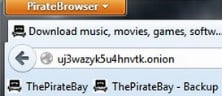
PirateBrowser is a simple tool provided by the operators of The Pirate Bay. It allows anyone to quickly and simply circumvent ISP and government web blocking.

The software is Tor-based and includes a version of the popular Firefox browser which should be used when a site needs to be unblocked. By mid October the tool had achieved around one million downloads and according to Alexa is most popular among users in South Korea.

PirateBrowser can be downloaded here

Tor

Tor is perhaps the most famous tool to unblock websites, avoid censorship and maintain privacy. It was originally designed and implemented by the U.S. Naval Research Laboratory for protecting government communications.

Today it used by people such as whistleblowers, journalists and activists who may need to keep their identities secret. It is also used by those looking to access censored webpages, hence its inclusion in this list.

Tor can be downloaded here

Virtual Private Networks – VPN

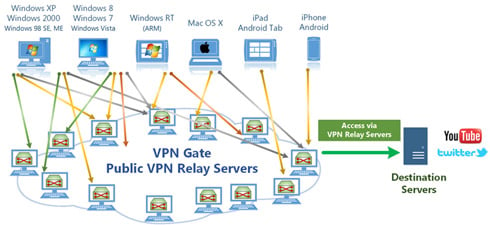
vpngate3A VPN is a group of computers networked over the top of the world’s largest network – the Internet. Communications are encrypted so VPNs are useful for maintaining privacy and, of course, unblocking blocked websites.

There can be no doubt that paying a few dollars per month for a premium account is the best option for those who have the money, but basic and completely free options are available.

Perhaps the most interesting one is offered by the Graduate School of University of Tsukuba, Japan. The VPN Gate Academic Experiment Project launched earlier this year aiming “to expand the knowledge of Global Distributed Public VPN Relay Servers.”

Like all technologies listed in this article, it’s not necessary for beginners to understand how they work, just that they do. Unlike Tor, don’t expect total privacy with VPN Gate but be assured that the service unblocks websites just fine.

VPN Gate can be downloaded here.

Site-Specific Reverse Proxies

In the wake of the censorship of torrent sites in the UK, the Netherlands, Italy, Denmark and other countries around Europe, special sites started to appear. Known as ‘reverse proxies’, these webpages access blocked sites and feed the content back to their own pages. To visitors accessing the reverse proxy, the blocked site appears as normal.

There are hundreds of these available, such as the selection available on PirateReverse.info and Come.in. However, some reverse proxies themselves have become subjected to censorship, meaning that they too are blocked at the ISP level, in the UK, the Netherlands and Belgium.

General Web Proxies

General webpage proxies are sites which can unblock most websites online via a simple interface. By simply entering the URL of the blocked website into the search box of the web proxy, the blocked site will become accessible.

There are hundreds of these web-based solutions which can be uncovered by a simple Google search, although some are overloaded with adverts and cluttered interfaces.

On the plus side they’re all free so have a browse around and find one you like. Some are available as a browser extension, which makes them even easier to use.

Conclusion

You are hereby ordered NOT to try any of these solutions – EVER – and if you have any of your own solutions you will REFRAIN from posting them in the comments section below.

Source: TorrentFreak, for the latest info on copyright, file-sharing and VPN services.

23 Nov 16:49

Get More Lives in Candy Crush (and Other Games) with a Clock Tweak

by Mihir Patkar

Get More Lives in Candy Crush (and Other Games) with a Clock Tweak

Hate having to wait (or beg) for more turns in the super-addictive Candy Crush Saga? There's a neat trick to bypass that limitation in games which make you wait a certain amount of time for a new turn, like Batman Arkham Origins or Jelly Splash, says Redditor vagoon.

You can remove these annoying artificial waiting times / payments by simply changing the time setting on your device. Once your stamina or whatever is depleted, change your phones date one day ahead and get your stamina back for free. You can then change the time back to normal, but your stamina will still be there. Enjoy.

The trick works perfectly with Candy Crush Saga on iOS and Android. As soon as you have got your new lives/turns, I'd recommend you change your system time back to the correct one—otherwise it messes up other apps like iMessage.

Never pay for extra lives in iPhone games using a simple hack | Reddit

23 Nov 16:48

Top 10 Free Upgrades to Make Your PC Better

by Whitson Gordon

Top 10 Free Upgrades to Make Your PC Better

Chances are right now, you aren't using your PC to its absolute fullest potential. Maybe it's a little slow, maybe your monitor's colors aren't quite right, or maybe it's just dusty and loud. You may not even realize these things are happening. But with a free afternoon, you can improve it from top to bottom without spending a dime. Here are 10 ways to do just that.

Note: Most of these tips are completely free, though they do depend on what you have lying around—and how nice you want things to look. You can elevate your monitors with a few books, but if you want something nicer, you may want to buy or build a cheap stand. Keep that in mind when going through the tips, and enjoy your newly upgraded computer.

10. Clean Your Hardware, Inside and Out

Top 10 Free Upgrades to Make Your PC Better

If your PC didn't come out of the box yesterday, it's probably gotten a little dirty over time. Dirt and dust not only makes things look gross on the outside, but can cause heat problems on the inside of your computer (and thus make your fans run really loudly). Take a little time to give your hardware a good cleaning. If you have a laptop, give it a little TLC with a Mr. Clean Magic Eraser and some compressed air. If you have a desktop, clean the inside with compressed air, and clean off your keyboard and mouse with some rubbing alcohol. Once everything's all cleaned up, your computer will feel a lot nicer (and like new!). Photo by nathanmac87.

9. Calibrate Your Monitor(s)

Top 10 Free Upgrades to Make Your PC Better

If you haven't calibrated your monitor since you bought it, chances are its colors are a little off. You can seriously improve the image quality by taking it through the built-in monitor calibration tool that comes with Windows or OS X. You'll find Windows' tool in Display Control Panel, and OS X's in the Display section of System Preferences. Check out our monitor calibration guide for more info (and while you're at it, you might as well do the same for your HDTV).

8. Remap Your Unused Keys

Top 10 Free Upgrades to Make Your PC Better

Can you remember the last time you actually used the Print Screen key? Or Caps Lock, or Insert, or, Pause Break? Most of us can't, so why not turn those keys into something more useful? You can remap any key to another one with a tool like SharpKeys, or give them new functions altogether with programs like AutoHotkey (which, coupled with Nircmd, can do some pretty useful stuff) And if you want to label those keys, a few stickers will do the trick nicely. Photo by Neil T.

7. Improve Your Speaker Setup

Top 10 Free Upgrades to Make Your PC Better

You don't have to spend a ton of money to be an audiophile—in fact, you can probably improve on the setup you already have for $0. If your speakers aren't at ear level, try to raise them so they are, or at least angle them toward your ears—you really will hear a difference. If you have a subwoofer, make sure it's balanced properly with your speakers. Turn your subwoofer all the way down, start playing music, then slowly turn it up until you just start to hear it. That'll fill out the sound nicely without overpowering it (unless you prefer drowning out your music with bass, in which case, go nuts!). And if your subwoofer has a crossfade setting, try to set it to the frequency at which your speakers start to drop off—which may require a little research (for example, my speakers drop off at around 80 Hz). You can often upgrade your headphones for free, too—or at least make them more comfortable. Photo credit.

6. Make Your Workspace More Ergonomic

Top 10 Free Upgrades to Make Your PC Better

While it may not improve your PC per se, having an ergonomic setup can make your PC easier to use and really improve your experience at the desk. For example, raising your monitor to eye level means you don't have to look down at them, and having your chair at the correct level can make your keyboard and mouse much more comfortable (and by the way, those keyboard feet are actually supposed to be left folded in). Check out our guide to a more ergonomic workspace for more. Photo by Joe Loong.

5. Ditch Unreliable Wireless and Go Wired

Wireless internet and peripherals are convenient, but convenient doesn't always equal "best." If your computer's on a wireless network, chances are you'll get slower file transfers between machines, and a less reliable connection to the internet (which can cause problems with gaming, streaming, or video chat). Your internet speeds won't necessarily be slower, but you may experience lag or occasional dropouts. So if you do any of these things, try wiring your computers up with ethernet instead—if you already have a cable lying around, it's a free upgrade that can make a big difference. Check out the video above from NCIX Tech Tips for a demonstration.

4. Keep It Running Quietly

Top 10 Free Upgrades to Make Your PC Better

Cleaning the dust out of your computer will help it run quieter, but with a few software tweaks, you can take it even further. Check out a program like SpeedFan (for Windows) or smcFanControl (for Mac) to control your computer's fan speeds. That way you can have them ramp up when you need them, but keep them running on low, quiet power when you don't. They're both free, but if you're willing to spend a bit of money on making your computer silent, you have some other options too. Photo remixed from Jon Ross.

3. Overclock Your Processor and Graphics Card

Top 10 Free Upgrades to Make Your PC Better

If you're willing to do some serious tweaking, you can get more bang for your buck by overclocking your computer's processor and (if you're a gamer) graphics card (if you have a netbook or Atom-based PC, we've got a guide for that too). It can harm your computer if done improperly, so be sure to do lots of research before you jump in, but it can really help speed up high-power processes like video encoding or gaming. Of course, if you're gaming, you may also want to familiarize yourself with graphics settings—tweaking them to the right sweet spot is a great way to get better performance for free.

2. Perform a Little Maintenance

Top 10 Free Upgrades to Make Your PC Better

A little maintenance can go a long way in making your computer feel like new. If you haven't done it in awhile, you might want to clear out some old files, uninstall programs you don't use, and so on—check out our guides to Windows, Mac, and Linux maintenance for more.

1. Install Better, Free Software

Top 10 Free Upgrades to Make Your PC Better

Still using Adobe Reader to read PDFs? Still using a bloated, expensive antivirus suite? You can probably improve your experience (not to mention make things run a little faster) with a better program—and often, the better alternatives are free! Check out our App Directory for Windowsand OS X for more. Photo by Perfect Vectors (Shutterstock) and Litz (Shutterstock).

23 Nov 11:44

(SPOILER) Preview page for Serenity: Leaves on the Wind #1.

https://twitter.com/DarkHorseComics/status/404024486153826304

Dark Horse tweeted the pic earlier today.

22 Nov 21:49

Eminem as Max Headroom

by David Pescovitz

Eminem plays Max Headroom in the forthcoming video for his track "Rap God" from the new record "Marshall Mathers LP2." Here's the teaser for the music video which is likely all we need of it. (Thanks, Gil Kaufman!)


22 Nov 21:48

United nearly kills shipped dog, refuses to pay vet bills without NDA

by Cory Doctorow


Janet Sinclair and her dog "Sedona"

When Janet Sinclair shipped her greyhound from San Diego to Boston with United Airlines' PetSafe program, she was horrified to discover her dog nearly dead on arrival, covered in feces and blood, with blood in its stool and urine. The dog had been exposed to punishing heat, its cage had been kicked across United's shipping facilities by their handlers. The vet bill was $2700, and the vet confirmed that the dog's injuries were the result of heat stroke and rough treatment.

United agreed to pay the vet bill, but only if Sinclair would sign a nondisclosure agreement promising not to tell anyone about their monumental screw-up. Instead, Sinclair went public. The ensuing media attention revealed hundreds of other people whose pets were injured and killed by United.

"And the woman in front of me said – 'Is that your dog?'" Sinclair said. "And she said, ‘Honey, I sure hope you’re taking video of this.’ And that was the beginning of the worst day of my life."

She shot cell phone video that July day and shared it with NBC Bay Area’s Investigative Unit. The video she recorded periodically shows her pets left outside, not in a temperature-controlled vehicle. According to the National Weather Service, the high in Houston that day was 94 degrees. When they touched down in Boston, Sinclair said her dog was barely alive.

"Sedona’s entire crate was filled with blood, feces, urine," Sinclair said. "Sedona was in full heat stroke. All of the blankets were filled with blood. She was urinating and defecating blood. She was dying, literally, right in front of me."

United Airlines Refuses to Pay Veterinarian Bill Without NDA [Elyce Kirchner and David Paredes/NBC Bay Area]

(via Consumerist)


22 Nov 21:46

Switching to Tea May Ease Psychological Stress Like Depression

by Eric Ravenscraft

Switching to Tea May Ease Psychological Stress Like Depression

Sodas and some coffees have pretty obvious negative health effects compared to tea, but if you're looking for one more reason to switch, how about this: drinking tea may ease the effects of stressful psychological conditions like depression.

Studies conducted in Japan found that drinking tea correlated with reduced psychological distress. One study in particular found that, among a sample of 1,058 residents a lower prevalence of depressive symptoms.

Of course, extrapolating that tea causes the reduction in depressive symptoms might not be appropriate. However, switching to tea can reduce both the amount of caffeine and high-fructose corn syrup in your diet, which can also help reduce psychological stress. Check out PsyBlog for more tips on how tea can help your mental health.

Tea: 6 Brilliant Effects on the Brain | PsyBlog

Photo by Dan McKay.

22 Nov 21:46

How to Manually Add an RSS Feed to Google Play Newsstand

by Eric Ravenscraft

How to Manually Add an RSS Feed to Google Play Newsstand

When we checked out Play Newsstand, we weren't sure if you could add RSS feeds manually. Thanks to intrepid reader aniruddh, we now know the answers: kind of!

By copying the entire RSS feed URL and pasting it into the search box in Newsstand, you can find a box you can add under "Feeds." This method seems to work, though for a couple of sample feeds, I got an endless loading loop. Others might not show up at all if the app doesn't properly detect them. It's a bit of a pain, particularly because copying a long link on a touchscreen device isn't the most intuitive input method, but it is possible. This just makes Newsstand that much more attractive for the casual reader.

Add RSS feeds into Google Play Newsstand | aniruddh

22 Nov 21:41

Turntable.fm shutting down next month

by Jacob Kastrenakes

Turntable.fm will shut down next month after nearly two years of operation. Turntable says that the decision to shut down its social music service was a tough one, but that it wants to begin focusing all of its efforts on Turntable Live, a new site that invites artists to stream live concerts to fans. Though Turntable.fm seemed to have some cult following, it appears music licensing costs finally became too much to handle. "The cost of running a music service has been too expensive, and we can't outpace it with our efforts to monetize it and cut costs," Turntable writes.

The service's final day of operation will be December 2nd, when Turntable promises to throw one final party. "If we also want to give Turntable Live a real shot, we need to fully focus on it," Turntable writes. So far, it's happy with the response. The streaming shows — all of which are hosted from Turntable's SoHo studio — try to recreate the live concert experience, straight down to asking fans to buy tickets ahead of time. Eleven shows have been run so far, with the last one bringing in $670 from 170 total viewers. While recreating the feel of a concert may be an exciting goal, Turntable.fm's users will likely be upset over losing the charm of being a digital DJ.