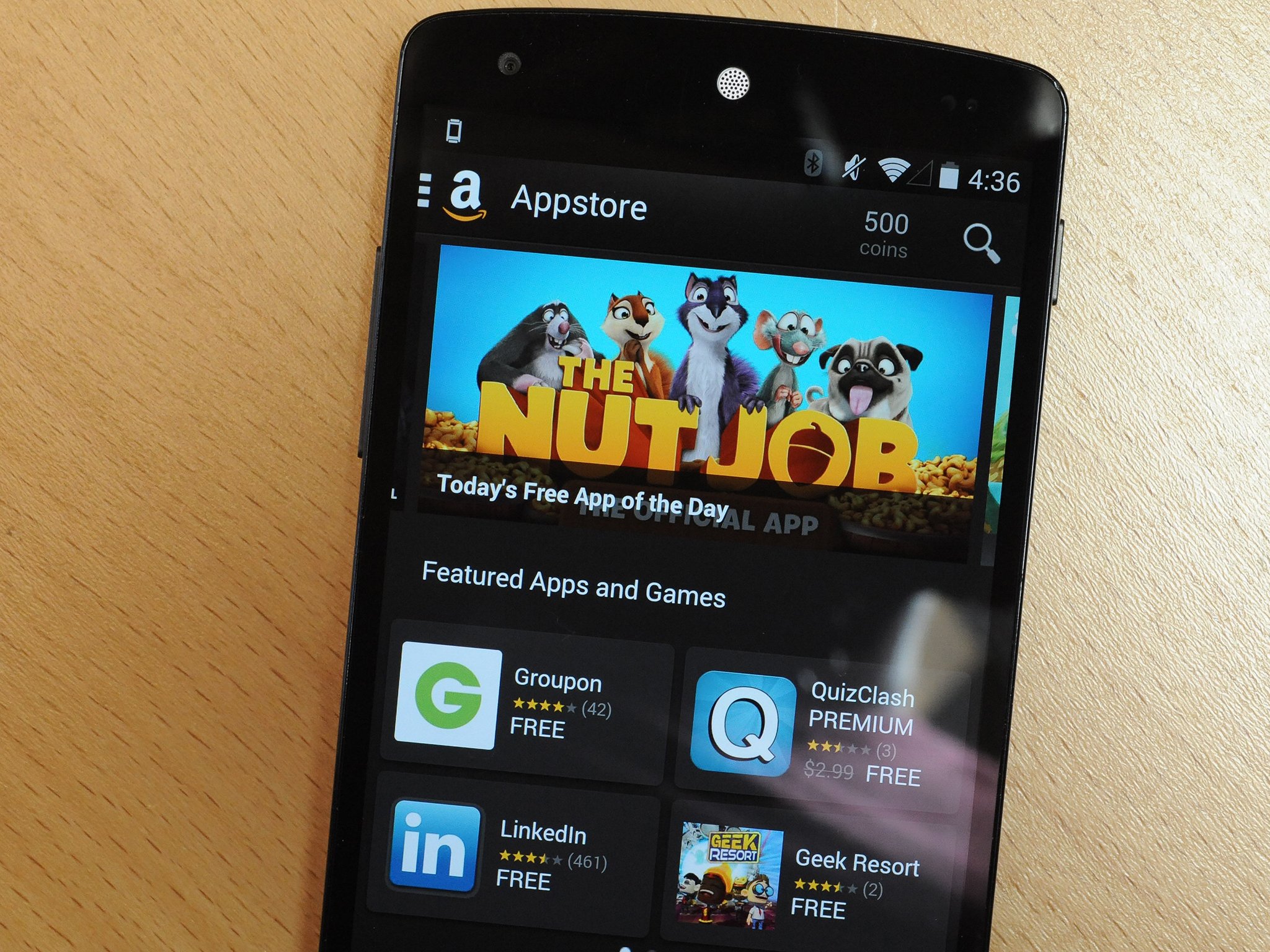
Amazon is still celebrating its Appstore's third birthday, and the next wave of deals are now available. Right now you'll find 14 paid apps completely free through the Amazon Appstore, worth over $50. A subset of apps are also available in the UK from the Amazon Appstore, totaling £25 in savings.
Bcstevieb
Shared posts
Microsoft has always reserved the right to read and disclose your Hotmail messages
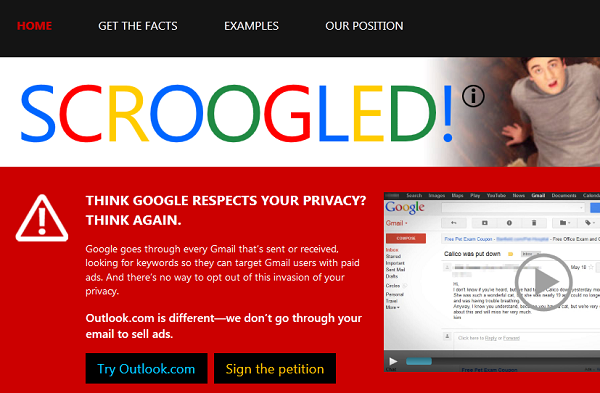
Microsoft's "Scroogled" campaign (no relation) boastfully compared Hotmail's privacy framework to Gmail's, condemning Google for "reading your mail." Now, Microsoft has admitted that it scoured the Hotmail messages belonging the contacts of a suspected leaker in order to secure his arrest, and points out that Hotmail's terms of service have always given Microsoft the right to read your personal mail for any of a number nebulously defined, general reasons.
The company says that is had an undisclosed "rigorous process" to determine when it is allowed to read and publish your private email. In a statement, it sets out what the process will be from now on (though it doesn't say what the process has been until now) and vows to include the instances in which it reads its users' mail in its transparency reports, except when it is secretly reading the Hotmail accounts of people who also work for Microsoft.
Here's a PGP tool that claims to work with Hotmail, and would theoretically leave your Hotmail messages unreadable to Microsoft, though the company could still mine your metadata (subject lines, social graph, etc).
Courts do not issue orders authorizing someone to search themselves, since obviously no such order is needed. So even when we believe we have probable cause, it's not feasible to ask a court to order us to search ourselves. However, even we should not conduct a search of our own email and other customer services unless the circumstances would justify a court order, if one were available. In order to build on our current practices and provide assurances for the future, we will follow the following policies going forward:
To ensure we comply with the standards applicable to obtaining a court order, we will rely in the first instance on a legal team separate from the internal investigating team to assess the evidence. We will move forward only if that team concludes there is evidence of a crime that would be sufficient to justify a court order, if one were applicable. As an additional step, as we go forward, we will then submit this evidence to an outside attorney who is a former federal judge. We will conduct such a search only if this former judge similarly concludes that there is evidence sufficient for a court order.
Even when such a search takes place, it is important that it be confined to the matter under investigation and not search for other information. We therefore will continue to ensure that the search itself is conducted in a proper manner, with supervision by counsel for this purpose.
Finally, we believe it is appropriate to ensure transparency of these types of searches, just as it is for searches that are conducted in response to governmental or court orders. We therefore will publish as part of our bi-annual transparency report the data on the number of these searches that have been conducted and the number of customer accounts that have been affected.
Microsoft: We have the right to search your Hotmail account (updated) [Mariella Moon/Engadget] ![]()
Top 10 new Android games this week: Lost Light, oO, Deadlings
Welcome back to Android Gaming Weekly, our weekly recap of new game releases. We still plan to cover upcoming releases and games we’re playing, but this column is dedicated to new games that you can start playing right now. Check out our top picks and let us know in the comments section if you have any suggestions for next week’s post.
Save the Furries
Description: Help Save the Furries across 50 levels in this puzzle-adventure! Furries are cute green aliens that love to visit strange planets and then stroll about oblivious to the dangers around them.
Run Blob Run
Description: ‘Run Blob Run’ is an infinite runner inspired by a couple of great games Canabalt and Flywrench. Run Blob Run mixes the colour matching of Flywrench with the running and jumping of Canabalt to give it a unique take on the genre.
Deadlings
Description: Flappy Deadling – A new level that eats cute flappy birds for breakfast with its difficulty. Protect your undead in a maze of deadly saws and spikes. Feed him as many brains as possible before he dies in the gruesome laboratory of Death. There’s no happy ending here!
Memory Matching Game For Kids
Description: Test your child’s memory with ‘Memory Game For Kids (3 – 6 years)’ which has been specially designed to entertain your children especially your little boys and girls. ‘Memory Pattern Game For Kids (3 – 6 years)’ is a educational learning game to develop memory skills and is designed for children and preschool boys and girls.
Broken Sword 5 Serpent’s Curse
Description: From multi-award winning Revolution comes the latest mystery in this much loved adventure-puzzle series. Playing as intrepid American George Stobbart and sassy French journalist Nico Collard, you find yourself on the trail of a stolen painting – and a murderous conspiracy. A conspiracy whose roots lie in mysteries older than the written word…
Pulser Free
Description: ulser offers a new and intuitive way to play. Use our custom six character keyboard to zap the invading shapes into oblivion! Swipe or tap to type and let the laser do the rest. Pulser caters for the casual gamer, but achieving the S rank in all 60 levels will test your reactions to the limit.
Lost Light
Description: Connect and match your way through this captivating NEW puzzle adventure from Disney! Journey to the heart of an enchanted forest and help restore the light hidden away by the wicked Beasties. Enter the world of Lost Light to experience a brand new kind of matching game with a unique numbers twist!
God of Light
Description: Sit back and become immersed into the world of God of Light, the game that rethinks the physics puzzle genre with its unique environment exploration gameplay, amazing graphics and exclusive soundtrack created by electronic music icon UNKLE.
The Jumping Squirrel
Description: If you like challenges and difficult games test The Jumping Squirrel. Show your reflexes and speed to get past all the obstacles that the squirrel is on its way .
oO
Description: oO is a minimalist “dodge-em-up” arcade game. Inspired by Pivvot and Super Hexagon.
Now Browser Is a Lightweight Browser for Android with Flash Support

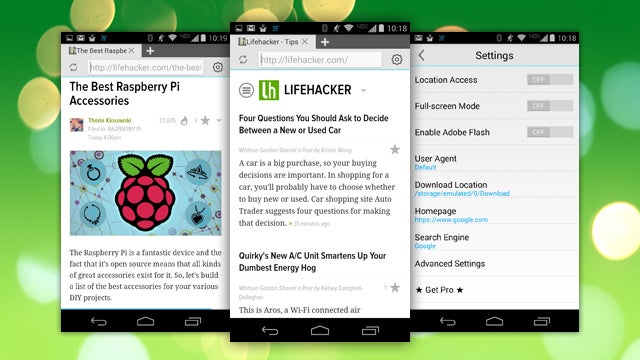
Android: If you still need flash support on the go, Now Browser is a speedy web browser for Android that offers it. It features a clean design that's at home in KitKat, gesture support, and more. It's not as feature-packed as other browsers, but it's fast, lightweight, and gets the job done.
Now Browser's real claim to fame is that it's fast and flexible, and that support for flash video and elements on a page is one tap away in the app's settings. You'll still need to find and install Adobe Flash for Android, but once it's installed, you can turn it on and off at will in Now Browser's settings. The browser itself is clean enough, and definitely fast—you can swipe left or right to navigate pages, and the interface is simple. The developers promise it's one of the fastest Android browsers you'll use, and while I thought it was definitely fast, that may be just because it didn't have a lot going on to slow it down.
Now Browser supports incognito mode, and a few long-press gestures to speed up navigation. It's free, but the free version limits the number of tabs you can have open at one time, which is a bummer big enough that relegates it to the "secondary browser in case I need flash on demand" category. If you like it enough to make your daily driver, there's a $1 pro version that includes some JavaScript tweaks to speed things up even more, and unlocks unlimited tabs.
Now Browser (Free) | Google Play via Addictive Tips
PayPal Expands Its In-App Pay At Table And Order Ahead Services In UK
Here's how security cameras would look if you could use all their footage

Cities across the country have struggled with the idea of placing more cameras in public areas in case of disasters and emergencies, but one project by artist Julian Oliver wants to put the footage from existing cameras in the hands of the people. Public Patch is an experiment that positions the copyright terms Creative Commons, Attribution, Share-alike, Non-Commercial License at the bottom of camera in a public space so that all the footage collected is technically owned by the people. Oliver writes on his website that the idea is to prevent the videos from being sold or modified without public consent. It's unlikely that the added disclaimer is legally binding, but the project does raise the question of how much surveillance footage...
There's No Excuse for Not Backing Up Your Computer. Do It Now.

At least once a month, some friend or family member asks me how to recover data from a failed hard drive. I help them as best I can, but in my head, my answer is always the same: “go back in time and back up your computer like you know you should’ve.”
This post was originally published on March 20th, 2014. We’re reposting it today in honor of World Backup Day. Spread the word!
When your computer’s hard drive fails, it can be gut-wrenching. At best, maybe you lost a really important presentation you were working on. At worst, maybe you’ve lost every photo of your kid’s childhood. Sometimes, you can recover that data yourself—but often, it’s gone forever (unless you want to pay a lot of money to get it back). Every hard drive fails one day. Backup service Backblaze says 50% fail after only four years. Save yourself the trouble and start backing up your computer now.
One Day, Your Hard Drive Will Fail

It’s my firm belief that everyone will experience this at least once in their life. Maybe you accidentally erase your data, maybe you lose your computer, or maybe your hard drive just dies. It’s inevitable: one day you will lose all of your data. Many of you have probably already experienced this already. And those of you that haven’t...well, you just haven’t yet.
It’s a scary thought, but it doesn’t have to be. I’ve experienced at least three catastrophic data losses in the past few years, but none of them were particularly stressful, because I was able to restore from a backup and keep on going.
Backing Up Isn’t Just for Tech Geeks Anymore

What shocks me the most about these hard drive failures is that every single person I talk to—everyone—admits that they knew they should have been backing up. They just weren’t. They know what backup means, and they even know what an external hard drive is. They might even have one. They just seem to think they can “do it tomorrow” and keep pushing it back until one day, their hard drive inevitably craps out.
(If you’ve never heard of backups before, then I apologize for the slightly bitter and condescending tone of this rant. However, you should still heed these warnings.)
Everyone has something to lose. Maybe it’s family photos, maybe it’s important work materials, maybe it’s your finely crafted resume you worked so hard on. Backing up isn’t just for computer geeks with lots of complex data—it’s something each and every one of us needs.
Backing Up Is Easy: Just Set It and Forget It

So now you know you should back up. All that’s left is to actually do it. Luckily, we have guides just for you. You have two choices when it comes to backup. You can:
-
Back up to the internet (recommended) with a program like Crashplan or Backblaze. This is preferred. It’s very easy to set up, and ensures that your data is kept safe even if your house catches fire or gets burgled. (And if you have a lot of data, they can send you a hard drive for the initial backup).
- Back up to an external drive with Windows 7 Backup, Windows 8’s File History, or OS X’s incredibly easy-to-use Time Machine. You can also back up to an external drive with Crashplan, as described above. External drives are okay, but this method won’t protect you in case of fire or theft. If you use an external drive, you should still back up your most important files to an online service like Dropbox, if they don’t take up too much space. (Make sure you use a quality external drive, too.)
Check out the guides linked above for instructions on how to set up each method. Heck, it’s even a good idea to have multiple backups if you really want to keep that data safe. But at least start with one.
Do It Today

Convinced yet? If so, stop whatever you’re doing right now and put it on your to-do list. Got a free hour tonight? Do it tonight. Got a bit of free time this weekend? Skip the movies and set your first backup. The movies will still be there next weekend. This is not something you can afford to keep pushing back.
Most importantly, pass it on. If you already have a backup—or if you’re officially planning to do it soon—let your friends know how important it is and how easy it is. If you don’t, you’ll have to hear about it the next time they lose something important.
Images by Pixel Embargo (Shutterstock), Storozhenko (Shutterstock), Picsfive (Shutterstock), wonderferret and Keith Williamson.
Supreme Court Denies Kim Dotcom Access to U.S. Evidence
Since Megaupload was shut down two years ago, Kim Dotcom and several of his colleagues have been wanted by the United States, each standing accused of copyright infringement related crimes.
Despite the severity of the charges, Megaupload’s legal team does not have insight into all of the relevant documents the U.S. Government relied upon to arrive at its conclusions.
Through the New Zealand courts Dotcom and his fellow defendants have requested access to this withheld information. To mount a proper defense they want to see the extent to which the U.S. authorities can back up their criminal charges.
Initially the District Court granted the request for full access to the U.S. evidence. However, March last year these rulings were overturned by the Court of Appeal, which concluded that the United States could move forward with a summary case.
After the defeat Dotcom and his legal team quickly filed an appeal at the Supreme Court, which today ruled against the entrepreneur and his associates. According to the Court’s ruling, the District Court was wrong to order full disclosure of all U.S. evidence.
The Supreme Court states that the New Zealand Extradition Act doesn’t require a foreign country to share all evidence with the accused, and the District Court had no statutory power to rule otherwise.
After hearing the verdict Dotcom responded on Twitter with a sad face. “Being defeated is often a temporary condition. Giving up is what makes it permanent,” he quoted a few minutes later.
:-(
— Kim Dotcom (@KimDotcom) March 20, 2014
Earlier this week Dotcom enjoyed success in another legal matter by obtaining a gag order against his former bodyguard Wayne Tempero. After resigning a few months ago, Tempero was supposedly planning to make “secret revelations” about Dotcom’s private life.
Under the injunction obtained by Dotcom, Tempero is “restrained from using or disclosing to any person, firm, corporation or entity, any confidential or trade information acquired whilst working for Kim Dotcom.”
The former bodyguard is reportedly going to appeal the gag order in the hope of regaining his free speech rights. There is also talk of a possible lawsuit against his former boss.
For now, however, Dotcom’s legal team will shift its focus to the upcoming extradition hearing. After yet another delay, the hearing is currently scheduled to take place in July this year.
Source: TorrentFreak, for the latest info on copyright, file-sharing and anonymous VPN services.
Netflix Blasts ISPs, Calls For “Strong” Net Neutrality And Explains Why It Pays Comcast
You Might Be Breathing Ineffectively. Here's How to Fix That

You'd think there's only one way to breathe, like the way you do naturally, but you'd be wrong. Certain methods take more work than others, and you can improve your health by doing it better.
Lifehacking blog Selfication explains a number of ways to breathe correctly, but the most important one is to breathe from your diaphragm. It's what singers learn to do and babies do naturally. Those deep breaths give both singers and little children the ability to project their voices powerfully, for better or worse. In your case, you can use it to get more oxygen and more energy. Selfication explains:
The air you breath in through your nose should go all the way down to your belly. Your breathing muscles consist of the diaphragm and muscles in the abdomen, chest, neck and shoulders.
70-80% of the inhaling should be done by the diaphragm so that your breathing is nice and deep. This has a couple of advantages:
- It helps your lungs with the gas exchange which is much more effective way down in the lungs.
- The diaphragm massages your liver, stomach and intestines and gives these organs a rhythmical balance.
- The lymphatic system, which is important for our immune system, gets the help it needs to get rid of the waste products from the bowels.
- The pressure in the chest and belly is decreased so that the heart won't have to work as hard.
- More effective muscle work as the wrong breathing muscles won't have to do unnecessary work.
- As the chest gets more relaxed so does the neck and shoulders and a s a result the likelihood of pain in these areas go down.
Selfication offers several more breathing tips that'll help you open up your air passages and gain more energy from the work you do breathing. Furthermore, good breathing can help keep you more calm and relaxed—it's a key point of meditation , after all. Be sure to read their full post for lots more useful information.
How to Breathe Properly – A (Surprisingly Important) Complete Guide | Selfication
Photo by Plume Photography (Shutterstock).
Ouya drops free-to-play requirement to attract more high-quality games

Ouya is relaxing its limitations on game developers in a bid to bolster support for the Android-based microconsole. In a blog post, the company says that it will soon allow developers to release games that lack a free-to-try component. To date, all games for the console have been required to either be entirely free or have a free-to-play component. Alternatively, developers could offer a free demo. But amidst complaints that the requirement wasn't a match for certain games or that a production of a demo was beyond developers' budgets, Ouya is changing its rules. According to Polygon, come April, developers will be able to use either a free-to-play or a paid model.
In a blog post, Ouya makes it clear what led to the move: "We’re...
Staying at the forefront of email security and reliability: HTTPS-only and 99.978 percent availability
Starting today, Gmail will always use an encrypted HTTPS connection when you check or send email. Gmail has supported HTTPS since the day it launched, and in 2010 we made HTTPS the default. Today's change means that no one can listen in on your messages as they go back and forth between you and Gmail’s servers—no matter if you're using public WiFi or logging in from your computer, phone or tablet.
In addition, every single email message you send or receive—100 percent of them—is encrypted while moving internally. This ensures that your messages are safe not only when they move between you and Gmail's servers, but also as they move between Google's data centers—something we made a top priority after last summer’s revelations.
Of course, being able to access your email is just as important as keeping it safe and secure. In 2013, Gmail was available 99.978 percent of the time, which averages to less than two hours of disruption for a user for the entire year. Our engineering experts look after Google's services 24x7 and if a problem ever arises, they're on the case immediately. We keep you informed by posting updates on the Apps Status Dashboard until the issue is fixed, and we always conduct a full analysis on the problem to prevent it from happening again.
Our commitment to the security and reliability of your email is absolute, and we’re constantly working on ways to improve. You can learn about additional ways to keep yourself safe online, like creating strong passwords and enabling 2-step verification, by visiting the Security Center: https://www.google.com/help/security.
Posted by Nicolas Lidzborski, Gmail Security Engineering Lead
Cross-posted from the Official Gmail Blog
Twitter Makes It Easy To Watch Videos In Tweets
Twitter is rolling out a new feature that makes it easier to view videos shared on the service, the New York Times reports. Like photos, in-line videos will begin to automatically preview in the timeline, and you can view them in fullscreen by clicking on the play button overlaid on the video.
Short videos shared using Twitter's Vine service already had these features. Significantly, these new videos appear to be designed to run directly on Twitter, hosted on the social network. Twitter had previously only hosted users’ photos on its site, relying on third-party services like YouTube or Vimeo for videos.
The National Basketball Association was one of the first to use the tool. During Wednesday’s evening games, the NBA posted videos taken directly from the live games and encouraged those who clicked on the video to “watch live now.” A Twitter spokesperson confirmed the company is starting this test with Twitter Amplify partners, including the NBA, and all users can see the new video previews on mobile apps and twitter.com.
The new feature could appeal to advertisers and TV partners Twitter has worked to bolster relationships with. The company is putting an increased focus on visual content, including adding inline image previews last fall. The goal appears to be to capitalize on the “second screen” experience, where people use Twitter on smartphones or tablets while watching television shows.
Update: An earlier version of this story indicated that the links to original videos still appeared in the code of Twitter's website, thus were viewed in a wrapper designed to keep the user on Twitter rather than NBA.com, however the company told The New York Times it was hosted on-site. We've reached out to Twitter for clarification.
Window Cleaning Magazines
![]() |
| Window Cleaning Business Owner Issue 19, click the picture to take you there. |
![]() |
| WCBO, Issue 18. Click the picture to get it now! |
Video: Take a look at the powerful Oppo Find 7 Android phone in action

Oppo finally unveiled the Find 7 this week, the first ever smartphone that can take a 50-megapixel photos. It's quite the beast of a phone as well with its 5.5-inch QHD display, 2.5 Ghz quad-core Snapdragon 801 processor, 3GB of RAM, 32GB of internal storage and a 13-megapixel Sony CMOS sensor on its camera. We know the specs and the price of the Oppo phone, we've heard about the high resolution photos and the 4K video recording, but we hadn't actually seen the Find 7 in action until GizChina published the first ever unboxing video on Thursday, showing off the design of the device along with the Android-based ColorOS. The full video can be found below.
Qik Is Shutting Down In April, Three Years After Being Acquired By Skype
Google encrypts Gmail between data centers to keep the NSA out of your inbox

Google just announced that as of today, Gmail is more secure than ever before. And the company isn't hiding the fact that it's actively trying to stop the government from spying on your email activity. Google says that Gmail will now use a secure HTTPS connection whenever you check or send email, regardless of where you're accessing Gmail from — be it your home network or public Wi-Fi — or what device you're using. Google made HTTPS encryption the default for its users back in 2010, but it's continually making improvements wherever possible to keep out prying eyes.
As an added barrier between you and the NSA, Google is making another change: every single email message Gmail users send or receive will now be encrypted as it moves...
Your Starbucks barista is about to become your bartender

You may already start your day at Starbucks, and Starbucks is hoping that you'll soon want to close out your evenings there too. According to Bloomberg, Starbucks plans to offer alcohol in thousands of its store as a way to continue its growth. The drinks will be offered as part of an evening menu, which it's been testing in about 40 stores, only after 4PM. So far, the menu includes beer and wine alongside a small selection of light foods and deserts, such as a Blue Brie plate and chocolate fondue. The rollout to thousands of stores is expected to take several years.
The Netherlands Sets An Example For The World, Becomes First Country To Legalize Carrier-Free SIM Cards [Updated]
In an ideal world, a phone's SIM card would work with whichever carrier you choose. No having to sell a Verizon HTC One to switch to an identical one on Sprint. A device with a carrier-free SIM card could go wherever its owner wanted it to. The only problem is, such a product is currently illegal across most of the planet. Only in the Netherlands is the story starting to change.

- T-Mobile In Netherlands Gets Google Play Carrier Billing
- Singapore's SingTel Gets Google Play Carrier Billing, Soon Coming To KPN / Hi In Netherlands, Maybe Vodafone / T-Mobile NL
- Cincinnati Bell Releases Froyo For The Motorola Milestone XT720, And It's Pre-Rooted
- Google Play Store Expands Carrier Billing Options To Include Books, Movies, And Music On Sprint
The Netherlands Sets An Example For The World, Becomes First Country To Legalize Carrier-Free SIM Cards [Updated] was written by the awesome team at Android Police.
New drug makes brain cancer cells explode

By screening over 1,000 different types of molecules, scientists have managed to identify a compound that can literally blow up tumor cells belonging to the most aggressive form of brain cancer — glioblastoma multiforme (GBM). The study, which was published today in Cell, was performed on mice, so the method will need a lot more testing before it's ready for human trials. But should the approach hold up, it could one day form the basis of an entirely new form of cancer treatment.
Orange Gives All Of Its Data To France’s NSA
Samsung's Gear Fit to cost $199

AT&T just announced that it will start taking pre-orders for Samsung's Galaxy S5 tomorrow. The high-profile Android flagship will cost $199.99 with a two-year contract. AT&T says Samsung's latest smartphone will ship in "early April," though the carrier stops short of offering up a specific date. Today also marks the first time we're seeing official US pricing for the Gear Fit (and that gorgeous curved OLED display): it'll cost $199 and also arrive in April. Samsung's Gear 2 and Gear 2 Neo smartwatches have been priced at $299 and $199 respectively. AT&T will discount both of those by $50 if you purchase them alongside the S5, though the deal criminally doesn't seem to include the Fit.
At launch, AT&T will only offer the Galaxy S5 in...
Newsbeat app reads you stories from hundreds of newspapers

Apps that read the day's news aloud aren't exactly a new concept, but Newsbeat — launched today by Tribune Co. — is among the sleekest we've seen yet. Newsbeat pulls in thousands of articles every day from hundreds of newspapers including The Washington Post, The Los Angeles Times, and websites like CNN. From there, stories are converted to audio for easy listening during your morning commute. Sometimes the recordings are produced with the help of text-to-speech technology, much like SoundGecko; other times it's an actual human reading an article.
Pushbullet Channel Added To IFTTT With Plenty Of Pre-Made Recipes And Almost Unlimited Possibilities
The core functionality of IFTTT is simple but powerful – if this certain thing happens, then do this other thing. You can use RSS feed updates, Facebook events, weather, and more as the 'if' part. The response is where things get interesting. There are 72 channels in IFTTT like Evernote, Gmail, Twitter, and more. As of today, Pushbullet is among them.
It looks like the channel just went live, but there are a few dozen recipes already listed by the Pushbullet team.

- Pushbullet Updated To v13.6 With Tasker Support
- Pushover Goes On Sale For $0.99 To Celebrate Teaming Up With Ifttt To Bend The Internet To Your Will
- PushBullet Now Has An API, Will Hopefully Result In More And Smarter Pushing
- PushBullet Updated To Version 11 With Easier Sharing, Improved Reliability, And More
Pushbullet Channel Added To IFTTT With Plenty Of Pre-Made Recipes And Almost Unlimited Possibilities was written by the awesome team at Android Police.
Samsung Chromebook 2 priced and dated for the UK
Samsung has announced that the faux leather covered Chromebook 2 will be headed to the UK and will be available from May 1. The black 11.6-inch model will be available from that date, but the white model and the larger 13.3-inch version will be available from March 12.
HUGE LEAK: Insider reveals launch timing and tons of details surrounding the mysterious Amazon smartphone

After years of rumors, Amazon will finally launch an own brand smartphone within the next three to six months. So says KGI Securities analyst Ming-Chi Kuo, whose reputation for accurately revealing device vendors' plans long before they are announced definitely precedes him.
Video: Motorola’s awesome new watch has secret battery-charging tech

In a live Hangouts session, Motorola revealed more details about its exciting Moto 360 smartwatch, one of the first devices that will be powered by Google’s recently released Android Wear OS for wearable gadgets. Designer Jim Wicks explained some of Moto 360’s features, without going into too much detail about them. The most exciting feature mentioned so far may be the device’s battery, which will feature a special mysterious charging method.
How to Streamline Your Household Cleaning

Cleaning the house is a necessary chore, but let's face it—some of us might not mind it, but no one really loves it. Still, like many chores, it's usually bigger in our head than it is when we set in to do it. Here are some ways you can streamline the process, make sure you have the tools on-hand when you need them, and never wonder what you should do next.
We walked you through some tips for putting all of your household chores on autopilot a while back, and while many of them still apply, when it comes to house cleaning, you can't just automate it—the cleaning needs to get done, and unless you pay for someone to do it for you, you're the one who has to do it. Still, there are some ways you can optimize the whole thing. Let's take a look.
Put Your Household Cleaning on a Schedule

This may seem basic, but it's important. The first thing to do is to put your regular cleaning on a schedule. This has two big benefits: First, it makes sure that everything that needs cleaning gets cleaned. Second, it makes sure that you never tackle too much at one time and get overwhelmed. Break down your cleaning calendar into specific duties, like "wipe down the countertops" or "clean the microwave," instead of just "clean the kitchen." By giving yourself specific tasks and responsibilities, you'll never stand in front of the kitchen or bathroom, heave a sigh, and wonder where you're going to start.
How you go about building your schedule is up to you. We'd recommend a shared Google Calendar with other people in your household, just so everyone's on the same page. A shared to-do list in your favorite to-do list manager , or in a collaboration app built for small groups can also make sure everyone does their share and everything gets done. If all that high-tech nonsense is too much for your household, just slap a calendar on the wall and add each cleaning duty to it with a marker.
Clean in Short Bursts So It's Not a Huge Commitment

You've likely heard all about how you can clean your house in minutes a day on the regular . Inspired by people like The Fly Lady and her detailed quick cleaning regimen, these methods break down the massive task of cleaning your home into bite-sized tasks that you can do in short bursts. If you had trouble making sure that your cleaning tasks were easy to tackle above, these methods will help a lot—but more importantly, they teach you to clean in short, quick bursts. Burst cleaning makes the job less daunting and helps you learn to clean as you go (cleaning while I cook is one of my secret tricks to an always-sparkling kitchen). It also makes tidying up an easy habit that you can pick up and integrate into your routine.
Use Timers and Technology to Power Through Your Cleaning Duties

Productivity methods like the Pomodoro Technique are great for helping you focus at work, but they're amazing for helping you clean, too. Set a timer for the amount of time you'd like to clean, say 25 minutes. Then focus on cleaning until the timer goes off. Give yourself a five minute break, and then do it again. After four of those work sessions, or "pomodoros," give yourself a longer break, or stop cleaning altogether. It helps those short bursts add up, and if you do something different for each of those sessions, you'll be surprised how quickly a lot of your cleaning gets done.
If you like cleaning to music, consider using timed playlists packed with your favorite music to signal when you should start cleaning and when you should stop, take a break, or move on to the next task. However you go about it, everything's a little more fun when there's music playing, and when you know the finish line is on its way soon.
Get Cleaning Supplies Auto-Delivered On Your Cleaning Schedule

Not having the tools on-hand to do the job you need to do can throw you off your game. Instead of trying to remember to pick up cleaning wipes or vinegar and baking soda at the grocery store when you do your regular shopping, buy them on a regular schedule along with your cleaning duties. Amazon's Subscribe and Save will net you everything you need on a monthly basis (or longer, depending), which can be perfect if matched up with your cleaning calendar. If you do the kitchen at the beginning of one month, and then the bathroom at the beginning of the next, set up your subscription to match. Alternatively, if you know you go through wipes monthly but wood polish every six months, set your cleaning supplies to deliver on that schedule. Not only will it serve as a reminder of what you have to do on any given month, you'll always have what you need to tidy up.
If you want to take it to the next level, take a look at ePantry, a subscription service just for cleaning products. They ask you questions about your household, suggest a cleaning regimen based on your habits, and then send you the cleaning products you like on a schedule that matches. You get the benefits of having the tools you need when you need them, and you also get the benefit of someone else drawing up your cleaning schedule so you don't have to.
Stop When You're Done, and Don't Go Overboard

Finally, and this is something I'm guilty of, don't let yourself get carried away when you start cleaning. It can be easy to just keep going once you've gotten started, but it's important to stop yourself when your timer goes off, of you've finished the task you said you would do. Don't go overboard and assume that because you're making good progress that you have to clean all the things. Putting in too much effort actually drains your limited willpower reserves , and will leave you stressed and tired for the next thing you have to do, or the next time you need to do some cleaning.
Some people will have the opposite problem, and get so quickly distracted that they never finish the one thing they set out to do. That's okay too—forgive yourself and come back to it later. The important thing is that you're getting the cleaning done and making an effort to make it a regular thing. Next time, break the task down even more so you have greater successes over longer periods, and step up from there. That way everything gets cleaned, and you don't feel terrible about it. With luck, these techniques will help. Whatever you do though, try to make it fun .
Photos by Maarten Takens, Tim Regan, mlpeixoto, zepfanman, and Stuart Heath.
What's The Best VPN Service Provider?

VPNs, or Virtual Private Networks, are great for protecting your privacy and security while you use the internet . Whether you're at home or abroad, they're essential for protecting your data. This week, we want to know which ones you think are the best.
Choosing the right VPN service provider isn't an easy task . Some of them pride themselves on cheap plans and speedy connections, but leak your data and log your activities. Others play dirty, stacking review sites and spamming people to get them to try them out. It's been a while since we looked at the best VPN service providers , so it's time for a fresh look.
Let's hear your vote in the discussions below! To cast your vote, follow these guidelines:
-
Follow this format for your vote, including the bold print. If you don't, it won't be counted:
AN IMAGE OR SCREENSHOT OF THE BEST VPN SERVICE PROVIDER
[preferably at 970x546]
Vote: [BEST VPN SERVICE PROVIDER]
Why: Why is this VPN provider the best? Why does it stand out? Maybe it's their app support, or the price? Maybe they don't log your activity, and promise to protect your privacy. Maybe they've been well reviewed by independent sources. Make your case! Try to keep it to a single paragraph, maybe two. - Don't duplicate nominations! Instead, if someone's nominated your pick, star (recommend) it to give it a boost, and reply with your story instead.
- Please don't leave non-entry, direct comments on this post. They'll just get pushed down. Save your stories for others' submissions!
If you're not sure what we mean, just check out the nominations by our writers below. We'll give you a head start, and they should all be in the proper format, so you can just follow our lead.
The Hive Five is our weekly series where you vote on your favorite apps and tools for any given job. Have a suggestion for a topic? Send us an email at tips+hivefive@lifehacker.com!
Photo by dencg (Shutterstock).