Popular iOS email client and Dropbox property Mailbox is coming to Android. The app, which was purchased by Dropbox a year ago, will include an "auto swipe" feature that will allow users to archive an email now and automatically archive similar emails that arrive in the future. Mailbox is launching today on Google Play and you can find it at the Play Store link above.
Flickr-competitor and photo-focused startup 500px is launching a trio of new things today, including a new blog called ISO that’s designed to build stories around member photos, revamped upload and management tools, and new collections which are curated photo groups that are designed to provide members with more sources of inspiration. The ISO blog and the Collections initiative are both… Read More
Facebook is taking its standalone app strategy to an extreme new level today. It's starting to notify users they'll no longer have the option to send and receive messages in Facebook for iOS and Android, and will instead have to download Facebook Messenger to chat on mobile. Read More
Dropbox today announced Carousel, a product to store and manage your photos and videos. It incorporates features from Snapjoy, a photo startup that Dropbox acquired in December 2012. The launch of Carousel represents a bid for Dropbox to diversify its lineup of products — and potential revenue streams — as it prepares for an expected initial public offering of its stock. The app is available today.
At an event in San Francisco, Mailbox founder Gentry Underwood showed off the service, which organizes photos and videos from your camera roll into an app for Android and iOS. A scroll wheel at the bottom of the app lets you move backward and forward in time with a swipe of the thumb. Dropbox says the app is "one place for all your...
Google's default Android calendar app may be in for some significant changes. Geek.com today posted screenshots captured from a test version of the app that features a very different design from what you'd find on a Nexus 5 or Google Play edition device today. It's undergone a radical visual makeover that ditches hard lines in favor of light circles, with your appointments given more prominence thanks to more colorful boxes in the app's main view. There's also a new view that highlights birthdays and a user's daily agenda, and social integration also looks to be expanded.
Geek notes that navigating through the app is a slick experience, with "visual flourishes that couldn’t be captured in screenshots." Calendar is called Timely in...
Roger Ebert's number one film of 1987, David Mamet's House of Games is about a psychiatrist coming to the aid of a compulsive gambler and being led by a smooth-talking grifter into the shadowy but compelling world of stings, scams, and con men.
A nice movie list from mgolf on Reddit. I've seen Shattered Glass (2003), The Player (1992), and House of Games (1987) and liked all three, so I've added the other 12 he mentions here on my list of movies to watch.
When South Carolina State Supreme Court Justice Donald Beatty told a convention of prosecutors that judges would not permit "unethical conduct, such as witness tampering, selective and retaliatory prosecutions, perjury and suppression of evidence," prosecutors revolted, vilifying him. They're following the lead of San Diego prosecutors, who boycott judges who are to "pro-Fourth Amendment." And in Arizona, prosecutors are fighting an ethics rule that would require them to disclose "new, credible, and material evidence" of wrongful convictions.
Samsung is opening up some new retail Experience locations across the U.K., similar to what’s launched this time last year at Best Buy locations in North America and existing stores in Spain, Germany, Portugal, Netherlands, Sweden and Ireland. These locations are opening today and being operated by Carphone Warehouse. There are nine locations total across England.
Speaking with TorrentFreak late last week, the Police Intellectual Property Crime Unit (PIPCU) clarified the stages behind Operation Creative, an ongoing campaign aimed at disrupting the activities of unauthorized content sites.
“At the first instance of a website being identified, evidenced and confirmed as providing copyright infringing content, the site owner is contacted by officers at the PIPCU and offered the opportunity to engage with the police, to correct their behavior and to begin to operate legitimately,” a spokesperson explained.
“In the contact sent to the website owners PIPCU clearly states that if a website fails to comply and engage with the police, then a variety of other tactical options may be used including; contacting the domain registrar to seek suspension of the site, disrupting advertising revenue and advert replacement.”
But while disruption is clearly on the agenda, the police can also rely on the traditional investigation and arrest process. Earlier this week, that’s exactly what they did.
Sometime on Monday morning, detectives from PIPCU carried out an arrest of a 26-year-old man in the UK. He was detained in York, England, a city located around four hours drive from PIPCU’s base in the City of London.
The man was arrested on suspicion of operating a number of streaming-related domains.
At the time of writing PIPCU has not responded to our requests for comment [Update: PIPCU comment below], but TF has discovered that earlier this week sports streaming domains BoxingGuru.co.uk, boxingguru.eu, boxingguru.tv and nutjob.eu were all suspended.
The sites currently redirect to a page carrying a statement indicating they are under investigation for online copyright infringement. Police have not yet publicly linked their closure with the arrest on Monday.
The logos of four key Operation Creative partners – BPI, FACT, IFPI and The Publishers Association – are displayed on the page although it seems highly likely that FACT were behind the recommendation to investigate the sites closed down this week.
All domains with ‘boxing’ in their titles linked to the world’s biggest boxing events. This would have put the sites on a collision course with FACT members including British Sky Broadcasting, BT Sport and cable provider Virgin Media, all of which generate revenue from that market.
Nutjob.eu linked to streams of a variety of sporting events including soccer, putting the site firmly in the cross-hairs of the powerful Premier League. Other links would certainly have proven unpopular with the NHL, NBA and ESPN.
While the sites certainly embedded videos and provided links to unauthorized content hosted elsewhere, their operator has always maintained he has nothing to do with placing the content online. Whether that holds true – or even if the police care at this stage – will be revealed as the investigation unfolds.
FACT did not immediately respond to our request for comment.
Update: “A 26 year old man was arrested on Monday 7 April by detectives from the Police Intellectual Property Crime Unit (PIPCU) in York, on suspicion of hosting a number of websites allowing people to illegally stream TV and films,” a PIPCU spokesperson told TF.
“A number of websites have been suspended and the suspect was taken to a local police station for questioning. The investigation is ongoing.”
One of the most popular reading apps across any platform, Pocket, is receiving a quick update today with important changes for how you view content in the app. Folks using Pocket on a device running Android 4.4 will now see the app enter "Immersive Mode" when viewing an article in full screen, which hides all interface elements so the content take up as much room as possible. Android 4.1-4.3 devices will hide just the status bar, but that's better than nothing.
You've probably heard about Heartbleed. You've probably been told that, as far as security vulnerabilities go on the Internet, it's pretty damned scary.
But what is Heartbleed? How does it work? Why is it something that you should care about? This Khan Academy-style video tries to break it all down. Read More
Heartbleed, a long-undiscovered bug in cryptographic software called OpenSSL that secures Web communications, may have left roughly two-thirds of the Web vulnerable to eavesdropping for the past two years. Heartbleed isn't your garden-variety vulnerability, so here's a quick guide to what it is, why it's so serious, and what you can do to keep your data safe.
What's Heartbleed?
The short version is that it's a vulnerability in the way your browser talks to a website over an encrypted channel. An attacker could theoretically take advantage of the bug to unravel the secure channels used by banks, e-commerce sites and other sensitive locations to steal passwords and other sensitive information.
The slightly longer version is that Heartbleed is a flaw in the OpenSSL implementation of the basic cryptographic protocol that secures Web communications, known as SSL.
What's SSL?
It stands for Secure Socket Layer, a cryptographic protocol that puts the S in "https"—the prefix you see on Web addresses when they're using a secure, encrypted connection. SSL basically ensures that no one can eavesdrop while you're banking, shopping or doing anything else.
What's OpenSSL?
OpenSSL is an open-source implementation of SSL and its successor protocol, TLS (which stands for Transport Security Layer). It's the default cryptographic library in the Apache and nginx Web servers, which together powered almost exactly two-thirds of all active websites as of April, according to Netcraft data (h/t Ars Technica). That means OpenSSL is used to protect sensitive Web communications across a vast swathe of the Internet.
Let's Go Back To Heartbleed. What Exactly Does It Do?
Officially known as CVE-2014-0160, Heartbleed is a recently discovered bug in OpenSSL that could allow an attack to read information off a Web server even though it's supposed to be secured against intrusion. The bug affects an OpenSSL extension known as “heartbeat,” which makes it possible to keep a secure communication channel open without re-negotiating security protocols over and over again.
In effect, the bug allows a malicious users to request data from a Web server's memory—data that could include the site's SSL encryption keys, user passwords and other sensitive information. According to Heartbleed, a website established by researchers at Codenomicon who identified the bug (as did a Google engineer):
The Heartbleed bug allows anyone on the Internet to read the memory of the systems protected by the vulnerable versions of the OpenSSL software. This compromises the secret keys used to identify the service providers and to encrypt the traffic, the names and passwords of the users and the actual content. This allows attackers to eavesdrop on communications, steal data directly from the services and users and to impersonate services and users.
Why Is HeartBleed So Serious?
There are several reasons. The first, and most obvious, is that Web servers may leak sensitive data as a result of the vulnerability. The Heartbleed bug lets an attack force a server to cough up the contents of its active memory (albeit in 64KB chunks). Depending on what the server happens to be doing, its memory may contain usernames, passwords or credit card numbers.
Heartbleed also lets attackers obtain the server’s secret keys—cryptographic measures that are supposed to ensure only an owner can access sensitive data—in order to impersonate servers and decrypt their communications.
What’s more, the site explains, is that it’s disturbingly difficult to tell if somebody exploits it. That means victims may have no way to tell if they've been, well, victimized.
Finally, the Heartbleed bug has been in the wild for roughly two years. That's a lot of potential exploitation, should any bad guys have stumbled across it in that time. Even worse, if anyone recorded encrypted traffic over that time and extracted a server's encryption keys, they can go back and decrypt past communications at their leisure.
Sites that use perfect forward secrecy, like Gmail, should be protected from retrospective decryption. Unfortunately, perfect forward secrecy isn't widely used across the Web.
Can I Tell If My Site Has Been Exploited Via Heartbleed?
No. However, you can test your site to see if it's vulnerable.
What Can I Do To Protect My Site?
If your site turns out to be vulnerable, OpenSSL recommends that you upgrade to OpenSSL version 1.0.1g, which patches the Heartbleed vulnerability. If you can't upgrade for some reason, you can disable OpenSSL heartbeat support for a quick fix.
Even if you patch the bug, however, it’s impossible to tell if an attack took place in the past.
What Can I Do To Protect Myself As An Internet User?
Now is a very good time to change your passwords. But note that, if the site has been affected and hasn't yet addressed the security hole, that new login may not be secure. In other words, you may have to change it again, once the site updates its servers.
Even if you don’t think you were affected, it's possible that sites you regularly use—like Yahoo—might have been. Ronald Prins of security firm Fox-IT tweeted that he used the Heartbleed vulnerability to find a Yahoo username and password, and provided proof on his blog. However, Yahoo has apparently patched its servers, as a Heartbleed vulnerability test for Yahoo.com has shown up clean since 4 PM Eastern.
Has Anyone Exploited The Heartbleed Vulnerability Yet?
We don’t know. Security researchers who study the bug have noted that when they exploit it, nothing unusual shows up on the logs. So if bad actors have used it for attacks, we can’t tell.
Updated to adjust advice. Users hoping to secure their logins may be tempted to change their passwords. But if the site hasn't yet secured its server, that new login may be vulnerable as well, requiring yet another password change. (Thank you, @RichardNixon!)
After the release of Windows XP in 2001 and for a few years that followed, Internet Explorer 6 was the biggest, most important browser in the world. And for longer, it has been the buggy browser that's overstayed its welcome. Microsoft announced it would support IE6 through April of this year back in 2009, and today (along with XP and Office 2003) is the last day Microsoft will provide updates. Unless you're an old user who couldn't care less or are somehow nostalgic for a broken web, it's finally time to say goodbye.
Who's got time to sit down and watch the news? No one, that's who. Watchup aims to save you from uninteresting news and endless hunting around on the web by building a newscast especially for you. Just set your preferences and the app delivers the good news right to your tablet.
Watchup can pull content from online sources that include general web video, but also national and international news channels.
While we anxiously wait to see what the first Android Wear device out of the gate will be, it appears that LG may try to take that title. As there were very few announcements so far, it seems like an obvious battle between the Moto 360 and LG's G Watch. Now Pocket-lint has confirmed that the G Watch will be available before July and will retail for less than £180 in the UK.
Still without a working model, LG showed off the final version of their prototype device — which does have the final design. The rectangular G Watch is a bit larger than the Gear 2 and will allow for changeable straps. We know it will be running Android Wear, but other specs are still unknown for the time being.One thing to note is that there are no buttons on the watch at all, and also no ports to be seen. The only noticeable feature are charging contacts on the back of the device which remind us of the same style on the MetaWatch devices.
If this holds true, we could very well see the G Watch (and hopefully other Android Wear devices) hit the market before the summer is out.
4K TV is here. Sort of. Netflix is now streaming the second season of House of Cards and some nature documentaries in 4K/Ultra HD format. But of course, your TV has to support the higher resolution to take advantage of the extra pixel count. Programs available for viewing in 4K will appear with the Ultra HD 4K label. Netflix confirmed to Multichannel News that the company is now streaming some… Read More
In a landmark ruling, the European Court of Justice has declared Europe’s Data Retention directive to be a violation of Internet users’ privacy.
Under the Directive Internet providers and other telecom companies were required to log and store vast amounts of information, including who their subscribers communicate with, and what IP-addresses they use.
The local authorities could then use this information to fight serious crimes, but it was also been frequently used by third parties, in online piracy cases for example.
Today the Court ruled that the data collection requirements are disproportionate. In a case started by Digital Rights Ireland the Court effectively annulled the directive, and it’s now up to the individual member states to change local laws accordingly.
“The Court is of the opinion that, by adopting the Data Retention Directive, the EU legislature has exceeded the limits imposed by compliance with the principle of proportionality,” the Court states.
“By requiring the retention of those data and by allowing the competent national authorities to access those data, the directive interferes in a particularly serious manner with the fundamental rights to respect for private life and to the protection of personal data,” it adds.
The judgement has far-reaching implications for large telecom companies, but also for smaller businesses including many VPN providers. With the new ruling these companies are no longer required to log extensive amount of user data as was required under the EU Directive.
While many ISPs are waiting to see what local Governments decide, the Swedish provider Bahnhof immediately announced that it would wipe all subscriber data it stored.
“Bahnhof stops all data storage with immediate effect. In addition, we will delete the information that was already saved,” Bahnhof CEO Jon Karlung says.
There’s also resistance against the Court decision. The Dutch Minister of Justice Fred Teeven, for example, wants local ISPs to continue storing user data for law enforcement purposes.
The European Court of Justice judgement is a clear victory for privacy activists, but mostly for the public who will regain some of their online privacy. While the ruling specified that some data retention may be needed, broad and mandatory retention laws and NSA-style data dragnets are no longer the standard.
Welcome to the roundup of the best new Android applications, games, and live wallpapers that went live in the Play Store or were spotted by us in the previous 2 weeks or so.
Please wait for this page to load in full in order to see the widgets, which include ratings and pricing info.
Looking for the previous roundup editions? Find them here.
Featured App
Today's roundup is presented by Stock Tracker - Stock Prices from Handy Apps.
Google's annual I/O developers' conference is due to kick off June 25th at San Francisco's Moscone Center, but developers and fans alike will have to wait a little while longer to register their interest in attending. The search giant had planned to open a lottery for event tickets this morning, but has now pushed back that date back to April 15th.
The conference generally brings lots of new product and services announcements from Google, and tickets sell out extremely quickly. Google has opted away from its prior "first-come first-served" method to make things fairer, but explains that it's "still working to make the registration process even easier." The lottery will now run from April 15th through to April 18th, and only after it...
Skip the IAPs with these outstanding Android games
Are you tired of being nickeled-and-dimed by freemium Android games? Had enough of gems and timers and boosts? That’s certainly the impression we get when we talk about freemium, so we’ve rounded up our favorite titles that do away with all of that, and provides the absolute maximum of product up-front. There's a healthy mix here of action, puzzle, strategy, RPG, so go ahead, dive in, and let us know what you think.
Microsoft this morning introduced Skype TX, a new version of its video chatting service, Skype, that's designed for broadcasters. Described as "studio-grade" software offering high-quality audio and video output, the platform provides broadcasters with professional feeds free of distractions, like call notifications and ads, plus API integration, call management features and more. Read More
A dynamically resizable YouTube player is nothingnew. However, Google has added a hidden YouTube experiment that allows you to enable a resizable player without downloading or installing anything.
To enable the resizable YouTube player, go to any video on YouTube. Then, open the developer console (Ctrl-Shift-J in Chrome and Opera, Ctrl-Shift-K in Firefox). In the console, paste the following code:
This will enable the experiment and reload the page. Now the player should resize with the window. As always, it should be noted that YouTube experiments can change at any time and without warning so there's no guarantee this will always work. Enjoy it while it does.
Cover is a well-known and popular lock screen replacement app for Android. The app has been in beta for quite some time with public availability going live last December. The app though may have proved to be too popular as Twitter has swooped in and scooped up the fledgling startup.
In a post on the Cover site, the Cover Team has acknowledge the sale to Twitter with a note that users can continue to expect the app to remain on the Play Store.
With just a voice command and a click of a button, a Google Glass wearer can launch the new Livestream app and start streaming from their face. The video streaming startup just announced the Glass app at the National Association of Broadcasters show. Glass already featured a live video streaming platform in Google Hangouts. But with Livestream, Glass just took a big step towards commercial… Read More
Sharing your best Titanfall moments with the Xbox One's upload feature is pretty seamless, but Microsoft's choice to limit video uploads to OneDrive isn't exactly convenient. Thankfully the company is heeding the call of its users and will enable uploads to YouTube beginning tomorrow. An update for the YouTube app will let gamers share their highlights to the video service via a new "My Uploads" section. Recording game clips and editing them works just as it has ever since the Xbox launched; you'll simply need to hop over to the YouTube app to upload them there.
YouTube is also gaining other new features as part of tomorrow's update. Videos can now be viewed in Snap mode, and you can even add individual YouTube clips to the Xbox One...
NPR: Mickey Rooney, the pint-size, precocious actor and all-around talent whose more than 90-year career spanned silent comedies, Shakespeare, Judy Garland musicals, Andy Hardy stardom, television and the Broadway theater, died Sunday at age 93.
Australia's far-right crybaby government is so terrified of civil servants criticizing its policies that it has ordered government employees to snitch on any colleagues who breathe an unhappy word about the politicians of the day online, even if the criticism is anonymous, because it is "unprofessional." Civil servants are also banned from editing Wikipedia in ways that make politicians and their policies look bad.
The sweeping new rules will even cover public servants posting political comments anonymously, including mummy bloggers on parenting websites, if a colleague knew their online identity.
The new policy clearly states it covers the use of social media in an official and unofficial capacity, whether for professional or personal use. If public servants are found to have breached the Australian Public Service Code of Conduct they could be sacked. Colleagues will also be encouraged to dob in each other.
“If an employee becomes aware of another employee who is engaging in conduct that may breach this policy, there is an expectation that the employee will report the conduct to the department,’’ the policy states.“
Chrome is the most popular browser around, but even with its large extension library, one size does not fit all. Thankfully, there's a treasure trove of web browser brilliance built on Chrome's solid, open-source foundation—from browsers aimed at the security conscious to the multimedia hobbyists. Here are four Chrome-based alternatives worth checking out.
Why Switch to a Different Chrome?
If you're already using Chrome, chances are you're pretty happy with it and don't feel any urgency to switch. And if it's a basic browsing experience that you're looking for, there may not be any massive need to swap over.
When developers start climbing its open source Chromium framework, they generally aren't looking to create another Chrome, however. Each one has its own particular nuance, and if that purpose aligns with your net-surfing preferences, you'll find yourself with a browser that gives the web a delicious new flavor.
The good news is that, being from the same code as Chrome, you can still sync your profile and use all the same extensions and add-ons as Google's original, so you'll never be giving anything up by testing out one of these great alternatives.
And hey! There are no rules that say you can only have one of these installed a time. Why not combine them depending on what you're doing on the net today?
For the Privacy Conscious: SRWare Iron
Like most browsers, and pretty much anything else with an Internet connection these days, Chrome sometimes comes under fire for privacy issues. Not that it's giving your data away, but it might not always camouflage it as much as you'd like. So SRWare created the Iron web browser as a privacy-conscious alternative.
Much of Iron's privacy tactics are derived from removing Chrome functions, rather than adding to them, which at first glance may appear like you're getting a reduced experience. However, it's mostly working to stem the flow of information from your computer to Google's. For example, it doesn't deliver suggestions direct to the address bar, nor does it contact Google for automatic updates or error reporting. There's even a built-in ad-blocker. (You can check out a full list of differences here).
A nice side effect of this streamlined Chrome alternative is that it also runs noticeably faster, since it's not using up brain power reporting every little click and search back to Google, and instead dedicates itself purely to shepherding you around the net. This is a good option for anyone who wants to retain the Chrome experience in an app that works straight out of the box, but is using a low-speed net connection and/or has growing concerns about online privacy.
There aren't any bells or whistles about this browser, so don't expect a feature-rich experience. To some this might sound a little off-putting, but many will appreciate its minimalist, safe approach. This is the browser I've actually settled on lately, and it's fast, cheerful and rock solid. We've become very firm friends.
Update: A lot of you have noted that Iron's features are not as privacy-conscious as they would have you believe, and that its developer's intentions are less than noble. This post does a good job of summing up some info on the subject. So if you want a browser focused on privacy, you can likely skip Iron and go with Chrome or Firefox.
For the Security Focused: Comodo Dragon
Targeted more toward the tech-savvy, experienced surfer, Comodo Dragon comes to us from security collective Comodo. As you'd expect from the Comodo Group, which has its entire corporate focus on web security, this web window offers a frontline defense as you wander the digital wilds.
Your home computer can probably handle the occasional kick in the ribs from a bit of malware, spyware or even a semi-malicious piece of code, but a business or work computer can't always dismiss those risks so lightly. When you first install Comodo Dragon, it gives you the option of routing your web browsing through Comodo's highly secure DNS servers. Indeed, if you're particularly paranoid, it'll even help you route all your traffic through these servers.
Additional checks are performed on SSL digital certificates and the browser reports back to you on how strong it feels secure websites really are. There's also an on-demand site inspector that checks pages for malicious code before you saunter into digital quicksand. On top of all this, it offers some similar privacy blocks as Iron, and has its own update system built in to keep you on the latest version.
It's not perfect, of course. There are times when Dragon feels to be toeing the company line a little too hard, pushing you toward Comodo's products and services by way of light (and mostly well-intentioned) scare tactics. You'd be forgiven if this eventually turned into a deal breaker for you, but this level of built-in paranoia could prove to be your savior if you frequent the darker corners of the web.
Oh, and if you're a Firefox fan rather than Chrome, Comodo offers much the same features in its IceDragon package.
For Extra Conveniences: CoolNovo
You may remember CoolNovo from back when it was called Chrome Plus. Its name has been changed for obvious legal reasons, but the end product hasn't been altered in any way, other than some great new updates and added features.
This browser is all about convenience, and works hard to make your online experience as simple and seamless as possible. It's still got some privacy tweaks like we've seen in the others, so safety hasn't been sacrificed in the name of CoolNovo's functionality, but it's more focused on enhancing your digital journey. It's becoming less and less of an issue, but there are still one or two sites that still work better with Internet Explorer. With one click, you can load the page in "IE Mode" right in a CoolNovo tab.
Similarly, it adds things like automatic translation, customizable mouse gestures, and other shortcuts like double-clicking a tab to close it. Top this off with a range of file download tools and "Super Drag," which lets you open links just by dropping the text onto the window, and you've got a great browser that's packed with operational extras.
This is a community-run project, however, and support for CoolNovo is sketchy at best. It's mainly based out of China, so there are one or two cultural and language barriers that stand in the way if you find yourself having any difficulties. So long as it works straight out of the box, you've nothing to worry about. But it could be put to the sword pretty quickly if you ever encounter any problems.
For the Multimedia Guru: Torch Browser
As the web becomes more and more a place where we store our files and find entertainment content, web browsers need to keep up with the increasingly busy two-way street of multimedia consumption. Torch Browser makes a significant move into this realm by lighting a fire under Chromium's sharing, downloading and multimedia functions.
One of the first of such features you'll come across is its tile-based drag-and-drop interface. This is a very unique and powerful feature that lets you simply drop a link, some text, a photo or whatever else you want to share (or search for) onto a relevant tile, and Torch Browser takes care of the rest. This might be Facebook, for example, or YouTube, and whatever you threw onto the browser window is automatically put to that particular tile's purpose. It also has a built-in torrent client.
Similarly, it also has a media grabber built-in, which saves embedded music and videos as a file on your computer. Downloading from the web is given a shot in the arm by way of the browser's download accelerator, which you can turn on and off as required. It even has Hola built-in, so you can access region-locked music and videos.
Ultimately this Chrome alternative targets the heavy social and multimedia user with pinpoint accuracy, all while delivering Chromium's usual smooth and user-friendly browsing experience. But no matter how we dress it up, there's no avoiding Torch Browser's likely appeal to the more...pirate-like among us, which might switch some people off if it begins to weigh on their conscience. For the rest, its interface may be a little cluttered, but it's got a good amount of useful tools built-in if you're willing to explore it.
These aren't the only browsers based off Chrome, of course, but they're some solid ones worth looking at (many of which you guys have mentioned before). If you've got needs Chrome can't service out of the box, they might be worth a look.
Title image remixed from pixelparticle (Shutterstock).
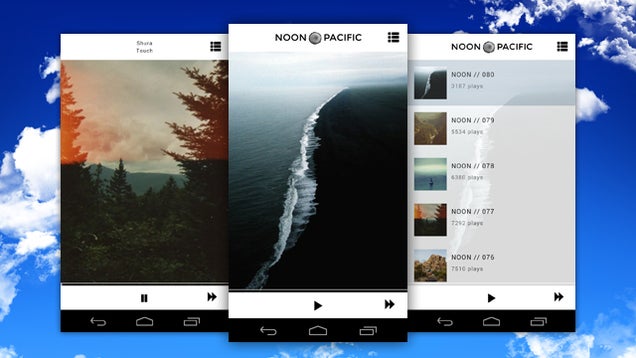
Android: We love Noon Pacific, the service that sends you a playlist of fresh, great music every week at exactly noon, pacific time. If you want to take that great music on the go with you though, the new Noon Pacific app for Android will do the job perfectly.
The app itself is simple and minimal—when you launch it, the most recent Noon Pacific playlist is front and center, and the app even hides the notification bar so all you see is the image, the playback controls, and the music. Press play to listen, or tap the settings button to see previous playlists and play one of those. As you listen, the song artist and title are displayed at the top. The best thing about the app is you can play playlist after playlist, and just indulge in great, curated music all day if you want.
We mentioned when Noon Pacific launched their iPhone app, and demand for an Android option was high. The new app looks great on Android phones and tablets, and is the same price as the iOS version—$1.99. Hit the link below to grab it.


 Flickr-competitor and photo-focused startup 500px is launching a trio of new things today, including a new blog called ISO that’s designed to build stories around member photos, revamped upload and management tools, and new collections which are curated photo groups that are designed to provide members with more sources of inspiration. The ISO blog and the Collections initiative are both…
  Facebook is taking its standalone app strategy to an extreme new level today. It's starting to notify users they'll no longer have the option to send and receive messages in Facebook for iOS and Android, and will instead have to download Facebook Messenger to chat on mobile.

 Roger Ebert's number one film of 1987, David Mamet's House of Games is about a psychiatrist coming to the aid of a compulsive gambler and being led by a smooth-talking grifter into the shadowy but compelling world of stings, scams, and con men.


 Speaking with TorrentFreak late last week, the Police Intellectual Property Crime Unit (PIPCU) clarified the stages behind Operation Creative, an ongoing campaign aimed at disrupting the activities of unauthorized content sites.


 You've probably heard about Heartbleed. You've probably been told that, as far as security vulnerabilities go on the Internet, it's pretty damned scary.
But what is Heartbleed? How does it work? Why is it something that you should care about? This Khan Academy-style video tries to break it all down.
You've probably heard about Heartbleed. You've probably been told that, as far as security vulnerabilities go on the Internet, it's pretty damned scary.
But what is Heartbleed? How does it work? Why is it something that you should care about? This Khan Academy-style video tries to break it all down.