Shared posts

30 Apr 13:20

The Internet Is About to Become Worse Than Television

by Annalee Newitz on io9, shared by Whitson Gordon to Lifehacker

The Internet Is About to Become Worse Than Television

Last week, an obscure but potentially internet-transforming document was leaked from the U.S. Federal Communications Commission. It revealed that government regulators are considering rules that would give big companies a chance to make their online services run faster than smaller ones.

The proposed rules were revealed in the New York Times, and they would overturn the principle of "network neutrality" on the internet. Put simply, network neutrality allows you to use services from rich companies like Google and small startups with equal speed through your ISP. You can read a blog hosted on somebody's home server, and it loads just as quickly as a blog on Tumblr.

Without network neutrality, Tumblr could cut a deal with your ISP — let's say it's Comcast — and its blogs would load really quickly while that home server blog might take minutes to load pictures. It might not even load at all. You can see why people in the freedom-of-speech obsessed United States might not be happy with chucking network neutrality. It privileges some speech over others, based on financial resources.

At the same time, ISPs would love to end network neutrality because they want to charge more to major players like Netflix in order to support their streaming content. Now, it looks like the FCC is thinking seriously about letting ISPs have what they want.

Over at Slate, lawyer Marvin Ammori sums up:

The FCC is going to propose that cable and phone companies such as Verizon, AT&T, and Time Warner Cable are allowed to discriminate against them, giving some websites better service and others worse service. Cable and phone companies will be able to make preferred deals with the companies that can afford to pay high fees for better service. They will even be allowed to make exclusive deals, such as making MSNBC.com the only news site on Comcast in the priority tier, and relegating competitors to a slow lane. The FCC is authorizing cable and phone companies to start making different deals with thousands or millions of websites, extracting money from sites that need to load quickly and reliably. So users will notice that Netflix or Hulu works better than Amazon Prime, which buffers repeatedly and is choppy. New sites will come along and be unable to compete with established giants. If we had had such discrimination a decade ago, we would still be using MySpace, not Facebook, because Facebook would have been unable to compete.

The chairman believes he can help us in one way: He will make sure all these highly discriminatory new tolls are "commercially reasonable." Will that matter? No. Commercially reasonable deals won't be measured by the market. If Amazon is paying twice what eBay is paying, the FCC will only make sure each price is reasonable, not that the prices are nondiscriminatory.

He adds that this "reasonable" pricing will hardly be reasonable, unless your company is insanely rich:

So, according to the FCC, when Verizon discriminates against a startup, we shouldn't be alarmed, because (while being discriminated against), this startup can hire a lot of expensive lawyers and expert witnesses and meet Verizon (a company worth more than $100 billion) at the FCC and litigate this issue out, with no certainty as to the rule. The startup will almost certainly lose either at the FCC or on appeal to a higher court, after bleeding money on lawyers.

Big internet service companies have been pushing the FCC to craft such regulations for years. In 2010, we wrote about a proposal from Amazon and Google, urging the FCC to adopt pay-to-play rules that would allow some companies to get their content to your eyeballs faster than smaller players. It's no exaggeration to say that rules like this would destroy the internet as we know it.

Now it looks like the rules that Googlezon wished for are actually in process.

Writing in the New Yorker, law professor Tim Wu explains:

The new rule gives broadband providers what they've wanted for about a decade now: the right to speed up some traffic and degrade others. (With broadband, there is no such thing as accelerating some traffic without degrading other traffic.) We take it for granted that bloggers, start-ups, or nonprofits on an open Internet reach their audiences roughly the same way as everyone else. Now they won't. They'll be behind in the queue, watching as companies that can pay tolls to the cable companies speed ahead. The motivation is not complicated. The broadband carriers want to make more money for doing what they already do. Never mind that American carriers already charge some of the world's highest prices, around sixty dollars or more per month for broadband, a service that costs less than five dollars to provide. To put it mildly, the cable and telephone companies don't need more money.

Wu has studied corporate controls of electronic communication for most of his life, and is the author of a terrific book about telecom monopolies called The Master Switch. He's worked as an adviser for the FCC, and has personally talked to President Obama about the need for net neutrality. So his disappointment is palpable when he notes that the leaked rules, confirmed as real by insiders at the agency, would allow internet companies to pay ISPs payola to get their traffic privileged above others.

This is the first step toward a world where corporate monopolies on content start affecting not just what you can see and read online — but also how you gain access to it. The signal will be out there, but your ISP just won't deliver it to you.

An internet without network neutrality will look a lot like television does now. You'll depend entirely on your cable company to get broadcasts, and they will only deliver their handpicked channels in their cable packages. There will probably be a little room for the web equivalent of public access television, but it will be so underfunded and slow to load that almost nobody will see it.

It used to be that when a show couldn't make it on broadcast television, we would watch it online. That's how amazing stuff like Dr. Horrible made it into the world. But without net neutrality, we lose that option too. If a company doesn't have the money or legal acumen to get its content included in ISP packages, you will never see its programming. You'll never have those shows; you'll never have those apps; and you'll never know what you're missing.

30 Apr 13:15

Pirate Sites Are Rife With Malware and Scams, Report Claims

by Ernesto

scamMost seasoned visitors of torrent sites and streaming portals know that many of the “download” and “play” buttons present are non-functional, at least in the regular sense.

In fact, many of these buttons link to advertisements of some sort, ranging from relatively harmless download managers to dubious services that ask for one’s credit card details.

A new report backed by the UK entertainment industry has looked into the prevalence of these threats. The study, carried out by the anti-piracy analysts of Intelligent Content Protection (Incopro), found that only 1 of the 30 most-visited pirate sites didn’t link to unwanted software or credit card scams.

According to a press release released this morning, the research found that of the 30 top pirate sites, “90% contained malware and other ‘Potentially Unwanted Programmes’ designed to deceive or defraud unwitting viewers.”

The “Potentially Unwanted Programmes” category is rather broad, and includes popups and ads that link to download managers. In addition, the report links one-third of the sites to credit card fraud.

“The rogue sites are also rife with credit card scams, with over two-thirds (67%) of the 30 sites containing credit card fraud,” the press release states.

While it’s true that many pirate sites link to malware and other dubious products, the sites themselves don’t host any of the material. For example, none of the top pirate sites TorrentFreak tested were flagged by Google’s Safebrowsing tool.

This nuance is left out of the official announcement, but the executive summary of the report does make this distinction.

“We did not encounter the automatic injection of any malicious program on the sites that we scanned. In all instances, the user must be tricked into opening a downloaded executable file or in the case of credit card fraud, the user needs to actively enter credit card details,” Incopro writes.

downloadnow

Most of the malware and “potentially” unwanted software ends up on users’ computers after they click on the wrong “download” button and then install the presented software. In many cases these are installers that may contain relatively harmless adware. However, the researchers also found links to rootkits and ransomware.

The allegation of “credit card fraud” also requires some clarification. Incopro told TorrentFreak that most of these cases involve links to services where users have to pay for access.

“There were 17 separate credit card schemes that were detected through our scanning, with many appearing to be similar or possibly related. Five of the sites had instances of two credit card fraud/scam sites, with the remaining 15 containing one credit card fraud/scam site,” Incopro told us.

“An example is someone visits one of the pirate sites and clicks a ‘Download’ or ‘Play now’ button, which is actually an advert appearing on the page, which then asks for payment details to access the content.”

This is characterized as “fraud” because these “premium” streaming or download services can result in recurring credit card charges of up to $50 per month, without an option to cancel.

The report, which isn’t available to the public, was commissioned by the UK film service FindAnyFilm and backed by several industry groups. Commenting on the findings, FACT’s Kieron Sharp noted that those who fall for these scams are inadvertently funding organized crime.

“Not only are you putting your personal security at risk, by using pirate websites you could be helping fund the organised criminal gangs who run these sites as a front for other cyber scams,” Sharp says.

It is clear that the research is used for scaremongering. Regular users of these sites know all too well what buttons not to click, so they are not affected by any of the threats.

However, there’s no denying that some pirate sites deliberately place these “ads” to confuse novice and unsuspecting visitors. Those visitors may indeed end up with adware, malware or run into scam services.

This isn’t in any way a new phenomenon though, it has been going on for more than a decade already. Ironically, the same anti-piracy groups who now warn of these threats are making them worse by cutting pirate sites off from legitimate advertisers.

Photo: Michael Theis

Source: TorrentFreak, for the latest info on copyright, file-sharing and anonymous VPN services.

30 Apr 13:10

Q App Aims To End Queuing At The Bar At The Royal Albert Hall, Among Others

by Mike Butcher
17ad4a81e3185c4f1015beec28b74f86 In the age of the smartphone, queuing for stuff shouldn’t really exist. Why can you not be alerted when it’s your turn to be served or to be seated? A number of startups are looking into this idea, but most are tackling it from the consumer end, trying to get us to download an app which has no partners. Q App (an app for iPhone or Android) is doing something different – slowly… Read More
29 Apr 19:54

Spotify Is Rolling Out An Updated Dark App Interface With A Handful Of New Features

by Ryan Whitwam

sThe Spotify app on Android has gone through several iterations on its way to being not ugly, but the one rolling out now might be the most significant. A new dark UI is hitting devices with new fonts, icons, and a few tweaked features. Some elements of this interface have been appearing on devices over the last few weeks, but today is the official announcement.

android3 android2

Here's what you can expect to see.

Done With This Post? You Might Also Like These:

Spotify Is Rolling Out An Updated Dark App Interface With A Handful Of New Features was written by the awesome team at Android Police.


29 Apr 19:51

The plant with 1000 faces

by Maggie Koerth-Baker
There is a vine that is capable of contorting the size, shape, color, orientation, and vein patterns of its leaves to match nearby foliage. It's able to match not just one or two other species, but a whole host of them. Nobody has any clue how it knows what neighboring plants look like.


29 Apr 16:47

Android 'Silver' devices could replace Nexus line with big in-store presence

by Alex Dobie

New premium Android devices with Google-controlled software and fast updates could arrive next year

Google could be preparing sweeping changes for the Android ecosystem next year, according to a report from The Information. The site has published details of what it calls the Android "Silver" program, a new lineup of premium Android smartphones it says will replace the current Nexus line. Silver, the report claims, is intended to combat Apple's iPhone and allow Google to assert more control over the high-end Android market, currently dominated by Samsung.


29 Apr 16:44

How to Get the Best Linux Features on Windows

by Eric Ravenscraft

How to Get the Best Linux Features on Windows

For many users, Linux isn't a viable option for everyday work. Some don't have the time or resources to learn a new OS, while others have a need for functionality only Windows can provide. However, Linux still has a bunch of great features and advantages. Here's how to get some of them on Windows.

Beef Up Your Window and Desktop Management with Dexpot

How to Get the Best Linux Features on Windows

Out of the box, Windows has only one way of adding a second desktop workspace: buy a second monitor. While that has its advantages, wouldn't it be handy to separate your workspaces virtually? Many Linux distributions seem to think so and the features come built in to the OS. Fortunately, we can add them to Windows fairly easily.

Dexpot is one of our favorite tools for getting this done. By default, Dexpot gives you multiple desktop spaces so you can spread out your work. You start with four separate workspaces, but you can create more or fewer as you need. The plugins and extras section in the settings of the app allows you to add sweet visuals like a 3D desktop cube (similar to the famous cube in Compiz on Linux).

Dexpot's usefulness doesn't end there, though. In addition to creating multiple desktops, you can also use it to manage individual windows. Similar to Mission Control (formerly known as exposé) on a Mac, Dexpot allows you press a keyboard shortcut to view all of your windows at once with the Dexcontrol plugin (enabled by default, but it can use some custom tweaking).

Tile Your Windows More Efficiently with Divvy

Yet another thing Linux distros excel at is tiled window management. Put simply, tiling windows allows you to quickly arrange them side by side or stacked so you can view multiple applications at once. Windows sort of does this natively by allowing you to snap a window to the left or right half of the screen. Any other configuration, however, is right out. Enter Divvy.

Divvy can be invoked with a quick keyboard shortcut and allows you to scale a window based according to a predefined grid. It's flexible enough to allow for a wide range of layouts without requiring a bunch of work upfront to define where you want windows to go first. It certainly beats trying to catch the corner of your browser and arbitrarily drag it wherever.

Make a More Powerful Dock with ObjectDock

How to Get the Best Linux Features on Windows

Prior to Windows 7, the taskbar was kinda crummy. The new one is actually so good that many of you found it to be your favorite. That doesn't make it perfect, though. One alternative if you want something with a little more flair and a lot more customization is ObjectDock.

ObjectDock adds an animated dock to Windows. OS X and Ubuntu, along with several other Linux distributions use similar features. Since Windows 7, the standard dock isn't as wildly different from apps like ObjectDock as they older versions used to be, but they still offer some advantages like creating tabbed docks, allowing you to organize app shortcuts. You can also open files by dragging them to the app in the dock, and it includes some more attractive animations. If you're not willing to spend $10 on ObjectDock, the classic RocketDock offers similar functionality.

Create a Central Notification System with Growl

How to Get the Best Linux Features on Windows

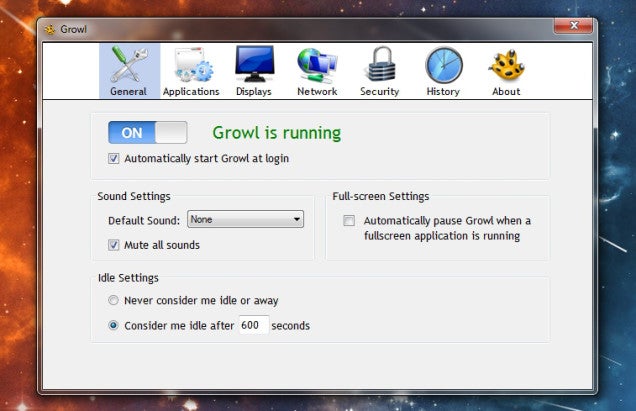
Windows has a pretty disjointed notification system. In fact, many apps like Chrome avoid using Windows notifications altogether and opt to build their own system instead. While some may be worth keeping around (Chrome's notifications are pretty useful), Growl for Windows can manage just about everything else.

Growl uses an assortment of plugins, userscripts, and extensions to intercept extensions from your regular apps. Unfortunately it can't just grab them all. However, extensions like Checker Plus for Gmail or Google Calendar can send messages directly to Growl. You can then customize what types of notifications you get, how long they last, and even forward them on to your phone.

Get a UNIX-Like Command Line with Cygwin

How to Get the Best Linux Features on Windows

The command line is one of the most powerful, yet under-utilized tools in Windows that everyone should master. It's still not perfect, though. If you're coming over from Linux, or you just want to learn some of the more universal Unix-based commands (most of which work on both Linux and OS X systems), Cygwin is where you want to get started.

We've written an intro guide to Cygwin before, but for the uninitiated, Cygwin is a Windows command line utility that's adapted to be familiar to Linux users. Here, you can use Linux-native commands. For super basic tasks, this won't amount to much beyond replacing the "dir" command with "ls", but it simplifies working with cross-platform apps and instructions. For example, if you were using Todo.txt, the command-line integrated to-do list app created by Lifehacker founder Gina Trapani, your commands would be much more similar to the Linux version.

Cygwin is more than just an app, though. Because it integrates the vast library of commands and packages directly into the Windows command line, you can use any terminal emulator you like and still have access to your new powers. As we've discussed before, Console and Mintty emulate more powerful, Linux-style terminals. Console is particularly neat due to its tabbed interface, allowing you to jump between multiple locations and tasks without creating whole new command line windows.

Get a Command Line Package Manager with Chocolatey

Linux users are used to being able to install apps directly from the command line with a simple string of text. Compared to the convoluted method of installing apps on Windows that tends to start with a Google search and end with dodging fake download buttons, package managers are pretty nifty. Enter Chocolatey, to help simplify the process.

Chocolatey is a package manager for Windows that lists over 1800 programs in its database, all of which can be installed or updated from a single terminal command. Chocolately even integrates with Cygwin, so you can install Chrome, Firefox, VLC, CCleaner, Dropbox, Skype, or hundreds of other apps by simply typing clist [appname].

Remap Your Entire Keyboard with Autohotkey

Many Linux distributions come with built in key mappers like XKB. In the Windows camp, our favorite scripting tool, Autohotkey, allows you to perform many of the same functions. You can use a single line to reassign any button to another key or combination of keys. You can also get fancy and use AHK's scripting powers to do more complex actions like turning your Caps Lock key into a dedicated web search button, or programming your middle-click button paste your clipboard contents (yet another great feature of Linux).

Create a Portable Windows Installation with WinToUSB

How to Get the Best Linux Features on Windows

Undeniably, one of the biggest advantages of Linux is that you don't necessarily need to wipe out your entire system to run it. Live CDs and USB installations of popular Linux distributions have existed for nearly as long as their respective mediums have. Windows isn't quite as flexible, but WinToUSB allows you to create a portable Windows installation you can run from a USB hard drive drive. You can check out our guide here with the full instructions on how to set this up.

Find Great, Free, Open Source Software

How to Get the Best Linux Features on Windows

One of Linux's greatest advantages, of course, is the bevy of free and open source software available. You probably know this already, but it bears repeating: Windows has quite a bit of great open source software too, including many of the same apps that you can get on Linux (like Pidgin, GIMP, LibreOffice, and [obviously] Firefox).

Plus, if you're ever looking for a good piece of software and want something open source, Osalt (short for "open source alternative") finds the best free and open counterparts to your favorite apps. While it's very useful for Linux converts, Osalt knows no platform. Windows and OS X users can all find listings for their OS.

Even if you're already comfortable with your apps of choice, it's still worth taking a look. For example, we all know GIMP is available on Windows, but by searching for alternatives, you'll also find GIMPshop, one of our favorite apps that makes GIMP's interface easier and more familiar to use. If you want to narrow your search even further, you can check out Open Source Windows, which lists a few essential apps—as well as our list of the 50 free apps we're thankful for, which includes many open source programs.

29 Apr 14:42

Hightrack Combines Your Agenda, To-Dos, and Weekly Review In One Tool

by Alan Henry

Web/Android/iOS: If you're tired of switching among tools to stay productive, like your calendar and your to-do list, your notes and your agenda, and so on, Hightrack is a new all-in-one productivity tool that brings them all together in a feature-rich, good-looking, easy to use tool.

The video above gives you a rundown of some of Hightrack's features, but one of the biggest things about it is that it combines a lot of things that you're probably already doing into one useful tool. You probably already have a to-do list, a calendar, another app for notes or quick thoughts, and yet another for your agenda. Hightrack combines all of those things, and pulls in things like your calendar from Google Calendar or iCloud so you don't have to start over from scratch. It'll remind you of appointments, consolidate your to-do list (or, if you prefer, keep them separate on different "tracks" you can use for different projects or things you want to focus on.)

Hightrack links your to-dos and your calendar so you can quickly add or check off items from each, but it helps you focus by keeping your attention on the things you need to work on now without the distractions of upcoming tasks. Finally, when it's time to do your weekly review, you can go back over what you've accomplished, see what's been delayed or what you've rescheduled, check your stats, and more. The service has a webapp that works on just about every platform, and native apps for iOS and Android so you can take your work on the go. Everything syncs in the background.

Hightrack is a freemium service. You can create a free account to see if you like it and if the features work for you. You get 15 task lists, and one local and one external calendar(read only). To get all of Hightrack's features: Unlimited calendars, unlimited tracks and task lists, the ability to email items to your to-do list, notes on your to-dos, daily backups, premium support, and more, you'll want a premium account, which will set you back $4.50/mo or $45/yr. You can read the differences between free and premium here. It's a tall order for a productivity service, but if the features appeal to you, it may be worthwhile, and better than using a dozen disparate apps. Hit the link below to learn more.

Hightrack

29 Apr 14:42

Firefox Gets a Brand New, Even More Customizable Design

by Whitson Gordon

Firefox Gets a Brand New, Even More Customizable Design

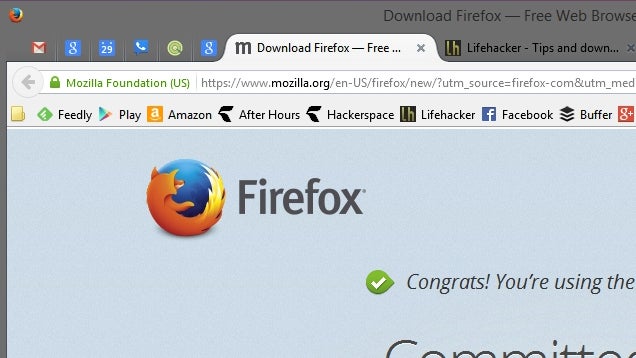
Firefox's long-awaited redesign is finally available to all, along with a few improvements to customization and Firefox Sync.

The new design looks pretty darn Chrome-like, what with the (annoyingly large) curved tabs and the right-hand "hamburger" menu. The menu, however, is more customizable than before, letting you drag and drop your most used items around and even add them to the toolbar. It may take some getting used to if you prefer traditional drop-down menus, but it's nice to have more customizability in an already insanely customizable browser. And, you can always turn the traditional File/Edit/View toolbar back on if you prefer it.

Mozilla has also made Firefox Sync easier to set up (thank God) with Firefox accounts.

Other than that, everything's pretty similar to before—just moved around a bit. Check out the video above to see it in action, the post below for more, or head to Firefox's About menu to update it to the latest version.

Mozilla Introduces the Most Customizable Firefox Ever With an Elegant New Design | The Mozilla Blog

29 Apr 14:41

Amazon Debuts A Storefront Just For Wearable Tech

by Darrell Etherington
Screen Shot 2014-04-29 at 9.43.54 AM Online shopping giant Amazon wants to get out ahead of the curve with wearable tech – hence the launch of its new Wearable Technology store today. The store is a subsection of its Amazon.com ecommerce portal, with a focus on devices like the Misfit Shine, Jawbone UP24 and Narrative Clip, to name just a few. Read More
29 Apr 12:37

21 Best (And 3 WTF) New Android Games From The Last 2 Weeks (4/14/14 - 4/28/14)

by Michael Crider

gameroundup_icon_largeWelcome to the roundup of the best new Android applications, games, and live wallpapers that went live in the Play Store or were spotted by us in the previous 2 weeks or so.

Please wait for this page to load in full in order to see the widgets, which include ratings and pricing info.

Looking for the previous roundup editions? Find them here.

Featured App

Passport Photo ID Studio

This week's roundup is brought to you by Passport Photo ID Studio from Handy Apps.

Done With This Post? You Might Also Like These:

21 Best (And 3 WTF) New Android Games From The Last 2 Weeks (4/14/14 - 4/28/14) was written by the awesome team at Android Police.


29 Apr 12:36

Perform a “4PM Triage” to Cap Off Your Workday Productively

by Mihir Patkar

Perform a “4PM Triage” to Cap Off Your Workday Productively

As your work day winds up, you may realise you didn't finish everything on your to do list. So what should you do first? Fast Company suggests a mental trick to figure out your priorities: pretend there's a villain who will switch the power off in an hour!

It's a funny example and not to be taken literally, of course. The broader point is to set aside that one hour (or any amount of time you see fit) where you don't take any meetings and have no interruptions. It's also important to adhere to the deadline of when you want to leave. So if that remaining time was all you had, what would be the one task you want to do and what would you put off? Here's how Fast Company phrases it:

PERFORM A 4:00 P.M. TRIAGE.

Choose a time—ideally 60 to 90 minutes before you intend to leave—and don't make yourself available for formal appointments after this time. Instead, revisit the day's to-do list and pretend that an evil villain has informed you he will cut off the power to your building at 5 p.m. Knowing that, what would you still choose to do, and what would you push off? Most likely, you'll be back at work tomorrow. A lot of stuff can wait.

The idea of a task review at the end of the day isn't anything new, but where this one differs is that apart from the review, you also get one actionable item right then. After that, you are free to schedule anything for the next day. There's nothing stopping you from taking the most important task and do it the first thing in the morning—eat the live frog, as they say.

The full article at Fast Company actually has some other great tips to save time and work more efficiently, like talking with everyone after lunch instead of at the end of the day so you don't hang around. Hit the link to read more.

7 Ways To Knock An Hour Off Your Work Day | Fast Company

Photo by Alan Cleaver.

28 Apr 23:18

Yahoo announces its first two original TV series, coming in 2015

by Jacob Kastrenakes

Yahoo is taking a big step into original content with its first two TV-length original series — its attempts to start taking on Netflix, Hulu, Amazon, and an increasingly large list of other top tech companies that have started to use exclusive series to attract viewers to their platforms. Its first series will be half-hour comedies, both coming from established names.

Continue reading…

28 Apr 23:18

Yahoo will stream a live concert every day for a year

by Jacob Kastrenakes

Yahoo wants to be the next big music venue. Through a partnership with Live Nation, the concert ticketing company, Yahoo plans to stream a live concert every day for an entire year, featuring what Yahoo marketing chief Kathy Savitt describes as the "world's hottest bands and musicians." Yahoo says that it'll also keep 1,200 of its live song recordings around after the shows airs for "months and months" so that listeners can continue to stream them.

"Together, we're going to feed the daily habit of music fans everywhere," Savitt said. Yahoo and Live Nation didn't announce when the concerts would start, where they would be held, or who specifically we can expect to see — but Live Nation's CEO says that the deal between his company and...

Continue reading…

28 Apr 21:14

Top 10 most popular Android apps from last week: Behang, wlpapR

by Steve Raycraft

Every week we cover new Android apps with Fresh Meat on Wednesday, followed by Android Gaming on Thursday and Top 10 App Updates on Friday. When Monday rolls around, we look back to see which apps were the most appealing to our audience. Read on for the 10 most popular Android apps from last week.

1. Zooper By Beard

Zooper By Beard

App info: Here is a set of 12 minimal widgets designed by La Barba and Richard Colon.


2. PAPER APEX/NOVA THEME

PAPER APEX

App info: Paper Theme provides a unique “paper” look to your icons. The app is updated weekly and includes Muzei Live Wallpaper support.


3. Behang

Behang

App info: Behang is a set of wallpapers created by knokfirst.


4. wlpapR

wlpapr

App info: wlpapR is a collection of wallpapers made for Android devices, all designed exclusively by user yackovsky. You can view and download them on the wlpapR website, or with my app, which has Muzei support.


5. Google Camera

Google Camera

App info: The official Google Camera comes to Google Play with modes such as Photo Sphere, Lens Blur and Panorama.


6. Zooper Widget Pro

Zooper Widget Pro

App info: Minimal, classy, extremely customizable and battery friendly “Do It Yourself” widget with almost limitless possibilities!


7. Cryten

Cryten

App info: Beautiful, clean, flat, round and neat icon pack with a pastel palette of colors that makes Cryten very unique!


8. Today Calendar

Today Calendar

App info: Today Calendar is a more modern version of the stock Android calendar. Grey colors have been replaced with a clean white interface.


9. TalkNotes Plus

TalkNotes Plus

App info: TalkNotes Plus is a Business Productivity tool that allows you to enter and review notes for your contacts during a call. New feature added is the pen drawing mode.


10. Google Edu Device Setup

Google Edu

App info: Quickly and easily set up tablets purchased through Google Apps for Education.


Note:  To ensure that all apps receive a fair chance to make the list, we will retire any app that has made the list for 3 consecutive weeks and will place it in our Android and Me App Hall of Fame. We will post this Hall of Fame list in a dedicated series. Any app with * next to the title indicates it will now be added to our Hall of Fame list and will no longer be listed in this article.

28 Apr 21:06

Microsoft Boosts OneDrive Storage For Corporate Clients From 25GB To 1TB Per User

by Alex Wilhelm
582 In the cloud storage wars, capacity is a weapon, and one that is rapidly losing its dollar value. Put simply: Companies that offer cloud storage are scrambling to add value on top of stored gigabytes, as the marginal dollar price that can be charged for that storage is rapidly dropping to zero. Microsoft, making that point even more explicit today announced that it is bolstering its provided… Read More
28 Apr 19:12

Google's self-driving cars are hitting the city streets, handling the chaos well

by Andrew Martonik

With a post on its official blog today, Google is giving an update on its self-driving car initiative, showing that the latest goal is to improve driving on city streets. Google's self-driving car project has already driven thousands of miles without a hitch, but until recently has primarily focused on simple highway driving. As anyone who has driven through a busy city core before knows, there are new and drastically more difficult to handle situations in the city than on an open road.


28 Apr 19:10

SimilarSiteSearch Finds Alternatives to Your Favorite Web Sites

by Dave Greenbaum

SimilarSiteSearch Finds Alternatives to Your Favorite Web Sites

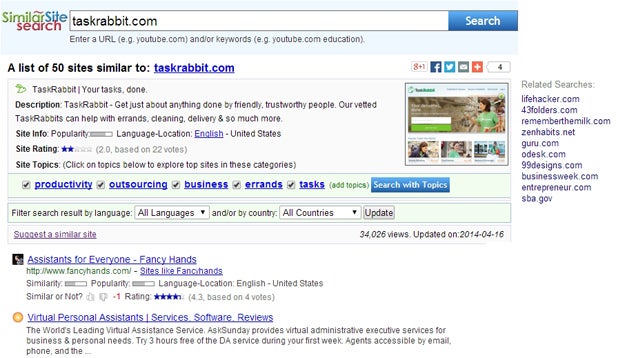
Although typical search engines like Google help you find information based on keywords, web site SimilarSiteSearch.com takes any URL and returns a list of similar sites for you to browse.

SimilarSiteSearch is a mashup of keyword based searches and directory listings. Type in a URL, topic keyword or modifiers such as "in the UK" or "for business". The results are filtered by country, language, or tagged topic. If you are looking for the (fill in the blank) of (fill in the blank), this website has the answer.

Check out some of your favorite websites into SimilarSiteSearch and see where it takes you.

SimilarSiteSearch | via MakeUseOf

28 Apr 16:37

QuickCamera Launches Your Camera App with a Flick of the Wrist

by Eric Ravenscraft

QuickCamera Launches Your Camera App with a Flick of the Wrist

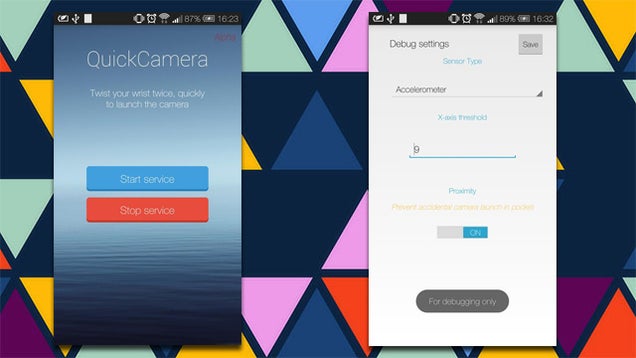
Android: One of the neatest features of the Moto X is that you can quickly open up the camera app with a flick of the wrist. QuickCamera brings this feature to all phones running Android 4.0 and up.

The app allows you to customize the threshold and sensitivity of the gesture, which helps make it easier to activate if you don't want a bunch of pictures of your pocket. QuickCamera is still in open alpha, so you'll have to join the Google+ community here, and then install the app from the Play Store from the link below.

QuickCamera | Google Play Store via XDA

28 Apr 16:35

Lab mice fear men but not women, and that's a big problem for science

by Arielle Duhaime-Ross

The history of science is one chock-full of mice and men. Historically, biological and medical research has largely depended on rodents, which provide scientists with everything from cells and organs to behavioral data. That's why a new study in which researchers found that mice actually fear men, but not women, has the potential to be so disruptive. It might mean that a number of researchers have published mouse studies in which their results reflect this male-induced stress effect — and they know nothing about it.

Continue reading…

28 Apr 16:34

Popcorn Time Is Coming To Android As Soon As Tomorrow

by Matt Burns
IMG_0179 Popcorn Time's evolution continues. A popular fork of the original software is launching on Android as soon as tomorrow, one of the developers tells TechCrunch. The software also recently gained TV shows from HBO and others, making it a one-stop-shop for all your pirating needs. Read More
28 Apr 14:26

Unnanounced 14-inch HP laptop spotted running Android

by Richard Devine

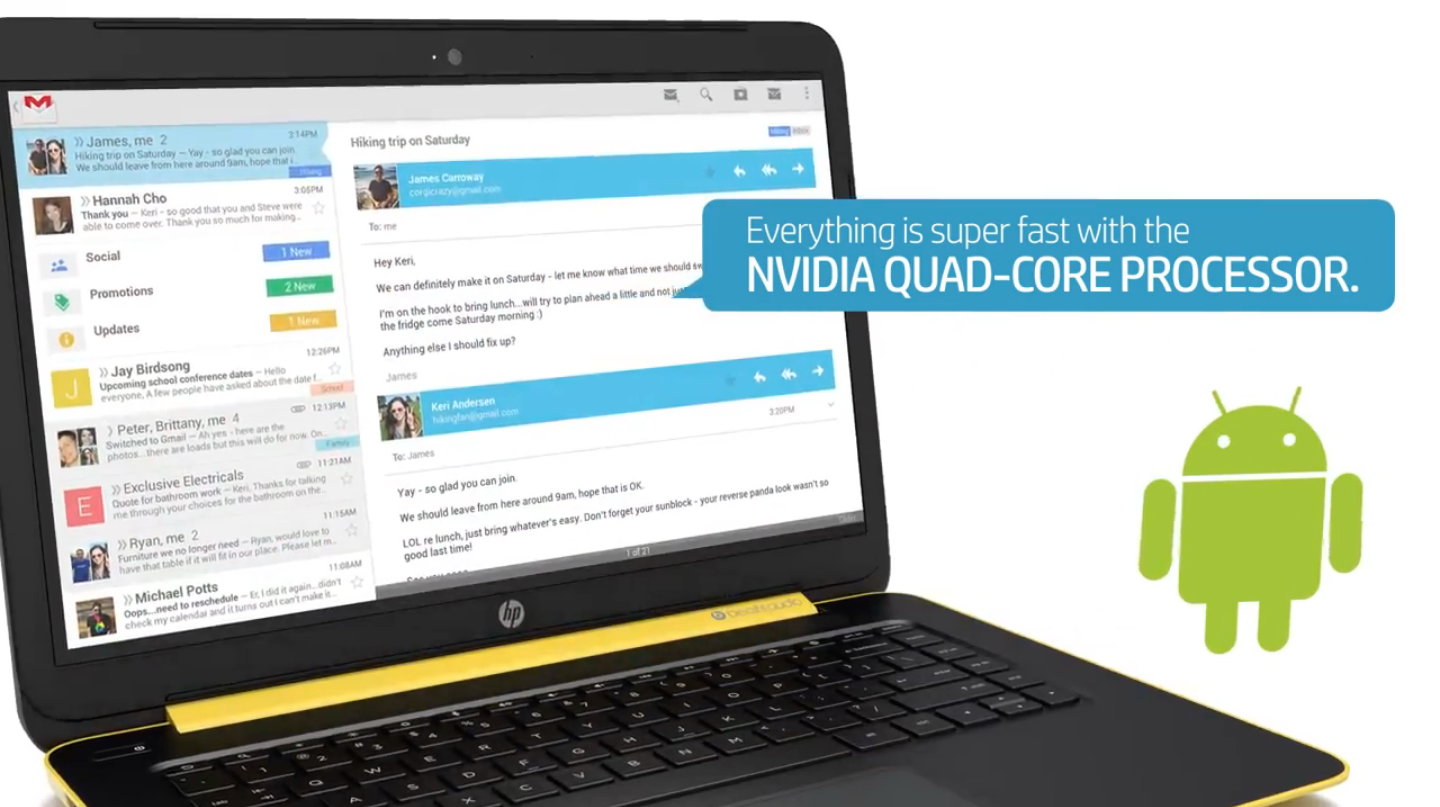
HP looks to have another new Android device in the pipeline, this time with a 14-inch display and a keyboard. Not content with phones, tablets and even Chromebooks, HP seems to have an Android powered laptop they're calling the Slatebook PC hiding away. The info was pulled up by the folks at Notebook Italia via a hidden video – embedded below – from the HP website.


28 Apr 14:19

Skype Makes Group Video Calling Free for All Users

by Alan Henry

Skype group video calls used to require a subscription to Skype Premium, but today the service announced that group video calling will be free starting today for Windows, OS X, and Xbox One users, and will roll out to all other Skype platforms soon.

Group video calls allow Skype users to connect with up to 10 people in a video chat at the same time, and Skype users have been clamoring for the company to make the feature free—a la Google Hangouts—for some time now. People using Skype on other platforms, like mobile devices, will have to wait a little bit before group video calling gets to them too, but it's on the way. Hit the link below for more information.

Skype Loves Bringing Groups Together – With FREE Group Video Calling | Skype Blog via The Verge

28 Apr 12:16

John Lewis launching own branded webOS TV 'next month'

by Richard Devine

webOS TV

LG resurrected webOS for its range of Smart TVs back at CES in January and now one major British retailer will be selling an own-branded version from "next month." As described by the folks at Pocket-Lint, department store John Lewis, will be selling three different sized webOS TVs – 49-, 55-, and 60-inches – and is already advertising them in its Spring 2014 catalog.

The JL9000 won't be cheap, with prices starting from £1499 for the smallest version. You'll also get a built in soundbar for your money, and honestly, what looks to be a pretty fine looking TV, too. But it's all about the webOS, and while John Lewis maybe isn't the first place you'd go for a TV, it's another step towards getting these things into the mainstream.

For more on webOS TV, be sure to check out our first look from CES 2014.

27 Apr 23:10

TinyTake Captures and Annotates Screenshots, Records Screencasts

by Ed Rhee

TinyTake Captures and Annotates Screenshots, Records Screencasts

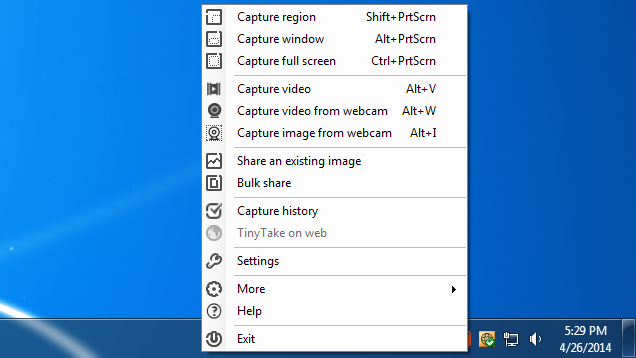
Windows: There's no shortage of good screen capture tools for Windows and we previously covered some of the best ones. TinyTake is another good option, particularly if you also need screencasting features.

TinyTake runs in the Windows taskbar and allows you to annotate the image after the capture. You can also share the images through TinyTake, but it requires a MangoApps account. Video captures can record up to five minutes at a time in MP4 format. Though its video recording feature is basic, it's nice to have it together with the screen capture tool.

If you give TinyTake try, let us know how it compares with your current favorite screen capture tool.

TinyTake (Free) | via AddictiveTips

27 Apr 22:45

New Vulnerability Found in Every Single Version of Internet Explorer

by Ashley Feinberg on Gizmodo, shared by Whitson Gordon to Lifehacker

New Vulnerability Found in Every Single Version of Internet Explorer

According to a confirmation by Microsoft late last night, a new zero day vulnerability has been found to affect every version of Internet Explorer. In other words—over a quarter of the entire browser market.

Attacks taking advantage of the vulnerability are largely targeting IE versions 9, 10, and 11 in something called a "use after free" attack. Essentially, the attack corrupts data as soon as memory has been released, most likely after users have been lured to phony websites. Microsoft explains:

The vulnerability exists in the way that Internet Explorer accesses an object in memory that has been deleted or has not been properly allocated. The vulnerability may corrupt memory in a way that could allow an attacker to execute arbitrary code in the context of the current user within Internet Explorer. An attacker could host a specially crafted website that is designed to exploit this vulnerability through Internet Explorer and then convince a user to view the website.

Microsoft is currently investigating the issue and will likely release an out-of-cycle security patch to take care of the problem. Let's just hope it comes soon, because according to security firm Fire Eye, this means that about 26 percent of the entire browser market is at risk.

And since Windows XP users won't be getting the patch for this fairly threatening bug, anyone still running the now-unsupported software is going to have to cough up some big bucks to stay safe. Anyone like—oh, the IRS, for instance. [Microsoft via Cnet]

27 Apr 16:45

US built dozens of Twitter-like services around the world to promote political debates

by Dante D'Orazio

The US government has operated multiple social media services around the world in hopes of providing a forum for debate and possibly political unrest. The programs, which operated in Pakistan, Afghanistan, Kenya, and dozens of other countries, were similar to ZunZuneo, a US-created social media service that had 40,000 users in Cuba at its peak. That program, which was secretly run out of the US Agency for International Development (USAID), was uncovered by the Associated Press earlier this month in an extensive report. At its peak, the text messaging-based service — which has been described as "Cuban Twitter" — had some 40,000 users. It abruptly shut down in 2012 after officials ran out of cash and failed to make the service...

Continue reading…

27 Apr 16:44

USB Disk Ejector Safely Ejects USB Drives with a Hotkey

by Ed Rhee

USB Disk Ejector Safely Ejects USB Drives with a Hotkey

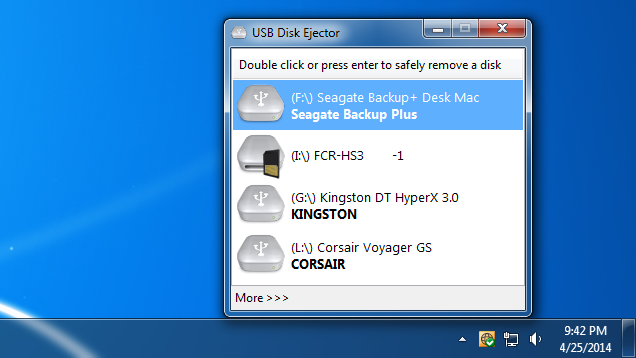
Windows: To safely remove USB drives and memory cards from Windows, you have to mouse over to the Safely Remove Hardware and Eject Media icon in the taskbar. USB Disk Ejector will do the same thing, but with a quick keyboard shortcut.

USB Disk Ejector is a portable program that runs in the taskbar and let's you set hotkeys to safely eject removable drives. It supports ejection by drive label, drive letter, drive name, and mount point. If you regularly use more than one drive at a time, USB Disk Ejector supports multiple hotkeys, too. Even if you don't use the hotkeys, USB Disk Ejector's list of drives is larger than the one built into Windows, so it's easier to see and eject.

USB Disk Ejector is free, open source software and works on all versions of Windows from XP on up.

Update: As a few of you pointed out, we've covered this program in the past. Sorry for the duplicate tip!

USB Disk Ejector | Quick And Easy Software via AddictiveTips

27 Apr 16:43

Five Best Resources for PC Games

by Alan Henry

Five Best Resources for PC Games

There are plenty of places to pick up great PC games, whether you're looking for something just-released or a classic treasure. Still, some are better than others, either thanks to their deals, selection, approach to DRM, or support for indie games. Here are five of the best, based on your nominations.

Earlier in the week we asked you for your favorite resources for PC video games. Whether it was selection that trumped everything, the best possible prices, great software, support for independent game devs and creators, or DRM-free downloads. We've shared some of our own in the past, but we wanted to hear yours. Now we're back to highlight the top five from our nominations round. Here they are, in no particular order:

GOG

Five Best Resources for PC Games

GOG, formerly Good Old Games, started off as a repository for digital sales and downloads of old, classic games that you may remember and love, just updated to run on modern computers and operating systems (especially great even if you know how to make them work yourself.) It's still very much that—if you have a classic game you remember playing back in the day, or that you've heard of from a long time ago, they likely have it available—and tweaked so it'll run on your current PC. GOG has evolved with the times, though. Now the site hosts new games for sale and download in addition to classic titles, often at impressive discounts. One of GOG's most notable features is that their games are DRM-free, meaning your games aren't locked to the PC you're on now, they're not stuck to some cloud account that can get hacked or banned, you don't have to be online or authenticated to another service to play them, and so on. It's a welcome change.

Those of you who nominated GOG made special note of the fact that downloads from the service are DRM-free, and that the site's selection of titles, especially classic games, is unparalleled. Many of you heralded their great prices and frequent discounts, but the one universal thing all of the comments mentioned was the fact that GOG has an exceptional community of gamers who truly love games, love classic titles, and get along well with each other. Part of that has to do with GOG's approach to its customers—seeing them more as friends and fellow gamers rather than just people who give them money. Don't take my word for it though, read more in its nomination thread.


Steam

Five Best Resources for PC Games

What started out as a tool Valve created to digitally deliver its own games to buyers and as a bit of a social network for people who play Valve games quickly evolved and grew into perhaps the dominant method of digital game delivery available today, and arguably one of the first real "app stores." Available for Windows, OS X, and Linux, Steam boasts a ridiculously large catalog of games large and small, big budget and independent, expensive and free-to-play. It's also backed by a massive community of PC gamers who can voice chat with one another, see what their friends are playing, join in, trade and gift games and in-game items, build wishlists, and more. We could write a whole article on Steam's features, like Big Picture mode, controller support, the upcoming Steam Machines and the SteamOS beta, and all of those wonderful Steam sales that drain our wallet every few months, and how to keep that library organized once you're filled it with games, but odds are you're already familiar with them all.

In the nominations thread, most of you praised Steam not necessarily because of its software or its platform, but because of its incredibly large game selection (and software selection too—let's not forget that Steam also sells non-game programs too) and frequent deep, deep discounts. We all love a good Steam sale, and it's pretty difficult to keep your credit card in your pocket when a game that was $60 when it was launched is $5 during a Steam sale. Some of you also noted that Steam's mobile app is a great way to keep up with friends and catch deals, and pointed to other tools like Enhanced Steam to help you make the most of it. Read more in the nominations thread here.


Amazon

Five Best Resources for PC Games

Amazon may not be the first service that comes to mind when you think of video games, but their game store—both digital and physical—are fairly underrated. They frequently list discounts on popular titles that are really hard to beat, and have a massive selection of titles that isn't hindered by corporate loyalties or alliances (that means it's a one-stop for games using Steam, Origin, UPlay, and just about everything else—including many DRM-free titles.) Amazon also earns points for being willing to price match anyone currently undercutting them on the same game, so you can always make sure you're getting the best possible deal if you check with them first. Plus, even though we're discussing PC titles here (and they do have downloadable and physical copies of games for Windows and OS X), they also have a thriving digital delivery store for PlayStation Network, and of course, Android devices.

Those of you who nominated Amazon specifically praised their selection and their rock bottom pricing, and Shane—who regularly curates our Kotaku Deals segment—notes that in his day to day, checking all of these stores for bargains, he turns up some of the best prices on Amazon every single day. They also offer great deals on pre-order titles, and have specific stores for indie games and free-to-play titles that you can download any time you like—and all of your keys are stored in your Amazon account for future retrieval if you ever need them. Read more in the nomination thread here.


The Humble Bundle

Five Best Resources for PC Games

The Humble Bundle, like many "bundle" sales, packs together a bunch of titles into a collection available at one low price that, ideally, is far less than the regular price of each item added up. That's what makes so many of them irresistible, and the Humble Bundle excels at it. The team behind the service started off offering gamers a way to get a ton of great games, DRM-free, at an amazing price, and also encouraging them to donate a portion of their purchase to charities like Child's Play, a worthwhile cause that gets a portion of the proceeds of each Humble Bundle sale. You choose how much you want to pay (within reason, of course), and the more you pay, the more games or other bonuses you get with the bundle. It's a simple model, but it's remarkably effective, and when there's a really great bundle available, odds are you'll hear about it from every corner of the internet.

Those of you who praised the Humble Bundle pointed to it being a great way to try out smaller titles at a great price, and the fact that it's an amazing outlet for independent and mobile games in addition to PC titles. The pay-what-you-want model for the bundle is a huge boost as well, and while many of the bundles go under the radar because there aren't huge titles in it, that doesn't mean they're no good or not worth your money. Plus, the fact that many—although not all and not consistently—downloads are DRM-free earned a few favors in the nominations thread. You can read more about the Humble Bundle in its nomination thread here.


Green Man Gaming

Five Best Resources for PC Games

If you're looking for a game store that really goes out of its way to give Steam a run for its money, Green Man Gaming is worth a look. The service consistently undercuts Steam, offers discounts and promo codes on Twitter and Facebook, and offers great pricing even on pre-order or newly released titles. GMG's library is absolutely massive, and their discounts are usually pretty deep. They often host their own seasonal and holiday sales on their entire catalog, offering attractive prices on popular games, and you can keep track of all of them and your keys and downloads through PlayFire, which nets you achievements and rewards as you play. They may be lesser known, but there's no reason for them to be—they're definitely worth checking before you spend money at another store.

GMG earned praise in the nominations round for its liberally-distributed coupon codes and store credits, which can often mean you get some pricey new games for surprisingly little cash if you save them up. The service is based in the UK, which can lead to some overseas payment processing issues for those of us in the US, but it's nothing you can't get around by using Paypal, for example. Beyond that however, GMG's library and pricing earned it praise, especially from bargain hunters who find themselves surprised from time to time that the best deals are over here. Read more in the nomination thread here.


There you have it! Now that you've seen the top five, it's time to put them to an all-out vote to determine the crowd favorite:

This week's honorable mentions go out to Half-Price Books, and other brick-and-mortar discount stores, where there are often surprising deals to be found at rock bottom prices. While it's a regional chain, odds are you have a similar low-price discount store in your area that sells videogames, and even if you don't, make sure to check your local Goodwill or Salvation Army—I've found incredible deals on boxed games there—especially single-player titles where the serials and discs were still intact and working.

We also got a number of nominations for deal sites that help you get the best possible price on deals from some of the above stores—great entries, so if you're looking for the best possible prices, make sure you head back to the call for contenders to check them out.

Want to make the case for your personal favorite, even if it wasn't included in the list? Remember, the top five are based on your most popular nominations from the call for contenders thread from earlier in the week. Don't just complain about the top five, let us know what your preferred alternative is—and make your case for it—in the discussions below.

The Hive Five is based on reader nominations. As with most Hive Five posts, if your favorite was left out, it didn't get the nominations required in the call for contenders post to make the top five. We understand it's a bit of a popularity contest. Have a suggestion for the Hive Five? Send us an email at tips+hivefive@lifehacker.com!

27 Apr 11:52

How To Make Pirate Bay Users Pay For Content

by Ernesto

tpb-logoOver the past several years, numerous studies have shown that “pirates” are more engaged consumers than their non-sharing counterparts.

They not only consume more media, but also pay more for legal content. While the average visit to The Pirate Bay doesn’t cost anything, the above suggests that it’s a good venue for indie creators to advertise their work.

This is exactly what a group of indie sci-fi creators thought, so last weekend they teamed up with VODO to promote their work on The Pirate Bay. The end result is the “Otherworlds” sci-fi bundle, which includes a wide variety of content, such as books, games, music, comics and videos.

The Pirate Bay was kind enough to promote the bundle for nearly three days, replacing the site’s iconic logo with a prominent banner. Those who clicked on the banner could download a torrent with free sample content, but those who wanted more had to pay up.

Pay for content???
vodo-offer

TorrentFreak reached out to VODO’s Jamie King, who organized the campaign, to learn more about the results. As expected, the Pirate Bay promotion generated a ton of traffic, over 100,000 visitors. Not all of this traffic resulted in sales, but overall results turned out quite well.

“The Pirate Bay helped us to make about $5,000 of sales from 375 customers. The simple immensity of the traffic really helped to move some bundles,” King tells us.

The “Otherworlds” bundle presents people with three payment options. A “pay what you want” option for five titles, a “beat the average” option with seven extra pieces of content, and a “beat the premium” option for the high rollers.

Interestingly, Pirate Bay users mostly picked the latter option. In total, 232 Pirate Bay visitors chose the most expensive “beat the premium” option, paying $18.11 on average. Another 72 visitors went for the cheapest option with an average payment of $1.78, and 67 people ended up in the middle with an $10.61 average.

Across all paying Pirate Bay visitors the average payment was $13.52. Interestingly enough, this is more than the average paid by people who came from other sites, or social media. That said, King notes that the ratio of incoming visitors to buying visitors was relatively low, about a tenth of that from other sites.

Those who have been reading TorrentFreak for a while may remember that VODO has been around for a few years already. Initially it started out by sharing torrents for free, and asking the public for donations. While some people were happy to donate, this model wasn’t very sustainable.

“To really create a success for a filmmaker, we’d have to generate literally millions of downloads. But it wasn’t do-able on a regular basis,” King tells us.

“So for us, putting up a ‘pay what you want’-wall has been a really simple and successful move. We still offer free sample torrents / mini-bundles, but basically, if you want the proper bundle, you have to choose to pay something,” he adds.

Conversions increased after the switch as more and more people started to contribute. The other advantage was that more creators were willing to join, as they were guaranteed a payment, while keeping control over how long their content remains available.

“Particularly, we can get much better content than if we were using torrents. The truth is most creators don’t have the rights to share their work freely, even if they wanted to,” King says.

In other words, if you want Pirate Bay users to contribute, the paywall system is a better way to do so than giving away everything for free in return for an optional donation. Perhaps this sounds counter-intuitive, but it’s how it works.

Finally, it’s worth noting that VODO has built-in an option for those who are not happy with the suggested payments. Beneath each offer is a “that’s too much for me” button where people can suggest the price they are willing to pay. Interestingly, hundreds of Pirate Bay users suggested their alternative price. In a week or so VODO plans to honor most of these offers, generating thousands of dollars in aftersales.

All in all the above shows that sites such as The Pirate Bay and EZTV, where it was promoted as well, can certainly help to finance indie creators. However, simply giving away content for free is not always the best option. As is often the case, people sometimes need a small incentive to contribute.

The “Otherworlds” bundle is still available today, and those who are interested can check out the offer here.

Source: TorrentFreak, for the latest info on copyright, file-sharing and anonymous VPN services.