Shared posts

26 Apr 22:47

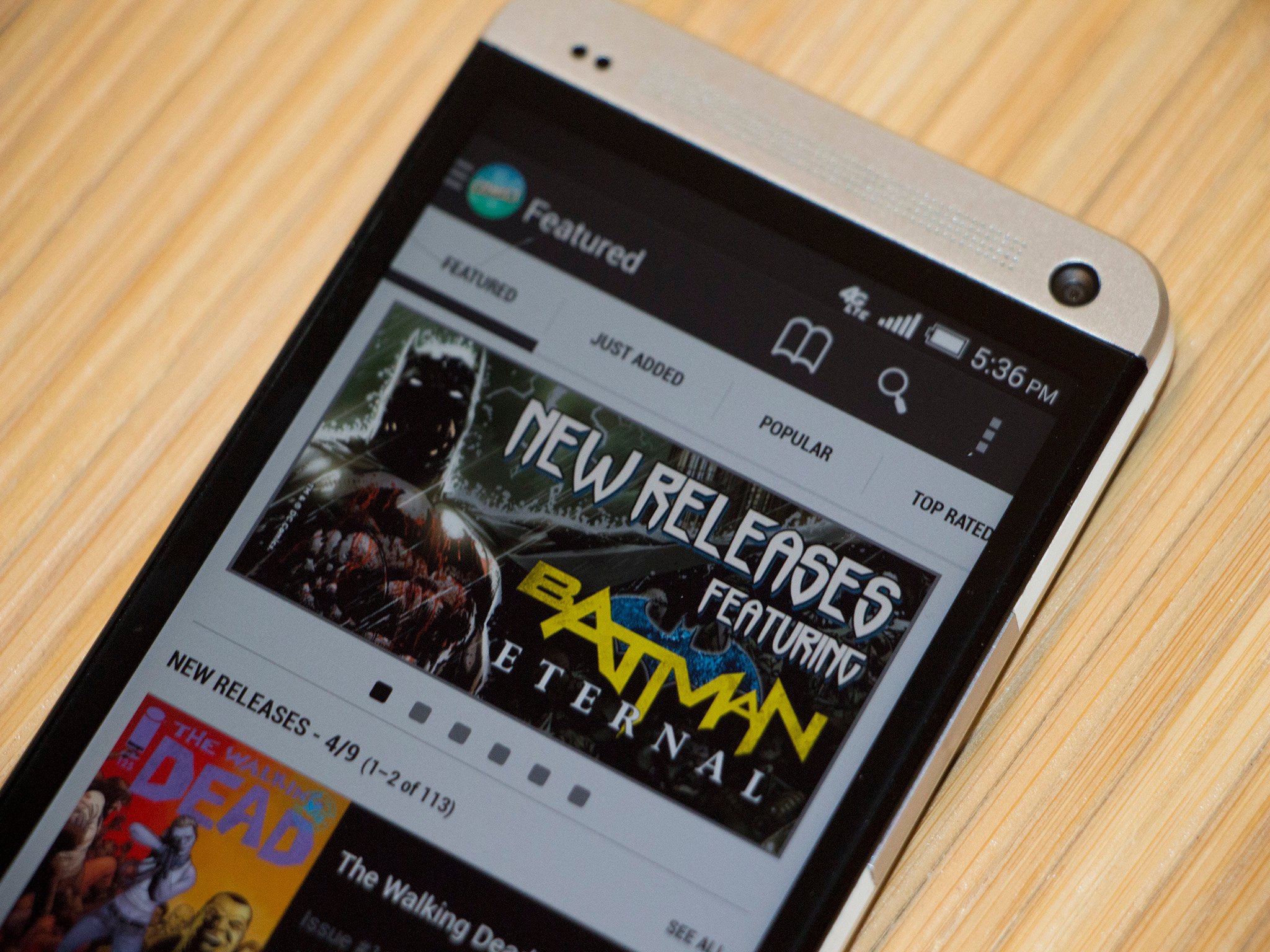
comiXology updates Android app following being acquired by Amazon

by Chris Parsons

Say goodbye to the in-app purchases you knew, and welcome Amazon's new method

If you're a comiXology user and been wondering if any changes to your account would come about due to Amazon acquiring the digital comic provider, we now know of at least one change. An update to the comiXology app for Android is now available on the Google Play store and it's one you're going to want to grab to ensure your comics still keep flowing.


26 Apr 22:46

RIAA to blame for impoverishment of artists it's using as human shield in anti-streaming lobbying

by Cory Doctorow
The RIAA and its captive collecting society Soundexchange are illegally lobbying for higher royalties from Internet streaming (despite the fact that companies like Pandora already give virtually all the money they take in to the labels), claiming that they're standing up for older artists. But, as Mike Masnick comprehensively establishes, these older artists have been impoverished by the RIAA, who "left them to rot" through abusive contracts, crooked accounting, and out-and-out theft.


26 Apr 21:44

Comixology removes in-app purchases to avoid paying fees to Apple

by Dante D'Orazio

It's about to get a bit more difficult to buy comic books from a mobile device. Comixology is replacing its iOS app today with a new version that removes the ability to purchase comics. The new app is solely a comic book reader, which means that you'll have to visit the company's website to purchase new comics. You can browse comics in the new app and download free comics directly, but paid comics can only be added to your wish list for later purchase online. As with the old app, previously purchased comics can be downloaded and synced directly from the app.

The change certainly isn't an improvement for iOS users, but it's clear why the change has been made: Apple's App Store policies demand that it receive a 30 percent cut of all...

Continue reading…

26 Apr 20:12

10 Awesome Minimalistic Math And Numbers Games For Android

by Rita El Khoury

math-numbers

While I don't consider myself a hardcore gamer, I do tend to get quickly addicted to casual math games. Give me a set of numbers, some form of logic problem to solve in a few seconds or more, and I can start round after round, often resulting in hours of continuous play. I have tried dozens of math games for Android and kept finding myself drawn toward the most minimalistic ones.

Done With This Post? You Might Also Like These:

10 Awesome Minimalistic Math And Numbers Games For Android was written by the awesome team at Android Police.


26 Apr 15:49

Top five Android phones: spring 2014

by Nick Sarafolean

Every quarter, or at least a rough approximation of a season, we like to bring you a list of our top Android phones, to help guide you in your quest for a new phone. For spring 2014, we’re happy to present you with our top five Android phones of the moment, as voted upon by the members of our staff. With each pick comes a short explanation as to why we love it, and buy links for all four major US carriers (when available), as well as an unlocked version. With that covered, let’s dive right in with number one!

_DSC0247

1. HTC One (M8)

Topping the list is HTC’s flagship for 2014, the HTC One (M8). With its premium metal design, gorgeous Sense software, and set of nifty features such as BoomSound, the HTC One (M8) climbed to the top of the pile to stand out as our number one phone for spring 2014. With availability across all four carriers, a developer edition, and a Google Play edition, the HTC One (M8) has most of the bases covered when it comes to availability. While some feel that the camera is a tad disappointing, that doesn’t stop the One (M8) from standing out from the crowd and making sure that it reigns supreme.

Verizon, AT&T, Sprint, T-Mobile, Unlocked

oneplusoneangle

2. OnePlus One

Regardless of the fact that we haven’t been able to get a full hands-on and review yet, the OnePlus One managed to sell us on its gorgeous design, high-powered specs, and commitment to great software through CyanogenMod. While OnePlus has yet to be tested in the mass market, it’s made some bold claims and we’re betting that it’ll stay true to them. That’s why the OnePlus One, even untested, manages to snag the number two spot on our list.

Since the OnePlus One isn’t really available yet (If you feel like trying to apply to smash your phone, by all means, go here), we don’t have any buy links.

Nexus 5 White

3. Nexus 5

Coming in at a respectable third place is the Nexus 5. While some may argue that the Nexus 5 has been out for a while, there’s no doubt that it’s still a great phone. Moreover, it’s the phone to have if you want a premier stock Android experience. Updates come straight from Google and you’ll never have to wait for them like everyone else. Aside from that, the Nexus 5 features a decent set of specs including an extremely color-accurate display. Regardless of its older age in comparison to many other devices on this list, the Nexus 5 is well deserving of the third spot on this list.

T-Mobile, Unlocked

Samsung Galaxy Note 3

4. Samsung Galaxy Note 3

In fourth place, we find Samsung’s third generation phablet that sets the precedent for all others. Like the Nexus 5, the Note 3 has been around for a bit. Yet, the Galaxy Note 3 continues to garner praise and respect from the tech community. Likewise, its large screen and top-shelf specs caught the attention of many of our staff who have fallen in love with the device and continue to recommend it, even if it has been available for a few months.

Verizon, AT&T, Sprint, T-Mobile, Unlocked

galaxys5reartopaam

5. Galaxy S5

The Galaxy S5 is actually one of our two fifth place phones, due to a perfect tie for fifth place. The Galaxy S5 features plenty of neat features and some practical ideas such as waterproofing and a certain level of ruggedization. It also has one of the best displays that we’ve seen on a smartphone. Unfortunately, the S5 didn’t make it higher on the list due to many of us feeling that the design is uninspired and bland. Another common complaint was the software, which brought up many comments about its cluttered nature and the fact that many of the design choices seemed exaggerated and slightly reminiscent of a toy phone. Nonetheless, nobody can deny that the Galaxy S5 has powerful internals and one of the best cameras on a smartphone, thus securing it a respectable fifth place.

Verizon, AT&T, Sprint, T-Mobile, Unlocked

We Are The RhoadsClient: Motorola

5. Motorola Moto X

The second of our two fifth place phones, the Moto X continues to make the list even after several months of availability. With a magical blend of simple software and hardware, the Moto X provides one of the best experiences found on a smartphone. While the specs are becoming a bit upstaged these days, the phone runs itself beautifully with the provided hardware. If you’re looking for a perfect mesh of hardware and software, look no further than the Moto X. As an added bonus, you have the option to customize the phone through MotoMaker. All of those added up to help the Moto X eek onto our top five list.

Verizon, AT&T, Sprint, Unlocked, MotoMaker

Hopefully this list will be of some help to you in your smartphone buying endeavors. As always, feel free to leave your list of the top five Android phones down in the comments section!

26 Apr 10:16

Zona is a Popcorn Time Beater and a Pirate’s Dream

by Andy

zonalogoPopcorn Time has had more than its fair share of press since it appeared earlier this year. The tale has enjoyed twists and turns in buckets, not to mention controversy and mystery.

The software was undoubtedly a game changer and the most simple and elegant way of downloading and viewing content using torrents. Nothing came close.

Except all along something else did – and then some.

Let’s not take anything away from it, Popcorn Time is pretty neat, but the software just introduced to TorrentFreak goes much, much further. It’s called Zona and could very well ignite an even bigger storm.

Zona hails from Russia but fear not, its 27mb installer appears in standard English. Getting the thing working is child’s play too, just make sure it’s being allowed through your firewall after setup. If users want it to become their standard torrent downloader that option is available too, but advanced users will probably prefer the flexibility of their regular client.

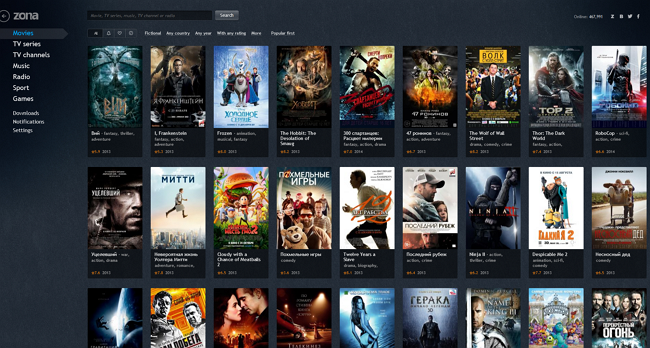
Once setup is complete, users are presented with the following screen, movies up first. Much of the artwork depicted is pulled from Russian sources, so for non-speakers a reliance on movie covers will be required. If that fails, directly under each movie is the title in clear English.

Zona1movies

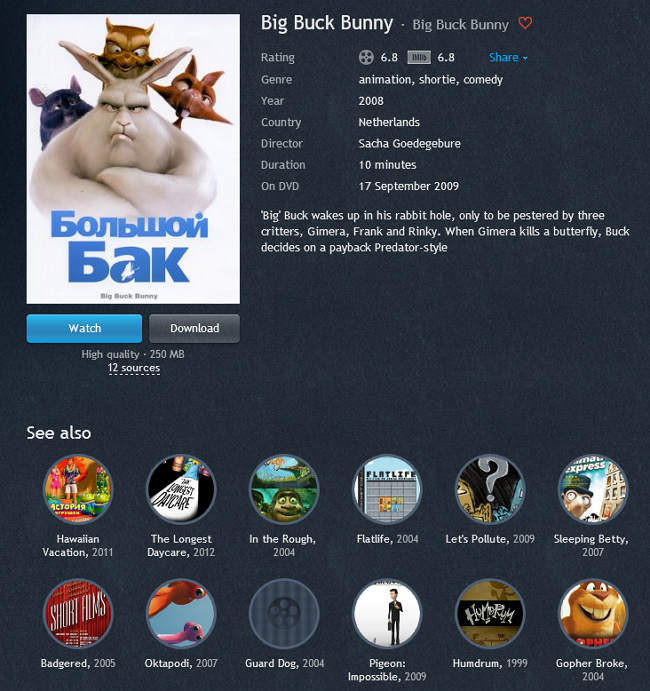
Click those titles and new page will appear, detailing everything people might want to know about the movie including its date of production, iMDb rating, genre, actors (including photos), runtime, and other sundry details. Here’s the page for the Creative Commons movie, Big Buck Bunny.

BigBuck

When selecting a movie a choice can be made – to stream Popcorn Time-style, or to download to the PC like a regular torrent client. If the former is chosen there is a wait of between a few seconds and a minute while enough buffering takes place. The movie is first presented in a small non-intrusive window in the left corner of the app, but this can be expanded to any size, including full screen.

Zonaplayer

Eagle-eyed viewers will note the ‘audio and subtitles’ text on the bottom right of the window above. This enables switching between English and often Russian audio, plus the toggling of various subtitles.

While Popcorn Time was restricted to content indexed on YTS, Zona has no such limitation. The app appears to have access to many, many thousands of movies pulled from torrent sites around the web. It is not clear where, but random searches hardly ever fail to turn up the required content although sometimes playback can hesitate, possibly due to lack of seeds. That said, a database of 500,000 torrents should be more than enough.

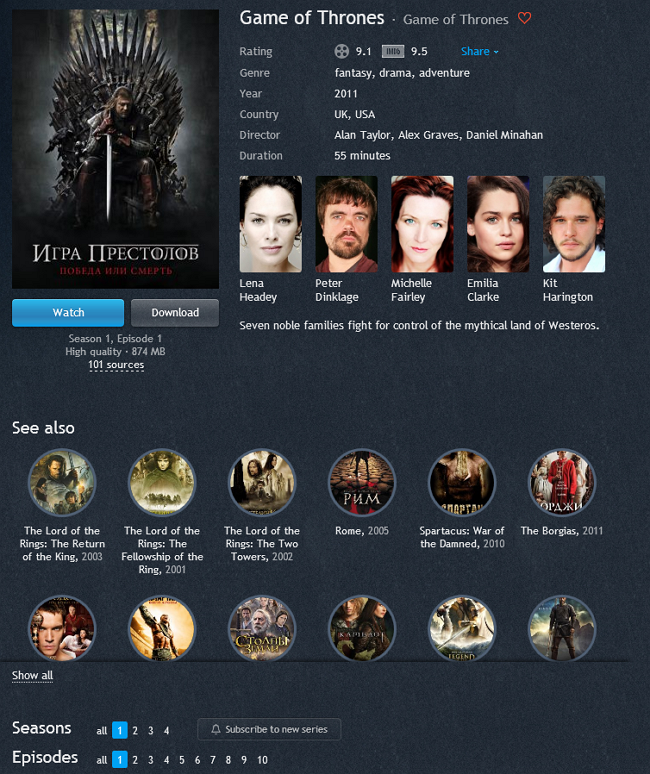
Zona is no slouch on the movie front, but it isn’t done yet. The software also caters to the TV fan and does it with never-seen-before flair. After selecting ‘TV’ from the list on the left, Zona presents TV shows in the same way as it does movies. However, when clicking through to the details screen one can see how it excels, with options to select any series and any episode. Since it’s topical, here’s how the page looks for Game of Thrones.

zona-got

Just below the recommended additional viewing graphics, one can see options to select a series and episode. Clicking on those brings up all of the sources, usefully filtered by video quality. Also on offer is a “subscription” feature, which allows people to subscribe to a series ‘Tivo-style’, leave the software running, and have the content appear when a new episode is released.

Another trick up Zona’s sleeve is its ability to steam live TV from a selection of built in channels. While many are Russian, there are plenty of English language channels too. Covering everything from news, to light entertainment to documentaries, it’s also particularly strong in sport, with free access to UK premium channels including all Sky Sports and BT Sport channels.

After ticking every box on the video front, Zona goes one step further by streaming music too. Users need to quickly sign up for a VK.com social networking account first, but after that almost every track one can think of will become available in the software.

Conclusion

Overall, it’s hard to fault Zona. It looks great and works nearly as well. There’s a huge range of content spanning movies, TV shows and music, and no other app that we’re aware of has as many options and features. It’s not open source, at least that we can see, so one up for Popcorn Time there. But it can stream to DLNA-enabled TVs, so that might balance things up a bit.

Oh, and you can filter out the adult content if kids are around. We did mention it does porn as well, didn’t we? No? That means we probably forgot to mention the Android version too.

Zona can be downloaded from its homepage, or directly here.

Source: TorrentFreak, for the latest info on copyright, file-sharing and anonymous VPN services.

26 Apr 10:15

Through the Google lens: search trends April 18-24

by Emily Wood
From Lupita topping the People 50 to LaMarcus dropping 46, it’s time to look again at the top trending items on Google Search.

The games we play
The NBA and NHL playoffs both kicked off in earnest this week, and searches for hockey and basketball topics lit up the scoreboard. In fact, the Chicago Blackhawks occupied a post in Google’s Hot Searches list every day but one since last Friday. The defending Stanley Cup champions are playing a tight (and, as of Wednesday, tied) series against the St. Louis Blues; they also drew controversy this weekend when stories emerged of the Blackhawks taunting Blues captain David Backes after a hit that got the Hawks’ Brent Seabrook suspended.

In the NBA, it was all about the big plays. Searches for the OKC Thunder’s Kevin Durant peaked after he made a ridiculous four-point play while (and I don’t use this word lightly) literally falling out of bounds on Tuesday. The last time Durant came close to this level of search interest was on January 30, after a 12-game 30+ point scoring streak. And the Portland Trail Blazers’ LaMarcus Aldridge was on fire on the court and on Google, scoring more than 40 points in his team’s first two playoff games against the Houston Rockets… on the road—making him one of only three players ever to do so. On a more somber note, searches were also high for longtime sideline reporter Craig Sager, who revealed on Sunday that he has been diagnosed with acute myeloid leukemia.
Moving to the diamond, [pine tar] was the top searched topic overall on Wednesday after Yankees’ starting pitcher Michael Pineda was caught red-handed (and sticky-necked) using the substance, a violation of MLB rules, while elsewhere in the American League the Angels’ Albert Pujols hit his 500th career home run. And during Monday’s Boston Marathon (a trending topic both this week and last), Meb Keflezighi became the first American to win the race in more than 30 years, making him a “breakout,” with nearly 1,000% increase in search interest over the last year on Google Search.

Stranger than fiction
Alongside searches for Easter and Earth Day, there were a few unconventional celebrations this week. Dyngus Day, a Polish-American holiday taking place on Easter Monday and similar to Poland’s Śmigus-Dyngus and Hungary’s Vízbevető, was a top topic in search on Monday (O.K., so it wasn’t the top topic, but it was top of mind for many). Traditionally celebrated by boys throwing water over girls, in the U.S. Dyngus Day celebrations include parades, traditional foods and polka music. Whatever its origins, interest in Dyngus Day has been growing steadily the past two years since barely registering on Search in 2012.

What the… powdered alcohol?! That’s what some people were thinking when they searched for [Palcohol], a powder that turns water into alcoholic drinks. It was approved by U.S. regulators earlier in the month, but this week the decision was rescinded. And when a 15-year-old boy caught a ride from San Jose, Calif., to Hawaii in an airplane wheel well, stunned searchers came to Google looking for images of wheel wells to understand how someone might survive such a feat—especially without the beverage cart.
Posted by Emily Wood, Google Blog Editor, who searched this week for [chekhov gun first act] and [hedgehogs in costumes]
26 Apr 09:40

State Dept launches 'Free the Press' campaign while DOJ asks Supreme Court to force NYT's James Risen to jail

by Trevor Timm
110224_risen_ap_605

The US State Department announced the launch of its third annual "Free the Press" campaign today, which will purportedly highlight "journalists or media outlets that are censored, attacked, threatened, or otherwise oppressed because of their reporting." A noble mission for sure. But maybe they should kick off the campaign by criticizing their own Justice Department, which on the very same day, has asked the Supreme Court to help them force Pulitzer Prize winning New York Times reporter James Risen into jail.

Politico's Josh Gerstein reports that the Justice Department filed a legal brief today urging the Supreme Court to reject Risen's petition to hear his reporter's privilege case, in which the Fourth Circuit ruled earlier this year that James Risen (and all journalists) can be forced to testify against their sources without any regard to the confidentiality required by their profession. This flies in the face of common law precedent all over the country, as well as the clear district court reasoning in Risen's case in 2012. (The government's Supreme Court brief can be read here.)

Associated Press reporter Matthew Lee commendably grilled the State Department spokesman about the contradiction of its press freedom campaign and the James Risen case at today's briefing on the State Department initiative, repeatedly asking if the government considers press freedom issues in the United States the same way it does aboard. The full transcript is below.

As Gerstein noted, "The Justice Department brief is unflinchingly hostile to the idea of the Supreme Court creating or finding protections for journalists," and if the Justice Department succeeds "it could place President Barack Obama in the awkward position of presiding over the jailing of a journalist in an administration the president has vowed to make the most transparent in history."

The government does mention it is working with Congress to craft a reporter's shield bill, which should give you some indication that the proposed bill is at best a watered-down, toothless version of what many courts have offered journalists for decades, and that would be no help to James Risen—the exact type of reporter that we should be attempting to protect the most. It's important to remember that in Risen's case, the government has previously analogized reporter's privilege to a criminal receiving drugs from someone and refusing to testify about it.

We'll have more on both the shield law and the Risen case soon, but it's clear that the US government still refuses to walk the walk when providing journalists the protections it says it believes in.

Oh, and while we're on the subject, maybe the State Department can use its "Free the Press" campaign to put pressure on one of its staunchest allies, the United Kingdom, which is using terrorism laws to suppress acts of journalism—something the State Department has condemned many times in the past.

Here's the full interaction between the AP's Matthew Lee and the State Department spokesperson Jennifer Psaki on James Risen and US press freedom at today's State Department briefing:

JENNIFER PSAKI: One more announcement for all of you: With World Press Freedom Day around the world on May 3rd, the department will launch its third annual Free the Press campaign later this afternoon in New York at the U.S. U.N. mission. Beginning on Monday and all of next week, we will highlight emblematic cases of imperiled reporters and media outlets that have been targeted, oppressed, imprisoned or otherwise harassed because of their professional work. The first two cases will be announced by Assistant Secretary -- Assistant Secretary Tom Malinowski later at the -- at U.S. U.N. And we invite you of course to follow Tom at Twitter, who has -- on Twitter who, as you all know, was just confirmed several weeks, @Malinowski and to keep up with human rights issues on DRL's website.

With that --

Q: Sure. Just on that, reporters who are, what, harassed? I'm sorry --

MS. PSAKI: Targeted, oppressed, imprisoned or otherwise harassed.

Q: Otherwise harassed. Does that include those who may have been targeted, harassed, imprisoned and otherwise whatever by the United States government?

MS. PSAKI: I'm --

Q: No?

MS. PSAKI: I think you're familiar with our Free the Press campaign, Matt, but --

Q: Fair enough. So it does not include those who might have been harassed by --

MS. PSAKI: We highlight, as we often do, where we see issues with media freedom around the world.

Q: Right, I understand. But you would say that you don't -- the U.S. does not believe that it has a problem with press freedom, or if it does, that it's not nearly as severe as the problems in other countries.

MS. PSAKI: We do not. I think we can look at many of the problems --

On media press freedom?

Oh. Go ahead. And then we'll go to you, (Paul ?).

Did you have another question on media press freedom, or --

...

Q: If I could just go back to the overall, in general, the administration does not regard attempting to prosecute American journalists as an infringement of press freedom?

MS. PSAKI: I'm not sure which case you're -- what you're referring to.

Q: Well, there's several cases that are out there right now. The one that comes -- springs to mind is the James Risen case, where the Justice Department is attempting to prosecute. I just want to be clear. I'm not trying to --

MS. PSAKI: Well, Matt, I --

Q: I just want to know if you regard that as an infringement on press freedom or not. And I suspect that you do not, but I want to make sure that that's the case.

MS. PSAKI: As you know, and I'll, of course, refer to the Department of Justice, but the leaking of classified information is in a separate category. What we're talking about here, as you all know and unfortunately we have talk about on a regular basis here, is the targeting of journalists, the arrests, the imprisonment for simply exercising their ability to tell the story.

Q: Right. I understand that. And we're all, I'm sure, myself and all my colleagues, we're very appreciative of that.

But the reporters in question here have not leaked the information; they simply published it. So is it correct, then, that you don't believe -- you don't regard that as an infringement of press freedom?

MS. PSAKI: We don't. I don't have anything more to say on that case.

Q: OK.

MS. PSAKI: Do we have a new topic?


25 Apr 23:47

The Honey Hunters of Nepal

by Xeni Jardin
Photo: Andrew Newey.


Photo: Andrew Newey.

Here's a stunning series of images by photographer Andrew Newey of Nepalese honey hunters. Newey spent two weeks among the Gurung ethnic group in central Nepal, documenting their traditional beekeeping practices.

High in the Himalayan foothills of central Nepal Gurung honey hunters gather twice a year, risking their lives to harvest the honey from the world’s largest honeybee. For hundreds of years, the skills required to practise this ancient and sacred tradition have been passed down through the generations, but now both the number of bees and traditional honey hunters are in rapid decline as a result of increased commercial interests and climate change.

Photoset: andrewnewey.com. You can buy matted prints.

The Guardian ran some of the images back in February, with some descriptive captions that help you understand what the hunters are doing.

In the image shared here, you can see a hunter using two simple tools: a handmade rope ladder, and a pair of long sticks called tangos. Most of the honeybees' nests are situated on steep cliffs.


25 Apr 20:24

The Always Up-to-Date Guide to Streaming Blocked Content Overseas

by Thorin Klosowski

The Always Up-to-Date Guide to Streaming Blocked Content Overseas

Regardless of which end of whatever pond you’re on, region blocked content is annoying. Whether you’re an ex-pat looking to watch reruns of The Wonder Years, or you’re hankering for a dose of Dr. Who, here’s the best (and easiest) way to get that content.

One of the big problems with streaming content overseas (or from an overzealous college campus that blocks everything) is that the landscape for doing so changes a lot. Just a few years ago you had to jump through a lot of hoops, but in most cases it’s now as simple as a using an extension or web service. First, let’s look at our favorite way of getting to the bulk of online content. Then, we’ll look at the alternatives that give you access to just about anything you want.

Update 5/29/2015: We no longer recommend Hola Better Internet, after the discovery that they sell your bandwidth to essentially run a botnet for hire.

The Easiest Method for Desktop and Mobile: TunnelBear

The Always Up-to-Date Guide to Streaming Blocked Content Overseas

As we learned from Hola Better Internet, you’re much better off paying for a VPN service than trying to find a free one. To that end, we like TunnelBear because it’s cheap, supports a variety of devices, and is incredibly easy to set up.

As far as desktop apps are concerned, TunnelBear has apps for PC, Mac, and a Chrome extension that you can route your traffic through. Once you’ve signed up for an account and install the app, switching between countries to access the internet from is dead simple. Just launch the app, select the country you want to access the internet from, and TunnelBear does the rest.

In terms of pricing, TunnelBear is in line with other options out there. Each month, you get 500MB of free data. If you need more, TunnelBear offers unlimited data for $4.99/month (or if you prefer to save a little by paying in bulk, $49.99/year) on three computers or mobile devices. It does more than just change your country too, it works as a VPN does, blocks trackers, allows for private browsing, and more.

Steaming blocked content to your Android and iOS devices is a little trickier, but it’s still doable. Once you sign up for TunnelBear and install the app on your mobile device, just tap the “Country” button on the main page, and change it to where you’d like to access the internet from. Once you do, TunnelBear installs a custom profile, and all your internet traffic goes through servers in those countries. On mobile, that means you can access these servers through their web sites or through their apps. The whole process takes about 20 seconds to get working and it’s easy to turn off when you don’t need it. If you only plan on using TunnelBear on mobile, there’s a cheaper mobile-only pricing plan ($2.99/month) that you can purchase from the app itself.

For Set Top Devices: Unblock-Us

Unblock-Us has been our pick for the best way to access the Olympics every time, because it’s cheap, easy to set up, and works on basically any device that accesses your router. That means that any device you have—whether that’s a Roku, PS4, or whatever else—can get access to overseas content. The setup process is a little different for each device, but they have guides for pretty much everything you could possible want to connect. Unblock-Us has a massive list of supported services and constantly updates with guides to unblock current programs (like removing blackouts during the NHL playoffs).

Unblock-Us will run you $4.99/month, but you can check out a week long trial to make sure it works for you. You have a lot of options in this space, but Unblock-Us easily takes the cake on the number of devices it supports and solid customer service.

Alternative Methods

You have a lot of options for streaming blocked content, and depending on where you are and what services you want to access, some other methods are better than others. Here are a few more great options to choose from.

  • Proxmate: If you’re from outside of the U.S. and only gunning to unblock a couple of choice U.S. services, the previously mentioned ProxMate is another option. After you install the extension, you’ll get access to Pandora, Google Play, YouTube, and others no matter where you are, but you’ll need to pay for premium access to sites like Netflix and BBC. You’ll need to manually install the extension in Chrome, but once it’s installed you’re good to go.
  • Use Any VPN You Want: Another option is to set up a VPN to reroute your traffic through servers in other counties. Any VPN will do (although you might want to stick with one of these five). If you subscribe to a Usenet service like GigaNews, you might even get a VPN for free as part of the package. This keeps your data a lot more private than the above services, but it will likely slow down your connection.
  • Hotspot Shield: Hotspot Shield works just like TunnelBear, but isn’t quite as dead simple to use. If you’re not a fan of TunnelBear for whatever reason, Hotspot Shield is a great alternative.
  • Set up a Proxy Server: If a browser extension is more your style then using a proxy service is easy enough. The speeds won’t be that great, but it’s easy to shut off when you’re done. You can also try the Tor browser for a few more options.
  • Media Hint: Media Hint is an extension for Chrome and Firefox that automatically unblocks content you come across on Hulu, Netflix, Pandora, and Rdio. Unfortunately, it’s no longer available directly in the Chrome Store, so you’ll have to manually install it.

This should give you access to pretty much any region blocked streaming content out there for right now. As other services pop up we’ll give them a shot and update when something simpler (or more encompassing) comes along.

Photos by AdrianNunez and Kentoh.

25 Apr 20:23

Reclaim Dropbox Space By Migrating Your Photos to Another Service

by Whitson Gordon

Reclaim Dropbox Space By Migrating Your Photos to Another Service

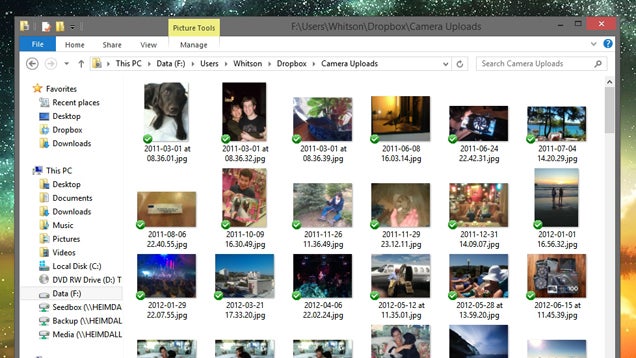
You can get all the free space you want, but your Dropbox can fill up fast. If photos are the problem, there's a simple (and somewhat obvious) solution: Use another auto-upload service instead.

Tony Hue over at LonePlacebo runs through a number of tips on freeing up Dropbox space. After running a hard disk analyzer, he found the "Camera Uploads" folder was taking up a massive amount of space. There's a lot you can do to fix that—like shrink the images or delete some photos—but the easiest one would be to just use a different service that provides the same auto-upload feature. Flickr's mobile app, for example, has a similar auto-upload feature, but gives you 1TB of free space, which is a lot better than Dropbox.

If photos are the main culprit in your Dropbox, switching to another service might be a good idea. Hit the link for more Dropbox-freeing tips.

How to Reclaim Dropbox Storage Space | LonePlacebo

25 Apr 17:03

Find Out If You're Sleep Deprived with This One-Minute Video

by Melanie Pinola

A consistent lack of sleep wreaks havoc on your body and brain. Want to quickly test if you're not getting enough sleep? Hit play on this video.

Besides the test in the first part of the video, In 59 Seconds' Richard Wiseman points out three clues you might be sleep deprived: needing to wake up with an alarm, falling asleep within five minutes of lying down, and relying on caffeine to get through your day. Falling asleep quickly is the most surprising one (since many of us would love to fall asleep faster), but the point is probably that if you're always asleep as soon as your head hits the pillow, you're likely dead tired all the time and should get more rest.

The Sleep Test | YouTube via Digg

25 Apr 17:02

International Galaxy Note II (GT-N7100) Finally Starts Receiving Update To Android 4.4

by Bertel King, Jr.

GalaxyNoteII-ThumbKitKat has started to come to the international variant of the Galaxy Note II. As SamMobile has reported, the update is currently available to users in France. It's an official build available through Kies, with no word yet on when an OTA is scheduled to go out. When it does, it should hit other regions as well. The update bumps the software version up to N7100XXUFND3.

NoteII1 NoteII3 NoteII2

This update includes the goodies that come with Android 4.4, such as white status bar icons, a camera icon on the lock screen, and wireless printing.

Done With This Post? You Might Also Like These:

International Galaxy Note II (GT-N7100) Finally Starts Receiving Update To Android 4.4 was written by the awesome team at Android Police.


25 Apr 14:44

38 Pet Photos to Amaze and Inspire You

by Darlene Hildebrandt

We’ve been focused on nature and landscape for a while on dPS so it’s time to shift gears and move over to the fauna, specifically – pets. If you have any pets you no doubt have endless photos of them. I have tons of photos of my cats on my iPhone. But let’s take it up a notch and see some really outstanding pet photos and see how it’s done. I might even motivate myself to get out the “real” camera and take some photos of my girls.

NOTE: if you’d like to learn how to take great pet photos check out this mini-guide – SnapnPets.


The post 38 Pet Photos to Amaze and Inspire You by Darlene Hildebrandt appeared first on Digital Photography School.

25 Apr 14:44

YouTube Mix Has Been Enabled On Android

by Ryan Whitwam

yOne of the biggest uses for YouTube is listening to music, and it's getting a bit more convenient to do that on Android today. YouTube Mix came to the desktop last year, but someone just threw the switch to enable it on Android. Simply search for an artists and rock out.

2014-04-25 13.55.47 2014-04-25 13.56.13 2014-04-25 13.56.58

YouTube Mix is essentially an auto-generated playlist of an artist's most popular videos on YouTube. It seems to be mostly pulling up Vevo content for established acts, but the videos can be pulled from any account.

Done With This Post? You Might Also Like These:

YouTube Mix Has Been Enabled On Android was written by the awesome team at Android Police.


25 Apr 14:42

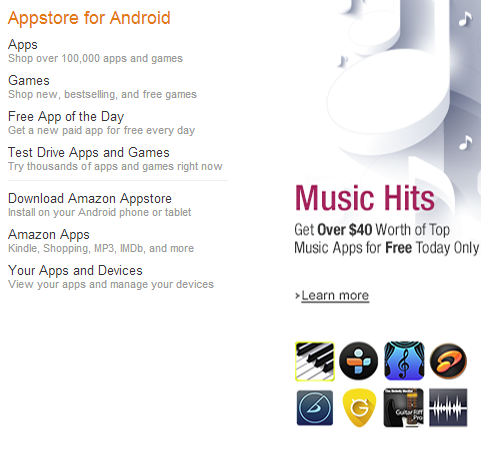
Over $40 In Free Music Apps Today On Amazon, Including Shazam Encore And TuneIn Radio Pro

by Cameron Summerson

1

Amazon has stayed true to its promise to offer a "premium" app of the day for free every day since the launch of its Appstore. On occasion, it has even offered multiple apps, best-of apps, or apps that are tangentially related in one way or another. Today, Amazon is offering a pretty cool bundle that revolves around music – music creation, discovery, listening, etc. There are some well-known titles in this bundle, too, like Shazam Encore and TuneIn Radio Pro, just to name a couple.

Done With This Post? You Might Also Like These:

Over $40 In Free Music Apps Today On Amazon, Including Shazam Encore And TuneIn Radio Pro was written by the awesome team at Android Police.


25 Apr 13:49

Microsoft morphs into a hardware giant with closure of Nokia deal

by Tom Warren

Microsoft is no longer just a software giant, it’s now a hardware giant.

Nearly eight months after its original announcement, Microsoft has completed its deal to purchase Nokia's devices and services unit today. Microsoft will pay €3.79 billion for Nokia's phone making business, plus another €1.65 billion to license its portfolio of patents. That's a total of around €5.44 billion (around $7.2 billion), a lot less than the $8.5 billion Microsoft paid for Skype back in 2011. Nokia expects the total transaction price will be "slightly higher," and the company plans to provide full details next week during its financial results. The deal sees Microsoft take control of more than 90 percent of all Windows Phones with Nokia's Lumia lineup, and...

Continue reading…

25 Apr 13:47

Hulu Blocks VPN Users Over Piracy Concerns

by Ernesto

hulu-barbedFree and legal streaming services such as Hulu have been proven to slow down piracy rates in the United States.

At the same time, however, they also created a new problem. With a relatively cheap VPN subscription, people from all over the world can connect to the site via a U.S.-based IP-address and bypass its geographical restrictions.

In an effort to deal with these unauthorized users, Hulu has started to block visitors who access the site through an IP-address that’s linked to a VPN service. This blockade also applies to hundreds of thousands of U.S. citizens.

Hulu’s blocklist was implemented this week and currently covers the IP-ranges of all major VPN services. People who try to access the site through one of these IPs are not allowed to view any content on the site, and receive the following notice instead.

“Based on your IP-address, we noticed that you are trying to access Hulu through an anonymous proxy tool. Hulu is not currently available outside the U.S. If you’re in the U.S. you’ll need to disable your anonymizer to access videos on Hulu,” the notice reads.

Hulu Blocked for VPN users
hulu-vpn

The sudden blockade hasn’t been announced publicly by Hulu, but it’s clear that the service wants to lock out all foreign users. The main reason for this is most likely to please TV networks and movie outlets.

Previously, entertainment industry sources in Australia complained bitterly that “VPN-pirates” were hurting their business, as tens of thousands of potential subscribers were using the U.S. version of Netflix.

However, the problem with Hulu’s blanket ban on VPN services is that U.S. citizens are forced to give up their privacy as well. They can still watch Hulu, but not securely. TorrentFreak has contacted several providers, who dealt with dozens of complaints on this issue yesterday.

VikingVPN was one of the first to notice the change, and TorGuard and Private Internet Access have been dealing with the fallout too. The latter is currently engaged in discussion with Hulu hoping to find a solution.

“Private Internet Access exists to protect the privacy of netizens everywhere. Many of our customers leave their Private Internet Access accounts enabled 24/7/365. It is unfortunate that Hulu is blocking VPN service IPs,” Andrew Lee, CEO of Private Internet Access told TF.

“We have an existing relationship with Hulu and are reaching out to them directly to see what we can do about fixing this issue,” Lee adds.

VikingVPN is disappointed with Hulu’s decision as well, and rightfully points out that the streaming service could at least implement SSL to protect the privacy of its visitors.

“We’re upset that our users would have to disconnect from our service in order to access Hulu. We encourage users to remain connected in order to guard their privacy, 24/7. Hulu could mitigate a small portion of this concern if they would at least implement SSL on their website,” VikingVPN’s Micah Greene tells TorrentFreak.

TorGuard informs us that not all of their shared IP-addresses have been blocked yet. When this happens, they plan to role out more dedicated IPs which are likely to remain undetected.

“In the event of wide-spread IP blocking a quick fix for the problem is to use a dedicated VPN IP. This ensures that no other user on the network has registered an account under that same IP address,” TorGuard’s CEO Ben Van Pelt informs TF.

“TorGuard has thousands of dedicated IPs on hand in our US locations and we’ve already seen an increase in purchases for this add-on today,” Van Pelt adds.

The above makes it clear that there may be ways to circumvent the Hulu blockade, so U.S. citizens can still keep their VPN connection alive while watching.

However, it’s clear that Hulu is taking a stand against foreign “pirates” who use their service without permission.

Source: TorrentFreak, for the latest info on copyright, file-sharing and anonymous VPN services.

25 Apr 13:46

Top 10 new Android games this week: Bomb Buds, Microtrip, XCOM

by Steve Raycraft

Welcome back to Android Gaming Weekly, our weekly recap of new game releases. We still plan to cover upcoming releases and games we’re playing, but this column is dedicated to new games that you can start playing right now. Check out our top picks and let us know in the comments section if you have any suggestions for next week’s post.

Kosmik Revenge

Description: Defend the galaxy with Kosmik Revenge, a fast paced space shooter inspired from classic shoot’em ups and updated with challenges, social features and advanced graphics, all at your fingertips.


Bomb Buds

Description: Battle other players in an all-out war in BOMB BUDS, a brand-new action game! Your tiny garden warriors shoot weapons out of their heads with explosive results. Red Buds, Blue Buds, Robot Buds and Kitty Buds go “KA-BLOOM!” with over 12 crazy weapons. Pick your Buds and get in on the action!


Abyss Attack

Description: Pick your submarine and use weapons and power-ups to tear through relentless creatures like you’ve never seen before and battle against giant bosses! Create rare and epic Relics to enhance your submarine’s stats and give you a fighting edge against the sea’s monsters.


One For Eleven

Description: One For Eleven is a football management game where millions of users from all over the world recruit real football players, create their own teams and compete against each other in a PvP environment.


XCOM: Enemy Unknown

Description: Threatened by an unknown enemy, Earth’s governments unite to form an elite paramilitary organization known as XCOM. As the commander of XCOM, you must create a fully-operational base, research alien technologies, plan combat missions and lead your soldiers in fierce battles against a terrifying alien invasion.


Microtrip

Description: Microtrip is a physics arcade game set inside the body of a strange creature. Its unique soft-body physics and  procedural generated levels make the game different and challenging every time you play.


Fusion Two 2048 Fruit Puzzle

Description: The ever so popular 2048 puzzle game and its serious design has been transformed to include lovely fruit characters that are ready to make you smile!


Pororo Penguin Run

Description: Run, jump and fly your way across Pororo’s delightful world, collecting stars and coins along the way! Join the adventure for free today! Brought to you by an award-winning team.


Smash Bandits Racing

Description: Smash everything. Well, almost. Whichever route you take through an ever-changing world of dirt tracks and dusty logging towns, you can crash and bash your way through smashable scenery in the most intense display of destruction you have ever seen.


Astro Emporia

Description: Astro Emporia is a casual turn-based space trading game. You have a limited amount of turns to make as much profit as you can. To do this, you buy resources and sell them at different planets in an attempt to make a profit.


25 Apr 13:44

EE hits 200th town milestone in UK 4G rollout

by Rich Edmonds

EE has today announced hitting a new milestone in the rollout of 4G LTE across the UK. The mobile operator has added the 200th town to its supported list, bringing the total coverage to a reported 72 percent. The residents of Rhyl, Wales recently had their LTE connection switched on alongside 12 other locations. The network began rolling out upgrades throughout the UK back in 2012.


25 Apr 13:38

Learn Websites' Keyboard Shortcuts With "?"

by trappleton on Hackerspace, shared by Whitson Gordon to Lifehacker

Learn Websites' Keyboard Shortcuts With "?"

Keyboard shortcuts have become widely adopted by many major web services, but you might not know about them. Luckily for you, there's a quick way to check.

Many of these keyboard shortcuts follow a casual standard. J and K, for instance, usually show you the next or previous post in a series. Some of the more esoteric ones, however, might need to be pointed out for you — and that's exactly what the "?" key will do in most cases. (The cheat sheet for Gmail, above, is practically encyclopedic, and you can customize them with Labs' "custom keyboard shortcuts.")

Start hitting the question mark key on your favorite websites, and you'll often be pleasantly surprised! It seems like all of Google's web services offer keyboard shortcuts; Twitter, Facebook, and Feedly do, as well. Tumblr offers some hotkeys, but strangely, the question mark key does not unveil their secrets. If I've missed any other big ones, sound off!

24 Apr 22:58

Most Popular Text Editor: Notepad++

by Alan Henry

Most Popular Text Editor: Notepad++

A good text editor comes in handy when you're making quick notes, doing checklists, programming, outlining, or doing just about anything else. Last week we asked you for your favorites, then looked at the five best text editors. Now we're back to crown the community favorite.

Most Popular Text Editor: Notepad++

Voting was tight—really tight—the whole time the poll was open, but Notepad++ took the top spot with close to 40% of the overall vote. It may be Windows only, but it's fast, flexible, feature-packed, and completely free.

Hot on its heels in second place was the cross-platform, extremely powerful Sublime Text, which powered through the call for contenders but came up just a little shy in the voting round, picking up about 33% of the overall vote. Behind it in third place with just shy of 20% of the votes cast was Vim (and its iterations). Fourth place went to the venerable Emacs, with 7% of the vote, and Atom, the new project from the folks at GitHub, picked up 2% of the vote and brought up the rear.

To read more about all of these and the honorable mentions not listed here, head back to the full Hive Five feature for more.

The Hive Five is based on reader nominations. As with most Hive Five posts, if your favorite was left out, it didn't get the nominations required in the call for contenders post to make the top five. We understand it's a bit of a popularity contest. Have a suggestion for the Hive Five? Send us an email at tips+hivefive@lifehacker.com!

24 Apr 20:03

US Copyright Law Doesn’t Apply Worldwide,”DVD Ripper” Tells Court

by Ernesto

dvdfablogoAACS, the decryption licensing outfit founded by a group of movie studios and technology partners including Warner Bros, Disney, Microsoft and Intel, launched a crackdown on DRM-circumvention software earlier this year.

In the most prominent action AACS sued the makers of popular DVD ripping software DVDFab. Last month it won a preliminary injunction based on the argument that the “DVDFab Group” violates the DMCA’s anti-circumvention clause, since their software that can bypass DVD encryption.

The injunction barred the Chinese-based DVDFab from distributing its software in public, by allowing AACS to order the seizure of its domain names. In addition, the company’s social media accounts were blocked and bank funds frozen.

DVDFab initially did not respond to the court, so the order was entered by default. However, after the injunction was issued the company responded in the name of Feng Tao, with a request for the court to revise its earlier judgment.

The company informed the court that the injunction is too broad, as it basically shuts down the entire operation based on U.S. law. The anti-circumvention provisions the injunction is based on don’t apply worldwide, they argue.

“It is well-established that the Copyright Act doesn’t apply extra-territorially,” the company notes.

dvdfab

Since DVDFab’s domain names and bank accounts were seized the injunction also blocks DVDFab’s business in other countries, which goes too far according to the lawyers.

“For example, shutting down the DVDFab domain names and enjoining the payment processors prevents defendant Feng Tao from using such domain names and payment processors for sales of unrelated products, and for sales of DVDFab products outside the United States,” they note.

For this reason DVDFab asks the court to amend the injunction so it only applies to the United States. This would require the return of seized domain names and social media accounts, plus the lifting of payment processing restrictions.

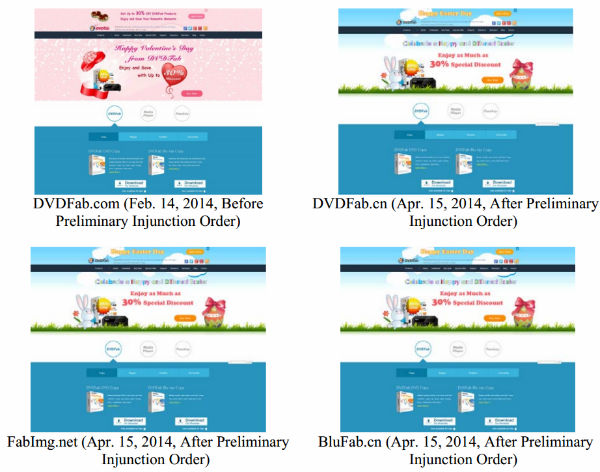
In a response, AACS points out that DVDFab has violated the preliminary injunction from the start. The company immediately registered several new domain names that are not under U.S. control, and continued business as usual. DVDFab also allegedly launched a new “BluFab” brand under which it sells copies of its DVD ripping software.

dvdfabchange

Even more controversially, AACS claims that a DVDFab representative threatened them in an attempt to settle the issue. A person named “Frank” contacted an AACS lawyer and offered an “exclusivity delay” with all major circumvention software makers, if AACS agreed to lift the domain name seizures. If AACS declined this offer, DVDFab would give away its software for free, the company allegedly said.

“Frank said that DVDFab was the largest circumvention software maker and it could align all other major circumvention software makers to allow AACS LA a one to three weeks exclusivity delay on introducing circumvention software in exchange for AACS LA restoring the DVDFab Websites and business.”

“Frank stated that if AACS LA refused the deal, DVDFab Defendants would distribute the software for free, thereby rendering AACS LA irrelevant,” AACS lawyers adds.

AACS further points out that the scope of the injunction isn’t too broad at all. According to the company, the Copyright Act allows for such measures in cases where the actions of a foreign business are “felt within the United States.”

It’s now up to the court to decide who’s right in this case.

For the time being, all U.S.-controlled DVDFab domain names, social media accounts and payment processing services remain unavailable. However, the software maker is still operational through several new domains, which can be easily found through Google and other search engines.

Source: TorrentFreak, for the latest info on copyright, file-sharing and anonymous VPN services.

24 Apr 19:53

Google+ boss Vic Gundotra is leaving the company

by Casey Newton

Vic Gundotra, a longtime Google employee who has led Google+ since the beginning, is leaving the company. In a post on Google+, Gundotra says he wants to try new things. "Now is the time for a new journey," he wrote. "A continuation." The news was first reported by Recode, and had been rumored two days ago on the app Secret. The social network will now reportedly be led by David Besbris, a Google vice president of engineering. He apparently got the job over Gundotra's top lieutenant at the social network, Bradley Horowitz.

Gundotra joined Google almost eight years ago after a long career at Microsoft. He was a vocal, cheerful presence at news events, and was responsible for shaping and implementing Google+ features like "circles" of...

Continue reading…

24 Apr 16:41

Link all of the things! IFTTT now available on Android

by Andrew Martonik

Your Internet life is complicated - let IFTTT automate it for you

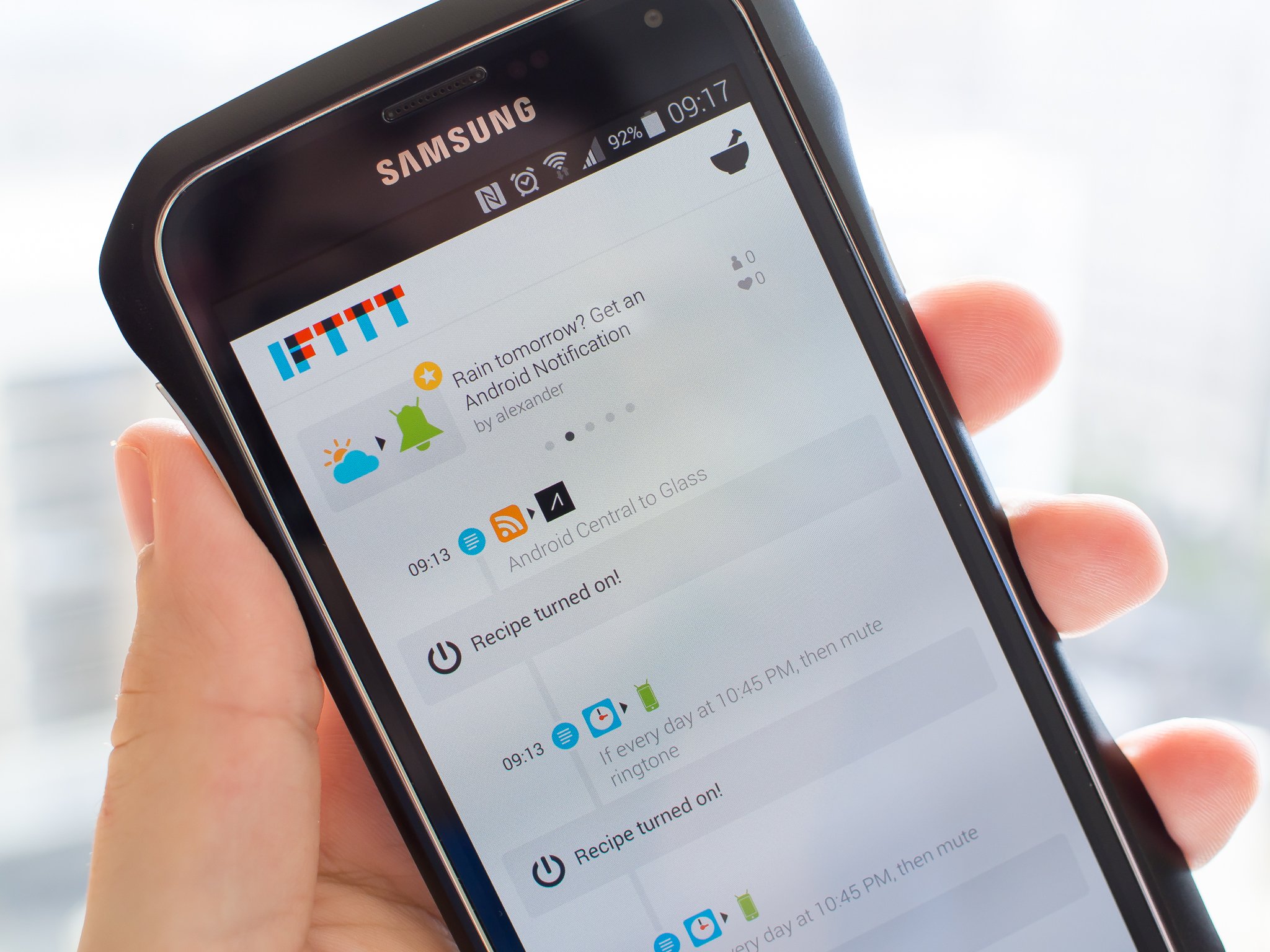
It's been a good while coming, but IFTTT (If This Then That) is launching its official Android app today. Arriving several months after the app's launch on iOS, IFTTT is launching a well-designed and useful app on Android that aims to help automate your Internet life. If you haven't dove into the vast world of IFTTT it may be a bit overwhelming at first, but the premise is pretty simple. Considering that we don't live in a perfect world and therefore services and functions across the Internet don't always talk to each other, IFTTT helps bridge the gap between everything you do online.

The premise is simple — you create "recipes" that work by linking a trigger (aka "if this") to an action (aka "then that"). If I post a picture to Instagram, save that to a folder in my Dropbox. If I mark an item to read on Pocket, add a note to my Evernote account. If someone follows me on Twitter, add an entry to a Google Doc. The possibilities were nearly limitless even before there was a proper Android app, and now you have the functions of your phone to work with.


24 Apr 13:39

Why Your Brain Needs Its Own "Inbox Zero"

by Eric Ravenscraft

Why Your Brain Needs Its Own "Inbox Zero"

Most of us are familiar with the concept of "inbox zero," the state (and long-term goal) of having and keeping an empty inbox. Productivity blog Johnny Moneyseed explains why it's even more important to apply this concept to your mind.

As the site explains, our brains have a habit of repeatedly reminding us of things we're stressed about or need to accomplish. This is brain clutter. Getting everything out of your system and on to a to-do list, calendar, or notebook frees up your precious brain power for the things that really matter:

Researchers say that everyday about 50,000 thoughts go through our heads. This can be anything from thinking "damn that girl/guy is sexy" to "I need to buy a garbage bag full of lemons this week." 50,000 thoughts that range anywhere from the trivial to the oh-shit-total-life-crisis and most of these thoughts that could be actionable end up wasting brain energy.

Have you ever had a thought that occurred more than once concerning something that you had to accomplish? Maybe your thought was something like this: "I really need to send a card to my uncle Norbert". You didn't act on it, because you knew that you didn't have to immediately. But then that thought rolled into your subconscious mind again. What you don't realize is that this thought is actually causing you stress, and that's why your brain regurgitated it. Your brain has been silently stressing itself out over your lack of action.

One of the easiest ways to put this principle into practice is to use the two-minute rule. If a task can be done in two minutes, do it. If it can't, but it needs to get done, write it down. You might not reach brainbox zero (okay, maybe that's not quite as pithy) all the time, but the closer you can get, the less stressful getting things done can be.

Zero your cerebral inbox. | Johnny Moneyseed

Photo by Casey Konstantin.

24 Apr 13:38

X-COM: Enemy Unknown now available on Google Play

by Simon Sage

Strategy gamers will be happy to hear that the highly acclaimed XCOM: Enemy Unknown, is now available on Android for $9.99. This title has seen a ton of critical success on PC and iOS already, and based on early reviews, looks like it's well-optimized for Android. An Amazon version's on the way too.


23 Apr 23:00

Fresh Meat: 10 new Android apps worth checking out

by Steve Raycraft

New apps need lovin’ too, right? Every day there are thousands of additions to the Google Play Store, but many go unnoticed and never receive the attention they deserve. We’ve shown in the past that this community can discover great apps and propel them to new heights. Our weekly Fresh Meat column highlights new apps with fewer than 100,000 installs. Browse our new Android app picks below and let us know which ones you enjoy.

Chrome Remote Desktop

Chrome Remote

Description: Securely access your computers from your Android device. On each of your computers, set up remote access using the Chrome Remote Desktop app from Chrome Web Store: https://chrome.google.com/remotedesktop. On your Android device, open the app and tap on any of your online computers to connect.


Auto-Response SMS

Auto Response SMS

Description: The Auto-Response SMS will help you to send auto-reply to your missed calls, when you can’t answer the phone. You can set auto-response from five default replies. You can set nine different reply to nine different numbers.


Solar Walk

Solar Walk

Description: This 3D solar system model lets you navigate between planets, through space and time and see all the planets and satellites close-up, learn their trajectories, inner structures, history of their exploration, points of interest and more.


CloudCaster

CloudCaster

Description: CloudCaster enables you to cast supported media files directly from the cloud to your Chromecast. Perfect if you need to display pictures or play video/audio from the cloud in your living room.


Xperia Keyboard

Xperia Keyboard

Description: Xperia keyboard is your default keyboard for all languages except Chinese, Japanese and Korean. It offers a superior swiping experience as well as traditional tapping.


Samsung WatchON

Samsung WatchOn

Description: Here comes a new WatchON along with enhanced UI/UX to discover, search, enjoy and share linear, on-demand and even free web content in one place! WatchON™ is all the entertainment you love on all the screens you love.


Today Calendar

Today Calendar

Description: Despite being derived from the same stock Android calendar as the majority of alternative calendars on the Play Store, Today Calendar sets itself apart by being the only calendar app to combine high functionality with truly beautiful aesthetics.


Animal Gallery

Animal Gallery

Description: Animal Gallery lets you view many types of interesting animal photos. It has a beautiful card UI and easy-to-use swiping navigation. The photos are updated daily as the source of photos come from Reddit.


David Lloyd Playlist

David Lloyd

Description: Working with specialist sports scientists, our team of expert curators update your app with fresh music every week so that there’s always something new to listen to when you get to the gym.


Bluebox Heartbleed Scanner

Bluebox Heartbleed

Description: Android devices ship with OpenSSL library by default. In addition, many apps will bundle their own copy of the library. The Bluebox Heartbleed Scanner from Bluebox Labs will check all of these copies and let you know if any appear to be susceptible to the Heartbleed vulnerability.


23 Apr 22:01

Put Great Buildings on Your Desktop with These Architecture Wallpapers

by Melanie Pinola

Put Great Buildings on Your Desktop with These Architecture Wallpapers

Buildings and other man-made structures can be awe-inspiring design masterpieces. Decorate your desktop with some of the world's greatest architecture.

Remember, we're now requesting your participation in the Wallpaper Wednesday series! You'll find a selection here, but post your favorites for this week's topic in the discussions below. Stick to our format as best you can, including a title, the image, resolution, and a link. Happy wallpapering!

Roman Colosseum

Put Great Buildings on Your Desktop with These Architecture Wallpapers

Download This Wallpaper (3840x2400) | WallpapersCraft

Frank Lloyd Wright's Falling Water

Put Great Buildings on Your Desktop with These Architecture Wallpapers

Download This Wallpaper (1680x1050 and other sizes) | art-wallpaper.net

The Orient

Put Great Buildings on Your Desktop with These Architecture Wallpapers

Download This Wallpaper (1900x1080) | The Paper Wall

Gothic Cathedral

Put Great Buildings on Your Desktop with These Architecture Wallpapers

Download This Wallpaper (5120x3200) | Wallpapers Wide

The Louvre

Put Great Buildings on Your Desktop with These Architecture Wallpapers

Download This Wallpaper (1920x1080) | The Paper Wall

Oia, Greece

Put Great Buildings on Your Desktop with These Architecture Wallpapers

Download This Wallpaper (1920x1080) | WallpapersCraft

Sydney Opera House

Put Great Buildings on Your Desktop with These Architecture Wallpapers

Download This Wallpaper (1920x1080) | The Paper Wall

Skyscrapers

Put Great Buildings on Your Desktop with These Architecture Wallpapers

Download This Wallpaper (2560x1440) | Wallpaper Up

23 Apr 22:00

How to Stop Buying Clothes You Never Wear

by April Dykman

How to Stop Buying Clothes You Never Wear

We all do it—buy clothes that we wear once or twice and then relegate them to the backs of our closets. It's a bad use of money and an organizational mess. But with some forethought and self-control, you can stop wasting money and start buying clothes you'll actually wear.

This post originally appeared on Get Rich Slowly.

The Backstory

When I graduated from college, my first apartment came with three closets—two in the master bath, and one in the hallway. I easily filled them all.

Part the problem was that I held onto things I didn't wear or like all that much—you know, just in case. Another part of the problem was that I would buy new clothes without much consideration. For instance, I owned five winter coats, and I live in Texas.

So, far too often, things were worn once, then eventually made their way to the no man's land that was the back of my closet. Or worse, I never wore them at all. The price tags were still attached, making it even harder for me to part with them because there was a reminder of how much money I wasted hanging from the label.

The crazy thing is that, even though I owned plenty of clothes, I somehow lacked the basic foundation for a work wardrobe.

The Closet Cleanout

The wasted money and the jammed closets finally got to be too much. Maybe it was the fact that I was learning about personal finance or the fact that I was reading about minimalism and the ease of a small wardrobe, but I'd had enough.

I decided to do a total closet cleanout. I donated, consigned, and gave away about 75 percent of my wardrobe.

It wasn't easy. I felt a lot of guilt for wasting that money in the first place. But by the time I was done, it was like a weight had been lifted. There was space in my closet, room to breathe. I also could see what I really needed in my wardrobe, and as I started to fill those holes, it became easier to get dressed in the morning. And I was able to shop with a list, knowing that what was on that list would get a lot of use.

One Small Closet, Plenty of Space

That's the Cliff's Notes version of the story, but the change wasn't as instantaneous as it may seem.

Even after cleaning out my closet, I'd still buy things that weren't really my style. Or I'd buy things that fit well enough, then never wear them. Sometimes I'd return those purchases, other times I fell into old habits and kept them around. After doing a few more minor closet cleanouts, though, there was less and less waste.

Then my husband and I bought a house. The master bedroom has two small closets—a his and a hers. My brother-in-law jokingly asked if my husband would really get his own closet or if I would claim some of his space, and I just smiled. I was actually excited about the size of my closetit was the perfect size for my small, well-curated wardrobe.

How to Only Buy Clothes You'll Really Wear

First of all, you need to clean out your closet if your closet door is bursting at the hinges or if you just have a lot of stuff you don't wear.

When you're done cleaning out your closet, you're probably going to feel a lot like this guy. But resist the urge to go clothes shopping right away. Here's what to do instead:

Think "Meat and Potatoes."

One of my favorite bits of advice came from designer Michael Kors:

70 percent of the clothes you own should be meat and potatoes. 30 percent should be icing and fluff—that's color, pattern, shine, accessories. Too many women get the proportions the other way round, then can't figure out why they can't get dressed.

Take a look at your closet, and figure out if you have enough meat and potatoes. Do you have enough basic black pants for work? Or a pair of nice dress shoes that will go with virtually everything?

If you don't know how to identify gaps, look at a list of wardrobe essentials and see what you're missing. (Some must-have lists aren't very realistic, but I think Alison Gary at Wardrobe Oxygen has great advice for both women and men.)

Dress for the Life You Live Right Now

The life you live right now includes factors like lifestyle and even the climate where you live.

For instance, an attorney in her 20s has very different clothing needs than a 35-year-old stay-at-home dad. Also, "it's important for the largest part of your wardrobe and seasonal fashion budget to reflect the dominant seasons where you live," writes style consultant Angie Cox of You Look Fab.

If you buy the majority of your clothes for a fantasy version of your life instead of the reality, you'll end up owning a lot of clothes and having nothing to wear.

Figure out Your "Uniform"

This is a new tip I've picked up—the idea of a personal uniform. Gary says:

If your wardrobe contains sequins, camouflage canvas, distressed denim, glazed leather, monkey fur, plaid kilts, and gold lamé cocktail dresses it may be fun to look at, but it's not as fun to dress for the every day. Having a signature style is easier on the wallet, easier on the soul when getting dressed each day, and better for your personal style.

That doesn't mean that you have to wear the same thing every day. It just means figuring out what looks good on you and what you like to wear—the items that are always in the wash or at the dry cleaner's are a good place to start.

Since I work from home now, my uniform has become straight leg jeans, a nice, drapey tee with a scoop neck, a long necklace, and flats or sandals. When I buy those things, I know they won't sit in my closet unworn.

Consider Fit and Fabric

I used to own 15 pairs of jeans, but I only wore three pairs. The ones I didn't wear were made of stiff fabric and looked okay on me but not great. The three I did wear were made from high-quality denim and made me feel like this.

My take on this is still the same. For fit, clothes should never gape, pull, or fit the person you want to be 10 pounds from now. Either don't buy those things or, if a tailor or seamstress can solve the problem, have them altered.

As for fabric, you really don't have to be an expert. Does it feel good and drape nicely, or does it feel cheap, like the sort of thing that will fall apart in the washing machine after one wear?

Watch out for High Prices (and Low Ones, Too!)

Sometimes it makes sense to pay more for quality. However, if you find a great pair of pants for $30, they are a better buy than the designer pants that cost $200 and fit you kinda funny. So as long as something is within your budget, price should be a secondary concern.

Also, beware of the clearance rack. I've taken many things home with me because they were a good deal, and then I barely wore them. Today, I ignore the discount and only buy something if I absolutely love it the minute I put it on. It has to feel great and look great and work in my existing wardrobe, or else it doesn't come home with me.

You Can Always Return It

If you get home and decide you don't like something after all, return it as soon as possible. I like to shop online, so I've become very disciplined about returning items I don't want within a week, long before the return policy expires.

And you have to do what works for you, but I don't buy anything on final sale anymore. That bit me in the bank account twice, and after that I decided that if there's not a return policy, I'm not buying it.

Be a Little Ruthless

Another source of extra stuff in my closet used to be gifts, like a sweater given to me by a loved one.

This situation is hard because I feel like a jerk for getting rid of their gift. On the other hand, I don't want to hang onto something that I know I'll never wear.

So, I donate it. I still feel a little bit bad about it, and I worry about some scenario where they'll ask me about it later, like, "Oh, show so-and-so that necklace I bought you last Christmas!"

But, I've had to learn to be a little ruthless. And besides, the gift always goes to a good cause, and hopefully to a closet where it'll actually get worn!

More on How to Stop Buying Clothes You Never Wear | Get Rich Slowly


April Dykman is a freelance writer, editor, and blogger who specializes in personal finance, real estate, and entrepreneurship topics. Her work has been featured on MSNBC, Fox Business, Forbes MoneyBuilder, Yahoo! Finance, Lifehacker, and The Consumerist. In her free time, April is a wannabe chef, a diehard Italophile, and a recovering yogi.

Since 2006, GetRichSlowly has been sharing information about debt elimination, saving, and practical investing. Learn more about our community at www.getrichslowly.org.

Image remixed from Anthonycz (Shutterstock) and filitova (Shutterstock).

Want to see your work on Lifehacker? Email Andy.