Shared posts

19 Jun 13:11

This is Harley-Davidson's first electric motorcycle

by Aaron Souppouris

America's foremost bike manufacturer is leaving a century of tradition behind with the all-electric Project LiveWire, and it's inviting the public to help test it. While the company is being coy with details on the bike, it says LiveWire offers "tire-shredding acceleration and an unmissable new sound," and is capable of hitting 0-60 in less than four seconds. LiveWire is not for sale, and is instead designed to help the company get "insight into rider expectations" of what a Harley-Davidson...

Continue reading…

19 Jun 13:09

Watch the entire Amazon Fire Phone press conference

by Sam Sabri

Busy with work or school earlier today and missed the Amazon unveiling of the Fire Phone? You could do the smart thing and check out our topic page for the Amazon Fire Phone to get all the info in one place. Or you can hit up YouTube and relieve the entire unveiling.


18 Jun 23:00

Straddle the Line Between Math and Art with These Fractal Wallpapers

by Eric Ravenscraft

Straddle the Line Between Math and Art with These Fractal Wallpapers

Fractals are a beautiful phenomenon that occurs when repeating patterns are represented visually. Apart from being fascinating mathematical concepts, they make some wonderful wallpapers.

Remember, we're now requesting your participation in the Wallpaper Wednesday series! You'll find a selection here, but post your favorites for this week's topic in the discussions below. Stick to our format as best you can, including a title, the image, resolution, and a link. Happy wallpapering!

Almost Christmas

Straddle the Line Between Math and Art with These Fractal Wallpapers

Download This Wallpaper (1920x1080) | Wallpaper Up

Blue Lotus

Straddle the Line Between Math and Art with These Fractal Wallpapers

Download This Wallpaper (1920x1080) | Wall Save

Clockwork

Straddle the Line Between Math and Art with These Fractal Wallpapers

Download This Wallpaper (1920x1080) | Wallpaper Stop

Golden City

Straddle the Line Between Math and Art with These Fractal Wallpapers

Download This Wallpaper (1920x1080) | Shadowness

Night Sky

Straddle the Line Between Math and Art with These Fractal Wallpapers

Download This Wallpaper (1920x1080) | Wall Save

Fractal Forest

Straddle the Line Between Math and Art with These Fractal Wallpapers

Download This Wallpaper (1920x1080) | HQ Screen

Flower Spheres

Straddle the Line Between Math and Art with These Fractal Wallpapers

Download This Wallpaper (1920x1080) | HQ Wallpapers

Rainbow Sea

Straddle the Line Between Math and Art with These Fractal Wallpapers

Download This Wallpaper (1920x1080) | Pichost

Paper Starburst

Straddle the Line Between Math and Art with These Fractal Wallpapers

Download This Wallpaper (1680x1050) | HQ Screen

Acid Trip

Straddle the Line Between Math and Art with These Fractal Wallpapers

Download This Wallpaper (1920x1200) | High Resolution Wallpapers

18 Jun 20:51

Samsung releases new Terrain Home launcher for all

by Dima Aryeh

Samsung Accelerator, a part of Samsung, has released a new launcher for Android devices called Terrain Home. Unlike most of Samsung’s work, this launcher is actually pretty basic in terms of styling. It’s holo-esque and follows some Android design guidelines, like the new refresh animation found in Google Now. But it has a pretty unique twist to it.

At first, the launcher looks normal. But it has a few gestures to activate different features. In an attempt to seemingly take on Google Now, swiping from the left brings you to a screen with cards showing information. This includes weather, calendar, Facebook, favorite contacts and some system toggles. There are also more functions available to add.

Swiping from the right brings out a panel with all of your apps, including buttons for each letter to quickly go to an app. This is pretty much identical to Action Launcher, though it’s so useful I can’t complain.

Swiping up opens a search, much like Google Now. It can search through contacts, apps and the web. It’s nothing new, but it’s nice to have it a gesture away. Overall, the launcher is actually pretty cool. It’s a beta, so it needs some work, but it definitely has potential. There are also stutters in places, but updates should take care of it. Check it out if you’re interested!


18 Jun 18:40

Twitter now supports GIFs

by Jacob Kastrenakes

GIFs have finally come to Twitter. On Twitter's website as well as its iOS and Android apps, you'll be able to watch a GIF in your timeline by clicking a play button that shows up over top of them. GIFs won't animate automatically, likely to prevent you from downloading large files that you don't need. Opening up a tweet on its own will, however, immediately begin playing the GIF.

Support for GIFs has been a highly requested feature, and adding it in makes reading through a Twitter feed much simpler, as you won't have to open up a new window every time you want to view one. Notably, Facebook has adamantly refused to add support for GIFs, seemingly over concerns of how it would make its News Feed look. They may not all be beautiful, but...

Continue reading…

18 Jun 18:39

Amazon officially unveils the Fire Phone

by Richard Devine

We're here at Amazon's "device unveiling" event where the retail giant has just announced its long-awaited entrant into the phone market. The Fire Phone is glass on both sides with a metal frame, rubber trim and metal buttons and has a 4.7-inch IPS LCD display.


18 Jun 18:37

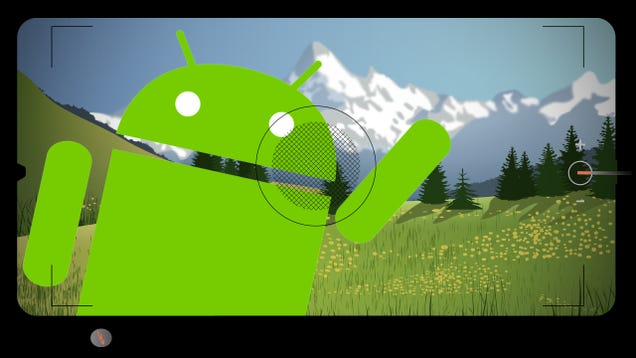
How to Get the Most Out of the New Google Camera for Android

by Eric Ravenscraft

How to Get the Most Out of the New Google Camera for Android

Recently, Google released its own camera to the Play Store for any device running KitKat or higher. Not only did this release add a few new features, but it brought a host of awesome things that were previously stock-locked to many more devices. Here are some of the coolest things you can do with Google Camera, and how to get the most out of them.

Adjust Focus After the Fact with Lens Blur

How to Get the Most Out of the New Google Camera for Android

One of the most recent additions to the Google Camera is the Lens Blur feature. High-end DSLRs allow you to create photos with a shallow depth of field, making certain subjects appear in focus while leaving the background out of focus, accentuating the subject more. Lens Blur approximates this type of effect digitally (of note: this is the same thing HTC attempted to do with its dual cameras, to limited effect).

More importantly, Lens Blur allows you to change the focus on a picture after the fact. You can only access the option within the Google Camera app itself (it's unavailable even in the stock Gallery or Photos apps). Swipe to the right and tap on the Lens Blur photo you want to edit. Tap the aperture symbol and you can adjust the intensity of the blur with the slider at the bottom, as well as changing the subject of the focus by tapping anywhere on the picture.

When taking the picture, you can also improve the quality of the picture by keeping the subject centered. This may limit the types of shots you can get, unfortunately, but the way the Lens Blur feature works gets the best results from a centered subject. It's not as good as a DSLR, obviously, but for smartphone pictures, it's pretty great.

Learn How Take the Perfect Photo Sphere

How to Get the Most Out of the New Google Camera for Android

Photo Spheres were introduced alongside Android 4.2. The feature takes panorama photos to the next level, allowing you to take pictures of an entire environment and stitch them together into a single, spherical photo that you can explore (with the right viewer, of course). Like any type of photography, this feature has a few tricks that can help you take better pictures:

  • Move your body around the camera, not the other way around: When you're taking a Photo Sphere, it's tempting to move your camera around like you would if you were taking individual pictures. As reddit user shark260 explains, the camera stitches pictures together best when the camera stays in one place. While you might not want to carry a tripod around for your phone, simply knowing how to move your body will result in better Photo Spheres.
  • Start at the least interesting part of the scenery: As Googler Minh Nguyen explains, the place that you begin your Photo Sphere is the hardest part to stitch together when you come back around because the most time has lapsed between the beginning and the end. To reduce how noticeable it is, focus on something mundane at the start and move to the more interesting parts of the area over time.
  • Undo a poorly shot photo: A lesser known feature of Photo Spheres is that you can undo an individual photo you've taken if it doesn't come out right. If someone walks into your shot or the camera just doesn't focus right, you can undo the most recent photo. If you move on to another shot, you're out of luck, though, so be sure you like each individual frame before moving on to the rest.
  • Avoid moving subjects: Obviously, Photo Spheres are taken over time and the final shot as a whole does not exist at the same point in time. Naturally, this isn't very compatible with subjects in motion. You can have people in your shots, so long as they're relatively stationary. And, as mentioned previously, if someone moves into frame while you're taking a shot, just undo it!

You can check out Minh Nguyen's post here for even more tips on taking excellent Photo Spheres. You'll need a Photo Sphere viewer in order to actually look at your shots once you move them off your phone. Google+ has built-in support for Photo Spheres, but if you don't want to upload them just yet, you can view them at this site. You can also edit the raw JPG in any photo-editing app, though it will be stretched out to a flat JPG.

Enable Manual Exposure Mode in Settings

How to Get the Most Out of the New Google Camera for Android

In many cases, automatic exposure does a good enough job for casual photographers. There always comes those times when the lighting is just right to confuse your camera, or it's too dark for the camera to find a subject. In those cases, you can enable manual exposure mode and adjust your camera's aperture yourself. To enable this feature:

  1. Swipe from the left to reveal the camera mode menu.
  2. Tap the Settings icon in the bottom right of the screen.
  3. Tap Advanced.
  4. Enable the Manual exposure switch.
  5. Return to the camera.
  6. Tap the three-dots menu button while in the viewfinder.
  7. On the far left, tap the +/- button to manually adjust exposure up or down.

This manual exposure isn't quite the same as manual exposure on a DSLR camera. The camera will still automatically adjust exposure as you move from one subject to another, but once it stabilizes, you can open or close the aperture as you deem necessary. The Google Camera also has an HDR mode that can help balance out scenes with uneven lighting. We've talked more about how to properly use HDR here, but the short version is that it's great for low-light, backlit, and outdoor scenes with high contrast you don't want, but terrible for movement, or scenes with already vivid and interesting lighting. As with all of these tools, use them appropriately.

Activate Your Camera Quickly with a Gesture

While not officially a feature of the Google Camera, the Moto X introduced the ability to launch your camera with a flick of the wrist. Previously mentioned Twisty Launcher brings this feature to other phones, so you can activate your camera even faster. You can choose which camera app opens when you twist your phone.

You can also use Twisty Launcher to activate other apps with a couple different gestures, so it's worth exploring. For camera purposes, though, it's an excellent way to get shooting faster. If the best camera you have is the one you have with you, it helps to know how to use it.

18 Jun 16:24

Brave New Adobe

by Frederic Lardinois
New Adobe.com_Screen Shot Adobe announced one of its largest updates to Creative Cloud today and released its first hardware devices. But more than just launching new features for Photoshop or Lightroom, today’s update really puts the spotlight on the changes the company has been going through over the last few years since it first started to move from shrink-wrapped software to becoming a services company. Read More
18 Jun 16:22

The Best Hacks From the Fan Site Ikea Doesn't Want You To See

by Jordan Kushins on Gizmodo, shared by Whitson Gordon to Lifehacker

The Best Hacks From the Fan Site Ikea Doesn't Want You To See

Ikea biffed by going after IkeaHackers, the fan site that shares all kinds of new uses and smart mods for the Swedish superstore's affordable furniture—seriously, you can't buy this kind of devotion. Until founder Jules Yap sets up shop under a new name, let's have a look at a few of the projects that make her site so endlessly scrollable.

There's such a range of finished works—from "Oh oh I could do that!" to "Why would you do that?!" to "Hey now that gives me an idea..."—that it's tough not to fall into a DIY-design clickhole. Here are some of the adventures-in-how-to that stood out to us. Share your own personal faves below!


A Cozy Hamster Home Made From a Bookshelf

The Best Hacks From the Fan Site Ikea Doesn't Want You To See

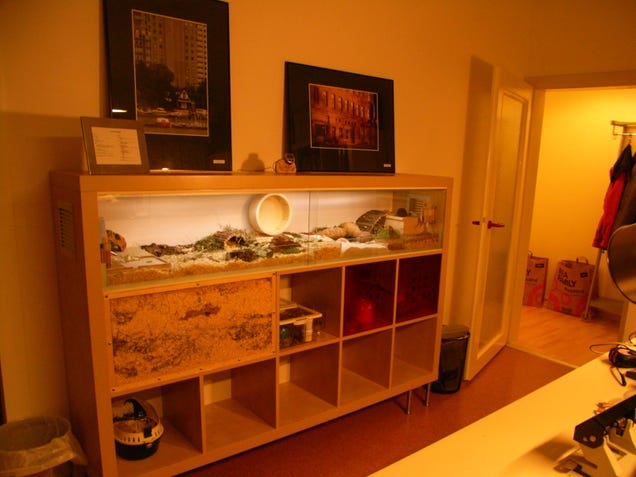
There's no end to what you can to with an Expedit (RIP). This awesome hamster habitat won the Hack of the Year in 2010, and it's easy to see why: Some small modifications to the Expedit—plus a little glass—turned Ikea's beloved shelving system into a home for a furry friend.


A Curving Wall Made From $2 Vases

The Best Hacks From the Fan Site Ikea Doesn't Want You To See

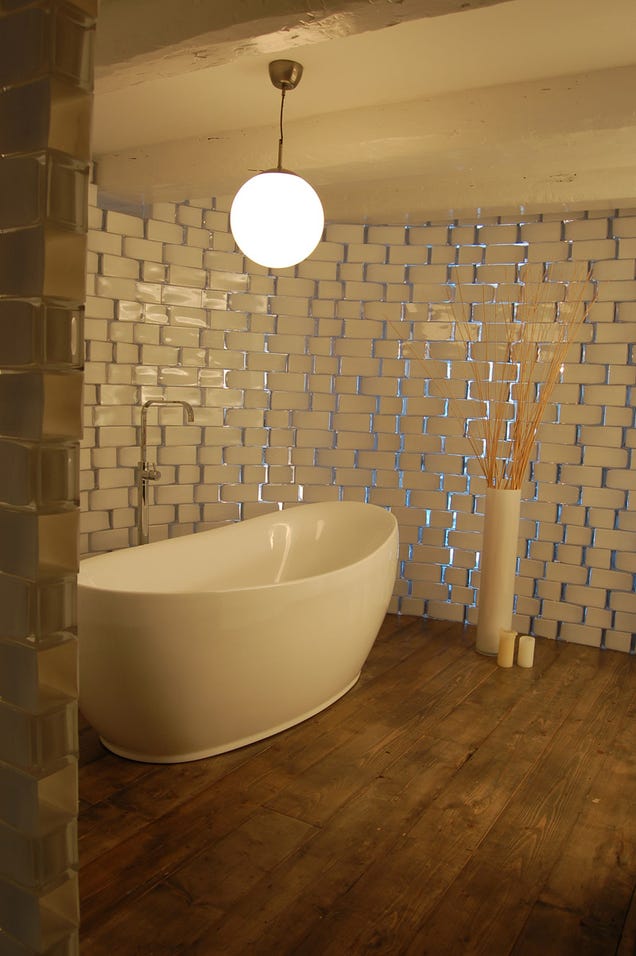
You'd never guess that this sleek, sinuous privacy screen—which turns the bathroom of an open loft into its own space—was made from $2 Rektangel vases. But yep: Hundreds of these glass thangs were tipped on their sides and repurposed.


A Huge Library Made From Billy Bookcases

The Best Hacks From the Fan Site Ikea Doesn't Want You To See

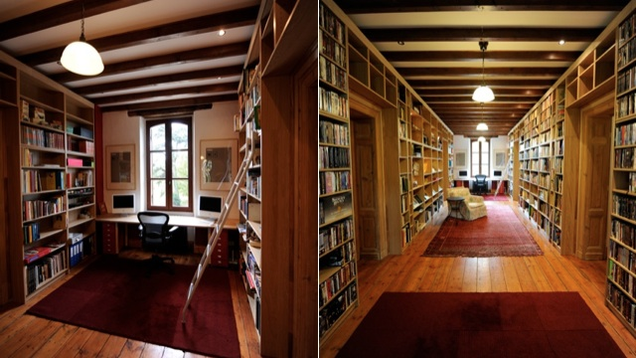
There's a reason this incredible personal library won the 2011 Hack of the Year. It's made from 60—yes, 60—Billy bookshelves, Ikea's bargain basement bookshelf. Attached to the French country home of Chas Saunter, they look undeniably classy.


A Coffee Table Made From File Organizers

The Best Hacks From the Fan Site Ikea Doesn't Want You To See

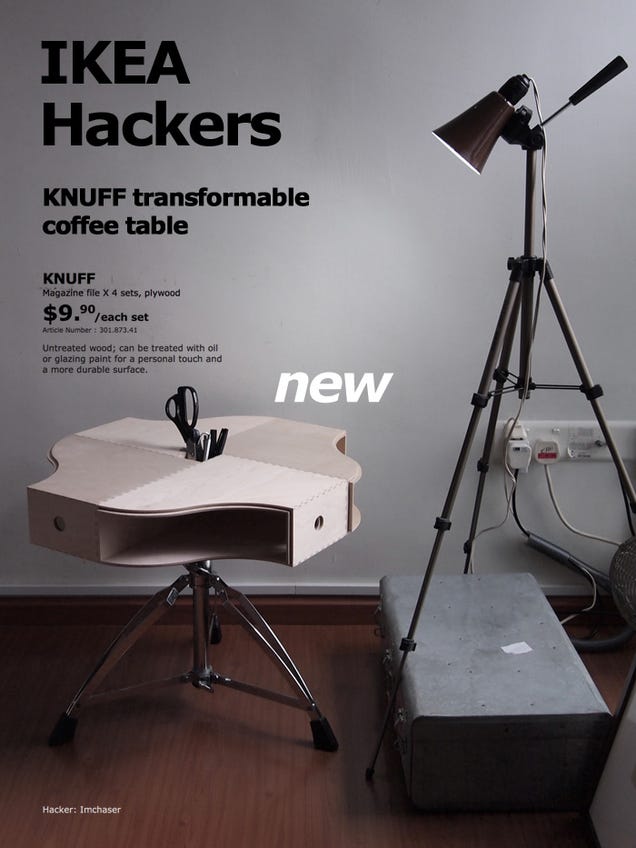
Here's the archetypal example of IkeaHacking brilliance. Take one stool, four nested file organizers, and boom: A transformable table with tons of storage space for under $10. All you have to do is glue the folders together and attach them to the stool. For an added bonus, the nested folders inside the table pull out to change its profile.


A Guitar Made From a Table

The Best Hacks From the Fan Site Ikea Doesn't Want You To See

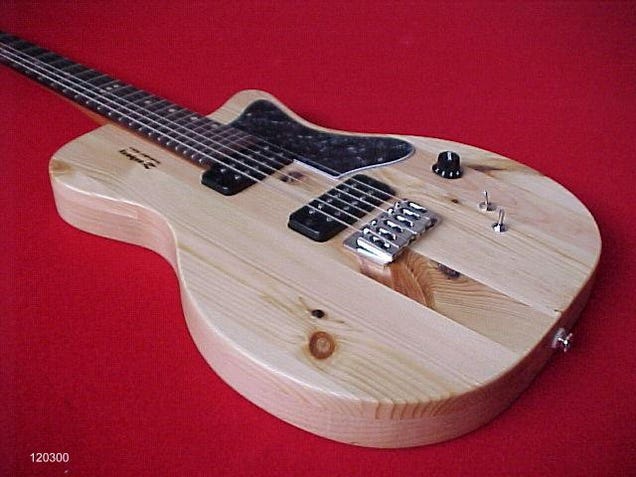
Things really get cool when an Ikea hacker has soldering skills: This brilliant hacker turned a plain old wood table top into a beautiful working guitar. More info here.


A Kid's Raincoat Made From an Ikea Bag

The Best Hacks From the Fan Site Ikea Doesn't Want You To See

Now this is unexpected. Tracing around an old kid's jacket will give a decent enough pattern for this cute little coat. Lined or unlined, it's pretty ingenious—though apparently it will dull the hell out of your sewing machine needle. I'm wondering whether to try to make one for myself...


A Super-Skinny Desk For iMacs

The Best Hacks From the Fan Site Ikea Doesn't Want You To See

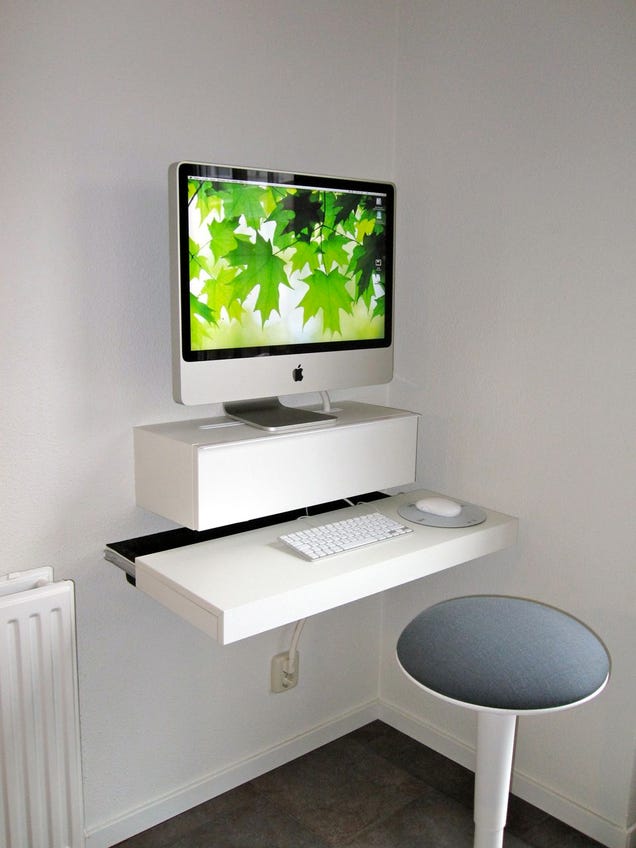
Here's a solution for all those space-challenged Ikea hackers out there (and aren't there so many!). This Dutch hacker took a shelf and a cabinet and mounted them to the wall, creating what might be the skinniest desk for an iMac ever built. The best part might be the fact that there aren't any errant cables hanging around: They're all stored inside the upper cabinet.


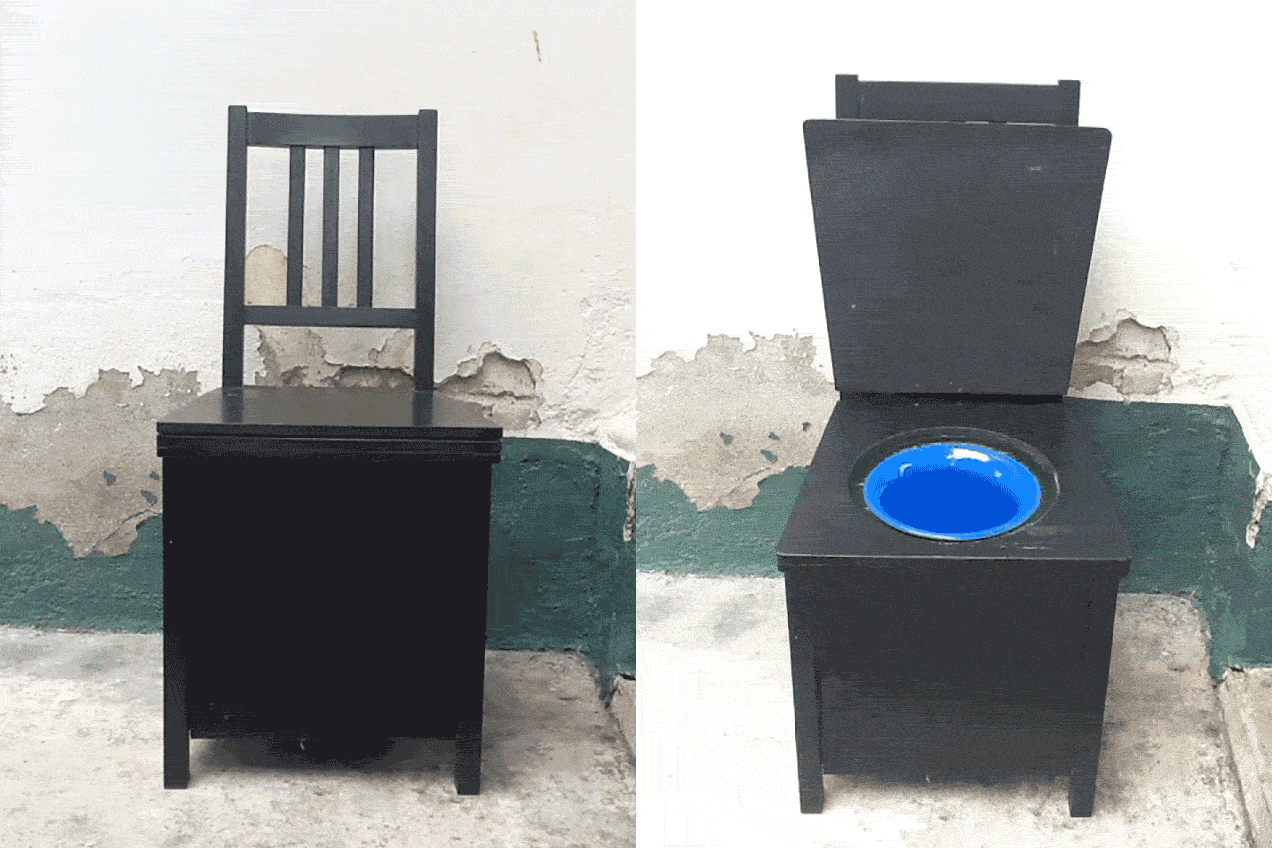
A Hidden Potty Made From a $25 Chair

The Best Hacks From the Fan Site Ikea Doesn't Want You To See

Okay, this is admittedly not for everyone, but it's a smart solution! An industrious family member made this for her grandma's home in Malacca, Malaysia, which is lacking upstairs plumbing. Adding a raised section to the top and a few privacy panels between the legs of a Stefan chair, a small bowl can easily slide in to the hole. Noted: next time she's choosing a model with arms, for extra comfort (though it would be tough to beat Homer's Lazy Man Toilet Seat for sheer sit-back-and-relax luxury).


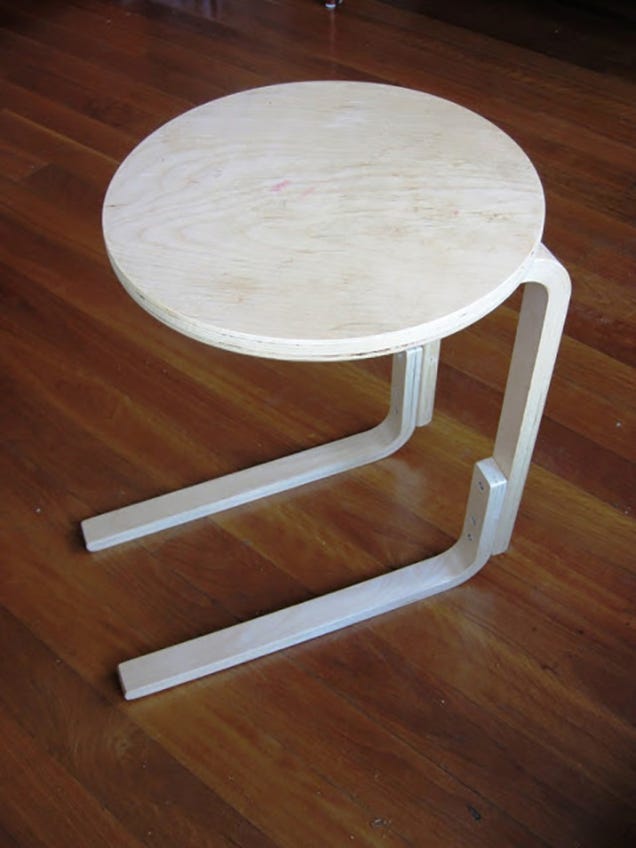
A Bedside Table Made From a Stool

The Best Hacks From the Fan Site Ikea Doesn't Want You To See

This was designed to allow or opening the drawers under a Mandal bed, but relocating two of the Frosta stool's legs looks like it would make a killer sofa table, too (as long as the height was right).


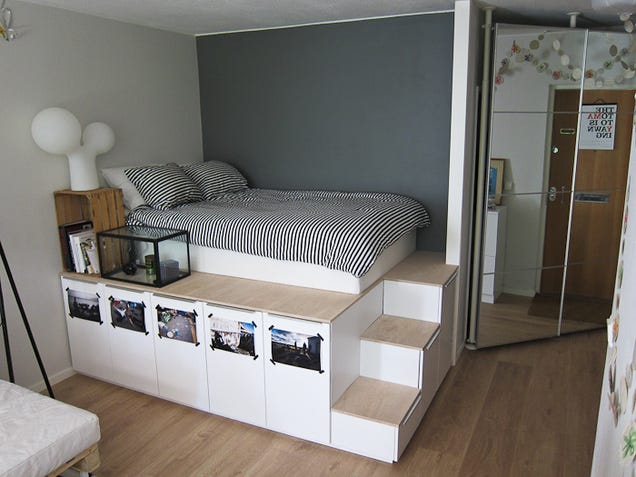
A Storage Bed Made From Nine Cabinets

The Best Hacks From the Fan Site Ikea Doesn't Want You To See

There are a lot of storage beds on IkeaHackers, but there's something about the structure and staging of this one, which used nine Faktum cabinets, that makes it look particularly perfect for a small space. It's involved (with extended blog post how-to here), but if you had the tools and the time and the drive—it would be incredible to make something this functional look this good.


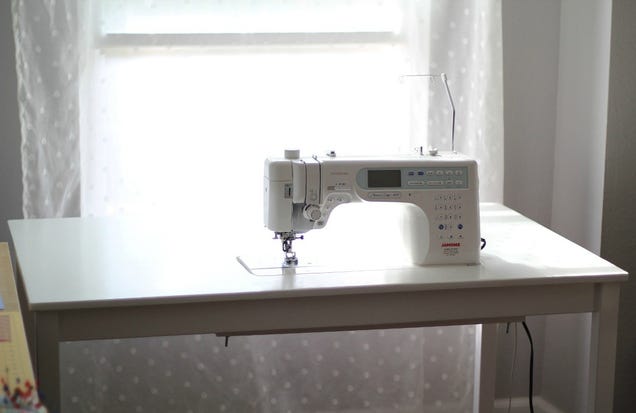
The Perfect Sewing Table Made From a Plain Old Desk

The Best Hacks From the Fan Site Ikea Doesn't Want You To See

This is another project that's going to require some power tools, but if you're keen on sewing and have the room for a dedicated place to stitch, this is a might purdy use of an Ingo table. Additional tutorial here, if you're into it.


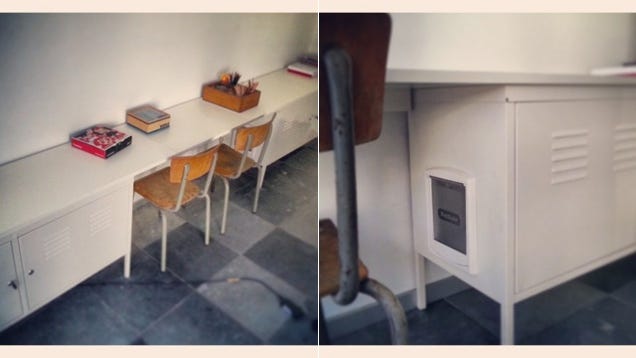
A Kids' Desk (and Hidden Cat Toilet) Made From Lockers

The Best Hacks From the Fan Site Ikea Doesn't Want You To See

Okay, hey—we're back to unconventional spots to pee and poo. The name here really says it all, and all it took was a long piece of MDF, a pair of Ikea PS Lockers, and a cat flap inserted into a custom cut-out in the side. Slide a litter box in the drawer and you're good to go.


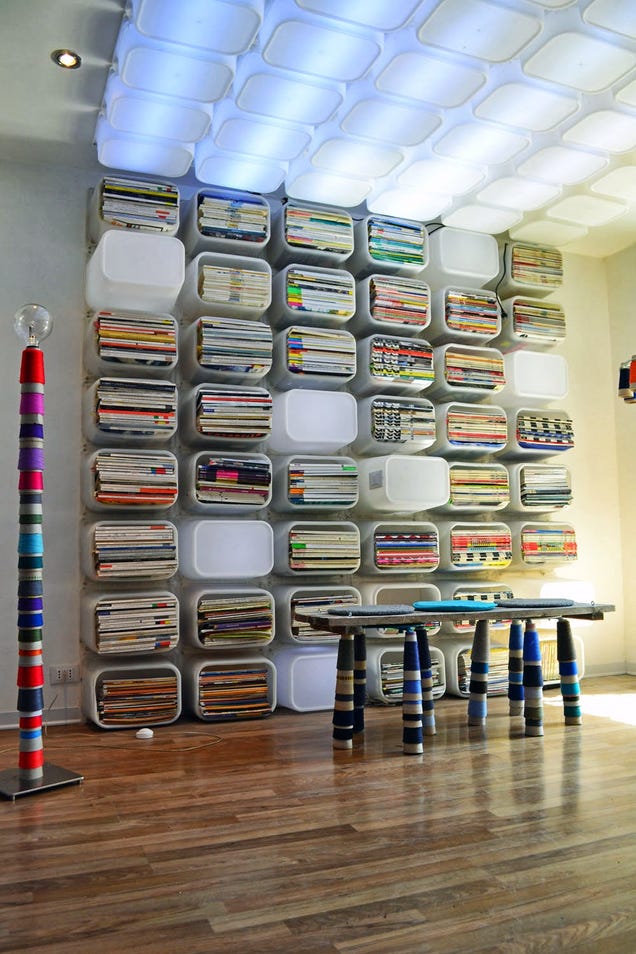
A Bookshelf and Ceilingscape Made From Toy Bins

The Best Hacks From the Fan Site Ikea Doesn't Want You To See

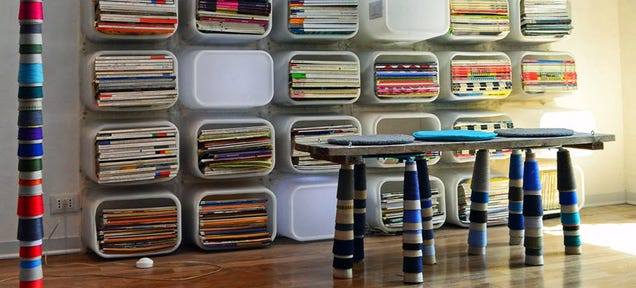
Wowie. This effect was made pretty much exclusively out of Trofast toy storage boxes affixed to the walls and ceiling: some facing out and filled with magazines and books, some facing the other way and lit from within by LEDs. Impressive. Most impressive.


A Bookshelf Made From Stools

The Best Hacks From the Fan Site Ikea Doesn't Want You To See

Ikea's iconic Frosta stool is a cult favorite—and here, it's turned into a beautifully abstract bookshelf that seems to climb up the wall like a vine. Very cool.


A Backsplash Made From Glass Shelves

The Best Hacks From the Fan Site Ikea Doesn't Want You To See

Rather than spring for some spendy backsplash, this cool kitchen has a series of Rationell glass panels installed flush up against the wall between counter and cabinet. But first! Wallpaper will make it match whatever else you've got going on, color-and-style-wise.


A Twins' High Chair Made From a Dining Room Table

The Best Hacks From the Fan Site Ikea Doesn't Want You To See

Take an average Bjursta dining room table, two average plastic high chairs, do a little clever sawing, et voila: An incredible double-trouble high chair.


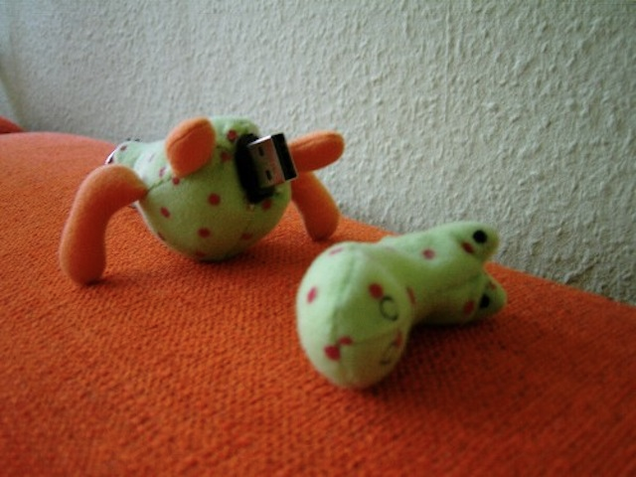
A Flash Drive Made From a Stuffed Crocodile

The Best Hacks From the Fan Site Ikea Doesn't Want You To See

The Best Hacks From the Fan Site Ikea Doesn't Want You To See

Ikea hacking doesn't have to be all about furniture: This clever hacker took a plush stuffed animal from Ikea's kids section, decapitated it, and installed a hidden USB drive.


A Beautiful Bathtub Stand Made From a Two Table Tops

The Best Hacks From the Fan Site Ikea Doesn't Want You To See

It wasn't easy to figure out a design to encase the new tub in this remolded bathroom—but using two Ikea Pronomen countertops, the crew was able to perfectly fit the wood around the irregular space.


An Epic Catwalk Made From Shelving

The Best Hacks From the Fan Site Ikea Doesn't Want You To See

The Best Hacks From the Fan Site Ikea Doesn't Want You To See

Hyllis shelves are good for more than just books: This Texas hacker turned them into one of the craziest cat playgrounds I've ever seen. Hung from the ceiling with brackets, these ordinary shelves become an incredible jungle gym for this lucky kitty.


These are just a few of our favorite hacks, but there are thousands more out there. Share yours with us below!

18 Jun 14:56

Best Streaming Music App for Android

by Jordan Miera

Listen to the music you want to hear wherever you are!

In days past the only way to really access music was by listening to your personal collection, or dealing with whatever the local radio station was playing. Today we're in much better straits thanks to streaming music giving you access to precisely the tracks you want to hear wherever you happen to be. From personalized radio stations, to playlists, to full albums, there is plenty to love about streaming music apps.

These are our picks for the best streaming music apps for Android!

Spotify Music

Spotify Music pulls to the head of the pack with its huge collection of music and the wide variety of features that it employs. The biggest perk is the wide variety of ways that you can find new music while exploring the app.

You've got genre and mood stations that are great if you're throwing a party and want to turn on music to play for a while. It's also easy to build playlists or listen to an entire album from beginning to end. With the emphasis on social connection, you can even share your music to your favorite social network, or browse the music that your friends are listening to.

See at Play Store

Pandora Radio

If you're looking for the best option for streaming music on a budget, then you need look no further then Pandora Radio. Pandora was one of the first streaming music platforms, and it's still popular for a good reason. You can create a station for a song or artist and then you'll get music that is related. By liking or disliking the music that plays you can curate stations so that you only hear the music that you enjoy.

Pandora Radio includes not only music but also some audio you might not expect like Epic Rap Battles from YouTube and stand-up comedy sets. On top of creating and curating stations, you can also browse stations by genre or mood. As you like music you'll also get access to Thumbprint radio, a station filled with only the songs that you have liked on other stations.

While you are limited to a specific number of song skips with the free version of Pandora, once you have curated your stations this shouldn't be a real issue. You can have as many stations as you like, and it's easy to add variety to an existing station if you want to hear something new.

See at Play Store

Google Play Music

Google Play Music has an impressive catalog when it comes to music, and may actually come installed when you get a new phone. While it does many things very well, (especially since Songza was added to the mix) Google Play Music really shines for those of you that also enjoy listening to podcasts.

From Nightvale to The Joe Rogan Experience, Google Play Music has a full section available for podcasts built in. This means that you can search by charts, category, or by specifically looking up your favorite podcast. You can easily add podcasts to a favorite list to make them easy to find again. You're also able to manage your subscribed podcasts by auto downloading or receiving notifications about new episodes, as well as choosing the order that episodes are displayed in.

See at Play Store

Tidal

In terms of streaming music services, Tidal is still one of the younger players on the block. Don't let that trick you, though. On top of their catalog of exclusive music like Beyonce's Lemonade, or Prince's full album list, they are also hands-down the absolute best experience for audiophiles.

Tidal delivers high fidelity sound on both its songs and its music videos. While they don't have quite as large of a catalog as some other services, the 40 million tracks that they do have are top notch in quality. Tidal also boasts a ton of great music that is exclusive to the service.

See at Play Store

Apple Music

Apple Music might not sound like it should belong on an Android phone, and that's where you would be so very, very, wrong. Apple Music has a solid collection of music with 30 million tracks, but it's their playlists that should get you intrigued. Building personal playlists can be fun, but there are times you just want to find awesome music with as little work as possible.

Apple Music brings you thousands of different playlists that have been curated for pretty much every genre or activity on the planet. As you find and listen to music, you'll also get special playlist recommendations that can help you to discover entirely new music. Apple Music also gives you access to a number of exclusive artists, records, and tracks, that you won't be able to find streaming elsewhere.

See at Play Store

Are you listening?

Streaming music lets you access the tunes you want to hear when you want to hear them. While some apps require a subscription, others are available for free, and you can find the experience you're looking for by checking out more than one streaming music service. Do you have a favorite streaming music app? Let us know about it in the comments below!

18 Jun 13:46

Towelroot Roots Many KitKat Devices in One Tap, No PC Required

by Mihir Patkar

Android (4.4+): Rooting your Android phone or tablet involves connecting it to the PC, using ADB, and several other steps. But developer geohot has now released Towelroot, a new tool that makes rooting many Android devices as simple as installing an app and running it.

Before you continue, there are a few things you should know. First, rooting your device usually voids your warranty. Second, this tool works on phones running Android KitKat. Third, it won't work with Motorola or HTC phones.

Installing and running it is pretty easy. Go to Settings -> Security and enable installing apps from unknown sources. Then head to Towelroot.com, download and install the APK, and run it. It takes about a minute for your device to be rooted and reboot. Check whether it worked using Root Checker.

Originally, this hack was made to root the Samsung Galaxy S5 on AT&T or Verizon, but users are reporting success with several other models. We asked several friends to try it out and used a few of our own unrooted devices and it worked with the Sony Xperia Z1 Compact, Samsung Galaxy Note 3, Google Nexus 5, Google Nexus 7 (2013) and the LG G2. It did not work with the HTC One M8, Moto E, Moto G and HTC One Mini.

As WonderHowTo notes, Towelroot gives any app root access if it's asked. This could be a major security risk, so you should install a root management app like SuperSU. Head to the WonderHowTo link below for more details on this.

You can find out more about Towelroot and direct questions to the community over at the official thread on XDA Developers Forum.

Towelroot | via WonderHowTo

18 Jun 13:37

Court Hands Google a Worldwide Site Blocking Injunction

by Andy

canadaGoogle’s dominance of the Internet, particularly in search, has seen the company become embroiled in the disputes of countless other companies.

Day after day, Google is expected to take action in third parties’ intellectual property complaints to avoid becoming liable itself. Prime examples can be found in the millions of DMCA-style notices the company processes each week. Google must remove those entries or face being accused of facilitating infringement.

Another case that Google has become involved in, Equustek Solutions Inc. v. Jack, sees two Canadian entities face off (the latter previous employees of the former) over stolen intellectual property used to manufacture competing products.

While Google has no direct links to the case, the plaintiffs claim that the company’s search engine is helping to direct people to a network of websites operated by the defendants which are selling the unlawful products. Google already removed links from its Google.ca results voluntarily, but that wasn’t enough for Equustek who wanted broader action.

In a ruling handed down in British Columbia, Justice L.A. Fenlon agreed, ordering Google to remove the infringing websites’ listings from its search results. Despite protestations from Google that any injunction should be limited to Canada and Google.ca, the Judge targeted Google’s central database in the United States, meaning that the ruling has worldwide implications.

“I note again that on the record before me, the injunction would compel Google to take steps in California or the state in which its search engine is controlled, and would not therefore direct that steps be taken around the world,” the Judge wrote.

“That the effect of the injunction could reach beyond one state is a separate issue. Even an order mandating or enjoining conduct entirely within British Columbia may have such extraterritorial, or even worldwide effect.”

Noting that Google did not complain that an order requiring it block the websites would “offend” the law in California where it is based, or any other country from where a search could be carried out, the Judge said that the search giant acknowledged that most countries would recognize that dealing in pirated products was “a legal wrong.”

Further detailing her decision, Judge Fenlon compared Google to an innocent warehouse that had been forbidden from shipping out goods for a company subjected to an injunction. That local order not to ship could also have broader geographical implications.

“Could it sensibly be argued that the Court could not grant the injunction because it would have effects worldwide? The impact of an injunction on strangers to the suit or the order itself is a valid consideration in deciding whether to exercise the Court’s jurisdiction to grant an injunction. It does not, however, affect the Court’s authority to make such an order,” she wrote.

The Judge also touched on the futility of ordering a blockade of results only on Google.ca, when users can simply switch to another variant.

“For example, even if the defendants’ websites were blocked from searches conducted through www.google.ca, Canadian users can go to www.google.co.uk or www.google.fr and obtain results including the defendants’ websites. On the record before me it appears that to be effective, even within Canada, Google must block search results on all of its websites,” she explained.

The nature of the ruling has raised concerns with lawyer Michael Geist, who notes that despite being issued by a local court, the ruling has attempted to match Google’s global reach.

“The issues raised by the decision date back to the very beginning of the globalization of the Internet and the World Wide Web as many worried about jurisdictional over-reach with courts applying local laws to a global audience,” Geist explains.

“While there is much to be said for asserting jurisdiction over Google – if it does business in the jurisdiction, the law should apply – attempts to extend blocking orders to a global audience has very troubling implications that could lead to a run on court orders that target the company’s global search results.”

While Google has a little under two weeks to comply with the injunction, its representatives told The Globe and Mail that the decision will be appealed.

Source: TorrentFreak, for the latest info on copyright, file-sharing and anonymous VPN services.

18 Jun 13:31

BlackBerry will bring thousands of apps from Amazon's store to its phones

by Jacob Kastrenakes

Thousands of apps from Amazon's Appstore will be available on BlackBerry 10 phones this fall, giving BlackBerry owners access to a selection that's greatly expanded in quality and scope from what they might find in their phone's existing store. BlackBerry's been struggling to find traction with its latest smartphones, and its lack of exciting, quality apps has only hurt it further. By striking a licensing deal with Amazon to bring over more than 200,000 apps, BlackBerry will soon have a bit less to worry about on that front.

Continue reading…

17 Jun 22:59

Add and share any web page with The Old Reader!

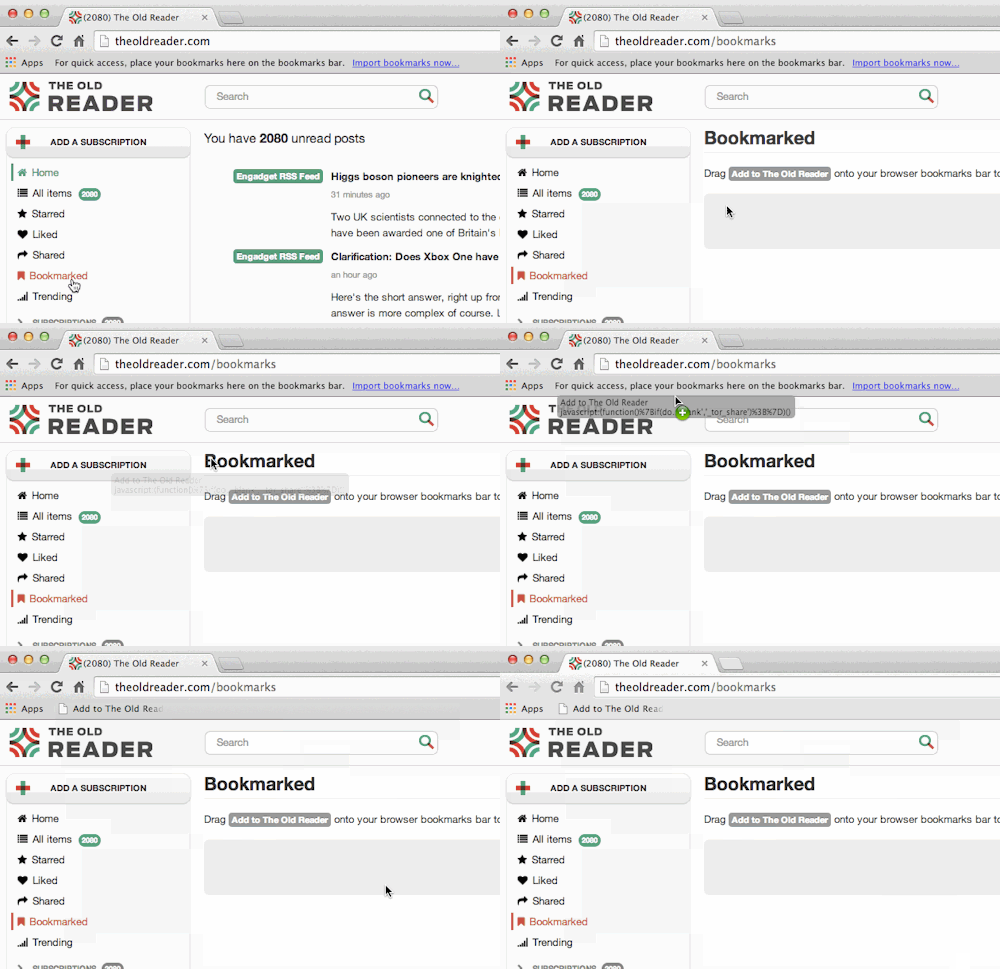
We’ve received a large number of requests to add a bookmarklet feature to The Old Reader.  Today we are excited to be launching this functionality for our premium users.  We will likely roll this functionality out to all users at some point in the future, but do not currently have a timeline in place.

image

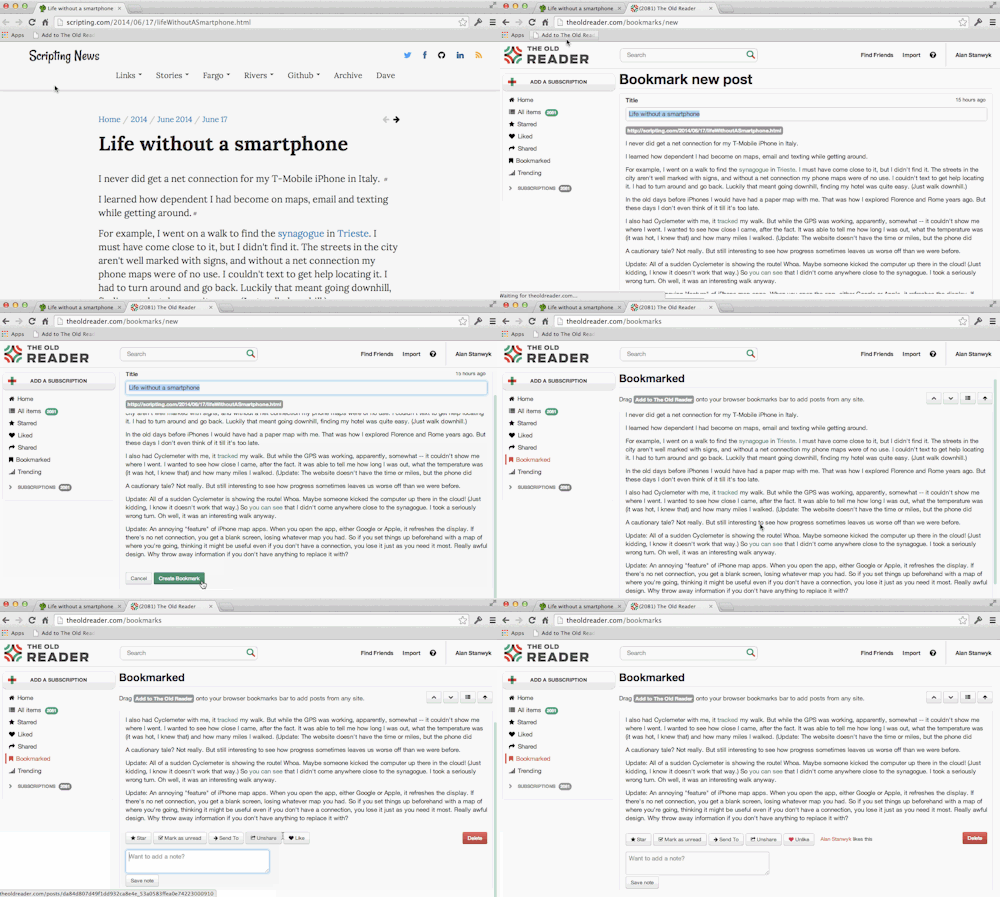
The bookmarklet is quickly and easily added to your browser bookmarks and allows you to send a copy of any web page to your TOR account.  Those pages are saved in the new bookmarklets section and are also searchable and sharable.

image

We know a lot of our users will be excited to see this new functionality and we look forward to your feedback.  Thanks for using The Old Reader!

17 Jun 22:58

London police's secret "domestic extremist" list includes people who sketch protests

by Cory Doctorow


Baroness Jenny Jones, a Green Party councillor, writes in the Guardian about the bizarre smears and tittle-tattle she found about herself in the Metropolitan London Police's secret database of "domestic extremists," such as her tweets from a protest in Trafalgar Square.

Jones is just one of many people who have found themselves placed on the "domestic extremist" watchlist by the Met on the flimsiest of excuses. For example, John Catt, an 89 year old peace and human rights campaigner, is in the database along with a notation about the fact that he sketches demonstrations. The police cast a wide net indeed -- noting, for example, that Green politician Ian Driver organised a meeting in support of marriage equality.

The Met's definition of "domestic extremism" didn't occur in a vacuum. It's part of a wider, more militarised view of dissent and protest in general, reflected around the world in the use of illegal "kettling" tactics against protesters, the deployment of "stingray" surveillance devices used to capture the identities of all attendees at peaceful protests, and other examples of officialdom's pants-wetting terror at the thought of people protesting the decisions made by plutocrats and their tame technocrats. Read the rest

17 Jun 20:11

Parallels Access Brings Windows and Mac Apps to Android

by Eric Ravenscraft

Android: Mobile OSes are great, but they're still a bit limited in what they can do compared to desktops. Parallels Access, previously available for iOS, allows you to run your Windows and Mac apps on Android.

The service requires you to run a server on your existing Windows or Mac desktop. You then download the client to your Android device. The app will run on your computer and stream it, remote desktop-style to your phone or tablet. Parallels will change your computer's resolution to match your Android and full screen all the apps, so you can interact with them easily.

It's not a perfect solution, but if you're in a pinch and you need an app that's only available for Windows or Mac on mobile, Parallels Access is one of the easier ways to get it.

Parallels Access | Google Play Store via 9to5Google

17 Jun 20:06

Judge ordered US military to turn over its video of Gitmo force-feedings. So military stopped filming.

by Xeni Jardin
Attorneys representing a Guantanamo detainee who was force-fed in a brutal, abusive manner have entered into evidence, as part of a lawsuit filed on the man's behalf, three videos shot by military guards at the prison. Read the rest
17 Jun 16:20

YouTube will block videos from artists who don't sign up for its paid streaming service

by Ben Popper

As YouTube prepares to roll out an ad-free streaming music service, it will block videos from indie artists who don't sign up for the new offering, as originally reported by Financial Times. YouTube has signed deals with the major labels, and is explicitly threatening to block artists from using the entire YouTube platform — free or paid — if they do not agree to the terms of the new streaming service.

Continue reading…

17 Jun 12:54

"You Teach People How to Treat You"

by Whitson Gordon

"You Teach People How to Treat You"

If you aren't happy with the way others treat you, it may have something to do with you. Motivational speaker Tony Gaskins says "You teach people how to treat you by what you allow, what you stop, and what you reinforce."

There are some real jerks in the world, and that'll always be true—but you might be surprised how many people back off when you stand up for yourself. Many, in fact, may not even realize that they treat others badly. That last part is just as important too, though—you reinforce behavior by how you act towards others. It's that old golden rule again: lead by example.

15 Essential Life Truths You Need to Live By | Lifehack

Photo by Ale Art.

17 Jun 12:53

Top 10 most popular Android apps from last week: Angry Birds Epic, AutoVera

by Steve Raycraft

Every week we cover new Android apps with Fresh Meat on Wednesday, followed by Android Gaming on Thursday and Top 10 App Updates on Friday. When Monday rolls around, we look back to see which apps were the most appealing to our audience. Read on for the 10 most popular Android apps from last week.

1. GServiceFix*

GServiceFix App info: It’s a workaround for the battery drain bug caused by Services / Android OS / Android System.


2. Desktop VisualizeR*

Desktop VisualizeR App info: Desktop VisualizeR(DVR) is an application that allows you to personalize your home screen by creating icons or widgets with your favorite photos or images.


3. SimplyText SMS

SimplyTextApp info: SimplyText is texting, done better. A great replacement app for the stock SMS messaging app for your phone.


4. Unicon (formerly Icon Themer)

Unicon App info: Unicon (formerly Icon Themer) Allows you to use Nova / Apex / ADW icon packs etc. on your device. 


5. Hodor Keyboard

Hodor App info: Accept no substitutes. Hodor would pay a dollar. You know it’s true. Be like Hodor. Say Hodor. Hodor hodor hodor.


6. AutoVera

AutoVeraApp info: AutoVera is a Tasker plugin that allows you to fully control your home in a very easy, yet powerful way.


7. World Cup 2014

World Cup 2014 App info: World Cup 2014 is a free application essential to follow World Cup 2014 in Brazil on your smartphone.


8. Sunrise Calendar

Sunrise Calendar App info: Sunrise is a free calendar made for Google Calendar and iCloud. With an amazing design, Sunrise is a new experience that will make your life easier.


9. Motorola Alert

Motorola Alert

App info: Motorola Alert lets you quickly alert people important to you when you need them. Simply put your phone on alert, and it will begin sending periodic notifications with your location to the people you designate so they can act fast to get you the help you need.


10. Angry Birds Epic

Angry Birds Epic

App info: Get ready for a bird-tastic FREE RPG adventure filled with “weapons” (whatever they could get ahold of), magic, bad guys and silly hats!


Note:  To ensure that all apps receive a fair chance to make the list, we will retire any app that has made the list for 3 consecutive weeks and will place it in our Android and Me App Hall of Fame. We will post this Hall of Fame list in a dedicated series. Any app with * next to the title indicates it will now be added to our Hall of Fame list and will no longer be listed in this article.

17 Jun 12:52

O2 adds carrier billing option for UK Play Store

by Harish Jonnalagadda

After rolling out a carrier billing service for all purchases made on Samsung's app store earlier this month, UK carrier O2 has announced that it is bringing the service to the Play Store.


17 Jun 12:51

UK justifies wholesale Google and Facebook spying on data center location

by Tom Warren

Britain’s most senior security official, Charles Farr, has been forced to comment on a UK government surveillance policy that exploits legal frameworks to monitor online communications. First revealed as part of the Edward Snowden leaks, Britain's Government Communications Headquarters (GCHQ) has been reportedly intercepting and storing massive amounts of data flowing across the web, including emails and posts on social media sites like Facebook and Twitter. Farr has published a detailed justification (PDF) for the UK government’s spying program, dubbed Tempora, and defended the lack of individual search warrants which are normally required to monitor internal communications between British residents.

Continue reading…

17 Jun 12:38

Danger Mouse Will Return!

Danger Mouse Will Return!

He's terrific! He's magnific! Again!

First it was Bananaman that was being unpeeled for a new generation. Now, from a post box somewhere on Baker Street, cartoon superspy Danger Mouse is about to get the same treatment. Current rights-holders Fremantle have decided to bring him out of his 23-year retirement, thanks to some strong ratings during a CITV retro weekend, albeit on the small screen rather than the large.

An animated series from Cosgrove Hall in the early '80s, Danger Mouse was a secret agent, channelling James Bond and Danger Man, and getting involved in a lot of very silly nonsense on a weekly basis. He drove a flying car; his sidekick was the blundering hamster Penfold; his "M" was Colonel K. (a chinchilla); and his arch enemy was the wheezy toad Baron Greenback, who had a crow henchman called Stiletto, and was always up to dastardly schemes like trying to melt the North Pole. Occasional secondary villains included Count Duckula, who went on to his own solo spin-off. Terrible puns were the order of the day.

"When I helped to create Danger Mouse I had no idea the show would be such a huge success both in the UK and overseas," said Brian Cosgrove in response to the announcement. "I am delighted that a whole new generation will be introduced to his daring deeds and thrilled to be part of this new 21st century series."

There are no details so far about what direction the new version will take, except that DM's famous eyepatch will apparently now be an "i-patch". There's also no mention yet of whether David Jason will be returning to voice "the last word in debonair and delightfully eccentric heroics". Terry Scott, who voiced Penfold, sadly died in 1994.

The revival will take place at the BBC, with CBBC controller Cheryl Taylor confident that "the much-loved duo will win over a whole new generation of fans." 


16 Jun 23:07

27 Best New Android Apps And Live Wallpapers From The Last 2 Weeks (6/3/14 - 6/16/14)

by Rita El Khoury

nexusae0_roundup_icon_large_thumb.png

Welcome to the roundup of the best new Android applications, games, and live wallpapers that went live in the Play Store or were spotted by us in the previous 2 weeks or so.

Please wait for this page to load in full in order to see the widgets, which include ratings and pricing info. Looking for the previous roundup editions? Find them here.

Featured App

Persist + Volume Control

Today's roundup is presented by Persist+ Volume Control.

27 Best New Android Apps And Live Wallpapers From The Last 2 Weeks (6/3/14 - 6/16/14) was written by the awesome team at Android Police.


16 Jun 21:13

LG G3 design and hardware: third time’s the charm

by Nick Sarafolean

The core structure of a phone begins with the internals that make the phone tick. It then moves onto the aesthetics, making the phone beautiful. For the final touch, it carries into the software, making the phone usable. Today, we’ll take a look the first two facets: the hardware and the aesthetics of the LG G3.

The LG G3 is LG’s 2014 flagship, and it has some stiff competition. To make the G3 stand on its own, LG pulled out all the stops when it came to design and hardware. From the narrow bezels to the perfectly positioned power button, the G3 screams detail. Detail that makes LG’s user experience better than ever.

Let’s begin with the externals, shall we? The G3 is solidly built, with Gorilla Glass 3 expanding across the face of the phone. The front is blissfully minimal with a simple speaker grille set at the top. Below the screen sits a small patch of accent glass that matches the color of the phone. A subtle, reflective LG logo sits in the middle, reminding you who crafted the phone.

LG G3 (4)

On the sides, we find an attractive yet restrained silver and white trim that loops around the G3. The sides are relatively unadorned, but on the top sits an IR blaster, microphone and, interestingly enough, an extendable antenna. The review unit we’ve been given is a Korean LTE-A model, and the antenna is used for picking up Korean television signals. Moving down to the bottom of the phone, we find another microphone, a 3.5mm headphone jack and a microUSB port.

Sweeping around to the back, we can see white, curved plastic sheathing the phone. A brushed design gives a premium look to the plastic and allows it to have a faux metal appearance. The backplate is treated with anti-fingerprint and anti-smudge coatings. Pleasantly surprising was the fact that both coatings worked well. The G3 didn’t scratch during my testing. Even more impressive was the anti-fingerprint coating that entirely resisted skin oils and food smears. How LG did this, I know not. But if this coating can be applied to screens, LG could have a real marketing feature on their hands.

On the back of the G3 we find a camera that’s flanked by a dual-LED flash and laser autofocus. Directly beneath the camera are the volume and power buttons. I initially doubted LG’s claims about the rear buttons being more intuitive, but eventually I found that the setup worked better than any other I’ve used. With the size of the G3, your finger rests almost directly on the power button. When your finger is already there, you don’t have to worry about doing finger acrobatics to reach a top-mounted power button. The placement is unconventional, yes, but there’s no doubt that it works.

LG G3 (7)

The LG G3 is one of the best-designed smartphones to date. The phone is large, and unashamedly so. Rather than trying to narrow or slim itself down, the G3 features what LG is calling a “floating arc” design. The phone naturally curves itself into your hand with a solid feel thanks to its added weight and thickness. Without a doubt, LG took the right move in bypassing slimness and opting for comfort.

Where the magic really happens is on the front of the phone. Pressing the power button brings to life a stunning 5.5-inch QHD display. The resolution of 2560×1440 allows the G3 to embrace the the title of having the highest resolution smartphone display available, with a PPI count of 538. The display is more than just a gimmick, though, offering beautiful color reproduction and superior brightness (even outdoors) compared to devices like the HTC One (M8). Take a look at the comparison shots in the gallery and notice the difference in color and brightness between the two devices. In person, the rift grows even more vast.

Were those thousands of extra pixels necessary? It pains us to say no. While it gives LG a great feature to sell, the extra pixels make no change to the naked eye. The pre-loaded content looks great, but in everyday use, the boost over 1080p isn’t noticeable. And due to the high resolution, you occasionally get a stutter when flying back and forth as the processor whirs to keep up. We applaud LG for making an effort, but a gentle reminder about the specs race might be necessary.

LG G3 (16)

A standout feature of the LG G3′s design is a small part that usually goes unnoticed, and that’s the bezel size. The G3 has some of the thinnest bezels to date and, while it’s a small change, it makes a big impact. Coming from an HTC One (M8), I immediately noticed the reduction in bezel size. After a few days, I became hooked, with the bezels on the One (M8) seeming massive in comparison. Not only do those small bezels allow for increased screen size, but they also allow the phone to be more usable, with less of a stretch around the device. Still, people with smaller hands may still need to use two hands while operating the G3.

One final aspect to mention is the sound. Plenty of you asked us to compare it to the HTC One (M8) and we did. Needless to say, the One (M8) outperformed the G3. However, for a device with only a single rear speaker, the G3 performed admirably and produced sound far more pleasing than most smartphones. Sound quality through the audio jack was also great. The sound output by the G3 through the audio jack is comparable to the One (M8), though we will say that the M8 has a slightly cleaner, crisper sound.

Looking at the G3 hardware as a whole, we can conclude that it is one of the nicest smartphones to date, and certainly LG’s best designed device. From the curved, oil-resistant back to the thin bezels on front, the G3 has serious design chops that allow it to compete with the big dogs like the One (M8), even if we’re not crazy about the plastic.

Check out the gallery below for even more pictures of the G3.

Gallery

LG G3 (10) (JPG) LG G3 (27) LG G3 (2) LG G3 (3) LG G3 (4) LG G3 (5) LG G3 (6) LG G3 (7) LG G3 (8) LG G3 (9) LG G3 (10) LG G3 (11) LG G3 (12) LG G3 (13) LG G3 (14) LG G3 (15) LG G3 (16) LG G3 (17) LG G3 (18) LG G3 (19) LG G3 (20) LG G3 (21) LG G3 (22) LG G3 (23) LG G3 (24) LG G3 (25) LG G3 (26)

16 Jun 21:11

Sony releases Live on YouTube app for Xperia devices

by Simon Sage

Sony has just released an app exclusive to Xperia devices called Live on YouTube, which does exactly what you expect it would. Users can boot up the app and start a live video stream from their Sony smartphone's camera, keep tabs on how many viewers and likes they have, as well as share links to the online broadcast to anyone they think would be interested.


16 Jun 21:05

A 'bionic pancreas' might transform how diabetes is managed

by Arielle Duhaime-Ross

Scientists have successfully tested a "bionic pancreas" on 20 adults and 32 teenagers with Type 1 diabetes for five days, reports the Associated Press. The pancreas is a wearable device that continuously monitors a patient's blood sugar levels and administers insulin automatically, when needed. And, unlike other wearables currently in the works, this one was able to correct low blood sugar levels, as well as high.

Continue reading…

16 Jun 19:34

This Android-powered router will let you remotely disconnect devices

by Simon Sage

A fresh Indigogo campaign has kicked off for Soap, a new Android 4.4 KitKat-powered wireless router with a built-in capacitive touchscreen. Through a paired mobile app, users can remotely manage devices connected on the same network, including game consoles, other tablets and smartphones. Namely, that means shutting off the Xbox when the kids need to start doing homework.

Custom-made apps will also enable home automation via Zigbee, Z-Wave, Insteon, and other popular wireless standards. Additional Soap units beyond the first can also network together to form a singular mesh network, which is pretty neat. Four models will be available, each with progressively faster processors, capping out at a quad-core 1 GHz ARM Cortex A9 processor.

Soap has just about every hardware input you could want, including two USB 3.0 ports, HDMI, SD and microSD, and five gigabit ethernet ports. Wi-Fi looks like it will be handled amply with dual-band AC and multiple antennae on the top-tier model.

It's easy to start piling up custom hubs next to your Wi-Fi router for things like Philips Hue, soa hub that earnestly tries to consolidate that clutter is a solid idea. Most Wi-Fi manufacturers have made their Wi-Fi routers much more smartphone-friendly, especially when it comes to parental controls, but if Soap delivers on the promises they're making here, it could set a new bar for usability in these kinds of devices.

The entry-level Soap Solo is available at an early bird price of $129, though those are likely to go fast. The higher-end Soap Quad has an early bird special of $229. Hit up Indigogo to become a Soap backer. What do you guys think? Is an Android-powered router a good idea, or a potential security concern? How many devices around the house do you control, and are your current means good enough?

16 Jun 19:09

US wants to regulate navigation apps, including Google Maps and Waze

by Chris Welch

The US Transportation Department already thinks it has the power to regulate navigation apps on your smartphone, and now it's pressing Congress to put that authority in writing. According to The New York Times, a new piece of the Obama administration’s proposed transportation bill would grant the National Highway Traffic Safety Administration the ability to "set restrictions on the apps and later order changes if they are deemed dangerous." Technology companies and developers are up in arms about the measure, claiming it would be nearly impossible to enforce and bog down the pace of innovation. But officials maintain they have no plans to interfere with or maintain oversight of apps in development; the measure would simply give them...

Continue reading…

16 Jun 18:24

Type Your Ringtone Sets Spoken-Word Notifications for Apps and Callers

by Alan Henry

Android (4.3+): Type Your Ringtone lets you set spoken notifications for individual callers in your contacts or for your favorite apps. If you want your phone to speak "Whitson is calling, sir" when he calls, or "You have a new message" when you get a text, this app can do it.

The video above is a quick demo of the app's features. You can set the language style, pitch, and speed of each alert, and you can customize contacts as well as apps, which is a nice touch. You can select from a variety of languages too, and preview any notification to listen and see if you like it before you save it. If you really like one, you can set it as the system notification sound as well. Of course, Android already lets you set specific notifications for each contact, but the nice thing about Type Your Ringtone is that you can just type in what you want your phone to say—no uploading an audio file or anything.

The free version of the app is really just a demo of how it works—you can create spoken-word alerts and set them as the system notification sound, but you'll have to upgrade to the $1 pro version to unlock the rest of the features and strip out the ads. Hit the links below to read more.

Type Your Ringtone Lite (Free) | Google Play
Type Your Ringtone Pro ($1) | Google Play