Shared posts

24 Jun 12:16

28 Best New Android Games From The Last 2 Weeks (6/11/14 - 6/23/14)

by Michael Crider

gameroundup_icon_largeWelcome to the roundup of the best new Android applications, games, and live wallpapers that went live in the Play Store or were spotted by us in the previous 2 weeks or so.

Please wait for this page to load in full in order to see the widgets, which include ratings and pricing info.

Looking for the previous roundup editions? Find them here.

Featured App

Wonder Wood

Today's roundup is sponsored by Wonder Wood from Herocraft.

28 Best New Android Games From The Last 2 Weeks (6/11/14 - 6/23/14) was written by the awesome team at Android Police.


24 Jun 12:07

Microsoft is doubling the amount of free storage available on OneDrive to 15GB.

by Andy Orin

Microsoft is doubling the amount of free storage available on OneDrive to 15GB. Office 365 subscriptions are also increased to 1TB, up from 20GB. Read more on the OneDrive blog.

23 Jun 20:50

You can reduce highway lanes without making traffic worse

by Maggie Koerth-Baker

4966874890_b2a13233c7_z

You cannot reduce traffic jams by building more lanes — in fact, more lanes often create more traffic. But new studies show that reducing roads doesn't make traffic worse.

Read the rest
23 Jun 20:46

Google Gets Into Domain Sales

by Greg Kumparak
domains So, you want to buy a domain name. Who do you go to first? GoDaddy? NameCheap? Whoever happens to have a sale going on right now? How about Google? For the past few years, anyone looking to Google to buy a domain has been met with this support page, which proclaims that “Google itself doesn’t register or host domain names,” before recommending up a few partners who do.… Read More
23 Jun 20:30

UK ISPs Quietly Block More Torrent Site Proxies

by Ernesto

stop-blockedFollowing a series of High Court orders, six UK ISPs are required to block subscriber access to several of the world’s largest torrent sites.

The blocks are somewhat effective, at least in preventing subscribers from accessing the domains directly. However, that doesn’t mean that the sites are completely inaccessible.

With every site that is added to the blocklist several reverse proxies are launched. These proxy sites give people access to the blocked sites and effectively bypass the restrictions put in place by the court.

The copyright holders who demanded the blockades are well aware of these workarounds and continue to ask ISPs to expand their blocking efforts.

This weekend the ISPs quietly added several torrent site proxies to their blocklists. TorrentFreak was able to confirm that Virgin Media and Sky are now blocking access to YTS proxy ytsre.come.in as well as the EZTV equivalent on come.in.

Interestingly, the other torrent site proxies, including ones for the Pirate Bay and Kickass, are still accessible.

YTS proxy blocked
sky-new-block

Whether these measures will be effective has yet to be seen. The Come.in homepage is still accessible and the team behind the site has already replaced the blocked domains with new ones.

“We just set up new proxies and will be watching for any upcoming measures from ISPs,” Come.in’s Nick tells TorrentFreak.

“We monitor such issues on a regular basis. Most of the time we can create new proxies only after current ones are blocked. Come.in visitors should know that we always publish fresh proxy addresses on our homepage,” he adds.

And so the whack-a-mole continues, with copyright holders adding new domains to the blocklists, and site owners hopping from domain to domain.

As with previous additions the newly blocked domains are covered by the High Court order, which provides the movie studios with the option to continually update the list of infringing domains. A Virgin Media spokesperson clarified that no additions are made by the ISP itself.

“We are only blocking those sites we are required to block by the court order,” we were told. “As a responsible ISP, Virgin Media supports the clear, legal framework put in place to protect against copyright infringement and we continue to comply with court orders specifically addressed to the company.”

While the recent additions are permitted under the High Court order, these changes are being made in secret without any form of public oversight, which means that we don’t know precisely how many proxies were added. The full list of blocked domains also remains unknown.

TorrentFreak reached out to both copyright holders and ISPs, but thus far they have refused to make the full scope of their blocking efforts public. It’s unlikely that this will change in the near future.

The full list of domains (that we know of) currently blocked in the UK is as follows:

Main sites: Megashare, Viooz, Watch32, Zmovie, Solarmovie, Tubeplus, Primewire, Vodly, Watchfreemovies, Project-Free TV, Yify-Torrents, 1337x, Bitsnoop, Extratorrent, Monova, Torrentcrazy, Torrentdownloads, Torrentreactor, Torrentz, Ambp3, Beemp3, Bomb-mp3, Eemp3world, Filecrop, Filestube, Mp3juices, Mp3lemon, Mp3raid, Mp3skull, Newalbumreleases, Rapidlibrary, EZTV, FirstRowSports, Download4all, Movie2K, KickAssTorrents, Fenopy, H33T and The Pirate Bay.

Proxies: Ytsre.come.in, Eztv.come.in, Fp.kleisauke.nl, Fenopy.5gg.biz, H33tunblock.info, H33t.uk.to, H33tproxy.co, H33tmirror.co, Katunblock.com, Katproxy.com, Kat.dashitz.com, Kat.kleisauke.nl, Katmirror.com, Kat.5gg.biz, Kickassunblock.info, Kickassproxy.info, Pirateproxy.net, Proxybay.net, Malaysiabay.org, Piratereverse.info, Pirateproxy.net, Campeche.zapto.org, Tpb.rubenstadman.com, Piratebay.interflective.com, Dashitz.com, Tpb.evrl.com

Source: TorrentFreak, for the latest info on copyright, file-sharing and anonymous VPN services.

23 Jun 20:27

Aviate Ends Invite Requirement, Becomes Yahoo Aviate In Big Update With New Features And UI

by Ryan Whitwam

yAviate was one of the most interesting alternative home screens when it came out last year as an invite-only beta, then Yahoo bought it and we all worried Aviate would be swallowed up by the machine. However, today is Aviate's big coming out party. The app has been updated with a number of new features, a tweaked UI, and you no longer need an invite to try it.

If you've never used Aviate, it bills itself as an intelligent home screen that changes to fit your location and the time of day.

Aviate Ends Invite Requirement, Becomes Yahoo Aviate In Big Update With New Features And UI was written by the awesome team at Android Police.


23 Jun 17:26

Meet Android Intents, The System That (Sort Of) Recreates The Web—Using Apps

by Dan Rowinski

One of Google's primary goals is to spread its Android operating system to any device that you may touch, and that's going to be a major theme this week at Google's I/O 2014 developer conference. Android Wear smartwatch development will be front and center. Android TV—a rumored entertainment service from Google—may make an appearance. Android is the prime delivery mechanism for Google's advanced search product, Google Now.

Former Microsoft CEO Steve Ballmer once infamously chanted "developers, developers, developers!" at a Microsoft event. (A developer event, naturally.) Google's head of platforms Sundar Pichai might as well come on stage at I/O 2014 and chant, "Android, Android, ANDROID!"

If Android is central to Google's overall mission, Android Intents—a developer feature that lets Android apps interact with one another—is core to what makes Android unique. As mobile devices have proliferated, the basic infrastructure of how we access information on the Web—namely, websites connected by links—is being supplanted by apps that frequently just don't talk to one another well, if at all.

That change hasn't been to Google's liking, both because it cuts against its long-held mission of indexing the world's information and because it undermines its core search-advertising business model. So it has quietly built out an infrastructure based on Intents that in some ways replicates the functionality of hyperlinks in the world of apps.

In fact, Google embedded Intents in Android at its inception. They're easily overlooked, but if you want to get a sense of how our access to the world's online information will evolve over the next few years, Intents are a pretty good place to start.

What Are Android Intents?

Android Intents are a developer-level technology let apps "shake hands" with one another to help a user complete an action—opening a map, say, or sharing a photo. Unlike similar capabilities in Apple's iOS and Windows Phone, Intents allow developers to easily create features that connect multiple apps together without having to build each integration separately. (They also make it possible for Android users to choose alternatives to various default apps such as the browser, the mapping application, or the interface theme.)

Example of Android Intents with Link Bubble browserExample of Android Intents with Link Bubble browser

Intents is used by over 90 percent of Android apps in the Google Play app store. They allow developers to share data between apps without having to hard-code that behavior into the apps themselves. Intents live deep within Android and serve as a kind of plumbing system that shuttles all manner of media and other data into and out of apps in a consistent and universal way.

Have you ever clicked on a link or a video in an app in Android and had a screen pop up asking you which app you would like to use to complete that actions? For instance, if I clicked on a video in an email, a box pops up and asks, “Complete this action using …” and then lists a series of apps such as YouTube or Chrome.

That’s what users experience from Intents. It's less cumbersome than it might sound, as you can choose a default option and then never see the dialog box again unless you clear the default in settings. The important thing is that the system provides the choice in the first place.

For developers, Intents means that they don’t need to get the cooperation of every other app maker in order to make a feature work across apps. The Intents system includes a long list of actions it can complete; developers simply register a new app with the appropriate capabilities in the Intents system. If an action doesn’t exist in the Intents directory, it's possible to define it and build it into Intents so any other app developer can use it.

Intents Interest

For the last several years, Android Intents was pretty much a unique developer feature. None of the other major mobile operating systems had anything quite like it.

Apple's own home-grown apps could communicate with each other, but third-party apps were largely left out in the cold. Apple's control over iOS gave consumers few options beyond Apple's default apps. Microsoft's Windows Phone also doesn't have many developer hooks for cross-app communication and functionality, letting apps live in their own hubs and tiles on the home screen.

Android has never been the easiest operating system to develop on—oddly, the consensus among developers I have asked is that Windows Phone is the easiest on which to code. But Android-first developers and designers have embraced and evangelized features such as Intents as important and unique aspects of the operating system. The fact that nine out of ten apps in the Google Play store have adopted Intents is a good indication of just how deeply ingrained they are in the Android app development experience.

Apple has belatedly recognized the value of letting apps communicate among themselves. One of the biggest new features in its forthcoming iOS 8 operating system is what Apple calls "extensibility." This is a feature that allows apps to share data and communicate with each other despite being isolated in "sandboxes" for security.

One consequence of extensibility is that iOS apps will, for the first time, be able to receive and handle data that would normally be the province of a designated default app—such as, say, the iOS keyboard. If the popularity of Android Intents is any indication, extensibility is likely to be a big hit among iOS developers.

Cross-Linking For Android Apps

On the Web, the link is king. Site addresses in the form of uniform resource locators (URLs) have long been the standard for how users navigate the Web, clicking through from one page to another. 

Smartphones and tablets are beginning to change that basic paradigm. On mobile devices, the app is king—and that means URL-based links often just won't work for many purposes. Google built Android Intents to offer an app-based alternative that offers something like the universal access to information we normally associate with the Web.

Android Intents may not even register in the mind of the average smartphone user. They are just bopping between apps, reading a Tweet and sharing a picture and reading an article and watching a video and sending an email. But the app-to-app sharing is taking place nonetheless.

One good example of Intents user interaction is seen in an app called Link Bubble, built by independent developer Chris Lacy out of Australia. Link Bubble is essentially a mobile browser, reimagined for the modern smartphone users.

Link Bubble essentially "grabs" links that users click in various apps. Instead of then opening a browser and forcing the user to wait while a page loads, it loads pages in the background, showing the link as a bubble—something like a Facebook Messenger chat head—right there on top of the app user interface.

Users can tab on a bubble to expand it immediately, or share the link by flicking it across the screen (to the right for Facebook, to the left for the read-it-later app Pocket, for instance). 

Link Bubble will also automatically open apps from links you click on in other apps. For instance, if you click an Instagram photo on Twitter, normally you’d be redirected to the Instagram website before going into the Instagram app itself. With Link Bubble, you’d click from Twitter and be taken straight to the Instagram Android app.

The ReadWrite team will be at Google I/O this week, bringing you all the news and analysis that you will need from Google's biggest week of the year. 

23 Jun 17:24

Patreon Raises $15 Million Series A, Revamps Site To Focus More On Content

by Sarah Buhr
jackconte_samyam Patreon, a subscription-based funding site for artists, has just raised $15 million in a Series A from Alexis Ohanian, Sam Altman, David Marcus, Joshua Reeves and a bevy of other tech entrepreneurs. There were 17 angel investors and VCs in all who contributed to this series, with Danny Rimer of Index Ventures leading the round. Patreon founders Jack Conte and Sam Yam tell TechCrunch… Read More
23 Jun 17:21

The next 'Civilization' is built exclusively for mobile

by Andrew Webster

After a five year hiatus, Civilization is heading back to mobile. While the series is rocketing into the stars later this year with the ambitious sci-fi strategy game Civilization: Beyond Earth, next month will see the launch of Civilization Revolution 2, the first game in the series designed specifically for mobile devices. The original Civilization Revolution launched on consoles in 2008 as a more streamlined take on the strategy series, and in 2009 it was ported to iOS for an experience that stripped things down even more.


The sequel will follow the traditional series format of letting you build an empire starting from the beginning of human civilization up until the present day. Publisher 2K Games hasn't provided much else in the...

Continue reading…

23 Jun 17:17

Piconka Syncs Web Clips with Google Drive (and Looks Good Doing It)

by Mihir Patkar

Chrome: Right now, Evernote is probably the best way to clip and save items on the web. But if you want something simple that works with your Google account, then Piconka is worth a look.

Like Evernote, Piconka is a web clipper. The free Chrome extension is easy to use. Select text or an image with your mouse cursor and drag it to the center of your screen. A small green box with a "+" will appear. Drop your selected data in it and you're done.

To check out all your clips, hit the Piconka icon in your toolbar for a good-looking pane where you can also drag-and-drop those items. You can also hook up the service with your Google account so that all the clips are saved directly in your Google Drive in a custom folder. It seems that Piconka is also planning to add the option to save to your Dropbox or Box account in the future, as those options are currently greyed out in the Settings.

Piconka | via Hacker News

23 Jun 17:16

The Best Spotify Tips and Tricks You’re Probably Not Using

by Patrick Allan

The Best Spotify Tips and Tricks You’re Probably Not Using

Spotify is one of the most popular music streaming services out there, but most of us aren't using it to its full potential. These little known tips can help you use Spotify more efficiently and make you a digital music master.

Get Your Playlists Organized

The Best Spotify Tips and Tricks You’re Probably Not Using

Chances are your playlists are listed one after the other. That's all well and good, but eventually your playlists seem to go on forever and it gets a little messy. MakeUseOf explains how you can get organized by creating playlist group folders:

In the Spotify desktop program, head to File > New Playlist Folder or use the shortcut Control + Shift + N to make a new group. These allow you to put any number of playlists into a single group; greatly cutting down on the noise in one step.

You can organize your playlist folders so all of your offline only playlists are in one place. That way you don't have to bother with your streaming-only tunes when you're looking for some music to jam to on your phone. If you want to go even further with your playlist organizing, you can also create playlist dividers. Create a new playlist and just name it "-" and you'll create a divider that can be moved around to separate playlist groups for you.

Use the "Your Music" Function and Go Mobile

The Best Spotify Tips and Tricks You’re Probably Not Using

With Spotify's most recent big update, the "Your Music" tab now gives you a location where all of your music can be seen and played in one place.

To add songs to Your Music on your computer, find the song you want to add and click the "+" sign next to it. The plus sign will change into a checkmark and the song will be added to your library. You can also add entire albums to Your Music. The easiest way you can do this is by going to the artist's profile overview. Scroll down to the "Albums" section and then toggle to tile view with the button on the right-hand side. Then mouse over an album and click that friendly plus sign to add the whole enchilada.

Even if you already have a ton of playlists, the songs in them still need to be added to Your Music. Spotify won't automatically add them. There's no quick fix for this at the moment, so to add the music from your playlists to Your Music, you have to go through them and click the plus sign for each track. This goes for your starred tracks too, as they've done away with starring songs.

Commenter dmachiavello pointed out to us that you can add all of the songs from a playlist much quicker by selecting all of the songs (on Windows it's Ctrl+A) in the playlist and dragging them over to the Songs section of Your Music.

Now that your playlists are organized and you've added the songs and albums you want to Your Music, it's time to take it all Mobile. You could sync playlists for offline use before, but now you can sync all of Your Music for offline use in one tap. On the mobile app, go to the "Songs" tab and tap "Available Offline." Now you can listen to your entire library without eating up all of your data.

Take Advantage of the Apps Within Spotify

The Best Spotify Tips and Tricks You’re Probably Not Using

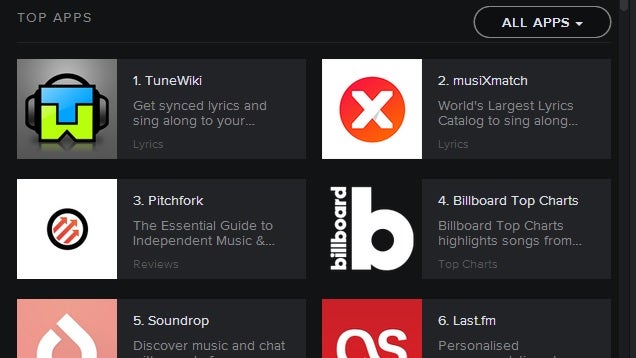
Spotify has apps of its own that you can download and use to enhance your music exploration. We've discussed a couple ways they can be really useful. On the left hand side of your Spotify window you'll see the "App Finder." These apps can do anything from finding you a music festival with your favorite artists, to travelling the world with music, and even getting lyrics to the songs you're listening to.

If you're feeling angry and want to rage a little, your 80s pop playlist isn't ideal. Apps like Moodagent let you pick the mood you're in and it will curate a playlist that goes along with it perfectly. It also learns from the music you listen to and adjusts its curation based on your traits: sensuality, tenderness, happiness, and anger. If you feel like singing along, TuneWiki brings you lyrics synced up to the song you're listening to. The app automatically scrolls as the song plays and bolds the current lyrics so you can bring the karaoke bar home and save the embarrassment.

Spotify Apps turn your desktop client into way more than a music player, so go to the App Finder and start browsing for things that will enhance the music for you.

Search for Music Efficiently

The Best Spotify Tips and Tricks You’re Probably Not Using

Just like with a Google search, you can use search modifiers to help you find exactly what you're looking for in Spotify. Going to the search bar and simply typing David Bowie will bring up a whole bunch of stuff. You'll see artists, albums, playlists, profiles, and a neverending list of songs and spoken word tracks that may or may not actually have anything to do with the Thin White Duke. Say you're only interested in finding David Bowie's tunage from his Ziggy Stardust phase in the years of 1971 to 1973. In that case, you want to use some modifiers to narrow things down, and you would type artist:David Bowie year:1971-1973 .

Modifiers make it simple to search for artists, songs, albums, release dates and date ranges, genres, record label, and you can even use boolean operators like "AND", "OR", and "NOT." For an extensive guide on using Spotify search engine modifiers, check out The Definitive Music Search Engine Guide at Search Engine Watch.

Share (or Don't Share) Your Music

The Best Spotify Tips and Tricks You’re Probably Not Using

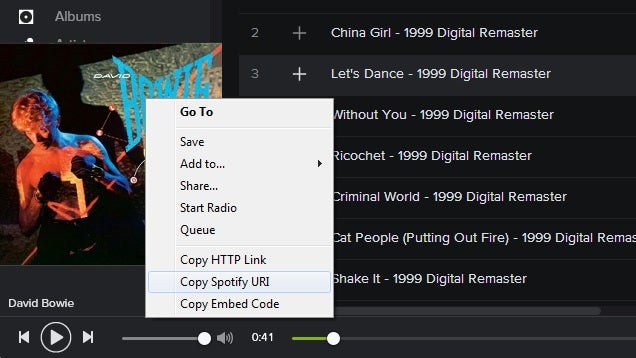
Spotify is great for finding new music, but it's even better for sharing music with others. You can make your playlists public and let your friends see what you've listened to lately, but sharing can go way beyond that. You can link individual tracks, profiles, playlists, artists, albums, and you can even link specific searches you've made. You can even add "#timestamp" to the end of any Spotify song URL and it will start playing at whatever point you decide—just like you can with YouTube videos. For example, copy this link to your address bar (Spotify URI links don't work in Kinja): spotify:track:0F0MA0ns8oXwGw66B2BSXm#0:41. Let's dance!

You can also stay completely invisible on Spotify if you'd rather not get into the social aspect. To avoid all contact with other users, click "Edit" at the top of your desktop client and select "Preferences…" Once you're there, the first section at the top is "Profile." Uncheck everything there and every playlist you make will be invisible, along with the tracks and artists you've been listening to. Other ways to keep dark are obvious: don't add any friends and don't connect your Facebook account.

If you are into being social, but just want to keep a playlist of guilty pleasures hidden away from your friends, you can do so. Right-click the playlist and select "Make Secret." This will hide its contents away from any friends, collaborators, or followers. Just make sure that you choose this option before adding the embarrassing tunes. If someone was a collaborator or borrowed your playlist already, making it secret will just keep anything new you add to it from appearing on their version of the playlist.


The number of things Spotify can do justifies the monthly fee for most people, and these tips should help you take your music discovery and listening to the next level. There's no reason Spotify can't be your one and only music listening tool.

Photos by isak55 (Shutterstock), Volkova (Shutterstock).

23 Jun 17:13

50,000 march against austerity in London, BBC doesn't notice

by Cory Doctorow

Joly writes, "It seems the BBC are capable of tracking down a single Scot in Brazil who cheered a goal against England but fail to notice 50,000 demonstrating on their doorstep." The Guardian noticed. There's much bigger stuff -- likely too big for the Beeb to ignore -- coming in October.

Read the rest

23 Jun 17:01

Google Glass Explorer Edition Now Available For Purchase In The UK - £1000, Free Shade / Frame Included With Purchase

by David Ruddock

glass2

Update 2: And now it's showing up for purchase on the UK Play Store - 1000 of your pounds will buy an Explorer Edition Glass in one of five colors. The same free frame / shade deal going on in the US is also available for the UK version. (Thanks, Ben!) Here's the official UK landing page for Glass, too.

original

Accessories seem to line up, as well - all the shades, frames, the stereo and mono earbuds, carrying case, pouch, and spare charger are all available for purchase.

Google Glass Explorer Edition Now Available For Purchase In The UK - £1000, Free Shade / Frame Included With Purchase was written by the awesome team at Android Police.


22 Jun 16:56

CS Lewis explains why you should be proud to read children's books

by Cory Doctorow

A stupid, shaming, linkbaity screed against young adult literature in Slate has got lots of peoples' backs up. But reactionary nonsense about children's literature is nothing new, as CS Lewis's classic 1952 essay On Three Ways of Writing for Children (currently available in the excellent collection Of Other Worlds) demonstrates. Lewis demolishes the knee-jerk fear of being caught reading "kids' stuff," and reveals it for what it is: insecurity about your own maturity and seriousness (he also tackles the stupid idea that fantasy literature makes it hard for kids to know what's real): Read the rest

22 Jun 11:24

Foul!!! Sony Orders Google to Censor The World Cup

by Andy

Soccer fever has been spreading across the globe this week, with dozens of millions tuning in to watch the World Cup via regular TV and an abundance of online services.

While England basked in its somewhat traditional World Cup disappointment Thursday, viewing records were being broken, but amazingly while Brazil sizzles, some want to pour cold water on the excitement.

Allow us to introduce MarkScan, a self-described “consulting boutique dedicated to your IP requirements”. The anti-piracy company is based in India and boasts a wide range of clients including the BBC, HBO, Nokia, and other prestigious brands.

Just recently MarkScan has been doing some work for Multi Screen Media Pvt. Ltd, a Sony Entertainment Television subsidiary in India. In June, Multi Screen Media launched LIV Sports, a digital sports entertainment site that was chosen by FIFA to be the official mobile and Internet broadcaster for the 2014 World Cup.

This week, MarkScan set off on an inevitable DMCA takedown spree to protect its clients’ and FIFA’s rights. What a disaster it’s been.

Much like FIFA, MarkScan began by sending its first batch of copyright complaints to Google several days before a ball had even been kicked. The notice, which covered 46 domains allegedly streaming the World Cup, was 100% rejected by Google.

One of the complaints targeted a great article by GigaOM which helpfully offered “Where to watch the 2014 FIFA World Cup live online, and how to stream it without cable.” The article listed all legal sources, including ESPN, across several countries.

Several subsequent takedown notices targeting more than 700 other URLs saw between 90% and 100% of URLs rejected by Google. One of them was nothing short of a disaster.

Markscan1

livsportsThe notice, sent on behalf of Sony’s Liv Sports via Multi Screen Media, targeted 610 URLs, all of which were rejected by Google. All were claimed to be infringing on Liv Sports’ and FIFA’s rights, yet what the notice actually did was target some of the web’s most respectable news sites and resources.

In the article titled “World Cup 2014: How to watch across BBC TV, radio and online”, the BBC attempted to inform its millions of readers how to legitimately access the World Cup. However, as can be seen from the image below, MarkScan had other ideas.

markscan2

Sadly, this attempted takedown of a purely informational and entirely legal article wasn’t the only casualty of this notice.

An article published by Variety informing its readership that ESPN would be streaming all 64 matches was deemed to be copyright-infringing too, as was a similar attempt by Canada’s CBC.ca.

Other catastrophes would be amusing if they weren’t so awful, such as the attempt to censor this article on Bleacher Report which advised how to watch Uruguay versus Germany – a match from FIFA World Cup 2010 four years ago.

bleacher

Also targeted was this 2013 article from Hollywood Reporter which detailed plans by Sony (ironically) and FIFA to broadcast the World Cup 2014 in Ultra HD. FoxSports’ interactive World Cup Schedule was also marked as infringing. Both are shown below.

Markscan3

Even legitimate traditional broadcasters couldn’t get the word out unhindered. Communications company Cox wanted to let its residential customers know they could “Watch the World’s Biggest Soccer Games. Any Way You Want” but MarkScan told Google the page was illegal.

The whole notice, which can be read here, has many more examples than those listed above, including the attempted censorship of EA Sports’ Twitter account and FIFA’s very own site – for FIFA Futsal World Cup Thailand 2012. Brilliant.

But, in its own unique way, one takedown is more disappointing than most.

In a post dated June 9, before the World Cup had even begun, Symantec tried to inform its readers on how to avoid various World Cup related scams. We don’t need to tell you what happened to it.

TorrentFreak contacted MarkScan whose Internet Enforcement Team told us they take care to avoid mistakes.

“We want to assure you that we deploy technology, in addition to best efforts of our teams, to ensure that we do not impact legal content on yours, or any other website,” they explained.

We suspect someone could be seeing at least a yellow card, possibly worse, in the days to come.

Source: TorrentFreak, for the latest info on copyright, file-sharing and anonymous VPN services.

21 Jun 22:20

This Is Volantis, HTC's Nine-Inch Nexus Tablet

by Liam Spradlin

t

With Android Silver rumors brewing, and LG's Ken Hong indicating that the manufacturer doesn't have a Nexus phone in the cards, the fate of the Nexus line as a whole has been sort of up in the air.

We don't have news about whether a Nexus phone exists, but we do have information related to HTC's Volantis (or Flounder), an 8.9" Nexus tablet. The information provided to us indicates possible specs, features, and pricing, as well as an early look at the form factor, though the images we have don't appear to be final renderings of the device.

This Is Volantis, HTC's Nine-Inch Nexus Tablet was written by the awesome team at Android Police.


21 Jun 20:04

Google Gesture concept sees real time translation of sign language [updated]

by Derek Kessler

Correction: A previous version of this article stated that Google was behind the Google Gesture arm bands, though it now seems more likely painfully obvious that this is a mock-up project from the marketing students at Berghs. Still, it's an impressive and out-of-the-box idea, no? Original follows.


21 Jun 09:33

Recalibrate Your Reality

by Thorin Klosowski

Recalibrate Your Reality

Wish you were better/smarter/stronger/faster? Sure, hard work helps, but the truth is, your self perception may be getting in the way. We all form our own realities, and those realities aren't perfect. Your self perception can be very limiting, and shaking up your notion of the world can do wonders for your productivity, creativity, and happiness. Here's how to recalibrate your reality.

Blast from the past is a weekly feature at Lifehacker in which we revive old, but still relevant, posts for your reading and hacking pleasure. This week, we thought it was time to do some mental house cleaning.

Remember the last time you lost confidence after your boss was disappointed in your work—or maybe you were stood up by a friend? You second-guessed yourself after that, and ultimately your work or personal life suffered. The idea behind recalibrating your reality is pretty simple. When you get locked into a view of the world you get stuck in routines and you lose sight of different viewpoints. Recalibrating that view can help you solve problems, win arguments, and even be happier. But how do we actually do it? We'll take a look at a few of the different methods you can use to recalibrate your perception of the world and yourself, but first, we have to understand how we perceive the world to begin with.

How We Perceive the World

Recalibrate Your Reality

To get a grasp on how we perceive the world, I talked with David Eagleman, neuroscientist at the Baylor College of Medicine and author of Incognito: The Secret Lives of the Brain and Timothy Wilson, psychologist at the University of Virginia and author of Redirect: The Surprising New Science of Psychological Chance.

In a literal sense, you can't perceive much more of the world than you already do. You only perceive what you really need in order to survive. David Eagleman explains:

We open our eyes and we think we're seeing the whole world out there. But what has become clear—and really just in the last few centuries—is that when you look at the electro-magnetic spectrum we are seeing less than 1/10 Billionth of the information that's riding on there. So we call that visible light. But everything else passing through our bodies is completely invisible to us.

Even though we accept the reality that's presented to us, we're really only seeing a little window of what's happening. There's so many examples of this, but one that's interesting to third-graders, but also neuroscience is optical illusions. [Illusions demonstrate] that these really simple things that you think are going on in front of you are not actually representing physical reality but instead your brain is constructing something.

Our construction of reality shapes and alters our view of the physical world. It also limits our cognitive ability because we weigh our views more importantly than others. Mr. Wilson explains:

A lot of this happens unconsciously. We don't know how much we're interpreting. The world presents itself like it's reality and we don't know how much we've already filtered that. There's a psychologist name Lee Brosan who calls this naive realism. We perceive the world as real, but we're doing a lot of spinning as the information comes in. He talks about it as a real impediment when we're in an argument because each person sees the world as real and thinks the other must be crazy or deliberately trying to destroy things when in fact they're just trying to bring their own expectations and facts to the table.

Recognizing this limited view is the first step. David Eagleman describes this as the umwelt: the assumption that our reality is the only reality out there. He suggests the first thing we have to do is recognize our umwelt.

The key is when you appreciate the umwelt it gives you intellectual humility. You realize that even though you assume this is reality, there is so much you're not seeing and so much that's a part of other people's reality. The usefulness is recognizing this humility when making a hypothesis.

Recognizing our own umwelt can help us recalibrate our version of reality and start looking at the world in a new and different way. Most of us can't do this by flipping a switch and require some exercises to get our brains into the habit of looking through other perspectives before making choices. Let's look at some of the ways you can utilize and act on this idea.

How to Alter Your Outlook

Recalibrate Your Reality

One of the biggest reasons to recalibrate your reality is to attempt to expand your world outlook outside of yourself to help you become a better communicator and expand your problem solving ability. This is easier said than done. Let's look at ways you can actually implement it in your day.

Wait Five Minutes Before You Respond

One regret most of us have is our stupid responses during debates or heated arguments. To help cure that and give yourself time to think, 37signals author Jason Fried suggests a simple approach: give it five minutes. He describes a situation where he was arguing with a speaker at a conference who eventually offered him this advice:

He said "Man, give it five minutes." I asked him what he meant by that? He said, it's fine to disagree, it's fine to push back, it's great to have strong opinions and beliefs, but give my ideas some time to set in before you're sure you want to argue against them. "Five minutes" represented "think", not react. He was totally right. I came into the discussion looking to prove something, not learn something.

Many arguments don't offer the luxury of a five minute response, but others, like email, social networks, or even conferences, give you plenty of time to formulate your response and recalibrate your reality before you say something stupid. Simply letting ideas settle in will inevitably force you to reconsider your own viewpoints, weigh them against your own, and give you an opportunity to come up with a better response.

Force Yourself to Think from Alternate Points of View in Monotonous Situations

It's not all about making yourself better at arguing a point. It can also be used as a form of stress relief for daily annoyances. In his commencement speech given to the graduating class at Kenyon University in 2005, author David Foster Wallace talked about the dangers of self-centered worldview and the importance of disrupting our "default setting" and views of the world by considering other options.

His suggestion is pretty simple. When you get annoyed at a situation or another person, think about why you would do what they're doing. For example, if you're in the checkout line and a woman smacks her kid, consider how you would end up in that situation. Alternately, if someone cuts you off in traffic, imagine why (or even when) you've done the same thing. Putting yourself in that mindset can change your view of a situation. As Wallace points out, doing this on a regular basis disrupts your default-setting and makes you more conscious of the world around you.

Write Out Your Day From Another Point of View

Recalibrate Your Reality

In his book, Mr. Wilson talks about the importance of writing things down as a means to understand different perspectives and one way to do that is to take a look at your day—whether that's work, your creative life, or happiness—from the third person. He explains:

Some researchers have developed a method where they say, if something is nagging at us, write about it in the third person so we can look at it as objectively as we can as opposed to immersing ourselves in a negative experience. That kind of distance can be really helpful to change our story and to look at it in a new way and give new meaning to it.

I think I try to do this sometimes. I remind myself that my interpretation of something is just that—an interpretation. It's not the only way. Sometimes it's good to to look at a situation the opposite way as an exercise.

It might make you feel a little like Bob Dole for a minute, but writing out your day from a different point of view will give you a unique perspective of your situation and can help you pinpoint where a problem is.

This isn't just about altering your view of the rest of the world though, it's also useful to recalibrate your perception of yourself. Let's see how you can do it. Photo by vtsr.

Alter Your Perception of Self to Expand Your Notions of the World

Recalibrate Your Reality

As we've seen above, we see the world through our own set of filters, but changing and recognizing those filters isn't too difficult. More difficult is editing your self-perception in order to change how you view the world. It's a bit difficult to imagine changing your own view, but here's a few ways you can do it.

Edit Your Own Story

One of the central themes in Mr. Wilson's book is the idea that you unconsciously form your own narratives that frame the world and shape your sense of reality. Like any story, these narratives can be edited with a technique he calls story-editing.

The goal of story-editing is to change your personal interpretations of yourself and the social world to make yourself happier. One way Mr. Wilson suggests doing this is using the Pennebaker Writing Exercise. The process is pretty simple.

  1. Find a quiet, private place to write.
  2. Commit to writing about a problem for fifteen minutes a day for three consecutive days.

Each time your write about a stress or problem, you reveal more and can subsequently edit your version of the story and understand it more. It's the same premise as five minute idea mentioned above. The writing exercise creates a self-assessment of your view and helps you consider other sides of a problem. This helps you interpret yourself differently in the social world and can provide insight into how you umwelt affects your decisions, creativity, and productivity.

Change How You Present Yourself

New research from Northwestern University suggests that you may be influenced by how you present yourself. The researchers call this "enclothed cognition" and theorizes that clothes have an effect not just on how you're seen by the world, but also how you see yourself. Basically, you can alter your self-perception and subsequently your reality by wearing different clothes.

The research doesn't prove anything yet. Instead, it suggests that our clothes have an impact on how we view ourselves. As an experiment on yourself, outfit yourself differently for a day and take note of how people perceive you how you perceive yourself. Does wearing a tie make you feel like more of an adult? Does a uniform change the way you view work? When your self-perception is changed, so is your view of reality.

Try on a Different Personality for an Hour

The idea of trying on a new personality might seem a little strange if you do it around friends and family, but doing so on a short flight or even in with a random conversation on the bus is an experience that completely alters your reality. It's also surprisingly easy to do. Mr. Wilson offers his experience:

The idea of trying on a new self can be a fun exercise. So, you're on a train or a plane and you're chatting with the person next to you and you just try on a new personality. For example, I tend to be a bit more on the introverted side and I often wish I was a little more talkative and socially skilled at parties and things. And that's something you can change if you practice it. So sometimes I'll just say, I'm going to be an extrovert. And you know, I'll never be Mr. Extrovert, but it's amazing how easy it can be if you just try to adopt a different trait.

I tried this idea myself. As a bit of an introvert, I tried on an extrovert hat while doing some work in a coffee shop one night. To my surprise, simply telling myself, "I'm an extrovert for the next two hours," actually made me more forthcoming to the person who was clearly trying to ignore me at the next table. It also gave me an idea of the difference in perception between an extrovert and an introvert. Where I typically would go to a coffee shop to work quietly in the corner, I took a seat closer to someone and actually engaged with them. I did this all automatically after I decided I was an extrovert and it wasn't until I looked back on it that I realized my seating choice and disposition was influenced by the conscious choice I made earlier.

Create Hiccups in Your Physical Reality to Recalibrate Your Views

Recalibrate Your Reality

One of the problems of falling into a set notion of the world is that we stop being mindful of the world around us and that closes our perception even more. In a lot of ways it's a good thing, because it's a great boon to productivity to not have to give cognitive thought to a lot of our daily actions, but it's still good to change your world slightly now and again. It's easy to do and can have a surprising effect.

Rearrange Your Home Environment to See New Things

Rearranging your home is an oddly relaxing way to explore your own dwelling and take a good look at the reality you form. Over years of living in an apartment or house, objects get hidden away, pictures you meant to hang get stuffed in storage, and you get so relaxed in the world you create that you don't spend any time paying attention to it.

You don't have to completely redo your living room or go out and buy anything. It is as simple as taking down the art on your walls and rearranging them in new places. You could even consider flipping a room to offer a different perspective. The goal is to provide that cognitive bump in the road so that when you walk into your house you're forced to reassess the situation slightly and take the time to actually think about what you're seeing.

Take Different Routes and Find New Areas to Explore

Like the rearranging of your furniture, taking alternate routes is about expanding your reality into something larger and breaking your routine enough to cause you to pause. This doesn't mean you have to take a new way to work every day, but it might mean taking a different street to the grocery store or jogging along a different path. When you break your routine, you move away from your reality and take in another section of the world.


The end goal of recalibrating your reality is to expand your perception so you can make your life better and more interesting. The above methods can be used to work through creative blocks, problem solve issues at work, and even to deal with minor traumatic events. Once you recognize the umwelt and the embrace the idea that your perception is limited, it opens up all types of new ideas. Do you do things to recalibrate your notion of reality? Share them in the comments.

Images by Alberto Zornetta (Shutterstock), Petr84 (Shutterstock), Elaine, Valentina Powers, vtsr, StrangeInterlude, amd Frank Tobia.

21 Jun 09:32

The German war against the link

by Jeff Jarvis

German publishers are not just fighting Google. They are fighting the link and thus the essence of the internet.

Half the major publishers in Germany have started a process of arbitration — which, no doubt, will lead to suits — to demand that Google pay them for quoting from and thus linking to their content. And now we know how much they think they deserve: 11% of Google’s revenue related to their snippets. From their government filing, they want a cut of “gross sales, including foreign sales” that come “directly and indirectly from making excerpts from online newspapers and magazines public.” [All these links are in German.]

Their demands are as absurd as they are cynical and dangerous. First, of course, Google is sending the publishers plenty of value as well. That is, Google is sending the publishers us: readers, customers, the public these news organizations allegedly want to serve. So what are we, chopped liver? I’ll be posting an essay soon that argues that one reason media have a problem building new digital business models is that we still think value is intrinsic only in content; we have no marketplace and metrics for valuing the creation of an audience for it (now that those functions are unbundled). If the publishers really want a fair exchange of value, then they should also be paying Google for the links — the readers — it sends their way. But, of course, that would create a moral hazard and corrupt search; that Google does not charge for placement in search and Google News is precisely what set it apart from predecessors and built a valuable and trusted service.

Google is never going to pay for the right to quote and link to content. That would ruin not only its business but also the infrastructure of knowledge online. If we can find only the knowledge that pays to be found, then the net turns into … oh, I don’t know, a newsstand?

The publishers aren’t stupid. They realize these facts. That’s what makes their action so cynical. They are trying to blackmail net companies in hopes of getting some payoff from them. They’re not just going after Google but also Microsoft and Yahoo — though, interestingly, if a company has only a search engine, the publishers would charge them only a third of their tariff. That is to say, they want to go after the big net companies because they are big targets.

Earlier this month, I spoke at a Google Big Tent event in Berlin (Google paid my travel expenses; I do not accept other payment from Google) where a conservative member of parliament, Dorothee Bär, had the admirable guts to criticize these mostly conservative publishers for their efforts, telling them that she opposed passage of the law that is allowing this nonsense — a Leistungschutzrecht or ancillary copyright — and also warning them that a failing business model is no excuse to run to government begging for regulation. You’d think conservatives would agree about that. But that, again, is what makes the publishers’ campaign so cynical.

Note, by the way, that Google does not place advertising on Google News. Are the publishers seeking 11% of 0? Note as well that there is data to say that longer samples of content could end up sending *more* traffic to creators (more on that, too, in a later post). These are facts that will need to be discussed in any suits.

Add all this to other attacks on Google by German media and politics against Google: the Verpixelungsrecht — right to be pixelated — in Google Street View and calls by German politicians to break up Google. Add to that as well the recent European court decision upholding a right to be forgotten and requiring Google to take down links to content that subjects don’t like.

And I worry about the net. I worry about Europe and especially Germany about their efforts to protect the past. I’ll likely write more about that as well later.

But, of course, these warriors do not speak for all of Germany or all of Europe. The instigators of the war include Axel Springer, Burda, WAZ, the Müncher Merkur, and others. But other major publishers — Spiegel Online, Handelsblatt.com, FAZ.net, Stern.de, Sueddeutsche.de and [cough] the new German edition of Huffington Post — have not joined the war. And there are politicians such as Bär and outgoing vice president of the European Commission Neelie Kroes who have the courage to defend the future. Here is Kroes the other day responding to strikes across Europe protesting the arrival of Über:

The debate about taxi apps is really a debate about the wider sharing economy. That debate forces us to think about the disruptive effects of digital technology and the need for entrepreneurs in our society. . . .

Whether it is about cabs, accommodation, music, flights, the news or whatever. The fact is that digital technology is changing many aspects of our lives. We cannot address these challenges by ignoring them, by going on strike, or by trying to ban these innovations out of existence. . . .

I believe it is a fundamental truth that Europe needs more entrepreneurs: people who will shake and wake us and create jobs and growth in the process.

We also need services that are designed around consumers. The old way of creating services and regulations around producers doesn’t work anymore. They must have a voice, but if you design systems around producers it means more rules and laws (that people say they don’t want) and those laws become quickly out of date, and privilege the groups that were the best political lobbyists when the law was written.

That is old-fashioned compared to a system that helps all of us as consumers, and encourages entrepreneurs. We need both those elements in our economy; otherwise we will be outpaced to our East and our West. We’ll be known as the place that used to be the future, but instead has become the world’s tourism playground and nursing home. I don’t want Europe to have that future. . . .

More generally, the job of the law is not to lie to you and tell you that everything will always be comfortable or that tomorrow will be the same as today. It won’t. Not only that, it will be worse for you and your children if we pretend we don’t have to change. If we don’t think together about how to benefit from these changes and these new technologies, we will all suffer. . . .

21 Jun 09:28

Samsung Rumored To Be Launching An Android Wear Smartwatch At Google I/O

by Liam Spradlin

image

There have been rumors recently that LG's G Watch might be the focus of Google I/O's Android Wear discussion, with the nascent device possibly being handed out to attendees. Whether Moto's watch, the Moto 360, would make an appearance has remained unclear. Until today though, those were the only two Android Wear devices even rumored for I/O cameos.

Cnet has reported, however, that Samsung will (according to sources) be throwing its hat into the Android Wear ring at I/O as well, debuting an Android Wear smartwatch of its own.

Samsung Rumored To Be Launching An Android Wear Smartwatch At Google I/O was written by the awesome team at Android Police.


20 Jun 21:18

[Quick Review] Moto Stream: A Fast, Dirty, Pretty Way To Smarten Up Your Stereo

by David Ruddock

wm_DSC04197

There are a lot of Bluetooth transceivers out there, but Motorola's newest product, the Moto Stream, undoubtedly tops them all for looks. It's just kind of mesmerizing.

stream1

But is it worth the $50 price tag? I ordered one to find out, though admittedly I did so only after finding it on sale for half off using a now-expired coupon code, bringing the price down to just over $30 shipped. At that price, I'd say the Stream is totally worth it - it's really neat to look at, easy to get up and running, and has a few noteworthy features that make it stand out.

[Quick Review] Moto Stream: A Fast, Dirty, Pretty Way To Smarten Up Your Stereo was written by the awesome team at Android Police.


20 Jun 20:21

Hands on with the Nokia Z Launcher

by Richard Devine

Simple, stylish and full of predictions

Nokia certainly caught us off guard by suddenly throwing an Android launcher out into the world. Known as Z Launcher, the project is currently in limited pre-beta status but anyone with a supported device can register, download and take it for a spin. So that's exactly what we did.


20 Jun 20:20

EE to begin trialing calls over Wi-Fi in the UK, 4G support coming in 2015

by Rich Edmonds

UK mobile operator EE has today announced trials for calls to be held over Wi-Fi will commence later this year. The trial is part of a £275 million investment in advanced voice capabilities, helping connect more rural parts of the UK who don't have the strongest levels of signal with EE. Launching the trial later this year, EE has also upgraded both 2G and 3G sites to handle the increased data usage across the network and make way for 4G calling services to launch in 2015.


20 Jun 20:13

Google Search Now Lets You Launch Music Apps From Artist Searches

by Eric Ravenscraft

Google Search Now Lets You Launch Music Apps From Artist Searches

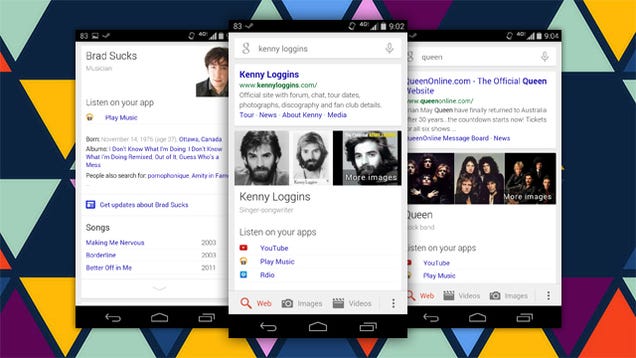
Google has added yet another feature to Search that now makes it easier than ever to get to music on your phone. Just search for an artist's name and you'll get quick links to open up that artist in your preferred music app.

This new feature plugs into YouTube, Play Music, Spotify, Rdio, and several others. Somewhat frustratingly, they only seem to appear on artist searches. If you search for a specific song, you won't get the link. However, the already existing "play" voice command can still work to launch your apps (as in, "play Bohemian Rhapsody by Queen").

Google Search On Android Now Gives You Direct Links To Music Apps If You Search For Artists (US Only For Now) | Android Police

20 Jun 20:13

Positive Self-Affirmation May Backfire on People with Low Self-Esteem

by Eric Ravenscraft

Positive Self-Affirmation May Backfire on People with Low Self-Esteem

Some people have a level of success using self-affirmation mantras like "I'm great and people like me." Others find them trite and unhelpful. The distinction may boil down to self-esteem and, more importantly, how much self-affirmation causes conflicting internal thoughts.

A study conducted at the University of Waterloo found that repeating self-affirmation statements like "I'm a loveable person" boosted self-esteem in some subjects. However, in subjects with already low self-esteem, they found that repeating the mantra only made the situation worse. They theorize that this is because the conflict between self-perception and the statements themselves caused more stress, leading the subject to feel worse:

"…outlandish, unreasonably positive self-statements, such as ''I accept myself completely,'' are often encouraged by self-help books.

Our results suggest that such self-statements may harm the very people they are designed for: people low in self-esteem."

The problem of low self-esteem, according to the study's authors, isn't one that can be solved simply by telling yourself something over and over until you believe it. Self-affirmation can help someone with otherwise high self-esteem get through periods of doubt and stress, but low self-esteem typically needs more concrete perception adjustments in order to escape the cycle of self-denial.

"I Am a Lovable Person!": Why Positive Mantras Backfire For Some | Psyblog

Photo by Loren Kerns.

19 Jun 17:17

Top 10 new Android games this week: Band Stars, Qvadriga

by Steve Raycraft

Welcome back to Android Gaming Weekly, our weekly recap of new game releases. We still plan to cover upcoming releases and games we’re playing, but this column is dedicated to new games that you can start playing right now. Check out our top picks and let us know in the comments section if you have any suggestions for next week’s post.

Topia World Builder

Description: Topia World Builder is a world creation simulation. You become god and shape the land as you choose, by the use of touch controls. Swipe your finger to create mountains, valleys, rivers, and oceans. Watch trees grow, spawn thousands of animals – and watch them live and die on the planet of your creation!


Qvadriga

Description: If you have come here it is because you wish to manage your own chariot racing team. Train your drivers and give them the finest equipment and horses. If you do this well, your chariots will provide you with both wealth and fame. but beware! Chariot races are dangerous. Accidents may occur and rival teams might try to harm your charioteers during the race.


Hubble Bubbles

Description: Hubble Bubbles is a skill driven arcade game, featuring madly addictive (I swear it was an accident!), straight from space gameplay. Whenever you will find yourself saying “Ok, now it’s the last time!… “, remember it’s not my fault!


Boom Beach

Description: Storm the beach and win the day! Boom Beach is a combat strategy game where you fight an epic war against the evil Blackguard. Take your expeditionary force to beautiful paradise islands invaded by the enemy. Fight for every beachhead, free enslaved islanders and explore the uncharted archipelago.


UMAI!

Description: UMAI! is a tasty sushi puzzle game. Chain sushi together to get combos and a high score – and try to avoid the poisonous ones, they don’t taste very good. The rainbow ones, however, are quite delicious.


Warhammer 40,000: Carnage

Description: Run and gun through screaming hordes of frenzied enemies in this fast-moving, high powered,action side-scroller. Suit up your Space Marine and inflict untold damage to all in your path.


Super Gravitron

Description: Super Gravitron is the minigame that originally appeared at the end of VVVVVV, now available as a free, standalone game on android!


Shibe!

Description: Shibe the Doge is not gonna let anything stop his eternal quest to find the “Epic Wow”. Not even telekinetic laser-shooting cat heads and gelatinous dual-phasing ground-hopping rooster heads!


Band Stars

Description: Form a band, hit the studio and start recording! Train up your band and complete challenges as you make your way to the top of the charts. Fame and fortune await! Set your sights on world stardom and make your way to the top of the local, national and global charts. Discover each of the 50 super-cool Band Stars characters and complete over 200 unique challenges!


Forgotten Game of Ur

Description: This Game has no name. For 5,000 years, we forgot it. Archaeologists call it Ur, in honor of the city, where it was discovered. The city where Abraham was born. There is no living person who knows original rules of this game, but we tried to repair them for you. Russian writer and popularizer of board games, Dmitry Skyruk proposed his own ruleset that makes this old game really interesting and unbelievable challenging.


19 Jun 17:16

The BlackBerry Passport Is A Phablet With A Hardware Keyboard That Makes No Sense Whatsoever

by Darrell Etherington
blackberry-passport Just when you think you might have figured out what BlackBerry is up to (a strong push in enterprise services and emerging markets like the Internet of Things) they go and do something like the BlackBerry Passport. The device broke cover today (via MobileSyrup) during the Canadian smartphone maker’s earnings call, and it’s set to be launched in September this year, following an… Read More
19 Jun 17:15

The Nokia team Microsoft didn’t buy has made an Android launcher

by Josh Lowensohn

Nokia's involvement with Google's Android can only be described as one big "what if." Ahead of Microsoft's deal to buy it, Nokia was testing Android phones, but the only thing that's come from that is the Nokia X, an entry-level Android device aimed at luring feature phone owners into the smartphone era. However, it's been designed to play second-fiddle to Microsoft's Windows Phone software and Nokia's own higher-end phones. Its future is also one big question mark now that Microsoft's taken the reins.

Continue reading…

19 Jun 17:14

Supreme Court rules software patents that cover 'abstract ideas' are invalid

by Adi Robertson

Software patents aren't dead, but they just took a blow. In a unanimous decision, the Supreme Court has ruled that a series of banking patents didn't cover a concrete software process but an abstract idea, throwing them out and potentially setting a stricter precedent for future patents.

Alice Corp. and CLS Bank are both major financial institutions, and they've been sparring for years in court. The issue is a series of patents that cover a kind of electronic escrow or "intermediated settlement," where a third party holds the real money while "shadow" balances are shown to both sides during trading. In order to preempt a threat from Alice, which held those patents, CLS asked for a court to declare them invalid, saying that the basic...

Continue reading…

19 Jun 14:47

BillGuard expands internationally, now available in Australia, New Zealand and the UK

by Richard Devine

Popular finance tracker, BillGuard, has today announced its first international expansion bringing it's service to folks in Australia, New Zealand and the UK for the very first time. Most major local banks and credit card providers are now supported to use alongside it's simple, yet powerful features to help you keep track of your spending. And all that in a really nice Android – or iOS – application.