Shared posts

12 Jul 15:21

The LG G Watch video review!

by Phil Nickinson

If it seems a little bit like everything's about Android Wear these days ... well, you're right. Everything is about Android Wear these days. And that's OK. These are exciting times. We've finally gone from months and months of a prototype-y Google Glass to actual Android Wear smartwatches that don't break the bank (or attract the ire of luddites).

Earlier this week we profiled the first two Android Wear devices — the LG G Watch and the Samsung Gear Live.

Here, now, is our video review of the former. Be sure to check out the full written LG G Watch review.


12 Jul 15:21

Top 10 Things You Might Be Doing Wrong Every Day

by Melanie Pinola

Top 10 Things You Might Be Doing Wrong Every Day

Surprise! Many of the things we think we're doing correctly are actually not the best ways to do them. This includes even basic, everyday things like cooking, driving, and even shaking hands (separately, of course). Let's take a look.

10. Breathing

Top 10 Things You Might Be Doing Wrong Every Day

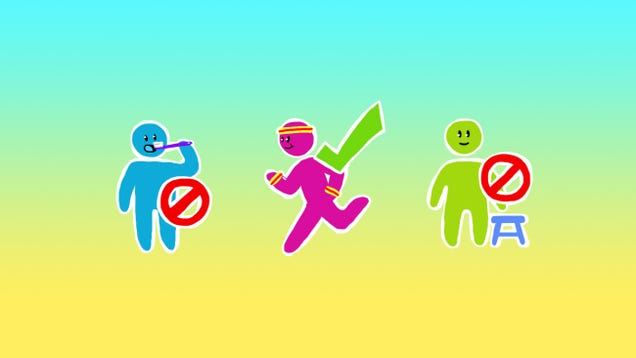
Unless you're dead, you're breathing and that's all there is to it, right? Although there isn't a "wrong" way to breathe, there's a more efficient way that increases your energy and gives your body more oxygen: belly breathing, which for some reason we stop doing past the baby stage. But if babies can do it, so can we!

9. Peeing in a Urinal

Top 10 Things You Might Be Doing Wrong Every Day

Pee should not haphazardly splash back on to the floor or yourself. Physicists have revealed the best way for men to use a urinal to minimize the dreaded splash-back: get close and aim down.

8. Brushing and Flossing Your Teeth

Top 10 Things You Might Be Doing Wrong Every Day

Morning and night, you're supposed to brush your teeth. Your dental hygienist probably showed you how a long, long time ago, but are you still doing it right? If you brush your teeth after breakfast or rinse with water after brushing, you're not helping your teeth.

7. Pronouncing Certain Words

Top 10 Things You Might Be Doing Wrong Every Day

Although you shouldn't be afraid to mispronounce words in public, there are a whole lot of words we're all probably mispronouncing—from foods and drinks to the highly contestable "gif." Maybe everyone's mispronouncing your name too. (Wouldn't life be so much easier if language was simpler?)

6. Standing and Sitting

Top 10 Things You Might Be Doing Wrong Every Day

Like breathing, your posture might also be straying from what's best for you. We've discussed how to ergonomically optimize your workspace, how to fix your sitting posture, how to test your back and neck posture, your natural sitting and standing posture, and even how to stand properly. Phew. Whatever you do, just don't sit around all day.

5. Washing Your Hands

Top 10 Things You Might Be Doing Wrong Every Day

Handwashing also seems like such an easy skill that's hard to mess up, but are you washing your hands as long and as often as you should? Are you wasting time and money with anti-bacterial soap, waiting for hot water, or an inefficient towel-drying method?

4. Loading the Dishwasher

Top 10 Things You Might Be Doing Wrong Every Day

Everyone has their own way of loading the dishwasher. This organization method, however, might be the best way for maximum cleanliness. (And if you're one of those types who cleans dishes before putting them in the dishwasher, seriously, stop.)

3. Handling a Knife

Top 10 Things You Might Be Doing Wrong Every Day

No, not in self-defense or for street wars, but for cooking. Learn the right way to hold a knife, sharpen it, and other knife skills so you don't end up in the emergency room from a knife-related kitchen injury.

2. Using Your Keyboard's Feet

Top 10 Things You Might Be Doing Wrong Every Day

You know those little feet that extend out the back of your desktop keyboard? Contrary to popular belief, they're not there for ergonomics, and having them extended can actually negatively affect you—depending on how you type.

1. Everything

Even the simplest of acts like dispensing Tic Tacs and peeling oranges have been "life hacked" into cleverer, better alternatives than the normal way most of us do it. Maddox, of The Best Show in the Universe, rants on several of these in the NSFW video above. Yeah, we're all probably doing everything wrong, because, well, nobody's perfect. Still, if you're reading Lifehacker, you're probably looking for ways—large and small—to improve your life, and the first step to that is understanding the areas where you can improve.

Illustration by Tina Mailhot-Roberge. Photos by Plume Photography (Shutterstock), Valua Vitaly (Shutterstock), Andy Melton.

11 Jul 20:59

HTC Dot View App Updated With Wallpaper Personalization, Redial For Three Most Recent Calls, And More

by Bertel King, Jr.

DotView-ThumbLeading up to the launch of the One M8, HTC started posting some of its apps to Play Store. This arrangement allows it to roll out changes to particular apps without having to issue firmware updates, which is what it has recently done. The HTC Dot View app has gained a number of new features that expand upon the functionality owners of the accessory can tap into.

DotView1 DotView2 DotView3

The update brings in the ability to select your own image to use as the case's wallpaper.

HTC Dot View App Updated With Wallpaper Personalization, Redial For Three Most Recent Calls, And More was written by the awesome team at Android Police.


11 Jul 15:51

Steven Spielberg's BFG Gets A Release Date

Steven Spielberg's BFG Gets A Release Date

Just in time for Roald Dahl's centenary


Dumbo
isn’t the only loveable, giant-lugged game in Hollywood this week. Also once-animated and also now en route to a live-action redo is Steven Spielberg’s The BFG - or Big Friendly Giant for the acronym-averse – which now has an official release date. It makes its worldwide bow in the UK and July 22, 2016 is the date to circle in your long-range diary, putting it up against Guy Ritchie’s King Arthur.

Spielberg’s take on Roald Dahl’s beloved belobed one has been penned by E.T. screenwriter Melissa Mathison. It’s had a lengthy and often briar-strewn path to the screen, passing through the hands of directors such as John Madden and Chris Columbus, before Spielberg took up the gauntlet for DreamWorks.

“It is fitting that the UK is the first international country to announce the date of The BFG”, Spielberg says, “a story that sprang from the imagination of this proud son from Wales. We at DreamWorks Studios hope our film will add to Roald Dahl’s prolific legacy of entertainment.”

For more on that Roald Dahl big-screen legacy history, head to this potted history of Dahl adaptations. If you’re not familiar with the story, The BFG tells of the world’s only friendly giant and his friendship with young girl called Sophie. He makes it his mission to collect good dreams and gift them to children while destroying nightmares and keeping his nasty fellow gigantic brethren from eating “human beans”.

Spielberg is also producing The BFG with old Raiders and Empire Of The Sun cohort Frank Marshall, with Kathleen Kennedy, John Madden and Michael Siegel also on board as executive producers. Some pedigree there.


11 Jul 14:57

Hurt flying fox enjoys grapes

by Rob Beschizza

Meet Charlie the mildly concussed flying fox. [YouTube via Arbroath]

11 Jul 13:54

Deal of the Day: Cruzerlite Bugdroid Circuit Case for HTC One (M8)

by ShopAndroid.com

Made from a scratch resistant and shock absorbent TPU, these HTC One (M8) skin cases are designed to keep a slim profile while providing a secure grip and access to the screen, camera, ports and buttons. The back of each case features a series of circuitry patterns that reach from top to bottom for a unique, custom design.

The Cruzerlite Bugdroid Circuit Case is available for just $8.95, 53% off today only. Several color options are available, too!


11 Jul 13:53

America's Army fails its own "rule of law" test

by Rob Beschizza
The Atlantic on the definition and its apparent irrelevance: "A panel of former executive-branch employees, many of whom served in the US military or the CIA, made this point bluntly in a recent report on drones."
11 Jul 12:37

ThinkUp Analyzes Your Social Life, Highlights Your Best Moments

by Alan Henry

ThinkUp Analyzes Your Social Life, Highlights Your Best Moments

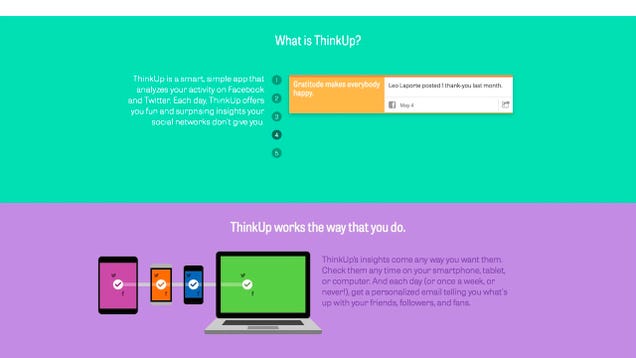
ThinkUp, the tool that archives, analyzes, and gives you control over your online social life, has come a long way since we last highlighted it. The service now gives you unique and surprising insight into the things you post and the things your friends interact with, and you can try it for free to see if you like it.

For those unfamiliar, ThinkUp is the brainchild of Gina Trapani, Lifehacker's founding editor, and Anil Dash. She introduced us to the service a while ago, but she's been steadily working on it since then.

Among its banner features, ThinkUp takes your Twitter and Facebook streams and uses them to give you useful information about how you use those networks, when you use them, and who you interact with. It can even show you who really appreciates what you post and share, and how far your messages really reach. It's a great way to see a top-down view of what your online life really looks like. ThinkUp can even pull out insightful and inspirational nuggets of wisdom from your interactions to help you better understand your relationships, or just how to communicate with your friends.

ThinkUp is a subscription service, and you can see its pricing here and read more in their FAQ. They're just launched a 14-day free trial that you can take advantage of now if you want to try it out, kick the tires, and see if it's useful for you. Hit the link below to sign up.

ThinkUp

10 Jul 23:38

Sony updates SmartWatch 2 to display custom wallpapers

by Chuong H Nguyen

Sony updates SmartWatch 2 to display custom wallpapers

Sony has rolled out a new firmware update to its SmartWatch 2 to bring custom wallpapers to your wrist. The firmware update also brings support for more languages.

The update brings the firmware build to 1.0.B.5.28/1.0.A.4.11. You can update the app from the Google Play store on your Android phone, and from within the app you can update the firmware on the SmartWatch 2.

Without an Android Wear wrist wear of its own, it looks like Sony is hard at work improving the SmartWatch 2, which competes in the same space as Samsung's Galaxy Gear 2, the Pebble, and Android Wear devices like the LG G Watch, Samsung Gear Live, and the Moto 360 among other wearables.

Is the ability to further customize your SmartWatch 2 with custom wallpapers a noteworthy update for you? Does Sony's latest update make it a bit more competitive with other offerings on the market?

Source: Xperia blog

10 Jul 22:33

Top 10 new Android games this week: FFFFF2P, Lost Toys

by Steve Raycraft

Welcome back to Android Gaming Weekly, our weekly recap of new game releases. We still plan to cover upcoming releases and games we’re playing, but this column is dedicated to new games that you can start playing right now. Check out our top picks and let us know in the comments section if you have any suggestions for next week’s post.

Leo’s Fortune

Description: Leo’s Fortune is an award-winning platform adventure game where you hunt down the cunning and mysterious thief that stole your gold. Beautifully hand-crafted levels bring the story of Leo to life in this epic adventure.


Fightback

Description: From the award-winning developer Ninja Theory comes a new standard in mobile fighters. Stunning visuals, unique controls, and a vibrant design come together to bring you the pinnacle of mobile fighting games.


Wayward Souls

Description: Wayward Souls is an action-adventure game built for quick playthroughs and massive amounts of replay value. It was inspired by Spelunky, Secret of Mana, and our previous game, Mage Gauntlet.


Bounden

Description: Bounden is a mix of Twister and ballet. You use your phone as a guide to dance, or get entangled with someone else. So, you pull out your phone, ask another person to put down a thumb, and move synchronously to dance together.


Timberman

Description: Timberman is an oldschool arcade style casual game. Become a Timberman, chop wood and avoid the branches. Sounds like an easy task? It’s easy to play but hard to master. 4 variable environments and 8 Timbermen to unlock.


Soulcraft 2

Description:SoulCraft 2 – League of Angels is the best Action RPG for Android. Choose one of seven Angels and defend earth from the legions of hell! Compete multiplayer against other players in the social league and become the best SoulCraft player in the world.


Sonic Jump Fever

Description: Catch the FEVER in an explosive race against the clock! Compete with Sonic and friends in high-speed bursts of vertical jumping mayhem. FREE and based on SEGA’s hit Sonic Jump.


Lost Toys

Description: Lost Toys is a mentally engaging 3D puzzle game of profound beauty, depth and challenge. Toys are lost, broken, or forgotten. Fixing them promises to right this hauntingly gorgeous chamber and restore the childhood innocence that has been lost.


FFFFF2P

Description: Princess Pixel is being held captive by Ug, the evil ogre! Its up to YOU to rescue her and restore order to the world. This is not going to be easy. To save the Princess, you’ll have to run, jump, and close, close, close, close, close, close, and close the ads Ug hurls at you. Don’t get squashed!


Nexionode

Description: Nexionode is a Sci-Fi logic puzzler set deep in outerspace. While the human crew is under cryostasis, the Nexio Colony Spaceship is suffering massive failures. You are TL-9507, a unique RepairDrone: your AI has been secretly enhanced.


10 Jul 20:13

Voyager 1 is officially the first manmade object to enter interstellar space

by Colin Lecher

In 2012, NASA's Voyager 1 probe became the first manmade object to leave the solar system, catapulting itself into the farthest reaches of the universe ever touched by humans — or, it didn't. Determining the exact borders of our solar system proved controversial. Now, though, we know NASA's position on the subject: although the probe has yet to leave the solar system, it's entered interstellar space, a part of the universe the human race has never reached.

Continue reading…

10 Jul 20:12

Google, DropBox, and others team up to cut patent trolls off at the source

by Adi Robertson

Despite its high profile in the tech world, patent trolling — in which companies sue for damages over patents they don't intend to use — has been difficult to address. Reform efforts in Congress stalled earlier this year, when Sen. Patrick Leahy (D-VT) failed to broker an agreement that would have raised the bar for sending patent infringement warnings and increased the risks for bringing a frivolous lawsuit. In the wake of this defeat, Google, DropBox, Canon, and others are forging a truce that they hope will stop trolls from building a patent arsenal.

Continue reading…

10 Jul 20:03

Secret proposed UK snooping law published - DO SOMETHING ABOUT IT

by Cory Doctorow

The secret, emergency snooping law that the UK Tories plan on ramming through Parliament this week without debate has been published. It's bad, and the leadership of Labour and the Libdems are complicit in the plan to make it law. Read the rest

10 Jul 13:17

Google Ventures invests in Europe

by Emily Wood
Wander through the excellent Science Museum in London, and you’ll see inventions that transformed history. Like Puffing Billy, one of the world’s first steam locomotives; or Charles Babbage’s difference engine, a Victorian predecessor to the modern computer; or penicillin, the wonder drug that revolutionized the treatment of disease. These marvels from the past still influence our lives today, and are tangible examples of how fearless exploration and entrepreneurship can literally change the world.

To help support the next generation of European entrepreneurs, today Google Ventures is launching a new venture fund, with initial funding of $100 million. Our goal is simple: we want to invest in the best ideas from the best European entrepreneurs, and help them bring those ideas to life.

When we launched Google Ventures in 2009, we set out to be a very different type of venture fund. Startups need more than just capital to succeed: they also benefit from engineering support, design expertise, and guidance with recruiting, marketing and product management. Five years later, we’re working with more than 250 portfolio companies, tackling challenges across a host of industries. For example, the team at Flatiron Health is improving the way doctors and patients approach cancer care, SynapDx is developing a blood test for the early detection of Autism in children, and Clean Power Finance is making solar energy affordable for homeowners.

We believe Europe’s startup scene has enormous potential. We’ve seen compelling new companies emerge from places like London, Paris, Berlin, the Nordic region and beyond—SoundCloud, Spotify, Supercell and many others.

We can’t predict the kinds of inventions the Science Museum might showcase 10+ years from now, but we do know European startups will be essential to this future, and we can’t wait to see what they create.

Posted by Bill Maris, Managing Partner, Google Ventures
10 Jul 13:17

Finally, A Way To Find Movies Worth Watching On Netflix

by Matt Burns
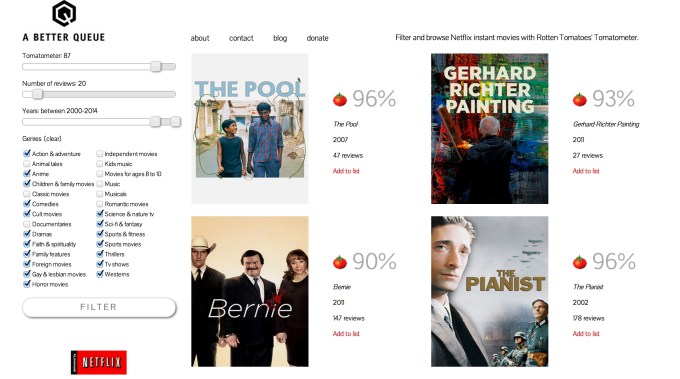
Screen Shot 2014-07-09 at 10.24.57 PM Netflix is like the candy dish at your grandmother’s house. Most of the movies are crap, but you know, buried somewhere in there, is something worth your time. A Better Queue is a site dedicated to finding the Werther’s Originals in Netflix based on Rotten Tomatoes ratings. Read More
09 Jul 22:39

Fresh Meat: 10 new Android apps worth checking out

by Steve Raycraft

New apps need lovin’ too, right? Every day there are thousands of additions to the Google Play Store, but many go unnoticed and never receive the attention they deserve. We’ve shown in the past that this community can discover great apps and propel them to new heights. Our weekly Fresh Meat column highlights new apps with fewer than 100,000 installs. Browse our new Android app picks below and let us know which ones you enjoy.

Commandr for Google Now

Commandr

Description: Google Now Just Got Better. Now you can use Google Now to control your flashlight, toggle settings, control music playback and much more! Google Now Just Got Personal. Add your own custom commands through Tasker to make sure your device fits your lifestyle.


fuseMe By Acision

fuseMe

Description: ‘fuseMe by Acision’ brings the best features from top free chat apps into one single secure place so you can connect with friends and family through voice and video calls, photo share, video share, text chats, location, voice notes and more – from one app! 


Baby Time: Android Wear Lock

Baby Time

Description: An Android Wear app to prevent rugrats from accidentally SMSing China or ordering you a Lyft car when you’re holding them. 


MathKit

MathKit

Description: MathKit is math formula reference application which contains hundreds of formulas from different areas of mathematics. The application consists of formulas from: Basic Algebra, Geometry, Trigonometry and Calculus (Standard Derivatives and Integrals)


Wear Aware

Wear Aware

Description: Wear Aware acts like a leash between your phone and your Android Wear watch. It is awesome when you are walking away from your phone or your phone is walking away from you!


Radical.FM

RadicalFM

Description: Radical.FM is the world’s most accurate personal radio service, built on one of the most comprehensive music libraries available. “If Pandora and Spotify had a baby… it would be Radical.FM.” – The Radio Agency


Motorola Connect

Motorola Connect

Description: Motorola Connect allows you to see text messages and calls coming into your Connect enabled phone on your computer’s Chrome browser. You can read and respond to texts using your keyboard and even know who’s calling before deciding if you should reach for your phone.


Theftie

Theftie

Description: Theftie: lock, locate, track, rescue data on your lost phone, stolen phone or misplaced Android, and take a thief’s selfie when suspects. A great feature of Theftie is its ability to send your data to your Google Drive in case you lost your phone.


BraveNewCoin

BraveNewCoin

Description: Brave New Coin provides in-depth market information for a variety of cryptocurrencies including weighted-average price index, market capitalisation and volumes traded from most international exchanges.


Tour de France Live – 2014

Tour de France Live

Description: All information and results of the Tour de France 2014. Live information for all stages. The 2014 Tour de France will be the 101st edition of the Tour de France. The 2014 Tour de France starts in Leeds on Saturday, July 5, and finishes in Paris on Sunday, July 27.


09 Jul 22:37

Gmail update brings better Drive sharing

by Chuong H Nguyen

Google is now beginning to push out an update to its Gmail app for Android which brings better sharing of content that's stored on Google Drive. You can now simply insert files, photos, and documents directly from Drive into your Gmail body and manage permissions on the go as to privacy and sharing.


09 Jul 22:30

UK government set to ram through surveillance legislation

by Cory Doctorow

The UK government is has put MPs on notice that a bill will be considered and moved on July 14, but they won't say what it is.

Read the rest
09 Jul 18:10

The best weather app for Android

by Dan Seifert

Is it going to rain today? Should I bring a jacket with me? Is it safe to plan a trip to the beach this weekend? Just a couple of years ago, answering any of those questions required watching your local news or tuning in to The Weather Channel to get a vague forecast that will probably change before you get where you’re going. But with smartphones, we can have insanely accurate weather reporting and predictions at our fingertips everywhere we go. Weather apps are a huge part of my daily...

Continue reading…

09 Jul 18:08

Using IFTTT with WeMo

by Robert J Nelson

We've already offered an introduction to IFTTT as a whole. If you remember, IFTTT is the service that automates the Internet. IFTTT stands for If This, Then Than, where the 'this' is the trigger and the 'that' is the action that comes as a result. Overall IFTTT is fairly easy to use, however with more than a 100 different channels to get started with -- things may seem a bit overwhelming at first glance. Having said that, we are going to be taking a look at IFTTT with specific services, beginning first with WeMo.

Using IFTTT begins with activating a channel, or more accurate, multiple channels. You'll first want to activate the channel for your WeMo device. Be careful though, because IFTTT has specific channels for the WeMo Switch, WeMo Motion, WeMo Light and WeMo Insight. Make sure you activate the correct channel. And before we get ahead here, the WeMo specific channel will likely be be for the 'that' -- the action.

You'll also need to activate the channel(s) for the 'this' -- the trigger. The trigger is what needs to happen to activate your WeMo. This is also where it gets interesting, and why we suggest thinking of a specific use case before you get started -- because the possibilities will seem endless. The key to remember though, WeMo and IFTTT are being combined to automate something. Or put another way, to make things a bit easier for you.

A few examples include being able to log when a WeMo connected light turned on (or off) in a Google Drive spreadsheet. This can also be combined with the Insight switch to give a good estimate of how much that particular light will cost you to use each month. But that may be on the geekier side. You can also use the location channel to have your light turn on as you arrive home, or use the Jawbone UP channel to turn your light on when your wake up in the morning. Or another use for the Jawbone UP channel would be to turn your coffee pot on when you wake up.

You can also combine text messaging and the use of hashtags to turn a light on or off. So far all the examples have been with the WeMo as the action, but you can flip that and have the WeMo act as the trigger. In this case you could set it up so Pushbullet pushes a note to your inbox anytime a WeMo device is switched on or off. Going along the same route here and you could also set it so you receive an Android notification when a WeMo switch is turned off. In this case the WeMo would be the trigger and the Android notification would be the action.

We've mentioned this before, but the advice seems worth repeating -- when you are first getting started it may be easier to go in with a specific use case to try and keep from being overwhelmed. Remember, you can always switch things up. A final tip when dealing with IFTTT and WeMo is that you sometimes will need to create two recipes. For example, if you use one to turn a light on, you'll want a second that later turns the light off.

Anyway, those are just a few of many many examples. The WeMo devices are powerful, and IFTTT is powerful, so when combined you have what seems like an endless supply of potential use cases. If you are using WeMo with IFTTT (or thinking about getting started), we would love to hear how you put them to work for you in the comments!

09 Jul 17:04

Five Computer Security Myths, Debunked by Experts

by Alan Henry

Five Computer Security Myths, Debunked by Experts

We're no strangers to helping you secure your computer, but there are some computer security myths and stories that keep getting passed around, even though they're clearly not true. We sat down with a few computer security experts to separate fact from fiction.

A few weeks ago, Wired shared their five biggest cybersecurity myths and the truth behind them. Their list is good, but we thought there had to be some computer security stories that everyday users still believe, even though they've either been long debunked, or because they keep getting spread around.

We sat down with computer security and forensics experts Frederick Lane and Peter Theobald to get to the truth behind some security myths we've all heard on a regular basis.

Myth #1: No One Would Want To Hack Me, I Don't Have Anything Worth Taking

Five Computer Security Myths, Debunked by Experts

This one comes in many forms, but it's often referred to as "security through obscurity." The idea is that because the internet is vast and the odds are in your favor, you'll never be targeted—and even if you were, you don't have any personal data of value on your computer worth taking. This one is pretty common, and both of our experts noted that they've heard this before.

The problem with playing the odds is that, of course, it only takes one bad roll to ruin your day. While it's true that most of us don't have to worry about being specifically targeted, the most common threats aren't the ones that target you specifically—they're internet-wide fishing expeditions by automated bots looking for vulnerable computers and networks. Similarly, it may not be your data someone wants—it's your vulnerable, broadband-connected PC. Your computer is the valuable asset, Frederick Lane explains:

The device itself (or the storage space on it) is potentially useful to a hacker as a remote storage unit for contraband materials (i.e., child pornography), or as a zombie/slave in coordinated denial-of-service (DOS) attacks on Web sites.

Even if you don't think your data is valuable, keep in mind that any personal or financial information is valuable to a potential identity thief. Bits and pieces can be assembled with other information from other sources to make a complete picture. In this case, a little prevention goes a long way, especially considering that recovering from identity theft is a long, arduous process that can take years. There's no reason to put yourself at risk when even a little protection can make sure you never have to trust the odds.

Myth #2: Services Like Tor and VPNs Make Me Completely Anonymous

Five Computer Security Myths, Debunked by Experts

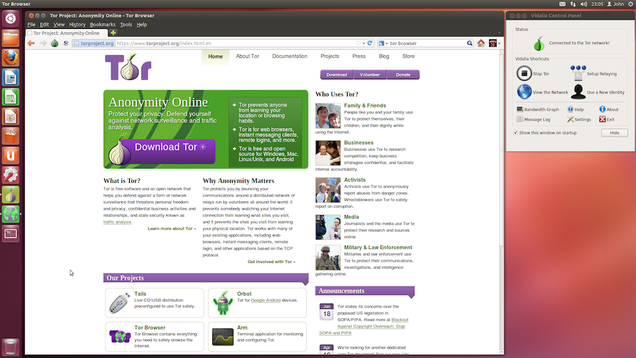
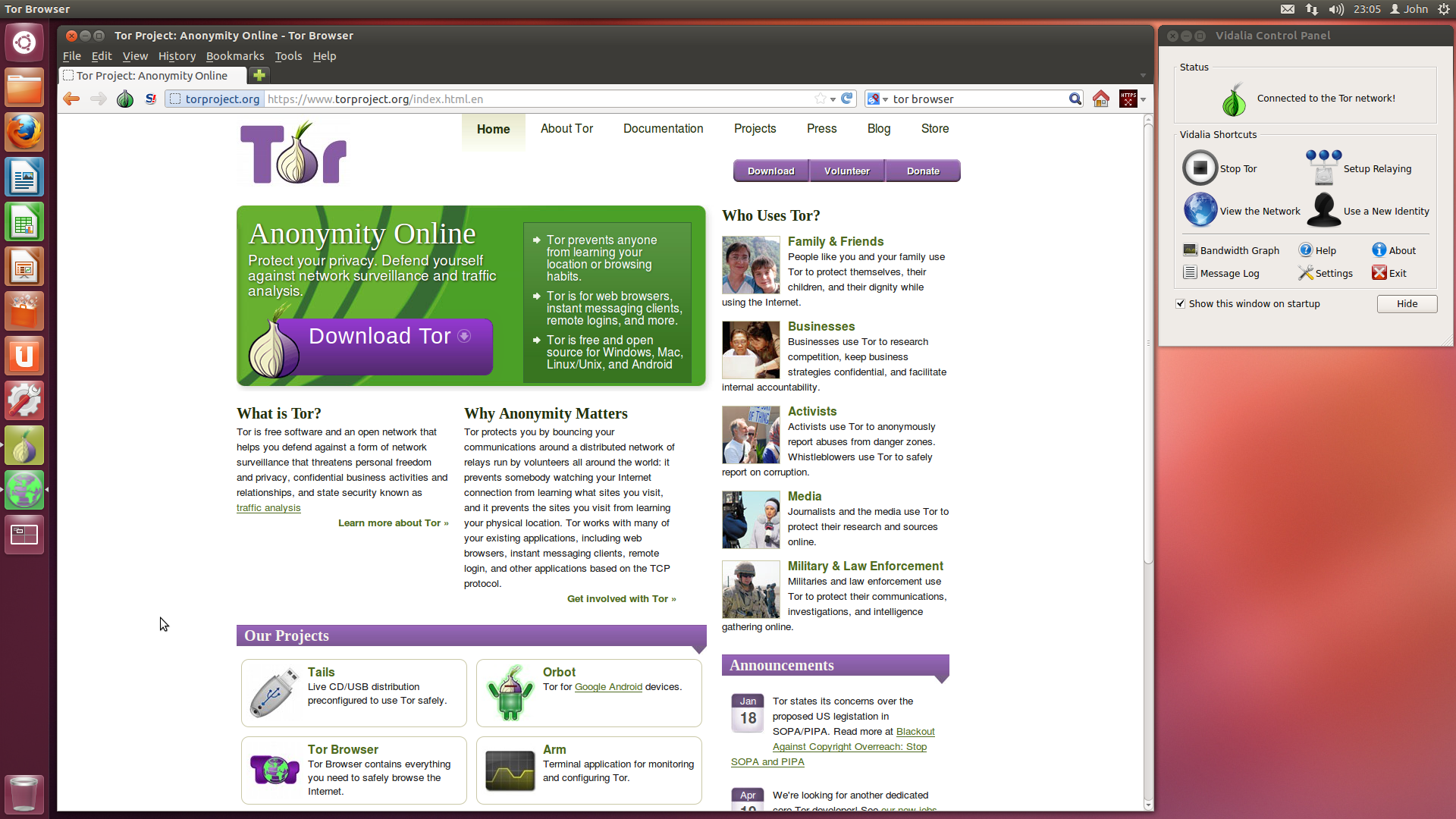
We love Tor, the service that disguises your web browsing so you stay anonymous. We've even showed you how to use it to protect yourself. The same is true for VPNs—we've explained why you should have one, and even some good ones to try. However, it's important to note that both services are only as smart as the person using them. Both are great tools at what they do, but remember: They're just tools. Lane explains:

[I've heard that] If I use Tor, no one can figure out what I'm doing. Tell that to the Harvard kid who logged into TOR on a campus computer to post a bomb threat last December, only to be stunned when law enforcement and Harvard IT employees were able to identify the computers that were used to access the network within a given time frame. They narrowed the suspects down to one who actually had a final, and when they showed up at his door, he confessed (no doubt out of shock). It is REALLY hard to be completely anonymous online.

Lane is right. Eldo Kim used Tor to post bomb threats in December of 2013 in an attempt to delay final exams at Harvard. He would have gotten away with it too, had he not left a trail of other evidence that led the FBI to his door, including the fact that he used Tor from the Harvard wireless network. Had he used a VPN, he may have had a bit more protection—but VPNs are designed for security—not anonymity. The chain of evidence would have led back to him eventually.

Bottom line: Remember that services like Tor and your favorite VPN are great for protecting your identity and security on the internet, but they're not foolproof. Tor offers incredible anonymity from companies that harvest your data, your ISP, and even the government to a degree. A VPN encrypts all of your traffic so you can be sure your communications are secure from prying eyes or snoops. However, in both cases what you do can give you away, you're still riding someone else's network, and someone skilled and determined enough to decrypt or log your activity can do so. We still believe Tor and a good VPN should be tools in your security arsenal, but if you think they're all it takes to be completely secure and anonymous, think again.

Myth #3: MAC Filtering and Disabling SSID Broadcast Is Enough Protection For My Wi-Fi Network

Five Computer Security Myths, Debunked by Experts

Most of us know better than to leave our Wi-Fi networks open to the world, but wireless security isn't something you should trust to obscurity. We still see people who leave Wi-Fi networks unencrypted, and instead hide their SSID or use MAC filtering to "secure" them. Unfortunately, while these methods may deter non-technical passers-by, it won't stop anyone with technical knowhow. Theobald explains:

Hiding your wireless network’s SSID is a mostly useless attempt at security. It may keep your nosy neighbor from seeing the name of your network, but as soon as you use your wireless network, you send your SSID name over the air anyway. In addition, hiding your SSID makes it more painful for your own computers and devices to connect to it. Hiding your SSID will make it difficult for legitimate users and won’t stop any hackers. So go ahead and display your SSID, and while you’re at it have some fun and scare the neighbors by naming your network “NSA_MobileTappingStation”.

Don’t run your wireless network unencrypted and don’t use the obsolete WEP encryption standard. It can now be cracked in seconds with simple, free-to-download tools. The best encryption standard to use is WPA2. While not perfect, it is the best available. Use a good long password that isn’t in the dictionary for better security.

Some wireless routers have an option to let you list all of the MAC addresses, which are similar to a serial number for your devices, that will be allowed to connect to your router. If you don’t mind the additional housekeeping of keeping track of your devices’ MAC addresses and your visiting friends and relatives devices’ MAC addresses there is no harm in using this setting to add another obstacle to hackers. It won’t stop a persistent hacker though, as they can watch your wireless traffic and see what MAC addresses you are using, then spoof one of those to gain access.

Lane agreed, and noted that easily available Wi-Fi scanning tools like Kismet can pull hidden SSIDs and MAC addresses out of the air. He also reiterated that WPA2 was the way to go. We've shown you how easy it is to hack WEP and WPA. As for MAC spoofing, you know how easy that can be. While these methods may be useful in addition to a properly secured Wi-Fi network, they're not security on their own.

Myth #4: Incognito Mode Protects My Privacy

Five Computer Security Myths, Debunked by Experts

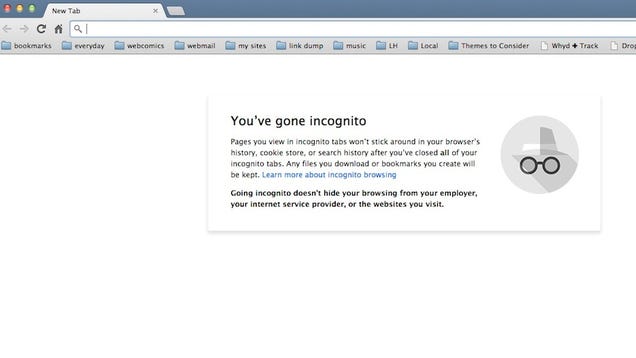
Actually, Incognito mode can protect your privacy—but only from other people using your computer. It's not actually a privacy tool that protects you from the rest of the internet. Even though you're warned each time you open an Incognito window, many people still think that browsing in Incognito mode means they can't be tracked, their ISP can't see what they're browsing, or they're somehow anonymous to the party on the other end of their connection. None of those things are the case.

Google explains in their FAQ (linked on every Incognito tab) that the sites you visit may still have records of your visit, and anything downloaded from those sites (including cookies, in some cases) will remain. Firefox has a similar FAQ on each Private Browsing tab. So, for example, if you log in to your Google account while browsing in Incognito mode, your Google Searches will still be saved in your web history. If you allow extensions to run in Incognito, any information they record or transmit will persist as well.

Perhaps most importantly, Lane explained that the sites or webapps you visit downstream still know who you are, have your IP address (and can match it to previous or future sessions) and can keep track of what you do while there. On mobile devices, Incognito mode may offer even less protection than on the desktop. Superuser has a great thread on this topic as well.

Myth #5: I Don't Need Anti-Malware Tools, I Don't Do Anything Risky

Five Computer Security Myths, Debunked by Experts

Perhaps the biggest and most persistent computer security myth we see is the idea that one person's definition of "common sense" is all that's required for everyone to stay secure—to the point where as long as you have it, you don't need anti-malware or antivirus at all. We've talked about the difference between the two, and made our own recommendation: Namely, that good internet hygeine is the most important thing, above and beyond the security tool you use, but you should still have a security tool. Says Theobald:

Secure computing, just safe driving, doesn’t just depend on your habits. It depends on the habits of everyone else as well. Recently it was found that hackers had managed to put the ‘Styx exploit’ into advertisements that were shown on YouTube. Anyone who viewed a YouTube page with those ads had their computer attacked and possibly infected with the Styx virus. So you could have been only visiting “safe” websites, but even YouTube got hacked! The only defenses to these “drive-by” viruses is to update your operating system and software frequently to get the latest security patches and run anti-virus software. If you want to be more proactive you can be even safer with software like NoScript and Privoxy which give you great security at the cost of more hassle.

Both of our experts agreed on this point, and added that while malware doesn't exactly make news these days, that doesn't mean it's not a significant threat. Similarly, malware today is often designed to avoid detection (unless we're talking about something like CryptoLocker or other ransomware, which specifically wants you to notice it). Like we mentioned earlier, the goal is to use your computer as a resource, a zombie in a botnet, a Bitcoin mining machine, or a storage locker—as well as quietly harvest data while it's running. You may also remember the whole Chrome extension malware fiasco from a few months back. You may never know something you thought was reasonable on your system is behaving badly until it's too late for "common sense."

That aside, it's fair to say that all of us likely do a few things off-color with our computers, and even if you're sure that you don't visit anything "risky" or have tools in place to protect yourself, it's important to have the right tools at your disposal just in case.


To be sure, none of these myths are perfectly false, but in the vast majority of cases putting faith in them only puts you and your data at risk. Instead, take the initiative to secure yourself or learn a little more about computer security, and you'll be in a far better position than someone who's playing the odds or relying on their own confidence to get them by.


Frederick Lane is an author, attorney, educational consultant, expert witness, and lecturer who has appeared on The Daily Show, CNN, NBC, ABC, CBS, the BBC, and MSNBC. He has written seven books, including most recently "Cybertraps for the Young." All of his books are available on Amazon or through his Web site. You can follow him on Twitter at @fsl3, or at Computer Forensics Digest.

Peter Theobald a Computer Forensics expert and president of TCForensics.com. He spends most of his time finding things that were supposed to have been deleted.

Both gentlemen offered their expertise for this piece, and we thank them.

Title image made using Maksim Kabakou (Shutterstock) and iadams (Shutterstock). Additional photos by Alexandre Dulaunoy, snurre86, woodleywonderworks, and Håkan Dahlström.

09 Jul 14:02

Empress of the Sun: return to Ian McDonald's wonderful Everness

by Cory Doctorow
Ian McDonald's Everness young adult books are everything you want in YA: adventure, romance, wild ideas and tense victories that make you pump your fist at the sky. In Empress of the Sun, McDonald takes the series up about four notches and show's the sky's the limit. Cory Doctorow raves about Empress of the Sun. Read the rest
08 Jul 23:07

Four Methods to Create a Secure Password You'll Actually Remember

by Kevan Lee

Four Methods to Create a Secure Password You'll Actually Remember

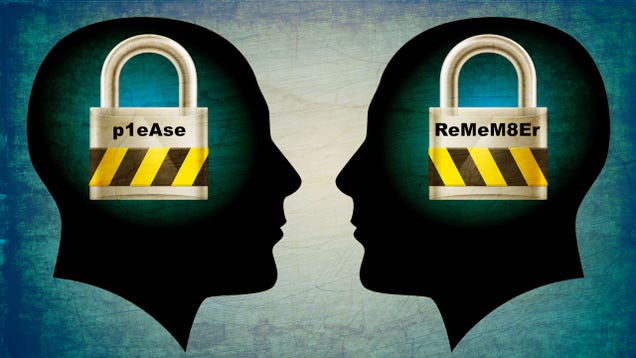
How do you balance the necessity of highly secure passwords with the utility of easily recalling them all? The only secure password is one that you can't remember, but there are times when you can't use a password manager and need to rely on your memory.

This post originally appeared on the Buffer blog.

It's a question I mull each and every time a security breach happens. When the Heartbleed vulnerability was discovered last spring, the mandate was for everyone to change all their passwords right away. It's still on my to-do list. I cringe at the thought of getting hacked, and I also cringe at the thought of taking the time and mental energy to do a complete overhaul of my favorite passwords.

Does this sound like you?

If you happen to have a system in place to manage your unique, random, unbreakable passwords, then my hat's off to you. According to some estimates, you are among a well-protected 8 percent of users who do not reuse passwords.

The rest of us are still searching for a solution. We know that creating a safe password is paramount, but how does one actually go about creating and recalling all those essential, random passwords we need? It took writing this post to get me on the straight-and-narrow with my passwords. Here's what I learned about how to create a secure password you can remember.

The Anatomy of an Unbreakable Password

Four Methods to Create a Secure Password You'll Actually Remember

The longer the password, the harder it is to crack. Consider a 12-character password or longer.

Avoid names, places, and dictionary words.

Mix it up. Use variations on capitalization, spelling, numbers, and punctuation.

These three rules make it exponentially harder for hackers to crack your password. The strategies employed by password crackers have advanced to an incredibly efficient level, so it's imperative to be unusual with the passwords you create. Here'san example from security expert Bruce Schneier about just how far password crackers have come:

Crackers use different dictionaries: English words, names, foreign words, phonetic patterns and so on for roots; two digits, dates, single symbols and so on for appendages. They run the dictionaries with various capitalizations and common substitutions: "$" for "s", "@" for "a", "1″ for "l" and so on. This guessing strategy quickly breaks about two-thirds of all passwords.

Recent password breaches at sites like Adobe have shown how insecure many of our passwords are. Here is a list of the most common passwords that turned up in the Adobe breach. It probably goes without saying: Avoid using these passwords.

  • 123456
  • 123456789
  • password
  • admin
  • 12345678
  • qwerty
  • 1234567
  • 111111
  • photoshop
  • 123123
  • 1234567890
  • 000000
  • abc123
  • 1234
  • adobe1
  • macromedia
  • azerty
  • iloveyou
  • aaaaaa
  • 654321

If you're curious whether your chosen password is secure or not, you can run it through an online password checker like the one at OnlineDomainTools. To highlight the importance of a lengthy, random, unique password, the online checker has specific fields to show your password's variation in characters, its appearance in dictionaries, and the time it would take for a brute force attack to crack it.

Four Methods for Choosing an Unbreakable Password

Four Methods to Create a Secure Password You'll Actually Remember

The only problem with coming up with a random, unbreakable password is that random passwords are hard to remember. If you're solely typing in characters with no rhyme or reason—a truly random fashion—then you'll likely have as hard a time remembering it as someone will cracking it.

So it makes sense to go with a seemingly random password, one that is near impossible for cracking software to recognize but that has meaning or familiarity for you. Here are four methods to try.

Bruce Schneier's Method

Security expert Bruce Schneier put forth a password method back in 2008 that he still recommends today. It works like this: Take a sentence and turn it into a password.

The sentence can be anything personal and memorable for you. Take the words from the sentence, then abbreviate and combine them in unique ways to form a password. Here are four sample sentences that I put together.

WOO!TPwontSB = Woohoo! The Packers won the Super Bowl!

PPupmoarT@O@tgs = Please pick up more Toasty O's at the grocery store.

1tubuupshhh…imj = I tuck button-up shirts into my jeans.

W?ow?imp::ohth3r = Where oh where is my pear? Oh, there.

The Electrum Method

Managing a Bitcoin wallet requires a high level of security and a huge reliance on safe passwords. Enter Electrum. The Electrum wallet offers a 12-word seed that lets you access all your Bitcoin addresses. The seed serves as a master password for your Bitcoins.

Four Methods to Create a Secure Password You'll Actually Remember

This type of password is also called a pass phrase, and it represents a somewhat new way of thinking about security. Instead of a difficult-to-remember string of characters, you can make a lengthy phrase instead. (Note: Bruce Schneier warns that password crackers now put together common dictionary words in their guesses, so if you try the pass phrase method, keep it as long as possible.)

The idea for pass phrases is captured quite nicely in this comic from xkcd:

Four Methods to Create a Secure Password You'll Actually Remember

How can you create a 12-word seed of your own? It's as simple as it sounds. Come up with 12 random words.

You can start with a phrase such as "Even in winter, the dogs party with brooms and neighbor Kit Kats." Just make sure it is not a simple phrase or a phrase taken from existing literature. You can grab 12 random words, too: "Pantry duck cotton ballcap tissue airplane snore oar Christmas puddle log charisma."

When placed into a password checker, the 12-word pass phrase above shows that it will take 238,378,158,171,207 quadragintillion years for a brute force attack to crack.

The PAO Method

Memorization techniques and mnemonic devices might help you remember an unbreakable password. At least, that's the theory put forth by Carnegie Mellon University computer scientists who suggest using the Person-Action-Object (PAO) method to create and store your unbreakable passwords.

PAO gained popularity in Joshua Foer's bestselling book Moonwalking with Einstein. The method goes like this:

Select an image of an interesting place (Mount Rushmore). Select a photo of a familiar or famous person (Beyonce). Imagine some random action along with a random object (Beyonce driving a Jello mold at Mount Rushmore).

The PAO method of memorization has cognitive advantages; our brains remember better with visual, shared cues and with outlandish, unusual scenarios. Once you create and memorize several PAO stories, you can use the stories to generate passwords.

For example, you can take the first three letters from "driving" and "Jello" to create "driJel." Do the same for three other stories, combine your made-up words together, and you'll have an 18-character password that'll appear completely random to others yet familiar to you.

Phonetic Muscle Memory

I've developed a bit of a fondness for a personal password system of mine that I've used to create some strange, unusual, random passwords over time. My method relies on a couple of helpful remembering devices: Phonetics and muscle memory. Here's how it works:

  1. Go to a random password generator site.
  2. Create 20 new passwords that are at least 10 characters in length and include numbers and capital letters (and punctuation if you're feeling brave).
  3. Scan the passwords, looking for phonetic structure—basically try to find passwords that you can sound out in your head. For example: drEnaba5Et (doctor enaba 5 E.T.) or BragUtheV5 (brag you the V5).
  4. Type out the phonetic passwords in a text file, taking note of how easy they are to type and how quickly you can type them. The easy-to-type passwords tend to get stuck in my muscle memory quicker.
  5. Keep the phonetic, muscle-memory passwords. Toss the rest. Print out your text file with password keepers.

One at a time, change your passwords on your most-commonly-used websites. It'll take a time or two of typing in these new passwords before you have the new them fully memorized, but typing it in enough should cement it in your brain. I still remember passwords from years ago based on this method.

The Next Most Important Step for a Secure Password

Four Methods to Create a Secure Password You'll Actually Remember

After creating your super-secure password, there is still one huge, all-important step remaining: Never reuse the same password.

Oof. I imagine a lot of folks get hung up on this part. Creating and remembering a unique password is challenging on its own, much less doing it multiple times. I seem to sign up at a new website or service once per day. That's 30 new passwords a month, and I'm afraid my brain cannot hold all that in.

How do you manage to create unique passwords, never reuse a single one, and still log in with speed and efficiency (and without hitting the "forgot password" link)?

This is where the question of security versus usability really hits home for me. Fortunately, there are a number of different approaches you can take to solving this conundrum.

Sign Up for a Password Management Tool

Your best bet with password security is to sign up for a tool like LastPass or 1Password. These tools will store your passwords for you (and even provide random new passwords when needed). All you need to do is remember a single master password that grants you access to the stored data. Enter your master password once, and the password management tool does the rest.

Some of these password management tools integrate nicely within your browser or even on a mobile device. The encrypted data is stored safely (the tools are as safe as you can get online) and passwords are retrieved easily. In almost every instance, a password manager is the best way to go, and you might only notice inconveniences when you're logging in from a foreign device or a spot where you can't access the service (truly rare instances).

Keep Original Passwords for Your Most Important Tools, Apps, and Websites

Another strategy I've come across is to max out your memory by storing as many possible passwords in your head. Use original ones for important sites like email, Facebook, Twitter, and banks. Use a common (but hard to crack) password for all the less important spots.

The risk here, of course, is that if one of your less important spots gets compromised, they'll all be at risk. Your all-important email, social, and money accounts will be safe, which is great. Your hacked Disqus account could be posting about how much you love acai fruit, which isn't so great.

Hybrid Method: Password Management Plus Memorization

What if you mixed the two methods? Memorize passwords for your most important and most frequently used tools and use LastPass or 1Password for the rest.

You could even split it in such a way that you memorize passwords you use most often in places where LastPass and 1Password are least accessible—mobile apps you log in to all the time, for instance.

At the end of the day it's important to remember that even complex passwords can be compromised, and you should never think you are completely secure just because your password is longer than Ulysses. It takes wits and common sense to avoid phishing scams and other common techniques that can compromise your accounts—and you should always enable two factor authentication when it's available.

How to Create a Secure Password You Can Remember Later: 4 Key Methods | Buffer Blog


Kevan Lee is a Content Crafter at Buffer, a smarter way to share on Twitter and Facebook.

Image adapted from DVARG (Shutterstock) and Zeana (Pixabay). Illustration by xkcd. Photos by DanielSTL (Flickr), Jean-Etienne Minh-Duy Poirrier (Flickr), and J Brew (Flickr).

Want to see your work on Lifehacker? Email Andy.

08 Jul 19:47

[Awesome] You Can Correct Misinterpreted Voice Searches By Following Up With 'No, I Said'

by Bertel King, Jr.

NoISaidThumbHere's something that might just blow your mind. If you perform a voice search and Google misunderstands you, or you happen to garble your words, there's a quick way to take care of that. Just follow up with a second search that begins with "No, I said..." Google will then replace the incorrect word with what you said the second time.

Here's an example. Let's say you're in a hurry to get to our lovely website, and you say "OK Google, take me to Android Police." It doesn't hear you properly, and somehow you end up with Android mobile.

[Awesome] You Can Correct Misinterpreted Voice Searches By Following Up With 'No, I Said' was written by the awesome team at Android Police.


08 Jul 19:44

Fake Google subdomain certificates found in the wild

by Cory Doctorow

An Indian certificate authority in the Microsoft root of trust has been caught issuing fake Google subdomain certificates that would allow nearly undetectable eavesdropping on "secure" connections to services like Google Docs. Read the rest

08 Jul 19:44

Wall Street as cause and beneficiary of skyrocketing university tuition

by Cory Doctorow

A deep, carefully argued, carefully research report from Debt and Society makes a strong case that sky-high tuition (and brutal, lifelong student debt, up 1000% in 15 years) is not primarily caused by bloated administrations or high professors' salaries. The explanation is a lot more banker-y. Read the rest

08 Jul 19:42

Floatify Brings Android L's New Notifications to KitKat Handsets

by Mark Wilson

Android: There are some great new features coming up in Android L, but you can bring some to your phone right now. Floatify lets just about any KitKat Android handset take advantage of the new notification system—and there's no need for rooting.

Once installed, when you receive a notification, a summary appears on the lock screen. You can tap it to see the full notification, or swipe to dismiss. If you invest in a $2 Pro key for the app, you can use additional gestures to even set reminders for notifications you're not ready to deal with right now. Opting for a Pro key also lifts the five app limit of the free version. We have looked at a similar tool before—Heads Up!—but Floatify is available from Google Play so there is no need to allow the installation of third party apps.

Your latest notifications always appear on the lockscreen. You can choose what happens when you unlock your handset—open the last notification, or view a popup of stacked notifications, so you never miss a notification that arrives when you phone is off. Notifications from different apps are grouped together to make them easier to see. You can customize their style and position to your liking.

You can select which apps you want to see notifications from, and Floatify's smart blacklist ensures you're not bothered by notifications when using a particular app—such as your web browser. With this feature enabled, notifications reappear as soon as you close that app.

Floatify (Free) | Google Play via XDA Developers Blog

08 Jul 19:41

Google Rolling Out a New Web UI for Google Drive

by Eric Ravenscraft

Google already brought some substantial upgrades to Google Drive and its suite of productivity apps at I/O. Now, it's beginning to roll out the updated interface on the web.

According to Android Police, some users are now getting the prompt to activate the new design for Drive on the web. The new version comes with an updated thumbnail grid, the ability to use desktop-style shortcuts (Ctrl-Clicking only works in list-view at the moment), and more. The rollout may be slow so if you don't see it now, just hang tight.

Google Drive Gets A Shiny New Interface On The Web, Rolling Out To Users Starting Now | Android Police

08 Jul 13:11

Thousands of rare videos of legendary rock bands are now on YouTube

by Josh Lowensohn

Google's YouTube is getting thousands of new videos featuring historic live concert footage courtesy of a new deal with Music Vault. The live music archive is adding more than 12,000 new clips to a collection that was already at about 1,600 videos. According to YouTube, that all adds up to 2,000 hours of exclusive footage that includes performances by The Rolling Stones, Van Morrison, The Sex Pistols, The Who, and others. More will be added in daily shows, curated playlists, and what Google is promising will be original content.

Continue reading…

08 Jul 11:55

Or Maybe Not

by Bill Crider