 Amazon‘s Instant Video service has traditionally been thought of as both a rival to iTunes and Netflix, in terms of offering movies and TV shows for rent, purchase or for free streaming via the company’s Amazon Prime membership program. But you might want to add YouTube to that list of would-be competitors, as Amazon has now introduced a new section to Instant Video focused on… Read More
Bcstevieb
Shared posts
25 Jul 20:14
Amazon‘s Instant Video service has traditionally been thought of as both a rival to iTunes and Netflix, in terms of offering movies and TV shows for rent, purchase or for free streaming via the company’s Amazon Prime membership program. But you might want to add YouTube to that list of would-be competitors, as Amazon has now introduced a new section to Instant Video focused on… Read More
Amazon Rolls Out A YouTube-Like “Video Shorts” Section On Instant Video
by Sarah Perez
Amazon‘s Instant Video service has traditionally been thought of as both a rival to iTunes and Netflix, in terms of offering movies and TV shows for rent, purchase or for free streaming via the company’s Amazon Prime membership program. But you might want to add YouTube to that list of would-be competitors, as Amazon has now introduced a new section to Instant Video focused on… Read More
25 Jul 20:11

Video: computer hacking in 1980s movies
by David Pescovitz
"80s Computer Hacking: A Supercut." List of movies below: (more…)
25 Jul 16:37


The Amazon Fire Phone is officially available today — here's what you need to know!
by Phil Nickinson

It's ... different — but there are still some compelling features in the new Amazon Fire Phone
Today, the Amazon Fire Phone is officially on sale. Those who preordered it should already have them in their hands, however, and that includes us. Nobody's expecting the Fire Phone to revolutionize smartphones, but there are more than a few interesting features that deserve mention.
So here we present you the short, short version of what you need to know about the Amazon Fire Phone.
25 Jul 16:34


Working Title Acquires Enid Blyton's The Famous Five


Enid Blyton’s work is among the most famous in the UK's – and, to an extent, the world's – publishing history. Her Famous Five books in particular have been devoured by eager readers for decades. Following a raft of different adaptations, primarily for the small screen, Working Title has decided the time is right for the Five to hit the cinema in a new version.
The company has grabbed the cinematic rights to the entire Five library of more than 20 novels featuring the young adventurers who investigate mysteries, solve crimes and go exploring in between lashings of good grub and fun times while they’re on holiday from boarding school.
Working Title is busy meeting with directors to launch a proper development period and figure out what shape the characters will hit the screen in. According to Deadline, no decisions have been announced as to whether they will stay in a period setting or receive the update treatment for a modernised take on the tales. We just hope Timmy the dog’s agent adds a clause that ensures he’s played by a proper canine actor and not some reality show performing wannabe. Or Andy Serkis...

25 Jul 14:28

If You Still Can't Justify a Purchase Three Days Later, Return It
by Eric Ravenscraft
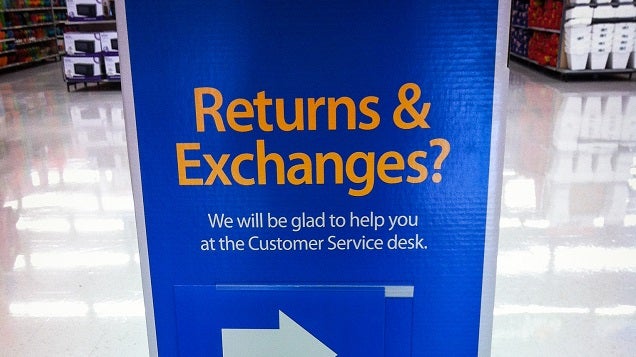
We all know what it's like to have buyer's remorse. The moments leading up to a purchase are filled with justifications, biases, and rationalizations. If you're still wrestling with the decision a few days later, though, take whatever it is you bought back.
With rare exception anymore, just about anything you buy can be returned. Gadgets, clothes, and even furniture can often be returned within at least the first week. As finance blog Plunged In Debt explains, we all make purchases for fun or personal enjoyment. However, if you're feeling regret days afterwards, don't hesitate to make use of that returns desk:
Life is too short to not be enjoyed. I'm not suggesting you don't enjoy your money. What I am suggesting is that you value your money and make sure it is appropriated in the best manner. If something makes you genuinely happy, that is justification enough but if three days later you're convincing yourself you still need "it", return it and rid your conscious of guilt.
For most things, three days is enough time to separate yourself from the pre-purchase justifications and decide if you like life with your purchase. However, you don't have to wait, either. Sometimes you know immediately whether you're really happy with a purchase, sometimes it might take a while. The important thing is that you don't neglect one of the most money-saving resources available to you: the returns desk.
If You Have to Justify a Purchase, You Probably Didn't Need It. | Plunged In Debt via Rockstar Finance
Photo by Clemens v. Vogelsang.
25 Jul 12:58

Nutrino Offers Personalized Meal Suggestions for Your Health Goals
by Alan Henry
iOS: Nutrino wants to make it a little easier to build meal plans and make good health decisions based on your personal fitness and nutrition goals. In a way, they want to put a dietitian in your pocket to help you stay motivated, make better choices, and take the stress out of meal planning.
Nutrino has been around for a while, but they've recently launched Nutrino 2.0, which includes some new features. Most notably, the service has revamped its meal planning tools to only offer you food suggestions based on your goals, whether you're trying to build muscle, lose weight, eat healthy, or gain weight. The app also incorporates fitness and activity tracking, so you can sync your Fitbit or Withings device, Runkeeper account, Moves account, or other fitness tracker. The app is kind of a health hub, featuring meals and recipes for your meal plan as well as personalized suggestions based on your activity level and an ongoing record of your workouts and activities.
The new version also features a built-in "health coach" that proactively engages you with news, reminders, health tips, and more. You can also add the recipes and meals from your meal plan to a grocery list to take shopping with you, and view specific nutritional information for each meal to help you track macros.
The app isn't perfect of course—for one, the app is subscription-based, so while you can download it for free, unlocking all of those useful features requires a $2/mo subscription fee. Beyond that, some reviewers have highlighted that the meal variety can get to be a bit much (and a bit expensive), and more options to limit meal variation or use leftovers would be nice. Either way, sentiment around the app is generally positive, and if you're looking for a bit of a personal health coach, it's a solid option. Hit the link below to try it out. The new version is out for iOS now, and Android is on the way soon.
Nutrino (Free) | iTunes App Store via Nutrino
25 Jul 12:43
First gameplay trailer for Firefly Online.
http://www.youtube.com/watch?v=8y98otfH9X8&feature=youtu.be
As previously covered the cast return for the game.
24 Jul 21:05


Top 10 new Android games this week: Pop Bugs, Solarmax 2
by Steve Raycraft
Welcome back to Android Gaming Weekly, our weekly recap of new game releases. We still plan to cover upcoming releases and games we’re playing, but this column is dedicated to new games that you can start playing right now. Check out our top picks and let us know in the comments section if you have any suggestions for next week’s post.
Bug Heroes 2
Description: Every day while you’re gone, an epic battle of swords, guns, and armor rages on your counters, on your floors, and in your yard… Enter the world of the Bug Heroes!From the creators of Monster Adventures and Heroes & Castles comes a new adventure, blending fast paced action, strategy, and defensive gameplay!
Pop Bugs
Description: Create runaway chains by popping bugs that shoot stingers, explode in fireballs, pack a mighty punch, and much more in this action-packed puzzle adventure! Discover new bugs with unique abilities as you pop your way through diverse worlds.
HEAVY Sword
Description: Inspired by classic NES and SNES platformers of old, like Mario bros 3, super mario world and Zelda. Take control of a young hero by the name of Pike! Run, jump, dash, chop, bomb, smash your way through Goblin, orcs, ogres, Robot knights, Wizards, lava, falling rocks, man eating plants, and loads of other dangers on your quest to rescue the Princess Lucinda!
Watercolors
Description: Mix red, yellow and blue to paint your way through hundreds of challenging levels. Fill the glowing circles with the indicated color to complete each puzzle. Just wait and see what happens when you combine all three colors, it might BLOW your mind!
Guardians of the Galaxy: TUW
Description: Join Star-Lord, Rocket, Groot, Gamora and Drax in an all-new adventure– Marvel’s Guardians of the Galaxy: The Universal Weapon! Jump into battle to help the Guardians recover the five pieces of The Universal Weapon before it falls into the hands of the villainous Ronan the Accuser!
Modern Combat 5: Blackout
Description: Step into the action as the latest installment in the best FPS series raises the bar for shooter games once more! Create a squad, add your friends and test your individual and team skills against other squads in dynamic multiplayer warfare!
ReactionLab 2
Description: ReactionLab 2 is a critically acclaimed pixelated particle sandbox, and quite possibly the best game of its type on Android. Let your inner mad scientist shine by drawing elements onto the canvas and watching them interact in real time. Featuring well over 50 elements, hundreds of different particle types, and nearly 80 achievements to attain.
The King of Fighters ’98
Description: “KOF ‘98” is praised among KOF fans around the world as being the ultimate compilation of “KOF ‘94” ~ “KOF ‘97” titles and for its fantastic game balance. Moreover, this perfect port of “KOF ‘98” features 2 different gameplay modes, “EXTRA” & “ADVANCED”, and also includes a “TRAINING MODE” where you can master all your combos!
Broken Sword 5: Ep. 2
Description: Episode Two ramps up the drama, as the game progresses: the adventure bursting out from Paris and London, taking the player on to stunning locations throughout Spanish Catalonia and to the Middle East and the birthplace of civilisation.
Solarmax 2
Description: The battle for Earth is over. Now, the war for the galaxy has begun. You must win every battle swiftly, decisively, and permanently. Command our fleet and lead us to victory. Solarmax is a streamlined strategy game of interplanetary war. Colonize planets, build hundreds of starships, and use superior tactics to overwhelm your opponents.
24 Jul 20:21
 Because everything is getting smarter, it would be silly to think that keychains would be exempt.
The Smart Keychain has four uses in one small package: USB file storage, upcoming calendar alerts, incoming email notifications, and a key locator. Read More
Because everything is getting smarter, it would be silly to think that keychains would be exempt.
The Smart Keychain has four uses in one small package: USB file storage, upcoming calendar alerts, incoming email notifications, and a key locator. Read More
The Smart Key Chain Will Store Your Files, Check Your Email, And Find Your Keys
by Jordan Crook
Because everything is getting smarter, it would be silly to think that keychains would be exempt.
The Smart Keychain has four uses in one small package: USB file storage, upcoming calendar alerts, incoming email notifications, and a key locator. Read More
24 Jul 20:16
Gmail and Google Drive — working better together while you’re on-the-go
by The Gmail Team
Posted by Simon Forsyth, Software Engineer
Important stuff doesn't always happen when you’re conveniently sitting at your desk. Maybe you're out to dinner when your boss tells you that she needs the latest project proposal ASAP, or your daughter calls you on your commute home to ask you to proofread her college essay (that’s of course due that night!). While we can't make your life more predictable, today's update to the Gmail iOS app, along with earlier updates to the Gmail Android app, makes it easier to get stuff done on-the-go.
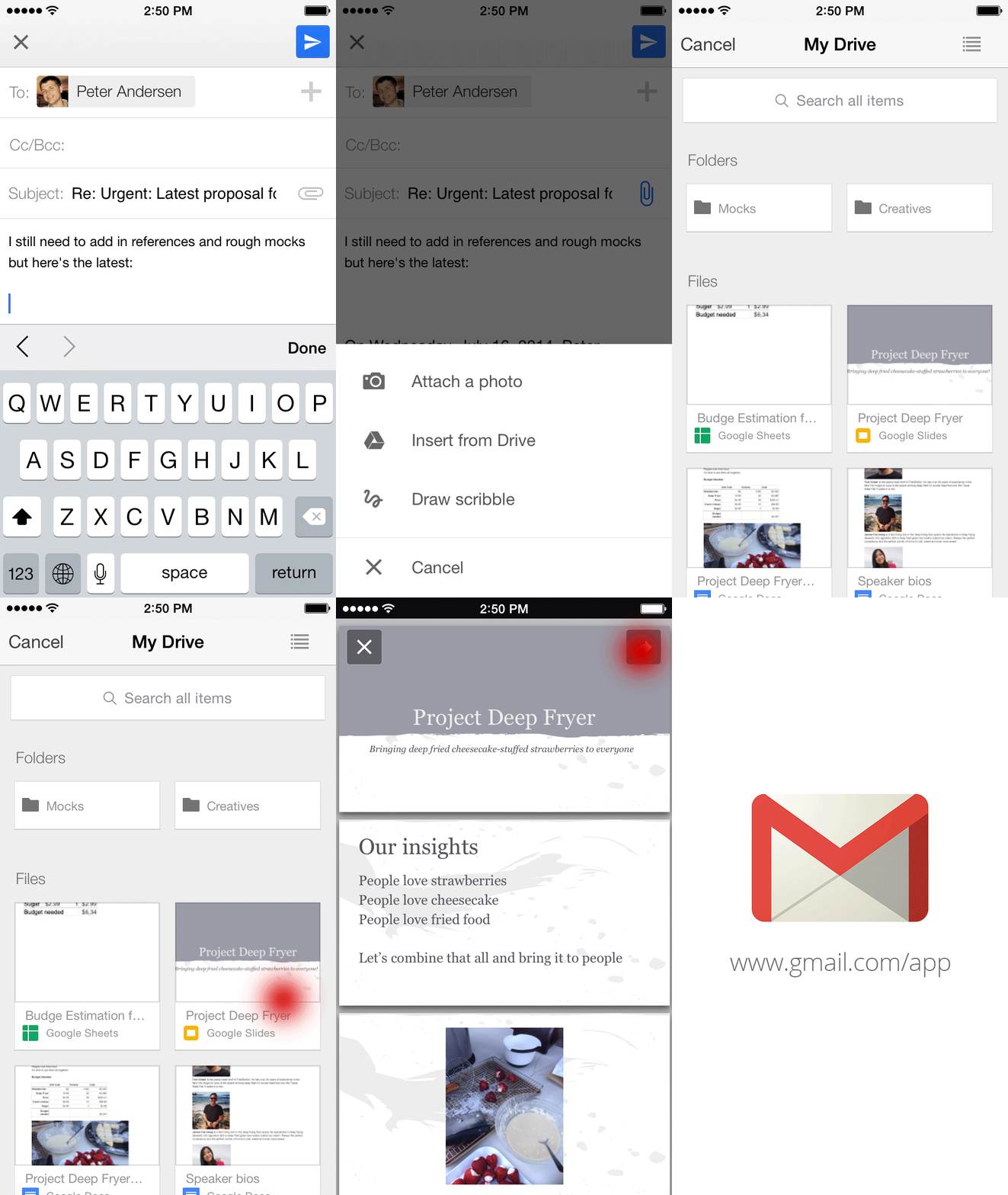
Just like with Gmail on the web, you can now insert files from Google Drive directly into an email on your phone or tablet.
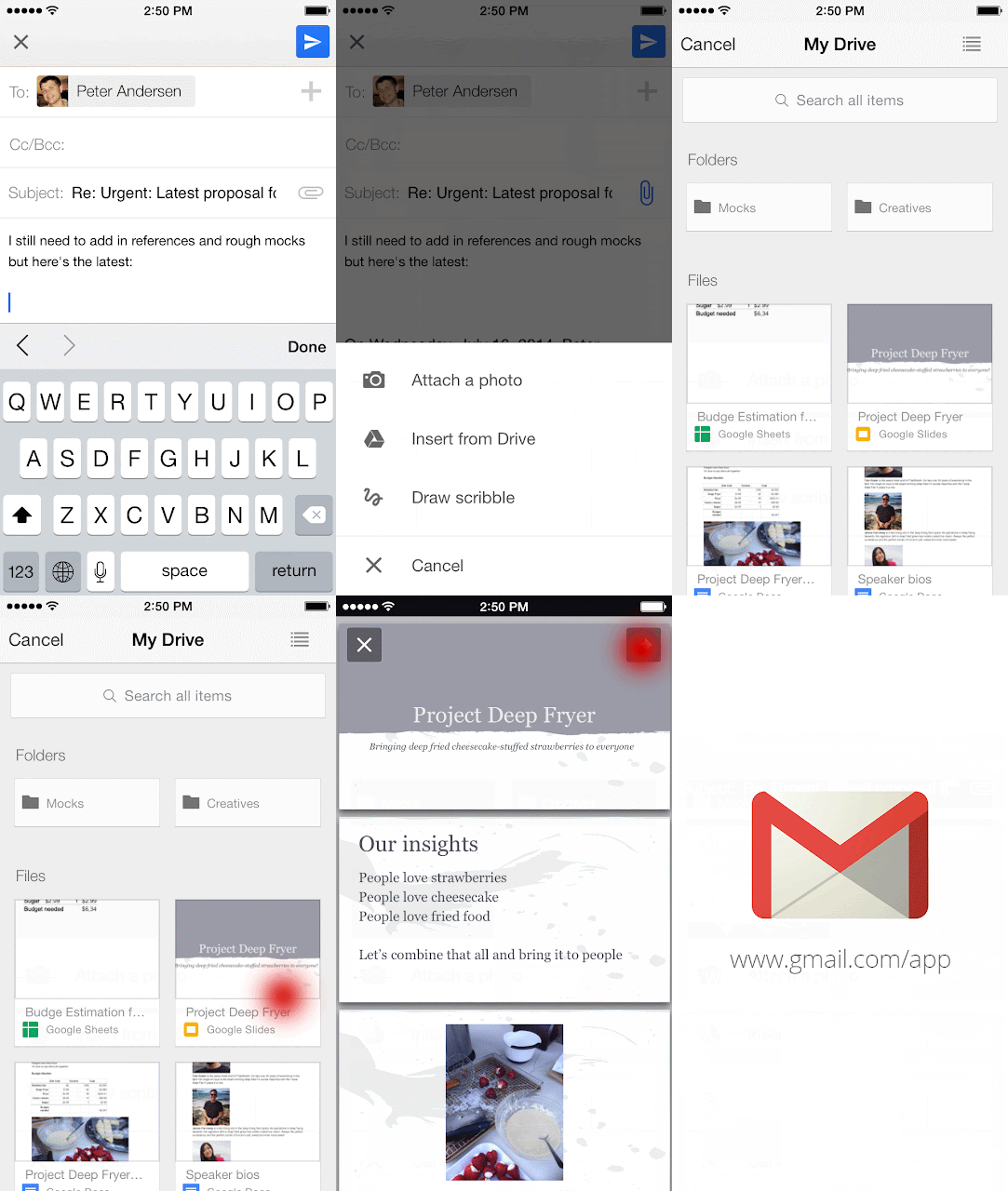 The apps will even tell you if your file isn’t shared with the person you’re sending it to so you can change the sharing settings before you send it. And to help you store all your files in a single place, if someone sends you an email attachment, you can save it directly to Drive with one tap.
 On iOS, you can now also change your profile picture right from your Settings. So the next time you take that perfect selfie, you can make it your profile picture right away, all while out with friends. Lastly, if you have multiple Gmail accounts, you can choose which signed-in accounts you want visible in the app.
You can give these features a try by downloading the updated Gmail iOS app from the App Store, and if you’re using an Android phone or tablet, you can get the latest version of the Gmail Android app from the Google Play Store.


Important stuff doesn't always happen when you’re conveniently sitting at your desk. Maybe you're out to dinner when your boss tells you that she needs the latest project proposal ASAP, or your daughter calls you on your commute home to ask you to proofread her college essay (that’s of course due that night!). While we can't make your life more predictable, today's update to the Gmail iOS app, along with earlier updates to the Gmail Android app, makes it easier to get stuff done on-the-go.
Just like with Gmail on the web, you can now insert files from Google Drive directly into an email on your phone or tablet.
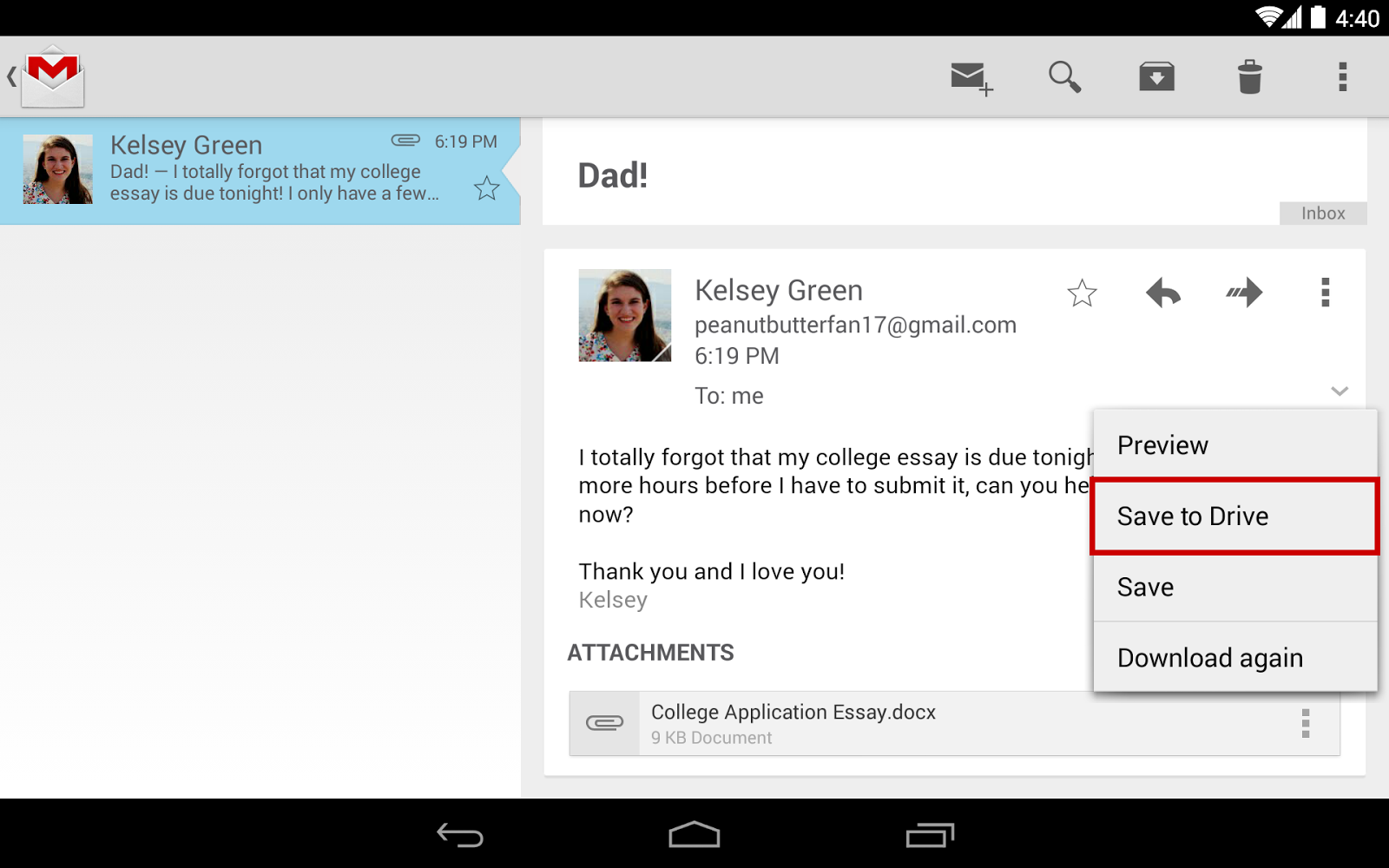
You can give these features a try by downloading the updated Gmail iOS app from the App Store, and if you’re using an Android phone or tablet, you can get the latest version of the Gmail Android app from the Google Play Store.
24 Jul 20:16
 In the United States, 1 in 50 people over the age of 25 have some form of bipolar disorder. In fact, the United States has more cases of bipolar I and II per-capita than any other nation in the world. Researchers at the University of Michigan are now testing a new smartphone app for Android, code-named PRIORI, that can help detect if someone is having a bipolar episode.
While the app still… Read More
In the United States, 1 in 50 people over the age of 25 have some form of bipolar disorder. In fact, the United States has more cases of bipolar I and II per-capita than any other nation in the world. Researchers at the University of Michigan are now testing a new smartphone app for Android, code-named PRIORI, that can help detect if someone is having a bipolar episode.
While the app still… Read More
Your Smartphone Will Soon Know If You Have Bipolar Disorder
by Sarah Buhr
In the United States, 1 in 50 people over the age of 25 have some form of bipolar disorder. In fact, the United States has more cases of bipolar I and II per-capita than any other nation in the world. Researchers at the University of Michigan are now testing a new smartphone app for Android, code-named PRIORI, that can help detect if someone is having a bipolar episode.
While the app still… Read More
24 Jul 20:16

Invertebrate populations have dropped by 45 percent in the last four decades
by Arielle Duhaime-Ross
Much has been said about the loss of bird, mammal, reptile, and amphibian species around the world. By current estimates, at least 322 species have gone extinct in the last 500 years. And researchers estimate that 16 to 33 percent of the world’s vertebrate species — animals with developed spinal cords — are currently threatened or endangered. But a new article, published today in Science, paints an even more alarming picture, as scientists have found that the number of individual insects, crustaceans, worms, and spiders decreased by 45 percent on average over the past 40 years — a period in which the global human population doubled.
24 Jul 20:13


OneNote arrives on Kindle Fire and Fire Phone
by Sam Sabri
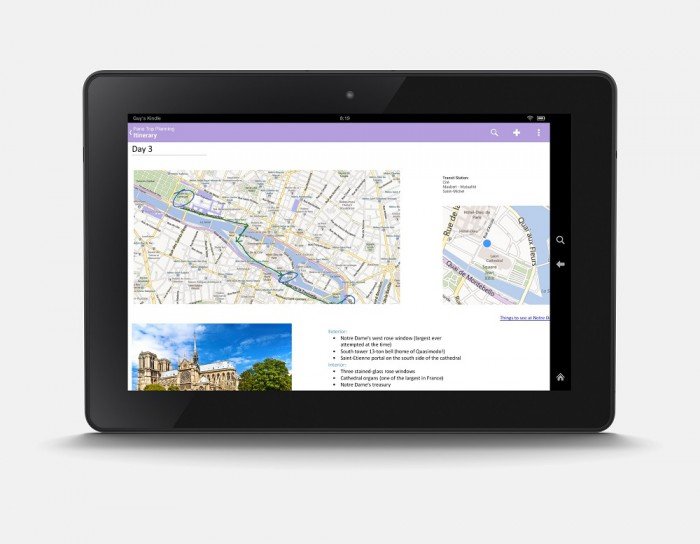
Rocking a Kindle Fire or will you soon have a Fire phone? Then you're going to want to check out the new OneNote app that Microsoft just released. OneNote is Microsoft's cloud-based note-taking application and service that syncs your notes across every device you own. It's now available for free in the Amazon Appstore for Android.
24 Jul 20:12


Madefire finally brings its digital comic book reader and store to Android
by John Callaham

Madefire, a company that sells digital comics from DC, IDW, Dark Horse and other publishers, has finally released an app for Android devices via Google Play that could serve to give Amazon's ComiXology app a run for its money.
24 Jul 20:09

EU wants Google to extend "right to be forgotten" to global users
by Cory Doctorow
Right now, Google blocks "forgotten" articles on EU versions of its site.
Read the rest
24 Jul 20:09

Today, Google rolled out an update for Chrome on Android that includes simplified sign-in.
by Eric Ravenscraft
Today, Google rolled out an update for Chrome on Android that includes simplified sign-in. If you have multiple Google accounts, you can easily switch between them just like on the desktop. Read more here.
24 Jul 16:17

How to Use the Infinite Number of Email Addresses Gmail Gives You
by David Nield on Field Guide, shared by Whitson Gordon to Lifehacker
One trick you may or may not have picked up about Gmail is that you can add in periods anywhere in the front part of your address and it makes no difference whatsoever: john.smith@gmail.com works just the same as johnsmith@gmail.com. What's more, you can add a plus sign and any word before the @ sign (e.g. johnsmith+hello@gmail.com) and messages will still reach you. If these tweaks make no difference, then why use them? One major reason: filters.
Here are a few ways you can make use of the feature to bring order to the chaos of your inbox.
Signing up for newsletters
The next time you sign up for a newsletter, app or website, use an address like johnsmith+news@gmail.com. That way, you can filter out everything sent to this address to a low-priority label or folder. A couple of options available to you are to have Gmail mark all these messages as unimportant, or categorize them all as Updates.
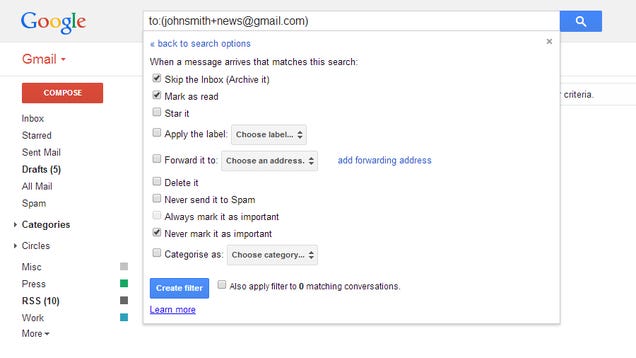
If you want to get really involved with your email management then you could even add a specific word for everything you sign up for: johnsmith+evernote@gmail.com for example. This might eventually become more trouble than it's worth, but it does give you the power to instantly send emails from a certain source to the spam folder, or to trash them immediately.
Giving friends VIP status
As well as marking some messages as unimportant, you can of course do the opposite. Try handing out an alternative email address—such as john.smith@gmail.com—to your nearest and dearest to help them stand out from the dross that usually fills up your inbox. Then set up a filter to mark these messages as important and top priority.
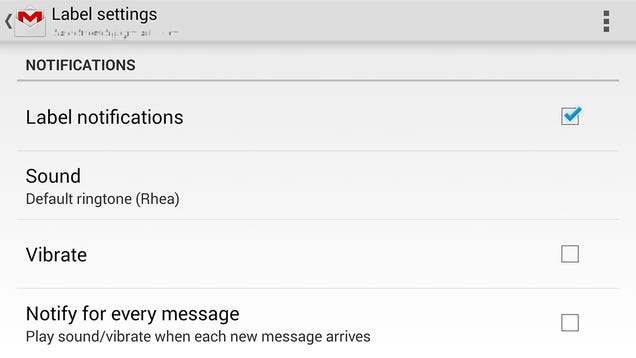
There's the mobile aspect to consider too. Through the settings in the Gmail app for Android it's possible to set notifications on a label-by-label basis, so if you set up a new label for your VIP contacts then you can make sure only these specific messages trigger an alert on your phone.
Dividing work life and personal life
You may already have a separate Google account for your job, but if you're someone who combines work and pleasure into one central inbox then use the address tricks to distinguish between the two. It could be as simple as adding "+w" to your Gmail address for any work-related emails.
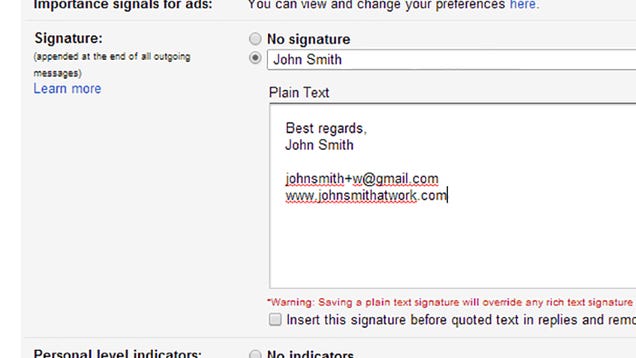
That then gives you the ability to mark every incoming work email with an appropriate label, with no manual effort required—not only will your inbox look tidier, but it will make searches much more efficient. You can restrict queries to one particular label and leave yourself with fewer results to sift through.
Controlling your home
We don't like to go more than a few days on Field Guide without mentioning something you can do with IFTTT, so here you go. Set up a johnsmith+lights@gmail.com address as a "Send mail as" alias in the Gmail settings and you can set up an IFTTT trigger that activates whenever an email appears from this address.
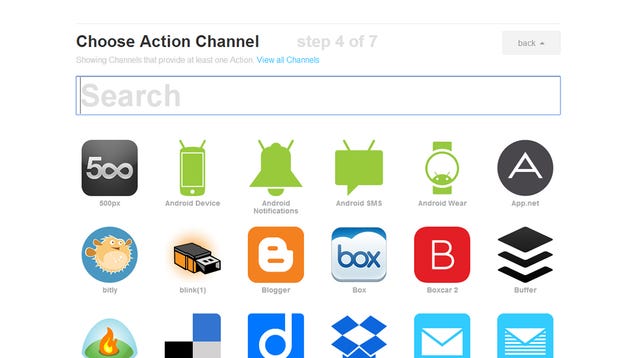
Select this alias when composing a message from the office or your mobile phone and you utilize any of IFTTT's features. You'll essentially be sending emails to yourself, but you could switch Hue lights on or off, turn up your Nest thermostat, and so on. You could also use the trick to send photos to Flickr, update Twitter, send a text from your Android phone, and so on and so on.
Creating a to do list
If you set up a filter that labels every email coming in to johnsmith+todo@gmail.com then you can pull up this label as a makeshift to do list. As well as emailing tasks when you're sat in the office or on your phone, you can forward emails from other accounts or even send photos to the list from wherever you happen to be.
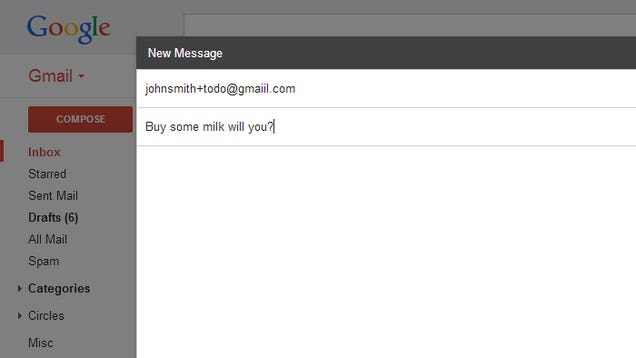
Anything that can be emailed can be added to your to do list, and as usual there's the option within the filter to automatically archive these messages and mark them as read so they don't clutter up your inbox.
Those are our ideas for using your Gmail aliases, but if you have some tricks and tips of your own we'd love to hear about them.
[Header image: Alexander Ryabintsev / Shutterstock.com]
24 Jul 14:22


Pirate Bay Launches Mobile Site, Teases More Expansions
by Ernesto
 One of The Pirate Bay’s strengths has been its resilience. No matter how hard the movie and music industries try, the site remains operational.
Over the years the Pirate Bay site has undergone many changes to make it harder to shut down. The tracker was put into retirement, torrents were traded in for magnet links, and the site moved its servers to the cloud.
What remained the same, however, was the site’s general appearance and its lack of support for mobile devices. That changes today.
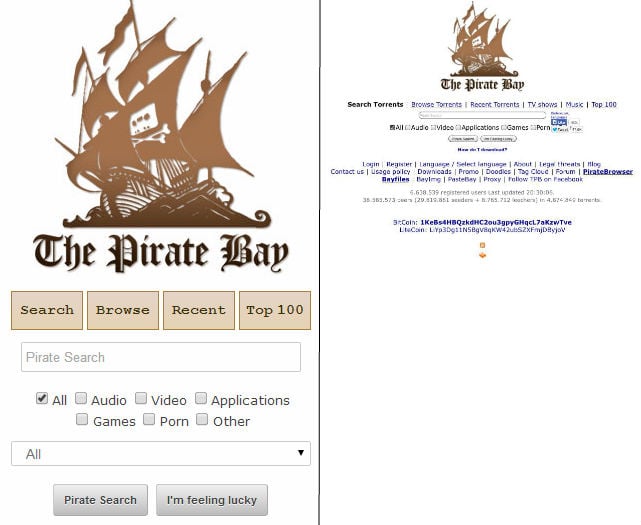
The Pirate Bay has just debuted a new site for mobile devices. The Mobile Bay offers a much more usable interface to browse the torrent site on mobile devices.
Previously mobile users were simply presented with a smaller version of the regular Pirate Bay site, which was coded long before smartphones and tablets became popular. With banners on both sides it was rather hard to navigate on smaller devices.
The mobile version doesn’t change the overall appearance much, but it’s definitely more readable and easier to navigate.
The new vs. old mobile look
Users on mobile devices are now redirected to the new Mobile Bay domain, which will exist next to the regular site. People have the option to continue using the old layout if they prefer, but The Pirate Bay team doesn’t see any reason why people would.
“The normal version of the site renders like crap on mobile devices,” the TPB team told us.
The Mobile Bay is one of the largest visible updates to the site in years, but according to The Pirate Bay it’s only the beginning. Behind the scenes the TPB team is working on a series of new niche sites that will provide extra features and make it easier to find content.
The TV, movie and music sections on The Pirate Bay will each get their own dedicated sites. The TV site, for example, will allow users to see a complete overview of all episodes per show, download season packs, and more.
Another new project in the pipeline is the RSSbay which will support personalized RSS feeds enabling people to launch torrents remotely.
“We will add more features later on, such as personal RSS feeds so users can browse torrents at work or school, and start the downloads at home,” the TPB team tells us.
Aside from improving the user experience, the other advantage of these separate domain names is that TPB can’t be taken out as easily.
“We’re trying to separate the site into different domain names to make it more resilient. In the event one domain get taken down, there will be plenty others left,” the TPB team says.
As always with the Pirate Bay, it will be hard to predict how long it will take before these new sites will see the light of day, but the mobile edition is live now.
Source: TorrentFreak, for the latest info on copyright, file-sharing and anonymous VPN services.
24 Jul 13:18

Pirates Of The Caribbean 5 Gets A Release Date


Shiver me timbers and blow the man down (other hoary old pirate expressions are available, speak to your local quartermaster for details) – Jack Sparrow is back. Three years after Pirates Of The Caribbean: On Stranger Tides sailed into cinemas, its hull pockmarked by critical broadsides, Disney have officially announced the fifth instalment in the long-running nautical franchise, and it turns out you'll have to wait three more years for it. Plus! Its subtitle is Dead Men Tell No Tales, and uber-producer Jerry Bruckheimer has recruited some new blood to helm the series' quinquel.
After Gore Verbinski and Rob Marshall, this time the director’s chair will have to be widened a bit to accommodate two microphone wielders: Joachim Ronning and Espen Sandberg. The duo are probably best known for the Scandi-sailing adventure Kon-Tiki, where they proved their saltwater credentials with aplomb.
Given that On Stranger Tides eventually grossed over $1 billion - even more in doubloons - the news isn’t terribly surprising. Nor is the fact that Johnny Depp is also due to return, after his other Bruckheimer diversion, The Lone Ranger, didn’t pan out too well.
In total, there will be a six-year gap between On Stranger Tides and the new instalment. And to make you feel really old, it’ll have been a 14-year gap since the original film once Dead Men Tell No Tales drenches the screen on July 7, 2017 - significantly later than its original 2015 release date, first mooted back in September last year.


24 Jul 13:17

What's The Best Usenet Provider?
by Alan Henry

Ah Usenet. Even after all these years, it's a great resource for digital media that offers more speed and reliability than bittorrent. First rule aside, this week we want to know which Usenet providers you think are the best.
The best Usenet providers offer great retention, affordable subscription prices, good monthly transfer rates, a good number of concurrent connections, and security like SSL or other encryption. We've talked about how to get started (and getting past the "first rule") in the past, and even discussed why you might consider it beyond bittorrent. Now we want to hear which providers you're willing to subscribe to.
Let's hear your vote in the discussions below! To cast your vote, follow these guidelines:
-
Follow this format for your vote, including the bold print. If you don't, it won't be counted:
A SCREENSHOT OR LOGO OF THE BEST USENET PROVIDER
Vote: [BEST USENET PROVIDER]
Why: Why is this Usenet provider the best one, or the one you'd suggest to others? Maybe it's affordable and has great retention rates. Maybe it's well recommended or comes with other tools. Make your case! Try to keep it to a single paragraph, maybe two.
- Don't duplicate nominations! Instead, if someone's nominated your pick, star (recommend) it to give it a boost, and reply with your story instead.
- Please don't leave non-entry, direct comments on this post. They'll just get pushed down. Save your stories for others' submissions!
If you're not sure what we mean, just check out the nominations by our writers below. We'll give you a head start, and they should all be in the proper format, so you can just follow our lead.
The Hive Five is our weekly series where you vote on your favorite apps and tools for any given job. Have a suggestion for a topic? Send us an email at tips+hivefive@lifehacker.com!
Photo by Alexandre Dulaunoy.
23 Jul 22:21

Most Popular Desktop Antivirus Application: Avast! Free Antivirus
by Alan Henry
A good antivirus tool doesn't have to cost a ton of money, and it doesn't have to drag your system down either. Last week we asked you for the best, then looked at the five best desktop antivirus applications. Now we're back to crown the crowd favorite.

It seems that the majority of you agreed with us, and chose Avast! Free Antivirus as your pick by a wide margin. Avast picked up over 47% of the overall vote. It's fast, it's free, and while it definitely has its quirks and annoyances, it scores highly in both AV Comparatives' and AV-Test's scores, keeps system utilization down, and doesn't cost a cent for great all-around protection.
Second place went to ESET's NOD32, a popular lightweight antivirus tool that I still hear championed loudly from all corners, especially system builders and people who want a good tool from a reputable firm that's light on system resources and doesn't miss threats. It picked up 19% of the overall vote. Third place went to Kaspersky Antivirus with over 13% of the votes cast, a premium tool that earned AV Comparatives' Product of the Year award. Fourth place went to BitDefender, with close to 12% of the overall vote. It's a simple, no-nonsense antivirus tool that won't confuse you with options and just does its job quietly. Bringing up the rear was Avira Antivirus, with 8% of the votes cast.
For more on these and the honorable mentions not listed here, make sure to head back to the full Hive Five feature for details.
The Hive Five is based on reader nominations. As with most Hive Five posts, if your favorite was left out, it didn't get the nominations required in the call for contenders post to make the top five. We understand it's a bit of a popularity contest. Have a suggestion for the Hive Five? Send us an email at tips+hivefive@lifehacker.com!
23 Jul 19:54

This is how the US government classifies people as terrorists
by Russell Brandom
More than a decade into the program, Americans are finally getting a look at how the government designates and tracks suspected terrorists. The Intercept has published The National Counterterrorism Center's Watchlisting Guidance report from March of 2013, distributed throughout the intelligence community as a roadmap to how the government tracks suspected terrorists and their associates.
23 Jul 18:55


Google Play Store now tells you when albums are in All Access
by Russell Holly

One of the many cool things to come from Google's Material Design update to the Play Store app, which now features big beautiful images and colorful icons when you select just about anything, is a huge deal for All Access subscribers. After this update hits your phone or tablet, you'll be able to check and see if an album is a part of your All Access subscription thanks to this single line toward the bottom of the page.
This is a huge step towards fixing the somewhat clumsy relationship Google has created between All Access and regular Album shopping on the Play Store. Previously, the lack of clarity could lead to accidental or unnecessary album purchases because there wasn't just an "add to Play Music" when you were subscribed to All Access. While that button still doesn't exist, because buying albums is still a cool thing to do sometimes, this new notification lets you know that all you need to do is search for the artist in the Play Music app in order to add their work to your existing playlists.
We're sure to be finding many more of these subtle little gems in the update Play Store, so be sure to sound off in the comments if you see something even cooler than this.
23 Jul 16:19


Fresh Meat: 10 new Android apps worth checking out
by Steve Raycraft
New apps need lovin’ too, right? Every day there are thousands of additions to the Google Play Store, but many go unnoticed and never receive the attention they deserve. We’ve shown in the past that this community can discover great apps and propel them to new heights. Our weekly Fresh Meat column highlights new apps with fewer than 100,000 installs. Browse our new Android app picks below and let us know which ones you enjoy.
Amazon Wallet

Description: Use the Amazon Wallet app to simplify your shopping trips, and never lose another gift card or rewards membership number. Scan or type your gift cards, loyalty cards and membership cards to your Amazon Wallet to reduce the clutter in your leather wallet or purse.
ChoreMonster

Description: Kids earn points by completing chores to use towards rewards like an hour of video games or a camping trip. Parents get an easy-to-use tool that takes the tension out of household chores. Kids also earn tickets to the Monster Carnival for each chore completed, where they can win and collect our monsters.
HTC Sense Input

Description: HTC Sense Input speeds up your typing and reduces accidental errors. It learns from your input and selections and offers you more precise word candidates. HTC Sense Input also supports the “trace” feature so you can type more efficiently with one hand.
PixtoCam

Description: PixtoCam allows you to view and control cameras from your watch to take pictures or make videos. Doesn’t matter if your phone is on or off. Just launch PixtoCam on your Android Wear Watch and get a realtime preview.
Nabu Utility

Description: Customizing your Nabu smartband is easily done through the Nabu Utility companion app. From notification priorities, display and vibration settings, to which Nabu-compatible apps to download and connect to, and even what activities are logged, Nabu Utility gives you complete control over your smartband.
Music Boss

Description: Whether you’re controlling a single media app or have an assortment of media apps and want to switch between them, Music Boss has you covered. The music controls on Android Wear are good, but if you’re a new or previous Music Boss user, you may feel that some features are missing.
Bamboo Paper

Description: Turn your Android tablet into a paper notebook. Bamboo Paper helps you capture your thoughts and ideas. Taking notes, sketching and drawing is as straightforward and as simple as using a real pen and paper.
FreeFlight 3

Description: Get FreeFlight 3, the free and official control app to pilot the Parrot MiniDrones (Jumping Sumo and Rolling Spider).
Sprout Now

Description: Sprout Now is your mobile destination for full episodes of your favorite Sprout shows. Log in with your television provider account and open up a whole new way to enjoy Sprout – anywhere you are.
Microsoft account

Description: Sometimes, Microsoft needs to verify your identity to help make sure that you – and only you – have access to your account. The Microsoft account app makes this easy, and you no longer need to enter security codes from text messages or authenticator apps!
23 Jul 15:51
 One of the major complaints with Amazon Prime Music, the company’s new streaming music service bundled in with its Amazon Prime membership program, was its lack of song selection, and especially current hits. Today, Amazon is taking a small step towards remedying that problem with an announcement of an expansion of the Prime Music service, which now has grown by “hundreds of… Read More
Amazon Expands Prime Music Catalog By “Hundreds Of Thousands” Of Songs
by Sarah Perez
One of the major complaints with Amazon Prime Music, the company’s new streaming music service bundled in with its Amazon Prime membership program, was its lack of song selection, and especially current hits. Today, Amazon is taking a small step towards remedying that problem with an announcement of an expansion of the Prime Music service, which now has grown by “hundreds of… Read More
23 Jul 15:50

Get unlimited access to over 15,000 Marvel comics for 99 cents
by Chris Welch
Marvel is opening up its massive vault of digital comics for only 99 cents this week to coincide with San Diego Comic-Con. A subscription to Marvel Unlimited — which offers immediate access to over 13,000 comics — normally runs $9.99 per month or $69 if you pay for an entire year up front. But Wired reports that for this week only, paying just under a buck will get you a month's worth of unfettered access to Marvel's universe. There are some limitations; you can store a maximum of 12 comics on a device for reading offline, and there's usually a wait of several months before new issues reach the service. (Marvel isn't trying to put your local comic book shop out of business, after all.) And yes, Marvel Unlimited is only available in the...
23 Jul 13:15
 As payments platforms look for more ways to grow their margins and usage among businesses, they continue to push into a wider and deeper range of financial services. In one of the latest moves, eBay’s PayPal is expanding its Working Capital service to the UK. This is its first market for PayPal’s lending platform outside of the U.S., where it first launched the service in… Read More
PayPal Expands Its Working Capital Service To UK, Switches From Loans To Cash Advances
by Ingrid Lunden
As payments platforms look for more ways to grow their margins and usage among businesses, they continue to push into a wider and deeper range of financial services. In one of the latest moves, eBay’s PayPal is expanding its Working Capital service to the UK. This is its first market for PayPal’s lending platform outside of the U.S., where it first launched the service in… Read More
23 Jul 13:15
 I’d think this was just a clever April Fools joke, if it wasn’t the middle of July.
Motorola and VivaLnk have made a temporary tattoo that can unlock a smartphone, no PIN required. Slap it on your skin, hold your phone up to it, and bam — phone unlocked.
Who needs gestural passwords or face recognition when you can unlock your phone like a time traveling space wizard? Read More
I’d think this was just a clever April Fools joke, if it wasn’t the middle of July.
Motorola and VivaLnk have made a temporary tattoo that can unlock a smartphone, no PIN required. Slap it on your skin, hold your phone up to it, and bam — phone unlocked.
Who needs gestural passwords or face recognition when you can unlock your phone like a time traveling space wizard? Read More
This Temporary Tattoo Can Unlock Your Phone
by Greg Kumparak
I’d think this was just a clever April Fools joke, if it wasn’t the middle of July.
Motorola and VivaLnk have made a temporary tattoo that can unlock a smartphone, no PIN required. Slap it on your skin, hold your phone up to it, and bam — phone unlocked.
Who needs gestural passwords or face recognition when you can unlock your phone like a time traveling space wizard? Read More
23 Jul 13:12


Material Design-inspired Google Play app update now rolling out
by Jerry Hildenbrand

Materiyolo
As shown off at Google I/O 2014, the new version of Google Play is beautiful, heavy on the Material Design, and starting to push out now to regular folk like you and me.
While much of the interface is unchanged, when you dive into an application's page (or a book, or movie, or music) you'll see the big changes. New animations, new badges, an awesome header of the associated video (if one is included) are just the beginning, and the whole design of the new content pages looks to have been built from scratch with the new design language.
There are some changes to get used to, as well. Content descriptions now are displayed full screen, and this is where you'll need to look to see any change logs. This is also where you'll find information like version number, the last update time, or the number of downloads.
It looks very nice and has us pumped to see the next version where more of the design has been updated.
Via: +Kirill Grouchnikov
23 Jul 13:00

EFF unveils secure, sharing-friendly, privacy-minded router OS
by Cory Doctorow
 As promised, the Open Wireless Movement's new sharing-friendly, privacy-minded router operating system was unveiled at HOPE X in New York last weekend.
Read the rest
As promised, the Open Wireless Movement's new sharing-friendly, privacy-minded router operating system was unveiled at HOPE X in New York last weekend.
Read the rest
Binaryjesus likes this