This is how to change the streaming quality of YouTube videos on your Android device
There are several reasons you may want to change the streaming quality of YouTube videos. You may want to downgrade the video quality because you want to cut down on the amount of data watching the video consumes. Or you may want to upgrade the video quality because you want to see more detail. Just remember that the video quality will be limited by the quality in which the video is uploaded in the first place.
After you've signed in to the video sharing service, let's talk about changing the streaming quality of YouTube videos. We'll be using the official YouTube app.
Vuze is one of the most recognized BitTorrent brands. Their client is used by millions of people each day and has a steadily growing user-base.
In recent years Vuze’s core BitTorrent client has evolved into an advanced download solution with every complex feature heavy BitTorrent users could wish for.
The downside of being so complete is that the application can be quite overwhelming to newcomers. In addition the application is somewhat of a resource hog. The Vuze team has taken these complaints to heart and coded “Vuze Leap,” a brand new client that is both simple and lightweight.
“We sought to deliver a simpler experience as a counterpart to the powerful, full-featured core Vuze BitTorrent Client that has pleased millions of users for years. Even with file-sharing being a part of internet usage for years, we continued to hear, from some users a desire to have a simpler experience that was less resource intensive,” Vuze’s Claude Tolbert tells TorrentFreak.
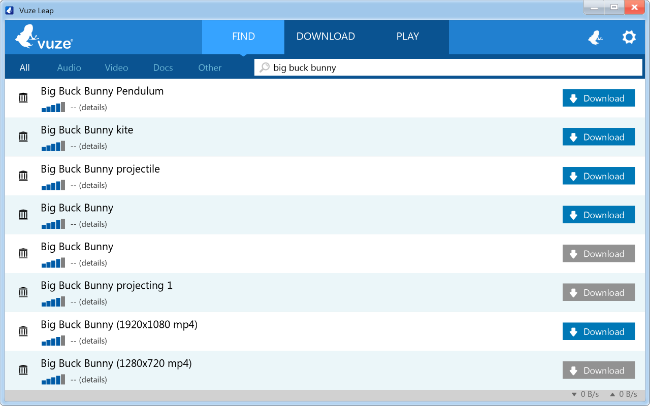
Today the first Vuze Leap beta is unveiled to the public. The torrent client works out of the box. Users are presented with a big search box which they can use to search for torrents without having to leave the application.
When a search term is entered, Vuze Leap will automatically search for matching content on Google, the Internet Archive and elsewhere. This can then be downloaded with a single click.
After a download is completed users can play media files directly from the client, or navigate to the download folder as they would do with other torrent clients. Vuze Leap automatically categorizes files into various categories to keep the library organized.
Vuze’s new BitTorrent client is best suited to less tech-savvy users who don’t necessarily need all the advanced features the core Vuze client has to offer. Through its simpler interface Vuze Leap should make BitTorrent more accessible to people who are new to torrents.
“We believe that Vuze Leap extends usability to users who may be new to filesharing or don’t require the power and functionality that the core Vuze BitTorrent Client provides. However, both provide an outstanding experience to users,” Tolbert says.
TorrentFreak tested the application and it works as advertised. It certainly feels much lighter and faster than the core Vuze client. The built-in search is handy as well, although users may have to scroll down to get the best search results, which often come from Google.
The application is currently only available for Windows but support for other operating systems is expected to follow in the future.
Those who are interested in taking Vuze Leap for a spin can download the latest beta release after signing up for the beta test. The download link comes with the confirmation email.
If you're on city property and your pants hang more than 2" below your "natural waistline," you face a $500 fine, and for repeat offenders, jail.
Read the rest
Smart light bulbs – like the Philips’ Hue connected bulbs or those from LG, GE or Samsung – are an easy jumping off point for those wanted to experiment in the “connected home” arena without the complexity or costs involved with the installation of a full “smart home” system. But even still, those bulbs aren’t cheap: A 3-bulb starter pack of… Read More
Amazon is swinging their Fire TV trademark at a small fan site, FireTVNews.com. This sort of thing isn't uncommon and not entirely unexpected since the word "Fire" is included on Amazon's list of trademarks, but it's still unfortunate for the site owners, and perhaps a little overzealous on Amazon's part to be going after a fansite like that.
Nvidia wasn't able to get its graphics chips into either the Xbox One or the PlayStation 4, so it's doing the next best thing by trying to obviate home consoles altogether. Today the company introduces its new $299 Shield Tablet: an 8-inch Android device designed to sate all your gaming needs at once. It's powered by the souped-up Tegra K1 processor that Nvidia debuted to much fanfare in January, and already has a number of major game titles optimized to make use of its extra power. It's also...
Move over Lockitron, there’s a new smart lock contender aiming to connect your door handles to the Internet so that you can lock and unlock remotely, send digital keys to friends and tradespeople (via the companion app), keep tabs on comings and goings, and get into your home without the faff of taking your keys out of your pocket. Read More
Pre-orders open today at $299, launching in the U.S. and Canada on July 29th
NVIDIA is expanding its Android-powered device portfolio today with the Shield Tablet, a gaming-focused Android tablet with some seriously impressive specs and features. The Shield Tablet comes in as a spiritual successor to the Tegra Note 7, with the distinct difference that this is part of the Shield family — meaning it is manufactured by NVIDIA instead of a partner and is dramatically more focused on gaming capabilities.
The Shield Tablet is also one of the first devices to run the latest Tegra K1 processor, NVIDIA's latest high-powered chip capable of amazing (by any standard) graphics and processing power. Paired up with 2GB of RAM, the Tegra K1 enables some pretty wonderful gaming at 1920x1200 resolution on its 8-inch display, whether it's a title from Google Play, a Tegra-optimized game from NVIDIA or one being streamed from your PC using GameStream. The Tegra K1 has plenty of headroom left over when playing these games as well, giving you the option of outputting 4K video to capable displays, as well as streaming your gameplay to Twitch.tv and supporting multiplayer gaming with multiple controllers.
To offer the best possible gaming experience, NVIDIA is launching the Shield Tablet with a pair of first-party accessories — the Shield Wireless Controller and Shield Tablet Cover — that combine to help take your mobile gaming to the next level. The Shield Wireless Controller connected to the Shield Tablet over Wifi Direct, offering latency lower than Bluetooth and two-way (headphone and mic) audio, while the Shield Tablet Cover connects to the tablet with magnets and props it up in three different positions depending on how you want to enjoy your games or other content.
Welcome to the roundup of the best new Android applications, games, and live wallpapers that went live in the Play Store or were spotted by us in the previous 2 weeks or so.
Please wait for this page to load in full in order to see the widgets, which include ratings and pricing info.
Looking for the previous roundup editions? Find them here.
Android tablet apps got a jolt of excitement this year when we learned they’re coming to Chromebooks soon, too. In our follow up to last week’s seventh annual Android pack, we’re checking out the apps that are doing the best with larger screens.
The Lifehacker Pack is a yearly snapshot of our favorite, essential applications for each of our favorite platforms. For our always-updating directory of all the best apps, be sure to bookmark our Android App Directory.
Wunderlist is still our top pick for Android to-do list and its tablet interface makes good use of the extra screen space. It can show you your lists, to-dos, and details all on a single screen. Google Keep takes a different approach, spreading your notes out in a grid-like array. Any.Do has also caught up with a useful tablet interface that shows your projects on one side of the screen and individual items on the other.
Today Calendar took our recommendation for Android phones. On tablets it has a nice layout with a month view on one side and day view on the other. Once you view an individual event, though, it starts stretching out to super-widescreen mode. If you’d rather use something that makes better use of the space, Google Calendar does the job. In the Week view, you can still get a thumbnail look at your month as well as all of your various sub calendars.
Google’s suite of office apps has only gotten better over the years. While Google Docs, Sheets, and Slides may be more powerful on the web, they’re also competent apps on Android. If you’re using a tablet with a keyboard, they really start to shine. You may not want to write a novel or balance your company’s budget solely from a touch screen, but if you need to make an edit or work on the road, these can get the job done.
In response to Google’s mobile efforts, Microsoft has started releasing Android versions of its major Office apps. You can use the basic versions of Word, Excel, and Powerpoint to view and make basic edits to your documents. If you want to unlock the full versions, including things like support for tablets larger than 10.1", you’ll need to buy an Office 365 subscription. For quick edits, the free version should be enough, but if you’re doing a lot of work on tablets (or a Chromebook), 365 may be worthwhile.
Whether you prefer Dropbox or Google Drive is largely a matter of opinion (and you all certainly have your thoughts), but both are must-haves for any device. Dropbox still suffers from the “stretched phone” look even after all these years, but it’s still plenty usable. Google Drive, on the other hand, takes the same card-style approach as most other Google apps, which means it looks roughly the same on tablets as it does on phones, but makes better use of the space.
Evernote’s tablet design is just as slick as the phone, but with plenty of extra breathing room so you can read more of your notes at once and get more done. Of course, if you use Evernote on your phone and desktop, you can’t use Evernote on a tablet without paying. If you’d rather not shell out the cash, OneNote from Microsoft offers a great alternative. You can add notes, manage notebooks, and even draw notes if you have a stylus.
Chrome’s ability to sync with its desktop counterpart and access open tabs on other devices still gives Chrome a huge lead on the competition here. Unlike the phone version of Chrome, on tablets the app has a tabbed interface which should make desktop users feel right at home. It also includes quick access to voice search right in the address bar.
There are few developers who really understand the power of Android quite like Pushbullet. As if the app wasn’t awesome enough on your phone, Pushbullet makes stellar use of your larger screen by showing a conversation view of all the people and devices you can push to. You can also browse all the channels you’re subscribed to quickly and easily. You might need a Pro plan if you want to send more than 100 text messages from your tablet a month, but for pushing links between your phone, tablet, and desktop, Pushbullet is still a must-have.
Hangouts supplies both individual and group chat, making it a solid contender for tablet messaging.. It also allows you to send picture messages and emoji, and conduct video calls. So far, Hangouts is still one of the most tablet-friendly chat apps. If you’re not a Hangouts fan, Facebook Messenger’s chat heads work sometimes, but its tablet interface is still stretched out and not really optimal..
If you have an Android device, Google Now should automatically be your right-hand app. It learns where you live and work, tells you how long it will take you to get to where you’re going, show you nearby restaurants and attractions, and keep you updated on weather, stocks, and news stories Google thinks you might be interested in and plenty more. You also get an extremely powerful set of voice commands, allowing you to add calendar events, set reminders and alarms, send messages, conduct searches, and identify songs with your voice alone. Be sure to check out our list of things you probably didn’t know you could do with Google’s voice commands.
Google Maps has always been one of the best apps on Android, and the tablet version is no exception. You can get directions, find new restaurants or places of interest, and lookup public transit or traffic info in the new Google Maps. The app couldn’t be handier, and it deserves its place as one of the most downloaded pieces of Android software.
Google’s own security app allows you to locate your other devices, remotely lock or wipe them, or ring them if you’ve misplaced it. It’s a handy, if fairly basic suite of security features. While you can register a tablet without installing the app itself, it’s handy for finding your phone or other Android devices.
Pandora is the standard when it comes to internet radio. On tablets, it’s just as useful as it is on phones, so you can get your fill of music on your slate without a stretched out user experience. The multi-panel design allows you to browse new stations while exploring them more in-depth without constantly swapping screens.
Snapseed has managed to make editing photos on mobile a breeze. It allows you to apply a ton of filters, fixes, and corrections to your images. It even has some great tools for complex editing. Google Photos has also grown into its own with a tile-based interface that makes use of the extra space without changing much. Auto Awesome, powerful search tools, and cloud backups make Photos an essential app if you want to manage your photos on your tablet.
Google Play’s music subscription makes it a compelling option for streaming music, on top of being an excellent digital locker for your existing collection. The cards-style UI scales perfectly to larger displays and it adapts very well to different screen sizes. If you pay for the subscription, you can also get access to YouTube Red, which removes ads, and adds background playback which is awesome for multitasking on a tablet. Spotify offers a nice alternative if you’re not into Google’s app. You can even stream music for free to tablets on Spotify, which is even better than the free offering for phones.
The tablet version of the incredibly popular FL Studio is a little on the pricey side at $20, but it’s well worth it if you want to make whole songs on the road. You’re given a host of instruments and loops you can use to weave together real songs. It’s not a complete music studio, but professionals or aspiring artists should definitely check it out.
IMDb is a must-have for anyone who’s ever said “What else was that actor in?” It’s also probably one of the few apps on this list that looks way better on tablets than it does on a phone. You can use the app to keep track of movies you’ve watched, ones you want to see, rate films, and even look up showtimes at theaters near you.
Netflix and Hulu serve very different streaming needs, but they go great together. Netflix serves up a bunch of original content plus a library of older TV shows and movies. Hulu focuses more on currently running series the day or week after they air. Both require a subscription to use on mobile, as well as an internet connection to play video (offline playback is not an option), but if you didn’t get that big display to watch things like Futurama and The Daily Show on, what did you get it for?
For reading RSS feeds and other content sources, Feedly offers a variety of views that make use of all that extra space. If you read RSS feeds heavily, the “Save for Later” feature is particularly handy for Pocket-like functionality without leaving the app. Scroll through feeds while sitting on the couch, save a few for later, then return to your bookmarks once you’re back to your desktop. Or do the same process in reverse for casual reading.
One of the most comfortable use cases for a tablet is sitting on the couch and reading. Pocket lets you set aside articles for casual perusal later. Because Pocket automatically downloads saved articles for offline reading, it’s particularly handy if you want to load up a Wi-Fi-only tablet and take it with you when you leave home.
Tablets make great ereaders. Google Play Books has worked its way up to our favorite ereader on Android. It comes with a ton of research features like Wikipedia integration, dictionaries, and notes. Amazon’s Kindle is another solid option. The unique X-Ray feature for novels helps you keep track of all the characters in A Song of Ice and Fire (you know, before they die).
AirDroid is the closest thing that Android has to a desktop client. It allows you to access your files and data on your tablet remotely without having to plug it in to your desktop. You can even reply to text messages or update applications. If you spend a lot of time at your desk with your devices plugged in, AirDroid is a must-have.
Tasker’s is just as powerful on slates as it is on phones. The app itself doesn’t cater to large displays much, but it doesn’t need to since Tasker runs in the background most of the time. There are plenty of ways to get started with Tasker if you’re unfamiliar with it. If Tasker is too overwhelming for you, IF from IFTTT (yes it’s confusing) is a much simpler automation tool that can plug into your other web services to do some truly awesome stuff.
Our previous pick for file explorer on tablets, ES File Explorer, got bumped way down our list when it started using shady adware. Fortunately, Solid Explorer is a gorgeous alternative that offers some useful features. You can browse your local files, cloud storage, cast to your Chromecast and more. Just like the phone, the app has a 14-day trial and costs $1.99 afterwards.
Widgets get neglected far too much on Android, but Dashclock comes through and it’s even better on a tablet. With a variety of extensions that you can plug in, you can use this widget to keep abreast of everything in your digital life. There are a ton of extensions available to supercharge Dashclock and on a larger tablet, you can turn this widget into a veritable control panel.
Titanium Backup remains the best app for backing up other apps on any Android device. There is no exception for tablets. The UI isn’t especially tailored to giant slates any more than it is to tiny phones, but backups don’t necessarily need to be pretty if they’re functional. Other areas may be worth exploring alternatives, but when it comes to making sure your data is secure, stick with the tried and true.
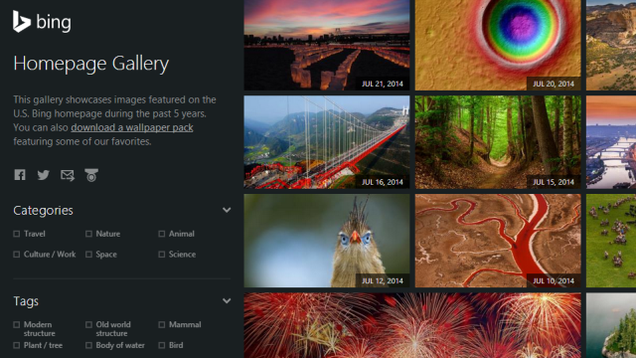
Web: Microsoft Bing's daily updated photo backgrounds for the search engine are cool and popular. You can now browse and download all the wallpapers in Bing's history at the official Homepage Gallery, all for free.
Recent backgrounds are displayed in a chronological thumbnailed gallery, which you can also sort by different filters such as:
Every week we cover new Android apps with Fresh Meat on Wednesday, followed by Android Gaming on Thursday and Top 10 App Updates on Friday. When Monday rolls around, we look back to see which apps were the most appealing to our audience. Read on for the 5 most popular Android apps from last week. These apps are ones that are most likely new and haven’t appeared in the Top 5 list more than three times.
1. Google Chrome
App info: Browse fast on your Android phone and tablet with the Google Chrome browser you love on desktop. Pick up where you left off on your other devices with tab sync, search by voice, and save up to 50% of data usage while browsing.
App info: Upgrade the launcher on your device to make Google Now one swipe away. From your primary home screen, swipe right to access Google Now cards that give you just the right information, at just the right time.
App info: Experience the world’s best strategy game with Magic 2015—Duels of the Planeswalkers! Hunt bigger game in this all new adventure. Command powerful creatures and wield devastating spells to defeat your opponents in the most exciting Magic yet!
App info: Explore a truly enormous and open Wild West frontier full of cowboys, bandits and more…unnatural enemies in this third person shooter adventure game.
App info: Normal is an entirely new kind of earphone designed by you and personalized to the nooks and crannies of your ears. Download the app to capture your ears, customize your Normals, and place your order.
Note: To ensure that all apps receive a fair chance to make the list, we will retire any app that has made the list for three consecutive weeks and will place it in our Android and Me App Hall of Fame. We will post this Hall of Fame list in a dedicated series. Any app with * next to the title indicates it will now be added to our Hall of Fame list and will no longer be listed in this article.
Yahoo has been on a mission to strengthen their mobile products for a while now and to push that envelope even further, the company has now announced they'll be acquiring mobile analytics firm Flurry after having reached a definitive agreement. Flurry, was started in 2008 and today has reached over 170,000 developers across 1.4 billion devices monthly with their services being offered to pretty much every mobile operating system out there one way or another.
This afternoon following the closing bell, Netflix announced the financial results of its second quarter, including revenue of $1.34 billion and earnings per share of $1.15. Analysts had expected Netflix to report $1.33 billion in revenue and $1.16 per share in earnings. The company, which traded up around 1.7% during regular trading in a down market, is up around 1% after-hours following… Read More
by Adam Clark Estes on Gizmodo, shared by Andy Orin to Lifehacker
Apple just released the latest build of OS X Yosemite, including a brand new iTunes. It's only a little bit anti-climactic. Version 12.0 does indeed look a lot like Version 11.3, the version that's probably on your computer. But it's got some neat little treats nevertheless.
The first thing you'll notice, of course, is the new icon. Yay for red! Or is it pink?
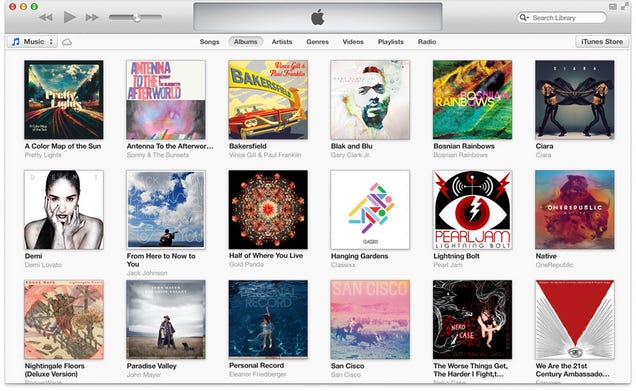
Otherwise, the new iTunes is super simple, if slightly more economical in terms of real estate. The navigation bar at the top has been cleaned up so that the display in the middle bleeds all the way to the edge, and the gradients match the rest of Yosemite. The left rail (or dropdown that used to be on the left hand side of the menu bar, depending on your view) has been replaced by a line of little icons for music, movies, TV shows, audiobooks, and apps with one of those … dropdown menus for everything else.
Meanwhile, you can no longer toggle between songs, albums, artists, etc. on the top. That is now a dropdown menu on the right hand side. So we lose a dropdown menu to gain a drop down menu. Either way, it looks nicer. Check out the old iTunes:
And behold, the new iTunes:
Here's another view:
Dramatic difference? No, not really. Incremental update that makes navigating slightly easier without complicating things too much? Sure, why not. Not satisfied with this limited preview? Well, luckily I felt like taking screenshots today.
Check out this awesome checkbox menu that lets you change which of the new icons you want to display:
And this is the new apps screen, which is actually almost identical to the old apps screen:
And this is the new iTunes Store, which is actually almost identical to the old store:
It's worth pointing out that iTunes is still exploring new ways to make it easier for you to buy things in iTunes. A button next to the song title lets you buy a song that's playing on iTunes Radio. It used to be a dropdown too, but buttons make buying easier!
And iTunes Radio still exists, as a reminder of what it could've been and a disappointment for what it is. (The new La Roux album is pretty good, though.)
There are inevitably other little tweaks hiding in the update. We'll keep digging, but if you happen to be running the latest version of Yosemite, let us know what you find!
Let's just say you popped open Facebook and spotted something interesting shared by one of your friends – maybe you want to save that? I can't remember the last time this happened, but I'm sure it's possible. That's what Facebook's newly announced Save feature is for, and I'm kind of surprised it didn't already exist.
Save will work on the web and in the mobile apps. The options for each post in your news feed will include the ability to save the content (be it a web link, restaurant, album, or anything else) to your Facebook profile for later.
This week we're going to be taking a deep dive into some of Yahoo's Android apps. Sure, Google trounced them in search in the early days, but Yahoo has managed to stick through it with a couple of bruises.
As it turns out, Yahoo has some pretty great apps. First and foremost, Yahoo Mail delivers some extremely sharp visuals thanks in no small part to the strong theme support. While looking through the inbox and other e-mail views, the background is blurred out, but as soon as you pop into a menu, you get a striking wallpaper and assigns a complementary highlight color through the rest of the interface. A similar set-up is available on the web, but unfortunately the two don't sync. Besides that, the icon set is flat and minimal, just the way we like it, and transition animations are smooth.
This means that all 552 episodes of the series will air 24 hours a day, seven days a week for a full week and a half. In addition, Variety reports that FXX will launch the "Simpsons World" digital hub in October, which will allow cable subscribers to watch every episode on demand on their desktops at SimpsonsWorld.com, mobile devices via the FXNow app, and on compatible smart TVs and set-top boxes. All the more reason for cable cutters to...
Over the past few years the entertainment industries have repeatedly asked Google to step up its anti-piracy efforts.
One of the most often heard complaints is that pirated content sometimes ranks better than legal alternatives. Copyright holders want Google to remedy this situation by promoting legal content through higher placement in search results.
“Search engines should address the distortive search practices that result in listings and rankings that favor substantially infringing sites,” the MPAA complained earlier.
While it seemed that Google had rejected the boosting of legal offerings in results, it appears that the company is now taking measures to address copyright holder concerns.
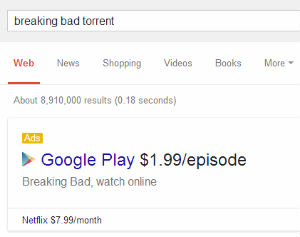
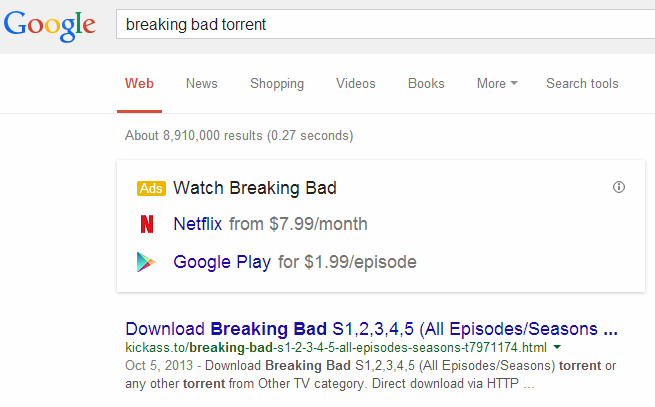
Google has quietly rolled out an update that places banner ads for Google Play and other content platforms above the regular search results if people search for piracy related terms. The banners in question show up on searches for a title of a movie or TV-show in combination with keywords such as “torrent,” “BitTorrent,” or “DVDrip.”
As shown below, the first organic result is still a “pirate” site, but the legal options are now clearly visible through the inserted banner.
“Breaking Bad Torrent”
Initially these new ads were displayed in most of the US and UK. The availability was limited after TorrentFreak reached out to Google before the weekend, but they are still visible to us from a California IP-address.
It’s unknown how Google picks the keywords but the banner is also shown when searching for the video format “avi” and even “putlocker,” a popular file-hosting service.
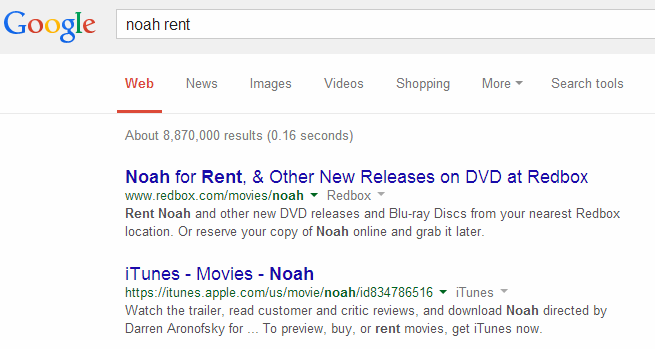
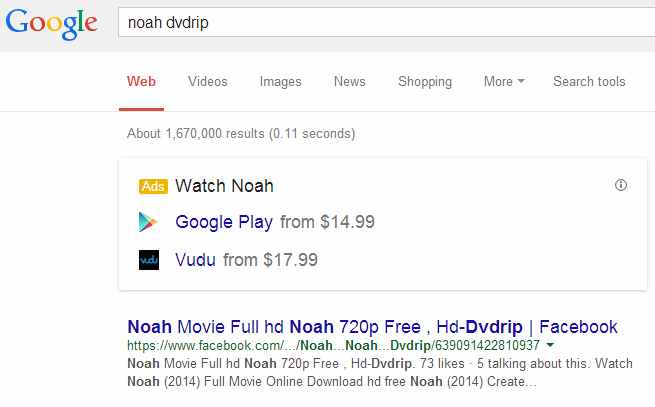
The ads do not appear when searching for the movie or TV-show titles alone. They are specifically triggered by the extra ‘piracy’ keyword. For example, the banner shows up when searching for “Noah DVDrip” but not for “Noah DVD,” “Noah rent“, “Noah buy” or Noah paired with a random word.
Noah DVDrip
In addition to piracy related keywords the ads also appear for more generic searches where pirate sites traditionally rank very high. These include words such as “download,” “watch,” “online” and “view” which often have unauthorized sites in the top results.
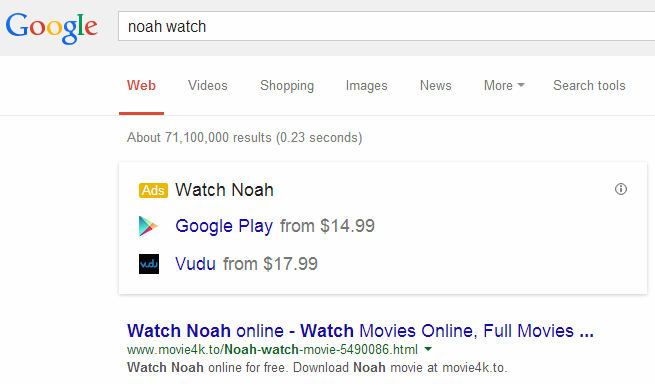
The “Noah watch” search below is a good example where a banner is placed above the first result, which in this case links to infringing material.
Noah Watch
TorrentFreak contacted Google but the company couldn’t say why the ads are displayed for these piracy related keywords. A spokesman did confirm that the ads appear for “various searches” and that they are the same format as the Knowledge Graph ads that were rolled out late last year.
“These ads will appear after various searches that include specific movie, TV, and music titles,” a Google spokesman told us.
Since the availability of the banners was limited overnight the company may still be experimenting with the setup. Unfortunately, Google couldn’t comment further on our findings.
Promoting legal content through ads would make sense for Google, as that would satisfy some of the copyright holders’ demands without changing the actual search results. On top of that, it can be quite useful to users as well.
Whether the banners will be able to steer people away from pirate sites has yet to be seen though.
A New York meeting providing information to companies interested in offering free Wi-Fi access counted Google among its attendees, according to a new Bloomberg report. Others at the event included IBM, Samsung and Cisco, but Google’s ambitions regarding blanketing the U.S. with free or affordable Internet connectivity could be a good reason so suspect it’ll submit a compelling… Read More
They're the first major publisher to sign with Bitlit, an app that lets you send a photo of your book's copyright page with your name inked on it in exchange for a deal on the ebook.
Read the rest
Four months after bootstrapping a London launch, which saw its co-founders initially jumping on a scooter to deliver customer orders themselves, local on-demand delivery app Jinn has raised a modest seed round of $200,000, to be used primarily for customer acquisition. Thus far the startup says it’s doing around 1,000 orders per month, with little to no money spent on marketing. Read More
Five years ago Peter Hames had chronic insomnia. Today he’s the co-founder of Big Health, a multi-million dollar VC-backed startup that’s setting out to create a new category of healthcare — under the self-defined banner of ‘digital medicine’. Read More
Google Now's reminder feature is nifty if you're looking to create quick alerts for events, and with the latest update, Google is making it easier to create new reminders. You can now create reminders directly from Google Search by entering a query along the lines of "remind me to collect contact lens at 11 am" in the search box.
Getting up-close and personal with LG's latest flagship
I'm really digging the LG G3. It's everything Alex said it would be when he looked at the original Korean version, and more. If you already picked one up, you know what I mean. That means it's time to get a little nerdy with it!
We have a nice mid-range USB Microscope. We have a very high-end LG G3. The two must get together, don't you think?
While we’ve known for a few months that studio boss Kevin Feige and his team have plans stretching as far as 2028, so far all the company has announced are its films up to early 2016, with Captain America’s third outing set for May 6 of that year - putting it up against Batman V. Superman: Dawn Of Justice.
Now, however, the company has put out a statement staking out July 28 and November 3, 2017; July 6 and November 2, 2018; and May 3, 2019. There’s just one tiny wrinkle: no film titles are listed, but with the studio due to make its typically big presentation to the Comic-Con faithful on July 26, we can hope that most, if not all, the gaps will be filled in then. After all, this is a company that loves its seekrits…
Feel free to guess away until then about which films will fill each slot, but we’d hazard that a third Avengers could be that July 2018 date (assuming it keeps to one every three years) and Thor 3 is likely to be another. With Doctor Strange now in development with Scott Derrickson, that’s surely a definite. So what else? Another Guardians? Black Panther at last? Ms. Marvel? The list of possibilities is endless.
Though his TV work outshone his big screen roles, James Garner was a legend no matter the size of the screen. So it’s sad to report that he has died at the age of 86.
Boasting an easy charm, rugged good looks and a flexible ability to inhabit comedy and drama, Garner delivered masculinity while merrily able to undercut it to supreme effect. Born James Scott Baumgarner in Oklahoma in 1928, he lost his mother when he was just four. Dropping out of high school at 16, Garner joined the merchant marine navy, only to suffer from chronic sea sickness, forcing him to quit and move to Los Angeles to live with his father. He briefly went back to school at Hollywood High and scored a swimsuit-modelling job. But further work in front of a camera would have to wait, as he spent a period drifting through odd jobs, and was then drafted into the army for the Korean War, where he was wounded twice while serving in the infantry.
Following his discharge, he attended the University of Oklahoma and then worked with his father in California as a carpet layer. But his best destiny appeared in acting, something he essentially fell into thanks to an old friend who had become a producer and agent. Scoring a part in a Broadway-bound play called The Caine Mutiny Court-Martial, he had zero lines, but made an impact and was signed the following year by Warner Bros. A film career followed that would include the likes of The Children’s Hour, The Great Escape, The Thrill Of It All, Grand Prix – from which he developed a lifelong love of racing – Support Your Local Sheriff, Marlow, Victor/Victoria and, more recently, The Notebook.
But it was on television that Garner truly soared, winning two ironic roles that would cement him in the pop culture consciousness. In 1957, he became the face of TV Western Maverick, playing the quick-witted roving gambler, a role that began to evolve as the writers played to his comic abilities. After leaving the show in 1960, two years before it ended, he returned to film work, only to find his true calling once again in 1974 for The Rockford Files. As a cliché-free detective drama, it forged a new type of hero for television, one not afraid to display his foibles. Garner won an Emmy for the series in 1977 and continued working until he was medically advised to stop in 1980.
After some contract issues with Universal, Garner returned to the character for TV movies that ran in the 1990s and joined the cast of the 1994 film based on Maverick. He enjoyed a long, successful career, winning awards for TV movies and becoming a beloved regular guest star on a variety of shows.
He’s survived by his wife Lois, who he met in 1956 and married two weeks later, his daughter and stepdaughter. He was a one of a kind and our thoughts are with his family.
Good browsing hygiene and "common sense" only get you so far on the internet. A good antivirus utility is worth keeping in your pocket in case either of those two things fail you (as they have been known to in the past) or someone less tech-savvy asks you for a good tool. This week we're looking at five of the best antivirus tools, based on your nominations.
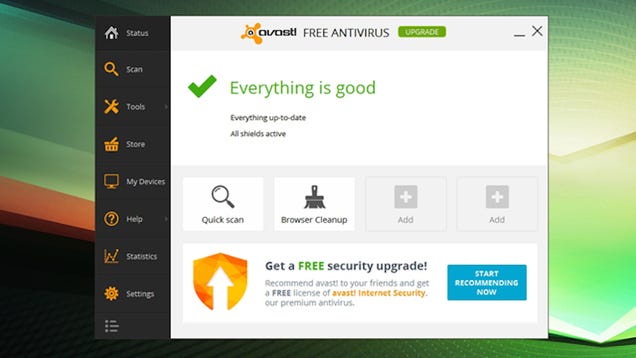
Avast! Free Antivirus is our current pick as the best antivirus for Windows, but it remains to be seen whether it'll be your pick as well. It's come a long way in a few short updates, with the 2014 version offering a streamlined, easy to navigate interface and a plethora of on-access scanning and protection tools (some of which you may not want, so take care when installing). It's still one of the top picks available, according to AV Comparitives and AV-Test, and performs well in antivirus tests. Avast offers an on-access antivirus scanner that examines files downloaded, pages you visit, emails you receive, and any files downloaded, and also features an on-demand scanner you can run at any time. It updates quietly in the background without fuss, and has a "silent" mode where you can disable any and all notifications and warnings to keep performance slim and trim. The app itself is relatively resource light—you may not even notice it's there. Best of all, it's completely free.
In the nominations round, many of you praised Avast for its performance and light use of system resources, and others pointed out that you'd been Avast users for a long time and were pleased to see its updates. Others highlighted specific features, like Avast's screensaver scan, where the application only kicks in when you're away from the computer or the system is idle. A few of you even highlighted the fact that Avast is cross-platform, and available for multiple operating systems. It's not perfect by any means, but it's a great tool. You can read more in its nominations thread here.
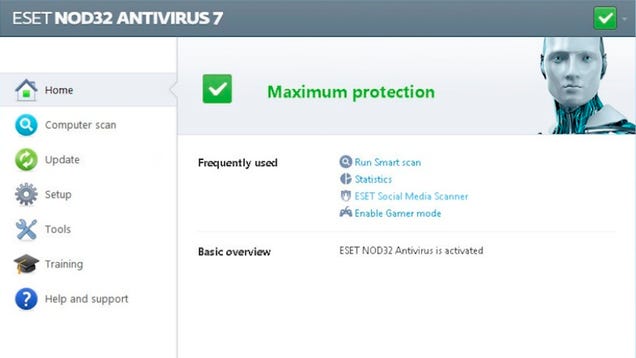
ESET's NOD32 Antivirus suite has been popular for years, and has earned a reputation for offering complete on-access and on-demand protection while being extremely lightweight when it comes to system resources. If you thought you'd have to balance performance with protection, NOD32 has consistently proven you don't. The most recent version of NOD32 includes more than just antivirus protection however—you also get anti-malware scanning, phishing protection, anti-spyware protection, and even special tools to make sure you don't fall for scams and hacks on social networks like Facebook and Twitter. AV Comparatives still loves it, and while it's not free (it'll starts at $40/yr), it does offer premium protection to match its price tag. If you're looking for even more protection, it's worth stepping up to the pricier-but-more-robust ESET Smart Security, which earned its own praise in the nominations round. It also offers anti-theft protection for your devices, advanced tools and scanning options, multi-device management tools, a silent "gaming mode" that's somehow lighter on resources, parental controls, and more. It'll set you back $60/yr.
The nomination threads for both products were full of praise, with almost everyone highlighting how well both tools performed both in virus detection and removal tasks as well as in everyday use when you didn't want to notice it. Frankly—that is the test of a great antivirus tool: When you're doing nothing, you don't want to notice it running, and ESET's tools both provide that kind of resource-light computing experience. Those of you who nominated NOD32 highlighted its fire-and-forget features that don't need a lot of tinkering, but those of you who highlighted ESET Smart Security highlighted its advanced tools and options that give you incredible control over the tool. Read more in NOD32's nomination thread here or Smart Security's nomination thread here.
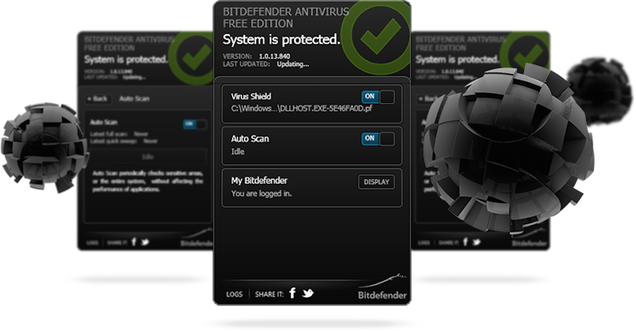
BitDefender prides itself on offering a one-click antivirus and security tool for people who both need to be able to get their hands dirty when they want to as well as people who just need a simple tool that runs and keeps them protected from threats without a ton of tweaking. Whether you go for the paid or the free version, BitDefender's minimal interface and lightweight install earned the praise of the folks at AV Comparatives. BitDefender's Internet Security ($80) suite comes with a firewall, parental controls, and other useful tools to keep your system—and presumably all of its users—safe. If you're looking for something lighter to keep your machine safe without all the bells and whistles, BitDefender Free won't cost you a cent, and gets the job done. In fact, if you were a fan of MSE's simple install and slient protection, BitDefender Free is very close to that experience without a ton of options, tweaks, or toggles. Just simple security for your PC.
Those of you who praised BitDefender in the nominations thread praised the completeness of the Internet Security suite, but particularly highlighted the free version and its set-it-and-forget-it protection. It's simple—as in some advanced users who like features like silent mode or additional on-demand malware protection may find it lacking, but for those people who just want to make sure nothing gets past their eyes without being properly inspected, it's a simple option that you download, install, turn on, and forget about. It's even cross-platform. Read more in its nomination thread here.
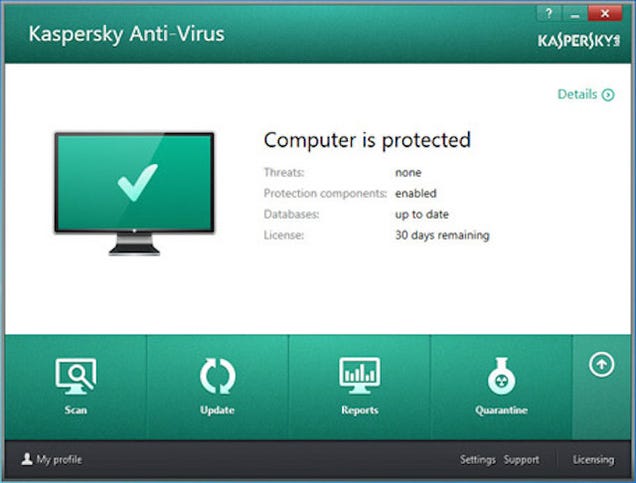
Kaspersky Antivirus is a bit of a controversial entry. It earns extremely high praise in some quarters, and revulsion in others. For their part, AV Comparatives gave it their product of the year award, which counts for a lot in our book. Kaspersky boasts rapid updates, strong heuristics, and the ability to quickly adapt to new threats without needing entire product updates to keep you protected. It's a fully-featured antivirus tool that offers both on-access and on-demand scanning of files, emails, downloads, and executed applications. Kaspersky promises that their smaller, more regular updates will help protect your PC from known threats, but also keep you safe from OS exploits and holes in software you may not have been able to update or patch yet. The tool also comes with a resource-light "gaming mode," that will let you play in peace, anti-phishing protection, and more. It's a premium product, and starts at $40/yr.
Kaspersky's nominations thread was full of the back-and-forth we mentioned earlier. Some of you praised it for being complete and well-rounded, and taking a proactive approach to internet security. Others noted that it's one of the more heavy products in the roundup and felt bloated and slow on your computer. Unlike many of the other contenders, Kaspersky makes no lofty claims about its resource utilization or lightweight install. However, it does offer complete protection from threats, and depending on what you use your PC for, that may be more important. Read more in its nomination thread here.
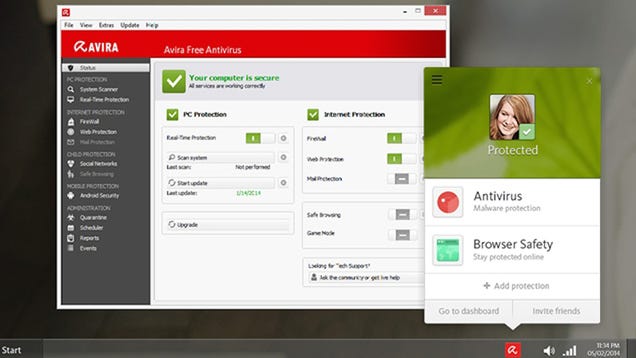
Avira is another tool that ranked among the top of AV Comparatives' list of great antivirus tools as well as AV-Test's rankings, and offers a suite of features beyond traditional on-access and on-demand scanning, completely for free. It also offers anti-malware protection, anti-spyware protection, and browser protection. It's not brimming with features, but the important ones are there, and they perform well. Avira also prides itself on its cloud-based scanning, meaning instead of waiting for updates to the application, the program can upload suspicious files to Avira for scanning against more recent threats.
Avira earned some solid praise in the nominations thread, with a few people noting they've used it for ages (back when it was called Avira AntiVir) without issue, and the general note being that if you want something a bit more complicated than BitDefender but don't care for Avast! for some reason, this is a great bet. Like many others on the list, it's also cross-platform, and if you upgrade to the paid version, you get even more features. Read more in its nomination thread here.
Now that you've seen the top five, it's time to put them to an all out vote to determine the Lifehacker community favorite:
The honorable mentions this week go out to Comodo Internet Security. Comodo Internet Security earned high praise in the nominations round from those of you familiar with Comodo's strong firewall product, and you pointed out that Comodo Internet Security is the full package of their products—a great on-access scanner and antivirus utility, along with an on-demand malware scanner and a firewall should you need one. It's fast, flexible, and it's free—you don't have to spend a ton of money to get on-access scanning or regular updates, and Comodo even offers a guarantee that you won't get infected while running their product, or they owe you $500.
We should also highlight AVG Free, which turned up in the nominations round late, but still earned some substantial support. It's free, cross-platform, and offers complete on-access and on-demand scanning, as well as special tools for speedy scans and unobtrusive scans (like the app's "speed scanner," gaming mode, and "smart scanner"). It even comes with anti-spyware protection and secure file deletion tools. We should note that AVG is the only entry in the roundup that was tested by AV Comparatives but didn't make its top products list. However, there's still clearly love for it, and its earned high praise in other outlets, like at PCMag and at CNET.
Want to make the case for your personal favorite, even if it wasn't included in the list? Remember, the top five are based on your most popular nominations from the call for contenders thread earlier in the week. Don't just complain about the top five, let us know what your preferred alternative is—and make your case for it—in the discussions below.
The Hive Five is based on reader nominations. As with most Hive Five posts, if your favorite was left out, it didn't get the nominations required in the call for contenders post to make the top five. We understand it's a bit of a popularity contest. Have a suggestion for the Hive Five? Send us an email at tips+hivefive@lifehacker.com!
ABC News: Actor James Garner, whose whimsical style in the 1950s TV Western "Maverick" led to a stellar career in TV and films such as "The Rockford Files" and his Oscar-nominated "Murphy's Romance," has died, police said. He was 86.




 If you're on city property and your pants hang more than 2" below your "natural waistline," you face a $500 fine, and for repeat offenders, jail.
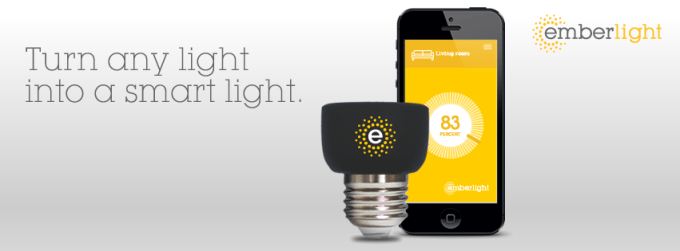 Smart light bulbs – like the Philips’ Hue connected bulbs or those from LG, GE or Samsung – are an easy jumping off point for those wanted to experiment in the “connected home” arena without the complexity or costs involved with the installation of a full “smart home” system. But even still, those bulbs aren’t cheap: A 3-bulb starter pack of…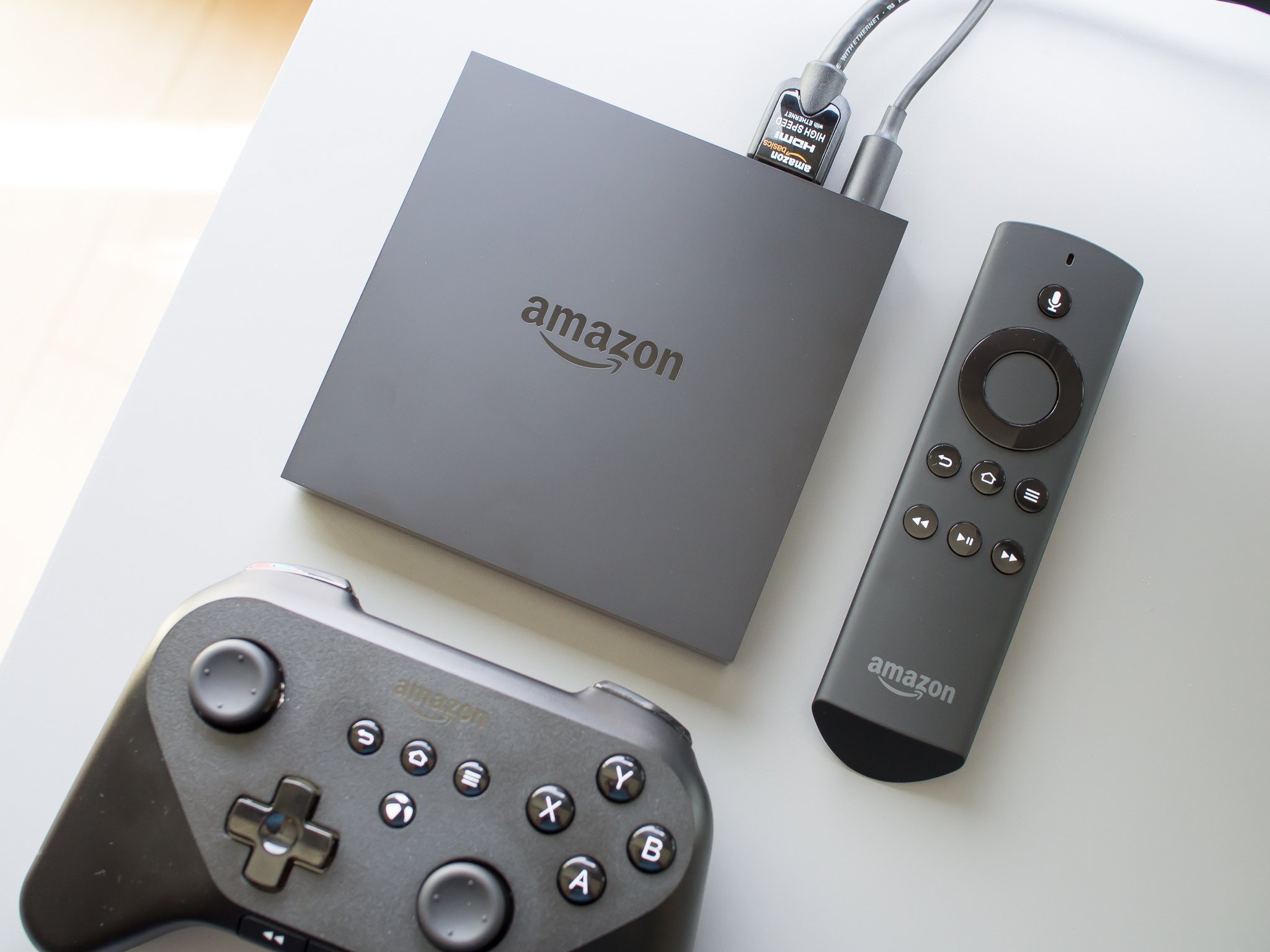


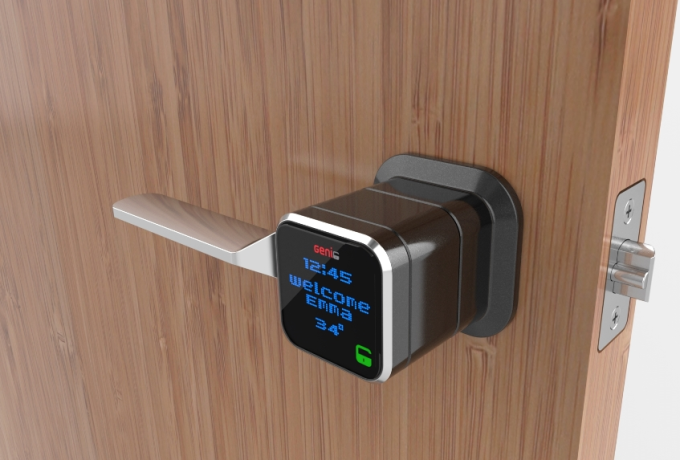 Move over Lockitron, there’s a new smart lock contender aiming to connect your door handles to the Internet so that you can lock and unlock remotely, send digital keys to friends and tradespeople (via the companion app), keep tabs on comings and goings, and get into your home without the faff of taking your keys out of your pocket.




 This afternoon following the closing bell, Netflix announced the financial results of its second quarter, including revenue of $1.34 billion and earnings per share of $1.15. Analysts had expected Netflix to report $1.33 billion in revenue and $1.16 per share in earnings. The company, which traded up around 1.7% during regular trading in a down market, is up around 1% after-hours following…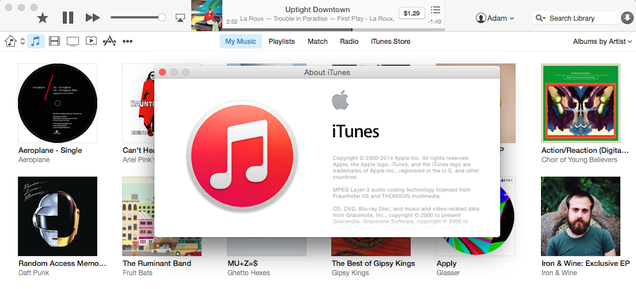




 A New York meeting providing information to companies interested in offering free Wi-Fi access counted Google among its attendees, according to a new Bloomberg report. Others at the event included IBM, Samsung and Cisco, but Google’s ambitions regarding blanketing the U.S. with free or affordable Internet connectivity could be a good reason so suspect it’ll submit a compelling…
  They're the first major publisher to sign with
  Four months after bootstrapping a London launch, which saw its co-founders initially jumping on a scooter to deliver customer orders themselves, local on-demand delivery app Jinn has raised a modest seed round of $200,000, to be used primarily for customer acquisition. Thus far the startup says it’s doing around 1,000 orders per month, with little to no money spent on marketing.
 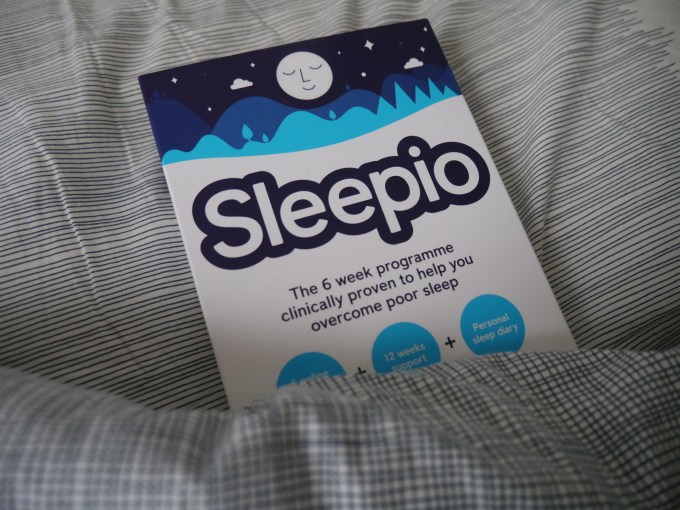 Five years ago Peter Hames had chronic insomnia. Today he’s the co-founder of Big Health, a multi-million dollar VC-backed startup that’s setting out to create a new category of healthcare — under the self-defined banner of ‘digital medicine’.