Shared posts

20 Oct 12:49

Google's redesigned Gmail app supports Yahoo and Outlook accounts

by Tom Warren

Google has been updating a number of its Android apps with its new material design recently, and it looks like Gmail will be the latest to get a visual overhaul shortly. Android Police has obtained early access to Gmail 5.0 for Android, and there’s a surprise addition of Yahoo and Outlook.com support inside the app. Gmail for Android has traditionally supported just Google’s own mail service, but it looks like the search giant wants to help Android users manage all of their mail from within its Gmail app.

Could spell the end of switching between Android email apps

A leaked video demonstrates the new Gmail app, and Google notes within it that more than just Gmail, Yahoo, and Outlook.com accounts are supported. It’s not clear whether the...

Continue reading…

20 Oct 12:47

Learn the Basics of Photography with This Interactive Chart

by Mihir Patkar

Even the best camera is only as good as the photographer's skills. The "Where to Start" interactive chart guides beginners to learn about the basics of photography.

The flowchart format helps you make decisions about figuring out what you need, but the cool part is that most boxes are clickable. Click and you'll be taken to a YouTube video by AdoramaTV, explaining the concept in simple terms. The chart was made by photographer and tutor Mark Wallace, who conducts several of the aforementioned videos.

For more tips on the basics, check out our photography night school.

Where To Start Chart [PDF] | SnapFactory

19 Oct 20:57

Facebook tells the DEA it can't use phony profiles to go after suspects

by Dante D'Orazio

Facebook has a message for the DEA: if you want to use our service, you have to use your real name. In a letter sent to the Drug Enforcement Administration on Friday, chief security office Joe Sullivan chided the agency for allowing one of its officers to lure criminals with a fake Facebook account created in a suspect's name. "We regard the DEA's conduct to be a knowing and serious breach of Facebook's terms and policies," writes Sullivan. He adds that the social network "asks that the DEA immediately confirm that it has ceased all activities on Facebook that involve the impersonation of others or that otherwise violate our terms and policies."

The issue came to the fore earlier this month when BuzzFeed reported on a case filed in a...

Continue reading…

19 Oct 16:54

The Soaring Financial Cost of Blocking Pirate Sites

by Andy

On Friday news broke that luxury brand company Richemont had succeeded in its quest to have several sites selling counterfeit products blocked by the UK’s largest ISPs.

The landmark ruling, which opens the floodgates for perhaps tens of thousands of other sites to be blocked at the ISP level, contained some surprise information on the costs involved in blocking infringing websites. The amounts cited by Justice Arnold all involve previous actions undertaken by the movie and music industry against sites such as The Pirate Bay and KickassTorrents.

The applications themselves

The solicitor acting for Richemont, Simon Baggs of Wiggin LLP, also acted for the movie studios in their website blocking applications. Information Baggs provided to the court reveals that an unopposed application for a section 97A blocking order works out at around £14,000 per website.

The record labels’ costs aren’t revealed but Justice Arnold said “it is safe to assume that they are of a similar magnitude to the costs incurred by the film studios.”

In copyright cases, 47 sites have been blocked at the ISP level = £658,000

Keeping blocked sites blocked

When blocking orders are issued in the UK they contain provisions for rightsholders to add additional IP addresses and URLs to thwart anti-blocking countermeasures employed by sites such as The Pirate Bay. It is the responsibility of the rightsholders to “accurately identify IP addresses and URLs which are to be notified to ISPs in this way.”

It transpires that in order to monitor the server locations and domain names used by targeted websites, the film studios have hired a company called Incopro, which happens to be directed by Simon Baggs of Wiggins.

In addition to maintaining a database of 10,000 ‘pirate’ domains, Incopro also operates ‘BlockWatch’. This system continuously monitors the IP addresses and domains of blocked sites and uses the information to notify ISPs of new IPs and URLs to be blocked.

“Incopro charges a fee to enter a site into the BlockWatch system. It also charges an ongoing monthly fee,” Justice Arnold reveals. “In addition, the rightholders incur legal costs in collating, checking and sending notifications to the ISPs. Mr Baggs’ evidence is that, together, these costs work out at around £3,600 per website per year.”

If we assume that the music industry’s costs are similar, for 47 sites these monitoring costs amount to around £169,200 per year, every year.

Costs to ISPs for implementing blocking orders

The ISPs involved in blocking orders have been less precise as to the costs involved, but they are still being incurred on an ongoing basis. All incur ongoing costs when filtering websites such as those on the Internet Watch List, but copyright injunctions only add to the load.

Sky

The cost of implementing a new copyright blocking order is reported as a “mid three figure sum” by Sky, with an update to an order (adding new IP addresses, for example) amounts to half of that. Ongoing monitoring of blocked domains costs the ISP a “low four figure sum per month.”

BT

According to the court, BT says that it expends 60 days of employee time per year implementing section 97A orders via its Cleanfeed system and a further 12 days employee time elsewhere.

Each new order takes up 8 hours of in-house lawyers’ time plus 13 hours of general staff time. Updates to orders accrue an hour of costs in the legal department plus another 13 hours of blocking staff time.

EE

For each new order EE expends 30 minutes of staff time and a further three hours of time at BT whose staff it utilizes. Updates cost the same amount of time.

EE pays BT a “near four figure sum” for each update and expends 36 hours employee time each year on maintenance and management.

TalkTalk

TalkTalk’s legal team expends two hours implementing each new order while its engineers spend around around two and a half. Updates are believed to amount to the same. The company’s senior engineers burn through 60 hours each year dealing with blocking orders amounting to “a low six figure sum” per annum.

Virgin

Virgin estimates that Internet security staff costs amount to a “low five figure sum” per year. Interestingly the ISP said it spent more on blocking this year than last, partly due to its staff having to respond to comments about blocking on social media.

And the bills are only set to increase

According to Justice Arnold several additional blocking orders are currently pending. They are:

- An application by Paramount Home Entertainment Ltd and other film studios relating to seven websites said to be “substantially focused” on infringement of copyright in movies and TV shows

- An application by 1967 Ltd and other record companies in respect of 21 torrent sites

- An application by Twentieth Century Fox Film Corp and other film studios in respect of eight websites said to be “substantially focused” on infringement of copyright in movies and TV shows

But these 36 new sites to be blocked on copyright grounds are potentially just the tip of a quite enormous iceberg now that blocking on trademark grounds is being permitted.

Richemont has identified approximately 239,000 sites potentially infringing on their trademarks, 46,000 of which have been confirmed as infringing and are waiting for enforcement action.

So who will pick up the bill?

“It is obvious that ISPs faced with the costs of implementing website orders have a choice. They may either absorb these costs themselves, resulting in slightly lower profit margins, or they may pass these costs on to their subscribers in the form of higher subscription charges,” Justice Arnold writes.

Since all ISPs will have to bear similar costs, it seems likely that the former will prove most attractive to them, as usual.

Source: TorrentFreak, for the latest info on copyright, file-sharing and anonymous VPN services.

19 Oct 08:15

Sports Streaming Site Hides Itself From The UK Piracy Police

by Ernesto

cityoflondonpoliceOver the past few months City of London Police have been working together with copyright holders to take on sites that provide or link to pirated content.

The Police Intellectual Property Crime Unit (PIPCU) uses a variety of measures to achieve its goals. This includes sending requests to registrars requesting the suspension of allegedly infringing domain names.

The sports streaming site Fromhot, also known as Sportlemon and Frombar, was one of the most recent targets of the latter strategy. The “franchise” has well over a million visitors per month but some of these went missing after the Frombar.com domain was suspended.

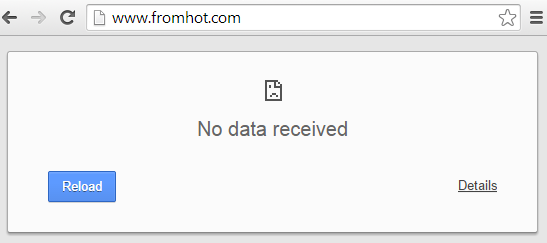
The streaming site does remain operational from several alternative domain names, which now point to Fromhot.com, but interestingly enough the site can no longer be accessed from the UK.

fromhot1

A few days after its main domain was suspended the sport streaming site decided to block all visitors from the UK. It appears that this measure was taken in the hope of avoiding further actions from PIPCU.

TorrentFreak contacted the people behind the site for a comment on the unusual measure, but we have yet to hear back.

Frombar is not the first sports streaming site to be targeted by PIPCU. In May, PIPCU had the domain of the Cricfree.tv streaming portal suspended but its operator was able to bring the site back under a new domain.

In addition to the domain suspensions PIPCU also had several sports streaming site operators arrested. TorrentFreak previously revealed that the operator of BoxingGuru.co.uk, boxingguru.eu, boxingguru.tv and nutjob.eu was arrested during April.

This was followed by the arrest last month of 27-year old Zain Parvez, who allegedly operated CoolSport.se, CoolSport.tv and KiwiSportz.tv. Parvez was described as the head of an “industrial scale” sports streaming operation but all charges against him were dropped earlier this week.

Whether the blockade of UK traffic will keep PIPCU at bay has yet to be seen. The notice posted on the seized Frombar.com still notes that the site is “under criminal investigation.”

Source: TorrentFreak, for the latest info on copyright, file-sharing and anonymous VPN services.

18 Oct 23:41

Remind Yourself “It Must Not Be Easy” When Dealing With Difficult People

by Dave Greenbaum

Remind Yourself “It Must Not Be Easy” When Dealing With Difficult People

We all have to deal with difficult people we can't avoid. Seeing things from their perspective helps create empathy and understand their perspective. Use the phrase "It must not be easy" to help you see their side before you react.

Over at Psychology Today, they've got some tips on how you can be empathetic. Instead of focusing on yourself and your reaction, first try to focus on the other person:

One effective way to de-personalize is to put yourself in the other person's shoes, even for just a moment. For example, consider the offender you're dealing with, and complete the sentence: "It must not be easy…"

"My friend is so aggressive. It must not be easy to come from an environment where everyone was forced to compete…"

"My manager is really overbearing. It must not be easy to have such high expectations placed on her performance by senior executives…"

"My partner is so controlling. It must not be easy to have grown up in a family where he was told how to think and act in every way…"

The goal here is to realize it isn't all about you, and that the other person has struggles too. You aren't giving them permission or condoning how they're acting. You're just trying to understand them a bit more.

Check out the link for other tips for what to do with challenging personalities.

How to Successfully Handle Aggressive and Controlling People | Psychology Today

Photo by miguelb.

18 Oct 23:09

The "weirdest lock on earth" has a key like a tiny mechanical snake

by Rob Beschizza

That's how this remarkable design is described by lockpicker John Coulter, whose efforts have been stymied by its peculiar design: instead of being a straight, flat piece of metal, the key is a flexible chain similar to a watch strap, housed in a hard slip-casing that allows it to be inserted into the snaking design of the lock itseld.

Read the rest
18 Oct 15:50

CTO of NSA is moonlighting for Keith Alexander's blue-chip rent-a-cybercops

by Cory Doctorow

Former NSA boss Alexander charges $1M/month for cybersecurity advice, but promises that he's not selling any of the state secrets from his career as a long-serving, all-seeing top spook. But he hired his protege Patrick Dowd -- who still draws a paycheck from Uncle Sugar -- to moonlight for his company, which has the self-parodying name "Ironnet Cybersecurity." Read the rest

18 Oct 09:40

Kickstarter Shuts Down Anonabox Amid Controversy

by Lauren Orsini
Anonabox

Kickstarter has suspended the crowdfunding campaign for Anonabox, a gadget that had earned nearly $600,000 from 9,000 backers in just a few days. Despite its popularity, it appears that the project ran afould of Kickstarter guidelines.

See also: Tiny Box Promises To Keep You Anonymous On The Internet

The gadget claimed to use a combination of the Tor privacy software and a custom, open-source hardware frame to create a tiny router that anonymized its users. However, as the device continued to ramp up in popularity, these claims came under fire.

When its creator, security consultant August Germar, gave an "Ask Me Anything" interview on Reddit about the project, he was unable to explain how the hardware was “custom” and not just a generic pre-produced item. Sleuths found exact copies of the Anonabox frame on Chinese suppliers’ sites. And given that those Chinese products turned out to be regular factory-made routers, many became suspicious of the Anonabox claim to keep users truly anonymous.

Kickstarter’s actions tends to support redditors’ claims. The company suspended the project Friday. Kickstarter did not and does not typically give a reason for project suspensions, but its terms of service state that all projects must be “honest and clearly presented.”

If this development hasn’t scared supporters away from the gadget, Germar told Quartz that the device will still be for sale on the project’s website

Photo via Anonabox

18 Oct 09:38

Bitcoin 2.0 Crowdfunding Is Real Crowdfunding

by Sandrine Ayral
bitcoin-mountain-rise In the past few months we’ve been hearing a lot about how bitcoin’s underlying technology is going to revolutionize not only our monetary system, but also notary services, DNS, authentication, intellectual property ownership and data storage. While most of the amazing products and services that were supposed to emerge on top of the bitcoin protocol have yet to see light,… Read More
18 Oct 09:37

Use Google Sheets as a Multilingual Chat Translator

by Patrick Allan

Use Google Sheets as a Multilingual Chat Translator

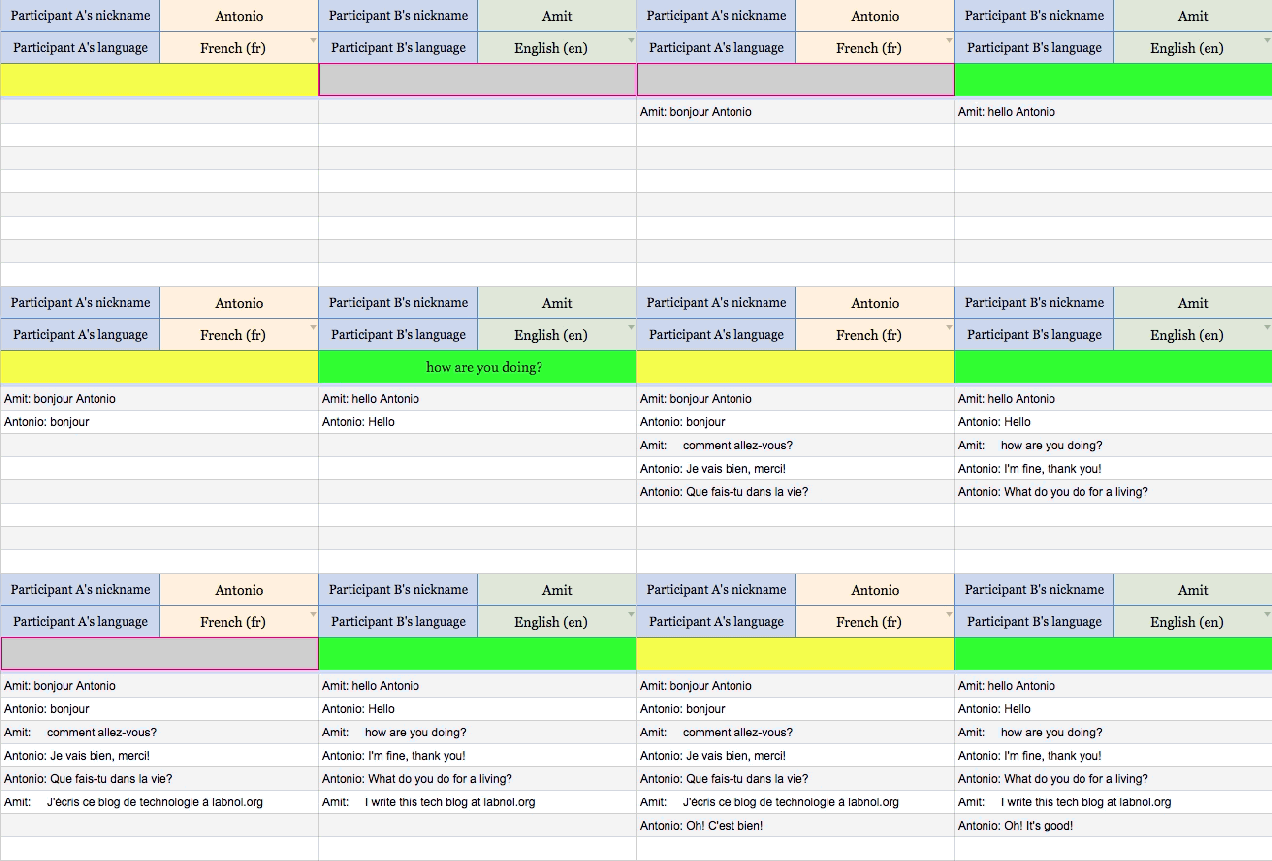
Communicating with someone who speaks and writes in another language isn't the easiest task, but this Google Sheet incorporates Google Translate so you can have a real-time chat conversation with anybody in the world.

Over at the tech blog Digital Inspiration, Amit Agarwal created a Google Sheet that's powered by Google Scripts, and translates all language pairs that are supported by Google Translate in real-time. This means that once you save a copy of the Google Sheet to your own Google Drive, you can share it with anyone who writes in another language and have a real-time chat within the document. Just enter your contact's name along with yours in the cells provided, select each participants native language from a drop-down menu, and start typing in the colored fields.

It may not be a 100% perfect translation, but it's a great way to communicate quickly with someone in another part of the world. For instructions on downloading the Google Sheet and how to operate it, check out the link below.

Use Google Sheets for Multilingual Chat with Spears of Different Languages | Digital Inspiration

18 Oct 09:36

How to Boost Your Phishing Detection Skills and Avoid Email Scams

by Adam Dachis

How to Boost Your Phishing Detection Skills and Avoid Email Scams

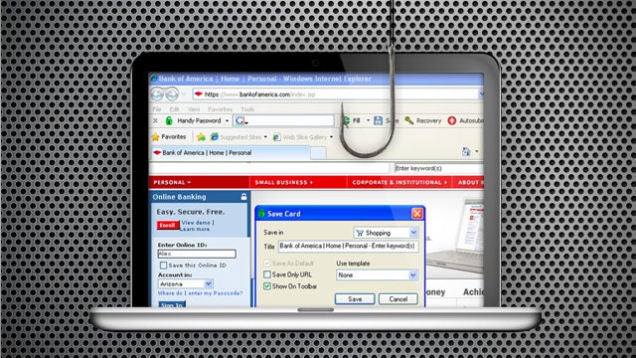
Phishing scams—the ones that try to get you to provide private information by masquerading as a legitimate company—can be easy to uncover with a skeptical eye, but some can easily get you when you let your guard down for just a second. Here's how you can boost your phishing detection skills and protect yourself during those times when you're not at full attention.

Want to test your phishing IQ and find out what kind of scams you're most likely to miss? Take this test.

Blast from the past is a weekly feature at Lifehacker in which we revive old, but still relevant, posts for your reading and hacking pleasure. This week, with yet another group of scams making the rounds, we thought it was time to brush up on our phishing detection skills.

What You Can Do

The way most phishing scams find victims is through email, but sometimes you'll come across a phishing site in the wild as well. Either way, here are the basic principles you want to follow to keep a cautious eye out for these malicious traps.

Check the URL

How to Boost Your Phishing Detection Skills and Avoid Email Scams

Phishing scams are designed to look like official emails and web sites from actual companies, but they aren't actually those things—they're just imitations. Because the emails and web sites are imitations they'll probably look a little different from what you'd expect in general, but more importantly those sites can't have the same URL as the web site they're pretending to because they are different sites. To check the URL, just hover of the link you're thinking of clicking. At the bottom of your window you should see the URL displayed. Once you do that, you have to figure out if it is a good URL or a bad URL.

Using PayPal as an example, you'll generally see http://www.paypal.com as part of the URL. Sometimes you'll see something like http://subdomain.paypal.com as well. Both of these URLs are okay, because they end in paypal.com. A phishing URL, however, might look something like this: http://paypal.someotherdomain.com. In this case, "paypal" is attached to another domain name (someotherdomain.com). URLs like this are the ones you want to avoid.

Type the Address Yourself

How to Boost Your Phishing Detection Skills and Avoid Email Scams

The best thing you can do to avoid phishing scams is always go directly to the web site you want to visit rather than clicking a link. This way you don't have to figure out if the URL is safe or not because you'll be using a URL in your bookmarks (or your brain) that you already know is safe. Doing this can also help protect you from phishing scams when you let your guard down because you'll be in the habit of visiting sites directly rather than clicking links.

I fell for a phishing scam once when I read the email right after I woke up in the morning. It was from my bank and they'd sent me a lot of verification notices lately since I'd been traveling and using my debit card all over the place. When I got another one, I didn't even think about it because I'd just woken up. I went to the site, filled in my info, and then immediately realized I'd just provided that information to a phishing scam site. I called the bank to let them know right away and got a new card, but had I changed my default behavior to calling the bank of visiting the bank's web site this probably wouldn't have happened. Of course, that's what I do now and it hasn't been a problem since.

What Your Browser Can Do For You

Detecting phishing scams on your own mainly require the mild paranoia and the behavioral adjustment described above, but there are a few other things you can do to make your everyday browsing safer.

Turn Off Form Autofill

How to Boost Your Phishing Detection Skills and Avoid Email Scams

One great feature of many web browsers is the autofill feature. It makes it really easy to fill out forms using information already stored in the browser. It also makes it easy for you to ignore the form you're filling out and just submit it, causing you to potentially miss a phishing scam when you're rushing through the process. While this precaution isn't necessary, and you might prefer the convenience of autofill to the safety benefits that deactivating it can provide, turning it off will provide a little added protection.

Utilize Your Browser's Built-In Tools

How to Boost Your Phishing Detection Skills and Avoid Email Scams

Most browsers come with some phishing protection built-in to help protect you, but it isn't always enable by default. Google Chrome keeps track of common phishing sites and can alert you when you visit one, but you may need to go through the short setup process to make it work. Firefox also offers phishing and malware protection in a similar way, and you can enable it in the Security section of Firefox's preferences.

Bump Up Your Phishing Protection with Web of Trust

How to Boost Your Phishing Detection Skills and Avoid Email Scams

Web of Trust is one of our favorite browser extensions because it automatically lets you know if a web site is trustworthy or not. While it can't possible verify every single site on the internet, it can make you aware of potentially harmful sites and phishing scams. All you have to do is install the extension for your browser and it will display a trust rating in your browser's toolbar. (You can read more about this here.) Web of Trust is available to download for Google Chrome, Firefox, Internet Explorer, Opera, Safari, and as a bookmarklet for other browsers.


Got any other tips for avoiding phishing scams? Let's hear 'em in the comments!

18 Oct 09:34

Android 5.0 Lollipop: Material Design in pictures and video

by Alex Dobie

Lollipop is upon us, kind of. The latest developer preview of Android 5.0 includes a more Material Design-inspired interface all around. It's just the kind of thing we've been waiting for — and sure get developers' creative juices flowing.

There are small changes everywhere — and when combined with some core features and applications that have recieved a serious revamping, we get an entirely new look and feel from the current Lollipop preview compared to previous builds. And when coming from KitKat it's a refreshing change that really *feels* like a new operating system.

Most of the features you love from Android are still there and working just as before, but subtle design changes give everything a fresh new look. Of course, there are some new tricks, and unlike some previous Android iterations the mix of the old and the new has a very consistant feel. Material Design is more than just a few new colors and a flat look, and when everything — down to the smallest icon — adheres to the specifications the whole system feels as if it belongs.

Of course, as Android fans we're pretty impressed. Things aren't perfect, but what we're seeing in the latest Lollipop preview has us excited. We think you'll be equally excited, so check out our montage of the Lollipop experience.


18 Oct 09:34

[Lollipop Feature Spotlight] Battery Saver Now Turns The Status Bar And Nav Bar Bright Orange

by Ryan Whitwam

orangeGoogle introduced the power saving mode in the last developer preview, and it seems to work the same this time with one notable exception—orange. Lots of orange. When you activate power saver mode, your status bar and nav bar will turn orange and stay that way until you shut off power saver.

2014-10-18 03.01.58 2014-10-18 03.02.16 2014-10-18 03.03.22

When you activate this mode, the screen brightness is reduced, animations are turned off, background data is (mostly) disabled, and vibration is off.

[Lollipop Feature Spotlight] Battery Saver Now Turns The Status Bar And Nav Bar Bright Orange was written by the awesome team at Android Police.


18 Oct 09:34

[Lollipop Feature Spotlight] You Can Now Allow Just Priority Notifications When You Don't Want To Be Disturbed, Or Avoid Getting Interrupted Altogether

by Ryan Whitwam

nonePriority notifications are going to be a thing in Android 5.0, but how the heck are you supposed to set something as a priority? There's actually a whole new menu for that, as well as a shortcut in the notification shade. By messing with these settings you can control what apps can bug you and when. Priority mode itself can be activated from the volume slider, so only your most important apps can get through.

[Lollipop Feature Spotlight] You Can Now Allow Just Priority Notifications When You Don't Want To Be Disturbed, Or Avoid Getting Interrupted Altogether was written by the awesome team at Android Police.


17 Oct 22:47

Writers condemn UK book censorship order

by Cory Doctorow

A large group of writers, including Stephen Fry, Jeffrey Archer, Katharine Norbury, Will Self, and others (include me!) have signed onto an open letter condemning a UK court decision that banned publication of a memoir because it revealed that the writer's child has autism and ADHD. Read the rest

17 Oct 22:40

Check out the new wallpapers from Lollipop

by Derek Kessler

With Android 5.0 Lollipop we got a whole new design for Android, and that means that we're getting a whole new set of wallpapers. Google's gone for a more natural look for a lot of the selection, but there's some abstract stuff in there too.

Check them out in the Android Central Forums


17 Oct 22:35

Lollipop brings proper multi-user accounts to your phone

by Jerry Hildenbrand

Lollipop will make sharing your phone easier and safer

We've had multi-user accounts on our Android tablets for some time now, but it required a bit of hackery to make it work with your Android phone. Too much hackery for something that should be standard on any phone in our opinion. The good news is that with Lollipop, this has been addressed and proper multiple user accounts and guest accounts are supported in "stock" Android.

If you've used these features on a tablet, the process and setup is mostly the same. If you've not seen it, here's a quick overview of how it works and what you can do with it.


17 Oct 16:58

This MasterCard with a built-in fingerprint sensor is coming in 2015

by Chris Welch

MasterCard has announced the world's first contactless payment card that uses your fingerprint to authenticate payments. It's partnered with Zwipe, the company behind this biometric technology, on a card that will only permit charges if your thumb is resting on the built-in sensor. You can wave it near an NFC reader for contactless payments, and it's also fully compatible with chip terminals. Fingerprint data is all stored locally inside the card's secure element and is never transmitted to MasterCard. And since biometric authentication obviates any need to enter a PIN, Zwipe says this is fundamentally more secure than the chip and PIN system. The company already ran a pilot with Norway’s Sparebanken DIN bank, but the prototype card used...

Continue reading…

17 Oct 16:54

Canadian government threatens bird watchers for writing concerned letter about bee die-off

by Cory Doctorow


Dave writes, "A birdwatching group sent a letter to two federal cabinet ministers citing concerns over the effects of certain chemicals on the life of bees. Shortly thereafter, they received a threatening letter from Revenue Canada telling them to stop with the political actions." Read the rest

17 Oct 14:00

Collection of Photos that Make a Splash

by Darlene Hildebrandt

A collection of photos that make splash – literally!

As summer comes to a close in the northern parts of the world let’s enjoy some of the fun that comes with water – splashing! Also with water comes mud and messy people. Not only kids love jumping in a puddle, and they all make for great photo subjects.

Enjoy this collection of photos of big splashes!

The post Collection of Photos that Make a Splash by Darlene Hildebrandt appeared first on Digital Photography School.

16 Oct 22:41

Twitter gets in-line audio streaming via Audio Cards

by Dan Thorp-Lancaster

Twitter is introducing a new feature to its Android and iOS apps today that will allow users to stream music directly from tweets within the app. Called the Audio Card, this new feature enables specific users to embed SoundCloud audio within their tweets, where users can then stream said audio while they continue to browse their feed.


16 Oct 20:27

Sony Confirms Android 5.0 Lollipop Will Come To All Z Series Devices

by Ryan Whitwam

nexusae0_Xperia_Z1_1_thumbAndroid 5.0 has only been official for about 24 hours now, and already OEMs are lining up to explain their upgrade paths. Yesterday was Motorola, and today Sony is laying its cards on the table. Sony has a lot of cards. The company has confirmed that all its Z series devices will get Android Lollipop. That's a whole mess of phones.

18_Xperia_Z3-817be0e382aae7a4fd410ab4b21dc5a9-605x483

According to Sony, the Sony Z Ultra Google Play edition is up first, which isn't a surprise.

Sony Confirms Android 5.0 Lollipop Will Come To All Z Series Devices was written by the awesome team at Android Police.


16 Oct 20:27

This is the Motorola Turbo Charger

by Phil Nickinson

For those who were curious, this is the $35 Motorola Turbo Charger, part of the new wave of chargers that promises to take your dead device to partially juiced in just a matter of minutes. As luck would have it, our Moto X is all charged up right now, so testing that claim will have to wait. But it is worth a quick mention that this is a rather sizable charger, especially compared to the two-port plug Moto's been including in the box.

Fifteen minutes of charging time gets your Moto X 8 more hours of battery life, thanks to Qualcomm's Quick Charge 2.0 technology. And it should work just fine on other devices, too — the box specifically mentions "USB-powered devices from Motorola, Apple, Samsung and more" — though the fine print does not that the supercharging "only applies to optimized Motorola devices with Qualcomm Quick Charge 2.0 technology such as the new Moto X. Battery must be substantially depleted; charging rate slows as charging progresses."

Using the right equipment (which includes a compatible phone) the Motorola charging block can send higher voltage to the phone. With the right circuitry, this means a faster charge. But don't worry, if the device you're charging doesn't have the necessary components, the charger will send out the standard voltage and nothing will blow the frak up.

We've got a few quick pics after the break.


16 Oct 20:23

Google’s Schmidt Stands Firm On Not Applying Europe’s Search De-Listing To Google.Com

by Natasha Lomas
Google Maps Europe Google’s Eric Schmidt has held the line against extending European search de-listing requests to Google’s .com domain. As it stands successful requests made by private individuals under the ruling for information to be de-indexed by Google in a search associated with their name are only implemented by Google on European sub domains, such as Google.co.uk or Google.de, not on Google.com. Read More

16 Oct 20:19

Apple Announces Too Many iPads

by Sarah Perez
ipad-mac-event0201 If you’re in the market to buy a new iPad, your choices just became dizzying. As expected, Apple announced new iPads this morning at its news conference in Cupertino, but it didn’t retire some of its older products to make way for the additions. How many iPad models can you choose from now? Five? And that’s not even counting the fact that each flavor comes with various… Read More
16 Oct 20:14

Watch Apple's full iPad Air 2 and Retina iMac event video

by Jacob Kastrenakes

Apple wrapped up its event unveiling the iPad Air 2, the iPad mini 3, and the first iMac with a Retina display barely an hour ago, and it's already posted a full video online of the presentation. You can head over to Apple's website to view it if you want to hear the news straight from the mouths of Apple's executives and see its extensive demos. If you're already caught up on Apple's previous announcements — including Yosemite and iOS 8 — there's a lot you may want to skip over here, as Apple spent a bit of time covering major features that you may already have seen (if not tried out).

If you're looking for a far quicker way to catch up on Apple's announcements, you can also head to our roundup here:

The 8 most important...

Continue reading…

16 Oct 17:12

Watch this video walkthrough of the Nexus 9

by Dan Seifert

The Nexus 9 tablet was just announced yesterday, but Vietnamese YouTuber Vật Vờ has already published a four minute video tour of the new device. The narration is all in Vietnamese, which doesn't do much for you if you don't speak or understand the language, but you can see the hardware in detail as well as what a final (or near-final, at least) version of Android 5.0 Lollipop looks like on the device. The Nexus 9 will be available for preorder starting tomorrow, and we'll have our own takes on its hardware in the near future, but until then, enjoy this first look.

Continue reading…

16 Oct 17:06

HP is killing all remaining Palm webOS devices on January 15th

by Chris Welch

There's no reasonable explanation for why anyone would still be actively using a Palm Pre or Pixi in 2014. Maybe you could make a case for the TouchPad, but if you're using any of these things, know that the end of HP's support for webOS is closing in. The company has announced that on January 15th, 2015, it will shut down all cloud services related to webOS that power the operating system across Palm's hardware. No, HP isn't flipping a kill switch on your obsolete hardware, but this move will eventually have the same end result. Once the shut down occurs, you'll basically have to pray that nothing goes wrong with your Palm device. Ever again.

HP says users will no longer be able to download apps or updates once cloud services are...

Continue reading…

16 Oct 17:04

Strap in for a ride in RollerCoaster Tycoon 4 for Android

by Simon Sage

Fans of the classic RollerCoaster Tycoon series will be happy to hear that the mobile version has finally found its way to Android.

RollerCoaster Tycoon has enjoyed considerable success on iOS as a freemium game, allowing players to build a sprawling theme park with diverse attractions, construct over-the-top rides, and rake in the profits. You'll find all of the usual free-to-play tropes here, such as social tie-ins and premium currency.