Shared posts

04 Feb 15:32

Full-Length Trailer For Netflix's Daredevil Arrives

Full-Length Trailer For Netflix's Daredevil Arrives

'I'm just trying to make my city a better place'

After a tiny slither of a teaser yesterday, here comes the full-length trailer for Marvel's first outing on Netflix, Daredevil, with Charlie Cox's take on Matt Murdock distinctly darker than the 2003 Ben Affleck version you know and, um, sometimes refer to.

With Spartacus TV man Steven S. DeKnight wrangling the show, Daredevil will kick off the companies’ attempt to launch a linked set of adventures for heroes including Jessica Jones (Krysten Ritter), Luke Cage (Mike Colter) and Iron Fist, with the characters eventually uniting for a Defenders miniseries.

Cox is joined by Elden Henson as Murdock’s law partner and pal Foggy Nelson, Deborah Ann Woll as aide/potential life partner Karen Page, Vincent D’Onofrio as baddie Winston 'Kingpin' Fisk and Rosario Dawson as Claire Temple. All 13 episodes of the show’s first season will debut at once, as is Netflix’s usual style.

In case you didn't know already, Daredevil will be cleaning up the mean streets of New York’s Hell’s Kitchen from April 10.


03 Feb 23:38

Disney Mulling Dedicated Marvel And Star Wars Subscription Video Services

by Darrell Etherington
star-avengers Disney says that it’s looking at other ways to work with services like Dish’s Sling TV, which offers unbundled content to broadband subscribers independent of a cable or satellite TV subscription. That’s not the best part, though: Disney’s planning around this possibility includes Marvel and/or Star Wars-specific offerings, which could mean that all my dreams really do… Read More
03 Feb 21:30

New Minions Trailer Hitches A Ride Online

New Minions Trailer Hitches A Ride Online

Meet Scarlett Overkill

The first trailer for Despicable Me spin-off Minions gave us a comic look at the little yellow creatures’ origin story. For this second look at the film, there’s a chance to meet the main villain – AKA the person that Kevin, Stuart and Bob desperately want to work for – Scarlett Overkill, voiced by Sandra Bullock. 

We catch up with our three hapless heroes in 1968 as they’ve arrived in America and are trying to hitch a ride to Orlando. They’re not trying to get to a theme park (Walt Disney World launched in 1971 and Universal wouldn’t exist there until 1990), but instead are headed to Villain-Con International, where all the biggest and baddest of the bads gather to celebrate their evil deeds and – as the Minions hope – acquire new henchfolk.

There, they do attract the attention of Scarlett and her besotted husband Herb (Jon Hamm), but they soon come to realise that working for the villainess might not be as enjoyable as they’d thought...

{New Minions Pics And Poster}

With Steve Coogan, Michael Keaton, Allison Janney, Jennifer Saunders, Pierre Coffin and Chris Renaud among the voicecast, Coffin and Kyle Balda are calling the shots on this one, working from a script by Brian Lynch. Minions scuttles on to UK screens on June 26. Banana!


03 Feb 21:19

[Game Roundup] Our Top Seven Picks For The Best New Games Of January 2015

by Michael Crider

nexusae0_icon_thumb1_thumbPopular wisdom says that movies released in January are the detritus of the previous year, as studios breathe a sigh of relief once all the Christmas blockbusters and Oscar bait has left theaters. The game industry has inherited a bit of this stigma, but it's hard to argue with the evidence: for the first time in over two years, we skipped a game roundup because of a lack of content. Even so, there are enough notable newcomers to keep you occupied until Valentine's Day at least.

Read More

[Game Roundup] Our Top Seven Picks For The Best New Games Of January 2015 was written by the awesome team at Android Police.


03 Feb 21:19

[App Roundup] Our Top Seven Picks For The Best New Apps Of January 2015

by Michael Crider

nexusae0_ic_thumb_thumbJanuary brought us the yearly madness that is CES, but that doesn't mean much in terms of software. The biggest news is probably Microsoft's continued expansion into multi-platform support for its biggest software sellers, including Word, Excel, PowerPoint, and now even Outlook. Google has been uncharacteristically quiet so far in 2015, aside from updating its current stable of apps.

nexusae0_apps-roundup-hero

Microsoft Outlook Preview

Android Police review: Microsoft Releases Outlook Preview For Android

It's been possible to use Microsoft Exchange mail accounts on Android for years, but never exactly in an ideal or intuitive way.

Read More

[App Roundup] Our Top Seven Picks For The Best New Apps Of January 2015 was written by the awesome team at Android Police.


03 Feb 21:15

Amazon’s Kindle Convert Can Turn Your Paper Library Into E-Books

by Darrell Etherington
7c9c1c84-2634-4813-b4c4-3bb396ead8b4._V330448927_-2 If you’ve been hanging on to those paper books because the idea of having to repurchase them all as Kindle titles is daunting, Amazon has a new option for you: Kindle Convert, a program for Windows that turns print books into digital versions fully compatible with Amazon’s Kindle software, including adjustable font, Whispersync for making sure you’ll be able to go to the… Read More
03 Feb 21:09

Eero is a little white box that aims to change Wi-Fi forever

by Chris Welch

Linksys, D-Link, Netgear, and Belkin. Those are the brands that most consumers choose when it comes time to set up a home Wi-Fi network. But no matter which product you buy, getting wireless internet working in your home — your entire home — can quickly turn into a miserable experience. More often than not, it's an exercise in frustration; a test of your patience and resolve. That's assuming you're talking about an average-sized house or apartment. Throw some long hallways or brick walls into the mix, and suddenly all bets are off. You can buy any number of ugly boxes (Wi-Fi extenders) that claim they'll fix the problem, yet still end up with dead zones in certain rooms, or you'll constantly be pestered by Netflix's buffering screen —...

Continue reading…

03 Feb 17:29

UK lawmakers vote to allow babies with three genetic 'parents'

by Arielle Duhaime-Ross

The UK House of Commons voted today to allow scientists to combine the DNA of three people instead of two. The law must now be approved by the House of Lords, the UK's upper house, reports CNN. If the law passes in the upper house, it may change ethical standards around genetic engineering.

Continue reading…

03 Feb 17:29

New Adware Found In Google Play Apps With Millions Of Downloads

by Sarah Perez
mobile-malware A new report from security firm Avast out this morning reveals the discovery of a new form of malware on the Google Play store, which begins to display advertisements disguised as warning messages to end users when they unlock their Android smartphone. What’s interesting about this malware – or adware, as it’s better known – is that some of the applications where it… Read More
03 Feb 15:38

Golden retrievers are magic dogs

by Xeni Jardin

Magic. (more…)

03 Feb 15:37

Stop Focusing on Your Mistakes for Better Fitness Success

by Dick Talens

Stop Focusing on Your Mistakes for Better Fitness Success

What if I told you that if you dropped just one word from your vocabulary, you would instantly become better at fitness (and life)? That word is "mistake." Ditch this word. Seriously, nuke it from your vocabulary.

The problem with the word mistake is that it's negatively ingrained into society. People too often define themselves by their mistakes, the presumed result of their own character flaws. Recall the last time you uttered the words "I made a mistake." You probably subconsciously judged your own character as soon as those words came out of your mouth.

All humans make mistakes. And while they're completely natural, the word implies a dead end of sorts, rather than a learning opportunity that will make you better at life.

Let's pretend you're on a strict diet. Your friend's wedding is coming up, but you don't want to disrupt your diet. Instead, you diligently plan around the food being served at the wedding. You're not exactly sure what said food consists of...although you do remember checking off "chicken" when you RSVP'ed for the invitation.

You're at your table, passing up the champagne, hoping that Game of Throne's "The Rains of Castamere" doesn't start playing when your dish arrives. You expected a grilled piece of chicken, but to your absolute horror, it's breaded. Not only that, it's doused in more oil than Paula Deen's kitchen pantry. You eat it anyway.

"I already broke my diet," you rationalize, turning your eye towards the wedding cake. Your memory gets fuzzy from there, but a few thousand calories worth of cake closer to Type II Diabetes later, you wake up from a sugar-induced coma.

"I've made a mistake," you're about to tell yourself. But you know better than to use that word.

Missteps vs. Mistakes

Stop Focusing on Your Mistakes for Better Fitness Success

People successful in fitness have something in common: they frame incidents like this as "missteps" rather than "mistakes."

A mistake implies a dead end—that a shameful decision or a moral failing, such as the lack of willpower or discipline, led to an undesired (and final) outcome. Instead, the word "misstep" reminds you that the decision is part of an overall journey, and that you always have the ability to course correct.

By reframing the experience as misstep—a mere speeding ticket on the way to your destination—you can show yourself self-compassion, which makes you less likely to make the same bad decision again. (After all, you'll probably be invited to more weddings.)

Let's go back to our example. Now that we know that we made a misstep (a decision that you can avoid in the future) rather than a mistake (the result of a potential character flaw), we can now learn from it using something I created called "The Time Machine Exercise."

Pretend that you had a Time Machine and could go back to the day of the wedding. What's something you could have done to create a better outcome? (Aside from buying Apple stock.)

In this exercise, you're not allowed to just say "show more discipline" or "there was nothing I could do." Sure, sometimes these are legitimate answers, but more often than not, defaulting to these answers prevent you from learning.

Instead, perhaps you could have planned to fail by giving yourself a free day or created a caloric buffer. You could have also practiced mindfulness after the first misstep and prevented yourself from further damage. Practicing this exercise will help you make better decisions in future situations.

A few words of caution: don't be fooled, because this is no easy exercise. Every single bone in your body, every single cell in your brain, even all of your friends who "like you just the way you are," will fight against change. You'll try to convince yourself that this exercise is silly, or that you knew what you should have done – just don't eat the damn chicken.

Change is hard. Allowing yourself to change is even harder. But here's the rarely-talked-about prerequisite for fitness change: you have to create an internal transformation before you create an external one.

Many people start with the external and ignore the internal. You see this on shows like The Biggest Loser all the time. They grind themselves into the ground and give it everything to simply "eat less and move more" not realizing that their biology dooms them from the start.

That's why most contestants (and dieters) end up gaining back their original weight. As we've said before: fitness is a skill. In order to truly evolve, you'll need to drop the word mistake from your vocabulary so that you can transform internally. After all, you are not your mistakes.

Images by Terrance Heath, Rooners.


Vitals is a new blog from Lifehacker all about heath and fitness. Follow us on Twitter here.

03 Feb 13:22

Black cat takes a nosedive into snow

by Xeni Jardin

LOL. [liveleak]

02 Feb 20:44

Blur Uses One-Time Use Credit Card Numbers to Deter Hackers

by Kristin Wong

Blur Uses One-Time Use Credit Card Numbers to Deter Hackers

After all the recent credit hacking news, many people are a little more hesitant about using plastic. Blur is a service that makes your shopping a little more secure by generating "fake" credit card numbers to deter hackers.

Blur is formerly DoNotTrackMe, which we've covered here. They're a browser extension and mobile app, and they've since made many updates to the service. One of the most appealing features is credit card masking, which allows you to buy items without actually giving out any information. The feature is free for thirty days, but then it costs $4.99 a month.

Once you've registered and downloaded the browser extension, when you make an online purchase, a "Protect My Card" notification will pop up, giving you the option of using a masked card. Blur will automatically create and insert a one-time use number, security code and expiration date. You can also use the feature in-store, with the app. Just enter the amount you want to pay in the app, tell it where you're at and give the credit card info to the cashier.

Business Insider reports:

"Masked cards are useful because they leave no trace of your real credit card on all those databases where you shop," says Abine co-founder and CEO Rob Shavell. "The principal behind what we do for security is very simple: Hackers can't steal what they don't have."

As for security, they don't store your actual credit card info.

That data is encrypted and stored by the company's banking partner. "The real point, though, is that consumers shouldn't trust us more than any other merchant," he said. "The advantage is that the more [that consumers] shop with masked cards, the less places their real card is."

You can check out their policy here. To check the service out for yourself, head to the site at the link below.

Blur by Abine

Photo by Sean MacEntee.


Two Cents is a new blog from Lifehacker all about personal finance. Follow us on Twitter here.

02 Feb 20:40

29 Best (And 1 WTF) New Android Games From The Last 2 Weeks (1/20/15 - 2/2/15)

by Michael Crider
multi-page article Page 1 Page 2

nexus2cee_gamethumbWelcome to the roundup of the best new Android applications, games, and live wallpapers that went live in the Play Store or were spotted by us in the previous 2 weeks or so.

Please wait for this page to load in full in order to see the widgets, which include ratings and pricing info.

Looking for the previous roundup editions? Find them here.

Games

The Witcher Battle Arena

Android Police review: The Witcher Battle Arena Review: A Surprisingly Great Free-To-Play Experience

The Witcher is a series of high-production, old-fashioned action-RPGs for PC and consoles.

Read More

29 Best (And 1 WTF) New Android Games From The Last 2 Weeks (1/20/15 - 2/2/15) was written by the awesome team at Android Police.


02 Feb 20:38

Sony sells Sony Online Entertainment, company's president excited to make Xbox One games

by Chris Plante

Sony Online Entertainment has been acquired from Sony by investment management firm Columbus Nova, according to an announcement by a member of the company on Reddit. The publisher, responsible for massive multiplayer online role-playing game Everquest, has been renamed Daybreak Game Company, shedding its Sony branding altogether.

"This name," says Reddit user SOE_Legion, "embodies who we are as an organization, and is a nod to the passion and dedication of our employees and players. It is also representative of our vision to approach each new day as an opportunity to move gaming forward.

Sony Online Entertainment has changed its name and is ready to make Xbox One games

Sony Online Entertainment has had a rough few years, with a...

Continue reading…

02 Feb 17:24

Paranoid Android Releases First Alpha Of Lollipop Custom ROM For Select Devices

by Michael Crider

bubThe nice thing about owning a Nexus device is that it's the first thing to get all the fancy new custom ROMs. Various indie developers have been tweaking AOSP for Nexus phones and tablets (and other devices) since Lollipop launched, and CyanogenMod started publishing nightlies just a few weeks ago. Now there's another option among the high-profile Android ROM teams: Paranoid Android. Alpha builds of the Lollipop version were just published to the download site.

pa

If you're new to the ROM scene, Paranoid Android is probably a distant second to CyanogenMod in terms of total current installs. Its developers are known for pushing the envelope a little more in terms of building out from Android's open-source code, especially when it comes to a user-customizable interface.

Read More

Paranoid Android Releases First Alpha Of Lollipop Custom ROM For Select Devices was written by the awesome team at Android Police.


02 Feb 17:23

Microsoft's new Picturesque lock screen brings Bing homepage photos to Android

by John Callaham

Microsoft has released yet another Android-exclusive app, Pictureseque, as part of its Microsoft Garage program that it first launched in October. The app, now available on the Google Play Store, is a lock screen that offers users access to the many terrific images that the company has posted on its Bing.com homepage.


02 Feb 17:22

Netflix Raising $1B In Debt To Invest Big In Content Acquisitions And More

by Ingrid Lunden
Screen Shot 2015-02-02 at 15.26.10 As streaming video competition continues to grow between Netflix, Amazon, Google, Facebook and others, one of the leaders of the pack is planning to invest big in content acquisitions and investments to stay up front. Netflix today said it plans to offer $1 billion in senior notes and plans to use the proceeds for “general corporate purposes, which may include content acquisitions… Read More

02 Feb 13:03

Carphone Warehouse partners with Three to launch new network in the UK

by Rich Edmonds

Dixons Carphone, the owner of UK retailer Carphone Warehouse, has announced plans to launch a new mobile virtual network operator (MVNO). Partnering with Three, which may soon merge with O2 should purchase talks between Hutchison Whampoa and Telefonica go head, Dixons itself will offer branded tariffs alongside contracts from major mobile operators in the UK.

02 Feb 12:57

Here's the Fast & Furious 7 Super Bowl trailer

by Ross Miller

Here it is, the high-octane, explosion-heavy, tagline-intensive Super Bowl spot for the new Fast & Furious film. It's the one Dwayne "The Rock" Johnson has really wanted you to see, and for good reason: he's got a very large gun (and, in some scenes, a very large arm cast). Furious 7 also stars Vin Diesel, Jason Statham, and the late Paul Walker, along with virtually everyone from the series thus far.

Furious 7 will hit theaters April 3rd, 2015. If 30 seconds isn't enough for you, here's the extended IMAX trailer.

Continue reading…

31 Jan 23:17

Top free antivirus apps for Android

by Adam Zeis

There are a ton of options when it comes to antivirus apps on your Android phone or tablet — but there are only a handful of truly free ones. Many offer free features, with more robust features available as at a premium or subscription basis. You can get just as many great features from an unrestricted free app however. And in this case we're talking all-the-way free.

So while we still contend that you don't necessarily need a virus scanner on Android, it's still a conversation we're going to have, and we're going to look at some of the apps that are currently available.

All of these apps offer the basics like virus and malware scanning, but a few also have features that go beyond, like app managers, app locks, privacy controls, phone finder, remote wipe and more. So if you're looking for a great free antivirus app for Android, look no further than these apps.


31 Jan 17:26

Shameless: rogue Lords sneak Snooper's Charter back in AGAIN

by Cory Doctorow

Last Friday, four rogue Lords copy/pasted the repeatedly defeated "Snooper's Charter" spying bill into a pending bill as an amendment, only to withdraw it on Monday after the Lords were bombarded by an aghast public -- and now, incredibly, these Lords have reintroduced the same language as a new amendment. Read the rest

31 Jan 17:26

Top 10 Lifehacker Posts of All Time

by Melanie Pinola

Top 10 Lifehacker Posts of All Time

Lifehacker launched exactly ten years ago today (happy birthday to us)! In light of the occasion, let's take a look back at some of the most popular posts we've shared with you this last decade.

This list is, more or less, our top 10 best performing posts by unique visits as determined by Google Analytics (there are many different measurements we could have used, but we went with this one). We took a few editorial liberties when putting it together, since some posts that had the most traffic are no longer relevant, or needed to be replaced with updated versions. In any case, we hope you enjoy this look back and thanks for reading us—whether you've been with us from the first post or just discovered us last week. Let's all go have some cake.

10. How Long to Nap for the Biggest Brain Benefits

Top 10 Lifehacker Posts of All Time

This post from 2013 is both a health and a productivity tip: The amount of time you spend napping will have different effects on your energy and brain power. Posts about sleep in general usually do pretty well in these parts, such as the science of the perfect nap and how to reboot your sleep cycle, perhaps for obvious reasons. Sleep is one of the three pillars of health (along with nutrition and exercise) and most of us can't get enough of it.

9. How to Plant Ideas in Someone's Mind

Top 10 Lifehacker Posts of All Time

Good ol' Evil Week, where we explore the dark side so we know how to beat it. If you've ever want to manipulate someone so you can get what you want—or detect when someone's subtly manipulating you—this post is a must-read. It covers popular persuasive strategies, cleverly planting "clues" during your conversations for what you want, and more. Of course, there are more ethical ways to go about this as well.

8. Hack Attack: Burn Almost Any Video File to a Playable DVD

Top 10 Lifehacker Posts of All Time

Although this post is from eight years ago, the technique still shockingly works. You'll need the open source, free Windows utility DVD Flick and these step-by-step instructions to create playable DVDs.

7. How to Get a Complete Workout with Nothing But Your Body

Top 10 Lifehacker Posts of All Time

Who needs a gym when you can get a full-body workout with no equipment at all? These exercises—covering cardio, upper body, core, and lower body—can be done practically anywhere. (So they're great when you want to keep in shape while traveling or you don't have the room or budget for an expensive home gym.) We've also posted our own well-rounded Lifehacker Workout if you want more workout ideas or want to get over inevitable fitness plateaus.

6. Top 10 Obscure Google Search Tricks

Top 10 Lifehacker Posts of All Time

Google search is packed with so many shortcuts and tools that few people probably know all of them. We took a look at the top 10 hidden search tricks back in 2008, then followed up more recently with 20 Google shortcuts and 10 more after that. That's a lot of shortcuts! And they're pretty handy.

5. Geek to Live: How to Format Your Hard Drive and Install Windows XP from Scratch

Top 10 Lifehacker Posts of All Time

Sometimes it's best to just start all over again from a blank slate. Lifehacker founder Gina Trapani wrote this XP guide back in 2006, and judging from its popularity, it's classic how-to guides like this one that help geeks and non-geeks alike the most. Although we're long past Windows XP, the basic steps are actually still pretty similar. But if you want something a bit more up-to-date, check out this guide to formatting your hard drive and this one for learning how to do a clean install of Windows (while keeping your files, settings, and tweaks intact).

4. The Always Up-to-Date Guide to Building a Hackintosh

Top 10 Lifehacker Posts of All Time

Ah, the hackintosh. For some, just mention of the word sparks joy. Over the years, we've posted countless guides to installing Mac OS X on non-Apple hardware, and most of them made it into our top posts of all time. Of course, almost all of them are out of date now, so bookmark this one for the most relevant, continuously updated instructions. Building a hackintosh is still as great a project as it ever was.

3. Five Best DVD Ripping Tools

Top 10 Lifehacker Posts of All Time

Lifehacker readers' five favorite DVD ripping utilities from 2012 are still awesome at what they do: Quickly and easily ripping DVDs and Blu-ray discs to files so you can watch them anywhere. You'll find options for all OSes here, several of them free.

2. How to Supercharge Your Router with DD-WRT

Top 10 Lifehacker Posts of All Time

This is the updated version of our second most popular post of all time: Turn Your $60 Router into a $600 Router. DD-WRT makes it possible to do much more with your router than you can with your router's default firmware, like improve your wireless signal, add advanced features, and more. (DD-WRT also tends to be more secure, as was the case with the WPS router vulnerability easily cracked with Reaver.)

1. How to Crack a Wi-Fi Password

Top 10 Lifehacker Posts of All Time

Gina's How to Crack a Wi-Fi Network's WEP Password with BackTrack guide is the site's top post of all time. But by now, you probably know you shouldn't be using WEP for your Wi-Fi network, and instead should be using the much more secure WPA2 (with AES encryption, if possible). WPA is still crackable, though, so it's an important subject to learn about. Check out both our guides on WEP and WPA password cracking for info on how to protect yourself.

That's it—our top 10 posts from our first 10 years. Thanks for taking this slightly navel-gazing journey with us, and more importantly, for sticking with us so long. We'd be nowhere without all of you guys, and our site would not be nearly as awesome without all your tips and contributions. So if you have a favorite post that didn't make the list, share it below!


Lifehacker's Weekend Roundup gathers our best guides, explainers, and other posts on a certain subject so you can tackle big projects with ease. For more, check out our Weekend Roundup and Top 10 tags.

31 Jan 17:21

The Pirate Bay Is Back Online!

by Ernesto

pirate bayEarly December The Pirate Bay was raided at the Nacka station, a nuclear-proof data center built into a mountain complex near Stockholm.

After being down for two weeks the domain came back online waving a pirate flag on its temporary homepage.

TPB later added a countdown to February 1st, alongside several hints that the site would reappear that day.

Today we can report that The Pirate Bay has lived up to the comeback expectations, with a comeback one day ahead of schedule.

A few minutes ago the site started serving torrents to the masses again, much to the delight of millions of users. The Pirate Bay’s homepage currently features a Phoenix.

tpbback

The Pirate Bay doesn’t have any ads at the moment but the look and feel of the site is familiar, and the user accounts are working properly too. The “Contact Us,” “RSS” and “Register” links are not operational yet and result in a 404 error.

Based on the recent torrents it appears that data loss is minimal. The latest upload was on December 9 last year, the same day TPB’s servers were raided.

There is one quite significant change though. The Pirate Bay staff can no longer access the moderation panel.

Earlier this week TPB staff already told us that they would be locked out of the reborn site. This kind of streamlining would make the site easier to manage and reduce the risk of being brought down for a third time.

However, these planned “optimizations” caused mutiny among the site’s original staff members.

WTC-SWE, one of the lead admins of The Pirate Bay, told us that they are launching their own version of the Pirate Bay, which they believe will be the real one.

These “former” staff members will also relaunch the official Suprbay forums. Interestingly, Thepiratebay.se is no longer listing Suprbay in its links section.

To make the matter even more confusing, Pirate Bay’s downtime spurred the development of various spin-offs, all of which have steady userbases of their own. Isohunt.to’s OldPirateBay.org is currently the largest, with millions of visitors per day and the number one spot for the search term Pirate Bay in Google.

It will be interesting to see if thepiratebay.se can reclaim these visitors during the months to come.

Update: A former TPB staffer informed TF that the moderation interface is indeed gone.

Update: TPB has some connection issues every now and then, probably because of the huge amount of traffic.

Source: TorrentFreak, for the latest info on copyright, file-sharing, torrent sites and anonymous VPN services.

31 Jan 12:43

Flipboard Topics Are Live For Readers In The UK And India

by Rita El Khoury

flipboard-thumb

Oh Flipboard, you had me at "Indian Food." Then you lost me at "Royal Baby." Then I liked you again when you mentioned "Fish and Chips." But I hate you now because you only want to be friends with British and Indian people. I'll have you know, some subjects are international. But you, dear reader, don't have to stand next to me in this feud, especially if you live in one of these two countries since you should be able to benefit from Flipboard's new Topics feature.

Launched this past October, Topics was only available to U.S and Canadian readers, allowing them to narrow down their interest scope to specific subjects instead of general tags.

Read More

Flipboard Topics Are Live For Readers In The UK And India was written by the awesome team at Android Police.


31 Jan 10:35

How to Make XBMC Easier to Use (Especially for Non-Geeks)

by Whitson Gordon

How to Make XBMC Easier to Use (Especially for Non-Geeks)

So you've created a kickass, play-anything media center with XBMC, but it's a too hard for your less tech-savvy friends and family members to use. Here are a few ways to make your home theater PC so easy that your four year old could use it.

Blast from the past is a weekly feature at Lifehacker in which we revive old, but still relevant, posts for your reading and hacking pleasure. This week, we're making your home theater a little more friendly.

Get a New Skin

How to Make XBMC Easier to Use (Especially for Non-Geeks)

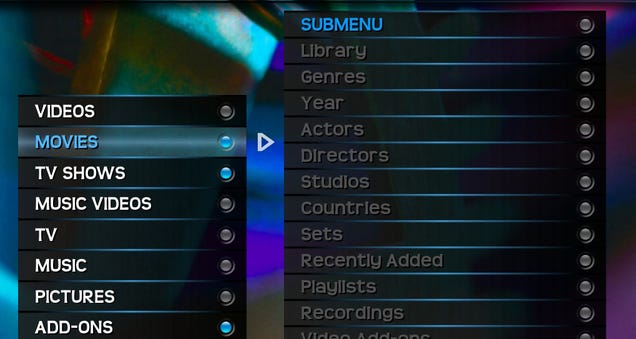
The default Confluence skin is pretty good-looking, and there are some even prettier ones out there if you look around. However, not all of them are exactly easy to navigate, especially for those unfamiliar with XBMC. For example, Confluence's horizontal menu is hard to see, and certain add-ons are buried in submenus. Experiment with some other skins and see which ones are easier to navigate.

I personally really like "Transparency" for its easy-to-read vertical menu. You can see every menu item on the menu page (that is, you don't have to scroll to see any of them), and nothing is buried in a submenu. From the main menu, you can see the Movies, TV Shows, Play Disc, and other options and go straight there with a few taps. It's much easier for an XBMC newbie to navigate than something like Confluence, Aeon, or Alaska, and it's still pretty darn attractive. Of course, there may be others out there, so search around and see what else you can find.

Program Your Remote for Easy Navigation

How to Make XBMC Easier to Use (Especially for Non-Geeks)

Certain remotes work out of the box with XBMC, but sometimes getting a simpler remote and programming it yourself can be more user-friendly (either with LIRC or using something like a customizable Logitech Harmony remote). Take care to program buttons in a way that makes sense—I spent years with an unintuitive button layout because I just matched XBMC's functions to the buttons they sounded like, which wasn't ideal. Play around with your remote and see what layout makes the most sense. Watch out for the "back" and "menu" buttons, which I found the trickiest to assign to something intuitive. If you really want to see if you've done it correctly, hand it off to someone else that hasn't used XBMC and see if they can find their way around without help. If they can, you've found the ideal layout, and you should stick with it.

You might also try going with a remote designed specifically for XBMC, like one that works on iOS or Android. Not only will they have buttons assigned to specific XBMC features, but you can even browse your library right from your mobile device and get it to play on the TV. It doesn't get much simpler than that.

Clean Up Your Main Menu

How to Make XBMC Easier to Use (Especially for Non-Geeks)

Head on over to Settings > Skin Settings and search for the menu editing section. Take some time to remove all the things you don't use, like "Pictures", "Music", and "Weather". Make sure to clean up the submenus too, if your skin has them—things like "Recently Added", "Random", and "Browse by Genre" aren't exactly confusing, but they can create a lot of clutter, which makes the menu harder to navigate. Some skins will even let you remove the submenus altogether. Remove the "Videos" option and replace it with separate "Movies" and "TV Shows" menu items. And, if "Play Disc" isn't enabled, make sure you turn it on for those occasional DVDs you rent or borrow from friends.

Put Streaming Add-Ons on the Main Menu

How to Make XBMC Easier to Use (Especially for Non-Geeks)

There are some great add-ons in XBMC that allow you to stream video from the web, but digging through the Add-On section isn't exactly fun. So, put some of your most used add-ons on the main page, so you don't have to go digging through other menus to find them.

This takes a few steps, but is really quite easy:

  1. Navigate to one of the add-ons you want on the main menu (say, USTV VoD—the add-on that streams from tons of cable channels). Bring up the context menu and choose "Add to Favorites". This step isn't necessary for all skins, but it is necessary for many, including Transparency.
  2. Head to Settings > Skin and find the option for customizing the main menu (in Transparency, it's called "Menu"). You should see some "Custom" or "Favorites" slots, where you can add custom menu items. Enable these and choose the add-on you want from the favorites menu.
  3. Repeat this process for all the add-ons you want on the front page. They should all show up on your main menu for quick, easy, pain-free access.

If you've cleaned up your main menu as we described in the previous section, you should now have a menu that's incredibly easy to navigate and has movies, TV, streaming video, and everything else you could ever want.

Enable Kiosk Mode

How to Make XBMC Easier to Use (Especially for Non-Geeks)

One of the most confusing parts about XBMC can be when you accidentally enter the "View" menu while scrolling through your movies or TV shows (the one that's hidden behind the right edge of the screen). Once you've got everything set up the way you want, you can turn on "kiosk mode" to lock your chosen views and get rid of this hidden menu. That way, when someone's browsing through your videos, they don't accidentally stumble on this menu or change your view mode by accident. In Transparency, you'll find kiosk mode under Settings > Skin Settings > General > Enable Kiosk mode. Check your skin's documentation for more info on whether it has kiosk mode and where to find it.


XBMC has come a long way, but it's still not the most user-friendly program on the planet. Hopefully, with these simple tweaks, you can get just about anyone using your XBMC box in no time. Got any of your own suggestions for making XBMC easier to use? Be sure to share them in the comments below.

Images remixed from Tanberin and Julien GONG Min.

31 Jan 10:26

Movie Release Group Members Plead Guilty

by Andy

factPlacing unreleased movies onto the Internet whilst located in the UK is a risky business and one likely to attract the attention of anti-piracy companies if done on a large-scale.

FACT, the Federation Against Copyright Theft, are particularly vigilant in this area and have launch numerous investigations into those it believes have infringed their movie partners’ copyrights.

On February 1 2013, FACT announced that they had joined police officers from the Economic Crime Unit to carry out raids in the UK targeting four addresses in the West Midlands.

Following a hearing in September 2014, the case was heard in Wolverhampton Crown Court this week. It’s the culmination of three years’ investigative work by FACT into the “source and supply” of copyrighted movies.

The accused are: Graeme Reid, 40, from Chesterfield, Scott Hemming, 25, and Reece Baker, 22, both from Birmingham, Sahil Rafiq, 24, of Wolverhampton and Ben Cooper, 33, of Willenhall.

In line with previous FACT-led prosecutions, copyright infringement is completely off the table. All men pleaded guilty to Conspiracy to Defraud a charge that previously saw SurfTheChannel’s Anton Vickerman jailed for four years.

In an earlier FACT press release the men were referred to as members of The Scene but one of the accused informs TorrentFreak that simply isn’t true.

“They say we were in The Scene – no, we were P2P,” he said.

Unless other connections come out in court, his claims appear to be true.

TorrentFreak has learned that the investigation spanned several BitTorrent-based release groups including 26K, RemixHD and UNiQUE, plus torrent sites Unleashthe.net (the site run by busted US-based release group IMAGiNE) and TheResistance.

remixhd-releases

Nevertheless, the case marks the first time that a group of movie releasers have ever gone to court in the UK and the signs are not promising for the men. Big numbers are being thrown around including the unauthorized release of up to 9,000 movies alongside claims that up to five million people may have viewed them.

At the end of the hearing the men were released on bail. They’re now in the hands of FACT’s private prosecution and whatever the court decides is an appropriate sentence following their guilty pleas. The extent of both will be revealed at a hearing later in the year.

Source: TorrentFreak, for the latest info on copyright, file-sharing, torrent sites and anonymous VPN services.

30 Jan 21:03

Google Earth Pro features now available for free to everyone

by Joseph Keller

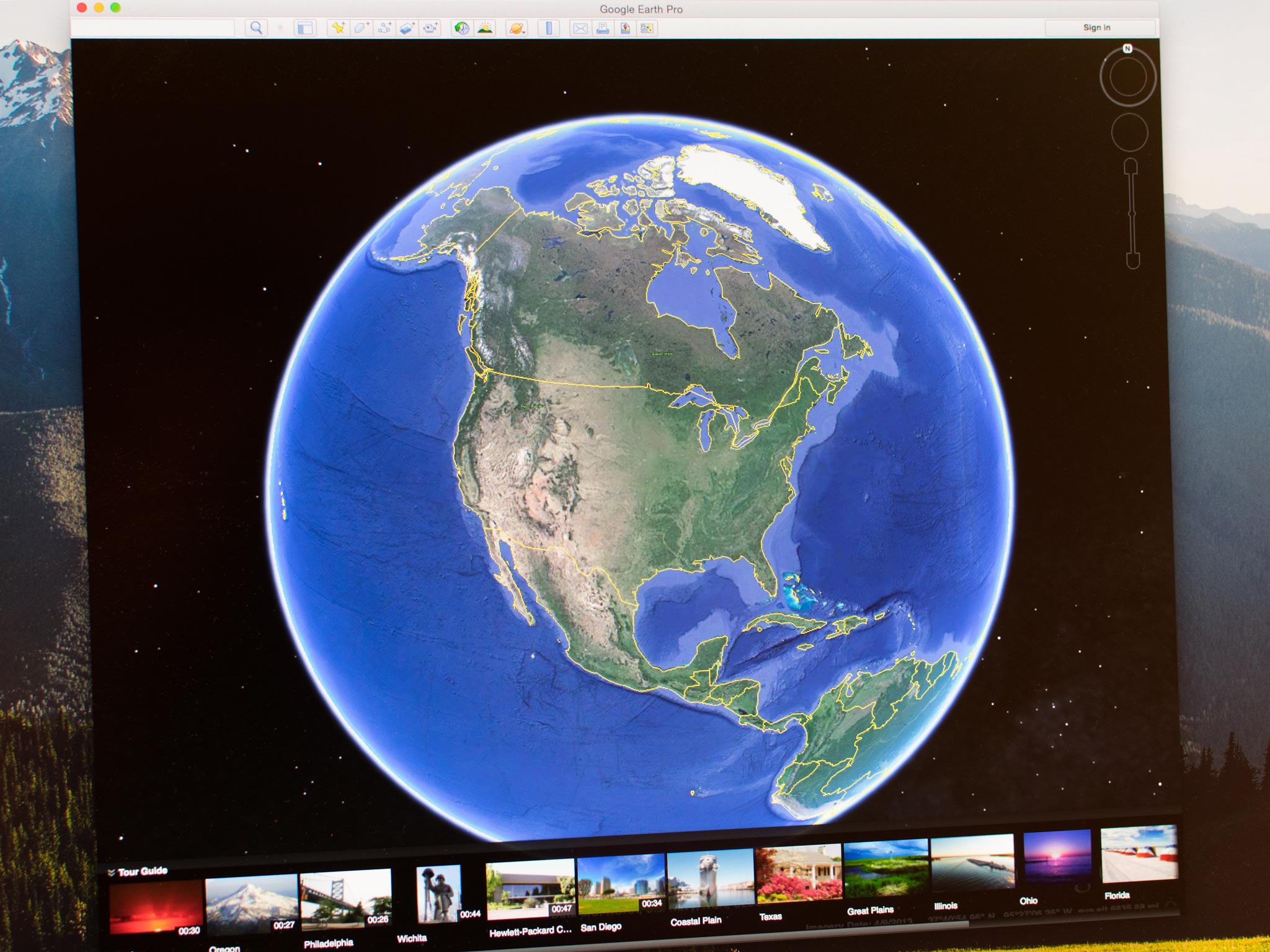
Google has announced that they are making Google Earth Pro features free to all users. Google Earth Pro adds a number of features and on top of the standard Google Earth desktop setup that allow you to measure 3D buildings, record HD video of your virtual flights, and more. You'll now be able to record your virtual trip to your favorite city absolutely free.

30 Jan 21:02

Google's Android App Adds Google Now Cards for 30+ Other Services

by Whitson Gordon

Google's Android App Adds Google Now Cards for 30+ Other Services

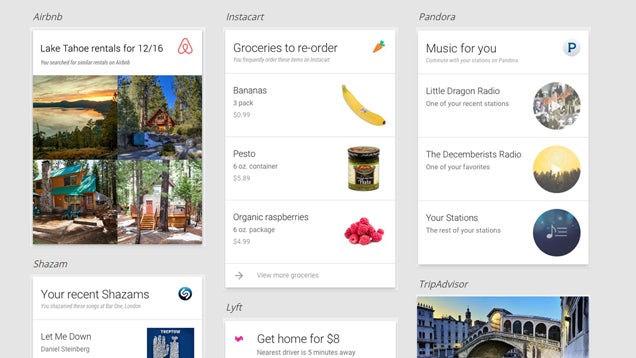
Android: Google Now has always been great for keeping you up to date on important stuff, and it just got a lot better. Google has teamed up with over 30 developers to add Google Now integration for tons of popular apps, like Pandora, Lyft, eBay, Kayak, and Mint.

Some of the integrations seem just okay, but others are really useful: for example, the Lyft card will tell you how far away the nearest driver is, and how much it'll cost you to get home from your current location. The eBay card lets you know how long you have until an auction ends, Mint keeps you up to date on how much of your budget you've used, and so on. You can see the full list of integrations (so far) here, and a bunch of examples at Google Now's home page.

These features will be rolling out over the next few weeks, provided you update to the latest version of the Google app. Check out Google's blog post below to read more.

Google App Update: Get Now Cards from Your Favorite Apps | Inside Search

30 Jan 21:00

Watch Paige Alms and other surfing greats tackle insane Hawaiian winter surf

by Andrea James

As Xeni has attested, recent surf in Hawaii has been remarkable. Some are saying Paige Alms caught the greatest big wave barrel ever caught by a female surfer, thanks to the unusual wave angle and nearly nonexistent breeze. Decide for yourself! (more…)