The Selvedge Yard is proud to offer Silver Piston jewelry in our online shop here. “As a kid growing up in the 70s and 80s, I was always intrigued by old buffalo nickels. I used to get them from my grandfather and would eventually spend them on candy. As a jewelry maker, they’re a cornerstone […]
From Monopoly to blackjack, you might be surprised to learn that you've been playing some of the world's most popular games wrong all along. Whether it's by misinterpreting the actual rules or misunderstanding the principles of how to win, here are six popular games where mistakes are common.
1. MONOPOLY
Monopoly is a game that hinges on “house rules”—passed down through families from one generation to the next, in different combinations which ensure that no two games are exactly alike. But it might surprise you just how significantly the most popular interpretations can differ from what’s been laid out in the rules for several decades.
The concept of auctioning unwanted properties after they’ve been landed on, for example, feels like an idea that someone came up with and added afterwards, which is probably why some people choose not to employ it. But auctions are clearly stated in the rules as being as much a part of the game as buying houses or picking up Community Chest cards.
Do you have to complete a full lap of the board before you’re allowed to buy property? Nope, not according to the rules: You can start buying as soon as you first land on something. And here’s a big one on which people often differ: Are you allowed to collect rent while in jail? Yes, of course you are—there’s nothing in the rules that says you can’t. Indeed, staying in jail is seen as a useful strategic tool in the later, hotel-filled stages of the game.
Popular house rules such as getting a windfall of previously-collected taxes when landing on Free Parking or getting double the usual salary for landing on “Go” were actually included in a special “House Rules” edition of the game last year. Oh, and that rule about going straight to jail if you roll three doubles in a row? It might sound like something your uncle made up, but that one’s been right there in the rules all along.
2. CLUE
Many a game of Clue has ended with players in a mad rush to get their tokens to the murder scene, so that they can make the all-important accusation. But this method of ending a game isn’t actually necessary, according to the rules.
While Clue’s rule book stipulates that you can only make a “suggestion” (the bit where you get people to show you the cards in their hand) about a room you’re currently in, the potentially game-ending “accusation” can actually be made at any point. You can make a suggestion in the conservatory for the purposes of eliminating it from your inquiries, before immediately making an accusation that the crime went down in the ballroom.
Seasoned Clue players point out that the writers of the original rule book didn’t take into account the sort of strategic play that involves making your accusation based on others’ actions as well as your own inquiries—and so the rules aren’t actually clear in stating that you don’t even have to make a suggestion before you go on to accuse.
Some recent editions of the game have actually added a new rule that states that you have to go to the central point on the board before you can make that all-important accusation, so mad dashes with the dice can still be a part of your game if you’re playing one of those versions. But they’re not an intrinsic part of the game’s framework, so make sure you clarify which rule you’re going with before you start playing!
3. POKER
While televised poker tournaments have done a lot for the wider public perception of how the game is supposed to be played in a formal setting, the fictional games often seen in movies and on TV shows still have plenty to answer for. So just to be clear: While it may look cool when some guy in a film says "I'll see your $50 … [dramatic pause] … and raise you $50!" in reality that second batch of chips would immediately be handed back to the player by the dealer. In a casino or tournament poker game, you can either call the bet or raise it, but you can't do both one after the other. If you want to raise, you have to declare it immediately.
That process of placing some chips on the table and then gradually increasing the amount with a dramatic flourish is known as "string betting," and is almost universally discouraged, primarily because it allows a player to judge others' reactions to the lower bet before deciding whether to continue.
4. SCRABBLE
Having a good vocabulary—or at least the ability to remember which two-letter words appear in the dictionary—is, of course, an important part of being good at Scrabble. But is it the only part? Can you become a top player based on dictionary skills alone, or is there more to it?
Something that people easily miss when it comes to Scrabble is that the game is as much about logic and strategy as it is about being able to solve anagrams. Knowing what words your rack can make at any particular time is of course a key attribute, but just as important is being able to “play” the tiles that are already on the board, those that might be on your opponent’s rack, and those that are still in the bag.
Sometimes it can actually be better to hold off on playing a particular word—even if it would score you decent points at that moment in time—to gain an advantage by playing it at a later point.
While most people know that you can forfeit your turn in order to exchange some or all of the letters in your rack (something that can also be an important strategic move on occasion), it’s less widely-known that the rules allow for players to skip their turn entirely, and simply wait for a better opportunity.
And of course, where you place your tiles is just as important as the words you make with them—and we’re not just talking about picking up double- and triple-word scores. If your play is only going to score points along a single axis, rather than gaining a multiplier bonus for creating multiple new words, then maybe it’s not worth playing at all.
5. BLACKJACK
A common mistake people make when playing blackjack is to only play your own cards—or, perhaps more significantly, to consider that yourself and the dealer are on a level playing field. In truth, due to the fact that you have to beat the dealer, the odds in casino blackjack are so heavily stacked against you that the only real way to come out on top is by counting cards.
If you don’t have the ability to see through cards, then at the very least familiarize yourself with some tables of probability beforehand—there are plenty all over the internet, although bear in mind that odds differ hugely depending on how many decks your particular casino uses. At the very least, be aware that the number on the dealer’s face-up card can have a far bigger effect than you might imagine on whether that 16 of yours is worth sticking or twisting on.
6. POOL
Everyone knows that when you get to the end of a game of pool—whether eight-ball or nine-ball—and you're looking to pot the eight-ball, you have to first nominate the pocket you're aiming for, and that sinking the ball into the wrong pocket will forfeit the entire game. Right? Well, no, not exactly.
While that's a fairly common house rule in pub-based games, it doesn't actually have its origin in any official or tournament-based set of rules, either in the U.S. or U.K. In fact, you're perfectly at liberty to pot the black anywhere you like, without declaring a pocket first.
In addition, while the most popular penalty for a standard foul in a casual game is for the opponent to be given a "free" shot, tournament rules generally dictate the much harsher outcome of getting the "ball in hand"—that is, being able to place the cue ball anywhere on the table before the next shot.
California is known for its unusually large number of cults and dodgy religious movements. The reasons for this may include the lack of an obviously dominant Protestant establishment, an economy based on get-rich-quick schemes and frequently failing businesses, a diverse population of rootless people in a cultural blank slate, or even the heady effects of […]
In our beginner’s guide to managing your money with Mint, you saw how to add accounts, set up budgets, and make some tweaks to transactions. Once you have all that down, it’s time to step up to some more useful advanced features. If you master these tips and tricks, you’ll be a real Mint expert! Splitting Transactions I don’t know about you, but when I go to a department store, I do a lot of different kinds of shopping. I might buy some groceries, some home-related items, occasionally electronics, sometimes gifts — it can vary a lot. That’s why classifying Target,...
No matter your football loyalties, two Southern teams competing in tonight's National Championship is a point of pride for us all. In honor of the matchup between Clemson and Alabama, celebrate with two worthy contributions to the Southern barbecue canon from each school’s home state: Alabama White Sauce and South Carolina-Style Mustard Sauce.
Kickoff is at 8:30 EST tonight, so pick up a pound of your favorite pulled pork, and top it with one of these homemade barbecue sauces.
Alabama-Style White Barbecue Sauce Makes about 2 cups
Mayonnaise adds silkiness to this surprisingly light sauce that is a Decatur, Alabama, original, created in 1925 by barbecue master Big Bob Gibson as a condiment for his hickory-smoked chicken. If you like it peppery, add more black pepper. If you like heat, boost the cayenne.
Ingredients
1 (15-ounce) jar mayonnaise (about 1 ½ cups)
¼ cup distilled white vinegar
1 tablespoon apple juice
Juice of one lemon
2 teaspoons freshly ground pepper
2 teaspoons prepared horseradish
¼ teaspoon kosher salt
¼ teaspoon cayenne pepper
Preparation
Combine all the ingredients in a bowl and whisk well to combine, then serve.
Store any remaining sauce in an airtight container, refrigerated, for up to 1 week. Stir before serving.
South Carolina-Style Mustard Barbecue Sauce Makes about 2 cups
Born of flavors brought to the state by German immigrants, traditional South Carolina mustard-based sauces start with plain yellow mustard. No need to get high falutin’ with Dijon.
Ingredients
1 teaspoon vegetable oil
1 tablespoon grated white onion
2 garlic cloves, minced
1 cup yellow mustard
½ cup apple cider vinegar
¼ cup honey
2 tablespoons dark brown sugar
1 teaspoon Worcestershire sauce
1 teaspoon freshly squeezed lemon juice
1 teaspoon freshly ground black pepper
1 teaspoon red pepper flakes
½ teaspoon celery seeds
1 teaspoon hot sauce
Preparation
Place a saucepan over medium heat and add the oil. Add the onion and garlic and sauté for 2 minutes, stirring frequently. Whisk in the remaining ingredients, stirring well to combine. Cook over medium heat until bubbles break the surface. Reduce the heat to low and simmer for 10 minutes. Serve immediately.
Let any remaining sauce cool to a room temperature, then store in an airtight container, refrigerated, for up to 2 weeks. To serve again, reheat by microwaving for 30 seconds to 1 minute.
Falsehood. Story. Lie. Whatever you call it, fudging a little here and there is what makes Southern storytelling so colorful. So maybe Edward Bloom didn’t really see a mermaid in Big Fish, Daniel Wallace’s creative novel that became a beloved film in 2003. That doesn’t make the story any less moving. In fact, telling exaggerated stories isn’t just fun—it’s part of Southern heritage.
A still from Big Fish.
Adam Booth, a four-time West Virginia Liar’s Contest champion who teaches Appalachian Studies classes at Shepherd University in Shepherdstown, West Virginia, tells his students that lying is regionally relevant.
“Appalachian industries like railroading, coal mining, and timbering contributed to the health and vitality of lying,” he says. “While people were working they’d brag about how much rail they laid, how much wood they chopped, or how they ‘shot a gun and the one bullet didn’t just kill a deer but it killed a whole flock of birds and a bear.’” Sure it did.
The Bold-Faced Liars’ Showdown in Laurinburg, North Carolina, brings together ambitious liars willing to put their storytelling chops to the test. It’s just one of the handful of bona fide lying festivals across the South—see also the Texas State Liars Contest in November and the Mountain Mack Liar’s Contest each spring in Virginia. Booth has been a guest judge and performer at multiple lying festivals, so we asked him to share his best tips for telling a harmless tall tale.
Adam Booth performs at Bear on the Square Mountain Festival in Dahlonega, Georgia. (Photograph by Margo Booth)
1. Base the lie on some truth
Root the retelling in an event that actually happened. “Usually in lying contests, one of the categories you’re judged on is the believability of the story,” Booth says. He keeps a notebook of nearly unbelievable things that happen to him. Build a house of exaggeration on a solid foundation of truth.
2. Tell a story in pictures, not words
“I can’t tell you how many times I’ve had that moment of dread watching someone who memorized a story and can’t remember what they were saying because they were reciting and lost their place,” Booth says. Describe a big-picture scene before telling details within it. Your audience is more likely to believe something they can play out in their minds, and you’re less likely to forget what you were saying.
3. Don’t save the whopper for the end
A lot of liars will build up to a big, unbelievable finish. Booth has a different tactic—“I start lying as soon as possible with details that seem believable,” he says. Within the first minute of a story, he’s already dropping half-truths. “My details keep escalating, so it’s not such a big hit at the end. But when people snap out of it, they’re left wondering, ‘how did we get to this point?’”
4. Keep your body language in check
Plenty of self-help articles describe how to detect a liar—a left eye twitch or a face scratch. But over years of competitive lying, Booth has noticed something simpler—people shift their weight when they lie. “When they are really starting to stretch the truth, they lean forward and go on the tip of their toes or bend their waist out,” he says. “If you’re not used to looking for it, it’s too subtle.”
5. Mind your audience
Even if it’s just one person, pay attention to what hooks them. If something makes your audience laugh, bring back those details to pull the listener full circle. Practice helps. “Sit at the counter of your local donut shop and talk to the regulars, or gather people in your living room,” Booth says. “It’s great to get all those experiences because you learn how to react to the listeners.”
And remember that old adage: Sometimes truth is stranger than fiction.
Time to dust off your neglected waffle maker—or go buy one. Pizza waffles are a convenient way to indulge your homemade pizza cravings in about 10 minutes.
I admit it, I take too many photos. I know it, and I have too many images to deal with, and unless I am getting paid to finish them and send them out to a client, they may never get processed. Are you in the same boat? Do you too have some images that have just been sitting there in your digital desk drawer?
With digital photography, and especially because of how cheap memory is (don’t forget to include web hosting sights and the cloud), more and more photos are just there and never used. The best solution is to be more decisive, and just take fewer photos. But we all get out of hand, and sometimes just come home with more images than we know what to do with.
Final product after the simple steps followed below—a workflow that you can adjust to your own tastes too!
So the best thing to do is get to the grind and produce something. But it doesn’t need to be so much of a grindstone as you might think. I love taking photos more than processing and unless I am flying solo, I think I’ve got lots of people onboard with me. As you know, photography is not about broad strokes, and details are important. This set of instructions is specifically designed for street photography. But, are most of your photos from your travels? Well, streets (along with the convenient airplane) is maybe how you got there. Much of what we do as photographers crosses over into different genres of style and art. So have a go at the following tutorial, and you may find that with your own adjustments this is a recipe for more than just the street.
Final image of two young girls walking in the slums of San Jose Costa Rica, all editing was done following the steps below.
These instructions begin in the Library module of Lightroom, and then progress into the Develop module. There are countless modifications that can be made upon importing, categorizing them, giving them tags, etc. As the point of this tutorial is to streamline your workflow, the tips for editing will also be streamlined. So let’s get at it!
Library Module
Step 1 – Select images
Select a batch of images that are preferably in similar lighting conditions, and which have a similar theme. For example, choose a set of photos that were all shot outside over the course of a few hours, but not all night. Or a group of photos that were all shot in the rain. Lighting and theme conditions can vary, but greater variations will have potential greater variations in results.
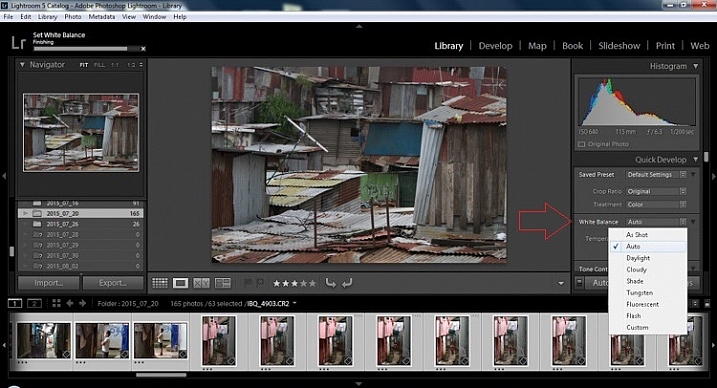
Step 2 – White Balance
In the Quick Develop Panel (at the top of the right panel in the Library Module) Select White Balance and choose Auto. Before you turn away, let me assure you that there have been more Ph.D.s awarded, and dissertations given, in creating the algorithms behind this button. If you compound the interest in dollars that has been invested in this Auto algorithm it would sustain many third and fourth quarter GDP figures for entire nations.
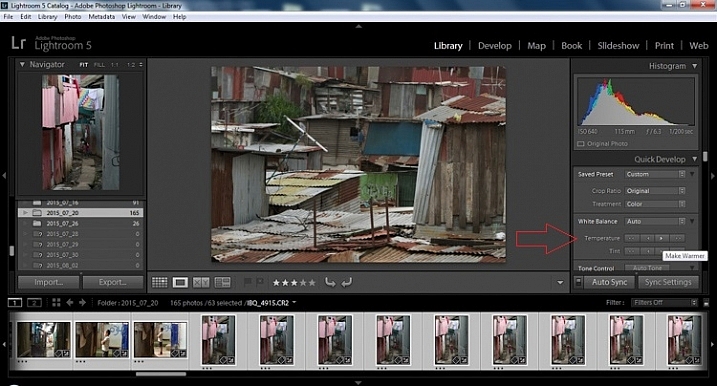
Step 3 – Warm images
Next, push the single arrow pointing right under the temperature heading indicated by the Make Warmer hint that appears if you hover over it. The single arrow will increase your warmth tone by +5. If you want plus +10 push it twice, using the double arrow will increase it in increments of +15.
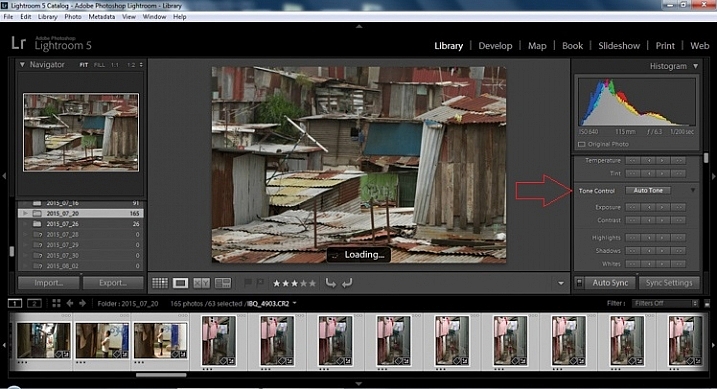
Step 4 – Auto Tone
I know it is scary, and it does make me cringe sometimes too, but anything can be shifted, tweaked, and tuned later (and should be) to your liking. This will Auto Tone your exposure, highlights, shadows, whites, and blacks to each photo individually, so it is not the same as batch editing which will be covered later.
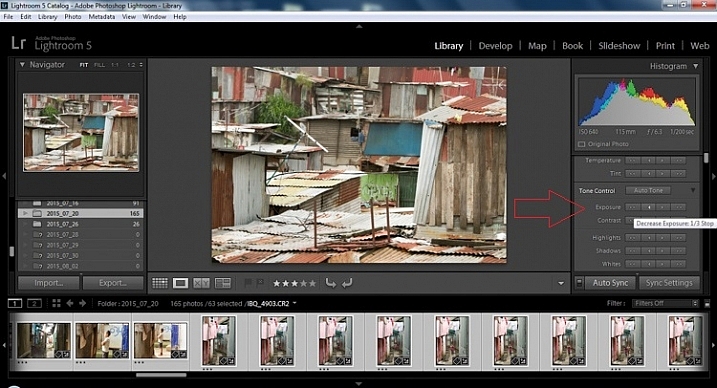
Step 5 – Decrease exposure
Select the single arrow to the left, decreasing the exposure by a 1/3 of a stop. It is minor, but keeps your darker tones (especially things like black asphalt) a little darker. Note:this is assuming you have a correct exposure to begin with – if it’s a bit out you can adjust later on a per image basis as needed.
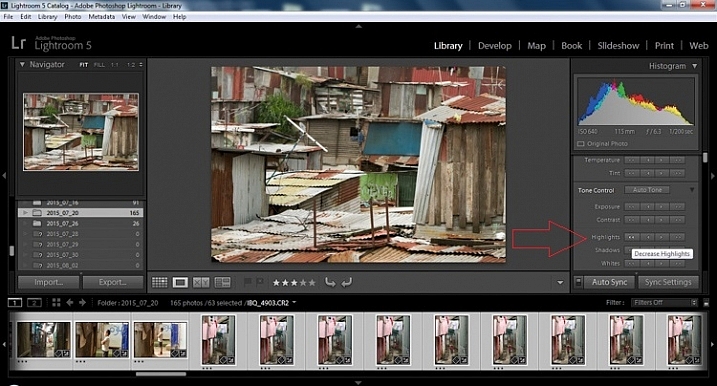
Step 6 – Decrease Highlights
For the Highlights, use the double arrow to the left, decreasing the highlights, and select it once. Be patient, as depending on how many pictures you select and your computer speed, it may take more than a few seconds. This can be monitored by looking in the top left of the screen above the Navigator window (progress bar).
Step 7 – Shadows
For the shadows, use the double arrow on the right, decreasing the shadows, and click it once.
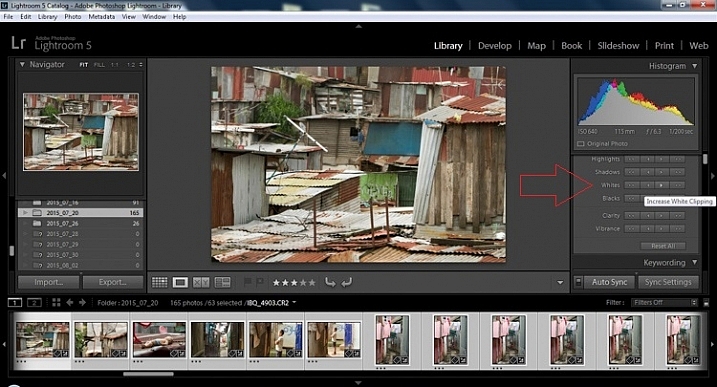
Step 8 – Whites and Blacks
Increase the white clipping by +5, by clicking the single right arrow once. Decrease the black clipping by -5 by clicking the single left arrow once.
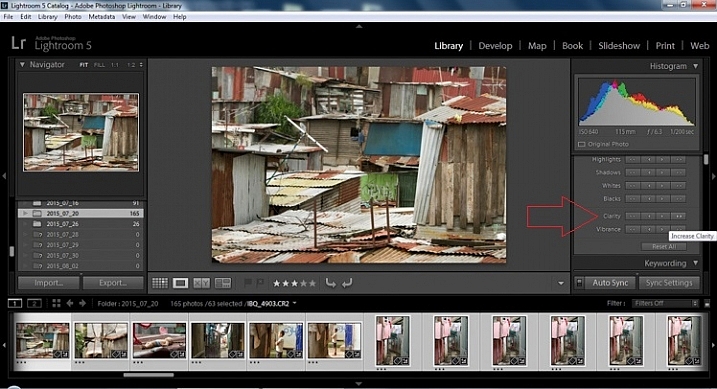
Step 9 – Clarity
Increase the clarity by +20, by pressing the double arrow to the right once (for more information about clarity please look near the end of the article which describes it in more detail).
Step 10 – Vibrance
The final step in the Library module is to increase the vibrance by pressing the double arrow to the right (for more detailed information about vibrance please see below).
Develop Module
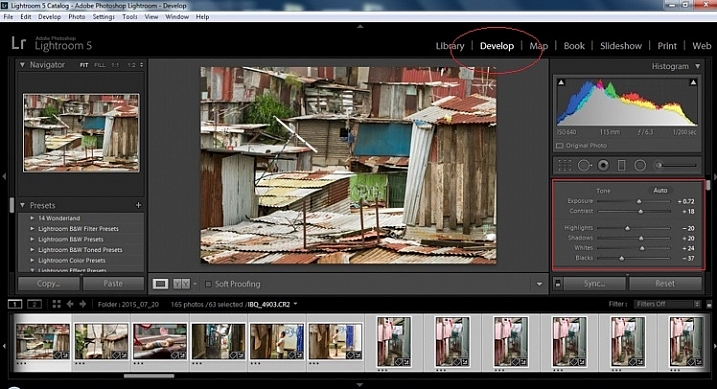
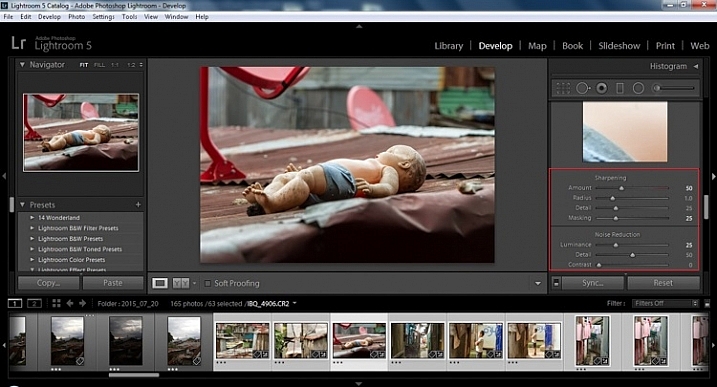
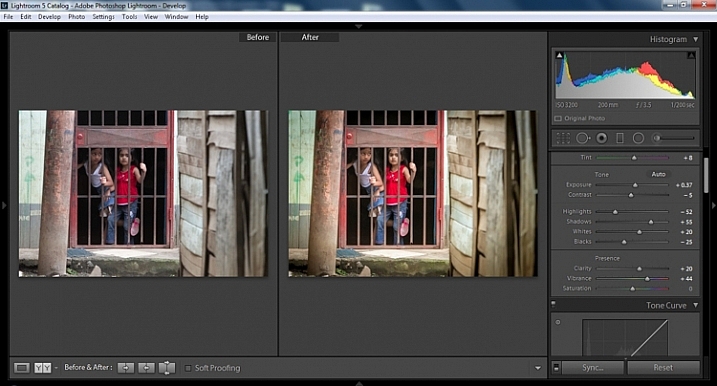
Now we will be moving into the Develop module. To this point, all the changes that you’ve made, have been applied to all the photos in the group, which you originally selected. Looking at the image below, you can see that despite the simple clicks made in the Library module, many delicate changes have been made. Again, all of these changes can be fine-tuned to your liking later. There are hundreds of modifications that can be made, but let’s keep those for later.
Notice the sliders have moved based on the changes you made in the Library Module Quick Develop panel.
Step 11 – Lens Corrections
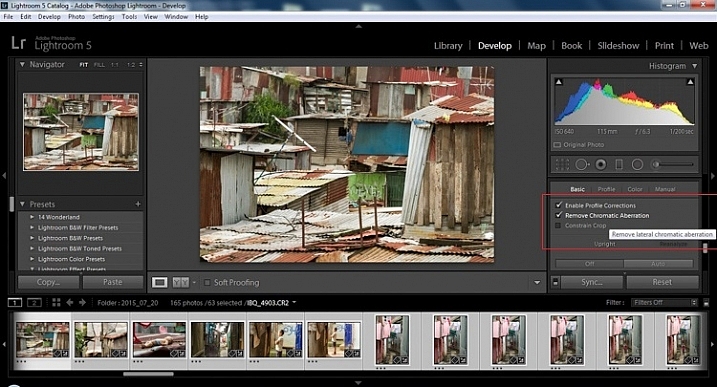
This step requires you to scroll down to the Lens Corrections Panel, and select two checkboxes. The first is Enable Profile Corrections, and the second is Remove Chromatic Aberrations. Both of these will allow Lightroom to make changes to the photo based on the lens used, and the inherent flaws that exist in that lens. A variety of corrections may or may not be included like, barrel distortion, vignetting, and as the second suggests, green and purple colors that result from diffraction in the lens.
Step 12 – Detail Panel
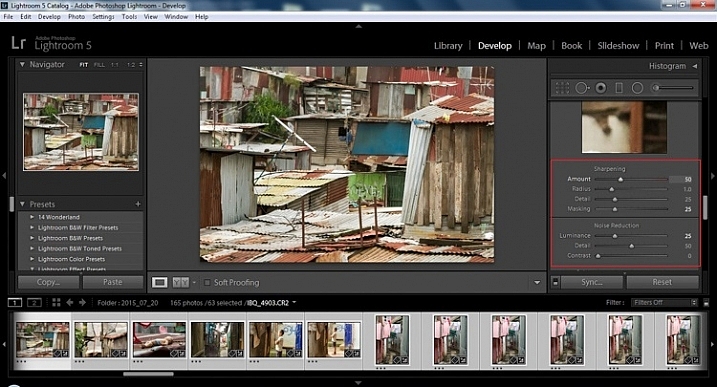
Next is to scroll up and go to sharpening, increase it to +50, then increase your masking to +25. Finally you may or may not need to reduce noise. For this example, because the ISO was 640 the noise reduction was increased to +25. To understand, sharpening and masking in more detail and their relationship to noise reduction please read below.
Are you still with me? Here is where you will thank some of those computer science majors for creating the AUTO button. This is why they get the big bucks, and it saves us large amounts of time. We don’t need to apply these changes individually.
Step 13 – Sync settings
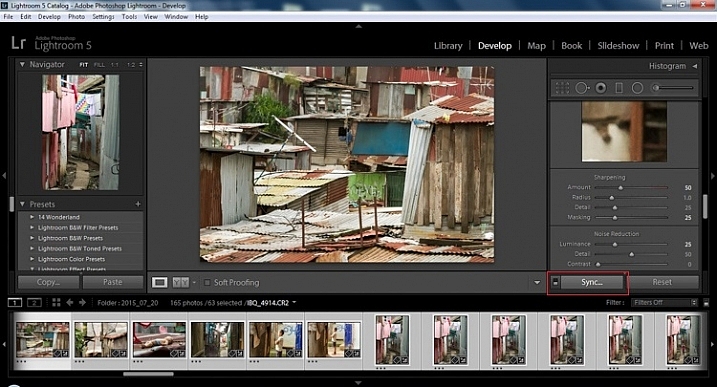
At the bottom of the Develop module there is a rectangular button that says Sync. PUSH IT! Make sure all your images are still selected before you sync (highlighted in the thumbnail strip at the bottom).
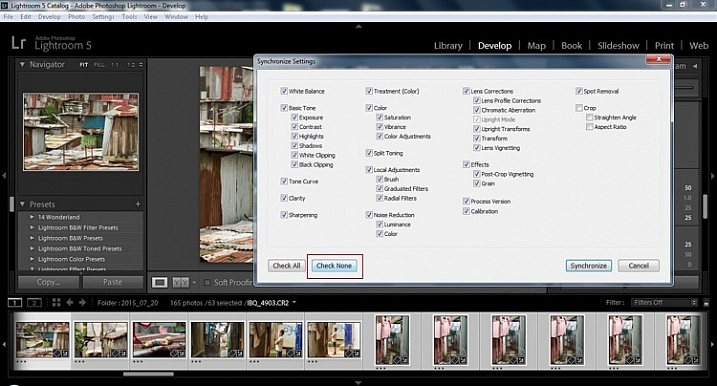
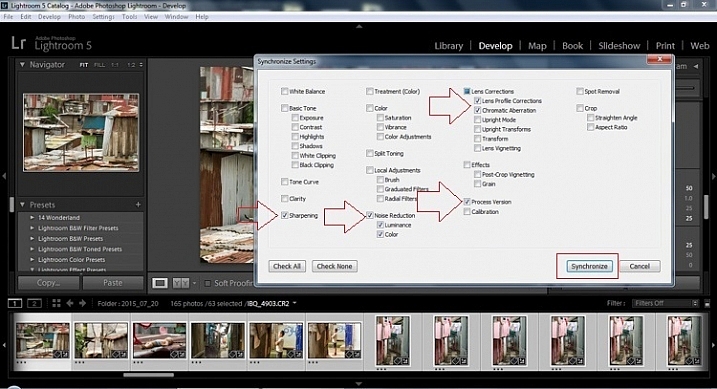
When the Synchronize Setting window pops up, select Check None. This will ensure that no unwanted changes will be made to your previous adjustments.
Now check the boxes labeled Sharpening, Noise reduction (which will subsequently select both boxes below it), Lens Profile Corrections, Chromatic Aberration, and finally Process Version. Notice these are the same adjustments that you had made in steps 12 and 13.
Finally, press the “Synchronize” button.
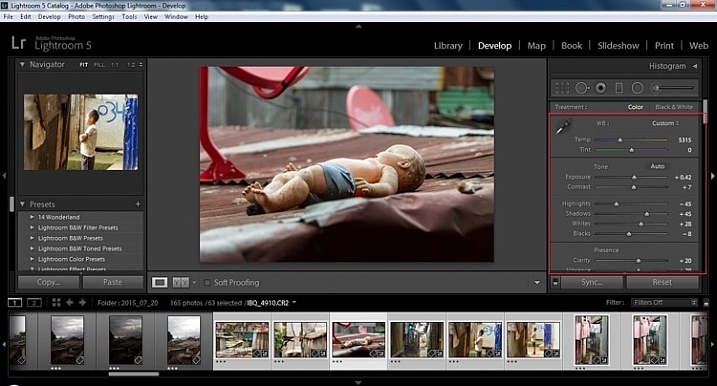
Looking at the screenshot above, you can see that the all of the selected photos have had the changes made to them. If I were to go back and make all the individual changes to the potentially tens, hundreds, or even in bizarre cases thousands of photos, it would have taken me time that I don’t have, and neither do you. Looking at the image below you can see that the exposure, shadows, lights, whites and blacks have remained unique to the individual photo.
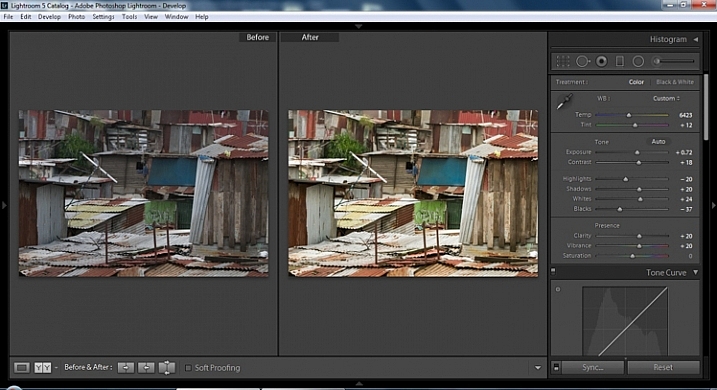
Below are simple side by side comparisons. In the last one I actually made a few additional small adjustments, and added a -10 vignette. Other than that, it is ready for export, along with almost all of the other photos that were just individually and batch adjusted. It is a bit of mix and match magic that keeps your photos natural, and true to the street.
Clarity
Clarity increases the contrast where two different tonal values meet. It is like contrast but on a micro scale, makes the image seem to be sharper. The lights will get lighter and the darks darker, but only where the different tone values meet, not broadly across the whole tonal range of the image.
Vibrance
Vibrance increases the tone of colors that are not already saturated. It is like a balancing scale for color. Saturation on the other hand, increases the intensity of all spectrums of light. Thus, vibrancy helps to bring out subtleties in the colors. For street photography, it brings out richness, without creating an over-saturated look. Sometimes I pull the vibrance up, and push the saturation down, to maintain an urban feel but doing so without making it look over-worked.
Sharpness
Just as I said, clarity is like contrast on the micro scale, sharpness is like clarity on a micro scale. Thus, it is like micro-micro scale. So we are still dealing with tonal values, but in even more detail. So be careful how much you increase your sharpness. Never try to rescue camera shake or blur in the photo using sharpness. “The devil is in the detail,” and this is no truer than in the sharpness slider. Because what you gain in sharpness you also increase the amount of noise (not desirable). If you have a high ISO, sharpness is more of an enemy than a friend.
Final image all adjustments applied
Masking
Textures will become more enhanced, but smooth surfaces will not be affected, resulting in less excess noise being introduced. This will help the street photography mood, without giving it an overly grainy feeling, or your shadows having too much noise. So how much of this movement left and right on the Masking slider is helping or hurting all your hard work? Thanks to those “AUTO guys” the Alt key on windows (Opt on Mac) will give you a grayscale impression of exactly where, and how the sharpening is impacting your photo. White indicates the area on the photo where sharpening is being applied, and black shows where it is not. You will notice that the contrasts and textures deserve most of the sharpening, alleviating your smooth tones and surfaces from the ill effects of sharpness.
Summary
So hopefully that will give you some things to try out with your images to process your street photography faster and consistently. Do you have any other tricks and tips you use? Please share in the comments below.
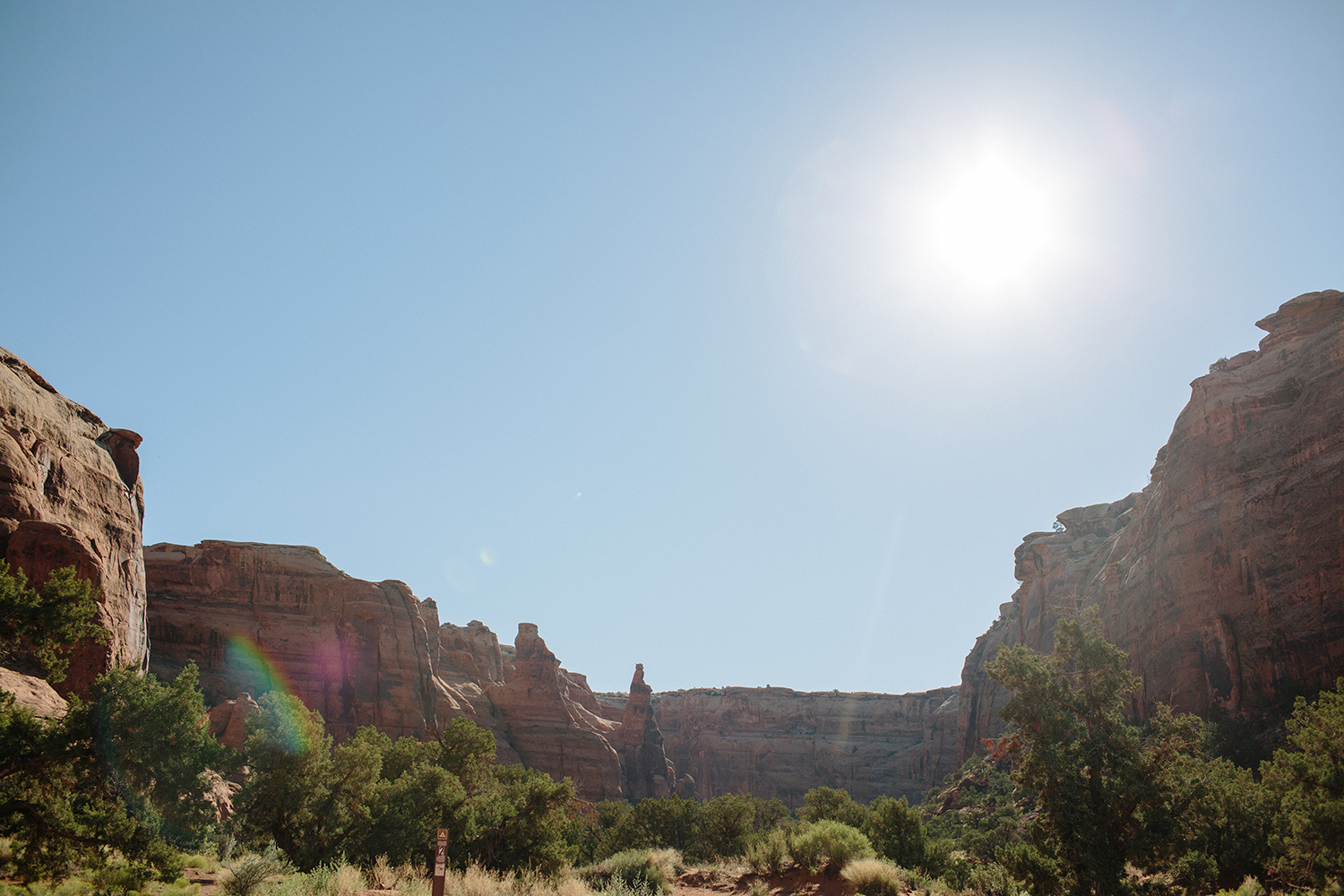
Moab is a mecca for anyone looking to get outside the box. A Western frontier hub for artists, athletes, and outdoor enthusiasts alike, Utah’s red rock canyons are the perfect place to get lost as temperatures drop and winter nears. And Moab, an oasis in a beautiful, vast, and mighty desert, truly has something for everyone.
Located near the confluence of the Colorado and Green River just west of the La Sal Mountains in the heart of the Colorado Plateau, the name Moab was given to the region by Mormon settlers in the late 1800s, because of the area’s similarities to Biblical Moab — a lush valley in the middle of a serious desert.
With an economy first established on farming and ranching, Moab’s population boomed in the 1950s as uranium mining (a key element in nuclear power production) swept the canyons. Today, the allure of Moab seems to be spreading as mountain town climbers, mountain bikers, and campers spend their shoulder season in the “Emerald in the Sand.”
Eager to see it all for yourself? As a Four Corners local, here are my top choices (and some best practices) for getting away to the desert.
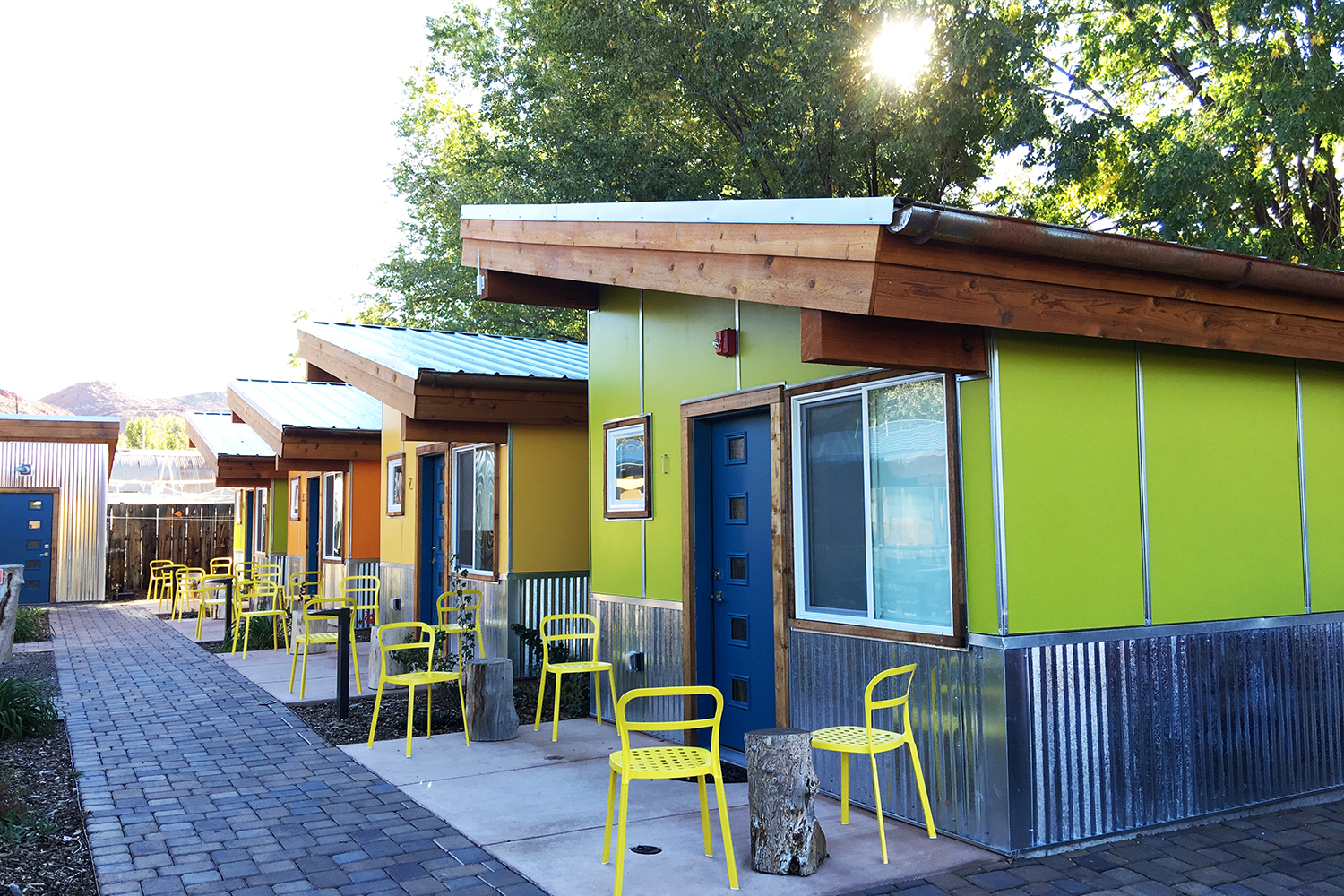
Wake up at Kokopelli 100 West, modern, pet-friendly cabins right downtown, and walk to the Love Muffin Cafe for one of the best lattes in town (the Dulce de Leche) and a breakfast burrito (they have several delicious filling options). Then head on over to the Back of Beyond Books and grab a copy of Beyond the Hundredth Meridian, a biography of John Wesley Powell, the distinguished ethnologist, geologist, and explorer who was one of the first Americans to navigate the Colorado River and the Grand Canyon.
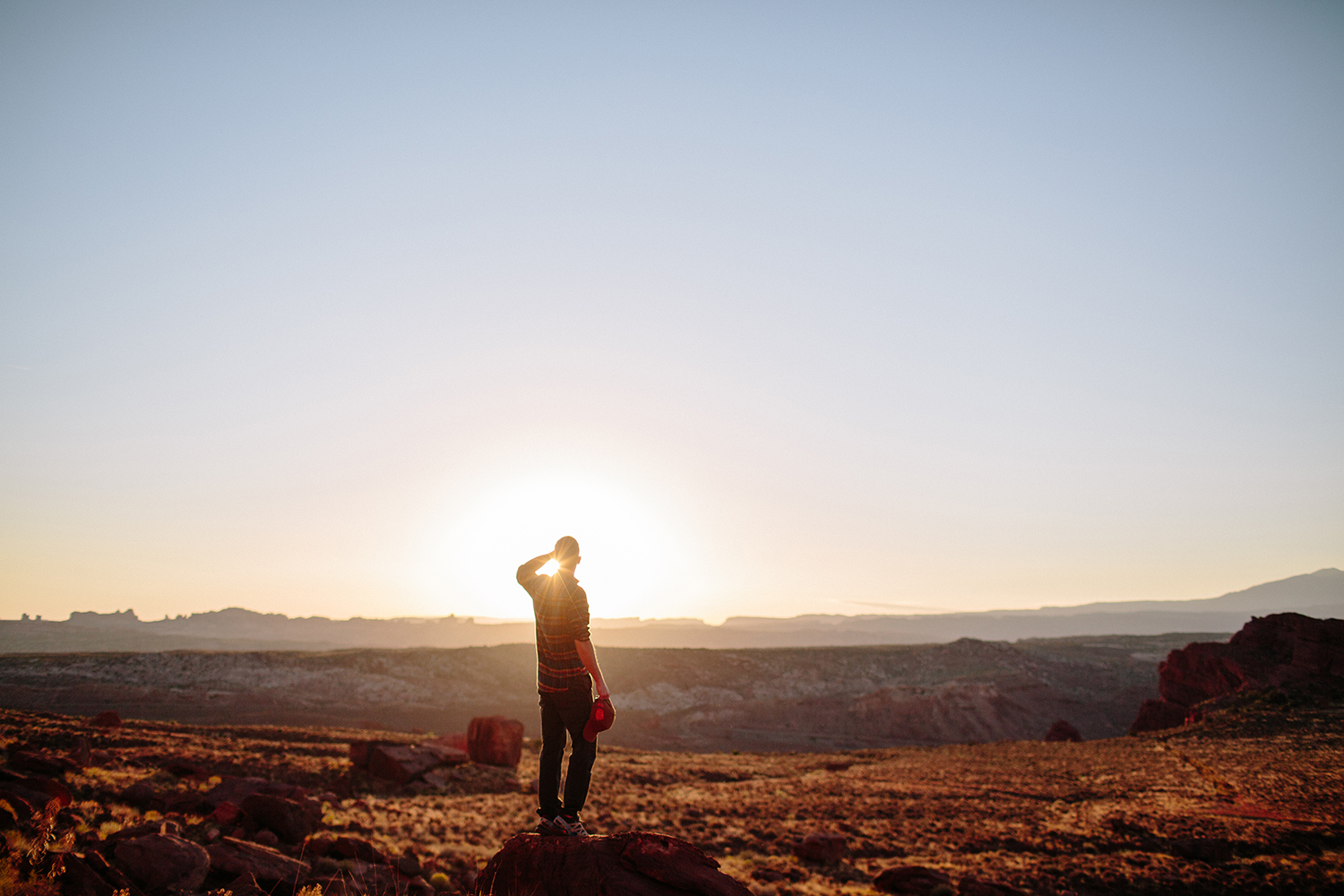
Grab your camera and hit the trail to the renowned Delicate Arch in Arches National Park. Make sure to pack some water and snacks (Moonflower Co-op has some great ready-to-go salads and sandwiches) and linger at the arch to savor the sunset. Head back into town and grab a pint (and a growler to go) at Moab Brewery, and head back to the Kokopelli cabins to enjoy a night under the desert sky, grilling out then chilling out in the hot tub.
Walk through the jungle-like garden leading to the Eklecticafe and sit down to the “Wake Me Up Wakame,” scrambled eggs or tofu and organic brown rice topped with steamed seaweed, toasted sesame seeds, and soy sesame ginger dressing. Spend the morning strolling through town and hop into shops like Triassic for handcrafted tools, jewelry, and wooden masterpieces, handmade from locally, responsibly-harvested trees and sustainably-collected gems. Next head to the Peace Tree Cafe to get your juice on and hydration up as you explore the desert. Scope out ancient rock art along the area’s endless routes of hiking trails and dirt roads — be sure to put Newspaper Rock, along Indian Creek just outside the entrance to the Needles District of Canyonlands National Park, on the list.
Visiting the area in spring or fall? Head on over to the Island in the Sky District of Canyonlands National Park for a ranger-led stargazing experience and breathtaking views of the Milky Way.
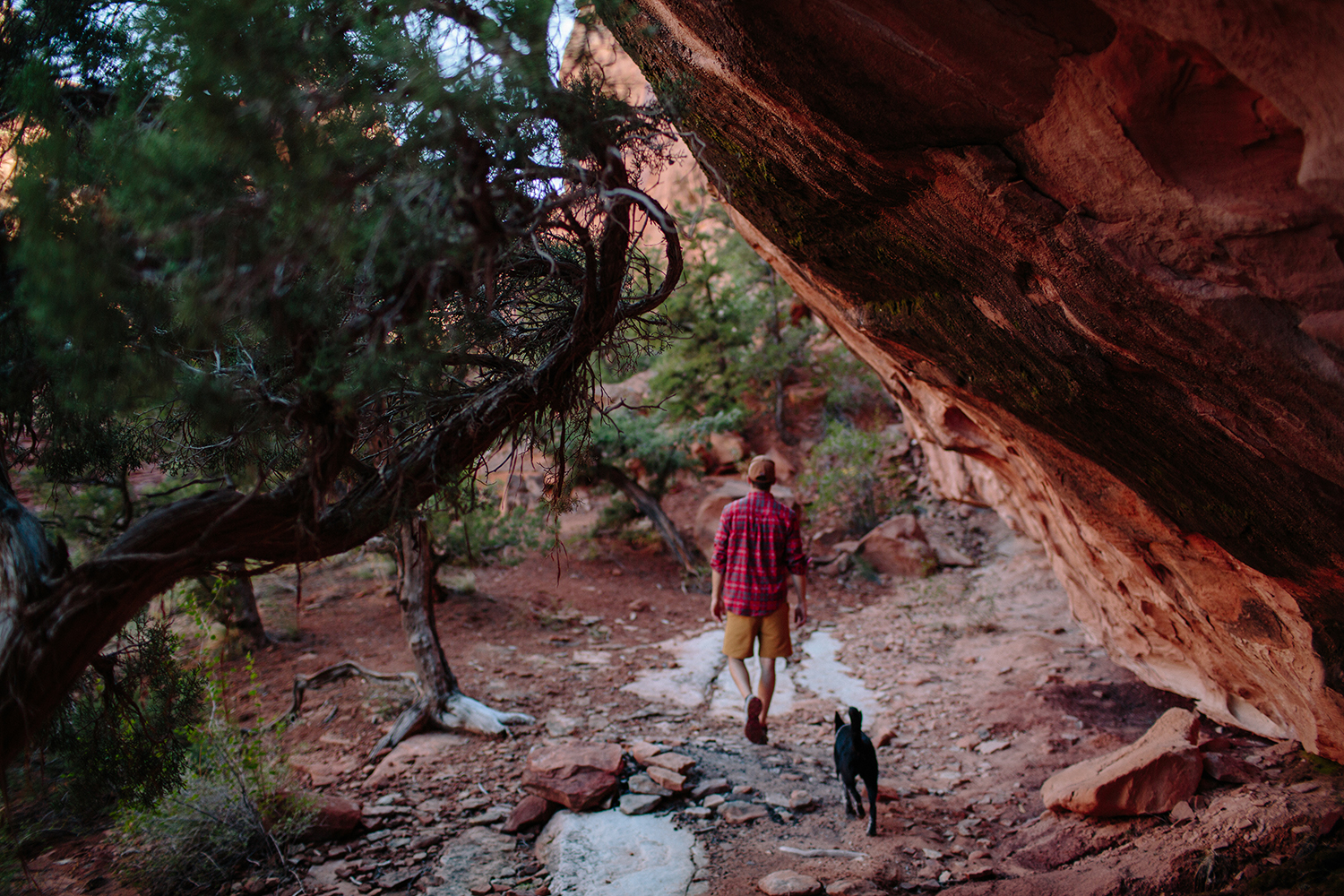
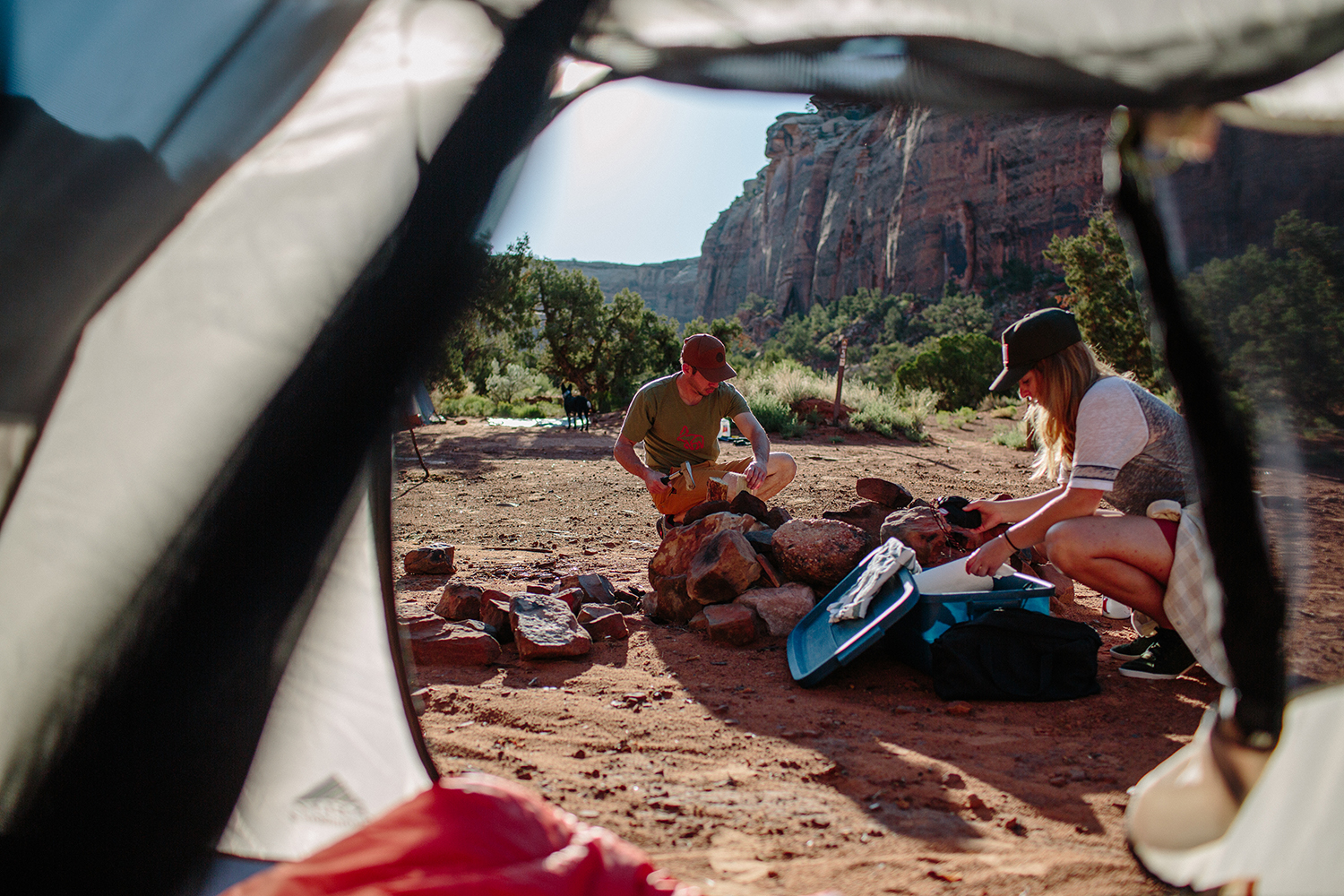
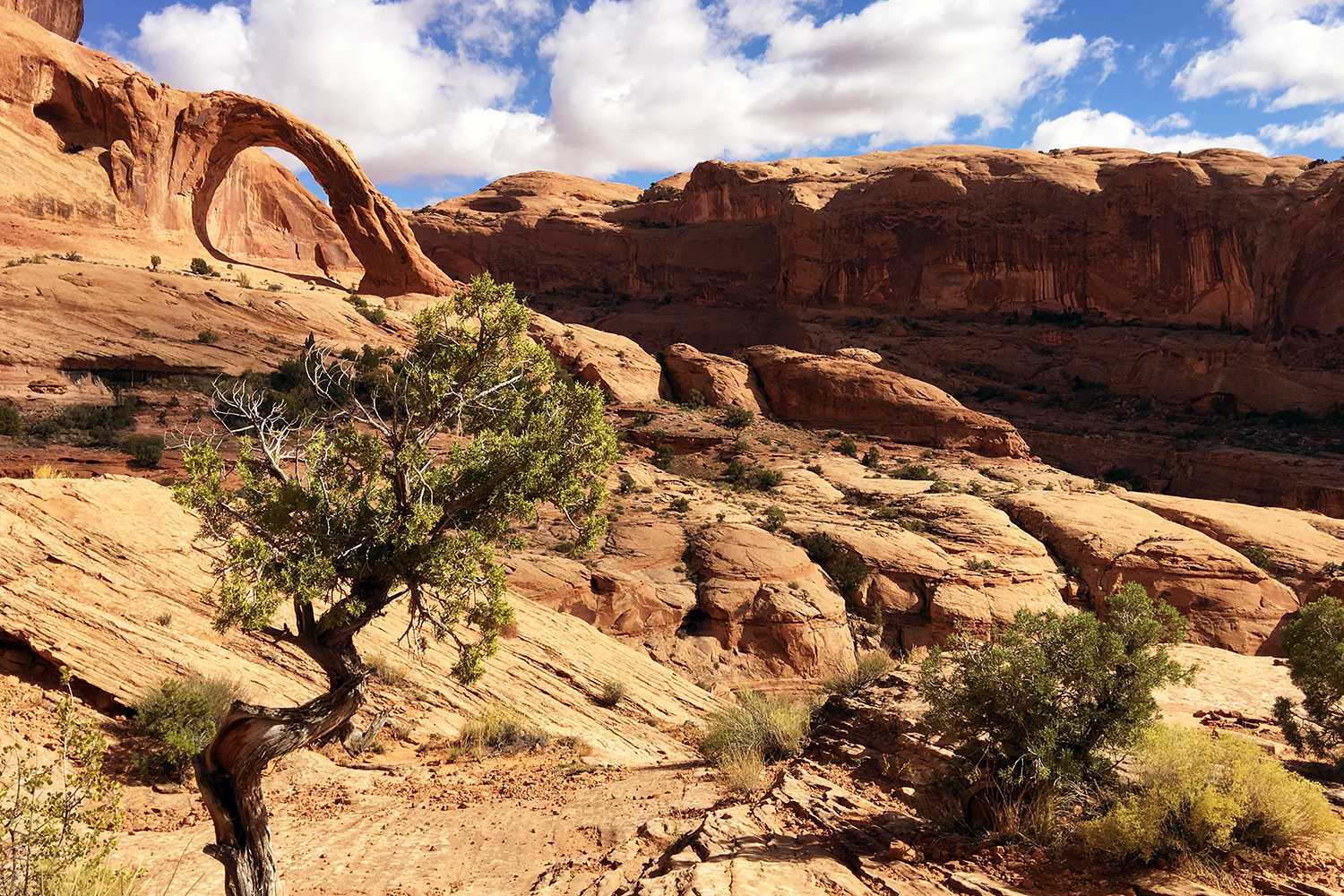
Moab has some amazing BLM land — AKA, free camping. So get out there and enjoy the endlessly-carved canyons and offroading dirt roads to explore — Gemini Bridges, Lavender Canyon, and Beef Basin Road have incredible scenery. If you’re looking to stay a bit closer to town, check out the BLM campgrounds along the beautiful Colorado River on Highway 279, Kane Creek Road, and Highway 128. There are first-rate hiking trails, petroglyphs, and geological features along these routes, like the 1500 foot Fisher Towers and trail to Corona Arch.
Sailing through town between campsites and wanders? Refuel at Quesadilla Mobilla for a sublime quesadilla lunch experience with the New Mexico Identity Crisis (green chile, chicken, cheddar-jack cheese, sauteed artichoke hearts, fresh spinach, and black olives). If you have a bit more time, enjoy the La Sal Mountains Scenic Loop and rainbow trout fishing while camping at Warner Lake. After putting in the trail miles, head to Milt’s Stop & Eat for an epic milkshake and some hand-cut fries.
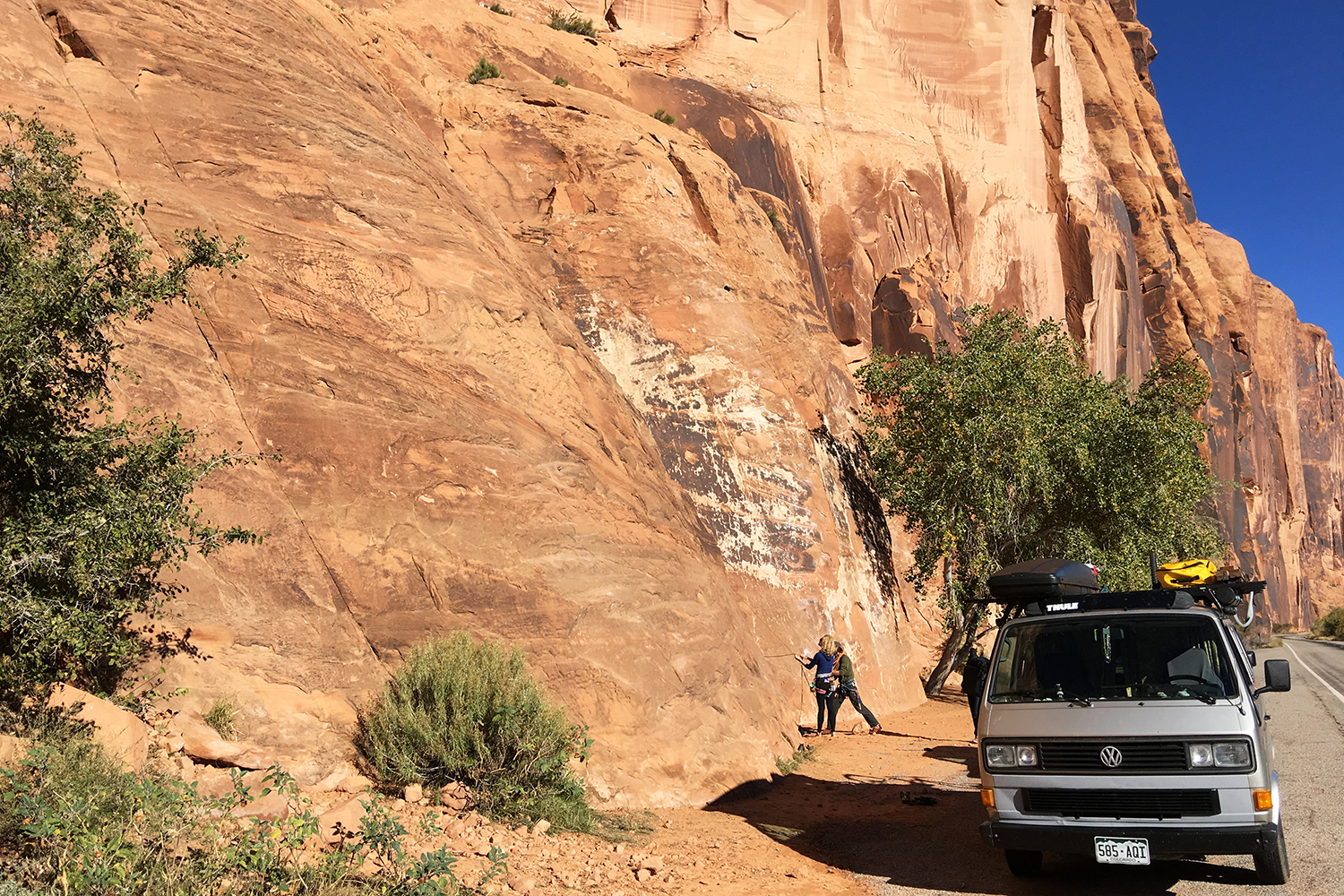
An athlete’s paradise, Moab has something for everyone. Learn rock climbing on the famed Wall Street along Highway 279 (AKA Potash Road) and Ice Cream Parlor on Kane Creek Road. More advanced climbers flock to Indian Creek, south of Moab, near the Needles in Canyonlands. Bouldering opportunities can be found on River Road while the options for slot canyon canyoneering in the area are endless.
After visiting Moab’s two must-see national parks (that is, Arches and Canyonlands), get everyone’s adrenaline levels up on a multi-day whitewater rafting trip down the Colorado River with Moab Adventure Center. Or really get hearts racing and check out the eminent landscape from a different point of view with Skydive Moab.
For a more relaxing day, rent stand-up paddleboards (SUP) or inflatable kayaks from Canyon Voyages Adventure Co. and pack a picnic to stop and take in the vast canyon walls encompassing the river. Spend the afternoon cooling off at Mill Creek, a refreshing swimming hole with shallow pools and rock “water slides,” beloved by the locals. End a thrilling day with tapas and drinks at the Twisted Sistas Cafe’s rooftop patio before retiring to the clubhouse and your cabins at the minimalist and environmentally-friendly ACT Campground.
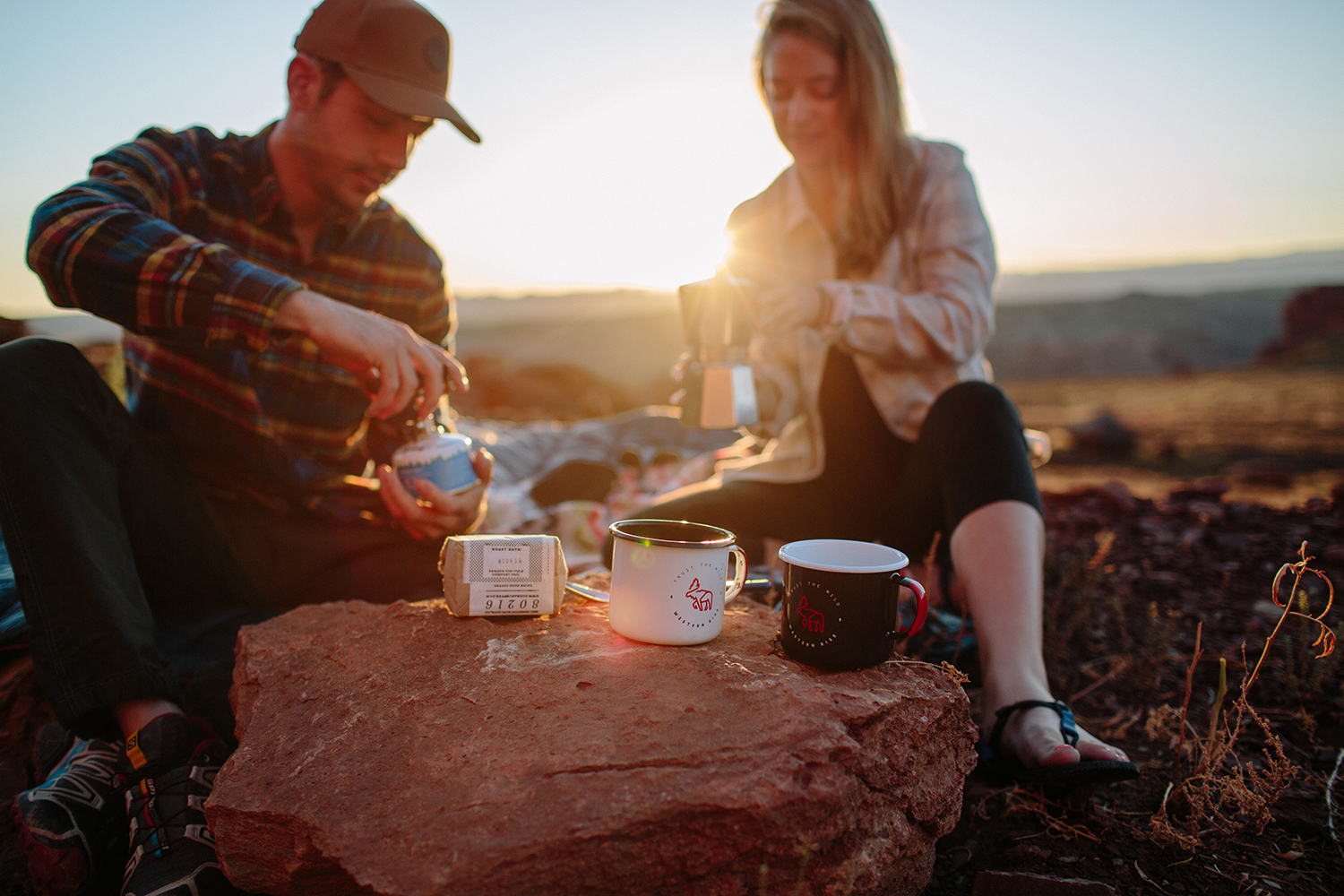
This one's simple: take the backroads. And if you don’t have an off-roading vehicle, rent one from Canyonlands Jeep. Then get up early and enjoy your java in the solitude of Moab’s quiet canyons — just you, your honey, and the spectacular sunrise. (Or visit Mesa Arch for another heart-stirring sunrise. You’re bound to share the moment with a handful of photographers, but it's nonetheless outstanding.)
Later, discover the most peaceful spots in Arches National Park with a Ranger-led tour through the Fiery Furnace. After a morning on foot, follow John Wayne’s tracks and horseback ride through the red rock valleys of western classics. Stop for a sip of Outlaw Red at the award-winning Castle Creek Winery, then fall for the silence of the desert as you wander the rim trails, watching the sun slowly set into the canyon, before heading inside to your Deadhorse State Park yurt and cozy fireplace. [H]
Amanda Ciesielczyk is a writer and co-founder at BoldBrew. Based in Colorado's San Juans, she is fond of camping at high country lakes, Wolf Creek powder days, and her heeler pup, Reins.
For the third year, we’re profiling five of the most exciting new restaurants below the Mason-Dixon line—one per day, in the order that they opened.
Sam Jones BBQ, Winterville, North Carolina Opened November 2015
Why can’t you find good barbecue just anywhere? There isn’t a lot of money in it. It takes all night to cook a hog, and diners still won’t pay much more for a tray of pork than they would for a fast food burger. “I tell people that cooking whole-hog barbecue over wood is financially irresponsible,” says Sam Jones, the third-generation heir to the legendary Skylight Inn in nearby Ayden. And yet, he is inspiring hope in smokehouses everywhere with his second restaurant.
(Photographs by Angie Mosier)
Jones still runs the pits at his bare-bones family business, where the four menu options are pork, chicken, slaw, and dense, chewy cornbread, made from a century-old recipe. “Skylight is such an original that I didn’t think it made sense to screw with it,” he says. But just ten minutes away, he now serves everything from loaded baked potatoes to spare ribs. “I didn’t know what folks around here would think about that,” he says. “We’re picky people.”
The place has been packed since it opened last month, from the drive-through line to the marble-topped bar. Because despite those modern touches, a raging fire still burns day and night in the smokehouse off to the side. Making barbecue the old-fashioned way is hot, time-consuming work, but it’s worth the trouble for the pit master and his family.
From left: Sam Jones chops barbecue; Eric Beaton works the pits.
“We went to extreme lengths to convince the state to let us build a smokehouse,” he says. “Me cooking by any other means than my family has for all these years would be like—‘In other news, Billy Graham starts a satanic church and Sam Jones is cooking with gas.’ My family, historically, has always thought very small. This is already a big step for us.”
Sharing a street with a handful of fast food giants, it’s also a vision of a delicious future.
Don’t miss: The spare ribs, sweet, meaty baked beans, or chopped pork.
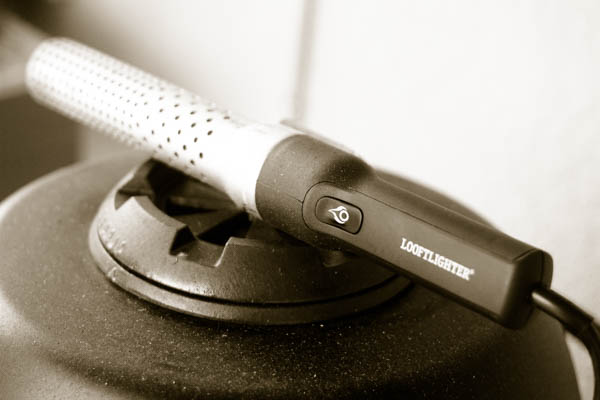
I have a lot of grilling gadgets, so for me to say that the Looftlighter electric charcoal lighter is my favorite gadget purchase in the last 2 years is saying something. Go back any further than that and I would have to count my Big Steel Keg in what would be a close race for favs. Any who, the Looftlighter has completely changed my weeknight grilling habits. I’ll walk you through the details on how this gadget has changed my grilling in this in-depth Looftlighter review.
How I Started Charcoal Before the Looftlighter
Way back 2 years ago, I used to rotate through several methods to start my charcoal grill. I went through a chimney phase, until the infamous toe burning of 2011 (please don’t be an idiot like me, wear close-toed shoes when handling white hot coals). With or without the charcoal chimney starter, I always used some sort of starter cube or block to start the charcoal. Invariably I would realize I was out of cubes right when I’m ready to grill, so I also used the newspaper and cooking oil technique. All of those alternative methods rely on supplies I may or may not have on hand. Even with the supplies, the charcoal would take around 25 – 30 minutes to get ready for high temp grilling like when grilling a steak.
Starting Charcoal with the Looftlighter
My charcoal grilling life changed when the Looftlighter arrived from Amazon. I prefer charcoal to gas, but a lot of times I would grill on my gas grill on weeknights out of convenience. Now with the Looftlighter, I don’t need anything but an electrical outlet to get my charcoal going. For high temp grilling, I will use the Looftlighter to start the charcoal from two opposite ends. This technique usually has my charcoal grill ready to cook in the time it takes me to season the protein I’m grilling. For smoking and lower temp grilling sessions, I just start the charcoal pile right in the middle.
How the Looftlighter Works
This part is easy and fun (for border line pyromaniacs like me). Simply plug in the Looftlighter, press the end into the charcoal pile and hold until you get a nice glowing red coal.
Once you have started that first coal, pull the Looftlighter back about 2 inches and allow the fan to create what my kids call the flamethrower effect to get the rest of the coals going. I continue to move the Looftlighter to blow the fan in several directions, spreading the lit coals to a larger area.
So as you can tell, I’m pretty giddy about this little flame-producing toy, but are there any “cons”? I’ve honestly only been able to come up with one, the fact that it has to be plugged in. Having said that, it is a pretty obvious need for an “electric” device. If there were some way to make it battery powered, with enough juice to get through a few lightings, it would be much more useful when tailgating and camping. It is still a small detail to me though since my vehicle has a power outlet.
Find this Looftlighter review helpful? Support us by buying one through the Amazon link below and let us know how it works for you. We appreciate the support!
I’ve used this tool for more than 10 years. (I had to replace my lost original.)
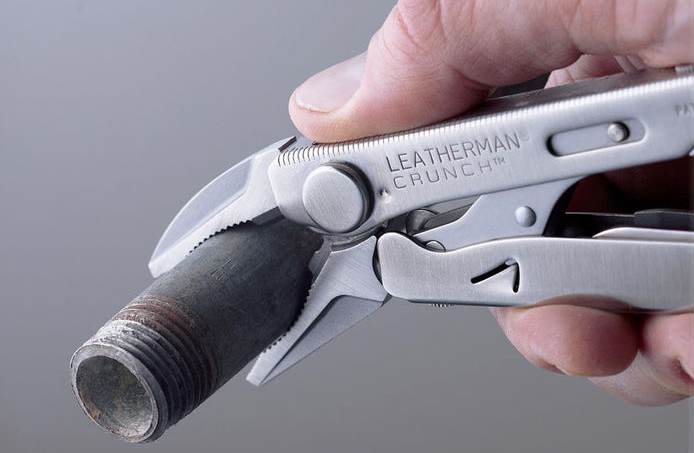
This particular Leatherman multitool is excellent in every regard, including a knife, file, screwdriver set and, most importantly, locking “vise-grip”-style pliers. The pliers have exceptional leverage and power, and are slim, so not only does it function as a hand-held vise whenever necessary, but it enables gripping/removal of broken screws, nails, stripped nuts and bolts, etc, etc. (It’s geometry is in between a standard and a needle-nose vice grip, but better than either.) You can even grip a standard saber-saw blade with it to function as a tiny but capable saw! Of the hundreds of tools I own, this is the number one to have on any remote job, as it saves the day/job over and over!
-- Jim Buchanan
LEATHERMAN, Crunch Multitool with Folding Locking Pliers and Pin Vise, Stainless Steel with Nylon Sheath
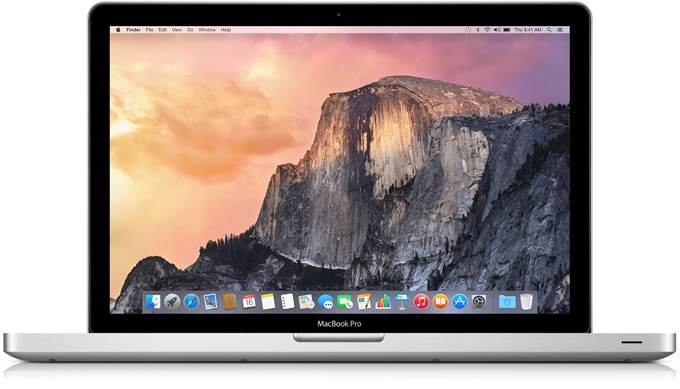
Over the years I’ve amassed a collection of tools ranging from mildly geeky to mega-geeky to downright useless for all but a few humans. I find most of them invaluable. When I use a computer without them, it feels like I’m computing with oven mitts on. You may not know it, but you, too, could be oven mitt computing.
Some of these tools pull back the curtain, reveal a little bit of the Oz behind the opaque facade of OS X. Others just make mundane tasks simpler. And yet others make you and your computer more secure.
We’ll start simple and get more geeky down the stack.
Morally contentious in that it can block ads, but the moral grayness of the very ads it blocks and their tracking software is equally contentious. Can double your browsing speed by blocking superfluous external scripts. This browser plug in has granular control so that you can whitelist the ads for sites you love and want to support. (Personally, though, I find it much simpler and more satisfying to subscribe to the publications I return to again and again.) An invaluable tool. Especially so when working in emergent economies where every megabyte of bandwidth counts. Download here.
Ghostery is not available for iOS, but I find 1Blocker is a competent analog. Again, necessary in places where bandwidth is at a premium and your iOS device is your main computer.
At a time where every site seems to be hacked with tick-tock regularity, I can’t imagine using the same password for more than one login. 1Password auto-generates long, gordian, unique passwords for every website on which you have an account. It let’s you sync — via an encrypted password file — between your mobile and desktop computers.
1Password then allows for one-tap login (or choice of login if you have multiple for a single site) on desktop and even integrates with Mobile Safari on iOS. It makes you faster and more secure.
People may further furrow their brow and exclaim: But if someone steals your 1Password file they’ll have all your logins! Yes, if you use a weak master password for 1Password, that might be a problem. But think of it like this: If someone is trying to hack into your personal computer, you’ve probably got more problems than just passwords. When big sites are breached, the value return for the time invested on the part of hackers is massive — millions of logins.
Now, when I hear of a site hacked on which I’m a member, I shrug, have 1Password generate a new password for that login and don’t think too much more about it. Download here.
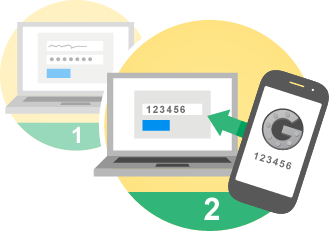
As a supplementary note to 1Password: It’s smart to have 2-factor authentication enabled on super-high-value logins like your Gmail account. This way, even if a malicious actor gets your account information, they will still need physical access to your smartphone to fully authenticate and log in.
I used to be a MenuMeters guy. For years it was the first app I installed on a new install of OS X. But it stopped working with El Capitan and it doesn’t look like it’s going to be fixed. So with a sigh, I switched to iStat Menus. It’s good, if slightly more complicated and a bit heavier feeling than MenuMeters. I cannot live without it. Let me tell you why:
I enable only two thing: the CPU Meter and the Network Throughput. These are the tachometers for your computer and network; they make visible the otherwise unanswered questions of: How hard is my computer working? Is my network connection OK?
Network Throughput lets you see that — oops — you’re connected to your router’s 2.5ghz network, not 5ghz network because you see you’re maxing out at 6MB/s. It let’s you instantly check the quality of a tethered 3G connection in the rice fields of Myanmar. It shows you that — wow — Starbucks WiFi in Japan is faster than most home WiFi in the US. It allows you to begin to connect the feeling of a network — the feeling of the speed of a website — with the actual throughput. I’ve found this to be weirdly invaluable. And of all the little tools I use with my computers, not having visible and real-time access to this information feels like the most oven mitty of all.
The value of the CPU meter is obvious: you immediately know when some dunderhead process is running wild in the background.
Ah, Flux. Is there a more loved menu bar tool in the world? I think not.
Flux changes the temperature of your screen to match the sun. When the sun rises, the screen shifts “normal” (blueish). When the sun sets, your screen gets warm, like an incandescent bulb (less blue).
It doesn’t sound like much but with millions of users around the world it’s hard to dismiss. And after using Flux for a few days, if it accidentally gets turned off at night, you’ll be cowering at just how harsh the light of your screen was before.
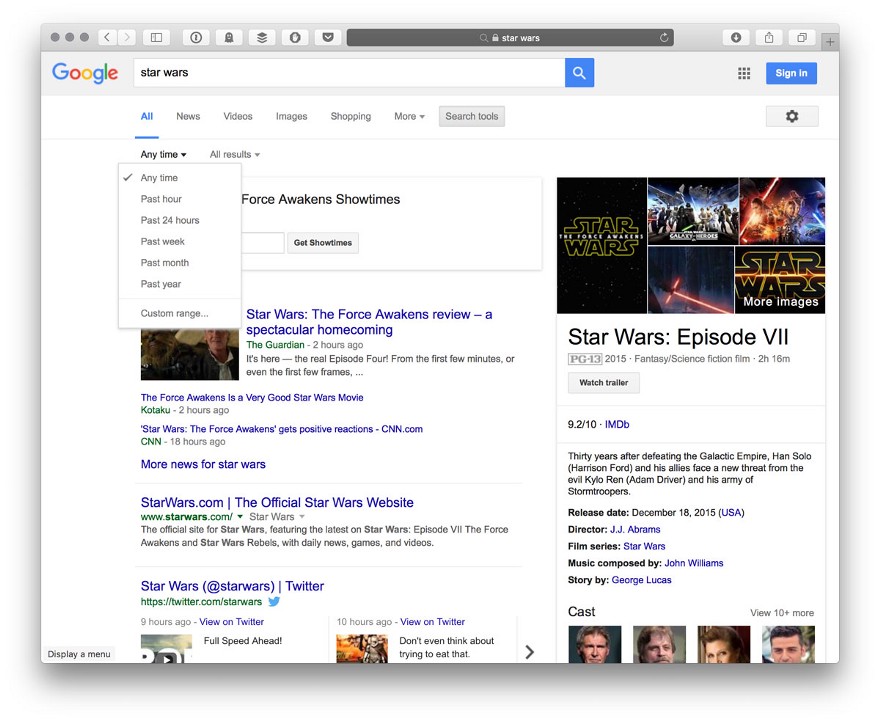
Do you use Google? Do you sometimes wish you could limit results to the last week? Month? Well, you can. In search results click “Search Tools” and then “By Time.” Why Google buries such a useful function is a mystery that one can only assume explained by copious A/B testing and little human / designer intervention. And that those working on Google’s search interface love oven mitts.
For example, you may be obsessively searching for only the latest Star Wars news. In order to filter out anything about the old movies, you can set your time constraint to the last month.
Take off those reprobate oven mitts! With an icon like that, you know this is going to be Deep Geek.
For those maximally OCD among us, Etre is the perfect tool to see precisely what kind of hidden refuse is installed on your OS X machine. If you’ve ever wondered about a rogue process, a strange hit on your battery life, the phantom running of laptop fans when you’re not doing anything worthy of their cooling, then EtreCheck might help you track down the random kernel extension or startup item that is causing the pain.
If you do find any good-for-nothing bums in EtreCheck, AppZapper is one way to snuff them out. It’s an embarrassingly simple application that helps you delete other applications while removing all of its other residual gunk (library files, extensions, startup items, etc).
It also lets you sort through your apps by time last used and size. Now you can see the biggest apps you haven’t opened in — for example — the last year (an old copy of Lightroom, iMovie, etc.) And delete them, freeing up, potentially, dozens of gigabytes of wasted space.
DaisyDisk is a near ideal single-serving app. It scans your HD and shows you what’s eating all your space. It’s the perfect I’m-on-an-airplane-and-sick-of-answering-offline-email tool. It’s an easy way to suddenly notice that your seven iPhone backups for phones you don’t own anymore are eating 100GB of space. Or that Google Chrome’s cache has ballooned to 5GB. Or that your downloads folder is now 25GB of random stuff you’ve accrued over the years. Delete. Compute boldly.
You can use dedicated software to do this, or just use OS X’s built in tool: System Prefs > Keyboard > Text. It allows you to map oft-used but annoying-to-type things to simple shortcuts. For example, I have {cf} convert to ( ͡° ͜ʖ ͡°) or {tf} to (╯°□°)╯︵ ┻━┻
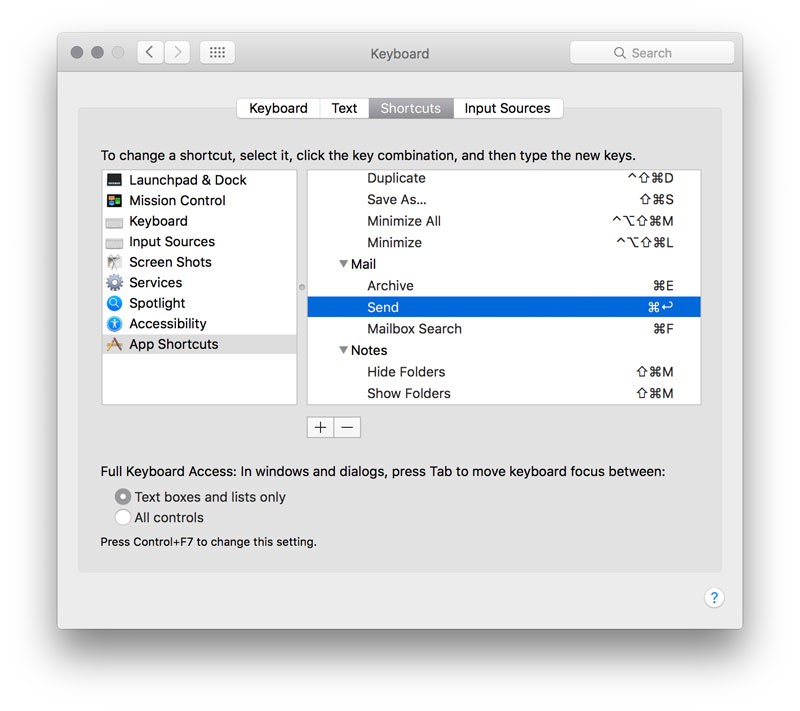
While you’re in there, if you click on “Shortcuts” you can also remap menu shortcuts. For example, I wanted Mail.app to feel a little more like Gmail so I remapped CMD-E to Archive, I also made CMD-↩ map to Send, and switched CMD-F from Forward to Search Mailboxes (Find). You can remap any shortcut to any uniquely named command in the menubar on an app-by-app basis. Weirdly handy.
Useful mainly for designers in constant need of Lorem Ipsum text, but still worth mentioning. Little Ipsum sits in your menu bar, let’s you produce one sentence, paragraph, or page of Lorem Ipsum, copied to your buffer, ready to be pasted into whatever brilliant design document you’re drafting. Could be hacked through Keyboard Shortcut Mapping, but the randomly generated latin or Little Ipsum is a nice detail (and design is nothing if not details).
How many times a day do you eject external hard drives from your laptop? Is there a more cumbersome process? Click finder > New Window (if one isn’t already open) > scroll to bottom of sidebar > click smallest {x}.
Unacceptable! Our solution: Use an apple script that you stick in your dock. One (big, fat) click to eject all external disks. Download here.
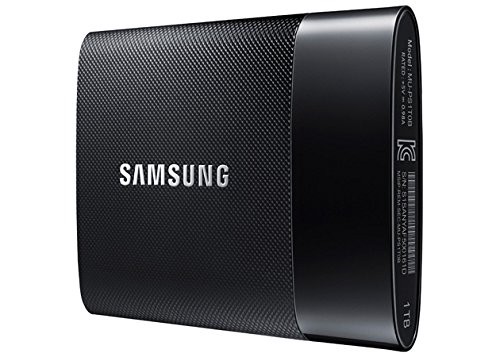
This is a little bonus tool — hardware, not software.
Modern stress is definitely modulated by battery percentages and free disk space, but carrying an external HD can feel cumbersome, gangly. Thankfully, Samsung has produced a nearly weightless, up-to 1TB external SSD that is as a close to hardware magic as anything I’ve seen. It’s the size of a business card. It’s probably faster than your internal SSD. Comes with the cutest, flat USB3 cable. And obviates the need to worry about having extra storage on you at all times. A more perfect on-the-go photo and media backup I know not. Grab one on Amazon.
“I will tell you when Russian companies are for sure going to decrease production — when oil costs $0.” – Russian Deputy Energy Minister Kirill Molodtsov
So the Saudis turn on the oil spigots – some say to take out US frackers, others say to take out Russia. The latter is probably the biggest factor in the current flood of crude.
But something interesting happened. The Russians turned on the spigots too forcing the price of oil down even further. This was not anticipated.
How long the Russians can keep it up is a seriously important question.
(From Zerohedge)
Indeed, one could plausibly argue that one of the reasons the Saudis moved to artificially suppress prices last year was to sqeeze Putin and ultimately force The Kremlin to give up its support for Assad. As The New York Times put it, a dramatic decline in crude prices has certain “ancillary diplomatic benefits.”
Unfortunately for Riyadh, the strategy hasn’t worked. In fact, it’s backfired in more ways than one.
First, Saudi Arabia is facing a fiscal crisis as Riyadh’s budget deficit balloons to 20% of GDP, forcing the kingdom to tap the debt market in order to offset the SAMA burn.
Second, Putin not only refused to give up his support for the government in Damascus, he actually doubled down by sending the Russian air force to Latakia. Meanwhile, Russia continued to pump even more oil, and as Bloomberg reports, Moscow is now producing at “the fastest pace since the collapse of the Soviet Union.”
What we find most interesting of all is that the media is not covering the special interest tax breaks. On the fiscal cliff bill a few years ago, they weren’t covered by the mainstream media, but you could find them by digging. Well, this time we are still digging. Did NASCAR get its tax break made permanent. We are pretty sure it did. Did Nancy Pelosi’s favorite company, StarKist Tuna? Did Goldman Sachs, Citigrgroup, and General Electric get their usual breaks? How much did all these tax give aways to special interest add up to? In the case of the fiscal cliff bill, they added up to as much or even more than all the Obama tax increases on the “rich” included in that bill. In one stroke he raised taxes on some and gave it back to key financial supporters. Why is it so hard to get this kind of information on this bill? Perhaps our readers can help us find it. One can’t just read a bill like this. It is written in a language designed precisely to obscure answering these questions.
Below is some of the reporting others have done on specific pieces in the bill. (Now law.) It’s not comprehensive, but one gets the picture.
It’s an interesting debate, although ‘debate’ is often not a good word to use when one person has rely on a measurable fraction of the Internet being your cheering section, and the other person has a similar soft power involving the American government*. To very briefly sum up: Apple CEO Tim Cook doesn’t want to give the American government back-door access to Apple products, because then he’d be maybe giving everybody else back-door access to Apple products, too**. Sen. Tom Cotton (R-AR) 82%‘s response is pretty much equally forthright: terrorists can read, so they know that Apple has government-proof encryption, so they’re going to use those products to plan out more attacks.
The thing here is, both men have a point. ‘Back doors’ sound all nice and romantic in a movie, but in real life they’re a security nightmare for companies and sometimes a legal one as well. There are indeed a lot of horrible people out there who will illicitly use what’s essentially a deliberate hole to mess with other people’s stuff, data, and credit card numbers. And, truth be told; the federal government does not exactly currently fill me with confidence that they’re going to play nice with this access, either.
But… terrorists use encryption. The shooter at that failed terrorist operation at Garland, Texas last summer used encryption that we still haven’t cracked in some of his messages – and it would be very helpful if we cracked that encryption, because then we could maybe get our hands on the people that want to shoot rooms full of Americans. The Paris strikes raise that point further… and while Tim Cook may think that we can have both privacy and national security (one hopes), there’s also the stubborn little point that not everybody is going to think that the occasional successful terrorist operation is simply the price you pay for keeping everybody’s encryption secure.
And one of those people is Sen. Tom Cotton (R-AR) 82%, who is by the way a Harvard Law School graduate and combat veteran (Iraq and Afghanistan) who did counterinsurgency work while deployed during his second tour***. So don’t assume that the Senator can’t talk about this effectively. Or that he’s got a sense of humor about it, either.
Moe Lane
*Senators can ruin your whole day. Particularly in the last year of a Presidential administration; nobody in the bureaucracy quite knows what the score is, so better safe than sorry.
**He also probably doesn’t want a Presidential administration – especially the next administration – in particular to have that kind of access.
The end of the year means it’s a good time to look back to see how far you’ve come, and social aggregator ThinkUp is, as they always do , collecting insights in December from the past year to see what you’ve said that’s really resonated on social media.
AM General has named a new chief executive, as longtime CEO Charlie Hall steps down and defense vehicle manufacturing industry veteran Andy Hove moves in to take his place.
As we have said before, there is no group who has gotten a more rotten deal from the US government than the American Indians. And that deal continues to this day. Many American Indians live in the last pockets of the 3rd world in the United States. Under the direct watch of Washington bureaucrats of course. (Who are often paid nicely.)
(From Red State)
Upfront I will stipulate that the treatment of the American Indian by the federal government has been nothing less than an egregious nightmare. It is a case study in progressive paternalism that has enriched a small coterie of privileged contractors, provided a bevy of bureaucrats with job security and self-importance, and reduced the American Indian population still living on reservations to a dystopic and nightmarish existence.
Ground Zero of that progressive utopia is the Office of the Assistant Secretary for Indian Affairs, a federal bureaucracy that notionally looks out for the best interests of the American Indian but in reality is equal parts corruption, incompetence, and a racial spoils system.
Feature: Many key mementos of The Possum, including the jacket cut off of him after he crashed his car while drunk, and a bag of his short-lived George Jones Cat Food. ...
The seven years of the President Barack Obama Administration have provided us with two diametrically opposite things. The government time and again failing utterly in just about everything it tries to do – economic recovery, job creation, health care, defense of our borders and our nation, budget stewardship,…. Meanwhile, the Administration and its Democrat Party keep usurping and pushing to usurp as much of the private sector as possible – to add it all to the government’s (ir)responsibility portfolio.
Which is a whiplash-inducing denial of Reality – and a recipe for continued, accelerated ruin. The private sector is where problems are solved. Government is where they are exponentially expanded – and whole new ones are created.
So as new problems arise – as they always will – let us please allow the private sector to work them out. Do NOT allow the government to “help” – as the late, extraordinarily great Ronald Reagan duly noted:
The nine most terrifying words in the English language are “I’m from the government – and I’m here to help.”
There is possibly a potential problem with a new cell phone/Wi-Fi technology – known as LTE-U. Without getting too thoroughly buried in the weeds, we cite Wikipedia:
LTE-U would allow cellphone carriers to boost coverage in their cellular networks, by using the unlicensed 5 GHz band already populated by Wi-Fi devices. T-Mobile and Verizon Wireless have indicated early interest in deploying such a system as soon as 2016.
While cell providers ordinarily rely on the radio spectrum to which they have exclusive licenses, LTE-U would share space with Wi-Fi equipment already inhabiting that band – smartphones, laptops and tablets connecting to home broadband networks, free hotspots provided by businesses, and so on.
LTE-U is intended to let cell networks boost data speeds over short distances, without requiring the user to login to a separate Wi-Fi network as they normally would.
As indicated, some major private sector entities are working to make LTE-U a reality. Some other major private sector entities are expressing some concern.
Google sent the Federal Communications Commission of the United States a 25-page protest….
The Wi-Fi Alliance and National Cable & Telecommunications Association (NCTA) also voiced opposition to LTE-U approval before more testing can be done, citing concerns that it would severely degrade performance of other Wi-Fi devices.
These major players can work out any issues that exist – together, without any government involvement whatsoever. And they absolutely should – because Sauron’s Eye is beginning to fix upon them.
ICYMI: HOUSE PANEL CONVENES SECOND LTE-U MEETING — The House Energy and Commerce Committee hosted Wi-Fi advocates and wireless and cable industry representatives for a second time Thursday in an invite-only meeting to hash out their differences over LTE-U technology, which would allow wireless carriers to offload data onto unlicensed airwaves.
Lawmakers have generally stayed out of the fight, which pits wireless carriers looking to expand network capacity against cable and tech companies that want to keep carriers from swamping Wi-Fi networks. The groups have agreed to test technical standards to ensure wireless and Wi-Fi networks can coexist peacefully, but there’s tension about who should do the testing and what it should try to prove.
“Lawmakers have generally stayed out of the fight” – music to our ears. As well they should. And as long as Congress’ majority is Republican – said song stylings will hopefully continue. But Congress is by no means the biggest potential problem.
Behold the Obama Administration’s Federal Communications Commission (FCC). Which has zero problem unilaterally grabbing power – bereft of any Congressional authorization whatsoever – to “solve” all sorts of private sector “problems” that don’t actually exist. As but one of many, many examples, see: Network Neutrality.
The FCC does in fact have a job to do in this area. The federal government holds roughly 60% of useable wireless spectrum – much of it really high-value stuff. Only the government has little idea where it is all located.
The FCC was years ago charged with mapping it – so we could then begin selling most of it to the private sector. Shocker – the FCC hasn’t yet done it. Because they have been too busy doing so many things they have no business doing. Were the FCC (and government everywhere) to do their actual jobs – many less private sector problems would arise.
Every one of these private sector entities know that they don’t want the FCC – or any other part of government – declaring for themselves a role in this LTE-U evolutionary process.
Every one of the entities knows the way to preempt that – is to solve any problem that exists. As quickly and cleanly as possible. Together – and all by themselves.
Government “help”- is the absolute last thing they need.



































 It’s an interesting debate, although ‘debate’ is often not a good word to use when one person has rely on a measurable fraction of the Internet being your cheering section, and the other person has a similar soft power involving the American government*. To very briefly sum up: Apple CEO Tim Cook doesn’t want to give the American government back-door access to Apple products, because then he’d be maybe giving everybody else back-door access to Apple products, too**. Sen. Tom Cotton (R-AR) 82%‘s response is pretty much equally forthright: terrorists can read, so they know that Apple has government-proof encryption, so they’re going to use those products to plan out more attacks.


 AM General has named a new chief executive, as longtime CEO Charlie Hall steps down and defense vehicle manufacturing industry veteran Andy Hove moves in to take his place.