Shared posts

23 Oct 16:23

Fall Bulbs for Spring Blooms

by Dacey Orr

As the leaves begin to fall and the spartina grass turns golden, it’s fun to daydream about what’s to come in the garden next spring. Make these musings a reality by stocking up on these compelling varieties of tulip, daffodil, and allium bulbs to plant now (or refrigerate). 


Tulips

While the traditional shape of tulips is classic for a reason, lately we’ve been drawn to the peony-esque varieties below.


Wedding Gift 


These beautiful blooms were created for the wedding of Kate Middleton and Prince William. Not only are they large and full, but they’re incredibly fragrant, too. $7 for ten bulbs; bluestoneperennials.com


Danceline 

It’s easy to see why tulip fever took over the world when a specimen appeared with distinctive variegated markings like the raspberry streaks on these aromatic flowers. $12 for seven bulbs; shopterrain.com


Snow Crystal 

Consider these beauties the couture ball gowns of your garden. $12 for ten bulbs; dutchgrown.com


Daffodils

So many iterations of the fragrant, gorgeous daffodil exist that thinking beyond the usual yellow has never been so rewarding.


Chromacolor 

Bill Pannill of Martinsville, Virginia, hybridized this sweet-smelling variety decades ago, and now it can now be found in royal and residential gardens around the world. $7 for five bulbs; brentandbeckybulbs.com


All-White 

Blossoms of different sizes and textures make this monochromatic mix a showstopper for sure. $15 for ten bulbs; edenbrothers.com


Delnashaugh 

Double blooms with a pinky-peachy center. What’s not to love? $30 for forty bulbs; brecks.com


Alliums

Planted en masse or all alone, alliums add height, architecture, and drama anywhere you plant them—especially when you’re working with one of these unusual specimens.


Silver Spring 

Bits of pink and purple help this allium variety pop. $8 per bulb; dutchgrown.com


Azureum

A soft cornflower blue—with a bit of purple, too—makes these globes a striking addition to the green of your garden. $21 for a hundred bulbs; dutchgrown.com


Mount Everest 

This particular variety looks like lace up close, but from far away, appears sculptural. $12 for two bulbs; shopterrain.com

The post Fall Bulbs for Spring Blooms appeared first on Garden & Gun.

23 Oct 16:22

Southern Ingenuity

by Jessica Giles

My friend Tom Rankin says he heard somebody call motion-activated nature-trail videos “the best thing invented in the South since the five-gallon bucket.” I like the ring of that observation. I welcome the opportunity to lead off a column with it. However, I can’t confirm that either the bucket or the video in question was, in fact, invented in the South.

Could’ve been. Waldo Semon, born in Demopolis, Alabama, invented PVC as we know it. He “brought about the age of vinyl,” said his obituary in the New York Times. He was in Akron, Ohio, though, when he brought it about. (Watch out: If you make the mistake of Googling “Waldo Sermon,” without “PVC,” you get sermons on the theme of “Where’s Waldo?”)

What would you give to have invented the five-gallon bucket? Its proportions are perfect, like the baseball diamond, and its value is universal, like the opposable thumb. You can sit and rest on a five-gallon bucket. You can carry your lunch in it and everything you really need for fishing. (I have a clipping of a baby sitting and grinning in a five-gallon bucket, over the caption “Keeping Company with the Bait.”) And you don’t have to buy a new five-gallon bucket, and be responsible for adding more plastic to the earth, because your bucket can come with driveway sealant or kitty litter.

I’ll tell you something that needs inventing. Why the hell do I have to devote half my life to keeping my phone charged? If it’s so smart, why can’t it charge itself? If it can count my steps, why can’t it wind itself, like my thirty-dollar Timex watch?

And why can’t we have “Organic” stickers that are organic? Or anyway, biodegradable. I don’t know about you, but if I’m buying organic groceries, I’m wanting to compost the skins and the shells and the hulls. Yet every time I dig around in my rich homemade loam, I turn up ten or fifteen immortal “Organic” stickers. After you frugally peel or scratch any persistent organic matter off these stickers, what are you going to do with them? They’re too small to dispose of, somehow. They sort of halfway stick to your fingernail. Try to roll them into a ball, as one might a booger, and they just kind of splinter.

I don’t question the necessity of “Organic” stickers. They reassure one’s wife that one is not trying to slip impure produce into the home. But must “Organic” stickers last forever? A nice green lime nearly covered by stickers that a worm won’t eat is like a Popsicle with promotional hot spots.

People don’t want these stickers. At the market today, I noticed a lot of them stuck not on the fruits and vegetables, but on the sides of the bins and shelves. Take the stickers off an organic banana, and it looks just like a nonorganic one, which is cheaper. That wouldn’t even cross my mind. But what one could do: One could pick up a few of those stickers, and buy nonorganic, and then, on the way home…

But that’s not even a good idea, probably, much less an invention. There’s a new garden store in town. Must be something newfangled there, right?

Okay: Roll-a-Bob, “the ultimate solution to unrolling barbed wire.” Well, I do enjoy pronouncing barbed wire, as “bobwar,” something I picked up from authentic Texan ranch workers, but I don’t need to be unrolling any bobwar. Because I don’t need any bobwar.

How about berries-and-cream-flavored treats for miniature pigs? Don’t have any miniature pigs. A solar-powered sonic-spike mole repeller? Don’t need it: do have a cat.

Wooo, here’s something. Somebody has gone and improved the splitting wedge! Look at that thing! Wood Grenade, it’s called. Instead of just being a simple slab, it has four facets to it, two flat and two edgy, tapering to a single point. Tap that sucker into the middle of a big chunk of log and whang it with the sledgehammer, and BOOM! Firewood a-flying!

Trouble is, now that we’re in New Orleans all winter, we don’t run through more than about five sticks of firewood a year. I can’t see sinking $18.50 into a piece of metal that, to use it, I’d have to go out and find just the right logs, ones that are big around. And then I’d have to saw them up. And then I’d have to haul them somewhere that’s cold. A good invention is one that works for me, not me work for it. I guess that’s why I’ve never come up with one. 

The post Southern Ingenuity appeared first on Garden & Gun.

23 Oct 16:16

Scott Avett’s Other Art

by Dacey Orr

“We all lean toward different languages,” says Scott Avett, who is probably best-known for his fluency in music. Ten studio albums and rowdy live shows have rightly made the Avett Brothers a household name for Americana fans. But as his band readied their latest album Closer Than Together, released earlier this month, Avett was also preparing to share work in another language: oil painting. He earned a BFA from East Carolina University before becoming an internationally-known musician, and from now until January 19, his work will be on display at the North Carolina Museum of Art as Scott Avett: I N V I S I B L E. The pieces in the exhibition, which includes many large-scale oil portraits, portray heartfelt individual reflections on love, loss, and family.

photo: Courtesy of the artist, © 2019 Scott Avett; Photograph: Airtype Studio

Scott Avett in his studio in 2017.

“The band is really a family in itself. There is a family of folks that put together our songs, and that camaraderie is crucial,” says Avett, whose work has graced the covers of several Avett Brothers releases. “But for me, painting is much more of a single, observational perspective. It’s me looking in on something. And it comes a little more naturally.”

Scott Avett.

Garden & Gun caught up with Scott to talk about his work as a visual artist, from doodles in high school classrooms to concepts for album covers, as well as the artistic process behind Closer Than Together. Read the interview and preview the exhibit below.


How did you get started with visual art?

Well, I was a terrible student in high school—and before that, too. [Laughs] But I always doodled, always liked to draw. It came naturally to me. So when it came time to make a decision about whether I was going to continue my education after high school, East Carolina University had an art school that seemed to get a lot of positive attention, and it was also the only university that accepted me. So with those two things, it seemed to be a no-brainer. So I went and studied art. But it wasn’t a constant journey for me. I got out of the art program after the first year, and ended up back in it through the guidance of professors who actually said, ‘You were born to do this. You have to get this degree. You have to follow through.’ I started oil painting, and right off the bat, it was just something that made sense. That would’ve been 1999-2000. And that was it. I painted from then on. 

photo: Courtesy of the artist, © 2019 Scott Avett; Photograph: Lydia Bittner-Baird

Scott Avett, Fatherhood, 2013, oil on canvas, 106 x 65 in.

Is there anything that you learned in your formal education that you apply as a songwriter? 

Yeah. I’m sure there’s a list of things, but one that’s really deeply integrated into everything I do is the idea of bringing work to a finishing point before stepping away from it or setting it down. Across the board, the approach to painting was to not overdevelop one part of the canvas more than another; everything was developed at the same pace. I used that in a lot of aspects of my life, definitely in songwriting. For example, I have a love-hate relationship with these voice memo things on our phones. There’s something about the glorious fragment that you can make with it. But then you put it away, and a lot of things have to line up for it to become a priority again. It really promotes more unfinished work than it does finished. But when I commit, real things get done.

photo: , Courtesy of the artist, © 2019 Scott Avett; Photograph: Lydia Bittner-Baird

Scott Avett, Jump the Boy, 2017, silkscreen and acrylic on canvas, 48 x 36 in.

You created the album cover art for Closer Than Together,  which was released earlier this month. What was the creative process like—did the art or the music come first? 

This album in particular had more versions of the cover than normal. I spent many hours testing—‘What is the concept? What is the theme? What is the summary?’—trying to identify the visual accumulation of this record. The more I worked on it, the more it was clear that the hope, the aspiration, was that we might make something that people will gather around, rather than use to cut or divide. We wanted this to be a reflection of our unity—not just a description of unity, but an example of it, in its ugliness and its goodness. So there was a lot of meshing of things, and there were a lot of ways that could have been right, but we came to this blend of Seth and Bob [Crawford, bassist] and I on our journey, this collage of us as one. 

The cover art for Closer Than Together, which was released on October 4.

Aside from portraits and faces, which appear a lot of your art, what inspires you visually? 

Certainly other artists influence me and inspire me—it’s just like anything, you see it and you say, ‘Well, I want to go do that. I want to use that color, but what do I do with that color? Can I even make that color?’ I go to museum galleries when I can. Nature is probably the most vibrant of anything. I can look at a painting, and figure out, more or less, how it went down. But I can’t explain how that sky just did that, or this tree is doing this, or this flower is doing that. I think that is the epiphany part. That closer-to-the-mystery thing that speaks to the natural beauties of childhood and of foliage and animal life.

photo: Courtesy of Betsy and Greg Blinn and the artist, © 2018 Scott Avett; Photograph: Lydia Bittner-Baird

Scott Avett, Color Wheel, 2014, linoleum block print, 45 x 43 in.

Is painting a release for you when you’re busy touring and recording?

There’s no one activity that I do that is more therapeutic than another. If I’m present, I could be on stage screaming and it could be therapeutic. It’s really a matter of just being awake to what I am and where I am, and painting is just another thing like songwriting has been—something that I believe I was born to do. I don’t know a whole lot, but I do know that on a good day, I can form shapes on a canvas. It’s one of my languages and one of the ways that I live life. 

photo: Courtesy of the artist, © 2019 Scott Avett; Photograph: Lydia Bittner-Baird

Scott Avett, Julianne in Vain, 2009, oil on canvas, 22 x 22 in. This painting also served as the cover for the Avett Brothers’ 2009 album, I and Love and You. 

The post Scott Avett’s Other Art appeared first on Garden & Gun.

23 Oct 16:12

10 Popular Wikis That Actually Work

by Dan Price
wikipedia-edits

A wiki is a community-edited website that acts as a knowledge base for a particular subject matter.

Today, there are lots of different types of wiki websites. At the top end of the scale, there’s Wikipedia. It’s the most extensive collection of encyclopedic knowledge ever collated. At the other end, there are wiki websites for niche topics such as games, celebrities, books, and almost anything else you can think of.

Here are 10 examples of wikis that are worth checking out.

1. Wikitravel

wiktravel wiki site

When you’re planning a holiday, you should give privately-owned websites like TripAdvisor a wide berth. The information on such sites can often be misleading; it’s hard to differentiate the paid promotions from the legitimate content. And that’s before you start worrying about the ongoing issue of fake reviews.

Wikitravel is a much better source of information. It’s been online since 2003 and is overseen by a team of administrators. They can roll back unwanted edits, delete pages, lock pages, and generally keep the information on the site accurate and free of spam.

2. WikiHow

wikihow wiki site

WikiHow is a popular wiki for anyone who wants to learn how to do something.

The content on offer is extremely varied. The site’s categories include topics such as Sports and Fitness, Pets and Animals, Relationships, and Philosophy and Religion.

Although anyone can contribute to the wiki website, WikiHow has strict editorial guidelines. A typical article has been edited by 23 people and reviewed by a further 16.

3. WikiBooks

wikibooks wiki site

WikiBooks makes our list of wiki sites thanks to its incredible repository of open-content textbooks, annotated texts, instructional guides, and manuals. It does not include fiction, primary research, or published texts.

The books are divided across nine primary categories: Computing, Engineering, Humanities, Languages, Mathematics, Science, Social Sciences, Standard Curricula, and Kids’ books. Each group is further subdivided for easy browsing.

You can also browse the site by a book’s completion status and by reading level.

4. Wiktionary

wikitionary wiki site

Print dictionaries can be expensive. The complete Second Edition of the Oxford English Dictionary runs to 20 volumes, weighs 140 pounds, and costs more than $500 to buy on Amazon. Even a subscription to the OED’s website costs $90 per year.

Wiktionary, therefore, is an example of a wiki that can save you money. It is a multilingual dictionary of languages, but has a definition for every word supplied in English, regardless of the source language. Today, there are more than six million words included from more than 4,000 dialects.

5. Stranger Things Wiki

stranger things wiki site

The Netflix Original, Stranger Things, has been one of the defining TV series of the last couple of years; it’s received nominations for a whole host of Emmys and Golden Globes. The third series set a new Netflix record, as 18.2 million accounts watched the entire series within four days of its release.

The Stranger Things wiki—which is part of the Fandom network of sites—is one of the best examples of a wiki about a TV series. It includes detailed information about the cast, characters, filming locations, soundtrack, and lots more. There’s also an extensive community section where fans of the show can chat and interact.

6. Wikispecies

wikispecies wiki site

Sure, we can all recognize a dog or horse. Hobbyists might even be able to identify particular types of insects, snakes, or birds. But what about a Phyllida varicosa? Or a Pelomyxa palustris? No, we thought not.

Wikispecies is to the 21st century what “On the Origin of Species” was to the 19th century. It aims to be a complete catalog of all Animalia, Plantae, fungi, bacteria, archaea, and Protista (i.e., life forms!) in the world.

There are almost 700,000 species in the wiki. So, there’s just eight million left still to write about…

7. Gamepedia

dota 2 wiki site

Gamepedia is an umbrella brand that covers hundreds of wikis about games. Some of the most popular wikis in the catalog include Wowpedia (about World of Warcraft), Dota 2 Wiki, No Man’s Sky Wiki, and Zelda Wiki.

As you’d expect, each wiki is packed with game-specific guides, plotlines, facts, trivia, in-game images, and more. Some of the wiki sites even have their own stores.

8. Wikimedia Commons

wikimedia commons wiki site

Finding media to use in your book, video, podcast, social media content, or website is not an easy undertaking. Sites like YouTube and Facebook are taking increasingly aggressive stances when it comes to removing content that breaches copyright, even if the breach was unintentional.

Wikimedia Commons is one solution. It offers more than 55 million freely usable images, sound files, and video clips. If you decide to grab the content, just make sure you accurately follow each file’s attribution requirements.

9. TV Tropes

tv tropes wiki site

TV Tropes is yet another different type of wiki website. It collates common plot themes, storylines, conventions, and devices that are found in hundreds of works. Because it is a wiki, anyone can add their own trope to the ever-growing list.

The site initially focused solely on TV shows and movies. Today, however, it also covers literature, comics, manga, video games, music, ads, and even toys.

You can browse by the type of media or type of trope. There’s also a community discussion section.

10. Baseball Reference

baseball reference wiki site

As a sport, Baseball is heavily driven by data and statistics, so it’s no surprise to learn that it provides the subject matter for the largest sports wiki on the web.

For anyone with an interest in current and historical baseball players, teams, scores, and stats, it’s a goldmine. 20,000 past and present players have profiles, and there are complete season-by-season breakdowns for every aspect of the sport’s minutiae.

You’ll even find data from the Minor, Japanese, Cuban, and Korean leagues, as well as the NCAA Division I and summer collegiate leagues.

Baseball Reference is part of the largest Sports Reference family. The group runs similar wikis for basketball, American football, soccer, and ice hockey.

Learn More About Wiki Sites

We hope our list of 10 wiki sites has provided you with an insight into the different types of wiki websites that exist. With a bit of digging, you can find one to match whatever hobbies and interests you have, no matter how niche.

If you would like to learn more about using wikis, check out our other article on how to create a wiki and our list of Wikipedia tools and alternatives.

Read the full article: 10 Popular Wikis That Actually Work

23 Oct 16:07

Why Astronomers Hate Twinkling Stars

by Paul M. Sutter, Contributor
To an astronomer, that beautiful twinkling starlight is one of the most aggravating things in the universe.
23 Oct 16:04

Behold the New York City Street Tree Map: An Interactive Map That Catalogues the 700,000 Trees Shading the Streets of New York City

by Josh Jones

It may sound odd, but one of the things I miss most about living in New York City is the ability to hop on a bus or train, or walk a few blocks from home, and end up lounging in a forest, the cacophony of traffic reduced to a dim hum, squirrels bounding around, birds twittering away above. Such urban respites are plentiful in NYC thanks to its 10,542 acres of forested land, “about half as much as the Congaree Swamp in South Carolina,” notes James Barron at The New York Times, in one of the most densely populated urban areas in the country.

“Most of the city’s forest is deep in parks”—in Central Park, of course, and also Prospect Park and Riverside, and dozens of smaller oases, and the lush Botanical Gardens in the Bronx. The city’s forests are subject to the usual pressures other wooded areas face: climate change, invasive species, etc.

They are also dependent on a well-funded Parks Department and nonprofits like the Natural Areas Conservancy for the preservation and upkeep not only of the large parks but of the trees that shade city streets in all five boroughs.

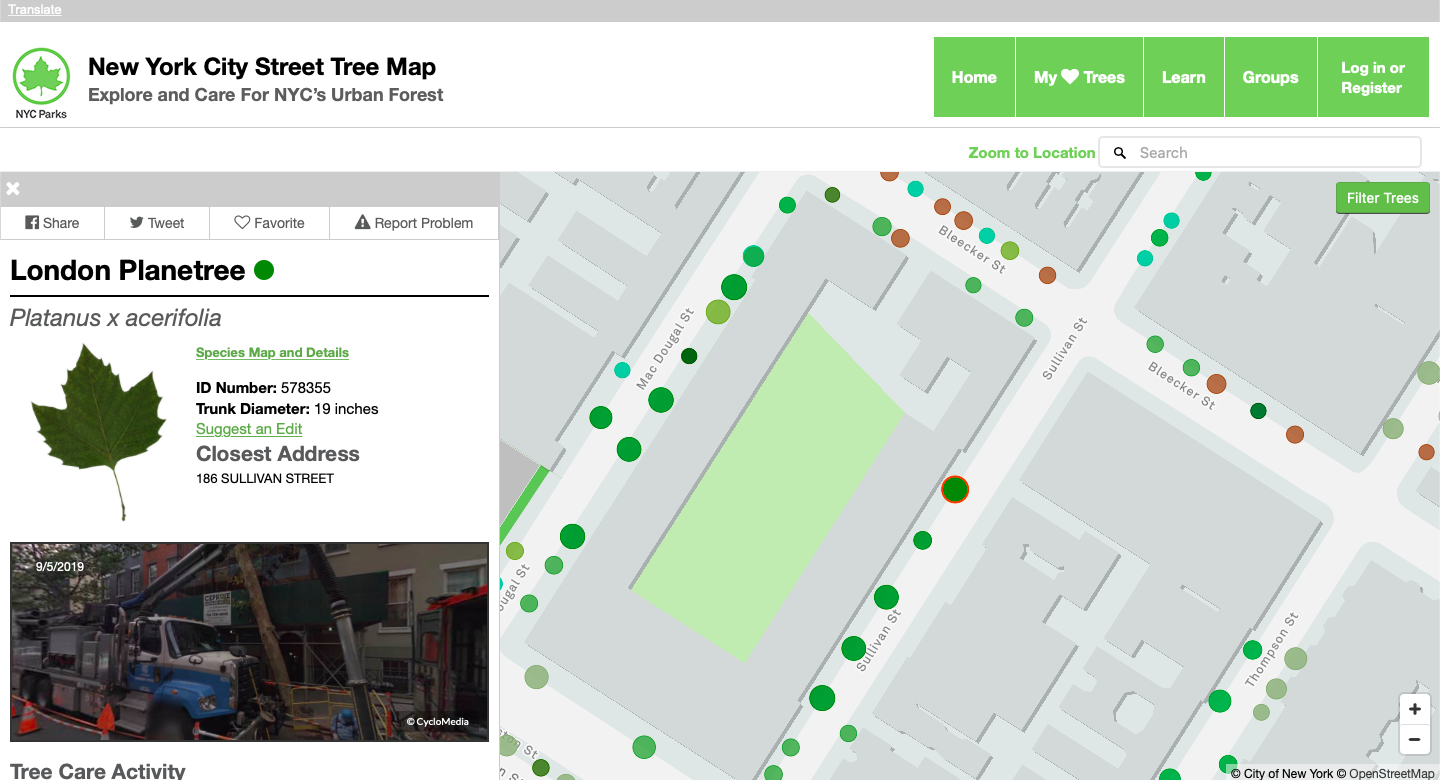
Luckily, the city and nonprofit groups have been working together to plan for what the conservancy’s senior ecologist, Helen Forgione, calls “future forests,” using big data to map out the best paths for urban woodland. The NYC Parks department has been busy compiling figures, and you can find all of their tree stats at the New York City Street Tree Map, which “brings New York City’s urban forest to your fingertips. For the first time,” the Parks department writes, “you have access to information about every street tree in New York City.”

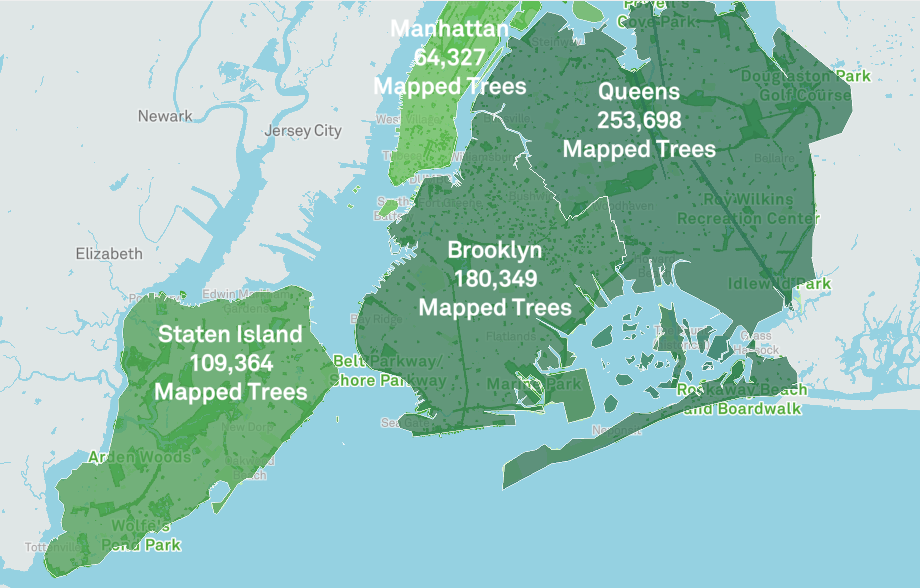
Large forested parks on the interactive map appear as flat green fields—the department has not counted each individual tree in Central Park. But the map gives us fine, granular detail when it comes to street trees, allowing users to zoom in to every intersection and click on colored dots that represent each tree, for example lining Avenue D in the East Village or Flatbush Avenue in Brooklyn. You can search specific locations or comb through citywide statistics for the big picture. At the time of this writing, the project has mapped 694,249 trees, much of that work undertaken by volunteers in the TreesCount! 2015 initiative.

There are many more trees yet to map, and the department’s forestry team updates the site daily. Out of 234 species identified, the most common is the London Planetree, representing 12% of the trees on the map. Other popular species include the Littleleaf Linden, Norway Maple, Pin Oak, and Ginko. Some other stats show the ecological benefits of urban trees, including the amount of energy conserved (667,590,884 kWh, or $84,279,933.06) and amount of carbon dioxide reduced (612,100 tons).

Visit the New York City Street Tree Map for the full, virtual tour of the city’s trees, and marvel—if you haven’t experienced the city’s vibrant tree life firsthand—at just how green the empire city’s streets really are.

Related Content:

New York Public Library Puts 20,000 Hi-Res Maps Online & Makes Them Free to Download and Use

New York City: A Social History (A Free Online Course from N.Y.U.) 

The Secret Language of Trees: A Charming Animated Lesson Explains How Trees Share Information with Each Other

Josh Jones is a writer and musician based in Durham, NC. Follow him at @jdmagness

Behold the New York City Street Tree Map: An Interactive Map That Catalogues the 700,000 Trees Shading the Streets of New York City is a post from: Open Culture. Follow us on Facebook, Twitter, and Google Plus, or get our Daily Email. And don't miss our big collections of Free Online Courses, Free Online Movies, Free eBooksFree Audio Books, Free Foreign Language Lessons, and MOOCs.

22 Oct 21:35

6 Best Soundboard Apps to Create or Discover Free Sound Collections

by Mihir Patkar
best-soundboard-apps

A soundboard can spice up your podcast, or even add some pizzazz to personal conversations. Here are some great readymade soundboards, as well as apps to create your own custom soundboard for free.

Apart from the best apps and software to record podcasts, it’s a good idea to have a soundboard app. You can use it for things like your theme song or background music, or add zing to conversations by playing sound effects, movie one-liners, and so on. It’s all up to how creative you want to be.

1. Soundboard (Web): Huge Database of Sounds and Soundboards

Soundboard.com has a huge collection of sounds

If you’re looking to create your own Soundboard or browse those made by others, visit Soundboard.com as your first destination. This website has one of the largest collections of audio clips and soundboards you’ll find on the internet.

Soundboard claims its database holds over 500,000 sounds in several different categories like comedians, movies, animals/nature, politicians, prank calls, sports, etc. Choose a category to browse available sounds or search the website.

It also hosts several publicly available soundboards created by other users. Most of these are free for anyone to use by opening it in a browser or in the Soundboard apps. You can also download each audio file individually to save it to your hard drive.

With Soundboard, you can also create your own customized soundboard. It’s completely free, and you can upload as many audio files as you want. Create it, add a logo and a description, and upload the tracks you want. Each track can be given a name too. If you’re creating a professional soundboard, you can even charge for it per track or to download them.

The only place where Soundboard is lacking is an easy way to add a sound you find on the site to your own custom soundboard. Instead, you’ll need to download that audio file, and then re-upload it to your own board.

Download: Soundboard for Android | iOS (Free)

2. 101 Soundboards (Web): Large Collection of Soundboards

101 Soundboards has several readymade soundboards

101 Soundboards has one of the largest collections of free soundboards you will find on the internet. The best part is that this is among the few websites where you can control a sound’s playback, stopping it midway.

When you play any sound, especially a quote, you will see the full clip’s sound graph at the bottom of the screen, as well as the full quote. That way, you can decide if you want to stop the clip early or let it play out fully. It’s a tremendously useful feature, and I wish more apps had it.

The website is already populated with soundboards of all types, and you can check out the most popular ones, recently updated boards, or search through the collection. Chances are, you will find multiple soundboards for your favorite TV shows or movies.

And yes, you can register and upload your own sounds too. But there isn’t a handy mobile app, so I wouldn’t suggest this over Soundboard to create your own collection.

3. Myinstants (Web): Find and Add Sound Buttons to Your Board

Myinstants is the easiest way to find and add sounds to your own custom soundboard

The design is a bit garish for my taste, but Myinstants is such a good app that you can overlook it. This website has a large collection of small sound clips, ready to be turned into a soundboard of your choice.

It’s best to register for the website, as this will let you save sounds to your own Favorites board, and upload audio too. The website works well on mobiles, and a shortcut lets you turn it into a browser-based mobile app.

Find sounds by browsing categories like games, movies, television, viral, memes, music, politics, etc. Each button is a different color and describes the sound. There’s also a handy search button. If you like a sound, add it to your favorites with one click.

You can also upload custom sounds, give it a desired color and title, and add a short description. Myinstants is a quick and easy way to build a soundboard of buttons for any project, including your own clips.

4. Meme Soundboard (Web): Readymade Soundboard of Popular Memes and More

Meme Soundboard is a readymade soundboard of popular memes and audio files

If you’re looking for a readymade soundboard to use on a computer, tablet, or phone, Meme Soundboard has you covered. As the name suggests, it is populated with sounds from some of the popular memes, but look beneath the surface and it has a few tricks.

The main interface is a delight to use, especially on phones. Meme Soundboard presents the collection as a grid of tiles, which are easy to tap or click. Whether you want to rick-roll someone or get Simon and Garfunkel crooning Sound of Silence, you can perform a super-fast search or just browse to find it.

While the quick search is the best feature, you will also like the Loop button to repeat any sound infinitely. If you like something, click the star to add it to your Favorites. The only issue seems to be that there isn’t a pause or stop button to quickly end the audio.

Apart from memes, the website also has readymade soundboards for other common audio in the Non-Meme Sounds board. And if you don’t mind the foul language, check out the NSFW soundboard.

Psst, do yourself a favor and click the Harlem Shake button. It’s wild!

5. Soundboard Studio (iOS): The Best Soundboard App Ever

Soundboard Studio is, without a doubt, the best soundboard app for iPhones and iPads. In fact, it’s the best mobile soundboard app, and it’s a pity there isn’t an Android version.

The free version called Soundboard Studio Lite gives you all the features of the full-fledged app but restricts you to 24 tracks. It’s a good way to test the app before paying the hefty price for the full version.

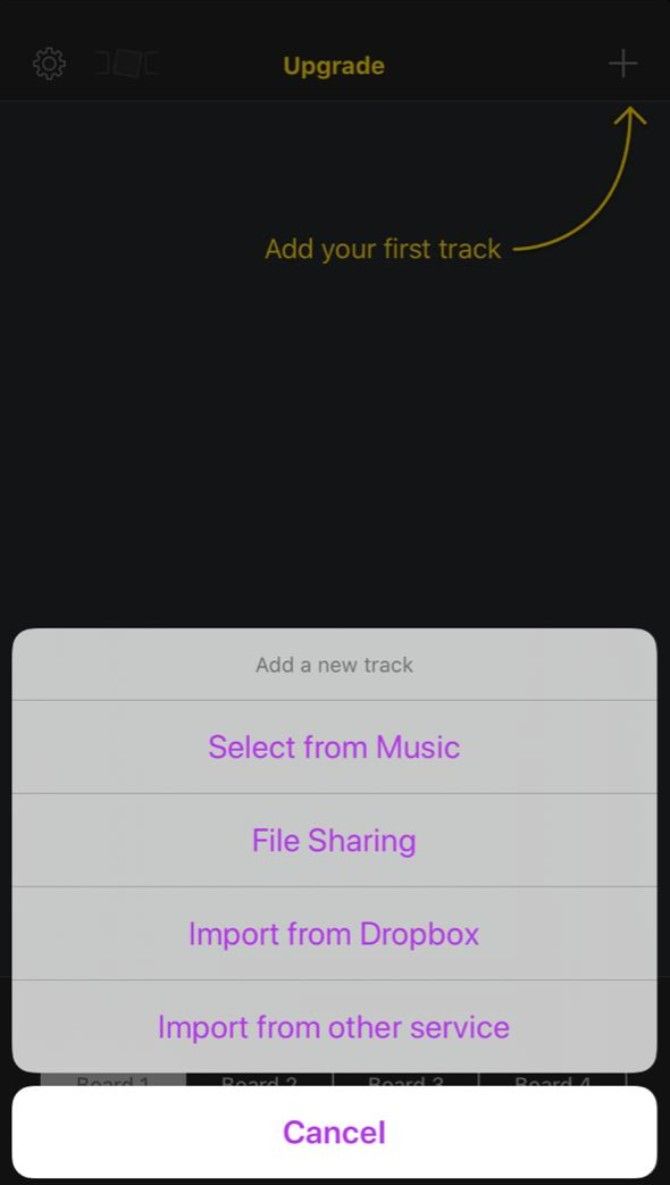
What does it let you do? Well, the question should be, what doesn’t it let you do? Soundboard Studio supports a wide variety of audio file formats, can import from cloud storage, and record audio too. Plus, you can play two tracks simultaneously.

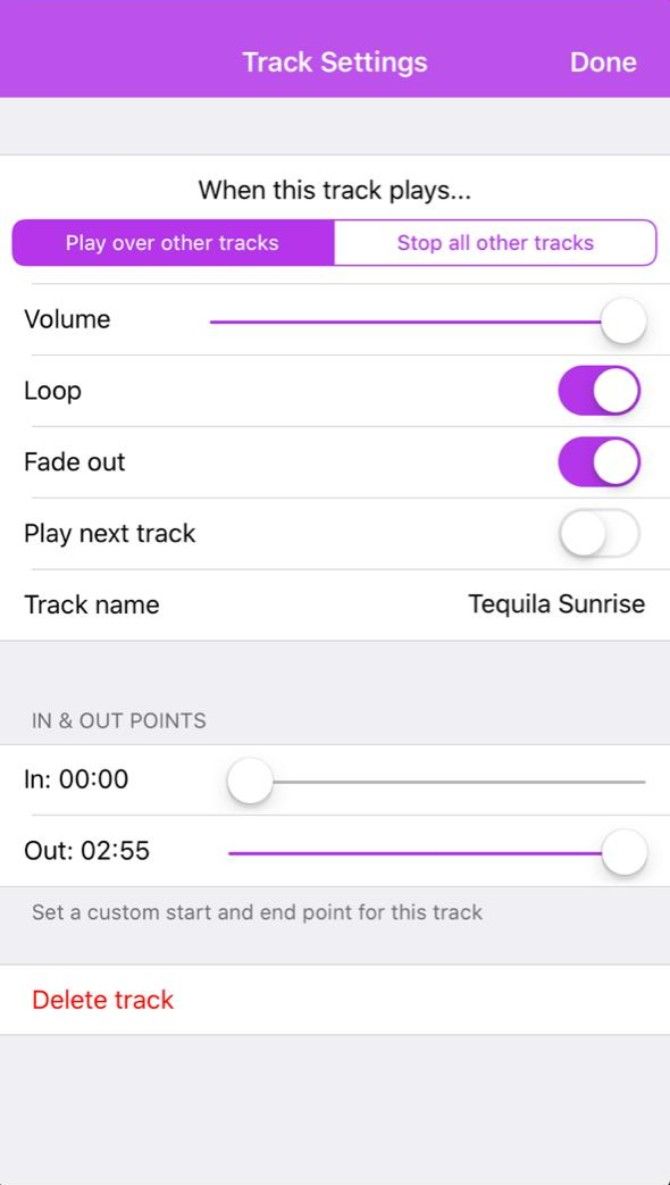
There are advanced settings for each track too. You can trim any track, adjust its volume, set it to loop, play it solo always and hush all other tracks, give it a fade in and fade out, and even set up automated actions. It’s just packed with features and looks great while doing it.

Download: Soundboard Studio Lite for iOS (Free)

Download: Soundboard Studio 2 for iOS ($59.99)

6. Custom Soundboard (Android): Best Free Soundboard Creator for Android

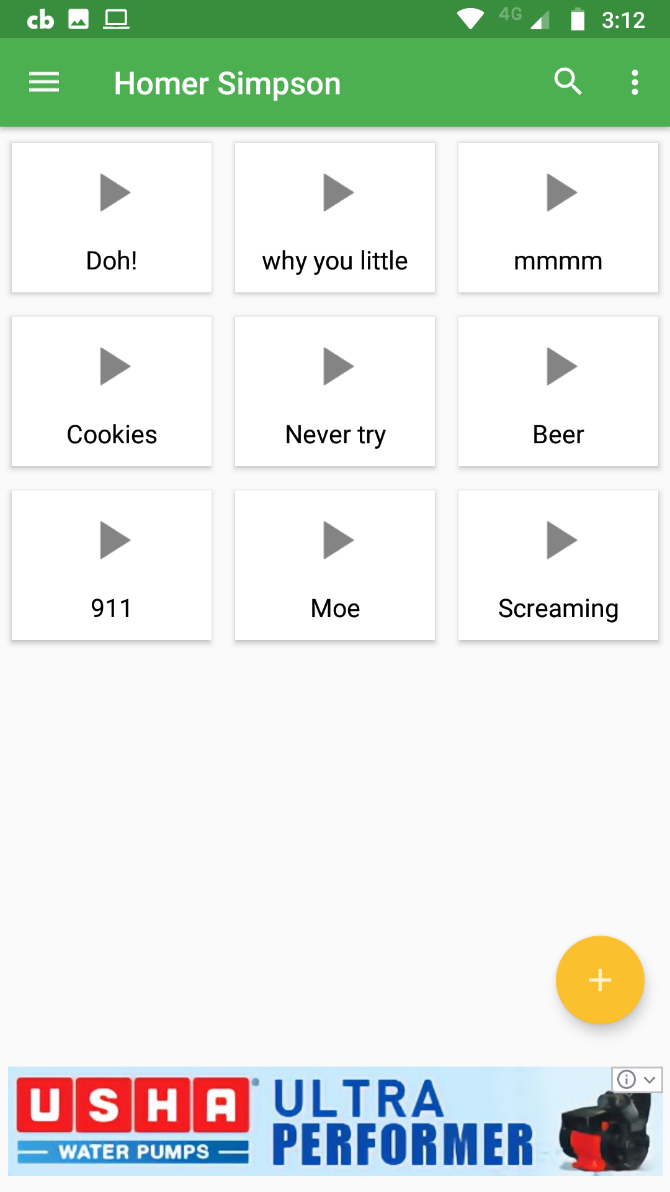
There is no Soundboard Studio for Android. The next best app is Custom Soundboard by Johannes Maagk. It’s completely free but ad-supported and lets you create unlimited soundboards with unlimited tracks.

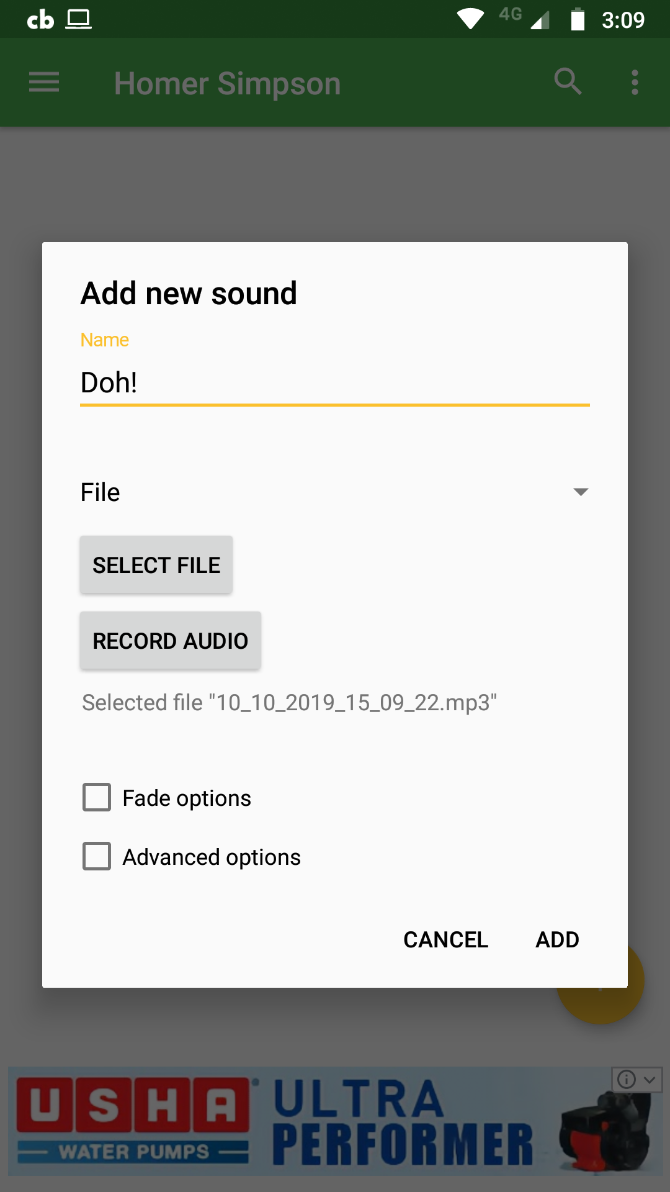
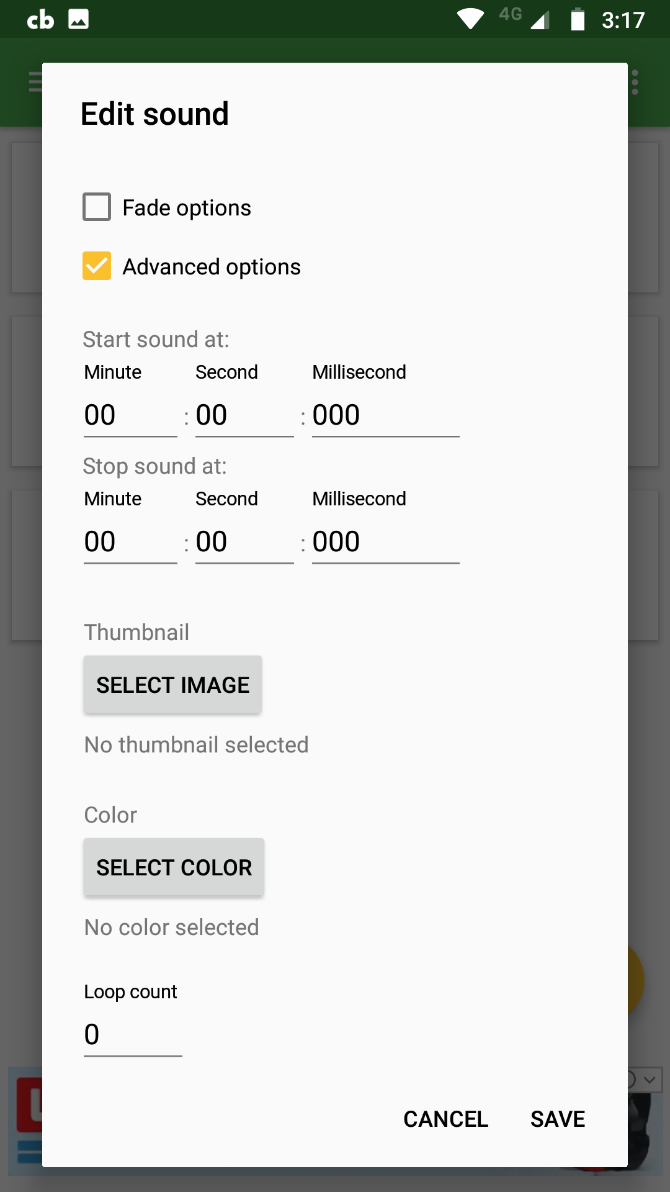
You can add audio from a file on your Android phone, add multiple tracks at the same time, or record live audio. Each track can fade in or out, have its own thumbnail image or color, be looped a set number of times, and even trimmed.

The app also lets you create a backup of all your soundboards, which is a helpful feature that most others don’t have. If you take the time and effort to customize this app, it will serve you well, and you’ll never lose your data.

Download: Custom Soundboard for Android (Free)

Compress, Then Upload

The trick to creating a good soundboard is to use good quality audio clips for your collection. But often, the file size can become a bit much, especially if you use WAV files. It’s a good idea to compress your audio files and then add them to the soundboard.

Check out our quick guide on how to compress large audio files while retaining their quality. It can make a big difference for the listener, and you can store more files easily.

Read the full article: 6 Best Soundboard Apps to Create or Discover Free Sound Collections

22 Oct 21:35

3 Camera Apps You Should Uninstall on iPhone 11

by Sarah Adedun
iphone11-camera-apps

Apple’s iPhone 11, 11 Pro, and 11 Pro Max have made headlines since their release in September 2019. A primary reason for this buzz is the significant innovations in the iPhone 11 camera.

With the iPhone now including more features in its camera, certain iPhone camera apps may now become obsolete. These apps relied on certain shortcomings of previous iPhone cameras to capture interest.

Let’s identify three iPhone camera apps that you probably won’t need anymore after purchasing the iPhone 11. And if you’re still using an older iPhone model, these apps can help you replicate what the iPhone 11 does.

Key Capabilities of the New iPhone 11 Camera

First, let’s summarize some of the iPhone 11 camera’s standout features.

Something you’re likely to notice immediately about the design of the iPhone 11 camera is its camera bump. The reason for this is to house the third lens in the iPhone 11 Pro and Pro Max. See our iPhone 11 and iPhone 11 Pro comparison if you’re not familiar with the different devices yet.

Beyond the apparent design change, what do these lenses bring to your iPhone camera game?

  • Triple camera system: Easily switch lenses in-between zooms while maintaining exposure and consistent image quality.
  • Wider shots: The 120-degree 12MP ultra-wide lens makes it easier to increase the range of a shot.
  • “Slofies”: Apple’s new term for slow-motion video selfies. It’s possible to take selfies on the move thanks to the 12MP TrueDepth front-facing camera.
  • Dedicated night mode: This makes it easy to shoot in low-light conditions.
  • Close to accurate picture reproduction: The new camera makes it easier to capture images with faithful color representation and an impressive dynamic range.
  • Sensory intelligence: The iPhone 11 Pro camera can accurately judge lighting conditions and adjust exposures. This, in turn, boosts the shadows of images and reigns in highlights when needed.
  • QuickTake: Want to take a video while capturing an image? Just position your iPhone 11 camera, click to shoot an image, and keep holding for a video.

A final exciting feature of the iPhone 11 camera is the new Deep Fusion algorithm. This is Apple’s post-processing software meant to aid with enhancing the details of images shot on the iPhone 11 camera.

This automatically activates when you open the camera app. As you frame the subject of the shot, the iPhone takes both short and long-range exposure shots. Then, when you click the shutter, the algorithm combines the images taken to form a master image. The image created has lower noise and is highly detailed.

At the time of writing, this feature is expected to become available in late 2019.

3 Camera Apps the iPhone 11 Camera Replaces

Now that Apple has brought these revolutions to phone camera technology, what does that mean for specific apps? We’ve identified a few camera apps that will be affected. by the iPhone 11’s offering.

1. VSCO

VSCO is one of the best camera apps in the App Store. Apart from its editing capabilities, the app also offers a powerful camera that’s user-friendly.

If you’ve used the app before, you know that the transition from image capture to edit on the platform is smooth. In camera mode, you have an array of icons at the bottom of the screen. These display the various controls you have over the images you take.

To unlock certain advanced features, you’ll have to upgrade to the pro level subscription. However, now that Apple will make your photos look better than ever out of the gate thanks to the Deep Fusion algorithm, VSCO might not be as necessary.

Apple’s upcoming functionality requires little to no intervention from you to determine the best setting for an image. For most people, this means paying for VSCO won’t be necessary.

Download: VSCO (Free, in-app purchases available)

2. ProCamera

For iPhone users vested in taking quality videos, the go-to camera app has been ProCamera. But with the iPhone 11 camera, ProCamera may have stiff competition.

This camera app offers you in-depth control over the videos you shoot with it. It offers features like the preset camera mode for HDR. Also, you can set the frame rate, focus, geotagging, stabilization, file format, and resolution of videos.

Meanwhile, the iPhone 11 camera has its triple camera system with HDR. This easily allows you to juggle lenses, which enhances the depth of coverage in the video. Plus, QuickTake lets you shoot a scene without having to go through the process of opening the camera app.

In low-light settings, the dedicated night mode feature removes the need for ProCamera. And as discussed, Deep Fusion will handle much of the post-processing work.

Download: ProCamera ($7.99, in-app purchases available)

3. Camera+ 2

One of the top options for fun iPhone photography apps is Camera+ 2. As soon as you launch it, you’ll notice that it’s relatively similar to the native camera app. However, unlike the native camera, you have more controls and buttons at your fingertips.

For example, with Camera+ 2, you get to set focus and exposure points. You also have access to depth capture and editing. It’s possible to adjust the amount of blur on an image and also set the focus distance. These perks offered in the Camera+ 2 are found in the iPhone 11 camera, with its broader shot capabilities as well as the sensory intelligence.

Another standout feature of the Camera+ 2 app (which previous iPhone cameras did not offer) is the different shooting modes. For those who love to engage in long-exposure photography, the lack of this on the iPhone would lead to use of Camera+ 2 app, You won’t need this now, if you have an iPhone 11.

With the new iPhone 11 camera, the QuickTake and “slofie” features are similar to the slow shutter mode of the Camera+ 2 app.

Download: Camera+ 2 ($3.99)

An Improved iPhone Photography Experience

It’s important to note that camera apps don’t exist to replace the core camera of your device. Instead, they supplement its inadequacies or enhance existing features of your phone’s camera. In the case of the iPhone 11 essentially coming with the standout characteristics of these apps already built-in, it will be fun to see how these camera app developers innovate.

To improve your photos no matter what device you have, check out iPhone camera settings everyone should master.

Read the full article: 3 Camera Apps You Should Uninstall on iPhone 11

22 Oct 21:28

The Pros and Cons of Social Media

by Dan Price
social-media-pros-cons

What are the pros and cons of social media? This is an especially pertinent question when more people than ever are using social media apps, but when social media is making people unhappy.

Social media has its pros and cons. And in this article we explore both sides of the argument, listing the pros of social media and the cons of social media to help you understand both sides.

The Pros of Social Media

Let’s start by looking at some of the benefits of social media.

Staying in Touch

The original selling point of apps like Facebook and MySpace was to provide a way for you to stay abreast of the goings-on in other people’s lives. This is arguably still the primary advantage of social media today.

It’s easy to use social media to keep in touch with friends and family who you might have otherwise fallen out of contact with. This is especially true if you’ve moved to another city (or even an entirely different country).

Access to News

The availability of news can be listed as both one of the pros and cons of social media. For now, let’s look at the positive side.

Millions of people around the world do not have access to a free press in their countries of residence. Given that all major news companies have social media accounts, apps like Facebook and Twitter give those people a way to stay abreast of news reports from the world’s most reputable newsrooms.

Finding Jobs

linkedin job post example

The job market remains tough for a lot of people.

If you use a professional social network, such as LinkedIn or Xing, you will be able to see automatic job listings that are a perfect fit for the skills you’ve listed on your profile. It’s one of the pros of social media that’s often overlooked.

Planning Events

Very few services can rival Facebook when it comes to planning parties, community events, weddings, conferences, and other mass gatherings. Given just about everyone has a Facebook account, it’s easy to create invites, disseminate event details, and share various materials connected with it.

Growing a Client Base

If you’re starting your own business, one of the biggest benefits of social media is the ability to grow an audience quickly, and by extension, a client base.

Not only does word of mouth spread quickly on social media, you can also run highly targeted ads for considerably less money than you’d pay to advertise on TV, on the radio, or in print media.

Law Enforcement and Civil Protection

Look, we get it, no one wants the government snooping around in our private messages. But at the same time, it remains a fact that criminal networks, terrorist groups, and even would-be mass shooting perpetrators are increasingly using social media to plan and coordinate their attacks.

Providing the police with a means of nipping such issues in the bud remains a key
advantage of social media.

Social Media Is Fun

When assessing the pros and cons of social media, it’s easy to forget that at its core, social media is fun. If it wasn’t, Facebook wouldn’t be able to boast almost three billion users.

Games, chat, interesting articles, memes, videos— there’s plenty of content to keep you entertained for hours, regardless of your interests.

The Cons of Social Media

Alas, it’s not all rosy. There are plenty of negative aspects you need to consider, too. Here are some of the biggest disadvantages of social media.

Cyberbullying and Online Abuse

One of the worst drawbacks of social media is the prevalence of cyberbullying and online abuse. It’s worryingly common for people to be targeted based on their gender, appearance, sexual orientation, religion, disabilities, political beliefs, and a whole lot more. Kids are especially vulnerable.

Addiction Is a Growing Problem

Take a trip to any local restaurant, and you’ll see dozens of patrons with their eyes glued to their smartphones. The majority of them are probably on social media sites. Sadly, too many people are more worried about their number of followers on Instagram than their real-life problems.

It’s not healthy, either physically or mentally. Indeed, it’s one of the most significant negative effects of social media on society.

Privacy Is Non-Existent

Another of the major cons of social media is the lack of privacy. If someone is a heavy social media user, you can often find out everything about them—favorite books, employer, what their baby looks like—with no more than a few minutes of cursory research.

Ads Are Scary

Everyone accepts that ads are part of the modern world. However, advertising on social media is very different from seeing a billboard on the side of a road or TV commercial during a sports game.

The processes going on behind the scenes to show you ads on Facebook etc.—from selling your data in bulk to analyzing your every online move—is straight out of 1984. And it should worry all of us.

Your Data Is Impossible to Delete

delete facebook account options

You can’t talk about the pros and cons of social media without considering the online footprints you’re leaving behind. Yes, you can delete your social media accounts. But what really happens to your data?

Sure, it might not be visible to the public any more. But is Twitter wiping all your tweets from its servers? Does Instagram definitely delete every photo you’ve shared from its records?

The answer is no. There will always be a chance (albeit small) that the data could someday resurface and be used against you.

Growth of Anti-Social Tendencies

Does social media make us less social? Plenty of studies suggest the answer is yes.

There are several reasons—some are linked to the issues we’ve already discussed, like addiction. But consider this example…

Your friend goes on holiday. Before the trip, they post everything about their planning. During the trip, there’s a neverending stream of photos and updates. When they get home, they spend days telling the world what a good time they had.

Is there any incentive for you to reach out and chat about their holiday in person? Probably not.

What Are the Pros and Cons of Social Media for You?

So, we’ve rounded up some of the most commonly cited pros and cons of social media, but we’re sure you can think of more. In which case, let us know in the comments below.

And if you’d like to learn more about the pros and cons of social media, be sure to read our articles discussing the positive effects of social media and the negative effects of social media.

Read the full article: The Pros and Cons of Social Media

22 Oct 21:27

6 Digital Journal Apps to Boost Mental Health With a Daily Diary 

by Mihir Patkar
digital-journal-apps

Experts recommend maintaining a daily journal to anyone seeking to boost their productivity or even manage their mental health. These free apps will help you write a daily journal on your phone or computer.

Each app takes a different approach to digital journaling, so pick the one that suits your style. Some focus on privacy, others target beginners and time-constrained users. And there’s even an app that turns the concept of a diary on its head by making your journal entries public.

1. Cactus (Web): Guided Journaling for Beginners

Cactus is a mood tracker and journaling app that guides beginners

If you’re new to journaling, Cactus is a good app to start with. It will guide you through the basics of digital journaling while helping you strengthen and improve the core experiences of your daily life.

Once you register for an account, Cactus asks you to check in once a day. There, it will ask you a question based on one of four essential elements: meaning, experience, energy, emotions, relationships. You won’t know the element till you answer the question, in the form of a journal entry.

Questions vary like “who is a person who makes you smile” or “what experiences are you looking forward to this week?” After answering, you’ll get an idea of why the question matters for your mental health. Each entry is a private note to check back later.

At times, Cactus also encourages you to share your notes with people. It’s a nice exercise for gratitude journaling, and it’s easy to share a single note without unloading all your thoughts on that person.

Psst, sign up now and you’ll also get some cool free phone wallpapers.

2. JournalBook (Web): Create Your Own Q&A Journal

Journal Book lets you create your own Q&A journal

Productivity gurus and mental health experts have several thoughts on what you should record in your journal. Each approach has different apps guiding you with questions that you can answer daily. With JournalBook, you can create a custom digital journal with your own questions.

You don’t need to register or sign up to use the app. Fire it up in your browser and you can start writing. It suggests four popular daily questions to get you started and has extra fields to add your own. Every day, it will prompt you to answer those questions. When you have a particularly big day, you can highlight it, and reflect upon those highlighted days later.

This is a progressive web app that works on any browser. All data is stored on your device, not on a cloud, so you’ll need to use it on the same gadget every day. It works offline and is mobile-friendly to use on a phone. You could even turn the site into an Android app.

3. Sol Journal (Web): Self-Hosted, Privacy-Focused Journal

Sol Journal is a self-hosted journal to protect your privacy

Sol Journal is another progressive web app journal that works offline in your browser. In fact, the developer says JournalBook was an inspiration for it. But the difference here is that you can host it yourself, thus giving you full control over privacy.

Privacy is a key factor in digital journaling. You didn’t let anyone see your diary as a kid, why should you trust that your deepest thoughts would be safe on a web server that someone can hack? Sol Journal lets you deploy a journal to your own server, so the data is protected. The GitHub instructions are simple.

You can try out Sol Journal before installing it. You’ll find a minimalistic interface for a journal, with day and night modes. There’s a handy “Quick Add Time” button to put the current timestamp into an entry. And you can export it all to a JSON file. You’ll need to register to use Sol Journal, but that only means you can use it on multiple devices instead of just one.

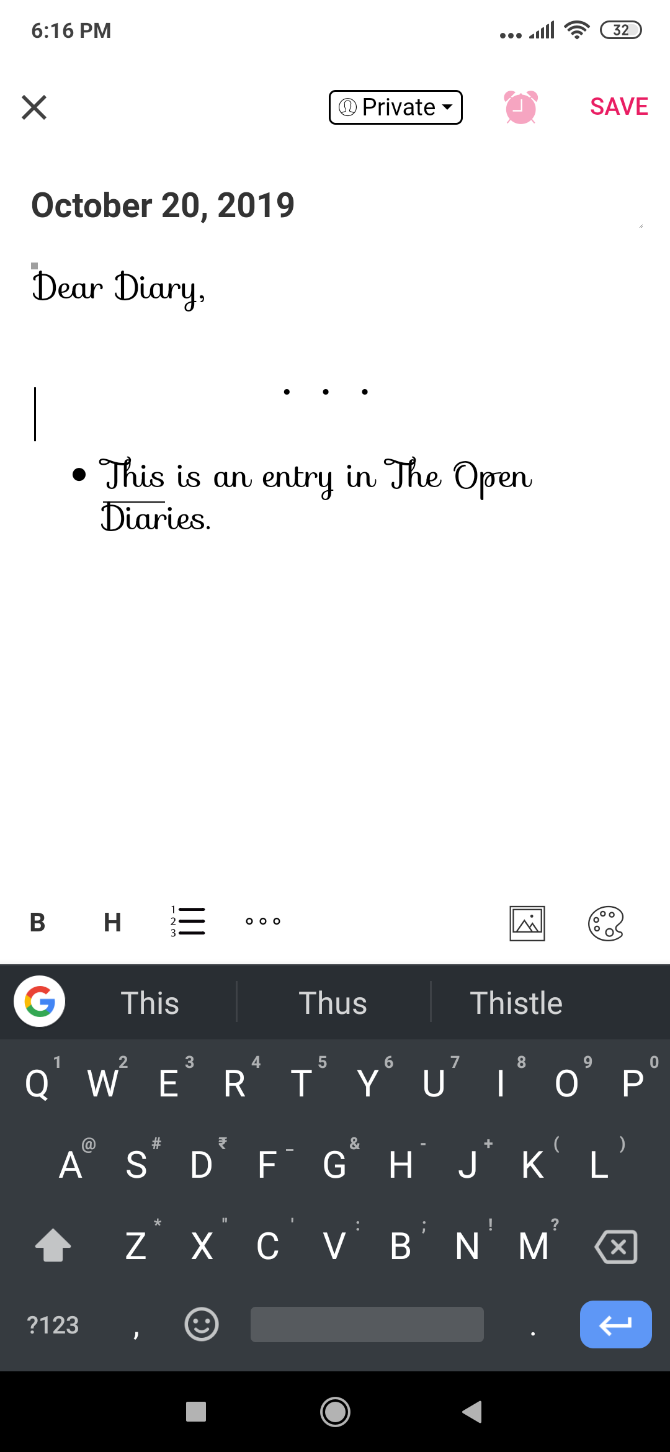
4. The Open Diaries (Web, Android, iOS): Read Others’ Journals and Share Your Own

A diary should be kept secret, or so we have been conditioned to believe. The Open Diaries questions that notion and urges you to be more open about the digital journaling experience. What would happen if you could read other people’s diaries, and they could read yours?

Don’t worry, it’s not like your entire journal is open for anyone. You get to choose which entries to make public and which ones to keep private for your eyes only. The interface is a bit kiddish, using a handwritten script-like font that you’ll have to live with. There’s also a decent text editor for formatting, and you can add images too.

On The Open Diaries public feed, you can browse and read entries from anyone. In our cursory browsing, it seemed like an active social network with people from different parts of the world.

Openly writing a diary might not be everyone’s cup of tea, and we’d advise not sharing personal details with which someone can identify you in real life. As long as you’re careful, it can be therapeutic in a whole new way.

Download: The Open Diaries for Android | iOS (Free)

5. Reflectly (Android, iOS): Simple Daily Journal With AI

You can’t escape artificial intelligence, even in digital journaling apps. On a serious note, Reflectly does a good job of using AI in a journal app, especially for those who don’t want to do long diary entries daily.

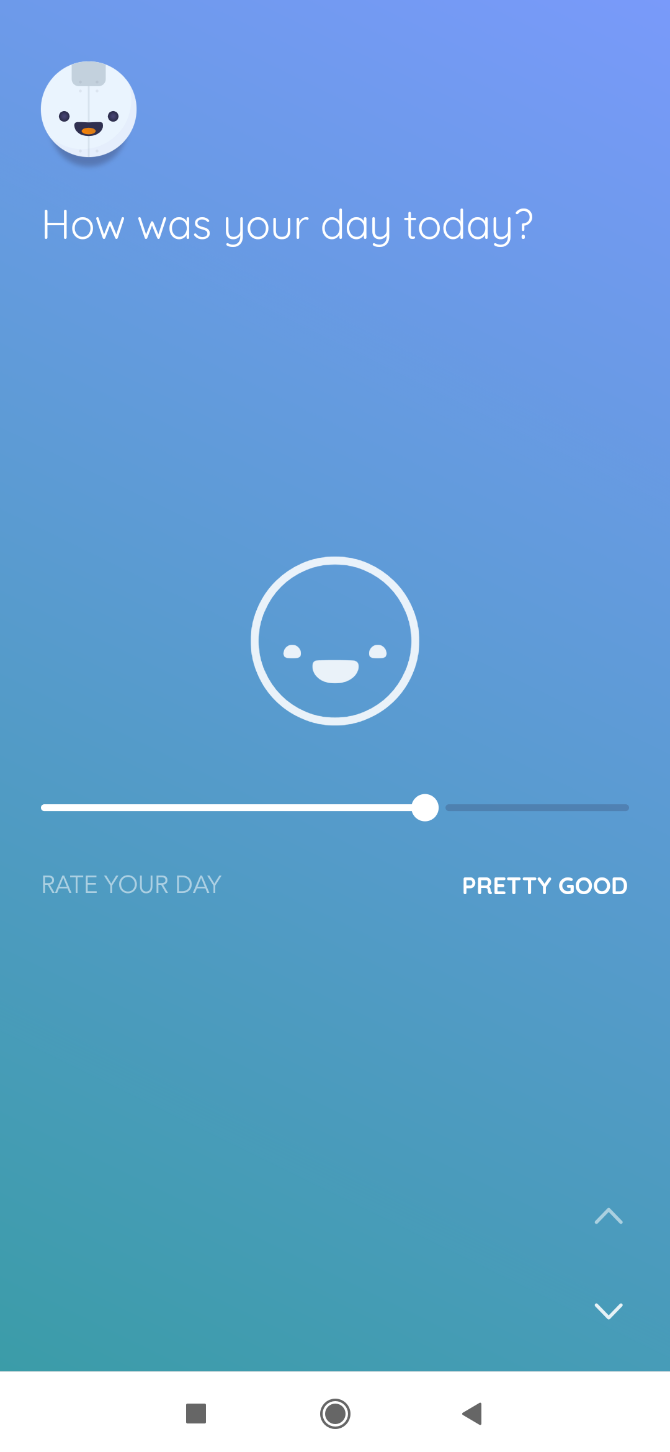
The app divides journaling into tracking your moods and noting major highlights. Every day, it prompts you to note how the day went, what type of activity made it feel that way and note any thoughts about it.

Along with these three, you get a new daily question. The type of question varies but it’s usually a good self-assessment or a place to vent. This is where the AI comes in, as it uses your mood and other data to come up with the questions.

You can also view statistics on Reflectly after you unlock stars by using it regularly. The app aggressively pushes its Premium version, but keep tapping “No Thanks” every time it pops up and you can still use the free version without a hitch.

Download: Reflectly for Android | iOS (Free)

6. JournalFlow (Web): Journal Through Email or Messengers

The term “Dear Diary” was meant to suggest that you’re talking to a friend. What if you could keep a journal by the modern mechanism of talking to friends? JournalFlow is a neat app that hooks into Telegram and Facebook Messenger, so you can chat to add to your journal.

Sign up and add JournalFlow to the messenger of your choice. From then on, it’s like any other chat with a friend. Type into the chat window and it’ll get automatically added to your journal. You can also post photos.

Periodically, JournalFlow will ask you questions pertaining to your day or mood, like any of the other guided journaling apps. You can also use JournalFlow through email, replying to one message a day with those questions.

The downside is that JournalFlow is free only for 30 days, after which you’ll have to pay $2.49 per month to use it. Try it out and see if it’s worth it for you.

Note: At the time of testing, the Telegram feature wasn’t working.

More Diary Apps

The benefits of digital journaling cannot be ignored. There are multiple studies that conclude this daily practice can help in mental clarity and emotional well-being. But different apps work for different people. So if the above tools aren’t your speed, try these other diary apps to start a journaling habit.

Read the full article: 6 Digital Journal Apps to Boost Mental Health With a Daily Diary 

21 Oct 18:50

Massive Blandtown Football-Bowling Game Bar Aims For a November Opening

by Beth McKibben
A yellow wooden platform set with bowling pins, three falling bowling pins, and a black painted “please reset your pins” sign Fowling Warehouse

Detroit-based gaming bar Fowling Warehouse opens in November on English Street off of Huff Road

The Atlanta location of Detroit-based gaming bar Fowling Warehouse opens in November on English Street off of Huff Road in the Blandtown neighborhood.

Fowling [FOH-ling] combines football and bowling using a regulation size football and 20 bowling pins. Teams try to be the first to knock down as many of the opposing team’s pins as possible.

Plans for the 25,000-square-foot game bar and restaurant were filed earlier this summer. Fowling Warehouse includes nearly two dozen game lanes, a 50-foot bar serving 100 beers in cans, bottles, and on draft, 20 televisions, and a menu offering food like fried pig skins, beef sliders, and meatballs.

A two-hour lane reservation costs $120 and accommodates up to ten people, according to the company’s website. For $10 per person, people can walk in for “open play” or first come, first serve. Game winners may remain in their lane and play a new set of challengers. Open play losers get back in the queue and wait for a lane to reopen.

A large warehouse space with seven fowling lanes set up with pins and a bar with TVs beyond the game area Fowling Warehouse

Fowling was invented by Detroit resident Chris Hutt and his friends 15 years ago. The first Fowling Warehouse and beer garden opened in Hamtramck, Michigan, in 2014.

Pin and Proper brought a similar game to the Beacon at Grant Park last year called Pinfall. The game, which also combines football and bowling, is apparently similar to fowling but is set up more like corn hole. Each team tries to be the first to knock down the opponent’s ten bowling pins using a football.

Open Monday - Thursday, 5 p.m. to 12 a.m.; Friday and Saturday, 4 p.m. to 2 a.m.; Sunday, 12 p.m. to 10 p.m. Fowling Warehouse is 21 and up on weekdays and all ages on the weekends, from 12 p.m. to 6 p.m.

1356 English Street, Atlanta. fowlingwarehouse.com.

21 Oct 18:50

Kimball House Partner Miles Macquarrie Helps Launch a Line of Canned Cocktails

by Laura Scholz
Three canned cocktails in front of three drinks: Negroni, Manhattan, and Old Fashioned Tip Top Cocktails

Pop open and pour — Tip Top Proper Cocktails are ready-to-drink classics in 100ml cans

Kimball House and Watchman’s Seafood and Spirits co-owner and beverage director Miles Macquarrie partnered with music festival veterans Neal Cohen and Yoni Reisman to officially launch Atlanta-based Tip Top Proper Cocktails last month. The line of ready-to-drink cocktails contained in 100ml cans come in three classic options: Manhattan, negroni, and old fashioned.

With experience producing, marketing, and running food and beverage programs at large-scale happenings and festivals like the Governor’s Ball and Bonnaroo, Cohen and Reisman say they saw a void in the drinks market at such events.

“We realized there are a lot of people like us [who] are accustomed to drinking good cocktails, but when they go to a music festival or concert, their only options are beer, wine, or a basic mixed drink,” explains Reisman.

They made it their goal to create high quality, shelf-stable canned cocktails for music venues, festivals, and other places where high volume cocktail preparation is nearly impossible. That these canned drinks also serve as an at-home or on-the-go option for cocktail enthusiasts is a bonus.

The ready-to-drink market (RTD) has grown over 40 percent in the past year, with spirit-based RTDs now generating $62 million in sales annually. Given the amount of competition on the canned cocktail market today, Cohen and Reisman felt they needed to stand out by partnering with a seasoned beverage professional to develop their line of pour-and-go cocktails.

Enter Miles Macquarrie of Decatur-based Kimball House, which has been a James Beard bar of the year award finalist for the last six years.

Vote for Atlanta’s Bartender of the Year Eater

Macquarrie was recommended to Cohen and Reisman by Creature Comforts Brewing founder David Stein, a childhood friend of the partners who had also worked with Macquarrie during their days at Brick Store Pub in Decatur.

“When Stein pitched me the idea, I thought it was smart and something useful in the market,” says Macquarrie. However, he wasn’t in a hurry to put his name on a collection of canned cocktails if they didn’t taste like something he might serve to guests in his home or at one of his bars.

The trio spent two years testing recipes, bottling prototypes to test for shelf life, and doing side-by-side tasting comparisons of the canned versions with cocktails made on the spot at both Kimball House and Watchman’s.

“We realized no one was doing classic, elegant, aromatic style RTDs,” Macquarrie explains. “These are quintessential classics [Manhattan, old fashioned, negroni] and some of the most popular cocktails in the world. Every good cocktail bar makes them, and they are familiar to consumers.”

That comfortable familiarity was also appealing to Cohen and Reisman, who took inspiration for the drinks from Sother Teague’s menu at New York City’s Amor y Amargo in the East Village, which specializes in bitter-based cocktails and amari.

A canned negroni in front of a cocktail glass containing a negroni Tip Top Cocktails

“Tip Top Proper’s drinks are the trifecta of classic bitter cocktails,” says Cohen. “We wanted to hit the standards, the ones people drink all the time.”

For Macquarrie, offering people the convenience of a canned cocktail of quality was also important, but he notes these aren’t meant to compete with drinks made at a cocktail bar. While he loves to make drinks at his full bar at home, Macquarrie realizes this isn’t the case for everyone.

“Maybe you’re prepping dinner or too tired to make a drink after work,” Macquarrie says. “Or maybe you’re having a cocktail party and don’t want to mix and serve eight Manhattans or going camping and still want that experience of a great drink. That’s where we [Tip Top] come in.”

Tip Top Proper Cocktails are currently available at several Atlanta area shops like Jax Package Store, Savi Provisions in Decatur, Toco Giant Package, and Tower Package in Buckhead as well as local bars like The Ivy in Buckhead, Ladybird Grove & Mess Hall on the Beltline, and at the Hotel Clermont on Ponce.

21 Oct 18:49

Supremo Taco Starts Slinging Al Pastor Tacos and Choriqueso on Memorial Drive Tonight

by Beth McKibben
Mole poblano taco | Supremo Taco

The takeout only taco joint from chefs Duane Kulers and Nhan Le swings open for tacos and horchatas across from Grindhouse Killer Burgers

Supremo Taco, the taco joint from chefs Duane Kulers and Nhan Le (8Arm, Octopus Bar), opens today on Memorial Drive. The small, takeout only establishment resides across the parking lot from Grindhouse Killer Burgers on the edge of Grant Park and is currently only open for dinner, except on Sundays.

Run by Kulers, Supremo serves a selection of tacos like al pastor, mole poblano with chicken, and barbacoa, an aguachile tostada, and snacks such as choriqueso and churros. Drinks include the rice milk-based horchata, an agua fresca, and Jarritos sodas. Orders are placed at the counter.

There is limited seating outside on the front deck facing Memorial. Supremo may open for weekday and Saturday lunch in the future.

Take a look at the menu:

 Supremo Taco

Le still hopes to open his long-awaited Beltline grilled seafood restaurant Ama adjacent to 8Arm and Three Hearts Coffee by the end of the year.

Tuesday - Thursday, 5 p.m. to 11 p.m.; Friday and Saturday, 5 p.m. to 12 a.m.; Sunday, 11 a.m. to 4 p.m.

701 B Memorial Drive SE, Atlanta. supremotaco.com.

21 Oct 18:48

25 Atlanta Restaurants That Won’t Break the Bank

by Eater Staff
Pollo la Catira with shredded chicken, caramelized peppers and onions, and cheddar cheese from Arepa Mia in Avondale Estates, GA.
Pollo la catira with shredded chicken, caramelized peppers and onions, and cheddar cheese. | Arepa Mia

Affordable dining deals on burgers, tacos, noodles, arepas, and sandwiches at restaurants throughout Atlanta

Atlantans love to eat out, but the cost can quickly add up, leaving many folks with both sticker shock and an empty wallet. A delicious meal that also happens to be reasonably priced is something most people will agree is a great find these days in Atlanta. Thankfully, there are plenty of restaurants around ATL serving up really good food with an affordable price tag attached. This map shines the spotlight on just a few establishments offering excellent, budget-friendly dining options — most with dishes on the menu priced around $10.

17 Atlanta Gas Stations to Fill Up on Biscuits, Wings, and Tacos

Don't see a favorite spot for affordable dining listed. Send Eater Atlanta the details via the tipline to check out for the next update.

Public Transit Info: Click here for MARTA bus schedules. Click here for MARTA train schedules.

Disclaimer: Health experts consider dining out to be a high-risk activity for the unvaccinated; it may pose a risk for the vaccinated, especially in areas with substantial COVID transmission. The latest CDC guidance is here; find a COVID-19 vaccination site here. It is highly advised people wear masks indoors or when in crowded situations, regardless of vaccination status, to help mitigate the spread of COVID-19.

21 Oct 18:48

The Beltline’s New Kroger Reopens with Barbecue from Atlanta Favorite B’s Cracklin’

by Beth McKibben
A plate of ribs, chopped whole hog, barbecue beans, and greens. Jonathan Phillips

Barbecue arrives today at the once infamous Kroger on Ponce, along with an in-store beer and wine bar

Today’s the day, Atlanta. The new “725 Ponce” or “Beltline” Kroger finally opens three years after the original Ponce De Leon grocery store with its insensitive moniker was demolished. More importantly, the Kroger’s re-opening means the award-winning B’s Cracklin’ Barbecue is also back in business.

In addition to B’s Cracklin’, the new Kroger across from Ponce City Market includes a beer and wine bar called Pub on Ponce with a walk-up window off the Beltline, a Starbucks coffee with a patio, Murray’s Cheese, and a deli and salad bar selling sandwiches, pizza, and sushi.

As for B’s, the Kroger-based barbecue counter serves a pared-down menu from the shuttered Riverside restaurant. Order wood-smoked chicken, brisket, pork, and rib plates and sandwiches with sides like barbecue beans, collards, cornbread, and hash and rice as well as banana pudding and peach crisps for dessert.

Customers purchase food at a register near B’s Cracklin’ for take-away or dine-in at a small seating area inside the store. Owner Bryan Furman and chef Maximilian Hines (The Lawrence) smoke and cook everything on site.

Furman says the Kroger stall isn’t replacing his Riverside restaurant, which was forced to close after a devastating smokehouse fire in March. The barbecue counter at the Beltline Kroger was apparently already in the works prior to the fire. The pitmaster still plans to reopen his barbecue restaurant, but isn’t disclosing the exact location.

B’s Cracklin’ Barbecue hours Monday, Wednesday, Thursday - Sunday, 10 a.m. to 10 p.m. Closed Tuesdays.

725 Ponce de Leon Avenue, Atlanta. bscracklinbbq.com.

21 Oct 14:55

The Best Whiskey of the Year Can Be Yours but Not for Long

Plus, Elijah Craig's first rye whiskey and the complete guide to Pappy Van Winkle bourbon.

21 Oct 14:54

Did Google Just Deliver A Death Blow To Waze?

by Suzanne Rowan Kelleher, Contributor
With a new slew of social reporting features, Google Maps has taken away Waze's playbook.
21 Oct 14:50

10 Free Internet TV Channels You Can Watch Online

by Dan Price
free-internet-tv-channels

We all know about the various streaming services that let you watch live TV. But what about standalone TV channels? Is it possible to watch free internet TV channels from around the world?

In this article we’ll help you find the best free TV channels on the web. Every channel on the list has a legal source, which means you’re not going to get in trouble with your ISP or the law.

1. BBC Channels

bbc free online tv channels

The BBC makes all of its TV license-funded TV channels available for free via the iPlayer service. You can watch BBC 1, BBC 2, BBC 4, BBC News, BBC Parliament, BBC Alba, CBBC, and CBeebies.

Other BBC Studios channels that are not funded by the license fee (Alibi, Dave, Drama, Eden, Gold, W, and Yesterday) are not available. The BBC’s international channels—such as BBC America and BBC Persian—are also not available.

If you don’t live in the UK, you’ll need to use a VPN. We recommend ExpressVPN and CyberGhost.

2. Bloomberg Television

bloomberg free online tv

Bloomberg is one of the leading sources for business and market news. It produces four international TV channels which you can stream for free. These are Bloomberg US, Bloomberg Europe, Bloomberg Asia, and Bloomberg Australia.

All four TV channels are online. You can stream them for free via Bloomberg’s website. The US version is also available on Pluto TV.

3. Sky News

sky news free internet tv channel

The UK-based Sky News is one of the best free internet TV channels for news junkies. You can watch it for free on the Sky News website and via the Sky News YouTube channel.

Sky News does not impose any geographical restrictions. You can watch the TV channel online no matter where in the world you are.

4. ABC

abc tv channels list

ABC is an American network. It has a focus on talk shows, dramas, lifestyle shows, and news. There is also a smattering of sports content.

ABC broadcasts international versions in many countries. However, if you want to watch the US edition of the network for free online, you can do so via the USTVNow service.

ABC is just one of five TV channels you can watch for free on the service. The other four are CBS, PBS, MyTV 9, and CW. All of the channels are only available in standard definition.

The channel is only officially available to American citizens living abroad, but there are several workarounds you can use to gain access.

5. FOX Sports

fox sports live tv channel

FOX Sports is a unique internet TV channel that you can watch online for free.

It is not the same version of the TV channel that you’d receive via a cable subscription or from an app like Hulu or FuboTV. Although the majority of the schedule is the same as FOX Sports 1, it does not feature any live sports.

You can, however, still enjoy highlights reels, sports commentary and analysis shows, and other regular programming.

You can watch the online-only web TV channel in the US, UK, Germany, and Austria on Pluto TV.

6. Eleven Sports Network

eleven sports free online

Eleven Sports is a UK-based sports network that’s been steadily growing in popularity and influence since its launch in 2015.

The US edition is called Eleven Sports Network. You can watch it for free on Pluto TV if you’re inside the United States. Other users will need to use a VPN.

The channel has the broadcast rights for the North American Soccer League (NASL), the Big Sky Conference, Spain’s top basketball league (Liga Endesa), the Swedish Hockey League, the World Rally Championship, the Can-Am Baseball league, and some eSports tournaments.

7. France 24

france 24 channels from around the world

If you like to watch TV channels from around the world online, France 24 is worth checking out. It’s a French state-owned national broadcaster with a focus on news and magazine content.

Four versions of the channel are produced: the French edition, along with English, Arabic, and Spanish broadcasts.

You can watch the international TV channels (as well as the French broadcast) for free on the France 24 website and on YouTube.

8. CNN

cnn live online

Many people wrongly assume that it’s impossible to watch CNN for free. After all, it’s part of most cable providers’ premium packages.

But it is possible! Again, Pluto TV provides the answer. As long as you’re in the US, you can stream the domestic version of the TV channel for free. Non-US residents will need a VPN.

9. ITV Channels

itv live tv channel

ITV is another British network. Unlike the BBC, ITV is independently owned. The network makes six of its channels available for free online to anyone with a UK-based IP address. They are ITV 1, ITV 2, ITV 3, ITV 4, CITV, and ITVBe. ITV Box Office and The Store are not available.

The free online channels offer the usual mix of news, drama, talk shows, and children’s programming.

Where the network excels for international cord-cutters, however, is its list of sports content. The network holds the rights to La Liga, UEFA European Championship, the FIFA World Cup, the Rugby World Cup, the Six Nations, the French Open, the Tour de France, and the Cheltenham Festival.

10. Nick Jr.

nick jr live free online

For our final free internet TV channel, we return to Pluto TV. Like its FOX Sports channel, Pluto broadcasts a specially adapted version of Nick Jr. to anyone living in the US, the UK, Germany, or Austria.

Kids’ programs on Nick Jr. include Dora the Explorer, Wallykazam, Peppa Pig, Bubble Guppies, and Nella the Princess Knight.

Don’t Forget About Paid Internet TV Channels

Although it’s possible to watch live TV and on-demand TV shows online for free, if you want a complete line-up of premium networks, you need to subscribe to one of the many paid live TV streaming apps.

Your options include Sling, Hulu + Live TV, DirecTV, and YouTube TV. If you’d like to learn more, we’ve rounded up some of the best live TV streaming services.

Which Free Internet TV Channels Do You Watch?

The free internet TV channels we’ve introduced you to in the article will give you a solid mix of news, sports, entertainment, and kids’ shows. But we’d love to know which (legal!) channels we have missed off the list.

And for more information about watching TV online, here’s how to unblock live TV streaming when you’re abroad.

Read the full article: 10 Free Internet TV Channels You Can Watch Online

21 Oct 14:50

Top 9 Conspiracy Web Sites

by Christian Cawley

There is a global threat to all our freedoms: the New World Order, controlled by the Illuminati, and delivered by globalist politicians. Or is it the imminent alien invasion? The opening of the gates of Hades? Or is it the mind tricks of the entertainment industry?

These are all conspiracy theories, of course, and barely scratching the surface. Looking for more? Read on to find the top conspiracy forums and conspiracy websites, this side of the New World Order.

1. Conspiracies

Perhaps the ultimate website for conspiracy theories right now, Conspiracies has everything you could possibly need. All major conspiracies (and a few more unusual ones) are featured here.

Want theories about Jesus Christ, or the idea that Elvis faked his own death? Is there a war on cash? These ideas are explored, but without any conclusive results. This makes the site a great gateway to the world of conspiracy theories.

You’ll also find links to video documentaries, books, and other merchandise.

2. Our Earth Is Hollow

The Hollow Earth conspiracy theory
Image Credit: C. Durand Chapman/Wikimedia

Jump up and down too hard and you might just fall into a new world. Well, no, not really, and not in this conspiracy theory. After all, the Earth is pretty big, and the “wall” between this world and the one beneath is many hundreds of miles deep.

Inside, the theory says, there is a central sun, roughly where you might picture the Earth’s core. Here, creatures and UFOs dwell, including lost tribes of Vikings. Our Earth Is Hollow details everything you need to know about the Hollow Earth conspiracy theory.

It is, of course, extremely unlikely that the planet is hollow. But plenty of respectable people have either contributed to this theory or been taken in by it.

3. Decrypted Matrix

For a more general look at conspiracy theories, Decrypted Matrix is a good place to visit.

Using a blog-like format, it indexes many popular conspiracy theories, giving you the chance to comment. Everything from 9/11 to JFK can be found here, along with many others besides.

One entry that caught my eye was the claim that the Gulf Oil Spill “proves” that Adolf Hitler is alive and well, playing an intense 80 year-long game of 4D chess at the age of 130. Who wouldn’t be convinced by that?

4. Illuminati Conspiracy Archive

One of the trademarks of many conspiracy sites is overall poor web design. Is this the sign of a cluttered mind or just ignorance about the importance of how information is presented to how well it is received?

The Illuminati Conspiracy Archive (ICA) has a very nice, almost academic design, with well-organized information. There are no real rants here, thank goodness, which leads to the site having greater credibility.

You’ll find the usual conspiracy fare within—Bilderbergers, Trilateral Commission, and of course, Freemasonry.

5. Godlike Productions — A Conspiracy Forum

On Godlike Productions, you’ll find material on UFOs, aliens, Illuminati/NOW/Bilderberger and more. Often, most of the discussions just end up leading back to the cause behind anything being UFOs and aliens.

This is a conspiracy theory-themed forum, so rather than reading a blog or news site, you’ll find threaded topics.

Godlike Productions is probably best known for its interview with an alleged former-Illuminati Grand Master, Leo Lyon Zagami. Sadly, he doesn’t really say anything to convince anyone.

6. Above Top Secret (ATS)

Probably the most popular site for all conspiracy-like things.

The focus here is mostly on UFO-related stories and “evidence”. The stories aren’t always terribly well researched or written as a lot of them are reader-submitted, but the layout is easy to use and read.

ATS has been running for quite a while and in that time has performed some self-censorship; panicked deletion of posts. This often happens with contemporary events, so for the best results, stick to the UFO material.

7. Reddit

The home of online discussion on pretty much every topic under the sun, Reddit is unparalleled. It doesn’t have just one awesome conspiracy board—no, Reddit has two.

Described as a platform for free-thinking, the r/conspiracy board hopes “to challenge issues which have captured the public’s imagination, from JFK and UFOs to 9/11.”

Meanwhile, the r/actualconspiracies subreddit is aimed at finding genuine conspiracies. For example, a contemporary topic is the arrest and sudden death of Jeffrey Epstein.

They say that, “Actual conspiracies exist. We ferret them out. No bullshit.”

8. The Flat Earth Society

Not strictly a conspiracy theory (more of a cult) this is the place to go to learn more about our Earth.

You think you know it all, but in fact, our planet isn’t a ball and it doesn’t orbit the sun. No, Earth is flat, like a disc, and the sun flies across the sky daily, casting light upon the surface.

Clearly this is absolute nonsense, but the Flat Earthers reckon they’re onto something. In the past 15 years, the popularity of this belief has risen considerably. While not a conspiracy theory itself, the Flat Earth Society peddles a fair few of them, however, such as the lack of existence of a horizon.

No, really.

9. Conspiracy Theories Uncovered YouTube

YouTube is another home for a host of conspiracy theories. Some are grouped into channels, while others are simply uploads of old TV shows on the topic.

For a more balanced look at popular conspiracy theories, the Uncovered channel approaches them from both sides. This is a channel that has been running for several years, has 1.82 million subscribers, and basically should be on your conspiracy website radar.

9 Insane Conspiracy Theory Websites to Check Out

By now you should have more conspiracy theories and websites that you can tell anyone about. Time to shut all the doors and windows, use a VPN, and don that tinfoil helmet. Not sure where to start? Here’s a recap:

  1. Our Earth Is Hollow
  2. Decrypted Matrix
  3. Illuminati Conspiracy Archive
  4. Godlike Productions
  5. Above Top Secret (ATS)
  6. Conspiracies
  7. Reddit
  8. The Flat Earth Society
  9. YouTube

Remember: If you think you’re being watched, you probably are. Take the time to cover the webcam on your laptop, tablet, and smartphone.

Read the full article: Top 9 Conspiracy Web Sites

21 Oct 14:50

The 6 Best Email Apps for Mac

by Shubham Agarwal
apple-mail-alternatives

Email plays a critical role in most people’s Mac workflow. It’s thus essential to have an email client that suits your needs and helps you work through your numerous email tasks efficiently.

Luckily, there’s a range of options available for macOS. Here are the best email apps for your Mac.

1. Apple Mail

Apple Mail on Mac

Your Mac comes preinstalled with Apple’s own email client, simply called Mail. Apple Mail is a feature-rich and responsive home for your inbox. It offers a standard set of features that’s sufficient for most users.

The app has a common two-window design, spam filters, and timely notifications. Best of all, it’s already available on your computer. You don’t have to download anything, learn a new system, or pay for a subscription.

Apple Mail is an ideal email solution if you’re also an iPhone user. You can seamlessly import media from your phone and continue writing drafts you left incomplete.

However, Apple Mail can feel archaic in places and has a rigid interface you can’t customize per your preferences. Plus, it’s not updated as often as the other options on this list, and lacks smart utilities.

2. Spark

Spark is for people who are constantly fed up with their overflowing inbox. This popular Mac email app groups your emails into various sections like Personal and Newsletters so that you can easily sift through them. More importantly, it has a clean look that doesn’t get cluttered even when working with hundreds of messages.

In addition, Spark houses a multitude of other intelligent features that let you email like a pro. It can remind you to follow up, snooze emails for later, create templates for emails you send out regularly, schedule messages, and more.

Another highlight of Spark is its collaboration options. If you work in a team, you can delegate emails to a colleague, edit a draft together in real-time, and chat with them right inside the email app.

If you like, you can also personalize Spark to your wishes. Find the design overwhelming due to its many features? Switch some of them off. If you find a particular sidebar useless, just hide it.

Spark is even compatible with third-party integrations. This means you can connect Pocket to save links, or use Todoist to add emails as tasks.

Download: Spark (Free)

3. Airmail

Airmail mac

You could describe AirMail as a more responsive and seamless form of Apple Mail. It augments the simple aesthetic with a series of under-the-hood and user-facing improvements. The app brings all your email accounts under a single roof and doesn’t bog you down with superficial additions.

AirMail allows you to turn emails into to-dos and memos so you can keep tabs on important messages that require a response. You can directly attach files from cloud storage platforms, such as Google Drive and Dropbox. You’ll also find a minimal mode that retracts Airmail into a mobile-like, vertical window.

The app hosts nearly every major feature you’d expect, including the ability to snooze emails, keyboard shortcuts, and offline access.

Airmail’s efficiency comes at a price, however, as it charges a one-time fee of $27. But it may be worth the cost if speed matters the most to you.

Download: Airmail ($26.99)

4. Spike

Spike email app

Spike is built on the idea of conversational email. The app transforms your inbox into something resembling an instant messaging app, allowing you to interact with your email threads like chats.

On the left, you have a list of your messages. When you click one, Spike launches a chat window on the right which shows its content and every other email you’ve exchanged with the sender in the past. There’s a reply box at the bottom accompanied by attachment and emoji buttons—similar to a messaging app.

Spike can sort your emails based on common subject lines, senders, or in chronological order as usual. Apart from that, you can schedule and snooze emails, switch themes, create calendar entries, and more. Teams on Spike have the option to chat and video/voice call their colleagues as well.

Spike is free for personal accounts with under 100,000 messages. For businesses, the app carries a monthly price per user.

Download: Spike (Free, subscription required for business accounts)

5. Canary Mail

Canary mail inbox Mac app

Canary Mail puts security above everything else. You can choose to protect your emails with end-to-end encryption, which means neither Canary Mail nor the service provider will be able to read them. However, for this to work, the recipient has to be a Canary Mail user too. You can send regular non-encrypted emails to those who aren’t.

Other than that, Canary Mail is filled to the brim with handy features. The apps come with a design that is both visually appealing and functional.

Canary’s AI-based system learns your preferences and automatically highlights the emails it thinks are most important to you. On top of this, there’s natural language search, snooze options, templates, and a one-click unsubscribe button for spam.

Download: Canary Mail ($19.99)

6. Mailplane

Mailplane universal search emails Mac app

Google offers a vast collection of tools with Gmail that you won’t find on other clients. You can send self-destructing emails, enable two-factor verification for each message, quickly reply with automated suggestions, and more. Gmail’s Smart Compose feature takes a lot of work out of composing new emails. Unfortunately, Gmail doesn’t have a desktop app.

Enter Mailplane, a third-party Mac app that brings Gmail to your desktop. Mailplane is essentially a web wrapper for Gmail’s web app. But it adds optimizations and a bunch of exclusive functions to make it feel more like a native client.

For starters, you have access to a universal search. It lets you look up emails from all your Gmail accounts in a single place. Mailplane also bundles a built-in annotation tool and quick-reply button for notifications.

Further, Mailplane comes with a Mac menu bar widget, which displays unread messages. Unlike a few other Gmail web wrappers, Mailplane supports a few popular Chrome extensions such as Grammarly and Boomerang.

Mailplane is not your only option for using the Gmail web app on your Mac. Check out these handy macOS apps that bring Gmail to your desktop.

Download: Mailplane ($29.95, free trial available)

Get the Best Email Experience on Your Phone Too

Your Mac is likely where you attend to most of your important emails. These apps ensure you have the right tools at your disposal to quickly get through the pile.

On the other side of the spectrum, you’re no stranger to tackling emails on your phone when on-the-go. For a consistent email experience across your devices, we recommend taking a look at the best iOS email apps and the best Android email apps.

Read the full article: The 6 Best Email Apps for Mac

21 Oct 14:49

7 Tips to Help You Waste Less Time on Social Media

by Dakota Jay Shelly
less-time-social

We’ve written about how to remove yourself off social media and the draining effects of constant social media use, but that doesn’t mean social media as a whole lacks value.

This guide is aimed at those who still wish to keep social media in their lives while managing their time and energy better. From apps that help direct your time to following healthier social media content, we have a few tricks to keep you positive and ready for every day.

1. Take a Day Off From Social Media

The Best Medicine Is Time Away From Social Media

While other ideas on this list will be about finding specific means to limit social media use, the best tip is often to take a day off of social media. Whether once a week or once a month, putting aside time where you don’t even check social media helps keep you from becoming dependent.

Few strategies work as well as time off, as your need for constant interaction and gratification will wane. And if you’re feeling a bit daring, even try daily downtime after a certain hour. It turns out, the more time you have before bed away from a bright screen, the easier it is to sleep!

Check out our article on how to do a social media detox.

2. Develop Alternative Hobbies

Sometimes a Good Read is All You Need

If you find your eyes are glued to your phone for hours on end, perhaps add a few hobbies to your daily routine.

From books to more social outings, each activity that you add to your metaphorical plate is time away from your phone. There is nothing more exciting than finding a new passion, such as bowling or fishing!

And if this wasn’t already obvious, try to keep your attention on your friends instead of your phone when hanging out. Not only will your time be better rewarded, but your friends will respect the time set aside for them.

3. Track Your Social Media App Time

Apple's Screen Time Feature Choose Your Apps for Limiting Usage

One of the best recent features in iOS 12 is Screen Time. Found under the Settings app, Screen Time touts two major social media usages: Tracking and Limiting.

Each day (or week), you can get notifications that give you an average on the amount of time you’ve spent on your screen. This is great for those who aren’t looking for total social media limitations but instead want to see how much time they are spending as a whole.

On the other side, the App Limits feature is a blessing for those who aren’t able to put down social media. Each day you allot how much time you want to spend on social media or other apps. After that time is reached, it’s game over.

4. Follow Lighter-Hearted Social Media Content

View this post on Instagram

?

A post shared by jiffpom (@jiffpom) on

Tired of seeing everyone around you living a life you wanted? Well, it turns out that most people only show their best selves on social media. A healthy alternative is to find content that is both enjoyable and uplifting. We see enough chaos in the world around us, wouldn’t a few more lighthearted accounts be a better follow?

Great examples of enjoyable content would be funny and cute images, such as the cutest animals on Instagram. Sometimes the best medicine is a smile that gets you away from the stress of how “perfect” everyone looks on social media. Content that fulfills is more beneficial than content that teaches us to envy.

5. Follow Honest Social Media Content

View this post on Instagram

I have something to tell you… I have a dessert baby! Haha! ? . ?? On the left is my belly when I'm not bloated & standing with a "tight tummy" or what I call "good posture". . ?? On the right is my tummy VERY bloated after eating dessert last night! (It was SO worth it by the way ?). . Perfection doesn't exist, which is easy to forget when we spend so much of our time on social media being bombarded by "perfect bodies" – or what "appears" to be. . So here's a reminder from me that I bloat.. I also have stretch marks, cellulite and pimples (as you may have seen in previous posts). I'm nowhere near perfect.. and that's fine by me! ? . #perfectnever #foodbaby #bloated #emilyskye . . @emilyskyefitness . .

A post shared by EMILY SKYE | Fitness + Health (@emilyskyefit) on

Following enjoyable and honest content is much healthier for your brain. If your off time is spent doing something you find yourself coming back to, why not make it a positive experience?

The second type of positive content to follow is that of honest content. Are you following workout professionals? Find ones that show you realistic bodies—how they look after eating, not flexing, etc. Following millionaires? Start to follow a few humble people who talk about their struggles and hopes equally.

If we idolize those with millions of follows, we really are only seeing a small piece of their lives and saying: “Yes this is a perfect life.” By allowing our social media feed to be lightened and full of honest individuals who enjoy life, you allow yourself to be part of an honest experience.

6. Ignore Likes and Follows

Life is more than likes and follows.

It is ridiculously easy to get trapped into wanting the most activity on your social media. From Instagram to Facebook, getting someone to like or comment on your photo releases endorphins through your brain. We get excited at the thought of someone else liking or following us. It becomes a drug.

A solution to that is to either turn off notifications or better yet, stop caring about the numbers. The number of friends or followers on your account should never be more important than your actual life—once you realize this and run away from the instant gratification, you’re a step towards better social media usage.

In fact, there is nothing wrong with wanting to make your Instagram stories more popular—as long as you don’t become obsessed. Enjoying the beauty and fun of social media without worrying about your “rank” is a relief.

7. Gamify Your Social Media Access

Reward Work With Social Media
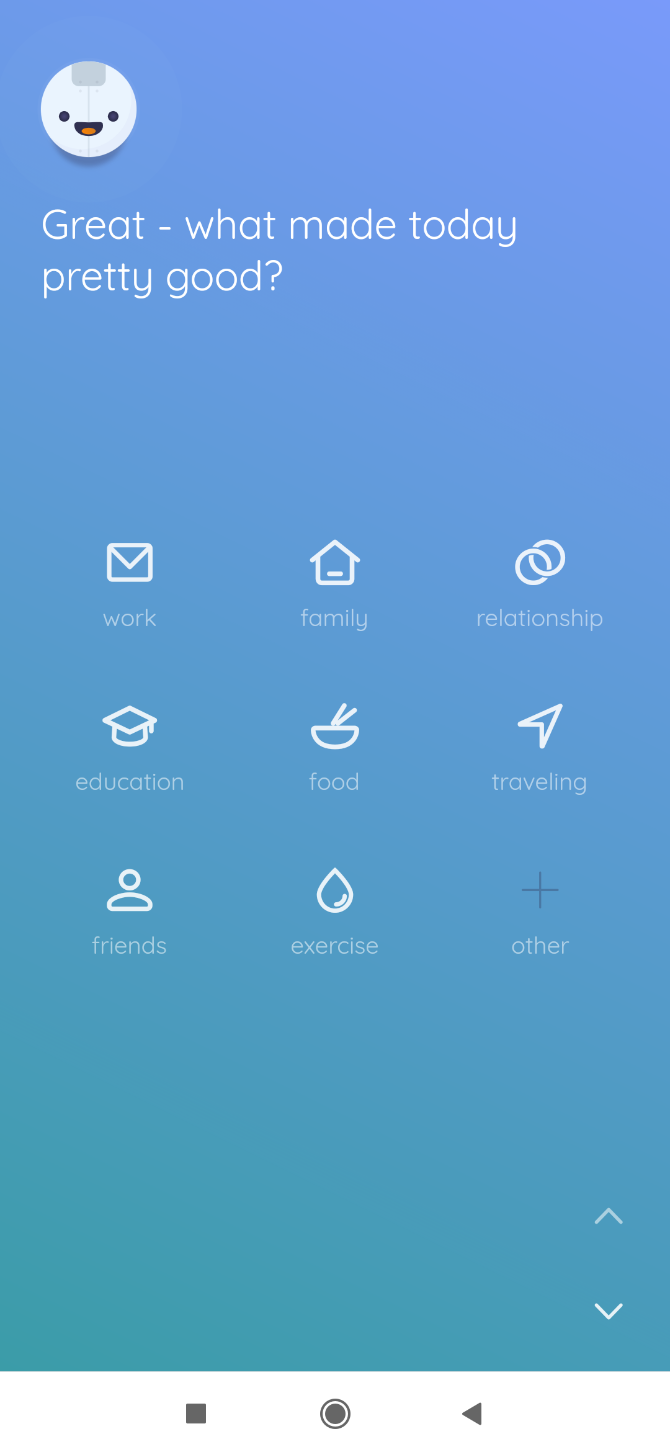
Setting up a prize system might make you feel like a pet, but it actually works. A great method to use is that of rewarding positive behaviors: complete items on your to-do list that have been pushed off, and then you can browse social media. It becomes a game. Do the dishes, add 3 minutes to your social media time. Each opportunity and social media craving will link back to productive work ethics. Once you’ve hit your stride, lessen the amount of time each task rewards.
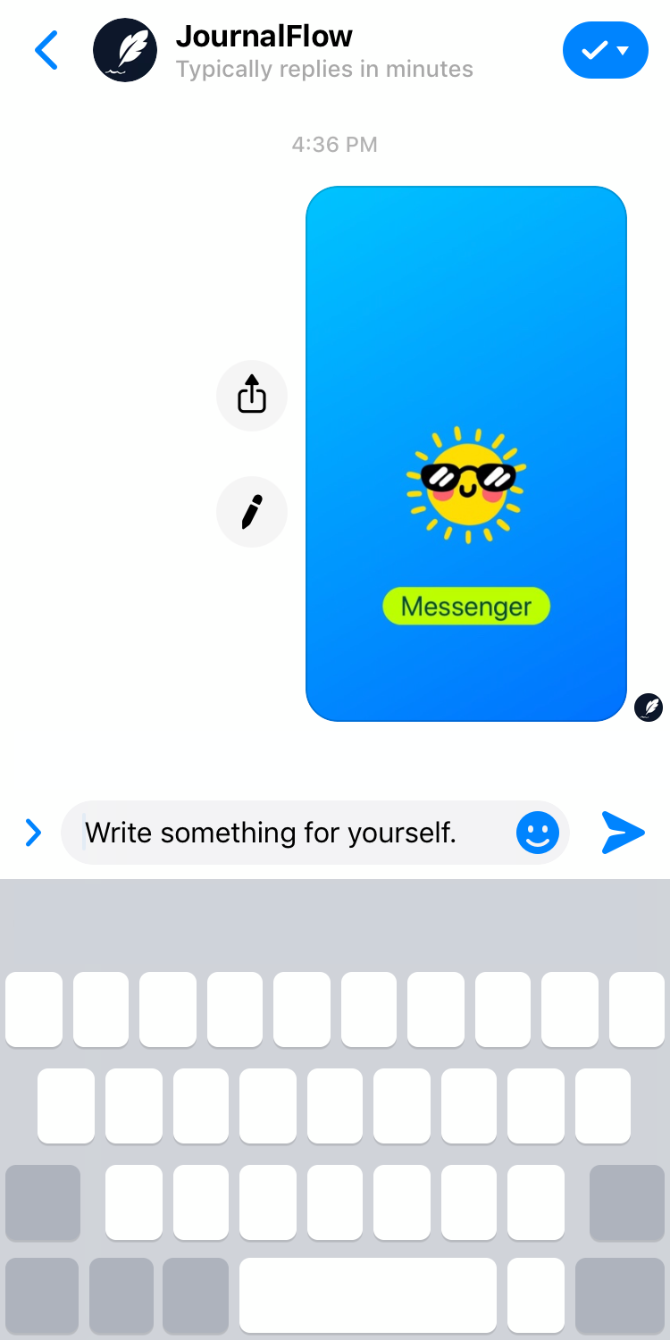
Constant consumption of social media is unhealthy, regardless of the person. Whether you try one or all of our tricks, make sure to stay positive and keep a strong mental image of yourself.

Still on the line as to whether social media needs to be cut out of your life? Then check out our article on the positive effects of social media.

Read the full article: 7 Tips to Help You Waste Less Time on Social Media

21 Oct 14:49

Vankyo V600: Budget Priced Projector That’s Brilliant and Bright

by Joe Coburn
Our verdict of the Vankyo V600 Projector:
It's big, it's bright, and it's reasonably priced. The Vankyo V600 is an excellent projector, although it suffers from a slightly dated software interface.810

Vankyo may not be the first name you think of when it comes to high-performance projectors, but the V600 is a very solid performer for a reasonable price. This projector is bright and produces a very sharp image at a native full HD, 1080P resolution. It makes some sacrifices to meet this price point–but are they enough to stop you buying this projector? Read on to find out.

If you’d like to build your own home-cinema, then don’t forget to enter our giveaway contest at the end of this review, where we are giving away a Vankyo V600 performance projector.

Specification

Vankyo V600 front view

The Vankyo V600 is a “performance” projector. In theory, this should set it apart from other projectors in its image quality, brightness, and feature set. Performance and budget don’t often work well together, but the V600 retails for $249.99. For this modest price you get:
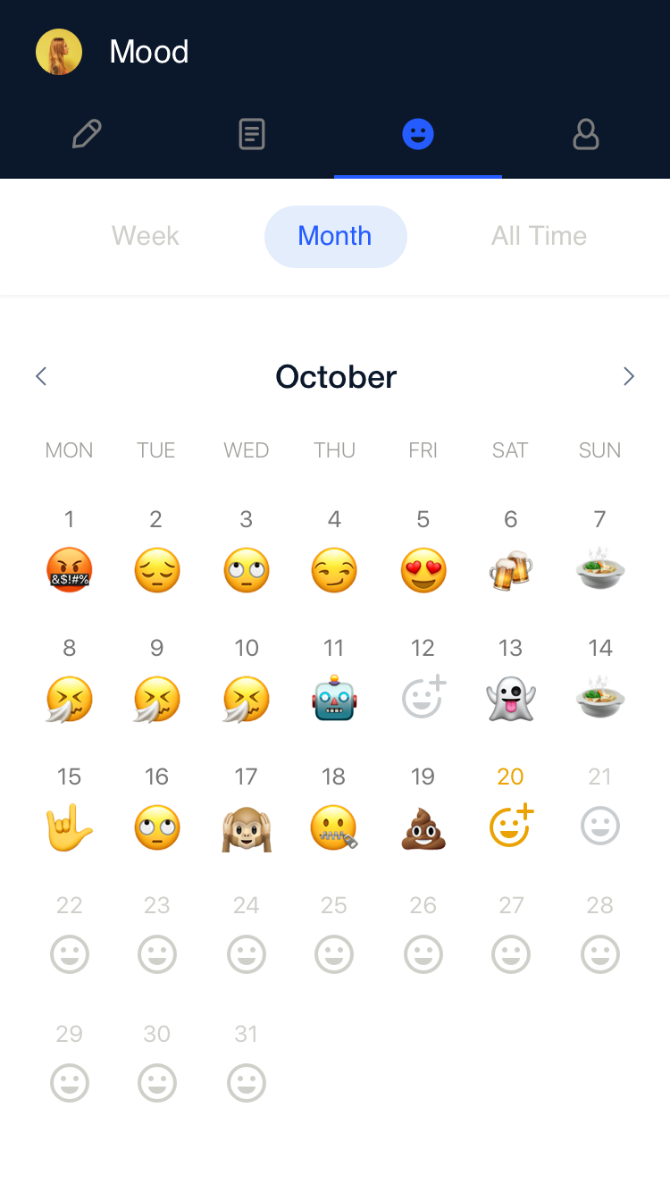
  • 1920 x 1080 pixel native resolution
  • 300-inch largest screen size
  • 5,500 lumens brightness
  • 6,000:1 contrast ratio
  • Built-in 5W speaker
  • LED lamp
  • 1 x AV input
  • 1 x VGA input
  • 1x audio output
  • 2 x HDMI inputs
  • 1 x MicroSD input
  • 1 x USB input

Features and Design

While it’s not 4K, the native 1080P resolution is excellent. It’s better to have a good 1080P resolution than a sub-standard 4K resolution. The 6,000:1 contrast ratio is excellent, as is the 300-inch maximum screen size. The maximum brightness of 5,500 lumens is outstanding, and many projectors such as the BenQ TK800 struggle to match this at six times the price.

But take that figure with a grain of salt. The gold standard of projector brightness is ANSI lumens. These set the benchmark of how to measure projector brightness, and ensure that every manufacturer is measuring output brightness by the same standards. Projectors that do not quote ANSI lumens are free to measure brightness any way they choose, including in ways favorable to their cause. We suspect that the Vankyo is taking liberties with these brightness measurements, given they are not quoted in ANSI lumens.

Vankyo V600 projecting

That said, the V600 is brilliantly bright, and you won’t be disappointed with its output level, even if it doesn’t match up to its quoted figures. Thanks to the LED bulb you can expect to achieve more than 50,000 hours of use.

The built-in speaker delivers average sound quality. There’s only one, so it’s not capable of reproducing stereo audio, and as it operates at 5 Watts, it can only just rise above the projector fan speed. Despite this, you don’t buy projectors for their sound quality, and so this tiny speaker is more than adequate to handle basic audio duties in an emergency. Any serious media consumers should consider purchasing an external audio system to pair with this projector.

Vankyo V600 rear view

The choice of I/O on this projector is confusing. There are two full-size HDMI inputs (no mention of their HDCP status), one VGA input for those still running computers with analog outputs, and an AV input if you want to connect an ancient video camera. While more ports are always better, you can’t help but wonder if Vankyo is recycling old parts to save money.

The MicroSD and USB inputs are welcome additions, but these are not as useable as you’d think. It’s possible to play media off an external drive, but you may become frustrated by the limitations. You need to format your drives in a very specific format (we had success with NTFS). After this, only certain video formats will play at all. We’re not sure on the definitive list of what is and is not supported, but some modern codecs will refuse to play. Any media player should be able to handle a variety of formats, and this projector falls short here.

Vankyo V600 projector

The V600 measures roughly 11.8 x 9 x 4 inches (30 x 23 x 10 cm). The cooling system is excellent at maintaining a steady operating temperature, but it does produce a lot of excessive noise. This isn’t unusual for a projector, but it will drown out the built-in speaker. The front contains a small adjustable foot to fine-tune the projector height, and on the top, you’ll find a series of buttons to control the projector, alongside the included remote control. You’ll need to supply your own batteries, however. The manual focus ring is smooth and offers plenty of room for fine-tuning the focus. You have to unwind the focus to use the included lens cap, however, which is frustrating if you don’t often move the projector.

Ease of Use

Vankyo V600 image sample

The V600 is easy to use, but the software interface is basic. It looks dated, and as discussed above, is incapable of playing many types of video. A healthy amount of vertical keystone can be corrected, and this projector provides settings for both rear and upside-down installation options. You can adjust the color temperature, keystone correction, brightness, power-up options, and more from the simple (but ancient-looking) menu. Choosing different input sources happens through a secondary source menu, which lets you choose inputs quickly.

Vankyo V600 controller

Various buttons on the top of the unit allow navigate menus easy enough, but outside of this their use is limited. For example, there’s no way to play or pause a video. To use this projector in any capacity, you have to use the included remote control. Quite why so many buttons are present, yet such limited control is possible from the projector itself is baffling, but the controller is easy enough to use and has a reasonable range.

Brightness and Image Quality

This projector is unbelievably bright. Thanks to the LED bulb, it is outstanding. It can project a bright and clear image with lights on or ambient daylight filtering into the room, although like any projector it will suffer significantly when competing with bright sunlight streaming into your room or directly in the path of the beam. Colors look bright and vivid, even when projecting onto a plain white wall instead of a dedicated projector screen.

Vankyo V600 image sample

The image quality is outstanding, especially when you consider the price. This projector blows away the competition at this price, especially when compared to any travel projector or budget models. Image quality is the main feature of any projector and the V600 is worthy of its performance moniker.

Vankyo V600 image sample

Films look stunning, and video games benefit from the super immersive experience offered by this projector. While I don’t have space to project a 300-inch image (which requires a throw distance of around 32 feet), I did experiment with several smaller screen sizes. While the brightness does reduce slightly at the large end of these screen sizes, it’s more than useable at any sensible screen size (that is, screens less than 100 inches diagonal).

Should You Buy the Vankyo V600?

This projector is quite simply stunning. Its insane output level and stunning image quality place it in a class of its own, and it far exceeds expectations for a budget projector. It represents outstanding value for money.

Vankyo V600 Logo

While the software interface is clunky and limited at times, the core feature of image quality blows away the competition. We can highly recommend this projector, but it’s not for everyone—and that’s ok.

If you’re looking for a portable projector, or one with a little more attention to detail (such as the software interface, or the lens cap), then this projector isn’t for you. Equally, if you must have extensive software control options, or you need to use a variety of different media formats or USB drives, then you may want to skip this model.

Vankyo V600 with lens cap

If you’re looking for a stunning projector without too many bells and whistles to distract from the image quality, then the V600 performance projector is perfect for you. It can get the job done for a very respectable $249.99. If you need something portable, then take a look at the Nebula Capsule 2. While it can’t compete with the V600, it is smaller and comes with a built-in battery.

If you’d like to own a Vankyo V600 projector, but can’t afford the modest $249.99, then make sure you enter our giveaway contest below for a chance to win one.

Enter the Competition!

Vankyo V600 Projector Giveaway

Read the full article: Vankyo V600: Budget Priced Projector That’s Brilliant and Bright

21 Oct 14:48

The 12 Best Free Audiobooks From Loyal Books You Should Listen To

by Dan Price
online-free-audiobooks

Even if you don’t have the time to sit and read a book, you can still enjoy quality literature by listening to audiobooks. And there are plenty of good free audiobooks out there.

Many sites now offer free audiobooks, including Amazon. However, in this article we take a look at the best free audiobooks on Loyal Books, which was formerly known as booksshouldbefree.

1. Robinson Crusoe by Daniel Defoe

robinson crusoe free audiobook

Published in 1719, Robinson Crusoe is considered to be one of the first English novels. It tells the story of a lost British castaway who is forced to spend 28 years on a Caribbean island before eventually being rescued.

Despite its age, Robinson Crusoe remains popular among adventure lovers; it includes tales of cannibals, wild animals, hunting, and the desolate loneliness that Crusoe faces throughout his ordeal.

2. Peter Pan by J.M. Barrie

peter pan free audiobook

The Scottish playwright and novelist Sir James Matthew Barrie was one of the foremost literary figures of the late 19th century.

Peter Pan had already featured in some of his works (such as 1901’s Little White Bird) before Barrie penned the full-length play about the character in 1904. The book version didn’t become available until 1911.

The original story is much less sanitized that the Disney adaptation that most people know and love. Suffice to say, if you’ve never read it, you’re in for a shock.

3. The Adventures of Sherlock Holmes by Sir Arthur Conan Doyle

sherlock holmes free audiobook

The Adventures of Sherlock Holmes is a series of 12 standalone stories. This free public domain audiobook includes all 12 releases which you can download individually.

The main protagonist is the title character. His friend and assistant, Dr. Watson, also features in every edition. Watson narrates all but four of the stories in the first-person.

4. The Wonderful Wizard of Oz by L. Frank Baum

the wizard of oz free audiobook

The Wonderful Wizard of Oz is one of American literature’s greatest titles.

The famous children’s book needs little introduction. It tells the story of Dorothy Gale as she’s carried away from her home in Kansas by a tornado, ending up in the fantastical land of Oz. Scarecrows, lions, and wizards all feature heavily.

5. The Odyssey by Homer

the odyssey free audiobook

Forget English literature. The Odyssey is one of the greatest masterpieces in human history. Written around 800 BC, it is the second-oldest surviving work of Western literature, bettered only by Homer’s other epic play, The Iliad.

The Trojan war between the Greeks and the Trojans provides the backdrop for the tale. For anyone with a passing interest in ancient culture, this free audiobook is a must-listen.

6. The 9/11 Commission Report

9/11 report free audiobook

Let’s move away from fiction for a moment. If you want to listen to a good free audiobook about real-life events, we recommend The 9/11 Commission Report.

Officially titled the Krean Hamilton Commission, the book is an audio transcript of the committee’s investigation into the terrorist attacks that devastated the United States in September 2001.

7. Gulliver’s Travels by Jonathan Swift

gullivers travels free audiobook

Another of the best free audiobooks for adventure addicts is Gulliver’s Travels. It was first published in 1726, less than a decade after the previous adventure novel we suggested, Robinson Crusoe. Critics frequently cite the book as one of the English language’s finest works.

Lemuel Gulliver is the primary character. He is the surgeon—and later Captain—on several ships. The story follows his life as he’s repeatedly shipwrecked, deserted, and cast adrift in far-flung corners of the globe.

8. The History of the Decline and Fall of the Roman Empire by Edward Gibbon

decline and fall of roman empire free audiobook

Another of the best non-fiction free audiobooks on Loyal Books is The History of the Decline and Fall of the Roman Empire. Despite its age, the book remains one of the foremost studies on Western civilization between the height of the Roman Empire to the fall of Byzantium.

Warning: This isn’t for the faint-hearted. The book discusses 1500 years of history across six mammoth volumes.

9. Moby-Dick by Herman Melville

moby dick free audiobook

Moby-Dick is one of the most influential novels to come out of the American Renaissance. It tells the story of a sailor who seeks to exact his revenge on the sperm whale that bit off his leg.

Oddly, the book was a flop upon its initial release. When Melville died in 1891, it was out of print and largely forgotten. However, after receiving glowing reviews from William Faulkner and D.H. Lawrence, it slowly grew in popularity. By 1926, it had been adapted into a silent film. Today, reviewers regularly list it as one of the best books of all time.

10. Andersen’s Fairy Tales by Hans Christian Andersen

andersens fairy tales free audiobook

The Princess and the Pea, The Little Mermaid, The Ugly Duckling, The Wild Swans, The Snow Queen—Hans Christian Andersen is responsible for some of the most celebrated fairy tales in the world. Many parents still dutifully read them to young children today, almost 150 years after the author’s death.

If you’re looking for some free audiobooks to entertain your little ‘uns on long trips, download this file and keep it handy. You won’t regret it.

11. The War of the Worlds by H.G. Wells

the war of the worlds free audiobook

With movies like Independence Day, Mars Attacks, and Starship Troopers—not to mention the endless stream of Marvel releases—it’s easy to forget just how groundbreaking The War of the Worlds was when first published. Urban legend claims that when Orson Welles narrated a radio adaptation in 1938, millions of listeners in the US panicked, assuming it to be an actual event.

To date, the novel has never been out of print. It truly is one of the best public domain audiobooks you can download.

12. Relativity: The Special and General Theory by Albert Einstein

albert einstein free audiobook

You don’t need to be a science whizz to read (or listen to) Albert Einstein’s seminal work. He wrote Relativity: The Special and General Theory for the general public. The physics concepts are explained clearly and concisely, and are almost entirely free from mathematical jargon.

So, if you can’t tell your E=mc2 from your a2+b2=c2, make sure you download this free audiobook from Loyal Books.

How to Download Even More Free Audiobooks

Remember, this list of best free audiobooks only covers titles that are available on Loyal Books (formerly booksshouldbefree). They are all public domain audiobooks, making them free and legal to download.

If you want to download newer audiobooks for free, be sure to check out our other articles uncovering the best ways to listen to audiobooks for free and listing the best free audiobooks you can listen to online.

Read the full article: The 12 Best Free Audiobooks From Loyal Books You Should Listen To

21 Oct 14:45

The private eye industry is alive and well 

by Caroline Dohack

The spy game has changed. In a fascinating interview with The New York Times, Brooklyn-based private investigator Marie Schembri looks back on some of her best lewks… as well as how the profession has evolved in the past 30 years. 

Turns out the private eye isn’t just a film noir trope

Business is booming — to the tune of $6.6B in 2019, and it’s projected to grow.

While it used to be jealous husbands seeking proof of infidelity during divorce proceedings, now more women are hiring PIs to avoid being catfished by potential paramours… or worse. According to stats from the Centers for Disease Control, women are more likely than men to be stalked or abused by a romantic partner.

And what used to be a boys’ club has changed dramatically. According to New York’s Society of Professional investigators, 40% of its members are women and about 40% are people of color. Talk about diversity, inclusion… and a license to thrill.

Technology makes snooping way easier

When the Times first caught up with her in 1995, Schembri revealed herself to be a master of disguise, transforming from prim schoolmarm to sneering punk. But now the stakeout has gone digital.

Surveillance cameras as small as pencil erasers can be hidden in multiple locations, which allows Schembri to do most of her work from a computer. Instead of trailing her targets IRL, she follows their digital trails. Basically, her work has become a sweet work-from-home gig. 

But a good PI is more than an ace Facebook creeper

There’s a lot more to the job than the ability to sift through someone’s news feeds. 

A lot of it is about data and records; knowing how to access them and interpret them is the name of the game. Schembri got her start as a tax investigator specializing in real estate cases and was able to parlay that into a PI career.

The post The private eye industry is alive and well  appeared first on The Hustle.

17 Oct 17:54

Mount Rushmore Before Carving

by Kim LaCapria

In October 2019, a post circulated showing a natural rock formation known as “Six Grandfathers” before it was carved into what most Americans now call “Mount Rushmore.”

The original tweet was shared in July 2017 by @TheAriDee:

Alongside an image of an unaltered rock formation, the post said:

For anyone curious, here’s what Six Grandfathers looked like before they defiled it by carving a bunch of old white men into it.

A small watermark indicated the image was originally published in LIFE, an entertainment magazine published weekly until the early 1970s (and intermittently after that until 2000) that was famous for its photography. A partial version of the edited caption was shared various times to Reddit, and on r/climbing alone twice:

Mount Rushmore before Carving. Guess what just became my least favorite monument? (x-post r/pics) from climbing

A top comment on the 2013 version didn’t reference what stood before Mount Rushmore, but remarked:

Surely I can’t be alone in thinking the carving shat up the landscape?

Just under it, another commented:

FYI the Treaty of Fort Laramie from 1868 had previously granted the Black Hills to the Lakota in perpetuity. So fuck that ’cause we need some old white people on that sacred mountain shit right?

Another version of the image and similar commentary appeared on Twitter in August 2019, when one user retweeted a “Mount Rushmore before carving” tweet and another commented:

Images labeled “Mount Rushmore before carving” seemed to follow a conversational pattern on social media, in which the latter caption and image was shared and sparked claims that the image showed a natural rock formation that had been called Six Grandfathers, it was sacred to the Lakota people, and that it was originally preserved for indigenous Americans under perpetual treaty.

Au August 2017 Vice article related to the debate over Confederate monuments examined Mount Rushmore’s colonialist history, observing that a common trope in film and on television involves a villain demonstrating egotistical weakness by carving their own face into Mount Rushmore:

Let’s start on a minor note: Mount Rushmore isn’t even finished. The monument was originally intended to show four presidents—Washington, Jefferson, Theodore Roosevelt, and Lincoln—from the waist up, as well as a large representation of the Louisiana Purchase, giant facsimiles of the Declaration of Independence, the Constitution, and a secret room behind Lincoln’s head. But construction stopped in 1941, shortly after the original sculptor’s death, and as it stands today, Lincoln is still missing an ear. The rocks lying below the carving? Those aren’t naturally occurring; that’s the rubble from rock blown away with dynamite.

Much more importantly, Mount Rushmore is only monumental in its hubris and deeply rooted racism. Countless comics, films, and television shows have depicted megalomaniacs carving their own faces into Mount Rushmore, while letting the original megalomania and racism slide. There is something so American about looking at the enormity of nature—at millions-of-years-old rock—and thinking, “You know what this needs? White guys.”

That is reflected on the site TV Tropes, which maintains a page called “Rushmore Refacement”:

Villains, especially cartoon villains, are remarkably narcissistic and prone to childish vandalism. Whenever there’s a landmark with a famous face on it, there’s a good chance the villain will demonstrate his need for attention by putting their own face on it instead (or some ridiculous caricature of a real face, to emphasize their whimsicality). Mount Rushmore (which features U.S. Presidents Washington, Jefferson, Roosevelt and Lincoln, in case you’ve forgotten) is an especially frequent target of this; the Statue of Liberty and the Great Sphinx of Giza are other popular venues for refacement.

Rushmore’s chief sculptor was John Gutzon de la Mothe Borglum, better known as Gutzon Borglum. Borglum was evidently extremely friendly with deeply unsavory people. For example, the “Mount Rushmore” project was funded in part by the Ku Klux Klan:

The son of polygamist Mormons from Idaho, Borglum had no ties to the Confederacy, but he had white supremacist leanings. In letters he fretted about a “mongrel horde” overrunning the “Nordic” purity of the West, and once said, “I would not trust an Indian, off-hand, 9 out of 10, where I would not trust a white man 1 out of 10.” Above all, he was an opportunist. He aligned himself with the Ku Klux Klan, an organization reborn—it had faded after the Civil War—in a torch-light ceremony atop Stone Mountain in 1915. While there isn’t proof that Borglum officially joined the Klan, which helped fund the project, “he nonetheless became deeply involved in Klan politics,” John Taliaferro writes in Great White Fathers, his 2002 history of Mount Rushmore.

Borglum’s decision to work with the Klan wasn’t even a sound business proposition. By the mid-1920s, infighting left the group in disarray and fundraising for the Stone Mountain memorial stalled. Around then, the South Dakota historian behind the Mount Rushmore initiative approached Borglum—an overture that enraged Borglum’s Atlanta backers, who fired him on February 25, 1925. He took an ax to his models for the shrine, and with a posse of locals on his heels, fled to North Carolina.

An August 2017 article in Colorlines.com went into the history of the mountain and the sacred monument known as “Six Grandfathers” by the region’s indigenous Americans:

One of those treaties [between the government and indigenous Americans], known alternately as the Sioux Treaty of 1868 and the Treaty of Fort Laramie, seemingly granted the Sioux autonomy over a reservation that included all of South Dakota’s land west of the Missouri River … The National Archives state that the government first violated the 1868 treaty just six years after it was signed, when General George A. Custer led a military expedition to the Black Hills. The Lakota Sioux regard these hills as sacred, but the government’s quest for the gold found in that range took precedence over tribal sovereignty. Miners flooded the area and demanded U.S. protection from Sioux peoples protecting their land, which lead to further military incursions and the U.S. seizing the land in 1877.

Nearly fifty years later, president Calvin Coolidge authorized workers to turn one of the Black Hills—”The Six Grandfathers,” which PBS says the Lakota Sioux named after the Earth, sky and four directions—into a carved edifice bearing the faces of presidents George Washington, Thomas Jefferson, Abraham Lincoln and Theodore Roosevelt.

Vice summarized the events in that interim “fifty years” in an article headlined, appropriately enough, “Mount Rushmore’s Extremely Racist History”:

The Black Hills region was designated “unfit for civilization,” and “Permanent Indian Country” in the 1850s. But when General Custer surveyed the area and reported that his men had discovered gold, white people came running. President [Ulysses S.] Grant secretly ordered the army not to protect the native residents, and bounty hunters began collected up to $300 per Indian killed. The Sioux were forcibly evicted from their land, and the mountain formerly known as Six Grandfathers was named after the first white man to express interest in it. In 1884, New York City lawyer Charles E. Rushmore asked his guide what Six Grandfathers was called. His guide replied, “Never had a name, but from now on we’ll call it Rushmore.”

Six Grandfathers was sacred to the Lakota Sioux. The mountain was named after the ancestral spirits who came to Lakota medicine man Black Elk in a vision, and any construction on that land would have been an insult … Of course, the US government has a long history of violating treaties with Indigenous populations. But the Black Hills are special insofar as the Supreme Court actually agreed that the land was taken illegally in United States v. Sioux Nation of Indians. The Court ruled in 1980 that the US owed the Sioux Nation the 1877 price for the land, along with 100 years of interest. The Sioux rejected the cash settlement because they still want the land back.

A 2013 piece in Cabinet Magazine noted that the Sioux never accepted the hefty repayment offered to them in 1980, aiming instead to get their land back:

In 1980, after decades of filing claims, the US Supreme Court ruled in favor of the Sioux Nation, acknowledging that the Black Hills had been appropriated illegally by the US government when it broke the treaty of 1868. But the court also declared that the passage of time made the return of Sioux lands impossible and ordered a $120 million reparation payment. The Sioux refused the money and in 1982 the Committee for the Return of the Black Hills was formed, consisting of one representative from each Sioux tribe. The committee got the support of New Jersey Senator Bill Bradley (Dem.), who sponsored their legislation in Congress. Representatives of South Dakota led the fight against the bill to return 1.3 of the 7.5 million acres of land the Supreme Court said belonged to the Sioux. The bill was defeated in 1987. In 1990 further legislation over the Black Hills claim was defeated on Capitol Hill. South Dakota Senator Tom Daschle (Dem.) established the Open Hills Association in his home state, an organization dedicated to fighting future attempts by the Sioux to regain the Paha Sapa. Daschle also began using Mount Rushmore to raise campaign money, charging “guests” $5,000 dollars each for a helicopter ride to the top of Washington’s head—an area designated off-limits by the National Park Service.

That article went on to note that as of 2013, the value of the $120 million repayment, with interest, had grown to about $570 million. In 2015LIFE‘s sibling publication TIME profiled Bill Groethe, who has been taking photographs of the stone face that became Mount Rushmore since its inception.

Posts on Facebook, Twitter, and Reddit showed “Mount Rushmore before carving,” typically eliciting claims that native lands had been defaced for the monument. The underlying history is both far more detailed and nuanced, but no less reflective of that claim. In fact, the Supreme Court ruled in 1980 that the lands on which Mount Rushmore stands were stolen illegally from the Lakota peoples when an 1868 treaty was violated. Court-ordered compensation initially valued at $120 million (which had more than quadrupled nearly 35 years later) lay untouched by the Sioux — who are waiting for their land to be returned, as they were promised so many years before.

The post Mount Rushmore Before Carving appeared first on Truth or Fiction?.

17 Oct 17:28

How to Use LinkedIn Skill Assessments to Stand Out

by Shianne Edelmayer
linkedin-skill-assessment

LinkedIn Skill Assessments help connect recruiters with job hunters by having job hunters prove their knowledge and skills.

The tests are run through the LinkedIn website. In this article, we’ll show you how to use LinkedIn Skill Assessments to stand out from the crowd.

What Are LinkedIn Skill Assessments?

LinkedIn Skill Assessments Give You a Verification Badge

LinkedIn Skill Assessments are a series of multiple-choice exams that allow you to prove the skills that are stated in your profile.

If you “grade in the 70th percentile or above”—according to LinkedIn—you officially pass and get a LinkedIn skill badge. The social media site will display your badge on your profile.

If you fail the quiz, you can take the test again in three months. Your profile will remain the same. No one will know that you took the test and failed.

To construct these tests, LinkedIn contacted multiple experts and peer-reviewed their answers. Each test is time-based, so people cannot cheat by looking for clues.

While LinkedIn Skill Assessments are available internationally, it’s important to note that not all tests will be available to all users. In addition, these tests are only available in English. However, LinkedIn plans to expand the Skill Assessments program over time.

NB: LinkedIn are consistently innovating in order to keep the platform fresh. So much so that in February 2019, LinkedIn launched its own video streaming service called LinkedIn Live.

What Skill Assessments Are Available?

What LinkedIn Skill Tests Are Available?

There are lots of tests currently available through LinkedIn Skill Assessments. Topics range from coding to office-based applications like Adobe Acrobat.

According to the LinkedIn Help Pages, the following tests are available. However, as previously noted, availability depends on your location:

  • Angular
  • AutoCAD
  • AWS
  • Bash
  • C
  • C#
  • C++
  • CSS
  • GIT
  • Hadoop
  • HTML
  • Java
  • JavaScript
  • jQuery
  • JSON
  • Maven
  • MongoDB
  • NodeJs
  • Objective-C
  • PHP
  • Python
  • R
  • React.js
  • Ruby
  • Ruby on Rails
  • Scala
  • Swift
  • WordPress
  • XML

When it comes to other skills, you can be tested on:

  • Adobe Acrobat
  • Maya
  • MS Excel, MS Word, and MS Outlook
  • MS PowerPoint, MS Project, MS SharePoint, and MS Vision
  • QuickBooks
  • Revit

Once you finish a test, you’ll be give a score. If you Pass, you’ll need to renew your LinkedIn skill badge on an annual basis. Please note that if you delete your badge by accident, you cannot take the test again for another three months.

If you Fail, LinkedIn will advertise LinkedIn Learning products to you, to help you prepare for the next test.

What We Learned From Taking a Skill Assessment

How to Start a Skill Quiz for LinkedIn Skill Assessments

We took a couple LinkedIn Skill Assessments to see what they would be like. And here’s what we learned:

  • LinkedIn tells you right away what to expect for time allowance, and what you need to do in order to successfully complete a test.
  • LinkedIn also explains how these multiple-choice quizzes will be broken down into sections.
  • Once you press Start, you’ll be taken to a screen where you’ll be asked your first question. You’ll have a bunch of multiple choice options below that.
  • You’ll also see a timer in the bottom left-hand corner, along with a blue bar that shows you your overall quiz progress.
  • After you answer each question, you’ll press the Next button in the right-hand corner. This will move the test to the next question, and then the next, and the next. Once you reach the end, you’ll be told if you passed the assessment or not.
  • If you didn’t pass the LinkedIn skill quiz, you’ll be given the opportunity to delete the test results from your profile history.

Our Verdict on LinkedIn Skill Assessments

After taking several of these tests, we can testify that they’re very straightforward. If you prefer multiple-choice quizzes or exams, you’ll do well. However, if you’re a visual learner, you may find them frustrating, as they don’t really accommodate for different learning styles.

The full range of LinkedIn Skill Assessment tests also veers heavily towards coding. This leaves little leeway for people who desire LinkedIn skill badges in other areas of expertise.

It should also be noted that these tests are not a great way to determine if a person is truly “skilled” at a task. Some people do great at a task in execution, but perform poorly in written tests, or vice versa.

Hopefully these areas of conflict will be improved with future updates.

A LinkedIn Skill Assessment Can Give You Credibility

The Reason You Should Take a LinkedIn Skill Test

LinkedIn is one of the best websites for job searching. While its size makes it crucial to create and maintain a LinkedIn profile, it can also make it harder for you to stand out, as there are just too many applicants.

Which is where LinkedIn Skill Assessments come into play. Taking one of these tests (and passing) can help confirm you’re the real deal, and help you stand out from the crowd as a result. And recruiters will use any tool at their disposal to zero in on the best candidates.

Do You Need to Complete a LinkedIn Skill Assessment?

You may be sent a request by a company to complete one of these Skill Assessments, especially if you apply to a job posting through the LinkedIn website. It’s good practice to have one done ahead of time on the day of your choosing.

However, we should stress—as LinkedIn does—that these tests are not mandatory. They’re just another way to add a secondary level of verification. So, don’t feel obliged to take one, but know that doing so could help you stand out from the crowd.

Use LinkedIn Skill Assessments in Your Job Search

It’s important to note that LinkedIn’s tests will be refined as the company receives more feedback. Taking a test—or getting a LinkedIn skill badge—is also not a guarantee that you will land your dream job.

However, you have nothing to lose and everything to gain by taking a LinkedIn Skill Assessment. Especially if you know you’ll pass first time.

Are you looking for other ways to stand out in the job market? LinkedIn Premium can help give you a headstart, and here are the reasons why LinkedIn Premium is worth paying for.

Read the full article: How to Use LinkedIn Skill Assessments to Stand Out

17 Oct 17:23

Write Your Name Graffiti Style Using the Graffiti Creator

by Ben Stegner

Graffiti is something most people don’t have firsthand experience with. But it still looks cool, and who hasn’t imagined their name being written out in slick graffiti art?

Using some online graffiti generators, you can create graffiti of your name easily. Whether you want to create cool art without committing a crime or just write your name in style, you can do it with these graffiti creators.

1. Graffiti Creator

Graffiti Creator Site

This long-time graffiti maker bills itself as “the original” on its site. To get started, pick from one of the several graffiti styles, including Kodiak, Bubbles, Wavy, and Flava.

The site still uses Adobe Flash, so you’ll need to allow it to run in your browser. Enter your text in the bottom-left corner and click Create to get a template. Adjust the letter-spacing below this and pick a color from the wheel or RGB sliders.

At the bottom-right, you can apply graphical styles to your graffiti to further customize it. If you want to customize letters individually, click and drag them on the canvas. Above the styles box, you can also select individual letters to apply effects to.

That’s all there is to this graffiti name generator; get as creative as you’d like. There’s no built-in option to save or export your creation, so you’ll need to right-click the canvas and choose Print to save it as a PDF or similar. Alternatively, you can take a screenshot of your art.

The creator of this page is a full-time graffiti artist and illustrator whose work has been featured in many products. If you’re looking for more professional graffiti of your name, you can reach out to him for a commission at CustomGraffiti.net.

Note that Adobe plans to discontinue Flash after 2020, so this app won’t work after that unless it receives an update to use modern technology.

2. Download or Copy Graffiti Fonts

Font Meme Graffiti Font

If you don’t want to use a dedicated graffiti creator app, you can download some free graffiti fonts manually and use them in your own projects. You’re sure to find plenty of graffiti-related options on the best free font sites.

One example is the Graffiti Fonts collection on Font Meme. This collects dozens of fonts from around the site in one easy page. Plus, if you don’t want to download and install a font, you can quickly generate any text you like and copy it.

To do this, enter some text in the first box, then select a font from the dropdown below it. After choosing the font size, you can apply one of the many effects if you want to. To finish up, just pick a color and hit the Generate button when ready.

You’ll see a preview of the text appear below. Confirm it looks right, then right-click it and choose Save image as to keep a copy of it. Alternatively, right-click and select Copy to paste it into an image editor. The Embed button provides links to add your creation to your website or link to the image.

Didn’t find what you were looking for here? Check out graffiti fonts on DaFont, UrbanFonts, and 1001 Fonts for more options.

3. GraffWriter

GraffWriter Graffiti

Here’s an alternate graffiti name maker that’s also easy to use. Enter your text in the top-left corner of the maker, then adjust the size, color, and gradient on the left side. You can even add a background image if you like.

To go deeper, use the controls along the top of the editor. Effects lets you add outlines, shadows, blurs, and similar effects. If you’re not feeling too creative, use Presets to apply a pre-made theme. Check the available Fonts if you don’t like what you’re using.

The major downside of this service is that it doesn’t update your graffiti name in real-time. You’ll need to click the Submit button to apply your changes each time. It will also display an error if your item is too large.

When you’re satisfied with your creation, click the Host this image button to generate an embed code and image download link. You can save or copy this image wherever you want to use it.

4. Graffiter

Graffiter Drawing Site

Thus far, we’ve looked at tools mainly intended as graffiti name generators. But what if you want to create virtual graffiti for the fun of drawing? That’s where Graffiter comes in.

This site lets you pick from a variety of walls to tag. Once you’ve selected one, you can use different drawing tools at the top for certain looks, like smeared or clean. Choose your drawing colors, and even zoom in if you need to.

After you’ve completed your masterpiece, the service lets you upload it to Graffiter.com for other people to see. You can peruse what others have added to get ideas for your own creations.

Graffiter is a fun way to live out drawing on a wall without fear of getting arrested. You’ll be able to make more impressive art if you have a touchscreen device, of course.

How Will You Graffiti Your Name?

These graffiti creators for names are a perfect way to create a fancy logo for yourself. Whether you want to add them to a website or just mess around for fun, they’re easy to use and paste into other image editors.

If you’re ready to go beyond these basic graffiti tools, have a look at sites that will teach you to draw on your own. We’ve also covered the fundamentals of digital coloring in Photoshop.

Read the full article: Write Your Name Graffiti Style Using the Graffiti Creator

16 Oct 17:50

Garbage Goat of the Welding Nun, Spokane, WA

Feature: Municipal mechanism resembling a goat that makes quick work of paper trash and litter. ...
16 Oct 17:44

Howard Finster's Paradise Garden, Summerville, GA

Feature: Outsider artist turned pop culture celeb, Rev. ...
16 Oct 17:43

America’s big business billionaires are buying up LOTS of land

by Conor Grant

A massive, 100-square-mile Texas ranch that belonged to recently deceased mega-millionaire T. Boone Pickens went on sale for $250m in 2017.

But compared to other land empires, Pickens’ plot was a small potato: 100 wealthy families own 42m acres of land across the US, and the amount of land owned by these lords of land has spiked 50% since 2007.

Why do billionaires want so much land?

Land tends to its retain value over time, making it a more consistent and predictable asset than other luxury investments.

For rich families with oodles of cash, land offers the added benefit of providing recreational opportunities — fishing, hunting, vacationing — to friends and family for generations.

But, as The New York Times reports, huge private land grabs also limit local access to public lands, which has made billionaire land barons unpopular in parts of the American West where they’ve bought up big lots.

So, who are some of the biggest landowners?

Many of the country’s largest landowners are famous business magnates. Here are a few of the big names — and how much acreage they’ve got:

  • John Malone, former CEO of Tele-Communications Inc: 2.2m acres
  • Ted Turner, founder of CNN: 2m acres
  • Stan Kroenke, owner of LA Rams: 1.38m acres
  • Peter Buck, co-founder of Subway:  925k acres
  • Jeff Bezos, founder of Amazon: 420k acres

The post America’s big business billionaires are buying up LOTS of land appeared first on The Hustle.