Almost everyone has some harmless piece of personal information floating around on the internet. Now, it’s almost unavoidable. But it’s a completely different story when someone writes something libelous about you or exposes a sensitive piece of information.
If you find false or private data on the web, you need to learn how to remove information from the internet. Follow along to find out what you need to do to act.
What Is Libel?
In the United States and in many countries around the world, truthful statements about another person are safe to publish. However, publishing outright lies with the intent to defame or injure the reputation of others is illegal.
In the U.S., the victim of libel has the right to bring a civil lawsuit against the defamer. Such lawsuits are usually very expensive and not worth the effort for most people. If you find that someone has published untrue information about you online, there are less expensive and more effective ways to remove that false, libelous information from the web. That’s why it’s important to know how to remove your address from the internet, along with other sensitive information that websites know about you.
Contact the Website Owner
Before you do anything else, swallow your pride and contact the person who published the information. Locate the contact details on the website if you can. Then, send a friendly email pointing out why what they wrote is untrue.
Don’t call them a liar, just ask them if they wouldn’t mind entering a friendly dialog with you regarding the issues that were published. You’d be surprised how many of these situations arise out of a gross misunderstanding.
Communicating with the other person can immediately clear up any disagreements you may have had, and you may discover that the author is willing to remove the hurtful page. Kindness can often go a very long way to getting what you want.
Unfortunately, the odds are pretty good that you may be dealing with an unstable or unreasonable individual. They may get obnoxious and refuse to cooperate. That’s when it’s time to step it up a notch.
How to Report a Website for Slander and Remove Personal Information From the Internet
When the owner of the website won’t cooperate, you need to get serious. The following steps will help you remove your information from the internet. While this guide doesn’t tell you how to remove your name from the internet completely, it’ll give you a surefire way to get your private information off the web.
To prevent any of these situations happening in the future, you might want to think about improving your online privacy as well.
1. Find Contact Information
Before you conduct full-fledged warfare against the offending website, you’ll need to do a little bit of investigating. The first step is to identify the name and contact information for the person who registered the site that hosts the libelous material.
For this, try the DomainTools Whois Lookup. This site gives you detailed information about the website you’re searching for. All you need to do is enter the site’s URL into the search bar.
To view the site’s full writeup, you’ll need to scroll to the bottom of the page and verify yourself with a CAPTCHA. You’ll see a contact email under “Registrant Email” or “Administrative Contact.” You can use these emails to try to get in touch with the owner of the site.
At the top of the page, DomainTools also provides information regarding the site’s host under the “Registrar” section. Once you know the name of the web hosting company, visit the website and obtain their contact information, as well as a list of the host’s Terms and Conditions. Make a list of those terms that the offending webmaster has broken on their website.
2. Report All Terms and Conditions Violations to the Host
If you’ve contacted the webmaster and they are unwilling to cooperate, then the first part of this battle is to fire off as many abuse violation reports as needed. Your first order of business is to report a violation to their web host. It’s important that you find a violation on the web page that goes against the terms and conditions of the host. Most web hosts do not allow the posting of personal information or any form of libel.
For example, GoDaddy, a popular web host, provides a form that allows you to file any abuse complaints. Simply find the place on the offending website where the author makes use of your name and other personal information without your permission and use it as your evidence.
3. Report Privacy or Copyright Infringement To Google
Another approach is to remove information from Google and get that web page delisted from the search engines. Google is the powerhouse of online information, so getting delisted from Google will virtually destroy any chance the offending website will have of getting visibility.
If you’re wondering how to remove yourself from Google search entirely, you might not get the answer you’re looking for. There are only some scenarios where Google will remove specific results. Those situations include when any of the following are published on a web page:
Your social security or government ID number
Your bank account or credit card number
An image of your handwritten signature
Your name or business published on an adult content site
Infringement of copyrighted content like text or images
In most cases, you can use this form to submit your request to remove content from Google.
4. Report Any Other Abuse to Google
If the website that’s posted libel about you hasn’t broken any privacy rules, you still have a chance of removing their site from Google if you can find a case of abuse related to Google’s Terms and Conditions. Search the website and try to find examples of any of the following:
The site is just spam
It buys or sells links
You find malware or malicious software on the site
The site contains phishing schemes
If you can identify any of the above activities on the website, submit a report to Google using the Spam Report Tool.
Don’t Give Up Trying to Remove Online Information
Now that you know how to remove your information from the internet, as well as how to report a website for slander, you can feel a little more at ease. If you don’t get a response from the website owner or host on the first try, don’t give up. As a last resort, you can turn to Google to take care of any personal information posted on the web.
Clothing is one of our most basic needs, yet it can often be one of the most expensive. Even with the rise of fast-fashion and lower prices, getting your hands on clothing can still be a financial burden.
If you’re cash-strapped but in need of some clothing, the internet can help. There are sites where you can find free clothes near you, helping you dress up in no time.
Here are five of the best places to find free clothes online.
Freecycle is best known as a second-hand marketplace for furniture and other home furnishings. However, the free exchange site has a large selection of free used clothes too.
One of the benefits of Freecycle is that it allows you to find items local to you. To use the site, you need to enter a specific area, like Brooklyn, New York, for example. This keeps the listings within a reasonable distance of where you are.
To search posts, you’ll need to be a signed-up member of the site, but registration only takes a moment. Once signed in, you’ll be able to search posts for keywords like clothes or free women’s clothes, for example.
You should also select the option to display only “offer posts”, rather than wanted listings. Opening an offer post should give you some detail on the item and allow you to reply to the post to arrange collection.
Although Freecycle is available in locations around the world, if you’re after free clothes in the UK, then Freegle is the best place to start. Freegle is a UK-based organization promoting waste reduction and product reuse. Their website operates in a similar way to Freecycle.
To get started, you enter your postcode, and then you can browse all available offer posts. If you often find yourself donating items to sites like these, you may also be interested in these social impact apps that’ll help you change the world.
As Freegle is not as well-known as Freecycle, there are usually fewer postings. However, it allows those in the UK to find free clothes online and complements the Freecycle service.
Since both are free to use, there is no downside to having multiple options when searching for free clothes online. To send a reply to an offer post, you’ll need to be registered with the site.
You’ve probably heard of Craigslist. The site was one of the first to bring traditional classified ads online back in 1995. It was designed to look like the classifieds page at the back of your newspaper and hasn’t really changed over the past two decades.
Don’t let the reasonably functional look put you off, though; Craigslist is one of the world’s most popular websites and is a great place to get free clothing near you.
When you first visit Craigslist, the site will determine your approximate location from your IP address and direct you to your local Craigslist domain. So, those in New York would be directed to newyork.craigslist.org, for example.
As a source of classified ads, Craigslist differs slightly from the previously discussed options. The majority of posts on the site are for paid services, or those looking to sell their items.
However, don’t let that dissuade you from using the site to locate free used clothes. From the main page, select clothing for sale and use the filters to set a maximum price of $0. That will allow you to see all the clothing listings that are available for free.
The range of listings means that, if you can afford to spend a bit of money on new clothes, you can find a wide variety of options available to you, even for modest budgets.
The sites we’ve discussed so far feature clothing but aren’t specifically geared towards finding free clothes. Rehash is a dedicated website that allows you to trade and exchange your clothes with other users. So, you’ll need to start with at least one item of clothing you’d be willing to swap, but it does mean that you can refresh your wardrobe without having to pay a dime.
Once you’ve created an account, you can list the clothes and accessories you want to trade. You’ll then start to get offers from other users who may wish to exchange with you. Once you’ve found an offer that fits, you can exchange clothes.
There are no fees for listing or completing a swap. In fact, the only thing you need to pay for is shipping your old clothes to your exchange. To date, the site has swapped almost 10,500 items between 61,000 members.
Thrift stores are a great way to find affordable second-hand clothes. However, if you can’t make it to a store, or don’t have one nearby, your options used to be limited. However, the online thrift store Swap.com has a modern take on the used clothes market. Thrift shopping can be quite time consuming, as each store holds a different stock. Swap has a much more extensive inventory of clothes for you to browse.
If you are the buyer, you’ll be able to browse a large collection of second-hand and pre-owned clothes, all available at low prices. While Swap isn’t a place where you can get free clothes, it does offer an affordable alternative to full-priced clothing.
Selling second-hand clothes can also be a hassle, as you typically have to maintain a listing and field questions from buyers. Swap handles all the admin for you. All you need to do is send them your pre-worn clothes, and they take care of the rest. Once your items have sold, you’ll be paid.
Where to Find Free Clothes Online
There’s no getting around the high cost of clothes. Even as mainstream fashion brands have been able to reduce prices, clothing is still an expensive necessity. Not everyone is always in the position to afford the expense of a new wardrobe. Fortunately, there are plenty of generous people willing to give away their used clothes for free.
Let me state for the record that I am usually opposed to sharing non-recipes like this. Thus, whenever I’ve mentioned bacon-wrapped dates as part of a party or Friendsgiving menu and have received a surge of comments and DMs asking me for the recipe, I’ve responded, “Just Google it — recipes abound!” Or, more huffily, “That’s it. That’s the recipe.” But I’ve begun to question why I want to send your beautiful faces elsewhere, especially because when you do Google for a recipe, it’s going to lead you to what I consider inadvisable places. And now, like clockwork, here come Opinions:
The editors of Cool Tools have curated a number of gift suggestions selected from our website, newsletters, videos, and podcasts. This week: Kevin’s picks!
Best belts
I use only nylon web belts. They don’t have holes, so they are infinitely adjustable. And they use hard plastic for the buckle so I don’t have to remove it in airports, saving me hassle. There are many styles and colors, all can be trimmed for length. The one I use is this generic model. — KK
Minimalism notebooks
I’ve long been a fan of blank (no-lines) Moleskine notebooks, large and small. I recently switched to Minimalism Art notebooks which are very similar, maybe better, quality and half the price. They also come in bright cover colors. — KK
Blendable color markers
For sketching and painting I favor alcohol-based markers, which let you blend colors like a watercolor brush, but with the convenience of a felt marker. The preferred premier markers are the extremely expensive Copics. An equivalent inexpensive alternative for blendable markers with dual tips (fat or point) are Bianyo. I can paint quickly easily in a notebook using a travel set like these 72 Bianyo markers — KK
Two-sided magnetic measuring spoons
These magnetic measuring spoons are handy because they have two sides for each measurement. The oval side fits into smaller jars, and I can alternate between wet and dry ingredients without having to wash a spoon. Also, the magnets keep them together so I never have to search for the one I need. — CD
Four legs
Hiking poles give me two extra legs. They are most useful going downhill, over uneven or wet terrain. I bring them wherever I hike, especially when I travel, because I use a collapsible set from Black Diamond that folds up to less than 14 inches (36 cm). That not only fits in carry-on luggage, it will also hide away in a day pack, so I can take them out only when needed. The $75 Distance Z-Poles are lightweight aluminum, unfold in a second, and are very rigid. You can get featherweight carbon fiber if you want to pay more. — KK
TSA-proof knife
After decades of using a Utili-key as my choice of a small knife to pass through airport security, I lost it in the woods. I replaced it with a Victorinox SwissCard. This tool is a mini-Swiss Army knife flattened into a plastic holder the size of credit card but thicker. It has a tiny (1.5 inch) sharp blade, scissors, tweezers, a pen, toothpick, and a pin. You can carry it in your wallet or bag. Goes through security. There is a knock-off version which remarkably adds a magnifier, a light, and four screwdriver heads in the same size card for half the price at $9 — but you’ll need to sharpen the flimsy blade. — KK
Werewolf, intense social game
When we meet for family reunions, or gather with friends, our favorite group game is Werewolf. Classrooms and corporate retreats also play Werewolf. It’s a deduction/deception game, extremely social, that is as much fun to watch as to play, so it can involve everyone. The games are exhilarating, surprising, and addictive. The only gear you need are some cards. While you can get by with an ordinary deck of cards, a set of dedicated Werewolf cards makes it much easier. After you’ve played a number of basic games, it’s easy and fun to play with variations, which are supported by this deck of Apostrophe Werewolf cards ($11). — KK
Cloud magnetic key holder
I saw one of these cute cloud-shaped magnetic key holders ($7) at my friend’s place and wanted one immediately. It solves my one recurring problem: not knowing where I put my keys. It came with adhesive backing so I was able to “set it up” right away. Easy peasy. — CD
Smallest, cheapest flashlight
This ThorFire is the brightest, cheapest ($22), smallest, lightest LED flashlight that runs on a single AA (rechargeable) battery. Rugged, made of metal, it will stand up on its end. I have them everywhere. — KK
WiFi smart plugs
I bought this 2-pack of GoldenDot WiFi smart plugs for $17 on Amazon. I used one on our bedroom’s air filter and the other on our garage door (to turn of the power so no one can open it with a remote). It was easy to link the plugs to Alexa and Google Assistant. I now control these appliances with my voice. I also put the air filter on a schedule, so it turns on at night and off in the morning. — MF
USB rechargeable lighter
Forget butane-lighters or matches. This $13 gooseneck electric arc lighter has a lithium-ion battery that can light hundreds of candles and barbecue fires on a single USB charge. — MF
Sturdiest big umbrella
We’ve had one of the rainiest winters in memory. I normally carry a compact foldup umbrella in my bag, but when I head out from my house in the rain, I grab the Blunt near the door. This full-length umbrella is built like a tank. It is super sturdy, larger than a solo umbrella but not as big as a golf umbrella. There are no pointy corners (they are blunt, hey), and high winds won’t faze it a bit despite its large sized canopy. It would take an actual hurricane to invert it. You’ll lose it before it wears out. It’s expensive ($79), but worth it. — KK
Most comfortable flip-flops
Sanuk Yoga Slings are made from recycled yoga mats and are unbelievably comfortable to walk around in. The thong sandals have stretchy fabric straps that you can pull around your ankle so that they never fall off. I gave a pair to my mother-in-law, who was born and raised in Hawaii and maybe the ultimate authority on flip-flops, and she loves them. — CD
Here are some of our readers’ favorite pocket-size tools. — MF
The Gerber Dime Multi-Tool ($29) has become and item I carry everyday. At times I carry bigger multi-tools, but even then, everyday I always have my Gerber Dime with me. The size of the tool is just over 2 inches when folded up so it fits comfortably in the watch pocket of my jeans. Because of this size you will find you always can carry it with you. Light enough to carry even with dress pants on. — Tom Parks
The Gerber E-Z Out Jr Knife ($27) has been my daily carry knife for 16 years. It is a small light weight belt clip knife with a serrated blade that lets me cut anything from paper to rope and straps. The thumb slot in the blade allows you to open the knife one handed. The lock release makes it easy to fold the blade back in one handed. The belt clip is handy but secure. — Peter Lucas
The Swiss Army Victorinox CyberTool 29 ($67) has a nice long 5mm driver that uses four double-ended bits, including my favorite Phillips #2, two smaller Phillips bits, a straight bit, three Torx drivers (#8, #10, #15), and a 4mm hex bit. It also includes the classic straight-blade screwdriver, can opener, awl, two knife blades, corkscrew (yes, I use it fairly regularly!) and a tiny screwdriver ingeniously tucked in the corkscrew. I really like that the straight-blade screwdriver and Phillips driver are at opposite ends. Having the two screwdrivers open at the same time often makes the task go quicker. — Rurik Spence
When saving ounces, the Leatherman Squirt ($35) is the lightest multi-tool kit to carry. It’s got your knife, pliers, wire cutter, scissors, file, and two screwdrivers in only 2 ounces (57 g). Some folks use it as a keychain fob; I primarily carry it while backpacking and biking. — KK
Smaller than most pocket knives, and with the ability to unfold into a completely handy pair of snips, the stainless steel Micra ($30) contains two functional flat-blade drivers (micro and “regular”) and a #2 Phillips-equivalent screwdriver, so I can achieve most anything I need to do inside a server closet or at a customer’s desk. — Steve Sussex
Got the DoohicKey Keychain Multitool ($4) over 6 months ago and it has been attached to my keyring ever since. It is almost invisible and barely noticeable, until you need it. The wide screwdriver tip, the bottle opener and the box cutter are perfect additions to my Leatherman Style PS Multitool, which also comes with me everywhere, including planes, as they are both TSA clean. The DoohicKey also comes with a wrench and a ruler. — Jesus Climent
Everyone has heard of the legendary Space Pen, which was developed for the space program and writes upside down, underwater and in extreme temperatures. They make many different varieties of the Space Pen, but the most useful and elegant is the Bullet ($18). The Fisher Bullet is in two pieces: the actual pen, and a cap that fits on the back of the pen to make a full-size writing instrument. When closed, it makes a compact, tight-fitting, gasket-sealed capsule that easily fits in your pocket. It comes with a shirt pocket clip that can be removed, so it’s less obtrusive in your pants pocket. You can get it in chrome, but the matte black finish is so much cooler. — Curtis Galloway
S-Biners ($2) are much lighter than conventional carabiners and have two attachment points, which really comes in handy when you need to quickly attach and detach things. — Cormac Eubanks
The Split Pea Lighter ($21) is the “world’s smallest lighter,” a stainless steel tube 1.3″ high and 0.5″ in diameter. Unscrew the top, flick the flint wheel, and behold! Fire! — Mike Everett-Lane
The Spyderco Bug Knife ($16) is the smallest knife I have ever found and is just big enough for general scraping, tiny hole poking, and little thing slicing you need to do on a daily basis. It does not have a lock mechanism, but as long as you know that, you can use it in a way that will not cause it to close. It is stainless steel, so it is tough and corrosion resistant. — Mark Nordhaus
At around $10, the Pelican Progear Keychain Flashlight is the right price for a piece of gear that my life could depend on, but if I happen to lose, they crying will be over the loss of a trusty piece of kit, not the loss of a small fortune. And believe me, this is something that I will replace with the same item immediately if it’s ever lost. — Mark Krawzcuk
I’ve been using various models of the Chive ($40) for 6+ years. It’s perfect for how I use it — everyday carry all around convenient small sharp thing. It has a small (~2″) 420HC blade, light, spring-assisted assisted opening (with a small flipper) and stainless steel so I can run it under hot water or otherwise clean and wash it with less concern about rust. The steel is a a big deal for me. Other small folders I’ve used have relatively softer blade steel, whereas the 420HC is a nice balance between holding an edge and easy to sharpen. — Steve
What surprised me about this cheap, tiny microscope ($7) is how much fun it can be to just take it to anything out in the world — the wood grain on a table, the tread of a bike tire, the print in a comic book — all these little hidden worlds open up and you can just instantly peek at them. If you have kids, it’s a slam dunk. Even if they already have a standard microscope, like my kid, the reaction to this was totally different. Beyond the novelty, I’ve found this useful a few times for inspecting electronics projects and troubleshooting connections or reading little component values or serial numbers. — Donald Bell
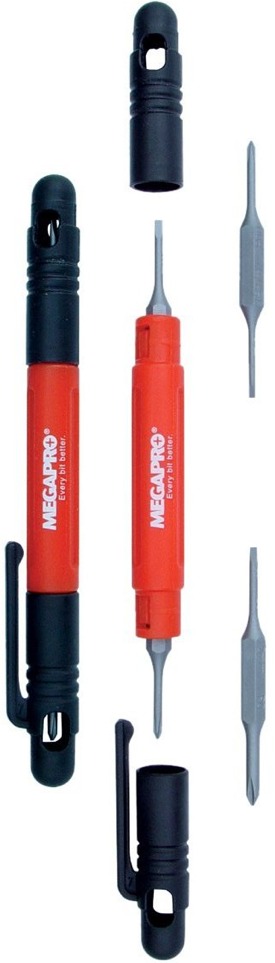
If you’re in IT, the need for small Phillips and Flat screwdrivers is common. Megapro, which makes the recently reviewed Megapro Stainless 15-in-1 Driver ($8), also makes a handy and inexpensive Pocket Driver. The bits cover two sizes for both Phillips and Flat head. The bits are well made. The handle is comfortable, just big enough for the job, while not being too big for a shirt pocket. The caps snap over each other, so you can put them on the tool when removing them and are less likely to leave them behind. The caps also rotate smoothly, making it easy to apply pressure with the palm of the hand while twisting with the fingers. The holes in the sides of the cap let you check which bit is in which end of the tool. There’s a clip for putting in your shirt pocket. I bought five so that I could hand them out to co-workers so they would be less likely to steal mine! — Toby Ovod-Everett
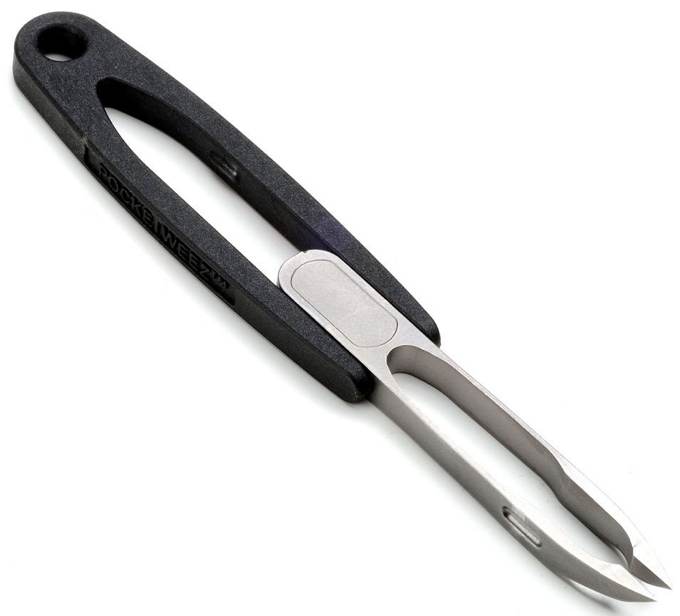
I wanted to have a set of tweezers I could put on my keychain. It needed to be sharp enough that I could dig out a stubborn sliver broken off under the skin and go with me hiking and camping and through the TSA too. I found it in the Pocketweez ($20). Like any tool once you use it you find others things to use it for. I dropped a tiny machine screw inside the electronics I was repairing that was non ferrous and not retrievable with a magnet. Worked great. — Kent Barnes
VKTRY Insoles combine aerospace-grade carbon fiber technology with a flexible design — a combo that’s scientifically proven to protect against injury while aiding peak performance.
You may start working for someone that seems brilliant, articulate, sensitive, caring and supportive. As time goes on, you realize he may not be all that he seems. Here are some of the signs to watch out for.
The coming of the railroad in the U.S. of the 19th century meant unprecedented opportunity for millions—a triumph of transportation and commerce that changed the country forever. For many more—including millions of American bison—it meant catastrophe and near extinction. This complicated history has provided a rich field of study for scholars of the period—who can tie the railroad to nearly every major historical development, from the Civil War to presidential campaigns to the spread of the Sears merchandising empire from coast to coast.
But as time wore on, passenger trains became both more commonplace and more luxurious, as they competed with air and auto travel in the early 20th century. It is this period of railroad history that most attracted Ira Silverman as a graduate student at Northwestern University in the 1960s. While enrolled at Northwestern’s Transportation Center in Evanston, Illinois, Silverman and his classmates found endless “opportunities for research, adventure, and unparalleled feasting,” writes Claire Voon at Atlas Obscura.
Silverman especially took to the dining cars—and more to the point, to the menus, which he collected by the dozens, “eventually amassing an archive of 238 menus and related pamphlets. After a long career in transit, he donated the collection to his alma mater’s Transportation Library, which recently digitized it in its entirety.” Silverman’s collection represents “35 United States and Canadian railroads,” points out Northwestern, and its contents mostly date from the early 60s to the 1980s—from his most active years riding the rails in style, that is.
But Silverman was also able to acquire earlier examples, such as a 1939 menu “once perused by passengers aboard the famed 20th Century Limited train,” Voon writes, “which traveled between New York City and Chicago.” Twenty years after this menu’s appearance, Cary Grant, “playing an adman in Alfred Hitchcock’s North by Northwest, orders a brook trout with his Gibson” while riding the same line. The Art Deco menu for the "new streamlined" line features such delicacies as “genuine Russian caviar on toast and grilled French sardines.”
Even kids' menus—now reliably dominated by chicken fingers, pizza, PB&Js, and mac & cheese—offered far more sophisticated dining than we might expect to find, with “items such as grilled lamb chops, roast beef, and seasonal fish" on the North Coast Limited menu below. “The mid-20th century seems to have been a golden age of railroad dining,” remarks Northwestern Transportation Librarian Rachel Cole. “It was never something that railroads profited on, but they used it to compete against each other and attract passengers,” taking pride in “selections that would be rivaled in restaurants.”
The fine dining-car experience might also include novelty items passengers would be unlikely to find anywhere else, such as Northwestern Pacific’s Great Baked Potato, “a monstrous spud,” Voon explains, “that could weigh anywhere between two to five pounds” and came served with “an appropriately sized butter pat.” One can see the appeal for a food and travel enthusiast like Silverman, who had the privilege of trying dishes on most of these menus for himself.
The rest of us will have to rely on our gustatory imaginations to conjure what it might have been like to eat prime rib on the Western Star in the Pacific Northwest in the early 60s, or braised smoked pork loin on an Amtrak train in 1972. If your memories of dining on a train mostly consist of pulling soggy, microwaved “food” from steaming hot plastic bags, or munching on packaged, processed salty snacks, expand your sense of what railroad dining could be at the Ira Silverman Railroad Menu Collection here.
H.P. Lovecraft, Agatha Christie, H.G. Wells, and Edgar Rice Burroughs all have something in common: A novel or two that's entering the public domain next month.
The latest Wi-Fi standard will make wireless networking faster, more reliable and less power-hungry. EnGenius Networks has launched a new 802.11ax wireless access point that brings the new Wi-Fi standard to home and work.
In 2018, MUJI marked its 10-year anniversary in the US with new stores opening across the country. We sat down with Toru Tsunoda, President of MUJI USA and the man responsible for bringing its minimalist aesthetic into the American home.
Nancy McRae was out for a Sunday drive around Charleston with her husband, Harris, on a spring afternoon in 1955 when she spotted the lush landscape of Boone Hall Plantation, an estate founded by Major John Boone, an Englishman, in 1681. The sturdy, regal oak trees dripping in Spanish moss and blooming gardens put the splendor of the Lowcountry on full display. “That’s the most beautiful place I’ve ever seen in the world,” she told her husband. Harris, who shipped produce and brokered sales for many Charleston farmers, bought it from then-owner Dr. Henry Deas a few months later for Nancy.
Since the McRaes purchased the estate, it has carried on as a working farm—one of the oldest in the country—and eventually became an educational destination for tourists and residents alike. Today, pumpkins, tomatoes, peaches, and other crops fill the fields that sprawl across more than seven hundred acres, and visitors arrive for tours of the home, gardens, and more. Boone Hall has also made efforts to more fully tell the story of the people formerly enslaved there, including in the Black History in America exhibit, on view in the original small, brick slave cabins that stand in a row just outside the iron gates of the mansion, as well as in the “Exploring the Gullah Culture” presentation.
photo: Courtesy of Boone Hall Plantation
Slave cabins at Boone Hall.
But as the surrounding town of Mount Pleasant exploded in size and development over the past decade, locals wondered if Boone Hall would be eventually lost to the area’s rapid urbanization, as neighboring estates such as Snee Farms and Brickyard have been. Thanks to a new conservation easement, though, Boone Hall has been saved from such a fate.
As of November 5, nearly six hundred acres of Boone Hall will be permanently protected from development and continue to operate only for agriculture, education, and tourism for every generation to come. Both the South Carolina Conservation Bank and the Charleston County Greenbelt Program contributed financially to the easement, held by the Lowcountry Land Trust, but current landowner Willie McRae’s donation of 75 percent of the land’s value—more than $21 million—truly made the preservation possible. “This was one of the largest financial contributions of value in the state of South Carolina,” says Raleigh West, the executive director of the South Carolina Conservation Bank.
The easement is a monumental win for conservationists in Charleston—this land deal guarantees Boone Hall will never be replaced with shiny new condos or golf courses but will instead continue to tell important stories from Charleston’s history.
photo: Courtesy of Boone Hall Plantation
The gardens at Boone Hall Plantation.
“Boone Hall has always been a magical, mystical place for me ever since I was a child,” McRae says. “And now, with this conservation easement, I hope it will be that way right on for many a future generation.”
McRae’s memories of his life on the estate—caring for the cows, picking the crops, and cutting the grass—aren’t much different from the memories made there by visitors today. South Carolina State Senator Larry Grooms recalls his children picking pumpkins and taking their first hayride around the fields. Elliot Summey, the chairman of the Charleston County Council, says that Boone Hall has taught his children what it means to be from the Lowcountry. “This is the jewel in the crown that is Charleston,” Summey says.
But McRae reveals that Boone Hall hasn’t always been as cherished as it is today. In fact, he still remembers a 1979 newspaper article that listed Boone Hall as one of the worst tourist destinations in Charleston. It was an unlikely motivator. “That’s what made me go to work,” he says. “I couldn’t have my mother having one of the worst attractions.”
photo: Courtesy of Boone Hall Plantation
The home at Boone Hall Plantation.
So over the years, McRae transformed the estate into a gathering place for the people of Charleston, with the history of the land at the heart, from hosting the world’s largest oyster roast on the back lawn to the Scottish Games and Highland Gathering. As he thinks about what his parents would say to such a land deal, he smiles, and says he knows they would be proud. Especially his mother, Nancy, who saw the promise of the estate long before it became a landmark beloved by Charleston.
Instagram isn’t just about photos and videos. The social network also allows you to communicate with family and friends using Instagram DMs.
Instagram DMs are a private chat function primarily accessible through the smartphone app. And here’s everything you need to know about Instagram DMs.
How Can I Send and Receive DMs on Instagram?
It’s easy to access your DMs via the Instagram app. After signing in, your feed will load. If there’s a particular person you want to contact, click on their profile, then click on Message. A new chat thread will appear.
From here, you can:
Take a photo by clicking on the Camera button
Write a message
Make an audio recording using the Microphone
Send an image from your Camera Roll
Access GIPHY for GIFs and Stickers
You’ll need to give Instagram permission to access your photos and microphone first. You can do this through your smartphone Settings.
To see all of your chats, click on the paper airplane symbol in the top-right of your feed. This is also where you’ll find any DMs you receive.
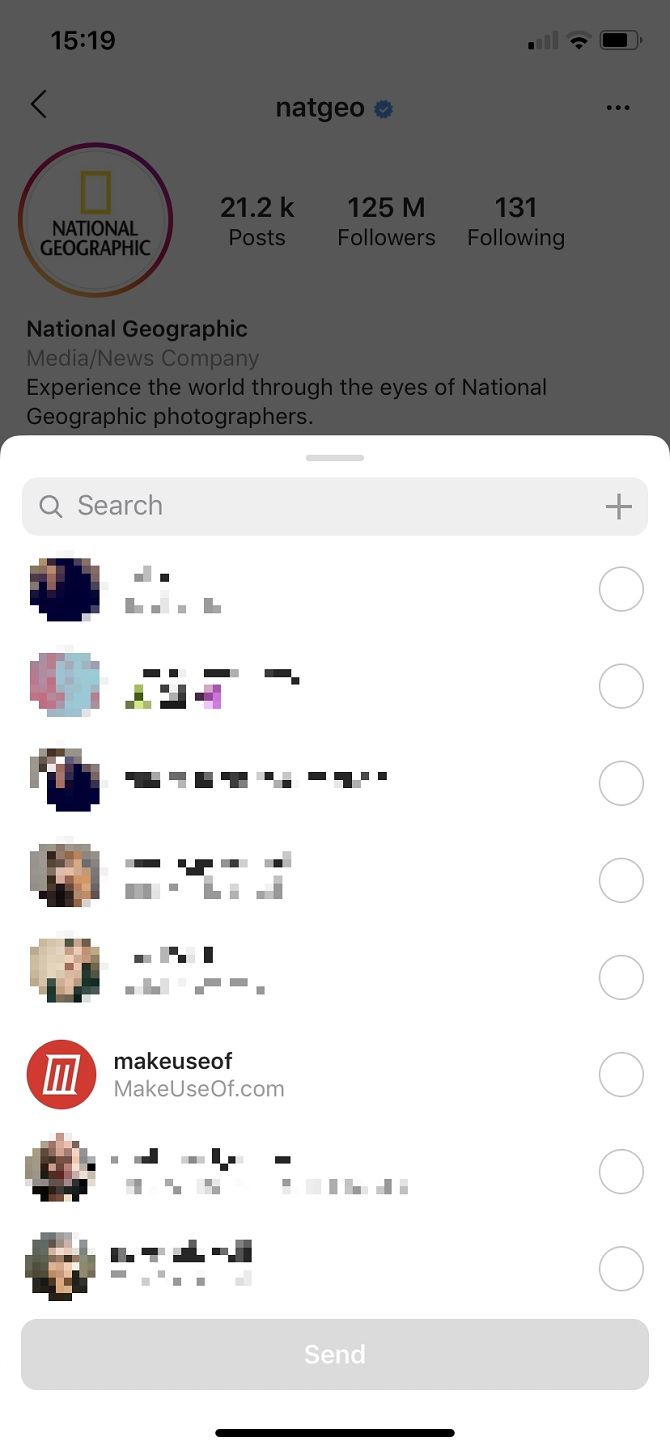
If you see a post in your feed that you’d like to share privately, click on the paper airplane symbol beneath the post. This is next to the Comments function. A list of regular contacts will appear. Alternatively, you can search for anyone you follow.
This is also how you add someone else’s post to your Story.
How Do I Make Group Chat DMs on Instagram?
You can send a post to a new or established group by following the above steps, but then clicking + in the Search bar.
To start a group chat similar to WhatsApp, navigate to your DMs. Click on the button that looks like a pencil in a box. You’ll see a list of followers under “Suggested”. Tick the people you want to add. If you have lots of followers, use the Search function.
Can I Share Profiles on Instagram DMs?
Let’s say you’ve found another Instagram profile you think your friend would love. You could tag them, or send a post as a DM.
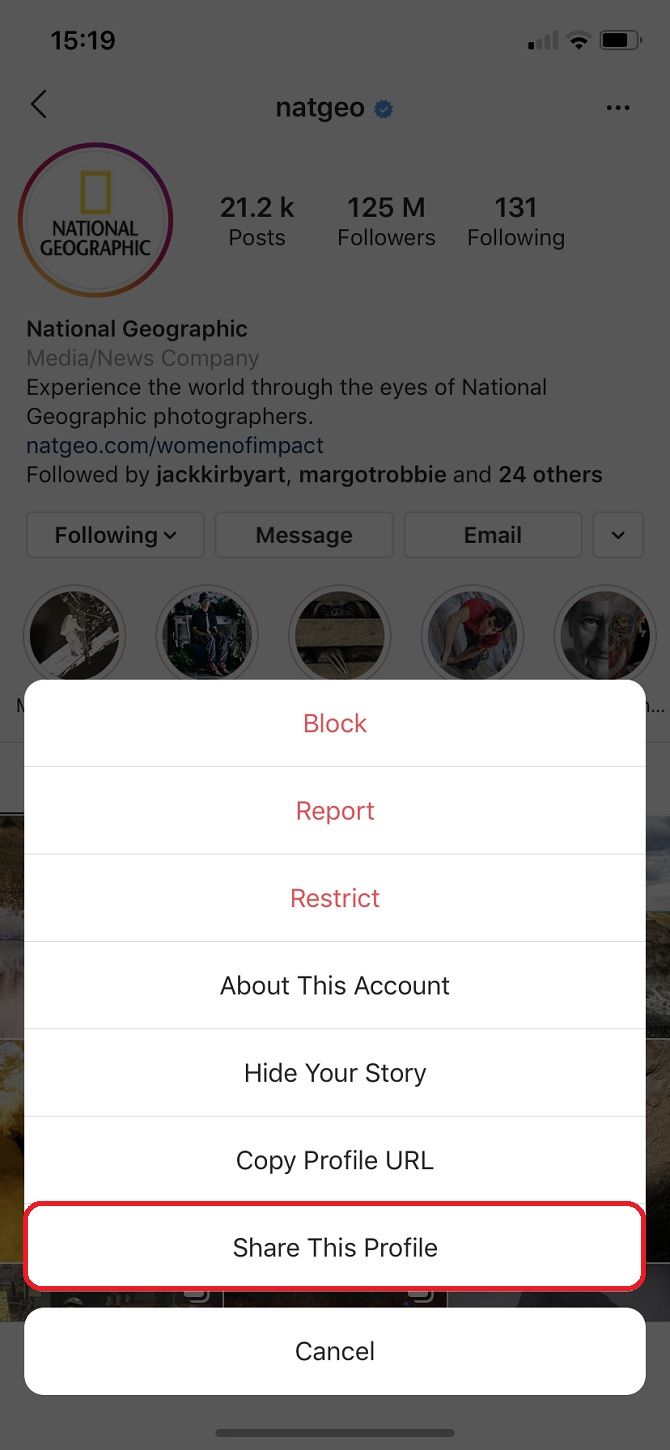
Or you could go onto the profile in question and tap on the ellipsis symbol in the top-right of the interface. Then click on Share This Profile or Send Profile As Message, depending on the version of the app you’re using.
How Do I Use Video Chat on Instagram?
Video chats are also accessed through Instagram DMs.
Click on the relevant person’s conversation feed or start one if you haven’t already. To initiate a video chat, click on the camera symbol in the top-right, next to the profile name.
How Do I Mute DMs on Instagram?
Perhaps you’re having a busy time and can’t be bothered with Instagram right now. Or maybe someone is being particularly annoying. If so, you can mute DMs from individuals, meaning you won’t see notifications when you receive a new message.
Just click on that person’s chat thread, then click on the i button in the top-right. The Details page will appear, allowing you to Mute messages and Mute video chat.
How to Like DMs on Instagram
You can like a DM in the same way you like normal posts on Instagram—just double-tap on the image or text. A small heart will appear underneath.
How to Unsend DMs on Instagram
Oops. You’ve sent a message you wish you hadn’t. Can you unsend a DM on Instagram? Fortunately, you can, although it doesn’t help if the recipient has already seen it.
Tap and hold on the message you want to withdraw. Two options will appear: Copy and Unsend. The latter will make it disappear from the thread entirely.
Instagram often tells you whether the other person has read the message too. It’ll say “Seen” below the post. However, if the other person has notifications turned on, they’ll probably have seen it already.
Can You Read Instagram DMs Without Being Seen?
Read receipts can be useful. They can also be a headache. And you can’t turn them off.
So, is there a way to view a direct message on Instagram without the sender knowing you saw it? It is possible, although it can be fiddly.
Firstly, you can read short DMs on your smartphone by enabling notifications. Do this by going on Settings > Instagram > Notifications. This doesn’t always work, though. The DM might be too long to read in its entirety. It might be a picture that’s too small to see. Or you could miss the notification.
There is another way you can read DMs without the other person knowing. Actually, it’s similar to how to secretly take screenshots on Snapchat. We cannot guarantee its effectiveness, but more often than not it works.
Load the app and check on your DMs, but do not click on the message. Navigate away from Instagram, but don’t close it. Turn off Wi-Fi and Mobile Data by simply clicking on Airplane Mode. Go back to Instagram. Now, you can read the DM without the other person knowing.
Next, go to Settings > Log Out. You can have numerous Instagram accounts—in which case, you need to log out of them all.
Close the app, then turn Airplane Mode off. You then need to log back into your accounts. If it’s worked, Instagram should say there’s a new notification waiting for you.
What Are Instagram DM Suggestions Based On?
Below your conversations, you might see further contacts listed as “Suggested”. These suggestions are based on several things.
They could simply be followers who you already follow back; in this case, Instagram encourages you to communicate. They can be based on your whereabouts if you’ve activated location services, or based on people you actually know if you’ve granted Instagram access to your Contacts. Suggestions can also be profiles you’ve visited, regardless of whether you followed them.
Can I Stop Seeing Profiles in Suggestions?
Seeing someone you don’t like or who you’ve fallen out with in DM suggestions can be off-putting. So what can you do to stop certain profiles from appearing in your DMs?
Your best option is to block that user. To do this, visit their profile and click on the ellipsis in the top-right, then tap Block. This will also stop them from being able to interact with you at all on the platform. Don’t worry: if you make amends, here’s how to unblock someone on Instagram.
How to Create Multiple Instagram Accounts
Chats can get messy, especially when you’re trying to have numerous conversations in one thread. Sometimes, you need to separate users depending on your personal situation. Try having a list of DMs for colleagues and another for friends, for example.
Google is rolling out some new Google Search features designed to help you pronounce words correctly. Google already has some impressive language skills, but the combination of visual cues and the ability to practice pronunciations takes things up a notch.
Learning to Pronounce Words Correctly
There are thousands of languages spoken around the world, and each of them has hundreds of thousands of words. Therefore, it’s impossible to know all of the words even in your native language, let alone a second or third language.
When you encounter either a new word or one you’re not familiar with, you may search online for how to pronounce it. And Google will invariably help. However, Google Search is now getting a couple of new tricks to help you pronounce words correctly.
Google Learns New Language Skills
Google details its new language skills in a post on The Keyword. The first new skill is an experimental pronunciation feature which lets you practice your language skills. The second is the addition of visuals designed to give context to words and their meanings.
The pronunciation feature lets you practice saying the word you’re having trouble with. After you Google “How to pronounce anemone” for example, Google will show you the correct pronunciation as usual. However, you’ll now also see a Practice button.
Click this, and you can say the word into your microphone. Google will then mark you using speech recognition technology and machine learning. Depending on the way your pronounce the word, Google will offer feedback on how you can improve.
Google will now also provide visual representations of the words you search for. This is designed to help visual learners, and will be especially helpful for words with multiple meanings. Google is starting with nouns, with hopes to expand in the future.
Will the Babel Fish Become a Reality?
The option to practice your pronunciations of words is available in American English now, with Spanish following closely behind. The visual cue cards are also available in English now, and across all language translations. This is mobile-only for now.
Google is upping its game when it comes to language skills. As well as these new Google Search features, Google Maps can now translate place names. It surely can’t be long until the Babel fish from The Hitchhiker’s Guide to the Galaxy becomes a reality.
Google is the default search engine for most of us. But did you know you can give to charity through search engines, or even earn cryptocurrency by searching? Check out these cool alternatives to Google.
You don’t need to quit Google cold-turkey or switch to any of these search engines immediately. Both can co-exist happily, and you can pick and choose when to use it. The idea is to try going away from Google to discover features and results that you won’t see otherwise.
1. Mojeek (Web): Search by Emotion, While Staying Private
Anything published on the internet gets a lot of reactions. Mojeek, an alternative to the likes of Google, says it can filter search results based on how people feel about that link. And it surprisingly works well.
There are five emotions currently available: love, wow, haha, sad, and angry.
Type your keywords and click the emoji to get search results that match the emotion. Click a different emoji and the results will change. It actually works, and you might discover links that you wouldn’t find otherwise. I found it a truly different, cool way to browse search results.
Mojeek is also a full web-crawling search engine, which means it uses its own results unlike many of the metasearch engines that repackage Google or some other search giant’s results. It is also completely private, does not track its users, and prides itself on hosting its servers with an eco-friendly partner.
The company’s founders conducted an extensive AMA on Reddit, if you want to know more about their philosophy or product.
2. Givero (Web): Raise Money for Good Causes Through Web Searches
How awesome would it be if every time you searched for something on the web, the money went to a good cause instead of lining the pockets of a private company like Google or Microsoft? Well, that’s what Givero is offering to do.
The idea behind Givero is similar to Ecosia and a few other such charity-focused tech companies. How does it work? Like Google or Bing, Givero earns revenue through advertising when you use it to search for anything. But unlike the others, half of the ad revenues from these searches will be given to a charitable cause.
You can choose the causes too. This includes global organizations (Mozilla Foundation, WWF, ocean cleanup) and local Danish causes since it’s a Denmark-based website. Add a charity to your causes, and the ad revenue from your searches will be diverted to only those causes.
3. Gibiru (Web): Uncensored, Privacy-Protected Google Results
You like Google, but you don’t like how it invades your privacy? Gibiru might be the best way for you to see Google search results while protecting your privacy. And you’ll also see some of the results that Google might censor.
Branded as an unfiltered, private search engine, Gibiru claims to have a modified version of the Google algorithm. So you will likely see the same results as you would on a Google search, and in fact, the interface is a little similar too.
But there’s a second tab called Uncensored. This tab shows links that you won’t see on Google or would be drowned into the back pages. Be warned, some of these are a bit out there, and you need to be wearing a tinfoil hat to click them.
But at its core, Gibiru does a good job of protecting your identity while doing search queries. It uses 256 bit encryption for all searches and does not keep search logs. It does not store any cookies on your device and doesn’t sell your data.
4. SearX (Web): Metasearch to Get Results From Multiple Search Engines
Different search engines use different methods to find the best results. SearX is a privacy-friendly metasearch engine that aggregates results into one central page. It’s based on open-source software.
In the Preferences, you can set which search engines you want to use.
These include popular giants like Google, Bing, and DuckDuckGo, as well as smaller names like Qwant and Startpage. In fact, you can choose specific engines for each type of search category, namely General, Files, Images, Map, Music, Videos, News, and Social Media.
The About page says SearX does not store any data, doesn’t generate a profile on your behavior, doesn’t share what you search with a third party, and can’t be used to compromise you. Website choices are saved locally on your computer, and you can clear all cookies through Preferences.
5. Presearch (Web): Earn Cryptocurrency Through Searches
Presearch is a fun little search engine that lets you earn some cryptocurrency with every search. It’s called PRE tokens and is not of much value at the moment. CoinMarketCap values one PRE token at $0.001 USD. But hey, it’s something.
Each search gives you a few decimals of PRE tokens, with a maximum of 32 searches per day giving that payout. Presearch’s tokens can be redeemed at an online store for merchandise like stickers and beanies. But it might be wiser to stack them up and use them to buy advertising space on Presearch.
The search app itself is quite cool though. It uses its own search engine by default, but you can add shortcuts to other services like Google, DuckDuckGo, Netflix, Amazon, Facebook, Twitter, etc. One click and you can search their catalogs.
Find What Google Can’t
It’s surprising to discover how many other great search engines there are. There’s Ecosia, which plants trees around the world to offset your search results’ carbon footprint. There’s Yippy, which clubs search results into “clusters” so you can find more links in the sub-category of what you’re looking for. And there are many more.
In fact, you might be shocked to know that Google can’t even find everything on the web. Heck, can it tell you which streaming service to play a movie or TV show on? No, you need a different app for that. There is much more to the world of online search results, which you can see through these alternative search engines to find what Google can’t.
As you’d expect from a powerful, versatile app like Ulysses, there are plenty of keyboard shortcuts to speed up navigation and other app-related actions. And while you can discover the shortcuts as you go about using the app, it’s much easier to have them ready to go in a single location.
That’s why we’ve come up with this cheat sheet, which you can save to your desktop for quick access. It contains all the keyboard shortcuts you need to manage various views, panels, and modes in Ulysses and switch between them effortlessly. You’ll also find several shortcuts for text editing.
With all these shortcuts at your fingertips, you probably won’t need to take your hands off the keyboard at all when you write in Ulysses!
FREE DOWNLOAD: This cheat sheet is available as a downloadable PDF from our distribution partner, TradePub. You will have to complete a short form to access it for the first time only. Download The Ulysses Keyboard Shortcuts Cheat Sheet for Mac.
The Ulysses Keyboard Shortcuts Cheat Sheet for Mac
Shortcut
Action
Sheets, Groups, and Views
Cmd + N
Create new sheet
Shift + Cmd + N
Create new group
Control + Cmd + N
Create new filter
Option + Cmd + N
Open new window
Cmd + T
Open new tab
Cmd + O
Show Quick Open panel to open from Library
Shift + Cmd + O
Show Quick Open panel to open from current group
Option + Cmd + O
Show Quick Open panel to open from current selection
¹Cmd + Return (Enter)
Reveal selected sheet in group
Control + Tab
Switch to next tab
Shift + Control + Tab
Switch to previous tab
Cmd + D
Add sheet to Favorites OR Remove sheet from Favorites
Cmd + S
Save current version of sheet and create new version
Cmd + J
Glue selected sheets
Shift + Cmd + B
Split sheet at selection
²Shift + Cmd + P
Open Export preview for selected sheet/group
³Cmd + R
Refresh preview window
Space OR
Right Arrow
Jump to next page in preview
Shift + Space OR
Left Arrow
Jump to previous page in preview
Down Arrow
Scroll down in preview
Up Arrow
Scroll up in preview
Cmd + P
Print current sheet
Cmd + Delete
Move sheet to Trash
⁴Option + Cmd + Delete
Erase sheet
Cmd + W
Close current tab
Shift + Cmd + W
Close current window
⁵Shift + Cmd + K
Open panel to attach keyword(s) to selected sheet
Cmd + , (Comma)
Open Ulysses Preferences
⁶Cmd + 1
Switch focus to Library OR
Toggle Library view
⁶Cmd + 2
Switch focus to Sheets OR
Toggle Sheet List view
⁶Cmd + 3
Switch focus to Editor OR
Switch to Editor Only view
Cmd + 4
Toggle Attachments view
⁷Cmd + 5
Switch to Favorites group
Cmd + 6
Show Quick Export panel
Cmd + 7
Show Statistics panel
Cmd + 8
Show Navigation panel
Cmd + 9
Show Markup panel
Cmd + F
Show Find panel
Option + Cmd + F
Show Find and Replace panel
⁸Cmd + E
Search for selection
Cmd + G
Find next match in search results
Shift + Cmd + G
Find previous match in search results
⁹Shift + Cmd + F
Show Sheet List search box
¹⁰Esc
Hide Find panel OR Hide Find and Replace panel OR
Hide Sheet List search panel
Control + Cmd + Space
Open Emoji & Symbols panel or Character Viewer
Option + Cmd + X
Toggle Dark Theme
Option + Cmd + L
Toggle Dark Mode
Option + Cmd + T
Toggle Typewriter Mode
Control + Cmd + F
Toggle Full Screen Mode
Cmd + M
Minimize Window
Control + Cmd + Z
Zoom Window
Option + Cmd + 3
¹¹Toggle second editor in Split View
Option + Scroll
Scroll simultaneously in both editors in Split View
Cmd + Left Arrow
Switch focus from Sheet List to Library
Cmd + Right Arrow
Switch focus from Library to Sheet List OR Switch focus from Sheet List to Editor
Right Arrow
Open selected group in Library
Option + Cmd + Up Arrow
Select previous sheet
Option + Cmd + Down Arrow
Select next sheet
Option + Cmd + Right Arrow
Move through panes from left to right
Option + Cmd + Left Arrow
Move through panes from right to left
Cmd + Drag
Force copy sheet/group
Option + Drag
Force move sheet/group
Text Editing
Cmd + \ (Back Slash)
Increase heading level
Shift + Cmd + \ (Back Slash)
Decrease heading level
Cmd + Left Arrow
Jump to start of line
Cmd + Right Arrow
Jump to end of line
Cmd + Up Arrow
Jump to start of sheet
Cmd + Down Arrow
Jump to end of sheet
Option + Left Arrow
Jump to previous word
Option + Right Arrow
Jump to next word
Option + Up Arrow
Jump to start of paragraph
Option + Down Arrow
Jump to end of paragraph
Control + Cmd + Up Arrow
Move current/selected line up
Control + Cmd + Down Arrow
Move current/selected line down
Option + Delete
Delete current word
Cmd + Delete
Delete current line
Cmd + B
Emphasize following/selected text
Cmd + I
Italicize following/selected text
Cmd + K
Create link
Cmd + L
Remove markup for current line or for selected text
Tab
Increase indentation
Shift + Tab
Decrease indentation
\ (Back Slash) [text]
Don’t apply markup to following text
Cmd + Z
Undo typing
Shift + Cmd + Z
Redo typing
Cmd + X
Cut selected text
Cmd + C
Copy selected text
Cmd + V
Paste selected text
Cmd + A
Select all text in Editor
Option + Cmd + C
Copy selected text as Markdown
Option + Cmd + V
Paste from Markdown
Option + Shift + Cmd + V
Paste as Plain Text
(img)
Open panel to insert image
(fn)
Open panel to insert footnote
Cmd + + (Plus)
Increase zoom
Cmd + - (Minus)
Decrease zoom
Cmd + 0
Revert to default zoom
Cmd + ; (Semicolon)
Spellcheck document
Shift + Cmd + ; (Semicolon)
Show Spelling and Grammar panel
¹Use in Quick Open panel.
²Preview window shows PDF by default. Select relevant export format from dropdown menu in title bar for corresponding preview.
³Shortcut is available only when preview window is open.
⁴Shortcut deletes sheet immediately without sending it to Trash.
⁵If focus is in Sheet List, popover panel appears and if focus is in Editor, sidebar panel appears.
⁶Shortcut cycles through available actions when used multiple times.
⁷Favorites group appears in Library only when there are one or more favorited sheets.
⁸Use shortcut after opening Find panel or Find and Replace panel.
⁹Search looks for keywords in Sheet List and Editor.
¹⁰Shortcut works only when panel is in focus.
¹¹Refers to Split View in Ulysses and not system-wide Split View option on macOS. However, shortcut works with both options.
Shortcuts for Ulysses on iPad and iPhone
Ulysses is a pleasure to use, and more so once you transition to a smoother workflow using our shortcuts cheat sheet.
You can even use some of these shortcuts in the Ulysses app on iPhone and iPad. To discover the best of them, hold down the Cmd key on the keyboard connected to your mobile device.
Spotify is always keen to create playlists for you. So if you have been using Spotify for any length of time Spotify will have created a number of daily mixes and more besides. And now Spotify is offering to Soundtrack Your Ride for you as well.
How to Create Playlists for Road Trips
The Soundtrack Your Ride site lets you create playlists for car journeys. This can be anything from a half-hour commute to work, to a 12-hour vacation road trip. Either way, you just tell Spotify what you want and it will create the perfect playlist.
To get started, go to soundtrackyourride.byspotify.com and log in to your Spotify account. Then add start and end points for your road trip using Google Maps (US-only). Or manually enter the length of your ride. Then, click Start Quiz.
Spotify will proceed to ask you a series of questions to determine the makeup of your road trip playlist. These questions include, “Who are you traveling with?”, “What’s your drive vibe?”, and “What is your ultimate driving song?”.
Spotify will then compile what it considers to be the perfect playlist for your road trip, and “Your playlist will be matched to the exact length of your ride and customized with your quiz answers.” Finally, click Listen Now to open Spotify and see your playlist.
Get Help Planning Your Next Adventure
To test Soundtrack Your Ride I created a playlist for a fantasy four-hour road trip from Los Angeles to Las Vegas. And the result was a mix of songs I already listen to and like, alongside some classics I’m not familiar with but which Spotify thinks I’ll enjoy.
The whole exercise only takes a couple of minutes, so if you have a road trip planned for the future, Soundtrack Your Ride is well worth the effort. And if you pair it with one of these awesome road trip planners, you could have the adventure of a lifetime.
You might have heard rumors or news reports that the Facebook app can spy on you using your smartphone’s camera or microphone. But is that really true? And how else could the site know so much about you?
Unlock the free "Facebook Security Checklist" now!
In November 2019, iPhone and Facebook user Joshua Maddux tweeted a video showing that when he browsed through the news feed in his Facebook app, his iPhone camera would be opened at strange times. Other users investigated and found similar issues.
When an iOS user opens the Facebook app on their device and scrolls through the news feed, the camera of their device may open in the background. There’s no reason that this should happen. And it’s very uncomfortable to think the app is watching users without their knowledge as they browse.
The existence of the bug was confirmed by Facebook to The Guardian. But a company spokesperson insisted that no photos or videos had been uploaded due to the bug. It’s likely that this was truly a security mistake, and not an actual attempt to spy on users.
Facebook submitted a fix for the app issue to the Apple App Store very quickly. This bug should now be removed from iOS and should no longer be a problem.
Does Facebook Use Smartphone Mics or Cameras to Spy on You?
This story made news headlines because many people are suspicious about how Facebook collects information about them. It’s a commonly held belief that Facebook surreptitiously turns on the camera or microphone of smartphones to spy on users.
Despite the security bug mentioned above, there’s no evidence that Facebook actually does this. Facebook has emphatically denied that it spies on users in the past.
However, you can see why people might believe this. It’s a very common experience to be discussing a product with a friend, and then for that product to be “magically” advertised to you on Facebook within a few days. Or when you’re planning a trip, for Facebook to recommend you a product like a new suitcase.
This makes it appear as if Facebook must be spying on you without your knowledge.
Facebook Doesn’t Need to Spy on You to Be Creepy and Invasive
The truth is, Facebook doesn’t need to spy on you through your smartphone’s microphone or camera in order to target ads at you with uncanny accuracy. People commonly assume that Facebook must be spying on them because it is so accurate at predicting their interests.
How Facebook Collects Information on You
Facebook is able to gobble up a tremendous amount of information about you. From this, it can predict your buying behavior extremely accurately.
The first piece of information Facebook uses to target ads is simply your location. By knowing where you live and spend most of your time, Facebook can predict a lot about your interests, personality, and purchasing habits. And when the app detects you are in a new location, then it knows you are traveling. So that’s a sign to advertise vacation items or travel accessories.
Another big source of information is a tool called a Facebook Pixel. This is a small snippet of code which webmasters for sites outside of Facebook can use to add Facebook tracking to their sites. It’s similar to a browser cookie, but for Facebook exclusively. This is why when you look at item like a pair of shoes on Amazon and then log into Facebook, you’ll often see an advert for the specific shoes you were just looking at.
Facebook Pixels are extremely common on sites across the internet. They allow Facebook to build up a profile of your behavior outside of the site and app. This makes it easier to target ads at you.
Other sources of data are your friends and family. Facebook knows that if a close friend of yours is interested in a product, the odds are high that you’d be interested in it too. Is also uses information like your stated interests and pages you have liked to build up a profile of you. All this information can predict your habits and behaviors very well.
How to Stop Facebook From Tracking You Online
Even if it’s not actively spying on you, it’s still creepy how much data that Facebook collects about you. Fortunately, there are ways you can lessen the amount of data which Facebook collects about you. Here are some ways to prevent Facebook from tracking you online:
Delete your Facebook account. This is a drastic step, but it’s the best way to stop Facebook harvesting data about you. If you go this route, be sure to delete your account and not merely to deactivate it. Even if your account is deactivated, Facebook will continue to collect data about you.
Use browser extensions which block Facebook tracking. There are extensions for both Chrome and Firefox to limit how much information Facebook can hoover up about you. These work by blocking Facebook Pixels and other trackers. Try an extension like Disconnect or Facebook Container.
Use general privacy browser extensions. While you’re adding extensions, now is a good time to consider other privacy tools as well. For example, the Electronic Frontier Foundation, a respected digital rights group, has a tool called Privacy Badger. This blocks online trackers without you needing to do anything. You might also consider using a general blocking tool like uBlock Origin.
Use a Facebook Pixel-blocking tool. If it’s Facebook Pixels in particular which both you, you should look into a company called Ghostery. The company produces reports on tracking tools, including those used by Facebook. And they have a browser extension to block Pixels and many other trackers too.
Further Steps to Limit Facebook Tracking
The above steps all limit the way Facebook can access your data from the outside. But there are also ways to limit the reach of Facebook from within:
Adjust your Facebook settings. With all the focus on privacy recently, Facebook has tried to make its privacy options stronger. It’s always a good idea to check your privacy settings. However, it’s impossible to opt out of all the ways Facebook collects data on you.
Revoke the Facebook app’s permissions. If you’re still concerned that Facebook is spying on you through the app, you can revoke the app’s access to your camera and microphone. Then you won’t be able to take picture directly through the Facebook app. But you can be more sure that the app isn’t watching or listening to you.
Facebook Is Harvesting Your Data
The bug which let the Facebook app open users’ cameras without permission really does appear to have been an honest mistake. However, Facebook doesn’t need to use your camera or microphone to spy on you. It already has more than enough information about you to predict your behavior.
In this day and age, our computers also double as a treasure trove for private information. As such, it’s a good idea to learn how to track what someone is doing on the computer—especially when that “someone” is snooping where they shouldn’t be.
Let’s break down how to track computer activity and catch spies red-handed.
If you want to know how to track keystrokes, look no further than a keylogger. Keyloggers are unique programs that monitor keyboard activity and log everything that’s typed.
While keyloggers are typically used for malicious purposes, you can use them yourself to log your own (or someone else’s) typing. These are the easiest way to catch intruders, as a single key-press will give the game away.
If you’d like to stick with free solutions, Revealer Keylogger is a good choice. This handy utility logs keystrokes as they occur. It also registers the exact time the key was pressed, and what application the letter was typed into.
The software can be hidden from the user so they have no idea they’re falling for your trap. When you return, you can reveal the program by pressing Ctrl + Alt + F9 and check the logs.
You can buy the full version to unlock the screenshot tool, which will take photos of your screen when it detects keyboard activity.
Due to keylogger’s malicious history, anti-malware software may quarantine this tool upon download. You’ll need to remove the quarantine before you can install it.
Want more features and options? Then you should take the paid route. One of the better options is All In One Keylogger, which captures keystrokes like any other software. On top of this, it has advanced log filtering options and the ability to send logs to specified email addresses, FTP servers or networked computers.
In addition, this software can take screenshots and record sounds via microphone. You can use this option free for seven days, but it’s $69.95 afterward.
All In One keylogger also comes at a discounted price if you purchase multiple copies in bulk. This is ideal for equipping an entire office to check for espionage.
Spytech has a good selection of computer tracking software available, but their SpyAgent PC activity tracker is particularly impressive. It can track computer activities such as keypresses, clicks, software used, browsing history, and more.
When you first start the software, you need to give it a password. This is used for both starting and stopping the recording so that nobody else can tamper it. When you want to monitor your PC, click the Start Monitoring button, enter your password, and then minimize it into stealth mode.
While it’s hidden, SpyAgent will begin monitoring any PC activity that occurs. It doesn’t let the user know it’s running, and even if it is discovered, the intruder can’t stop the monitoring unless they know your special password.
When you come back, you press a special hotkey to bring the window out of hiding. Once stopped, SpyAgent will give you the details on everything that transpired during the session. It will even show you periodic screenshots of the monitor so you can see what was going on.
SpyAgent goes into impressive detail when recording what changed. It even detects files being deleted or created on the operating system, so you can tell if someone tampered with your files. This makes for a great one-size-fits-all solution that can monitor every part of your computer.
You can download the free trial to give SpyAgent a shot. If it impresses you, you can purchase the full software for $69.95.
A word of warning: As SpyAgent is an in-depth PC activity tracker, your antivirus will likely have a panic attack when you download the trial. Be sure to tell it to leave the file alone, else you’ll never get past the installation step.
Download: SpyAgent ($69.95, only 32-bit installer available)
Let’s say that unauthorized computer use is just the beginning of your problems. What if you’re also concerned about what’s going on around your computer? A keylogger or activity monitor can’t help you there.
That’s where iSpy comes in. This free, open-source software can track computer activity through your webcam. It has motion tracking and scheduling features that allow you to record only when you need to.
It also has the ability to automatically upload the recorded video to the web, including YouTube. That’s handy because it allows for remote storage of video immediately, keeping it safe from any attempt to delete it.
When you first install and run iSpy, it asks you to add a camera. Once you do so, it’ll show your feed and a green bar underneath it. The green bar may look like the microphone sound levels, but don’t be fooled. This bar is actually how much motion iSpy is detecting. The more movement iSpy detects, the more the green bar fills. If the bar goes over the red arrows, it’ll start recording.
As such, it’s a good idea to get used to iSpy before you use it for real. Leave the program running and get out of the webcam’s viewpoint. Then, pretend to be an intruder, sit down, and start using the computer.
Once you’re done, you can then view when iSpy triggered, and what movements started the recording. Make sure that background movement doesn’t register; you don’t want 30 minutes of footage of the cats walking around.
Download: iSpy (Free, 32 and 64-bit versions available)
Keeping Your Privacy Safe From Snooping
With the above tools, you now know how to track PC activity even when you’re not in the room. You can find out what was typed, what websites were visited, what files were downloaded, and what emails were sent. You can even see what’s going on in front of your computer remotely via your webcam.
The web isn’t exactly known for its ability to provide high-quality free advice. Social media networks, for example, are packed with suspect guidance and bad takes.
But if you know where to look, the internet can be a wonderful resource for everything from financial and legal queries to relationship advice and insight.
So, if you’re in a jam and want to know where to get advice online, keep reading. We’re going to look at eight of the best advice websites that are worth checking out.
7 Cups is an online advice site that aims to connects people who need to talk with caring listeners.
There is a free 24/7 chat that you can use to talk to volunteer listeners and other users. If you need a professional ear, you can pay for confidential online therapy and counseling with fully trained and licensed therapists. Access to the trained staff requires a subscription of $150 per month.
7 Cups is entirely anonymous. So it doesn’t matter how private or personal your issue is, you’ll be able to chat with someone in confidence. Some of the most common issues on the site include advice on depression, anxiety, relationships, LGBTQ+ issues, and teen advice.
Another great place to get free advice online is Elder Wisdom Circle. It aims to fill the void for anyone who doesn’t have older people in their lives to confide in.
The “elders” provide empathetic, caring, and supportive advice on many topics, drawing on their own life experiences to provide a framework for people who need support.
Anyone can reach out to the elders for advice. But do note that all the elders themselves are based in the United States. As such, it might not be the best advice site for non-Americans who need answers about areas in which rules and regulations differ from the US.
FreeAdvice is a website that specializes in providing free legal advice online. Again, the site is US-focused, so it might not be suitable for non-Americans.
Some of the most popular topics on the site include car accidents, bankruptcy, personal injury, real estate, child custody, and immigration law. In addition to user-generated questions, the site also provides in-depth articles, FAQs, and a video library for each legal topic.
You should also check out the forums. They are one of the web’s most-visited forums for consumers’ legal issues and have a number of experts in each topic.
Of course, if you’re facing serious legal issues, you should seek out paid legal advice and hire a lawyer who is a specialist in the field.
It should come as no surprise to learn that Reddit has a subreddit that’s entirely dedicated to providing free online advice to other users.
The scope of the topics on r/advice varies wildly. People ask for guidance on everything from parenting to employment law. And because anyone can answer your question, the quality of the advice can also vary considerably.
On the positive side, the subreddit has almost 350,000 subscribers. As such, the number of replies on each post typically reaches double figures, so you’re sure to get an answer in most cases.
Other subreddits where you can find advice-givers online include r/needadvice, r/needafriend, r/relationships, r/legaladvice, and r/techsupport.
Ask a Manager is a free advice site for anyone who needs career guidance. The site is part-blog, part-reader Q&A.
The person behind the site—and the one who is responsible for providing advice to readers—is Alison Green. In her previous life, she was the Chief of Staff for a successful non-profit business.
Today, she answers questions on hiring, firing, promoting, managing, and a whole lot more. Some of the top categories on the site are “Advice about your boss,” “Being the boss,” “Job searching,” and “Workplace practices.”
If you like Alison’s style and want more advice, make sure you check out her list of published books.
We’ve written about some of the best job search guides if you’d like more information about career advice.
If you want to get free advice online across a broad range of topics, check out Fun Advice. The site offers step-by-step guides in a huge number of areas.
To give you a flavor of what to expect, some of the top advice on the site at the time of writing includes “Road Trip to the USA: Your Essential Survival Guide,” “Home-Selling Checklist: 10 Things to Do Before Selling Your House,” and “How to Create a Website for Free.”
The downside is quality control. Anyone can become a member and provide advice on the site. That’s fine for simple topics, but it’s probably not the best site to read if you need free online advice concerning more serious topics.
TheAnswerBank is a British website, so the type of advice provided is mainly geared towards people living in the UK.
The site uses a Q&A approach. Anyone can ask for advice, and other users will provide their input. To make navigation easier, you can filter by answered and unanswered questions.
TheAnswerBank has a long list of categories. They include Law, Insurance, Family, Food and Drink, Spam and Scams, Motoring, Business, Jobs, and Media.
One of the age-old types of advice that you’ll see pop up, again and again, is “what would you tell your younger self if you could go back in time.”
Hey, From the Future aims to address that question by sourcing advice from other users that are focused on people of a specific age. When you log on to the site for the first time, just click the age that you are today and see what pearls of wisdom that people want to pass on.
Perhaps understandably, the site is slightly skewed towards the younger age groups. Once you get up above 40, the advice starts to become somewhat thin. Still, the site is a fantastic resource for people in a mini crisis about where their career or love lives are heading.
Find Even More Advice Online
The eight sites we’ve introduced are all places where you can get free advice online. But there are far from being the only resources.
On the west side of Georgia Tech’s campus sits the largest “living building” in the southern United States. Part of the School of Architecture at Georgia Tech, the recently-opened Kendeda Building for Innovative Sustainable Design building is home to classrooms, event spaces, an apiary, and a blueberry orchard.
From the outside, the building feels almost out of place for its urban surroundings. A combination of natural wood and cement with broad, large windows, the building seems like it should be in the middle of the woods instead of on a college campus in Atlanta. But that’s part of the design. Using reclaimed wood, windows that help regulate the temperature, and a sophisticated water reclamation system, the building is designed to barely make a blip on the ecological radar.
Salvaged materials mean this new building incorporates a lot of campus history. The bathroom tile was sourced from a roof update at the Georgia Tech Alumni Association building and the staircase treads are heart pine joists that were salvaged from a renovation of the 140-year-old Tech Tower.
The Kendeda Building also has a green roof, bees to produce honey, and more than 900 solar panels. Construction was largely completed in 2019, and the building opens for classes in January 2020.
In the Vatican’s Profane Museum, there’s one artifact that looks out of place among the ornate sarcophagi and marble statues: a mosaic floor that seems to be covered in the picked-over refuse of a meal.
When you first look down at the mosaic, it looks like the kitchen trash tipped over: Nutshells, olive pits, fruit rinds, and grape stems are strewn about. But if you look closer, the food scraps dissolve into chunks of stone and chips of glass. It’s a trompe l’oeil in mosaic, and an extraordinarily fine one. The shells gleam, the chestnut husks bristle with spines, and the grapes are fuzzed over with a soft, velvety bloom.
Mosaics like this one formed the floors of triclinia, dining rooms in ancient Rome where party guests lounged on couches, picking at delicacies. This one was unearthed among the remains of a villa on Aventine Hill, and even now it emanates some of the atmosphere of one of those long, dim, boozy Roman banquets. The scraps of food cast long, erratic shadows in different directions, as if lit by the dancing flicker of oil lamps, and even the little mouse, nibbling on a nut in the corner, carries a white glimmer of reflected lamplight in its eye.
This motif is a surprisingly common one, enough so that it has its own name: asarotos oikos, or “unswept room” in Greek. Although Greek artists made the first “unswept room” mosaics, we have only later Roman copies, which were constructed during a craze for Greek culture. But why would an elite Roman go to such effort and expense to make their dining room floor look like it was covered in trash?
For one, it was a kind of sly status symbol. Consider the refuse represented in the collection of the Profane Museum (so named because it houses non-Christian art): It’s trash, yes, but trash of the most luxurious kind. There’s fresh seafood, rushed in from the coast, including lobster, oysters, and even the spiny shell of a Murex Brandaris, which was the source of the famous Tyrian purple that only the elite of Roman society were permitted to wear. Strewn among the shells are expensive imports, such as mulberries from Asia, ginger from India, and figs from the Middle East. The spoils of a whole empire are scattered on the floor.
The mosaic implies a feast so lavish that, if it were actually served, it might have been illegal—a violation of Roman sumptuary laws, which capped how much a host could spend on any one banquet. The Lex Orchia, passed in 182 BC, limited the number of guests that could be invited to a single meal, and later laws outlawed the consumption of fattened fowl, shellfish, and sow’s udders (a favorite Roman delicacy). But based on the accounts of feasts we have from this time, these rules were frequently flouted. After all, what better way to impress your guests than breaking the law to entertain them?
Art historians, however, have connected the motif to another Roman dining tradition: the memento mori, or “reminder of death.” These little references to mortality were all part of the fun at a Roman banquet. Little jointed bronze skeletons called larva convivalis, for instance, seem to have been used as party entertainment. One appears in the Satyricon, doing a jiggly puppet-dance on the table while the host declaims, “Alas for us poor mortals … So we shall all be, after the world below takes us away. Let us live then while it goes well with us.”
Viewed from this perspective, the mosaic was a demonstration that even the finest feast is quickly transformed from sustenance into trash, just as the diner will be reduced in time to bones and dust. In other words, enjoy your meal, because it might be your last.
Almost 2,000 years separate us from the diners who ate over this mosaic. The deaths they imagined came to pass; all that’s left is this image of their trash. But this trompe l’oeil mosaic still has a few tricks up its sleeve. In his book Courtesans and Fishcakes, James Davidson, professor of ancient history, points out this telling detail: Some of the food remnants don’t quite meet their own shadows, as if they are still a split second from hitting the ground. The diners may be long dead, but the feast rages on.




 Let me state for the record that I am usually opposed to sharing non-recipes like this. Thus, whenever I’ve mentioned bacon-wrapped dates as part of a party or Friendsgiving menu and have received a surge of comments and DMs asking me for the recipe, I’ve responded, “Just Google it — recipes abound!” Or, more huffily, “That’s it. That’s the recipe.” But I’ve begun to question why I want to send your beautiful faces elsewhere, especially because when you do Google for a recipe, it’s going to lead you to what I consider inadvisable places. And now, like clockwork, here come Opinions:






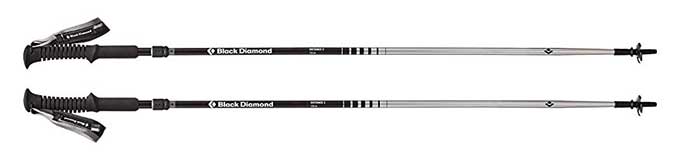
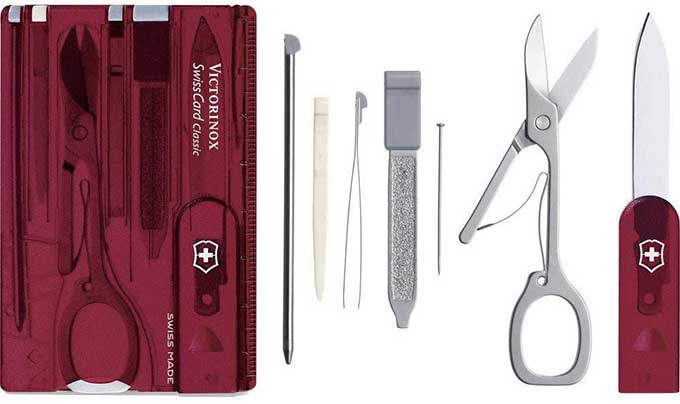


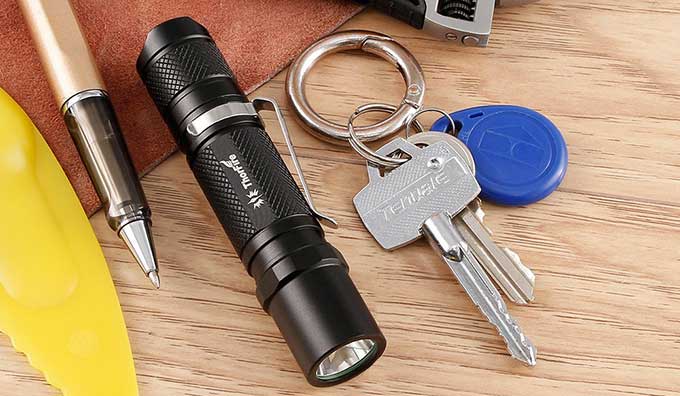




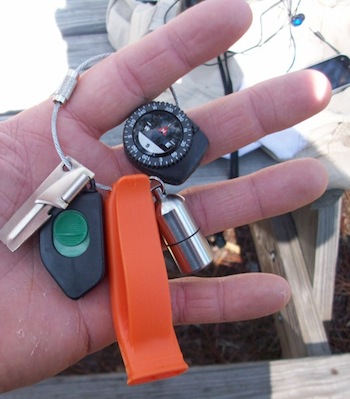




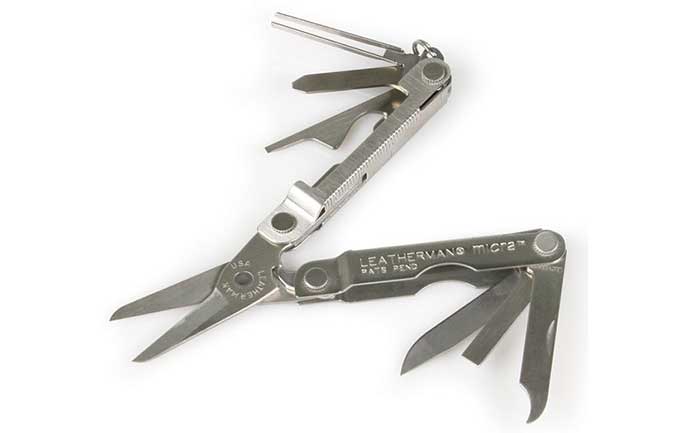




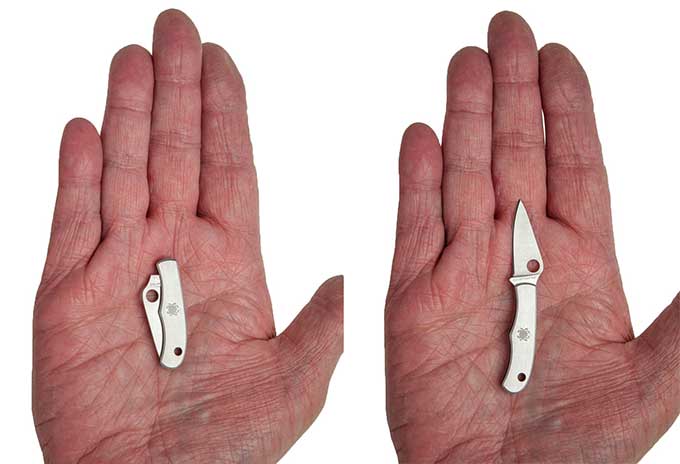
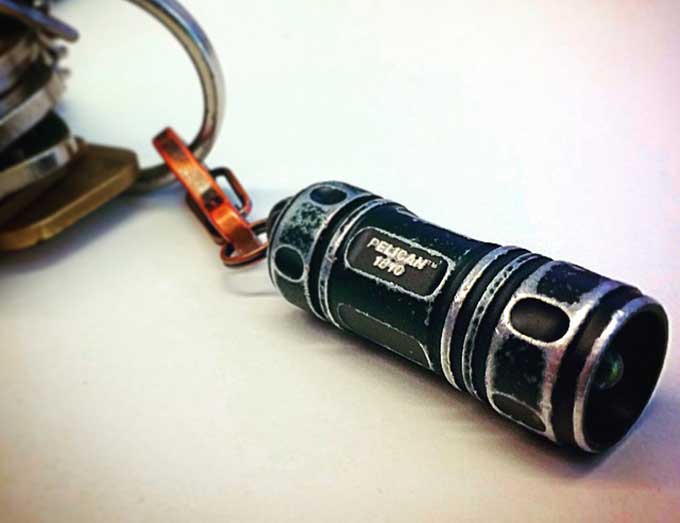
 I’ve been using various models of the Chive ($40) for 6+ years. It’s perfect for how I use it — everyday carry all around convenient small sharp thing. It has a small (~2″) 420HC blade, light, spring-assisted assisted opening (with a small flipper) and stainless steel so I can run it under hot water or otherwise clean and wash it with less concern about rust. The steel is a a big deal for me. Other small folders I’ve used have relatively softer blade steel, whereas the 420HC is a nice balance between holding an edge and easy to sharpen. — Steve