HP is facing a class-action lawsuit in the United States that centers around the accusation that HP is intentionally bricking functionality on all-in-one printer models when ink is running low.
All-in-one printers support a number of tasks besides printing. Functionality includes making copies, scanning and also faxing. Not all of these functions require printer ink; scanning, for example, does not.
HP is accused of limiting functionality on its printers that do not require printer ink to work, if printer ink is low.
Many printer models are priced competitively as traditional printer manufacturers such as HP or Canon earn most of the revenue from the sale of printer ink. Called black gold by many, printer ink is sometimes more expensive than the purchased printer model. Color printers use multiple ink cartridges, often black, cyan, magenta and yellow. Some printers are designed to refuse printing if only one of the ink cartridges is low, even if it is not black and a black-and-white printing is needed.
HP has used several anti-consumer tactics in the past to push sales of its printer ink. From pushing new firmware on to printers that blocks use of third-party ink cartridges, using HP Dynamic Security and other means, to launching the subscription-based service HP+, which, as a feature, blocks using third-party ink for the lifetime of the printer, even when customers unsubscribe later on.
The class action lawsuit accuses HP of bricking certain all-in-one printers when ink is running out. Functionality that does not require ink becomes unavailable at this stage as well, and the lawsuit claims that HP is not informing its customers about that prior to the purchase.
This is not the first time that HP is facing lawsuits regarding anti-consumer practices. Last year, consumer group Euroconsumers reached a settlement with HP over the enforcement of HP's ink cartridge DRM in 2016 in four European countries. APNews reports that HP declined to comment on the issue.
Classic printers are cheap, but they are subsidized by printer ink. Consumer Reports suggests that users may spend $70 per year on printer ink, but it can be a lot more, depending on how the printer is used.
A new class of printer models uses tanks instead of cartridges. These printers cost considerably more, but they reduce the costs of ink significantly. Over time, they help save money.
Another option that people have is to buy laser printers instead (I recommend Brother laser printers). These are more expensive as well, but they don't require ink or have ink-related issues, such as ink drying up if printing is infrequent.
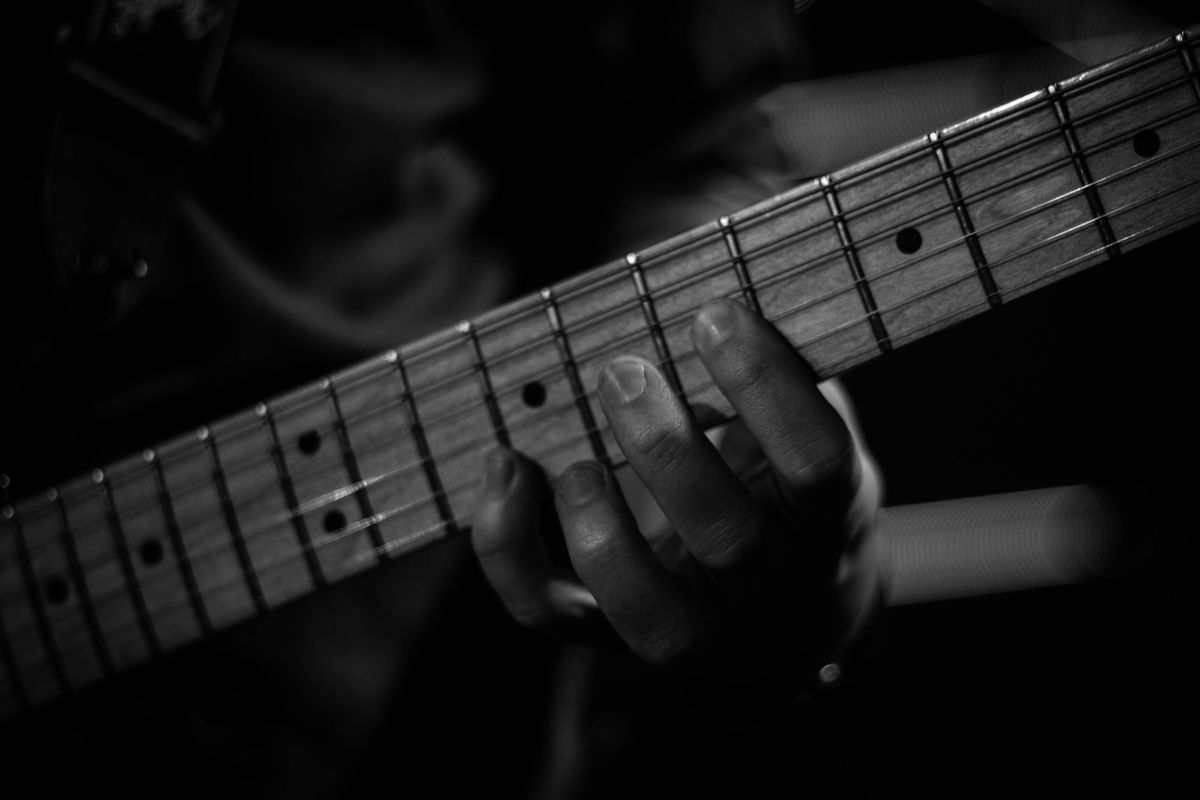
Play whatever you want, whenever you want. Sounds good, right? The road to get to that level can be filled with practicing new scales and chords along the way. New patterns and shapes can be tricky and trying to get your fingers to do your bidding can be a challenge. It seems like there are millions of finger exercises to work on, but to what end?
You learn a crazy shape, play it for your friends and family, they're (not) impressed, and then it's on to the next. Not much of a long-term plan for development.
I have worked on the following examples over the years, and they have taught me a lot about how to physically play the guitar and gain more control over my fingers. Other patterns and shapes are just as good, so long as you practice them correctly and know what you're trying to achieve. So, what are you trying to achieve?
Relaxation Don't crush the guitar while playing. The harder you press down, the longer it takes to release all that physical energy. Lighten up and you can move your fingers faster.
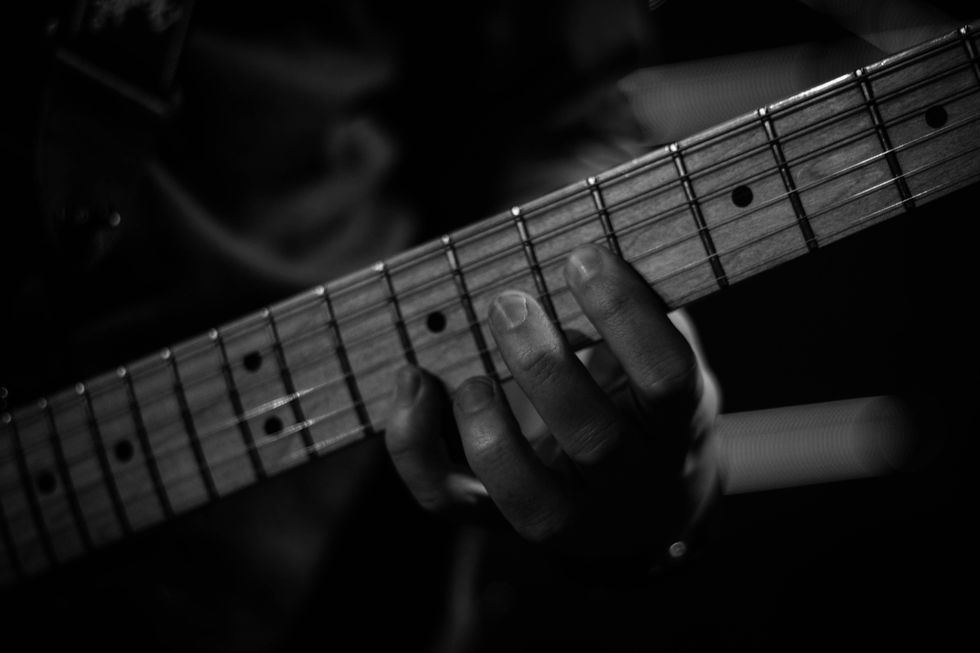
Great Tone Place your fingertip right behind the fret, keep your fingers at a right angle to the neck, keep the pad of your thumb on the back of the neck. Your hand is not a coat hanger that hangs on the guitar.
Smooth as Silk Legato means "connected." All notes get their full value, with no dead air in between.
Shape vs. Sound Yes, these exercises and patterns will sound weird. Focus on the finger pattern, not the sound it produces.
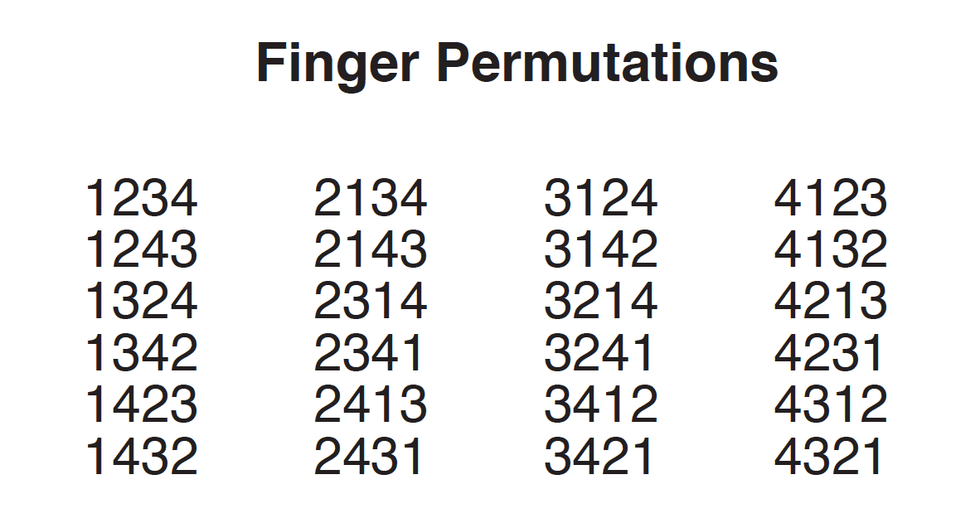
Every Possible Finger Combination
Ex. 1 is a list of all permutations (or combinations) of the first, second, third, and fourth fingers of your fretting hand. Pick a position, play each permutation with various rhythms on each string. I typically start on the 6th string and move through to the 1st string, and then back down.
Play the first pass in whole-notes and the second pass in dotted half-notes. Keep making the counts smaller until you're doing sixteenth-notes (four notes per click) Use a metronome, set at a tempo that makes the sixteenth-notes playable. Yes, the whole-notes will take a long time, but this is not a speed drill. Focus on relaxed, legato-style playing and great-sounding notes. Don't get bored with it!
Finger Freedom Ex. 1
In the following examples I took a single permutation and worked it from whole-notes up to sixteenth-notes. For these, I chose 1423 and started in 7th position. As you work through each example, think about tone, time, and above all, be relaxed.
Finger Freedom Ex. 2
Finger Freedom Ex. 3
Finger Freedom Ex. 4
Finger Freedom Ex. 5
Finger Freedom Ex. 6
Finger Freedom Ex. 7
Finger Freedom Ex. 8
Keep It Separated
The next exercise is designed to enhance your disassociation skills. Switching to permutation 3421, Ex. 9 moves the permutation up and down the 1st string. Begin with the open E, play the permutation in 1st position, play the open E, play the permutation in 2nd position, etc. Once you get the idea, do this on all six strings, use all the rhythms from the previous examples and move up the neck until you run out of frets.
Finger Freedom Ex. 9
Ex. 10 and Ex. 11 use the 2431 permutation to build chords across the neck. These also tackle the sound vs. shape issue and require additional focus on relaxation and hand position. In Ex. 10, build each chord using the permutation and let the notes ring out. Relax all four fingers, move up a set of strings, and build the next chord. Ex. 11 is the same 2431 permutation but builds the chords from the 1st-string side of the neck.
Finger Freedom Ex. 10
Finger Freedom Ex. 11
If you're into frustration and possibly throwing your guitar out a window, then this next group of exercises is right up your alley. For these there is one additional rule: Once a finger is placed on the fretboard, it stays on the fretboard until you have to move it again.
In Ex. 12, place your index finger on the 7th fret of the 4th string and hold it down, but do not play this note. Use your second, third and fourth fingers to play the notes on frets 8, 9 and 10 on the rest of the strings.
Finger Freedom Ex. 12
Ex. 13 is the same concept but this time you're holding down your second finger, using your first, third, and fourth fingers to play the notes on frets 7, 9, and 10 on the rest of the strings.
Finger Freedom Ex. 13
Ex. 14 and Ex. 15 continue this process, holding down your third and fourth finger, respectively. In all four examples skip over the 4th string with your remaining fingers.
Finger Freedom Ex. 14
Finger Freedom Ex. 15
Ex. 16 and Ex. 17 are less irritating, but only slightly so. These exercises continue to focus on hand position, relaxation, and legato playing while moving only one finger at a time. In Ex. 16, use your first and third fingers on the 6th string, then second and fourth fingers on the 5th, back to first and third on the 4th string, etc. Continue this process all the way up to the 1st string and then back down to the 6th string. Ex. 17 starts with the second and fourth fingers on the 6th string and continues in a similar fashion.
Finger Freedom Ex. 16
Finger Freedom Ex. 17
Even though these examples are not written out in all subdivisions, they should eventually be practiced that way. Remember to start at a slow tempo, playing longer rhythms. Focus on note quality, relaxed left-hand playing and legato style. Move to eighths, triplets and sixteenths only after these examples become more familiar. Good luck!
Remote work has been increasing in popularity over the past few years. With technology on the rise and more people being able to do their jobs in their pajamas, it’s a wonder why anyone would want to go into an office. Although there are many perks to working from your house, there are also a […]
If you read tech news, you’re probably well aware that companies are collecting a huge amount of your data: your ISPs are probably monitoring your internet connection, advertisers are collecting and collating everything they can, social networks develop profiles for you even if you don’t have an account, and all sorts of mobile metadata gets collected and analyzed by cell providers and the government. But there’s a new sort of collection that was rolled out recently, and it’s a bit more unnerving than the methods you’re probably used to. ClearChannel Outdoor is now helping advertisers track your movements on the street,...
Sweetwater's Mitch Gallagher took a look at Ultimate Acoustics, a room analysys calculator for finding the right acoustic treatment for converting a room for studio use. This is something I should really do here, and the app looks helpful to know what I need. The app is free, and you can then buy the necessary padding from Sweetwater. The circle of life!
An intriguing new video surfaced from apeSoft, the developer of iVCS3 and iDensity. Sparkle brings us "Cross-synthesis, phase-sync high-quality transformations" which sounds awesome in practice on this demo! I'm looking forward to this one, which is listed as "coming soon." Thanks to Linda from the Facebook iPad Musician group for pointing this out!
Developer Patchworks has released a major update to Conductr, their Ableton Live controller app. The update adds a ‘smart’ MIDI keyboard controller and more. Conductr was previously focused on live performance control of Live. With this update, Conductr is introducing more production-orient … Continue reading →
Developer Sebastian Dittmann (Audiobus) lets us know about a new gadget that adds Bluetooth Wireless MIDI support to your electronic music gear, the mi.1. In other words, attach these onto the back of your new or vintage MIDI gear, and you’ve added Wireless … Continue reading →
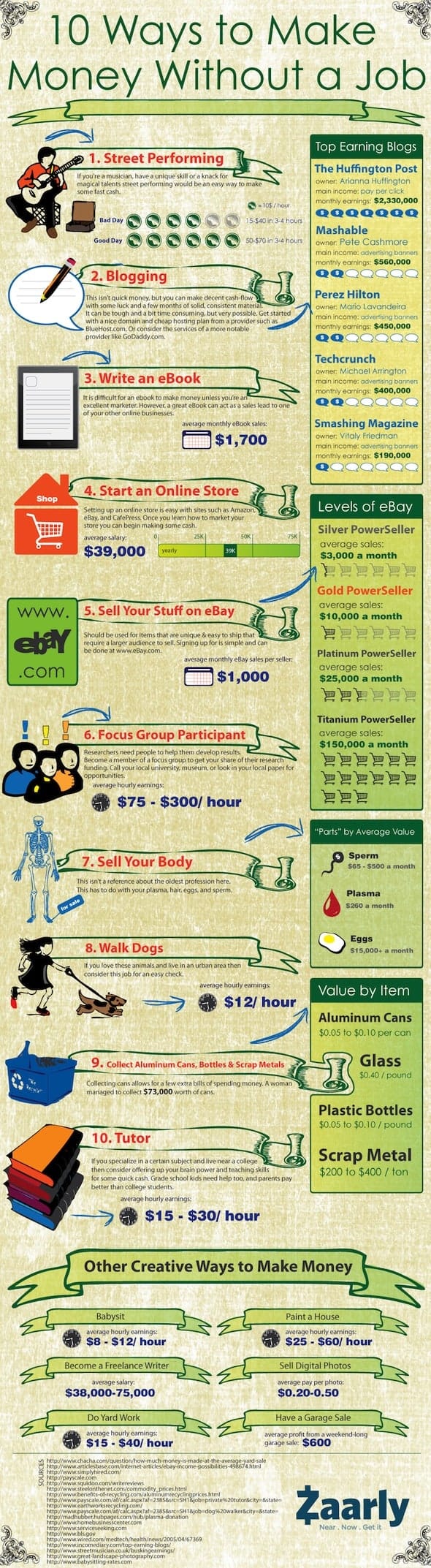
I was a waitress for almost five years before becoming a graduate assistant, and I got used to fast cash. As a perpetually broke college student, I’m always looking for new ways to make more money.
I’ve considered doing several of these things while I’ve been in school, including selling plasma or eggs. It’s always been out of the question though, because I have this whole afraid-of-needles thing going for me. Many of these (like street performing) are way beyond my skill level, while others seem time consuming.
I think there’s a little something for everyone here. Big fan of kids? Try babysitting. Really good at math? Consider tutoring someone. Too much junk? Have a garage sale. Just pick something that sounds interesting and do it. You don’t have much to lose, right? Personally, I’m going to start blogging and actually set up an online shop for my paintings. (I’ve been talking about it for years.)
Speaking of shops, the original creator of this infographic is a company called Zaarly, which is basically an online marketplace for people to buy and sell things with those around them. Their about page says the company exists “to enable people everywhere to make money doing what they love.” I don’t know about you, but making money doing what I love sounds like a wonderful use of my time. [via]
Did any of you read the Time article “The Childfree Life” this past summer? For those of you who didn’t, the short version is as follows: people who don’t have kids turn out quite happy, not to mention wealthy. In the, over-populated, increasingly economically unstable world we find ourselves in- this has become a not-so unpopular idea. Today’s infographic has the same idea, and points out that raising a child is actually more expensive than a brand-new Bentley Continental GT. Now that’s a fly ass car!
Now, I’m 21 — and I know my feelings could change in the future, but I plan on not having kids. For every reason detailed in the infographic, and every article titled “Have We Mortgaged Our Children’s Future because of (insert ‘Obamacare’ for Fox News or ‘Bailouts’ for CNN)” it’s a scary time for us twenty-somethings. Not having kids seems like a solid way to avoid drowning in debt.
Today’s Infographic does a fantastic job of putting a tangible amount to the kids or no-kids dilemma: having kids has an inverse relationship with being able to afford a 190,000 dollar car. 190 thousand dollars!? That’s a lot of scratch, you could buy a vacation home with that money, or 13 of these jet-skis. You could start your own jet-ski rental company! In all seriousness though, I wouldn’t blow the extra money from not having kids on a Bentley, or a baker’s dozen of jet-skis, it would definitely have to be the Martin Personal Jetpack which is rumored to cost around $200k when it hits the market in 2015. If it’s a kid or a jetpack, I’m going jetpack.
Ok, ok. Back to being serious. More young people than ever before are considering the benefits of not having kids. Not so they can use the extra money to buy tons of cool shit (ok that is a little bit of it) but for reasons that are as complex as they are numerous. Economic uncertainty, environmental degradation caused by over-population, and a change in cultural expectations are a few of these reasons. It’s a unique time we’re living in, which may call for unique measures. Give today’s infographic a look and decide for yourself. [Via]
Working a 9-to-5 is something that most of can relate to. Every day is either good or bad or bleh! But regardless of whatever the work day has in store for us, we seem to always let our minds get ahead of us. Our minds often ramble on about the most random things. Unfortunately, this means that our minds are not engaged in our work. That’s okay though.
Not all of us need to be 100% in our work everyday of the week. It’s definitely okay to ponder on who would be your best your ally when the zombie apocalypse strikes while you are at work. I have run this scenario and many like it countless times in my head, as I am sure many of you all do too. Zombies are potentially a real threat so it is important to think about what you might do and who you might partner with in the office.
Also a grave concern in the work place; realizing that you work too much! Sure you have bills to pay! We all do, hello?! But don’t stress about it. You got it covered homie. Don’t be that work-a-holic that stays late and ends up late to the party in your work clothes. Keep those at home.
While at work, ponder on the fact that you are dope as hell and that you have a life to live after the monotony. [via]
Dreaming of starting a podcast? Then you’ve got a lot of work to do. Besides planning content, finding co-hosts and negotiating advertising deals, you’ve got to get some gear—audio gear. We surveyed 20 podcasts to find out what they use, and we’ll explain the results in detail in this post. Tip: New to podcasting? Stay tuned for a step-by-step how-to tutorial in the next few weeks.
My first goal is to cover the gear that podcasters are actually using. I’m not interested in the gear you could use for a podcast—I want to know what podcasters are actually using right now.
Secondly, I don’t want a list of gear used by huge companies with a much bigger budget than you have, or audio geeks, who have an entire home studio at their disposal. I’ve looked for podcasts created by the average Joe—people just like you.
So I went in search of 20 suitable podcasts, whose hosts have been kind enough to share the details of the equipment they use. I listed them at the end of the post, along with a link to their show, and a link to their gear page.
Audio Software
I made a surprising discovery about the audio software podcasters use to record their audio. They use what they have. Just about any audio software you can get your hands on today has the features you need to record a podcast.
If you have Photoshop, you probably have Adobe Audition.
If you don’t have either, you can download Audacity, which is free.
Each of these apps is commonly used by podcasters for recording audio. Two other apps are used frequently by podcasters:
Skype, so everyone on the podcast don’t have to be in the same room, or same country.
The Levelator, a free cross-platform app that can enhance your audio “like magic”, including adjusting audio levels.
In all likelihood, that’s all the software you’ll need. Easy!
Microphones
This is where things get more tricky… and expensive. You obviously need a microphone to record your voice—well, one for each person—but which should you choose? Let me break it down for you.
The two types of mics you’ll be choosing from are condenser and dynamic. Condenser mics are often used in recording studios because they pick up sound really well. But if you’re in a slightly noisy environment, they’ll pick up everything. Literally. And they require more power to do that. (You’ll need a mixer with “phantom power”—see below.)
On the other hand, a dynamic mic is more directional, mainly picking up the sound that you point it at—your voice. Either types are suitable for podcasting, but it’s interesting to note that the top two mic choices are dynamics.
You also have to make a choice between a mic with a standard XLR connection, or one with a USB interface, designed to be plugged directly into your computer. If you only need one mic, I strongly recommend getting one of the USB models. It will make your setup much simpler—and cheaper.
But if there’s more than one person on your podcast, you should consider purchasing standard XLR microphones, and also a mixer with enough inputs. The mixer should have a USB interface (to make it easy to get all those voices into your computer), and if you’re using condenser mics, it should also have phantom power. But more on that later.
Once you’ve chosen your mic, you’ll also need a mic stand (or boom), a lead (which may be included), and a shock mount if you choose a condenser mic.
Here’s the complete list of 22 microphones used by the surveyed podcasts. The list is sorted first by popularity, then by price. You’ll find the best microphones at the top, and the less expensive ones at the bottom. They range in price from $25 to over $300.
Used by: 7 (Podcast Answer Man, Jontus Media, 5by5, Flight Podcast, The Paranormal Podcast, We Grow Media, Handyguys Podcast)
“The Heil PR 40 microphone boasts the widest frequency range of any dynamic mic in the Heil PR series. The PR 40 incorporates Heil’s sage-like understanding of phasing plug placement, along with the use of a very large (1.5”), low mass diaphragm, and custom magnet metals housed in a specially designed microphone body.”
“I was blown away by the amazing sound that comes out of the Heil PR-40. You may be shocked to learn that it is a dynamic microphone. Once my wife, Stephanie, heard the sound of my Heil PR40, she insisted that I purchase one for her as well.” (Podcast Answer Man)
“I’ve tried numerous microphones over the years I’ve been podcasting, but the mic I always come back to and use for 99 percent of my shows is the Heil PR40. The Heil PR 40 is a great piece of equipment. It’s a dynamic microphone, designed and made by Bob Heil. It works brilliantly for a wide range of professional uses such as recording, live sound, and even commercial broadcasting. According to the tech guys, the Heil PR40 produces the widest frequency range available in a dynamic microphone, but as far as I am concerned it just sounds great. I love the range it’s got, helping to give my naturally tenor voice a touch more bass.” (Jontus Media)
“Dynamic mics work very well in broadcasting situations where you want to isolate a voice and eliminate background noise, but they’re more expensive. Condenser mics create a more ‘natural’ or ‘live’ sound, but pick up a lot more background noise and require a better mic technique. The Heil PR-40 is a dynamic mic that sounds like a condenser (but without the tradeoffs see below). My recommendation is to spend the extra money and get a dynamic mic. It will make a big difference, and though it’ll hurt your wallet today, your listeners will thank you.” (5by5)
“I like the fact the PR40 is a dynamic mic and doesn’t seem to pick up a lot of background noise..Leo Laporte uses this so if it is good enough for him…you’ll want the below shockmount, pop filter & boom arm if you go with the Heil.” (The Paranormal Podcast)
“As I did my research, another microphone received glowing reviews by both Cliff Ravenscraft and Leo LaPorte: the Heil PR40. About $100 more expensive than the Rode, at around $325, the Heil seems to offer “dreamy” voice recordings. But… because it was a professional mic, the accessories add to the price. You need a boom and shockmount as you do with the Rode, but the Heil is not a USB microphone. So you need an interface to get the audio from the mic to the computer, and an XLR cable.” (We Grow Media)
“The Podcaster is ideal for podcasting, vodcasting, YouTube videos, voice recognition software, corporate videos and any production application that requires a simple yet professional voice over microphone. It is also a convenient demo microphone for musicians and songwriters that prefer the convenience of a USB microphone but don’t want to compromise sound quality.”
“The Rode Podcaster Dynamic Mic ($230) is the best USB mic I’ve ever used. It isolates your voice against typically noisy backgrounds (kids, neighbors, traffic, etc.) and requires only basic mic technique. All of my 5by5 co-hosts (except John Siracusa) use this mic, and it sounds great. It plugs right into your computer’s USB port, and you don’t need an audio interface. You probably won’t need a pop-filter, either.” (5by5)
Used by: 3 (One of Swords, PodCulture, Google-Weekly.net)
“The MXL 990 has a FET preamp and a large diaphragm for truly professional sound quality in both digital and analog recordings.”
“A little bit higher-end condenser mic that we purchased to test out for the show. Very nice mic. It gives a fantastic sound, however it is a very sensitive mic and unless your recording area is completely silent; it will pick up every little sound.” (PodCulture)
Type: Condenser, USB (and 30-pin iPad/iPhone connector) Cost: $199.00 (Amazon) Web: www.apogeedigital.com/products/mic Used by: 1 (The #IRchat Podcast) Designed for GarageBand on iPad, iPhone and Mac.
Type: Dynamic, XLR Cost: No longer available Web: Memorex support page Used by: 1 (PodCulture)
Mixers and Audio Interfaces
If you just need a single microphone with a USB interface, your job is finished. But if you are using multiple microphones, or a mic with an XLR connection, you’ll need a mixer (or audio interface).
The biggest decision you need to make is how many channels the mixer should have—in particular, the number of inputs. Count the number of microphones you’ll need, and allow for growth. You’ll need a mixer with at least that number of channels.
Your mixer should also have a USB computer interface. Each one listed below does. And if you’re using condenser mics, make sure you choose a mixer with phantom power. Again, everything on this list (including the tiny Icicle) is suitable.
Here’s the complete list of 15 mixers and interfaces used by the surveyed podcasts. The list is sorted first by popularity, then by price. You’ll find the best at the top, and the less expensive ones at the bottom. They range in price from $40 all the way up to $950.
Used by: 4 (Rooster Teeth, The Bad Dice Podcast, Google-Weekly.net, Handyguys Podcast)
“Designed with low–noise analog electronics, the MultiMix 16 USB 2.0 mixer lets users take advantage of 100 studio–grade 28–bit digital effects. Whether used for mobile or studio recording, the MultiMix 16 USB 2.0 mixer makes recording high–quality audio to your computer fast and easy.”
“Look for the following features: USB connectivity that is compatible with the iPad and the Apple camera connection kit; at least two main mix outs so I can sent to my recording device and a second out to Laptop for live streaming; Aux channels to allow ‘Mix-Minus’ recording to Skype; at least four XLR inputs with Phantom Power + extra channels for other audio sources.” (The Bad Dice Podcast)
“The new MW USB Mixing Studio series mixers give you everything you need to turn your computer system into a complete, full- featured, high-performance home recording studio. The new MW uses a single cable USB =connection to interface with your computer, for bi-directional audio data transfer. It gives you comprehensive signal input and mixing features in a compact size”
“We use conversations on Skype for recording and run the audio through a Yamaha MW12C USB mixer that feeds raw wave audio into a solid state Zoom H2 or Zoom H4n recorder. Audio is recorded locally on a PC as a backup. That raw audio is first imported into Levelator and then later into Adobe Audition or Audacity for editing. You won’t see the benefits of our editing process until all our hosts have synchronised their means of input.” (Flight Podcast)
Many podcasts also use portable recorders. Some use them to record face-to-face interviews. Others prefer a simpler system, which means less things can go wrong. Still others like to record their podcasts on the go. Portable recorders are not a podcasting requirement, but you may find one handy.
It’s possible to use a smartphone for this purpose, either with the built-in mic or a higher-quality external one. (We covered some microphones for iOS in our article Top 30 Devices and Interfaces for iPad Audio.) Interestingly, none of the surveyed podcasts seem to be doing that currently.
Here’s the list of six portable recorders used by the surveyed podcasts. Again, it’s sorted first by popularity, then by price. They range in price from $60 to $270.
Used by: 5 (Jontus Media, INTERCUT, Flight Podcast, The Paranormal Podcast, Internet Marketing Quick Tips)
“Its onboard X/Y stereo condenser mics are arranged with the right and left mics on the same axis. This design ensures that the mics are always an equal distance from the sound source for perfect localization without phase shifting. Frequency response remains uniform throughout your recording. The result is great stereo recording with natural depth and accurate imaging every time.”
“Unlike some podcasters who recorded directly into their Mac or PC, I prefer to record into a digital recorder. My choice is the Zoom H4N digital recorder. I looked at the Roland R-05 Digital Audio Recorder but settled on the Zoom because it felt more robust. This was important because I needed something that I could cart around in my bag for recording in the field. I also tested the onboard condenser mics in the store before I bought and just loved the sound. It’s warm and rich and I’ve got some great clips using it. I didn’t buy the additional kit that you can get for the Zoom H4N; instead, I bought a cheap mini-tripod to have on my desk and angle the recorder just so I can see it.” (Jontus Media)
“In the future I might replace the Zoom H4N. That’s probably the technical spot in the chain that could be improved. The mic preamps in the H4N are not that good, and the sound quality might benefit from a better preamp. But that will be down the road, once we get better at podcasting.” (INTERCUT)
“I really like this recorder because of its high customer ratings, its versatility, onboard mics with ability to use professional XLR mics as well, its quality sound, and relatively low price!” (The Paranormal Podcast)
“If you podcast and are anything like me, you live in fear, deathly afraid that you’ll finish an hour recording of an exclusive hard to get interview, and then for some reason your computer crapped out and did not record. Not to sound strange, but I just got sick to my stomach thinking about this. That is why every serious podcaster needs a portable recorder, and this one is the best. This is guaranteed to be my next purchase before anything else on this page.” (Internet Marketing Quick Tips)
Used by: 2 (The Bad Dice Podcast, Podcast Answer Man)
“The compact R-05 is easy to use, affordable, and packed with big-ticket features that raise the bar in its price class. Experience crystal-clear 24/96 capture, enhanced recording and editing features, and extended battery life (over 16 hours per charge).”
“I bought this amazing bit of kit, not to take out and record on location, but to remove my laptop from the recording set-up unless it is used to bring audio in or take it to a live stream. Since day 1 the major issues that cropped up now and again were always software based. The laptop would crash, the software would freeze, or even record a whole show then not be there after a save. Added to that I had a laptop in front of me while recording which means noises from the fan, typing and playing with the mouse and also a distraction of emails popping up and all the other things that draw your attention away.” (The Bad Dice Podcast)
“If there was one piece of recording equipment that I could not live without, it is the Roland portable digital recorder… It is small enough to fit into your pocket and the audio quality that it records is simply amazing. It is entirely possible that one could produce a podcast with this single piece of audio equipment… It’s perfect for sound seeing tours with its two onboard condenser mics which record in an unbelievable stereo sound that makes you feel as though you are right there with the person who is recording the sound seeing tour.This recorder is also great for a face to face interview.” (Podcast Answer Man)
Here is a list of the podcasts referenced in this tutorial. Check out their gear pages for more details, and listen to the podcasts to see how the gear performs.