Shared posts

07 Apr 19:28

You Can Pick Your Own Mushrooms at This Grocery Store

by John Farrier

Redditor BlondeRed snapped this photo. There's a Kroger grocery store in Bloomington, Indiana where customers can pick their own living mushrooms from an active bed of them. That's a fancy Kroger! Or, as some redditors are calling it, "Kro-Gucci."

Some redditors suspect that it stinks, but BlondeRed says that it doesn't smell at all.

It's very impressive, but I'll wait until the store offers Super Mario Bros. mushrooms.

-via Messy Nessy Chic

07 Apr 18:43

Mouthwatering Food & Cooking Cinemagraphs by ‘Kitchen Ghosts’

by Christopher Jobson

cine-2

Over at Kitchen Ghosts, photographer Daria Khoroshavina and food stylist Olga Kolesnikov have been creating cinemagraphs that detail the creation of entire meals. Some are more like step-by-step recipes, while others just document the general preparation of different ingredients. They also run a Tumblr of additional food prep GIFs at Buttery Planet. (via This Isn’t Happiness)

cine-1

cine-3

cine-4

cine-5

cine-6

cine-7

cine-8

07 Apr 17:48

A Lost GoPro Captures a Rapid Descent After Falling off a Skydiver 10,000 Feet in the Air

by Brian Heater

Father of YouTubber Kristoffer Örstadius discovered a lost GoPro in a field in Gringelstad, Sweden. When the pair checked out the memory card, they discovered video of the camera’s rapid, spinning descent to the ground after falling off a skydiver at around 10,000 feet up. Örstadius posted the downright dizzying footage online, which eventually helped him locate the camera’s owner, ensuring its safe return.

via PetaPixel

07 Apr 17:26

House In Blair Atholl By Nico Van Der Meulen Architects

by Erin

Werner van der Meulen of Nico van der Meulen Architects has recently completed a home in Blair Atholl, a golf estate located north of Johannesburg, South Africa.

House In Blair Atholl By Nico Van Der Meulen Architects

continue reading

05 Apr 05:15

High Winds Make for a Terrifying Experience for These Window Washers

by Lisa Marcus

The window washers in the footage above were trapped at the mercy of high winds for 15 minutes on the 91st floor of the Shanghai World Financial Center April 2. The scaffolding they were perched upon swayed drastically from side to side and violently hit the windows of the 1,600-foot-tall building (shown in the photo below) numerous times. According to this article at Gizmodo, the Shanghai World Financial Center is the seventh tallest building in the world. Can you imagine? My heart is beating out of my chest just from watching the video!

Shanghai World Financial Center | Image: Wikipedia

05 Apr 05:08

A Tray On One Side And A Chopping Board On The Other

by Erin

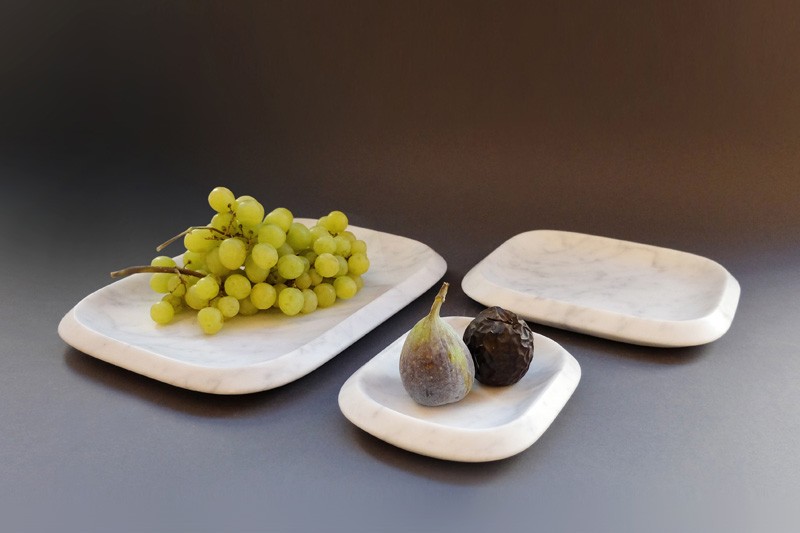
Claesson Koivisto Rune Architects have designed ORTE, a new tray and chopping board set made from stone, that was recently launched for Italian brand MONITILLO MARMI.

ORTE By Claesson Koivisto Rune Architects

continue reading

05 Apr 05:08

A House Surrounded By Gardens

by Erin

VGZ Architecture have designed a home in Mexico City that is surrounded by gardens, where every space has natural light and fresh air during the day.

V9 House by VGZ Arquitectura

continue reading

04 Apr 18:04

A Towering Home in the Alaskan Wilderness Looks Like Something Right out of a Dr. Seuss Book

by Christopher Jobson

tumblr_nlaq4r9hFk1rutr4uo1_1280
Photo by Jovell Rennie

As the story goes, the original owner of this unwieldy building located in Willow, Alaska built his house shortly after a forest fire with a clear view of Mount McKinley and Denali National Park. As the surrounding trees recovered, the pristine view was obscured and the owner decided to add few more stories, eventually spending a decade adding floors until it reached the 12-ish story tower you see today. Not surprisingly, locals refer to the building as the “Dr. Seuss House” as the design so closely mimics structures you might see in Theodor Geisel’s illustrated storybooks.

While the tower sat abandoned for a while, the Dr. Seuss house apparently has a new owner who is currently working on renovations. Photographer Jovell Rennie and Alaska Aerial Footage recently stopped by to capture some of the images and video you see here. (via Jeroen Apers, Unusual Places)

drseuss-2

drseuss-3

drseuss-4

03 Apr 18:07

SnapPower Charger, A Wall Outlet Cover Plate That Adds a USB Charging Port With No Rewiring Needed

by Brian Heater

The SnapPower Charger is a new wall outlet cover plate designed by Provo, Utah-based hardware startup SnapPower that features a built-in USB charger, which can be installed with no rewiring required. The cover, which is currently seeking funding on Kickstarter, uses two prongs that draw power directly from screws on the sides of the outlet.

SnapPower

SnapPower

SnapPower

SnapPower

SnapPower

images via SnapPower

via Gizmodo

03 Apr 18:04

Cafflano Klassic, A Portable All-in-One Coffee Maker Tucked Inside a Travel Mug

by Rebecca Escamilla

Cafflano Klassic grinder
photo via Cafflano on Facebook

The Cafflano Klassic by Cafflano is an all-in-one portable coffee maker that includes a drip kettle, grinder, dripper, filter, and cup all tucked into one travel mug-sized package. Its small size makes it very portable for travel or camping, and the only things a user needs to add are coffee beans and hot water.

The Cafflano Klassic is available for sale at The Fowndry.

Cafflano Klassic parts
image via Cafflano on Kickstarter

Cafflano Klassic
photo via The Fowndry

Cafflano Klassic with coffee
photo via Cafflano on Facebook

submitted via Laughing Squid Tips

03 Apr 17:51

Extremely Detailed Maps of the United States Featuring Every Single Road in the Country

by Brian Heater

US roads

reddit user WestCoastBestCoast94 has created a series of extremely complex maps of the United States, featuring every single road from coast to coast. The map is available both as the entire continental US and as all 50 states individually. Of particular note are the high concentration in big cities and the empty space for large farmland, parks, and other vast unpaved expanses.

US Roads
New York

US Roads
California

US Roads
Oregon

images via WestCoastBestCoast94

via The Washington Post

03 Apr 17:35

30 Useful Online Resources For Graphic Designers

by Jane Hurst
3438548106_cd7ea571c3_b

How would you like to be able to use the same resources that graphic designers use, so you can create amazing websites and other projects? There are plenty of well-known, and not-so-well-known tools on the Internet that the world’s top designers use for many of their projects, and you can access these same tools for all of your projects. Here are 30 of the best online resources for graphic designers of all levels.

1. UI Cloud

uicloud

This is the world’s largest user interface design database. You can download more than 46,608 UI elements, such as progress bar, music player, and more.

2. Free Stock Images

freestockimages

You will likely be needing images for websites and documents, and you don’t necessarily want to pay for them.

3. Kaku

kaku

This is a great free tool to use if you deal with clients and associates from other parts of the world. This plugin will let you translate text layers into a variety of different languages, and it is easy to use.

4. Psddd.co

pss

This is a great site to use for PSD files. You will also have access to UI and blurred background elements. Find all kinds of templates and more, for free.

5. Gridzzly

griz

If you need grid paper, don’t bother running to the store, or trying to use a ruler and a pencil to create it. Instead, use Gridzzly to create grid paper you can print out for free and use any time.

6. Colour Lovers

colour

Sure, you have a decent color pallet on your computer, but you likely only have the basic Pantone color pallet. This website has more than three million free color pallets which you can use to inspire you to create amazing projects.

7. Subtle Patterns

subt

Sometimes, you just want subtle patterns for backgrounds. Find about 400 different patterns here for free. You can even get a Photoshop plugin.

8. Size Marks

size

This Photoshop scrip will convert rectangular marquee to labeled measurement mark. This is a great free tool for web designers and front-end engineers.

9. Webydo

web

Design a website for free, and you don’t even need to use code, so it is also super easy. You can manage content, and even publish independently using Webydo.

10. guideguide

guide

It can be really hard to use guides when you are creating websites. Guideguide will show you how to easily use guides. You can download this tool for Photoshop 3.1.3. There is no cost to use this site.

11. No More Banding

nomore

Don’t you just hate it when you try to do gradient colors, and they end up banding? Put an end to it with this tool, which is free to use.

12. Make App Icon

makeapp

Here is a fast way to turn your designs into app icons. Simply drop your files, and your icons will be created for you. It doesn’t get much easier than that, and it’s free.

13. Hexy

hexy

You don’t have to select layers, highlight text, or open the Color Picker to get a hex value of a certain color any longer. Just use the free Hexy eyedropper tool to click on any color on the object, and copy it right to your clipboard.

14. Perfect Effects 3

perf

This is a site for photographers, where you will be able to add effects. The great thing about this site is that it is faster and easier to use than other photo editing software, and it is free.

15. Cut & Slice

cut

Export assets to various devices quickly and easily with Cut & Slice. You can even name layers for a better workflow. This is a free Photoshop plugin.

16. Layrs Control 2

lay

Download this Photoshop extension for free, and make doing this tedious job a whole lot quicker and easier. Here you will find seven scripts to make layering actually seem like fun.

17. Prisma

prisma

If you miss those great color swatches from Illustrator in Photoshop, you can find them here for free. Connect layers and then re-color them together using multiple PSD files.

18. CG Textures

gq

It can be difficult to find the best backgrounds and textures for your graphics. At CG textures, you will find just about any texture you can think of, free of charge. One of the really neat features of this site is that you also can check out tutorials on how to use the textures.

19. Free Behance Presentation Builder

behance

Build presentations for your Behance portfolio in a single click. This free PDS File and Action tool is easy to use, so you can build presentations without worrying about all of the hard stuff.

20. WhattheFont!

myfonts

Sometimes you see a font that you really like, but you don’t know what it’s called so you can’t use it. Now, you can send a screenshot to find the closest match to the fonts you like, at no cost.

21. Fribbble

fribble

When you need icons, you can get them at Fribble for free. Some of the neat tools you can use include a Halftone Pack, an iPhone/iPad PSD Mockup, and a Sketch Icon Set. You even get 50 free icons.

22. Velositey Version 2

velo

Using Photoshop, you can design an awesome website in a matter of seconds, for free. Choose from loads of templates and modules, and get the design aspect out of the way so you can get down to the nitty-gritty of creating a website.

23. Liveshare PS

invi

Use this free tool to broadcast any Photoshop document to an unlimited amount of people via a LiveShare meeting. Everything is in real time, so if you make any document changes, they will be seen by everyone instantly.

24.  Instagram Filters

devian

This app has 13 filters that are just like the app Instagram for Photoshop, and it is simple to use. You do have to buy the art, and the cost will depend on the work and the artist.

25. Typewolf

type

Choosing the right fonts for your website can be difficult. Typewolf will show you the fonts used on various real websites, so you can see how they look in use. This tool will also recommend fonts for you to use. This tool is free to use.

26. Free Images

free

Any time you need free images, this app has nearly 400,000 for you to choose from. No matter what you need, you are sure to find it here. There are even tutorials on how to use the images to your best advantage.

27. Free Lorem Ipsum Generator

layerhero

This free app will let you see how your design looks with default text or Lorem Ipsum. Customize options for generating words, sentences, and paragraphs in a single click.

28. FontAwesomePS

creative

This tool lets you search for icons, and then click to make a new layer shape that you can edit. There is a huge selection of font icons, and you can download this tool for free.

29. Photoshop Share Plugin

lay

This free tool lets you share your designs instantly. The great thing is that you can do it all from one app, so you no longer have to switch back and forth between apps.

30. Social Kit

social kit

This is from Made by Source, and it covers images, ad banners, and profile photos for social media. This plugin is free to use, and you will find customizable templates for Facebook.

Featured photo credit: Trapped in Suburbia via flickr.com

The post 30 Useful Online Resources For Graphic Designers appeared first on Lifehack.

01 Apr 22:00

How to Draw a Stick Figure: a Complex Guide

by Monika Zagrobelna
Final product image
What You'll Be Creating

There are people out there, real artists, creating amazing pieces in seconds. And here's you, struggling with a simple stick figure. Wouldn't it be great to draw that, at least? Imagine your friend saying "I can't even draw a stick figure," and you, cutting in: "I can!" How awesome would that be?

With that remarkable skill, your dreams would come true! Imagine people approaching you on the street and asking you to draw a stick figure for them! You could become rich and famous! All you need to do to make it come true is to follow this life-changing tutorial. Let's get started!

1. General Anatomy of Stick Figure

Let's start from the basics. A common stick figure is constructed of:

  1. Head: roughly circular
  2. Facial features (optional): easily recognizable
  3. Neck (optional): thin and short
  4. Arms: two of them
  5. Spine: looking like a third arm
  6. Legs: two of them
how to draw stick figure stickman tutorial step by step

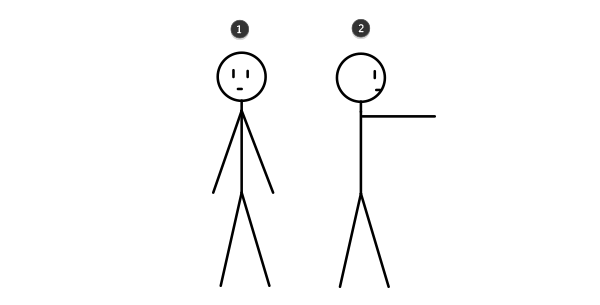
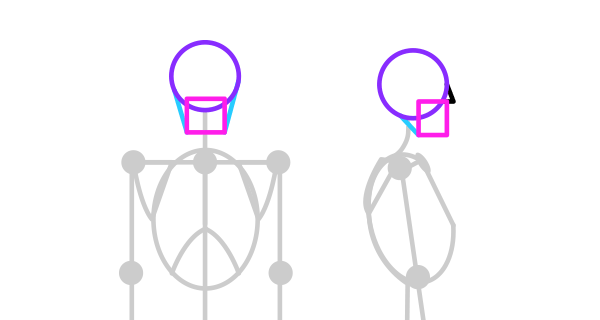
It is widely known that a stick figure seen in the side view (2) shares most of its characteristics with the front view (1). Therefore, perspective is useless when you want to draw a stick figure (isn't it pretty useless anyway?).

how to draw stick figure stickman tutorial steo by step 2
Stick figure in front view (1) and side view (2)

2. Spine and Skull

Spine

Draw a medium-length vertical line. It is the spine of a stick figure.

how to draw stick figure stickman tutorial spine skull

Just kidding! Of course, every stick figure has its own personal spine, and it doesn't need to be as straight as... something very straight.

how to draw stick figure stickman tutorial spine skull 2

Skull

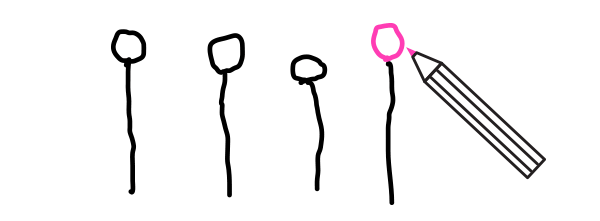
Add a circle for the skull.

how to draw stick figure stickman tutorial spine skull 3

By "circle" I mean, of course, something resembling this noble shape. Perfection is overrated.

how to draw stick figure stickman tutorial spine skull 4

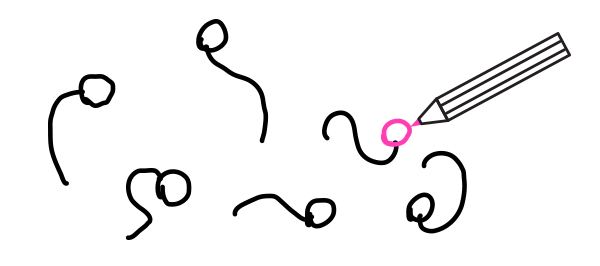
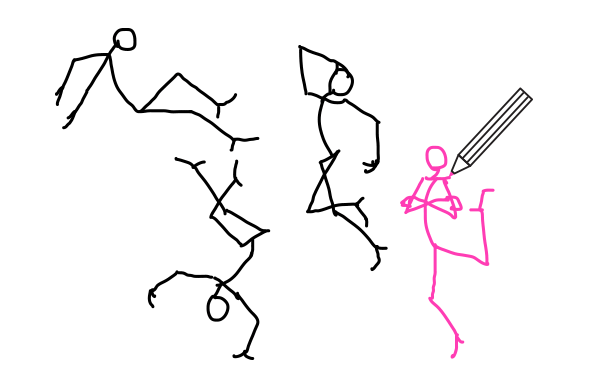
A legless stick figure moves by floating in space. Practice these simple poses for a while before we make it more complicated.

how to draw stick figure stickman tutorial spine skull 5

3. Legs 

A stick figure without legs is more like a fish than a man. Let's fix it.

Step 1

Draw one long leg.

how to draw stick figure stickman tutorial legs feet

Step 2

Add another leg on the other side.

how to draw stick figure stickman tutorial legs feet 2

Step 3

However, these long sticks won't stand on their own unless they're stuck into the ground. For a proper support we need to add tripod feet:

  1. Toes
  2. Heel
  3. Ankle
how to draw stick figure stickman tutorial legs feet 3

The tripod structure is visible the best in the front (2) and back (3) view.

how to draw stick figure stickman tutorial legs feet 4

So, add feet to your stick figure.

how to draw stick figure stickman tutorial legs feet 5

Step 4

The legs are not done yet. They're too straight! How is the figure supposed to move?

To give our stick figure full mobility we need to add joints to every leg:

  1. Hip
  2. Knee
  3. Ankle and toes
how to draw stick figure stickman tutorial legs feet 6

Each joint has its own range of motion.

how to draw stick figure stickman tutorial legs feet 7
Actual range of motion depends on personal flexibility

The spine can use the hip joint, too:

how to draw stick figure stickman tutorial legs feet 8

The problem is, one joint can't manage three different moves at the same time. How to create a pose like the one below?

how to draw stick figure stickman tutorial legs feet 9

We need to use two hips. This way both legs and the spine get the mobility they need, and the pose is more stable. Keep in mind that these three joints merge into one when in side view.

how to draw stick figure stickman tutorial legs feet 10

Step 5

Practice! It's going to be harder with every step, so it's good to work on small chunks at a time to avoid chaos.

how to draw stick figure stickman tutorial legs feet 11

4. Arms

Step 1

By dividing the spine you get the neck point. The arms start there.

how to draw stick figure stickman tutorial arms

Step 2

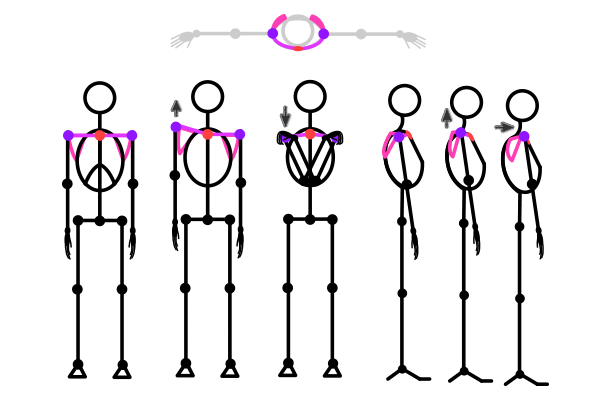
Of course, we can predict that the neck and arms will want to have their own mobility, so let's add the clavicles.

how to draw stick figure stickman tutorial arms 2

Step 3

The arm has three joints that make it very mobile:

  1. Shoulder
  2. Elbow
  3. Wrist and fingers
how to draw stick figure stickman tutorial arms 3

Just as with the leg joints, arm joints have a defined range of motion:

how to draw stick figure stickman tutorial arms 4

We can re-use one of these new joints to move the neck:

how to draw stick figure stickman tutorial arms 5

Step 4

Hands are very complicated—they're actually stick figures on their own—so we'll take only a brief look at them. There are two things you can remember about them:

  • Every finger (except the thumb) has three joints: one at the base and two in the middle.
  • All the fingers follow the same rhythm—imagine them being attached to the base of thumb with invisible strings.
how to draw stick figure stickman tutorial arms  hands 6

Step 5

Time for practice! Forget the hands for now and just have fun.

how to draw stick figure stickman tutorial arms 7

5. Upper Body

Step 1

We need a chest to put the stick figure's heart in. Draw an oval between the shoulders and the elbows.

how to draw stick figure stickman tutorial torso

Step 2

The chest is very heavy, and it's placed high in the body, making it unstable. The spine needs to be modified to hold this weight!

how to draw stick figure stickman tutorial torso 2

Cut the roundness of the chest by adding the sternum—that flat area between the breasts.

how to draw stick figure stickman tutorial torso 3

Step 3

Arms have such a great range of motion thanks to being attached to the shoulder girdle. Each shoulder is attached to scapula (shoulder blade) and clavicle, which is attached to the sternum, which is attached to the chest, which is attached to the spine. The spine and chest are quite rigid, but the arms aren't connected to them directly, hence their mobility.

Anyway... just look what your shoulders can do!

how to draw stick figure stickman tutorial torso 4

Step 4

The lower torso is a bit more complicated, but that won't stop us! Draw a flipped heart to create buttocks. In side view they look like a drop.

how to draw stick figure stickman tutorial torso 5
Follow the figure's pose to locate the part on your body

In the front, in the middle, add a circle. It indicates the pubic area.

how to draw stick figure stickman tutorial torso 6

Add two "wings" for the iliac crest.

how to draw stick figure stickman tutorial torso 7

Step 5

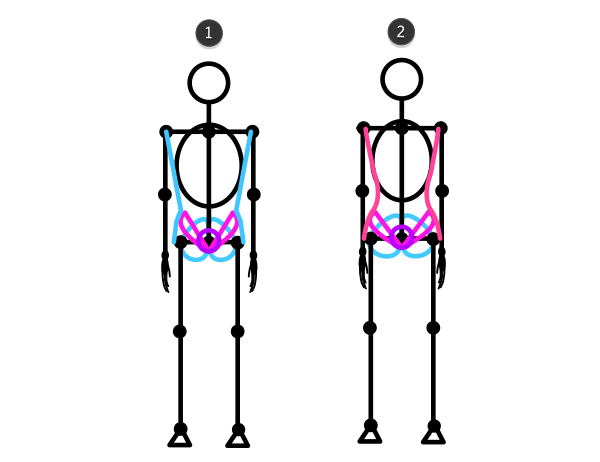
Traditionally, there's a type of silhouette typical for men (1) and women (2), although it's not always the case. It's safer to say that narrow hips and wide shoulders make the silhouette more masculine, and wide hips/narrow shoulders—feminine, whatever the gender.

how to draw stick figure stickman tutorial torso 8
If you want to make your characters more natural, don't use the same shoulders/hips ratio for all men/women

Step 6

The spine is attached between the buttocks. If humans had tails, this is where one would start.

how to draw stick figure stickman tutorial torso 9

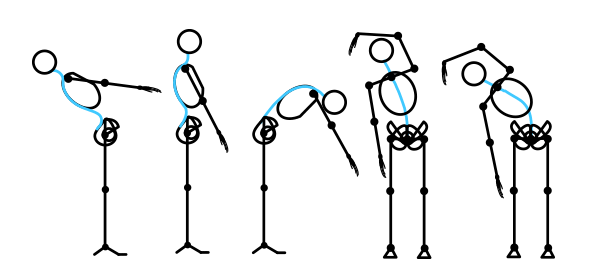
The human spine is not very flexible, and it changes its shape very slightly when bent.

how to draw stick figure stickman tutorial torso 10

The spine limits the range of motion of the hips, too.

how to draw stick figure stickman tutorial hips

Step 7

The head isn't overly important for a stick figure, so let's make do with this simple scheme:

how to draw stick figure stickman tutorial head

6. Perspective and Proportions

I was kidding about the importance of perspective. It is, in fact, very useful. However, it's much simpler than you may think. Perspective defines what happens to the view in transition, for example between front and side.

If you want to turn the stick figure around, simply imagine one side turning into the other side. Imagine a transitional form between two sides. For example, if in the front view two arms are visible, and in the side view one arm overlaps the other, in the transition one arm is coming closer to the point where it will be overlapped.

how to draw stick figure stickman tutorial perspective

When it comes to proportions, there is no one perfect recipe for them. Humans are very, very different, and "average" doesn't really exist. So instead of remembering all these "x heads long", observe your own body:

  1. You can fit your elbow in the waist—the elbow is placed right below the chest.
  2. You can grab your shoulder—the forearm is almost as long as the upper arm.
  3. You can touch your thighs with your wrists when upright—arms are longer than the upper body.
  4. You can roughly cover your face with your hands—one hand is as big as roughly half of the head.
  5. If you curl up, you can touch the knee with your chin—the thigh is shorter than the upper body.
  6. You can sit down on your heels—the thigh and calf have similar length.
  7. With your back flat, you can't reach the heel level with your extended arms—arms, hands included, are shorter than legs.

It's very easy to forget what we've just learned, so take your time to practice!

That's All!

I hope you forgive me that little trick I've used to drag you through quite a complicated tutorial about drawing a simplified human skeleton. After all, that's still a stick figure—except it's far more useful than its cousin.

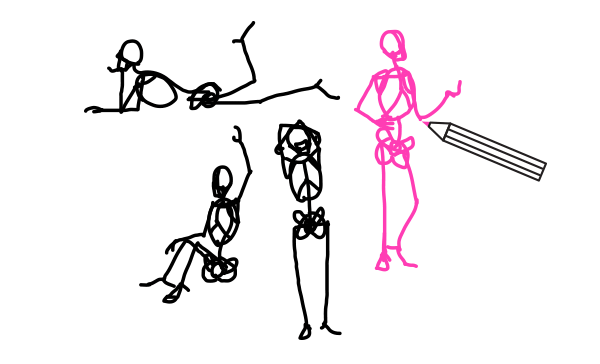
You're now ready to practice gestures—a base for the human figure. If you manage to practice at least 15 minutes every day, congratulations—you're on the way to drawing interesting, dynamic human poses without a reference! And all this thanks to a simple stick figure.

01 Apr 21:56

Oscar Wilde

"My own business always bores me to death; I prefer other people's."
01 Apr 21:55

Jack Handey

"I hope life isn't a big joke, because I don't get it."
01 Apr 21:44

How musicians die

by Jason Kottke

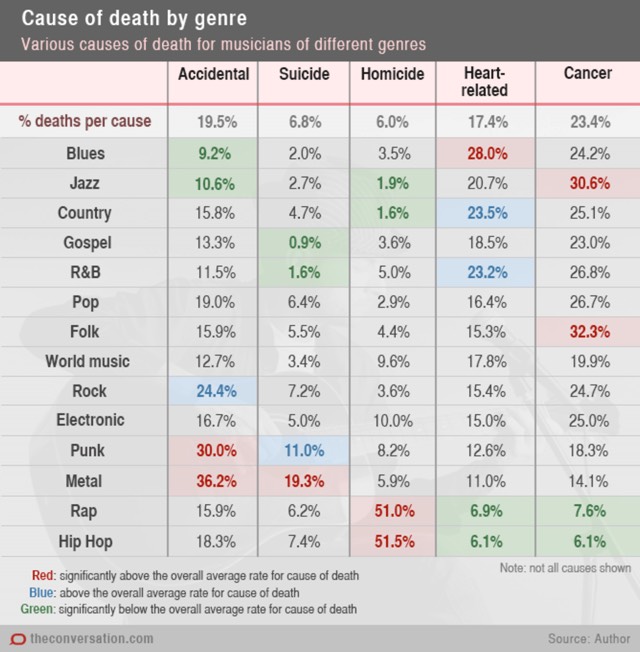
In a series of three articles, Dianna Kenny examines the life expectancy of pop musicians, the myth of the 27 Club1, and how genre affects popular musicians' life expectancy. It is from the third article that this chart is taken:

Cause of death by genre for musicians

For male musicians across all genres, accidental death (including all vehicular incidents and accidental overdose) accounted for almost 20% of all deaths. But accidental death for rock musicians was higher than this (24.4%) and for metal musicians higher still (36.2%).

Suicide accounted for almost 7% of all deaths in the total sample. However, for punk musicians, suicide accounted for 11% of deaths; for metal musicians, a staggering 19.3%. At just 0.9%, gospel musicians had the lowest suicide rate of all the genres studied.

Murder accounted for 6.0% of deaths across the sample, but was the cause of 51% of deaths in rap musicians and 51.5% of deaths for hip hop musicians, to date. This could be due to these genres' strong associations with drug-related crime and gang culture.

Heart-related fatalities accounted for 17.4% of all deaths across all genres, while 28% of blues musicians died of heart-related causes. Similarly, the average percentage of deaths accounted for by cancer was 23.4%. Older genres such as folk (32.3%) and jazz (30.6%) had higher rates of fatal cancers than other genres.

In the case of the newer genres, it's worth pointing out that members of these genres have not yet lived long enough to fall into the highest-risk ages for heart- and liver-related illnesses. Consequently, they had the lowest rates of death in these categories.

(via mr)

  1. The 27 Club is a group of musicians who died at the age of 27. Membership includes Kurt Cobain, Janis Joplin, Jim Morrison, Jimi Hendrix, Brian Jones, Amy Winehouse, and Robert Johnson.

Tags: death   Dianna Kenny   music
01 Apr 16:56

T-Mobile Decides To Base New Coverage Map On Real Data From Real Phones

by Kate Cox
T-Mobile's dynamic coverage map for the greater Washington, DC area.

T-Mobile’s dynamic coverage map for the greater Washington, DC area.

T-Mobile has been trying, for the past few years, to break away from the dominant competition in the mobile space by doing anything they can think of differently. And now, that extends to information for potential customers, too: their coverage map.

The company announced the change to the new map today. Basically, it has two big differences from everyone else’s, the company claims. First, it’s going to be updated at least twice a month, instead of being a static, annual thing. And secondly, it works backwards.

Your typical wireless coverage map is a visual representation of where the company claims to provide service. Customer experience, for a variety of reasons, may not always line up.

So T-Mobile’s new map is coming at it from the other angle: it’s a visual representation of where customers say the company provides service. The so-called “Next Gen Network Map” isn’t 100% made up of customer data points; it also includes data from third-party network monitoring services like Inrix.

The map doesn’t just say where customers get T-Mobile coverage, but specifically breaks down what level of coverage — 4G LTE vs 3G, and so on — is available at a given address. The map also incorporates speed test data for some (but not all) locations, showing the average of customer network speed-tests run over the past 90 days.

It’s not hard to see why T-Mobile would be gung-ho for the new coverage mapping tech. Despite aggressive expansion, T-Mobile still faces a popular perception of having a small, slow, crappy network. If the “uncarrier” can refute that perception with real, real-time data, they may be able to win over more customers from AT&T and Verizon.

As for consumers, it’s a good way to get a look at what T-Mobile offers in your area, or in an area you’re likely to travel to. Though data that granular can be of mixed utility: two addresses, each within six blocks of yours truly, offered wildly divergent speed test results, with one clocking in at barely 1 Mbps and the other reporting an average of 12 Mbps. And none of the customer-verified nodes in between those two addresses had speed test data attached.

Still, more transparency is basically always a good thing. And T-Mobile’s chief tech officer Neville Ray seems to agree. “We want the rest of the competition to do this,” Ray said. “In the future, customers will demand greater visibility on all aspects of their service.”

T-Mobile ditches static coverage map [CNet]

01 Apr 16:34

Custom Glass Planets Containing the Cremated Remains of Loved Ones

by Kate Sierzputowski

Coor_07

Coor_01

Coor_02

Coor_03

Coor_04

Coor_06

Merry Coor produces ethereal designs from cremated remains within custom glass beads. Coor crafts each bead by hand, first melting glass into a round bead, then spiraling the design out of ashes on top, and finally sealing the design with an outer layer of clear glass. For each bead she not only requests a 1/2 teaspoon of ashes, but also a picture, letter, or story of the deceased so she can develop a personal connection while forming the piece of jewelry.

Coor has been making glass beads for about 15 years, but it wasn’t until last year that she began incorporating ashes into their designs. After this development Coor explained, “My bead making now gave me a new purpose, and a way to honor others, both living and passed.”

Custom beads can be requested by the California-based artist either through her company’s website, Ash Beads, or through her Etsy. (via Laughing Squid, Bored Panda)

30 Mar 22:34

The Trials and Tribulations of Developing an Easy Cheese 3D Printer

by E.D.W. Lynch
Jesse

hilarious!

Artist Andrew Maxwell-Parish is developing a 3D printer that makes 3D objects out of Easy Cheese. As this very amusing test video demonstrates, making an Easy Cheese printer is not so easy. We previously posted about Maxwell-Parish’s High Five Camera.

via reddit

30 Mar 19:44

10 Niche Job Websites To Help You Hack Your Job Search

by Ryan Park
Job Websites vs.Newspapers

As the internet evolves, it’s hard to believe that we use to search for jobs on the back pages of newspapers. Today, searching for jobs is much easier than it use to be, but whether you want to work for a startup, a Fortune 500 company, or work from home, finding a job can still be a challenge. The internet is filled with wonderful niche job websites, but many of these job-hunting treasure troves are hard to find– they are hidden behind the wall  of search engines results that are dominated by sites like Indeed, Monster, and Craigslist.

To make your job hunt easier, I have compiled a list of 10 niche job websites to help you hack your job search, connect with great companies, and find your dream job. If you know of other great job websites, please let me know.

10 Niche Job Websites To Help You Hack Your Job Search

1. Y Combinator – Startup Jobs

Also known as Hacker News, Y Combinator has a job feed that features an array of jobs at startups that were funded by Y Combinator. The job feed features jobs from established companies, startups, and jobs that range from newly posted only be a few weeks old. It’s a great place to job hunt, especially if you are a developer or tech enthusiast.

2. The Creative Ham – Advertising Jobs

The Job Board features advertising jobs at the world’s top agencies, it’s updated daily, and it’s quickly becoming one of the best places to find creative industry jobs in graphic design, web development, copywriting, account management, social media, and  a wide selection of internships. The website’s clean design makes for a pleasant job browsing experience.

3. Travel Weekly – Travel Industry Jobs

From airline to hospitality, this job board features an incredible variety of open positions around the world. If you like to travel, this is a great place to find a job.

4. Star Chefs – Hotel & Restaurant Jobs

Despite an outdated user interface, the sheer quantity of jobs on Star Chefs make it a great place to find restaurant and hotel industry job.

5. Outdoor Ed – Outdoor Industry Jobs

Originally designed for connecting outdoor education professionals, this site has expanded to include a job board that features high-quality jobs in the outdoor industry. If you have wanderlust, job hunt on Outdoor Ed.

6. Poached Jobs – Food Industry Jobs

From bar tending to restaurant and hotel management, Poached features an easy to use job board that’s segmented by city.

7. All Cruise Jobs – Cruise Ship Jobs

Want to work in the Bahamas, Jamaica, and Mexico in the same week? Maybe a job in hospitality on a cruise ship is your calling. All Cruise Jobs is the place to go for cruise ship jobs, and it will have you day dreaming in your cubicle.

8. Tech Cocktail – Tech Jobs

Tech Cocktail lives and breathes the tech world–they got their start by hosting tech meetups and their community grew from there. After a $2.5M investment from Zappos founder Tony Hsieh, their site only continues to improve. Consequently, their job board always features quality tech jobs, and is worth checking out on a weekly basis.

9. The Denver Egotist – Advertising Jobs

While the Egotist Network has multiple websites, it was started in Denver, CO and its job board featured consistently updated advertising and marketing jobs. It’s a great place to find ad industry jobs, internships, and freelance opportunities.

10. The Rig Zone – Oil & Gas Jobs

The oil and gas industry continues to grow as a place for high-paying, little-experience required positions. The Rig Zone features jobs in the oil and gas industry, and is one of the easier to use job websites.

Featured photo credit: job search/slightlyeverything via flickr.com

The post 10 Niche Job Websites To Help You Hack Your Job Search appeared first on Lifehack.

26 Mar 22:21

A Picture To Show You Clearly The Effects of Aperture, Shutter Speed and ISO On Images

by Anthony Dejolde
PhotoExposure_Featured_image

photography

Want to capture excellent photos? Then you need to understand three things — the aperture, the shutter speed, and the ISO.

The aperture controls light that passes through your camera lens. If you shoot with the aperture adjusted to the smallest opening, the smallest amount of light is allowed to enter. Let’s say, you need to take a picture in an environment that’s too bright — how do you fix that? Simple — just choose a smaller aperture. The aperture’s sizes are measured by f-stops. A higher f-stop means a smaller aperture hole while a lower f-stop means a bigger aperture opening.

Now, the shutter speed. It’s the duration of time a camera shutter is open to allow light into the camera sensor. Shutter speeds are usually measured in fractions of a second. Fast shutter speeds allow less light into the camera sensor and are used for high-light and daytime photography while slow shutter speeds allow more light into the camera sensor. Obviously, slow shutter speeds are ideal for nighttime photography.

Finally, the ISO. ISO is all about the sensitivity level of your camera to available light. Usually, it’s measured by numbers. A lower number represents lower sensitivity to light while higher numbers mean heightened sensitivity. The drawback in using increased sensitivity is that it produces noisier images. Simply put, you end up with grainy pictures if you use high ISO.

How do you take properly exposed photos, then? Those that are not too dark or too bright. The three – Shutter Speed, Aperture, and ISO – need to play together well. Let’s say it’s high noon. Of course, you have plenty of sunlight. If your camera aperture is very small you block most of the light. It means the camera sensor needs a longer time to gather light. Now, for the sensor to collect enough light, the shutter has to stay open longer. In other words, you need a slower shutter speed.

Look at the diagram featured here. From the top, the first level represents aperture sizes, the second level represents shutter speeds, and the third level represents levels of ISO.

Diagram: New Mobile Life

Sources: PHOTOGRAPHY BASICS #2: APERTURE, SHUTTER SPEED, AND ISO via IMPROVE Photography

  Basic Photo Tips: Aperture, Shutter Speed, and ISO via Photo.net

Featured photo credit: Photographer/atalay KARACAÖRENLİ via flickr.com

The post A Picture To Show You Clearly The Effects of Aperture, Shutter Speed and ISO On Images appeared first on Lifehack.

26 Mar 22:18

30 Excellent Slow Cooker Recipes For Lazy People

by Dejan Kvrgic
8034913576_de380d39c b_o

Sometimes, you’re just not into cooking. Takes time. Can get tricky. You can cut yourself. Don’t want to miss the newest episode of your favorite show. But, you love to eat.

You love enjoying a nice dish, and want to start the good habit in life, cooking. Does it really need to be that tough? Absolutely not.

Take a look in your kitchen for slow cooker. This handy all-in-one cooking appliance can be used in many recipes, and produce delicious meals without effort. It’s basically made for the people who don’t want to spend hours in kitchen. First thing that comes to mind when you think about slow cooker – a soup. Or a stew. However, you can prepare a variety of meals with it, considering the way of preparing food. A tasty dinner, lunch or a dessert.

Big advantage of using a crock pot is – you just get the ingredients, mash them all together, put them in and forget about it. An alarm after needed hours is a smart move, to remind you that your meal is done.

Using the slow cooker, you won’t miss your favorite show on TV. Here are the slow cooker recipes that will change your cooking:

1. Slow Cooker Lemon Garlic Chicken

Crock pot chicken lemon

For this one, you’ll need a skillet and slow cooker. Ten ingredients (probably already in your kitchen), and just 10-15 minutes of preparation.

Then, you just leave it for 3 hours if you set on “High” or 6 hours if you set on “Medium”. Set the alarm, relax, and let crock pot do the rest.

Can’t be easier.  It’s healthy, delicious, and you didn’t brake a sweat making it.

2. Slow Cooker Make-Ahead Scrambled Eggs

scrambled eggs

When you usually don’t have time to cook, and want to make something tasty, you use scrambled eggs. It’s easy, and done quick.

With this slow cooker recipe, you can have them prepared and waiting for the next 8 hours for your needs. Excellent idea if you need to snack, and have no nerves to cook again after lunch.

Preparation is easy, and you can make variations suiting your taste.

3. Spicy Fajita Soup

spicy fajita soup

The Fajita soup tastes delicious, and the preparation is easy; put the ingredients in a crock pot, and let them cook slow, 4-6 hours. Extras like tortilla and cheese topping are fine but not necessary. (Or can be bought on the side)

Healthy, tasteful meal.

4. Savory Bean and Spinach Soup

beans and spinach soup

Bean and spinach soup can be served as a whole meal, served with bread. The process is same like the before mentioned soup, just pour the ingredients and cook for 5-7 hours. (Depending on setting)

Season to taste, and surprise your partner with tasty meal, nutritional and good-looking. People won’t believe you made it yourself.

5. Honey Ginger Apple Shredded Pork

honey-ginger-pork2-620x300

Have you tried this combination perhaps? It’s well-known in Paleo circles these days. Paleo diet has been a blast on the Internet lately, and we know that it is healthy, and losing a pound or two wouldn’t hurt you, right?

With this slow cooker recipe, you can stick to the diet, and prepare meal in advance. Same principles as always, put the ingredients in crock pot, and cook them for 8 to 10 hours. Enjoy combining apples and pork.

6. Slow Cooker Beef and Broccoli

IMG_3430edit

Beef is low-fat, tasty and stacked with protein. Broccoli is one of the healthiest green foods you can eat. Rice is great for the bowels, and keeps you full for long time. And yes, its tremendously easy to make this meal.

7. Baked Potatoes from the Crock Pot

baked potato

This one is really easy. Wrap potatoes in foil, put them to slow cooker, and leave them. They’re done in nearly 4 hours and prepared in five minutes. Can’t get any easier than this. And, they are more healthy when not fried.

8. Easy Slow Cooker Vegetarian Chili

VEGGIE-CHILI-7-779x1024

Vegetarian food can also be great, and well prepared in slow cooker. This meal will need about 4-6 hours, depending on heat setting. There is a lot of veggies involved, so health benefits are obvious here.

9. Slow Cooker Sweet and Sour Country Ribs

Sweet & Sour Ribs

You need 8 ingredients, and slow cooker. That’s all. And the taste is unbelievable. (Takes around 6-10 hours, depending on setting  the cooker)

10. Slow Cooker Hot Artichoke and Spinach Dip

Slow-Cooker Hot Artichoke and Spinach Dip

Same as always, mix the ingredients and put them into cooker for 2 to 4 hours.

This delicious dip is awesome appetizer and starter, even though can be used for a meal with friends. Serve it on a crunchy bread and enjoy.

11. Slow Cooker Cheesy Italian Tortellini

cheesy italian tortelini

This slow cooker recipe is a bit “harder” to make. You need to bake beef and sausage 5 minutes, and then put that in slow cooker for next 7 hours with rest of the ingredients. 15 minutes before the end, adding Italian tortellini to mixture can’t be that complicated, right? Only thing left to do is to enjoy the meal.

*Tip – this meal is caloric, be sure to have it before 6 PM. Healthy eating must induce consuming lighter food after 6 PM, as this habit is not difficult to implement in your daily life.*

12. Slow Cooker Garlicky Shrimp

This one doesn’t need many hours to complete. It only takes 50 minutes, and some small preparation. Shrimp are good protein source, and it’s recommended eating seafood once a week at least.

13. Slow Cooker Enchilada Quinoa Bake

slow-cooker-quinoa-enchilada-bake-srgb.

This is a healthy meal your whole family can agree on and you will love the ease of prep. Small preparation before cooking in pot, (4 minutes) and than 3 hours and 15 minutes of cooking.

14. Crock Pot Potato Chowder

Crock-Pot Potato Chowder -#50144-3

Potato chowder is yummy! This meal, when is “seasoned” with little bacon and chives on top, tastes amazing. Cooking time – 8 to 10 hours.

You will be able to set it up in 10 minutes, and go to work, and when you’re back, you’ll have your delicious meal waiting. Simple as that.

15. Slow Cooker Chili Chicken Tacos

Tacos

In slow cooker, combine chicken, garlic, salsa, chiles, chili powder, 1 teaspoon salt, and teaspoon pepper. Cover and cook on high, 4 hours (or on low, 8 hours).

After it’s done, tear the meat apart in small pieces, add spices to taste and enjoy the easy made delicious tacos. Much more healthier than regular tacos bought on the street.

16. Slow Cooker Chicken and Chickpea Curry

Slow-cooker chicken and chickpea curry

This scrumptious meal can turn your house to an restaurant, smell-vise. Cooking lasts for 6 hours, or when chicken gets tender, and during this period your house will be filled with delicious smell which will last for hours after. Preparation of ingredients before cooking in crock pot takes only 5-6 minutes.

17. Slow Cooker Chicken Burrito Bowl

Slow-Cooker-Chicken-Burrito-Bowl-4

When you get used to crock pot and using it every single day (which will happen if you try at least two of the recipes from here) you can start on some bit “complex” meals. Even though they’re still so easy to make.

Put in, cook, remove chicken, add rice, return chicken and cheese, serve. Easy.

18. Grape Jelly Meatballs

Grape Yelly Meatballs

One of the easiest yet.It can be done for 5 minutes prep, and 4 hours cooking. Three ingredients. These are a party hit!

Small suggestion: they are yummy, but caloric. The good advice for consuming them is to make sure you eat them during the day, and don’t overdose.

19. Slow-Cooked Fisherman’s Wharf Seafood Stew

Slow cooked seafood

Easy recipe. Mix the ingredients in crock pot, and cook for 8-9 hours. 20 minutes before the end, add meaty stuff, and let them cook together. Extraordinary delicious, and healthy meal.

Seafood should be implemented in your weekly feeding regime for health reasons, and it’s tasty.

20. Slow Cooker Teriyaki Chicken

crock pot teriyaki chicken

Excellent recipe for weight watchers. Low calories, high protein, and healthy and delicious meal. Cut the chicken, put it in crock pot with spices and sauces, and cook on Low for 2 hours.

21. Leg of Lamb in the Slow Cooker with Mint, Rosemary & Garlic

Leg-of-lamb-mint-sauce-3

Preparing this will take around 30 minutes. You need to make the paste for meat, and bake lamb in skillet until it goes brown on all sides. And then, put it in slow cooker for 8 hours. It will melt in your mouth later.

22. Slow Cooker Barbecue Beef Sandwiches

slow cooker barbecue beef sandwich

Your slow cooker does all the work. Real barbecue taste from a crock pot. Cooking lasts for 8 hours, and then you just cut it thin with onion and enjoy.

23. Mocha Hot Chocolate

mocha hot chocolate

Ice cream, milk, and espresso. Delicious combination. When crock pot mends them together you’ll forget about regular coffee.

24. Slow Cooker Chocolate Fudge

chocolate fudge

Melt the ingredients in your crock pot, and pour into baking dish. Let it harden, and than cut on small cubes. Delicious.

25. Slow Cooker Pumpkin Spice Latte

slow-cooker-pumpkin-spice-latte_hero

2 hours of cooking will make this latte with pumpkin taste unforgettable. And you’ll prepare it for 5 minutes, and all the rest will be done by your crock pot.

26. Crock Pot Cherry Dump Cake

Crock-Pot-Cherry-Dump-Cake-2

Delicious desert. Easy to make, and you get to mix and crumble dry cake mix with butter. 2 to 4 hours cooking in cooker, depending on heat.

27. Overnight Apple Cinnamon Oatmeal

Crock-pot-oats

This seriously could NOT be any easier! And, you’ll wake up in the morning with a house that smells delicious and a slow cooker full of piping hot oatmeal!

28. Slow Cooker Bananas Foster

Slow-Cooker-Bananas-Foster

This delicious low calorie treat will be done in about two hours. Rum and honey give exquisite taste to banana slices, while slow cooker melts them to perfection.

29. Mulled Cranberry Punch

Mulled Cranberry Punch

You can make a healthy fruit punch for an vivid afternoon sip. It can replace a tea as well as cocktails at your brunch party.

30. Easy Slow Cooker Applesauce

Applesauce

This low calorie dessert is delicious and healthy. Combined with whipped cream it is a pleasure for all senses.

The slow cooker can make your life easier. You will prepare meals like professional without too much effort. Don’t be afraid to make a first step, you can enjoy your specialty even today.

The post 30 Excellent Slow Cooker Recipes For Lazy People appeared first on Lifehack.

24 Mar 17:26

Unknown

"What if this weren't a hypothetical question?"
24 Mar 17:26

Frederick L Collins

"There are two types of people--those who come into a room and say, 'Well, here I am!' and those who come in and say, 'Ah, there you are.'"
24 Mar 17:23

William Gibson

"The future is here. It's just not widely distributed yet."
24 Mar 17:22

Jeff Marder

Jesse

Especially in LA

"We live in an age when pizza gets to your home before the police."
24 Mar 17:22

Raymond Chandler

"Chess is as elaborate a waste of human intelligence as you can find outside an advertising agency."
24 Mar 15:49

The Beer Engine, A Specialty Motorcycle With a Beer Barrel for a Sidecar and an Onboard Bar

by Brian Heater

Hogs Back

The Beer Engine is a custom-built motorcycle commissioned by the Hogs Back Brewery in Surrey, UK for a Discovery Channel competition. The motorcycle features a sidecar built from a beer barrel, as well as an onboard bar. Though it was ultimately disqualified from the competition due to its sidecar, the bike is still on-display at the brewery.

Hogs Back

Hogs Back

Hogs Back

images via BBC

via Neokentin

24 Mar 15:49

SpaceX Will Release All Photos Freely to the Public Under a Creative Commons License

by Glen Tickle

SpaceX Falcon 9 Launch

Private space exploration company SpaceX has recently released all its photographs freely to the public under a Creative Commons License on their Flickr page. CEO Elon Musk also said on Twitter that he would be releasing them under “full public domain,” but the photos are currently listed on Flickr as Creative Commons Attribution 2.0 Generic license meaning they can be used for any reason with attribution.

@Pandoomic Just changed them to full public domain

— Elon Musk (@elonmusk) March 21, 2015

photo via SpaceX

via Motherboard

24 Mar 15:35

MinutePhysics Describes a Common Problem With Computer Display Colors and How it Can Be Fixed

by Brian Heater

MinutePhysics (previously) explains an extremely common problem among computers when it comes to displaying and blending different colors and offers up a solution for how it can be addressed.

Unfortunately, the vast majority of software ranging from iOS to Instagram to the standard settings in Photoshop takes the lazy, ugly and wrong approach to photo brightness.