Der Microsoft Update Catalog hat keine künstliche Zugangsbeschränkung mehr. Microsoft hat die ActiveX-Voraussetzung aus dem alten Werkzeug für Administratoren entfernt. (Browserwahl, Microsoft)
US-Whistleblower Edward Snowden warnt Journalisten vor einem falschen Vertrauen in den Schutz ihrer Kommunikation. Zudem kritisiert er die Politik der Bundesregierung in mehreren Punkten. (Vorratsdatenspeicherung, Wikileaks)
Today’s post was written by Kirk Koenigsbauer, corporate vice president for the Office team.
Today, Microsoft announced the Windows 10 Creators Update coming in early 2017, as well as stunning new devices: Surface Studio, Surface Dial and Surface Book with Performance Base. At our event today, Satya Nadella, Terry Myerson and Panos Panay showcased innovations to the Office apps that are coming first to Windows and brought to life on Surface. These advances make using a digital pen even better than traditional pen and paper, offer new ways to interact with your documents, and expand your options for creating rich and interactive content.
Inking is more powerful in the Office apps
We’re continuing to expand what’s possible with digital ink in Office. This year, we’ve already released capabilities for instant inking, shape conversion and even learning with ink. Today, we introduced even more inking capabilities coming first to Windows touch-enabled devices and designed to work best with your Windows Ink enabled pen:
Ink Editor—Originally shown by the Windows team at //build, we are now launching Ink Editor. This makes your pen a more powerful document editing tool than ever. Strike through words to delete them, circle text to select it and automatically snap highlighter ink to text. And this is just the beginning. We’re planning to add even more Ink Editor capabilities and extend the feature to other Office apps in the future. Get started with Ink Editor in a few easy steps.
Use your pen intuitively to make edits directly in Word.
Availability: Ink Editor is available today in Word on Windows desktops for Office 365 subscribers in the Office Insider program.
Ink Replay control with Surface Dial—In August, we introduced Ink Replay, which lets you rewind and replay ink you see in your document. Today, we announced tight integration with Surface Dial and Windows 10, making ink playback as natural to control as a spin of the device. This helps you effortlessly set the pace at which you review step-by-step instructions, reveal lesson ideas and more.
Effortlessly set the pace of Ink Replay when you use Surface Dial.
Availability: Ink Replay is available today in Word, Excel and PowerPoint on Windows desktops, and OneNote for Windows 10, for Office 365 subscribers. Integration with Surface Dial works automatically (devices sold separately).
Digital ruler—Also originally shown by the Windows team at //build, you’ll soon be able to draw straight lines and align objects with the help of a built-in digital ruler in PowerPoint. Only with Windows 10 technology can you use pen and touch simultaneously, allowing you to position the built-in software ruler with one hand while using your pen to draw with the other. We’ll add the built-in ruler to more apps, like Word, Excel and OneNote, in the future.
Use the built-in digital ruler to draw straight lines, and drag the Segment Eraser over excess bits of ink to create precise ink shapes and clean up your drawings.
Availability: The built-in digital ruler in PowerPoint on Windows desktops is coming in early 2017 for Office 365 subscribers.
Segment Eraser in PowerPoint—Create precise ink shapes easily with the help of this new eraser that intelligently removes excess bits of ink, right up to the nearest line. It’s easy to drag the Segment Eraser over multiple bits of excess ink to remove them all at once. We’ll extend this capability to more apps, like Word and Excel, in the future. You really need to see Segment Eraser in action to understand what it can do—check out the video above!
Availability: Segment Eraser in PowerPoint on Windows desktops is coming with the November Office 365 updates, for Office 365 subscribers.
Office innovations optimized for Surface Studio and Surface Dial
We’re excited to announce additional capabilities in the Office apps that uniquely and seamlessly integrate with Surface Studio and Surface Dial. This helps you work in an intuitive and optimized way using those devices.
New large-screen page view in Word—Review and edit documents using a new page view specifically designed for large-screen devices such as Surface Studio and Surface Hub. Naturally swipe to flip through pages with a fluid two-page magazine-style layout, and pinch to zoom out to navigate longer documents in a grid view.
Word will provide a new reviewing and editing experience optimized for large-screen devices.
Availability: The new large-screen page view in Word on Windows desktops is coming in early 2017 for Office 365 subscribers.
Additional Office integrations with Surface Dial—Surface Dial is an entirely new class of device that enables people to interact with their apps and devices. In Office, you can use it to control capabilities such as Ink Replay (outlined earlier) as well as advance slides and animations in PowerPoint presentations. You can even use Surface Dial to navigate across on-screen elements when using Narrator, the screen-reading app built into Windows 10 that reads aloud and describes content on your PC screen if you’re blind or have low vision.
Availability: Integrations with Surface Dial are available in Office apps on Windows 10 desktops for Office 365 subscribers. Integrations with Surface Dial work automatically (devices sold separately).
Office apps are adding support for new modern content types
We’re continuing to expand the modern types of content you can add and edit in the Office apps, coming first to Windows. This helps you present your ideas in more creative, interactive and polished ways.
3D in the Office apps—As showcased during today’s event, we’ll be adding support for 3D models in Word, Excel and PowerPoint over the next year for the Windows 10 Creators Update. 3D helps expand the creativity and visual impact you can bring to your documents, presentations and reports. Insert 3D models from Remix 3D (the new online community filled with millions of pieces of content) or your desktop. Easily change the perspective of 3D material with rotation handles for all three dimensions. Office features work seamlessly with 3D models. For example, in PowerPoint, effortlessly apply transitions like Morph to create cinematic 3D animation that brings your presentations to life and celebrates your content. Stay tuned for more.
3D in PowerPoint will help you bring your presentations to life and increase their visual impact.
Availability: 3D in Office apps on Windows desktops is coming next year for Office 365 subscribers using the Windows 10 Creators Update.
Icons and Scalable Vector Graphics (SVGs) in Office apps—Now you can insert and edit SVG icons and images in your documents. We’re adding a built-in library of professional, high-quality icons you can use to make your content more visual. Since these icons are vector-based, they look great at any size without getting pixelated. In addition to icons, you can add and format other SVG images such as company logos, graphics created in applications like Adobe Illustrator and many other types of high-end visuals.
Now you can add and edit SVGs in Office. An SVG icon library is coming soon.
Availability: Scalable Vector Graphics (SVG) support is now available in Word, Excel, PowerPoint and Outlook on Windows desktops, for Office 365 subscribers in the Office Insider program. SVG support in Office Mobile apps on Windows and Android is coming with the November updates, as is the icon library on Windows desktops for Office 365 subscribers.
It’s an exciting set of capabilities the Office apps are bringing first to Windows. Office will continue to fully support the latest innovations in Windows and on Microsoft devices, with more to announce in the future.
You can learn even more about what’s new for Office 365 subscribers this month at: Office 2016 | Office for Mac | Office Mobile for Windows | Office for iPhone and iPad | Office on Android. If you’re an Office 365 Home or Personal customer, be sure to sign up for Office Insider to be the first to use the latest and greatest in Office productivity. Commercial customers on both Current Channel and Deferred Channel can also get early access to a fully supported build through First Release. This site explains more about when you can expect to receive the features announced today.
With Windows 10, our goal is to have the effect of the Gutenberg Press on this next generation of computing, enabling 3D creativity, mixed reality, and eSports & game broadcasting for everyone.
At our core, we believe each of us are creators. I’m personally inspired by creators who use technology to build a better world for each of us, who build communities with technology, and who develop revolutionary new ways to educate all types of students. However you choose to create, we are building Windows for each of you. We want to help you make your mark on the world and for Windows to be the place you love to create and play.
New Surface Devices Designed for Creators
From the beginning, our Surface journey has been about empowering people to work and create in new ways. It led us to create the first tablet that could truly replace your laptop with Surface Pro and to redefine the ultimate laptop with Surface Book. We believe there is a special alchemy when a device and software pair perfectly to create something new – a profound experience that can create an entirely new category. Today, we unveiled our next new category – an all new Surface device, designed for creators and professionals.
With a 4.5k ultra HD screen, Surface Studio delivers 63% more pixels than a state-of-the-art 4K TV.
Surface Studio turns your desk into a creative studio. It is a new class of device that transforms from a desktop PC into a powerful digital canvas, unlocking a more natural and immersive way to create on the thinnest display ever built. With a 4.5k ultra HD screen, Surface Studio delivers 63% more pixels than a state-of-the-art 4K TV. Surface Studio works beautifully with pen, touch, and the new Surface Dial.
Surface Dial is a new input device designed for the creative process, enabling you to work with both of your hands. It integrates with Windows 10 to work with any Surface device for a faster and more intuitive way to scroll, zoom, and navigate. It also enables a set of unique experiences exclusive to Surface Studio, such as app-specific digital tools that allow you to quickly access shortcuts and move seamlessly through your workflow.
Surface Book with Performance Base, the most powerful Surface Book yet, packs 16 hours of battery life into the same sleek, versatile design people love. It has more than twice the GPU processing power than the original Surface Book. No other laptop combines this combination of battery life, performance and pixels, in as lightweight a package.
Coming as a free update early next year to the more than 400 million devices running Windows 10 and available to Windows Insiders this week, the Creators Update will bring 3D and mixed reality to everyone, empower every gamer to be a broadcaster, connect people faster to those they care about most, and much more.
3D for Everyone
With the Creators Update, you and the millions of other Windows 10 users will turn on your laptop and be able to start capturing in 3D, printing in 3D, creating in 3D, sharing in 3D, and experiencing mixed reality.
With more than 100 million monthly users, Paint is one of the most popular creation tools today, and with Paint 3D, anyone can now create and build 3D objects. We also unveiled Remix 3D, a online community to connect creators and creations around the world and bring 3D content to the masses. Trimble’s 3D modelling program SketchUp – and their millions of creators and creations from 3D Warehouse will be part of Remix3D.com. Office will be adding native support for 3D content next year. You can learn more about 3D for everyone from Megan Saunders.
With Microsoft HoloLens, rich 3D content can break free from your screen and Microsoft Edge is the first browser to fully embrace 3D across devices. Showcasing the potential of this level of 3D immersion, we demo’d a prototype Houzz site where you can select furniture in the site and visualize it in your home before you buy it.
Powerful and affordable virtual reality is coming to everyone with the Creators Update. HP, Dell, Lenovo, ASUS, and Acer will ship the first VR headsets capable of mixed reality with the Windows 10 Creators Update. And these accessories will be the first and only with inside-out, six-degrees of freedom. Unlike every other virtual reality headset in the market today, there will be zero need for a separate room and complicated setup. While the less immersive VR accessories today cost more than $500, or require a new expensive device, these accessories will start at just $299 and work with affordable laptops and PCs.
The Best Experience in 4K Gaming and in Game Broadcasting
The Creators Update will make it easy for you to create and enjoy live game streams and customized eSports tournaments on Xbox Live.
Gaming is incredibly popular on Windows 10 – increasing 500% in the last year. The Creators Update will make it easy for you to create and enjoy live game streams and customized eSports tournaments on Xbox Live. Beam system integration will enable interactive broadcasting and viewing of gameplay on Xbox Live, so you can watch your favorite streamer play and interact with them in real time. The Creators Update will also bring user-generated tournaments via Arena on Xbox Live, so you can define the rules of competition, invite friends and track tournament progress seamlessly across devices.
Plus, with a Windows 10 gaming PC, you’re able to play games like “Forza Horizon 3,” “Gears of War 4,” and more in 4K, in the highest possible visual fidelity. Visit Xbox Wire to learn more about what today’s news means for gamers.
A Faster Way to Connect and Share with People who Matter Most
The common thread between our most productive and our most fun moments is our people, those we share these moments with. Yet today, they are confined within separate applications, social networking apps, and email.
With the Creators Update, we are placing people at the center of your Windows experience – right where they belong. Your most important friends, family, and co-workers will be instantly accessible. With Windows MyPeople, you can pin your favorite contacts to the Windows task bar and easily drag and drop any document, photo or video right on top of the contact for easy sharing. You can receive unique notifications, Shoulder Taps, and easily view and open emails, IMs, shared documents and more, all in one place. The Windows MyPeople experience is also integrated across universal Windows apps for easy sharing.
We are excited for you to try the Creators Update and our expanded family of Surface devices, and we can’t wait to see what you’ll create.
With the Windows 10 Creators Update, Microsoft introduced Paint 3D — your 3D art studio in Windows — and the online community Remix 3D, connecting creators and creations all over the world. Everyone is welcome to start creating and sharing in Paint 3D today by joining the Windows Insider Program at insider.windows.com. To learn more about 3D in Windows 10, go to Remix3D.com.
Ideas are always driven by a spark of inspiration. Our spark began when my daughter Maddie — completely out of the blue — asked for a 3D printer as part of her Christmas wish list. I was surprised and curious and so I asked, “Maddie, what would you do with a 3D printer?” She responded with a wide range of ideas — from making tiny soaps to little creatures and even a dishwasher (ours was broken at the time)! I was struck with how powerful it could be to enable not just Maddie but anyone to move their ideas from their imagination to their screen and out into the world.
Why 3D?
3D can better communicate ideas and expression, it accelerates comprehension because it’s much more representative of the world in which we live.
As humans, we have long used our creativity for expression. To communicate and connect with one another, to solve problems, to tell our stories and to stimulate our minds. However, we’ve often been limited to a two-dimensional canvas and yet we live in a multi-dimensional world. 3D can better communicate ideas and expression, it accelerates comprehension because it’s much more representative of the world in which we live. It provides a richer canvas on which we can paint, and a bridge to connect our physical and digital worlds.
That’s an incredible capability that will be available for free to 400 million Windows 10 users with the Windows 10 Creators Update.
And here’s how it works
Creating is easy with capture and Paint 3D
We start by making creations as easy as taking a photo. The objects from our lives hold a special significance marking our history and memories. Capture objects from your world in 3D using the camera on your phone, available soon on Windows 10 Mobile devices, and coming to iOS and Android in the future.
We are also making it easy to create in 3D from scratch. If you’re one of the 100+ million people who use and love Paint every month, you already know how easy it is. The same simple ethos that has always characterized Paint runs through the all new Paint 3D experience – allowing anyone to quickly and easily create in a new dimension. Your brushes now work directly on 3D and even your favorite photos become stickers on 3D models.
All-new Paint 3D user interface
Connect with great content and community
Remix 3D is a hub for connecting with content and creators including over a million 3D objects and models that you can repurpose for your own creations.
A big part of creativity is being inspired by the ideas of others. Remix 3D is a hub for connecting with content and creators including over a million 3D objects and models that you can repurpose for your own creations. Remix 3D will enable all new scenarios for creators, including the ability for Minecraft players to share their 3D creations broadly with the Remix 3D community in the future.
Take a 3D emoji for example. Want to add some personal flair? Remix it with a stylish hat or stamp your individuality with colors and stickers (and unicorn horns of course!). With the Remix 3D community also built directly into Paint 3D, it’s incredibly easy to find what you want, remix it to make it your own, and share it back out for others to see.
The all-new Community, www.Remix3D.com
Millions of creations and creators with SketchUp
It’s important that Remix 3D be a source for inspiration, a place where you can extend your creativity. That’s why we’re also excited to announce we are partnering with Trimble to bring the 3D modelling program SketchUp – and their millions of creators and creations from 3D Warehouse – to be a part of Remix 3D.
Mixed-reality experiences across devices
Windows 10 allows your 3D content to seamlessly flow not only across your screens, but also out into your world. Take an object from the real world, capture it in 3D, edit it in Paint 3D, share it out to the web, bring it back into your world as a hologram or take it into a virtual world. The barriers between the physical and the digital worlds are removed.
In the apps you know and love
Over the next year, we will bring 3D to a range of Office applications including Word, Excel and PowerPoint expanding the creativity and visual impact you can bring to your documents, reports and presentations. Whether you’re adding one of your own creations or something from the Remix 3D community, 3D makes your content punchier and more persuasive.
Get started now. Join the preview.
You can be among the first to experience 3D in Windows 10 – and bring your ideas to life in 3D—by joining the Windows Insider Program at insider.windows.com. To learn more about 3D in Windows 10, visit Remix3D.com.
Announcing support for environments, and 6 new connectors: Bit.ly, Microsoft Cognitive Services, Dynamics NAV, Dynamics 365 for Financials, Instapaper and Pinterest.
In case you weren't able to tune in to Microsoft's October Windows 10 Event, or simply want to enjoy all of the announcements again, the whole show is available for on-demand viewing right now.
Microsoft announced the new Microsoft Surface Studio, an all-in-one PC that offers some advanced functionality for creative professionals. We've taken a look at the new machine to get a better idea as to how it all comes together to transform productivity and creativity on the desktop.
Microsoft hat im Zuge des gestrigen Oktober Events in New York das Surface Studio, Surface Book i7 sowie das Windows 10 Creators Update angekündigt, welches bereits von Windows Insidern unter dem Codenamen Redstone 2 getestet wird. Bislang hat man die spannendsten Neuerungen allerdings unter Verschluss gehalten, um sie während des Events herzeigen zu können.
Microsofts Windows- und Devices Chef Terry Myerson zeigte während des Events nur drei große Neuerungen des Updates und zwar sprach man über 3D, Virtual Reality und Gaming. Zahlreiche weitere Neuerungen sind aber ebenfalls in der Aktualisierung enthalten und einen ersten Eindruck gibt uns Microsofts Werbevideo. Wir haben dieses für euch analysiert und uns genau angesehen, was bislang nicht in Windows 10 enthalten war.
Akzentfarbe frei wählbar
Was bislang nur mittels Registry Tweaks möglich war, wird dem Windows 10 Creators Update endlich Realität. Ein kurzer Ausschnitt im Video die Personalisierungseinstellungen, wo sich die Live Tile Farbe mittels eines Color Pickers frei wählen lässt.
Info Center: Schieberegler für Helligkeit und Sound
Das Info Center wird ebenfalls mit dem kommenden Update wesentlich verbessert und das Interface verfeinert. In Zukunft könnt ihr Sound sowie Helligkeit mittels eines Schiebereglers anpassen und die Schnelleinstellungen sehen nun wesentlich besser aus. Ansonsten sind auf dem gezeigten Screenshot keine Änderungen zu erkennen.
Windows Store: Herunterladbare Themes
Wer das Design von Windows 10 weiter anpassen möchte und auch mit eigenen Kreationen etwas Geld verdienen will, wird offenbar zukünftig die Möglichkeit dazu haben. Im Windows Store sind im Video bei den empfohlenen Apps nun unterschiedliche Themes und Wallpaper zu finden. Offenbar können Nutzer diese gestalten und anbieten.
Weitere Details darüber verrät das Video allerdings nicht.
Groove Music Maker
Eine neue Anwendung auf Basis der Universal Windows Plattform wird offenbar den Weg in das System schaffen. „Groove Music Maker“ scheint der Name und damit können Nutzer recht einfach, Musik machen. Das Interface erinnert an Tools zur Herstellung von Musik, ist aber von der Funktionalität wohl eher nicht mit professionelleren Werkzeugen zu vergleichen. Dennoch scheint die Anwendung die Basics zu besitzen und wird dadurch sicherlich vielen interessierten Nutzern einen Zugang dazu bieten.
Microsoft Edge: Tabs für später vormerken
Für viele Nutzer sind Tabs die neuen To-Do Listen und daran können weder praktische Dienste, wie Pocket, noch Wunderlist etwas ändern. Microsoft Edge wird da mit dem Windows 10 Creators Update Abhilfe schaffen und zwar mittels vorgemerkten Tabs. Zwar ist nicht ganz klar, wie diese Tabs gespeichert werden können, dafür wird im Video einen Moment lang das Menü gezeigt, wo Tabs von letzter Woche und von vor zwei Wochen gespeichert sind. Der Nutzer kann daraufhin diese Tabs wieder öffnen und wieder jene Arbeit fortsetzen, die er zu diesem Zeitpunkt nicht erledigen konnte.
Dadurch müssen Nutzer nicht ständig alle Tabs offen halten, sondern können diese ganz einfach für später speichern.
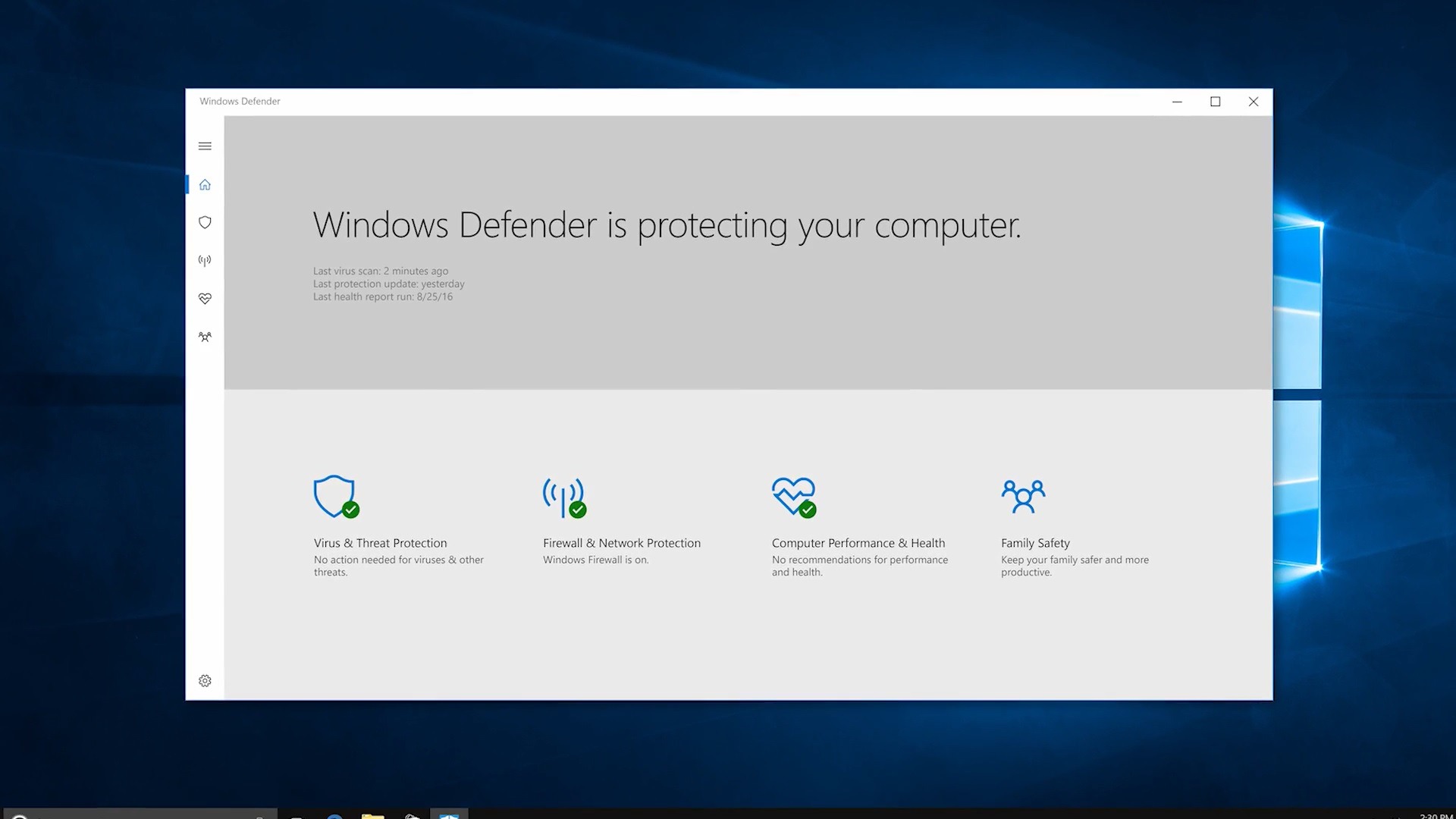
Windows Defender Universal App
Der seit Windows 7 kaum im Design veränderte Windows Defender wird mit dem Creators Update ein ordentliches Update erhalten und zwar ist die Anwendung im Stile der UWP-Plattform gehalten. Dies deutet darauf hin, dass neben Paint auch der integrierte Virenschutz zur Store-App wird. Dadurch ist die Anwendung wesentlich besser für die Bedienung mit Touchscreen geeignet.
Interessant ist dies vor allem in Anbetracht der Arbeit, die Microsoft dafür im Hintergrund geleistet haben muss. Bislang dürfte ein Virenschutz aufgrund der begrenzten Schnittstellen gar nicht möglich gewesen sein. Sollte Microsoft für den Defender nicht eigene APIs programmiert haben, könnten wir in Zukunft auch andere Hersteller von Antivirensoftware im Windows Store antreffen.
Im Laufe dieser Woche soll noch eine Preview Build erscheinen, wo diese Neuerungen enthalten sein werden. Diese werden wir uns selbstverständlich ebenfalls genau ansehen und euch darüber informieren, welche Features bereits enthalten sind. Lange müssen Windows Insider sich also nicht gedulden, um diese selbst auszuprobieren.
Are you looking to tell a story with your data? Or have you ever wanted your charts and reports to be highly tailored to your specific topic? The new infographic designer custom visual for Power BI…
Straßen lassen sich an vielen Stellen überqueren, nicht nur dort, wo Ampeln sind. Doch dürfen sich Fußgänger darauf verlassen, dass Autofahrer immer für sie bremsen?
In dem aktuellen Ranking der zuverlässigsten Autohersteller des US-Verbraucherschutzmagazins Consumer Reports belegt Tesla nur den 25 Rang – von 29. Schuld an dem Debakel ist wohl das Model X.
Tesla von Verbraucherschützern kritisiert
Noch vor etwas mehr als einem Jahr hatte Consumer Reports das Tesla Model S P85Dmit der Bestnote von 103 Punkten bewertet – auf einer Skala von nur 100. Das Elektroauto sei so gut gewesen, dass die Verbraucherschützer anschließend ihr Punktesystem ändern mussten. Jetzt ist Elon Musks Unternehmen in der Gunst der US-Verbraucherschützer aber offenbar massiv gesunken. In dem aktuellen Ranking der zuverlässigsten Autohersteller landet Tesla auf einem schlechten 25. Rang, nur vier Kontrahenten finden sich noch dahinter.
Tesla Model X kann Verbraucherschützer nicht überzeugen. (Bild: Tesla)
In dem Ranking werden die Autobauer auf einer Skala von null bis 100 bewertet. In dem Bereich von 41 bis 60 Punkten sind die Hersteller zuverlässig. Alle, die weniger als 41 Punkte erreichen konnten, werden als weniger zuverlässig bezeichnet. Die Marken mit mehr Punkten sind dementsprechend als zuverlässiger eingestuft worden. Als zuverlässigster Autobauer an der Spitze des Rankings findet sich Lexus mit 86 Punkten. Auf den Plätzen zwei und drei finden sich Toyota (78 Punkte) und Buick (75 Punkte).
Tesla, das im Vorjahr noch nicht in dem Ranking aufgeführt wurde, muss sich mit dem 25. Platz und 28 Punkten begnügen, knapp vor Dodge und Chrysler mit ebenfalls 28 beziehungsweise 26 Punkten. Ebenfalls im unteren Drittel des Rankings finden sich Volvo (40 Punkte) und Volkswagen (30 Punkte), die gegenüber dem Vorjahr deutlich verloren. Mercedes-Benz, Porsche und BMW können sich immerhin mit durchschnittlichen Werten platzieren. Bester deutscher Autohersteller in dem dem Ranking von Consumer Reports ist Audi auf dem vierten Platz und mit 71 Punkten.
Tesla: Probleme mit Model X und Autopiloten
Als Hauptgrund für das schlechte Abschneiden Teslas gelten die Probleme mit dem Model X, bei dem es Probleme mit Türen, Bremsen, der Klimaanlage und der Elektronik gegeben haben soll. Tesla hat die Probleme gegenüber CNBC eingeräumt, will aber weiter daran arbeiten, die zuverlässigsten Autos der Welt herzustellen. Die Probleme mit dem Model X seien in den vergangenen Monaten zudem großteils behoben worden. In Deutschland hatte Tesla zuletzt Ärger wegen des Autopiloten des Tesla Model S, das vom Verkehrsministerium als „erheblich verkehrsgefährdend“ dargestellt wurde. Tausende Tesla-Fahrer sollen per Brief vor der Nutzung des Tesla-Autopiloten gewarnt worden sein.
Fallen Tausende Grafikdesigner nun vom Glauben an den iMac ab? Mit dem Surface Studio demonstriert Microsoft neue Coolness. Windows 10 soll zur 3-D-Plattform werden.
If you don't use the "Cast to Device" feature on Windows 10, then use this guide to quickly remove the option from the context menu.
On Windows 10, Cast to Device (formerly known as Play To), is a feature that allows you to stream content, such as videos, music, and pictures, using Windows Media Player to another device (including your Xbox One) using DLNA or Miracast technology.
File Explorer includes a "Cast to Device" option in the context menu when you right-click a compatible file, but if you rarely (or never) use this feature, you can remove it from the context menu.
In this Windows 10 guide, we'll walk you through the steps to quickly remove the "Cast to Device" option from the context menu in File Explorer.
While Surface Studio and Surface Dial got all the Surface love at today's Microsoft Windows 10 event, the firm is actually shipping other Surface hardware soon, too.
Leipzig ist im Höhenflug, vor allem der Westen der Stadt. Kreative gründen Start-ups, Hipster besprechen Projekte. Und das Beste daran: Es ist noch Platz für Experimente.
 Der Microsoft Update Catalog hat keine künstliche Zugangsbeschränkung mehr. Microsoft hat die ActiveX-Voraussetzung aus dem alten Werkzeug für Administratoren entfernt. (Browserwahl, Microsoft)
 US-Whistleblower Edward Snowden warnt Journalisten vor einem falschen Vertrauen in den Schutz ihrer Kommunikation. Zudem kritisiert er die Politik der Bundesregierung in mehreren Punkten. (Vorratsdatenspeicherung, Wikileaks)



 Straßen lassen sich an vielen Stellen überqueren, nicht nur dort, wo Ampeln sind. Doch dürfen sich Fußgänger darauf verlassen, dass Autofahrer immer für sie bremsen?


 Fallen Tausende Grafikdesigner nun vom Glauben an den iMac ab? Mit dem Surface Studio demonstriert Microsoft neue Coolness. Windows 10 soll zur 3-D-Plattform werden.


 Leipzig ist im Höhenflug, vor allem der Westen der Stadt. Kreative gründen Start-ups, Hipster besprechen Projekte. Und das Beste daran: Es ist noch Platz für Experimente.