Keeping teams working together effectively online has always been a bit hit and miss - we used to use Skype and its chat groups here at All About Towers. Others have recently used Slack, a startup which has seen a lot of success, but now Microsoft has got into the game in a big way, expanding the Office 365 empire with a new product, Microsoft Teams (née Skype Teams, so you can see where all this came from in terms of ideas). See the release and promo video below, though note that this is all for just Office 365's Business and Enterprise SKUs, so don't get too excited as a consumer/enthusiast.
Microsoft hat am Mittwoch die Slack-Konkurrenz Teams vorgestellt. Die Erfinder des Vorbilds antworten darauf mit einer Full-Page-Ad in der New York Times.
Slack zu Microsoft: „Wir sind begeistert, etwas Konkurrenz zu bekommen!“
Slack ist aufgeregt, „etwas Konkurrenz zu haben.“ (Foto: Steward Butterfield / Twitter)
Die Slack-Gründer greifen auf Marketing-Lehren des verstorbenen Steve Jobs zurück. Das Startup, das ein Kommunikation-Tool für den Arbeitsplatz anbietet, hat eine ganzseitige Anzeige in der New York Times gebucht. Darin richtet sich das Unternehmen höhnisch an die Entwickler der am Mittwoch veröffentlichten Teams-Software von Microsoft – ähnlich wie der Apple-Gründer es damals gegenüber IBM tat. So erinnert die gewählte Schriftart stark an die Apple-Anzeige, in der der US-Computerkonzern gegen IBM schoss, nachdem der damalige Weltmarktführer für Großrechner seinen ersten PC vorgestellt hatte.
Teams enthält Elemente wie Chats, Newsfeeds und Gruppen für den Unternehmensalltag und wird fester Bestandteil des Office-365-Pakets. Enthalten sind darin auch Video-Telefonate per Skype sowie ein Zugriff auf Word, Excel, Powerpoint und One-Note. Für den mobilen Einsatz sind entsprechende Apps für Apples iOS, Googles Android und Windows Phone verfügbar, teilte Microsoft in New York mit.
„Diese Gefühl, wenn man denkt, dass man eine Full-Page-Ad in der Times kaufen sollte, um einen offenen Brief zu veröffentlichen – und es dann wirklich zu tun.“
Damit gehen die Redmonder auf direkten Konfrontationskurs mit Slack. So erklärt sich auch die gigantische Werbung in einer der wohl renommiertesten Zeitung der Welt. „Diese Gefühl, wenn man denkt, dass man eine Full-Page-Ad in der Times kaufen sollte, um einen Offenen Brief zu veröffentlichen – und es dann wirklich zu tun“, kommentierte Steward Butterfield, einer der Gründer von Slack, die Anzeige auf Twitter.
In der Full-Page-Ad teilt Slack kräftig gegen die Mitbewerber aus. So heißt es unter anderem, dass Slack zwar begeistert sei, „etwas Konkurrenz zu bekommen“ – Microsoft könne aber nicht etwas schaffen, das Nutzer wirklich lieben, indem sie lediglich etwas herstellen, das „genauso so ist“ wie Slack. Die Ausführungen seien nur ein „freundlicher Ratschlag“, schreibt das 2013 gegründete Unternehmen in Richtung des Software-Giganten.
Der komplette Wortlaut der englischsprachigen Anzeige:
Dear Microsoft,
Wow. Big news! Congratulations on today's announcements. We're genuinely excited to have some competition.
We realized a few years ago that the value of switching to Slack was so obvious and the advantages so overwhelming that every business would be using Slack, or "something just like it," within the decade. It's validating to see you've come around to the same way of thinking. And even though — being honest here — it's a little scary, we know it will bring a better future forward faster.
However, all this is harder than it looks. So, as you set out to build "something just like it," we want to give you some friendly advice.
First, and most importantly, it's not the features that matter. You're not going to create something people really love by making a big list of Slack's features and simply checking those boxes. The revolution that has led to millions of people flocking to Slack has been, and continues to be, driven by something much deeper.
Building a product that allows for significant improvements in how people communicate requires a degree of thoughtfulness and craftsmanship that is not common in the development of enterprise software. How far you go in helping companies truly transform to take advantage of this shift in working is even more important than the individual software features you are duplicating.
Communication is hard, yet it is the most fundamental thing we do as human beings. We've spent tens of thousands of hours talking to customers and adapting Slack to find the grooves that match all those human quirks. The internal transparency and sense of shared purpose that Slack-using teams discover is not an accident. Tiny details make big differences.
Second, an open platform is essential. Communication is just one part of what humans do on the job. The modern knowledge worker relies on dozens of different products for their daily work, and that number is constantly expanding. These critical business processes and workflows demand the best tools, regardless of vendor.
That's why we work so hard to find elegant and creative ways to weave third-party software workflows right into Slack. And that's why there are 750 apps in the Slack App Directory for everything from marketing automation, customer support, and analytics, to project management, CRM, and developer tools. Together with the thousands of applications developed by customers, more than six million apps have been installed on Slack teams so far.
We are deeply committed to making our customers' experience of their existing tools even better, no matter who makes them. We know that playing nice with others isn't exactly your MO, but if you can't offer people an open platform that brings everything together into one place and makes their lives dramatically simpler, it's just not going to work.
Third, you've got to do this with love. You'll need to take a radically different approach to supporting and partnering with customers to help them adjust to new and better ways of working.
When we push a same-day fix in response to a customer's tweet, agonize over the best way to slip some humor into release notes, run design sprints with other software vendors to ensure our products work together seamlessly, or achieve a 100-minute average turnaround time for a thoughtful, human response to each support inquiry, that's not "going above and beyond." It's not "us being clever." That's how we do. That's who we are.
We love our work, and when we say our mission is to make people's working lives simpler, more pleasant, and more productive, we're not simply mouthing the words. If you want customers to switch to your product, you're going to have to match our commitment to their success and take the same amount of delight in their happiness.
One final point: Slack is here to stay. We are where work happens for millions of people around the world.
You can see Slack at work in nearly every newsroom and every technology company across the country. Slack powers the businesses of architects and filmmakers and construction material manufacturers and lawyers and creative agencies and research labs. It's the only tool preferred by both late night comedy writers and risk & compliance officers. It is in some of the world's largest enterprises as well as tens of thousands of businesses on the main streets of towns and cities all over the planet. And we're just getting started.
Was haltet ihr von diesem Marketing-Stunt? Gelungen oder peinlich – schreibt es in die Kommentare!
PowerApps made general availability November 1st 2016, and provides a great way for line of business specialists to create no-code applications to solve business challenges they see in their department or team. Once you tapped into data sources and created your logic, you might want to spruce up the application with some animations to make it look a little bit slicker. And that’s the basis of this post.
I’ve recently been developing a couple of PowerApps, and in one of them I wanted to resize an image in a fluid manner before displaying an entry form. There are no built-in transition effects on objects, but by using the timer control you can actually achieve quite a lot.
Your other option is to create the animation somewhere else as either a movie file or gif animation, but where’s the fun in that.
Add an image control and timer control
Image controls can show images from either embedded resources, or from a web address. I’ll go with the latter. Add an image control to your screen and set the Image property to some URL.
Resize the image to the start position and add a timer control to the screen and set the Duration property of the control to 2 seconds (2000 milliseconds).
As I want the image to be half the original size, I’m using this formula:
768 - ((384*(Timer1.Value/Timer1.Duration)))
768 is the full height, and 384 is the half of that, so I replace 768 with the formula above, which will over the span of the timer reduce the height of the image down to 384.
Start a preview of the screen, click the timer control and watch the animation unfold.
You can of course hide the timer and start that by some other action, but it shows the concept and should get you started. If you want a slower or faster animation, just change the timer duration.
Microsoft has launched their new team messaging application, previously rumored to be named Skype Teams, but now called Microsoft Teams. Teams is positioned as a competitor to Slack, a company that Microsoft was at one stage considering purchasing. As a user of Slack for quite some time now, I was immediately interested to see what Teams could bring to the table.
The first and most obvious advantage to using Microsoft Teams is that it is included as part of Office 365, meaning it is tightly integrated with existing Office 365 identities and services, as well as offering the same level of security and data protection as the rest of Office 365. That’s something that IT folks care about, but users are more interested in functionality and usability. So let’s take a closer look at what Teams offers to users at launch.
Activating Microsoft Teams for Office 365 Tenants
Before your users can start to use Teams it will need to be enabled in your Office 365 tenant. Log on to the Office 365 admin portal with your global administrator account, and navigate to Settings, Services & add-ins, and select Microsoft Teams.
When you enable Teams there are a series of other configuration options to review. These options control things like email notifications, whether video and screen sharing is allowed, whether animated images are allowed, as well as options to integrate bots. You’ll also notice that Team creation, naming, and other settings are controlled using the Groups control panel, because Teams are essentially an add-on service to Office 365 Groups, much like Planner.
Time to flip the switch
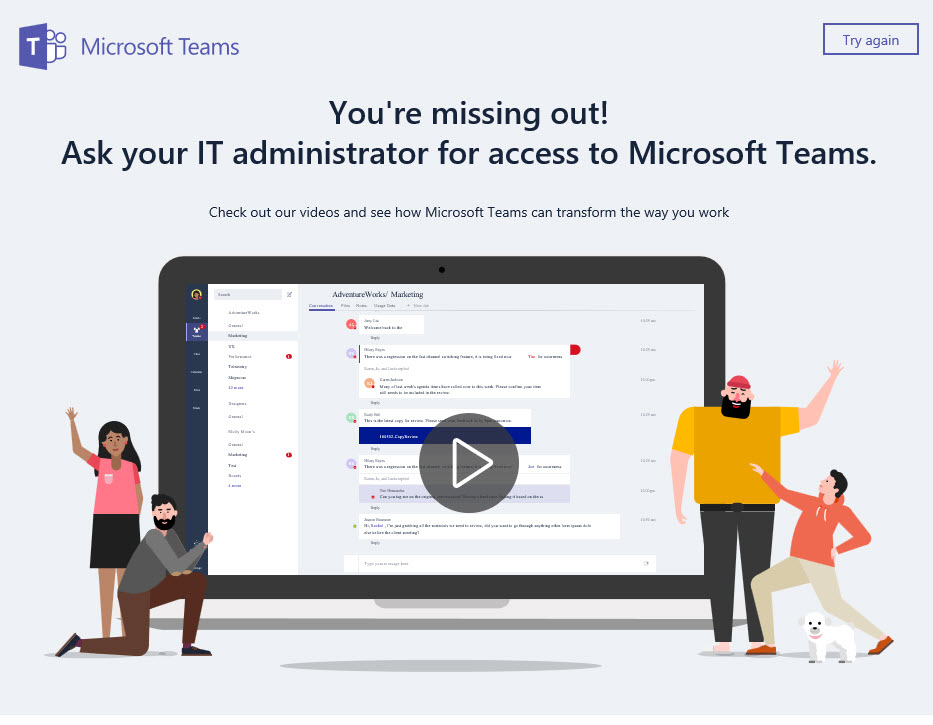
After enabling and configuring Teams your users will be able to browse to https://teams.microsoft.com and begin creating and using Teams.
Creating Teams
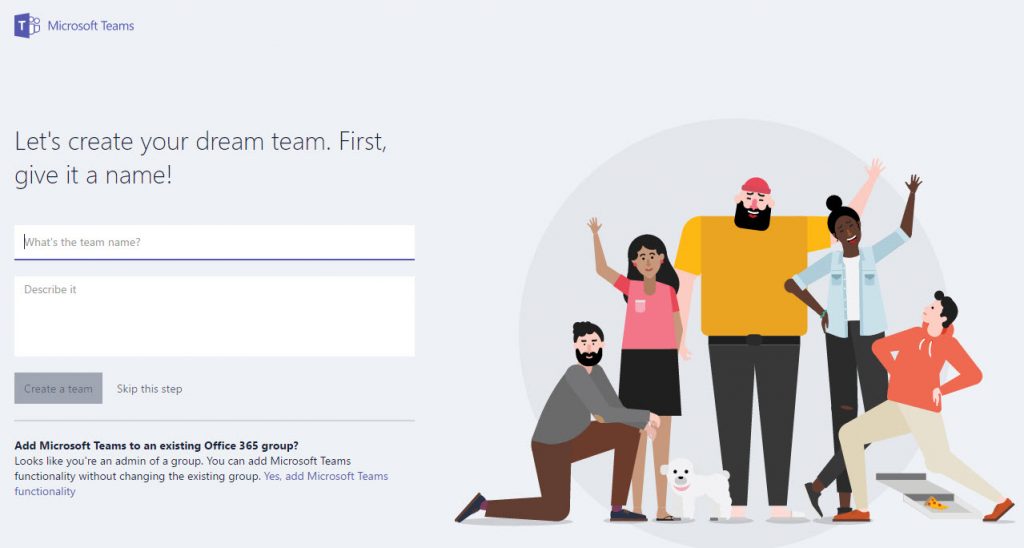
After logging in to the Teams portal for the first time, users are presented with the option to create a new Team, or if they are already an admin for an Office 365 Group, they can add a Team to an existing Group.
Create a new Team or add it to existing Groups
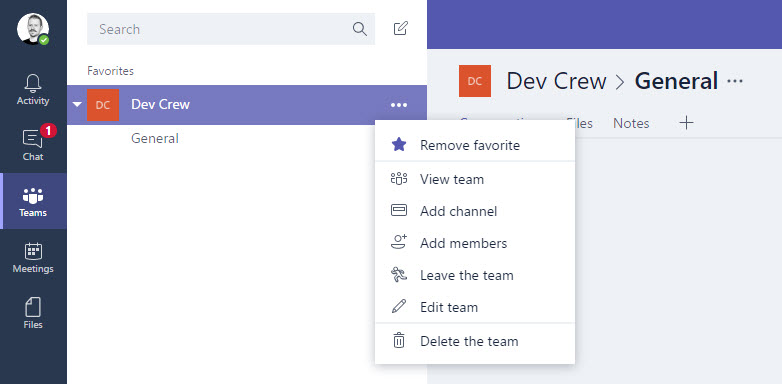
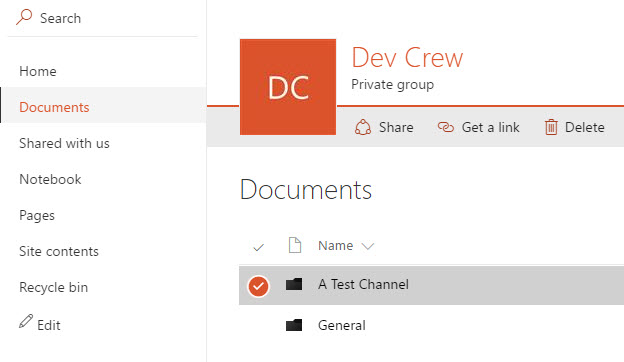
I created a new Team called “Dev Crew” for this demonstration. After naming the new Team I skipped the step to add any more users, and was presented with my new Team. Within the Team are options to manage members, add channels, and so on. Team members can also access files and other integrated Office 365 apps like Power BI via tabs in the team channels.
My new channel
The idea of a Team makes a lot of sense, as does the integration with Groups which Microsoft has made the cornerstone of their Office 365 collaboration efforts. If I were working in a sales, dev or ops team right now, having an Office 365 Group that also provided me with the communications features of Teams is a win, and eliminates the need to use a Skype chat or any third party messaging service (assuming that Teams integrates with everything else that I need).
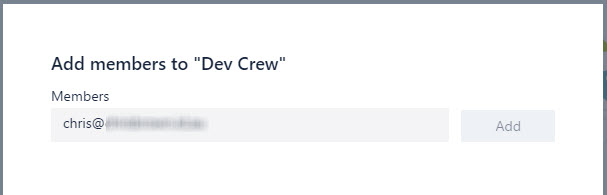
Adding Members to Teams
A solo Team is not all that exciting to look at, although arguably you could set up a private Team and integrate a bunch of bots and notifications that only you are interested in. But since Teams is primarily a tool for communication with multiple people, I wanted to add one of my collaborators to this Team. Unfortunately, as they are an external user, I couldn’t add them using the Teams interface.
Guest access not available yet
Adding the external user via the Group admin interface works from a Groups perspective, but when the external user logs into Teams they either can’t access Teams at all (if it hasn’t been enabled in their own tenant) or they can’t access my Team.
Go hassle your IT admin to get Teams activated
If Microsoft wants to position Teams against Slack, external access is something to address ASAP. I saw some chatter online that it may arrive by the time Teams moves out of preview and into general availability.
Working with Channels and Connectors
Within a Team you (or the Team members) can create multiple channels. Think of an example of a Team as being the IT Operations team. Within IT Operations there could be Exchange admins, SharePoint admins, DBAs, and so on. Obviously each of those teams with IT Operations would like their own channel with chat and file sharing, which Teams makes possible. You can then have “General” channels for broader communication. Everyone in the Team can see all channels, and mark their most relevant channels as favorites. If a particular team within IT Operations wanted a private space to chat, that would need to be a separate Team entirely.
Everybody gets a channel!
Channels can be configured with connectors. Connectors allow a channel to be connected to services such as Twitter, Trello, Jira, GitHub, RSS, webhooks, and dozens more. Microsoft is expecting to have integration with more than 150 partners by the time Teams reaches general availability.
Lots of integration between Teams and third party applications
To test this functionality I added an RSS feed for a busy subreddit, a Google Analytics daily report, and Pingdom alerts for the websites that I monitor.
Connectors are simple and easy to configure
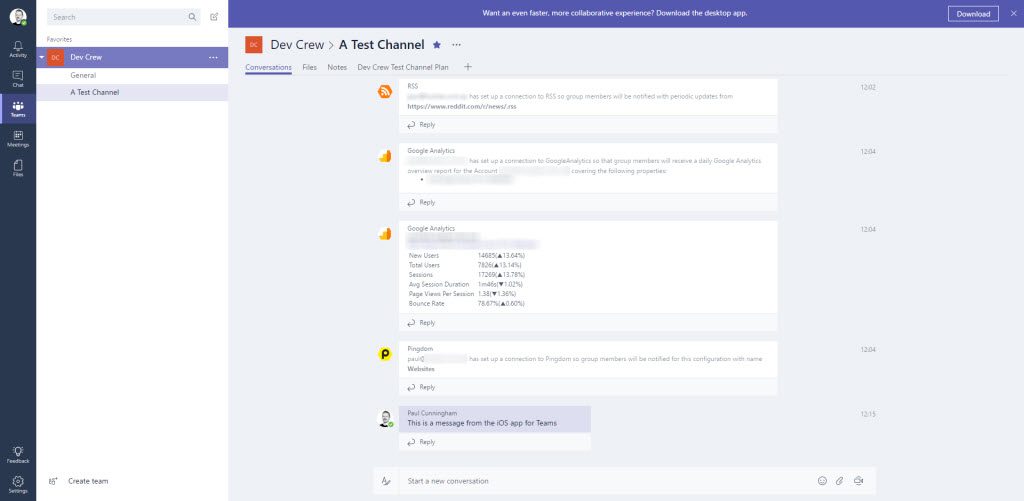
The channel sees notifications for each new connector that’s been added, and the first of my daily reports from Google Analytics has already appeared.
User Interface
Speaking of channels and notifications, the user interface for Teams is actually very good. Both the desktop and web UI are identical. They’re similar to Slack, with the list of Teams and channels visible on the left, and the message stream occupying most of the space. There’s a few oddities, for example the amount of empty space on either side of the messages, and the time stamps floating way off to the right on their own.
Needs some work to make better use of space
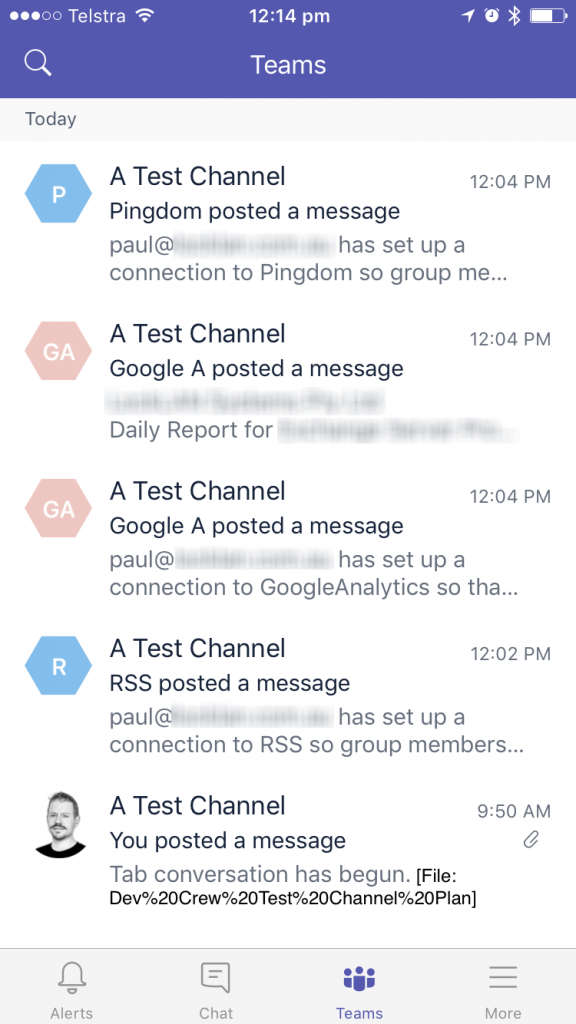
I’d like to see that space used a little more efficiently. At minimum I’d like to see the time stamp and any other relevant metadata brought closer to the conversation threads themselves. There’s also an odd mix of names being displayed on some messages as the full name, e.g. “Paul Cunningham”, and on other notifications being displayed using the email address instead. On the iOS client there’s also some rather ugly display format for files that have spaces in the name.
Nice iOS app, shame about the file names
Planner Integration?
Planner (another Groups feature) is a useful application that I’ve been using quite a lot lately. Planner has a 1:1 association with Groups (each Plan is a unique Group). That is one of the quirks of Planner that bothers me a little. I just feel like it would be neater if one Group (for my team) could have multiple Plans just as it now can have multiple Team channels.
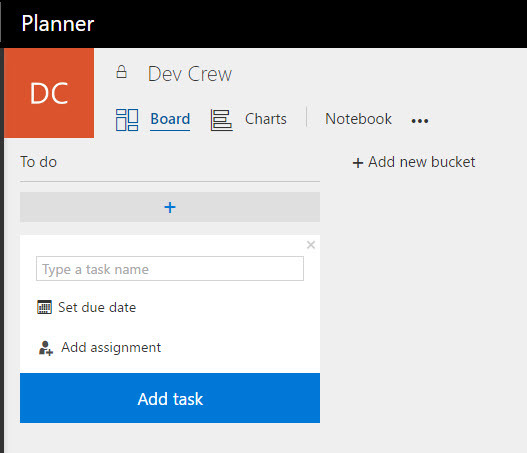
Within Teams, each channel can have Planner plans added. In fact, they can have multiple plans per channel. So now we have one Group, with one Team, with multiple channels, each with multiple plans.
Lots of plans!
That’s actually a good thing on the face of it, until you realize that the Planner functionality within Teams is not the same as what you get when you use Planner directly, even if it’s all contained within one Group. Within Teams, each plan can have buckets and task, but there’s no charts available. Meanwhile, if you return to the normal Planner view, you can see the Group associated with the team, but the Planner view doesn’t display any of the plans, buckets, or tasks that have been created in Teams.
But I can’t see them here!
This creates a weird, fragmented experience for people who are actively using Planner and want to start using Teams. Hopefully this can be cleaned up soon. My personal preference would be to see the multi-plan capabilities of Teams extend to Planner as well, so a team can manage all their micro-projects in one place with full functionality rather than have them sprawled across multiple Groups.
At least the files functionality of Teams works nicely in a Group, with each channel getting a sub-folder of the parent Group’s file storage.
But file storage is okay
What Else?
Microsoft Teams comes with other features that some people will love, and others will think are a bit silly. There’s all the usual social network features like threaded conversations, @replies/mentions, direct messages (private chats), and an impressive library of customizable graphics.
There’s also video chat. Of course, we already have video chat in Skype and Skype for Business. Video chat should definitely be a part of Teams, but it does raise the question of where exactly Teams fits in to existing communications tools that businesses already use today.
I had a meeting with myself and approved my pay rise
When I think about different teams (lowercase) that I’ve worked in over the years, it’s easy to see where Teams would fit in. Yes, we might have used Lync or Skype for Business to do IM, voice, and video chat, and it worked fine. In fact, it worked great. In the early stages of a critical incident an IM between two people would often expand to a group IM, and then group audio as the situation developed. It worked, but that conversation remained separate from other elements of the situation, such as alerts (which could be appearing in Teams while we chat) or document sharing (such as collating notes in the Team OneNote, or working through a list of servers in a spreadsheet).
So as far as Teams fitting in to existing orgs, I’d say it could very easily replace the tools that teams are using to communicate today.
Summary
To summarize, I’ve put together this short list of pros and cons based on my usage so far.
Pros:
Free/included with Office 365 plans
Easy to enable and set up
Usable via web and all major platforms (Windows, Mac, iOS and Android apps available)
Good integration with a lot of third party services, and more to come
Cons:
UI needs some work to optimize the layout and use of space
Fragmented Planner experience
No external/guest access
To see more of Teams in action check out the Microsoft Mechanics video available on YouTube.
Die CDU-Fraktionsvize Nadine Schön fordert eine Abkehr von der Datensparsamkeit. Das dürften manche Politikerkollegen nach der Ausspähung durch ihre Browser-Addons anders sehen. (Mozilla, Firefox)
Eine Grundfunktion in der Netzwerksoftware zeigt der Deutschen Telekom an, wie viele Glasfaseranschlüsse wirklich bis ans Haus oder weiter gehen. Angaben dazu sind weiter nicht öffentlich. (Vectoring, DSL)
Deutsche Forscher haben ein Energiespar-Display entwickelt, das nur einen Bruchteil der Energie herkömmlicher Displays benötigt. Das Display soll künftig in Datenbrillen Einsatz finden.
Stromsparend: Display für Datenbrille der Zukunft
Datenbrillen, wie sie etwa von Google entwickelt wurden, haben von der technischen Seite her zwei Probleme: Der Akku macht zu schnell schlapp, und der Mikroprozessor und damit die Brille werden zu schnell heiß. Daher, meinen die Forscher des Fraunhofer-Instituts für Organische Elektronik, Elektronenstrahl- und Plasmatechnik FEP, hätten sich Datenbrillen bisher noch nicht durchgesetzt. Die Datenschutzprobleme, mit deren Auswirkungen etwa Besitzer einer Google Glass zu kämpfen hatten, lassen die Fraunhofer-Wissenschaftler allerdings außer Acht. Die technischen Problem soll jedenfalls ein neues Energiespar-Display lösen, wie es in einer entsprechenden Mitteilung heißt.
Energiespar-Display soll Datenbrillen revolutionieren. (Bild: Fraunhofer FEP)
Dieses Display soll besonders energiesparend und zugleich sehr hell sein. Die hinter der Entwicklung stehenden Ingenieure sollen langjährige Erfahrung bei der Herstellung von Displays mit organischen Leuchtdioden (OLED) haben. In den Chip, auf den die OLED aufgetragen werden, haben die Entwickler eine Kamerafunktion eingebaut. Dadurch soll das Display nicht nur zur Anzeige von Informationen, sondern auch zum Wahrnehmen der Umgebung dienen. Damit soll auch erkannt werden, in welche Richtung der Träger der Brille guckt.
Display verbraucht nur zwei bis drei Milliwatt
Um den Stromverbrauch zu senken, haben sich die Fraunhofer-Forscher einen Trick überlegt: „Wir steuern den Chip jetzt so, dass nicht ständig das gesamte Videobild erneuert wird, sondern nur jener Teil auf dem Display, in dem sich etwas verändert“, erklärt Projektleiter Philipp Wartenberg. Die Schaltung sei so angepasst worden, dass nur der sich verändernde Teil des Datenstroms durchgelassen werde. Dazu mussten die Entwickler das Design des Chips und die Steuerungselektronik in großen Teilen neu entwerfen. Insgesamt ist es so möglich, dass statt einer Leistung von 200 Milliwatt, wie sie herkömmliche Datenbrillen benötigen, nur zwei bis drei Milliwatt gebraucht werden.
Einen Prototypen haben die Fraunhofer-Wissenschaftler schon gefertigt, dieser soll in der Zeit vom 8. bis 11. November 2016 auf der Messe electronica in München vorgestellt werden. Als Zielgruppe sehen Wartenberg und seine Kollegen die Industrie, etwa in der Logistik oder bei der Montage, sowie Sportler und Privatkunden. Wann es ein marktreifes Produkt mit dem neuen Energiespar-Display gibt, steht noch nicht fest. Die Forscher stünden für entsprechende Projekt bereit, heißt es.
Kamal und ich, wir sprechen heute über die Veranstaltungen von Microsoft und Apple aus der vergangenen Woche. Eigentlich ist diese YouTube-Story mit der Gema auch aktuell, hätten wir dazu etwas machen sollen? Naja, zieht's Euch rein…
Themen
Microsoft Surface Studio (01:08)
Apple MacBook Pro (07:09)
Fragen und Antworten (29:49)
BestCast
P.S.: BestCast gibt es jetzt auch als Audio auf iTunes
Microsoft hat seine Slack-Alternative Teams gestartet, um bei der Onlinekommunikation von Arbeitsgruppen mitzuhalten. Teams kann beim Abschluss eines Office-365-Firmenabos kostenlos genutzt werden. (Office 365, Microsoft)
München - Seit Jahren fordert die Stadt die Deutsche Bahn auf, die Paul-Heyse-Unterführung am Hauptbahnhof zu sanieren – ohne Erfolg. Doch jetzt kommt Bewegung in die Angelegenheit. Bahn und Stadt haben sich darauf verständigt, „das optische Erscheinungsbild der Unterführung zeitnah zu verbessern“.
Das Analystenhaus Strategy Analytics hat nun die eigenen Tablet-Verkaufsanteile für das dritte Quartal 2016 veröffentlicht und darin zeichnet sich ein glasklarer Trend ab. Microsoft ist spät in den Tablet-Markt eingestiegen und hat auf das richtige Pferd gesetzt. Der Erfolg zeigt sich nun deutlich.
Laut den Analysten waren Windows-Tablets die einzige Produktkategorie am Markt, welches ein Wachstum im dritten Quartal erlebt hat. Es wurden nämlich insgesamt 7,3 Millionen Geräte verkauft anstatt 5,8 Millionen, wie im Jahr davor, ein Anstieg von 25 Prozent. Der Verkaufsanteil von Windows-Tablets erreicht damit ein neues Rekordhoch und zwar 16 Prozent.
Für Google und Apple sieht es in diesem Bereich zumindest im Trend wesentlich schlechter aus. Apple hat demnach 6 Prozent weniger iPads verkauft als im Vorjahr und zwar fiel der Wert von 9,9 auf 9,3 Millionen Einheiten. Der Verkaufsanteil von Android-Tablets brach im vorigen Quartal ebenfalls ein und san um ganze 17 Prozent, also von 36 auf 30,1 Millionen Geräte. „Der Marktanteil von Android fiel auf 65 Prozent, da das starke Verkauf von Windows-Tablets die Android-Geräte vom Markt drücken.“, heißt es in der Veröffentlichung von Strategy Analytics.
Android- und iOS-Marktanteile schrumpfen
Gefährlich nahe kommen Windows-Tablets damit erstmals an Apples iPads, welche derzeit bei einem Gesamtmarktanteil von 19,1 Prozent rangieren. Windows-Tablets kommen derzeit auf 16 Prozent und, sollte sich der Trend fortsetzen, hat Microsofts Betriebssystem trotz zwei Jahren Verspätung Apple überholt.
„Tablets sind mehr als Entertainment-Geräte“
Tablets im heutigen Sinn wurden praktisch vom Apple iPad definiert, das Steve Jobs 2010 vorgestellt hatte. Sie waren reine Entertainment-Geräte, zweite Bildschirme während des Fernsehens und generell für den Medienkonsum ausgelegt. Wenn das Notebook zu sperrig und das Smartphone-Display zu klein war, kam das Tablet ins Spiel. Das Konzept wurde wenig später von Google übernommen und zwei Jahre darauf sogar erweitert und kleine Tablets, weswegen Monate später auch das iPad Mini kommen musste.
Microsoft hat bewusst einen anderen Ansatz gewählt und mit dem Surface RT das Convertible erschaffen. Das Gerät floppte, aber mit der dritten Generation hatte Microsoft den Dreh raus und die Konkurrenz hatte in der Zwischenzeit geschlafen, wohl auch, weil man das Surface aufgrund seines Misserfolgs unterschätzt hatte. Das Convertible war geboren und es ist zweifellos ein Markt, in dem weder Android, noch iOS richtig mithalten können. Kunden wollen Tablets nun für mehr Zwecke als für reines Entertainment und wollen mit Convertibles mehrere Aufgaben des täglichen Lebens erledigen können. Viele Nutzer können mit einem solchen 2-in-1 mehrere Geräte ersetzen und dank der höheren Leistungsfähigkeit schlagen auch Unternehmenskunden diesen Kurs ein. Die Analysten schätzen derzeit, dass sich dieser Trend fortsetzen wird.
Außenminister Çavuşoğlu hat sofortige Visafreiheit für türkische Bürger gefordert. Andernfalls werde sein Land den Deal mit der EU zur Flüchtlingsaufnahme platzen lassen.
SharePoint had been a UWP app in preview for a while and the label got officially dropped a few weeks ago, though many had installation issues. These seem to have been sorted now, so a quick link of interest is in order. Note that SharePoint requires you to have an active Office 365 subscription that includes SharePoint online, so think work or school accounts.
Mit Microsoft Teams bekommt Office 365 ein neues Chat-basiertes Kollaborations-Tool. Damit zielt der Konzern aus Redmond offensichtlich auf Slack-Nutzer ab.
Microsoft Teams: Slack-Alternative für Office 365 vorgestellt
Mit Microsoft Teams will der Software-Konzern aus Redmond offensichtlich eine eigene Alternative zu Slack an den Mann bringen. Die Team-Messaging-Lösung befindet sich jetzt in der Testphase und soll ab dem ersten Quartal 2017 allen interessierten Unternehmen zur Verfügung stehen. Teams wird Firmen als Teil ihres Office-365-Abonnements angeboten. Neben Chat-Konversationen wurde Skype für die Durchführung von Online-Meetings per Video- oder Sprach-Chat integriert. Allerdings bietet auch Slack seit geraumer Zeit eine Telefonie-Funktion.
Ein wichtigeres Unterscheidungsmerkmal dürfte daher eher die tiefe Office-365-Integration gelten. So sollen Mitarbeiter alle wichtigen Informationen direkt über Teams abfragen und mit ihren Kollegen teilen können. Aber wie bei Slack können auch Drittanbieter-Apps wie Github oder Twitter mit dem Dienst verbunden werden. Bis zum offiziellen Start im nächsten Jahr soll es mehr als 150 solcher Integrationen geben. Schon jetzt bekannt ist die Unterstützung von Zendesk, Asena und Hootsuite.
Microsoft Teams: Vor allem die Office-365-Integration dürfte für bestehende Abonnenten interessant sein. (Grafik: Microsoft)
Microsoft Teams unterstützt Microsofts Bot-Framework
2016 waren es vor allem Bots, die im Chat-Bereich für Aufmerksamkeit gesorgt haben. Auch hier will Microsoft nicht hinter der Konkurrenz zurückbleiben und hat daher das firmeneigene Bot-Framework um die Unterstützung für Teams erweitert. So sollen Firmen intelligente Bots selbst entwickeln oder auch Bots von Drittanbietern einbinden können. Teams selbst soll unter Windows, Mac, Android, iOS und als Web-App nutzbar sein.
Microsoft Teams soll allen Firmen zur Verfügung stehen, die über ein Business-Essential- oder ein Business-Premium-Abo von Office 365 verfügen. Außerdem wird es Bestandteil der Enterprise-Abonnements E1, E3 und E5. Es bleibt abzuwarten, ob Microsoft es schaffen kann, Slack mit Teams den Rang als Team-Messaging-König abzulaufen.
… ist im Rahmen einer Revision festsgestellt worden, dass der für den 22.05.2015 anberaumte Verkündungstermin aus nicht mehr nachvollziehbaren Gründen „untergegangen“ ist.
Es wird daher angefragt, ob erneut Einverständnis mit einer Entscheidung im schriftlichen Verfahren gemäß § 128 Abs. 2 ZPO besteht.
Eigentlich schade, dass im Gericht dann letztlich doch keine Akte unbearbeitet bleiben darf. Der Klägerin selbst scheint bislang nicht aufgefallen zu sein, dass ihr anderthalb Jahre lang kein Urteil zugeschickt wurde. Wir haben es schon gemerkt, aber nichts gesagt. Unser Mandant, der Beklagte, hat es regelmäßig ja auch nicht eilig.
Prevent someone from guessing your password by using this guide to temporarily lock out your computer after a specific number of invalid attempts.
Microsoft has designed Windows 10 to keep your information protected from the most advanced security threats with features like BitLocker, Windows Hello, and an entirely new Windows Defender for malware protection. However, even with so many security technologies in place, there are still chances of someone guessing your password. In part is because, by default, the operating system allows unlimited passwords attempts through the Sign-in screen.
Perhaps one of the main reasons for this is to prevent you from quickly getting locked out of your system when you suddenly forget your password. But unfortunately, it also leaves the doors open to anyone with physical access to your device to have unlimited tries to guess your password -- and probably guess the right one.
Thankfully, Windows 10 (and previous versions), includes a set of advanced security options to temporarily lock out your account after a defined number of failed sign-in attempts. While there are a bunch of different ways that someone can try to bypass your password, you will at least slow down and make it harder for anyone to hack into your local Windows 10 account.
88-mal zur Sonne und wieder zurück: So lang müsste theoretisch eine Teststrecke für autonome Autos sein. Eine starke Motivation für Hersteller und Behörden, emsig nach anderen Lösungen zu suchen. (Autonomes Fahren, Technologie)
Eine der meistgenutzten Reise-Apps auf dem Smartphone ist der DB Navigator. Bahn-Vielfahrer Karsten verrät Tipps und Tricks, was der DB Navigator alles kann und in welchen Situationen ihm welche Funktionen am besten weiterhelfen.
DB Navigator: Stets informiert dank der Benachrichtigungen zur Reise
Nicht nur für Pendler und Bahn-Vielfahrer, sondern auch für diejenigen unter Ihnen, die nur ab und zu mit der Bahn verreisen: Die App DB Navigator informiert Sie mit den benachrichtigungen zur Reise (bisher Verspätungs-Alarm) z. B. über Verspätungen oder Gleisänderungen auf Ihrer Strecke. Damit sind Sie immer auf dem neuesten Stand und können Ihre Reise genießen.
Push-Nachricht direkt aufs Smartphone
Das Einrichten der Benachrichtigungen zur Reise ist sehr einfach. Sobald Sie im DB Navigator ein Ticket buchen, ist die Funktion aktiviert. Auf Ihr Smartphone (nur iPhone und Android) erhalten Sie dann automatisch eine Push-Nachricht, sobald Ihr Zug eine Verspätung hat, Ihr Anschluss gefährdet ist, eine Haltestelle oder gar ein Zug ausfällt oder Ihr Zug von einem anderen Gleis abfährt. Wichtig ist dabei, dass Sie ein Nutzerprofil in der App angelegt und die Push-Nachrichten aktiviert haben.
Auch beim Kauf von Fahrkarten über bahn.de bekommen Sie die Benachrichtigungen zur Reise automatisch „obendrauf“, per E-Mail.
So fügen Sie die Benachrichtigungen zur Reise manuell hinzu.[/caption]
Benachrichtigungen zur Reise für Pendler
Für Pendler ideal: Auch für Ihre regelmäßigen Strecken können Sie – ohne ein Ticket buchen zu müssen – die Benachrichtigungen zur Reise nutzen. Wählen Sie dafür im DB Navigator in der Reiseauskunft Ihre Verbindung, klicken Sie den grauen Drei-Punkte-Button und wählen Sie „Benachrichtigungen zur Reise“. Im nächsten Schritt wählen Sie „Benachrichtigungen zur Reise für Pendler einrichten“ aus. Nun können Sie den Zeitraum festlegen und die Wochentage markieren, an denen Sie über Abweichungen zu Ihrer Verbindung informiert werden möchten.*
Perfekt – dann wissen Sie immer genau, wann Sie im Büro loslaufen müssen, um rechtzeitig am Bahnsteig zu sein. So nutzen Sie Ihre Freizeit noch besser.
Als Pendler einfach die gewünschten Wochentage auswählen.[/caption]
Karsten Sauer ist Bahn-Vielfahrer und nutzt die App DB Navigator täglich. Für inside.bahn.de verrät er Tipps und Tricks.
*Bitte beachten: Jedes Jahr zum Fahrplanwechsel im Dezember werden die angelegten Benachrichtigungen zur Reise automatisch gelöscht. Ab Oktober können Sie Ihre Alarme für den neuen Fahrplan bereits neu aktivieren.
[Aktualisiert am 11.08.2020: Verspätungsalarm im DB Navigator und auf bahn.de heißt jetzt Benachrichtigungen zur Reise, Screens aktualisiert.]
Having your Windows 10 Mobile smartphone's lockscreen set to 'Bing', you'll be getting the 'Windows Spotlight' images each day, but there have been some crackers, which you may wish to have local copies of on your phone? Or perhaps you want a faster swap between images? Either way, new UWP utility SpotBright has you covered.
Ein britischer KFZ-Versicherer wollte die Facebook-Posts von Neukunden einsehen. Dem hat das soziale Netzwerk jetzt einen Riegel vorgeschoben.
Facebook will nicht als Informationsquelle für einen Versicherer dienen
Lässt sich anhand von Hobbys und Aktivitäten erkennen, wie sicher ein junger Fahrer am Steuer seines Automobils ist? Für den britischen KFZ-Versicherer Admiral scheint die Antwort auf diese Frage ja zu lauten. Das Unternehmen wollte Menschen zwischen 17 und 21, die gerade ihren Führerschein gemacht haben, dazu anhalten, ihm Zugriff auf ihre Facebook-Posts zu geben. Anhand einer Analyse der dort hinterlegten Daten versprach der Versicherer den potenziellen Neukunden einen Rabatt von bis zu 350 britischen Pfund pro Jahr.
Facebook: Kein Daumen nach oben für die Pläne der Versicherung. (Foto: Facebook)
Admiral versicherte zwar, dass die Auswertung der Facebook-Daten freiwillig erfolge und zu keiner Erhöhung des Beitragssatzes führe. Facebook war von dem Plan allerdings trotzdem nicht angetan. Wie die BBC berichtet, hat das soziale Netzwerk das Ganze daher in letzter Minute gestoppt. Statt Zugriff auf den Facebook-Account der jungen Kunden zu verlangen, sollen das Unternehmen diesen jetzt lediglich einen Fragebogen zum Ausfüllen bereitstellen. Auf dessen Basis werden dann die möglichen Rabatte errechnet.
Facebook: Einsicht von Versicherern könnte das Werbegeschäft schädigen
Es ist verständlich, warum Facebook dem Versicherer keinen Zugriff auf die Nutzerdaten geben will. Zwar könnte das soziale Netzwerk daraus sicherlich ein Geschäftsmodell entwickeln, das würde aber zu einem ganz anderen Problem führen: Nutzer hätten dadurch einen starken Anreiz, sich gegenüber einer Versicherung möglichst gut darzustellen. Das könnte bedeuten, dass Nutzer Interessen vorgeben, die sie nicht haben. Dadurch wären aber auch Facebooks Möglichkeiten begrenzt, Werbekunden passende Zielgruppen für ihre Produkte zu liefern.
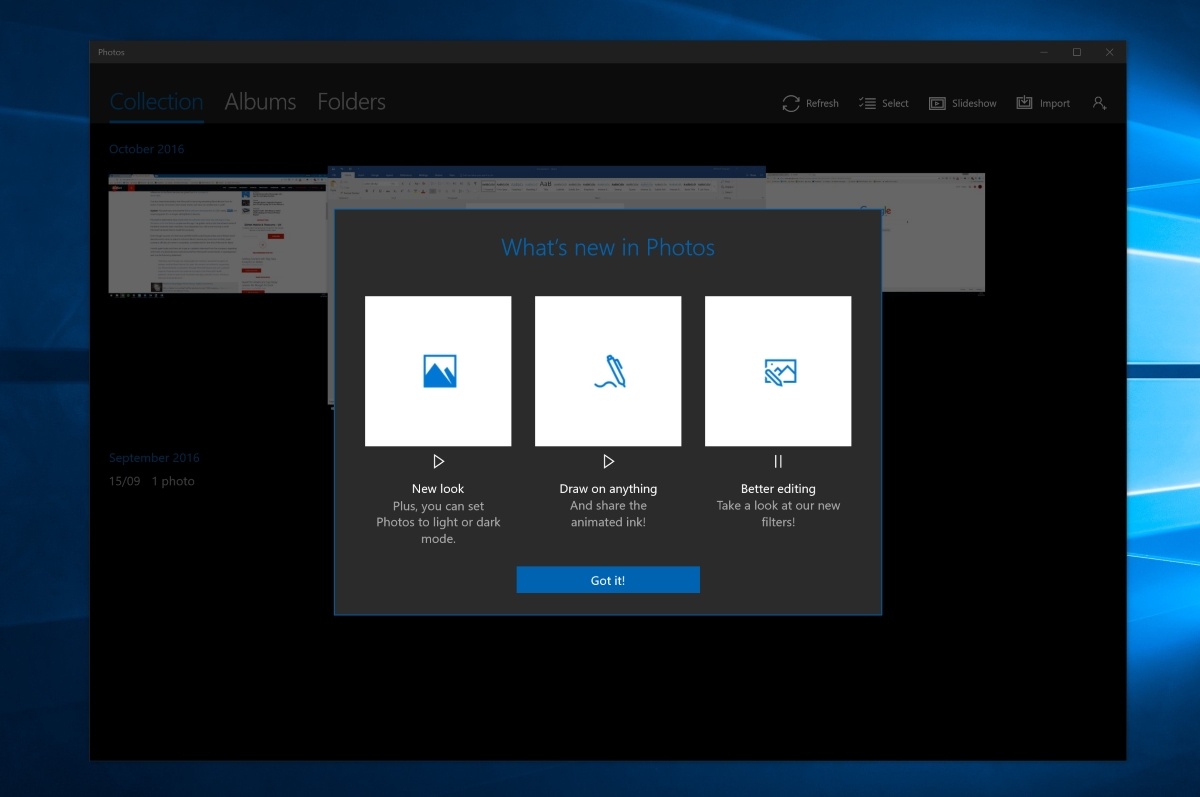
Windows Insider im Release Preview Ring dürfen sich seit gestern Abend über eine aktualisierte Fotos-App freuen und dieses Update hat es in sich. Die Aktualisierung auf Version 16.1ß17.10002.0 für Windows 10 und Windows 10 Mobile bringt eine ganze Menge neuer Funktionen.
Einerseits neu ist Unterstützung für Windows Ink, womit Nutzer nun auch auf den Fotos zeichnen können. Außerdem gibt es neue Möglichkeiten zur Bearbeitung sowie Filter. Die Anwendung wurde damit in vieler Hinsicht verbessert und enorm aufgewertet. Dass diese nun für Windows Insider im Release Preview Ring erscheint, bedeutet, dass die neue Fotos-App wohl sehr bald auch für reguläre Nutzer kommen wird. Bislang war diese nämlich nur den Insidern im Fast Ring vorbehalten.
Unter dem folgenden Link könnt ihr die App aus dem Windows Store herunterladen:
Microsoft's game plan with the Surface line is to lead and inspire and that includes their OEM partners like Lenovo, Dell, HP, and more. At the Adobe MAX conference going on right now, it was Dell who just teased their new creator-focused PC (spotted by @SurfaceProArtist).







 Die CDU-Fraktionsvize Nadine Schön fordert eine Abkehr von der Datensparsamkeit. Das dürften manche Politikerkollegen nach der Ausspähung durch ihre Browser-Addons anders sehen. (
 Eine Grundfunktion in der Netzwerksoftware zeigt der Deutschen Telekom an, wie viele Glasfaseranschlüsse wirklich bis ans Haus oder weiter gehen. Angaben dazu sind weiter nicht öffentlich. (


 Microsoft hat seine Slack-Alternative Teams gestartet, um bei der Onlinekommunikation von Arbeitsgruppen mitzuhalten. Teams kann beim Abschluss eines Office-365-Firmenabos kostenlos genutzt werden. (Office 365, Microsoft)


 Außenminister Çavuşoğlu hat sofortige Visafreiheit für türkische Bürger gefordert. Andernfalls werde sein Land den Deal mit der EU zur Flüchtlingsaufnahme platzen lassen.
 Unser Autor, Harvard-Dozent, reiste für uns an sieben deutsche Unis. Er fand schnarchende Studenten, gelangweilte Professoren – und einige gute Ideen.


 88-mal zur Sonne und wieder zurück: So lang müsste theoretisch eine Teststrecke für autonome Autos sein. Eine starke Motivation für Hersteller und Behörden, emsig nach anderen Lösungen zu suchen. (Autonomes Fahren, Technologie)