München - Wie weit darf man eigentlich gehen, um nicht vor Gericht zu landen? Die Münchner Anwälte Stephan Lucas und Alexander Stevens verraten in ihrem neuen Buch, was garantiert nicht strafbar ist.
Mobility is paramount in today’s business environment. That’s why we’re excited to announce Microsoft Visio Online, which enables users to share and view Visio diagrams in high fidelity from almost any device using their favorite browser. Today, Visio Online opens the online viewing experience to almost all Office 365 commercial users, boosting productivity for everyone on your team, no matter where they’re working. In addition to Visio Online, we’ve released JavaScript APIs for IT professionals to extend Visio capabilities to meet specific user needs.
The Visio team has steadily released more and more features to increase mobility across your organization. In November 2016, we brought Visio Online Public Preview for a group of Office 365 users—and their feedback was fantastic! Since then, we’ve enabled Visio Online for VSD file format and for users who are using email through Exchange Online, Outlook.com and Hotmail. In addition to online viewing, we’re excited to announce commenting for Visio Online, giving you and your team a place to review and discuss process flows, shape data and more without switching windows.
Get started today! For more information, visit our FAQ page.
Add comments to Visio diagrams from your browser.
Create custom Visio Online solutions to meet your needs
We are also releasing Visio JavaScript APIs that extend the capabilities of Visio Online for developers. Using these APIs, IT professionals can now build rich mashup solutions to meet their organization’s specific needs.
The APIs enable programmatic access to the embedded Visio Online diagrams in a SharePoint Online page. Developers can use them to interact with Visio diagram elements—like pages and shapes—expose diagram data, write custom handlers for mouse events, create visual mark-ups on the diagram canvas and more. As a mashup example, developers can create a custom overlay, such as a list of steps required to complete before moving forward in a process, that appears when users select or hover over a diagram shape.
Embed Visio Online diagrams into SharePoint Online using JavaScript APIs.
Please visit the Office Dev Center and read the related blog for detailed instructions and more information on how to use JavaScript APIs with Visio Online.
You can also visit our UserVoice page to submit suggestions for new products, and follow us on Facebook, YouTube and Twitter for the latest Visio news.
Today, we’re pleased to announce that the new Office 365 Service health dashboard is now available to all customers. Since the first preview—announced at Ignite in September 2016—the new Service health dashboard has provided admins with a deeper level of service health insight. We’re excited about the rich insights that it is bringing to admins.
The new Service health dashboard reaches general availability
For many of you, moving to Office 365 was a big change. In an on-premises world, if there was a service incident, you were the ones investigating and solving the issue. With Office 365, you trust Microsoft with running the service as well as with quickly solving service incidents. We know that having visibility into the service is crucial for you, and we built the Service health dashboard with that in mind. We are now providing an even deeper level of service health insights that are personalized for your organization. This allows admins to stay on top of service incidents, improve their internal support experience and improve their users’ Office 365 experience.
We’d like to thank each one of you who has participated in the preview program and who has provided feedback on the Service health dashboard. Over the last four months, we have received numerous pieces of feedback that have helped us identify gaps, fix bugs and evolve the Service health dashboard to a monitoring experience that meets the needs of all company sizes. And it’s great to hear how it is already helping you:
“The Service health dashboard has helped us better understand the current state of the Office 365 service and is a much clearer picture of potential service. It conveys easy to understand information about service health and makes me aware of what is relevant to me.” —Customer feedback
Here is a summary of the main improvements:
Access rich and more actionable incident insights—The dashboard now features a view that separates major business critical outages from others and splits them into two categories: Incidents and Advisories. This view makes it easy for you to identify issues that you might want to act on immediately.
Quickly understand the incident—A summary view surfaces the most relevant and critical details to you in two short sentences—easy and quick to consume. If you want to access additional details, you can go to a more detailed view that provides you with all available information, including workarounds and message history. You can also access a history of incidents and advisories that occurred in the past 30 days.
Easily see the impact for your organization—The dashboard allows you to quickly understand the impact of the service incident on your organization by showing you the number of impacted users. (Please note: This functionality is currently available for Exchange Online–related incidents only and will be extended to other workloads over time.)
Quickly providefeedback—A rating option now enables admins to provide feedback on the accuracy and usefulness of the information of each post on the Service health dashboard.
To access the new Service health dashboard, click Service health in the left navigation menu in the Office 365 admin center.
More to come
This is just the beginning. Our goal is to provide you with richer and more actionable service health insights that will help you to stay on top of incidents, reduce support costs and improve end user experiences. We’ll be adding more enhancements in the coming months, including:
Tell us about issues—If you are impacted by an issue that is not showing up on your Service health dashboard, the Tell us feature will provide you with a quick and easy way to let us know.
Stay informed through your preferred channel—The Service health dashboard will enable you to sign up for notifications via text and/or email, so that you can monitor the service and track issues through the channel you prefer.
Access user level details—In addition to the number of impacted users, you will also be able to access a full list of impacted users to enable you to drive more targeted communication and support.
Check the health of your users—On-demand user health checks will allow you to check end user health by running a test against our service. User Monitoring will enable you to proactively monitor specific users and to find out about possible health issues affecting those users right away—often before they might even notice them.
In-product messaging—The Service health dashboard will enable you to make your users aware of service incidents and inform them about possible workaround solutions through optional in-product notifications.
More management enhancements in February
Here’s a summary of additional Office 365 administration updates for February:
Weekly Message Center digest—Based on popular demand, we introduced a weekly digest that enables Office 365 admins to receive a summary of their Message Center notifications via email. The Message Center is the main channel that Microsoft uses to inform admins about changes, maintenance work and updates coming to their service. To make it easier for you to stay up to date and to share the notifications with your co-workers, the weekly digest now brings them directly to your inbox and can be configured for delivery to any email address of your choosing—even an Office 365 Groups mailbox in Outlook. The weekly digest capability is currently available to Office 365 admins who are set to First Release in tenants with more than 50 subscribed users and will become available for all customers over time.
If you don’t receive the weekly digest yet, you can also access the Message Center in the admin center, admin mobile app and Office 365 Service Communications API.
Introducing Azure AD tenant restrictions (preview)—Certain organizations choose to restrict internet destinations by filtering on Fully Qualified Domain Names (FQDNs) and/or IP addresses using proxy and/or firewall devices. However, this approach is not effective in a world where SaaS applications are hosted in a public cloud, running on shared FQDNs such as outlook.office.com (Outlook on the web) and login.microsoftonline.com (Azure AD). Blocking these FQDNs would effectively block access to every instance of the service, including the organization’s.
The new tenant restrictions feature enables organizations to control access to SaaS cloud applications, based on the Azure AD tenant the applications use for single sign-on. For example, you may want to allow access to your organization’s Office 365 applications, while preventing access to other organizations’ Office 365 applications.
Tenant restrictions is a new feature being introduced to Azure AD Premium P1 subscribers and all Office 365 customers. To make use of this feature, Office 365 subscribers must enable Modern Authentication as the default authentication protocol for the cloud service and access the service using a Modern Authentication–enabled client. When you’re ready to get started, see Use Tenant restrictions to manage access to SaaS cloud applications for more information.
Office 365 admin center learning page—To help small business run their business on Office 365, we’ve launched an Office 365 admin center video page that makes it easy to understand key management scenarios through a series of short, easy-to-follow videos. Learn how to add a domain name, add people, set up document storage, download software and much more. Please let us know what content you’d like to see as we continue to add more videos and categories in the coming months.
New Power BI admin role—The Power BI admin role is a new role in Azure AD, meant for those tasked with administering Power BI for their organization. Office 365 user admins can assign users to be Power BI admins within the Office 365 admin center or via PowerShell script. Once a user is assigned, they’ll be able to access the Power BI Admin portal. There, they will have access to tenant-wide usage metrics and be able to control tenant-wide usage of Power BI features.
Office 365 admin app improvements—The Office 365 admin app now supports cert-based authentication and multi-factor authentication.
New tile for the Office 365 admin center dashboard—To enable admins to manage Office 365 more efficiently, we continue to evolve the admin center home page. In February, we included a Suggested Features tile that admins can add to their home page. The tile shows features we recommend enabling to increase the value your organization is getting out of Office 365.
In addition, we’ve started to retire the old admin center and the ability for customers to switch back to the old experience.
More to come
Over the coming months, we will add more reports, focused on the clients used to access SharePoint and OneDrive for Business. We are also working on making the Office 365 adoption content pack in Power BI available to all customers and on providing new public APIs that will enable you to programmatically access the usage data and integrate it into custom applications, like a company reporting portal.
Let us know what you think!
Try the new features and provide feedback using the feedback link in the lower right corner of the admin center. And don’t be surprised if we respond to your feedback. We truly read every piece of feedback that we receive to make sure the Office 365 administration experience meets your needs.
Please note: The features mentioned in this blog post have started to roll out. If they are not available yet in your region, for your subscription or for your organization, please check back in a few weeks!
—Anne Michels, @Anne_Michels, senior product marketing manager for the Office 365 Marketing team
Join us for the second episode of a two-part Modern Workplace special security series, “Cyber Intelligence—the human element,” airing March 7, 2017 at 8 a.m. PST / 4 p.m. GMT. In this episode, get a deeper look inside the biggest threat to an organization’s security—its employees. In addition, you will learn how to motivate your team to proactively help prevent a breach.
Featured guests:
Cyber intelligence advisor, Dr. Jessica Barker, shares simple steps you can take today to motivate your organization to help keep security threats at bay.
CISO for Nielsen, Phil Ferraro, discusses five common security myths you must avoid to protect your data.
Plus, learn how Office 365 Advanced Threat Protection can help enterprise businesses detect, investigate and respond to advanced threats.
As one of our newest professional learning offerings, people often ask me what it’s like to go through the Microsoft Professional Program for Data Science. What do they need to know before they start? What can they hope to actually learn? And whether I have any tips or tricks.
Fortunately, a Microsoft employee who recently completed MPP on his own time wrote about his experience on LinkedIn that does a fantastic job of answering those questions and more. If you’re considering the Microsoft Professional Program to learn some of the most in-demand data science skills, I strongly encourage you to read what Brady Leavitt had to say about his experience.
Hal Varian, Chief Economist at Google, is often quoted as having said in 2009 that "the sexy job in the next ten years will be [data scientists]." (The actual word he used was "statisticians", but I'm sticking with the current buzz word). Hal went on to say:
The ability to take data—to be able to understand it, to process it, to extract value from it, to visualize it, to communicate it—that’s going to be a hugely important skill in the next decades...
While I don't personally claim the title of "data scientist" and certainly don't qualify on standards of sexiness, I was recently part of the first graduating cohort of the Microsoft Professional Program in Data Science (MPP), a 10-course series focused on various data-related skills and a challenging capstone competition. The program leverages both open source and Microsoft technologies, in a digestible, easy-to-use way. If you're looking to up your data game, or just want to get more familiar with data science in general, read on.
Program Structure:
The MPP is delivered on the edX website. Like many massive open online courses (MOOCs), most of the courses in the program can be audited for free (but you have to pay the registration fees if you want to earn the official certificate). The program consists of 9 courses and capstone data competition. Topics covered include working with databases, analyzing data visually, a foundation of key statistical concepts, data exploration, data science/machine learning fundamentals, manipulating data with Python or R, and practical applications.
Check out the webpage to see the specific program structure.
Why this is a great course:
I've taken my fair share of online courses, including other data science mini-degrees. Here's what I like about the MPP:
Grounded in business use cases: almost all of the examples, labs, and final projects use business-related data as their subject matter. This makes the material more accessible to a wider audience than other courses, which sometimes use highly technical, medical, or irrelevant data (Iris anyone?).
Gradual progression from simple to complex: I think that many students new to data science get discouraged because the "intro course" plunges them into a cold pool of esoteric words and concepts. Not the MPP. The very first course starts at a conversational level and carefully builds on each concept. The sequence of follow-on courses is logical.
Good balance of theory/practice: the typical format of a MPP course pairs theory and discussion with hands on labs that guide you through tasks and then asks you to apply it. This may just be my personal learning style, but it worked nicely. There is hands on work all along the way, with a capstone project to tie everything together.
Tools Used:
Being a Microsoft program, it's not surprising that the toolset has a Microsoft flavor:
What is surprising to some people, however, are the portions of the program taught in the R or Python programming languages. Microsoft is embracing these open source technologies in a big way. And, because R and Python skills are very desirable to prospective employers, that's good news for aspiring data scientists.
Words of Caution:
Plan ahead to make sure you are staying on track with each course. The concepts build on each other, so missing something early on could cause trouble down the road.
Some of the courses may be more challenging if you do not have any prior experience. For example, if you've never worked with a database before, you may find some of the concepts in "Querying Data with Transact-SQL" a challenge. You won't get totally left behind, but give yourself some time to figure things out.
For the statistical foundations course, "Statistical Thinking for Data Science and Analytics" Microsoft has contracted with Columbia University to use one of their courses. For me, this was one of the more challenging experiences -- longer videos, more formal presentation, and less accessible content. The information is all very good and important, but it's delivered in more of a classic stats format that I found to be less engaging and digestible than the Microsoft content.
The capstone project is a data science competition, which was challenging and VERY addictive. I found myself up late several nights in a row experimenting and trying to improve the accuracy of my submission. More fun than bingeing Netflix, but similarly time consuming.
Conclusion:
In summary, if you are a business-focused, data-interested person, or if you'd like to increase your overall level of professional sexiness, I would highly recommend checking out the Microsoft Professional Program for Data Science.
Michael Fortin is the CVP of Windows and Devices Group Core Quality and John Cable is the Director of Program Management, Windows Servicing and Delivery
Customers continue to tell us that they want the best possible experience – including the latest features, apps, and security capabilities – when they use their Windows 10 devices. We designed Windows 10 to automatically keep devices up to date with the latest updates. Since we released the first version of Windows 10 we’ve received a lot of great feedback from customers about the way we deliver and install updates. You have also shared your thoughts on how we can make the installation of the next Windows feature update, the Windows 10 Creators Update, a more seamless and user controlled experience. We know this is especially important because installing updates is important for keeping your device more secure and allows you to enjoy the latest innovation Windows 10 has to offer, free for the supported lifetime of the device.
We’re gearing up for the launch of the Creators Update, which will bring 3D to everyone, game broadcasting and tournaments to gamers across Xbox and Windows 10 PCs, improvements to our most popular apps and Microsoft Edge, as well as new privacy and security features that put you in control. I am excited to share that you will have considerably more flexibility when specifying the best time to install updates on your devices. We are also making other improvements to the update deployment experience in the Creators Update. For example, downloads will have less impact on device performance while they are in progress. You should experience fewer reboots, which will reduce the likelihood that an update will be installed at an inopportune time. Another example of more customer choice and control is the announcement Terry Myerson made in January on new privacy-centric features coming in the Creators Update. This new functionality will make it easier to choose the privacy and diagnostic data collection settings that are best for you. We’re now ready to start showing the new experiences to Windows Insiders and we look forward to receiving feedback.
Finally, I want to introduce John Cable, our Director of Program Management within the Windows Servicing and Delivery (WSD) team. He is responsible for keeping our 400M and growing Windows 10 devices up to date with the latest updates and ensuring customers have the most seamless update experience possible. John will be saying a lot more in the weeks and months ahead about improvements to the Windows 10 update experience. He’ll start today by sharing more about the areas of innovation I mentioned above.
Thank you, and keep the feedback coming! Over to you John.
-Mike
New update deployment and privacy settings controls in the Creators Update
Thanks, Mike! Before I dive into the details I want to say again how important all the feedback we receive from customers is to us at Microsoft. We actively listen to feedback from many different sources including the Feedback Hub application, responses customers provide to system-initiated prompts, our customer support engineers, postings to social media, and a variety of Windows forums.
Our approach is to continuously listen to all the feedback and improve the experience with each future update. In fact, most of the improvements I’ll talk about next are the direct result of what we heard through these channels from our customers. On to the details!
Prior to the Creators Update, Windows 10 made most of the decisions for you regarding when updates would be installed and didn’t provide ways to tailor the timing to your specific needs. What we heard back most explicitly was that you want more control over when Windows 10 installs updates. We also heard that unexpected reboots are disruptive if they happen at the wrong time.
With the Creators Update you will have several new options for scheduling the timing of when updates install. For example, you can specify exactly when you want an update to occur (including the ability to reschedule an update if your original choice ends up being less convenient than expected), or “hit the snooze button.” The “snooze” capability allows you to pause the update process completely for three days when you need uninterrupted time on your device. In addition, we are widening the “Active Hours” time so Windows doesn’t install an update at times when you want your device to be ready to use. Here are two screen shots of the choices you will have when the Creators Update becomes available.
As always, we believe in the value of keeping devices “up to date,” and recommend that you choose the installation defaults that Windows 10 provides so you will always have the latest features, apps, and security updates. However, when you need more control over the update experience, you will have new choices.
If you decide to exercise more control over the update process, we’ve added a new icon to the Windows Update Settings page that makes it easier to verify that your device is up to date. This “at a glance” feature is consistent with a similar feature in the new Windows Defender Security Center.
In keeping with our approach of iterating based on your feedback, this enhanced update experience has been available to our Windows Insiders for some time and the response has been positive. We look forward to rolling this out more broadly with the Creators Update.
I also want to say a few words about the new privacy settings experience that will accompany the rollout of the Creators Update. Screenshots of this experience will be available to today via a “quest” we publish in the Feedback Hub application. This feedback will help us iterate on this experience as we get closer to shipping the Creators Update. Included here are screenshots that show what the experience will look like, including the choices customers will have when they want to update their privacy settings.
These, and many other improvements are the direct result of your feedback. Keep it coming!
This blog post today highlights just a part of our journey to listen intently to your feedback and provide on-going improvement to the Windows experience. In the coming weeks, you can expect to hear more from me about our process for rolling out the Creators Update, how we partner with OEMs to ensure high-quality experiences, and how we utilize your real time feedback and data to ensure the best update experience for all our customers.
Die Inhaftierung von Deniz Yücel dürfe nicht ohne Konsequenzen bleiben. "Ein Präsident, der so etwas zulässt, ist als Gast in Deutschland nicht mehr willkommen."
Einem Bericht zufolge hat Apple die Garantiebedingungen für iOS-Geräte gelockert. Demnach sollen Displayreparaturen bei einem Repair-Shop nicht mehr zum Garantieverlust führen.
Es war da, es war weg - und jetzt ist es wirklich da: Nutzer des Samsung Galaxy S7 und S7 Edge bekommen ab heute das Update auf Android 7.0 (Nougat). Zunächst sind die Geräte aus dem freien Handel dran.
Jetzt haben wir endlich Antwort auf unsere Frage bekommen, warum München von Limux zu Windows zurückkehren will - und sind so klug als wie zuvor. Die CSU rechtfertigt sich gegen Vorwürfe, die wir nicht gemacht haben, die SPD weicht aus und technisch reden beide Unfug. Was soll das? Ein IMHO von Sebastian Grüner (Limux, IMHO)
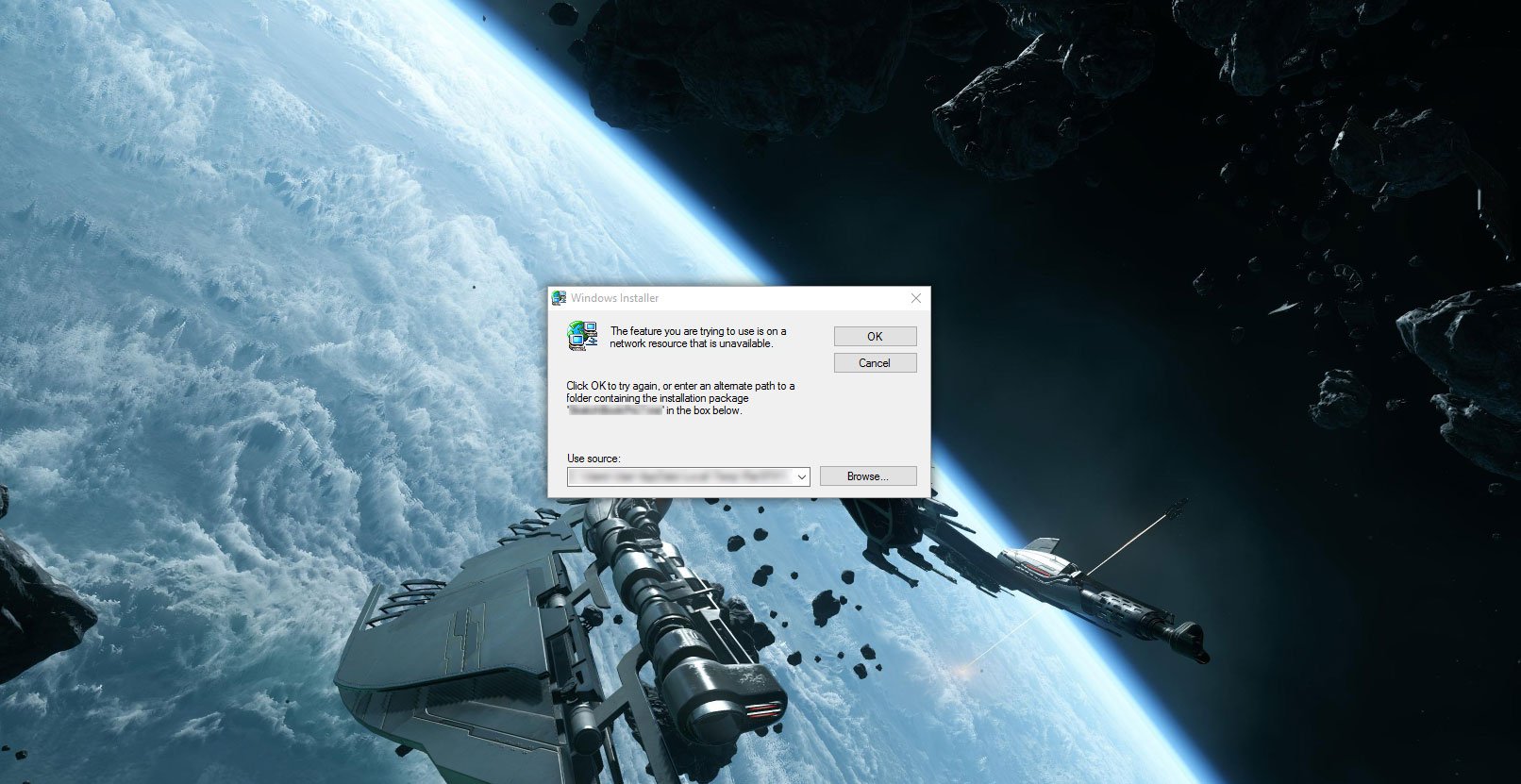
If you're installing software on Windows 10, you could encounter an issue with network resources being unavailable for access. Here's how to fix the problem.
When you install and remove software on Windows there are a number of processes that take place, and most of them are not shown in the GUI. Unfortunately, due to the complexity of the OS and underlying software, things can sometimes go wrong. Should you be installing some software and see an unexpected error that states, "The feature you are trying to use is on a network resource that is unavailable," you'll usually need to close down the wizard, because the install or uninstall process is unable to progress past that stage.
Searching around Microsoft's online resources brings up a few potential fixes. We'll go through them in this guide to get you back on track.
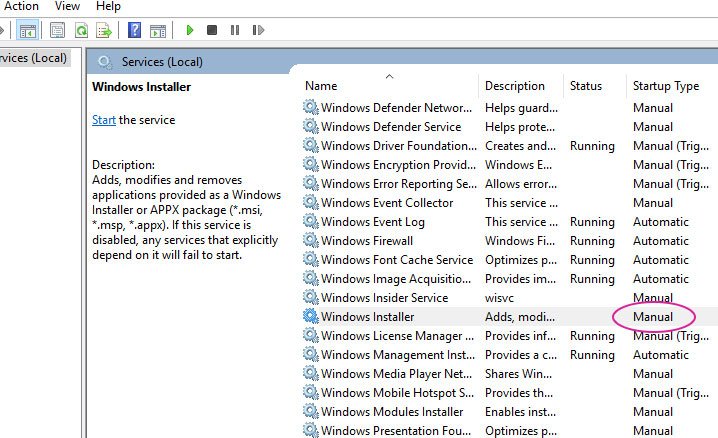
Check Windows Installer
First, you should check that the Windows Installer service is actually running. Here's how to make sure everything is working:
5G-Netze sind nichts anderes als Festnetze mit mobiler Schnittstelle, sagt der Breko. Reine Glasfaseranschlüsse blieben 5G immer überlegen. (5G, Open Access)
Accelerated Mobile Pages (AMP) werden zunehmend als Linkziel innerhalb von Apps genutzt. Selbst wenn es konventionelle mobile Seiten gibt, präferieren viele App-Anbieter dennoch die AMP-Links.
Aufwachen, AMP ist da
Schon seit Oktober 2015 gibt es AMP als Open-Source-Projekt des Suchmaschinenriesen aus Mountain View. Gestartet mit ein paar Dutzend Publishern weltweit, steht AMP inzwischen seit gut einem Jahr für jedermann zur Verfügung.
Wirklich ernst genommen wurde die neue Art der Informationsauslieferung eher nicht. Auch SEO-Experten waren recht einhellig der Meinung, dass man sich als Seitenbetreiber (noch) nicht notwendigerweise mit AMP auseinandersetzen müsse. Es handele sich eher um ein Spezialthema des „Mobile SEO” und beziehe sich im Wesentlichen auf die Darstellung von News in der Google-Suche.
Nun zeigt sich allerdings, dass diese Annahme zu kurz gegriffen ist, denn das Thema wird von dritter Seite gepusht. Es sind weder die Publisher, noch Google, die AMP den entscheidenden Schub geben. Es sind die Entwickler von Apps, die auf Drittcontent verlinken, beispielsweise Flipboard.
In einem aktuellen Beitrag für Search Engine Land beschreibt die Autorin Barb Palser das Phänomen, dass sie seit etwa Anfang 2017 immer mehr Traffic in ihren AMP-Statistiken sieht, der nicht von Google, sondern von Apps wie LinkedIn oder Flipboard kommt. Auch der AMP-Traffic über Twitter und Facebook stieg abrupt.
(Illustration: Search Engine Land)
Das Interesse Dritter an AMP ist leicht verständlich
Der Hintergrund ist an sich nicht schwer zu verstehen. App-Entwickler wollen Inhalte schnell darstellen, um Wartezeiten für ihre Nutzer zu reduzieren. Was liegt da näher, als app-seitig eine Funktion zu implementieren, die für einen Link prüft, ob es ihn auch als optimierte AMP-Version gibt, um dann im Zweifel diese zu laden?
Diese Prüfung ist sehr einfach, weil jede Website, die auch mit AMP arbeitet, Links zu den AMP-Varianten im Header führt. Umgekehrt führen die AMP-Seiten zurück zu den Desktop-Varianten, sodass klar zu definieren ist, welche Seiten wie zusammengehören.
Neben der Geschwindigkeit dürfte für Anbieter von Dritt-Apps auch der eher standardisierte optische Aspekt eine Rolle spielen. Das Layout lässt sich mit AMP leichter kontrollieren. Aus App-Entwickler-Sicht spricht, wenn man es durchdenkt, eigentlich alles für AMP und nichts für das Zeigen einer konventionellen, mobiloptimierten Website.
AMP setzt sich schneller durch als erwartet
Wenn sich dieser Trend fortsetzt, wovon wohl getrost auszugehen ist, wird das Anbieten einer AMP-Version doch sehr viel schneller zu einem wichtigen Wettbewerbsfaktor, als zunächst prognostiziert wurde. Der bekannte WordPress-Entwickler Joost de Valk, Erfinder von YoastSEO, äußerte sich auf dem WordCamp US im letzten Dezember ganz eindeutig:
.@jdevalk AMP is the way of the future. Prediction: Two years from now we will all design in AMP or we will be lost #wcus
Ob man de Valk nun glauben mag oder nicht, Fakt ist, dass das AMP-Framework aktiv weiter ausgebaut wird. War es zunächst nicht möglich, etwa Formulare zu integrieren, ist das heutzutage problemlos erledigt. AMP entfernt sich immer weiter vom Konzept „Performance durch Weglassen von Elementen“ hin zu „Performance trotz vieler Elemente“. Der wesentliche Geschwindigkeitsvorteil ergibt sich dabei nach wie vor durch das Caching der AMP-Seiten auf Googles Infrastruktur.
Erleichterungen im Umgang mit AMP und erfolgreiche Eigennutzung
Der CDN-Anbieter Cloudflare nahm jüngst das Feature „Accelerated Mobile Links” in sein Angebot auf. Dieses Feature automatisiert die eben beschriebene Auswahl bestehender AMP-Links für jedermann, also alle Kunden des Dienstes. Existiert von einem beliebigen Link eine AMP-Version, sorgt Cloudflare dafür, dass diese angesprochen wird, auch wenn sie nicht explizit als solche verlinkt wurde.
News-Publisher mit eigenen Apps werden verstärkt selber auf die Idee kommen, ihre Beiträge als AMP anzusteuern. Wie der Selbstversuch der Mediengruppe SHZ aus Schleswig-Holstein zeigt, beschleunigte sich der Zugriff auf die Inhalte durch die Umstellung der hauseigenen App auf AMP um das Vierfache, was direkt dazu führte, dass pro Session rund 25 Prozent mehr Pageviews gezählt werden konnten.
Fazit der SHZ: Die Leserinnen und Leser bleiben durch schnellere Bereitstellung der Inhalte auch tatsächlich länger auf dem Angebot.
Wer seine Website auf der Basis von WordPress betreibt, sollte über die Nutzung des offiziellen AMP-Plugins aus dem Hause Automattic nachdenken. Einfacher lässt sich eine Seite nicht um AMP erweitern. Hier steht es zur Verfügung:
Power BI dashboards are optimized to monitor the status of your business at a glance. Business applications are optimized to manage your business. Wouldn’t it be great if you could monitor your business in the right context of a business application and, for example, see your customer profitability analysis from within your CRM application? You can do that! We have recently enabled embedding Power BI dashboards into your business applications, allowing you to stay focused on your work while still monitoring familiar Power BI dashboards.
Das o2-Netz habe "das beste Netzerlebnis in den Städten", sagt der neue Telefónica-Chef Markus Haas. Dieses Jahr müsse man aus dem integrierten Netz das beste Netz backen. Eine Milliarde Euro wird dazu dieses Jahr investiert.
Welcome to our new Demo Tuesday series. Each week we will be highlighting a new product feature from the Hybrid Cloud Platform.
Every systems administrator who manages I/O intensive workloads is acutely aware of the problems that happen when storage controllers become overloadedapplications come to a screeching halt.
This is especially problematic for database administrators managing busy transactional workloads across multiple virtual machines. When storage devices come under load, you need to be able to utilize every available IOPS to maximize performance.
Windows Server 2016 with Storage Quality of Service (QoS) offers greater control over how you reserve IOPS for each virtual machine, enabling you to make more efficient use of storage bandwidth across virtual machines. Admins can set not only the maximum IOPs limit for each VM, but in a feature unique to Windows Server 2016, they can also set the minimum IOPs that should be allocated for each VM. This level of fine-tuned control means IT can optimize the performance of all available storage resources. Take a look at this brief demo:
Storage QoS offers two important advantages: 1) it helps you to get more bang for your storage buck by better utilizing the storage you already own, and 2) it makes storage performance more reliable, even for workloads with uneven traffic across virtual machines.
Kernkraftwerk Nowoworonesch II mit zwei WWER-1200-Reaktorblöcken
Am 27. Februar 2017 ging Block 1 des russischen Kernkraftwerks Nowoworonesch II nach erfolgreichem Abschluss der letzten Tests in den kommerziellen Leistungsbetrieb über. Der Reaktor des Typs WWER-1200 ist damit der weltweit erste Druckwasserreaktor der Generation III+, der im regulären Stromversorgungsbetrieb läuft. Er ist Vorreiter einer neuen Kernreaktorgeneration. Die ersten Exemplare weiterer Reaktortypen, wie der europäische EPR oder der amerikanische AP-1000, befinden sich derzeit noch im Bau.
Eine Stadt für ein Kernkraftwerk
In den 1950ern Jahren entstand am Ufer des Don südlich der Stadt Woronesch eine neue Stadt: der »Atomgrad« Nowoworonesch. Mit ihm entstand das gleichnamige Kernkraftwerk, das erste kommerzielle der Sowjetunion. Igor Kurtschatow, der Vater der Stadt und des Kraftwerks, hatte für die Realisierung der Anlage gegen einen Staatsapparat angekämpft, die seine Idee für zu kostspielig hielt. Schließlich war es Nikita Chruschtschow persönlich, der den Bau genehmigte. Damit war der Weg frei für den ersten WWER, den Water-Water Energetic Reactor, der das meistgebaute Reaktormodell der Welt werden sollte.
Vermutlich würde Kurtschatow staunen, könnte er sehen, wie weit es »seine« Reaktoren am heutigen Tag geschafft haben. Der WWER-1200 liefert immerhin die sechsfache Leistung der ersten WWER-Einheit. Russland unterstreicht damit nicht nur seine Vorreiterrolle in der Kerntechnik, sondern hat mit dem WWER-1200 auch ein international gefragtes Reaktormodell geschaffen, das den Export russischer Nukleartechnik weiter beflügelt. Bereits mit dem Vorgängermodell WWER-1000 erzielte der staatliche Nuklearkonzern Rosatom Exporterfolge. Längst konnte Russland aus dem Schatten seiner Tschernobyl-Vergangenheit heraustreten.
WWER-1200 bietet verbesserte Leistung, Effizienz und Sicherheit
Was macht den WWER-1200 so besonders? Dr. Jonathan Cobb von der World Nuclear Association nennt die Anlage »ein weiteres Beispiel dafür, wie Nuklearunternehmen neue Technik und neue Auslegungen entwickeln, um Leistung, Effizienz und Sicherheit von Kernreaktoren zu verbessern.« Hannes Wimmer, Experte des TÜV Süd, der den Reaktortyp für Siemens prüfte, resümiert: »Westliche Sicherheitsstandards werden eingehalten oder sogar übertroffen.«
Die WWER-1200 ist gegen Erdbeben und Flugzeugabstürze ausgelegt und kommt selbst bei völligem Stromausfall wie alle Generation-III+-Reaktoren tagelang ohne aktive Kühlung aus. Einen »Station Blackout« wie in Fukushima-Daiichi hätte der WWER-1200 lange genug weggesteckt, um wirksame Hilfsmaßnahmen einleiten zu können. Anders als in Japan verfügt der WWER-1200 über einen Kernfänger, der den geschmolzenen Brennstoff kontrolliert aufgenommen hätte.
Dirk Egelkraut ist Mechatroniker in der Automatisierungsbranche und als Mitglied in der Nuklearia aktiv. Er betreibt die Deutsche Nucleopedia und befasst sich technisch und historisch mit der russischen Atomwirtschaft.
Rainer Klute ist Diplom-Informatiker, Nebenfach-Physiker und Vorsitzender des Nuklearia e. V. Seine Berufung zur Kernenergie erfuhr er 2011, als durch Erdbeben und Tsunami in Japan und das nachfolgende Reaktorunglück im Kernkraftwerk Fukushima-Daiichi auch einer seiner Söhne betroffen war.
Amazon wollte zuerst nicht von einem Ausfall sprechen, die Nutzer schon: Das AWS-Rechenzentrum US-East-1 meldete "erhöhte Fehlerraten" beim Cloud-Dienst S3. Zahlreiche Webdienste waren nicht erreichbar, auch die Fire-TV-Dienste und Amazon Music konnten nicht genutzt werden. (AWS, Storage)
Wir haben bereits sehr ausführlich darüber berichtet, dass Windows 10 ab Mitte 2017 für ARM-Geräte auf Basis des neuen Qualcomm Snapdragon 835-Chips zur Verfügung stehen wird. Laut Microsoft sind Geräte mit Displaydiagonalen zwischen 6- und 14-Zoll vorgesehen.
„Keine andere Windows 10-Version“
Im Zuge des Mobile World Congress 2017 nannte Qualcomm dann auch nähere Details. Qualcomms Produktmanager Ketih Kressin äußerte sich auch konkret zu den Fragen, welches System denn tatsächlich auf den Computern mit dem Snapdragon 835-Chip laufen werden. „Das Ziel ist, etwas Glaubwürdiges auf den markt zu bringen, den Menschen zu zeigen, warum es anders ist als bei RT. Zu zeigen, dass es Windows 10 ist – Es gibt keine zweite Version von Windows 10.“, betonte der Manager.
Preislich am „Sweet Spot“: Nicht zu günstig, nicht zu teuer
Gleichzeitig sprach Qualcomm über die kommenden Windows 10-Geräte mit dem Snapdragon 835-Prozessor. Man orientiere sich dabei an der Funktionalität von Smartphones, sprich man vereint die Vorzüge dieser Geräte mit der Produktivität von traditionellen Windows 10-Geräten. Dazu zählt einerseits die höhere Effizienz, ergo wesentlich längere Akkulaufzeiten, andererseits die ständige Konnektivität mit dem Internet. Dank eines integrierten LTE-Modems könnten die Geräte praktisch ständig verbunden sein, durchaus eine Neuheit für Windows-Computer.
Cellular PCs kommen Ende dieses Jahres
Ende dieses Jahres werden die ersten Geräte aus Basis des Qualcomm Snapdragon 835 veröffentlicht, kündigte der Chiphersteller an. Diese würden preislich am „sweet spot“ sein, also nicht im extremen Low-End Bereich angesiedelt sein, aber auch nicht „zu teuer“ sein. Die Preise der Cellular PCs, wie Qualcomm die neue Produktkategorie nennt, werden im Endeffekt von den Herstellern abhängen und welche Ausstattung gewählt wird. Der Release der neuen Produkte werde schrittweise durchgeführt und mehr Geräte werden wir erst zwischen 2018 und 2019 sehen. Diese Entwicklung wird ihre Zeit brauchen, um auch von den Kunden angenommen zu werden.
Virtual Reality
Der Qualcomm Snapdragon 835 ist dank Unterstützung von DirectX12 auch bereit für Gaming, jedoch natürlich nicht mit Gaming-Rechnern mit Windows 10 vergleichbar sein. Der Chip unterstützt allerdings sehr wohl Virtual Reality-Anwendungen und so manches Smartphone-Game aus dem Windows Store könnte darauf durchaus gut laufen.
Alle weiteren Details zum Qualcomm Snapdragon 835 findet ihr im folgenden Artikel:
Spielzeug aus der Cloudpets-Reihe zeichnet die Stimmen der Kinder auf. Wem das nicht schon zu gruselig ist, der dürfte sich spätestens über die offene MongoDB-Datenbank aufregen. 800.000 Nutzer mit über 2 Millionen Sprachsamples sind betroffen. (Spielzeug, Datenschutz)
Das Apple-eigene Betriebssystem macOS hält eine Vielzahl praktischer Funktionen bereit, die Normalnutzern jedoch verborgen bleiben. Ein neues Tool schafft Abhilfe.
Wer mit macOS arbeitet, dem stehen in den Systemeinstellungen einige praktische Funktionen zur Verfügung. Aus Gründen der Benutzerfreundlichkeit hat Apple jedoch viele Detailfunktionen im System versteckt. Diese sind Normalnutzern deshalb entweder gar nicht bekannt oder lassen sich allenfalls auf Umwegen erreichen. Oft sind sogar Kenntnisse im Umgang mit dem Terminal notwendig. Mit Arthur gehört das der Vergangenheit an. Die macOS-App macht die versteckten Funktionen für Jedermann sichtbar, sodass diese mit nur einem Klick aktiviert werden können.
Das kann Arthur für macOS
Einige Beispiele gefällig? So lassen sich etwa mit einem Klick alle versteckten Systemdateien oder der beliebte Library-Ordner dauerhaft anzeigen. Normalerweise müssen Nutzer hier bestimmter Tastenkombinationen mächtig sein. Darüber hinaus gibt es die Möglichkeit, die Autokorrektur systemweit zu deaktivieren oder die lästigen .DS-Store-Dateien, die beispielsweise bei der Datenübertragung auf Festplatten mitgeschrieben werden, aus der Welt zu schaffen. Ebenfalls praktisch: Dokumente lassen sich standardmäßig auf der Festplatte und nicht länger in der iCloud abspeichern.
Diese versteckten macOS-Funktionen lassen sich mit Arthur zuschalten. (Screenshot: t3n.de)
Viele Optionen dienen außerdem der Erhöhung der Arbeitsgeschwindigkeit auf macOS. Die Möglichkeit, die Tastenwiederholung zu erhöhen, dürfte vor allem Programmierern eine willkommene Hilfe sein. Auch die dauerhafte Anzeige von Dateiendungen wie .jpg oder .psd ist hilfreich. Arthur nistet sich nach der Installation direkt in die Systemeinstellungen von macOS ein. Alle Einstellungen lassen sich über das iOS-ähnliche Toggle jederzeit wieder rückgängig machen.
Preis und Fazit
Arthur kann über die offizielle Website für einmalig 5,99 US-Dollar heruntergeladen werden. Hinter der Anwendung steht die südafrikanische Design- und Softwareschmiede Wixel. Fazit: Freilich ist Arthur kein technisches Hexenwerk. Vielmehr handelt es sich um einen übersichtlichen Aggregator versteckter macOS-Funktionen, die sich mit etwas Recherche auch mithilfe von Tastenkombinationen oder dem Terminal zuschalten lassen. Auch gibt es mit Programmen wie Deeper oder Tinkertool kostenlose Alternativen. Wer jedoch ein einfaches und bequemes Tool zur Optimierung von macOS sucht, dürfte mit Arthur auf seine Kosten kommen. Ob der Preis dafür angemessen ist, muss jeder für sich entscheiden.
Amazon soll daran arbeiten, Alexa eine Stimmenerkennung zu verpassen. Dann könnten verschiedene Nutzer anhand der Stimme identifiziert werden. Das verspricht neue Möglichkeiten bei der Alexa-Nutzung. (Amazon Alexa, Amazon)
Update: This issue appears to be resolved and notifications for WhatsApp are slowly coming back online for Windows Phone 8.1 and Windows 10 Mobile handsets. Original article follows.
If you've been wondering why nobody has messaged you on WhatsApp this morning, they probably already have and you just didn't know. It appears WhatsApp on Windows Phone is suffering from an issue that has stopped all notifications coming in until you open the app, essentially making the platform useless for Windows Phone users on Windows Phone 8.1 and Windows 10 Mobile.
It's unclear what's caused the issue, but the issue itself appears to be widespread on both the production WhatsApp and WhatsApp Beta apps, making us believe it may be a server issue. It's also unclear if this is a global issue or regional one. Sending a message to someone using WhatsApp on Windows Phone right now will see that message not get delivered until they open the app, which is why Windows Phone users aren't receiving notifications.
Windows Central has been able to confirm that notifications are not working on Windows 10 Mobile using both WhatsApp and WhatsApp Beta apps in the UK, on both the Anniversary Update and Creators Update. Reinstalling the app does not appear to fix the issue. We've reached out to WhatsApp for comment, and will update this article when we know more or if the issue gets mended. In the meantime, are you still receiving notifications from WhatsApp on Windows Phone?
800.000 Nutzer der Spielzeugfirma Spiral Toys, die einen ans Internet der Dinge angeschlossenen Teddybären gekauft haben, sind von einem großen Datenleck betroffen.


 75 Jahre lang beobachteten Forscher der Harvard-Universität Hunderte Menschen. Sie fanden dadurch heraus, was uns wahrhaftig glücklich macht.


 Die Inhaftierung von Deniz Yücel dürfe nicht ohne Konsequenzen bleiben. "Ein Präsident, der so etwas zulässt, ist als Gast in Deutschland nicht mehr willkommen."
 Einem Bericht zufolge hat Apple die Garantiebedingungen für iOS-Geräte gelockert. Demnach sollen Displayreparaturen bei einem Repair-Shop nicht mehr zum Garantieverlust führen.
 Es war da, es war weg - und jetzt ist es wirklich da: Nutzer des Samsung Galaxy S7 und S7 Edge bekommen ab heute das Update auf Android 7.0 (Nougat). Zunächst sind die Geräte aus dem freien Handel dran.
 Jetzt haben wir endlich Antwort auf unsere Frage bekommen, warum München von Limux zu Windows zurückkehren will - und sind so klug als wie zuvor. Die CSU rechtfertigt sich gegen Vorwürfe, die wir nicht gemacht haben, die SPD weicht aus und technisch reden beide Unfug. Was soll das? Ein IMHO von Sebastian Grüner (Limux, IMHO)

 5G-Netze sind nichts anderes als Festnetze mit mobiler Schnittstelle, sagt der Breko. Reine Glasfaseranschlüsse blieben 5G immer überlegen. (5G, Open Access)


 Das o2-Netz habe "das beste Netzerlebnis in den Städten", sagt der neue Telefónica-Chef Markus Haas. Dieses Jahr müsse man aus dem integrierten Netz das beste Netz backen. Eine Milliarde Euro wird dazu dieses Jahr investiert.


 Amazon wollte zuerst nicht von einem Ausfall sprechen, die Nutzer schon: Das AWS-Rechenzentrum US-East-1 meldete "erhöhte Fehlerraten" beim Cloud-Dienst S3. Zahlreiche Webdienste waren nicht erreichbar, auch die Fire-TV-Dienste und Amazon Music konnten nicht genutzt werden. (

 Spielzeug aus der Cloudpets-Reihe zeichnet die Stimmen der Kinder auf. Wem das nicht schon zu gruselig ist, der dürfte sich spätestens über die offene MongoDB-Datenbank aufregen. 800.000 Nutzer mit über 2 Millionen Sprachsamples sind betroffen. (Spielzeug, Datenschutz)


 Amazon soll daran arbeiten, Alexa eine Stimmenerkennung zu verpassen. Dann könnten verschiedene Nutzer anhand der Stimme identifiziert werden. Das verspricht neue Möglichkeiten bei der Alexa-Nutzung. (Amazon Alexa, Amazon)


