Midnight, January 8, 2016. High above the snow-covered tundra of arctic Sweden, a Canadair CRJ-200 cargo jet made a beeline through the -76 degree air. Inside the cockpit, the pilot in command studied the approach information for Tromsø, Norway. His eyes flickered up from his reading to the primary flight display, an iPad-size rectangle on the left side of his control panel, where the indicator that showed how high the nose was pointing above the horizon had started to creep upward.
Not good.
The pilot felt no sense of movement, but that didn’t matter: One of the first things he’d been taught was that without being able to see the ground, it’s almost impossible to accurately judge whether you’re climbing or turning. A pilot must trust his instruments completely.
A klaxon sounded: The autopilot had turned itself off. There was no time to think. If the nose went too high, it could result in a deadly stall. On the display, a bright red arrow pointed downward: Descend! The pilot pushed forward on the controls, yet still the display said the nose was too high. He pushed more. Manuals and binders rose up into the air and clattered onto the ceiling. He was hanging in his shoulder straps as though upside down. An audio clacker went off: The plane had exceeded its maximum operating speed.
“Help me!” the pilot said.
“I’m trying!” the co-pilot called out.
What the pilot did not comprehend was that his plane had already lost nearly two miles of altitude and was pointed almost straight down. Forty seconds before, the automated system that guided the plane had suffered a partial malfunction, causing it to display an erroneous reading. Now the plane was hurtling toward the frozen landscape at 584 mph. At this rate, impact was less than 30 seconds away. And the pilot had no idea what was really going on.
The co-pilot toggled the radio. “Mayday, Air Sweden 294!”
* *
Automation — the use of systems to minimize human intervention — has been around since at least the automatic textile looms of the 18th century. For the most part, automation works just as it should, allowing humanity to accomplish things that would otherwise be impossible: sort through millions of web pages to find a precise phrase, inject the exact same dollop of jam into a donut a million times, or keep a plane stable and steady six miles up in total darkness. But as automation becomes increasingly capable, it is also becoming increasingly complex. These systems can surprise their creators, even when working as designed. And as artificial intelligence creeps into systems design, it’s becoming harder to figure out what’s happening inside our machines.
The first primitive autopilot was unveiled in 1914. By the 1930s, the technology was being used on commercial airliners. These simple devices, useful for keeping a plane heading in the right direction, gave way in the computer age to sophisticated systems that can take off, navigate, and land without any human assistance. The increasing power of airplane automation is a primary reason that the accident rate has fallen from 40 fatal accidents per million U.S. aircraft departures in 1959 to 0.1 today.
Commercial jets are expensive pieces of equipment — a Boeing 777 costs a quarter of a billion dollars — and great resources are lavished on making sure they work properly. Important systems are built triple-redundant, so it is extremely unlikely for them to fail completely. Systems even protect pilots from their own incompetence: If a pilot tries to command a potentially dangerous procedure, the automated flight control system will simply refuse to do it. (Sometimes pilots can override the system’s refusal; sometimes they can’t.)
Robustness, however, carries the inevitable price of complexity. Complex systems have a lot of parts, and that means there are a lot of ways that they can fail.
The spontaneously surprising behavior experienced by Air Sweden 294 was not an outlier. In 2015, a glitch caused a Lufthansa plane to suddenly dive steeply as it flew from Bilbao, Spain, to Munich. In 2008, a malfunctioning Qantas A330 abruptly plummeted while en route from Singapore to Perth, causing broken bones and spinal injuries among those on board. And in 2011, runaway flight controls on a Dassault Falcon 7X business jet caused it to unexpectedly pitch up into a steep climb while descending to land in Subang, Malaysia. If not for the quick thinking of the plane’s copilot, who slammed the controls and veered the plane hard onto its side, the result would almost certainly have been a fatal crash.
In many of these cases, investigators were later able to comb through the system and determine what went wrong. But not all. In the case of the Air Sweden accident, they were able to determine that the Air Data Inertial Reference Unit, or ADIRU — a device that tells the plane how it’s moving through space — had begun to send erroneous signals. But they couldn’t figure out why.
Obviously, we don’t want our machines running amok on us, and not only when we’re at 30,000 feet. If, as few dispute, we’re going to rely more and more on automated systems in the future, then we should have some understanding of when and why they can go haywire, and what we can do about it.
At present, autonomous systems like those used in airliners are designed from the top down: Everything about them was put in place intentionally by human designers. As a result, their complexity, while vast, is also finite, so if something goes wrong, it’s at least conceivable that the error can be identified and fixed, perhaps with the help of technology. At Airbus’ headquarters in Toulouse, France, engineers developing a new aircraft put it through its paces in a giant contraption called the “Iron Bird.” Consisting of all the subcomponents of a plane wired together and hooked up to a flight simulator, the device allows the engineers to simulate a great variety of different configurations and test how different failures would propagate through the system. The Iron Bird operates throughout the years of each new design’s development, and is kept operational after the model enters service, to test modifications and any issues that might crop up. Ultimately, this kind of approach — methodically testing every possible combination of inputs and errors — could become sophisticated enough to eliminate flaws entirely. At least in theory.
That won’t be true in the future. The kinds of hand-crafted, top-down engineered systems like those found in today’s airliners will be superseded. Right now the cutting edge in artificial intelligence research is so-called “deep learning” built on neural networks. If presented with large amounts of data and trained to categorize it, these systems can then parse new data into the correct categories. Shown pictures of pandas, for instance, a machine could then go out and find new pictures of pandas on the internet. This is the technology that underlies state-of-the-art facial recognition and machine translation systems.
Deep learning-dependent systems aren’t programmed in the way a top-down system is, said Vasant Dhar, a professor of data science at New York University. “They learn as they go along, autonomously. This lets you solve problems that are practically impossible to solve top-down, by humans specifying the algorithms.” This flexibility will be crucial to the successful operation of many kinds of systems in the real world. Self-driving cars, for instance, will have to deal with a huge range of situations for which it would be difficult to write enough prescriptive rules to deal with every single eventuality. “Negotiating a crowded intersection, for instance, is very hard to program from the top down,” Dhar said, “but by watching humans do it many times, these systems can figure it out for themselves.”
The downside to a neural net, said Dhar, is that it’s essentially a black box. Unlike a top-down system, there’s no way for the people who built it to understand why it acts the way it does. “You can never be entirely sure about what it’s learned,” he said. “You can look at the input/output behavior and say, ‘Yeah, it’s doing well,’ it’s behaving the way you want, but you don’t really know why.”
It’s not that engineers can’t peer inside the system as it’s working, but that the way neural nets process information is fundamentally inscrutable. The systems are constructed in layers, with the data — say, a raw image — coming in at the bottom, and the output — for instance a description of what’s in the image — coming out at the top. If you examine the system in action, it’s possible to figure out what each computation element is doing in the top and bottom layers, but what goes on in between is harder to characterize. “We can actually see the internals very clearly,” said Kyunghyun Cho, a colleague of Dhar’s at NYU’s Center for Data Science. “Except we don’t know how to interpret them.”
The way that neural nets are constructed leaves them prone to peculiar and surprising behavior. When fed “adversarial examples,” for instance — sets of data that have been tweaked slightly — deep learning programs can be led wildly astray. An image-classification system presented with an imperceptibly tweaked image of a panda might instead label it a gibbon. While this kind of failure is unlikely to crop up spontaneously, it could be taken advantage of by hackers, for instance in working around a security system based on photos of users’ faces.
Self-teaching autonomous systems can behave in other surprising ways, too. Because they can sift through vastly larger amounts of data than humans, and can explore vastly greater numbers of potential outcomes, they can arrive at conclusions that have never occurred to mere humans. Famously, Google’s Go-playing system, AlphaGo, not only managed to defeat the world’s top-ranked human player last year but in the process made a move that so flabbergasted its opponent that he had to leave the room to collect himself. The gambit was so unusual that one commentator later admitted, “I thought it was a mistake.”
It was, instead, a stroke of genius. But sometimes a neural networks’ surprising outputs really are just mistakes. Recently researchers trained neural nets on patient data at the University of Pittsburgh Medical Center in an effort to develop rules for treating pneumonia patients. The nets’ overall advice was better than top-down generated algorithms, with one potentially lethal exception: They thought that pneumonia patients who already had asthma should be sent home. The researchers investigated and found that the nets had noticed that such patients recovered faster, concluding that this meant they were low-risk. In fact, it was the opposite — these patients were so high-risk that hospital policy was to send them to intensive care right away. It was the effectiveness of this strategy that misled the computer.
Before we turn over crucial areas of our lives to self-training autonomous systems, said Cho, “we’ll just have to spend more time figuring out how to verify their correctness.”
It’s not entirely clear that’s going to be possible, however. One approach, Cho said, would be to build a second machine to look at the first. “We can build another system that looks at the transparent internals of the first system and learn to interpret them,” he said. “You can think of it as something like having a baby raised in a culture with another language. I won’t be able to understand any of what those people in the other culture are saying, but the baby will be able to understand everything and explain it to me.”
But how can we trust the second system, that has assured us about the first?
Said Cho, “Society needs to invest in this kind of research.”
* *
It’s one thing for automation to learn unpredictably and surprise us. It’s another for the technology to become so advanced that we lose the ability to even understand what it’s doing. If we get complacent about machines making countless kinds of decisions on our behalf, the danger is less that they’ll run away from us than that they’ll run away with us.
“How do you really control these systems that you don’t really fully understand?” Dhar said. “One of the consequences of this change that has occurred in AI is that you now have a machine that has learned how to learn, which historically has been the purview of human beings. The machines can now learn stuff autonomously, and you have no idea whether it’s learning desirable things or undesirable things.”
In the years ahead, engineers will become increasingly familiar with a sensation that parents have experienced since the dawn of time: being surprised by an entity that they have brought into the world. Robots, like children, are going to teach themselves about the world and learn things their creators never intended. Among artificial intelligence researchers, this results in what’s known as the “control problem.” It turns out that under certain circumstances, even simple agents can learn to maneuver around constraints imposed on them in order to achieve their programmed goals. Stuart Armstrong, a fellow at Oxford University’s Future of Humanity Institute, has devised a simple demonstration involving a robot tasked with pushing boxes onto a chute. The robot gets reinforced when it pushes a block down the chute. When a surveillance monitor is set up to watch the robot and shut it down after it delivers a single box to the chute, the robot can “learn” to fool the monitor by pushing boxes to block its view so that it can deliver more. (You can see a virtual robot figure this out in real time via an online Java implementation.)
“You get all sorts of weird behavior with a learning system,” said Anders Sandberg, a colleague of Armstrong’s at the Future of Humanity Institute. “It doesn’t need to be very complicated to behave in very surprising ways.”
As machines become more sophisticated, they will increasingly incorporate human behavior into their models of the world. To optimally achieve their goals they will have to adapt their strategies to our predicted behavior. If they think that we could hinder their objectives, for instance by turning them off, they will come up with ways to prevent that. Said Dhar: “We may not be able to ‘turn them off’ if they start behaving in a way we don’t understand.”
Working together, as a society, we may figure out a way to rejigger our settings so that we can maneuver our way out of danger. Or we might find ourselves overwhelmed by a problem whose dimensions we can barely comprehend.
* *
Forty seconds after their ADIRU malfunctioned, as Air Sweden 294 dove straight down through 20,000 feet, the pilot and his co-pilot could see their altitude unspooling at a horrendous rate, and knew they had to somehow regain altitude. But they were thoroughly disoriented, and instead of recovering control argued about whether to turn left or to turn right. For a moment, the pilot pulled back on the controls, causing the men to sink into their seats with three times the force of gravity. Then he pushed forward again.
One minute and 20 seconds into the incident, the jet hit the frozen ground with the velocity of a .45 caliber bullet. The impact instantly killed both members of the flight crew and carved a 20-foot-deep crater 50 feet across. When search-and-rescue helicopters arrived that morning, all that remained was an asterisk-shaped smudge of black on the flat whiteness of the valley floor.
Accident investigators still haven’t figured out what went wrong with the Inertial Reference Unit.
This story originally appeared on March 15, 2017 on The Outline.
Make your Outlook.com experience more productive with these great add-ins.
If you spend a lot of the day working with email, Outlook is a great way to manage it. Microsoft's latest online offering at Outlook.com is superb, too, and it allows you to maintain full control over your inbox from any PC.
Outlook.com also supports integrations with third-party add-ins, and there are some really great ones out there that can enhance your experience and make you even more productive. Here are some of the best Outlook add-ins.
Früher gab es den Spruch, dass ein ehrbarer Kaufmann sich nicht auf Verjährung beruft. Ich weiß, das gilt heute sowieso nicht mehr. Und wohl schon gar nicht für die Deutsche Bank. Nach allem, was man von dem Unternehmen so hört.
Von einer Tochterfirma der Deutschen Bank, der Deutschen Bank Bauspar AG, möchte ich die Darlehensgebühr in Höhe von 603,42 Euro zurückhaben, die ich Mitte des Jahres 2007 für einen Bausparvertrag gezahlt habe. Die Deutsche Bank Bauspar AG lehnt die Zahlung ab und sagt: Verjährung. Selbst das muss aber noch nicht mal stimmen.
Doch der Reihe nach:
Immerhin behauptet die Deutsche Bank Bauspar AG nicht, das Urteil des Bundesgerichtshofs vom 8. November 2016 mit dem Aktenzeichen XI ZR 552/15 gelte für sie nicht. Wie sollte sie das auch tun? Immerhin erklären die obersten Zivilrichter mit kaum interpretierbarer Deutlichkeit: IM KLEINGEDRUCKTEN VON BAUSPARVERTRÄGEN DÜRFEN KEINE DARLEHENSGEBÜHREN BERECHNET WERDEN. Daran ist wohl kaum zu rütteln.
So wirft die Deutsche Bank Bauspar AG den Notanker der Verjährung. Muss sie nicht. Darf sie aber. Allerdings stimmt der Hinweis im Ablehnungsschreiben nicht unbedingt, die Verjährungsfrist betrage in diesem Fall drei Jahre. Das ist zwar in der Tat die sogenannte Regelverjährung. Aber auch hier kommt der Bundegerichtshof ins Spiel.
Für den Fall von Kreditbearbeitungsgebühren hat der Bundesgerichtshof nämlich entschieden, dass hier eine zehnjährige Verjährungsfrist gelten kann (Aktenzeichen XI ZR 348/13). So lange kann die Verjährung ausnahmsweise hinausgeschoben sein, wenn die Rechtslage unklar ist. Oder wenn sich sogar alle weitgehend einig sind, dass die Gebühren rechtmäßig sind – bis Obergerichte es dann halt anders sehen. So ist es auch bei den Darlehensgebühren für Bausparverträge. Fast alle Rückzahlungsklagen, die ich in der Kürze der Zeit recherchieren konnten, blieben erfolglos. Erst mit dem Machtwort des Bundesgerichtshofs hat sich das nun geändert.
Ich habe gegen die Deutsche Bank Bauspar AG eine Klage eingereicht. Schauen wir mal, ob ein bisschen Ehrbarkeit nicht besser gewesen wäre.
Today I’d like to introduce a new valuable capability for Flow buttons, one which can shift the way you and your team works, and how efficient you become: You can now share your buttons with others to run, as well as pin buttons to your home screen. We have also added mobile support to Team flows. Read more on how to work smarter and faster.
Die Zeitumstellung trage zur Schlafkrise der Gesellschaft bei, sagt ein Mediziner der ZEIT. Und eine Studie zeigt: Deutsche Arbeitnehmer haben zunehmend Schlafstörungen.
I’ve seen a lot of customer environments that have a Microsoft security patching policy that could be summarized as:
Critical patches deployed ASAP
Everything else can wait
The idea is that the most critical vulnerabilities get rolled out as fast as quickly as possible (testing is optional, for some customers). But anything in a security bulletin rated Important or lower will get rolled out next time there’s a planned maintenance window, which could be monthly, or quarterly, or never in some cases.
There’s a problem with the idea that only Critical rated vulnerabilities are important. Because often the Important rated vulnerabilities are also… important. As an example, the MS17-015 bulletin contains information about an Exchange Server vulnerability that is rated Important. The description is:
An elevation of privilege vulnerability exists in the way that Microsoft Exchange Outlook Web Access (OWA) fails to properly handle web requests. To exploit the vulnerability, an attacker who successfully exploited this vulnerability could, perform script/content injection attacks, and attempt to trick the user into disclosing sensitive information.
In today’s security climate that is certainly a risk.
NOTE: For this vulnerability to be exploited, a user must click on a maliciously crafted link from an attacker.
Getting malicious links in front of end users is not actually all that difficult for attackers. OWA usage is quite high in many orgs these days, so a vulnerability like this certainly should be patched as quickly as possible. But it’s easily overlooked due to the Important rating.
An email filter bypass exists in the way that Microsoft Exchange parses HTML messages that could allow information disclosure. An attacker who successfully exploited the vulnerability could identify, fingerprint, and track a user online if the user views email messages using Outlook Web Access (OWA). An attacker could also combine this vulnerability with another one, such as a Cross-Site Request Forgery (CSRF), to amplify the attack.
To exploit the vulnerability, an attacker could include specially crafted image URLs in OWA messages that could be loaded, without warning or filtering, from the attacker-controlled URL. This callback vector provides an information disclosure tactic used in web beacons and other types of tracking systems. The update corrects the way that Exchange parses HTML messages.
In plain language, the vulnerability was that remote images would be loaded automatically by OWA if they were coded as the background image of a HTML table cell. I was able to reproduce the exploit with minimum effort (it didn’t require any special coding abilities, just some basic HTML). Using it to track a user via a beacon image is nefarious enough. But it’s easy to apply such a technique to phishing and other attacks, by crafting something like a fake PayPal notice that is entirely image-based and would bypass many of the weaker spam filters on the market today. But as an Important vulnerability, it’s easily overlooked.
The takeaway here is to ensure that you’re interpreting security bulletins correctly. Arbitrary rules like “We only deploy Critical patches” or delays on other patches due to their lower rating may be leaving you exposed to what are still serious flaws in the product.
For Exchange Server in particular, the security bulletins that Microsoft issues are also often misunderstood. Customers who look at the MS17-015 bulletin see that Exchange Server 2013 SP1 (which is really CU4), Exchange Server 2013 CU14, and Exchange Server 2016 CU3 are vulnerable. So where does that leave customers who are running other versions of Exchange?
The key is to look at security bulletins in the context of Microsoft support lifecycle. Cumulative Updates are supported for about 6 months, long enough for the next two CUs to be released. Exchange Server 2013 SP1 (CU4) is a special case because it was given a different support lifecycle, but you shouldn’t be running that build in production today. But every other CU in between CU4 and CU14 should be considered vulnerable, even though they aren’t all listed. That’s because Microsoft doesn’t release security advisories for unsupported builds (not even to clarify whether they’re vulnerable or not). The same goes for Exchange Server 2016 CU2 and earlier. Those builds are vulnerable, even though they’re not listed because they’re no longer supported.
The patch cycle for Microsoft products is tough to keep up with. Exchange makes life a little easier thanks to its robust high availability features, allowing us to patch individual servers while maintaining availability of the overall service for our end users. But if it’s still too much effort, there’s always Office 365 to consider. Nobody ever tells me that they miss patching all those servers after they move to the cloud.
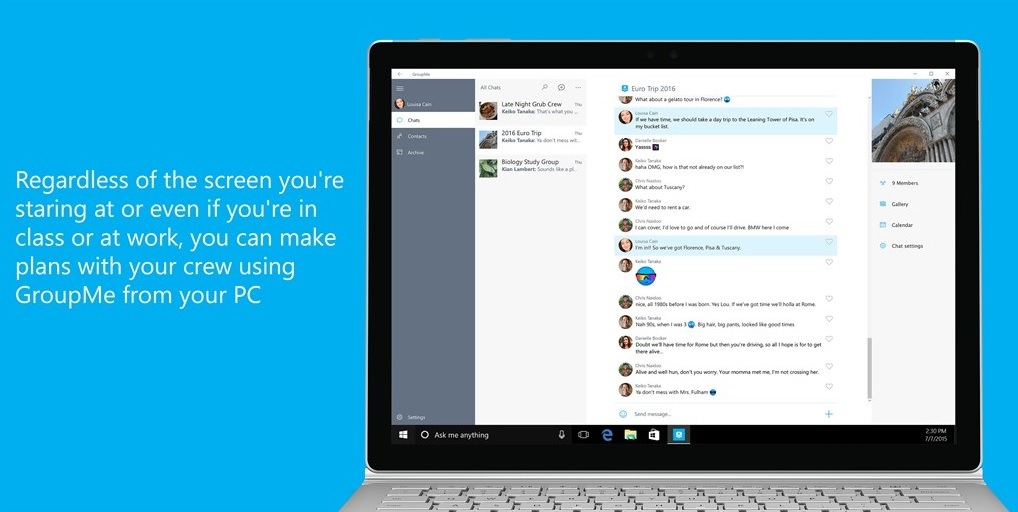
Microsoft hat heute die eigene App des Gruppennachrichtendienstes GroupMe aktualisiert und mit dem Update halten einige Verbesserungen in die Anwendung Einzug. Es sind kleinere neue Funktionen, welche die Nutzung im Alltag etwas erleichtern sollen.
So gibt es einerseits nun die Möglichkeit, Dateien aus der Zwischenablage als Anhang in der App zu verschicken. Anstatt beispielsweise Fotos stets über den Dateimanager zu suchen, könnt ihr die entsprechende Datei nun einfach kopieren und im gewünschten Thread in GroupMe einfügen. Außerdem kann mit der neuen Version die Mediensuche verwendet werden, wenn Bilder für Kalender-Events oder Gruppenbilder gesucht werden.
GroupMe ist euch kein Begriff? Der Messaging-Dienst, welcher sich auf Gruppennachrichten spezialisiert hat, wurde im Mai 2010 gestartet. Zwischenzeitlich übernahm Skype das Ruder. Da dieses im Mai 2011 von Microsoft übernommen wurde, gehört auch GroupMe mittlerweile zu Redmonds Portfolio.
Von anderen Diensten unterscheidet sich der Messenger vor allem dadurch, dass neben Nachrichten, Fotos und Videos auch Veranstaltungen und Twitter-Beiträge geteilt werden können. Des Weiteren werden lässt sich der Dienst plattformübergreifend unter Windows Phone, iOS, Android und via Web-App nutzen. Sofern das Update bei euch noch nicht automatisch installiert wurde, könnt ihr GroupMe für Windows 10 und Windows 10 Mobile einfach unter dem folgenden Link im Windows Store aufrufen und direkt aktualisieren.
Der JPEG-Encoder Guetzli von Google soll Bilder mit bis zu einem Drittel kleinerer Dateigröße als die Konkurrenz erzeugen. Dabei wird schlicht auf kaum wahrnehmbare Details verzichtet.
Gedacht ist Guetzli vor allem für Websitebetreiber. Webseiten, die schneller laden und weniger Daten benötigen, wollen sowohl Betreiber als auch Nutzer. Daher stellt Google stellt Google seinen JPEG-Encoder Guetzli bereit. Mit Guetzli sind JPEG-Dateien den Angaben zufolge im Schnitt zwischen 20 und 30 Prozent kleiner als die, die mit dem herkömmlichen Encoder Libjpeg erstellt werden. In einigen Fällen seien bis zu 35 Prozent kleinere Dateien möglich.
Anders als etwa Lepton von Dropbox dient Guetzli nicht allein zum Speichern von Daten, sondern wird direkt zum Erzeugen der komprimierten Bilder genutzt. Das Projekt ist damit eine direkte Konkurrenz zum JPEG-Encoder von Mozilla und soll vor allem von Websitebetreibern eingesetzt werden. Eine Verwendung in anderen Fällen ist schwer vorstellbar, da der Encoder vergleichsweise langsam arbeitet. Dieser Mehraufwand ist aber zu vernachlässigen, wenn das Bild nur einmal kodiert, aber möglicherweise millionenfach ausgeliefert wird.
Psychovisuelles Modell zur Verkleinerung
Guetzli nutzt zum Verkleinern der Bilder die Quantisierung, wobei ein visueller Qualitätsverlust erzeugt wird, der auch bei anderen JPEG-Encodern üblich ist. „Guetzli versucht dabei, eine Balance zwischen minimalem Verlust und Dateigröße zu finden, indem ein Suchalgorithmus eingesetzt wird, der den Unterschied zwischen der psychovisuellen Modellierung des JPEG-Formats und dem psychovisuellen Modell von Guetzli überwinden will“, erklärt Google in seinem Open-Source-Blog.
Das Modell zu Guetzli, das auf Butteraugli basiert, nähert Google zufolge die Farbwahrnehmung und das so genannte Visual Masking in einer detaillierteren Weise an, als dies durch einfache Farbtransformationen und die diskrete Kosinustransformation erreicht werden kann. Visual Masking bezeichnet das Überdecken oder Verändern einer Bildinformation durch einen nahe gelegenen zweiten Reiz.
Zusätzlich zur Verkleinerung der Dateien soll Guetzli im Vergleich zu Libjpeg bei ähnlichen Dateigrößen bei der Bewertung durch Menschen eine wesentlich bessere Qualität liefern. Bei der Verwendung von technischen Metriken wie SSIM oder PNSR schneidet Guetzli dagegen schlechter ab als Libjpeg. Dies wird schlicht dadurch erreicht, dass Butteraugli Bilder mit weniger Block- und Rausch-Artefakten bevorzugt.
(Bild: Google)
Guetzli hilft künftig vielleicht auch Videos
Netflix setzt zum Bewerten seiner vorgehaltenen Videos und zum Kodieren dieser ebenfalls auf eine Metrik, die auf menschlicher Wahrnehmung basiert und in einigen Bereichen von den Ergebnissen von SSIM oder PSNR abweicht. Google erwartet, dass der Ansatz von Guetzli und Butteraugli künftig weitere Arbeiten an Bild- und Videokomprimierung inspirieren wird.
An Guetzli arbeitet Googles europäisches Forschungsteam mit Sitz in Zürich. Die Gruppe ist auch für die Zlib-Alternative Zopfli und deren Nachfolger Brotli verantwortlich. Der Entwickler Jyrki Alakuijala ist einer der Hauptverantwortlichen dieser Projekte. Erstmals öffentlich bekanntgegeben hat Alakuijala die Offenlegung von Guetzli im vergangenen Oktober, allerdings in einem Forum, das nur einem kleinen Kreis bekannt sein dürfte. Version 1.0 von Guetzli findet sich nun auf Github.
Der Sommer steht vor der Tür. Da ist es an der Zeit, die Freunde mit einer 360-Grad-Aufnahme vom Ausflug an den See oder einem Zeitraffer-Film vom Straßenfest so richtig neidisch zu machen. Was aber, wenn Regen aufzieht? Genau für solche Fälle haben wir das Unterwasser-Gehäuse von Holaca für LG 360 Cam und Ricoh Theta S getestet.
Hintergrund
360-Grad-Videos und Fotos machen einfach Spaß. In Verbindung mit einer VR-Brille sind Zuschauer mitten im Geschehen. Zwei der von uns getesteten Rundum-Kameras im unteren Preissegment sind die LG 360 Cam und die Ricoh Theta S.
Motive am Pool, im Paddelboot oder Zeitrafferaufnahmen im Freien sind mit den beiden Kandidaten aber immer ein Risiko für die Technik: Ein unachtsamer Augenblick und die Kamera ist abgesoffen. Der Hersteller Holaca hat kürzlich ein spezielles Unterwassergehäuse für die LG auf den Markt gebracht. Obwohl nicht vom Hersteller beworben, passt auch die Theta S perfekt hinein.
Design, Verarbeitung und Lieferumfang
Das Hardcase besteht aus einer Grundplatte, an der die Kamera befestigt ist, und einem durchsichtigen Oberteil. Die zwei Teile des Gehäuses werden einfach zusammengeschraubt. Die Grundplatte hat auf der Unterseite ein Stativgewinde, damit man die Kamera auch mit Gehäuse einfach am Ministativ oder Fahrradlenker befestigen kann. Da das Stativgewinde der LG 360 Cam nicht mittig, sondern leicht versetzt an der Unterseite angebracht ist, hat Holaca einen passenden Adapter beigelegt. So sitzt nun auch die LG absolut in der Mitte. Durch die Höhe des Adapters sitzen die Objektive der LG 360 Cam etwa an derselben Stelle wie die der Ricoh Theta S.
Praxistest
Ob so ein verhältnismäßig einfacher Aufbau mit Gummiring zwischen Grundplatte und Gehäuse auch wirklich dicht hält? Wir haben da erstmal so unsere Zweifel. Also ab ins Wasser damit. Unsere Kamera wollten wir dafür aber nicht riskieren. Daher erst einmal Trockenübungen – beziehungsweise eben nicht. Satt Kamera findet ein Zewa-Tuch Platz im Inneren des Gehäuses, das wir dann für 24 Stunden in einem Eimer voller Wasser versenkt haben. In diesem Experiment hat das Gehäuse auf jeden Fall gehalten, was es verspricht. Auch in 30 Metern Tiefe würden wir aber erst einmal einen Versuch ohne Kamera empfehlen.
Auch für Zeitrafferaufnahmen ist das Case wirklich praktisch: So kann man die Kamera unbeaufsichtigt draußen aufstellen, ohne Angst vorm nächsten Regenschauer haben zu müssen.
Die Aufnahmen im Gehäuse gelingen erstaunlich gut. Auf den ersten Blick ist kein großer Unterschied zu Videos und Fotos ohne Case erkennbar. Eine minimale Unschärfe ist bei genauer Betrachtung dann leider doch zu erkennen; der Gesamteindruck ist trotzdem gut. Wir hatten mit einer weit stärkeren Beeinträchtigung der Bildqualität gerechnet.
Fazit
Eine 360-Grad Rafting-Tour oder eine Tiefschneeabfahrt für die VR-Brille sind so auch mit LG 360 Cam oder Ricoh Theta S gefahrlos machbar. Auch interessante Außenaufnahmen sind dank wasserdichtem Gehäuse wetterunabhängig umsetzbar und schaffen neue kreative Möglichkeiten. Neben Aufnahmen auf und unter Wasser finden wir beispielsweise Zeitrafferaufnahmen mit vorbeiziehenden Wolken und wandernden Schatten extrem cool.
Den einzigen Minuspunkt gibt es für das Fehlen einer Transportmöglichkeit. Wer nicht aufpasst, hat schnell die ersten Kratzer im Kunststoff, was die Bildqualität erheblich beeinträchtigt. Wir haben das ganze deshalb für den Transport einfach in eine Baumwolltasche eingewickelt. Bisher hat das auch gut funktioniert.
Wir finden, dass sich die knapp 22 Euro auf jeden Fall lohnen.
In dem Beitrag „Ein paar tausend Vermutungen“ habe ich vor einiger Zeit vom Risiko berichtet, dass die eigene Adresse für Bestellungen missbraucht wird. Zum Beispiel, um auf obskuren Internetseiten Drogen zu erwerben und diese mit Bitcoin zu bezahlen. Eine Lieferung an eine zugängliche Anschrift in der Nachbarschaft bietet sich für diesen Fall natürlich an – um eigenen Ärger zu vermeiden.
Der Leidtragende ist in solchen Fällen stets derjenige, an den die Sendung (meist Briefe) ging. Er muss sich in einem Ermittlungsverfahren gegen den (Anfangs-)Verdacht wehren, er bestelle für sich selbst. Mitunter kommt es auch zu einer Hausdurchsuchung. Jedenfalls dann, wenn Staatsanwälte und Ermittlungsrichter den Verhältnismäßigkeitsgrundsatz angesichts so vager Anhaltspunkte nicht beachten.
Meine in dem Beitrag vollständig zitierte Verteidigungsschrift zeigt ungefähr auf, wie man sich gegen solche Vorwürfe wehrt. Es muss halt plausibel dargelegt werden, dass der Briefkasten leicht zugänglich und eher wenig gesichert ist. Dann lässt sich der Verdacht leicht entkräften. Es sei denn natürlich, bei einer eventuellen Hausdurchsuchung wurde dann doch was gefunden…
Etwas weiter ging jetzt ein Strafverfahren in Iserlohn. Dort hatte die Staatsanwaltschaft jemanden angeklagt, der Drogen im Darknet geordert haben soll. Der zuständige Amtsrichter sah aber im Gegensatz zu den Anklägern, dass nicht unbedingt derjenige Besteller sein muss, an den die Post geht. Er lehnte mit einem ganz aktuellen Beschluss vom 10.03.2017 die Zulassung der Anklage ab. Begründung:
Der Angeschuldigte bestreitet die Tat.
Vor diesem Hintergrund ist eine Verurteilung mit den zur Verfügung stehenden Beweismitteln nicht wahrscheinlich, da letztlich nicht ausgeschlossen werden kann, dass eine andere Person mit oder ohne Wissen des Angeschuldigten die entsprechenden Bestellungen aufgegeben haben kann.
Mithin war die Eröffnung des Verfahrens mangels hinreichender Verurteilungswahrscheinlichkeit aus tatsächlichen Gründen abzulehnen.
Eyeo will nicht mehr selbst über die Regeln für Whitelisting bei Adblockern und akzeptable Werbeanzeigen entscheiden. Künftig wird ein Gremium die Regeln festlegen - unabhängig - wie Eyeo betont. (Adblock Plus, Onlinewerbung)
In Nordrhein-Westfalen müssen Autofahrer weiter fürchten, dass ihnen wegen schon länger zurückliegendem Cannabiskonsum die Fahrerlaubnis entzogen wird. Das Oberverwaltungsgericht Münster bekräftigt seine Rechtsprechung, wonach schon ab einem THC-Wert von 1,0 ng/ml im Serum Autofahrer ungeeignet sind.
Auf den Rat von Experten hören die Richter nicht.
Schon 2015 hat die Grenzwertkommisision – eine fachübergreifende Arbeitsgruppe, paritätisch besetzt von der Deutschen Gesellschaft für Rechtsmedizin, der Deutschen Gesellschaft für Verkehrsmedizin und der Gesellschaft für Forensische und Toxikologische Chemie – einen Grenzwert von 3,0 ng/ml THC im Serum vorgeschlagen. Die Mediziner halten den Grenzwert von 1,0 ng/ml unter anderem deshalb für zu niedrig, weil er selbst mit länger zurückliegendem Cannabiskonsum erreicht werden kann. Eine akute Beeinträchtigung bei einer so niedrigen Dosis halten sie für wenig plausibel, jedenfalls müsse ein Konsument hiermit nicht rechnen.
Das Oberverwaltungsgericht hält es dagegen andersrum. Schon wenn im Einzelfall eine Beeinträchtigung der Fahrtüchtikeit nicht ausgeschlossen werden kann, habe der Grenzwert seine Berechtigung. Mit der Entscheidung fällt es Führerscheinbehörden weiterhin leicht, die seit einigen Jahren praktizierte Null-Toleran-Politik fortzusetzen. Das bedeutet für ertappte Autofahrer, dass die Fahrerlaubnis auch bei niedrigsten Cannabis-Konzentrationen dauerhaft weg ist. Bei Alkoholdelikten ist das sonst frühestens ab 1,1 Promille der Fall (Aktenzeichen 16 A 432/16, 16 A 550/16, 16 A 551/16).
Organizations often lack the technology prerequisites needed to fully realize hybrid cloud capabilities. In this article, we explore two of the four critical competencies that mark a successful hybrid deployment, with recommendations on how some of these capabilities can be best achieved.
The four pillars of successful cloud deployment
As Gartner reports, companies that have successfully realized the full benefits of their hybrid cloud strategies demonstrate mature competence in four key areas, specifically:
Virtualization
Standardization
Automation
Instrumentation
Organizations must evaluate their competencies in these disciplines objectively and be aware that the level of maturity they develop in each area can directly impact the level of benefits they can expect from their hybrid cloud.
1. Virtualize more than your compute environment
As you probably already know, virtualizing as many things as you can saves you money and time. However, the organization looking to leverage the full benefits from their hybrid cloud should focus on extending virtualization beyond compute storage. To help understand your readiness, consider the following:
Have you targeted your virtualizing infrastructure silos for applications that can be virtualized?
Have you achieved at least an 80 percent virtualization level at the compute layer?
Have you procured compute, storage, and networking that can be leveraged by any cloud management platform?
2. Standardize components that make up the services
Standardization can help dramatically reduce the diversity of an organizations infrastructure services. Hardware standardization allows easier pooling of resources. Likewise, software standardization can have a profound impact on provisioning, patching, and governance. When assessing your competence in this area consider:
Have you standardized all components wherever possible?
Have you instituted a formal governance process for new products, a process that includes multiple IT disciplines and can ensure standards are known throughout the organization?
Have you made it difficult to add components without valid business reasons?
Are you getting the full benefits of the hybrid cloud? Download this report and find out what your organization needs.
While many organizations have developed mature competencies in virtualization and standardization, as deployments grow, the need for similar competencies in automation and instrumentation become rapidly apparent.
The degree to which an organization can eliminate infrastructure and operational tasks, as well as provide real-time visibility into infrastructure and application components, directly impacts the level of benefits they can expect from their hybrid cloud deployment.
Die Telekom verbessert ab heute ihre LTE-Versorgung durch den Bereich 900 MHz. Dafür wurden Frequenzen mit Vodafone ausgetauscht. Die ersten Städte gehen bereits in Betrieb. (Long Term Evolution, Telekom)
Als Reaktion auf den jüngsten Raketentest Nordkoreas will US-Außenminister Tillerson neue Wege gegenüber Pjöngjang einschlagen: Alle Optionen lägen auf dem Tisch.
Did you know that you can intentionally force a Blue Screen of Death on Windows 10? Now you do.
A "stop error," commonly known as the Blue Screen of Death (BSoD), is a nasty error that appears after a serious system crash. It's almost always a terrible thing to come across. However, there are rare times when you may need to force a blue screen error to test your system or an application's resiliency (or if you want to play a prank to a friend).
Whatever the reason, Microsoft actually has a documented process to modify the Registry to use a keyboard shortcut sequence to force a Blue Screen of Death on your Windows 10 computer using a PS/2 or USB keyboard with a Scroll Lock key.
One of the features of Microsoft Teams is the ability to send email to Team channels. When a channel receives an email, a new discussion thread is started, and the Team members can discuss the topic within Teams (replies do not go to the original sender of the email, it’s all contained within Teams).
There’s lots of scenarios where emailing a Team channel for discussion around a topic would be useful. Team members could forward an email about a new internal company announcement, or subscribe the team to external alert emails such as security bulletins. Really any “what do you think about this?” type of discussion is made easier by this feature.
However, there are some potential concerns that you should be aware of.
To email a Team channel you must first know the channel’s email address. Within Teams you can get the email address for a channel by opening the menu next to the channel name and choosing Get email address.
The email addresses for Team channels use Microsoft-owned domains. For my region, the domain is @apac.teams.ms.
The first time I tested emailing a channel I did so from an external address, and it worked straight away. That made me wonder what controls or protection can be applied to the channel emails. There are three settings that you can configure for a channel to control the email functionality. The options are accessed by clicking on the advanced settings link when retrieving a channel’s email address.
The default is to allow anyone to send emails to the address. For some organizations this will be a concern. Even though the channel email address is not easily guessable, there are customers who won’t accept security by obscurity. For those customers, choosing Only members of this team, or Only email sent from these domains can be used to reduce the perceived risk of abuse.
Unfortunately, those settings are configured on a per-channel basis. There is no PowerShell administration for Teams (yet?), so no apparent way to check every channel’s settings, or make bulk changes. There’s also no option to change the default behavior to one of the more secure settings. At the tenant-level, the only option is to completely enable or disable the channel email functionality.
That tenant-level setting really needs to be improved to allow administrators to set default email behavior for channels, or to block some of the options entirely (e.g. not allow wide open groups, thereby forcing channel owners to configure specific approved domains if they want external senders to email the channel).
As an aside, when the tenant-level option is set to Off, Teams users are not made aware of it. They are free to continue getting the email address for a channel and trying to send it emails. The sender will receive an NDR, but if the channel owner is trying to send emails from an external source (e.g. a reporting or alerting service) then they might not see those NDRs at all.
While I was playing around with this I started thinking about how the inbound emails to Teams channels are handled. If each team in my tenant has an @apac.teams.ms email address, where does that resolve to?
It seems that Teams emails go through Exchange Online Protection. I did a quick test by sending emails with and without a malware attachment (using the EICAR test string), and the email with the malware was not delivered. Which is what you would expect.
However that does raise a few questions about the level of protection being provided for Teams. If a customer is paying for EOP Advanced Threat Protection, do they receive that extra protection that ATP provides? It’s hard to say whether ATP Safe Attachments scanning is occurring, but it definitely appears that Safe Links policies are not applied to URLs within the emails. That makes sense, because the email itself never actually routes through your own EOP/EXO service. But in an ideal world the ATP protection you’re paying a premium for would protect you from all emails.
It also raises some potential issues for organizations that have specific security or compliance requirements. If an Office 365 customer requires that all email route through a third party spam filter, an on-premises server via centralized transport, be subject to certain transport rules, or is journaled away to a hosted archiving service, should that also include emails sent to Teams channels? I would say the answer to that question will vary for different customers. Some will consider emails to Teams channels to be different to regular email, while others will view them as the same thing.
Teams has just reached general availability, and the email to channels feature is brand new, so perhaps these capabilities will change over time to accommodate more customer requirements. In the meantime, if you are concerned about the current options available to you, it might be necessary to just completely disable emails to channels until more controls are made available.
Die wachsende Zahl von „elektrifizierten Fahrzeugen“ im Straßenverkehr stellt auch die Rettungskräfte der Freiwilligen Feuerwehr vor neue Herausforderungen. Die Freiwillige Feuerwehr Geretsried hat sich jüngst in einer speziellen Schulung über die Besonderheiten der Elektro-Fahrzeuge informiert.
Die Crownfunding-Kampagne des chinesischen Herstellers GPD für ein 7-Zoll Windows 10 Laptop war unglaublich erfolgreich und hat das Finanzierungsziel um das 10-fache überschritten. Kein Wunder, denn das versprochene Produkt ist außerordentlich interessant: GPD will nämlich ein Intel Atom x7-Z8700 betriebenes Notebook produzieren, das über ein 7-Zoll kleines Display verfügt. Zuvor hatte der Hersteller bereits eine Handheld-Spielekonsole mit Windows 10 präsentiert und diese auch erfolgreich auf den Markt gebracht.
In einem neuen Video zeigt der Hersteller nun einen funktionierenden Prototypen des GPD Pocket mit Windows 10. Bedient wird das Gerät über einen Mauszeiger, welcher über ein Trackpoint gesteuert wird und das scheint auch ganz gut zu funktionieren. Dass FullHD-Display sieht ebenfalls vielversprechend aus und der vor laufender Kamera durchgeführte Benchmark soll die Performance des auch im Surface 3 verbauten Atom-Chips verdeutlichen.
Der GPD Pocket wird laut dem Hersteller ein 7-Zoll Display bieten mit Gorilla Glass-Verglasung, welches, wie ein Notebook, mit einer Tastatureinheit verbunden ist. Darin steckt auch die gesamte Hardware des Geräts und zwar wird der GPD Pocket von einem Intel Atom x7-Z8700 betrieben, der auch im durchaus leistungsfähigem Surface 3 verbaut ist. Daneben gibt es vier Gigabyte Arbeitsspeicher und 128 Gigabyte an internem Speicher. Der Akku wird laut Hersteller eine Kapazität von 7000 mAh besitzen, jedoch stehen bislang keine Daten zur Laufzeit zur Verfügung. Das Produkt wird auf Indiegogo finanziert und ist dort ab 409 US-Dollar käuflich zu erwerben.
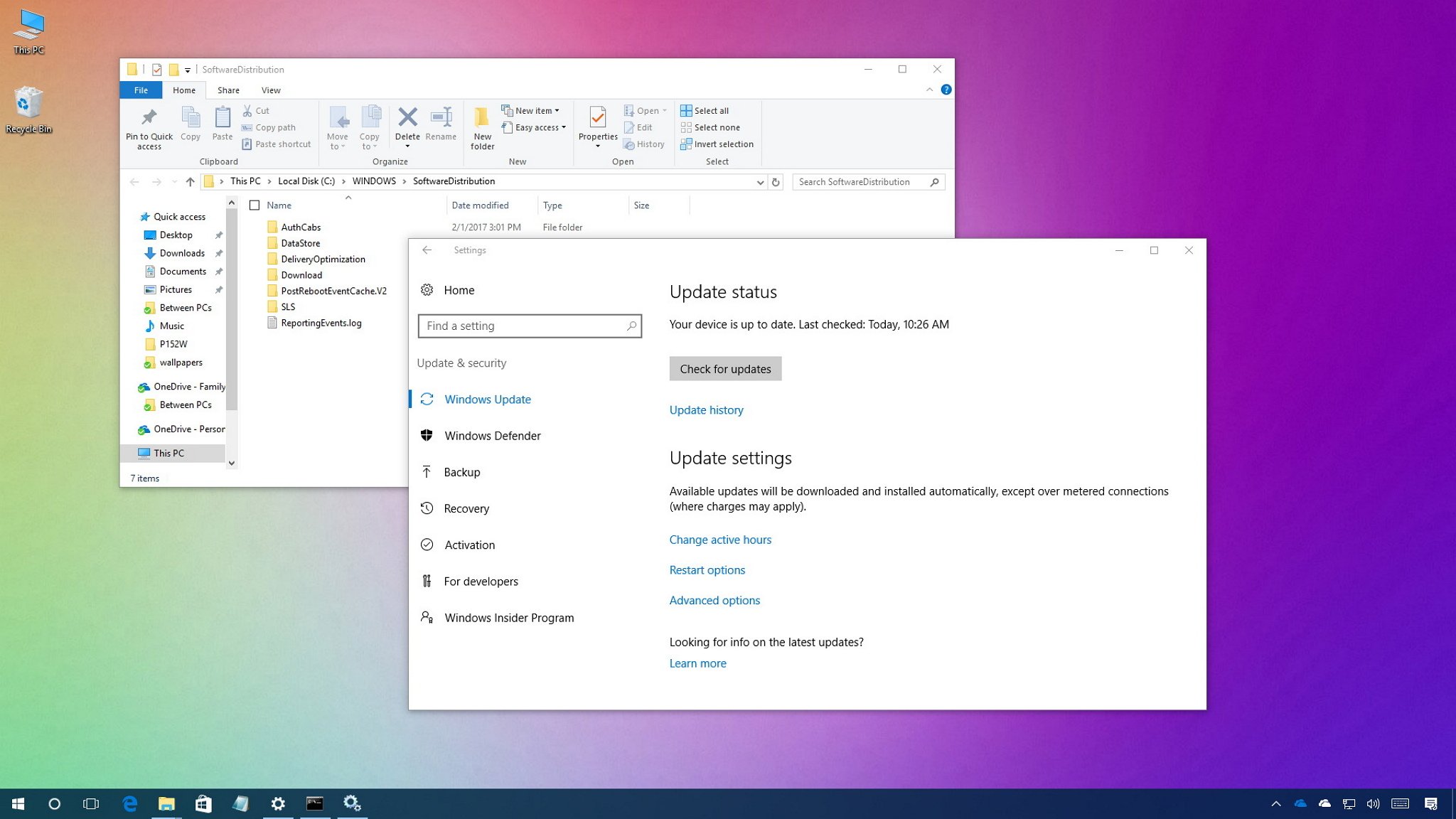
If Windows Update isn't working, it could be caused by a problem with the SoftwareDistribution folder, and here we'll show you how to fix it.
On Windows 10, the "SoftwareDistribution" folder is an essential component for Windows Update, which temporarily stores files needed to install new updates to keep your device secure and with the latest fixes and improvements.
This folder is maintained by the WUAgent (Windows Update Agent), and typically, it should be left alone, but there will be times when you may need to clear its content manually in the case the Datastore and Download folders aren't synchronized, and it's preventing Windows Update from applying new updates to your PC.
Usually, if you're having trouble with Windows Update, or after updates have been applied, it's safe to empty the content of the SoftwareDistribution folder. Windows 10 will always re-download all the necessary files, or re-create the folder and re-download all the components, if removed.
you will get the following information back, listing the site name and URL – a better approach compared to using the /drive/root/webUrl endpoint as you don’t have to strip anything.
Das Amtsgericht Frankfurt am Main kenne ich als Laden, der, um es mit Donald Trump zu sagen, läuft wie eine gut geschmierte Maschine. Nicht. Wenn es irgendwo unnötigen Stress gibt, immer gerne mit dem Amtsgericht Frankfurt am Main.
Ich hätte noch ein paar andere Fälle in petto. Schleppende Bearbeitung, verschwundene bzw. falsch zugeordnete Post. Verfahrensdauern jenseits von Gut und Böse. Und das als Düsseldorfer Anwalt. Möchte gar nicht wissen, was Frankfurter Kollegen dazu sagen können.
Da trifft es sich natürlich prima, dass ausgerechnet so ein gut sortierter Laden mir als Anwalt wertvolle Belehrungen erteilt. Und gleich prophylaktisch ein bisschen droht. Mit der Anwaltskammer. Das geschieht auf den Empfangsbekenntnissen, welche das Gericht an Rechtsanwälte übersendet. Auf dem ansonsten üblichen Formular findet sich das:
Die weitaus meisten Rechtsanwälte schlampen sicher nicht mit der Rücksendung von Empfangsbekenntnissen. Vielmehr geben sie sich redlich Mühe. Klar, schwarze Schafe gibt es überall. (Wobei manches schwarze Schaf vielleicht sogar gar nicht schwarz ist. Sondern nur das Pech hat, dass jemand am Amtsgericht Frankfurt am Main das ordentlich zurückgesandte Empfangsbekenntnis verbummelt.) So müssen sich aber alle Anwälte jeden Tag den erhobenen Zeigefinger präsentieren und, so empfinde ich das jedenfalls, durch den unnötigen Hinweis nerven lassen. Ganz abgesehen davon, dass man sich als sorgfältiger Anwalt das ja auch jedes Mal durchlesen muss. Die dafür verschwendete Zeit erstattet die hessische Justiz jedenfalls nicht.
Dabei könnte man auch gezielt auf die schwarzen Schafe zugehen und diese an ihre Berufspflichten erinnern. So ganz klassisch, mit individueller erster und zweiter Mahnung und dann – von mir aus – mit einem Brief an die Anwaltskammer. Aber man sieht, wer (auf der richtigen Seite) im Glaushaus sitzt, darf halt mit Steinen werfen. Wild, in alle Richtungen.
Last summer we introduced Ink math assistant in OneNote—a digital tutor that gives you step-by-step instructions on how to solve your handwritten math problems. Today, we are excited to announce that Ink math assistant can draw graphs of your equations, all within OneNote for Windows 10.
Now, when you write your math equations, the Ink math assistant quickly plots an interactive graph to help you visualize those difficult math concepts. You can zoom in and move the graph to observe intersection points or change values of parameters in your equations to better understand how each of them reflects on the graph. Finally, you can save a screenshot of the graph directly to your page to revisit it later.
Five steps to graph an equation in OneNote
Begin by writing your equation. For example: y=x+3 or y=sin(x)+cos(2x).
Next, use Lasso tool to select the equation and then, on the Draw tab, click the Math button.
From the drop-down menu in Math pane, select the option to Graph in 2D. You can play with the interactive graph of your equation—use a single finger to move the graph position or two fingers to change the zoom level.
Use + and – buttons to change the values of the parameters in your equation.
Finally, click the Insert on Page button to add a screenshot of the graph to your page.
Availability: Ink math assistant is available in OneNote for Windows 10, for Office 365 subscribers.
As always, we would love to hear your feedback, so please make comments below or suggest and vote on future ideas on OneNote UserVoice page.
Das BSI ist auf viele veraltete Installationen von ownCloud und Nextcloud gestoßen. Obwohl die Betroffenen Bescheid wissen, haben bislang die wenigsten reagiert.
Weniger als 1.700 Fälle von Infektionen mit dem Zika-Virus hat Brasilien in den ersten Monaten dieses Jahres registriert. Im Vorjahreszeitraum waren es mehr als 30.000.


 Die Zeitumstellung trage zur Schlafkrise der Gesellschaft bei, sagt ein Mediziner der ZEIT. Und eine Studie zeigt: Deutsche Arbeitnehmer haben zunehmend Schlafstörungen.




 Eyeo will nicht mehr selbst über die Regeln für Whitelisting bei Adblockern und akzeptable Werbeanzeigen entscheiden. Künftig wird ein Gremium die Regeln festlegen - unabhängig - wie Eyeo betont. (Adblock Plus, Onlinewerbung)
 Die Telekom verbessert ab heute ihre LTE-Versorgung durch den Bereich 900 MHz. Dafür wurden Frequenzen mit Vodafone ausgetauscht. Die ersten Städte gehen bereits in Betrieb. (Long Term Evolution, Telekom)
 Als Reaktion auf den jüngsten Raketentest Nordkoreas will US-Außenminister Tillerson neue Wege gegenüber Pjöngjang einschlagen: Alle Optionen lägen auf dem Tisch.






 Weniger als 1.700 Fälle von Infektionen mit dem Zika-Virus hat Brasilien in den ersten Monaten dieses Jahres registriert. Im Vorjahreszeitraum waren es mehr als 30.000.