Shared posts

11 Aug 15:35

Pull-Lernen: nicht in den Kopf hinein hämmern, sondern aufsaugen

by Peter Addor

In den Social Media Kanälen wird momentan auf das Interview mit dem dm-Gründer Götz Werner verwiesen, der darin sagte (1):

Im Leben braucht man keinen Druck, sondern Sog. Wer fliegen möchte, braucht Thermik. Flugzeuge fliegen, weil Sog aufgebaut wird. Ich selbst bin Vater von sieben Kindern – die reagierten alle nur auf Sog. Kunden, die bei uns kaufen, kommen, weil sie Sog verspüren, nicht weil ihnen jemand in den Hintern tritt.

Dass Menschen etwas aus sich heraus tun und nicht, weil sie unter Druck stehen, ist absolut richtig, auch wenn das Beispiel mit dem Fliegen schlecht gewählt ist. Ob die Kunden von seiner Drogeriekette angesaugt oder hineingeblasen werden, sei mal dahingestellt. Sicher ist, dass seine Drogerien von den Kunden gezogen werden und nicht von den Lieferanten gestossen.

Pull- und Push-Strategien

In der Betriebswirtschaft ist das logistische Pullprinzip längst angekommen. In den 70er Jahren galt noch das Push-Prinzip: Die Unternehmen produzierten „auf Halde“ und füllten die Endprodukteläger. Der Verkauf musste die Produkte dann so schnell als möglich verkaufen, indem er sie den Kunden auf die Nase drückte. „Bedürfnisse schaffen“ nannte man das damals.

by Grochim and Wikipedia

In den 80ern kippte das Push-Paradigma und machte einem neuen Verständis Platz, wonach die Kunden zu sagen pflegen, was sie wollen. Das bedeutete, dass der Verkauf vorwiegend zuhörte, was der Kunde wünscht – sog. „screening“ – und ihm dann diesen Wunsch realisiert. Damit „zieht“ der Kunde das Produkt durch die Produktion hindurch, es wird nicht mehr durchgestossen, wie in den 70ern. Spätenstens seit den 90er Jahren funktionieren alle Unternehmen nach dem Push-Prinzip. Das bedeutet, dass in der Produktion stets ein „Sog“ herrscht, wie es Herr Götz Werner in seinem Interview anschaulich ausdrückte, auch wenn es sich nicht um die betriebswirtschaftlich korrekte Bezeichnung handelt.

Zwar ist die Unterscheidung zwischen Pull- und Push-Strategie (2) nicht ganz so einfach, wie hier dargestellt. Auch heute kann in gewissen Fällen eine Push-Strategie immer noch Sinn machen. Bei der Pull-Strategie besteht das Problem, dass der Kunde meist nicht gewillt ist, so lange auf das Produkt zu warten, bis es produziert ist. Daher werden meist Mischformen angewandt.

Pull-Lernen

Weners Zitat wird auch deshalb verbreitet, weil es eine Aussage für modernes Lernen machen kann. Gelernt wird, was interessiert. Wenn mich etwas interessiert, dann gehe ich dem nach. Meine Motivation saugt das Wissen auf. Wenn aber ein Lehrer, die Eltern, der Arbeitgeber oder sonst eine Institution versucht, mir Wissen „beizubringen“, das mich nicht interessiert, dann ist das so, als würde er es mir in den Kopf hinein „drücken“ wollen und das funktioniert nicht. Das meinte Werner, wenn er sagt, dass seine Kinder nur auf Sog reagieren. Sie machen, was sie wollen, was sie interessiert, wofür sie motiviert sind.

Auf das Lernen übertragen bedeutet dies, dass nur der Lernende weiss, was er benötigt und was ihn interessiert. Das herkömmliche Schulsystem geht aber davon aus, dass der Lehrer im Vornherein weiss, was der Schüler braucht. Der Lehrer erzählt den Stoff einer Gruppe von Schülern in einem frontalen Vortrag. Die Schüler müssen dann das, was der Lehrer erzählt hat, nur noch auswendig lernen. Genau dieser Schritt geht nur unter Druck. Das, was der Lehrer erzählt hat, muss in die Köpfe hinein „gedrückt“ werden. Nach Götz Werner funktioniert dies nicht.

Neuere Lern-Ansätze drehen den Spiess denn auch etwa um. Anstatt, dass die Lehrer Wissen „auf Halde“ produzieren, in der Hoffnung, dieses Wissen den Schülern „verkaufen“ zu können, sollen die Schüler dasjenige Wissen, das sie interessiert, be-ziehen. Die Schüler ziehen das Wissen aus dem Bildungsapparat heraus, ganz wie die Kunden ihre Produkte aus den Produktionsstätten herausziehen. Ich nannte dieses neue Lernparadigma deshalb Pull-Lernen.

Lehrer nach Bedarf

Pull-Lernen stelle ich mir so vor, dass sich ein Mensch in seiner aktuellen Lebenssituation für gewisse Dinge interessiert und diesen aus sich heraus nachgeht. Er liest zunächst einmal einschlägige Artikel und Lehrbücher. Vielleicht stellt er fest, dass er noch nicht über die nötigen Voraussetzungen verfügt, um den Stoff zu verstehen. Dann wird er sich für die Preliminarien interessieren. Versteht er etwas nicht, von dem, was er gelesen hat, dann wendet er sich an Experten. Das können z.B. Lehrer sein, die ihm genau dieses eine Wissenselement erklären, das unser Protagonist nicht verstanden hat. Dazu müssen die Lehrer nicht in einer Schule sitzen und vor Klassen reden. Sie können z.B. im Web angesprochen werden und dort ihre Erklärungen abgeben. In weitergehenden Fällen können Online-Besprechungen oder gar persönliche Treffen durchgeführt werden. Schulen und erst recht Schulhäuser werden also beim Pull-Lernen überflüssig.

Ebenso werden Zeugnisse, Prüfungen und Zertifikate obsolet. Wenn sich unser Mensch für etwas interessiert, dann sagt er, wann er genug weiss und kann. Er prüft sich ständig selbst. Nur er weiss, wann das „Lern-Produkt“ die nötige Qualität hat, die er sich vorgestellt hat, als er anfing, sich für diese Sache zu interessieren.

Lernen just-in-time

Wer im herkömmlichen „Lernjahre – Wanderjahre – Meisterjahre“ denkt, kann mit diesem neuen Lernparadigma so gar nichts anfangen. Wie, wird er fragen, kann ein Mensch, der z.B. Maurer werden will, wissen, was er heute lernen muss, um dereinst gut mauern zu können. Da er ja das Maurern erst erlernen will, kann er zum Voraus noch nicht wissen, für was er sich heute im Detail interessieren soll. Das ist richtig.

Mit zunehmender Komplexität der Arbeitswelt werden jedoch die Blöcke Lernjahre, Wanderjahre, Meisterjahre zunehmend kleiner und fragmentierter. Es wird nicht mehr möglich sein, einen Beruf für’s Leben zu erlernen. Gemäss dem eindrücklichen Video „Did you know“ haben 2004 die Jobs noch gar nicht existiert, die 2010 zu den gefragtesten gehörten (3). Diese Tendenz nimmt exponentiell zu. Heute gibt es gefragte Jobs, die vor 3 bis 4 Jahre noch gar nicht existierten. Es ist also schon sinnlos geworden, auf eine Lehrabschlussprüfung zu lernen, die in 3 bis 4 Jahren stattfindet.

Das US Departement of Labour schätzt, dass ein Mensch 14 verschiedene Jobs haben wird, bevor er 40jährig ist. Das bedeutet, dass Menschen immer schneller ihre Jobs wechseln (müssen). Man ist immer seltener Maurer, Mathematiker, Pilot oder Lehrer. Man mag dieses Jahr Lehrer sein und nächstes Jahr vielleicht Augenoptiker. Und meistens hat man sowieso mehrere Jobs parallel. Um diese schnelle Abfolge von verschiedenen Tätigkeiten zu meistern, muss man sich laufend neue Fähigkeiten aneignen. Mit reiner Wissensaufnahme ist es nicht getan. Wir müssen immer öfters eine Fähigkeit genau in diesem Moment erlernen, in welchem wir diese Fähigkeit benötigen.

Im herkömmlichen Bildungsverständnis lernt ein Mensch „für’s Leben“. Er lernt Dinge, von denen er nicht weiss, ob er sie jemals benötigen wird. Das war bisher auch richtig so. Doch wenn wir dieses Verständnis nicht aufgeben, dann bilden wir bald Studenten für Jobs aus, die noch gar nicht exsistieren, um Technologien zu nutzen, die noch gar nicht eingeführt sind und um Probleme lösen zu können, die noch gar nicht als Problem erkannt sind, wie wir im Video „Did you know“ erfahren. Eine Lösung für die zukünftige Arbeitswelt kann auch wieder aus der betriebswirtschaftlichen Logistik entlehnt werden: Learning by just in time. Wir absolvieren nicht mehr länger teure und jahrelang andauernde Lehrgänge, in welchen wir uns Fähigkeiten aneignen müssen, die bereits bei der Abschlussprüfung nicht mehr gefragt sein werden, sondern lernen das, was im aktuellen Job oder Lebenssituation gerade angesagt ist.

Volksschulen

Wie ist die spezielle Lernsituation von Kindern in diesem Kontext zu interpretieren? Selbstverständlich gibt es einen Kanon von Kulturtechniken, die vermutlich in den nächsten paar Jahrzehnten Beständigkeit haben werden. Welche das sind, ist gerade Thema einer breitangelegten Diskussion.

Ich kann mir vorstellen, dass bald niemand mehr selber schreiben muss, da bereits heute gängige Softwarepakete existieren, die alles, was man ihnen diktiert sofort in ein Dokument schreiben. Dass wir solche Software so wenig brauchen, liegt noch an der Benutzerfreundlichkeit. Wir wollen ja nicht immer eine Software starten und vielleicht sogar noch ein Headset anlegen, bevor wir etwas schreiben können. Wahrscheinlich wird bald einmal das Smartphone einfach alles, was wir sagen, in ein Dokument schreiben. Daraus können wir dann entnehmen, was wir schriftlich weiterverarbeiten wollen.

Auch rechnen brauchen wir nicht mehr selber. Es gibt seit Jahrzehnten handliche Rechenmaschinchen oder entsprechende Apps für das Smartphone. Allerdings gilt in diesem Fall dasselbe wie für das Schreiben. Es ist oft zu mühsam, die Rechnerapp zu starten und die Rechenaufgabe einzutippen. Eine Anzeige in der Brille muss automatisch reagieren, wenn wir eine Rechnung sagen.

Übersetzungssoftwarepakete werden bald so gut sein, dass sich niemand mehr der Mühe aussetzt, eine fremde Sprache zu erlernen. Man kann also tatsächlich rätseln, welche Kulturtechniken denn übrigbleiben, die unsere Kinder „für’s Leben“ lernen könnten.

Eine Fähigkeit, die bestimmt in den nächsten hundert Jahren benötigt wird, ist die, Neues zu Lernen. Wenn ich morgen bei Arbeitsbeginn vernehme, dass ich jetzt einen neuen Job habe, der so gar nichts mit allem dem zu tun hat, was ich bisher gemacht habe, dann muss ich schnell und effektiv das lernen, was der neue Job von mir fordert. Damit ich das kann, muss ich gewisse Lern-Fähigkeiten haben. Da niemand solche Fähigkeiten einem anderen beibringen kann, muss sie sich jeder selber aneignen. Das gilt auch und vor allem für Kinder. Gewiss, man kann sie unterstützen, indem man z.B. Spiele erfindet, welche in schneller Abfolge verschiedene Fähigkeiten fordern, die sich die Mitspieler zuerst aneignen müssen, bevor sie weiterspielen können.

Spielerisch lernen statt büffeln

Angesichts der Zunahme von Informationen und Daten spielt kritisches Verständnis eines Textes eine grosse Rolle. Auch das kann geübt werden, genauso wie Kreativität, die für zukünftige Jobs eine zunehmend wichtige Voraussetzung sein wird. Solche Fähigkeiten können spielerisch geübt und angeeignet werden. Die Zeiten des Drills und Büffelns werden bald vorbei sein, weil genau dasjenige Wissen, das nur durch büffeln einigermassen haften bleibt, obsolet wird. Zwar müssen auch die Kulturtechniken, die in Zukunft Bestand haben, immer wieder geübt werden, bis sich ein bestimmtes Verhalten eingeprägt hat. Aber dieses Üben geschieht nicht drillmässig, sondern spielerisch. Daher werden Schulen für Kinder bis ca. 15jährig vermutlich offener und spielerischer werden.

Die einzige bisherige Kulturtechnik, die vielleicht noch weiterhin geübt wird, könnte Lesen sein. Zwar kann ich mir einen Text von einer Software vorlesen lassen. Ich persönlich verstehe aber einen etwas komplizierteren Sachverhalt besser, wenn ich ihn lese, als wenn ihn mir jemand vorliest oder vorträgt. Das mag u.a. daran liegen, dass ich beim Lesen innehalten und mir das bisher Gelesene überlegen kann. Zwar könnte ich auch eine Vorlese-Software anhalten. Das ist aber bedeutend umständlicher, auch wenn ich bloss „stop“ rufen müsste.

Leuchtfeuer 4.0

Am 19. April startet online eine kollaborative Veranstaltung, die u.a. diese Themen aufarbeitet. Der Anlass ist kostenlos. Jedermensch kann teilnehmen und mitmachen. Während zwei Wochen kann man sich mit anderen austauschen und seine Meinung einbringen. Die Veranstalter schreiben (4):

Mit dem MOOC möchten wir zunächst, gemeinsam mit euch, unser aller „Neuland“ im Zeitalter von „Arbeit 4.0“ neu kartographieren. Wie können wir uns darauf besser vorbereiten? Das ist die zentrale Frage.

Schauen Sie rein! Es lohnt sich auf jeden Fall.

Nachtrag (09.04.2017): Das berührende Video „alike“ zeigt, was hier gemeint ist. Der Schüler interessiert sich jetzt für Musik, wird aber gepusht, sich mit Buchstaben zu beschäftigen, bis ihm die Farbe abhanden kommt.

„Alike“ is an animated short film directed by Daniel Martínez Lara & Rafa Cano

(1) http://derstandard.at/2000051252761/Goetz-Werner-Alte-s-stellt-eine-ganze-Gesellschaft-vom-Kopf
http://www.webcitation.org/6pLWCnzPR

(2) https://de.wikipedia.org/wiki/Push-Pull-Strategie

(3) Did you know? https://www.youtube.com/watch?v=U9NZqtG2Ncg

(4) https://mooin.oncampus.de/feuer40

21 Apr 16:20

Andreas Lubitz’s Family Disputes Germanwings Suicide Scenario

by Jeff Wise

On Friday, March 24, the third anniversary of the crash of Germanwings 9525 into the French Alps, the father of the pilot who is believed to have crashed the plane, Andreas Lubitz, held a lengthy press conference to proclaim his son’s innocence. The majority of the talking was done by a German aviation journalist, Tim van Beveren. The media widely reported that the event took place but ignored what was said. The popular consensus has long been that Lubitz was guilty, and so the general tone of the coverage was scathing. (In my 2015 Kindle Single, Fatal Descent, I also concluded that Lubitz was responsible for the fatal plunge.) I think it is irresponsible to dismiss an assertion without bothering to listen to it, so I’m grateful to reader Robert Pete for sending me the following synopsis of the press conference, which I’m passing along verbatim.

The father of the co-pilot of the Germanwings flight which crashed asked an aviation expert (T van Br) to investigate what actually happened. He had tried unsuccessfully himself to investigate. The press conference presented the findings.

1. The father represented that his son, the pilot, had been treated for depression in 2008-2009 and had been able to fully recover.

2. The French authorities released a statement 48 hours after the crash which presented the thesis that the co-pilot was a depressive mass-murderer who had with intent and preparation locked the captain outside, put the plane into descent, and crashed it into the mountainside.

3. This thesis has not been altered to the present day.

4. The co-pilot’s family is in search of the truth. If their son was guilty of such an act or not, they want to know.

5. The attorney for the press conference explained that they feel that the thesis presented by the French authorities is incorrect.

6. Herr van B presented his credentials to undertake this investigation for the co-pilot’s family.

7. His first point was that the authorities did not know WHO was in the cockpit when they released their statement 48 hours after the crash. 2 months later they knew the person in the cockpit was alive, but they did not know if he was conscious. They still do not know who was in the cockpit.

8. Hr v B explained that the investigation was run by 2 engineers. One trained in aviation. The second in electronics. No human-factor experts have ever been able to listen to the flight data recorders.

9. Hr v B showed the airplane flight certificate. It was unusual in several ways: it was issued the day before the crash, it was altered with handwritten changes, it had been due to expire in 11 days, it was extended for less than 1 year (contrary to rule), and the signature did not match the printed name. The irregularities with the certificate were never followed up in the investigation.

10. The flight data recorder was originally reported as burned. 9 days after the accident it was found under some rocks. The data was read, but never published. But some inconsistencies are present. The maneuvers suggested in the thesis (shutting the door and selecting Descent in 1 second) were tried in a flight simulator. Not realistic to do. Also, the recorders showed the plane to be in Open Descent mode and Descent mode simultaneously, which is impossible to have. So there are some unresolved problems here.

11. As to the cockpit door. Entry is allowed by pushing the latch after getting a knock. It is not necessary to latch the door. There is a keypad, through which some can ring or use emergency code access. This plane had the emergency code access fail while on the ground days before the accident, causing mechanics to be summoned. This was reported to Hr v B 2 days after the crash. He passed it to the authorities. It was never investigated. There is no evidence in the report that the co-pilot barred the door to the pilot.

12. The weather map for that day is in the report. It shows a low-level, high-velocity jet stream in that same area. Other pilots who flew that route descended to a lower altitude because of its presence. The flight data recording is missing the parameter normally present which records the G-force.

13. The report says the pilot suffered a heavy psychotic attack which disrupted his capability and his sense of reality. This was written by engineers, since no human-factor experts have yet to hear/see the evidence. Human factor experts interviewed by Hr v B say that this statement is highly speculative and cannot be based on factual data.

14.. Nevertheless, IF the statement were correct, then the accident report is mis-categorized. Since then the accident should be regarded as the incapicitation of the crew.

15. When the Duesseldorf Criminal Police investigated the co-pilot’s dwelling, his life-partner (sig other) was not present. Statements she supposedly made are not correct. They found one Ipad the first day they searched. They found a second one the next day. A third Ipad was turned over to the police by a third party AFTER the French police had announced that the plane was flown into the side of the mountain by a chronic depressive as a suicide act. The third Ipad is the one that had his Internet history of browsing for cockpit door info. These messages also came without the check numbers to tie them to the actual Ipad.

That’s what was covered at the press conference in Berlin. Hr v B concluded by saying that there exists no motive for the crash. He has none to offer. He only wants the investigation to continue. Settling for the thesis offered by the French authorities 48 hours after the crash seems to be wrong, in view of the evidence we know of now and in view of the lack of human-factor experts to participate.

UPDATE: The Aviation Herald has published a lengthy elucidation of these issues, including a response from the BEA, which states, “What was presented or suggested is incompatible with the factual and recorded data contained in the final report of the BEA.”

Personally, while there may have been flaws or even inconsistencies in the official report, I find it hard to imagine what an alternative explanation for this crash might look like.

21 Apr 16:06

Use Microsoft Flow to Convert, Merge, Watermark, Secure, and OCR files

Learn how to convert, merge, watermark, secure and OCR your files automatically using the power of Microsoft Flow and PDF Converter Services by Muhimbi.
21 Apr 16:05

Restrict Syncing to Specific Domains – OneDrive for Business (Office 365)

by Kelsey Epps

OneDrive for Business now can restrict syncing of files to managed computers. This is done by configuring OneDrive for Business to sync with only specified domains. Use the process below to enable this option and add specified domains.

Login to the Office Admin Center

On the left navigation menu, click Admin Centers

Click OneDrive

Click Sync

Click Allow syncing only on PCs joined to specific domains

Click Add Domains

Add the domain(s) in which you want to add to the list

Check Block sync on Mac OS if that’s required

  • This will prevent Mac OS users from syncing entirely

Click Save

21 Apr 16:05

Manage External Sharing at the Tenant Level – Office 365 (SharePoint Online)

by Kelsey Epps

Office 365 with SharePoint Online allows you to have granular level control of your data and how it’s shared internally and externally. In the post below, I will highlight a few of the common settings and highlight the default settings. Please keep in mind that you will need to do your own internal security assessment and fit these settings to your organization.

For more detailed information about all the external sharing scenarios in SharePoint Online, please use the Microsoft KB below.

https://support.office.com/en-us/article/Manage-external-sharing-for-your-SharePoint-Online-environment-c8a462eb-0723-4b0b-8d0a-70feafe4be85?ui=en-US&rs=en-US&ad=US

Login to the Office Admin Center

On the left navigation menu, click Admin Centers

Click SharePoint

  • You need the correct permissions to access SharePoint Admin center and make the changes

Click Sharing

Sharing Outside your organization – Select the option that meets your security requirements.

  • Don’t allow sharing outside your organization – Prevents all users for all sites from sharing with external users. This option is typically set when organizations cannot share any content externally.
  • Allow sharing only with the external users that already exist in your organization’s directory – Allow sharing only for external users that are in the organizations directory. External users who do not already exist in your organization’s directory are prevented from accessing data. This is the most secure method to share data externally since the external users accessing the data must reside in the organizations directory. This gives the ability for checks and balances to be put in place because a typical user is not allowed to add external users to the organizations directory. Typically this goes through an approval work flow and is strictly governed.
  • Allow users to invite and share with authenticated external users – External users who have received sharing invitations are required to sign-in with a Microsoft account to access the content. This method is a little less secure than the one above, but it’s more secure than the one below. This gives the ability for external sharing governed by the user sending the links.
  • DEFAULT – Allow sharing to authenticated external users and using anonymous access – Allow site users to share sites with people who sign in as authenticated users, but you also want to allow site users to share documents through the use of anonymous guest links, which do not require invited recipients to sign in. You can also specify, in number of days, when the links will expire. This is the least secure and default option in SharePoint Online.

Default Link Type

  • Direct – Accessible only to users who already have permission to access the document
  • Internal – Accessible only to users within your organization
  • DEFAULT – Anonymous access links – Accessible by anyone

Additional Settings

  • Limit external sharing using domains – This option gives you granular level control to the domains you want or don’t want to allow sharing with.
  • Prevent external users from sharing files, folders, and sites they don’t own – I would highly recommend that you check this box. This prevents external users from sharing data they don’t own or that they should not be sharing.
  • External users must accept sharing invitations using the same account that the invitations were sent to – I would highly recommend that you check this box. This locks access down to the account where the invite was sent.

This screen shot is the default sharing settings for SharePoint Online

This screen shot is how I setup my own SharePoint Online external sharing.

21 Apr 16:05

Manage External Sharing at the Site Collection Level – Office 365 (SharePoint Online)

by Kelsey Epps

Office 365 with SharePoint Online allows you to have granular level control of your data and how it’s shared internally and externally. In the previous post, Manage External Sharing at the Tenant Level – Office 365 (SharePoint Online), I showed you the tenant level options; the post below, I will highlight a how to do this at a site collection level.

Please keep in mind that you will need to do your own internal security assessment and fit these settings to your organization.

For more detailed information about all the external sharing scenarios in SharePoint Online, please use the Microsoft KB below.

https://support.office.com/en-us/article/Manage-external-sharing-for-your-SharePoint-Online-environment-c8a462eb-0723-4b0b-8d0a-70feafe4be85?ui=en-US&rs=en-US&ad=US

Login to the Office Admin Center

On the left navigation menu, click Admin Centers

Click SharePoint

  • You need the correct permissions to access SharePoint Admin center and make the changes

Click Site Collections

Select the Site Collection you want to change the sharing on

Click Sharing

Set the Sharing Settings

Sharing Outside your organization – Select the option that meets your security requirements. If you have tenant level settings that are more restrictive than the default options, the lesser options will not be available.

  • Don’t allow sharing outside your organization – Prevents all users for all sites from sharing with external users. This option is typically set when organizations cannot share any content externally.
  • Allow sharing only with the external users that already exist in your organization’s directory – Allow sharing only for external users that are in the organizations directory. External users who do not already exist in your organization’s directory are prevented from accessing data. This is the most secure method to share data externally since the external users accessing the data must reside in the organizations directory. This gives the ability for checks and balances to be put in place because a typical user is not allowed to add external users to the organizations directory. Typically this goes through an approval work flow and is strictly governed.
  • Allow users to invite and share with authenticated external users – External users who have received sharing invitations are required to sign-in with a Microsoft account to access the content. This method is a little less secure than the one above, but it’s more secure than the one below. This gives the ability for external sharing governed by the user sending the links.
  • DEFAULT – Allow sharing to authenticated external users and using anonymous access – Allow site users to share sites with people who sign in as authenticated users, but you also want to allow site users to share documents through the use of anonymous guest links, which do not require invited recipients to sign in. You can also specify, in number of days, when the links will expire. This is the least secure and default option in SharePoint Online.

Additional Settings

  • Limit external sharing using domains – This option gives you granular level control to the domains you want or don’t want to allow sharing with.

Click Save

21 Apr 16:04

What’s new in Office 365 administration—public preview of Microsoft Graph reporting APIs

by Office 365 Team

Editor’s note 4/24/2017:
This post has been updated to reflect that the PowerShell cmdlets related to deprecating APIs within the Office 365 Reporting Web Service will also be retired October 1, 2017. The deprecating cmdlets include: Get-O365ClientBrowserDetailReport, Get-O365ClientBrowserReport, Get-O365ClientOSDetailReport, Get-O365ClientOSReport, Get-ConnectionByClientTypeReport, Get-ConnectionByClientTypeDetailReport, Get-GroupActivityReport, Get-MailboxActivityReport, Get-MailboxUsageReport, Get-MailboxUsageDetailReport, Get-PartnerClientExpiringSubscriptionReport, Get-PartnerCustomerUserReport, Get-ScorecardClientDeviceReport, Get-ScorecardClientOSReport, Get-ScorecardClientOutlookReport, Get-ScorecardMetricsReport, Get-StaleMailboxReport, Get-StaleMailboxDetailReport, Get-LicenseVsUsageSummaryReport, Get-CsActiveUserReport, Get-CsClientDeviceReport, Get-CsConferenceReport, Get-CsP2PSessionReport, Get-CsAVConferenceTimeReport, Get-CsP2PAVTimeReport, Get-SPOActiveUserReport, Get-SPOOneDriveForBusinessUserStatisticsReport, Get-SPOOneDriveForBusinessFileActivityReport, Get-SPOTeamSiteDeployedReport, Get-SPOTeamSiteStorageReport, Get-SPOSkyDriveProDeployedReport and Get-SPOTenantStorageMetricReport.


Since March 2016, the usage reports in the Office 365 admin center have been providing admins with insights about how their users adopt and use Office 365. Today, we’re pleased to announce the public preview of the new Microsoft Graph reporting APIs, enabling customers to programmatically access the data available within the usage reports.

Public preview of Microsoft Graph reporting APIs for retrieving Office 365 product usage data

The usage reports in the Office 365 admin center enable admins to understand usage across the various services within Office 365. However, many of you already have existing reporting solutions—such as a company reporting application or a web portal—in place. To assure that you can monitor your IT services in one unified place, the usage reporting APIs complement the existing usage reports by allowing organizations and independent software vendors to incorporate the Office 365 activity data into their existing reporting solutions. Using this API, you can retrieve the data available in all the usage reports, including organization level summaries per service, as well as entity level (user, sites, accounts) detail usage information for different reporting periods of the last 7/30/90/180 days, and daily activity aggregates.

Get started with the new APIs

Any user with global admin or product admin rights (for Exchange, Skype for Business and SharePoint) in the organization can retrieve data through these APIs. You can leverage the Microsoft Graph documentation for the reporting API and submit feature requests by asking or voting on an idea on UserVoice. Please submit questions by posting them on Stack Overflow and tagging microsoftgraph.

With this announcement, we’re starting the deprecation of the following APIs available within the Office 365 Reporting Web Service: ConnectionbyClientType, ConnectionbyClientTypeDetail, CsActiveUser, CsAVConferenceTime, CsP2PAVTime, CsConference, CsP2PSession, GroupActivity, MailboxActivity, GroupActivity, MailboxUsage, MailboxUsageDetail, StaleMailbox and StaleMailboxDetail. We will remove these APIs, as well as any related PowerShell cmdlets, on October 1, 2017.

If you are currently using APIs or any of the related PowerShell cmdlets from the Office 365 Reporting Web Service, which are going to be replaced by the new APIs, please start planning the migration of any subsystems within your organization.

More management enhancements in March

Here’s a summary of additional Office 365 administration updates for March:

Additional mailbox settings in the admin center—Admins can now convert user mailboxes into shared mailboxes directly from the main Office 365 admin center. The default resulting shared mailbox will continue to have a license; however, admins can manually remove the license after the conversion.

Admins have now more control over what items get copied to a shared mailbox by enabling the Copy items set on behalf of this mailbox toggle. This allows the admin to ensure that members of the mailbox can see what other members have sent on behalf of it.

Dynamics 365 (online) admin role in Office 365 admin center—The Dynamics 365 service administrator role is meant for those who are administering Dynamics 365 for their organization. This role can now be assigned to users in the Office 365 admin center or via PowerShell. Once a user is assigned, they’ll be able to access the Dynamics 365 admin center without needing a paid Dynamics license. For more information, see “Use the Dynamics 365 service admin role to manage your tenant.”

New employee quick start guide—It is important for a company to quickly onboard a new employee into their role. As part of the ramp-up process, admins are often asked to help the new employee understand and use the available software and tools—including Office 365. The new employee quick start guide helps admins quickly get users started with Office 365 by walking them through the sign-up process, the installation of apps, as well as common scenarios such as saving files to OneDrive. It is also a helpful resource for organizations that just deployed Office 365 to use with all employees.

Managing Microsoft Teams from the Office 365 admin center—On March 14, Microsoft Teams reached general availability. Microsoft Teams is now enabled at the tenant level by default but will continue to respect per user licensing. Tenant admins can control the organization-wide settings as well as the per user settings in the Office 365 admin center or via PowerShell script for bulk editing. Read this article to learn more.

Improved support for full re-delegation of your domain—It is now even easier for admins to move their domain management to Microsoft. After adding a custom domain to Office 365, admins must verify that they are the owner of the respective domain by connecting it to Office 365. They can now do so by simply adding one TXT record to their name server DNS. Microsoft will then set up the online services and manage DNS records on your behalf.

New export capabilities in usage reports in the Office 365 admin center—Admins can now export the data from the organization-wide activity charts at the top of each usage report. By clicking or tapping the Export link, the data for the selected time period is exported into an Excel .csv file, enabling admins to further analyze or share the chart data with others. The export will contain data for the selected reporting period.

New Service health dashboard available for the mobile app—The new Service health dashboard has started to roll out to the Office 365 mobile admin app for Windows Phone, iOS and Android. The dashboard provides admins with a new level of service health insights that are personalized for their organization and that allow them to stay on top of service incidents, improve their internal support experience and improve their users’ Office 365 experience.

Modern Service Management blog series—Regardless of the size of the organization, the move to Office 365 brings changes from a service management perspective. This blog series discusses major aspects of service management, including monitoring, incident management and change management in an evergreen service.

More to come

Over the coming months, we will add more reports focused on the clients used to access SharePoint and OneDrive for Business, as well as enhance existing reports, including the Microsoft Groups report. We are also working on making a reporting role and the Office 365 adoption content pack in Power BI available to all customers.

Let us know what you think!

Try the new features and provide feedback using the feedback link in the lower right corner of the admin center. And don’t be surprised if we respond to your feedback. We truly read every piece of feedback that we receive to make sure the Office 365 administration experience meets your needs.

Please note: the features mentioned in this blog post have started to roll out. If they are not available yet in your region, for your subscription or for your organization, please check back in a few weeks!

—Anne Michels, @Anne_Michels, senior product marketing manager for the Office 365 Marketing team

The post What’s new in Office 365 administration—public preview of Microsoft Graph reporting APIs appeared first on Office Blogs.

21 Apr 16:04

New value in Office 365 Enterprise K1 for frontline workers

by Office 365 Team

Today, we are announcing updates to the Office 365 Enterprise K1 plan—designed to enable your frontline workers to do their best work with tools for schedule and task management, communications and community, training and onboarding, and identity and access management.

Frontline workers are the heartbeat of many of the world’s largest industries, such as manufacturing, retail, healthcare and hospitality. They’re the people behind the counter, on the phone with customers, operating the production line, building products, and running the day-to-day operations. They are often the face of an organization to its customers. And as more companies invest in digital transformation, there’s a growing recognition of the importance of empowering frontline workers with modern productivity tools.

That’s why we have expanded the Office 365 Enterprise K1 plan to include the following additional products:

  • Microsoft StaffHub—Helps frontline workers manage their workday with schedule management, information sharing and the ability to connect to other work-related apps and resources. StaffHub was added to the K1 plan earlier this year.
  • OneDrive for Business with 2 GB of cloud storage—Provides employees a secure environment to store, manage and access files from virtually anywhere and on any device.
  • Skype for Business presence and instant messaging—Enables employees to communicate in real-time, along with the ability to participate in Skype Meeting Broadcast sessions.
  • Microsoft Teams—A hub for teamwork that connects employees to the people, tools and content they need to do their best work.
  • Office 365 Video—Provides employees with a secure, company-wide destination for discovering and accessing video content.
  • Microsoft PowerApps and Microsoft Flow—Eases the automation of repetitive tasks and workflows.

These additional products build upon the core value already offered with the Office 365 Enterprise K1 plan and unlock important scenarios for frontline workers, including the ability to view and swap shifts, take advantage of video-based employee training and onboarding, exchange best practices across the company and even participate in live, company-wide town hall meetings. The Office 365 Enterprise K1 plan gives companies the tools they expect to manage employee access and the digital identity to meet today’s complex and constantly changing security and compliance requirements.

Broadcast company town halls to engage employees remotely.

Finally, we are excited by the response of our customers, like AccorHotels, who’ve already started to change the way they work with Office 365 and Microsoft StaffHub.

These new capabilities will begin rolling out to customers in the next several weeks. Please visit the Office 365 Enterprise K1 plan page to learn more, and check out the Microsoft Mechanics video below.

The post New value in Office 365 Enterprise K1 for frontline workers appeared first on Office Blogs.

21 Apr 16:04

Assigning multiple users to a task is now possible in Microsoft Planner

by Planner Team

As of today, Microsoft Planner users can assign multiple people to a task—a feature that tops the list at planner.uservoice.com. Now, users can assign more than just one user to a task in Planner, and every user that is assigned the task will see it on their My Tasks page.

Our goal is to support additional collaboration, and we will continue to develop features and enhancements that our users want. Feel free to join the conversation about this feature and many others at our TechCommunity page. Also, please share your feedback with us about Planner features you would like to see at planner.uservoice.com.

—The Planner team

The post Assigning multiple users to a task is now possible in Microsoft Planner appeared first on Office Blogs.

21 Apr 16:04

Create and manage up to 30,000 projects in Project Online

by Project Team

The Microsoft Project team is continuously innovating to meet our customers’ most-pressing needs. That’s why we’ve released additional features during the past six months—and why we’re now excited to announce a huge increase in the number of projects you can support through Project Online, a Microsoft Project & Portfolio Management (PPM) solution.

Create more projects, get more done

In the past, Project Online only allowed for 5,000 projects. Today, that increases six-fold, enabling you to create and manage up to 30,000 projects in the cloud. You’ve been asking for greater scale through Project Online, and we believe 30,000 projects gives you ample space and flexibility to get more done without resorting to cumbersome workarounds.

We’re also excited to announce several updates that improve performance and help you get the project information you need faster. One of these updates is the ability to create more project sites—also called subsites or collaboration sites. Before, there was a limit of 2,000 project sites. If you wanted more, you had to split them into multiple Project Web App (PWA) sites, impacting team productivity. Now, there’s a one-to-one relationship between projects and project sites. For example, if your Operations department creates 4,000 projects, it can also create 4,000 project sites across multiple site collections, boosting collaboration and information-sharing among project teams. Additionally, you can set the destination of these project sites in the Enterprise Project Type (EPT) template to help streamline project creation.

Divide projects and project sites among different departments, as shown here, or host all 30,000 in a single place—whatever works best for your business.

Access the Project Center data faster

More projects also means more data. Every time you go to the Project Center, Project Online calculates aggregate information—like total cost of all projects—which slows the time it takes to pull up that page. Going forward, you have the option to disable rollup groups and Gantt charts, bringing you the project data you need faster—especially as you create more and more projects. We also expedited the process for displaying a list of projects within Project Center and improved the custom filtering feature to help you quickly find the right project data.

Filter data rollup and Gantt chart groups to find Project Center information faster.

We also released OData performance enhancements to decrease the transmission time for retrieving data from project reports. This is particularly helpful if you use SQL Server Integration Services to transfer data from Project Online into your own warehouse. You can download all your data at once, then pull the changed records at regular intervals to keep project data updated.

Lastly, we added modify dates to the following entities:

  • AssignmentBaseline
  • AssignmentBaselineTimephasedData
  • AssignmentTimephasedData
  • Engagement
  • EngagementsTimephasedData
  • ProjectBaseline
  • TaskBaseline
  • TaskBaselineTimephasedData
  • TaskTimephasedData
  • TimesheetLineActualData
  • ResourceDemandTimephasedData
  • ResourceTimephasedData

The Project team is always innovating to help customers achieve better project outcomes. Please go to our UserVoice page to submit ideas for improving Project. You can also visit the Microsoft PPM website to learn more about Project Online and other PPM offerings.

—The Project team


Frequently asked questions

Q. What do I need to do to increase my limit to 30,000 projects?

A. The limit has been updated for everyone.

Q. Can I control which site collections my project sites are created in?

A. You can set project destinations at the Enterprise Project Type (EPT) level.

Q. Where can I go to find the best practices to be successful with 30,000 projects?

A. Please see “Tune Project Online performance” for best practices.

Q. Can I use User Sync and SharePoint Task List Sync with these updates?

A. User Sync and SharePoint Task List Sync are only supported when a project site is in the same site collection as the PWA site. Project sites created outside the PWA site will not support these functionalities.

The post Create and manage up to 30,000 projects in Project Online appeared first on Office Blogs.

10 Apr 13:52

Noiszy – A Chrome plugin that creates meaningless web tracking data

10 Apr 13:51

Async JavaScript Generators

10 Apr 13:51

Spotify’s Love/Hate Relationship with DNS

10 Apr 13:51

GPIO pins for Windows, C#, VB, F#

10 Apr 13:04

Why I Always Tug on the ATM

by BrianKrebs

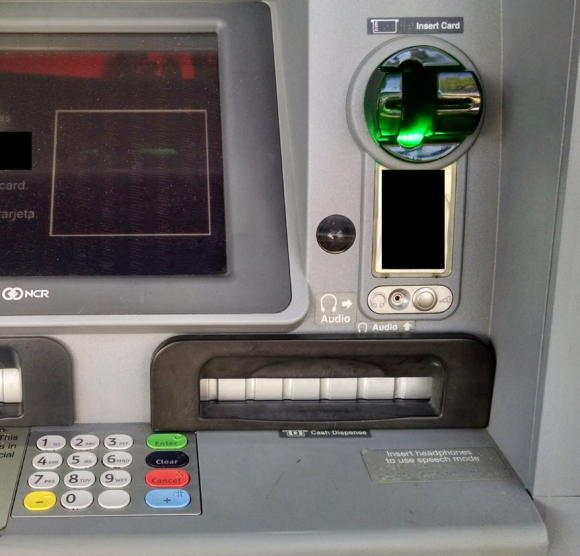
Once you understand how easy and common it is for thieves to attach “skimming” devices to ATMs and other machines that accept debit and credit cards, it’s difficult not to closely inspect and even tug on the machines before using them. Several readers who are in the habit of doing just that recently shared images of skimmers they discovered after gently pulling on various parts of a cash machine they were about to use.

Viewed from less than two feet away, this ATM looks reasonably safe to use, right?

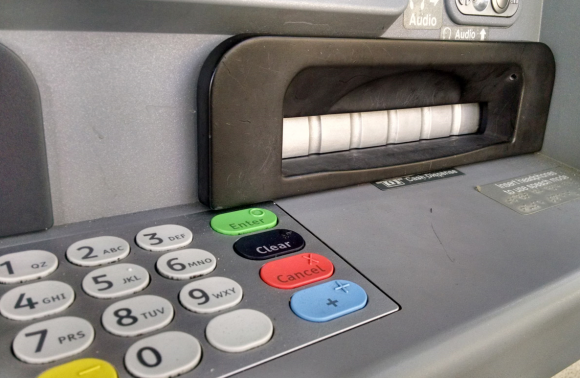
Although it's difficult to tell from even this close, this ATM's card acceptance slot and cash dispenser are both compromised by skimming devices.

Although it may be difficult to tell from even this close, this ATM’s card acceptance slot and cash dispenser are both compromised by skimming devices.

But something fishy comes into view when we change our perspective slightly. Can you spot what doesn’t belong here?

Can you spot what doesn't belong here?

Can you spot what doesn’t belong here?

Congratulations if you noticed the tiny pinhole in the upper right corner of the phony black bezel that was affixed over top of the cash dispenser slot. That fake bezel overlay contained a tiny pinhole camera angled toward the PIN pad to record time-stamped videos of people entering their PINs:

A closeup of the tiny pinhole that allows a mini spy camera embedded in the fake cash dispenser bezel to record customers entering their PINs.

A closeup of the tiny pinhole that allows a mini spy camera embedded in the fake cash dispenser bezel to record customers entering their PINs.

How about the card acceptance slot? Looks legit (if a tad shinier than the rest of the ATM), right?

fakecardbezel

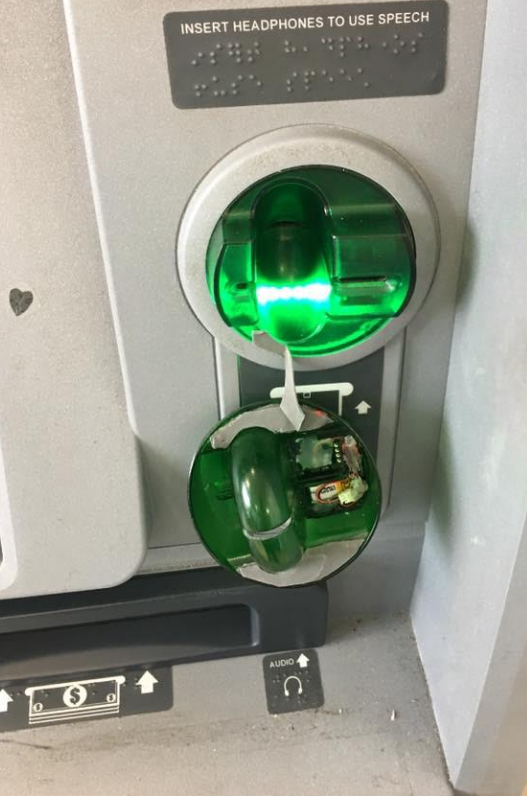
What happens if we apply a tiny bit of pressure to the anti-skimming green bezel where customers are expected to insert their ATM cards? Look at that! The cheap plastic bezel that skimmer thieves placed on top of the real card acceptance slot starts to pull away. Also, you can see some homemade electronics that are not very well hidden at the mouth of the bezel.

Notice the left side of this card skimmer overlay starts to pull away from the rest of the facade when squeezed. Also note the presence of a circuit board close to the mouth of the fake bezel.

Notice the left side of this card skimmer overlay starts to pull away from the rest of the facade when squeezed. Also note the presence of a circuit board close to the mouth of the fake bezel.

ATM card skimmers contain tiny bits of electronics that record payment card data from the magnetic stripe on the backs of cards inserted into a hacked ATM. Most commonly (as in this case), a card skimmer is paired with a pinhole spy camera hidden above or beside the PIN pad to record time-stamped video of cardholders entering their PINs. Taken together, the stolen data allows thieves to fabricate new cards and use PINs to withdraw cash from victim accounts.

Card skimmers designed to look like the green anti-skimming devices found on many ATMs are some of the most common cash machine skimming devices in use today, probably because they are relatively cheap to manufacture en masse and there are many fraudsters peddling these in the cybercrime underground.

Typically, the fake anti-skimmer bezels like the one pictured above are made of hard plastic. However, the reader who shared these images said this bezel card skimming device was made of a semi-flexible, vinyl-like plastic material.

“I immediately went in and notified the manager who shut down the machine,” the reader said in an email to KrebsOnSecurity. “All the tellers were busy so he asked me to stand by the ATM and stop people from trying to use it while he called his security team. In the three minutes I was standing there a young woman came up and started to dip her card in the slot even thought the screen was black. I stopped her and told her and pointed out what was going. She was thankful.”

Normally, these bezel skimmers look more like the hard plastic one that came off of this ATM at a 7-Eleven convenience store in Texas in February, after a customer yanked on the ATM’s card acceptance slot:

A skimmer overlay that came off an ATM at a 7-Eleven convenience store in Texas after a curious customer tugged on the card slot.

A skimmer overlay that came off an ATM at a 7-Eleven convenience store in Texas after a curious customer tugged on the card slot.

Many people believe that skimmers are mainly a problem in the United States, where most ATMs still do not require more secure chip-based cards that are far more expensive and difficult for thieves to clone. However, it’s precisely because most U.S. ATMs lack this security requirement that skimming remains so prevalent in Europe.

Mainly for reasons of backward compatibility to accommodate American tourists, many European ATMs allow non-chip-based cards to be inserted into the cash machine. What’s more, many chip-based cards issued by American and European banks alike still have cardholder data encoded on a magnetic stripe in addition to the chip.

When thieves skim ATMs in Europe, they generally sell the stolen card and PIN data to fraudsters on the other side of the pond. Those fraudsters in turn will encode the card data onto counterfeit cards and withdraw cash at ATMs here in the United States.

Interestingly, even after most U.S. banks put in place chip-capable ATMs, the magnetic stripe will still be needed because it’s an integral part of the way ATMs work: Most ATMs in use today require a magnetic stripe for the card to be accepted into the machine. The main reason for this is to ensure that customers are putting the card into the slot correctly, as embossed letters and numbers running across odd spots in the card reader can take their toll on the machines over time.

Below is part of a skimming device that a reader recently pulled off of a compromised ATM in Dusseldorf, Germany. This component actually cracked off of the hard plastic fake anti-skimming bezel that was placed by a fraudster over top of the card acceptance device of an NCR cash machine there.

de-brokenskim

Here’s the plastic overlay that the piece pictured in the reader’s hand above broke away from:

de-crackedbezel

It’s fine to tug on parts of an ATM before using it (heck, I’ve been known to do this even for machines I have no intention of using), but just know that doing so doesn’t guarantee that you will detect a cleverly hidden skimmer.

As I’ve noted in countless skimmer stories here, the simplest way to protect yourself from ATM skimming is to cover your hand when entering your PIN. That’s because most skimmers rely on hidden cameras to steal the victim’s PIN. As easy as this is, you’d be amazed at how many people fail to take this basic precaution.

Yes, there is still a chance that thieves could use a PIN-pad overlay device to capture your PIN, but in my experience these are far less common than hidden cameras (and quite a bit more costly for thieves who aren’t making their own skimmers).

Also, if you visit an ATM that looks strange, tampered with, or out of place, try to find another cash machine. Use only machines in public, well-lit areas, and avoid ATMs in secluded spots. Finally, don’t neglect your own physical security while at the cash machine: As common as these skimmers are, you’re probably more likely to get mugged withdrawing cash from an ATM than you are to find a skimmer attached to it.

Did you enjoy this post? Are you fascinated by skimming devices? Check out my series, All About Skimmers.

10 Apr 12:43

Studie: TK-Infrastruktur hoffnungslos unsicher – Verschlüsselung Fehlanzeige

US-Studie: TK-Infrastruktur hoffnungslos unsicher - Verschlüsselung Fehlanzeige

Das amerikanische Pendant zur Bundesnetzagentur hat die Sicherheit des für die Telekommunikations-Infrastruktur unverzichtbaren SS7-Protokolls untersucht. Die Bilanz ist haarsträubend; die Arbeitsgruppe empfiehlt Ende-zu-Ende-Verschlüsselung.

10 Apr 12:42

EvilEye: Malware kapert Webcam, um Werbung zu personalisieren

Evil3ye

Eine auf "EvilEye" getaufte Spyware sucht per übernommener Webcam nach Produkten des Computernutzers, um ihm gezielt personalisierte Werbung anzuzeigen und daran zu verdienen. Perfide Nachahmer treiben die neue Angriffsmethode noch weiter.

10 Apr 12:42

Smart Home: c't findet versteckte Mikrofone und unsichere Web-Frontends

Smart Home: c't findet verstecke Mikrofone und unsichere Web-Frontends

Bei einem Test diverser Smart-Home-Geräte hat c't in Ausgabe 8/17 gravierende Sicherheitsmängel endeckt. Unter anderem konnten WLAN-Passwörter ausgelesen werden - über unsichere Web-Frontends von IoT-Geräten.

10 Apr 12:31

Mobilfunk: LTE-Netz in Münchner U-Bahn ist fertig

Erstmal gibt es nur 50 MBit/s, alle drei Mobilfunkbetreiber haben das Netz unter München mit LTE ausgestattet. Die Arbeiten konnten früher abgeschlossen werden. Ein Upgrade auf 150 MBit/s ist geplant. (Long Term Evolution, Telekom)
10 Apr 12:06

How does Microsoft Teams stack up to Slack?

by Cale Hunt

Is Microsoft Teams better than Slack?

With the release of Teams, Microsoft's new corporate collaboration app, many people are wondering how it compares to Slack, the name most people think of today when it comes to office chat. Teams hasn't revolutionized the collaboration game by any means, but it does offer strong competition.

Let's take a look at exactly how these two apps compare in the areas that matter most.

Price

One of the most important factors in deciding between these two products is the price. Companies that already subscribe to Office 365 for Business or Enterprise get Teams as a free addition to an already strong suite of office tools.

Let's say that your business isn't already using Office 365. In order to grab service apps such as Teams, OneDrive for Business and Skype for Business, without including any Office apps (Word, Excel and PowerPoint), you're looking at spending $5 per month, per user with a yearly commitment. Enterprise E1 subscribers are looking at an $8 per month, per user with a yearly commitment.

10 Apr 12:05

Best Portable Document And Receipt Scanners

by Cale Hunt

What are the best portable scanners?

Updated March 31, 2017: We refreshed this list with a new collection of portable scanners to help you decide which one is best for you.

There is nothing worse than a wallet or car console full of receipts or a filing cabinet that's bursting with unsorted documents. If you find yourself on the road a lot, you're probably looking for a scanner that can come with you, whether it's in your luggage or right in your laptop bag. In any case, we rounded up some of the best portable scanners you can get right now.

Office Lens

When it comes to portable scanning, adding a function to a product you already carry around every day is a no-brainer. In this case, it's as easy as downloading the Office Lens app. It's completely free, and it has a 4.5-star rating on the Microsoft Store with more than 14,000 reviews.

All you have to do is snap a picture of a document, crop out the background, trim the edges, and choose where to save the file. With upload options straight to OneDrive, OneNote, and Dropbox, Office Lens makes scanning about as easy as possible.

10 Apr 12:05

The best ways to use Skype for Business

by Ryan Blundell

If you have used Skype before, the chances are that you have been involved in a conference call or video presentation before.

As some may think of Skype as a simple chat and phone call service, it is actually a multifunctional means of both communication and collaboration. Skype provides a way to connect teams, work sites and businesses to clients without having to be in the same room.

Speaking in public is anxiety-inducing enough as it is. Having to show off your verbal acuity on top of your technological adeptness could be potentially overwhelming. They can't see you sweating through a monitor, though!

Take a look at some of these features available through Skype to help you prepare for your big moment.

10 Apr 12:02

What to know when choosing between router and mesh networking

by Rich Edmonds

A home network today usually consists of a router — which can be provided by an Internet Service Provider — and various devices dotted around the building. The majority of consumers can be more than satisfied with the signal strength in a smaller house, but should the router be located in a corner or the building be larger in size — dead spots can appear that leave devices without connectivity to the network and beyond.

This is when wireless access points or a mesh network might come in handy.

10 Apr 11:11

Microsoft will Skype-Niederlassung in Stockholm schließen

by Albert Jelica

Microsoft hat vor einigen Monaten bereits in London eine größere Skype-Niederlassung geschlossen und im Zuge dessen etwa 400 Mitarbeiter entlassen. Ein ehemaliger Mitarbeiter äußerte sich kurz darauf gegenüber den Medien und meinte, Microsoft wolle selbst die Entwicklung des Dienstes übernehmen.

Nun hat Microsoft in Schweden die Verhandlungen mit der Gewerkschaft aufgenommen, denn auch in Stockholm müssen Mitarbeiter nach der Schließung der Niederlassung das Unternehmen verlassen. Im konkreten Fall geht es um 120 Mitarbeiter, die nach der Übernahme von Skype zu Microsoft gekommen sind. Microsoft bietet zwar für Mitarbeiter ein Programm an, dass sie, sofern sie innerhalb von 90 Tagen eine neue Stelle im Unternehmen finden, bleiben können, allerdings können davon schlichtweg nicht alle Gebrauch machen. Zahlreiche Stellen dürften also verloren gehen, jedoch darf durchaus damit gerechnet werden, dass die betroffenen ehemaligen Skype-Mitarbeiter es nicht schwer haben werden einen Job zu finden. Bei dem Messenger-Chaos, das aktuell bei Google herrscht, kann sich der Suchmaschinengigant beispielsweise nur über neue Talente freuen.

Microsoft führt momentan sehr große Veränderungen bei Skype durch und hat Anfang dieses Jahres den Sprung von P2P in die Cloud gemacht. Es dürfte wohl so gewesen sein, dass die bisherigen Skype-Mitarbeiter von dieser Idee nicht allzu viel hielten, denn Berichten zufolge habe Microsoft die Kontrolle über die Entwicklung in den letzten Jahren an sich gerissen.


Quelle: Computer Weekly

Der Beitrag Microsoft will Skype-Niederlassung in Stockholm schließen erschien zuerst auf WindowsArea.de.

10 Apr 11:10

Das britische Bildungsministerium setzt künftig auf Surface-Geräte

by Basti

Nachdem die britische Premierministerin Theresa May erst kürzlich Microsofts Niederlassung im vereinigten Königreich besucht hat, gab das britische Bildungsministerium heute bekannt, dass man in Zukunft Surface-Geräte in der Behörde einsetzen möchte.

Jeder der 5.000 Mitarbeiterinnen und Mitarbeiter wird in naher Zukunft mit einem Surface Book oder Surface Pro 4 ausgestattet, teilte CTO Adrian Tucker mit. In der Pressemeldung heißt es, die Geräte gäben Mitarbeitern die beste Möglichkeit, überall arbeiten zu können. Weiter sagt Tucker, das Geräte von Microsofts Surface-Reihe massiv an dem technischen Fortschritt der letzten 18 Monate beteiligt waren.

In der Behörde wurde bereits seit längerer Zeit das Surface Pro 3 getestet. Nachdem man auch das Upgrade auf Windows 10 erfolgreich ausgeführt hatte, ist die Behörde nun bereit für den Einsatz der neuen Geräte.

Die Pressemeldung im Wortlaut:

“We have seen significant technology modernisation over the past 18 months, and the Surface devices have been a big part of that,” said Adrian Tucker, Chief Technology Officer at the DfE. “The Surface Book has been a core part of our mobility and productivity; it’s allowed us to use a device that’s secure in a mobile way. We have also upgraded from Windows 7 to Windows 10 and we are able to collaborate, share documents and use the cloud. We haven’t had these benefits before, and now we want to exploit the technology.”


via MSPU

Der Beitrag Das britische Bildungsministerium setzt künftig auf Surface-Geräte erschien zuerst auf WindowsArea.de.

10 Apr 11:10

Microsoft kauft Snapchat für 2,5 Milliarden US-Dollar

by Armin Osaj

Microsoft hat sich den Online-Dienst Snapchat gekauft, welcher besonderen Anklang bei jüngeren Smartphone-Nutzern findet. Bislang ist der Dienst jedoch nicht für Windows Phone-Nutzer verfügbar. Dies könnte sich schon bald ändern.

Microsoft kauft Snapchat

In den letzten Jahren hat Microsoft unter der Leitung von Satya Nutella so gut wie jedes zweite aufstrebende Unternehmen aus dem PlayStore gekauft. Beam, Wunderlist, McDonalds, Minecraft oder auch Whiskas. Dieser Trend wird konsequent fortgeführt. Microsofts neustes ergattertes Schnäppchen ist Snapchat. Das Unternehmen ging für 2,5 Milliarden US-Dollar über den Ladentisch. Damit gehört der Nachrichten-Dienst nun offiziell zu Microsoft.

Was ändert sich für die Nutzer?

Für die bisherigen Nutzer der sozialen Plattform auf Android und iOS gibt es noch kaum Änderungen. Diese können Snapchat wie gewohnt weiterhin verwenden, werden aber in Zukunft auch die Möglichkeit haben, sich mit ihrem Microsoft-Account anzumelden und für gewisse Fotos Xbox Live Erfolge zu sammeln. Die große Frage, die sich Windows-Nutzer stellen, ist, ob denn Snapchat nun endlich auch eine App im Windows Store anbieten wird.

In einem ersten Statement versicherte Microsoft, dass man Snapchat genauso wie LinkedIn, Skype, Nokia, Minecraft und 343 Industries unabhängig operieren lassen wird bevor man sich in wenigen Jahren umentscheidet, alles umkrempelt, so gut wie sämtliche talentierten Mitarbeiter entlässt oder die Produkte gänzlich verändert, verschlechtert oder direkt einstellt. Snapchat dürfe daher selbst entscheiden, ob eine Universal App geplant ist oder nicht. Evan Spiegel, bisher CEO von Snap Inc. und zukünftig Senior Vice President of Communications bei Microsoft, war ebenfalls von der Übernahme sehr begeistert:“Wir freuen uns sehr darauf, endlich im Team von Microsoft dabei zu sein. Unsere Teams sind sehr ähnlich und man fühlt sich wie zuhause.“ Auf die Frage, wann und ob eine Windows Phone-App kommt, hieß es von ihm:“Neue Funktionen für Windows Mobile kommen zur richtigen Zeit. Snapchat kann man schon bald™ erwarten. Im Laufe des Jahres™ werden wir die erste Beta-Version für Snapchat Insider ausrollen.“

Microsoft nutzt Snapchat zur internen Kommunikation

Der Zweck der Übernahme war allerdings nicht nur, jüngere Nutzer zu erreichen, sondern der Fokus dieser Übernahme liegt voll und ganz im Business-Bereich. Bislang setzt Microsoft auf Skype for Business und Microsoft Teams, jedoch empfindet man diese Art als nicht mehr zeitgemäß und neue, junge Mitarbeiter kommen mit den sperrigen Kommunikationswerkzeugen nur schwer zurecht. „Wir haben die interne Kommunikation über Snapchat lange getestet und sind zum Schluss gekommen, dass diese wesentlich effizienter ist.“, teilte Microsoft-CEO Satya Nadella über ein internes Memo mit, welches er an eine Gruppe namens „alle Mitarbeiter“ von seinem iPhone Pro aus verschickte.

„Dass Windows 10 von Anfang an ein solch schönes, homogenes und durchdachtes Design besitzt, liegt daran, dass die UI-Designer längst Snapchat verwenden.“ Wenn ein Konzept für ein neues Interface nicht ganz den Wünschen entspricht, wird einfach ein Filter darüber gelegt. Was bei Gesichtern klappt, dürfte auch bei Benutzeroberflächen von Programmen funktionieren.

„Snapchat bietet auch eine Reihe von advanced security features welche die Kommunikation wesentlich sicherer gestalten.“, heißt es in der gemeinsamen Aussendung. So können Inhalte sicher geteilt und nicht mehr repliziert werden, um sie so beispielsweise neugierigen Mitgliedern der Presse weiterzugeben. Wer einen Screenshot erstellt, wird automatisch in eine Gruppe „Verräter“ aussortiert und bekommt künftig keine Snaps. Das gelbe Viertel im Microsoft Logo steht übrigens nicht mehr für Bing, sondern für Snapchat.

Snapchat 365

Microsoft sieht großes Potenzial in Snapchat und möchte dieses auch vollkommen nutzen. Deswegen hat man bereits große Pläne, wenn es um den Dienst geht. Da Snapchat bislang allerdings praktisch kein Geld verdient hat, setzte Microsoft dafür seinen besten Mitarbeiter an: Joe Belfiore. Seine Aufgabe wird es sein, ein Finanzierungsmodell für den Dienst zu finden. Es ist davon auszugehen, dass Snapchat ein Teil von Office 365 wird. Google wird außerdem seinen einzigen Busienss-Kunden verlieren. Bislang in der Google Cloud beheimatet, wandert Snapchat schon bald in die Azure Cloud von Microsoft. Spekuliert wird auch, dass Microsoft Teams dafür seinen Platz in der Office-Suite verlieren wird.

Ein weiteres Abo wird ebenfalls in Snapchat integriert und zwar werden vorerst neue Filter zum Preis von einigen Dollar pro Monat erhältlich sein. Microsoft erkannte die Beliebtheit des Hundefilters und hat diesen daraufhin direkt wieder entfernt. Stattdessen wird es neue Sticker geben, darunter auch der Papierkorb von Windows 10 sowie das Microsoft Edge-Logo. An weiteren Filtern will man im Laufe des Jahres arbeiten und dann  Katzenfilter, Mäusefilter, Pandafilter, Koalafilter oder auch den Manuel Neuer-Filter hinzufügen. Diese neuen Filter sind aber vorerst US-only.

Neue Zielgruppe: Junge Business-Kunden

Das Windows 10 Creators Update zielt bereits darauf ab, junge Menschen für die Arbeit mit Computern zu begeistern, einer stets wachsenden Branche. Die Übernahme von Snapchat soll diese Ambitionen intensivieren. Microsoft erklärte, dass immer weniger junge Nutzer mit dem Unternehmen zu tun haben, da man ganz plötzlich und aus heiterem Himmel jegliche Relevanz am Smartphone-Markt verloren hat. „Wir haben enttäuscht festgestellt, dass immer weniger Menschen positiv über Windows 10 Mobile denken.“

„Ich kann doch meine 800 Follower nicht einfach so im Stich lassen“
– Jaqueline, 12 Jahre alt, stolze Besitzerin eines Note 7

„Wenn ich ein Windows Phone benutze, dann fühle ich mich eingeschränkt. Länger als eine Stunde halte ich das nicht aus.“
– Terry Myerson

„Früher war alles besser.“
– Joe Belfiore, bevor er für ein Jahr weggesperrt wurde

Mit dem Kauf jeder zweiten qualitativen Anwendung aus dem AppStore will man diese Relevanz wiederherstellen. Außerdem wird man künftig auch Android-Smartphones verkaufen, sodass die eigenen Lumia-Smartphones den eigenen Diensten nicht mehr im Weg stehen, schließlich sind Outlook, Snapchat, Wunderlist und LinkedIn unter Windows 10 Mobile schlechter nutzbar.


Was haltet ihr von Microsofts neusten Kauf? Wir freuen uns auf eure Diskussionen in den Kommentaren!


Der Beitrag Microsoft kauft Snapchat für 2,5 Milliarden US-Dollar erschien zuerst auf WindowsArea.de.

10 Apr 11:06

Microsoft kündigt Flow für Windows Phone an und löscht dann das Posting

by Albert Jelica

Microsoft Flow ist ein Dienst, der es erlaubt, automatische Workflows mit Apps und anderen Diensten zu erstellen, um Benachrichtigungen zu erhalten, Dateien zu synchronisieren oder andere Aufgaben darin zu erledigen. Es ist ein praktisches Tool zur Automatisierung gewisser Aufgaben, beispielsweise das Erstellen eines Kontakts in Dynamics, wenn ein Nutzer auf Twitter sich über das eigene Unternehmen äußert oder aber das Erstellen eines Termins im Kalender. Viele Aufgaben, welche meist mehrere Schritte benötigen, können so einfach automatisiert werden.

Der automatische Workflow-Dienst ist seit längerer Zeit im Web sowie als App für Android und iOS erhältlich. Microsoft hat auch nicht wirklich Pläne, daran etwas zu ändern, doch ein heute veröffentlichter Blogpost deutete auf etwas Anderes hin. Darin schrieb Adi Regev, Program Managerin für Flow Mobile, dass die „Microsoft Flow App für Windows Phone als Beta jetzt erhältlich“ sei. Wer am Programm teilnehmen möchte, der soll eine Anfrage an flowmobilefeedback@microsoft.com senden und wird daraufhin Zugang bekommen.

Kurz darauf hat Microsoft den Blogpost allerdings wieder gelöscht, jedoch sind die Gründe dafür nicht bekannt. Man könnte einerseits den Ansturm an Windows Phone-Fans unterschätzt haben oder aber das Posting wurde unabsichtlich veröffentlicht. Ob nun eine Flow-App für Windows Phone geplant ist, kann daher nicht wirklich mit Sicherheit gesagt werden. Für jene Nutzer, die schon länger darauf warten, den Dienst auszuprobieren, wäre es jedenfalls erfreulich. Momentan gibt es aber von Microsoft nichts Offizielles dazu, denn das wurde ohne weitere Hinweise gelöscht.


Quelle: Internet Cache

Der Beitrag Microsoft kündigt Flow für Windows Phone an und löscht dann das Posting erschien zuerst auf WindowsArea.de.

09 Apr 20:35

Kein alltäglicher Fall am Amtsgericht

by Udo Vetter

Es ist auch für einen Anwalt immer wieder schön, wenn er kleinere Unstimmigkeiten mit einem Richter lösen kann. Zum Beispiel mit einem freundlichen Telefonat, so wie ich es gestern führte.

In Kürze nehme ich im Gerichtssaal neben dem Staatsanwalt Platz. Ich vertrete nämlich die Eltern einer Frau, deren Tochter bei einem Verkehrsunfall ums Leben kam. Der Fahrer des Wagens ist wegen fahrlässiger Tötung angeklagt. Der Richter hat auf meinen Antrag hin die Eltern auch als Nebenkläger zugelassen, alles insoweit kein Problem.

Nur mein weiterer Antrag, mich den Nebenklägern als Beistand beizuordnen, blieb leider ohne Reaktion. Die Beiordnung als Beistand hat zur Folge, dass die Staatskasse zunächst die Anwaltskosten übernimmt. Das ist übrigens eine der Auswirkungen des verstärkten Opferschutzes, dem sich die Gesetzgebung in den letzten Jahren ja ausgiebig widmet.

Ich rief also den Richter an und fragte, ob ich denn mit meiner Beiordnung noch rechnen kann. Er konnte zunächst nicht unbedingt einordnen, was ich denn nun wollte. „Es reicht doch“, sagte er, „wenn Sie als Anwalt der Eltern einfach zum Termin kommen. Die Eltern sind doch als Nebenkläger zugelassen.“ So handhabe er es jedenfalls immer.

Mein Hinweis, dass die Zulassung als Nebenkläger und die Beiordnung eines Beistandes nicht unbedingt dasselbe sind, sorgte dann für etwas Aufklärung. Nach § 397a StPO (Ziff. 2) können nämlich auch die Eltern als „Angehörige“ beigeordnet werden, wenn das Tatopfer verstorben ist.

So eine Beiordnung auf Staatskosten gibt es natürlich nicht bei geringfügigen Delikten. Es muss schon was wirklich Schlimmes passiert sein, wozu das Gesetz auch die fahrlässige Tötung rechnet.

„Ich schicke die Beiordnung dann gleich raus“, sagte der Richter am Ende unseres Gesprächs. „Ich hoffe, Sie haben Verständnis. Mit Todesopfern habe ich es hier am Amtsgericht nicht jeden Tag zu tun.“

Ich zum Glück auch nicht.

Flattr this!

09 Apr 20:35

Ich war reisefertig

by Udo Vetter

Heute morgen hatte ich schon den Autoschlüssel in der Hand, um rauf nach Bremen zu fahren. Dort sollte um 13 Uhr eine Strafsache verhandelt werden. Ich vertrete die Nebenkläger.

Um 9.20 Uhr ein Anruf vom Gericht. Der Termin ist abgesagt. Der Richter erwägt wohl den Erlass eines Strafbefehls. Gut, das ist eine zulässige Verfahrensweise. Die Nebenkläger haben hier kein Widerspruchsrecht.

Ich bin nur froh, dass diese Pläne nicht erst um 12.30 Uhr Gestalt annahmen. Aber wahrscheinlich liegt das Ganze auch eher am Verteidiger des Angeklagten. Der wird vermutlich schon am Freitag zum Telefonhörer gegriffen haben, um vielleicht einen Deal für seinen Mandanten hinzubekommen.

Er hatte ja vorher nur läppische sechs Monate Zeit. Seitdem liegt die Anklage vor.

Flattr this!

09 Apr 20:35

Der Beschuldigte wurde im Bademantel angetroffen

by Udo Vetter

Meinem Mandanten wird ein sehr schwerwiegendes Vergehen zur Last gelegt. Er soll einige Wochen mit einer sogenannten Dreambox in Verbindung mit einer speziellen, aber illegalen Software oder einer manipulierten Smartcard Sky geguckt haben. Beziehungsweise soll er versucht haben Sky zu gucken, denn so richtig funktionierte das Kästchen wohl nie. Bevor es dann auch ganz schnell im Kabuff verschwand und mein Mandant (nachweislich!) im Folgemonat zahlender Sky-Kunde wurde.

Selbst wenn man den unrabattierten Normalpreis für Sky zu Grunde legt, den nur Irregeleitete zahlen dürften, hält sich der mögliche „Schaden“ also in sehr überschaubaren Grenzen.

Das hinderte aber ein Gericht nicht daran, einen Durchsuchungsbeschluss gegen meinen Mandanten zu erlassen. Was ich aber noch besser, äh, fast noch schlechter finde, ist das Verhalten der Polizei. Diese kommt also in einen ansonsten gutbürgerlichen Haushalt in einer durchaus gehobenen ostdeutschen Wohngegend und hält dann folgendes im Durchsuchungsbericht fest:

Der Beschuldigte wurde im Morgenmantel angetroffen.

Seine nachträglich angelegte Bekleidung wurde vorher in Augenschein genommen.

Ja, es geht halt nichts über eine vernünftige Eigensicherung im unermüdlichen Kampf gegen das gefährliche und immerwährende Unrecht.

Flattr this!