Shared posts

02 Jun 11:34

A Tale of Two Kernels

by Jason Howard

Insiders are the millions who represent the billions – Dona Sarkar

This is absolutely true. Each and every Windows Insider out there is an individual who represents not only themselves, but also – to varying degrees – countless others who don’t participate in this amazing program. One area where the Windows Insider Program excels is in gathering broad coverage on the holistic Windows experience. We receive feedback and insights on every aspect of the OS – from app usage and core OS functionality, to usability and accessibility, from each of the primary languages around the globe. Windows Insiders represent the world in a microcosm.

One of the things we as a team have learned along the way is that at times the voice of one or two Insiders can be representative of hundreds of Windows users. Or thousands. Or even hundreds of thousands. Data from a handful of Insiders can truly be the “needle in a haystack” we’re often looking for while trying to squash bugs during a development cycle. The fun and challenging part of our work is when a small number of users – even just one or two – report an issue. Is this signal weak? Did so few people experience this issue that only one or two found a unique scenario (commonly referred to as a single-user or one-off issue), or is it because these users are a tiny number representing the proverbial tip of a “bug iceberg?”  How do we tell the difference between these two categories?

The Tale of a Blue Screen (Well, Two Actually)

Let’s take a quick trip down memory lane. It’s mid-December 2016. We’ve released Build 14986 for PC to Insiders in the Fast ring. Users are installing and giving feedback and all seems well as we head into the end of the year. Fast forward a few weeks into the beginning of January 2017. Build 15002 was released. The Engineering team is taking in Insider feedback, reviewing bugs, and as usual, we’re chatting with Insiders on Twitter. As part of these conversations, a tweet comes across like so many others. One user seems to be having an issue installing the new build:

Together we go through various troubleshooting steps, we work with the user so that feedback gets filed, and we wait until the next build to see if it was an issue only for this user. About a week after 15002 was released, another build was shared out to the Fast ring for PC users, build 15007. Unfortunately for this user, it’s the same situation yet again:

Same user, same problem, but still only one report that landed in front of us.

A Blue Screen by Any Other Name

Fast forward a bit to early February. We’re doing the second #WinBugBash for the Windows 10 Creators Update and a new error appears from another Insider who is frustrated with not being able to update and participate.

Well this is interesting. Another single-user issue of being stuck on 14986, but a very different error message. We work through all the usual troubleshooting steps, we ensure that feedback gets filed, and we test through a few more releases on the chance that any potential changes in the OS end up solving this issue. These steps didn’t resolve the issue.

As we work on this issue over the course of a few weeks, the frustration begins to set in for these two users. On our side, we’re still pouring through the data. How do we fix this issue? Why is it so hard to diagnose? And why aren’t other users reporting this? If this was an OS issue, there should be more than one person hitting each of these errors. And if it was the same issue as the PTE_Misuse error from the first user, why aren’t both machines showing the same error? The one thing in common here is that both users are stuck on 14986 and haven’t been able to update to any new builds since then. Something is wrong and we need to tackle this from a different angle. It’s time to put a new strategy in place.

Comparing Notes

It’s March 1st, I have two unresolved issues, and I haven’t been able to make headway for these Insiders. Pulling out all the stops, I loop both users into a private conversation via Twitter DM. It’s time to crush these issues once and for all. I’ve talked extensively with the Deployment team here at Microsoft, but there’s no actionable data in the setup error logs. All that we know is there’s a failure and it’s early enough in the update process that no telemetry is being captured. All signs point to a kernel-level failure, but we don’t know exactly what is happening.

Sometimes taking drastic actions can have surprising results. After starting the private conversation, both users share their system information data and immediately we see a connection:

DM Note 1

Now we have something to work with! Deeper investigation and additional hardware comparison shows that both users are running the near-exact laptops, both laptops being from the same manufacturer, and both with the same processor. The only notable difference is the amount of RAM in each machine (8GB and 12GB). At last we have a link! But even with this commonality, we can’t resolve the issue without seeing what’s going on. It’s time for kernel debugging, but neither user has done this before, and neither have I. There’s always time to learn something new though, and that’s part of what makes the Windows Insider Program fun.

Cracking the Issue

I could spend pages of writing detailing what happened over the month of March and early April, but I’ll sum it up in a few bullets:

  • I shared instructions with Tony and he set up a kernel debugger. We noticed that the failure happened before the debugger could grab anything during the boot process. The effort dead-ended on his machine.
  • I did some research and found another laptop from a different manufacturer with the same processor.  I set up a kernel debugger and tried to reproduce the issue. The issue didn’t appear. This points us to viewing this bug as being specific to the OEM (manufacturer) of the laptops these two users have.
  • We engage with the OEM and kick off a full investigation. The OEM tested the failure scenario on a variety of laptops and could reproduce the issue. This was reassuring that we were on the right path, but we still had to root cause the bug.
  • Several weeks of investigation and hypothesis testing ensued. Nearly 50 emails and countless investigation hours later between the OEM and Microsoft, our combined triage team found the issue.

It turned out that a BIOS update released by the OEM in late November for this family of laptop models would fail to allow newer preview builds of Windows 10 to install. The failure was so early in the boot process that none of our log gathering tools would capture the failure, including a standard kernel debugger. Now that we knew the full scope of the problem, we could begin to work on a fix.

Once the OEM had prepared an updated BIOS for these machines, it was time to test. The OEM completed a full range of testing and validation on their side. But what about the two Insiders who had helped tirelessly to help us troubleshoot? It was time to thank them. Once again partnering with this OEM, the updated BIOS that had been prepared was delivered securely to these two Insiders. Both users installed the new BIOS and then attempted to install build 15063. At last… success!  The BIOS update solved the issue and had fully resolved the update issue for these two users.

An Interesting Side-Note

From of all of this, it’s funny to look back and realize that we had accidentally found the issue back at the beginning of March and not even realized it.While the noted timing of the BIOS update was slightly off (Brent had updated in December), this bit of conversation captured the problem:

DM Note 2

Build 15002 hadn’t been released when each of these users had taken the BIOS update. Both users had installed build 14986 and then installed the BIOS that was now causing problems. Sometimes it’s best to trust your instincts, and it is always important to pay attention to all the details, but I digress from our story.

Learning an Important Lesson or Two (Actually, Three)

After fully detailing the scope of the issue and identifying all possible laptop models from this OEM that could be affected by the issue, we put a block in place to prevent affected retail users across the globe from attempting to install the Windows 10 Creators Update and hitting this upgrade failure. Months of hard work and investigation had helped protect users from a failed OS upgrade experience. The work of two dedicated Windows Insiders helped prevent potentially hundreds of thousands of failed OS upgrades and frustrated users. These two users and their feedback helped others from across the world to keep from using their internet bandwidth (which can be extremely expensive depending on locale) to download an upgrade they wouldn’t be able to install. We listened to Insider feedback and understood there was something bigger here, even if there were the only two people reporting the issue.

Windows Insiders are an amazing bunch of people. They like to learn, they like to explore new features and functionality, and with just as much importance, they like to poke around and find bugs. It’s this nature of curiosity that helps us continually make Windows even better. Another important lesson we learned from this experience is in highlighting the various layers of software that are at play in making a PC work properly. The initial thoughts from the affected users was that we had regressed (broken) functionality at the OS-level. As it turned out in this scenario, it was the OEM firmware that was the culprit of the regression. The software creation process is complex and fraught with ways to create potentially unexpected results (a polite way of saying “bugs”!). Anyone who writes software wants to create a good product and a positive end-user experience. To help with the troubleshooting process in the future, we’ll be creating an additional series of documentation; some will highlight the various layers of software and how they work, as other docs will lay out the foundation of engaging in troubleshooting and some of the related best practices. We’re committed to helping Insiders learn just as much as we’re committed to learning from Insiders.

Lastly, this overall scenario was an important reminder to us on the Windows Insider Engineering Team. Seeking to increase the diversity of hardware and application usage will be an even-greater focal point of the Windows Insider Program as we move forward. Seeing two Insiders represent so many retail users was a profound moment. We’re already working through ways to identify additional scenarios such as this and working to give them the attention they so greatly deserve. It will be an ongoing effort, but we are committed to this program and to listening to our greatest fans who take the time to share their insights and feedback. Knowing how important it is for the millions (of Insiders) to represent the billions (of Windows users), we also know it is just as important for the two who represent the hundreds of thousands. You never know if you may be the one user, or one of a small handful of users, whose feedback and dedication ends up being responsible for helping so many others.

This tale of two kernels is an expression of my unending gratitude to the dedication of every Windows Insider who helps make a difference every day. Without your efforts, this program would not be the success it is.

– Jason

The post A Tale of Two Kernels appeared first on Windows Experience Blog.

02 Jun 11:34

Using Azure Backup for Windows Server system state and applications

by Microsoft Server and Cloud Platform Team

Azure Backup makes it easier for you to protect your Windows Server with a new version of Azure Backup Server and the ability to perform on-premises system state backup, available today.

Azure Backup is less complex and less expensive than traditional backup solutions, where you would have to pay for the tape, maintenance and personnel of an offsite. Retrieving tape from an offsite location is time consuming, and the functionality of the tape is not guaranteed.

Cost-effective storage with latest version of Azure Backup Server

Azure Backup is a compliant and cost-effective backup solution that makes it easier to protect application workloads running on your Windows Server environment. As a hybrid solution, Azure Backup enables you to store data onto disk and in Azure. Azure Backup Server is included with the Azure Backup service, and you can use it to make disk backups for Microsoft workloads such as SQL Server, Exchange and SharePoint running on physical servers, Hyper-V or VMware. Azure Backup Server has been redesigned to reduce the backup storage consumed on disk, so you can have lower storage costs. You can use Azure Backup Server when you need to meet tight recovery time objectives (RTO) for restoring data from disk to your on-premises Windows Server in a few minutes. To further reduce costs, stop paying for an offsite location to save backups for compliance purposes and use Azure Backup to store your backups in Azure for long term retention, up to 99 years.

Windows Server system state backup to Azure

Azure Backup also helps you protect Windows Server virtual machines running in Azure, and you can even restore data from Azure to on-premises. Starting today, you can use Azure Backup to back up your on-premises Windows Server system state to Azure. In the event something happens to your Windows Server, Azure Backup can give you a snapshot of your system state, including files, Active Directory settings and certification services stored in Azure. You can then restore your system state from Azure back to your on-premises Windows Server.

Whether you are backing up data to disk or to Azure, you can manage your backups from the Azure portal. Azure Backup reduces cost and increases compliance by giving you a single backup solution that supports your on-premises or Azure Windows Servers.

Get started today:

02 Jun 06:48

Ranking zeigt: Münchens Behörden sind die Schlimmsten

by Johannes Heininger
In München auf ein Amt zu gehen, ist häufig eine Tortur. Ein Zufriedensheits-Ranking bestätigt nun den Eindruck viele Einwohner: Die Münchner Behörden sind die schlimmsten in ganz Deutschland. 
02 Jun 06:45

US quits Paris climate pact

02 Jun 06:45

Microsoft Build 2017 sessions video recap

If you missed us at Microsoft Build 2017, the videos for our sessions are now available on Channel 9. Check out these records to hear about the latest with our platform, see how to build a Custom Connector or integrate Flow with your Azure Resources!
02 Jun 06:43

Supreme Court Sides with Consumers–Affirms Your Right to Repair Stuff

01 Jun 18:47

Autobahngesellschaft: Schlaglöcher werden Bundessache

by ZEIT ONLINE: Mobilitaet - Monika Pilath
Autobahnen in Topzustand, keine Dauerbaustellen, weniger Staus? Um die 13.000 Kilometer soll sich von 2021 an eine bundeseigene GmbH kümmern. Drei Fragen und Antworten
01 Jun 16:55

Skype is getting a major makeover with hints of Snapchat thrown in

by Dan Thorp-Lancaster

Microsoft has announced a major new update for Skype, overhauling the interface with a fresh new look.

01 Jun 16:54

Windows-Medien am Mac: NTFS for Mac 15 im Test

Für Kompatibilität mit Medien im Windows-Format sorgt NTFS for Mac von Paragon. Die aktuelle Version bietet eine neue Oberfläche.
01 Jun 16:54

Schmerzensgeld für privates Sexfoto

by Udo Vetter

Wenn private Sexfotos ohne Einverständnis des Partners in sozialen Netzwerken landen, kann das teuer werden. Diese Erfahrung macht ein heute 22-Jähriger. Das Oberlandesgericht Hamm verurteilte ihn jetzt, seiner ehemaligen Freundin 7.000 Euro Schmerzensgeld zu zahlen.

Im Jahr 2011 fotografierte der junge Mann sich und seine Freundin beim Oralverkehr. Das Foto entstand vermutlich im beiderseitigen Einverständnis. Beide waren damals 16 Jahre alt. Der Mann stellte das Foto (nach der Trennung) kurz in einem sozialen Netzwerk online. Zwar entfernte er es nach Aufforderung durch seine Ex-Freundin sofort wieder. Aber da hatten es Freunde und Angehörige schon gesehen und teilweise heruntergeladen. Das Gericht spricht von einer „massiven Bloßstellung gegenüber einer unüberschaubaren Anzahl von Personen“.

Für die junge Frau begann ein Leidensweg. Sie wurde psychisch krank, mied die Öffentlichkeit und war längere Zeit nicht in der Lage, eine Berufsausbildung zu beginnen. Ursprünglich hatte das Landgericht Münster der Frau sogar 20.000 Euro Schmerzensgeld zugesprochen. Diese Summe hielt das Oberlandesgericht Hamm für zu hoch. Das Gericht hält dem Beklagten zu Gute, er habe mit 16 Jahren eine „unreflektierte Spontanhandlung“ begangen; außerdem sei er alkoholisiert gewesen. Er bereue sein Verhalten auch aufrichtig (Aktenzeichen 3 U 138/15). .

Flattr this!

01 Jun 16:52

Gesundheit: Zocken gegen Demenz

by ZEIT ONLINE: Digital -
Videospielen wird unterstellt, sie würden sozial isolieren und Aggressionen fördern. Psychologen haben herausgefunden: Sie lassen Hirnregionen wachsen.
01 Jun 12:54

Surface Devices Are Not Vulnerable to Intel AMT Exploit

by Paul Thurrott
Surface Devices Are Not Vulnerable to Intel AMT Exploit

Today, Microsoft said that Surface devices are not vulnerable to a recently disclosed vulnerability in the Intel Active Management Technology (AMT) chipset and firmware.

The post Surface Devices Are Not Vulnerable to Intel AMT Exploit appeared first on Thurrott.com.

01 Jun 10:20

Moses Pelham: EuGH soll Streit zwischen Moses Pelham und Kraftwerk klären

by ZEIT ONLINE: Musik -
Was bedeutet die Kopie eines zweisekündigen Beats? Welchen Schutz genießen militärische Lageberichte? Der BGH hat Entscheidungen zum Urheberrecht an den EuGH überwiesen.
01 Jun 10:08

o2: Neuer EU-Roaming-Tarif bereits nutzbar

o2 setzt Roam-like-Home-Verordnung umWie geplant hat o2 die "technische Umsetzung" des neuen regulierten EU-Roamingtarifs vorgezogen. Interessierte Kunden müssen aber auf eventuell gebuchte Roamingoptionen achten.
01 Jun 10:07

Timeout when applying a composed look (branding) to a Team Site in an Office 365 Group

by Mikael Svenson

As I’ve written about before, when you create a new Office 365 Group, the Team Site will get a random funky color, often pink – a color most organizations would like to change. This can be changed by applying a composed look, specifying your own custom fonts and colors matching your own style guide.

Recently I experienced an issue when applying a composed look to the team site for an Office 365 Group where it timed out, and the colors was not applied. I opened up a support ticket and now know the reason and how to resolve it.

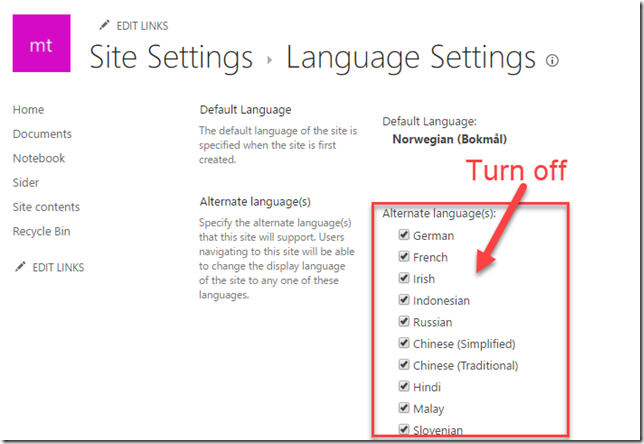
The culprit is that a team site by default have all languages available, and when applying a composed look it will apply this per language. There might be a technical sound explanation for this which I’m not aware of, but here goes.

image

Before applying the composed look, turn off all languages except the default one (/_layouts/15/muisetng.aspx). Apply the composed look without any timeout issues what so ever, and then re-enable the UI languages you need on the site.

01 Jun 10:07

Windows Mobile lebt: Microsoft arbeitet an großem Refresh und neuer Hardware

Microsofts Versuche, im Mobilsektor Fuß zu fassen, sind bisher allesamt gescheitert. Neuen Informationen zufolge haben die Redmonder die Flinte aber noch nicht ins Korn geworfen.

Microsoft arbeitet an neuen Windows-Mobile-Geräten und neuer Software

Wie der gut vernetzte Brad Sams auf dem renommierten Blog Thurrot berichtet, will er von zwei Microsoft-nahen Quellen erfahren haben, dass neue Hard- und Software in Arbeit sei. Offenbar werde mindestens ein Smartphone entwickelt, außerdem arbeite das Unternehmen an einem neuen Zweig von Windows Mobile.

Die nächsten Windows-Smartphones werden laut Microsoft-Chef nicht mehr wie herkömmliche Smartphones aussehen. (Bild: Microsoft)

Laut Sams werde sich die Nutzeroberfläche von der bisherigen Kacheloptik unterscheiden. Allerdings gebe es noch keine konkreten Details dazu, da die Software sich noch in einer früher Entwicklungsphase befände. Dem Beitrag zufolge scheint Microsoft die Entwicklung vom anstehenden Windows 10 Mobile Redstone 3 angehalten zu haben, sodass für existierende Geräte wohl keine Feature-Updates mehr erscheinen werden.

Weiter berichtet Sams, dass Silverlight-Apps mit der aktualisierten Plattform nicht mehr kompatibel sein könnten. Die Entwicklung befände sich indes noch in einer relativ frühen Phase, sodass die Pläne sich bis zur finalen Version noch ändern könnten. Er rechnet damit, dass die neue Plattform innerhalb des nächsten Jahres präsentiert werden könnte.

Microsofts neue Windows-Mobile-Plattform – anders als bisherige Smartphones

Dass Microsoft an einem neuen Ansatz arbeitet, hatte Satya Nadella schon Anfang Mai bestätigt, als er sagte, die nächsten Smartphones würden nicht wie herkömmliche Smartphones aussehen. Man verfolge bei künftigen Smartphones einen ähnlichen Ansatz wie bei den Surface-2-in-1-Geräten.

Im „Surface Phone“ ausgereift? Microsofts Desktop-Ersatz Continuum. (Foto: Microsoft)

Was Microsoft mit seiner nächsten Smartphone-Generation plant, deutet sich anhand diverser Projekte und Partnerschaften an, die sich in erster Linie um die Verbesserung der Continuum-Funktion drehen: Smartphones sollen künftig in Kombination mit Tastatur, Display und Maus als Desktop-Ersatz fungieren. Einer der ersten Schritte in diese Richtung ist beispielsweise die Möglichkeit, ein volles Windows 10 auf Qualcomms Smartphone-Prozessor Snapdragon 835 auszuführen. Erste Produkte werden noch im Laufe dieses Jahres erscheinen.

Eines ist sicher: Microsoft kann und darf den mobilen Markt nicht einfach der Konkurrenz überlassen – dafür ist das Mobilgeschäft einfach zu wichtig. Immerhin zeigen die Redmonder sich (zwangsläufig) offen und erweitern sukzessive ihr Produktangebot für Android und iOS. Zuletzt hat Microsoft den „Microsoft Graph“ angekündigt, mit dem sich Arbeitsabläufe über die großen Plattformen hinweg synchronisieren lassen können.

Weiterführende Links:

01 Jun 10:06

Microsoft’s “Always Connected PCs” Initiative Brings eSIMs to PCs

by Paul Thurrott
Microsoft's "Always Connected PCs" Initiative Brings eSIMs to PCs

At Computex 2017 this morning, Microsoft announced that it will partner with chipmakers like Intel and Qualcomm, PC makers, and mobile operators on a new "Always Connected PCs" initiative.

The post Microsoft’s “Always Connected PCs” Initiative Brings eSIMs to PCs appeared first on Thurrott.com.

01 Jun 10:00

Hindernisse beim Crosslauf – wer konnte damit rechnen?

by Udo Vetter

Wer an einem Waldcrosshindernislauf teilnimmt, muss mit Beschwerlichkeiten rechnen. Diese Erkenntnis schreibt das Landgericht Köln einem Freizeitsportler ins Stammbuch. Der Mann hatte gegen den Veranstalter des Hindernislaufs geklagt, weil er sich in einem künstlich angelegten Teich, der zum Parcours gehörte, das Bein brach.

Bei dem Rennen mussten die rund 10.000 Teilnehmer eine Wasserrutsche herabgleiten, die in dem künstlichen Teich mündete. Die Plane in dem Becken hatte Falten geworfen. Deswegen, so der Sportler, habe er sich das Bein gebrochen. Der Mann verlangte Schadensersatz und Schmerzensgeld in Höhe von 5.000 Euro.

Das Landgericht weist allerdings darauf hin, dass bei einem Waldcrosshindernislauf absichtlich Hindernisse aufgebaut werden, die Barrieren in freier Natur nachempfunden seien. Die Falten in der Bodenplane des Teiches seien deshalb nicht anders zu beurteilen als Bodenunebenheiten in einem natürlichen Wassergraben. Überdies habe der Veranstalter durch Schilder und Ordner auf das Verletzungsrisiko hingewiesen und um „angepasstes Laufverhalten “ gebeten. Den anderen Teilnehmern sei, soweit bekannt, auch nichts passiert.

Insgesamt, so die Richter, sollte sich jemand, der beim Laufsport Unebenheiten vermeiden möchte, nicht für einen waghalsigen und anspruchsvollen Waldcrosshindernislauf anmelden. Er sei da besser in einer Sporthalle aufgehoben; dort seien Unebenheiten nicht zu befürchten (Aktenzeichen 3 O 129/16).

Flattr this!

01 Jun 10:00

Ein Richter erklärt das Internet – und zwar gut

by Udo Vetter

Das Amtsgericht Bocholt beschäftigt sich in einem aktuellen Beschluss mit zwei Fragen, die im Zusammenhang mit dem Vorwurf des Besitzes von Jugend- und Kinderpornografie immer wieder eine Rolle spielen. Dabei setzt sich das Gericht recht deutlich von der überwiegenden Rechtsprechung ab.

Zunächst ging es um die Frage, wann ein Foto jugendpornografisch ist. Der mutmaßliche Täter soll zahlreiche pornografische Bilder „eines etwa 16-jährigen Mädchens“ auf seinem Rechner gespeichert haben.

Hierzu führt das Amtsgericht Bocholt aus, es sei schon nicht erkennbar, dass es sich um eine 16-Jährige handelt. Allein vom visuellen Eindruck sei eine Unterscheidung zwischen einer 16-jährigen Jugendlichen und einer 18-jährigen jungen Frau mit der nötigen Sicherheit nicht möglich. Eine Strafbarkeit komme in solchen Fällen nur in Betracht, wenn die abgebildeten Personen „ganz offensichtlich“ nicht volljährig sind, etwa dann, wenn sie fast noch kindlich wirken und eine Abgrenzung eher zum Straftatbestand der Kinderpornografie (Bilder von unter 14-Jähriger) nahe liegt.

Der Richter hält es angesichts des visuellen Eindrucks der Bilder für „nicht nachvollziehbar“, wieso die Staatsanwaltschaft von einer Frau unter 18 Jahren ausgehe. Im Zweifel, so das Gericht, müsse davon ausgegangen werden, dass die abgebildete Person nicht mehr minderjährig sei. Im entschiedenen Fall konnte nicht geklärt werden, wer auf den Fotos zu sehen ist.

Außerdem musste das Gericht die Frage beantworten, ob lediglich im Zwischenspeicher des Rechners (Cache) gespeicherte Dateien schon den Tatbestand des „Besitzes“ von Kinderpornografie erfüllen. Hier bietet es sich wirklich an, dass ich die Argumentation des Gerichts komplett zitiere. Was der Richter schreibt, ist nämlich höchst lesenswert.

Hier also der Beschluss:

Aus der Pfadbeschreibung der jeweiligen Fotos ergibt sich, dass diese unter dem Namen des Angeschuldigten/AppData/Local/Microsoft/Windows/TemporaryInternetFiles/Low/Content befunden haben. Sie befinden sich damit in einem Bereich, in dem der Nutzer nicht bewusst Daten speichern kann, sondern in dem das Betriebssystem Windows automatisch, ohne Einwirkungsmöglichkeit des normalen Nutzers Daten speichert.

Aus dem Pfad geht also zunächst einmal nur hervor, dass der Angeschuldigte oder eine dritte Person, die Zugang zu dem Rechner hatte, diese Bilder betrachtet hat und dann die Daten automatisch gespeichert wurden. Öffnet somit der Nutzer eine X-beliebige Internetseite über seinen Browser so wird diese im Hintergrund gespeichert mit dem Ziel, dass, wenn der Nutzer zu einem späteren Zeitpunkt erneut auf die Seite, hier also die inkriminierenden Bilder, zugreift, diese schneller aufgebaut werden könnten und nicht nochmal heruntergeladen werden müssten (Vergleiche Was ist Cache leeren http: …praxistipps.chip.de/was-ist-cache-leeren-einfach-erklaert_41811 Stand 23.03.2017). Die Funktion wurde in das Betriebssystem Windows Anfang der 2000er, als die Datenverbindungen langsam waren und es noch keine Flatrates gab, sondern die Kosten entsprechend dem Traffic erhoben wurden, implementiert.

Wie der Name Cache schon sagt, bedeutet dies nicht, dass der Nutzer auf diese Daten unmittelbaren Zugriff hat, sondern Cache bedeutet so viel wie „verstecken“. Er wird verwendet, da die im Cache gespeicherten Daten selbst vor dem Nutzer versteckt werden (Vergleiche: Was ist Cache a.a.O). Entsprechend hat der Nutzer auf die im Cache gespeicherten Daten zunächst einmal keinen Zugriff, denn in der normalen Verzeichnisstruktur ist der Pfad „AppData“ nicht sichtbar. Diese Daten werden nur angezeigt, wenn die Funktion „geschützte Systemdateien ausblenden“ deaktiviert wird und dafür die Funktion „versteckte Dateien und Ordner anzeigen“ aktiviert wird (Vergleiche: Verstecke Dateien anzeigen, http: …praxistipps.chip.de/versteckte-dateien-in-windows-7-anzeigen_1282, Stand 23.03.2017). Vor diesem Hintergrund ist der Besitz zweifelhaft.

Selbst wenn man dies vorliegend annehmen würde, so reicht allein der Umstand, dass in einem automatischen Verfahren kinderpornographische Inhalte auf der Festplatte des Nutzers gespeichert wurden zum Nachweis des Besitzwillens nicht aus (Vergleiche Gercke in Spindler/Schuster Rechte der elektronischen Medien, 3. Auflage 2015 § 184 b StGB Randnummer 25). § 184b ist kein Unternehmensdelikt denn § 184b Abs. 1 in Verbindung mit § 11 Abs. 3 StGB setzt ein tatsächliches Herrschaftsverhältnis über die Bilder voraus mit der Möglichkeit, die Bilder sich und anderen zugänglich zu machen. Dies muss vorsätzlich geschehen, wobei der Vorsatz als direkter oder bedingter Vorsatz gegeben sein muss. Wusste der Angeklagte nicht, dass die Bilder im Cache gespeichert werden, so setzt die Strafbarkeit erst ein, sobald der Angeschuldigte erkennt oder aber billigend in Kauf genommen hat, dass er Kinderpornographie besitzt und den Besitz gleichwohl fortsetzt (OLG Oldenburg, Urteil vom 29.11.2010 – 1SS166/10 zitiert nach Beck RS 2010).

In Zeiten des Cloud Speichers, in der üblicherweise insbesondere auch Bilder privater Natur im Netz gespeichert werden, erscheint diese Funktion wie ein Anachronismus. Anders als noch vor 10 Jahren, als die Nutzer bereits im praktischen Betrieb erkennen konnten, dass Bilder im Cache gespeichert wurden, beispielsweise am schnelleren Seitenaufbau oder der Nichtbelastung des mit dem Provider vereinbarte Datenvolumens, ist dies in der heutigen Zeit aus den vorgenannten Gründen nicht mehr erkennbar. Auf das Datenvolumen braucht der Nutzer heutzutage bei einer Flatrate nicht zu achten und die Geschwindigkeit des Seitenaufbaus ist beim Highspeedinternet ebenso schnell wie beim Herunterladen von der Festplatte. Gegenteilige insbesondere ältere Entscheidungen, die von einer Kenntnis des Nutzers von der Datenspeicherung im Cache ausgehen, sind aufgrund der technischen Entwicklung überholt. Der durchschnittliche Nutzer weiß im Zweifel daher nicht mehr, dass schon beim Betrachten von Bildern Daten im sogenannten Cache gespeichert werden (Vergleiche OLG Zweibrücken MMR 2016, 831, 832 f).

Dass der Angeklagte, der von sich unwiderlegbar behauptet, von den Bildern keine Kenntnis gehabt zu haben, solche überdurchschnittlichen Kenntnisse im PC Bereich hatte, ist nicht feststellbar. Der Nachweis wird letztlich im Hauptverfahren nicht zu führen sein so dass trotz der abscheulichen Bilder aus tatsächlichen Gründen eine Verurteilung nicht zu erwarten ist.

In diesem Zusammenhang ist auch darauf hinzuweisen, dass nicht einmal feststeht, dass der Angeschuldigte bewusst die inkriminierenden Bilder betrachtet hat. Im Zeitalter von Web 2.0 ist es jedermann problemlos möglich, Bilder ins Internet zu stellen. Hierdurch ist es auch möglich, Straftäter wider Willen zu generieren. Dies ergibt sich aus folgendem Szenario: Speichert beispielsweise ein x-beliebiger Straftäter Bilder kinderpornographischen Inhalts im Internet, beispielsweise bei Dropbox oder Amazon Cloud oder vergleichbaren Clouddiensten, so hat er die Möglichkeit, einen Link zu generieren und diesen dem Angeschuldigten zu schicken. Öffnet der ahnungslose Angeschuldigte dann diesen Link, so hat er die Bilder auf seinem Rechner und damit auch im Cache, ohne dass er überhaupt die Absicht hatte, derartige Bilder zu betrachten. Es ist hierdurch möglich jede x-beliebige Person zum Besitzer von kinderpornographischen Bildern zu machen. Da es auch technisch möglich ist, einen Link zu einem Verzeichnis mit einer Vielzahl an Bildern zu generieren, können auch entsprechen viele Bilder im Cache des Nutzers sein.

So könnte ein Straftäter jede x-beliebige Person allein dadurch zum Straftäter machen, indem er einen Link mit kinderpornographischem Inhalt an diese verschickt und diese irrtümlich ohne Kenntnis vom Inhalt den Link öffnen. Die Daten sind dann im Cache gespeichert und der Nutzer hätte kaum Möglichkeiten, diese Bilder zu entfernen, es sei denn, es verfügt über entsprechende Computerkenntnisse. Denn die Funktion von Microsoft „Datenträgerbereinigung“ löscht die Daten des Cache nicht mit der erforderlichen Sicherheit. Dies ist nur manuell möglich und verlangt tiefgreifende Kenntnisse über das Betriebssystem Windows, um überhaupt die Daten zu entfernen. Ein sicheres Entfernen geht nur über Spezialprogramme wie beispielsweise CC Cleaner, wobei nicht von jedermann verlangt werden kann, derartige Programme zu installieren.

Letztendlich ist dem Angeschuldigten vorliegend vom Besitz ausgehend, nicht nachzuweisen, dass er wusste oder wissen musste, dass die hier in Rede stehenden Fotos aus seinem Rechner im Cache gespeichert werden. Hinsichtlich der hier angesprochenen technischen Zusammenhänge bedurfte es nicht der Einholung eines Sachverständigen, da das Gericht über eigene Sachkunde verfügt, die auch in einer Vielzahl von Publikationen zum Thema IT und IT Recht dokumentiert ist.

Aktenzeichen 3 Ds 540 Js 100/16 – (581/16)

Flattr this!

01 Jun 10:00

Announcing the Microsoft Planner mobile app for iPhone and Android

by Planner Team

We are pleased to announce that the new Microsoft Planner mobile app is now available for iPhone and Android phones. Starting today, current Planner users can use this companion app to view and update their plans on the go, addressing feedback we’ve heard since the launch of the Planner web app. For people who are new to Planner, you can first get started by visiting tasks.office.com. Once you’ve created your plans in the web app, you can view and update those plans in the mobile experience.

Planner is available to customers with Office 365 Enterprise E1–E5, Business Essentials, Business Premium and Education subscription plans. Current Planner users can download the app for Android and iOS.

Side-by-side images of the Planner mobile app on the iPhone (left) and Android (right).

In the coming months, we plan to add push notifications, the ability to create new plans from the mobile app and integration with Intune.

For other feature requests, please visit our UserVoice page and submit your idea. And as always, visit the TechCommunity page to communicate with other Microsoft Planner users and the product team.

To get the Microsoft Planner mobile app, leave a suggestion or ask for help, follow these links:


Frequently asked questions

Q. What is Planner?

A. Planner provides a simple, visual way to organize teamwork. The Planner mobile app enables your team to organize and assign tasks, share files, chat about what you’re working on and get updates on progress.

Q. How can I access Planner?

A. If you’re new to Planner, you can access the web app via tasks.office.com to start and build your plans. Existing users can access Planner through both the web and mobile experiences. If you don’t have an eligible license of Office 365, please visit our product page to learn more about which subscriptions include Planner. If you have an eligible license and would like to learn more about Planner, please visit our support page.

Q. Which features are coming next?

A. Updates including push notifications, the ability to create a plan and Intune integration are coming soon, and we look forward to hearing your feedback about how we can improve the Microsoft Planner mobile experience.

Q. Where can I learn more about the functionality of the Planner mobile app?

A. Please visit iPhone support and Android support to learn more about features and functionality of the mobile app.

The post Announcing the Microsoft Planner mobile app for iPhone and Android appeared first on Office Blogs.

01 Jun 09:59

BMW Werk München: Neue Lackiererei schont die Umwelt

by Benny

Mit einer neuen Lackiererei im BMW Werk München setzt die BMW Group ein weiteres Zeichen für Nachhaltigkeit und saubere Produktion. Das Stammwerk des Unternehmens verfügt nun über eine der modernsten Lackierereien der Automobilindustrie. Lackiert wird nun – wie an anderen Standorten der BMW Group schon seit längerer Zeit – mit der IPP-Technologie. Der Integrated Paint Process kommt ohne das früher notwendige Auftragen und Trocknen einer Füllerschicht aus, stattdessen werden zwei Basis-Lackschichten “nass in nass” auf die Oberflächen aufgetragen.

Die Eigenschaften und Funktionen der früher üblichen Füller-Grundierung werden von der ersten Schicht vollständig übernommen, die zweite Schicht sorgt für die optischen Eigenschaften wie Farbe, Effekt und Tiefenwirkung. Im Anschluss wird die Lackierung mit einer Schicht Klarlack überzogen, die für eine erhöhte Beständigkeit gegenüber Chemikalien und Kratzern sorgt. Im Werk München setzt die BMW Group nun erstmalig eine vollautomatisierte Qualitätskontrolle in der Lackiererei ein. Beim Scan der Oberflächen mit Hilfe von Robotern können selbst kleinste Fehler erkannt werden, die das menschliche Auge nicht wahrnehmen kann.

Durch die neue Hightech-Lackiererei sinken auch der Ressourcen-Verbrauch und die Schadstoff-Emissionen des Werks München spürbar. Mit der neuen Technik ist rund ein Viertel weniger Strom als bisher nötig, der Erdgasverbrauch sinkt um die Hälfte und auch die CO2-Emissionen werden halbiert. Die innovative Trockenabscheidung kommt komplett ohne Wasser, Chemie und andere Zusatzstoffe aus und dank neuer Umluft-Technologien konnte auch die emittierte Abluft um rund zwei Drittel reduziert werden.

Diese Sauberkeit zahlt sich aus, denn allein im BMW Werk München werden pro Tag bis zu 1.000 Karosserien von Fahrzeugen der 3er- und 4er-Reihe lackiert. Im Jahr 2016 liefen in München insgesamt 216.761 Fahrzeuge vom Band, hinzu kamen über 560.000 Motoren mit 3 bis 12 Zylindern.

Oliver Zipse (Produktionsvorstand der BMW Group): “Unsere Investition von mehr als 200 Millionen Euro für die neue Lackiererei ist eine der höchsten in der Industrie in Bayern der vergangenen Jahre. Die Lackiererei ist damit nicht nur für unser Werk, sondern auch für die Stadt München ein echter Gewinn. Durch höhere Prozessqualität und Flexibilität können wir künftig die Wünsche unserer Kunden noch besser erfüllen und leisten darüber hinaus einen substantiellen Beitrag zum Umweltschutz.”

Ilse Aigner (Bayerische Wirtschaftsministerin): “BMW beweist mit dieser Investition einmal mehr Weitblick und investiert konsequent in die Zukunft. Das ist wichtig, um Wettbewerbsfähigkeit zu erhalten – und damit Wertschöpfung und Arbeitsplätze in Bayern. Für mich ist entscheidend, dass bayerische Unternehmen die Chancen der Digitalisierung nutzen.”

Milan Nedeljkovic (Leiter BMW Group Werk München): “Die Lackierstraßen werden somit noch umweltfreundlicher. Ein Aspekt, dem aufgrund der Lage unseres Werkes inmitten Münchens eine besondere Bedeutung zukommt.”

01 Jun 09:59

Logitech MX Master 2S im Hands on: Mausschieben deluxe

Bilder, Texte oder Daten einfach vom einen Rechner auf den anderen verschieben oder kopieren: Mit neuen Mäusen von Logitech geht das verblüffend einfach, selbst über Betriebssystemgrenzen hinweg. Golem.de hat es mit der MX Master 2S ausprobiert. Ein Hands on von Peter Steinlechner (Logitech, Eingabegerät)
01 Jun 09:59

Google Maps unter Android Auto im Test

Google Maps bringt Sie auch unter Android Auto zuverlässig zum Ziel. Mit exakten Verkehrslageangaben.
01 Jun 09:53

How Basic Performance Analysis Saved Us Millions

01 Jun 09:51

Europol jagt online Kinder- schänder mit neuer Methode

Über eine Website jagt Europol nun Kinderschänder mit einer neuen Methode. Und braucht dazu die Hilfe der Web-Nutzer.
01 Jun 09:06

Immersive Reader comes to Outlook on the web and the OneNote for Windows 10 app, and expands its global reach

by OneNote Team

In February, we announced the availability of the Microsoft Learning Tools Immersive Reader on Word Online and OneNote Online. As a result of customer demand, we are pleased to announce that Immersive Reader is now available for Outlook.com, Outlook on the web and the OneNote Windows 10 app. Immersive Reader includes a view that utilizes techniques proven to help people read more effectively, such as:

  • Read Aloud—Reads text out loud with simultaneous highlighting that improves decoding, fluency and comprehension while sustaining the reader’s focus and attention.
  • Spacing—Optimizes font spacing in a narrow column view to improve reading fluency for users with visual crowding issues.
  • Syllables—Shows the breaks between syllables to enhance word recognition and decoding.
  • Parts of Speech—Supports writing instruction and grammar comprehension by identifying verbs, nouns and adjectives.

In addition to the Immersive Reader rollout across new apps and platforms, we are also adding new language and geographic availability for the Read Aloud, Syllables and Parts of Speech features. This expanded language support—coming to Word Online, OneNote Online, Outlook on the web and the OneNote Windows 10 app—will allow more customers across the world to experience the benefits of both the Learning Tools and the Immersive Reader. For the OneNote Desktop Learning Tools add-in, we are launching Japanese dictation, plus bug fixes and other small improvements. See all of the details at the Learning Tools language support page.

And finally, we are excited to announce the availability of Try it out—an updated and enhanced capability on the recently redesigned Microsoft Learning Tools landing page. Try it out allows anyone to quickly and easily try out the Immersive Reader, without needing an Office 365 ID or a Microsoft account. We hope these announcements enable more people to read in a way that works best for them, and we look forward to hearing impactful stories from more of you, such as this story about empowering students to read in a new way.

Immersive Reader brings increased accessibility to Outlook on the web

In talking with customers, a common request we heard was to bring the same Immersive Reader capabilities of Word Online and OneNote Online to those accessing Outlook via the web. Starting today, the Immersive Reader will begin rolling out to Outlook.com and Outlook on the web worldwide.

There are several ways to launch the Immersive Reader in Outlook on the web or Outlook.com:

  • On any received message, select the Reply all drop-down and then select Show in immersive reader.
  • Right-click any message and select Show in immersive reader.
  • From the main message view, click the and select Show in immersive reader.

The new Immersive Reader for Outlook on the web and Outlook.com will be available in many languages and countries. Visit the Learning Tools language support page to learn more.

Immersive Reader comes to the OneNote Windows 10 app

Since the release of Learning Tools for OneNote Desktop, many customers have asked for these same capabilities in our OneNote Windows 10 app. With the June OneNote Windows 10 app update, the Immersive Reader will be available to all customers via the View menu and will be pre-installed.

In the OneNote for Windows 10 app, a red square highlights the Immersive Reader button located under the View menu.

The new Immersive Reader in OneNote Windows 10 will be available in many languages and countries. Visit the Learning Tools language support page to learn more.

Expanding the global reach of the Immersive Reader

Since the Immersive Reader rolled out to Word Online and OneNote Online in February, customers all over the world asked us to expand these capabilities to more languages. Today, we are pleased to announce that Read Aloud is now available in 14 new languages and geographies, including:

  • Arabic (Saudi Arabia)
  • Czech
  • English (Ireland)
  • French (Switzerland)
  • German (Austria)
  • German (Switzerland)
  • Greek
  • Hebrew
  • Hindi
  • Hungarian
  • Indonesian
  • Romanian
  • Slovak
  • Thai

In addition, the Syllables feature is being added to four languages: Hungarian, Indonesian, Romanian and Slovak.

Finally, the Parts of Speech feature for German, Italian and Dutch will be enabled for Word Online, OneNote Online and Outlook on the web in the next few weeks. Norwegian, Swedish, Finnish, Danish and Brazilian Portuguese languages will be available later this summer.

Visit the Learning Tools language support page to see the current list of languages for the Immersive Reader.

Try it out—the updated and enhanced landing page for Learning Tools

With the recent interest and popularity of the Learning Tools and the Immersive Reader, we wanted to allow anyone to quickly try out the functionality through any web browser and experience all its benefits and features. We recently updated our Learning Tools landing page with the Try it out function that immediately launches the Immersive Reader. You can also put your own custom text in and try it out. The new Try it out feature supports 39 languages, so people from around the world can immediately experience the Immersive Reader.

Image shows "Try it out" button displayed on the Learning Tools landing page. Image is linked to the Learning Tools landing page.

Japanese dictation language added to the OneNote Desktop Learning Tools add-in

Support for Japanese dictation on OneNote Desktop has been added, in addition to bug fixes and stability improvements to the add-in. You can grab the latest version (v1.3) of the OneNote Desktop Learning Tools add-in on the Microsoft Learning Tools page.

In the OneNote Desktop, the Japanese dictation option is selected under the Dictate menu.

You can download the Learning Tools at www.onenote.com/learningtools. Send any feedback to LearningTools@onenote.uservoice.com or reach out on Twitter: @OneNoteEDU.

—The OneNote team

The post Immersive Reader comes to Outlook on the web and the OneNote for Windows 10 app, and expands its global reach appeared first on Office Blogs.

01 Jun 09:06

Announcing general availability of the Office 365 Centralized Deployment service

by Office 365 Team

Office add-ins help Office users to personalize their work experience and streamline data access. Late last year, we announced the Centralized Deployment service in preview, which allows administrators to deploy Office web add-ins. Today, we are excited to announce general availability of Centralized Deployment.

From the Office 365 admin center or by using PowerShell scripts, administrators can deploy Office web add-ins to individual users, groups or an organization with ease, using Centralized Deployment. Users can simply open Office applications—such as Word, Excel or PowerPoint on Windows, Mac or Office Online—to see the add-ins installed on their ribbon. This allows organizations—large and small—to easily extend Office with high-value services across all platforms.

Image shows the Office 365 admin center displaying a list of add-ins that can be deployed using Centralized Deployment.

Add-ins built internally for use within an organization, as well as add-ins from the Office Store or Microsoft AppSource, can be deployed using Centralized Deployment to tenants worldwide.

“With Office 365 Centralized Deployment, we could deploy Qorus easily to our global user base, and the process is transparent to users. When they open Microsoft Word or PowerPoint, they find the add-in already installed.”
—Eric Jacobs, Genetec

Get started with Centralized Deployment


Frequently asked questions:

Q. How do you target add-in user assignments with Centralized Deployment?

A. Centralized Deployment supports users in top-level groups, Office 365 Groups, distribution lists and security groups that are top-level groups supported by Azure Active Directory.

Q. How do I know if my organization is set up for Centralized Deployment?

A. Centralized Deployment requires a recent version of Microsoft Office and OAuth enabled version of Exchange. IT admins can run a quick test to ensure compatibility and determine if their organization has the correct configuration prior to getting started. Learn more about configuration requirements and try the compatibility add-in.

Q. What languages and worldwide Office data centers are supported?

A. Today, we have worldwide support for Centralized Deployment for all supported Office languages. We also support the Microsoft Office sovereign datacenters for Germany, with support for Chinese sovereign deployment coming later in the year.

Q. What type of deployment telemetry is available?

A. Telemetry will be available shortly for IT admins to see data about deployments and usage in reports in the Office 365 admin center, and for developers to see their add-in deployments in the Office ISV Seller Dashboard, their developer portal.

Q. Can IT admins and users turn off add-ins?

A. IT admins may turn on or off the add-ins they deploy for all users from the Office 365 admin center. Soon, we will support the ability for users turn off add-ins that are deployed to them, so they are no longer shown on the Office applications ribbon.

Q. How do I deploy Outlook add-ins?

A. Centralized Deployment currently supports Word, Excel and PowerPoint add-ins on Windows, Mac or Office Online. Today, you can deploy Outlook add-ins from the Exchange management pages. This experience will merge with Centralized Deployment shortly.

The post Announcing general availability of the Office 365 Centralized Deployment service appeared first on Office Blogs.

01 Jun 09:04

Tipp: Einfacher Screenshots erstellen unter Windows 10

by Armin Osaj

Hinweis: Benötigt das Windows 10 Creators Update. Wie ihr es erhalten könnt, erfahrt ihr hier.

In einigen Situationen möchte man schnell den Bildschirminhalt mit Freunden teilen. Dazu werden einem unter Windows viele Möglichkeiten geboten. Darunter fällt die Tastenkombination Windows + Druck, das Snipping Tool, oder auch der Windows Ink Arbeitsbereich.

Mit dem Creators Update hat Microsoft jedoch eine weitere, sehr bequeme Methode hinzugefügt. Und zwar lassen sich mit der Tastenkombination Windows + Shift + S sehr leicht Screenshots erstellen.

Wie funktioniert das?

Nachdem man alle drei Tasten gleichzeitig gedrückt hat, nimmt Windows 10 unseren Bildschirminhalt auf. Nun wird dieser etwas heller dargestellt und unser Mauszeiger ändert sich. Jetzt können wir den Bereich markieren, der abgespeichert werden soll. Ganz einfach mit der Maus ziehen, oder für Tastatur-Nutzer alternativ die Enter-Taste drücken und danach mit den Pfeiltasten navigieren.

Wenn wir unseren Bereich markiert haben, lassen wir die Maus einfach los, oder drücken erneut die Enter-Taste. Doch wohin wurde jetzt unser Screenshot abgespeichert? In der Zwischenablage! Diesen können wir jetzt in Programmen einfügen, die das unterstützen. Darunter fallen Skype, Telegram, aber auch Webbrowser. Mit Letzterem lassen sich die Screenshots einfach in Facebook, Twitter oder WhatsApp-Nachrichten/Beiträgen einfügen, ohne nervig eine Datei abspeichern und suchen zu müssen.

Falls wir den Screenshot dennoch als Datei abspeichern möchten, können wir diesen einfach in Paint 3D einfügen und dann als 2D Bild abspeichern.

Der Beitrag Tipp: Einfacher Screenshots erstellen unter Windows 10 erschien zuerst auf WindowsArea.de.

01 Jun 09:04

Atom-Duell: Döschner kneift – und wir wissen, warum!

by Rainer Klute

Von Dr. Anna Veronika Wendland

Die Nuklearia hat heute abend allen Grund, eine Flasche Sekt aufzumachen. Jürgen Döschner, der WDR-Energieexperte, der den Großteil seiner Energie auf das Skandalisieren der Kernenergie verwendet, sieht sich nicht in der Lage, als Diskutant eines Streitgesprächs über die Kernenergie die Klinge mit uns zu kreuzen. Und warum?

Nicht etwa, weil er keine Zeit hätte oder keine Lust. Und auch nicht, weil er etwa feige kneifen wolle, wie die meisten Leser auf Twitter und Facebook ihm unfreundlicherweise unterstellen.

Sondern: weil er »Journalist« sei, nicht etwa Vertreter einer Meinung. Schon gar nicht einer Meinung zur, oder – Gott bewahre –, gegen die Kernenergie. Da fragt sich der Döschner-Exeget im Reaktorfahrer: Was für Transienten fährt der Mann eigentlich gerade? Meint er es so, wie alle von Petry bis Kässmann: »Ich habe es zwar genau so gesagt, aber das Volk hat mich einfach nicht verstanden«?

Oder ist dieser linguistische Massendefekt doch tiefer begründet? Unser bescheidener, schon leicht verstrahlter Verstand stellt also weitere Vermutungen an. Haben wir womöglich den Herrn Döschner all die Jahre hindurch einfach missverstanden? Waren seine endlosen Paraden von Schrott-, Riss- und Bröckelreaktoren, die täglich dräuenden Super-GAUs über Aachen und Freiburg, das zu warme Notkühlwasser der Osteuropäer und das zu kalte Profitkalkül der Gronauer Brennelementbauer – waren all diese nuklearen Greuel, denen Döschner so viele Sendeminuten gewidmet hat, dass die Zeit glatt ausreichen würde, um währenddessen eine Ladung Atommüll vollständig abklingen zu lassen, waren sie nur Produkt unserer Phantasie, die den auslegungsgemäßen Siedeabstand überschritten hat?

Oder, halt, war das am Ende einfach nur der übliche Zungenschlag eines zu Sachlichkeit und Unparteilichkeit angehaltenen und deswegen von uns finanzierten öffentlich-rechtlichen Journalismus? Wir meinen: nein, und nochmals nein, weit gefehlt! Wir von der Atomlobby sind zwar keine ausgebildeten Tiefenpsychologen, aber wir vermuten hier eine ganz anders gelagerte Motivik.

Hinter all den Atom-Aversionen des Jürgen D., so unsere Hypothese, steckt in Wirklichkeit ein verhinderter Nuklearier. Ein Mensch, dessen körperlich-intellektuelles Dasein mit seiner seelischen Identität nicht zusammenfindet, sozusagen ein Transgender der Kerntechnik. Ein leidendes Individuum, das sich in der Tiefe seines Herzens danach sehnt, in den warmen Umarmungen eines gut durchgeheizten KKW-Kontrollbereichs die Nachtschicht zu durchschlummern, mit einem Overall als Kopfkissen und einem Satz Borsäuresäcke als Matratze. Ein einsamer Wolf, der, statt im WDR-Büro auf seinen Bildschirm zu starren und die Likes unter seinen Facebook-Einträgen zu zählen, lieber im Kontrollraum eines Reaktorblocks säße, mit vierzig Monitoren vor der Nase und, Gipfel der Begierde, der Reaktorschnellabschaltung auf Armeslänge. Von den Revisionen ganz zu schweigen, wo man die RESA sogar auslösen darf, ohne dafür auf die Finger zu kriegen.

Kurzum: Sei uns nach dieser Absage doppelt willkommen, lieber Jürgen Döschner! Denn: Wir verstehen Dich. Wir werden weiter Deine Texte lesen und Deine Filmchen schauen. In unseren Hilfsanlagengebäuden gibt es heimlich aufgehängte Döschner-Pinups auf verborgenen Nebenleitständen. Wir halten immer einen Podiumsplatz in unserem Herzen für Dich frei, unsere Personenschleusen stehen für Dich offen, und wenigstens ein Notkühlsystem-Strang ist bei uns immer für Dich beheizt.

Literaturtipps


Dr. Anna Veronika Wendland

Dr. Anna Veronika Wendland ist Historikerin mit einem kerntechnischen Arbeitsschwerpunkt, der sie ab und zu in das Innere von Kernkraftwerken führt. Im Nebenjob ist sie Beauftragte für Atom-Steampunk der Nuklearia.

Der Beitrag Atom-Duell: Döschner kneift – und wir wissen, warum! erschien zuerst auf Nuklearia.

01 Jun 09:03

DSC Resource Kit Release May 2017

by Katie Keim [MSFT]

We just released the DSC Resource Kit! This release includes updates to 10 DSC resource modules including 3 new resources. In these past 6 weeks, 60 pull requests have been merged and 58 issues have been closed, all thanks to our amazing community!

The modules updated in this release are:

  • SharePointDsc
  • SecurityPolicyDsc
  • xCertificate
  • xComputerManagement
  • xCredSSP
  • xExchange
  • xHyper-V
  • xNetworking
  • xSqlServer
  • xStorage

UPDATE – xDFS has now also been released. Release notes can be found on the PowerShell Gallery here.
xStorage, xNetworking, and xCertificate have also just been released again to fix a conflict when using the modules together.

PSDscResources is also in the pipeline for release, but it is currently failing tests in AppVeyor.
It will be released when tests are passing.

For a detailed list of the resource modules and fixes in this release, see the Included in this Release section below.

Our last community call for the DSC Resource Kit was last week on May 24. A recording of our updates as well as summarizing notes are available. Join us next time to ask questions and give feedback about your experience with the DSC Resource Kit. Keep an eye on the community agenda for the link to the next call.

We strongly encourage you to update to the newest version of all modules using the PowerShell Gallery, and don’t forget to give us your feedback in the comments below, on GitHub, or on Twitter (@PowerShell_Team)!

All resources with the ‘x’ prefix in their names are still experimental – this means that those resources are provided AS IS and are not supported through any Microsoft support program or service. If you find a problem with a resource, please file an issue on GitHub.

Included in this Release

You can see a detailed summary of all changes included in this release in the table below. For past release notes, go to the README.md or Changelog.md file on the GitHub repository page for a specific module (see the How to Find DSC Resource Modules on GitHub section below for details on finding the GitHub page for a specific module).

Module Name Version Release Notes
SharePointDsc 1.7.0.0
  • Update SPSearchIndexPartition made ServiceAppName as a Key
  • New resouce: SPTrustedRootAuthority
  • Update SPFarmSolution to eject from loop after 30m.
  • New resource: SPMachineTranslationServiceApp
  • New resource: SPPowerPointAutomationServiceApp
  • Bugfix in SPSearchFileType made ServiceAppName a key property.
  • New resource: SPWebApplicationExtension
  • Added new resource SPAccessServices2010
  • Added MSFT_SPSearchCrawlMapping Resource to manage Crawl Mappings for Search Service Application
  • Added new resource SPSearchAuthoritativePage
  • Bugfix in SPWebAppThrottlingSettings for setting large list window time.
  • Fix typo in method Get-TargetResource of SPFeature
  • Fix bug in SPManagedAccount not returning the correct account name value
  • Fix typo in method Get-TargetResource of SPSearchIndexPartition
  • Update documentation of SPInstallLanguagePack to add guidance on package change in SP2016
  • Added returning the required RunCentralAdmin parameter to Get-TargetResource in SPFarm
  • Added web role check for SPBlobCacheSettings
  • Improved error message when rule could not be found in SPHealthAnalyzerRuleState
  • Extended the documentation to specify that the default value of Ensure is Present
  • Added documentation about the user of Host Header Site Collections and the HostHeader parameter in SPWebApplication
  • Fixed missing brackets in SPWebAppPolicy module file
  • Fixed issue with SPSecureStoreServiceApp not returning database information
  • Fixed issue with SPManagedMetadataServiceApp not returning ContentTypeHubUrl in SP2016
  • Updated SPTrustedIdentityTokenIssuer to allow to specify the signing certificate from file path as an alternative to the certificate store
  • New resource: SPSearchCrawlerImpactRule
  • Fixed issue in SPSite where the used template wasn’t returned properly
  • Fixed issue in SPWebApplicationGeneralSettings which didn’t return the security validation timeout properly
  • Fixed bug in SPCreateFarm and SPJoinFarm when a SharePoint Server is already joined to a farm
  • Bugfix in SPContentDatabase for setting WarningSiteCount as 0.
  • Fixing verbose message that identifies SP2016 as 2013 in MSFT_SPFarm
  • Fixed SPProductUpdate looking for OSearch15 in SP2016 when stopping services
  • Added TermStoreAdministrators property to SPManagedMetadataServiceApp
  • Fixed an issue in SPSearchTopology that would leave a corrupt topology in place if a server was removed and re-added to a farm
  • Fixed bug in SPFarm that caused issues with database names that have dashes in the names
SecurityPolicyDsc 1.4.0.0
  • Added functionality to support BaselineManagement Module.
  • Updated UserRightsAssignment resource to respect dynamic local accounts.
  • Added SecuritySetting resource to process additional INF settings.
xCertificate 2.6.0.0
  • Added mandatory properties for xPfxImport resource example.
  • xCertReq:
    • Fixed issue where xCertReq does not identify when DNS Names in SANs are incorrect.
    • Added Certificate Authority auto-discovery to resource xCertReq.
    • Added SAN and certificate template name to xCertReq”s Get-TargetResource
    • Added new parameter UseMachineContext to be able to use CA templates that try to fill the subject alternative name
  • CertificateDSc.Common:
    • Added function Get-CertificateTemplateName to retrieve template name
    • Added function Get-CertificateSan to retrieve subject alternative name
    • Added function Find-CertificateAuthority to enable auto-discovery
xComputerManagement 1.10.0.0
  • Added resources
    • xVirtualMemory
xCredSSP 1.3.0.0
  • Added a fix to enable credSSP with a fresh server installation
xExchange 1.15.0.0
  • xExchDatabaseAvailabilityGroupMember: Added check to ensure Failover-Clustering role is installed before adding server to DAG.
  • xExchInstall: Remove parameter “-AllowImmediateReboot $AllowImmediateReboot” when calling CheckWSManConfig.
  • xExchOutlookAnywhere: Add test for ExternalClientAuthenticationMethod.
  • Test: Update OAB and UMService tests to create test OAB and UMDialPlans, respectively.
xHyper-V 3.8.0.0
  • Fix bug in xVMDvdDrive with hardcoded VM Name.
  • Corrected Markdown rule violations in Readme.md.
xNetworking 4.0.0.0
  • Converted to use AppVeyor.psm1 in DSCResource.Tests repository.
  • Converted to use Example and Markdown tests in DSCResource.Tests repository.
  • Added CodeCov.io support.
  • Added a new example to xDNSServerAddress to clarify setting multiple DNS Servers.
  • Fix examples to correct display in auto documentation generation.
  • BREAKING CHANGE: Migrated xNetworkAdapter module functionality to xNetAdapterName resource.
  • Added CommonTestHelper module for aiding testing.
  • MSFT_xNetAdapterName:
    • Created new resource for renaming network adapters.
    • Added Find-NetAdapter cmdlet to NetworkingDsc.Common.
  • Correct example parameters format to meet style guidelines.
xSqlServer 7.1.0.0
  • Changes to xSQLServerMemory
    • Changed the way SQLServer parameter is passed from Test-TargetResource to Get-TargetResource so that the default value isn”t lost (issue 576).
    • Added condition to unit tests for when no SQLServer parameter is set.
  • Changes to xSQLServerMaxDop
    • Changed the way SQLServer parameter is passed from Test-TargetResource to Get-TargetResource so that the default value isn”t lost (issue 576).
    • Added condition to unit tests for when no SQLServer parameter is set.
  • Changes to xWaitForAvailabilityGroup
    • Updated README.md with a description for the resources and revised the parameter descriptions.
    • The default value for RetryIntervalSec is now 20 seconds and the default value for RetryCount is now 30 times (issue 505).
    • Cleaned up code and fixed PSSA rules warnings (issue 268).
    • Added unit tests (issue 297).
    • Added descriptive text to README.md that the account that runs the resource must have permission to run the cmdlet Get-ClusterGroup (issue 307).
    • Added read-only parameter GroupExist which will return $true if the cluster role/group exist, otherwise it returns $false (issue 510).
    • Added examples.
  • Changes to xSQLServerPermission
    • Cleaned up code, removed SupportsShouldProcess and fixed PSSA rules warnings (issue 241 and issue 262).
    • It is now possible to add permissions to two or more logins on the same instance (issue 526).
    • The parameter NodeName is no longer mandatory and has now the default value of $env:COMPUTERNAME.
    • The parameter Ensure now has a default value of “Present”.
    • Updated README.md with a description for the resources and revised the parameter descriptions.
    • Removed dependency of SQLPS provider (issue 482).
    • Added ConnectSql permission. Now that permission can also be granted or revoked.
    • Updated note in resource description to also mention ConnectSql permission.
  • Changes to xSQLServerHelper module
    • Removed helper function Get-SQLPSInstance and Get-SQLPSInstanceName because there is no resource using it any longer.
    • Added four new helper functions.
      • Register-SqlSmo, Register-SqlWmiManagement and Unregister-SqlAssemblies to handle the creation on the application domain and loading and unloading of the SMO and SqlWmiManagement assemblies.
      • Get-SqlInstanceMajorVersion to get the major SQL version for a specific instance.
    • Fixed typos in comment-based help
  • Changes to xSQLServer
    • Fixed typos in markdown files; CHANGELOG, CONTRIBUTING, README and ISSUE_TEMPLATE.
    • Fixed typos in schema.mof files (and README.md).
    • Updated some parameter description in schema.mof files on those that was found was not equal to README.md.
  • Changes to xSQLServerAlwaysOnService
    • Get-TargetResource should no longer fail silently with error “Index operation failed; the array index evaluated to null.” (issue 519). Now if the Server.IsHadrEnabled property return neither $true or $false the Get-TargetResource function will throw an error.
  • Changes to xSQLServerSetUp
    • Updated xSQLServerSetup Module Get-Resource method to fix (issue 516 and 490).
    • Added change to detect DQ, DQC, BOL, SDK features. Now the function Test-TargetResource returns true after calling set for DQ, DQC, BOL, SDK features (issue 516 and 490).
  • Changes to xSQLServerAlwaysOnAvailabilityGroup
    • Updated to return the exception raised when an error is thrown.
  • Changes to xSQLServerAlwaysOnAvailabilityGroupReplica
    • Updated to return the exception raised when an error is thrown.
    • Updated parameter description for parameter Name, so that it says it must be in the format SQLServer\InstanceName for named instance (issue 548).
  • Changes to xSQLServerLogin
    • Added an optional boolean parameter Disabled. It can be used to enable/disable existing logins or create disabled logins (new logins are created as enabled by default).
  • Changes to xSQLServerDatabaseRole
    • Updated variable passed to Microsoft.SqlServer.Management.Smo.User constructor to fix issue 530
  • Changes to xSQLServerNetwork
    • Added optional parameter SQLServer with default value of $env:COMPUTERNAME (issue 528).
    • Added optional parameter RestartTimeout with default value of 120 seconds.
    • Now the resource supports restarting a sql server in a cluster (issue 527 and issue 455).
    • Now the resource allows to set the parameter TcpDynamicPorts to a blank value (partly fixes issue 534). Setting a blank value for parameter TcpDynamicPorts together with a value for parameter TcpPort means that static port will be used.
    • Now the resource will not call Alter() in the Set-TargetResource when there is no change necessary (issue 537).
    • Updated example 1-EnableTcpIpOnCustomStaticPort.
    • Added unit tests (issue 294).
    • Refactored some of the code, cleaned up the rest and fixed PSSA rules warnings (issue 261).
    • If parameter TcpDynamicPort is set to “0” at the same time as TcpPort is set the resource will now throw an error (issue 535).
    • Added examples (issue 536).
    • When TcpDynamicPorts is set to “0” the Test-TargetResource function will no longer fail each time (issue 564).
  • Changes to xSQLServerRSConfig
    • Replaced sqlcmd.exe usages with Invoke-Sqlcmd calls (issue 567).
  • Changes to xSQLServerDatabasePermission
    • Fixed code style, updated README.md and removed *-SqlDatabasePermission functions from xSQLServerHelper.psm1.
    • Added the option “GrantWithGrant” with gives the user grant rights, together with the ability to grant others the same right.
    • Now the resource can revoke permission correctly (issue 454). When revoking “GrantWithGrant”, both the grantee and all the other users the grantee has granted the same permission to, will also get their permission revoked.
    • Updated tests to cover Revoke().
  • Changes to xSQLServerHelper
    • The missing helper function (“Test-SPDSCObjectHasProperty”), that was referenced in the helper function Test-SQLDscParameterState, is now incorporated into Test-SQLDscParameterState (issue 589).
xStorage 3.0.0.0
  • Converted AppVeyor build process to use AppVeyor.psm1.
  • Added support for auto generating wiki, help files, markdown linting and checking examples.
  • Correct name of MSFT_xDiskAccessPath.tests.ps1.
  • Move shared modules into Modules folder.
  • Fixed unit tests.
  • Removed support for WMI cmdlets.
  • Opted in to Markdown and Example tests.
  • Added CodeCov.io support.
  • Removed requirement on using Pester 3.4.6 because Pester bug fixed in 4.0.3.
  • Fixed unit tests for MSFT_xDiskAccessPath resource to be compatible with Pester 4.0.3.
  • xDisk:
    • BREAKING CHANGE: Renamed parameter DiskNumber to DiskId to enable it to
    • Added DiskIdType parameter to enable specifying the type of identifer
    • Changed to use xDiskAccessPath pattern to fix issue with Windows Server
    • Fixed style violations in xDisk.
    • Fixed issue when creating multiple partitions on a single disk with no size
  • xDiskAccessPath:
    • BREAKING CHANGE: Renamed parameter DiskNumber to DiskId to
    • Added DiskIdType parameter to enable specifying the type
    • Fixed incorrect logging messages when changing volume label.
    • Fixed issue when creating multiple partitions on a single disk with no size
  • xWaitForDisk:
    • BREAKING CHANGE: Renamed parameter DiskNumber to DiskId
    • Added DiskIdType parameter to enable specifying the type

How to Find Released DSC Resource Modules

To see a list of all released DSC Resource Kit modules, go to the PowerShell Gallery and display all modules tagged as DSCResourceKit. You can also enter a module’s name in the search box in the upper right corner of the PowerShell Gallery to find a specific module.

Of course, you can also always use PowerShellGet (available in WMF 5.0) to find modules with DSC Resources:

# To list all modules that are part of the DSC Resource Kit
Find-Module -Tag DSCResourceKit 
# To list all DSC resources from all sources 
Find-DscResource

To find a specific module, go directly to its URL on the PowerShell Gallery:
http://www.powershellgallery.com/packages/< module name >
For example:
http://www.powershellgallery.com/packages/xWebAdministration

How to Install DSC Resource Modules From the PowerShell Gallery

We recommend that you use PowerShellGet to install DSC resource modules:

Install-Module -Name < module name >

For example:

Install-Module -Name xWebAdministration

To update all previously installed modules at once, open an elevated PowerShell prompt and use this command:

Update-Module

After installing modules, you can discover all DSC resources available to your local system with this command:

Get-DscResource

How to Find DSC Resource Modules on GitHub

All resource modules in the DSC Resource Kit are available open-source on GitHub.
You can see the most recent state of a resource module by visiting its GitHub page at:
https://github.com/PowerShell/< module name >
For example, for the xCertificate module, go to:
https://github.com/PowerShell/xCertificate.

All DSC modules are also listed as submodules of the DscResources repository in the xDscResources folder.

How to Contribute

You are more than welcome to contribute to the development of the DSC Resource Kit! There are several different ways you can help. You can create new DSC resources or modules, add test automation, improve documentation, fix existing issues, or open new ones.
See our contributing guide for more info on how to become a DSC Resource Kit contributor.

If you would like to help, please take a look at the list of open issues for the DscResources repository.
You can also check issues for specific resource modules by going to:
https://github.com/PowerShell/< module name >/issues
For example:
https://github.com/PowerShell/xPSDesiredStateConfiguration/issues

Your help in developing the DSC Resource Kit is invaluable to us!

Questions, comments?

If you’re looking into using PowerShell DSC, have questions or issues with a current resource, or would like a new resource, let us know in the comments below, on Twitter (@PowerShell_Team), or by creating an issue on GitHub.

Katie Keim
Software Engineer
PowerShell Team
@katiedsc (Twitter)
@kwirkykat (GitHub)