Shared posts

11 Aug 16:41

How to remove the banner on modern pages from the UI

by Mikael Svenson

I have previously written about how to change the layout type of a modern page using PnP PowerShell in order to get rid of the huuuuge top banner. Yes,  I know Microsoft is in the works of adding functionality to the UI to allow header changes, but until that happens I figured I’d show a way to accomplish the same for a Power User.

The layout of a modern page is handled by a column named Page Layout Type (PageLayoutType), and it’s part of a sealed content type named Site Page.

You cannot modify a sealed content, and the Page Layout Type column is hidden, so we need a tiny bit of trickery to get this working.

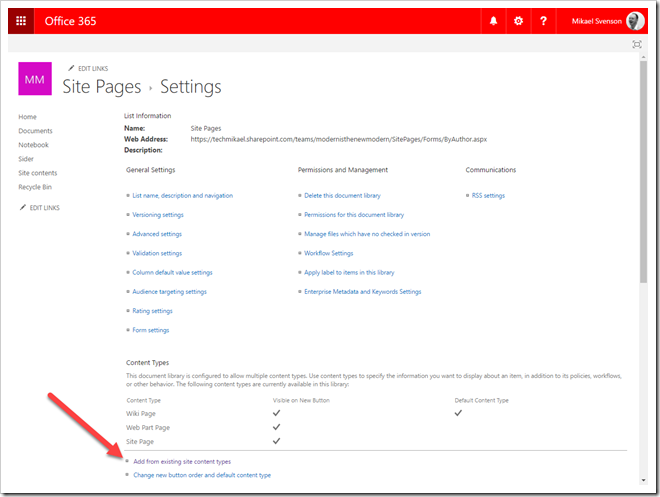
In your site, navigate to site settings, and to site site content types. Or tack /_layouts/15/mngctype.aspx at the end of the URL to go there directly.

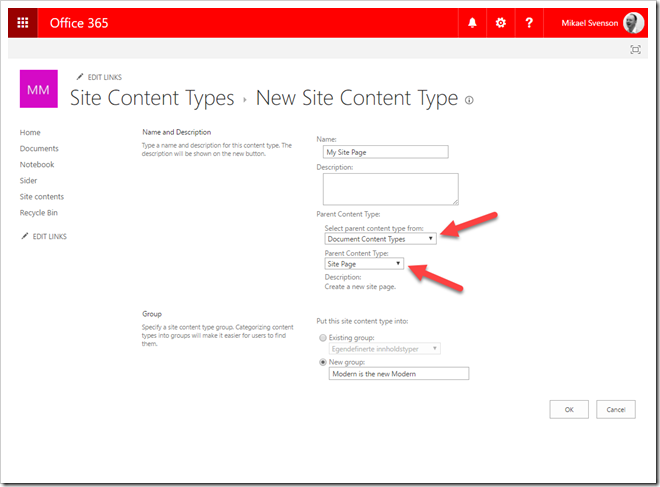
Create a new content type named My Site Page which inherits from the Site Page content type.

image

Copy the content type id from the URL in your browser and create the following URL:

https://contoso.sharepoint.com/teams/modernisthenewmodern/_layouts/15/ManageContentTypeField.aspx?ctype=0x0101009D1CB255DA76424F860D91F20E6C411800FA0F5B1F8210094AB33AED9F195597A5&Field=PageLayoutType

On the column screen, make no changes, just hit OK. This will make the column visible later. Next, navigate to the Site Pages library and go to library settings and add the previously created content type.

image

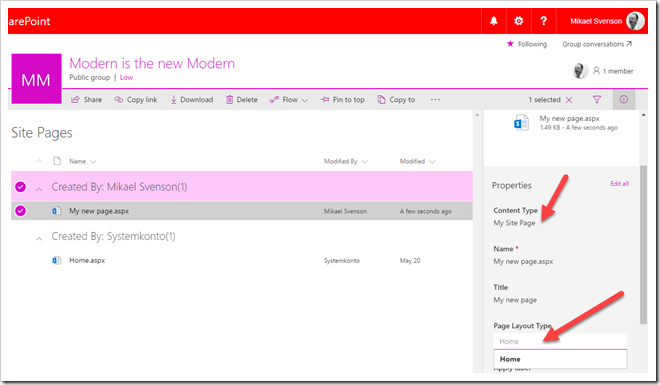
You are now ready to create your site or news page. Once the page is created and saved:

  • navigate back to the site pages library
  • select the page you created
  • click the information icon
  • change the content type to My Site Page

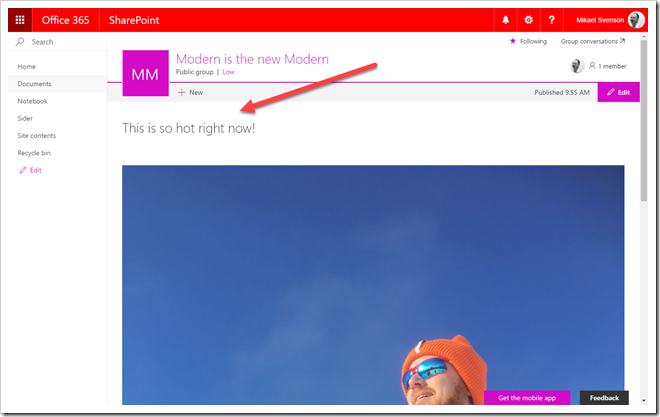
You will now see the Page Layout Type column visible. Change the value from Article to Home, and the banner is gone. You can change the content type back to Site Page after you have changed the layout to ensure any search based experience relying on the base type is still working.

image

Look ma, no banner!

image

Summary

Once set up, you can per page change the content type to your custom one and change the layout to get rid of the banner. It’s somewhat convoluted, but it is doable from the UI :)

11 Aug 15:34

Umfrage: Vorgehensmodelle im IT Projektmanagement

by Stefan Hagen

Christoph Albers von der Universität Duisburg führt aktuell eine Expertenbefragung zum Thema IT Vorgehensmodelle durch. Teilnehmer/innen sollten EINES der folgenden Kriterien erfüllen:

  • Umfassende Erfahrung als Projektleiter unter der Verwendung eines oder mehrerer gängiger Vorgehensmodelle,
  • Projektleiter mit Zertifizierung für eines oder mehrere Vorgehensmodelle (z.B. PMI, IPMA, PRINCE2, CSPO, CSSM, TKP etc.),
  • Lehrender im Umfeld des IT-Projektmanagements, IT-Managements, Prozessmanagements, Vorgehensmodelle oder ähnlich,
  • aktive Mitgliedschaft oder nahestehende Angehörigkeit zu einschlägigen Usergroups, Communities oder Forschungsgruppen (z.B. Gesellschaft für Informatik, Agile Alliance, P2UG, Best Practice User Group, Limited WIP Society, etc.).

Den Fragebogen finden Sie unter: https://www.soscisurvey.de/vm-it-pm/.

Durch die Teilnahme an diesem Fragebogen tragen Sie einen wertvollen Beitrag zu meiner Arbeit bei. Die Beantwortung des Fragebogens wird in etwa 20 Minuten Ihrer Zeit in Anspruch nehmen. Reichen die diese Einladung gerne an Kollegen aus dem Umfeld des IT-Projektmanagement weiter.

Bei weiteren Fragen oder Anmerkungen stehe ich Ihnen gerne unter christoph.albers@stud.uni-due.de zur Verfügung.

11 Aug 14:53

The rise of the IT leader

by Office 365 Team

Today’s IT leaders are true agents of change. Beyond just responding to business requests, they are helping steer progressive organizations in bold new directions.

The new infographic, The rise of the IT leader, offers five insights that are transforming IT leadership:

  1. IT can shape business strategy.
  2. There’s an urgent need for real-time insight.
  3. Mobility keeps driving innovation.
  4. Success depends on closer collaboration.
  5. IT is the catalyst for change.

Download the new infographic: The rise of the IT leader to learn how you can become an IT leader.

The post The rise of the IT leader appeared first on Office Blogs.

11 Aug 14:53

Windows Server 2016 Datacenter Automatic Virtual Machine Activation (AVMA)

by Manfred Helber

Es ist sicher bekannt, dass eine Windows Server Lizenz immer nur einem physischen Server zugeordnet werden darf und nie einer virtuellen Maschine (VM). Je nachdem welche Windows Server Edition dem physischen Server als Lizenz zugeordnet wurde ergibt sich daraus eine bestimmte Anzahl von virtuellen Windows Server Nutzungsrechten. Jeder dieser virtuellen Windows Server erfordert einen Produkt Key für die Installation. Außerdem ist auch für die virtuellen Windows Server eine Aktivierung erforderlich. Dies kann insbesondere wenn die virtuellen Windows Systeme in isolierten Netzwerken betrieben werden sehr mühsam sein.

Windows Server 2016 Datacenter bietet mit dem Feature Automatic Virtual Machine Activation (AVMA) eine Funktion welche die Aktivierung von virtuellen Windows Server 2016 und Windows Server 2012 R2 Systemen automatisiert, wenn diese auf einem Hyper-V Host mit Windows Server 2016 Datacenter ausgeführt werden – auch wenn die jeweilige VM keine Netzwerkverbindung hat.

Das Feature AVMA wurde bereits mit Windows Server 2012 R2 Datacenter eingeführt – zu meinem zugehörigen Blog Artikel gelangen Sie über folgenden Link:
http://www.manfredhelber.de/automatic-virtual-machine-activation-avma/

Voraussetzungen um AVMA nutzen zu können:

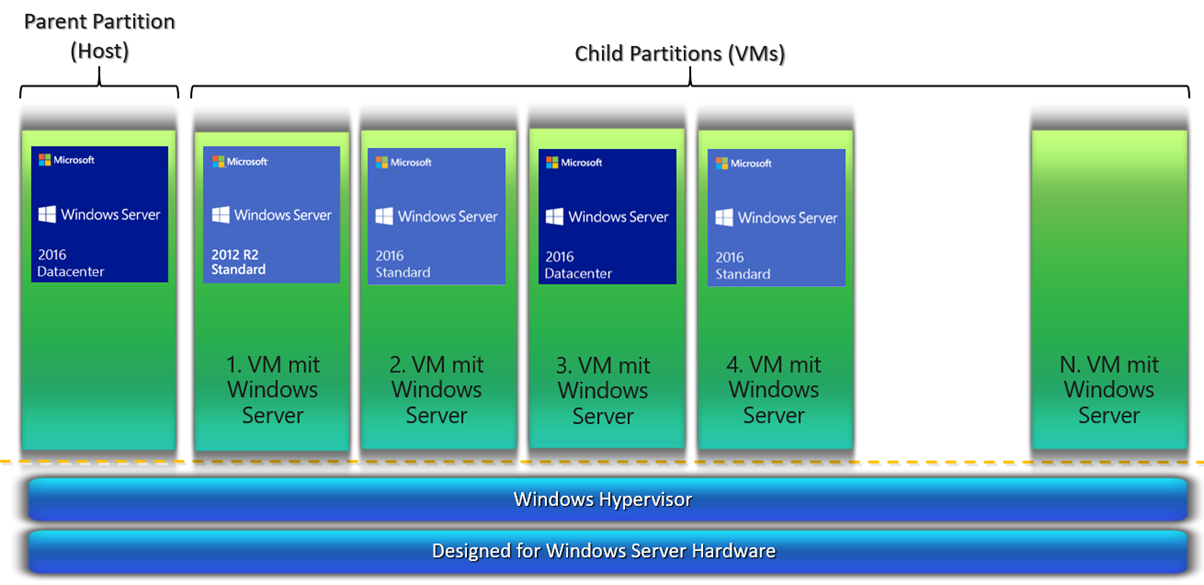
  1. Sie müssen Hyper-V nutzen – nur bei Nutzung von Hyper-V steht AVMA zur Verfügung
  2. Der Parent muss mit Windows Server 2016 Datacenter oder Windows Server 2012 R2 Datacenter installiert sein
  3. Der Parent muss aktiviert sein
  4. In den Childs (VMs) muss eine der folgenden Windows Server Editionen installiert sein: Windows Server 2016 Standard, Windows Server 2016 Datacenter, Windows Server 2016 Essentials, Windows Server 2012 R2 Standard, Windows Server 2012 R2 Datacenter oder Windows Server 2012 R2 Essentials
  5. In den VMs müssen bei der Windows Installation die AVMA Keys verwendet werden.

Ein entsprechender Hyper-V Host könnte wie folgt aussehen:

Ältere Gastbetriebssysteme sind aus technischer Sicht möglich, allerdings kann für VMs mit Betriebssystemen vor Windows Server 2012 R2 kein AVMA genutzt werden.

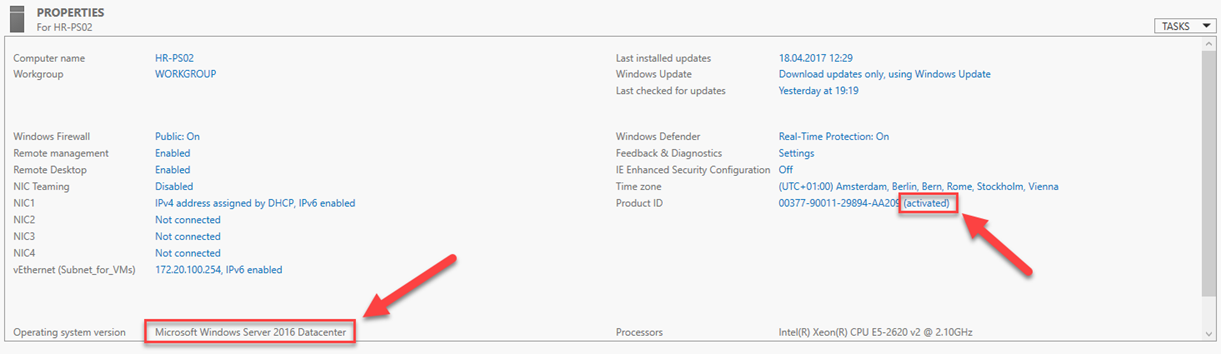
In meinem Beispiel wurde Windows Server 2016 Datacenter als Parent System installiert und aktiviert:

Bei der Installation des Parent Systems wurde der mit Windows Server 2016 Datacenter erworbene Product Key für die Installation verwendet.

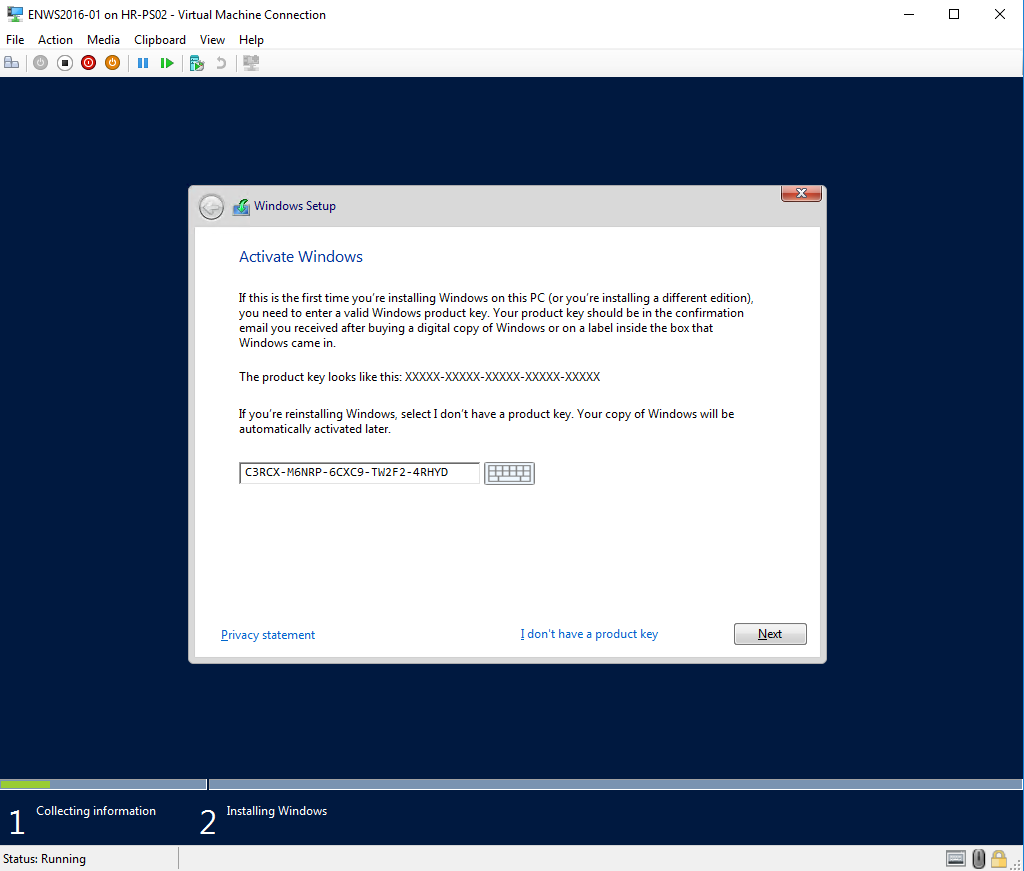
Wenn auf diesem Hyper-V Host eine virtuelle Maschine mit Windows Server 2016 oder Windows Server 2012 R2 installiert wird ist darauf zu achten, dass als Product Key nicht der Product Key des Parent Systems sondern einer der AVMA Product Keys eingegeben wird.

Die AVMA Keys sind im TechNet unter folgendem Link zu finden: https://technet.microsoft.com/en-us/library/dn303421(v=ws.11).aspx und lauten:

Für VMs mit Windows Server 2012 R2 als Betriebssystem:
Datacenter: Y4TGP-NPTV9-HTC2H-7MGQ3-DV4TW
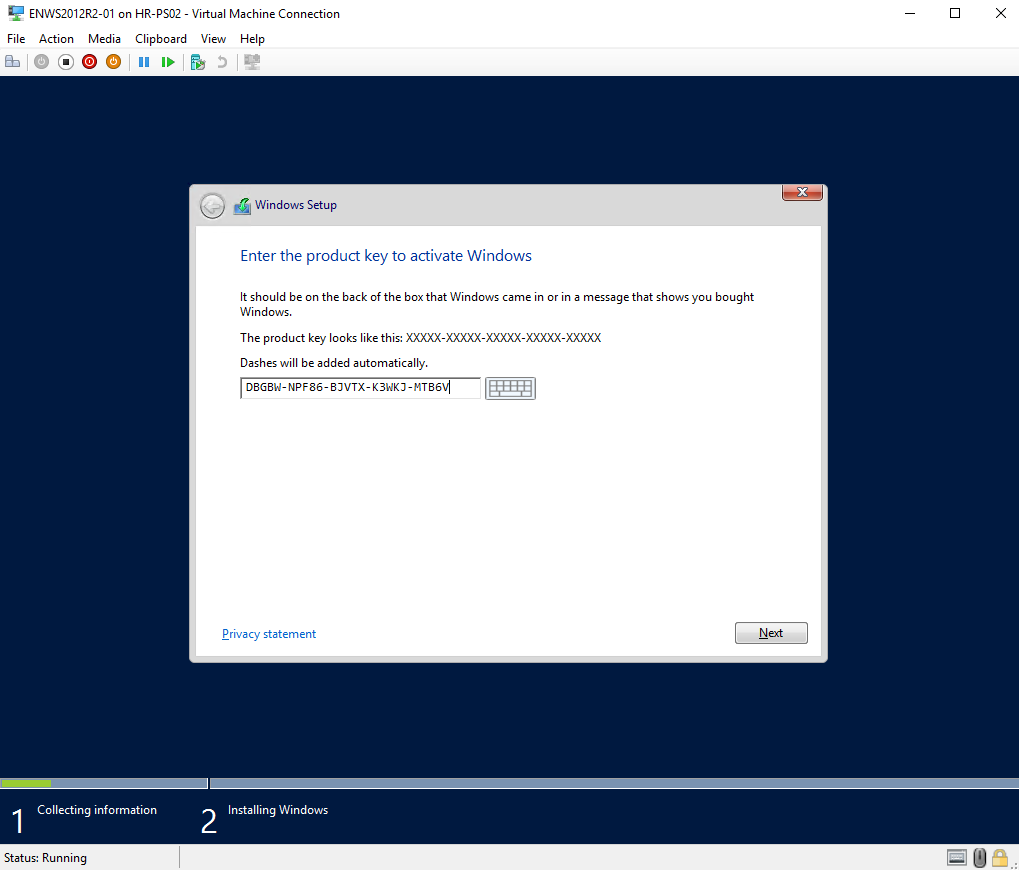
Standard: DBGBW-NPF86-BJVTX-K3WKJ-MTB6V
Essentials: K2XGM-NMBT3-2R6Q8-WF2FK-P36R2

Für VMs mit Windows Server 2016 als Betriebssystem:
Datacenter: TMJ3Y-NTRTM-FJYXT-T22BY-CWG3J
Standard: C3RCX-M6NRP-6CXC9-TW2F2-4RHYD
Essentials: B4YNW-62DX9-W8V6M-82649-MHBKQ

Im folgenden Screenshot wird bei der Installation einer VM mit Windows Server 2012 R2 der AVMA Key für Windows Server 2012 R2 Standard genutzt:

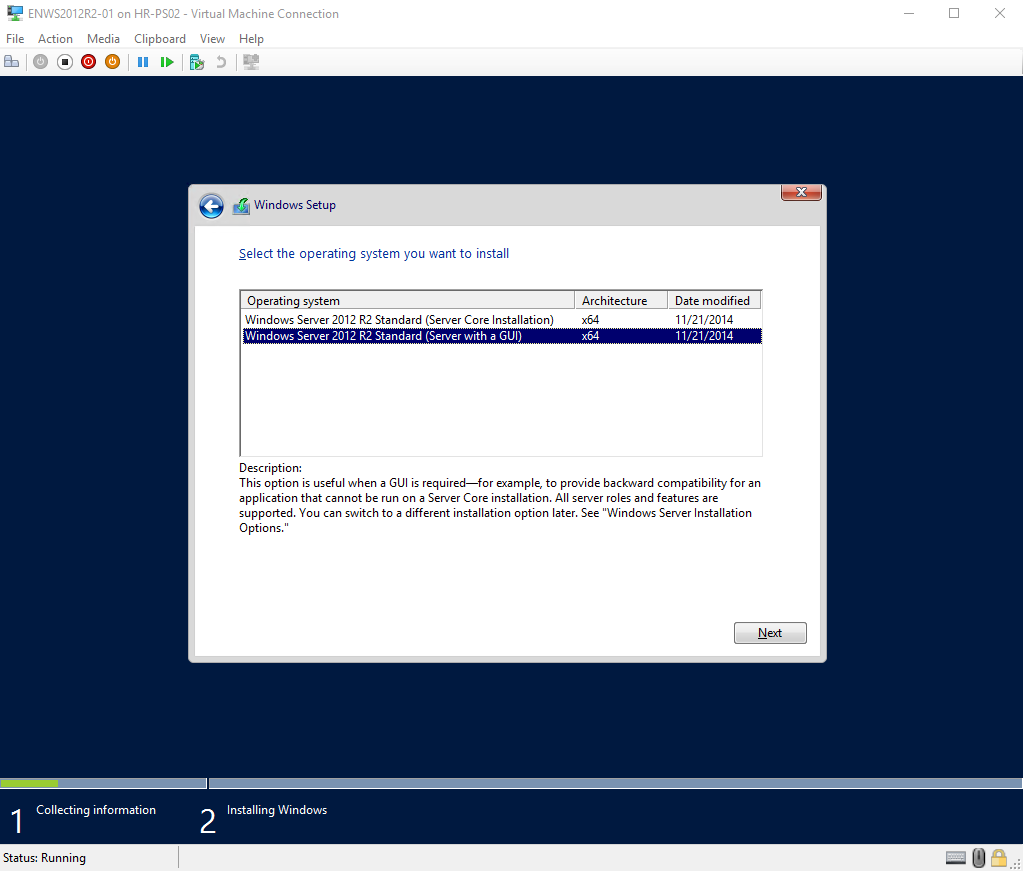
Als Ergebnis werden im folgenden Setup Schritt die beiden Installationsvarianten für Windows Server 2012 R2 Standard angeboten:

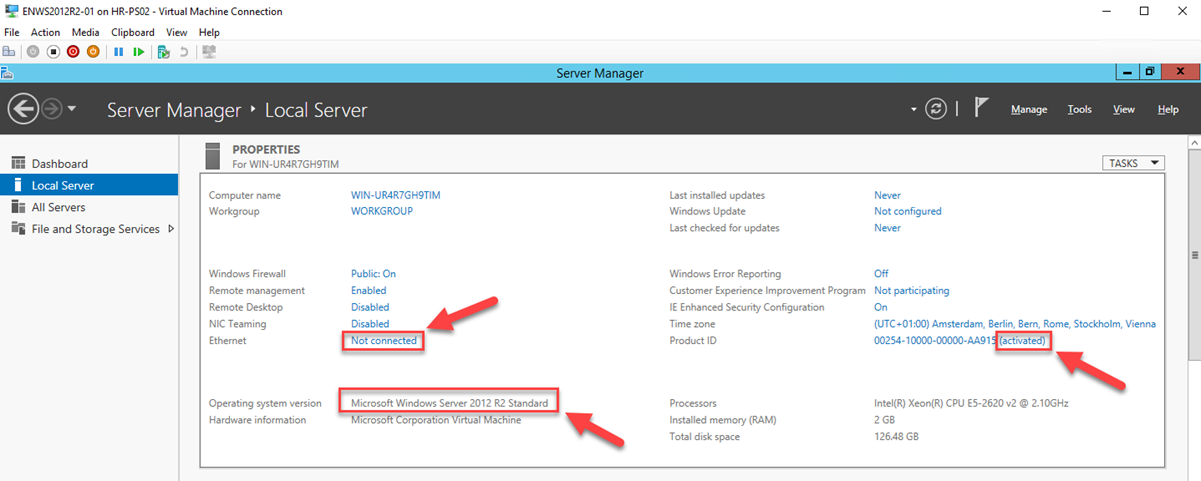
Nach Abschluss der Windows Server 2012 R2 Installation ist das Gast-Betriebssystem automatisch aktiviert – wie im Screenshot zu sehen benötigt die VM dazu keine aktive Netzwerkverbindung:

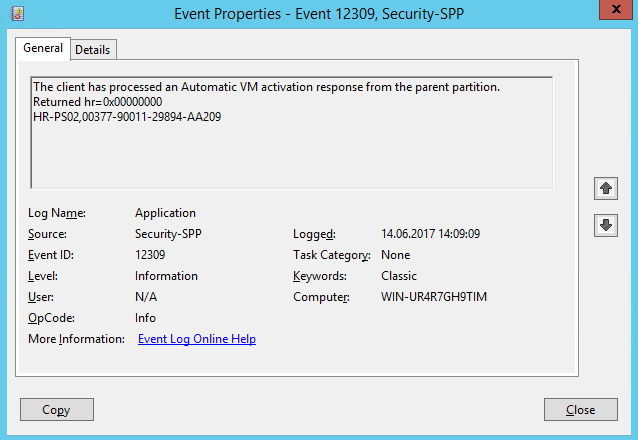
Die AVMA Aktivierung wird im Gastbetriebssystem im Application-Log unter der Event ID 12309 aufgezeichnet:

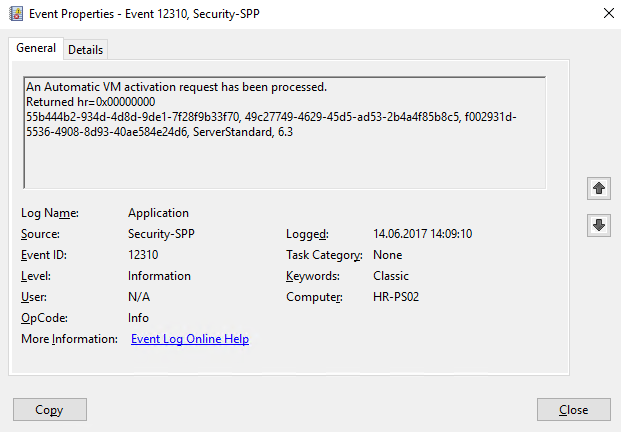
Am Parent-System finden sich die erfolgten AVMA Aktivierungen im Application-Log unter der Event ID 12310:

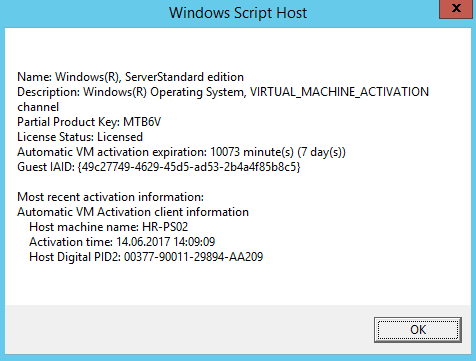
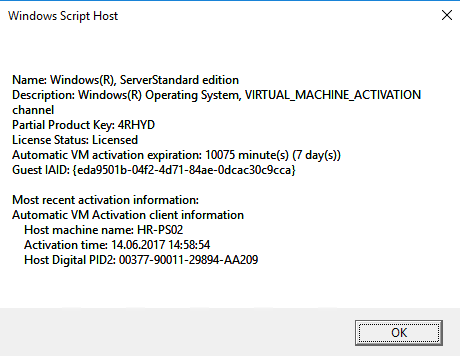
Durch Aufruf von slmgr /dli im Gastbetriebssystem lassen sich detaillierte Informationen zur Windows Lizenz abrufen:

Im Screenshot ist der Name des AVMA Hosts zu sehen. Außerdem ist zu sehen, dass die AVMA Aktivierung für 7 Tage gültig ist. D.h. die AVMA Aktivierung wird alle 7 Tage vom AVMA Host bestätigt.


Analog funktioniert dies natürlich mit VMs mit Windows Server 2016 als Gastbetriebssystem:

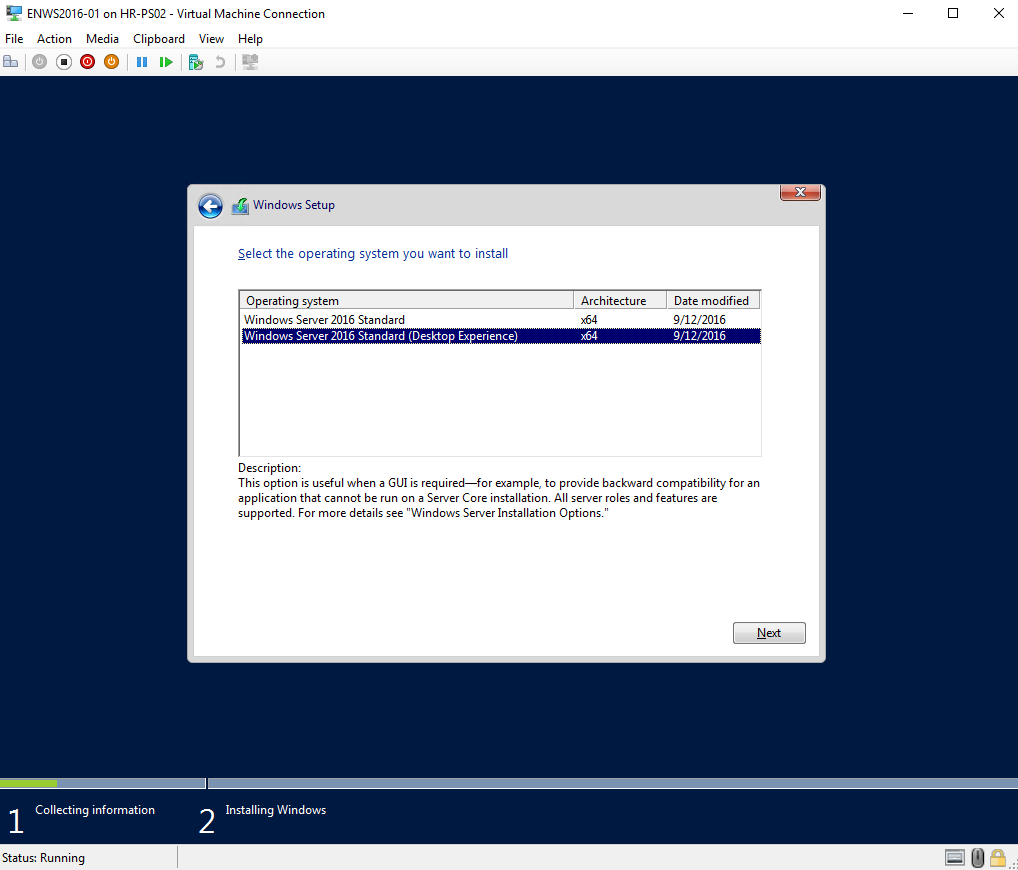
Als Ergebnis werden im folgenden Setup Schritt die beiden Installationsvarianten für Windows Server 2016 Standard angeboten:

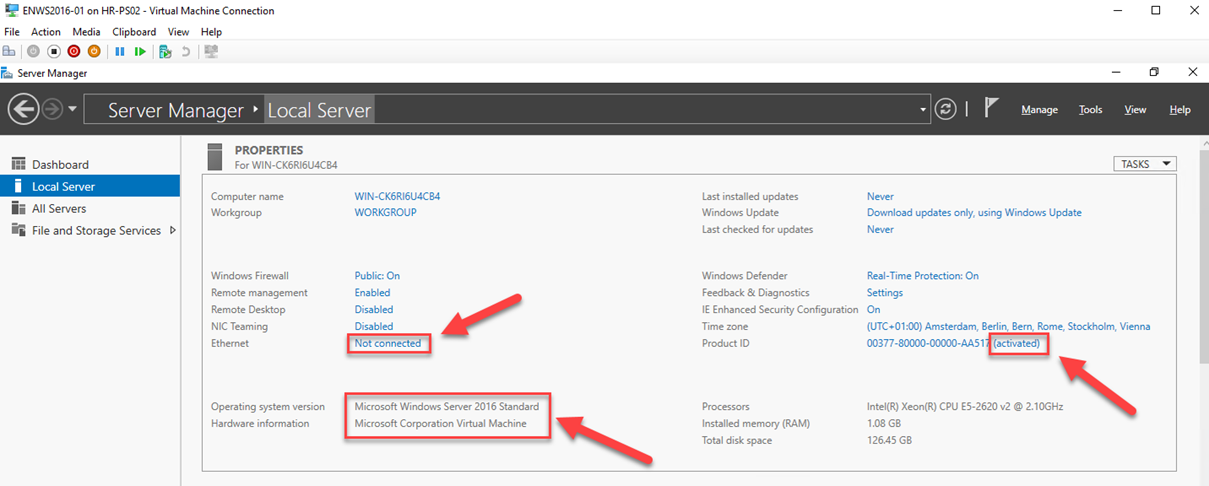
Nach Abschluss der Windows Server 2016 Installation in der VM ist das Gast-Betriebssystem automatisch aktiviert – wie im Screenshot zu sehen benötigt die VM dazu keine aktive Netzwerkverbindung:

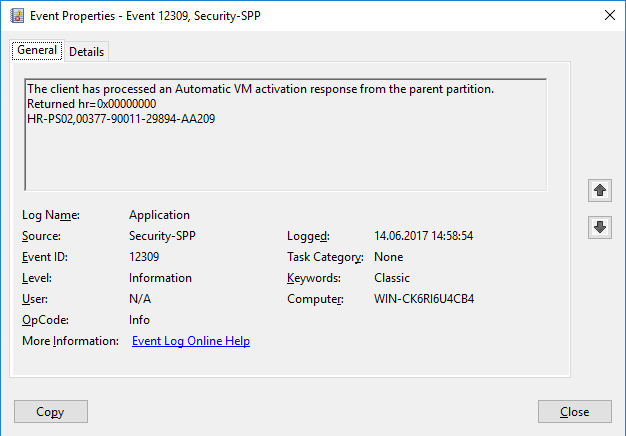
Die AVMA Aktivierung wird auch bei Windows Server 2016 VMs im Gastbetriebssystem im Application-Log unter der Event ID 12309 aufgezeichnet:

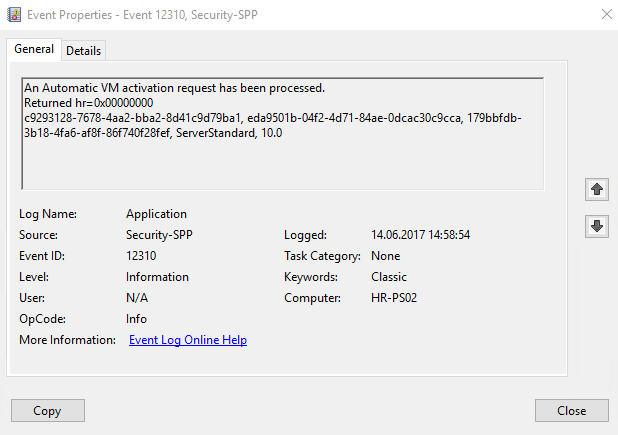
Auch am Parent-System finden Sie diese AVMA Aktivierung im Application-Log unter der Event ID 12310:

Auch bei Windows Server 2016 VMs lassen sich durch Aufruf von slmgr /dli im Gastbetriebssystem detaillierte Informationen zur Windows Lizenz abrufen:

Im Screenshot ist der Name des AVMA Hosts zu sehen. Außerdem ist zu sehen, dass die AVMA Aktivierung für 7 Tage gültig ist. D.h. die AVMA Aktivierung wird alle 7 Tage vom AVMA Host bestätigt.

Wurde bei der Installation des Windows Server 2016 oder Windows Server 2012 R2 Gastbetriebssystems in der VM kein AVMA Key eingeben (z.B. weil eine Eval. Version installiert wurde) so lässt sich dieser nachträglich durch Eingabe des folgenden Befehles im Gastbetriebssystem integrieren:
slmgr.vbs /ipk AVMAKEY

Viel Erfolg bei der Nutzung von Windows Server 2016 und AVMA.

Falls Sie sich intensiver zum Thema Hyper-V informieren möchten schauen Sie doch einmal in unserem Workshop-Bereich vorbei:
http://www.manfredhelber.de/kurse/

11 Aug 14:52

Outlook for iOS/Android Still Able to Connect After Disabling ActiveSync

by Paul Cunningham

When an Exchange Online mailbox has the ActiveSync protocol disabled, you may find that the Outlook app for iOS and Android mobile devices is still able to connect to the mailbox to send and receive emails.

PS C:\> Set-CasMailbox dave.bedrat -ActiveSyncEnabled $false

The reason for this is the architecture of the Outlook app and the infrastructure it connects to. From TechNet:

Outlook for iOS and Android uses a stateless protocol translator component that is built and run in Azure. This component routes data and translates commands, but it doesn’t cache user data. The app is coded with the Outlook device API, a proprietary API that syncs commands and data to and from the app. Exchange Online data is accessed via the publicly available REST APIs. The protocol translator enables communication between Outlook and Exchange Online.

Image via TechNet

Even when ActiveSync is disabled the REST API is still accessible by Outlook. To block access to the REST API we need to use a different method. There are a few approaches that we can use:

  • A device access rule to block Outlook for iOS and Android. This is an organization-wide block and requires you to manually approve Outlook app usage on a per-user basis for anyone who still needs to use it, so it may not be a practical approach if you’re just trying to block one user from having any mobile email access.
  • A client access rule to block REST API access. Client access rules can be targeted at specific users but managing the target list over time could be cumbersome. This approach also blocks all REST API access for the targeted users, not just the Outlook app.
  • Block the Outlook app using an EWS block list. This is the approach I’ll demonstrate here.

As I’ve previously written here, EWS policies can be used to block or allow specific applications on a per-user or per-organization basis. If you want to block Outlook app usage for the entire organization then you would use an organization-level EWS block list. Since this example scenario is for a user who has had the ActiveSync protocol disabled I will stick to the per-user option. As a side note, if your Office 365 tenant has any “K” (kiosk) licenses then the organization-level EWS controls will not work, and you’ll need to use per-user EWS controls.

First, let’s take a look at the mobile device association that shows Outlook connecting to the REST API.

PS C:\> Get-MobileDevice -Mailbox "Dave Bedrat" | Where {$_.FriendlyName -like "Outlook*"} | Select DeviceModel,DeviceUserAgent,DeviceAccessState,ClientType
DeviceModel        : Outlook for iOS and Android
DeviceUserAgent    : Outlook-iOS/2.0
DeviceAccessState  : Allowed
ClientType         : REST

Next, let’s look at the EWS configuration for the mailbox.

PS C:\> Get-CASMailbox "Dave Bedrat" | Select *EWS*
EwsEnabled                 : True
EwsAllowOutlook            :
EwsAllowMacOutlook         :
EwsAllowEntourage          :
EwsApplicationAccessPolicy :
EwsAllowList               :
EwsBlockList               :

To block EWS access for the Outlook app we need to block the user agent. The iOS version of Outlook currently has a user agent of “Outlook-iOS/2.0” (shown above), and the Android version uses “Outlook-Android/2.0”. Earlier versions had a user agent of “Outlook-iOS-Android/1.0” for both platforms, so we can expect the user agent to change in future as the version number increments. As such, it’s best to use a wildcard in the EWS block list. The example below will block the original user agent, the current user agents for both platforms, and any future user agent strings that follow the same pattern.

PS C:\> Set-CASMailbox "Dave Bedrat" -EwsBlockList @{Add="Outlook-iOS/*","Outlook-Android/*"}

Another look at the EWS configuration for the mailbox shows the two user agents have been added to the block list, and the EwsApplicationAccessPolicy option is now set to EnforceBlockList.

PS C:\> Get-CASMailbox "Dave Bedrat" | Select *EWS*
EwsEnabled                 : True
EwsAllowOutlook            :
EwsAllowMacOutlook         :
EwsAllowEntourage          :
EwsApplicationAccessPolicy : EnforceBlockList
EwsAllowList               :
EwsBlockList               : {Outlook-Android/*, Outlook-iOS/*}

This change doesn’t take effect immediately. In my demo environment it took about 30 minutes before the Outlook app on my iPad stopped retrieving new emails. The access token life is 1 hour by default though, so you should expect it to take at least that long.

To reverse the block, remove the two user agents from the block list, and if there’s no more block list entries you can also null the EwsApplicationAccessPolicy.

PS C:\> Set-CASMailbox "Dave Bedrat" -EwsBlockList @{Remove="Outlook-iOS/*","Outlook-Android/*"}
PS C:\> Set-CASMailbox "Dave Bedrat" -EwsApplicationAccessPolicy $null

As one last point to keep in mind, the DeviceAccessState for the mobile device association won’t change from Allowed to Blocked when you use an EWS block list.

The post Outlook for iOS/Android Still Able to Connect After Disabling ActiveSync appeared first on Practical 365.

15 Jun 16:16

Innere Sicherheit: Angst ist ein Politikum

by ZEIT ONLINE: Gesellschaft - Tobias Dorfer
Politiker, die mehr Polizei versprechen, und Kameras, die alles filmen: Fühlen wir uns dadurch sicherer? Ein Video widmet sich der Frage, woher unsere Angst kommt.
15 Jun 15:25

Microsoft Forms Arrives for Commercial Office 365 Tenants

by Paul Cunningham

Microsoft Forms is an Office 365 app that allows users to build surveys, questionnaires, quizzes, and other data collection forms. Until now Forms has been focused on the education market, and as such has only been available to Education customers in Office 365.

A recent addition to the Office 365 road map indicates that Forms is on its way to commercial tenants as well, noted as a Preview.

Today as I poke around the admin portal I’ve discovered that Forms has arrived for all of my tenants. My Message Center has no notices about it, nor does the official Office 365 blog. Perhaps the roll out has just begun and the announcements are forthcoming. Update: a Message Center notice has now appeared in my tenant, and refers to this Forms release as a Preview.

There’s nothing in my admin portal or in the Forms app itself to suggest this is a Preview, it actually looks like a GA release to me.

As with all new Office 365 features, Forms is enabled by default. It’s a useful app, but an immediate concern for some organizations may be the external collaboration feature, which is also enabled by default. You can find this setting in the Office 365 admin portal under Settings -> Services & Add-ins.

Obviously Forms is well suited to external data collection, such as running marketing surveys or collecting registration information for events. That’s where the trouble begins for some organizations though, with concerns over the type of data collection that their users might try to use it for, and where that data is subsequently stored. It would be bad if a user unwittingly designed an event registration form that collected credit card details or other sensitive information. The control above only limits external collaboration though, not external responses, so if you’d like to be absolutely sure that none of your users start collecting external data you’ll need to disable Forms entirely for them.

As an on-by-default feature, you need to disable Forms by managing licensing. Forms now appears in the per-user licensing options in the Office 365 admin portal.

Forms is also available as an option in Azure AD group-based licensing, if that is how you’re managing your licenses.

It’s good to see Forms finally show up in commercial tenants. I run a lot of surveys myself, so I’ll be exploring it with interest. It just would have been nice to get notified of its arrival. Update: My Message Center has been updated with a notice about the Forms Preview release.

The post Microsoft Forms Arrives for Commercial Office 365 Tenants appeared first on Practical 365.

15 Jun 15:04

Update on Crowdsourcing Europol’s “Stop Child Abuse – Trace an Object” Campaign

by Christiaan Triebert

Following Bellingcat’s attempt to support Europol’s call for help to identify objects related to child abuse, several objects have been positively identified. Here’s an update.

Objects Successfully Identified

One of the plastic bags was quickly identified bag from Tesco, a British multinational grocery retailer. Tesco operates in other European countries too, but we assume the company could provide Europol with more relevant information related to where these bags are distributed.

Two other plastic bags were identified by a Twitter-user as bags from JULA and REMA 1000 respectively. Both stores are operating in several countries, including Sweden (both), Denmark (REMA 1000), and Poland (JULA).

“Bo”, a member of the Check verification team, identified the objects seen in another image as a shoe-type phone shoe, which for example can be bought on Alibaba.


Another object that has been identified by a Reddit-user, and is a Tatty Teddy girl’s swimsuit.

Yet to be Identified Objects

There is still a lot of objects that need to be identified. However, there are leads on several ones including this polo shirt. The logo on the shirt has been identified as one recurring on shirts sold by, among others, H&M and the brand appears to be L.O.G.G.

New Objects to Identify

Europol says it has received around 10,000 tips from all over Europe following their call for support. The tips have not yet led to arrests, but the law enforcement agency of the European Union are convinced that the information shared is of use.

Europol has published several new images it asks the online community to identify. We have added these images to the crowdsourced verification platform Check and hope Bellingcat’s audience will continue to identify the objects in the images, harnessing the talent of our open source investigation community.


The post Update on Crowdsourcing Europol’s “Stop Child Abuse – Trace an Object” Campaign appeared first on bellingcat.

15 Jun 15:03

Gläserne Gesetze: Initiative will 17.000 Lobbypapiere befreien

Welche Dokumente entstehen eigentlich im Laufe eines Gesetzgebungsverfahrens? Abgeordnetenwatch und das Portal Frag den Staat wollen es wissen und setzen auf viele Freiwillige, die die Dokumente anfragen. (Open Data, Internet)
15 Jun 12:15

Entschlüsselungstool für Erpressungstrojaner Jaff veröffentlicht

Entschlüsselungstool für Erpressungstrojaner Jaff veröffentlicht

Ein Sicherheitsforscher von Kaspersky hat eine Schwachstelle im Code der Ransomware Jaff entdeckt. Nun können Betroffene ihre Daten mit einem kostenlosen Tool entschlüsseln.

15 Jun 12:15

Hochwertige und kostenfreie Stockfotos: 13 Seiten, die langweiligen Bildern den Kampf ansagen

Ihr wollt nicht mehr auf hässliche Stockfotos zurückgreifen? Wir zeigen euch 13 Plattformen, die hochwertige und kostenfreie Bilder zur Verfügung stellen.

Stockfotos adé – hochwertige und kostenfreie Bilder für den schicken Web-Auftritt

Großartige und kostenfreie Bilder für das eigene Blog oder die Webseite zu finden, kann enorm viel Zeit fressen. Niemand gibt sich gerne mit qualitativ minderwertigen Fotos zufrieden oder will auf Bilder zurückgreifen, die schlecht inszenierte Service-Mitarbeiter mit Headset und Finger auf der Tastatur zeigen. Das richtige Motiv sagt eben viel aus – beispielsweise über Geschmack und Kreativität. Wir haben uns für euch im Netz umgeschaut und Plattformen recherchiert, die euch mit coolem und kostenlosem Bildmaterial versorgen. Ergänzt die Liste gerne in den Kommentaren und speichert sie euch in den Favoriten – wir werden sie regelmäßig aktualisieren.

1. Picjumbo

Hochwertige und kostenfreie Stockfotos – Picjumbo. (Screenshot: picjumbo.com)

Der 20-jährige Webdesigner Viktor Hanascek hat sich dazu entschieden, seine Bilder kostenlos anzubieten – und zwar auf einer eigens angelegten Plattform namens picjumbo.com. Zwar findet sich hier nicht die Masse an Bilder, dafür sind die vorhandenen wirklich schön. Von A wie „abstract“ bis W wie „wedding“. Alle Fotos können auch kommerziell genutzt werden. Für sechs US-Dollar können Interessierte auch ein Premium-Angebot nutzen – hier bekommt man 30 Fotos monatlich frei Haus geliefert.

Was euch auf Picjumbo erwartet.

(Bild: Picjumbo.com)

1 von 3

Zur Galerie

2. Unsplash

Hochwertige und kostenfreie Stockfotos – Unsplash. (Screenshot: unsplash.com)

Unsplash verschickt einen Download-Link an die Nutzer. Die Plattform bietet alle zehn Tage zehn Bilder an. Auch hier schreiben die Verantwortlichen, dass die Fotos kostenfrei und kommerziell genutzt werden dürfen. Unter den Fotos stehen auch die Namen der Urheber – seid dankbar und schenkt ihnen die Credits!

Was euch auf Unsplash erwartet.

(Bild: unsplash.com / Victor Erixon)

1 von 3

Zur Galerie

3. Gratisography

Hochwertige und kostenfreie Stockfotos – Gratisography. (Screenshot: gratisography.com)

Gratisography ist ebenfalls ein Projekt, das klein angefangen hat, aber von Tag zu Tag wächst. Geknipst wurden die Bilder auf der Plattform von Ryan McGuire, dem Betreiber der Seite. Auch er bietet sie kostenlos und ohne Bedingungen an. McGuire schießt ein Bild pro Tag. Das Projekt erinnert an Picjumbo – auch hier können faire Verwerter dem Fotografen via PayPal eine Spende zuschicken und ihm einen Kaffee spendieren.

Was euch auf Gratisography erwartet.

Die passenden Fotos für eine Website sollten knallen. Websites wie Gratisography stellen kostenlose Bilder bereit, die ihr für eure Projekte verwenden könnt. (Bild: gratisography.com)

1 von 3

Zur Galerie

4. Superfamous Studios

Hochwertige und kostenfreie Stockfotos – Superfamous Studios. (Screenshot: superfamous.com)

Superfamous veröffentlicht Bilder unter der Creative Commons Lizenz CC-BY-3.0 – ihr könnt sie für alles nutzen, müsst jedoch entsprechend die Credits liefern. Das Projekt wächst wie die oberen Beispiele stetig. Wie viele Bilder schon veröffentlicht sind und wie viele in welchen Abständen hinzukommen, ist nicht ersichtlich. Doch so wichtig ist das auch gar nicht – die Bilder, die es gibt, sind auf jeden Fall echte Hingucker!

Was euch auf Superfamous Studios erwartet.

(Bild: superfamous.com / CC-BY-3.0)

1 von 3

Zur Galerie

5. Death to the Stock Photo

Hochwertige und kostenfreie Bilder – Death to the Stock Photo. (Screenshot: join.deathtothestockphoto.com)
Hochwertige und kostenfreie Stockfotos – Death to the Stock Photo. (Screenshot: join.deathtothestockphoto.com)

Der Name ist Programm, keine Frage. Death to the Stock Photo will genau wie die oberen Beispiele weg von beliebigen Stockbildern. Auch hier gilt es, die E-Mail-Adresse zu hinterlassen und die kostenfreien Bilder ins Postfach geschickt zu bekommen. Die Bilder können ebenfalls für kommerzielle Zwecke, Blogposts, Social-Media-Accounts und Mockups genutzt werden.

Was euch auf Death to the Stock Photo erwartet.

(Bild: join.deathtothestockphoto.com)

1 von 3

Zur Galerie

6. New Old Stock

Hochwertige und kostenfreie Stockfotos – New Old Stock. (Screenshot: nos.twnsnd.co)

„New Old Stock“ bedeutet so viel wie „neu aus altem Lagerbestand“. Und darum geht es auch bei diesem spannenden Projekt. Cole Townsend hat die Plattform ins Leben gerufen und zieht die Bilder aus öffentlichen Archiven. Die Fotografien sind gemeinfrei, da das Urheberrecht abgelaufen ist. Sicherlich sind die hier aufgeführten Bilder sehr speziell und nicht für jedes Web-Projekt geeignet – in unserer Auflistung darf New Old Stock dennoch nicht fehlen, denn die Bilder sind wirklich einzigartig.

Was euch auf New Old Stock erwartet.

(Bild: nos.twnsnd.co)

1 von 3

Zur Galerie

7. Free Refe Mobile Photos

Hochwertige und kostenfreie Stockfotos – Free Refe Mobile Photos. (Screenshot: getrefe.tumblr.com)

Free Refe Mobile Photos ist ein Marketplace für kostenlose Smartphone-Bilder. Da der Fundus auf einem Tumblr-Blog bereitgestellt wird und keine Suchfunktion enthalten ist, müssen Interessierte sich durch die Seite scrollen, um fündig zu werden. Die Urheber der Bilder sollten faireshalber benannt werden, wenn ihr ein Bild auswählt – immerhin dürft ihr sie auch kommerziell nutzen.

Was euch auf Free Refe Mobile Photos erwartet.

(Bild: Paula Borowska / getrefe.tumblr.com)

1 von 3

Zur Galerie

8. IM Free

Hochwertige und kostenfreie Stockfotos – IM Free. (Screenshot: imcreator.com/free)

IM Free ist eine super Seite, die verschiedene kostenlose Bilder, Templates oder auch Icons von Drittseiten wie Flickr kuratiert. Die Werke sind in thematisch in Collections zusammengefasst – beispielsweise Technologie, People, Fashion & Beauty oder Objects & Items. Das Angebot ist kostenlos und kann auch kommerziell genutzt werden. Credits geben ist auch hier selbstverständlich, streckenweise aber auch erforderlich – den Hinweis findet ihr auf der Quellseite.

Was euch auf IM Free erwartet.

(Bild: Robert S. Donovan-Flickr / CC-BY-2.0)

1 von 3

Zur Galerie

9. Startup Stock Photos

Hochwertige und kostenfreie Stockfotos – Authentic Snaps. (Screenshot: startupstockphotos.com)

Startup Stock Photos Credo lautet: „Take 'em, these things are free. Go. Make something.“ Die Seite veröffentlicht vor allem Fotografien mit einem Business-Kontext – darunter Menschen bei der Arbeit, Flipboards oder sogar konkrete Einblicke in Büros wie beispielsweise dem Sprint Accelerator in Kansas City. Um die Bilder nutzen zu können, ist keine Anmeldung oder Ähnliches nötig. Hinter der Seite steht die die Social Media Agentur Sculpt aus Iowa. Auf die Bilder haben laut Betreiber auch schon Medien wie Mashable, Hubspot oder Buffer zugegriffen.

Was euch auf Startup Stock Photo erwartet.

(Bild: Startup Stock Photos)

1 von 3

Zur Galerie

10. Pexels

Hochwertige und kostenfreie Stockfotos – Pexels. (Screenshot: pexels.com)

Pexels wurde erst kürzlich auf Product Hunt kuratiert und mit guten Bewertungen an die Spitze gewählt. Die Webseite startet direkt mit einer umfassenden Suchfunktion, sodass Bilder per Schlüsselwort gefiltert ausgeben werden. Das zeugt von einer optimierteren Nutzerfreundlichkeit als bei einigen der anderen Beispiele. Zudem können Besucher die häufigsten Suchbegriffe einsehen und sich dadurch inspirieren lassen. Pexels bietet unter anderem Stockfotos aus verschiedenen Kategorien. Auch hier können Nutzer via PayPal eine Spende für das Bilder hinterlassen.

Was euch auf Pexels erwartet.

1 von 3

Zur Galerie

11. Negative Space

Hochwertige und kostenfreie Stockfotos – Negative Space. (Screenshot: negativespace.co)

Negative Space bietet jede Woche 20 neue Fotos, die unter der Creative Commons CC0 veröffentlicht werden. Das bedeutet, dass die Fotos allesamt der Öffentlichkeit gespendet wurden. Die Dateien sind alle gut durchsuchbar und können unter anderem nach Kategorien sortiert werden. Sie bilden verschiedene Szenarien ab, die für Blogposts oder Webseiten genutzt werden können – Menschen, Hardware, Gebäude und vieles mehr. Die Betreiber haben auch einen Instagram-Kanal, der euch ständig auf dem Laufenden hält, sobald neue Bilder auftauchen.

Was euch auf Negative Space erwartet.

(Foto: negativespace.co)

1 von 3

Zur Galerie

12. Pixabay

Hochwertige und kostenfreie Stockfotos – Pixabay. (Screenshot: pixabay.com/de/)

Auch Pixabay liefert Bilder und Videos, die frei von Urheberrechten unter Creative Commons CC0 veröffentlicht sind. Nutzer können sie kostenlos herunterladen, verändern und für beliebige Zwecke verwenden. Wie die Betreiber der Plattform wissen lassen, können die Inhalte auch in kommerziellen Bereichen genutzt werden. Eine Namensnennung ist nicht erforderlich.

Was euch auf Pixabay erwartet.

(Foto: pixabay.com/de)

1 von 3

Zur Galerie

13. WoC in Tech Photos

Hochwertige und kostenfreie Stockfotos – WOCinTech Photos. (Screenshot: wocintechchat.com)

Es ist schon ziemlich auffällig, wie Tech-Projekte häufig mit Fotos weißer Männer bebildert werden. Warum eigentlich? Warum nicht mal eine farbige Frau? Die Webseite WOCinTechChat.com findet das nicht besonders gut und hat deswegen eine Stockfoto-Galerie veröffentlicht, in der entsprechende Bilder zur Verfügung stehen – natürlich ebenfalls kostenlos! Die Bilder stehen unter einer CC-Lizenz.

Was euch auf WoC in Tech Photos erwartet.

1 von 3

Zur Galerie

Übrigens: Die schlimmsten Stockfotos hat Kollegin Melanie Dahrendorf in einem Artikel gesammelt: „Stockfotografie zum Fremdschämen: 20 Motive, die wir schon viel zu oft gesehen haben“

15 Jun 12:14

Helmut Schmidt: Universität hängt Wehrmacht-Foto des Altkanzlers wieder auf

by ZEIT ONLINE: Zeitgeschehen -
Im Zuge der Bundeswehr-Affäre war das Foto von Helmut Schmidt in Wehrmachtsuniform entfernt worden. Jetzt hat es die Bundeswehr-Universität Hamburg wieder aufgehängt.
15 Jun 12:14

Help Test V1.02 of the Office 365 Groups Report Script

by Paul Cunningham

The Office 365 Groups report script helps you track new, modified, and deleted Groups in your Office 365 tenant. When the script was first developed there was no method for recovering deleted Groups. That has since been added, along with the Azure AD PowerShell cmdlets to support it.

Right now the PowerShell cmdlet Get-AzureADMSDeletedGroup, which lists soft-deleted Groups that are recoverable for 30 days, is available in the AzureADPreview module. I’ve taken the opportunity to start updating the Office 365 Groups report script to include information about deleted Groups that are still recoverable.

The new script adds two pieces of information:

  • Newly deleted Groups are now listed with the time stamp for when they were deleted. Previously the script could only detect that the Group had been deleted since the last time you ran the script, but not provide a specific time.
  • Recoverable Groups are now listed in a section of the report, including the number of days until they can no longer be recovered.

I’m releasing V1.02 of the script as a beta for now, until the PowerShell cmdlets are released in the Azure AD module, and so that any bugs that come up in the real world can be fixed before then. If you are willing to test it for me and provide feedback, please download this zip file. You’ll also need to install or update the Azure AD Preview module on your computer so that you have at least V2.0.0.127. All other dependencies and usage instructions listed here still apply.

Any feedback from your testing is appreciated, and can be provided in the comments below or by raising an issue on GitHub.

The post Help Test V1.02 of the Office 365 Groups Report Script appeared first on Practical 365.

15 Jun 12:10

Veggie-Fleisch: Genauso, nur anders

by ZEIT ONLINE: Campus - Selina Thaler
Frikadellen, Chickenburger, Leberwurst und Schnitzel gibt es jetzt auch fleischlos, sie sollen Fleischesser verführen. Es gibt nur ein Problem: Sie schmecken ihnen nicht.
15 Jun 09:27

Renate Künast: Warum mögen die Wähler die Grünen nicht mehr?

by ZEIT ONLINE: Politik -
"Die Wähler wollen uns kämpfen sehen", sagt Renate Künast. Die Partei müsse wieder radikaler werden, um bei der Bundestagswahl eine Chance so haben.
15 Jun 09:22

Surface Laptop, Surface Studio und Surface Pro starten heute offiziell in Deutschland

by Albert Jelica

Ab sofort ist die gesamte Produktfamilie hierzulande vollständig und so können ab heute sämtliche Produkte bestellt werden. Vom Surface Pro-Tablet bis hin zum Surface Studio sind nun alle Produkte auch bei uns zu haben.

Neu sind in Deutschland ab heute das Surface Pro (2017): Die neueste Generation von Microsofts Tablet mit Kickstand und ansteckbarer Tastatur startet ab heute ab einem Preis von 949 Euro. Der Surface Pen sowie die Tastatur sind separat erhältlich, allerdings notwendiges Zubehör, wenn man das Surface Pro so nutzen will, dass man auch die wahren Stärken des Geräts verwenden kann. Die neuen Surface Pro Signature Type Cover in den neuen Farben Platin, Kobaltblau und Burgundy werden allerdings erst ab 30. Juni erhältlich sein und kosten 179,99 Euro, während der Surface Pen euer Budget um 64,99 Euro belastet.

> Surface Pro (2017) bestellen

Der Surface Laptop ist Microsofts allererstes echtes Notebook, das tatsächlich keinen Detachable-Modus besitzt. Microsoft richtet das Gerät, welches mit Windows 10 S ausgeliefert wird, offiziell an Studenten, wobei die Zielgruppe vor allem Menschen sind, die für ein solches Premium-Produkt auch etwas tiefer in die Tasche greifen.

Wie auch das Surface Pro ist der Surface Laptop preislich sehr weit oben angesiedelt und beginnt in der Variante mit 128 Gigabyte SSD, Intel Core i5-Prozessor und 4 Gigabyte Arbeitsspeicher erst ab 1149 Euro. Zudem steht das Notebook hierzulande momentan nur in der Farbe Platinum zur Verfügung.

Die anderen Farben können allerdings bereits vorbestellt werden und sind laut Microsoft Store ab dem 24. August dieses Jahres lieferbar.

> Microsoft Surface Laptop bestellen

Im Laufe des heutigen Tages wird auch Microsofts teuerstes Produkt der Surface-Reihe zur Bestellung erhältlich sein. Der All-in-One von Microsoft bietet ein 28-Zoll Display mit 4.5K-Auflösung und fischt vor allem im Teich der bisherigen iMac- und Mac Pro-Nutzer. Vor allem Kreative will Microsoft mit dem Gerät zur Windows-Plattform locken.

Die Hardware ist auch genau an die Bedürfnisse vom Profis im kreativen Bereich angepasst. Das 28-Zoll große Display bietet einen Touchscreen samt Stiftunterstützung und kann dank eines sehr innovativen Scharniers mit zwei Fingern mühelos hingelegt werden, sodass darauf gezeichnet werden kann. Für ausreichend Leistung sollen Intel Core i5- oder i7-Prozessoren sorgen in Kombination mit mindestens 8 und höchstens 32 Gigabyte an Arbeitsspeicher. Als Grafikeinheiten stehen eine 965M oder eine 980M zur Verfügung.

Preislich beginnt Microsoft Surface Studio bei 3549 Euro, ist also wahrlich kein Schnäppchen. Wer damit allerdings professionell arbeitet, wird ziemlich sicher sein, dass damit der eigene Arbeitsalltag effektiver gestaltet werden kann.

> Surface Studio bestellen


Enthält Partnerlinks

Der Beitrag Surface Laptop, Surface Studio und Surface Pro starten heute offiziell in Deutschland erschien zuerst auf WindowsArea.de.

15 Jun 08:31

Scheduled runbooks will use the latest modules in your automation account

Azure Automation will start using the latest modules in your automation account when a new scheduled job is run.
15 Jun 08:31

The Workings of an Ancient Nuclear Reactor (2009)

15 Jun 08:30

Show HN: Password-protect a static HTML page

15 Jun 08:27

Umwelt: Elektroautos kein Mittel zur CO2-Reduktion

Der Knackpunkt von Elektroautos ist ihr Akku - nicht nur mit Blick auf die Reichweite, sondern auch auf die Umweltfreundlichkeit. Eine schwedische Studie zeigt, dass bei der Produktion des Stromspeichers viel CO2 ausgestoßen werde, was den Vorteil zum Verbrenner schwinden lasse. (Elektroauto, Technologie)
15 Jun 08:26

Eero 2.0: Neues Mesh-WLAN-System kann sich auch per Kabel vernetzen

Der US-WLAN-Equipment-Hersteller Eero hat die ersten Geräte der zweiten Mesh-WLAN-Generation angekündigt. Die kleinen WLAN-Boxen können für ihr Mesh-Netzwerk dank Qualcomms neuer Plattform per Netzwerkkabel eine Backhaul-Leitung aufbauen. Eero 2.0 dürfte damit sehr viel flexibler im Einsatz werden. (WLAN, Netzwerk)
15 Jun 08:24

FTTH: Minister will Glasfaser nicht Gewinnprognosen unterwerfen

Der Bundeslandwirtschaftsminister will "Glasfaser bis ans Haus und zu jedem Funkmast". Dies dürfe nicht einseitig durch Gewinnprognosen beeinflusst werden. (Glasfaser, Internet)
15 Jun 08:24

Kehrtwende: Der Traditionsschiffsanleger kommt

Hinter verschlossenen Türen haben die Fraktionen mehrheitlich den Bauauftrag für den Traditionsschiffsanleger abgenickt.
14 Jun 18:16

Hauptversammlung: Air Berlin will einfach wieder Air Berlin sein

by ZEIT ONLINE: Wirtschaft - Bastian Brauns
Schulden, Pannen, dann der Spott: Air Berlin muss viel verkraften. Doch auf der Hauptversammlung lautet die Parole: Wir schaffen das. Vielleicht stimmt das sogar.
14 Jun 16:34

Diesel-Fahrverbot: So reagieren unsere User und OB Reiter

Es ist das Aufreger-Thema derzeit in München: Das Diesel-Fahrverbot, über das OB Reiter nachdenkt. Auch bei unseren Usern sorgt die Meldung für Diskussionen.
14 Jun 16:34

Zugriff auf Whatsapp: Innenminister wollen Messenger-Dienste abhören

Auf der Innenministerkonferenz haben sich die Länder darauf geeinigt, dass Messenger-Dienste wie Whatsapp bei schweren Straftaten abgehört werden dürfen.

Bund und Länder wollen im Kampf gegen Terrorismus und Kriminalität enger zusammenrücken. So soll nach dem Beschluss der Innenministerkonferenz (IMK) künftig wieder ein „Musterpolizeigesetz“ deutschlandweit für einheitliche Standards sorgen. Bundesinnenminister Thomas de Maizière von der CDU sprach am Mittwoch zum Abschluss der IMK-Frühjahrstagung in Dresden von einem Durchbruch. „Wir brauchen keinen Flickenteppich bei der inneren Sicherheit“, sagte er. „Befugnislücken sind Sicherheitslücken“, betonte der IMK-Vorsitzende, Sachsens Ressortchef Markus Ulbig, ebenfalls CDU.

Das Musterpolizeigesetz soll als Vorlage für die Landespolizeigesetze dienen. „Ziel ist es, einheitliche Sicherheitsstandards trotz Zuständigkeit der Länder auf den Weg zu bekommen“, sagte Ulbig. Ein solches Mustergesetz gab es bereits in den 70er Jahren. Die Erarbeitung damals habe drei Jahre gedauert, sagte Lorenz Caffier, Innenminister in Mecklenburg-Vorpommern. Er zeigte sich optimistisch, dass es dieses Mal schneller gelingt. „Wir rücken enger zusammen“, konstatierte er angesichts der geänderten Bedrohungslage.

Innenminister einigen sich auf Abhören von Whatsapp

De Maizière kündigte einen neuen Umgang mit islamistischen Gefährdern an. „Wir haben den Beschluss gefasst, dass wir die Gefährder- und Gefährdungsbewertung auf neue Füße stellen.“ Es gebe beim Bundeskriminalamt ein neues Analysemodell, auf dessen Grundlage Gefährder künftig besser eingestuft werden könnten. Im gemeinsamen Terrorabwehrzentrum sollten dann Maßnahmen „besprochen und in den Ländern gemeinsam und verbindlich umgesetzt werden“. De Maizière sprach von einem Fortschritt, „der möglicherweise auch nur im Zusammenhang mit den Fall Amri zustande gekommen ist“.

Einig seien sich Bund und Länder auch, dass auf Messenger-Dienste wie Whatsapp zur Verfolgung schwerer Straftaten von Ermittlern zugegriffen können werden müsse. „Das bedeutet zum Beispiel, dass man die Behörden rechtlich und technisch in den Stand versetzen muss, unter den gleichen Bedingungen, wie man ein Telefon oder eine SMS abhört, auch Informationen und Nachrichten auf Messenger-Diensten abgreifen zu können.“ Der Bund werde das in den letzten noch verbleibenden Sitzungswochen in die Strafprozessordnung einführen.

  „Das spart künftig manchen Gentest.“

Ergebnisse von DNA-Analysen sollen künftig „auf die Feststellung des Alters, der Hautfarbe, der Augenfarbe und der Herkunft“ erweitert werden, wie de Maizière sagte. „Das spart künftig manchen Gentest.“ Bislang werden beispielsweise Teilnehmer an DNA-Massentests unabhängig von ihrem genetischen Infragekommen getestet.

Um künftig Doppelidentitäten in Asylverfahren zu vermeiden, wurde beschlossen, die Altersgrenze zur Abnahme von Fingerabdrücken bei Flüchtlingskindern von derzeit 14 auf sechs Jahre zu senken. Bei den vorerst nur teilweise ausgesetzten Abschiebungen abgelehnter Asylbewerber nach Afghanistan erwarteten die Länder von der Bundesregierung „noch vor der Sommerpause“ einen aktualisierten Bericht zur Sicherheitslage, sagte Ulbig.

Einig waren sich die Minister außerdem, dass sogenannte Reichsbürger künftig keine Waffen mehr besitzen dürfen. Sie konnten sich aber nicht darauf verständigen, schon bei Erteilen einer waffenrechtlichen Erlaubnis eine Regelanfrage beim Verfassungsschutz zu stellen. Zum Bedauern der SPD-geführten Länder, wie ihr Sprecher, Niedersachsens Innenminister Boris Pistorius, sagte. Der nun gefundene Weg führe dazu, „dass zufällig abgefragt wird, wer von den Waffenscheininhabern Extremist ist. In der Zeit hat der aber schon eine Waffe.“

Bei der im Vorfeld der Konferenz viel diskutierten bundesweiten Einführung der Schleierfahndung seien sich die Länder nicht einig gewesen, sagte Ulbig. „Deswegen haben die unionsgeführten Länder eine Protokollnotiz abgegeben und die Bedeutung der Schleierfahndung noch mal dokumentiert.“ Bis auf Bremen, Berlin und Nordrhein-Westfalen ist die Schleierfahndung bereits in allen Ländern möglich. dpa

Mehr zum Thema: Sicherheitspolitik: Vorsätzlich eingeführte Software-Hintertüren sind eine Katastrophe

14 Jun 16:00

Managing Projects with Office 365 Groups, Planner, and Teams

by Paul Cunningham

With Office 365 Microsoft is on a mission to provide productivity applications to empower their customers to achieve more. One feature in particular, Office 365 Groups, goes a long way to achieving that goal.

Groups began as an Outlook collaboration feature that brought email communication together with file and note sharing.  Over time, Groups has also played the role of membership service to new applications such as Planner and Teams. As the integration between different applications has been established, the usefulness of Groups has grown.

Managing projects is one of the areas where Groups stands out. Project management in the Microsoft ecosystem has previously required the use of Microsoft Project or Project Server (or Project Online in the cloud services world). The Project suite of products has always come at an additional cost, and for smaller projects the cost isn’t always able to be justified. I’ve personally been involved in many internal and customer projects where the capabilities of Project would have been useful, but no budget was provided to pay for them.

With Office 365 Groups, Planner, and Teams, small to medium-sized projects get access to useful applications that help to manage the project without the additional cost. Here’s an overview of how Office 365 Groups can be used to manage projects.

Licensing for Office 365 Groups, Planner, and Teams

Office 365 Groups, Planner, and Teams are all included with Office 365 licenses that include Exchange Online and SharePoint Online. Today that means Business Essentials and Premium, and Enterprise E1, E3 and E5.

Let’s say for example that the following user accounts are already licensed for Office 365, and have Exchange Online mailboxes:

  • Jane Tulley, IT Operations Team Leader
  • Dave Bedrat, Senior Systems Engineer
  • John Dorey, Systems Engineer

The following user accounts are not already licensed for Office 365, and have Exchange on-premises mailboxes:

  • Alan Reid, IT Manager
  • Aaron Gardiner, Help Desk

To get the appropriate licenses assigned, the organization needs to assign Alan and Aaron an Office 365 license. This can be achieved using group-based license management, or you can also manage licenses with PowerShell, or you can do manual license assignment through the Office 365 portal.

Choosing a New vs Existing Office 365 Group

Both Planner and Teams can be used with an existing Group, or a new Group can be created for a new Plan or Team. When considering whether to use existing Groups or create new Groups, you should take into consideration:

  • Whether the people involved in the project aligns with an existing Group membership.
  • Whether the Group already has a Plan and Team attached that is used for other purposes (today Planner and Teams both have a 1:1 relationship with Groups, i.e. there can only be one Plan and Team per Group).
  • Whether the project has a life cycle that doesn’t align with the existing Group’s purpose.
  • Whether the project’s communications in email and Teams chat will clash with the existing communication running through that Group.

For most projects, it will make sense to create a new Group. A team that already has a Group might use that for micro-projects and general communication within their own team, but other projects with people from other areas of the company deserve their own Group.

When you create a Group you can invite all the project members, or add them later. The Group membership can change as the project moves through its different phases, and new members will gain access to all the previous conversations and information that the Group contains.

A Team is not automatically created for a Group, but you can attach a new Team to an existing Group.

However a plan is automatically created when the Group is created.

Using Planner for Project Tasks

Planner is a collaborative task management app, or as I like to think of it, a micro-project management app. When you create a Planner plan and add members to participate in that plan, each member can add their own tasks. However, only the managers of the Office 365 Group can edit the plan settings, or delete the plan entirely.

By adding tasks to Planner, the project team can see which tasks have been assigned to them, and when they are due to be completed. The project manager and other interested stakeholders can see project progress as well as conversations around individual tasks. It’s the type of dashboard view that managers love to look at, and with Planner they can check it any time they like without burdening the project team with requests for status updates.

With the Planner mobile app that is now also available, project team members can update their tasks from their mobile devices as well.

Using Teams for Communications

When you bring Teams into the picture the question needs to be asked, should you use Teams or Outlook for conversations during a project? The answer depends on the type of conversations that are taking place.

Broadcast communications to the entire project team, such as the summary of decisions made during a meeting, are well suited to email and are stored in the Group mailbox where they can be referenced later.

Real time conversations are better suited to the chat environment of Teams. The conversations are still preserved for historical reference, but are a little easier to read in their chronological order in Teams instead of needing to piece together email reply chains that can easily become fragmented as different people respond. Teams is also good for those members of the project team who don’t want to see email chains in their own inbox, but want to dip in and out of Teams to keep up to date on recent conversations.

Teams can also be used to host audio and video meetings, which is very useful for distributed teams. The Teams mobile clients also make it a useful real-time communication method for workers who aren’t at their desk. For example, a Help Desk officer providing post-migration desk side support to end users can chat with the rest of the team. Or a team member can provide remote support to others via Teams chat, instead of the comparatively slower conversations that occur over email.

Summary

Office 365 Groups, along with Planner and Teams, allows the users in an organization to spin up their own instances of collaboration, project management, and communications apps quickly and easily. Although Planner lacks some of the in-depth project management capabilities of Project, it is more than capable of providing task management for the type of small, simple projects that many organizations are constantly running.

There are still some rough edges that need polishing, however none of these are serious blockers at this stage. At least not for most organizations that I have dealt with.

There are some file storage inconsistencies between Groups, Planner, and Teams. In the Group view in Outlook, the files for individual Teams channels can’t be seen, but files attached to Planner tasks can be seen. The Teams client can see channel files, but not the files in the root of the document library that are visible in Outlook. However, all the files for the Group, Planner, and Teams can be viewed by opening the document library in SharePoint Online. Ideally that wouldn’t be necessary, but at least the workaround exists.

Planner integration with Teams is minimal. When you add a Planner tab to a Teams channel, it lets you view the tasks in the plan, but not anything else from Planner such as reporting views. Completing tasks in Planner doesn’t notify the channel, nor does it notify the Group manager. Ideally the option would exist for Planner activities to generate Teams notifications.

Adding a OneNote tab to Teams adds a section to the Group’s OneNote notebook, which is then visible when the notebook is accessed via Outlook. But you can’t add an existing OneNote section to Teams, you can only create a new one. Synchronization of content between Outlook and Teams is a little slow, but you’d probably only notice it if you quickly switched between the two. The OneNote tabs in Teams have no visual clues to differentiate them from other tabs. The same criticism exists for Planner tabs, but you can rename tabs to a more descriptive name after adding them.

Managing meetings in Teams is a little buggy. For meetings created in Teams you can’t invite the entire group as a single entry, which you can do in Outlook. Instead you need to invite each individual user. Selecting a meeting room also buggy, with room lists not working correctly. On the plus side, you can choose a Teams channel as the meeting location for IM or remote meetings.

The Office 365 road map has items in development to fix many of those issues as well as add more improvements such as guest access to Planner and Teams to allow collaboration with external users. But other than those few issues, the combination of Groups, Planner, and Teams is ready to provide good project management capabilities to many organizations today.

The post Managing Projects with Office 365 Groups, Planner, and Teams appeared first on Practical 365.

14 Jun 15:59

Keine Barzahlung von Rundfunkbeiträgen

by Udo Vetter

Bürger haben keinen Anspruch darauf, ihren Rundfunkbeitrag bar zahlen zu können. Dies hat das Oberverwaltungsgericht Münster entschieden. Ein Rundfunkteilnehmer hatte sich geweigert, seine Gebühren per Überweisung zu zahlen. Dazu ist er jedoch nach Auffassung des Gerichts verpflichtet.

Die Richter haben keine ernsthaften Zweifel daran, dass die Vorgaben des Rundfunkbeitragsstaatsvertrags wirksam sind. Dieser beschreibt ausdrücklich vor, dass der Rundfunkbeitrag nur per Überweisung oder Lastschrift gezahlt werden kann. Das sei im Rahmen der „Massenverwaltung“ auch zulässig, heißt es in dem Gerichtsbeschluss. Es liege auch im Interesse der Zahlungspflichtigen, dass die Verwaltungskosten niedrig gehalten werden (Aktenzeichen 2 A 135/16).

Flattr this!

14 Jun 14:56

The Hidden Cost of Privatization

14 Jun 14:32

Show HN: GitHub for Microsoft Word