Shared posts

11 Aug 16:14

Infografiken erstellen: Diese 14 Tools helfen

Infografiken liegen im Trend. Doch die Visualisierung von Daten erfordert viel Vorbereitung und das richtige Werkzeug. Mit diesen Tools kannst du Infografiken einfach selbst erstellen.

Infogram Infogram richtet sich an Anfänger. (Screenshot: t3n) Der Webdienst Infogram richtet sich an blutige Anfänger. Dank vorgefertigter Templates stehen die Chancen gut, ein optisch ansprechendes Ergebnis zu erzielen. Die Datenbasis können Nutzer aus Tabellenprogrammen wie Microsoft Excel importieren und anschließend mit verschiedenen Arten von Tabellen und Graphen visualisieren. Einziger ...

weiterlesen auf t3n.de
11 Aug 13:57

„Wir hören zu!“ – Die Geschichte hinter dem Feedback Hub in Windows 10

by Albert Jelica

Microsoft hat kürzlich ein Video auf YouTube veröffentlicht, welches die Geschichte hinter dem Feedback Hub in Windows 10 beschreibt. Darin erklärt Microsoft, man habe mit Windows 10 den mutigen Schritt gesetzt, das Betriebssystem an der Seite der Fans gestalten und entwickeln will.

Um die Vorschläge der Fans möglichst effizient verarbeiten zu können, musste das Feedback Hub her. Die Nutzer sollten in der Lage sein, die Probleme mit dem System sowie die eigenen Vorschläge an Microsoft weiterleiten zu können und das Windows-Team sollte daraufhin diese Probleme und Vorschläge auch einordnen und verstehen können.

Die Daten, welche von den Nutzern über das Feedback Hub übermittelt werden, wird von Azure-Diensten betrieben, welche in Microsofts Cloud verarbeitet wird. Doppelte oder ähnliche Einträge werden mittels Algorithmen zusammengeführt, sodass dieselbe Idee nicht verloren geht, wenn sich die Stimmen dafür aufteilen. Das Feedback wird in Kategorien sortiert und unterschiedliche Manager sind für die Kategorien verantwortlich. Sie sehen sich das Feedback durch, besprechen die Vorschläge im Team und setzen sie um, sofern Microsoft den Vorschlag als sinnvoll erachtet. Laut Microsoft können die Windows Insider so tatsächlich den Design- und Entwicklungsprozess von Windows 10 beeinflussen. Beliebtes Feedback landet tatsächlich bei den Teams und wird dort besprochen. Das Feedback helfe Microsoft dabei, ein Produkt zu gestalten, das die Kunden glücklich macht.

Nachlese: Microsofts Verständnis von Feedback


via mspu

Der Beitrag „Wir hören zu!“ – Die Geschichte hinter dem Feedback Hub in Windows 10 erschien zuerst auf WindowsArea.de.

12 Jul 14:03

Twitter-Sprechstunde mit SharePoint-Chef Jeff Teper: Die Highlights

by Wolfgang Miedl
Gestern hat Jeff Teper, der Herr über SharePoint, Office und OneDrive bei Microsoft, auf Twitter eine Stunde lang Fragen aus der Community beantwortet. Das ganze lief unter dem Hashtag #tepertakeover. Weiterlesen Ähnliche Beiträge: “Verschwörungstheorien und Gerüchte um die Server-Zukunft”: Microsoft sorgt für Klarheit auf der Ignite “SharePoint ist zurück”– die Highlights von der European SharePoint Conference 2015 Sharepoint-Boss Teper bestätigt: “Neben Office 365 wird es weiterhin Sharepoint Server geben”

[Den vollständigen Beitrag finden Sie auf der Website]
12 Jul 14:00

Visual Studio Code: Microsoft stellt Arduino-Erweiterung unter Open-Source-Lizenz

Microsoft hat eine Erweiterung von Visual Studio Code zur Arbeit mit dem Arduino-Entwicklerboard unter einer Open-Source-Lizenz veröffentlicht.

Visual Studio Code: Arduino-Erweiterung ist Open Source

Dank einer Erweiterung unterstützt Visual Studio Code auch die Entwicklung von Software für den Arduino. Wie der Code des Editors selbst steht auch der Quellcode der Erweiterung jetzt unter der MIT-Lizenz. Die Erweiterung ist nach Angaben von Microsoft fast vollständig kompatibel zur offiziellen Arduino-Entwicklungsumgebung.

Visual Studio Code 1.0 in Bildern

Quelloffener Code-Editor von Microsoft: Visual Studio Code ist in Version 1.0 erschienen. (Screenshot: Visual Studio Code)

1 von 4

Zur Galerie

Die Erweiterung unterstützt Autovervollständigung und Syntaxhervorhebung. Außerdem lassen sich Programme für den Arduino von Visual Studio Code aus verifizieren und hochladen. Neu ist darüber hinaus die Integration eines Debuggers. Die Erweiterung erlaubt auch die Verwaltung von Boards und Bibliotheken.

Arduino-Erweiterung für Visual Studio Code: Microsoft will Unterstützung der Community

In einem Blog-Beitrag äußert Microsoft seinen Wunsch, dass sich die Arduino-Community an der Weiterentwicklung der Erweiterung beteiligt. Der Quellcode wurde dazu auf Github veröffentlicht. Außerdem gibt es einen Gitter-Chat für das Projekt. Wer lediglich die fertige Erweiterung haben möchte, der kann sie direkt aus dem Visual-Studio-Marketplace herunterladen. Um diese verwenden zu können, benötigt ihr allerdings auch die offizielle Arduino-IDE.

Ebenfalls interessant:

12 Jul 14:00

Neu mit iOS 11: Wie Sie immer wissen, welche Apps Sie orten

In iOS 11 sollen neue Features zum Thema Tracking kommen. Doch manche der Beta-Tester sind davon überhaupt nicht begeistert.
12 Jul 14:00

3D scanning by dipping into a liquid

12 Jul 13:59

Europäischer Gerichtshof für Menschenrechte: Verschleiern verbieten erlaubt

by ZEIT ONLINE: Zeitgeschehen -
Staaten dürfen Frauen verbieten, Gesichtsschleier zu tragen. Dies sei kein Verstoß gegen die Religionsfreiheit, urteilt der Europäische Gerichtshof für Menschenrechte.
11 Jul 14:35

Hongkong: Mit Ende der Subventionen endet auch Teslas Erfolg

Seit die staatlichen Subventionen für Elektroautos in Hongkong ausgelaufen sind, ist die Zahl der zugelassenen Teslas von 2.939 im März 2017 auf null im April gesunken. Elektromobilität scheint nur staatlich gefördert zu funktionieren. (Elektroauto, Technologie)
11 Jul 14:35

Flugsicherheit: Flugzeugabstürze werden seltener

by ZEIT ONLINE: Mobilitaet -
Fliegen wird laut Unfallforschern zunehmend sicherer. In diesem Jahr gab es bei kommerziellen Flügen keine Toten, im Zehnjahresdurchschnitt noch 286.
11 Jul 14:33

White Space: Microsoft investiert in billiges Internet auf dem Land

Microsoft will die Versorgung ländlicher Regionen durch White-Space-Technik sponsern. Für 10 US-Dollar im Monat werden 3 bis 4 MBit/s in Regionen ohne Netzversorgung geboten. (Microsoft, FCC)
11 Jul 14:32

Seagate's 8TB USB hard drive is just £120 for Prime Day

by Richard Devine

If you're forever in need of more storage for your PC or your Xbox One then this Prime Day deal on Amazon UK is definitely worth a look. The Seagate Backup Plus Hub 8TB is down to a crazy low price of £119.99 for one day only, which is a lot of pretty cheap storage!

11 Jul 14:31

Smartphone: Honor 6A kommt für 170 Euro nach Deutschland

Das Honor 6A wird auch in Deutschland erhältlich sein: Für 170 Euro ist das Smartphone bei zahlreichen Onlinehändlern vorbestellbar. Das Einsteigergerät kommt mit einem 5-Zoll-Bildschirm, einem Snapdragon-430-Prozessor und einer 13-Megapixel-Kamera. (Honor, Smartphone)
11 Jul 14:31

Skype für Windows-Insider mit neuen Funktionen

Skype für WindowsDie Messaging- und Videochat-Plattform Skype hat im Insider-Programm für Windows 10 ein Update mit einigen neuen Funktionen erhalten. Vom wenig positiv aufgenommenen Re-Design der Android-Version ist noch kaum etwas zu sehen.
11 Jul 14:30

Leak: Neue Fotos-App kommt auch für Windows 10 Mobile

by Albert Jelica

Bereits vor Monaten hat Microsoft die Fotos-App für Windows 10 komplett runderneuert und zahlreiche sehr praktische Funktionen implementiert. Zahlreiche Bearbeitungsmöglichkeiten kamen hinzu, darunter Filter, die Möglichkeit Bilder zu skalieren und auf den Fotos zu zeichnen. All das kommt schon bald für Windows 10 Mobile.

Lange hat es gedauert bis die neuen Funktionen für das mobile Interface optimiert wurden, doch schon sehr bald dürfte die neue Fotos-App auch für Windows 10 Mobile erscheinen. Die italienischen Kollegen haben nämlich eine frühe Version der Anwendung installieren können, worauf sich die neuen Funktionen bereits zeigen. Ihr könnt auf Fotos zeichnen, Filter darüberlegen, selbst die Helligkeit und Wärme ändern und sogar retuschieren und rote Augen korrigieren. Windows 10 Mobile hätte damit die mit Abstand leistungsfähigste integrierte Fotos-App aller mobiler Betriebssysteme, denn selbst unter Android gibt es weniger Bearbeitungsmöglichkeiten als sie Microsoft derzeit nur am PC bietet.

Bislang gibt es von Microsoft allerdings keine Ankündigungen für eine mobile Version der Fotos-App, sodass sich Windows 10 Mobile-Nutzer womöglich noch etwas gedulden müssen. Es ist allerdings erfreulich zu sehen, dass Microsoft weiterhin daran arbeitet, die eigenen Universal Apps auch für Smartphones und kleinere Windows 10-Geräte zu optimieren.

Sobald das Update tatsächlich verfügbar ist, werden wir euch auf WindowsArea.de natürlich sofort darüber informieren.

Freut ihr euch schon auf die neuewn Funktionen der Fotos-App?

Galerie


Quelle: aggiornamentilumia

Der Beitrag Leak: Neue Fotos-App kommt auch für Windows 10 Mobile erschien zuerst auf WindowsArea.de.

11 Jul 14:29

Lidl Connect: Mehr Datenvolumen in allen Tarifen

Neue Konditionen bei Lidl ConnectDie Grundgebühren für Optionen bei Lidl Connect werden jetzt alle 28 Tage berechnet. Bislang wurde monatlich abgerechnet. Dafür bekommen die Kunden mehr Datenvolumen.
11 Jul 14:29

Enterprise und Cloud: Microsoft verbindet Windows und Office 365 zu einer Lizenz

Office 365 und Windows werden bei Microsoft immer stärker miteinander verbunden. Microsoft 365 ist die neue Lizenz, die Unternehmen Office 365 und Windows 10 als eine Lizenz mieten lässt. Auf der Inspire 2017 pries das Unternehmen auch seine Expansion auf dem Cloud-Markt an - mit einigen großen Zahlen. (Office 365, Microsoft)
11 Jul 14:29

Hilfe, ich kann mein Elektro-Auto nicht aufladen!

by Christoph Hollender
Ein Münchner will ein Elektro-Auto in der Tiefgarage seiner zukünftigen Wohnung laden, doch die Leistung reicht nicht aus. Und das in der „Vorreiter-Stadt“ der Elektromobilität. 
11 Jul 14:28

Speed limits the last bastion of Windows 10/HERE Maps advantage to 'fall'?

I've dealt in several features here on AAWP with the pros and cons of HERE Maps and then Windows 10 Maps (based on the same codebase) and - despite dodgy traffic handling and UI issues - one of the key advantages of Nokia's and then Microsoft's application was that speed limits are displayed and speed warnings given. In contrast, this has been a deficiency of Google Maps for a decade, but I wanted to link out to news that speed limits and warnings are coming to the latter. It's a rollout and I don't know why it's taking Google so long (perhaps they never gathered limit information in the first place, unlike HERE/Nokia?), but at some point in the near future (a year or so), the market leading Google Maps/Navigation will have the same speed functions as Microsoft's in house application...

11 Jul 06:25

Automating the Synchronization of RDS SQL Server Agent Jobs in a Multi-AZ Environment

by Laerte Junior

It has never been as easy to run and maintain SQL Server on AWS as it is with Azure, but if your organization uses AWS, then it makes sense to do so. Amazon Relational Database Service (RDS) for SQL Server now makes it much easier to set up, operate, and scale SQL Server deployments in AWS.  It is a hosted database platform that uses all the AWS services necessary for a SQL Server cloud platform. It deals with the DBA chores of provisioning, taking backups, patching software, monitoring. It will scale the hardware using all versions of SQL Server from 2008 v2. RDS can be controlled via either a wizard, web service, or PowerShell script. 

Multi-AZ Deployments – When you create or modify your DB Instance to run as a Multi-AZ deployment, Amazon RDS will automatically provision a primary database in one Availability Zone and maintain a synchronous “standby” replica in a different Availability Zone. In the event of planned database maintenance or unplanned service disruption, Amazon RDS will automatically failover the SQL Server database to the up-to-date standby. Database operations can resume quickly without any manual intervention.

Behind the scenes, it uses a SQL Server Database Mirroring technology that does not synchronize the SQL Server Jobs. In fact, it is generally the case with SQL Server RDS that the SQL Server agent jobs are missing after a failover. Actually these jobs are not missing, but just not synchronized; and AWS RDS documentation now says that it has always been the case that the synchronization must be done manually with RDS SQL Server. Before then, it wasn’t entirely obvious: Without wishing to blame myself, I only realized that I had to do it after three weeks using AWS.

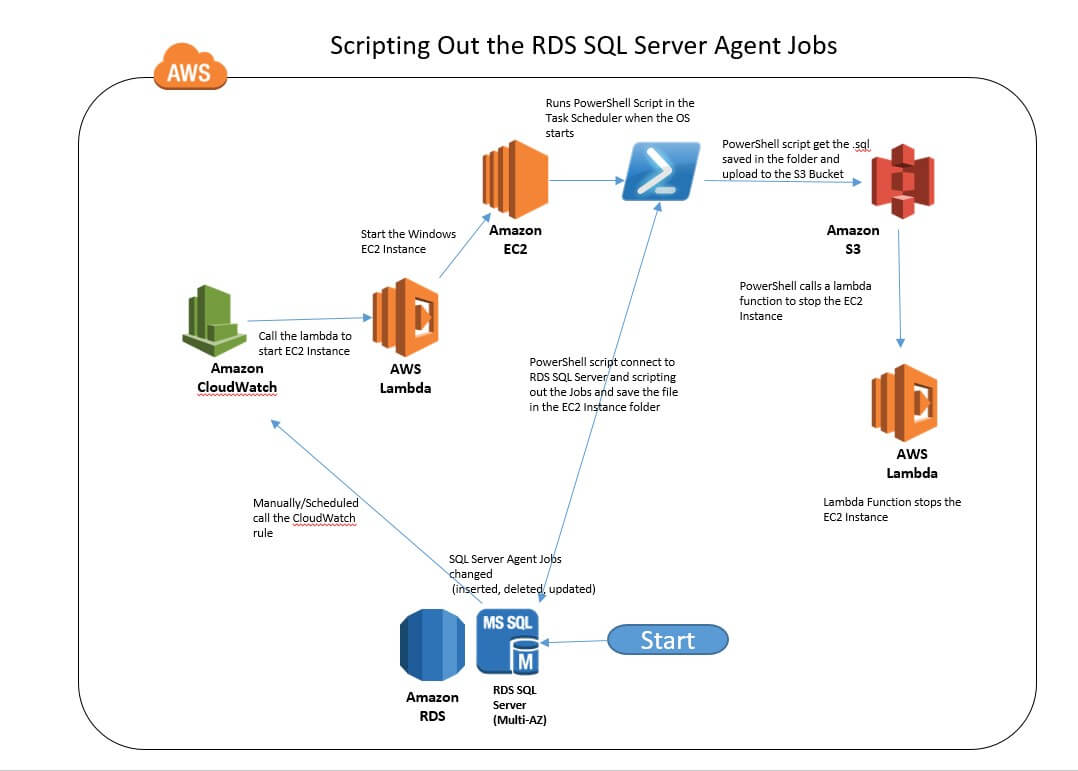
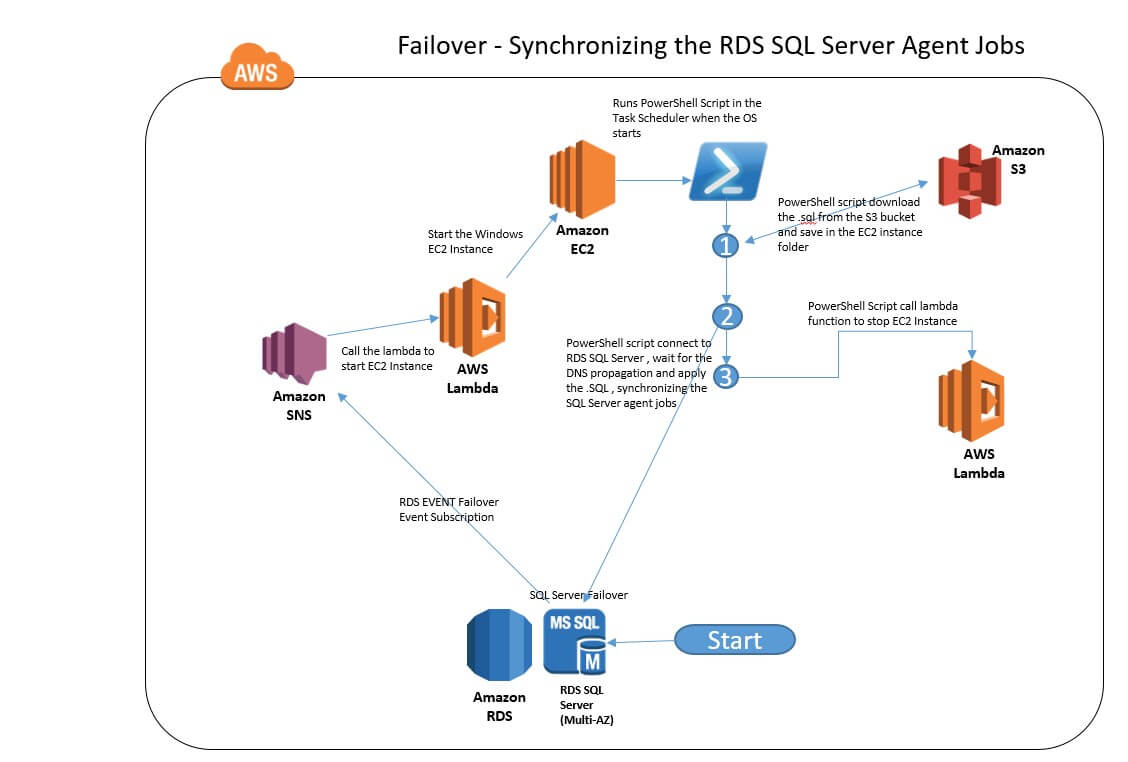
In this article, I’ll be illustrating how you automate SQL Server RDS via lambda functions and PowerShell, by showing how to script out a high-availability SQL Server solution.

Phase 1: Scripting out the solution

The solution can be broken up into 2 phases:

The first phase consists of uploading the changes (scripting out) and the second phase consists of applying these changes whenever Failover occurs.

Step 1 – Setup the IAM Role to launch the EC2 Windows Instance and run the Lambda Functions

Setup the IAM Service Role on the EC2 Instance :

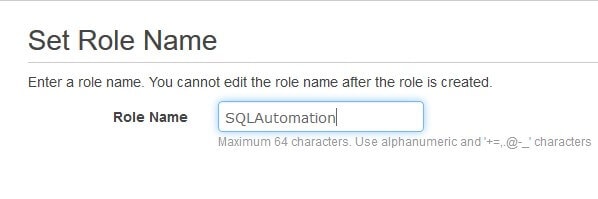
Create an AWS Identity and Access Management (IAM) role. You can name your IAM role anything as long as it fits the requirements for IAM roles. I called my IAM role: ‘SQLAutomation

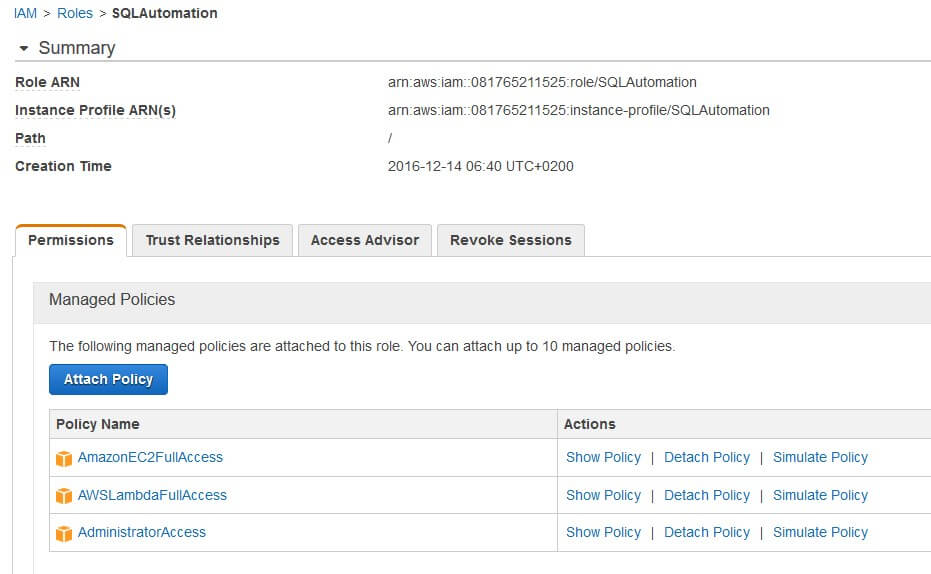
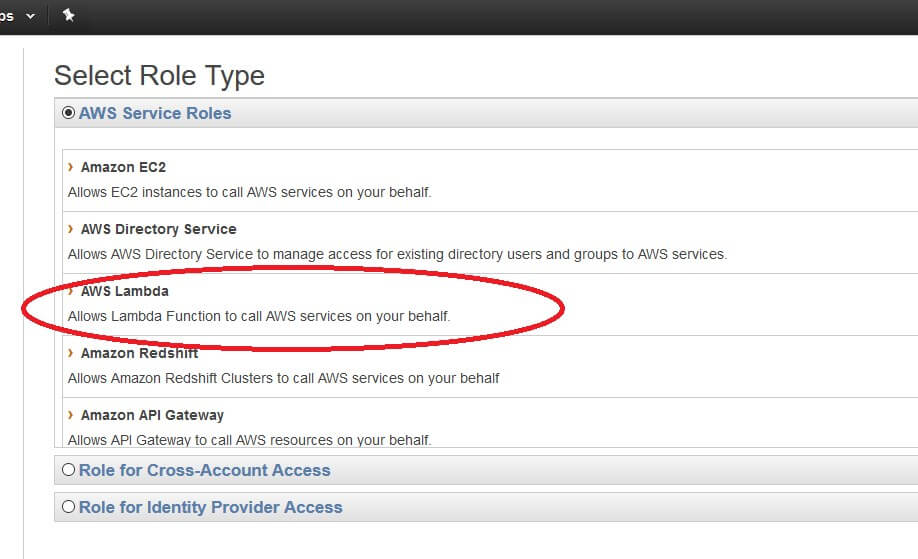
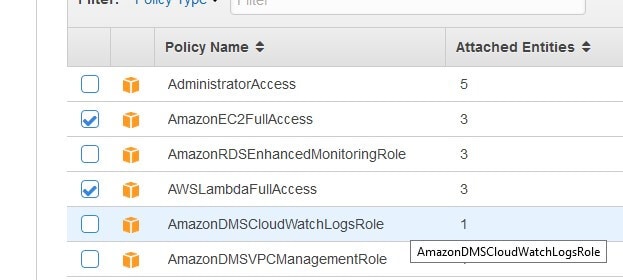
Select the AWS Service Roles. Select Amazon EC2 and choose the related policies to attach to the role. Attach the following policies to your role : AmazonEc2FullAccess ,AWSLambdaFullAccess and Administrator Access

To set up permissions to run a Lambda Function

Enter a role name (IE : start_stop_ec2_instance) and select AWS Lambda Service Roles.

Attach the policies AmazonEC2FullAcces and AWSLambdaFullAccess

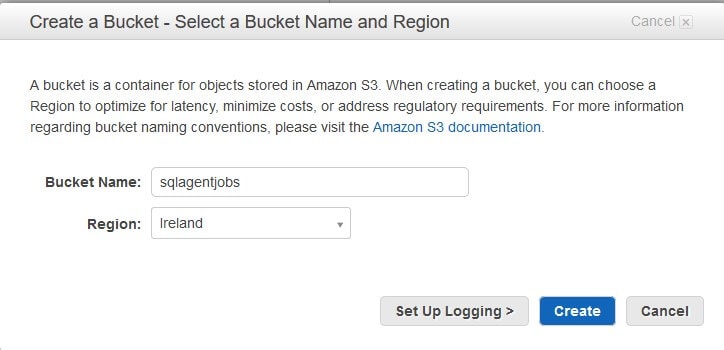
Step 2 – Create a S3 Bucket, i.e. sqlagentjobs

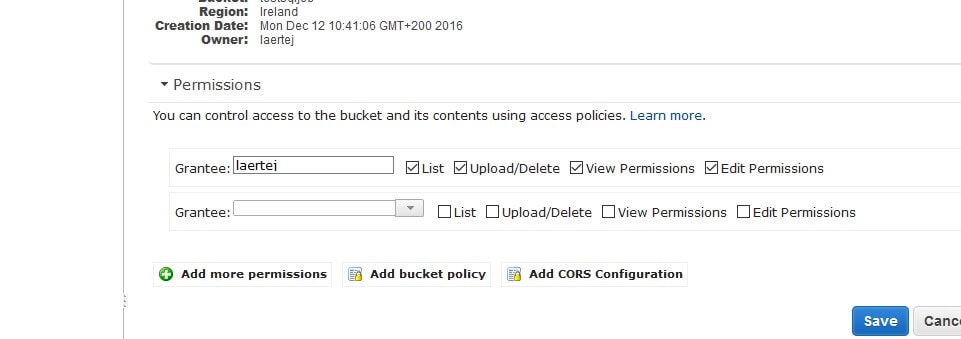
Grant the appropriate permission to the user who will execute the solution:

Step 3- Launch an EC2 Windows Instance

  • Select any Windows Server version higher than, or equal to, 2012 R2.You can use the free tier only with Windows Server 2012 R2 RTM
  • Link the EC2 Instance to the IAM Role previously created in the Step 1 – IE : SQLAutomation
  • Link the EC2 instance in a Security Group in the sameVirtual Private Cloud (VPC) as the RDS SQL Server instance
  • Launch the Instance, and then download and install from the Microsoft® SQL Server® 2016 Feature Pack :
    • Microsoft® System CLR Types for Microsoft SQL Server® 2016
    • Microsoft® SQL Server® 2016 Shared Management Objects
    • Microsoft® Windows PowerShell Extensions for Microsoft SQL Server® 2016
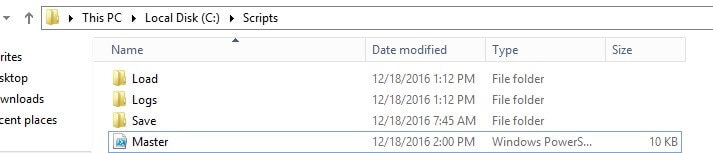
  • Create a folder called ‘Scripts’ and subfolders ‘Load’, ’Logs’ and ‘Save’ in the C: drive
  • Copy the ‘master.ps1’ PowerShell script attached to this article to the folder ‘Scripts’

  • Open the Master.ps1 and change the commented lines:
    • Block code 1 to your environment details

      #Block code 1 - change the variables here 
      $sqlserverendpoint = "SQLServerRDSEndpoint"  
      $Username = "SQLServerRDSUSer" 
      $password = "PAssword" 
      $bucketName = "Bucketname" #sqlagentjobs 
      $region = "Region" 
      #Block code 1 - change the variables here

    • Block code 2 to the lambda function ARN to stop the EC2 Instance

      (detailed in the Step 4) 
      #Block code 2 -#change to your lambda function ARN in the -functionname parameter 
      if ($Operation -eq 'Failover' -or $operation -like 'Schedule') { 
       
      $params = @{ 
      FunctionName = 'ARN Function Name ' #'arn:aws:lambda:euwest-1:081765211525:function:SQLSTopInstance' 
      InvocationType = 'RequestResponse' 
      Force = $true 
      } 
       
      Invoke-LMFunction @params 
      } 
      #Block code 2

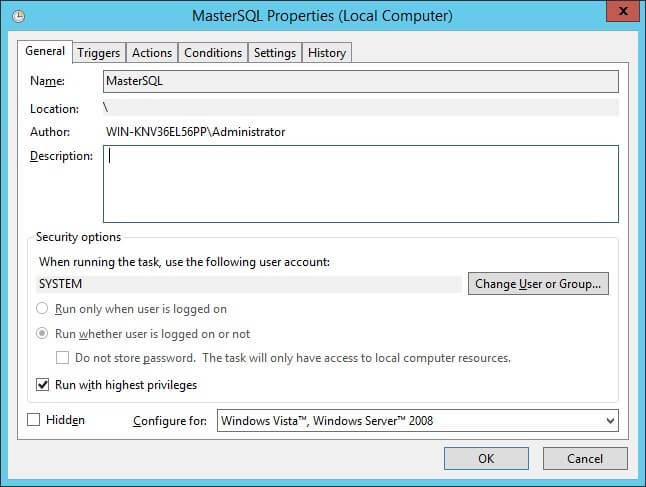
  • Schedule the task in the Windows Task Scheduler as following :
    • Name : MasterSQL (or any other name)
    • Security Options : ‘Run as System’
    • Security Options : ‘Run with Highest Privileges’

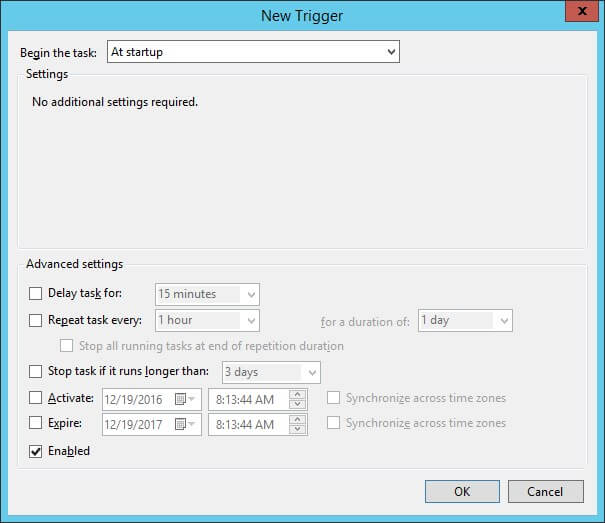
    • Click on the ‘Triggers’ tab: Define the trigger as ‘At Startup’

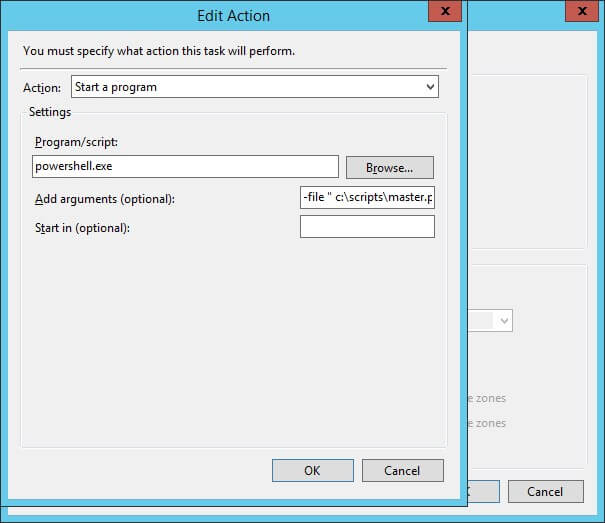
  • Click on the ‘Actions’ tab :
    • Action : select ‘Start a Program’
    • Program/Script : enter ‘PowerShell.exe’
    • In ‘Add Arguments’ enter ‘ -file “c:\scripts\master.ps1” –executionpolicy ByPass’ (where –file is the full path of the master.ps1 file)

  • Stop the EC2 Instance

Step 4 – Create the three Lambda Functions :

To Stop EC2 Instance

Select

  • Blank Function
  • Name : SQLStopEC2Instance (or whatever name)
  • Runtime : Python 2.7
  • Role : Choose an existing role
  • Existing Role : start_stop_ec2_instance (previously created in step 1 – To Lambda Functions)

Lambda Function Code :

import boto3 
 
//  your region 
region = 'eu-west-1' 
 
// Id of the EC2 Instance  created step 2 
instances = ['i-03b4f750e45e274c4'] 
 
def lambda_handler(event, context): 
 
    ec2 = boto3.client('ec2', region_name=region) 
 
    ec2.stop_instances(InstanceIds=instances)

To Start the EC2 Instance

Select :

  • Blank Function o Name : SQLStartEC2Instance (or whatever name)
  • Runtime : Python 2.7
  • Role : Choose an existing role
  • Existing Role : start_stop_ec2_instance (previously created in step 1 – ‘To set up permissions to run a Lambda Function’)
  • Insert the following Lambda Function Code :

    import boto3 
    import base64 
     
    //Your region 
    region = 'eu-west-1' 
     
    //ID of the EC2 Instance Created step 2 
    instance = ['i-03b4f750e45e274c4'] 
     
    def lambda_handler(event, context): 
         
    // Saying to the EC2 Instance that was Schedule calling 
        NewValue = base64.b64encode('Schedule')  
     
        ec2 = boto3.client('ec2', region_name=region) 
     
        //modifying the user data (in the EC2 to know was Schedule Calling)     ec2.modify_instance_attribute( 
        DryRun=False, 
        InstanceId=str(instance[0]), 
        Attribute='userData', 
        Value=NewValue ) 
     
        ec2.start_instances(InstanceIds=instance)

To Start EC2 Instance after failover,

Select

  • Blank Function
  • Name : SQLStartEC2InstanceFailover (or whatever name)
  • Runtime : Python 2.7
  • Role : Choose an existing role
  • Existing Role : start_stop_ec2_instance (previously created in step 1 – ‘ To set up permissions to run a Lambda Function’)
  • Insert the following Lambda Function Code :

    import boto3 
    import base64 
     
    //Your region 
    region = 'eu-west-1' 
     
    //ID of the EC2 Instance Created 
    instance = ['i-03b4f750e45e274c4'] 
     
    def lambda_handler(event, context): 
         
    // Saying to the EC2 Instance that was Failover calling 
        NewValue = base64.b64encode('Failover')  
     
        ec2 = boto3.client('ec2', region_name=region) 
     
        //modifying the user data (in the EC2 to know was FailoverCalling)     ec2.modify_instance_attribute( 
        DryRun=False, 
        InstanceId=str(instance[0]), 
        Attribute='userData',     Value=NewValue ) 
        ec2.start_instances(InstanceIds=instance)

Step 5 – Setup CloudWatch to Schedule the call of the Lambda Function

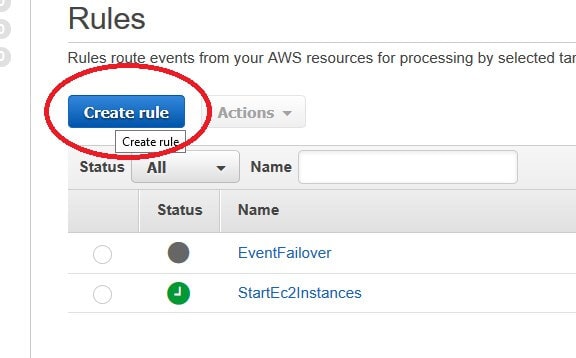
Create a CloudWatch rule IE : StartEc2Instance

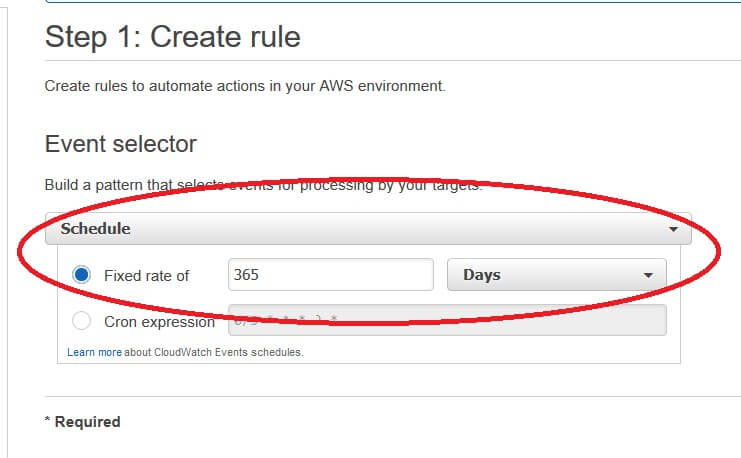
Select ‘Schedule’ in the Event Select combo box and define the time configurations. In this example I am creating one with 365 days, but you can specify whatever time-ranges you want. Because SQL Server agent jobs are usually seldom changed, when some changes happens you can enable and disable the CloudWatch from the AWS console or by PowerShell

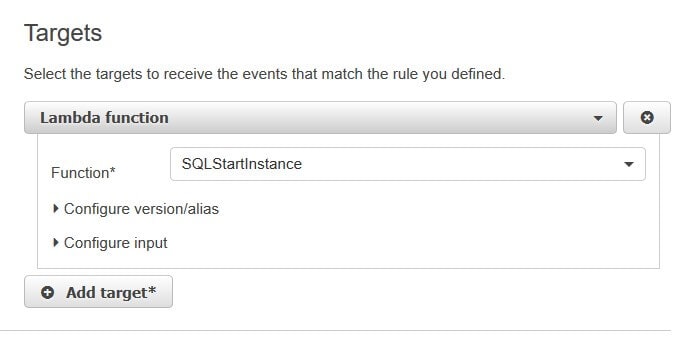
Select the Targets and choose the lambda function created in the step 4 to start the instance (not after failover one)

Step 6 – Setup Amazon SNS to call the Lambda Function Failover

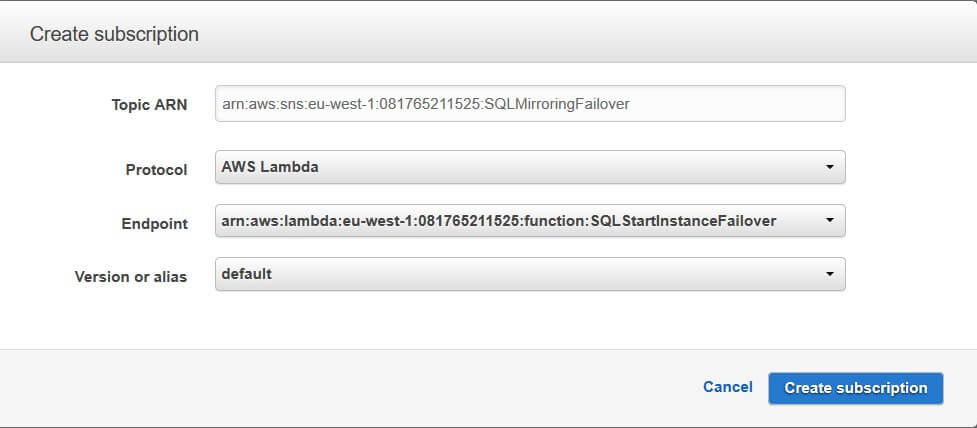
Create a new Topic. I’ve used SQLMirroringFailover in the illustration.

Create a subscription to the SQLStartEC2InstanceFailover Lambda Function that we’ve created

Step 7: Setup a RDS Event Failover and link to the SNS

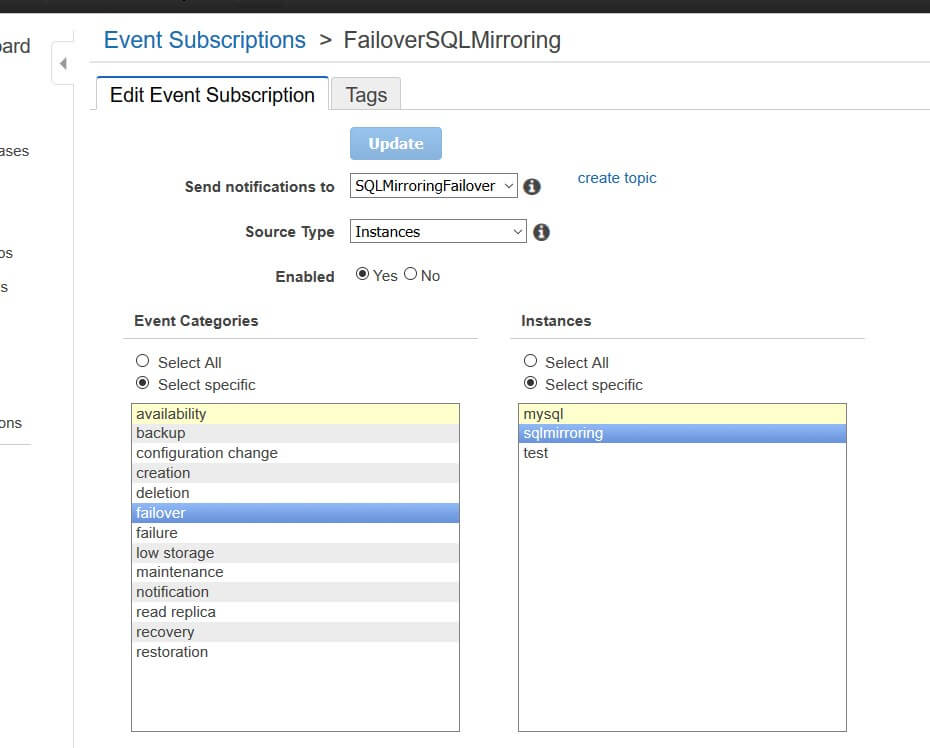
Create a new Event Subscription. We’ll call this FailoverSQLMirroring

  • In the dropdown widget ‘Send notifications to’, specify the SNS that we previously created in step 6 called SQLMirroringFailover
  • The dropdown called ‘Source Type’ should be set to Instances
  • The ‘Event Categories’ listbox should have ’Failover’ selected.
  • The ‘Instances’ listbox should have the name of the RDS SQL Server doing the Mirroring

Phase 2: Applying changes when Failover occurs.

Execute the PowerShell command to enable the CloudWatch Rule and start the process to do the scripting out and saving the script to the bucket by PowerShell:

Enable-CWERule -Name StartEc2Instances -Region eu-west-1

disable the CloudWatch Rule after the process:

Disable-CWERule  -Name StartEc2Instances -Region eu-west-1

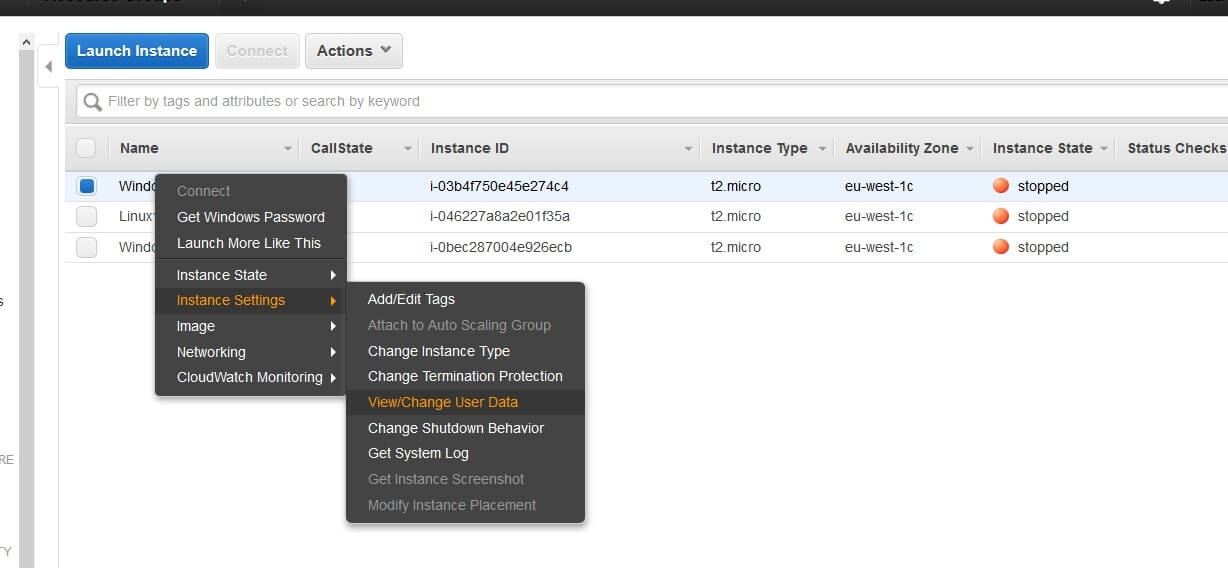
To launch the EC2 Instance and not run the PowerShell code (for maintenance of the code for example)

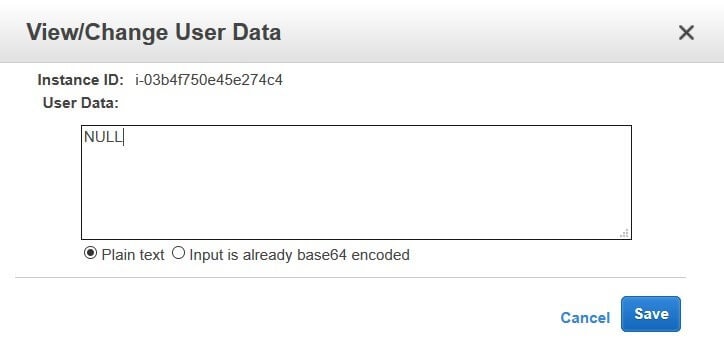
· Change the User Data from the EC2 Instance for something different from Schedule or Failover. IE: NULL

Next Steps: To do – Improvements

Set up an Amazon Simple Email Service (SES) to send email notifications of the status of the process (to inform the user whether the .sql script was upload and whether the jobs were successfully synchronized)

Create better error handling in the PowerShell script, along with scripting out the email notifications

Set up the EC2 Instance in Amazon RDS Multi-AZ to provide enhanced availability and durability for Database (DB) Instances

Create an AWS Key Management Service (KMS) key to store the credentials of the RDS SQL Server login rather than having it hard-coded in the PowerShell script

The post Automating the Synchronization of RDS SQL Server Agent Jobs in a Multi-AZ Environment appeared first on Simple Talk.

11 Jul 06:23

Statistics in SQL: The Mann–Whitney U test

by Phil Factor

The series so far:

  1. Statistics in SQL: Pearson’s Correlation
  2. Statistics in SQL: Kendall’s Tau Rank Correlation
  3. Statistics in SQL: Simple Linear Regressions
  4. Statistics in SQL: The Kruskal–Wallis Test
  5. Statistics in SQL: The Mann–Whitney U Test

Imagine you have some data. Maybe you’ve done a web redesign and you want to do some A/B testing to see if by redesigning the page your visitors spend more time reading your content. You set up an experiment in which visitors are randomly sent to either the old or new design, and you measure how long they spend engaged with the content. (you try to ensure that all other factors besides the design of the website are ‘controlled’, meaning that they are equal for both samples. Is the new design significantly better than the old one? You need to disprove the ‘null hypothesis’ that the two samples, from those who got the new design and those who got the old one are from the same population.

There are several ways that you can test this, but nobody is going to argue with you if you use a Mann–Whitney U test to test whether two samples come from the same distribution. It doesn’t require that the data has any particular type of distribution. It just requires that each observation is done by a different member of the population so that all the observations from both groups are independent of each other. It is really just a test of differences in mean-rank between two populations’ pooled ranking. To test this difference It has to be possible to compare any of the observations with any of the others and say which of the two are greater. Your objective is to disprove the assumption that The distributions of both populations are equal. Calculating a measure of the difference is simple, and was designed to be done easily by hand before computers. The probability that the observed difference occurred by chance is easily calculated for large samples because U then approximates to the normal distribution, but it is complex for small samples. Here, we have a small sample and are just interested in whether the two-tailed test is signifcant at the five percent level so we dodge the bullet by using a significance lookup table for the critical value of U.

SET NOCOUNT on
/* we'll start with our table of critical values for U for small values. Our test is two-tailed and we
are interested in the 5% level so we just need that. */
DECLARE @TwoTailedCriticalValues TABLE
  (
  UValue INT NOT NULL,
  N1 INT NOT NULL,
  N2 INT NOT NULL
  );
INSERT INTO @TwoTailedCriticalValues(UValue,N2,N1)
values
(0,8,2), (0,9,2), (0,10,2), (0,11,2), (1,12,2), (1,13,2), (1,14,2), (1,15,2), (1,16,2), (2,17,2),
(2,18,2), (2,19,2), (2,20,2), (0,5,3), (1,6,3), (1,7,3), (2,8,3), (2,9,3), (3,10,3), (3,11,3), 
(4,12,3), (4,13,3), (5,14,3), (5,15,3), (6,16,3), (6,17,3), (7,18,3), (7,19,3), (8,20,3),(0,5,4),
(1,6,4), (2,7,4), (3,8,4), (4,9,4), (4,10,4), (5,11,4), (6,12,4), (7,13,4), (9,14,4), (10,15,4), 
(11,16,4), (11,17,4), (12,18,4), (13,19,4), (14,20,4),(2,5,5), (3,6,5), (5,7,5), (6,8,5), (7,9,5),
(8,10,5), (9,11,5), (11,12,5), (12,13,5), (13,14,5), (14,15,5), (15,16,5), (17,17,5), (18,18,5),
(19,19,5), (20,20,5), (5,6,6), (6,7,6), (8,8,6), (10,9,6), (11,10,6), (13,11,6), (14,12,6),
(16,13,6), (17,14,6), (19,15,6), (21,16,6), (22,17,6), (24,18,6), (25,19,6), (27,20,6),(8,7,7), 
(10,8,7), (12,9,7), (14,10,7), (16,11,7), (18,12,7), (20,13,7), (22,14,7), (24,15,7), (26,16,7),
(28,17,7), (30,18,7), (32,19,7), (34,20,7),(13,8,8), (15,9,8), (17,10,8), (19,11,8), (22,12,8), 
(24,13,8), (26,14,8), (29,15,8), (31,16,8), (34,17,8), (36,18,8), (38,19,8), (41,20,8),(17,9,9), 
(20,10,9), (23,11,9), (26,12,9), (28,13,9), (31,14,9), (34,15,9), (36,16,9), (39,17,9), (42,18,9),
(45,19,9), (48,20,9), (23,10,10), (26,11,10), (29,12,10), (33,13,10), (36,14,10), (39,15,10),
(42,16,10), (45,17,10), (48,18,10), (52,19,10), (55,20,10), (30,11,11), (33,12,11), (37,13,11), 
(40,14,11), (44,15,11), (47,16,11), (51,17,11), (55,18,11), (55,19,11), (62,20,11),(37,12,12), 
(41,13,12), (45,14,12), (49,15,12), (53,16,12), (57,17,12), (61,18,12), (65,19,12), (69,20,12),
(45,13,13), (50,14,13), (54,15,13), (59,16,13), (63,17,13), (67,18,13), (72,19,13), (76,20,13),
(55,14,14), (59,15,14), (64,16,14), (69,17,14), (74,18,14), (78,19,14), (83,20,14),(64,15,15), 
(70,16,15), (75,17,15), (80,18,15), (85,19,15), (90,20,15), (75,16,16), (81,17,16), (86,18,16), 
(92,19,16), (98,20,16), (87,17,17), (93,18,17), (99,19,17), (105,20,17),(113,19,19),(119,20,19), 
(127,20,20)

/*
Now we can add our data. here is the number of seconds spent on the page with either the old
design (B) or the new design (A). The 'observation' is the number of seconds spent on the
page. There is a fair range but not normally distributed. Some people get to the page and 
soon realise it is not relevant for them, whereas others spend a long time on it. 
With this test, the first thing you do is to rank these results so the actual measurement
is irrelevant. You can do a U test on just ranked data for the two groups. The 'observation'
is only used to achieve the ranking
*/
DECLARE @ourResults TABLE --where we hold our results
  (
  TheGroup CHAR(1),
  Observation INT NOT NULL
  );
INSERT INTO @ourResults
  ( Observation,TheGroup)
VALUES 
(3,'B'),
(3,'A'),
(3,'B'),
(9,'B'),
(9,'A'),
(21,'B'),
(25,'B'),
(37,'A'),
(45,'B'),
(56,'B'),
(75,'A'),
(88,'B'),
(101,'B'),
(120,'A'),
(120,'A'),
(156,'B'),
(206,'A'),
(269,'A'),
(269,'B'),
(291,'B'),
(308,'A'),
(321,'A'),
(346,'A'),
(400,'A'),
(421,'A'),
(431,'A')

DECLARE @tx NUMERIC(8, 2), @nx INT, @Ntotal INT, @UValue INT;

--We now rank all the observations in order regardless of The group

DECLARE @ourRanking TABLE
  (
  TheGroup CHAR(1),
  Observation INT NOT NULL,
  TheRank NUMERIC(8, 2) NOT NULL
  );
--insert into the temporary table the ranked observations
INSERT INTO @ourRanking
  (TheGroup, Observation, TheRank)
  SELECT TheGroup, Observation, Rank() OVER (ORDER BY [@ourResults].Observation) AS TheRank
  FROM @ourResults;
--and remember how many observations there were in total
SELECT @Ntotal = @@RowCount; 
--now deal with ties to give them equal shared rank so that joint first would both be 1.5
--and three tied in first would all be 2
UPDATE @ourRanking
  SET TheRank = [@ourRanking].TheRank + ((ties.NumberOfTies - 1.00) / 2)
  FROM
  (SELECT Count(*) AS NumberOfTies, TheRank
     FROM @ourRanking
     GROUP BY TheRank
  ) AS ties
    INNER JOIN @ourRanking
      ON [@ourRanking].TheRank = ties.TheRank;
SELECT * FROM @ourRanking AS ORA
SELECT TOP 1 @tx = Sum(TheRank), @nx = Count(*)
  FROM @ourRanking
  GROUP BY TheGroup
  ORDER BY Sum(TheRank) DESC;

--Now we can simply calculate the Mann Whitney U value
SELECT @UValue = @nx * (@Ntotal - @nx) + @nx * ((@nx + 1) / 2.00) - @tx;
IF @Ntotal - @nx<=20 AND @Ntotal - @nx<=20
  --and see if it is significant...
  SELECT 'The U score was '+CONVERT(varchar(5),@UValue)
  +' from sample sizes of '+CONVERT(varchar(5),@nx)+' and '
  + Convert(varchar(5),@Ntotal - @nx)
  +' observations, the critical U score for 5% significance level was '
  +CONVERT(varchar(5),CriticalValue)+', so the samples were'
  + CASE WHEN CriticalValue<@UValue THEN ' NOT' ELSE '' END
  +' from significantly different populations'
  FROM (
    SELECT @UValue AS UValue,
      CASE WHEN @Ntotal - @nx > @Ntotal / 2 THEN
        (SELECT UValue FROM @TwoTailedCriticalValues 
		   WHERE N1 = @nx AND N2 = @Ntotal - @nx) 
      ELSE
       (SELECT UValue FROM @TwoTailedCriticalValues 
	       WHERE N1 = @Ntotal - @nx AND N2 = @nx) END
	  AS CriticalValue)f;
  ELSE
  SELECT 'The U score was '+CONVERT(varchar(5),@UValue)
  +' from sample sizes of '+CONVERT(varchar(5),@nx)+' and '
  + Convert(varchar(5),@Ntotal - @nx)
  +' observations. You''ll need to calculate the Z and p values' ;

This, when executed in SQL Server yields this result …

The U score was 42 from sample sizes of 14 and 12 observations, the critical U score for 5% significance level was 45, so the samples were from significantly different populations

With all this series, I’m not giving you the cut n’ paste formula for doing production stats, The aim is to provide something you can experiment with, even if it just changing the figures and trying things out to see how easy it is to get from statistics theory to practice. It is much better to do this- even work things out on paper – before you get to crank the handle of a package such as R. There is too much magic in doing that if you don’t first get a feel for what is really being done, and what the assumptions are. The real expertise of statistics is in ensuring that the design of the test is right and in choosing the right statistical method for the task. Otherwise a tool like R merely gets you to the wrong answer quicker.

The post Statistics in SQL: The Mann–Whitney U test appeared first on Simple Talk.

11 Jul 06:22

Revisiting Script Injection in ASP.NET

by Dino Esposito

Unless, maybe, you are writing a web application for a small and well-known audience, you should really take a look at the cheat sheet of OWASP for .NET projects. The Open Web Application Security Project (OWASP) is an organization that cares about good practices to minimize security risks in web applications. More information on OWASP is available at http://www.owasp.org.

In this article, I’ll focus on the countermeasures and tools built into the classic ASP.NET pipeline, and the ASP.NET MVC stack in particular, to fend off script injection attacks and in general any attempt to inject invalid and potentially malicious input into an application. All the rules of web security could be summed up in single nugget of plain wisdom—never trust any user input. However, it is interesting to see how the perspective on the most appropriate way to deal with raw input has changed from classic ASP.NET to ASP.NET Core. Note that in this article, when not explicitly stated otherwise, I’m referring to the classic ASP.NET MVC 5.x stack and the classic ASP.NET pipeline. I’ll discuss ASP.NET Core later on in a separate section.

ASP.NET Request Barricades

Years ago, ASPX Web Forms pages introduced a page directive to enable or disable request URL validation.

<%@ Page validateRequest="true" %>

When set to true, the validateRequest directive instructs the runtime to perform a preliminary check on the parametric segments of the URL being called to spot any potentially malicious characters. If any of those characters are found (for example, angle brackets possibly being the beginning of a JavaScript snippet) then the pipeline would stop the request and throw an exception. The same barrier is set up for the ASP.NET MVC stack. Over the years, though, the request validation filter has been moved out of the application model stack (Web Forms or MVC) and placed just outside the entire request processing cycle. Currently, in fact, the check is performed before the request is processed by the ASP.NET pipeline and culminates in a controller method call or in an ASPX postback event.

Regardless of the application model of choice, whether Web Forms or MVC, in ASP.NET any request goes through a sequence of application-level events that can be handled with code in global.asax. The event that signals the receipt of the request and the beginning of any processing work on it is BeginRequest.

protected void Application_BeginRequest(object sender, EventArgs e)
{
   :
}

When the BeginRequest event fires up, any request validation work has been done already. If BeginRequest is received by the application code then it also means that the check on the URL was successful. The request validation filter doesn’t do any particularly sophisticated work but it’s enough to detect common attempts of script injection and anyway is better than nothing. For any occurrence of “<” followed by alphabetical characters and for any occurrence of “<!” and “&#” found in posted form data, query string, cookies, route data the system throws a HttpRequestValidationException exception and aborts the request.

Note that the request validation input filter is optional in classic ASP.NET and can be disabled altogether for the entire application in web.config or on a per ASPX page and controller action method basis. To disable it on a controller method you apply the ValidateInput attribute.

[ValidateInput(false)]
public ActionResult Index()
{
    :
}

Disabling the filter for the entire application is a bit trickier. First, you set the ValidateRequest property on the Controller class to false. Second, you edit the default configuration of the HTTP runtime to make it work as it used to do before ASP.NET 4.0.

<system.web>
   <httpRuntime requestValidationMode="2.0" />
</system.web>

It is with ASP.NET 4.0, in fact, that the request validation filter has been moved before BeginRequest and because of this any programmatic check comes too late. Resetting the configuration of the runtime to any version of ASP.NET prior to 4.0 regains you full control over the application of the filter. To cover all of your controllers with a single setting, you might want to introduce a custom base controller class property configured to disable the filter.

The ASP.NET Core Approach

Since the beginning there has been a vibrant debate about the effective usefulness of such a blind barrier around request URLs that is unable to detect and interpret context. The primary objection was that an automatic request validation barrier prevents any application from receiving some HTML content via a form. This is a real issue for all those applications that need to have users enabled to type in HTML markup, say, as the body of a published news. Disabling the filter solves the issue for those applications in the need of processing (sanitized) HTML, but leaves on the developers’ shoulders the responsibility of actually sanitizing the HTML.

In ASP.NET Core, the ASP.NET team chose a different direction. No middleware is made available that behaves in a way similar to the ASP.NET request validation filter. This is by design. The standpoint is that, in the end, validating the input should be seen as a primary application concern. Having a general-purpose barrier set in place for free might even give a false sense of comfort and safety; and this might lead developers to disregard specific concerns originating in their specific context. A general-purpose barrier carries the risk of being  rather porous,  even inadequate, and it’s definitely hard to come up with a mix of checks that work for just any applications. Hence, the ASP.NET Core team decided not to offer any built-in middleware but instead leaves you responsible for building your own middleware. On the other hand, the team managed to ensure that all output from Razor views is automatically encoded. This is the best countermeasure to stay protected against cross-site script attacks (XSS).

What if I Need to Process HTML in JavaScript?

Let’s assume that your application has one or more HTML forms that are due to accept (and parse and sanitize) HTML input. The first example that comes to mind is a form that captures a news or a blog post where you want to use some HTML formatting tags. The first scenario I’ll go through is when the sanitization should occur on the client side and done via JavaScript.

JavaScript provides the encodeURI global function to encode plain text. The net effect of the function is to encode special characters except the following: , / ? : @ & = + $ #. However, if you use the encodeURIComponent function instead, all special characters will be encoded. To decode what could have been encoded, you use the decodeURI function. Let’s have a look at the following code snippet.

<script>
    $("#js-submit-button").click(function () {
        var input = $("#textinput").val();
        var input1 = encodeURI(input);
        var input2 = "<xmp>" + input + "</xmp>";
        var input3 = htmlEncode(input);
        $("#output").html(input1 + "<br>" + input2 + "<br>" + input3);
    });
</script>
<script>
    function htmlEncode(value) {
        return $('<textarea/>').text(value).html();
    }
</script>

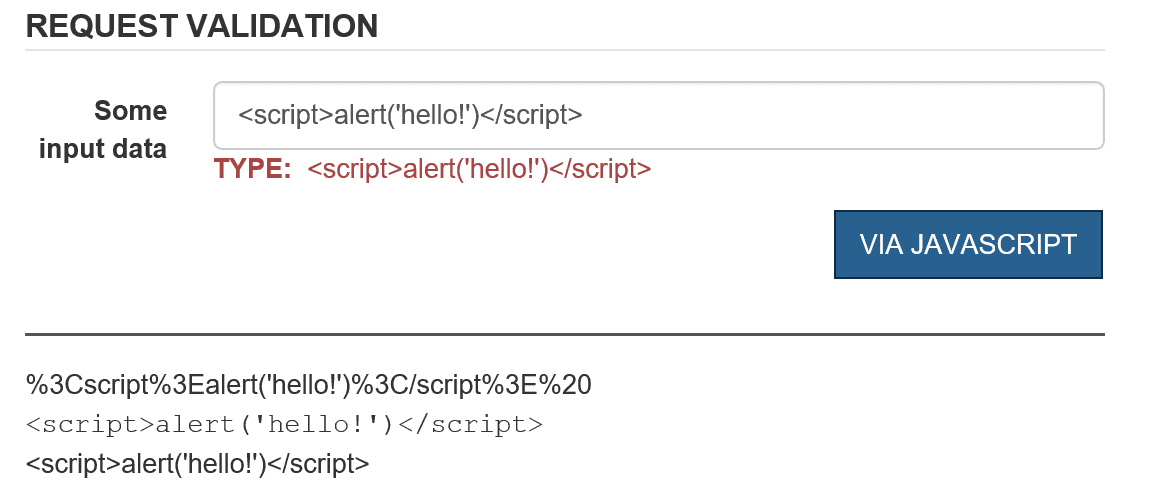
The variable named input contains the raw input as the user may have typed it in the input field. The variable input1 contains the safely encoded version of it, ideal for transmitting across the wire on the server. The other two variables, input2 and input3, provide two ways to display encoded HTML and JavaScript content within the current DOM. The first approach involves wrapping the raw input with a XMP element. The second approach wraps the raw input in a disabled textarea element. The figure below shows the final result in a sample page.

The textbox receives some text that can be evaluated to an active script. Below the horizontal line, you can see the encoded text as it was generated by the encodeURI function, the rendering of the raw text once wrapped up in a XMP element and, finally, the output of the raw input within a disabled textarea element. Depending on the expected use of the input markup (processing or just display) you have quite a few options to work with the data safely.

Processing Potentially Malicious Data on the Server

If you keep ValidateRequest enabled, then your controller action methods will never have their chance to parse and process any request that contains markup and tag elements. Hence your decision depends on the answer you give one core question: does your application need to receive and process HTML formatted input? If the answer is no, then you can probably keep the filter on and will automatically be protected against any attempt to post potentially malicious data. If the answer is yes, instead, you’d better disable the request validation filter and roll your own (effective) sanitization layer. The good news is that in this case ASP.NET MVC has some additional capabilities to keep your necessary work of parsing HTML down to the bare minimum. You can use the AllowHtml attribute on the properties of a view model class used to capture input data through model binding.

public class ReqValViewModel  
{
    [AllowHtml]
    public string TextInput { get; set; }
    public string Buffer { get; set; }
}

Suppose you populate an instance of this class via the model binding engine of ASP.NET MVC.

[ValidateInput(true)]  // default
public ActionResult Reqval(ReqValViewModel input)
{
    ViewData["TextInput"] = input.TextInput;
    return View();
}

In the example, the request validation filter is on but any attempt to bind HTML content to TextInput won’t throw any security exception. This is because the member is decorated with the AllowHTML attribute. If you attempt to bind HTML content to the property Buffer, instead, you will get the expected exception. Note that the AllowHTML attribute can only be used through model binding and it won’t work if applied to a parameter as the Bind attribute does. In other words, the following code, though logically equivalent, won’t compile.

public ActionResult Reqval(
    [AllowHTML] string textInput, 
    string buffer)
{
    :
}

Note that ASP.NET prohibits direct access to input collections such as QueryString and Form if the request validation filter is disabled and potentially dangerous input is acceptable. The following code will fail:

[ValidateInput(false)]  // DISABLED!
public ActionResult Reqval(ReqValViewModel input)
{
    // This code will fail!!!
    var content = Request.Form["TextInput"];
    :
    return View();
}

The reason the code fails is that Form or QueryString collections get to contain raw data not sanitized in any way. If direct access is really necessary in code then you have to resort to the following expression:

var content = Request.Unvalidated.Form["TextInput"];

No issues exist whatsoever if you retrieve posted values through the model binding layer. When it comes to writing your own request validation filter you might want to get inspired by the original one written by Microsoft for ASP.NET. The source code is available as open source and if you have JetBrains’s dotPeek installed (it’s free) you can access it directly from within Visual Studio. Anyway, if in your own request validation layer, you need to invoke the original filter just call it: Request.ValidateInput().

Output Encoding

Request validation comes as a tool to defend against XSS attacks that exploit vulnerabilities in input validation. As a result, client-side script code can be injected in the DOM resulting in unwanted actions and unpredictable results. The most effective line of defense—the only one implemented in ASP.NET Core—is automatically encoding any output being rendered through Razor views. Outside of Razor views, for example in Web Forms pages, you can use the Server.HtmlEncode method. In Razor, you can also use the method Html.Encode to have text explicitly encoded. Should you need to emit un-encoded text from within a Razor view use the Html.Raw method instead.

To prevent automatic encoding of output content you can use special string types such as HtmlString and MvcHtmlString. The former is for Web Forms pages whereas the latter is for use within Razor views. Both classes implement the interface IHtmlString which tells the system not to encode text automatically.

@{
    var htmlString = MvcHtmlString.Create(Html.Encode("<script>alert('hello!')</script>"));
}

It is important to remind that any use of MvcHtmlString comes under the assumption that the text being rendered is, or has been, already accounted for encoding.

Note that the ASP.NET default encoder class looks for black-listed characters that may indicate some malicious script. There’s an alternative though—using the AntiXssEncoder class. Encoding methods on this class take a white-list approach and define a set of allowed characters and ensure no other characters are found. To replace the default encoder, you add the following to your web.config file:

<httpRuntime 
      targetFramework="4.5" 
      encoderType="System.Web.Security.AntiXss.AntiXssEncoder" />

The AntiXssEncoder class has the same HTML encoding method as the default encoder plus others. In particular, the AntiXssEncoder class provides additional static methods to encode in special scenarios such as for text to be included in a CSS file (method CssEncode), in an XML file (method XmlEncode) and in a HTML form being posted (method HtmlFormUrlEncode).

Summary

In the end, Cross-Site Scripting (XSS) vulnerabilities are still today a significant threat for the security of most web applications. XSS attacks can be prevented in two ways: by validating the input accepted through all possible channels and by encoding any output. Validating request content means avoiding all special characters and constraining all user input to acceptable range, type and length.  In ASP.NET MVC, output encoding is automatic in Razor views and incoming requests are also validated for special characters.

The post Revisiting Script Injection in ASP.NET appeared first on Simple Talk.

11 Jul 06:22

Using R to illustrate relationships from graph objects

by Dennes Torres

My new article about Graph Database Objects was just published, it’s really a very good new feature.

Another new feature we have since SQL Server 2016 is R language. We can use R language inside the database to analyze our data.

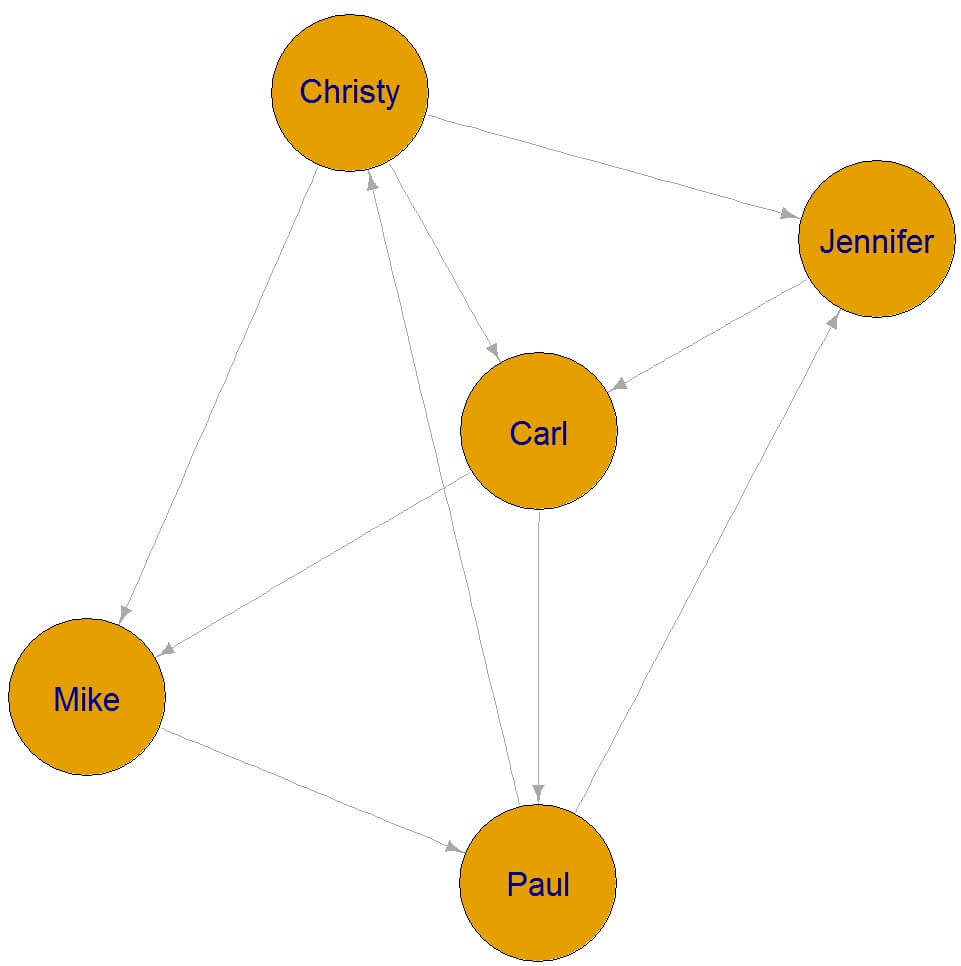
The possibility to use both technologies together is very interesting. Using graph objects we can store relationships between elements, for example, relationships between forum members. Using R scripts we can build a cluster graph from the stored graph information, illustrating the relationships in the graph.

The script below creates a database for our example with a subset of the objects used in my article and a few more relationship records between the forum members.

use master
drop database if exists RGraph
go
create database RGraph
go

use RGraph
go

drop table if exists dbo.Likes
drop table if exists dbo.ForumMembers

CREATE TABLE [dbo].[ForumMembers](
       [MemberID] [int] IDENTITY(1,1) NOT NULL,
       [MemberName] [varchar](100) NULL
)
AS NODE
GO

CREATE TABLE [dbo].[Likes]
AS EDGE

INSERT ForumMembers values (‘Mike’),(‘Carl’),(‘Paul’),(‘Christy’),(‘Jennifer’),(‘Charlie’)

INSERT Likes ($to_id,$from_id)
    VALUES
    ((SELECT $node_id FROM dbo.ForumMembers WHERE MemberID = 1),
         (SELECT $node_id FROM dbo.ForumMembers WHERE MemberID = 2)),
    ((SELECT $node_id FROM dbo.ForumMembers WHERE MemberID = 3),
         (SELECT $node_id FROM dbo.ForumMembers WHERE MemberID = 2)),
    ((SELECT $node_id FROM dbo.ForumMembers WHERE MemberID = 1),
         (SELECT $node_id FROM dbo.ForumMembers WHERE MemberID = 4)),
    ((SELECT $node_id FROM dbo.ForumMembers WHERE MemberID = 5),
         (SELECT $node_id FROM dbo.ForumMembers WHERE MemberID = 4))

insert into likes ($from_id,$to_id) values
  ((select $node_id from dbo.forummembers where MemberName=‘Mike’),
    (select $node_id from dbo.forummembers where MemberName=‘Paul’)),
  ((select $node_id from dbo.forummembers where MemberName=‘Paul’),
    (select $node_id from dbo.forummembers where MemberName=‘Christy’)),
  ((select $node_id from dbo.forummembers where MemberName=‘Christy’),
    (select $node_id from dbo.forummembers where MemberName=‘Carl’)),
  ((select $node_id from dbo.forummembers where MemberName=‘Paul’),
    (select $node_id from dbo.forummembers where MemberName=‘Jennifer’)),
  ((select $node_id from dbo.forummembers where MemberName=‘Jennifer’),
    (select $node_id from dbo.forummembers where MemberName=‘Carl’))

You need to follow a few steps to enable R scripts:

1) Install R in SQL Server

You can follow the instructions in this link to install R in SQL Server

2) Install the package iGraph in R

You can follow the instructions in this link to install iGraph package

3) Enable the use of external scripts. You can execute the following t-sql code:

exec sp_configure ‘external scripts enabled’, 1;
RECONFIGURE;

4) Execute the script

Below is the R script to build a cluster graph using iGraph our relationships stored in SQL Server. You need to change the folder to store the graph.

exec sp_execute_external_script @language = N’R’,
@script = N’
require(igraph)
g <- graph.data.frame(graphdf)
V(g)$label.cex <- 2
png(filename = “c:\\R\\plot1.png”, height = 1200, width = 1200, res = 100); plot(g, vertex.label.family = “sans”, vertex.size = 40)
dev.off() ‘,
@input_data_1 = N’select LikeMember.MemberName as LikeMember,    LikedMember.MemberName as LikedMember         from dbo.ForumMembers as LikeMember,  dbo.ForumMembers as LikedMember,  Likes
        where Match(LikeMember-(Likes)->LikedMember) ‘,
@input_data_1_name = N’graphdf’
GO

The image below shows the resulting graph with the relations between forum members:

Cluster created with R from relationship graph information

It’s interesting to remember about the new feature in SQL Server 2017: We can also build the same script using Python.

The post Using R to illustrate relationships from graph objects appeared first on Simple Talk.

11 Jul 06:15

Nein, Ubuntu kommt nicht in den Windows Store

by Albert Jelica

In letzter Zeit häufen sich die Falschmeldungen in Bezug auf Linux-Distributionen im Windows Store, wobei viele Berichte auch reiner Clickbait sind. Die Headlines und auch die Artikel suggerieren nämlich, die Linux-Distributionen seien Betriebssysteme, welche sich aus dem Windows Store heraus installieren lassen.

Wer allerdings nur kurz recherchiert und beispielsweise diese Anwendung aus dem Windows Store herunterlädt, wird schnell merken, dass das völlig falsch ist. Grundsätzlich würde allerdings ausreichen, die Beschreibung im Store gelesen zu haben und es ist wohl auch selbstverständlich, dass Microsoft nicht die Installation eines fremden Betriebssystems vom eigenen Store heraus erlauben würde.

Was ist Ubuntu im Windows Store?

Dennoch liest man in zahlreichen Medien momentan, Ubuntu käme in den Windows Store. Nun, das ist völliger Schwachsinn. Was in den Windows Store kommt, ist eine Erweiterung der Linux-Bash unter Windows 10 der jeweiligen Distribution. Somit können Entwickler auch spezielle Ubuntu- oder SUSE-Befehle direkt in der Windows-Bash nutzen. Ubuntu im Windows Store ist also eine Erweiterung für die Bash, kein Betriebssystem.

Momentan kann diese ohnehin nur von Windows Insidern im Fast Ring genutzt werden und auch in Zukunft dürften auch nur Entwickler davon Gebrauch machen.

Was viele Medien aktuell betreiben, ist entweder sehr, sehr schlecht recherchiert oder purer Clickbait. Die Headlines suggerieren, das Feature sei auch für Linux-Fans und somit eine weitere Zielgruppe interessant. Ist es allerdings nicht.

Ubuntu (Kostenlos, Windows Store) →

Der Beitrag Nein, Ubuntu kommt nicht in den Windows Store erschien zuerst auf WindowsArea.de.

11 Jul 06:14

Kaffee: Kaffeetrinker leben länger

by ZEIT ONLINE: Gesundheit - Dagny Lüdemann
Überraschung: Unter Kaffeetrinkern ist die Sterblichkeit geringer. Ist also alles falsch, was wir bisher über Kaffee dachten?
11 Jul 06:14

Paint.NET is Coming to the Windows Store

by Paul Thurrott
Paint.NET is Coming to the Windows Store

Paint.NET, a free and well-regarded graphics editor for Windows, is coming to the Windows Store, Rick Brewster said this week.

The post Paint.NET is Coming to the Windows Store appeared first on Thurrott.com.

11 Jul 06:13

G20-Gipfel: Maas bittet EU-Partner um rasche Fahndungshilfe

by ZEIT ONLINE: Deutschland -
Nach den Krawallen hat der Justizminister seine EU-Kollegen aufgefordert, intensiv nach den Tätern zu fahnden. Bisher sitzen Verdächtige aus acht Ländern in U-Haft.
11 Jul 06:13

Microsoft Really Wants You To Try Groove, $10 for 7 Months of Service

by Brad Sams

Microsoft is offering a good deal on Groove where you can get seven months of service for $9.99 but there are some caveats you should know about.

The post Microsoft Really Wants You To Try Groove, $10 for 7 Months of Service appeared first on Thurrott.com.

11 Jul 06:12

Systemd-Entwickler wollen die "0day"-Lücke nun doch schließen

Systemd-Entwickler wollen die "0day"-Lücke nun doch schließen

Eigentlich sei alles, wie es sein soll, hieß es. Das mehr als fragwürdige Verhalten beim Systemstart von Linux sei völlig in Ordnung. Doch dann kam ein riesiger Shitstorm und selbst Linus Torvalds zeigte sich unzufrieden. Jetzt gibt es einen Patch.

11 Jul 06:12

SFO near miss might have triggered aviation disaster

11 Jul 06:12

Windows 10 Insider Builds: Microsoft integriert Ubuntu in den Windows-Store

Wer mit den Vorabversionen des Fall Creators Update von Windows 10 arbeitet, kann neben Suse Linux nun auch Ubuntu direkt aus dem Windows Store installieren. Die Installation soll damit einfacher werden. (Windows 10, Server)