Shared posts

27 Sep 09:22

Work better together with SharePoint team sites Office 365 app integrations

by Mark Kashman

At Ignite 2017, we announced numerous innovations to SharePoint that help you work better together, to provide consistent access to content from across Office 365, the ability to see how sites and content are bring used, plus new admin capabilities to provide consistency across sites – all brought to the user on their device of choice via updates to the SharePoint mobile apps.


At work, it is important for every team member to streamline efforts and stay on the same page, especially when they are on the go. SharePoint team sites provide a central location to manage team files, input and connect to important data, and share timely news. And with insight into what drives the most engagement and value, people can course correct and optimize for greatest impact.
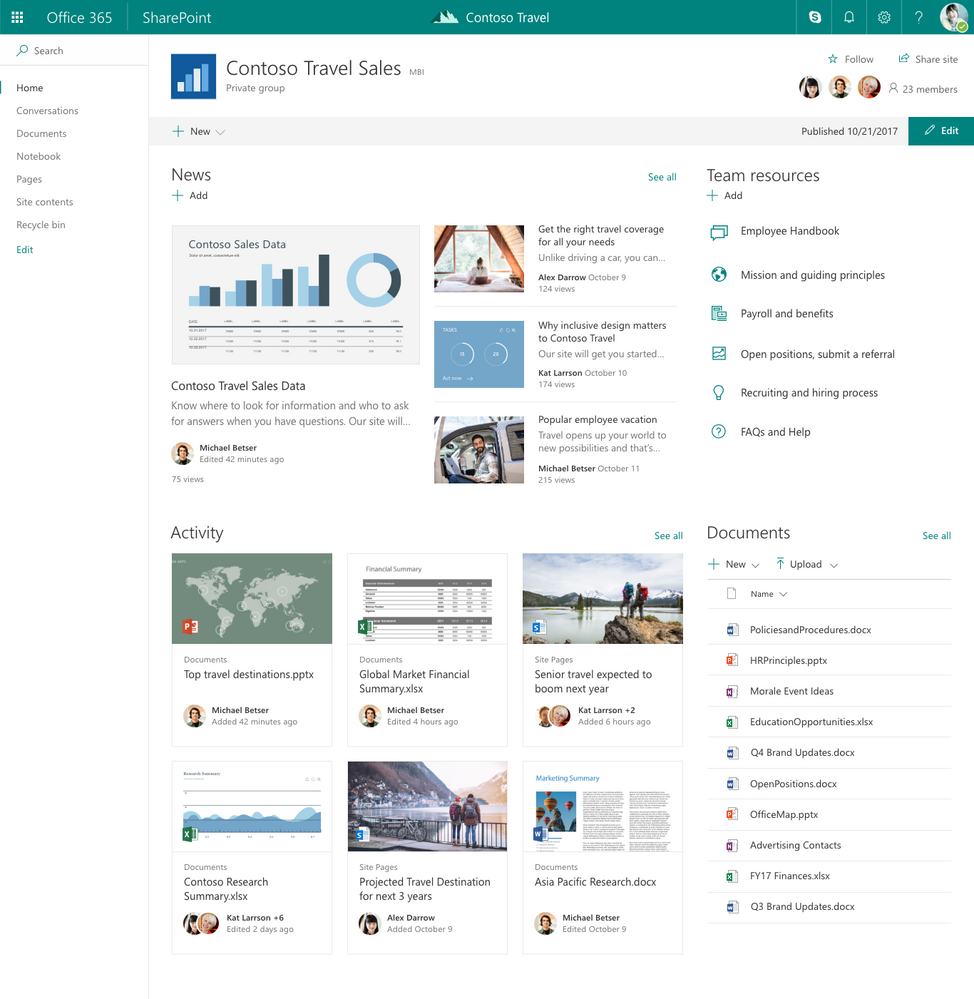
 

SharePoint team sites are tightly integrated with Office 365 Groups and associated applications.SharePoint team sites are tightly integrated with Office 365 Groups and associated applications.

Let’s dive into the details.

Work better together using SharePoint, Office 365 groups & Microsoft Teams

Every group will have a unique approach to how they work and what works best. Some will be email-centric, some files-centric and some oriented around chat. And because all groups in Office 365 are backed by SharePoint team sites, all content resides in a content service (SharePoint) that is easy to bring into a discussion, to share and to access.


View SharePoint pages and news articles within Microsoft Teams.

Microsoft Teams is the hub for teamwork where groups that actively engage and are working on core projects can connect and collaborate. And in conjunction with SharePoint, groups keep content at the center of teamwork, making files, sites and all types of content easily shareable and accessible across teams. Beyond files stored in SharePoint document libraries, now you can access the dynamic, data-driven pages and news articles and surface them right in the context of your work in Microsoft Teams.


It is now possible to manually add an important page or news article as a unique tab in a Microsoft Teams channel. The page itself lives in the appropriate SharePoint site, and is surfaced in context where it needs to be a part of the chat. Simply select your page, choose if you want to post to a channel about this page, and click Save.
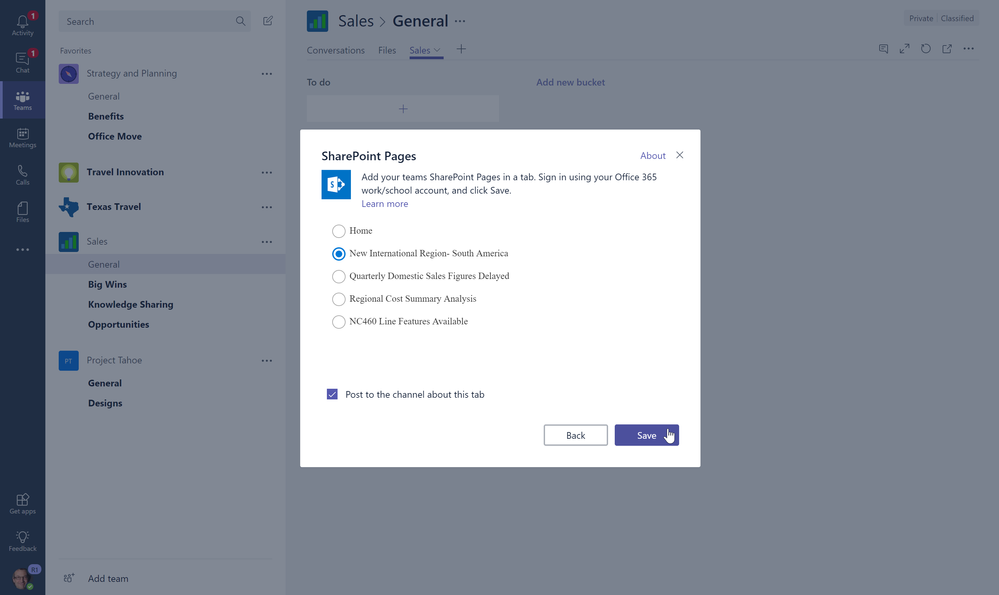
 

SharePoint pages and news can easily be added as unique tabs within Microsoft Teams.SharePoint pages and news can easily be added as unique tabs within Microsoft Teams.

If there is a more consistent need for an always-on connection to all published team news, it’s possible to connect all news articles to appear as unique threads within the default channel chat experience.
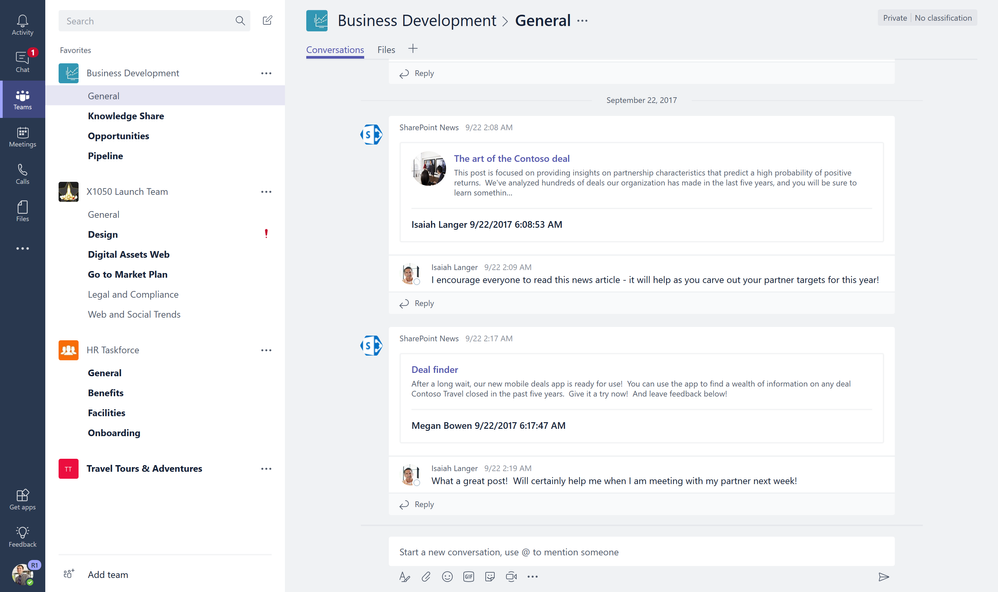
 

You can connect SharePoint team news to automatically start new chat threads per news item each time one is created from SharePoint team sites.You can connect SharePoint team news to automatically start new chat threads per news item each time one is created from SharePoint team sites.

Bring Office 365 group content and resources to your SharePoint team site

By default, SharePoint team sites are connected to Office 365 Groups for consistent membership and access to related apps like a share inbox, calendar and OneNote notebook. It is now easier to refine how Office 365 group apps and controls are brought into the SharePoint team site experience.

You can quickly edit the team site left-hand navigation to include links to the group’s Conversations Calendar, Notebook, and Planner.
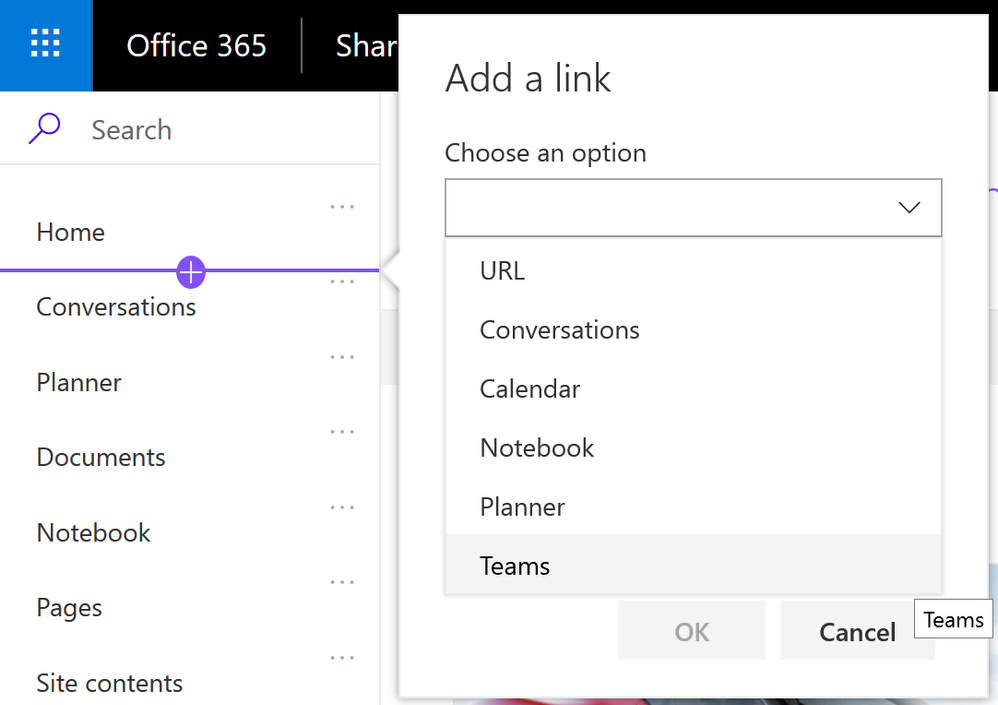
 

Quickly add left-hand navigation items that link directly to connected Office 365 group apps.Quickly add left-hand navigation items that link directly to connected Office 365 group apps.

Click Edit, hover between two navigation items and click the + icon to Add a link to Choose an option.


Beyond team site navigation flexibility, you also can enhance the team site home page, or pages and news articles within the team site, with new Office 365 group-related web parts, including Connectors:


  • Group calendar – Enables a team to embed their Office 365 Group calendar on the home page, or any modern SharePoint page, of their team or communication site.
  • Planner – A new, modern web part from the Planner team to showcase plans within the SharePoint team and communication sites UI.
  • Document library (preview) – Easily add a window into the group’s Files document library from the home page of your team site, or from within a page or news article.
  • Connectors – we will begin to bring in the value of Office 365 Connectors that provide connection to numerous third-party services like Facebook, Bing News, Jira, GitHub, Stack Overflow and up to 100 existing connectors – with more coming over time. Note: connectors web parts are only available for use within group-connected team sites.

Connect an existing SharePoint team site to a new Office 365 group

You can now connect an existing SharePoint team site to a new group in Office 365, to improve your team’s productivity with the content and resources of an Office 365 group, including:


  • A shared mailbox for group conversations in Outlook  
  • A shared calendar to track deadlines, events, and team vacations
  • Planner to manage tasks, and
  • The option to create a team Microsoft Teams for as a hub for collaboration.

The site retains its URL, settings and permissions site owners, members and visitors can work without interruption. While existing pages are not automatically updated, you can begin modernizing your team site already, today. You can create new pages and even make one of the new pages the home page of your site.


We suggest properties based on your current team site. Here’s a look at what happens:

  • Your existing team site will be connected to a new Office 365 Group 
  • Your existing site content, hierarchy and permissions remain the same 
  • We'll help you select group members based on your existing site membership. No site permissions will be altered; we’re simply adding the new Azure Active Directory (AAD) group object claim.
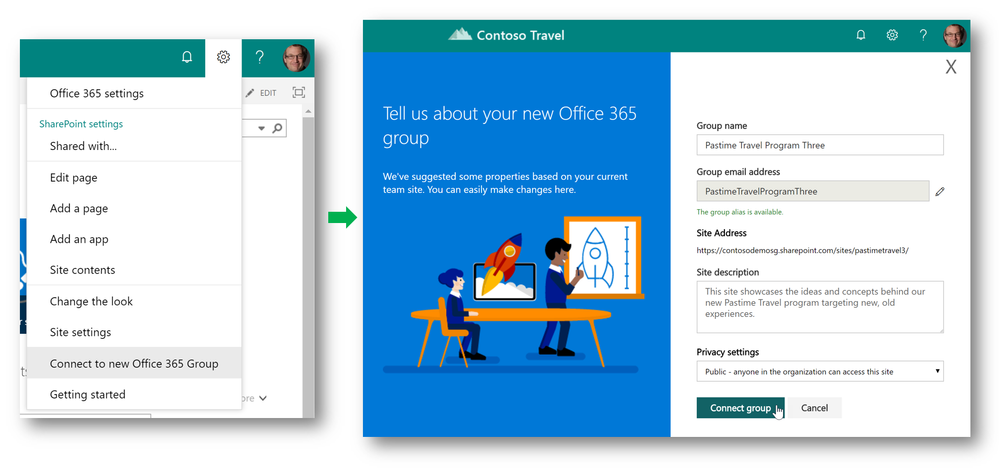
Site owners can connect existing team sites to new Office 365 Groups.Site owners can connect existing team sites to new Office 365 Groups.

When you connect a site to Office 365 groups, a new group is created. Group owners and members are suggested based on your existing team site's membership. You can add or remove people from the group. Of course, you can update group membership at any time. 


Group membership is managed separately from site membership, but group members always have access to the team site. You can continue to add users to the site’s owners, members and visitors group to give them access to the site without granting access to other group resources.

Track the value of your site

The Site usage page gives site owners a view of information that shows how their users are interacting with a site. For example, site owners can see the number of people who have visited the home page, how many new items were added to your site, and a list of files that have received the most views.


We are announcing additional insights at the site level (most viewed and most unique viewers, trending content, historical views), and at the page level (the number of comments and likes, plus views and viewer counts). Views and Viewer counts for SharePoint pages will be available on each page and everyone with view permissions can see this.
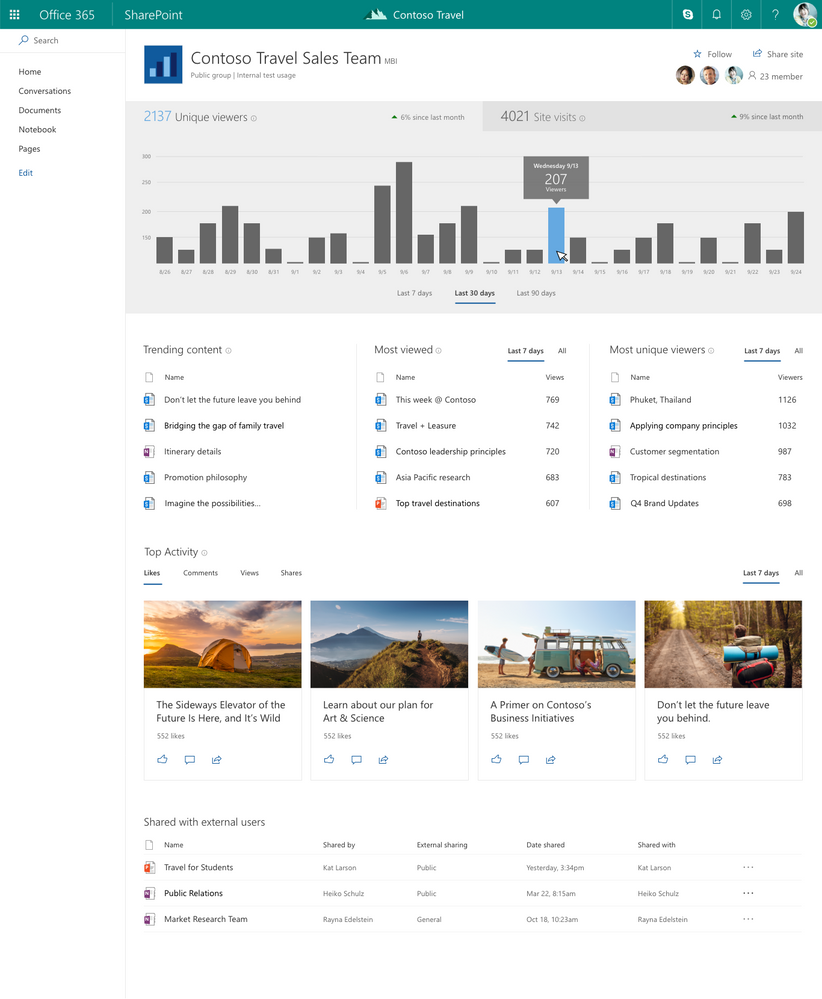
 

Whether in a SharePoint team site or communication site, the Site usage page gives insights into how your site is being used over time.Whether in a SharePoint team site or communication site, the Site usage page gives insights into how your site is being used over time.

Teamwork on the go

Take your intranet with you to stay connected and informed about important content, news, sites and people while on the go – for those in-between moments. You can easily get back to what’s relevant to you, alongside powerful search capabilities to find what you need, plus provide feedback via comments and likes – all to keep work moving forward.


Introducing the new Me tab with the SharePoint mobile app

Sometimes it IS all about YOU 😊. The Me tab within the SharePoint mobile apps delivers a single place to catch up on important things going on around you – one place to find recent files, lists, pages, and news posts. You can easily pick up where you left off, and using the Save for later gesture - save news, pages, and files for later.
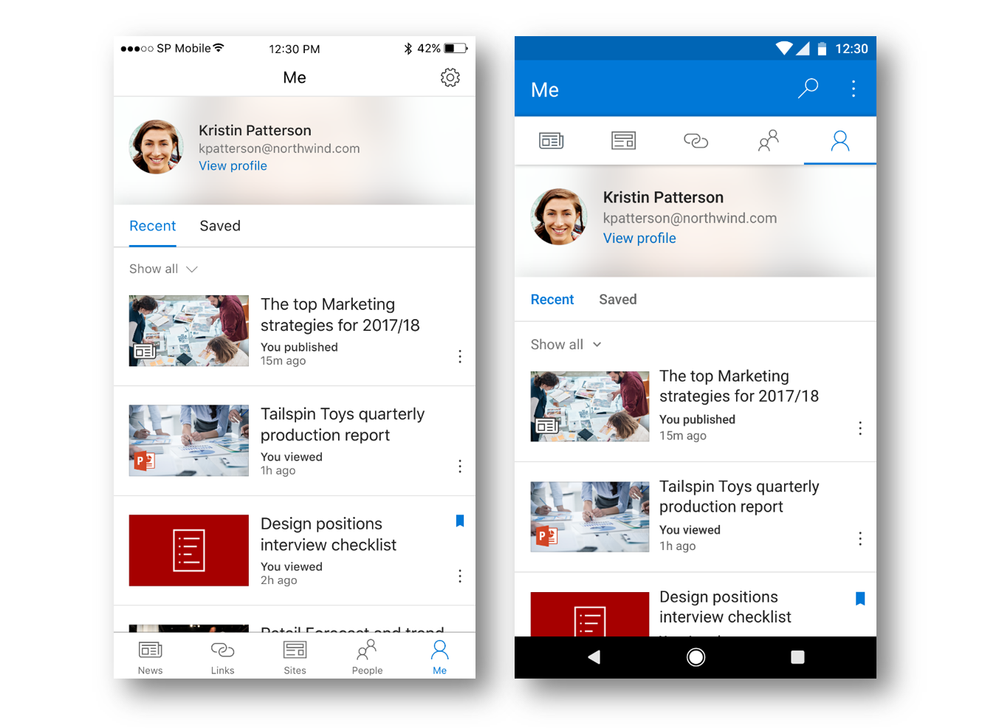
The Me tab focuses on bringing a Recent and a Saved experience to SharePoint mobile (iOS on the left, Android right).The Me tab focuses on bringing a Recent and a Saved experience to SharePoint mobile (iOS on the left, Android right).

Create news on Android: Add your own news stories right from your Android device. Simply click + Add from the News section on a team site, type a title, add body text and format it. You can also add image(s) and embed documents. And then click Publish. You and your peers will see the story appear across the news service as a recent story – on SharePoint home in Office 365, within the personalized News tab of the SharePoint apps, and on the team site itself. That’s news reach – ensuring you have an effective, automated megaphone to amplify your news.


Android on-premises: You will be able to log into your on-premises SharePoint Server environment from within the SharePoint mobile app for Android - giving you access to all your sites within your firewall, and if you are leveraging SharePoint Online, the app will provide access to all your sites from both on-premises and online in Office 365. Access SharePoint Server 2013 and 2016 with support for FBA and NTLM.


IT control and content management

With great sites come great responsibility and structure. It is the focus of IT and content managers to enable the business to achieve their outcomes while staying in compliance with company guidelines and preferences.


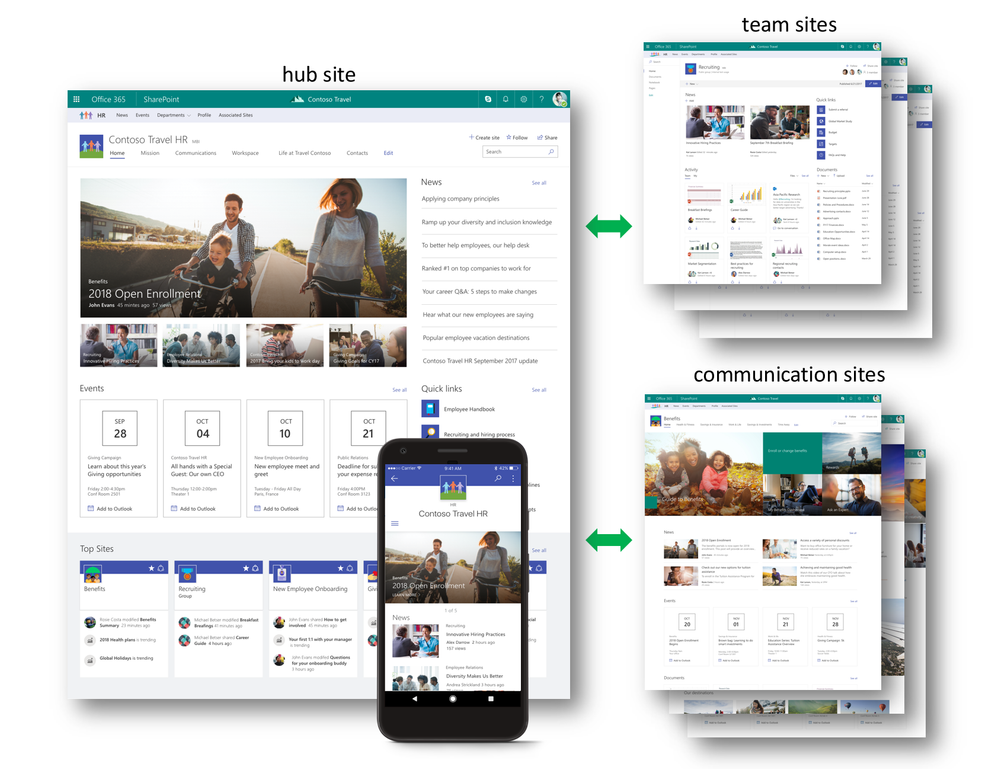
SharePoint hub sites – Microsoft announced SharePoint hub sites that bring together related sites to roll up news and activity, to simplify search, and to create cohesion with shared navigation and look-and-feel; this is applicable to both team sites and communication sites, and it is the role of the admin to create a hub site to enable site owners to join and un-join as the business requires.


Custom site themes and custom site designs – As sites become more organized according to the business, they, too, can better align with the preferred look and feel and structure via use of custom site themes and custom site designs – with a tenant-wide gallery available to ensure each site can be assigned to the right set of themes and designs. It, too, is possible to assign who can pick and use specific designs at the time when they create new sites. Custom site design and custom site themes apply to both team sites and communication sites, and provide you with the flexibility and choice to apply your preferred look and feel, while at the same time give you control for pre-configured layout, page design and pre-populated content.


Files that need attention – It is possible that some files added to or bulk uploaded into document libraries come without required metadata fields filled out. Now it is easy to see if an individual document has incomplete metadata that has been marked as required. And in one click, you can view all files that need attention, aka, filter down to the files that are missing metadata and quickly rectify inline using the information pane.
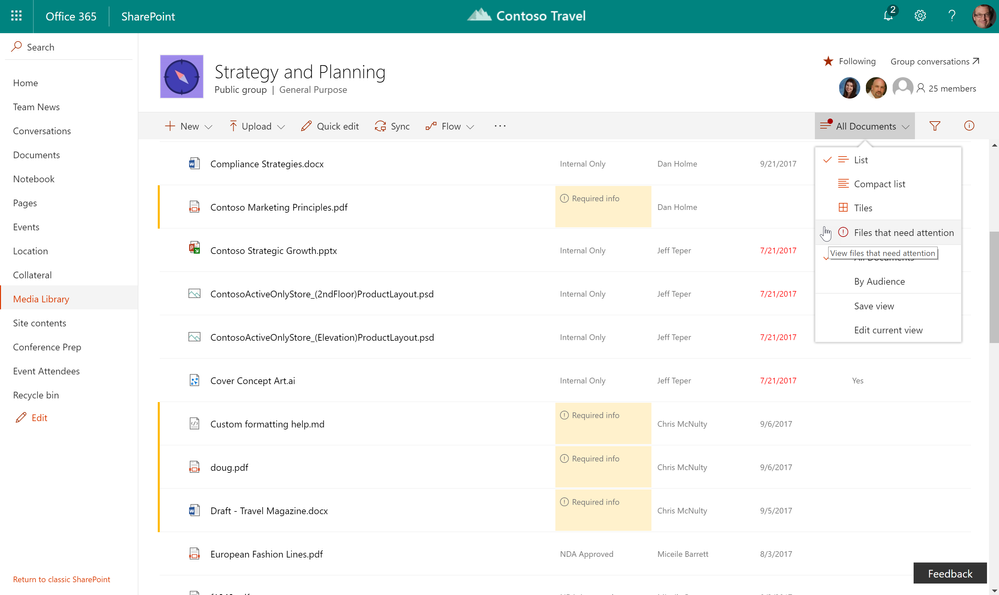
 

Files that are missing required metadata are highlighted for awareness and easy to adjust inline within the information pane.Files that are missing required metadata are highlighted for awareness and easy to adjust inline within the information pane.

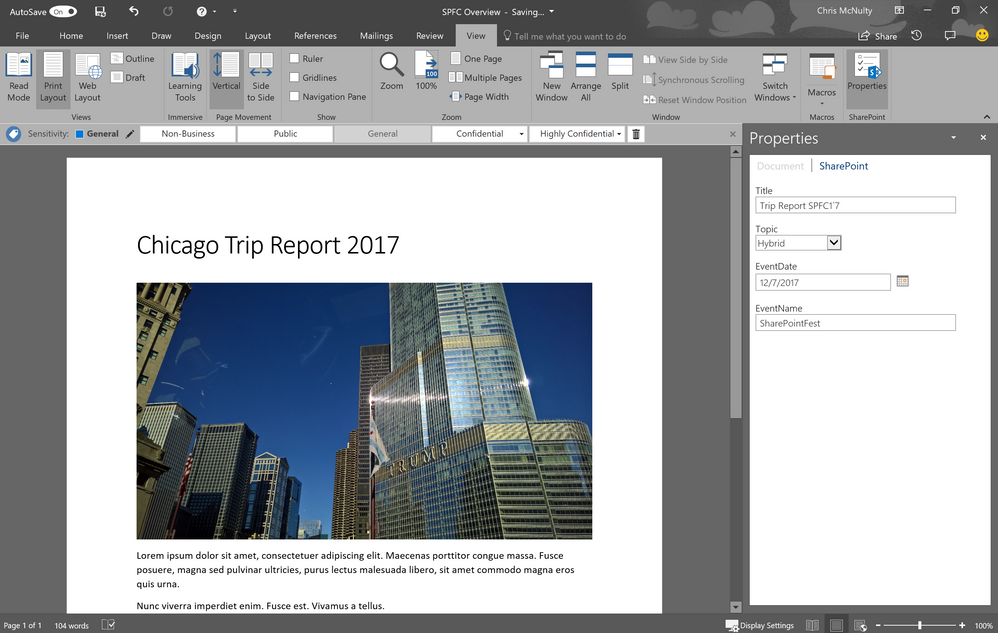
SharePoint Properties in Office (formerly Document Input Panel (DIP)) – you can now manage metadata stored in SharePoint directly from within the Office client application – within the document itself. This makes it easy for people to fill out required information, and provides content managers a means to highlight required and missing information in context where their users are working.


Futures

Additional integration between SharePoint, Teams, and Office 365 Groups is coming as we enable diverse teams to work in the experience that best suits their unique workstyles, without sacrificing power or flexibility.  You can take advantage of many of the features listed above soon. Create new Office365 groups from SharePoint home. Connect with your peers using Microsoft Teams, and highlight important updates by authoring and sharing team news.


We want to empower you and every person on your team to achieve more. Let us know what you need next. We are always open to feedback via UserVoice and continued dialog in the SharePoint community in the Microsoft Tech Community —and we always have an eye on tweets to @SharePoint. Let us know.


—Mark Kashman, senior product manager for the SharePoint team


Note: you can now view the corresponding Ignite 2017 session, "Share and work together on the intranet with SharePoint Team Sites" by Mark Kashman and Jeremy Mazner, along with the corresponding PowerPoint presentation. [BRK2207]

FAQs

Q: When can I expect to see the above-mentioned innovation within my Office 365 tenant?

A: Much of what is mentioned above will begin to rollout to Office 365 First Release customers before the end of calendar year 2017, except for the ability to connect existing team site to a new Office 365 group and SharePoint hub sites – both are targeted to begin rollout within the first half of calendar year 2018.


Q: What roles do Office 365 Groups, SharePoint team sites, and Microsoft Teams all play when used together?

A: Office 365 Groups helps manage the list of team members who work together (group objects are stored in Azure Active Directory (AAD)); members can be a part of numerous groups. They then leverage team sites to manage their content and information by using news, pages, document libraries, lists and business apps. Microsoft Teams comes into play for the team’s ongoing conversation. It’s possible to share a document stored in the team site directly into the chat as a link. Members can also showcase news articles, pages, or the full site from within the tabs of Microsoft Teams channels.
27 Sep 09:22

SharePoint hub sites new in Office 365

by Mark Kashman

Today at Ignite 2017, we announced SharePoint hub sites, a new building block of the intranet, to bring together related sites to roll up news and activity, to simplify search, and to create cohesion with shared navigation and look-and-feel.


The digital workplace is dynamic and ever changing. Business goals and team structures evolve and change – often frequently. SharePoint helps your organization adapt, by connecting your workplace with intelligent content management and intranets that give you the tools to share and work together, and to inform and engage people across the organization. And now it gets easier to organize your intranet dynamically.


You can associate multiple team sites and communication sites to model and promote an intranet that reflects the way your people organize. Hub sites provide common navigational structure, look and feel, and search across associated sites. Hub sites also aggregate news and activities from associated sites and display the roll-up on the hub site’s home page.

SharePoint hub sites bring together related sites to roll up news and activity, and to create cohesion with shared navigation and look-and-feel.SharePoint hub sites bring together related sites to roll up news and activity, and to create cohesion with shared navigation and look-and-feel.
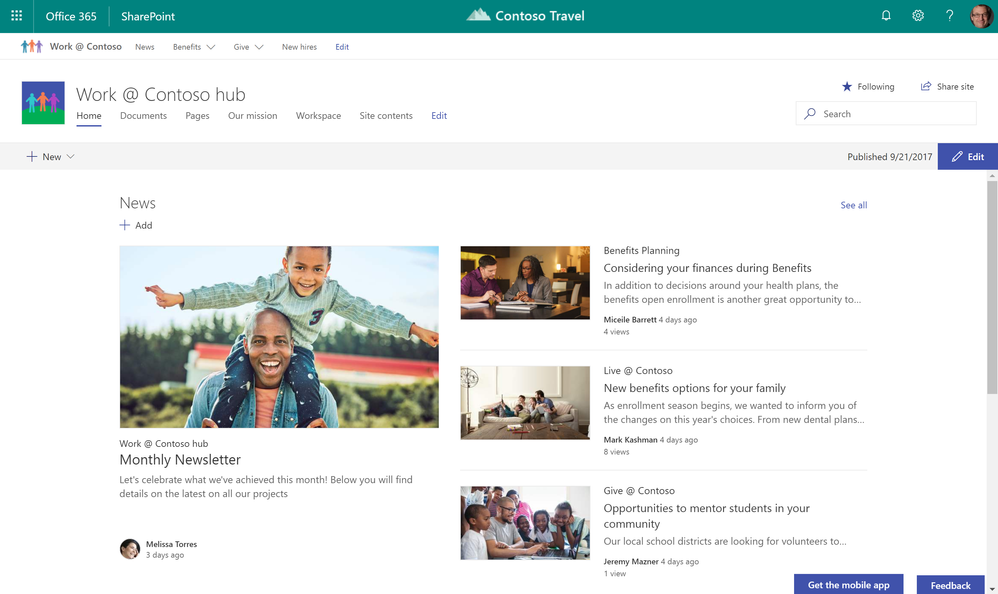
You can use SharePoint hub sites to organize concepts, teams, divisions, or resources throughout your businesses. Let’s dive into the details.

Create a cohesive set of related sites with shared navigation, look and feel

A hub site brings consistency across sites from the top down. When a team site or communication site is associated to a hub site, it inherits common characteristics, including:


  • Navigation – Define top navigation in the hub site that is inherited by associated sites.
  • Theme – Define the look and feel of the hub site, and that theme remains consistent across associated sites.
  • Logo – A logo on a site is like the green sticker on a map that says, “You are here.” It’s an important identifier of the site you are visiting, and the information and people the site represents. A consistent logo defined by the hub site and used by associated sites says, “You are here, and you have not left.”

SharePoint hub sites bring together team sites and communication sites together into more centralized locations within your intranet.SharePoint hub sites bring together team sites and communication sites together into more centralized locations within your intranet.
Roll up and present a consolidated view of news and activities

Throughout the lifecycle of your projects, your launches, your internal campaigns, it is important to increase visibility, awareness and discoverability beyond the core day-to-day people, and not expect everyone to have to drill into the various related sites, but more represent a clear, broad picture of what’s happening across sites, aka, what’s happening across projects and initiatives. Team sites and communication sites push content and information up to the hub site level with:

  • News aggregation –After you create and publish a news article on an associated site, the news article surfaces on SharePoint home, in the SharePoint mobile apps, and now on the hub site’s home page.
  • Combined site activities – It’s important to know what is happening within sites, so you can prioritize your focus and your time. Site activities are visible on a team site’s home page, and on the site’s card on SharePoint home. Now, site activities will roll up from each associated sites so that they are visible on the hub site’s home page, so you can see what happening across related sites, instead of having to view activity site by site.
  • Scoped search – When you search for content from a hub site, results include content from all associated sites. Because associated sites are related, search from the hub site home page increases relevance, and enhances content discovery.

Create hub sites and associate team and communication sites

It is easy for admins to create one or more hub sites. After a hub site is created, site owners can associate existing team sites and communication sites with the hub site, or to associate a new site while creating a site from SharePoint home in Office 365Soon you will be able to create an associated site directly from within the hub site itself.

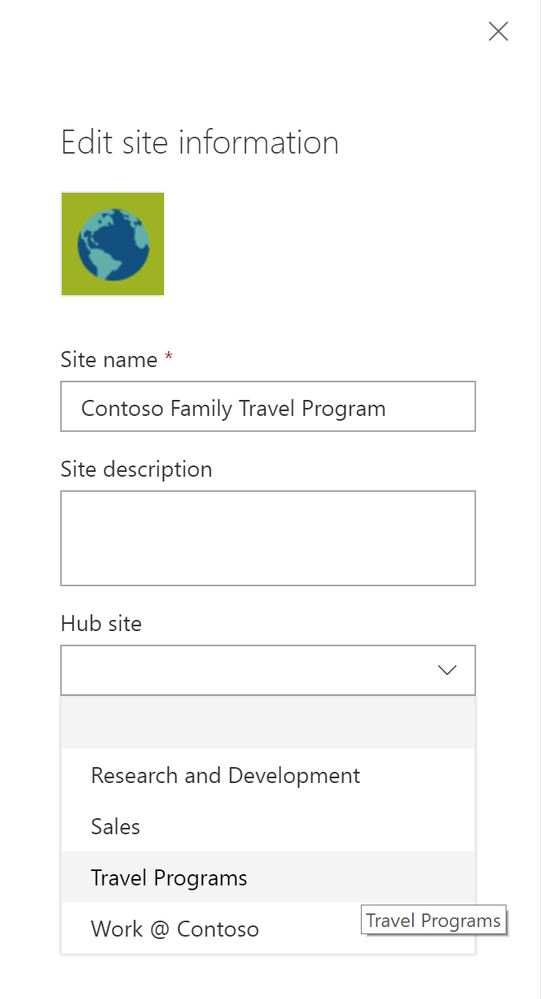
Site owners can associate an existing team site or communication site with a hub site.Site owners can associate an existing team site or communication site with a hub site.

Site owners can associate an existing team site or communication site with a hub site.
  1. Click the gear icon in the upper right of the site.
  2. Click Site information.
  3. In the Edit site information pane that appears, click the Hub site drop-down menu and choose the right hub site to join.

Note that team sites and communication sites can only be associated to one hub site. And as easy as it is to join a site to a hub site, you, too, can un-join from one. This is the power of a dynamic intranet, one that can change and adapt with the ebb and flow of your ever-changing business landscape.        

Access hub sites and associated sites with the SharePoint mobile app

The SharePoint mobile app helps keep your work moving forward by providing quick access to all your sites, news and the team members you work with, and search to find content and people across your organization.


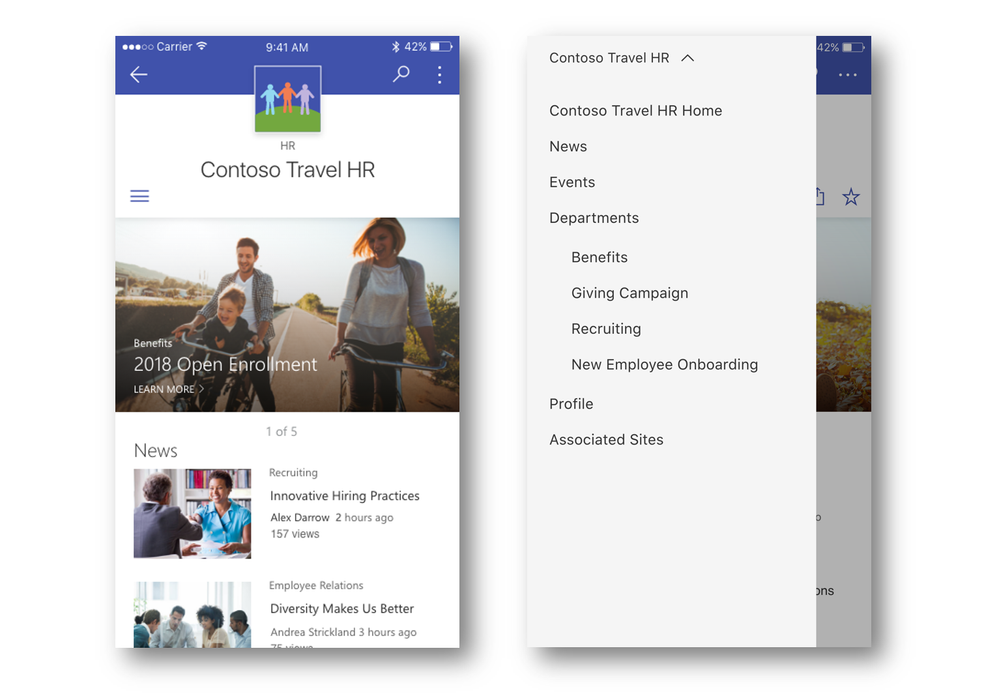
With the addition of SharePoint hub sites, the SharePoint mobile app will be updated to natively render hub sites, and their pages, news, and content, with smooth navigation between associated sites and the scoped search experience. Find what you need on the go, and get going!

SharePoint hub sites and their associated sites are easy to access and navigate via the SharePoint mobile app.SharePoint hub sites and their associated sites are easy to access and navigate via the SharePoint mobile app.

Moving forward and growing together

Team sites, communication sites and now hub sites – as well as classic publishing sites and sites for applications – are building blocks of your intranet. SharePoint connects the workplace so that you can share, manage, and find the content, knowledge, and apps you need, on any device.


As you modernize and extend your intranet to support collaboration and communication, SharePoint will support you and your teams now and into the future.


Let us know what you need next. We are always open to feedback via UserVoice and continued dialog in the SharePoint community in the Microsoft Tech Community —and we always have an eye on tweets to @SharePoint. Let us know.


—Mark Kashman, senior product manager for the SharePoint team


Note: you can now view a recent webinar whose sole focus was to provide a "SharePoint hub sites overview" + correpsonding presentation via SlideShare.net.


FAQs

Q: When can I expect to see SharePoint hub sites appear in my Office 365 tenant?

A: SharePoint hub sites with begin rolling out to Office 365 First Release customers in the first half of calendar year 2018.


Q: Can I join one SharePoint hub site under another hub site?

A: No, you won't be able to join a SharePoint hub site to another hub site.


Q: Can a team site or a communication site be joined to more than one SharePoint hub site?

A: No. It will only be possible to join a site to one hub site at a time. It is possible to link to various un'joined sites in the top naviogation. And it will be possible, within seconds, to join and/or un'join a site as the business changes.


Q: Can a hub site replace my current organizational portal?

A: Hub sites are designed to let you dynamically organize closely related sites, bringing together similar projects, and binding related assets, and presenting common activity. Customers with portals that include customization beyond the web parts and extensions that SharePoint Framework currently supports are likely to continue using the SharePoint publishing infrastructure, which continues to be fully supported both in SharePoint Server on-premises and SharePoint Online.


Q: When should I use a team site, and when should I use a communication site?

A: Your SharePoint team site lets you share content, knowledge, news and apps with your group as collaborate on a project. A communication site lets you tell your story, share your work, and showcase your product across the organization.

27 Sep 09:22

Reinvent business process in SharePoint and OneDrive

by Chris McNulty

Microsoft 365 drives digital transformation, giving organizations the opportunity to accelerate and optimize business processes. Today, we are announcing a new series of capabilities for SharePoint and OneDrive, integrated with PowerApps, Power BI, Microsoft Flow and Microsoft Forms, that allow people to create and share custom forms, applications and workflows that automate processes.  


Microsoft Forms allows anyone to create surveys and simple forms inside and outside organization boundaries.  Custom forms with PowerApps and column formatting allow designer to build beautiful experiences for multiple data sources or just a single field.  Mobile interfaces for PowerApps and Flow can now be shared in the browser views for SharePoint sites for a more consistent user experience. Power BI is integrating new capabilities for generating reports from data wherever it lives.  And SharePoint lists are being optimized with predictive indexing to accelerate lists with millions of items.


This week, we’re announcing the rollout of exciting new capabilities for Office 365 business applications: (First Release dates in [BOLD].)

  • Custom forms with PowerApps.  Solution creators can build rich forms inside SharePoint that blend data from lists with over 160 online and on premises data sources. [October November 2017]
  • Flow for OneDrive.  Now, you can build and launch Flows directly from inside OneDrive to automate processes for your personal files.  [October 2017]
  • Column formatter.   Allow power users to add rich formatting and interactivity to data in SharePoint lists and libraries.  [October 2017]
  • Predictive indexing.  SharePoint automatically sorts, queries and indexes your information so it’s even easier to work with the largest lists and libraries.  [Now]
  • Flow launch panel.   When a flow is launched, an inline panel prompts the user to enter information, that can then be used by the flow (e.g.  adding optional steps such as logging or alerting.) [October 2017]
  • Document/item review.  A built in Flow allows you to route a document for review and feedback.  [December 2017]
  • Custom approval action.  Build custom processes with Flow, to approve and publish content for libraries requiring formal check in and approval. [November 2017]
  • Power BI & Forms web parts.  Add simple forms and interactive data visualizations to any SharePoint page. [October 2017]
  • PowerApps web part.  Add PowerApps to any SharePoint page. [December 2017]
  • Let’s look in more detail at some of these:


Work with the largest lists and libraries with predictive indexing and queries

SharePoint lists have long been used for planning, tracking, collaboration and data management.  They’re used to track everything from t-shirts and lunch orders to NASCAR race standings and public health programs.  Up to 30 million items can be kept in a SharePoint list.  But until recently, storing more than a few thousand items required careful planning and administration.


Predictive indexing changes that.  As lists grow beyond 5000 items, SharePoint senses the fields used in views and sorts and automatically adds indexes without user intervention or throttles.  The modern user experience is also optimized to use those indexes, when available – and to retrieve data in sets to avoid throttles and unavailability.


Visualize column data with column formatter

SharePoint lists can be tailored to support almost any content or business application need.  But until recently it has required special skills – custom development –to customize the formatting of fields and columns. 


Today, we’re introducing new, low-code capabilities that open custom formatting to non-developers too.   Data bar graphs, color coding, red-yellow-green KPI icons, or interactive icons for email and Flow can be easily added to any list or library.

Column formatterColumn formatter

The column formatter lets people cut-and-paste JSON formatting scripts from our SharePoint Patterns and Practices site or other online examples as column properties.  Over time, we’ll make the SharePoint column formatter a no-code solution, as easy to use as Excel. But this first step enables power users—or at least “super power users”—to take advantage of this powerful new capability early.


Custom forms with PowerApps

As we announced earlier this year, power users can use PowerApps to build customized SharePoint forms - which previously required InfoPath or custom code.  Customized forms launch in the SharePoint list in a dynamic, responsive panel.  For a consistent user experience, the default forms will now open in the same panel.

 Custom forms with PowerAppsCustom forms with PowerApps

Almost any user can use PowerApps to customize the default forms for viewing and editing SharePoint data.  And the customized SharePoint forms can take advantage of the full capabilities of PowerApps – no code connectivity to over 150 data services such as Google, Dynamics, Salesforce, Box, Twilio, and Mail Chimp.  


[7 November 2017 UPDATE: the custom form rollout is close to starting; First Release is expected to start in mid-November.  Thanks for your patience.]


Later this year, we’ll also rollout the PowerApps web part, so you can embed any PowerApp on any SharePoint page.  PowerApps supports most of the scenarios that organizations addressed with InfoPath, and lets you take advantage of new cloud-first, mobile-first, connected capabilities to create custom forms and digital experiences.


Enrich user experience with new SharePoint web parts

We are also simplifying the process of integrating business apps with SharePoint pages.  New web parts for Microsoft Forms, Power BI and PowerApps allow designers to combine those experiences on any SharePoint page.

Microsoft Forms and Power BI on SharePointMicrosoft Forms and Power BI on SharePoint


Flow Launch Panel

Microsoft Flow brings makes it easy to streamline and automate business processes in SharePoint, across Office 365 and beyond.  Flows can run automatically, based on a trigger event, or you can launch a flow for a selected item or document. 


Today, we announced a new feature that lets you add values to a flow before it runs.  For example, a “Request new equipment” flow might ask you to select a desktop, laptop, or a tablet, and send that selection to the team responsible for handling the request   You are prompted to enter information in a panel that opens directly inside a list or library.

Flow launch panelFlow launch panel

In-the-box Flows for streamlined collaboration

Many documents require a quick review before they’re shared or further processed.

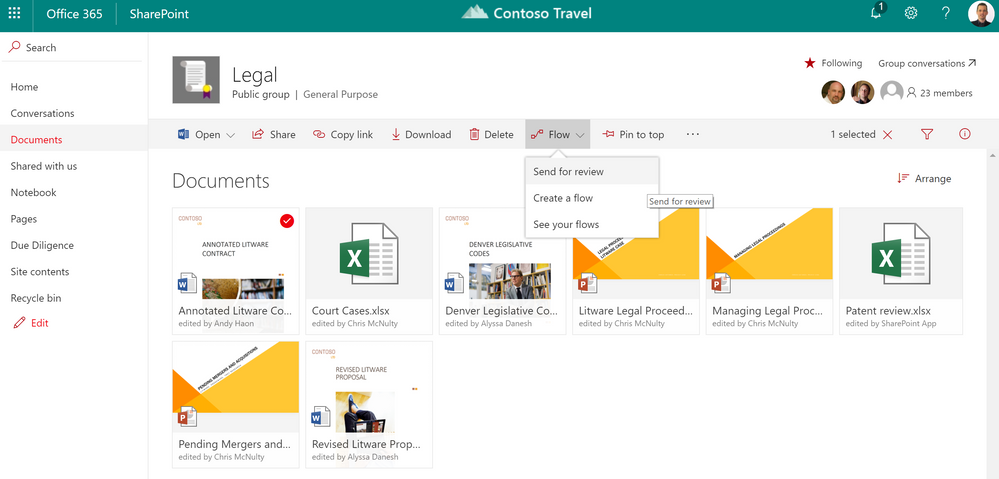
 Send for reviewSend for review

We are building a send for review flow into every SharePoint library, so you don’t have to custom build one.  People can route a file to another user for feedback and review.  Built with Microsoft Flow and integrated with the Flow approval center, signoff Flows are trackable in SharePoint as well as the Flow admin consoles. 


For more formal approvals, such as document or page publishing, we’re also introducing a custom action to the Flow designer that will approve and publish a file.  You can use this action to create a custom flow that can be triggered automatically by an event or launched from the command bar.


Summary

Innovations across SharePoint, PowerApps, Microsoft Flow, Microsoft Forms, and Power BI give organizations unprecedented ability to build no/zero/low-code applications that can connect to over 160 data sources and services.  You can empower everyone -- not just developers – to create solutions that streamline processes, solve problems, and improve productivity. Empowering everyone to be a solution creator is an essential ingredient in digital transformation.

If you’re at Ignite this week, learn more at our session “Transform business processes with SharePoint, PowerApps, and Microsoft Flow” URL Tuesday, September 27 at 4:00PM.  And you can always learn more about Office 365 business apps in SharePoint and OneDrive on our resource center (https://aka.ms/sharepoint-bizapps).  Thank you.

27 Sep 09:19

Updating content management for the cloud

by Chris McNulty

SharePoint powers content collaboration and content services (also called enterprise content management or ECM) throughout Office 365.  Today at Ignite, we’re thrilled to announce the following new capabilities for SharePoint content services: (First Release dates in [BOLD].)


  • When content is distributed between Office 365 and on-premises SharePoint, hybrid content types allow administrators to deploy a unified information architecture, governing metadata, templates and retention regardless of where content lives. [Now]
  • Attention Views aggregate files that require custom metadata into actionable screens that enable bulk management and updates.   [October 2017]
  • You can view and edit document metadata directly inside Word 2016 on Windows with the Word SharePoint Properties Pane. [January 2018]
  • You can work with the largest document libraries, using performance improvements from predictive indexing and queries. And you can find the files you need with the new filter pane.  [Now]
  • Automate document review and feedback with integrated review flows.  Built with Microsoft Flow and available on all libraries, you can easily route any file for review. [October 2017]
  • Build custom processes with Flow, to approve and publish content for libraries requiring formal check in and approval. [November 2017]
  • Event-based retention allows you to trigger document disposal from external events like project closure, financial events, or manual review. [Q4 2017]
  • Sync files from document libraries protected with information rights management policies. Files from IRM-protected document libraries can now be synced to your PC or Mac.  [Q4 2017]

Let’s look at each of these.


Unify information architecture with hybrid content types

Content types define taxonomy, retention and templates. By associating files with content types, you can group related files and manage them accordingly.  In 2016, we introduced hybrid taxonomy, which let you manage your term sets in Office 365 and replicate them to SharePoint Server 2013 and 2016. 


This year, we have introduced hybrid content types, which also allow you to manage content types in Office 365 and replicate them to on-premises SharePoint Server 2013 and 2016.  This allows you to facilitate co-existence with a unified information architecture of content types and tags across hybrid content.


Gather metadata in Word documents with the SharePoint properties panel

While you can edit the metadata for a document in a SharePoint document library, it is often easier to display and edit document metadata inside the document itself.  Earlier versions of Word provided a way to view and edit SharePoint metadata in a document.  This capability was not originally provided by Word 2016.  As a result, many users continued to rely on Word 2013. Now, the Word SharePoint properties panel, currently rolling into First Release for Word 2016 on Windows, provides an easy way to display and edit column values in context with the document.

Word SharePoint properties panelWord SharePoint properties panel


Prioritize content management tasks with attention views

Document metadata is essential for focused, precise use of enterprise content in SharePoint.  However, managing groups of files with missing metadata, pending check-ins, missing approvals and expiration dates requires a way to "zoom in" on files that need attention.  Attention views provide a visual reminder that files require additional action, and allow you to focus on those files with an actionable view for metadata updates. 


Attention viewsAttention views


The first version of attention views will begin in October 2017 and will identify any files that are missing required metadata.  Future updates will add additional conditions, such as files requiring check-in.


Work effectively with the largest libraries, with predictive indexing and queries

SharePoint lists and libraries can house up to 30 million items or documents – and each tenant can store a maximum of 30 trillion documents. 


Predictive indexing lets you use the full capacity of SharePoint libraries while minimizing the need for active administration and performance throttles.  When we detect a query that might result in thousands of records, SharePoint automatically adds the index on the fly – and we’re working on automatic indexing for queries of any size.   In the modern user experience, library views are smarter about using queries and paging behind the scenes to grab records in manageable sets as the users moves through a large view, without needing to throttle the view completely. 


Our new predictive logic is an ongoing deployment and will be available to most customers in Q4 of 2017.


Automate document reviews with Microsoft Flow

Use out of the box automation to optimize creativity with integrated review flows.  Every document library will allow you to route a document for review and feedback.


Send for reviewSend for review

For more formal processes that use SharePoint versioning and publishing approval, you can build a custom Flow with a new action that supports SharePoint check in and approval.

Protect and govern content to support your compliance requirements

Our data governance features allow administrators to create labels, shared across Office 365, that can be applied to files and thereby enforce policies for records management or retention.


Many retention policies are time based, such as keeping contracts for at least seven years.  However, there are other occasions when documents need to be retained until an event occurs, such as the termination of a project, or the approval of a contract.  With event-based retention, document end of life can be also triggered on demand from the Office 365 Security & Compliance Center, providing an auditable, controlled removal of content when required for operational compliance.


Sometimes, content needs even more control.  SharePoint libraries allow rights management policies to enforce encryption and policies on downloaded content, but that encryption has been incompatible with the OneDrive sync client.  Now, without compromising data encryption, SharePoint and OneDrive will allow offline synchronization of libraries encrypted by Information Rights Management.

Resources

We look forward to seeing many of you at our session this week at Ignite – Harness collective knowledge with SharePoint and OneDrive content services (ECM)


In addition, we are pleased to share our new white paper on content services in Office 365.  Please download “Modernizing Enterprise Content Management with Microsoft Content Services” for more information.  More ongoing resources on Office 365 content solutions are available on our Resource Center at https://aka.ms/sharepoint-contentservices.  Thank you, and please join the discussion to share your thoughts and feedback.

27 Sep 09:07

Security you can trust, control you can count on with SharePoint and OneDrive (Ignite News)

by Bill Baer

Today at Microsoft Ignite we shared our investments, our vision, and strategy for addressing today’s most challenging business and technology trends that are ever broadening the threat landscape.  From meeting complex corporate and governmental regulatory compliance, to addressing a more mobile and connected workforce, SharePoint and OneDrive and uniquely positioned to address your business needs. 


Stay ahead of data residency requirements

Governments around the world are strengthening laws and regulations to protect citizens’ data, preserve national security, and protect business interests.


New Multi-Geo Capabilities in Microsoft 365 with SharePoint and OneDrive provide global organizations a solution to maximizing the value of Office 365, including SharePoint and OneDrive, while meeting data residency and compliance requirements.  Multi-geo capabilities provide you with a choice of geographical locations in which to store, manage, and secure your data by allowing a single Office 365 tenant to span multiple regions, storing data on a per-user or per-site basis.  So whether you’re adding a new user to your organization or need to move an existing user, as well as their data, seamlessly and transparently to that user, to a new region, new multi-geo capabilities are designed to address those needs.


MG-1.png


Multi-geo is in private preview today. If you’re interested and want to learn more visit the links below.


OneDrive http://aka.ms/OneDriveMultiGeo

SharePoint http://aka.ms/SharePointMultiGeo


Manage your service-level encryption key

Gain greater trust from your own clients, with service-level encryption with customer key so that Microsoft does not see or extract any encryption keys. 


Customer key with Office 365 allows you to take control of your information, providing an additional layer of security and data privacy above which is already supplied by Microsoft with SharePoint and OneDrive in Office 365. Customer key can be used to encrypt and/or decrypt the individual encryption keys used to encrypt your cloud storage service for SharePoint Online and OneDrive for Business.  Additionally, you can decide when to change and/or revoke access to these keys limiting Microsoft’s ability to access encrypted content.


Microsoft encrypts your content at rest and in transit throughout SharePoint, OneDrive and Office 365. In fact, we use multiple keys to encrypt your data, and distribute those keys across multiple data centers.  At the service level, we encrypt those keys that are used to encrypt your data. With customer lockbox, even our administrators have no ability to access your data without your explicit, time-bounded consent. Learn more about our encryption features here.


Service-level encryption with customer key goes one step further. You can manage the service-level key(s) that is used to encrypt the SharePoint and OneDrive data encryption keys. You can decide when to change this key(s) and, if your business requires, you can revoke the service-level key(s) and thereby deny the service access to your content.


Limit information overexposure

The risk of information exposure has increased because users don’t always work on desktop computers connected to the corporate network. Access controls now need to account for users connecting their mobile devices to non-secure networks or using their own unmanaged devices. These new access controls start with conditional access policies. Conditional access allows you to keep your corporate data safe while providing your users a secure environment in which they can work from any device. Conditional access in SharePoint Online and OneDrive for Business offers security that goes beyond user permissions. It considers the identity of the user, the devices and applications being used, the network that the user has connected to, and the sensitivity of the data being accessed.


Site-level device access policies

In March 2017, we introduced device access policies at the tenant level so you can control access from unmanaged or non-compliant devices to content stored in SharePoint and OneDrive.  At Microsoft Ignite 2017, we announced and demonstrated new support for bringing these device access policies to the site collection level, so you can limit access from these devices on a site by site basis, based on the classification of the content.  In addition, an administrator can also allow these devices access to collaborate using the Web browser to provide a seamless user experience for instances where unmanaged devices still need the ability to access and use content stored in one or more sites.


SL-POL.png


Session timeout policies

Unmanaged and non-compliant devices represent just one of many risks of information overexposure. The use of shared systems has also increased—from shared computers in the workplace, to kiosks at hotels and airports, devices and networks often change, but the one constant is the corporate data they access.  Also at Microsoft Ignite we shared our investments in idle-timeout scenarios that allow you to configure policy to automatically sign-out sessions at a specified interval on these shared systems after a period of inactivity.


Sign_Out.png


Moving forward...

In today’s volatile economic climate, organizations require collaboration, communication, and productivity solutions to be both cost-effective and flexible.  SharePoint and OneDrive can help businesses achieve new levels of reliability and performance, delivering features and capabilities that simplify administration, protect communications and information, and empower users while meeting their demands for greater business mobility. 


However, data loss is non-negotiable, and overexposure to information can have legal and compliance implications.  In SharePoint and OneDrive, we’re providing a broad array of features and capabilities designed to make certain that sensitive information remains that way, and to ensure that the right people have access to the right information at the right time – whether challenged by an increasingly distributed and remote workforce, ubiquities connectivity, or rapid changes in corporate and regulatory compliance, we’ll be there each step of the way, evolving our protection in parallel to your risk.


After all, the security landscape has changed. Ubiquitous connectivity has led to users to expect data mobility, across networks, across devices, and more often, personal devices and shared systems, like kiosks.  These challenges and more complex corporate and regulatory compliance requirements have only made it more challenging to stay ahead of the trends. The video below demonstrates a subset of the latest controls we've built and announced at Microsoft Ignite, and how we'll continue to evolve our capabilities with more fine-grained controls – from the tenant and site level all the way down to the file level.


Office 365 is designed to help every company’s needs for business productivity, content security and compliance with technical, legal and regulatory standards. We’ve been hard at work in lighting up new productivity scenarios in OneDrive and SharePoint and architecting the service to support advanced features to help customers meet their regulatory security and compliance needs. 


Resources

We understand that there is no security without usability. If security gets in the way of productivity, users will find a different, less secure way to do their work.  Learn more about how we address our customers security and compliance concerns with the resources here.


eBook – Securing your content in the new world of work with SharePoint and OneDrive

Visual Interactive – Share with confidence with SharePoint and OneDrive


27 Sep 09:05

Introducing the SharePoint Migration Tool from Microsoft

by Bill Baer

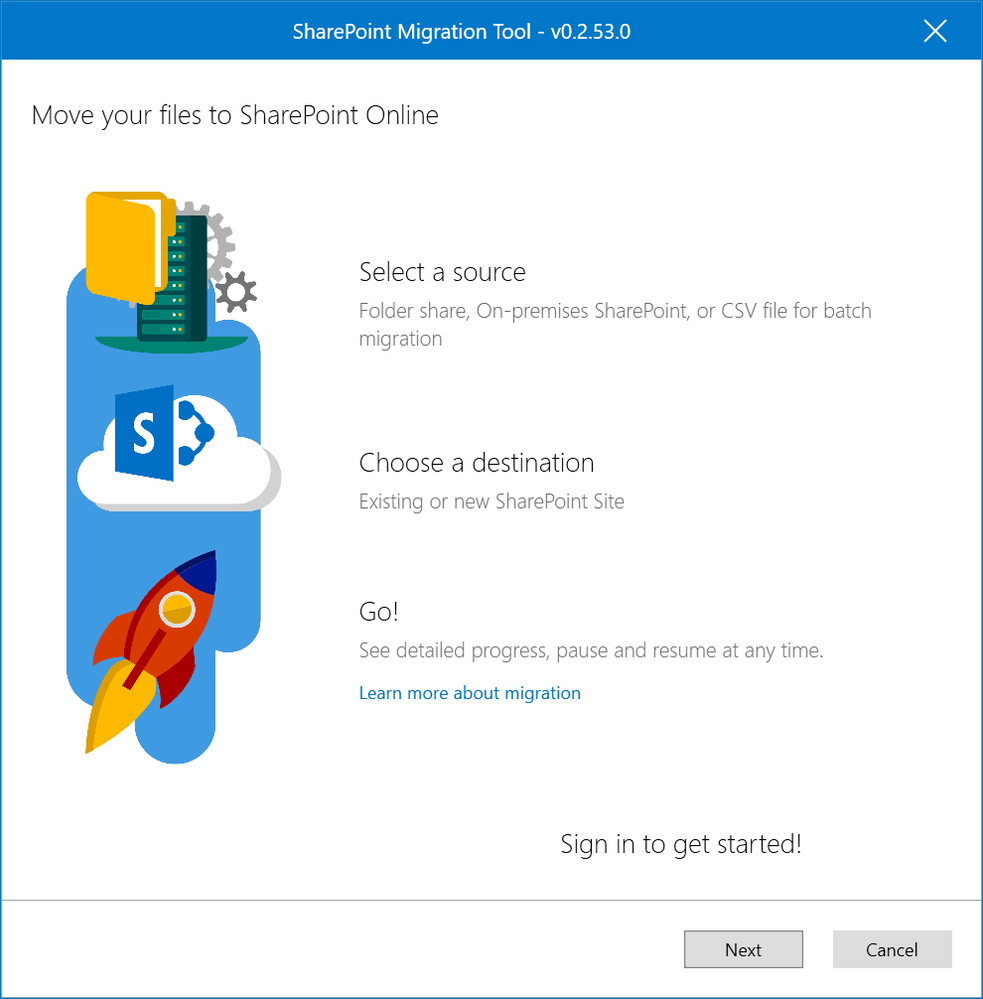
Taking advantage of cloud services doesn’t have to be difficult or a long-phased migration project.  At Microsoft Ignite we announced a new free, simple, and fast migration solution to help you migrate content from on-premises SharePoint sites and file shares to SharePoint or OneDrive in Office 365.


Splash.png


Based on the learning and experience from Microsoft FastTrack, using the SharePoint Migration Tool from Microsoft with a few simple clicks you can begin to bring your information to the cloud and take advantage of the latest collaboration, intelligence, and security solutions with Office 365.


Whether you’re looking to migrate from file shares on-premises to SharePoint or OneDrive or from on-premises versions of SharePoint, the SharePoint Migration Tool is designed to support the smallest of migrations to large scale migrations with support for bulk scenarios.


Using the SharePoint Migration Tool, you can quickly and easily migrate files from file shares, SharePoint sites, or support bulk migrations with a few simple clicks in the intuitive user interface.


Sources.png


The SharePoint Migration Tool also provides detailed information on the process of existing and completed migrations and task reports to help identify and resolve issues that may have occurred during the migration process.


Migration_Status.png


For additional details and to see the SharePoint Migration Tool in action, check out the video below.


While the SharePoint Migration Tool provides support for many migration scenarios, we recognize your needs may differ in scope and complexity.  For more complex migrations, support with adoption and usage, or help planning Microsoft FastTrack includes resources, tools, and experts to make your rollout of Office 365 a success.


To learn more about Microsoft FastTrack visit https://fasttrack.microsoft.com/office.  In addition, consider one of Microsoft’s many partners that can help ensure your migration to Office 365 is both seamless and successful.


Getting Started
To get started and preview the new SharePoint Migration Tool from Microsoft visit https://aka.ms/spmt.


Resources
How to use the SharePoint Migration Tool
How the SharePoint Migration Tool works
How to format your CSV file for data content migration
Create a user mapping file for data content migration
SharePoint Online and OneDrive Migration Speed SharePoint Online provided Azure containers and queues for SPO Migration API


27 Sep 09:02

Introducing the new SharePoint Admin Center

by Bill Baer

This week at Microsoft Ignite, we unveiled the latest innovations for SharePoint and OneDrive, including powerful integrations across Office 365, Windows and Azure.


Innovation in the cloud drives tremendous business value, and it delivers new capabilities to the IT professionals who work tirelessly to support, configure, administer, and secure their organizations' content and services.


We've built Office 365 with global scale, exceptional reliability, and support for compliance across every industry and geography. On top of intelligent security that keeps your service and content protected and private, we give you granular and dynamic controls so that you can manage access and distribution of your organization's sensitive information. We've equipped you with detailed activity and usage reports. And we've brought the innovations born in Office 365 to SharePoint Server with out-of-the-box capabilities and connected, hybrid experiences.


While our new user experiences are designed to be simpler, more intuitive, and more powerful we also believe administration should be just as simple, just as intuitive, and just as powerful, and to that, later this year we're introducing a completely revamped SharePoint Admin center that draws heavily on our modern principles. An administrative console designed to help IT achieve more, so their users can achieve more.


Home
The redesigned "Home" is designed to surface the most important information and quickly help you discover some of the most important information about the service, both its health, and how your organization is using SharePoint Online.


Home.png


Site Management
Borrowing from the modern List experience in SharePoint Online, the new Site Management page promotes ease of use and flexibility - a one stop shop for viewing and managing some of the most important aspects of SharePoint Online sites.  You can now sort, filter, and discover information about your sites and their activity.


Site_Management.png


Recycle Bin
Sometimes you need information back.  The Recycle bin section in the new SharePoint Admin Center provides quick access to easily manage and recover deleted sites.


Recycle_Bin.png


Sharing
At the foundation of SharePoint is sharing, and we're bringing sharing controls to the forefront of administration. Closely aligned with the OneDrive Admin Center, our sharing controls are designed to help your users make the most of their work all the while making it easy for you to control the flow of your organizations information.


Sharing.png


Device Access
If you're complacent, you're likely not compliant - however, we believe compliance shouldn't get in the way of collaboration and over the past year have introduced several new conditional access policies across user, location, and device pivots to help you secure access to your information. With the upcoming SharePoint Admin Center, you can quickly access and use these policies to address your unique business needs.


Device_Access.png


Settings
We've taken the many settings available to you for SharePoint Online and grouped and isolated them to simplify how you manage some of the more discrete options for the service and sites.


Settings.png


FaQ


When will the new admin center be available to my Tenant?

The new SharePoint Admin Center will begin to be available to First Release Tenants in early CY2018.  To participate in a limited, register at https://forms.office.com/Pages/ResponsePage.aspx?id=v4j5cvGGr0GRqy180BHbR3CCKNES_u9Bul1dZT-hbi5UNTFUODdKQVNFQUJMRzAxTVhUMUsyWFlOOC4u.


27 Sep 08:40

OneDrive bekommt auf allen Plattformen neue Funktionen

by Albert Jelica

Im Zuge der gestrigen Ignite-Konferenz in Orlando hat Microsoft einige größere Veränderungen für OneDrive angekündigt. Wir haben diese kurz und übersichtlich für euch zusammengefasst.

Neues Interface für OneDrive im Web

Der OneDrive Web-Client bekommt ein kleines Redesign, welches das Interface auch nötig hatte. Gleichzeitig wird Microsoft die Performance von OneDrive im Web verbessern, sodass bei der Benutzung die langen Wartezeiten wegfallen könnten. Außerdem werden Office-Dokumente im Web künftig direkt im Bearbeitungsmodus geöffnet und ZIP-Dateien können nun ebenfalls aufgemacht werden.

Dateien wiederherstellen im Web

OneDrive im Web bekommt ein sehr lange gewünschtes Feature zum Wiederherstellen von Dateien. Damit sollen nicht nur gelöschte Dateien wiederhergestellt, sondern auch ungewollte Änderungen rückgängig gemacht werden können.

Neues Teilen-Interface für Windows, Mac und Web

Teil dieses neuen Designs ist ein verbessertes Teilen-Menü bei der Freigabe von Inhalten in der eigenen OneDrive. Es kann nun direkt entschieden werden, welche Gruppe von Menschen Zugriff auf eine Datei oder einen Ordner in OneDrive erhält.

Sicheres Teilen ohne Microsoft-Account

Wer Freunden, die nicht über einen Microsoft-Account verfügen, bislang einen Link geschickt hat, musste stets einen öffentlichen Link erstellen zum Anzeigen oder Bearbeiten der Dateien. Dieser Link sollte dann allerdings nicht in falsche Hände geraten. Microsoft will künftig eine Möglichkeit bieten, Inhalte sicher mit einzelnen Nutzern zu teilen, die keinen Microsoft-Account haben.

Neue Apps für iOS und Android

Die beiden mobilen Plattformen, welche für Microsoft eine Rolle spielen, bekommen außerdem erneut ein größeres Update mit einem deutlich verbesserten Interface.

OneDrive ist nun Teil von Office für Mac

Zudem wird OneDrive künftig als Teil von Microsoft Office für Mac installiert.


Quelle: Microsoft

Der Beitrag OneDrive bekommt auf allen Plattformen neue Funktionen erschien zuerst auf WindowsArea.de.

27 Sep 08:38

Neue Filtertechnik: Adblock Plus blockiert wieder Facebook-Anzeigen

Die Nutzer von Adblock Plus können derzeit wieder Anzeigen auf Facebook blockieren. Der Adblocker-Hersteller Eyeo rechnet aber selbst damit, dass sich das soziale Netzwerk das nicht lange bieten lassen wird. (Facebook, Soziales Netz)
27 Sep 08:15

PowerShell in Azure Cloud Shell (Preview) is now publically available in Azure Portal

by PowerShell Team

Yesterday, at IGNITE 2017, we announced the public availability of PowerShell in Azure Cloud Shell. With the addition of PowerShell in Cloud Shell, alongside Bash in Azure Cloud Shell, you now have the flexibility to choose the shell experience that works best for you.

Thank you to our private preview users who helped shape the current experience by providing valuable feedback via issues and feature requests. We encourage you to continue your support by sharing your thoughts, experience, and input through the Azure Cloud Shell UserVoice.

Hemant Mahawar – @HemanMahawar
Principal Program Manager
PowerShell Team

27 Sep 08:14

Bahn entschuldigt sich bei Flaschensammlerin Anna (76)

Anna Leeb wurde mit einem Hausverbot und einer Geldstrafe belegt, nachdem sie im Hauptbahnhof Pfandflaschen gesammelt hatte. Der Fall schlug hohe Wellen, die sich jetzt aber wieder ganz geglättet haben.
26 Sep 21:34

Obamacare: Abstimmung über US-Gesundheitsreform gescheitert

by ZEIT ONLINE: Ausland -
Die Republikaner im US-Senat werden nicht über eine Obamacare-Abschaffung abstimmen. Es fehlen Stimmen. Damit ist Trumps Vorhaben auf unbestimmte Zeit gescheitert.
26 Sep 21:34

Surface Pro with LTE will reportedly be available on December 1

by Dan Thorp-Lancaster

If you're waiting to get your hands on a Surface Pro with LTE, it sounds like you'll have a lot to look forward to on December 1.

When Microsoft initially debuted the new Surface Pro in May, it also announced that an LTE version of the tablet would be available at some point in the future.

26 Sep 21:03

Watch Microsoft CEO Satya Nadella talk company culture, more on CBS This Morning

by Dan Thorp-Lancaster

Microsoft CEO Satya Nadella talks about his new book and the culture at Microsoft with CBS This Morning.

On the same day that his new book, Hit Refresh, hits store shelves, Microsoft CEO Satya Nadella sat down with CBS This Morning to talk about transforming the culture at Microsoft.

26 Sep 20:43

Tipp: SharePoint-Berechtigungen automatisch dokumentieren–mit Bordmitteln

by Thomas Maier
Wer hat wo welche Zugriffsrechte in einer SharePoint-Site? Früher oder später müssen sich Webseiten-Besitzer mit diesem Thema befassen, und meist wird dabei schnell klar, dass eine Dokumentation erforderlich wäre. In Weiterlesen Ähnliche Beiträge: Mails aus Outlook in Sharepoint speichern – einfach per Drag&Drop Excel-Tabellen einfach in SharePoint publizieren Grundlagenwissen SharePoint-Berechtigungen (1): Wissenswertes über die Vererbung und Unterbrechung von Berechtigungen

[Den vollständigen Beitrag finden Sie auf der Website]
26 Sep 20:35

New Sharepoint Migration Tool

by Jos

As you may have heard/read at MSIgnite 2017, there is a new migration tool for Sharepoint to Sharepoint and Fileserver to Sharepoint migrations!

So, I will most likely discontinue maintenance of O365Migrator 🙂

26 Sep 20:34

OneDrive for Business – News von Microsoft Ignite Konferenz

by Hans Brender

01 IgniteDie wichtigsten Neuheiten zum Next Generation Sync Client direkt von der Microsoft Ignite Conference hier in Orlando, Florida. Mehr als 25.000 Teilnehmer haben sich hier zusammengefunden, um in einer Woche Neuerungen an vielen Microsoft Programmen, Services und Visionen abzuholen.

Ich schreibe dies schon nach der PreDay, wo die MVP’s die wichtigen Neuheiten in Kurzform vermittelt bekommen haben. Bloggen oder Twittern ist aber nicht. Dafür sind spezielle Zeiten einzuhalten. Aber das gibt mir die Gelegenheit, ein paar wichtige Informationen schon mal los zu werden. Die Einzelheiten werden dann noch folgen

IRM /RMS

Endlich ist es möglich, mit dem Next Generation Snyc Client mit IRM/RMS geschützte Bibliotheken zu synchronisieren. Außerdem wird es möglich sein, mit privaten Schlüsseln versehene Dateien zu synchronisieren.

Next Generation Snyc Client – SharePoint Server OnPremise

Die gute Nachricht. Ja, Microsoft arbeitet daran. Die schlechte Nachricht: Es wird noch eine Weile dauern, bevor Bibliotheken vom SharePoint Server 2019 mit dem NGSC synchronisiert werden können. Wenn man sich die zeitlichen Ankündigungen zur OnPremise Version SharePoint Server 2019 anschaut, sind das noch 12 Monate. Und um die aufkommenden Fragen gleich zu beantworten: Nein, die vorherigen Versionen der OnPremise Variante des SharePoint Server werden nicht unterstützt werden. Hier verhält sich das Ganze wie bei OneDrive Files on Demand. Dies Funktionalität wird es ausschließlich für Windows 10 geben. Die Erklärung ist sehr einfach. Microsoft hat noch nie für ältere Versionen (Betriebssysteme) oder Server neue Funktionalitäten implementiert. Also schon mal ins Budget aufnehmen. Das Update von SharePoint XXXX auf SharePoint Server 2019. Und das nicht auf die lange Bank schieben. Denn für größere SharePoint Farmen ist hier jede Menge Vorarbeit angesagt. Und wir wollen ja mit einem einzigen Synchronisations-Client sowohl Cloud als auch onPremise Dateien synchronisieren, wenn Microsoft die NGSC Version für OnPremise freigibt, oder?


26 Sep 20:32

ConfigMgr @ 25

by BradAnderson

Late last week, I wrote about the remarkable quarter-century milestone reached by ConfigMgr, and today I wanted to dive even deeper into the backstory of this incredible product, share a couple announcements, and debut an awesome new documentary (lookout Sundance!) which offers an in-depth look at the genesis and growth of the product that created the PC Management industry.

Next, the ConfigMgr announcement:

And with this present-day milestone in mind, heres a story you may not have heard before:

How It All Began

Late last week, I took the opportunity to re-read the original vision document or spec for Project Hermes. I hadnt seen this doc in several years, and it was amazing to see how true ConfigMgr has stayed to that original vision. The fundamental building blocks outlined in that doc are still used today and are still part of its foundation.

In 1992, the original mission of Microsoft (aka, a PC in every home and on every desktop) was just hitting critical mass. Organizations were aggressively moving from terminal emulation to the x86 distributed computing model, and there was no solution to manage the PCs at scale. The team knew that Project Hermes had to be impactful.

The original SMS team was two full time developers and an intern named Ken Pan. When I joined the team in 2003, Ken the Intern was leading the entire dev team of about 150 engineers. Ken has led the engineering efforts on SCCM and Intune for me ever since!

Fun fact: The very first build of Systems Management Server (SMS) was 245. Why not 1? Well… Windows was on build 300 at that time and the team didnt want to seem too far behind but they knew that picking something too close to 300 would raise suspicion. So they picked 245!

SMS officially launched on November 7, 1994. That first release took a little over two years today we release new insiders builds every month!

A big moment from that launch was an e-mail sent by Bill Gates to every Microsoft employee explaining that SMS was being deployed across the company. Ever the engineer, Bill pointed out in that e-mail how to remove SMS software from your machine if you were so inclined. (:

If you want to read that e-mail, Ive included it at the bottom of this post.

Pushing the Architecture Forward

SMS 1.0, 1.1 and 1.2 were all released pretty quickly, and a new market was subsequently born. Without delay, the team then started working on SMS 2.0.

Thats when things got… complicated.

And, honestly, we made some poor decisions. A big part of the growth mindset is the ability to learn rapidly this has been core in the SMS team from the beginning.

So much had changed in the architecture of how client-server applications were built since 1992 that the team essentially re-wrote the SMS server infrastructure in 1997 and 1998 to bring the scale and performance of SMS forward, and they also integrated with the upcoming capabilities of Windows Server 2000. This was the first time that the SMS architecture was rewritten to ensure it was the state-of-the-art for that time.

SMS 2.0 was released in January 1999, and the adoption and usage accelerated. At the time, I was working at SMSs largest competitor, Novell, leading the Novell ZENworks team. I couldnt possibly count the number of hours I spent meeting with SMS customers talking about the differentiators of ZENworks that were based in focusing on users (identities) with deep Directory integration!

While writing this post I was reminded that SMS 2.0 had an Easter egg in it. The Easter egg was a video showing the names and pictures of people who worked on the product, and, when I look another look at it this week, one name stood out:

Yup, Terry Myerson my boss and the Executive Vice President of Microsoft. I guess all the greats really have passed through SMS at one point in their career. (:

I joined the SMS team just as efforts were ramping up for what would become SMS 2003.

In SMS 2003, there were significant portions of the product that were, again, re-written. A big milestone at the time was getting SMS aligned on WSUS for patching. This aligned the Microsoft patching from cloud (Windows Update) to consumers and the Enterprise. WSUS is essentially the same bits that are used for Windows Update except running in your datacenter.

Windows Update is one of the worlds largest Cloud services updating more than 1B devices every month. Think about this for a minute: One of Microsofts key differentiators in the public cloud today are our hybrid capabilities and the ability for you to essentially run our public cloud in your datacenter. Running Windows Update in your data center (WSUS) was really a pioneer and perhaps the earliest example of being cloud connected and hybrid. This was also the point in time when laptop usage had really accelerated, and we needed to build a new client that functioned in a disconnected or loosely connected model.

As we neared the release of SMS 2003, we would meet each Friday morning with a group from across the company to evaluate the status of the project. One of the key groups invited to that meeting was the Microsoft IT department (MSIT). In a move that had no precedent in the company, I granted the IT team veto authority over the decision to ship SMS 2003 if they did not feel it was ready. Ever since then, MSIT has been our first and best customer as well as one of our best sources of feedback on early builds.

Today, we manage over 500,000 PCs and mobile devices here at Microsoft (this number is not included in the 1000M MAD) through a single ConfigMgr deployment. We are constantly deploying new bits across Microsoft as we are building each monthly release. We definitely eat our own dogfood. Another fun cat: My team actually oversees the internal deployment of ConfigMgr. There is no better way to learn than by than doing!

Between 2003 and 2007, we released two Feature Packs. We didnt want to wait for an entire new product to deliver new functionality, so we innovated this new way to release capabilities. The first Feature Pack finished up the work of aligning on WSUS for our patching. The second Feature Pack was when we released OS Deployment.

One of my favorite memories of this time was a demo we set up at an event in Europe in November 2003 to show-off the new OS Deployment capabilities. Bill Gates was delivering the keynote, and, during his section of What Is New with SMS, we live upgraded 100 PCs on a wall behind Bill. We called this demo the Wall of Fire.

Heres a picture we took of Bill when he turned around to watch the demo execute:

Heres a picture of the brave SMS team members that staged the demo:

Making an Impact

In the fall of 2004, Bill and Steve hosted an offsite meeting with a few of the senior leaders from across the company and the final session of the day was open Q&A with Bill and Steve. Someone asked Bill what he thought was, The most significant thing that has happened for Microsoft in the last year. Bill responded: We got SMS and Active Directory right and they will be tremendous assets for us going forward.

To this day, that is one of the best days of my professional career!

In 2007, we changed the name from SMS to ConfigMgr, in order to align it with the System Center brand. Desired State Configuration (DSC) was the newest innovative scenario that customers were requesting, so, once again, we evolved the architecture to really enable DSC to work the way it should. We also completely rewrote the administrative experience.

In Feb 2011, mid-way through the engineering of SCCM 2012, Satya took over the Server and Tools Business (STB), renamed it the Cloud and Enterprise (C+E), and became my boss. For our first 1:1 meeting, Satya came to my office and spent the bulk of the time really getting to know me better as a person. It was an incredible experience to work directly for Satya for several years and learn from his incredible, inquisitive nature, his growth mindset, and his humble-servant approach to leadership. Satya had a tremendous impact on the future and architecture of ConfigMgr during this release.

In ConfigMgr 2012 we essentially turned the architecture on its head by focusing the architecture and experience on users not just devices.

Customers were telling us that mobility was going to be key in the future, and we understood that mobility was about the mobility of humans not just devices. In response to this information, we dramatically flattened the architecture to require less hardware, and we massively increased the scale limits. This is where our journey to the cloud really, really got serious; we connected ConfigMgr to Microsoft Intune, and Intune essentially became the edge of ConfigMgr.

This hybrid configuration became the model that allowed us to innovate in the cloud, and then deliver new value to on-prem ConfigMgr via that hybrid deployment. We believed that the cloud would enable scenarios that would have been impossible in the past, and Satya could see the potential impact of the cloud for device management and he really pushed us to innovate and experiment here.

ConfigMgr Heads to the Cloud

The next architectural evolution was the most challenging by far.

When we learned that Windows 10 would be delivered as-a-service with multiple updates delivered each year, we knew that ConfigMgr needed to follow suit and move to the cloud.

The challenge here was daunting.

Historically, ConfigMgr had released on a 2-3 year cadence. I remember looking at the first all-up plan for SCCM 2007 and seeing 16 months of stabilization and beta between the time we declared code-complete and the release. 16 months! It was clear we needed to SaaS-ify ConfigMgr so we could maintain a multiple-times-per-year release cadence.

With such a daunting task ahead, we set about hand-picking a small team of engineers and program managers who knew ConfigMgr deeply, had a growth mindset, and a shared a passion for this customer base. Our belief was the only way we could pull this off was for a small and focused team to overhaul the entire architecture and create a cloud-delivered service from the ground cloud up.

When I looked at our timetable for this overhaul, I will admit to having a bit of skepticism mixed in with my normal abundance of optimism. Getting things done this quickly was an unbelievable undertaking.

The outcome, now, is obvious: This hyper-focused engineering team exceeded every single benchmark and delivered a new cloud-based approach to PC management that allowed us to move to a monthly release cycle. To keep track of these updates, we did away with the traditional version numbers (e.g. 2003, 2007, 2012) and instead started naming them with a year/month convention; thus, the first release was versioned 1511 because we released it in the 11th month of 2015.

Since then, we have released a new insiders version of ConfigMgr every month, and major CurrentBranch releases every ~4 months.

This is without question one of the most incredible engineering efforts I have ever been a part of.

The customer response to this new cloud-delivered model has been incredible.

Check out this graphic:

Just over half of the ConfigMgr base has already upgraded to the new current branch model, and there are now more than 100M devices being actively managed and sending back telemetry.


Holy cow 100M!!!!

To my knowledge there are only 3 enterprise services in the world that have >100M monthly active users or devices under management and sending back telemetry: Office 365, Azure Active Directory, and ConfigMgr. What do these three things have in common? All are part of the integrated Microsoft 365 offer.

This chart shows the adoption of the major releases of ConfigMgr Current Branch since the 1511 release. We have a dashboard that shows us this data in real time, and we send out this chart to our entire team every Sunday morning at 8:30.

Believe me when I tell you that 8:30 on Sunday mornings is one of my favorite moments of every week.

This has been the fastest all-time upgrade for ConfigMgr, and you can see that with each release the rate of adoption (the slope of the line from left-to-right) gets faster and steeper. At first, we were a little nervous about how the ConfigMgr community would react to such fast releases and we have been both amazed and grateful for your trust and confidence in us.

There has never been more interest in and passion for Project Hermes than there is right now.

Whats Next

We began the journey to the cloud with the 1511 release of ConfigMgr Current Branch in November 2015, and, at the time, it was clear to us that this was a major step towards where we needed to get. It was also clear to us that there was a lot more work to do.

The pace of innovation since 1511 has only accelerated. Organizations are rapidly moving to a world of cloud services connected to mobile devices, and, in order for us to deliver what you need in this accelerating environment, the ConfigMgr infrastructure has taken the big steps toward being a true cloud service. It is now a service that is continually updated with new capabilities, it utilizes the AI capabilities of the cloud to adjust to your needs and deliver the protection you require, and it is available to you as a cloud-based service that is able to scale to 100s of millions of devices around the globe.

All of this reminds me of the most common thing I hear from IT leaders all over the world: They are frustrated with the complexity they and their teams have to deal with in order to get work done. Organizations are looking for ways to simplify what they have deployed and they want a unified way to enable their users on all devices that also delivers the management and security they need. This is why we have built Microsoft 365. M365 delivers the modern, secure workspace and integrated cloud services that enable users to achieve more. It has been engineered to enable IT to deliver that rich and empowering work environment that is Loved by User and Trusted by IT.

This is the next evolution of all of the products from Microsoft that youve been using for years Windows, Office, Active Directory, ConfigMgr and weve moved them all to the cloud with Microsoft 365. Enterprise customers around the globe are migrating to the cloud (consuming Windows 10 as-a-Service, Office 365, and the EMS services) and this is the natural next evolution of the ConfigMgr architecture.

Just about every enterprise and commercial organization on the planet is starting from an on-premises model today where they are using Active Directory, Group Policy, and ConfigMgr as their management tools. The desire to move to a simpler and more modern model is high, but getting to that new modern model hasnt been easy. An organization cant just snap their fingers and move users/devices from AD/GP/ConfigMgr to AAD/Intune. What youve needed from us is a bridge that makes this move simpler, faster and removes risk. This is an area where we learned a lot by watching organizations move from on-prem Exchange to Exchange Online.

Today, we are excited to announce Co-management, a new set of capabilities and the bridge that will help accelerate the move to modern management from the cloud. With the Fall Creators Update, a Windows 10 device can be joined to on-premises Active Directory (AD) and Azure AD at the same time.

Co-management takes advantage of this improvement and enables the device to be managed by both ConfigMgr agent and Intune MDM. The move to modern management is no longer a cliff where you have to jump. With co-management you can take your own journey, step-by-step, to the cloud in a way and at a pace that makes sense for your organization.

Weve made it simple to work within the ConfigMgr console to take the devices under management and enroll them for management with Intune. You can then select the first workload you want to move to the cloud (it is literally a slider bar that you move over from ConfigMgr to Intune) and that workload is moved to the cloud.

One of the unique capabilities of Microsoft 365 in this co-managed scenario is that ConfigMgr and Intune are in constant communication. As workloads are moved, we understand who the authoritative source (Intune or ConfigMgr) is for every attribute on users and devices and this avoids conflicting policies from being applied.

This will dramatically accelerate the move to Windows 10 and modern management from the cloud.

* * * * *

Writing this has been an incredible walk down memory lane for me. SMS/ConfigMgr/Intune has had a profound impact on my life, the life of my family, the lives of 1,000s of engineers that have worked on the projects, and the lives of millions of IT Pros who have used and continue to use it today. I love this product and I love this community.

I have also really enjoyed seeing todays documentary about the history of ConfigMgr come together but it is only Part 1. And Part 2 is much more important. Thats because Part 2 is going to be created by you.

If youre at Ignite, stop by the management and security section of the Microsoft booth and tell your story. Simple directions are here.

If youre not at Ignite, taking part is still very easy. Tell your story by uploading your memories and your stories about ConfigMgr here aka.ms/ConfigMgr25. Here are some basic instructions.

Well use these submissions to create Part 2 a video wed like to call:

The Peoples History of ConfigMgr.

I cant wait to see it.

_______________________________________________


26 Sep 20:28

USA: Adidas-Manager wegen Korruptionsverdacht verhaftet

by ZEIT ONLINE: Sport -
Die US-Polizei hat einen Adidas-Mitarbeiter verhaftet. Ihm wird vorgeworfen, einen Nachwuchsspieler bestochen zu haben. Neun weiteren Personen werden verdächtigt.
26 Sep 20:25

Gleichberechtigung: Saudi-Arabien erlaubt Frauen das Autofahren

by ZEIT ONLINE: Ausland -
Ein Erlass des saudischen Königs hebt das Fahrverbot für Frauen auf. Ab Mitte nächsten Jahres dürfen sie in dem konservativen Land endlich einen Führerschein machen.
26 Sep 14:48

Retouren bei Amazon: Marketplace-Verkäufer kritisieren den Online-Händler

Die Vorwürfe sind nicht neu, aber sie tauchen derzeit vermehrt auf: Amazon soll es mit der Verarbeitung von Retouren oft nicht so genau nehmen. Das trifft Marketplace-Händler und Kunden.  

Falsche Ware, schlecht verpackte Sendungen, verlorene und beschädigte Artikel – für Händler, die über den Amazon Marketplace verkaufen, läuft offenbar nicht immer alles rund. So beklagt ein großer Marketplace-Händler über das Portal Wortfilter.de den Verlust von Waren im Wert von 104.000 Euro alleine in den Monaten seit April. Andere Händler berichten, fremde, nicht von ihnen stammende Ware zurückerhalten zu haben oder Ware, die durch unzureichende Verpackung nur noch als Totalschaden gewertet werden könnte. Weitere, wenn auch weniger krasse Fälle lassen sich in verschiedenen Foren finden.

Händler können meist auf Kulanz hoffen

Fragt man größere Händler, wird schnell deutlich, dass die Probleme oft aufgrund von Unwissenheit und fehlender Reaktion von Händlern entstehen, die mit dem System Amazon noch nicht so vertraut sind. Denn Amazon selbst sei nicht nur gegenüber den Kunden extrem großzügig, sondern auch gegenüber den Marketplace-Händlern im Zweifel kulant. Allerdings, das erklärt ein Händler, der ungenannt bleiben will, müsse man schon manchmal etwas hartnäckig sein gegenüber Amazon, wenn man einen Verlust geltend machen wolle. Leider habe man stets andere Bearbeiter vor sich und müsse so viele Dinge mehrfach erklären, wenn ein Fall sich hinzieht.

Ein Händler, der unter anderem Hygieneartikel im Heimtierbereich anbietet, bemängelt eher, dass Amazon manchmal nicht ausreichend die Ware prüfe, was dann auf ihn zurückfalle. Er wisse von Fällen, in denen hygienerelevanten Artikel wieder in den Verkauf gingen, obwohl sie eben noch Haare und Krallenreste aufweisen, die aus dem ersten Verkauf stammen mussten. Das sei für den Händler dann ein Problem, da dieser natürlich die negative Bewertung erhalte – eine Bewertung, auf deren Basis Amazon ihn wiederum beurteile.

Ein anderer Fall aus dem Schmuckbereich, bei dem es um die Echtheit von Produkten geht, zeigt ein weiteres Problem. Wird ein Artikel durch den Kunden mutwillig gegen ein Plagiat ausgetauscht und dieses dann anstelle des Originals retourniert, steht ein Händler schnell am Pranger. Angesichts der Tatsache, dass Amazon in einigen Fällen von heute auf morgen zumindest kleinere und mittlere Händler gesperrt hat, da Amazon das Hausrecht habe, ist das für Händler ein immenses Risiko. Im Zweifelsfall steht es Aussage gegen Aussage und die Prozesse können für Händler zum Problem werden, wie die Wirtschaftswoche berichtet.

Anzeige

Verluste durch unzureichende Retouren sind meist einkalkuliert

Größere Händler verstehen Retouren als einen unvermeidlichen Kostenfaktor, ähnlich wie ihn das Geschäft in der City in Form von Mietnebenkosten habe. „Das gehört einfach dazu – und ab einer bestimmten Größe schaust du dir die Ware gar nicht mehr ausführlich an, sondern buchst sie gleich aus und schreibst sie ab.“ Das mag gerade für Händler mit vielen Kleinumsätzen und günstigen Artikeln aus Fernost auch das Vernünftigste sein. Für Merchants, die mit Luxusartikeln und hochwertigen Produkten handeln, ist das aber keine Option. Sie kommen also nicht drum herum, bei entsprechenden Fehlern Amazon zu kontaktieren und um eine Korrektur zu bitten.

Letztendlich sind Verluste durch Rückläufer, die nicht mehr verkäuflich sind, aber auch ein Problem und ein Kostenfaktor für den Endkunden. Denn sie gehen naturgemäß in die Kalkulation des Händlers mit ein, erhöhen also die Preise. Das mag immerhin den Händler in der City freuen, der sich dafür mit Warendiebstahl und ähnlichen Problemen herumschlagen muss.

Hinzu kommt ein anderer Faktor: Oft liegen die Kosten für die Begutachtung und die Wiederverwendung des Rückläufers über dem eigentlichen Warenwert, weswegen Amazon inzwischen manchmal ganz auf die Rückforderung verzichtet. Interessant ist bei dieser Politik, dass Amazon auch über den Kopf des Marketplace-Händlers hinweg auf die Rücksendung von Waren verzichten kann. Marketplace-Händler können sich dagegen nicht wehren und müssen sich auf das Urteil Amazons verlassen. Dies sei im jeweiligen Fall nicht wirtschaftlich.

Retourenprobleme der Händler? Amazon will sich nicht äußern

Insgesamt dürfte es sich angesichts der Größe des Amazon Markeplace aber tatsächlich um die übliche Bandbreite an Fällen handeln – wo gehobelt wird, fallen Späne, wie es ein Händler achselzuckend kommentiert. Amazon selbst will sich nicht dazu äußern, ob es eine höhere Zahl an Problemen mit der Retourenabwicklung gibt. Ein Sprecher des Unternehmens erklärt dazu lediglich: „Bitte haben Sie jedoch Verständnis, dass wir Details unserer internen Geschäftsabläufe nicht öffentlich kommentieren. Amazon-Marketplace-Verkäufer können sich aber bei Fragen zur Rücksendung von Produkten jederzeit an den Verkäufer-Support wenden. Verkäufer erhalten zudem Hilfestellung im Online-Portal „Seller Central“.

Das könnte dich auch interessieren:

26 Sep 14:47

Bundesverband für Influencer-Marketing nimmt die Arbeit auf

Der Bundesverband für Influencer-Marketing hat offiziell seine Arbeit aufgenommen. Ein erstes Programm soll in den kommenden Monaten entwickelt werden.

Das steckt hinter dem Bundesverband für Influencer-Marketing

Mit dem Bundesverband für Influencer-Marketing (BVIM) bekommt die Unterdisziplin des Online-Marketings eine eigene Interessenvertretung. Die Organisation nimmt jetzt offiziell die Arbeit auf, nachdem sie im Februar 2017 gegründet wurde und seit August den Status als eingetragener Verein genießt. Der BVIM sieht sich als Interessenvertreter für alle am Influencer-Marketing beteiligten Unternehmen und Gruppierungen.

„Wir wollen in den nächsten Monaten mit den Aktiven unserer Branche sprechen und vor allem zuhören. Uns ist es wichtig, die Bedürfnisse und Stimmungen der Branche aufzunehmen und daraus in einigen Monaten ein Programm zu entwickeln“, erklärt der Vorstandsvorsitzende Stefan Doktorowski die unmittelbaren Pläne des Vereins. Dazu befindet sich auf der offiziellen Website des BVIM auch eine Online-Umfrage, mit deren Hilfe der Verband seine zukünftigen Themenschwerpunkte festlegen will.

Die offizielle Website des Bundesverbands für Influencer-Marketing. (Screenshot: bvim.info)
Anzeige

Bundesverband will Influencer ins Boot holen

Neben der Festlegung eines konkreten Programms will der Verband auch die Zusammensetzung des Vorstandes überarbeiten und einige Sitze direkt an Influencer vergeben. „Der Gründungsvorstand spiegelt noch nicht die Branche wider, das ist allen bewusst. Daher werden wir zügig den Vorstand sowie den Beirat erweitern und laden Influencer und Unternehmen ein, sich an der Vorstandsarbeit zu beteiligen“, so Doktorowski.

Wer sich in dem Verband engagieren will, der kann für einen Jahresbeitrag in Höhe von 480 Euro ein ordentliches Mitglied werden. Die Gründungsmitglieder sind nach der geltenden Beitragsordnung von diesem Beitrag befreit. Für einen Jahresbeitrag in Höhe von 24 Euro können Unterstützer auch sogenannte Netzwerkmitglieder werden. Ihnen steht dann jedoch kein Stimmrecht zu. Firmen und Verbände können darüber hinaus auch eine Fördermitgliedschaft beantragen.

Ebenfalls interessant:

26 Sep 14:44

Public preview: PowerShell in Azure Cloud Shell

PowerShell in Azure Cloud Shell is available in public preview. It provides an alternative to the existing Bash experience (also in public preview) while retaining the benefits of Cloud Shell.
26 Sep 14:44

The fastest Firefox ever with Photon UI and better tooling

26 Sep 14:37

Schwachstelle in macOS bis High Sierra: Apps können alle Schlüsselbund-Passwörter klauen

Schwachstelle in macOS bis High Sierra: Apps können alle Schlüsselbund-Passwörter klauen

Schad-Software kann den kompletten Inhalt des macOS-Schlüsselbundes extrahieren, darunter die Passwörter im Klartext, wie ein Sicherheitsforscher demonstriert. Die schwere Lücke lasse selbst unsignierte Apps an die sensiblen Nutzerdaten.

26 Sep 14:37

Star Trek Discovery angeschaut: Star Trek - eine neue Hoffnung

Klingonen sind gruseliger, Lens Flares immer noch in und die Geschichte hat Potenzial: Die ersten beiden Folgen von Star Trek Discovery sind ausgestrahlt worden. Neu-Trekkies könnte der vielversprechende Serienstart aber etwas überfordern. Eine Rezension von Tobias Költzsch (Star Trek, Internet)
26 Sep 14:36

Without the Ozone Treaty You’d Get Sunburned in 5 Minutes

26 Sep 14:36

Microsoft Announces Office 2019

by Paul Thurrott

The release is due next year and is aimed at businesses and consumers who aren't ready to move to the cloud.

The post Microsoft Announces Office 2019 appeared first on Thurrott.com.

26 Sep 14:36

Raumfahrt: Sputnik-Satellit wird versteigert

Der Prototyp des Sputnik 1 wird derzeit beim britischen Auktionshaus Bonhams gelistet. Ein Schnäppchen ist er aber nicht.
26 Sep 14:36

SharePoint 2019: Microsoft kündigt das ‚Office-System 2019‘ für Ende 2018 an

by Wolfgang Miedl
Vor lauter Office 365 ist es etwas ruhig geworden um die klassischen Office-Clients und Server von Microsoft. Doch der eingespielte Dreijahresrhythmus wird beibehalten, nach dem Office-System 2016 kommt Office 2019, Weiterlesen Ähnliche Beiträge: Video: Office 365 – Dokumenten-Teamwork im Detail Office-365-Basics: So einfach klappt die Integration von Outlook 2010 iPad konfigurieren für Office 365: So laufen Sharepoint und Exchange Online optimal

[Den vollständigen Beitrag finden Sie auf der Website]