Shared posts

21 Nov 16:24

Deutsche Video-Streaming-Anbieter im Vergleich

Netflix, Disney Plus, Joyn, Mubi oder doch Apple TV Plus? Auch in Deutschland tummeln sich immer mehr Anbieter von Streaming-Abos. Wir schauen uns an, was die Dienste bieten, was sie kosten und welche Unterschiede es gibt.

Derzeit ist ziemlich klar, welche zwei Unternehmen auf Deutschlands Streaming-Markt am erfolgreichsten sind. Amazons kostenpflichtiges Kundenbindungsprogramm Prime machte im Oktober 2019 fast 47 Prozent aller bezahlten Video-Streaming-Abos aus. Netflix kam auf 35,7 Prozent. Die anderen Anbieter konnten hingegen nicht einmal die Sechs-Prozent-Marke knacken. Das geht aus einer Schätzung des ...

weiterlesen auf t3n.de
21 Nov 16:23

Fixing DPI Scaling Issues in Skype for Business on Windows 10 and multiple monitors

by Mikael Svenson

image

I have a Surface Pro, and when travelling around I often hook up to a random second monitor. The default DPI scaling of the Surface monitor is 175%, while an external monitor in 1920x1200 resolution is set to 100%.

When running Skype for Business on the Surface monitor everything looks ok, but when I move a chat window over to the external screen, it all becomes super big.

I came across a post by Matt WoodWard which pointed me in the right direction but didn’t solve it for me.

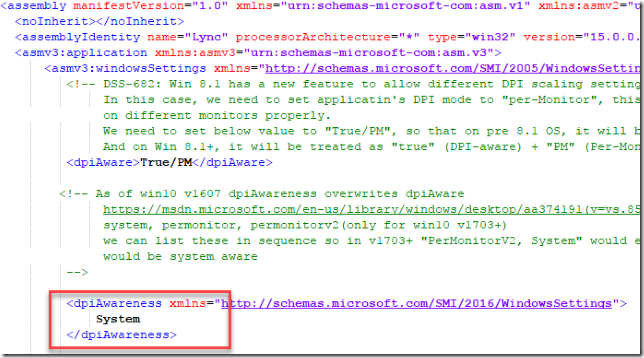
I’m on Windows 10 Fall Creators Update (10.0.16299.19), and what did the trick for me was to open up the file C:\Program Files (x86)\Microsoft Office\root\Office16\LYNC.EXE.MANIFEST, and change dpiAwareness from PerMonitor to System. Remember to open the file as an administrator. If not you won’t be able to change it.

After quitting Skype for Business and restarting it, it all worked.

21 Nov 16:23

Asus Transformer Mini: Windows-Tablet mit Tastaturhülle kostet 380 Euro

In Kürze will Asus das Transformer Mini T103 auf den Markt bringen. Das Windows-10-Tablet mit 10,1-Zoll-Touchscreen wird mit einer Tastaturhülle ausgeliefert, mit der sich das Gerät in ein Notebook verwandelt. (Tablet, Asus)
21 Nov 16:23

So wird dein Data-Mining-Projekt erfolgreich

Du nutzt bereits ein BI-System? Deine Telefonanlage schreibt heute schon Daten in dein CRM und der Außendienst bekommt eine Nachricht, wenn der Kunde ein besonders großes Angebot angefordert hat? Wenn nicht, solltest du darüber nachdenken, ein Data-Mining-Projekt zu starten.

Da kommt der ambitionierte ITler vom Kongress zurück, randvoll mit neuen Ideen. Und dazu er hat noch eine innovative Cloudlösung im Gepäck. Der Chef ist beeindruckt. Guter Mann. „Schnell stellt dann jedoch heraus, dass die Lösung zwar dufte ist, aber im eigenen Unternehmen nichts bewirken kann. Einfach weil die Qualität der eigenen Prozesse und die Datenqualität nicht ausreichen“, so Peter Pusch, verantwortlich für das Data-Mining-Projekt im Unternehmen Perschmann. Die Firmengruppe aus Braunschweig hat sich in den vergangenen zwölf Monaten auf den Weg gemacht, um herauszufinden, was sie tatsächlich über ihre Kunden weiß. „Wer seine Vertriebsplanung heute in Excel erledigt und Angebote an seine Kunden in Word tippt, wird morgen kein Stück digitaler sein, egal welche Softwaresuite er kauft oder welche Cloudlösung er einsetzt.“

Die vergessenen Daten

Die eigenen Daten und Prozesse zu verstehen und sicherzustellen, dass die Daten korrekt, überschneidungsfrei und gleichzeitig lückenlos sind, das sei der eigentliche Flaschenhals für die Anwendung digitaler Technologien. „Gleichzeitig ist diese Anforderung so selbstverständlich, dass sie oftmals schlicht vergessen wird“, so Pusch. „Manchmal kommt es mir so vor, als sei Data-Mining schon wieder out – noch bevor es richtig in war. So wie das papierlose Büro, das Anfang 2000 in aller Munde war.“ Warum sind diese Themen eigentlich so schnell wieder aus dem Fokus der Entscheider verschwunden? Für Pusch ist die Antwort eindeutig: Ohne gravierende Investitionen in eine hohe Rechenleistung habe es schlicht nicht funktioniert. Das gelte übrigens damals wie heute. Doch heute hätten es Unternehmen wesentlich leichter. Denn sowohl die nötige Software, als auch Erfahrung und Rechenpower gäbe es heute ganz einfach zu kaufen.

Anzeige

Was wollt Ihr wissen

„Bei Data-Mining geht es darum, Neues in alten Daten zu entdecken“, so Pusch. Dafür müssten Unternehmen alle verfügbaren Daten durchforsten und die jeweiligen Analysemodelle immer wieder aufs Neue verbessern. „Dies klingt nicht nur wie ein Haufen Arbeit, das ist es auch.“ Der beste Weg herauszufinden, welche Daten Unternehmen bereits hätten und welche sie noch suchen müssten, sei es sämtliche Daten auf einer einzigen Plattform zusammenzuführen. Also einfach alle Daten in ein Data-Warehouse stecken, sicherstellen, dass sie richtig und vollständig sind, ein Stück Software und einen Statistiker kaufen – und schon würden die Erkenntnisse auf den Tisch purzeln? „Ganz so einfach ist es nicht“, raubt Pusch die gängige Illusion. „Unternehmen brauchen zunächst die passenden Fragestellungen – und im Anschluss  einen Prozess, der die Antworten konsequent verarbeitet.“

Neue Fragen!

„Die gängigen Fragestellungen im Rahmen einer Datenauswertung gäben sich oft mit sehr wenig zufrieden. So laute die tradierte Frage eines E-Shops, wie hoch wohl der durchschnittliche Warenkorb sei. Eine Antwort fänden Unternehmen leicht im ERP-System. Auf diese Weise lassen sich jedoch keine weltbewegenden Erkenntnisse gewinnen“, so Pusch. „Wenn Unternehmen aber anfangen, tiefer zu bohren. Wenn sie beispielsweise wissen wollen, welche Kunden einen höheren Warenkorb als den durchschnittlichen einkaufen, dann stoßen die Daten des herkömmlichen Business-Intelligence-Systems schnell an Grenzen: Sind es die, die vorher telefonisch beraten wurden oder die, die auch auf der letzten Messe am Stand waren? Vielleicht sind es auch die, die den Newsletter abonniert haben oder die, die sich wieder abgemeldet haben? Sind es die Kunden, bei denen DHL in jedem Fall am nächsten Tag zustellt, oder dauert es bei diesen Kunden gern auch mal drei Tage, bis ihre Bestellung angekommen ist?“

Unternehmen seien überrascht, welche Daten ihnen heute schon zur Verfügung stünden. „Vielleicht fällt auf diesem Weg plötzlich auf, dass ein wichtiges Ressort komplett fehlt? Oder die Daten doch nicht so vollständig sind, wie es auf den ersten Blick schien.“ Das sei kein Grund, sich zu ärgern. Vielmehr seien dies die wertvollsten Erkenntnisse in einem Data-Mining-Projekt. „Liegen am Ende alle Daten vor, braucht es jemanden, der mit unternehmerischem Blick in diesen Daten rührt, sie probiert, abschmeckt und schließlich auch nett anrichtet und serviert“, so Pusch.

Transparent und bunt

Wichtig sei es, die Daten frei zugänglich zu führen, sodass jeder interessierte Mitarbeiter sich ein Bild machen könne. „Das Neue in diesen Daten ergibt sich nicht durch Zauberhand, es will gefunden werden“, weiß Pusch. „Je mehr Personen Zugang zu den Daten haben, je präsenter diese im Unternehmensalltag  sind, desto mehr neue Ideen werden entstehen.“

Seien es Veränderungen im Auftragsbestand des nördlichen Vertriebsgebietes nach Ostern. Oder ihr entdeckt in euern Daten, dass insbesondere männliche Hundebesitzer mittleren Alters in eurer Filiale einkaufen oder dass Schülerinnen zwischen zwölf und 14 Jahren nahezu doppelt so viel ins Kino gehen wie Jungs im gleichen Alter. Jedes noch so kleine Detail könne spannend sein. „Wichtig ist es, die Zahlen anschaulich zu machen“, empfiehlt Pusch. Es gäbe großartige, teilweise kostenlose Möglichkeiten, Daten und Zahlenkolonnen zu zeigen.

Folgende Aspekte sind laut Pusch für dein Data-Mining-Projekt erfolgsentscheidend:

Daten finden: Finde alle Daten, die um den Kunden oder den Prozess erfasst werden können und mache sie nutzbar. Lass dich nicht abwimmeln.

Daten aufbereiten und Lücken füllen: Finde heraus, wo die Daten liegen und wie diese für Menschen lesbar gemacht werden können. Auch zukünftige Projekte werden wieder auf diesen Daten aufbauen.

Zeit lassen: Setz dich mit den verschiedenen Quellen und den sogenannten ETL-Prozessen (Extract- Transform-Load) im Unternehmen auseinander. Damit steht und fällt alles.

Fehler beseitigen: Du hast einen fragwürdigen Daten-Prozess gefunden? Dann ändere ihn. „Und lass dich von Aussagen wie: ‚Das wusste ich schon, das steht doch im ERP‘ nicht beirren“, so Pusch. „Such dir lieber Kollegen mit Vision, keine Spießgesellen.“

Heute läuft die Plattform bei Perschmann. Sie verarbeitet und liefert Daten für diverse Prozesse im Unternehmen. „Ein echtes Ende gibt es in einem solchen Projekt jedoch nicht, denn mit den Erkenntnissen wachsen stets auch die Anforderungen an die Kundendaten. Und wir finden heute immer noch Daten, die wir bisher noch gar nicht angefasst haben“, schmunzelt Pusch.

Mehr zum Thema: Mit Process Mining Unternehmensprozesse digital analysieren: Schaltzentrale für Daten

21 Nov 16:23

Russland: Russischer Wetterdienst bestätigt zeitweise hohe Radioaktivität

by ZEIT ONLINE: Umwelt -
Im September registrierten Messgeräte in Europa erhöhte Ruthenium-106-Konzentrationen. Als Ursprungsort wurde der Ural vermutet. Russland hatte dies zunächst geleugnet.
21 Nov 16:22

Microsoft Edge für iPhone kann nun Passwörter synchronisieren

by Albert Jelica

Microsoft hat über das Wochenende den eigenen Microsoft Edge-Browser für iPhone aktualisiert, welcher erst vor einigen Wochen als sehr frühe Vorschauversion für Android und iOS veröffentlicht worden war.

Die Aktualisierung bringt ein durchaus wichtiges Feature mit, das Microsoft Edge für iPhone eine Spur nützlicher macht. Die gespeicherten Passwörter von Microsoft Edge am PC können nun auch auf das iPhone synchronisiert werden, sodass bei vielen Webseiten die Passworteingabe weg fällt. Werden auf dem iPhone neue Passwörter gespeichert, sind diese umgekehrt auch in Microsoft Edge am Windows 10 PC verfügbar. Wer Microsoft Edge am PC nutzt, kann damit auch unterwegs die eigenen Passwörter mitnehmen.

Während das Update diese wichtige Funktionalität mitbringt, gibt es weiterhin keine Unterstützung für das iPhone X. Apples neuestes, rahmenloses iPhone bringt auch ein neues Displayformat mit, für welches Apps nun allesamt optimiert werden müssen. Bis dahin werden die Anwendungen mit entsprechendem Rahmen dargestellt. Bevor der Browser veröffentlicht wird, kommt hoffentlich auch die Unterstützung für das neueste iPhone.

Die Registrierungen für die iOS-Version von Microsoft Edge sind übrigens momentan nicht mehr möglich, denn das Unternehmen scheint das Limit von Apples TestFlight Beta-System erreicht zu haben. Microsoft behauptet zwar, dass die Beta von Microsoft Edge öffentlich zugänglich ist, allerdings werden keine neue Tester aufgenommen. Wer dennoch sein Glück versuchen möchte, kann sich auf der dafür eingerichteten Microsoft Edge Preview-Seite registrieren.

Die Android-Version liegt in der Entwicklung etwas hinter Microsoft Edge für iPhone. Es ist damit zu rechnen, dass die Passwörter in wenigen Tagen auch auf Android-Smartphones synchronisiert werden können.


Quelle: Microsoft

Der Beitrag Microsoft Edge für iPhone kann nun Passwörter synchronisieren erschien zuerst auf WindowsArea.de.

21 Nov 16:22

IT-Sicherheit: Der Rathaus-Hack

by ZEIT ONLINE: Datenschutz - Kai Biermann
Ohne Computer funktioniert keine deutsche Stadt mehr. Doch die Technik in den Rathäusern ist gefährlich unsicher. ZEIT ONLINE konnte diverse vertrauliche Daten sehen.
21 Nov 16:22

Angela Merkel schart Getreue um sich

Die AfD sieht nach dem FDP-Ausstieg aus Jamaika einen ersten Jagderfolg.
21 Nov 16:22

Tether: Kryptowährungsstartup verliert 31 Millionen Dollar

Wenn bei Kryptowährungen etwas schiefgeht, dann wird es schnell teuer. Beim Startup Tether haben Angreifer Token im Wert von 31 Millionen US-Dollar transferieren können. Das Unternehmen reagiert mit einem Fork der eigenen Software. (Blockchain, Internet)
21 Nov 07:26

Schule: Gut in Teamarbeit

by ZEIT ONLINE: Schule - Parvin Sadigh
Erstmals hat eine Pisa-Studie getestet, wie Schüler zusammenarbeiten können. Die deutschen sind im internationalen Vergleich sozial kompetent, es ginge aber noch besser.
21 Nov 07:26

Sackgasse: EU-Industriekommissarin sieht Diesel am Ende

EU-Industriekommissarin Elżbieta Bieńkowska erwartet das baldige Aus für den Dieselmotor und befürchtet, dass Null- und Niedrigemissionsautos nicht in der EU gebaut würden. Eine E-Auto-Quote lehnt sie ab, setzt aber auf Anreizsysteme für Hersteller. (Auto, Technologie)

21 Nov 07:19

A race to monetize our attention is now eroding the pillars of our society

21 Nov 07:18

Announcing the New AWS Secret Region

21 Nov 07:18

The Last of the Iron Lungs

21 Nov 07:08

Erwachsenwerden: Wo ist das Kind, das ich war?

by ZEIT ONLINE: Kultur - Wolfram Eilenberger
Kinder sind die wahren Philosophen, denn sie können über alles staunen. Die meisten Erwachsenen haben das verlernt. Trotzdem kein Grund, nostalgisch zu werden.
21 Nov 06:59

Deutsch-russische Beziehungen: Ein unbequemer Nachbar, aber kein Feind

by ZEIT ONLINE: Politik - Theo Sommer
Es hilft nicht, Russland als Angstgegner aufzubauen. Der Westen sollte mit dem Land nüchterner umgehen – sonst bleiben die globalen Probleme ungelöst.
21 Nov 06:47

Software converts 360 video into 3D model for VR

21 Nov 06:47

An in-depth security review of the Intel Management Engine

21 Nov 06:47

Application Container Security Guide [pdf]

21 Nov 06:46

Show HN: Fill Paper and PDF Forms Online

21 Nov 06:46

The way Microsoft patched a recent bug raised some eyebrows

21 Nov 06:46

The first known object to enter our solar system from deep space

21 Nov 06:23

A Nuclear Jet at Chernobyl Around 21:23:45 UTC on April 25, 1986

21 Nov 06:23

OneDrive for Business Group Policy Template has Changed

by Paul Cunningham

Recently I published a blog post demonstrating how to roll out OneDrive for Business to replace user home drives on a traditional file server.

At the time I wrote that blog post the OneDrive for Business Group Policy template required direct editing of the .admx file to set some tenant ID values. It was an awkward and problematic approach, but it worked.

Since then, Microsoft has updated the OneDrive GPO template so that more configuration can be applied through the Group Policy Management console, instead of directly editing the .admx file. I've updated my blog post with the new steps.

For any environment using the older GPO template, you can migrate to the new template to make your Group Policies a bit tidier. I've run through the migration myself with no issues, using the following process.

First, review your GPO settings for OneDrive, including any customizations that you had to make to the old .admx file. This step is important, because when you update the GPO template files in your central store it will reset the policy settings back to the default “Not configured” state.

OneDrive policy settings reset when GPO template is updated

Next, upload the new GPO template files to your Group Policy central store. You can find instructions for managing the central store here. The new GPO template files are not currently available for download from Microsoft. Instead, you need to retrieve them from a computer with the latest OneDrive sync client installed. You'll find the files in the %localappdata%\Microsoft\OneDrive\BuildNumber\adm\ folder.

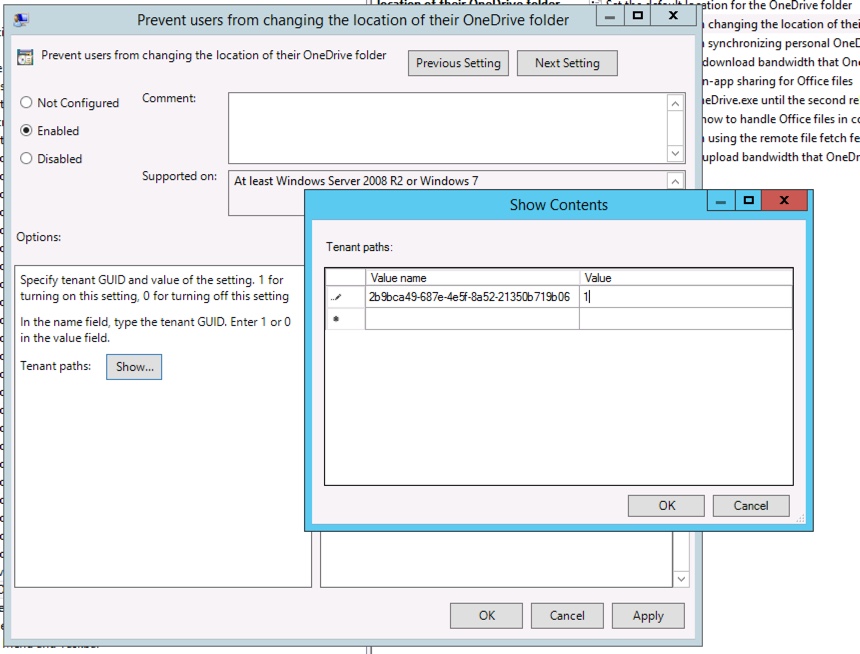
Finally, re-apply your desired GPO settings. Among the new settings available for managing directly in the Group Policy Management console is the ability to prevent users from changing the location OneDrive uses to sync files on their PC. Previously this setting required editing the .admx file directly.

In my testing this change had no impact on existing OneDrive users who were managed by the previous GPO template settings. However, as always you should perform your own testing to ensure the change goes smoothly for your users.

The post OneDrive for Business Group Policy Template has Changed appeared first on Practical 365.

20 Nov 22:03

Automatisiertes Fahren: Düsseldorf testet Navigation durch Verkehrszentrale

Mehrere Regionen in Deutschland richten Teststrecken für automatisiertes Fahren ein. In Düsseldorf geht es vor allem um die Kommunikation der Autos mit Ampeln und Tempolimits. (Autonomes Fahren, Internet)
20 Nov 22:02

A Certain Kind of Love, or Why My Apartment Qualifies as a Phone Network Now

20 Nov 21:56

PowerShell Constrained Language Mode

by PowerShell Team

PowerShell Constrained Language Mode

What is PowerShell Constrained Language?

PowerShell Constrained Language is a language mode of PowerShell designed to support day-to-day administrative tasks, yet restrict access to sensitive language elements that can be used to invoke arbitrary Windows APIs.

You can place a PowerShell session into Constrained Language mode simply by setting a property:

PS C:\> $ExecutionContext.SessionState.LanguageMode
FullLanguage
PS C:\> $ExecutionContext.SessionState.LanguageMode = "ConstrainedLanguage"
PS C:\> $ExecutionContext.SessionState.LanguageMode
ConstrainedLanguage

PS C:\> [System.Console]::WriteLine("Hello")
Cannot invoke method. Method invocation is supported only on core types in this language mode.
At line:1 char:1
+ [System.Console]::WriteLine("Hello")
+ ~~~~~~~~~~~~~~~~~~~~~~~~~~~~~~~~~~~~
    + CategoryInfo          : InvalidOperation: (:) [], RuntimeException
    + FullyQualifiedErrorId : MethodInvocationNotSupportedInConstrainedLanguage

Of course, this is not secure. A user can simply start another PowerShell session which will run in Full Language mode and have full access to PowerShell features. As part of the implementation of Constrained Language, PowerShell included an environment variable for debugging and unit testing called __PSLockdownPolicy. While we have never documented this, some have discovered it and described this as an enforcement mechanism. This is unwise because an attacker can easily change the environment variable to remove this enforcement. In addition, there are also file naming conventions that enable FullLanguage mode on a script, effectively bypassing Constrained Language. Again, this is for unit testing. These test hooks cannot override a Device Guard UMCI policy and can only be used when no policy enforcement is applied.

Then what is it for?

PowerShell Constrained Language mode was designed to work with system-wide application control solutions such as Device Guard User Mode Code Integrity (UMCI). Application control solutions are an incredibly effective way to drastically reduce the risk of viruses, ransomware, and unapproved software. For DeviceGuard UMCI the approved applications are determined via a UMCI policy. PowerShell automatically detects when a UMCI policy is being enforced on a system and will run only in Constrained Language mode. So PowerShell Constrained Language mode becomes more interesting when working in conjunction with system-wide lockdown policies.

PowerShell’s detection of system policy enforcement through DeviceGuard is supported only for Windows platform running Windows PowerShell version 5.1. It is not currently implemented in Open Source PowerShell Core 6 beta, and it does not work on non-Windows platforms. So this is currently very much a Windows security feature. However, we will continue to enhance this for non-Windows platforms where feasible.

These lockdown policies are important for high-value systems that need to be protected against malicious administrators or compromised administrator credentials. With a policy enforced even administrators are limited to what they can do on the system.

Since Constrained Language is so limited, you will find that many of the approved scripts that you use for advanced systems management no longer work. The solution to this is simple: add these scripts (or more effectively: your code signing authority that signed them) to your Device Guard policy. This will allow your approved scripts to run in Full Language mode.

For example, all PowerShell module files shipped with Windows (e.g., Install-WindowsFeature) are trusted and signed. The UMCI policy allowing signed Windows files lets PowerShell run these modules in Full Language mode. But if you create a custom PowerShell module that is not allowed by the policy then it will be considered untrusted and run with Constrained Language restrictions.

Consequently, any PowerShell module marked as trusted in the policy needs to be carefully reviewed for security vulnerabilities. A vulnerability could allow code injection, or leak private functions not intended for public use. In either case it could allow a user to run arbitrary code in Full Language mode, thus bypassing the system policy protections.

We have described these dangers in much more detail in our post, “Writing Secure PowerShell Scripts” (coming soon).

What does Constrained Language constrain?

Constrained Language consists of a number of restrictions that limit unconstrained code execution on a locked-down system. These restrictions are:

  • PowerShell module script files must explicitly export functions by name without the use of wildcard characters.
    This is to prevent inadvertently exposing powerful helper function not meant to be used publicly.
  • PowerShell module manifest files must explicitly export functions by name without the use of wildcards.
    Again, to prevent inadvertent exposure of functions.
  • COM objects are blocked.
    They can expose Win32 APIs that have likely never been rigorously hardened as part of an attack surface.
  • Only approved .NET types are allowed.
    Many .NET types can be used to invoke arbitrary Win32 APIs. As a result only specific whitelisted types are allowed.
  • Add-Type is blocked.
    It allows the creation of arbitrary types defined in different languages.
  • The use of PowerShell classes are disallowed.
    PowerShell classes are just arbitrary C# type definitions.
  • PowerShell type conversion is not allowed.
    Type conversion implicitly creates types and runs type constructors.
  • Dot sourcing across language modes is disallowed.
    Dot sourcing a script file brings all functions, variables, aliases from that script into the current scope.
    So this blocks a trusted script from being dot sourced into an untrusted script and exposing all of its internal functions.
    Similarly, an untrusted script is prevented from being dot sourced into a trusted script so that it cannot pollute the trusted scope.
  • Command resolution automatically hides commands you cannot run.
    For example, a function created in Constrained Language mode is not visible to script running in Full Language mode.
  • XAML based workflows are blocked since they cannot be constrained by PowerShell.
    But script based workflows and trusted XAML based workflows shipped in-box are allowed.
  • The SupportedCommand parameter for Import-LocalizedData is disabled.
    It allows additional commands prevented by Constrained Language.
  • Invoke-Expression cmdlet always runs in Constrained Language.
    Invoke-Expression cannot validate input as trusted.
  • Set-PSBreakpoint command is blocked unless there is a system-wide lockdown through UMCI.
  • Command completers are always run in Constrained Language.
    Command completers are not validated as trustworthy.
  • Commands and script run within the script debugger will always be run in Constrained Language if there is a system-wide lockdown.
  • The DSC Configuration keyword is disabled.
  • Supported commands and Statements are not allowed in script DATA sections.
  • Start-Job is unavailable if the system is not locked-down.
    Start-Job starts PowerShell in a new process and if the system is not locked-down the new process runs in Full Language mode.

As we can see, Constrained Language mode imposes some significant restrictions on PowerShell. Nevertheless, it remains a formidable and capable shell and scripting language. You can run native commands and PowerShell cmdlets and you have access to the full scripting features: variables, statements, loops, functions, arrays, hashtables, error handling, etc.

How is this different from JEA?

PowerShell Constrained Language restricts only some elements of the PowerShell language along with access to Win32 APIs. It provides full shell access to all native commands and many cmdlets. It is not designed to operate independently and needs to work with application control solutions such as UMCI to fully lockdown a system and prevent access to unauthorized applications. Its purpose is to provide PowerShell on a locked-down system without compromising the system.

JEA (Just Enough Administration) is a sandboxed PowerShell remote session that is designed to strictly limit what the logged on user can do. It is configured in ‘no language mode’, has no access to file or other drive providers, and makes only a small set of cmdlets available. These cmdlets are often custom and designed to perform specific management functions without giving unfettered access to the system. The set of cmdlets provided in the session is role based (RBAC) and the session can be run in virtual or Group Managed Service accounts.

The JEA scenario is where an administrator needs to perform a management task on a high-value machine (such as collect logs or restart a specific service). The administrator creates a remote PowerShell session to the machine’s JEA endpoint. Within that session the user has access to only those commands needed to perform the task and cannot directly access the file system or the registry or run arbitrary code.

Summary

PowerShell Constrained Language is designed to work with application whitelisting solutions in order to restrict what can be accessed in an interactive PowerShell session with policy enforcement. You configure which scripts are allowed full system access through the whitelisting solution policy. In contrast, JEA is a sandboxed PowerShell remote session that restricts an interactive session to specific commands based on user role.

Paul Higinbotham [MSFT]
PowerShell Team

20 Nov 21:54

New features for SharePoint list and library preview web parts

by Chris McNulty

Earlier in 2017 we introduced preview versions of new web parts to allow you to integrate views of a SharePoint list or library on SharePoint pages.  Our initial rollout was limited to “read-only” mode, meaning you could embed custom views of the list or library with limited interactivity.


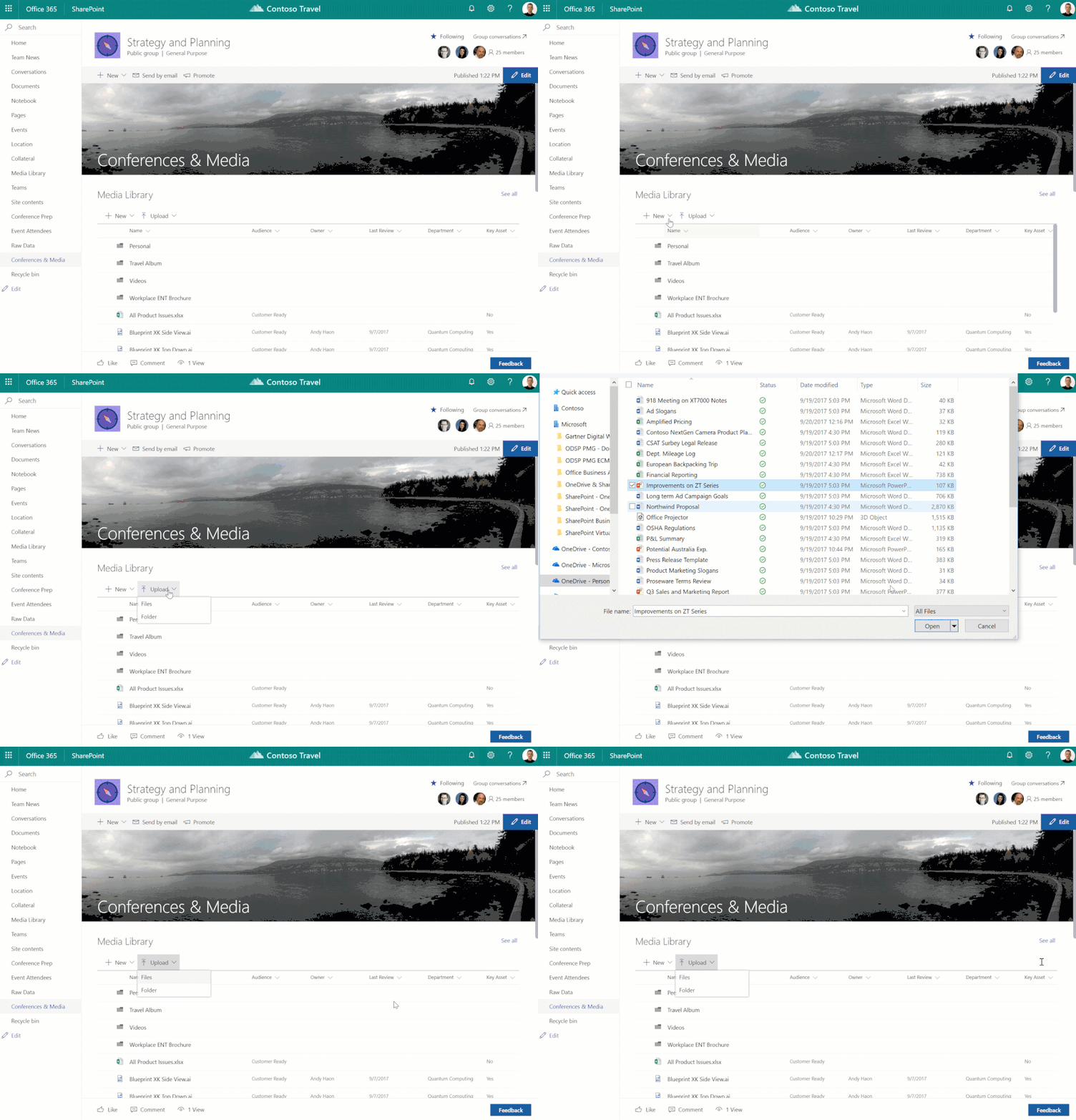
Today we’re introducing related command bar items that allow you to create new items and upload documents directly from within the web part. We are also introducing item renaming, deletion, and downloading in the web part.


Animation of uploading with new web partAnimation of uploading with new web part


Please note, this functionality has been always available in the native views of lists and libraries.  Today’s announcement extends those capabilities to the web part experience.  Additional material is available in the support articles, “Use the document library web part” and "Use the list web part".


We expect to start the rollout of this feature around November 14, 2017.  Please continue to watch the TechCommunity for the latest rollout news.  Thanks.


20 Nov 21:54

PowerShell: Listing Azure AD/Office 365 User Accounts with Directory Sync Status

by Paul Cunningham

User accounts for Office 365 are stored in Azure Active Directory. The accounts will either be cloud identities, or synced identities. Cloud identities are accounts that exist only in Office 365/Azure AD, whereas synced identities are those that exist in an on-premises Active Directory and are being synchronized to Azure AD using a directory sync tool such as Azure AD Connect.

If you want to retrieve a list of synced and non-synced identities you can do so using the AzureAD PowerShell module. After connecting to Azure AD, use the Get-AzureADUser cmdlet to retrieve a list of users. You can group the users by the DirSyncEnabled property to get a count of synced and non-synced accounts.

PS C:\>Connect-AzureAD
PS C:\> Get-AzureADUser | Group-Object -Property:DirSyncEnabled
Count Name                      Group
----- ----                      -----
   98 True                      {class User {...
    2                           {class User {...

The first time I saw this I expected to see values of True and False, but instead it seems we get values of True and null. So, to retrieve a list of synced users, the command would be as follows:

PS C:\> Get-AzureADUser | Where {$_.DirSyncEnabled -eq $true}

Here's an example where I've retrieved the DirSyncEnabled and LastDirSyncTime properties as well.

PS C:\> Get-AzureADUser | Where {$_.DirSyncEnabled -eq $true} | Select -Property DisplayName,UserPrincipalName
,DirSyncEnabled,LastDirSyncTime | ft -auto
DisplayName    UserPrincipalName                    DirSyncEnabled LastDirSyncTime
-----------    -----------------                    -------------- ---------------
Aaron Gardiner aaron.gardiner@exchangeserverpro.net           True 10/19/2017 1:56:03 PM
Adam Wally     adam.wally@exchangeserverpro.net               True 10/19/2017 1:56:03 PM
Aisha Bhari    Aisha.Bhari@exchangeserverpro.net              True 10/19/2017 1:50:52 PM
Alan Reid      Alan.Reid@exchangeserverpro.net                True 10/19/2017 1:56:03 PM
Alannah Shaw   Alannah.Shaw@exchangeserverpro.net             True 10/19/2017 1:56:03 PM
Aldith Walker  Aldith.Walker@exchangeserverpro.net            True 10/19/2017 1:52:08 PM
Alex Heyne     Alex.Heyne@exchangeserverpro.net               True 10/19/2017 1:56:03 PM
Alice Mullins  Alice.Mullins@exchangeserverpro.net            True 10/19/2017 1:53:24 PM
Alison Pugh    Alison.Pugh@exchangeserverpro.net              True 10/19/2017 1:47:08 PM
Almaz Duggan   Almaz.Duggan@exchangeserverpro.net             True 10/19/2017 1:56:02 PM
.....

To retrieve a list of non-synced, or cloud-only identities, the command would be as follows:

PS C:\> Get-AzureADUser | Where {$_.DirSyncEnabled -eq $null}
ObjectId                      DisplayName                   UserPrincipalName             UserType
--------                      -----------                   -----------------             --------
8db8b044-b825-4456-b6f7-39... Paul Cunningham               admin@exchangeserverpro.on...
00a77560-657b-44c3-9f38-08... Cloudy Room                   CloudyRoom@exchangeserverp... Member

The post PowerShell: Listing Azure AD/Office 365 User Accounts with Directory Sync Status appeared first on Practical 365.

20 Nov 21:51

Resetting passwords on Azure AD-joined devices is much easier with the latest Windows update

by Alex Simons

Howdy folks,

Today were announcing a feature that should make your users lives much easier. With the new Windows 10 Fall Creators update, users with Azure AD-joined (AADJ) devices can now see a Reset password link on their lock screen to reset their passwords.

Ive invited one of my Program Managers, Manini Roy, to tell you more about this feature and share details on how to enable it. Read on for additional information from her, and be sure to tell us what you think!

Best regards,

Alex Simons (Twitter: @Alex_A_Simons)

Director of Program Management

Microsoft Identity Division


Do the employees in your enterprise forget their passwords? Good news! We have got you covered because now they can quickly reset it from the lock screen.

The new Windows 10 Fall Creators update allows users with Azure AD-joined (AADJ) devices to see a Reset password link on their lock screen. When they click this link, they will be brought to the same self-service password reset (SSPR) experience they see when signing in from a browser.

We know that controlling helpdesk costs is a constant burden for the worlds largest IT organizations. One of the common problems weve seen is that, even though organizations have password management solutions, users just dont know where to go to reset their passwords. This can be due to lack of discoverability, or simply that its not in a place that users frequent very often. One of the significant benefits of the Azure AD password reset experience is that its right in front of users when they sign in on the web. Now, its right in-line with what your users see when coming to work the first thing in the morning, too!

Here are some screenshots from the experience:

Windows 10 Fall Creators update reset password screen

Windows 10 Creators update reset password screen

How do I enable this for my organization?

First, have a global admin configure an MDM policy. Then, by updating to the Windows 10 Fall Creators Update, users with Azure AD-joined devices in your organization will see a Reset password link on their login screen. Thats it!

Whats coming?

While this only works for AADJ devices right now, we are actively working to bring the same SSPR from the login screen feature to hybrid AADJ machines. We anticipate this feature will release with the next Windows feature update, so stay tuned!

Wrapping Up

We hope you love the new self-service password reset from lock screen feature! If you have any questions about enabling or using SSPR from the login screen, reach out to us on this feedback post.

Thanks for your continued feedback! Its what helps us empower every person and organization on the planet to achieve more. So, keep talking because we are listening.

Thanks,

Manini Roy (Twitter: @manini_roy)

Program Manager II

Microsoft Identity Division