Version 0.85 of Game of Trees has been released (and the port updated):
Shared posts
10 Mar 15:13
A New Open-Source Farming Robot Takes Shape
by Jenny List
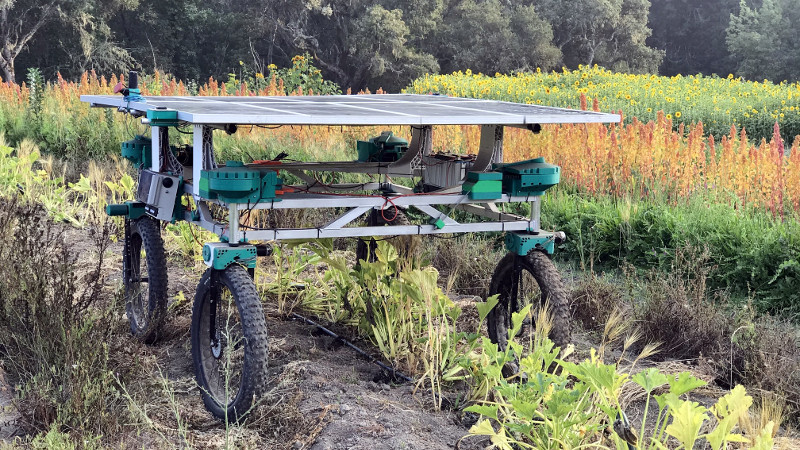
The world of automated farming may be an unglamorous one to those not invested in its attractions, but like the robots themselves that quietly get on in the background with tending crops, those who follow that path spend many seasons refining their designs. The Acorn is a newly-open-sourced robot from Twisted Fields, a Californian research farm, and it provides a fascinating look at the progress of a farming robot design from germination onwards.
The Acorn is not a CNC gantry for small intensive gardens in the manner of designs such as the Farmbot, instead it’s an autonomous solar-powered rover intended for larger farms which will cruise the fields continuously tending to the plants in its patch. It’s a work in progress, so what we see is the completed rover with the tools and machine vision to follow. It pursues the course of a low-cost lightweight platform, an aluminium chassis surmounted by the solar panel, with mountain bike front fork derived wheels at each corner. It has four wheel drive and four wheel steering, meaning that it can traverse the roughest of farmland. We can see its progress since a 2019 prototype, and while it seems as slow as the seasons themselves to mature, we can see that the final version could be a significantly useful machine on a small farm.
It’s not the first autonomous farming robot we’ve seen over the years, as for example this slightly more robust Australian model. We’re guessing that this is the direction autonomous farming is likely to take, with the more traditional tractor-based machinery projected by some manufacturers taking on repetitive loading and hauling roles.
10 Apr 01:09
heartbleed vs malloc.conf (updated)
Ted Unangst (tedu@) has posted an article about how OpenSSL has managed to sidestep OpenBSD's malloc.conf(3) protections:
About two years ago, OpenSSL introduced a new feature that youve never used or even heard about until yesterday, after somebody discovered a bug that could be used to read process memory.
As they say, read the whole thing.
Update:
tedu@ has a
follow up post
in which he finds a particularly nasty bug in the code which sidesteps the malloc.conf options, which means that it cannot, unpatched, be disabled:
Instead of telling people to find themselves a better malloc, OpenSSL incorporated a one-off LIFO freelist. You guessed it. OpenSSL misuses the LIFO freelist. In fact, the bug Im about to describe can only exist and go unnoticed precisely because the freelist is LIFO.
As they say, read this other thing.
dan likes this
17 Mar 13:21

Tie A Few On
| Ads by Project Wonderful! Your ad could be here, right now. |
I bet you thought I forgot about this storyline ha ha ha haaaa
21 Jan 13:41
The Answer To Their Own Question
Deli | FL, USA

(Today all my customers have been placing the exact same order, so I decide to have fun with the next one who comes in.)
Me: “Hello. Can I help you?”
Customer: “Hi! Can I have—”
Me: “A pound of [Brand] oven roasted turkey? Sliced thin?”
Customer: “Um, yes…”
Me: “Yes, ma’am. Coming right up.”
(I slice the turkey for her and hand it to her.)
Me: “Would you like anything else today?”
Customer: “Can I also have—”
Me: “Yes, ma’am. One pound of [Brand] white American cheese, coming up.”
(Her eyes go wide but she doesn’t say anything. I look through the cold case but don’t find an open package of the cheese.)
Me: “Oh, looks like I need to open a new package. One moment, please.”
(I step out from behind the counter and open up the door on the front of the case to get a new package of cheese.)
Customer: “Wow! I didn’t know—”
Me: “That’s okay. Most people don’t know the doors open from the front.”
(Her eyes get even wider. I try not to snicker as I slice her cheese.)
Me: “Aaaaand there you go. Will that be all for you, ma’am?”
Customer: “What number am I—”
Me: “42.”
(She snatches the cheese and runs out the front door at full speed.)
Coworker: “How did you know what number she was thinking?”
Me: “Douglas Adams, dude. 42 is always the answer.”
Coworker: “You’re sick, man.”
Me: “I knew you’d say that.”
Lucas B, tanner.jon and 2 others like this
14 Oct 19:46
The Viscosity of Data
by janchip
I’ve spent the last year exploring the value that can be drawn from different forms of data ranging from client’s “big data” through to building sensor networks to generating our own. There’s a lot of hype and noise around the impact of data on the innovation process and it’s been good to tease out where the value is for our insights practice, and ultimately how that insight might help our clients.
One small task in this exploration involved the following exploration of a photo archive taken from a 6 week project that included 3 weeks of international field study time (frog will in due course be publishing a big report on data/sensing in the new year with perspectives of colleagues from around the globe). With thanks to Dorothy Xu for wading though the archive. The analysis of the photo archive was focussed on understanding the relative cost of collecting photos versus their use, the effort required for proper archival management, and the image capturing cadence of the team. These are the top line numbers:
One project generated 13,514 photos – the unfiltered archive. We shoot in RAW.
It took ~6.4 hours of transfer time to import these files into the computer – although the time/researcher-attention cost is far higher once the number of imports and mental load are taken into account.
Of the 13,514 photos in the unfiltered archive – 5,604 duplicate, blurred, or unwanted photos (41% of the total) were deleted leaving 7,910 photos – a process that took a trained intern 3 days – 1,868 photos per day, or 4.5 photos per minute, working 7 hours/day. The hit-rate of usable photos can obviously be higher with slower recording equipment (we use rapid-fire 5D Mark IIs) and a more competent, more cautious photographer. However the skill level on this team was fairly consistent with studies where designers, strategists and other ‘non-research’ professions are put to work in-field.
The camera shutters for all cameras (two 5D Mark IIs, and some point-and-shoots) used over the entire course of the study were open for 7.4 minutes. For the filtered catalog of 7,910 photos the camera shutters were open for a total of 260 seconds (4.3 minutes).
Full daily backups of the archive to an external drive took up to <4 hours.
An estimated 1,000 additional photos were deleted from the cameras prior to importing into the unfiltered archive – typically by the photographer in a car on the way from an intensive interview session to another intensive interview session.
The processing time to obtain 100 ready-to-use photos from this study is around ~24 hours: to transfer 13,481 photos from memory card to photo management software (6.4 hrs); export as jpegs from photo management software (19 hrs); compress those photos into a zip file (4.5 mins), and copy them to a hard drive (5 mins) or upload them to the a cloud backup service (10 mins with decent connection). This doesn’t include time spent selecting key photos.
It is useful to think in terms of the viscosity of data — its ability to travel in the project team, amongst stakeholders and in the client organisation. The atomistic unit that has the highest signal-to-noise ratio, and is mostly widely shared is typically one photo + one observation, where the insight is relatively obvious and doesn’t require much explanation. Time pressures mean that the team typically needs to rapidly optimise photographs for maximum viscosity.
How much time did the team spend capturing their surroundings? For the original catalog of 13,4810 photos the camera shutters were open for a total of 444 seconds (7.4 minutes), an average shutter speed of 1/30th of a second. This is a relatively long time for a camera where a minimum of 1/60th of a second is considered the benchmark to obtain a clear photo in good lighting without a tripod. The archive included a few super-long exposures, mostly errors by the photographer.
The camera flash was not used in the entire study. It is normally too disruptive to the research process (except in situations where a bit of theatre is required).
A team member that has worked in field on at least some the data collection can comfortably browse a folder of ~600 photos if they are properly named and contain minimal metadata. For a team member with no in-field experience on that project a comfortable folder size is close to ~200 photos, the difference in numbers being related to familiarity with the material and the mental cues required to effectively scan. Making effective use of and printing more than ~100 photos from the field research can be a painful experience. A single home visit generates between 50 and 800 photos.
Around ~200 photos were used in the deliverables – representing a total capture time of 6.6 seconds. (6 weeks is 3,628,800.0 seconds of potential capture time for one researcher figuring out where to point the camera and press the shutter). Any conversation around filtering photos that enters the work stream has to start with the photographer-researcher’s ability to know where go to optimize relevant data collection, what to point the camera at and when to shoot.
By our estimation 5 photos from the study were widely used in the organisation – less than a second of exposure time.
The things that impact the the number of photos that are taken includes: how many cities the team has already visited on the same project (the team tends to be less trigger-happy as the study progresses because they have a better idea of where the value lies and have a more focussed appreciation of the weight of data); the team on the ground; whether the location and participants are photogenic.
Next time you’re prepping a team for field research, remember the weight of data.
There are of course other ways to tag photos with appropriate meta-data such as Luis von Ahn’s ESP game, but these have yet to be proven effective for the tight meta-data tagging that client organisation’s require.
Photo? The jungles around Sertão Do Taquari on a day when the team needed perspective from the data. We have another study coming up in Rio in November – ping if you’re based in the city.
No more posts. Check out what's trending.