
Shared posts
19 Apr 12:35


Aprende a volar un F-18
by jb
Bueno, exactamente hablamos de un CF-18 Hornet de la Royal Canadian Air Force, con el Capitan Erick O’Connor del 409 Escuadrón que nos muestra los elementos principales del cockpit y los mandos que utiliza para gestionar la avionica y sistemas de vuelo.
Según nuestro instructor de hoy, volar el Hornet es muy sencillo, con sistemas que permiten reducir la carga de trabajo que debe asumir el piloto, que es equivalente a la de otros aviones de dos plazas que además del piloto llevan un operador, dedicado completamente a la adquisición de blancos y gestión de armas.
Si claro…, pues si es tan sencillo ya me podrían dejar ir a dar una vuelta con él!!!
17 Apr 10:28


Aproximación a Santander pista 29
by jb
Me encanta este video de una aproximación al ILS de la pista 29 en Santander (SDR/LEXJ) en un Bombardier CRJ 200 de Air Nostrum, que nos muestra una perspectiva muy interesante de esta operación.
Grabado con dos cámaras, nos ofrece una vista lateral (por detrás del comandante) y una vista central del cockpit en la que apreciamos perfectamente todos los movimientos de la tripulación, y también todos los movimientos realizados por el piloto automático sobre los mandos de vuelo.
A diferencia de la filosofía Airbus, en la que el piloto automático es sólo un botón y una indicación visual del modo de vuelo seleccionado en la MCDU de los pilotos, en los aviones americanos (y por extensión, también en los canadienses) el control y los movimientos realizados por el A/P se suelen reflejar con movimientos de los cuernos por lo que los pilotos pueden tener un feedback visual de la máquina trabajando.
En cambio, el CRJ200 no dispone de autothrottle, por lo que como véis el PF (pilot flying, que en este salto es el segundo) debe ajustar la potencia manualmente en todo momento, incluso antes de pasar a volar en manual en cuanto el radioaltímetro canta los 500 ft sobre el terreno…
10 Apr 19:45


DataRescue’s DD creates disk images of corrupted storage devices
by Martin Brinkmann
A failing hard drive should not be taken lightly. Maybe you are noticing that you can't load some of the files on the drive anymore or that write processes sometimes fail, or you received a notification by a disk monitoring tool that the drive will likely cause these issues in the near future.
While you can go ahead and try and copy all the data that is stored on the device to another, you sometimes may run into issues doing so especially if part of the drive is already corrupt or non-readable.
Data recovery software may aid you in the recovery of the files in this case, and while you can run a program like Recuva, Free Recover or Unstoppable Copier to see if those files can be recovered, it is usually better to create an image of the disk first to run the recovery software on the image and not the original drive.
DataRescue DD is a free program for Windows and Mac operating systems that can create an image of a hard drive connected to the system. It can not create an image of the system drive though, only secondary hard drives seem to be supported by it.
The program itself is relatively easy to use. Vista and newer Windows users need to run the program with elevated rights so that the drive list can be populated. If you run the software without the required rights, you will notice that no drives are identified by it.

Select the drive under source that you want to create an image of. You should also make sure that you pick a destination that has sufficient free space to hold the data. One interesting option is the ability to create a partial image instead of a full image. You can specify the size in Megabyte as well as the start and end points for that, or the same for sectors of the drive. A click on the play icon starts the image creation and a file with the .dd extension will be saved to the local drive in the process. This is a raw file that most recovery programs should have no troubles to read and process.
The program supports two read directions and it may make sense to create images using both directions to avoid situations where a drive image cannot be completed because of corrupt sectors.
DataRescue DD is not the only program that enables you to create a disk image of a hard drive. Several tools that we have reviewed in our data backup overview for Windows can do that including DriveImage XML. Still, if you are looking for an easy to use program to create a disk image for recovery purposes, you may find this one suitable for the task as long as you need to create an image of a non-system partition or drive.
The post DataRescue’s DD creates disk images of corrupted storage devices appeared first on gHacks Technology News | Latest Tech News, Software And Tutorials.
Luisyo2001 likes this
10 Apr 17:47

Air Combat Maneuvering over the Pacific. F-15 Eagle-style
by David Cenciotti
Last year, we published a video recorded and edited by the 67th FS “Fighting Cocks”, from Kadena airbase, to commemorate the winning of the 2011 Raytheon Trophy, a trophy that is given to the top air-to-air squadron in the USAF.
Now, the 67th FS has released some more stunning footage showing the squadron’s F-15C Eagle dofigthing during training mission over Kadena and the Pacific Ocean.
Update: thanks to the readers of The Aviationist who have noticed that the new footage is actually a shorten version of the old one made in 2012 for the Raytheon Trophy.
Unfortunately, the 67th FS is among the U.S. Air Force combat units grounded or affected by budget cuts imposed by sequestration: it will maintain basic mission capability (hence, it will fly much less than usual) through Sept. 2013.
The 67th FS provides air defense and air superiority in the Asian-Western Pacific area of operations.
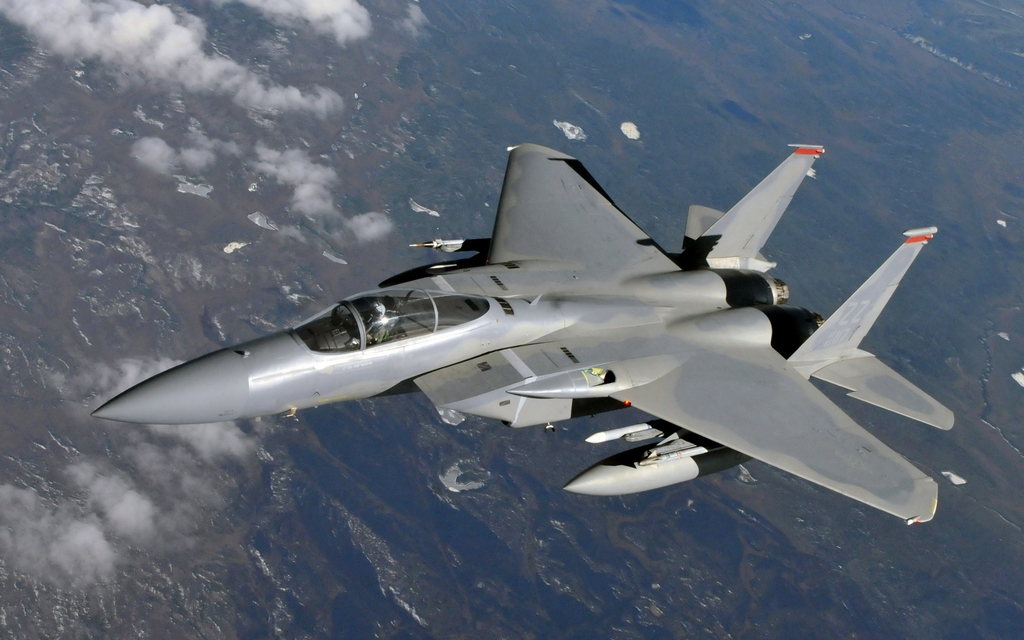
Image credit: U.S. Air Force
Related articles
-
 This is what taking off with an F-15 Eagle fighter jet looks like
-
 U.S. moved its F-22 stealth fighter jets to South Korea. Here’s what they could do over there.
-
 Bomber incident: two Nuclear-armed Russian Tu-95s reportedly skirt U.S. military base at Guam
-
 U.S. Air Force says B-1s were not deployed to Guam. So, where did five big bombers go last night?

04 Apr 23:07
Beech Baron aterriza sin rueda de nariz en Australia
by Álvaro Romero

(Foto, captura de pantalla) Ayer 3 de abril en Australia, el piloto Mark Crampton debió usar sus habilidades para aterrizar el Beechcraft Baron VH-OMS en Toowoomba, tras comprobar que el tren de aterrizaje delantero no se bloqueó:

No more posts. Check out what's trending.