At Silent Signal, we use Amazon Web Services for various purposes (no, we don't
run code that handles sensitive information or store such material without
end-to-end encryption in the cloud), and when I read that multi factor
authentication is available for console login, I wanted to try it. Amazon
even had an app called AWS virtual MFA in the Play Store and
in their appstore, but I couldn't find them on my Nexus S, so I tried
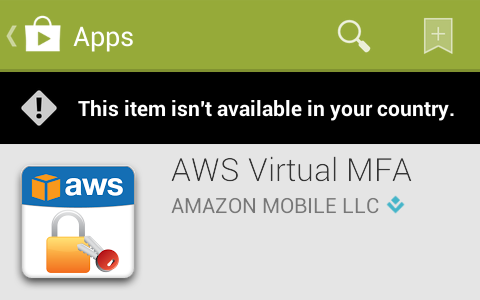
a different approach by opening a direct link. The following message confirmed
that I couldn't find it beacuse someone found it a good idea to geoban this
application, so it wasn't available in Hungary.
Although a month ago I found a way to use Burp with the Android emulator,
but this time, I didn't want to do a man-in-the-middle attack, but rather just
redirect all traffic through an Internet connection in a country outside the
geoban. I chose the United States, and configured TOR to select an exit node
operating there by appending the following two lines to torrc.
ExitNodes {us}
StrictExitNodes 1
TOR was listening on port 9050 as a SOCKS proxy, but Android needs an HTTP one,
so I installed Privoxy using apt-get install privoxy, and just
uncommented a line in the Debian default configuration file
/etc/privoxy/config that enabled TOR as an upstream proxy.
forward-socks5 / 127.0.0.1:9050 .
For some reason, the Android emulator didn't like setting Privoxy as the HTTP
proxy – HTTP connections worked, but in case of HTTPS ones, the emulator just
closed the connection with a FIN just after receiving the SSL Server Hello
packet, as it can be seen below in the output of Wireshark.

Even disconnecting TOR from Privoxy didn't help, so after 30 minutes of trials,
I found another way to set a proxy in the Android emulator – or any device for
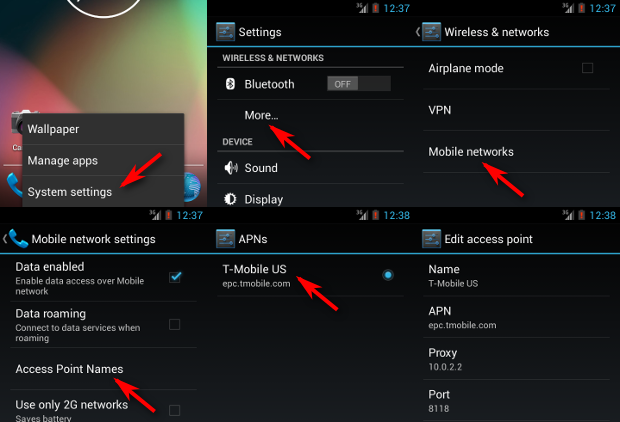
that matter. The six steps are illustrated on the screenshots below, and the
essence is that the emulator presents the network as an Access Point, and such
APs can have a proxy associated with them. The QEMU NAT used by the Android
emulator makes the host OS accessible on 10.0.2.2, so setting this up with
the default Privoxy port 8118 worked for the first try.
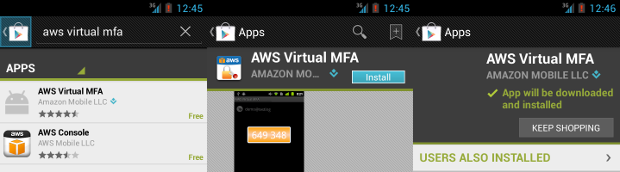
I installed Play Store by following a Stack Overflow answer, and as it can
be seen below, it appeared in the search results and I was able to install it –
although the process was pretty slow, and some images are missing from the
screenshots below because the latency of TOR was so high that I didn't wait for
them to be loaded.
Having the app installed on the emulator, it's trivial to get the APK file that
can be installed on any device now, even those without network connection.
$ adb pull /data/app/com.amazonaws.mobile.apps.Authenticator-1.apk .
837 KB/s (111962 bytes in 0.130s)
$ file com.amazonaws.mobile.apps.Authenticator-1.apk
com.amazonaws.mobile.apps.Authenticator-1.apk: Zip archive data, at least v2.0 to extract
$ ls -l com.amazonaws.mobile.apps.Authenticator-1.apk
-rw-r--r-- 1 dnet dnet 111962 jún   13 14:49 com.amazonaws.mobile.apps.Authenticator-1.apk


