Shared posts

24 Jun 19:58

Google's version of the W3C's video DRM has been cracked

by Cory Doctorow
animation

https://www.youtube.com/watch?v=5CkWjOvpZJw

Since 2013, the World Wide Web Consortium (W3C) has been working with the major browser companies, Netflix, the MPAA, and a few other stakeholders to standardize "Encrypted Media Extensions" (EME), which attempts to control web users' behavior by adding code to browsers that refuses to obey user instructions where they conflict with the instructions sent by video services. (more…)

24 Jun 19:57

Things Organized Neatly: The Art of Arranging the Everyday

by Kevin Kelly

tumblr_o8u1a57Gzo1t3i99fo1_1280

See sample pages from this book at Wink.

Things Organized Neatly: The Art of Arranging the Everyday
by Austin Radcliffe
Universe
2016, 104 pages, 7.8 x 10 x 0.8 inches
$17 Buy a copy on Amazon

Simply as advertised. Rows and rows of diverse things neatly organized. This process is often called knolling. The applied organizing logic varies: it can be by size, by color, by age; in rows, in grids, in fitted mosaics. The effect is always hypnotic. Seemingly meaningless collections gain intelligence and order which focuses attention on the parts. The book ranges wide and far in the type of things that are inspected. You will soon knoll your own.

24 Jun 19:57

When was "going to the beach" invented?

by David Pescovitz

slide_241327_1290027_free

Until the 18th century, the seashore was not a place most people would go to relax. In ancient times, it was where you might run into a variety of monsters like Scylla and Charybdis. The shore is also where one might encounter pirates, smallpox, or even a wayward Kraken. Then something changed. Sorbonne University historian Alain Corbin explores this unusual history in the book The Lure of the Sea: The Discovery of the Seaside in the Western World, 1750-1840, one of the sources for a fascinating Smithsonian magazine article about "Inventing the Beach":

Around the mid-18th century, according to Corbin, European elites began touting the curative qualities of fresh air, exercise and sea bathing. Especially in Britain, home of the Industrial Revolution, aristocrats and intellectuals became preoccupied with their own health and hygiene. They viewed workers, whose numbers were multiplying in factories and new industrial towns, as strengthened through labor. By comparison, the upper classes seemed fragile and effete: lacking in physical prowess and destined for decline. The notion of the “restorative sea” was born. Physicians prescribed a plunge into chilly waters to invigorate and enliven. The first seaside resort opened on England’s eastern shore in the tiny town of Scarborough near York. Other coastal communities followed, catering to a growing clientele of sea bathers seeking treatment for a number of conditions: melancholy, rickets, leprosy, gout, impotence, tubercular infections, menstrual problems and “hysteria.” In an earlier version of today’s wellness culture, the practice of sea bathing went mainstream...

Tracing this remarkable turnaround, “the irresistible awakening of a collective desire for the shore,” Corbin concludes that by 1840, the beach meant something new to Europeans. It had become a place of human consumption; a sought-after “escape” from the city and the drudgery of modern life. The rise of trains and tourism facilitated this cultural and commercial process. Travel became affordable and easy. Middle-class families took to the shore in ever-increasing numbers. In sailors’ jargon, “on the beach” once connoted poverty and helplessness; being stranded or left behind. Now it conveyed health and pleasure. The term “vacation,” once used to describe an involuntary absence from work, was now a desired interlude.

"Inventing the Beach: The Unnatural History of a Natural Place" (Smithsonian)

The Lure of the Sea: The Discovery of the Seaside in the Western World, 1750-1840 (Amazon)

photo above by Gray Malin; painting below by Edouard Manet

beach-at-boulogne-1869.jpg__800x600_q85_crop

24 Jun 19:54

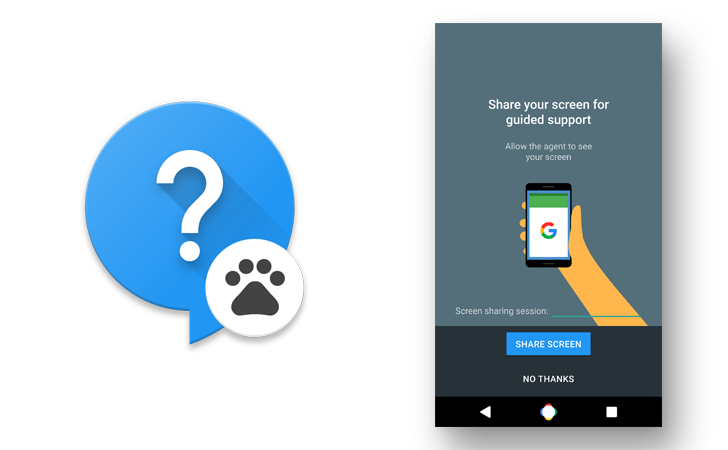
Exclusive: Google is building a live support app with screen-sharing for Nexus devices

by David Ruddock

support

A long-standing gap in the Nexus device feature-set for "normal" buyers has been live on-device support. In the event you need help setting up your Nexus smartphone - a smartphone you bought on the internet, not a store - going through the online Google Support documentation or back and forth with a chat agent in the browser is not an ideal experience. Being able to share your screen with an agent who can see what's happening on your display is a lot easier for many people, and it helps support agents resolve issues more quickly by having direct visual access to a user's device.

Read More

Exclusive: Google is building a live support app with screen-sharing for Nexus devices was written by the awesome team at Android Police.

24 Jun 19:49

ATM skimmer caught in the wild by a real security engineer

by John Biggs
AAEAAQAAAAAAAAiDAAAAJDQ4ODQxZjM5LTU0ZDktNDE2ZC1iM2QwLWM5ZTcyZmM1ODI2Mw Whoda thunk it? Tourist/cybersecurity expert Benjamin Tedesco was hanging out in Vienna when he walked up to an ATM. Because he trusts no one he decided to give the reader a little tug and came away with a working skimmer designed to look exactly like the card slot on the original machine. “It pays to be paranoid,” he said — and he’s right. Tedesco pulled off the… Read More
24 Jun 16:55

26 Sublime Images of Bridges and Connection

by Darlene Hildebrandt

The term bridge has several meanings. The literal one which is a structure that spans across something, usually over a waterway. The other is of a connection between two things, or a transition from one to the other. Of course there is also the bridge of a ship where the captain takes the helm, bridge of your nose, and a bridge or passage in a musical composition.

Here are several images that interpret that term – bridge:

Shellie

By Shellie

Several Seconds

By Several seconds

Styrovor

By styrovor

Julie Anne Johnson

By Julie anne Johnson

Yusuke Umezawa

By Yusuke Umezawa

Jon Matthies

By Jon Matthies

Jacob Surland

By Jacob Surland

Thomas Hawk

By Thomas Hawk

Omar Bariffi

By Omar Bariffi

Rick Schwartz

By Rick Schwartz

Raul Lieberwirth

By Raul Lieberwirth

Andrew E. Larsen

By Andrew E. Larsen

Pablo Fernández

By Pablo Fernández

Sian Monument

By sian monument

Jason Mrachina

By Jason Mrachina

Daniel Mennerich

By Daniel Mennerich

Andi Campbell-Jones

By Andi Campbell-Jones

David Merrett

By David Merrett

JP Freethinker

By JP Freethinker

Bernhard Latzko

By Bernhard Latzko

Francisco Manuel Esteban

By Francisco Manuel Esteban

Timothy Neesam

By Timothy Neesam

L.E Daniel Larsson

By L.E Daniel Larsson

Sudheer G

By Sudheer G

MaxGag

By MaxGag

Andrea Moroni

By Andrea Moroni

The post 26 Sublime Images of Bridges and Connection by Darlene Hildebrandt appeared first on Digital Photography School.

24 Jun 16:55

Dawg Be Trippin’

by McCullough
Puppy get a hold of some shrooms
24 Jun 16:54

Man who saves family in car wreck gets $143 bill from first responders

by Mark Frauenfelder
feeforgooddeed

A California man rescued a man and his children trapped inside a van that rolled over. When first responders arrived, they checked his pulse and give him a bottle of water to rinse off a small cut on his hand. He was surprised when he received a bill from the Cosumnes California Fire Department for $143.

Due to his heroic actions, the family got out safely, but in the process of freeing them, DeAnda received what he calls "a small scrape" on his hand. He was given a bottle of water to rinse it, and had his pulse checked by the emergency technicians who arrived later.

However, as he found out a few weeks later, that tiny "injury," as the Cosumnes Fire Department called it, may cost him nearly $150.

"A couple months later I get a bill for $143 for a bottle of water???" he wrote in a Facebook post after receiving a bill from the fire department. "Makes you wonder why people don't want to stop to help at an accident scene. All I can say is the look on the man's face when I was able to break that windshield and get him and his kids out of that vehicle was all the thanks I needed. I'm glad I was able to help. But now I have a bill to pay and they won't let it go."

24 Jun 16:46

Incipio is buying Skullcandy to expand its accessory empire

by Sean O'Kane

Two of the most well-known commodity brands are about to come together, because Incipio just announced that it's buying Skullcandy. Incipio LLC says it will pay $5.75 per share for all of Skullcandy Inc., resulting in a cash deal worth $177 million.

The deal is just the latest in an increasingly long line of acquisitions made by the popular California-based phone case company. In September of last year, Incipio bought Incase, a maker of popular backpacks and cases for laptops and phones. A few months before that it purchased ClamCase, a leading maker of iPad cases. Incipio also has licensing deals with premium brands like Kate Spade and Burton.

What does this mean for you, the loyal electronics goods consumer? Probably not much. A...

Continue reading…

24 Jun 13:15

YouTube announces mobile live broadcasting coming 'soon' for everyone

by Andrew Martonik

Though the likes of Periscope and Facebook Live are the talk of the town right now in mobile live video broadcasting, YouTube is now ready to get into the game. Taking to the YouTube Creator blog, Google has announced that live broadcasts will be coming to the YouTube app "soon" and that it'll be "more reliable than anything else out there."

Though YouTube makes the point that its service offered live streaming for events since 2011, it has sorely lacked the latest hot feature of direct broadcast from your phone — the only way to go live to YouTube from your phone directly was to have one of the few that supported the feature, namely recent Sony and Samsung phones.

With this change, everyone with the YouTube app will be able to start broadcasting live to millions of people (well, at least potentially) with no extra strings attached. The thought of "better late than never" certainly applies here, but with Facebook Live already showing huge growth in such a short period, you have to wonder how YouTube will catch back up and win over users.

24 Jun 13:13

Best Arcade Games for Android

by Marc Lagace

Bring back all the nostalgic feels with these arcade classics for Android.

For all the great new games that are released on Android, sometimes you want to play something ... familiar. Maybe something a little retro that reminds you of those arcade days spent plugging quarters into standalone machines for hours on end.

You can relive those moments on your Android phone with these great arcade games available in the Google Play Store.

PinOut

PinOut is a brilliant reimagining of the classic pinball action we're all familiar with into an endless arcade format, created by the award-winning developers behind Smash Hit. The game features sharp, futuristic graphics and smooth controls as it pits you in a race against the clock to see how far you can make it on one ball.

Unlike other pinball games that give you a set number of balls and have you focused on racking up combos and bonuses by strategically hitting bumpers and other features on the table, PinOut instead offers an infinite race against the clock on a seemingly neverending table. Tap to use the left and right flippers and strategically work the ball up through rails and onto the next section. Some rails feature a trail of dots which add time to the countdown clock at the top, so you'll need to master your flipper control and focus on hitting the ball through the time bonus rails. If you fail to hit the ball and it falls between your flippers, the only penalty imposed is the time you waste getting the ball back up to where it once was. If the time runs out, it's game over.

PinOut is a free download from the Google Play Store, but you might want to spend $2.99 on the one-time upgrade to premium to unlock the ability to start from previous checkpoints you've reached.

Download: PinOut (free with in-app purchases)

PAC-MAN

The quintessential arcade classic has been ported to Android over and over again, with a dozen of different twists on the tried and true gaming formula. But if you're looking for a pure Pac-Man experience, Bandai-Namco's free PAC-MAN app is everything you'll need.

In Classic Mode, you'll find everything looks and plays as you remember — minus the need for a stack of quarters. Once you've had your fill of the classic mazes, check out the collection of new mazes which add a new layer of strategy.

Tournament mode adds another layer of replay. Try and set the high score in regularly occurring tournaments against players from around the world.

PAC-MAN is a free download in the Google Play Store, and includes in-app purchases for different maze packs.

Download: PAC-MAN (free)

Advertisement


Galactic Nemesis

Galactic Nemesis is an updated version of arcade classics like Galaga and Galaxian for your Android phone. Blast your way through wave after wave of alien invaders, upgrading your ship as you go.

Controls are dead simple. Tap and drag your finger around the screen to move and shoot at the same time. Power-ups collect along the right side of the screen, so simply tap them when you need a little help. You get the first world for free but will have to pay $1.99 to unlock 3 other worlds. You'll also get 10 ships to unlock, over 50 in-game challenges, and no ads. With great pixel art, simple controls, and a winning gameplay formula, you can't go wrong with Galactic Nemesis if you're into classic arcade games.

Download: Galactic Nemesis (free with in-app purchases)

Metal Slug 3

A classic run-and-gun arcade title, Metal Slug 3 has been perfectly ported over to the Google Play Store and is worth checking out if you're a fan of the original games or simply enjoy action arcade shooting games.

The Android version gives you multiple ways to play.There's a single player campaign, which you can play in classic Arcade Mode or Mission Mode, which allows you to play your favorite mission or practice a particularly tough mission.

If your friends have the game, you can connect up via Bluetooth and play co-op modes. Metal Slug is always more fun with friends, so the addition of wireless local multiplayer greatly enhances the replay value.

Download: Metal Slug 3 ($2.99)

R-Type

Fans of R-Type will enjoy how smooth this classic side-scrolling shoot-em-up game plays on Android. Man your ship and take down the alien invasion one level at a time.

The game lets you control your ship directly via touch or using an on-screen joystick (Bluetooth controller support would have been nice here) and has a toggle for autofire. We've found the touch control to be the best compromise for allowing full control for evading enemies without obstructing too much of the screen.

Having reliable controls is important because this game is as tough as you remember it being. With wave after wave of enemies, tough boss battles, and one-hit deaths, you're in for a real challenge with R-Type.

Download: R-Type ($1.99)

SoulCalibur

We'd be remiss to have a list of best arcade games without at least one fighting game making the cut. This port of Soul Calibur is one of the nicest direct ports we've seen, featuring (thankfully) updated graphics from the 1998 original.

Beyond the classic Arcade Mode, there are multiple game modes to enjoy: Time Attack challenges you to beat all characters as fast as you can, Survival sees how far you can go in sudden-death battles, and Extreme Survival cranks things up to see how far you can go without being hit.

Before you click your heels and jump into the Google Play Store to get this one, here's the bad news: the price. At $13.99, this is priced more along the lines of a console download than a mobile offering. But this is essentially a full-fledged console game on your phone. This might be strictly for the hardcore SoulCalibur fans, but if you're looking for a quality fighting game for your Android device, SoulCalibur is as good as you'll find.

The only other downside besides the price is its lack of controller support; however, the virtual gamepad is surprisingly responsive and fully customizable.

Download: SoulCalibur ($13.99)

Advertisement


Crazy Taxi Classic

Hop in! The classic arcade driving game Crazy Taxi has been ported to Android by Sega and it's just as fun as you remember.

For those who might be unfamiliar with the concept, the game is a wicked-fast game where you play the raddest taxi driver in San Francisco as you break all the traffic stops to get your passengers to where they need to be as fast as possible. Featuring the classic punk sounds of The Offspring and Bad Religion, this game is a total throwback to the old arcade machines, or perhaps you remember the game best from the Sega Dreamcast.

You can play by classic arcade rules where you're always working to extend the countdown timer, or see how much money you can rake in over a set amount of time. The game is free to play with ads, or you can remove the non-Sega ads via an in-app purchase.

Download: Crazy Taxi Classic (Free w/ads, $1.99 to unlock full game)

Pinball Arcade
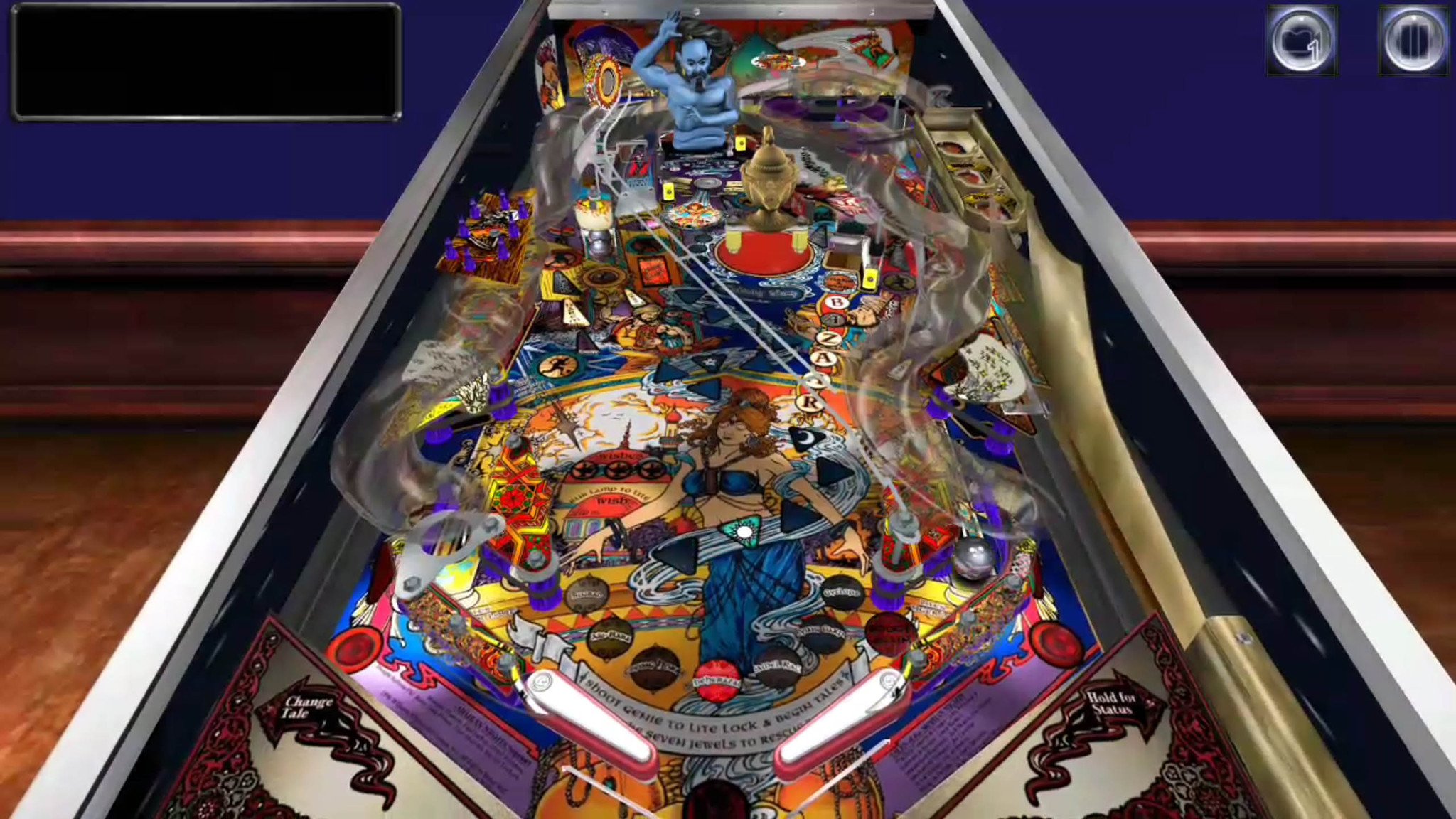
For fans of pinball, nothing will quite replicate the experience of playing on a glass-top pinball cabinet. Pinball Arcade for Android might just be the next best thing, featuring 70 classic pinball tables.

Each table is faithfully reproduced with all original features and graphics in rather stunning 3D graphics.

You get the full Arabian Nights table for free and are able to play free versions of all of the other tables included in the game, but you must plop down some serious cash to get full access to the other tables, which are sold individually ($5-$9 per table) or as part of a Season Pack ($35-$42 per season pack).

These prices are going to be way too steep for most, but if you're a hardcore Pinball fan who collects pinball cabinets, you'll appreciate the ability to test and play classic tables for a fraction of the cost of owning one in real life.

Download: Pinball Arcade (free with in-app purchases)

NBA Jam

NBA Jam has been available on Android since October 2010, and yet it still remains one of the most polished and fun sports arcade games you can play on the platform.

This remake of the 90s classic features all the fast-paced two-on-two action you remember from back in the day, with upgraded graphics including hilarious big head animations for every player in the game. Touch controls are simple and responsive, making it super easy to set up an epic alley-oop, or sink three shots in a row and hear Tim Kitzrow — the original NBA JAM commentator — yell his infamous line, "HE'S ON FIRE!"

There are four modes of play and no in-app purchases or currencies to deal with, so you can jump into a game right away. On top of quick matches and a Classic Campaign where you can unlock legendary players and other goodies, you can play online (but good luck finding a random opponent) or with a friend over local Wi-Fi.

If you're an NBA fan or a fan of the original game, NBA Jam should be a mainstay on your Android device.

Download: NBA Jam ($4.99)

Any arcade games we missed?

What are your favorite arcade-style games for Android? Any that should be added to our list? Let us know in the comments!

Update December 2017: Added Crazy Taxi Classic and NBA JAM to our list.

24 Jun 13:05

The world isn’t ready for only wireless headphones, Apple

by Haje Jan Kamps
IMG_0508 As the rumor mill continues to report that Apple supposedly is doing away with the headphone socket on its next-generation phones (more than 300,000 people already voiced their opinion), I found myself in a series of situations recently that illustrate exactly why the world isn’t quite ready yet… Read More
24 Jun 13:04

YouTube Red buys its first big TV series

by Nick Statt

YouTube Red, Google's paid video streaming service, has purchased its first big-budget television series, reports The New York Times. The show will be called Step Up, and it's based on the Channing Tatum dance drama franchise of the same name. Lionsgate, which produced the franchise's fourth and fifth iterations, will deliver a 10-episode season with each episode running 45 minutes in length. Tatum is onboard as an executive producer, and the show is said to resemble the first film in the series with a setting at a performing arts high school.

While the choice may sound seemingly out of left field, it does mark YouTube's first foray into expensive, Hollywood-caliber original programming. Susanne Daniels, YouTube’s global head of...

Continue reading…

24 Jun 13:01

Google is testing out a storage manager for Chrome OS

by James Vincent

Google continues to flesh out Chrome OS with new features. Last week, we saw the first Chromebook devices get access to Android apps and games, and this week, the company is experimenting with adding a storage manager to the latest developer update of the software.

The feature does exactly what you'd expect, showing Chromebook users the total capacity, free space, and space used on their devices, with the latter broken down into downloads and offline files. It's far from the most detailed storage manager, but it's better than nothing, and more easily accessible than an app (Chrome OS users' best option to check out their storage previously).

(Image credit: Francois Beaufort)

The Storage Manager is available in the...

Continue reading…

23 Jun 22:43

Uber is trying to make you forget that surge pricing exists

by Andrew J . Hawkins

Surge pricing has long been Uber’s Achilles’ heel: during periods of excessive demand, when there are more riders than drivers, Uber increases its normal prices to encourage drivers to flood the zone. Drivers love it, often waiting to sign-on to the platform until surge pricing kicks in, but most passengers hate it and some critics equate it with price gouging.

Now, Uber is testing a new version of its app that makes surge pricing nearly invisible to customers. The lightning bolt on the home screen and pop-up box notifying riders that their fare will be multiplied are both gone. Instead, riders who input their destinations will be presented with an ironclad, upfront fare.

Uber

So how will riders know when surge...

Continue reading…

23 Jun 19:50

2016: the first presidential election in 50 years without Voting Rights Act protections

by Cory Doctorow

056c026d-1c66-4d42-9fae-a8e96df290c5-1020x1093

Three years ago, the Supreme Court gutted the Voting Rights Act, a 50-year-old piece of civil rights legislation that ended the Jim Crow practices of poll taxes and other restrictions that disproportionately denied people of color and poor people the right to vote. (more…)

23 Jun 19:47

Watch this osprey catch a trout in super slo-mo

by Andrea James
osprey-01

From the BBC series The Highlands, narrated by Ewan McGregor. From their site: (more…)

23 Jun 19:46

Brain.fm Gives You Streaming Music to Focus, Relax, or Sleep To

by Alan Henry
Brain.fm Gives You Streaming Music to Focus, Relax, or Sleep To

Whether you’re trying to focus and get some work done, you need to chill out and relax, or you want something soothing to help you drift off to sleep, Brain.fm has tunes that can help you out. The compositions are completely original, so don’t expect to hear songs you know, but they do work like a charm.

All of the music you’ll hear at Brain.fm are original compositions, designed to stream for specific periods of time. Just choose whether you’re trying to work, relax, or sleep, and then drill down a little, and the service will build a “brainwave” of music for you to listen to. Pop on your headphones or put in your earbuds, and enjoy. You can tweak the stream to play for 30 minutes, an hour, two hours, or indefinitely until you turn it off, or even skip a specific composition if you’re not enjoying it, or it’s not working for you.

If you prefer, you can hit the explore tab at the top of the page to try different recordings and audio tracks for each category on your own, and explore the sounds available without the site generating one for you. Similarly, the team behind Brain.fm claim a lot of science goes into their compositions and streams, and you can read a lot of it under the “research” tab. I tried the service out for a few days, and sure enough, the focus playlists were full of ambient but still assertive music designed to fade into the background but provide a mildly energetic soundtrack. The relaxation playlists were definitely chill and relaxing, and perfect for lounging around to.

Brain.fm is similar to serivces like the previously mentioned Focus@Will or another site we’ve highlighted, GetWorkDoneMusic. The big difference is that Brain.fm uses all original music. Similarly, Brain.fm is a paid service. It’s free for 7 listening sessions, so you can try it out and see how you like it. If you do like it, you can get a premium account for $7/month, $4/month if you pay for a year up front($48), or $150 for a lifetime subscription.

Brain.fm

23 Jun 19:42

There is a new dog breed, and it needs all the hugs

by Dami Lee

The American Kennel Club introduced the 190th dog breed this week: a whimsical, hard-working herding pooch called the Pumi.

The Pumi comes to us all the way from Hungary, and will be eligible to compete at the Westminster Kennel Club Dog Show next February.

Just look at this floppy-eared guy:

Getty

He looks trustworthy! I'd tell him my secrets.

So how does a dog breed get recognized by the AKC? It was a long process to get the Pumi the recognition it deserves — an achievement 17 years in the making. The AKC requires that at least 150 dogs of a specific breed be registered in the US to compete in the "miscellaneous" class. It requires 300 for it to be fully recognized as one of the seven dog groups in the...

Continue reading…

23 Jun 16:18

BitTorrent Now streams music and video from up-and-coming artists

by Joseph Keller

BitTorrent has launched Now, a new app for Android aimed at making it easier to access music and video from up-and-coming artists. The streaming app offers curated selections from BitTorrent, trending content, search, and more.

Here are the basics of what you can do with BitTorrent Now:

  • Experience it now or save it for later: browse and stream curated music and video recommendations from independent artists
  • Check out what tracks, artists, and videos are trending within the Now community
  • Personalize your experience by signing in with Facebook, Google+, or email to follow your favorite artists to get the scoop on their latest releases
  • Explore categories by tag, genre, and more
  • Share the awesome stories you've discovered with friends
  • Uninterrupted listening with background play -- listen the way you want to

BitTorrent Now can be found on the Google Play Store right now.

23 Jun 16:15

Adele's 25 is coming to Spotify tomorrow, seven months after its release

by Jamieson Cox

According to Recode's Peter Kafka, Adele's blockbuster 2015 LP 25 is finally making its way to Spotify. The album is landing on the streaming service over seven months after its initial physical and digital release, which smashed sales records all around the world while being held off of streaming platforms — both paid and free. (Internet radio services like Pandora had access to the album's tracks, but that's about it.) Singles like "Hello," "When We Were Young," and "Send My Love (To Your New Lover)" have been made available for streaming upon their release, but this is the first time the album is being released for that purpose in full.

25 is apparently already available for users in countries like Australia and New Zealand where...

Continue reading…

23 Jun 14:13

Kick-ass flamenco ukulele shredding

by Cory Doctorow
animation

https://www.youtube.com/watch?v=5ciInwSGm-A

Taimane, backed by Jonathan and Jazzy, perform at a benefit on Hawai'i's north shore for Music in Elementary Schools -- Tamaine performs her signature flamenco uke style, which goes well beyond gimmick and into a badass, shredding marvel that is as fantastic to watch as it is to listen to. (more…)

23 Jun 14:13

Ask "Do I Want to Let This In My Life?" to Save Space For Things That Matter

by Eric Ravenscraft
Ask "Do I Want to Let This In My Life?" to Save Space For Things That Matter

How much crap in your house do you really need? Do the piles of crap you have add to your happiness, or is it just so much clutter? Keep the important things and stay away from the garbage by asking yourself “Do I want to let this in my life?”

As lifestyle and personal finance site Afford Anything explains, you have a limited amount of everything. Limited time, money, and energy. Everything you decide to buy or do takes away from those limited resources. So, before you spend something on a new gadget or commit to some new event, ask yourself if this thing is going to add to your happiness, or if there’s some other reason you’re doing it:

Editing makes us calmer. Happier. And here’s an unintended bonus benefit: when we curate, we also spend less without feeling deprived.

We’re not trying to save money. We’re not being frugal for its own sake. We’re asking the deeper question: “Do I want to let this into my life?” Most of the time, that answer is no. And this creates space for the rare things worthy of yes.

There are plenty of things that we don’t really need or want in our lives that we feel pressured to do anyway. It happens to everyone, so there’s no shame in it, but we can fight back against it. If that new gadget isn’t going to add to your life in a meaningful way, skip it. If you’d rather have a quiet evening in, rather than going out simply because you need to “keep up,” then turn down the invite and save space in your life for the things that matter.

Curate Your Life, and the Rest Will Follow | Afford Anything

Photo by Unnar Ýmir Björnsson.

23 Jun 14:11

Solar Impulse 2 completes first ever solar-powered Atlantic flight

by James Vincent

Solar Impulse 2 has successfully crossed the Atlantic — the first journey of its kind made by a solar-powered plane. The experimental aircraft set off from New York on Monday and landed this morning in Seville, Spain.

The four day crossing is one of the most difficult sections in the aircraft's round-the-world flight. The journey started in March 2015 in Abu Dhabi, and last year, the Solar Impulse 2 flew eight stages of its trip — including a record-breaking four day, 21-hour leg from Japan to Hawaii. However, the craf was forced to wait out the winter on the Pacific island, spending 10 months in a hangar as repairs were carried out and the crew waited for optimum solar conditions.

Continue reading…

23 Jun 14:10

It's polling day in the UK and everyone is lying about their 93-year-old mums

by James Vincent

Today is the day the UK decides whether or not to leave the European Union. It's a big moment for us. Life-changing if we leave, life-remaining-broadly-the-saming if we stay. It's also the culmination of a political campaign that has been one of the nastiest in recent British history, defined by a staggering number of half-truths, distortions, inaccuracies, and fibs told by politicians, media, and the general population. So, it's appropriate then that on UK Twitter, rather than getting bogged down in bitter recriminations and last-minute in-fighting, everyone is having fun lying about their blind, 93-year-old mum.

It started this morning with a tweet:

Continue reading…

23 Jun 00:26

How to fix Nexus 5X battery life problems

by Kathy McGraw

How do I improve battery life in the Nexus 5X?

While the 2,700mAh battery in LG's Nexus 5X can get you through the day on a single charge, depending on usage, we think you can probably get a little bit more out of it by making a few simple changes.

1. Turn off Ambient Display

Ambient Display is a feature that sends notifications to your screen when it's locked. It's useful to see what's going without having to unlock your phone's screen, but it does consume battery power.

To turn this feature off, follow these steps:

  1. Launch Settings from your Home screen, the app drawer, or the Notification Shade.
  2. Tap Display.
  3. Toggle the Ambient Display switch to off.

2. Mind your Bluetooth

Smartwatches are great and we love them, but you should be aware that they consume more battery than Ambient Display does. If you know that you need extra power, leave your smartwatch at home that day.

The same goes for fitness trackers, speakers, car audio systems, and just about anything else with a Bluetooth connection. When in doubt, disable Bluetooth!.

  1. Launch Settings from your Home screen, the app drawer, or the Notification Shade
  2. Tap Bluetooth
  3. Toggle the Bluetooth switch to off.

3. Lower your screen's brightness setting

The Nexus 5X has a beautiful 5.2-inch inch full HD LCD display that hits that sweet spot for size but is one of the most battery-intensive features of the phone.

Dial down how much battery your Nexus 5X's screen draws by decreasing the brightness level a few notches:

  1. Launch Settings from your Home screen, the app drawer, or the Notification Shade.
  2. Tap Display.
  3. Tap on Brightness level.
  4. Tap and drag the brightness bar to your desired level.

Alternatively, you can let Adaptive brightness manage the brightness level of your screen based on the amount of ambient light available:

  1. Launch Settings from your Home screen, the app drawer, or the Notification Shade.
  2. Tap Display.
  3. Toggle the Adaptive brightness switch to on.

4. Limit or turn off Location Services

Google's Location Services is useful for helping you get around town and some apps, such as Foursquare and Twitter, use it to determine your location as well. However helpful Location Services is, it can take a huge chunk out of your battery, especially when using GPS.

Location Services has three modes: High accuracy, Battery saving, and Device only. High accuracy uses GPS, Wi-Fi, and mobile network information to find your position, Power saving uses just Wi-Fi and mobile network information, while Device only uses only GPS. Of the three, the most power hungry modes are High accuracy and Device only.

If you need some form of location services on, choose Battery saving — it won't be as accurate, but it will save on battery. For the most power savings, turn off Location Services altogether. If you choose to turn off Location Services, some apps that rely on it may not function properly — just something to be aware of.

You can find all of these settings under Location in your Nexus 5X's Settings menu:

  1. Tap Location.
  2. Tap Mode to pull up the Location mode screen. From there tap the option of your choice:
    • High accuracy
    • Battery saving
    • Device only

To turn Location Services off, simply toggle the switch to off at the top of the screen.

5. Check apps' battery usage

Android keeps tabs on how much battery every app on your phone consumes and it's simple to check:

  1. Launch Settings from your Home screen, the app drawer, or the Notification Shade.
  2. Tap Battery.

Here you'll see a breakdown by app of how much battery they consume as a percentage of total battery use.

Video streaming services and games naturally will use more battery than others, but if something else is hogging the battery when it shouldn't be, you'll see it here.

6. Avoid streaming video

The Nexus 5X loses power more quickly when streaming video. If you can, download any video content you plan to watch to your device and watch it locally.

Here's how you can download content for offline viewing in Google Play.

  1. Launch the Google Play Movies and TV app from your Home screen or the app drawer.
  2. Tap the Menu button. It looks like this ☰.
  3. Tap My library.
  4. Tap the Download button next to the content you'd like to watch offline.

That's it. Now the content will download to your device and be available to watch any time you'd like, no internet connection necessary.

How about you?

We've given you some tips on how you can eek out a few more hours of life from your Nexus 5X's battery, but what about you? What do you do to make your battery last longer? Tell us about it in the comments below.

Want more information on the LG Nexus 5X? Have a peek at our review.

22 Jun 22:29

Teen stuck inside giant Barney dinosaur head is freed by firefighters

by Xeni Jardin

HT_darby_risner_barney_head_3_jt_160621_v4x3_31x13_1600

15-year-old Darby Risner of Trussville, Alabama, got stuck in a giant Barney dinosaur head on Sunday night, when she found the purple prop at her friend's house.

Young miss Risner told ABC News she wanted to scare her friends with it when they came downstairs, but the prank turned into something unexpected when she failed to remove herself from the dinosaur's fuzzy purple cranium.

(more…)

22 Jun 22:27

Huawei is reportedly working on its own mobile OS as a 'contingency measure'

by Ryan Whitwam

huawei

Huawei is working toward making its Android software more palatable for a western audience before it goes all-in on the US market, but that's not the only mobile project the Chinese OEM is undertaking. The Information reports that Huawei is also running a secret project to build its own mobile operating system as a hedge against Android. The new EMUI software layer is expected this fall, but the mobile OS might never see the light of day.

Read More

Huawei is reportedly working on its own mobile OS as a 'contingency measure' was written by the awesome team at Android Police.

22 Jun 20:20

How to Turn Off Facebook Live Notifications

by Thorin Klosowski
How to Turn Off Facebook Live Notifications

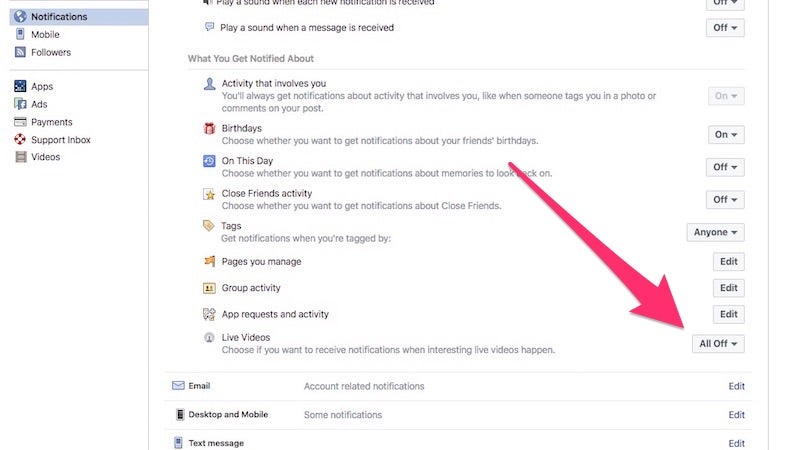
When Facebook rolls out new features, they seem to love ignoring your default settings and toggling every notification to a loud “on” setting. Facebook Live is one of the newest features, and if you’re sick of getting a notification every time a friends decides to live video their drive through traffic, here’s how to turn them off.

  1. Click the drop-down arrow in the far right
  2. Click Notifications
  3. Click “On Facebook”
  4. Under the Live Videos settings, set the toggle to “All Off.”

That’s it, you’ll stop getting the notifications for live video, so you can return to your quiet life. While you’re in there, go ahead and make sure everything else you don’t want to get notifications for are all set to off as well.

22 Jun 19:28

This tiny electric car just set a world record: 0–60 in 1.5 seconds

by Sean O'Kane

A team of 30 students have built the fastest-accelerating electric car in the world. Academic Motorsports Club Zurich (AMZ) published a video today that shows "grimsel," its electric race car, accelerating from 0–60 miles per hour in just 1.513 seconds on a runway at Dübendorf Air Base in Switzerland.

That's fast. It's more than half a second faster than the world's fastest production cars (including Tesla and its "Ludicrous Speed" mode), and two-tenths of a second faster the previous record. It's even faster than the Zombie 222 electric Mustang we covered last year. To achieve this kind of feat, the car is made mostly of carbon fiber, uses four-wheel drive, and has an onboard computer that applies traction control to each individual...

Continue reading…