I've spent time with a lot of chargers since I began reviewing them a few months ago. I've seen one port, two port, five port, and even six port chargers. The charger I'm taking a look at today blows them all away, well at least in terms of the number of ports it has. This is one of Aukey's latest USB chargers, and it rocks a crazy 10 charging ports!
Eight of the ten ports are standard 2.4A adaptive ports, the other two, denoted by an orange-colored plug, are QC 3.0 ports, meaning they will give a speedy charge to any Qualcomm Quick Charge 3.0 compatible devices (a cool guy I know made a list of phones that support QC 3.0, you can check it out here).
I’ve fallen asleep in some seriously public places over the years, like on the subway and in college common rooms. When I look back on it, that was a crazy thing to do. I really had faith no one would steal my wallet or cut my hair while I was away from the real world. Sleep is a mysterious time that I love, so when I got a pitch for the ZEEQ smart pillow, I knew I had to try it out.
The pillow, which launched on Kickstarter today, comes with eight speakers, a microphone, a three-axis gyroscope, and a 5000 mAh battery tucked inside it. The pillow can detect snoring through its microphone, register motion with its gyroscope, and play music through its speakers. ZEEQ’s creators told me their inspiration came from their own sleep...
Learning any artistic process takes a mental adjustment. Learning to draw requires a different mindset that making a spreadsheet. This graphic helps you recognize the broad steps to get started.
Most “Learn to Draw” books begin by making you draw things. However, as Betty Edwards, author of Drawing on the Right Side of the Brain explains, learning to draw begins with learning how to see the world. You start by paying attention to the edges and shapes of the things around you and practice translating those into an image.
The graphic below, created by information designer Anna Vital, is a basic outline of these key steps. You can find a more detailed explanation of each step at the source link below.
Welcome to the roundup of the best new Android applications and live wallpapers that went live in the Play Store or were spotted by us in the previous 2 weeks or so.
Please wait for this page to load in full in order to see the widgets, which include ratings and pricing info.
Looking for the previous roundup editions? Find them here.
Featured App
DigiCal Calendar Agenda
Today's roundup is presented by DigiCal Calendar & Widgets from Digibites.
The European Commission has formally adopted a new framework for governing personal data transfers between the EU and the US, replacing the prior Safe Harbor agreement which was invalidated last fall, and aiming to end nine months of uncertainty. Read More
If you’ve recently decided to exclusively go the veggie or vegan route, learning how to make all your favorite dishes without animal products can be a culinary speed bump. But making the change to a plant-based lifestyle can be fun and easy with a little meal planning.
Here to help us learn about simple recipes that anyone can whip up are Alexis Fox and Micah Risk, co-founders of Lighter. Lighter is a new site that helps you maintain a healthy diet by providing you with useful grocery lists and recipes that you can use to make a variety of vegan meals. Whether you’re just looking to eat healthier or are taking a stance for sustainability, Alexis and Micah can offer advice on easy ways to plan your meals. They’ll be here for the next hour, so leave a question below!
Update: This Q&A is now over—thank you for your questions!
Though he'd planned to stay on for two more months while his party chose a new leader, Prime Minister David Cameron is to step down Wednesday after opposition to Theresa May evaporated. What's getting everyone's attention, though, is the odd little tune he hummed after making his announcement.
Believing himself off the air, Cameron's mic was in fact still hot as he turned from the podium in Downing Street to retreat into Number 10.
"Do doooo, do doo," Cameron hummed, to a tune suggestive both of ironic victory and melancholy detachment.
Then, as he closed the door, he paused a moment and added a stout "Right"—the customary rhetorical punctuation mark of a British man who has completely and irremediably ruined everything around him.
The video above was captured by ITV journalist Vincent McAviney.
This garage sale-worthy painting would be worth millions if it were by famed artist Peter Doig. But it isn't, says Doig. So its owners are suing him for interfering with their ability to sell it.
The owner, a former corrections officer who said he knew Doig while working in a Canadian detention facility, said the famous painter created the work as a youthful inmate there. His suit contends that Doig is either confused or lying and that his denials blew up a plan to sell the work for millions of dollars.
Doig says he was never anywhere near the detention facility in Thunder Bay, would have been only 16 at the time, and that his lawyers tracked down the real artist, Peter Doige ( with an 'e') who died recently. Doige signed the work—with an 'e'—and his family reports that he served time in Thunder Bay.
He died in 2012, but his sister said he had attended Lakehead University, served time in Thunder Bay and painted. “I believe that Mr. Fletcher is mistaken and that he actually met my brother, Peter, who I believe did this painting,” the sister, Marilyn Doige Bovard, said in a court declaration.
The prison’s former art teacher recognized a photograph of Bovard’s brother as a man who had been in his class and said he had watched him paint the painting, according to the teacher’s affidavit.
The plaintiff got the judge to bring it to trial, though, meaning it'll be very expensive for Doig (without an e) irrespective of who gets paid.
Leshia Evans was arrested for "obstructing traffic" by heavily armored Baton Rouge police officers on July 9. Jonathan Bachman's photograph of the event tells so many stories.
Revealed in the margins is the impossibly of 'traffic' when a formation of riot police fills the street. In the center, Evans stands like a pillar in front of officers we know are advancing upon her, but who appear to be falling away. Police uniforms so overbearingly militarized it's a wonder they can move at all.
They can remove their armor at the end of the day. She can't remove hers.
In an atmosphere of heightened racial tension, and amid growing debate over the seeming militarisation of American police, one photo has stood out. ... The photograph was taken outside the Baton Rouge police headquarters, where most of Saturday's protest was focused. ... AP reported that the woman in the photograph was grabbed by officers after refusing to move off the public highway.
Heavy.com reports that it was her first protest and spent the night in jail.
On Facebook, she thanked people for the well wishes and wrote: “I just need you people to know. I appreciate the well wishes and love, but this is the work of God. I am a vessel! Glory to the most high! I’m glad I’m alive and safe. And that there were no casualties that I have witnessed first hand.”
Evans was arrested in the same protest as DeRay Mckesson, whom The New York Times calls “one of the best known voices for the Black Lives Matter movement.” The Times says Mckesson spent 16 hours in jail in Baton Rouge before he was released on Sunday.
Q4 launch for Android Pay confirmed by TSB on Twitter.
Despite the UK-wide rollout of Android Pay in May, some major British high street banks still aren't signed up to the mobile payments service. Among those is TSB, and while the bank has made clear its intentions to support Android Pay at some point in the future, there've been no further details offered until now.
Today TSB has confirmed on Twitter that it'll be offering Android Pay to customers from the fourth quarter of 2016. TSB already supports Apple Pay, so the move isn't entirely surprising. Nevertheless, it's the first firm timetable we've seen for the bank.
@smr105 to our customers in Quarter 4 of this year. We'll keep you updated as soon as we know more. Thanks again. 2/2 ^Jon
Web/Android/iOS: Lots of services try to predict music you’ll love with algorithms, and others have an entirely human touch, but Wonder.fm combines both in a visually good-looking way. The result is a webapp you can sit back and stream all day, and mobile apps that work anywhere. Best of all, it’s all free.
The team behind Wonder (and its offshoots, electronic music-focused site Primary and hip-hop site White Label, both available in the sidebar at Wonder) explained that they use algorithms and technology to see what newly released songs and artists are trending on music blogs around the web, and then actual human curation to choose the best of those new songs and float them to the front of their respective homepages.
The end result is that you get to hear some of the best new music from independent artists and small producers first, before they hit the big sites, and you get to download and support their music too right out of the gate. Even better, it means you’’re introduced to some great new music you may never have heard, from musicians you’re not familiar with, so you always have something fresh and interesting to listen to. Hit the links below to try it out.
Two-factor authentication can protect your account, and a USB Security Key makes for a great backup if you lose your phone.
We've gone over why using two-factor authentication on your online accounts is a good idea, and showed you how to set it up for your Google account as well as how to get started with Authy if you use more than one phone or computer. But we're not done yet!
There is a third thing you can do to help secure your Google account, and this one also is a cover-your-butt backup in case you lose your phone — and the authenticator app you installed on it. We're talking about USB Security Keys. They're relatively cheap (starting at about $10), easy to set up and can get you into your Google account from any computer anywhere.
What are you talking about? Why do I want one of these things?
A USB Security Key is a small plastic key-shaped device you can plug into a USB port on a Computer. Some of them light up, some have a small touch-sensitive button, and some have both. But they don't really do anything, you just plug them in. AT least it looks like they don't do anything.
What you can see is the tiny chip inside the plastic. It's connected to the gold-colored contacts on the pluggy-inny side, and when two of those contacts are powered up by your computer through the USB port, a secure token can be read. Software on a computer can get this token and compare it against what it expects to see, and see if the two match. That software can use this result to do "stuff." When you go to log onto your Google account from a computer, the web page code can read one of these keys. If everything matches, you get a green light and can get into your account. If things don't match, you get an error. Everything is encrypted, everything is safe, and no two keys are the same.
A USB key is like plug-and-play account recovery.
It's a "thing you have" that can be used to authenticate who you are. When used in tandem with your username and password, it makes things very difficult for someone pretending to be you on the internet. It makes for a great piece of a 2FA scheme, but it's best to add it as a third authentication method along with the authenticator app on your phone. It's even a good idea to use more than one of them.
Let's say you get on a plane and head out somewhere nice for a week or so. During the commotion at the baggage carousel or the rental car desk, you lose (or someone steals) your carry-on. Inside was your smartphone and your laptop. If you have 2FA set up on your Google account and don't have another computer or phone that's already logged in you have three options.
Find those backup codes Google told you were important to print out and keep safe.
Call Google and work your way through their account recovery process and hope for the best. Also, hope that the information you have on file with Google is correct and you can remember it.
Scream and shout because you now need to make a new account and will lose everything you had before.
The first option is the best one. Those recovery codes are an easy way in, and Google even tells you how important it is to keep track of them. Mine are ... somewhere. The second option can be a crapshoot, and frankly, shouldn't even exist. Google should never ever give you access to a 2FA protected account if you can't provide both methods of authentication. Knowing your mother's maiden name or the name of your first pet is a ridiculous security challenge, and if I had my phone to take a call and get a code I wouldn't be asking in the first place. And the third option, well, that would suck. None of us want to think about the third option.
If you had a USB Security Key (or two) set up on your account you would have a fourth — log in at any computer, and plug your key in when asked. I have two of them — one on my keychain, and one at my house that I won't lose.
How to set up a USB Security Key
This part is easy. All you need is access to a computer with a USB port — Chromebooks work just fine — and the key itself. There's a link to a good one at the bottom of the page.
Visit the web page for your account settings. Here's a handy link. Click the Sign in & security link near the top, then look for the link that says 2-Step Verification under the Password & sign-in method section. You'll need to provide your password (and use a 2FA token if this is the first time you've used this computer or it's been 30 days since you logged in to Google) and you'll see the Security Keys tab in the middle of the page. Click it and there's a handy button labeled Add Security Key.
They're cheap enough, so buy more than one.
Make sure your key isn't already plugged in and click that button. Read the instructions that open, but you already removed the key because you're smart and you read Android Central. Click the Register button and plug in your key when it tells you to plug in your key. If your key has a "button" — a metallic round disk on one side and not really a button — you'll have to lightly place your finger on it. It's not reading your fingerprint, it's just a switch that closes the circuit so Google and your key can chat about baseball and security stuff. OK, just security stuff. But a USB baseball key would be awesome somehow.
And you're done. It will tell you that you're done even. The next time you're at a computer and asked to log into your Google account, it will ask for your key after you've entered your password. You put it in and place your finger on the button if it has one, and it can verify you. If you don't have your key with you, you can still use another 2FA method like the app installed on your phone. And you can have more than one key attached to your account so you have a backup of your backup.
Imagine a future where a plane lands at an airfield that doubles as a rail yard. The cabin — one of three that cling to the underbelly of the aircraft like a baby possum to its mother — detaches, is seamlessly transferred to a nearby train, and then continues its journey toward the city center. Your multi-seat trip (taxi-to-subway-to-airtrain) from home to hotel suddenly becomes a one-seat, hassle-free ride. That’s the aim of a consortium of Swiss researchers with the conceptual Clip-Air, a bold-looking plane-train hybrid that despite its high-minded possibilities, will probably never get made.
In essence, Clip-Air is a modular aircraft in four parts. There are three cabins, or capsules, which can carry passengers, freight, or fuel....
In the relatively short time since the first 4G networks launched in the UK, the way we use our phones has changed drastically. Faster networks make it easier to view rich websites, watch videos and stream music, which in turn means you can burn through a few gigabytes of data in no time.
That's why the major UK networks are offering bigger and bigger data bundles, with buckets in excess of 20GB becoming increasingly common. But it's not always easy to track down all the details, which is why we've done the legwork for you.
Let's take a look.
EE
EE's contract-plus-phone plans max out at 20GB, with prices for current Android flagships like the Samsung Galaxy S7 edge ranging from £40.99 to £55.99 per month (for 24 months) depending on how much you pay upfront for the phone.
Otherwise, you're looking at SIM-only deals, which come in at up to 16GB as part of a 12-month plan. You'll pay £34.99 per month for a plan with double-speed 4G and EE's "Extra" benefits, which include free texts and calls in Europe.
If it's a PAYG (Pay As You Go) SIM you're after, EE's plans top out at 4GB, with prices between £25 and £15 depending on whether you want calls and texts, or just a prepaid data SIM.
Overages: Contract customers can buy extra data when they run out:
100MB for 24 hours costs £1.99
1GB for 7 days costs £6.99
10GB (usable until next bill date) costs £19.99
Vodafone
Vodafone's top tier 30GB deal is only available when you take out a contract with a new smartphone. Again, if you're going with a high-end phone like the GS7 edge you'll pay a premium — £63 per month and £10 upfront — for Voda's biggest data bucket.
That plan also comes with unlimited calls and texts, 4GB of inclusive roaming data and unlimited roaming calls and texts to the carrier's inclusive roaming zone. And you can choose between a free subscription to NowTV, Sky Sports Mobile or Spotify.
On SIM-only, your limit is 20GB on a 12-month plan, which costs £37 per month and comes with all the extras detailed above — unlimited calls and texts, 4GB roaming data, inclusive roaming calls and texts, and free optional subscriptions.
Overages: Vodafone customers can add 1GB for £6 a month by texting '1GB' to 40506, or 2GB for £10 a month by text '2GB' to the same number. Otherwise you'll be charged £6.50 for every 250MB.
O2
O2's prices for flagship Android phones closely follow Vodafone's, with a GS7 edge and the biggest 30GB data bundle setting you back £63 per month and £9.99 upfront. That's as part of a 24-month plan that also includes unlimited calls and texts.
If you want to go SIM-free on O2 you'll have to settle for 25GB on a 12-month plan, which is available with unlimited calls and texts for £25 per month.
Overages: O2 has a range of bolt-ons that let customers add up to an extra 2GB of data for £13 per month. One-off data bolt-ons max out at 1GB for £10.
Three
Three remains the only major UK network to offer unlimited "All You Can Eat" data. For a high-end phone like the GS7 edge with Three's AYCE data, you can expect to pay £49 upfront and £55 per month. Right now the carrier is running a promotion that halves your monthly bill to £27.50 per month for the first six months.
The 24-month plan also includes unlimited calls and texts.
If you want to go SIM-only, a 12-month All You Can Eat SIM will run you £16.50 for the first six months, then £33 per month for the last six months. On a rolling one-month contract, it's £36 per month.
Carphone Warehouse often has different deals on O2, Vodafone and EE that may let you bag more data at a discount.
GiffGaff's unlimited "Always On" data bundle gives you 6GB of data at 4G speeds, then unlimited data at a significantly reduced 256kbps. The speed limit applies from 8am to midnight.
Tesco Mobile offers a SIM-only deal with 20GB of data for £30 per month, for 12 months.
Are you a heavy data user? Let us know how much mobile data you've burned through down in the comments!
One of the leading complaints about VPN services is that they slow your browsing experience to a crawl. HideMyAss, however, gives you two years of high-speed browsing experience while allowing you to access servers in over 190 countries. Browse like a local practically anywhere on Earth, while securing your privacy and eluding prying eyes.
Say goodbye to all your online privacy worries. VPN Unlimited is your one-stop shop for protecting both your Wi-Fi and cellular connections, securing your online activity, and bypassing web content restrictions.
PureVPN: Lifetime Subscription
Last but not least, you can make sure your personal data and Internet activity are never exposed with a lifetime subscription from the extremely reliable PureVPN: Lifetime Subscription trusted by over a million users.
PureVPN’s self-managed VPN network has a wider reach (550+ servers nodes in 141 countries) and allows more simultaneous device connections (five) than pretty much any other VPN out there.
The agricultural sector is increasingly a data-driven business, where the "internet of farming" holds out the promise of highly optimized plowing, fertilizing, sowing, pest-management and harvesting -- a development that is supercharging the worst practices of the ag-business monopolies that have been squeezing farmers for most of a century.
(more…)
The fine folks at LoanMe prequalified this Reddit user for a $10,600 loan. The annual interest rate is 99.75 percent. The monthly payment would be $841 and would require 84 payments to pay off the loan. In the end, the loan would cost over $70,000.
Over at LoanMe, there are other deals for people desperate enough to take the bait. Idaho residents who need $2600 can get it by paying a $75 loan fee, after which they will be obligated to make 47 monthly payments of $388.40, for a total payback of $18,254.80.
Benjamin Bennett makes ad-free videos of himself silently sitting in a corner of a room and smiling at the camera. He live streams each one and saves them on his YouTube channel. He posted his 220th one today. (One commenter said it's the "best episode yet.")
Bennett launched a Kickstarter in 2015 to fund 200 hours of sitting and smiling. It was unsuccessful but it didn't stop him from doing it anyway.
I sit and smile for 4-hour durations, and stream it live on YouTube. By the end of this Kickstarter campaign, I will have sat and smiled for 100 episodes, or 400 hours. I will soon be moving to another city, leaving my part-time job, and so will need a new way to support myself. It is my wish to turn Sitting and Smiling into my job, and this fundraiser could be the beginning of that. If viewers support this project, it would allow me to devote more time and energy to Sitting and Smiling, increasing the frequency and quality of the videos.
My goal for this campaign is to make $8 per hour of sitting and smiling for the next 200 hours. My deadline for completing the next 200 hours is August 31st, 2015. I am giving myself leeway because I am moving, but if all goes well with the move, I will be able to finish well before the deadline.
The money will go a long way, covering my bills and living expenses, which are quite low by most people's standards. I may also purchase a more comfortable sitting cushion, to replace my chunks of mattress foam.
You’ve set the table, lit the candles, and now you’re ready to dig into this meal you’ve been working on for hours. Set the mood with this soothing dinner music playlist.
This week’s playlist, curated by Spotify, features a selection of easy listening artists including Adele, John Mayer, Mumford and Sons, and even some Barry White. Whether you’re shooting for a romantic dinner for two or a quiet dinner party among several friends, this playlist should have plenty for you.
Welcome to our new Featured Playlist series. Each week, we’ll share a new themed playlist, embedded for your convenience! You can copy the track list to your service of choice, or listen right here. Have a sweet playlist of your own? Share it with us in the comments below!
by Claire Lower on Skillet, shared by Andy Orin to Lifehacker
Beer is good, ice cream is good, and sweltering heat is bad. As such, I suggest you combine the two good things to beat the the terrible oppressive rays of the summer sun, and I suggest you use the below graphic to create amazing flavor combinations.
Though this graphic is geared specifically towards Baskin-Robbins, there’s no reason you can’t apply its wisdom to other brands. Watermelon sorbet would be great in a cucumber gose (or a sour to be quite honest) no matter who churns it, and Cherry Garcia + Barleywine would definitely equal cool and creamy happiness.
by David Nield on Field Guide, shared by Andy Orin to Lifehacker
Microsoft’s concept of universal apps that run seamlessly across computers, tablets, and phones are a hallmark of the company’s newest operating system. The problem is most people don’t know which apps they should be using. With the Windows App Store growing all the time, there are plenty of ways to try out the new feature. Here are the best Windows 10 universal apps that are actually worth installing on your desktop.
1) Fresh Paint
Fresh Paint is a fun, natural art program that you can use to doodle during five minutes of downtime or use to make something more serious. It’s not the most advanced graphic animation app you’ve ever seen, but there are plenty of brushes and tools to play around with.
Colors and materials mix together intelligently (the app started out as a research project), and it comes with a few ‘tutorial’ images you can use to hone your skills. You can import images from disk or start from scratch and everything syncs seamlessly to OneDrive.
2) Autodesk SketchBook
For something a little more advanced, there’s Autodesk Sketchbook. You get a whole host of brushes, canvas styles and colors to play around with, and if you put in the time and the effort then some truly professional results are possible.
Of course (as is the case with Fresh Paint), you’re going to get a lot more from the app if you’re using a tablet or a touchscreen computer, but even with a mouse and keyboard this is powerful software. You get a 15-day trial of the Pro version free of charge.
3) Facebook
If you prefer your Facebook experience in a native app rather than in a web browser, check out the Facebook app for Windows 10. Why would you do this? It seems to be slightly faster, and it’s certainly cleaner—it also works well if you’re using Windows 10 on a touchscreen.
All of the usual Facebook goodies are here (though Messenger is a separate app), and you can get at the same settings, feeds, events, groups, apps and saved pages accessible on the web. The left-hand pane is customizable, so you can pick your favorite shortcuts.
4) Plex
Like Facebook, Plex works fine in the browser, but the Windows 10 app gives you access to a desktop-ready program so you don’t have to keep your Chrome tabs open all the time. However, it’s only really the paid-for version of Plex that makes this app worth installing.
If you don’t want to pay you can only play local files, browse media files on the server, and control other devices through the app. To play your content over the web, you’ll need to stump up for a Plex Pass subscription ($4.99 a month) or pay a one-time fee of $4.99.
5) VLC Media Player
As fantastic as the standard version of this program is, it’s not the most user-friendly media player, and VLC for Windows 10 is much easier on the eye. The app handles all of your local media files as well as physical discs and network streams.
Get the app watching your media folders and all of your music, movies and photos pop up as thumbnails. There are some advanced tweaks hidden away as well, for playback speed and audio and subtitle delay, and you’ve got a full suite of keyboard shortcut controls too.
6) Flipboard
Few Windows 10 apps make as good use of your big desktop (or laptop) monitor as Flipboard. It’s been around a while, so you probably know the ins and outs of the app, and this universal Windows 10 shows off all its best features.
Saving and curating stories of interest to you is straightforward and, of course, the recognizable Windows tile approach suits Flipboard very well. Tapping through on a story reveals the full webpage edition of the article, but you never have to leave the app.
7) Uber
At this stage in its evolution, it feels a little odd that Uber is stuck on mobile devices and doesn’t have much of a web interface to speak of, but Uber for Windows 10 fills the gap and lets you get at the taxi-hailing service from your desktop, laptop, or tablet.
Unlike the main Uber website, you can’t review previous journeys or make detailed changes to your account profile, but you can see a map of available drivers and book a ride, as well as edit payment information (which is much easier to do on a larger screen).
8) Lara Croft Go
There isn’t a wonderful selection of games on the Windows 10 Store but Lara Croft Go is well worth your time and money (it’ll set you back $4.99). As with the Android and iOS versions, the first-person adventure game is transformed into a more sedate 3D puzzler.
That doesn’t mean the game is any less engaging though—the levels are beautifully designed and the learning curve is judged just right, so you should find yourself challenged without feeling the need to hurl the keyboard out of the window in frustration.
9) Adobe Photoshop Express
Photoshop is the best image editing application out there, but it’s way beyond what most people are going to need, and for the rest of us there’s Adobe Photoshop Express. You get all of the basic editing tools in a fresh-looking interface as well as some fun filters on top.
For the most part, the app feels very much like a blown-up version of Instagram. It includes some quick fix tools including red eye adjustments and a reduce noise filter (available as an extra in-app purchase). Everything syncs nearly with your Adobe ID, if you have one.
10) Netflix
You may be more than happy with your web Netflix experience, but the Netflix universal app for Windows 10 is a slick and neatly designed alternative. Your categories are a click away on the left-hand menu rather than in a pop-up window in the Windows 10 app.
There are a few quirks, and the settings screen is disappointingly sparse (and you can’t edit your Netflix profiles either), but you know that if Netflix ever decides to offer offline downloads, they’re going to go be a big part of this Windows 10 application.
The mobile phone has transformed quite a bit in the last ten years, but the heart of it — the address book — hasn’t changed much. Drupe, with brand new funding, is looking to accelerate the evolution of the Phone Book. The company today announced $3 million in new funding from Canaan Partners Israel and Sweet Capital, a fund that was spun up by the founders of Candy Crush… Read More
Google is getting deeper into the tech side of the video and broadcasting business. The company today announced that it has acquired Anvato, a platform for encoding, editing, publishing and distribution video across platforms. The company says Anvato will join its Cloud Platform team and that Anvato’s technology will complement its efforts “to enable scalable media processing… Read More
Google is working on safeguarding Chrome against the potential threat of quantum computers, the company announced today. It's doing so by implementingpost-quantum cryptography in an experimental version of the browser, the company announced today. While there exist hardware defenses against the vastly superior computing power of quantum machines, Google is using a new so-called post-quantum key-exchange algorithm. This software, called the New Hope algorithm, is enabled in Chrome Canary, a kind of testing ground for new browser technology, on only a small number of connections between the browser and Google servers.
Although quantum computers of this variety are only small and experimental at this stage, Google is taking precautions...
Brought up in the Cotswolds, Oliver began his photographic education studying photography at the renowned course at Filton Technical College in Bristol. He went on to study film and television at the London College of Printing and has been balancing work in stills and moving image ever since.
His first solo exhibition entitled Volte-face will premier at London's Royal Geographical Society in September 2016.
Taken over a period of four years, Volte-face is a series of images taken at the world’s most photographed historic sites, buildings and monuments - but looking away from them. To coincide with the exhibition at the RGS a book of the project, featuring an essay by Geoff Dyer, will be published by Dewi Lewis Publishing Ltd.
Filmmaker Joe Capra says just released his new video PHASED | LA, shot in 12K 100 megapixel resolution. It's gorgeous!
Shot by Joe Capra of Scientifantastic.com, PHASED | LA was shot natively in 12K resolution entirely on the Phase One XF IQ3 100 megapixel camera . That is three times the resolution of existing 4K Ultra HD content, and each and every single frame of this film is 100 megapixels. With the latest software update to the XF system Phase One added a new timelapse mode which allows users to easily shoot extreme resolution timelapses. Having the ability to shoot in such extreme resolution allows you much more creative freedom and flexibility in post production, and this film's purpose is to demonstrate that. You can punch in extremely far into a scene while maintaining massive amounts of detail.
There's a lot of cheap crap out there in the world of budget Android phones. Here are some pointers to help you avoid buying a dud.
Android smartphones have never been cheaper, and that's mainly a good thing. There are some real bargains out there, making the mobile web, apps and photography more accessible than ever.
But just as there are some great deals out there, there are also plenty of duds — phones that just aren't worth your money at any price. Navigating this mess of cheap Android phones can be tricky, so we've assembled a quick checklist of things to watch out for. Read on.
1. At least a 720p display
Whatever screen size you're looking at, a 720p HD display (1280x720 pixels) should be the minimum. Anything less than that and some web pages (and even a few less forgiving apps) may be difficult to view, while photos and videos will appear grainy and unpleasant.
While 720p screens were once a luxury reserved for high-end smartphones, today that's the baseline of what you should expect even from a cheap Android handset. Don't settle for anything less.
2. At least 2GB of RAM and 16GB of storage
OK, it's not impossible to squeeze a decent Android experience out of less RAM or internal storage — case in point: many Android One phones. But the other side of that coin is phones like the Wileyfox Spark, which offer truly dismal performance on 1GB of RAM and 8GB of storage.
You'll never actually get 8GB of storage out of an 8GB phone.
There are a few things at play here. First, you'll never actually get 8GB of usable space out of an 8GB phone. (The same is true of any computer — usable space is always less than the theoretical capacity of the disk.) On a typical 8GB phone you'll get maybe 3GB for your own stuff if you're lucky — even less once you've updated built-in apps, because app updates come out of your internal storage too. That might force you to move your apps to an SD card, or store use Android's Adoptable Storage feature to seamlessly expand your internal flash with a micro-SD. There's a big performance hit there, because SD storage is slower than internal storage.
And to add to your performance woes, 1GB of RAM, even on an extremely well-optimized Android phone, will mean you're constantly swapping things between RAM and that slow blob of internal and SD storage. In short, you're going to had a bad time. Aim for 2GB of RAM and 16GB of storage for much-needed breathing space.
3. micro-SD expandability
Even with 16GB of internal storage, you're going to want to offload some stuff — like music and photos — to expandable memory, keeping your valuable built-in storage clear for apps. The vast majority of low-priced Android phones come with a microSD slot, but it's worth double-checking which cards are supported. Some really cheap phones max out at a 32GB card.
4. Android 6.0 Marshmallow or better
Don't buy a phone with Lollipop (or, perish the thought, KitKat or Jelly Bean) in 2016. There's no excuse for cheap phones not to ship with at least Android 6.0 (double-check under Settings > About phone). Marshmallow brings performance and battery life improvements compared to earlier Android versions, as well as ensuring you won't be vulnerable to older Android exploits that might be unpatched in cheap Android 5.x handsets. (You'll also want to check the Android security patch level under Settings > About phone to see how up to date your security protection is.)
What's more, Marshmallow gives you adoptable storage, a new feature which lets you directly expand your internal memory using an SD card.
5. A screen with oleophobic glass
Without a smudge-resistant coating, your shiny new phone soon becomes a fingerprint magnet.
This one's a little harder to nail down. An oleophobic coating is included as standard in the overwhelming majority of Android phones, but some budget-level phones — notably the Wileyfox Spark, Honor 5X and Honor 5C — don't. Since this feature often isn't listed on spec sheets, you may want to track down a handset in person to check for yourself.
An oleophobic coating is the smudge and oil-resistant layer that stops the screens of more expensive handsets from getting gunked up with fingerprints. If the screen isn't oleophobic, it'll feel greasy to the touch, and it'll be difficult to clean off fingerprints. It may even make a squeaky sound when you rub the display with your finger.
While this coating can wear off with time, any phone is going to be much more pleasant to use if it's not constantly collecting fingerprints.
What do you look for in an inexpensive Android phone? Share your thoughts down in the comments!
Amazon-owned Audible announced a new service called Channels today, one that differs from its typical audiobook business in offering more bite-size content from original content producers, as well as recordings of news stores from NYT, WSJ, The Washington Post and others. The original programming will be rolling out over time, covering comedy, investigatory journalism (think Serial) and… Read More
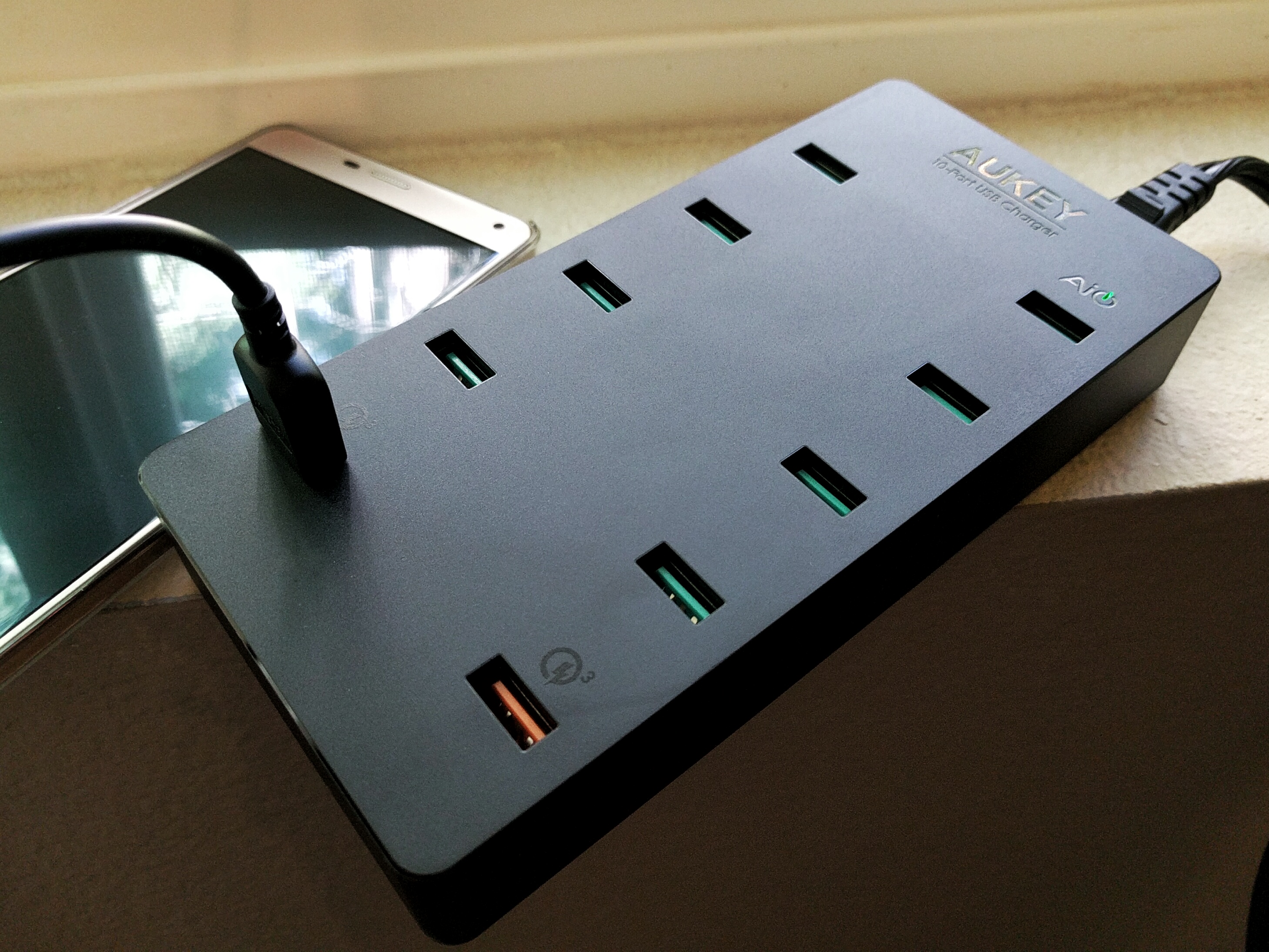 I've spent time with a lot of chargers since I began reviewing them a few months ago. I've seen one port, two port, five port, and even six port chargers. The charger I'm taking a look at today blows them all away, well at least in terms of the number of ports it has. This is one of Aukey's latest USB chargers, and it rocks a crazy 10 charging ports!


 Warner Brothers was just found guilty of manipulating new media by paying prominent YouTube hosts to promote a video game.
  The European Commission has formally adopted a new framework for governing personal data transfers between the EU and the US, replacing the prior Safe Harbor agreement which was invalidated last fall, and aiming to end nine months of uncertainty.




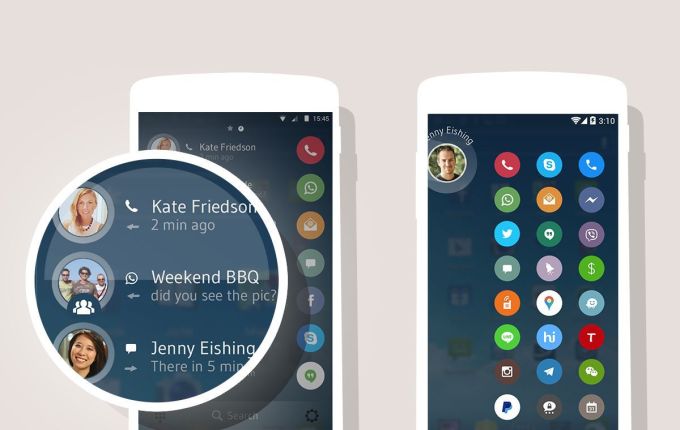 The mobile phone has transformed quite a bit in the last ten years, but the heart of it — the address book — hasn’t changed much. Drupe, with brand new funding, is looking to accelerate the evolution of the Phone Book. The company today announced $3 million in new funding from Canaan Partners Israel and Sweet Capital, a fund that was spun up by the founders of Candy Crush…
 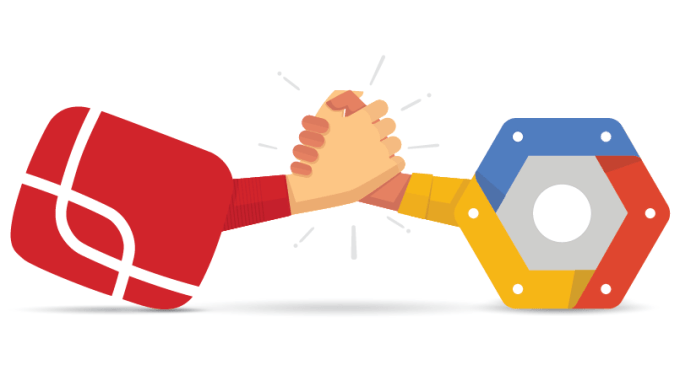 Google is getting deeper into the tech side of the video and broadcasting business. The company today announced that it has acquired Anvato, a platform for encoding, editing, publishing and distribution video across platforms. The company says Anvato will join its Cloud Platform team and that Anvato’s technology will complement its efforts “to enable scalable media processing…



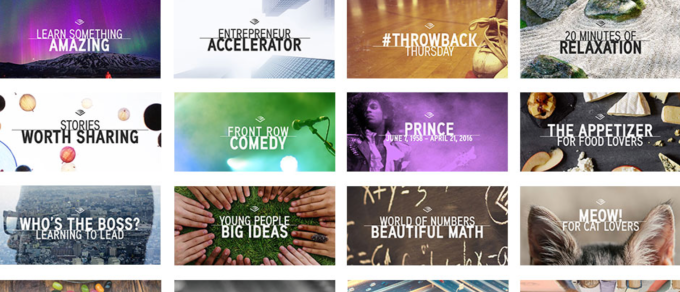 Amazon-owned Audible announced a new service called Channels today, one that differs from its typical audiobook business in offering more bite-size content from original content producers, as well as recordings of news stores from NYT, WSJ, The Washington Post and others. The original programming will be rolling out over time, covering comedy, investigatory journalism (think Serial) and…