
Since WWI, doctors have speculated that PTSD's underlying cause was some sort of physical damage caused by blast-waves from bombs, which literally shook loose something important in the brains of sufferers. (more…)
Since WWI, doctors have speculated that PTSD's underlying cause was some sort of physical damage caused by blast-waves from bombs, which literally shook loose something important in the brains of sufferers. (more…)

A system-wide computer outage has delayed Delta flights around the world, leaving thousands of passengers stuck in airports as they wait to board their planes. The US airline says the glitch was caused by a power outage in Atlanta at 2:30AM ET this morning, and "impacted Delta computer systems and operations worldwide." The company says it's working on a fix, but expects "large-scale cancellations" today, advising passengers to check the status of their flight before heading to the airport. Flights already on their way to their destination are unaffected.
Due to a computer outage, flights awaiting departure are currently delayed. Flights enroute are operating normally.
— Delta News Hub (@DeltaNewsHub) August 8, 2016
D...

In Wire Wire: A West African Cyber Threat, researchers from Secureworks reveal their findings from monitoring a Nigerian bank-fraud ring whose members had unwittingly infected themselves with their own malware, which captured their keystrokes and files and uploaded them to a file-server from which the researchers were able to monitor their activities and methodologies. (more…)

If you live in the UK and watch live TV or use the Iplayer video-on-demand service, you have to pay a "license fee" that directly supports public media in the UK (in other countries, public media is funded out of the tax-coffers, but in the UK, it's a direct transfer from viewers to the media, which is meant to make the BBC independent of the whims of government and thus more able to hold it to account). (more…)

Nobel prize-winning economist Joseph Stiglitz has resigned from the Panamanian committee set up to probe the country's money-laundering industry in the wake of the Panama Papers leak, because the Panamanian government has reneged on its promise to publish the committee's findings and now says it will keep them secret. (more…)
 At TorrentFreak we have been keeping a close eye on the torrent ecosystem for more than a decade.
During this time, many sites have shut down, either voluntarily or forced by a court order.
This week meta-search engine Torrentz joined this ever-expanding list. In what appears to be a voluntary action, the site waved its millions of users farewell without prior warning.
The site’s operators have yet to explain their motivations. However, it wouldn’t be a big surprise if the continued legal pressure on torrent sites played a major role, with KAT as the most recent example.
And let’s be honest. Running a site that could make you the target of an FBI investigation, facing over a dozen years in prison, is no joke.
Looking back at the largest torrent sites of the past 15 years, we see a familiar pattern emerge. Many of the sites that make it to the top eventually fall down, often due to legal pressure.
Suprnova was one of the first ever BitTorrent giants. Founded by the Slovenian-born Andrej Preston, the site dominated the torrent scene during the early days.
It was also one of the first torrent sites to be targeted by the authorities. In November 2004 the site’s servers were raided, and a month later Preston, aka Sloncek, decided to shut it down voluntarily. The police investigation was eventually dropped a few months later.
When Suprnova went down a new site was quick to fill its void. LokiTorrent soon became one of the largest torrent sites around, which also attracted the attention of the MPAA.
LokiTorrent’s owner Ed Webber said he wanted to fight the MPAA and actively collected donations to pay for the legal costs. With success, as he raised over $40,000 in a few weeks.
However, not long after that, LokiTorrent was shut down, and all that was left was the iconic “You can click but you can’t hide” MPAA notice.

In 2006 TorrentSpy was more popular than any other BitTorrent site. This quickly changed when it was sued by the MPAA. In 2007 a federal judge ordered TorrentSpy to log all user data and the site opted to ban all U.S. traffic in response.
March 2008 TorrentSpy owner Justin Bunnell decided to shut down completely and not much later his company was ordered to pay the Hollywood studios $110 million in damages.
After TorrentSpy’s demise, Mininova became the largest torrent site on the net. The name was inspired by Suprnova, but in 2008 the site was many times larger than its predecessor.
Its popularity eventually resulted in a lawsuit from local anti-piracy outfit BREIN, which Mininova lost. As a result, the site had to remove all infringing torrents, a move which effectively ended its reign.
Today the site is still online, limiting uploads to pre-approved publishers, making it a ghost of the giant it was in the past.
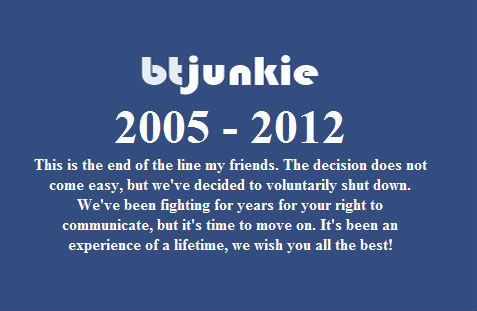
In 2012, shortly after the Megaupload raid, torrent site BTJunkie shut down voluntarily.
Talking to TorrentFreak, BTjunkie’s founder said that the legal actions against other file-sharing sites played an important role in making the difficult decision. Witnessing all the trouble his colleagues got into was a constant cause of worry and stress.
“We’ve been fighting for years for your right to communicate, but it’s time to move on. It’s been an experience of a lifetime, we wish you all the best,” he wrote in a farewell message.
The shutdown of isoHunt a year later wasn’t much of a surprise. The site had been fighting a legal battle with the MPAA for over a decade and eventually lost, agreeing to pay the movie studios a $110m settlement.
As one of the oldest and largest sites at the time, the torrent ecosystem lost another icon. However, as is often the case, another site with the same name quickly took over and is still operating today.
The story of EZTV’s demise is quite different from the rest. The popular TV-torrent distribution group shut down last year after a hostile takeover.
Strangely enough, many people don’t even realize that it’s “gone.” The site continued to operate under new ownership and still releases torrents. However, in solidarity with the original founders these torrents are banned on several other sites.
What started as a simple movie release group in 2010 turned into one of the largest torrent icons. The group amassed a huge following and its website was generating millions of pageviews per day early last year.
In November 2015 this ended abruptly. Facing a million dollar lawsuit from Hollywood, the group’s founder decided to pull the plug and call it quits. Even though various copycats have since emerged, the real YIFY/YTS is no more.
Three weeks ago Polish law enforcement officers arrested Artem Vaulin, the alleged owner of KickassTorrents. The arrest resulted in the shutdown of the site, which came as a shock to millions of KAT users and the torrent community at large.
Out of nowhere, the largest torrent index disappeared and there are no signs that it’s coming back anytime soon. The site’s community, meanwhile, has found a new home at Katcr.to.
Torrentz is the last torrent site to cease its operations. Although no official explanation was given, some of the stories outlined above were probably weighed into the founders’ decision.
—
So what will the future bring? Who will be the next giant to fall? It’s obvious that nearly nothing last forever in the torrent ecosystem. Well, apart from the ever-resilient Pirate Bay.
And there are several other alternatives still around as well. ExtraTorrent has been around for a decade now and continues to grow, and the same is true for other popular torrent sites.
At least, for now…
Source: TF, for the latest info on copyright, file-sharing, torrent sites and ANONYMOUS VPN services.

How do I improve battery life in the Nexus 5X?
While the 2,700mAh battery in LG's Nexus 5X can get you through the day on a single charge, depending on usage, we think you can probably get a little bit more out of it by making a few simple changes.
Ambient Display is a feature that sends notifications to your screen when it's locked. It's useful to see what's going without having to unlock your phone's screen, but it does consume battery power.
To turn this feature off, follow these steps:
Smartwatches are great and we love them, but you should be aware that they consume more battery than Ambient Display does. If you know that you need extra power, leave your smartwatch at home that day.
The same goes for fitness trackers, speakers, car audio systems, and just about anything else with a Bluetooth connection. When in doubt, disable Bluetooth!.
The Nexus 5X has a beautiful 5.2-inch inch full HD LCD display that hits that sweet spot for size but is one of the most battery-intensive features of the phone.
Dial down how much battery your Nexus 5X's screen draws by decreasing the brightness level a few notches:
Alternatively, you can let Adaptive brightness manage the brightness level of your screen based on the amount of ambient light available:

Google's Location Services is useful for helping you get around town and some apps, such as Foursquare and Twitter, use it to determine your location as well. However helpful Location Services is, it can take a huge chunk out of your battery, especially when using GPS.
Location Services has three modes: High accuracy, Battery saving, and Device only. High accuracy uses GPS, Wi-Fi, and mobile network information to find your position, Power saving uses just Wi-Fi and mobile network information, while Device only uses only GPS. Of the three, the most power hungry modes are High accuracy and Device only.
If you need some form of location services on, choose Battery saving — it won't be as accurate, but it will save on battery. For the most power savings, turn off Location Services altogether. If you choose to turn off Location Services, some apps that rely on it may not function properly — just something to be aware of.
You can find all of these settings under Location in your Nexus 5X's Settings menu:
To turn Location Services off, simply toggle the switch to off at the top of the screen.
Android keeps tabs on how much battery every app on your phone consumes and it's simple to check:
Here you'll see a breakdown by app of how much battery they consume as a percentage of total battery use.
Video streaming services and games naturally will use more battery than others, but if something else is hogging the battery when it shouldn't be, you'll see it here.
The Nexus 5X loses power more quickly when streaming video. If you can, download any video content you plan to watch to your device and watch it locally.
Here's how you can download content for offline viewing in Google Play.
That's it. Now the content will download to your device and be available to watch any time you'd like, no internet connection necessary.
We've given you some tips on how you can eek out a few more hours of life from your Nexus 5X's battery, but what about you? What do you do to make your battery last longer? Tell us about it in the comments below.
Want more information on the LG Nexus 5X? Have a peek at our review.

We all had high hopes for Google Now on Tap, but the reality of actually using it didn't live up to the hype. There are too many instances where Google Now on Tap simply misses key words or phrases, or just brings up that sad "nothing on tap right now" card. Google is testing a new feature of Now on Tap that might make it vastly more useful. Some users are seeing standard Google Now cards in Now on Tap.
Read MoreGoogle has started testing Now cards in Google Now on Tap was written by the awesome team at Android Police.
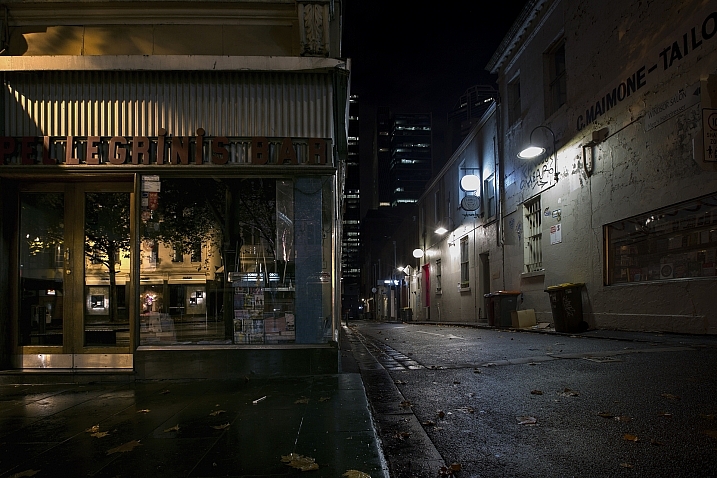
Using lines and in particular, leading lines, in photography is a popular method of composition to create more interesting and dynamic images.
Roads, pathways, and trails can give you a great opportunity to photograph such leading lines. Let’s look at these images of long and winding roads and see where they lead us:

By Thomas Hawk

By Carl Jones

By Ozzy Delaney

By joshuadelaughter

By Anthony Wright

By C.C. Chapman

By Dom Crossley

By Kylie_Jaxxon
By Terry Chapman

By Ed Suominen

By paul bica

By Del Brown

By cushmok

By Diana Robinson

By Geee Kay

By Jon Noel

By nrg_crisis

By David Menidrey

By Todd Martin

By UnShuttered Soul~ Good to be busy!

By Andrés Nieto Porras
The post 21 Enjoyable Images of Long and Winding Roads by Darlene Hildebrandt appeared first on Digital Photography School.

183 Mexicans are stranded at Madrid-Barajas airport, some for up to two weeks. They are sleeping on the floor and are running out of money to buy food.
They are grounded because the kind of tickets they are holding are honored only on non-full Aeromexico flights, and since it is tourist season, all the flights have been full.
From BBC
A Facebook group called Mexicanas en Madrid issued a public appeal for help.
"It would be good to supply them with food, drinks, damp towels, spare bottles for water, fruit," their post said, adding that offers of temporary accommodation would be welcome too.
El Pais newspaper said some Madrid residents had offered to put Mexicans up for a few nights.

If you haven’t checked out Netflix’s new show Stranger Things, seriously do it. It’s awesome. If you have, you know that the music totally makes the show. Unfortunately, the synth-tastic soundtrack isn’t out, but this playlist of 80s music featured in the show is.
When it comes to the real-life 80s songs used in the show, Stranger Things lifts from beloved sources like Jefferson Airplane, The Clash, and Foreigner. The playlist below, created by Netflix itself, even kicks off with the now-heart-wrenching “Should I Stay or Should I Go.” Thanks, Netflix for making this fun song tragically emotional for me now.
Welcome to our Featured Playlist series. Each week, we’ll share a new themed playlist, embedded for your convenience! You can copy the track list to your service of choice, or listen right here. Have a sweet playlist of your own? Share it with us in the comments below!

Iced coffee is a brilliant way to sell people ice for the price of coffee (which is mostly water to begin with). Cold brew on the other hand is a different process that results in less acidity, among other benefits, and you can do it yourself at home with this $19 Takeya.
This non-coffee drinker bought one of these a couple months ago, and I’m absolutely in love with it. All you have to do is fill the basket with ground coffee, fill the container with water, and let it steep overnight in the fridge. The resulting coffee concentrate needs to be watered down, so one batch should last you several days.
Amazon’s listed slightly lower prices on a few occasions, but $19 is still several dollars less than its usual going rate.
https://www.amazon.com/Takeya-Coffee-…
Commerce Content is independent of Editorial and Advertising, and if you buy something through our posts, we may get a small share of the sale. Click here to learn more, and don’t forget to sign up for our email newsletter. We want your feedback.
The Tiny Tesla is a kit that allows you to build your own electric Tesla coil!
This is a Tesla you can actually afford!
Need a hobby? Like to tinker and build things yourself? Want every room in the house to have a Victor Frankenstein vibe? If you answered yes to any of these three questions, it's time to meet the tinyTesla!
The tinyTesla opens the doors to a very enjoyable hobby. There is a group of people who get a kick out of building their own Tesla coils. They're called "coilers" and with the right kit, you can become one too! Tesla coils look super cool! They shoot off little bolts of electricity. And they can even be tricked into playing music!
$219.00
The Tiny Tesla is a kit that allows you to build your own electric Tesla coil!
 Social game developer Zynga tumbled 9 percent in after-hours trading following the second quarter 2016 earnings announcement after the bell today. The company reported a net loss of $4.4 million, while still beating analysts’ expectations in terms of revenue. For the second quarter ended June 30, the San Francisco-based maker of FarmVille and Words with Friends posted revenue of… Read More
 Deliveroo, a popular on-demand restaurant food delivery startup in Europe, has raised another $275 million in funding, a Series E investment that we have heard from sources values the company at around $1 billion. This latest round is led by new investor, Bridgepoint, previous investors DST Global and General Catalyst, and also had participation from existing investor Greenoaks… Read More

Mozilla's Firefox may be lagging behind Chrome and Internet Explorer in market share, but it promises something those two browsers don't — no more 404s. Mozilla launched a new project on its Test Pilot platform this week that replaces missing web pages with archived entries for the site in question, giving users a glimpse at what would've been there if they'd searched before.
When presented with a missing page, Mozilla's No More 404s add-on will give Firefox users the option to visit an archived version, courtesy of the Internet Archive's Wayback Machine. Old or popular pages are likely to have snapshots available, but Mozilla's add-on won't work if there's no Wayback Machine entry for the page, if the site automatically redirects...

Amazon is shipping enough packages across the US that it is starting to need its own planes. Now we know what they look like.
At a media event Thursday in Seattle, Amazon took the wraps off its first “Prime Air” branded plane, a Boeing 767 owned by Atlas Air that has been converted into a freighter. Amazon announced deals with two aircraft leasing companies — Atlas, and another called Air Transport Services Group, or ATSG — earlier this year to fly up to 40 dedicated cargo planes over the next two years. Eleven are already in operation; this is the first one that’s been painted.

Microsoft only started rolling out Windows 10's Anniversary Update this week, but it's already discussing future updates for the operating system. A new blog post detailing update changes for IT professionals sheds some light on Microsoft's plans for Windows 10. "This will be our last feature update for 2016, with two additional feature updates expected in 2017," says Microsoft's Nathan Mercer.
Understandably, Microsoft isn't detailing exactly what features are coming just yet, but the next big feature update to Windows 10 is rumored to release some time early next year before spring. Codenamed "Redstone 2," the Windows 10 update may coincide with hardware updates to Microsoft's Surface Pro and Surface Book devices. Microsoft is already...

Over the last year the tech product that has brought the most joy into my life has undoubtedly been Discover Weekly, Spotify's playlist of tracks personalized for my taste. Today the company is rolling out another feature along the same lines: Release Radar gives you a weekly playlist of songs culled from new albums. Discover Weekly will kick things off each Monday, and Radar will take you into the weekend with a Friday release. It's actually a much more challenging task to get right, because unlike the tracks from Discover Weekly, there isn't a lot of good data available on brand new music.
"When a new album drops, we don’t really have much information about it yet, so we don’t have any streaming data or playlisting data, and those are...

You've all been asking: "how is this crazy weird new home button with the little colored dots going to work?" Today, we finally have an answer for you. In animated GIF form. Because that's the best kind of answer. Before the GIF - a bit of background. At this point, it is our basic assumption that the reasoning behind the home button's rather radically colorful redesign is in order to promote Google Assistant (possibly via Now / On Tap functions), which has been teased by Google in the past using these four little colored dots.
Read MoreThis is how Google's crazy new home button for Assistant on the 2016 Nexus phones animates was written by the awesome team at Android Police.

Chrome 52 is rolling out for both Windows and Mac today, and the first thing you’ll notice is that it comes with a slightly new look. This new interface translates better on some devices than it does others, but thankfully if you’re not a fan it’s easy to get the old design back.
Chrome 52 is all about Google’s Material Design, which means the UI is a little more flat and a bunch of the icons have changed. This means tab shapes are different, icons are totally changed, and the ominbox is redesigned to match the mobile apps. Good news though, if you’re not a fan of the new design, you can disable it:
chrome://flags and press Enter.With that, you can continue on your merry way, ignoring Google’s newest design.

Kudos to this guy for all the work he had to do to come up with a way to park his car. He is stuck with the particular car model for life, though, because it fits like a glove.

In Perchang, all you need to do is get the little metal balls from one side of the screen to the other. You can't just let them roll over there, though. There are flippers, ramps, fans, magnets, and other contraptions to control in each over-engineered level. Oh, and you're scored based on how quickly you figure it all out. No pressure, though.
The game starts you off with simple levels that only require you to hold a button that tilts a platform to win.
Read MorePerchang is a neat Rube Goldberg machine puzzler, now available free on Android was written by the awesome team at Android Police.

Passwords are lame, but they're currently the best way we have to secure online accounts. There's plenty of advice out there about how to make passwords more secure like not reusing them across sites, choosing longer passwords, using special characters, and so on. Of course, that makes passwords more annoying. Now, Dashlane and Google have teamed up to create a new password management API called Open YOLO—that's You Only Login Once, not the other YOLO.
Read MoreDashlane and Google introduce the 'Open YOLO' password manager API was written by the awesome team at Android Police.

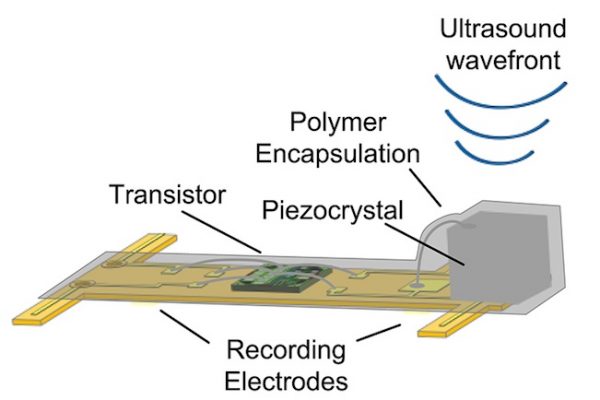
UC Berkeley researchers are developing "Neural Dust," tiny wireless sensors for implanting in the brain, muscles, and intestines that could someday be used to control prosthetics or a "electroceuticals" to treat epilepsy or fire up the immune system. So far, they've tested a 3 millimeter long version of the device in rats.
“I think the long-term prospects for neural dust are not only within nerves and the brain, but much broader,“ says researcher Michel Maharbiz. “Having access to in-body telemetry has never been possible because there has been no way to put something supertiny superdeep. But now I can take a speck of nothing and park it next to a nerve or organ, your GI tract or a muscle, and read out the data."
Maharbiz, neuroengineer Jose Carmena, and their colleagues published their latest results on "Wireless Recording in the Peripheral Nervous System with Ultrasonic Neural Dust" in the journal Neuron.
From UC Berkeley:
While the experiments so far have involved the peripheral nervous system and muscles, the neural dust motes could work equally well in the central nervous system and brain to control prosthetics, the researchers say. Today’s implantable electrodes degrade within 1 to 2 years, and all connect to wires that pass through holes in the skull. Wireless sensors – dozens to a hundred – could be sealed in, avoiding infection and unwanted movement of the electrodes.
“The original goal of the neural dust project was to imagine the next generation of brain-machine interfaces, and to make it a viable clinical technology,” said neuroscience graduate student Ryan Neely. “If a paraplegic wants to control a computer or a robotic arm, you would just implant this electrode in the brain and it would last essentially a lifetime.”
"Sprinkling of neural dust opens door to electroceuticals"



GOG.com is exclusively releasing updated, computer-playable versions of three classic Disney platformers: Aladdin, The Lion King, and The Jungle Book. All three games were originally released for 16-bit consoles between 1993 and 1994, and their GOG.com versions aren't remasters or upscaled originals. According to a press release, "all three titles have been meticulously updated to be compatible with modern operating systems while preserving the original graphics, sound, and gameplay." Each of the games playable on Linux, Mac, and Windows systems, and they're being sold individually for $9.99 USD. They're also available in a bundle for $19.99 USD until August 8th.
The release of Aladdin, The Lion King, and The Jungle Book is the latest...

Thanks to the wonders of the web there’s no excuse for keeping three old iPhones in a drawer or letting an old tablet gather dust. There are now a huge number of sites and apps willing to turn your unwanted stuff into cold, hard cash—and these are the ways you can make sure the process is as smooth and profitable as possible.

Perhaps the platform you think of first when it comes to shifting something is the venerable eBay. It started way back in 1995—and parts of its web interface still look stuck in the last century—but it’s a comprehensive and largely secure portal for getting cash in return for unwanted stuff.
eBay works well for reaching a wide audience and is perfect for tech kit that can be posted or couriered, plus the bidding process means you’re usually guaranteed whatever the going rate is. Several key seller safety measures are in place to keep you safe though you do have to cough up fees.
Craigslist has no fees and is both less restrictive and less well policed than eBay. It’s good for selling bigger items or odd items to people in the local neighborhood—everything is based on where you are in the world so you’re restricted in terms of potential buyers.
Certain items are particularly popular on Craigslist, including furniture and gadgets, but for other categories (like clothes) eBay might be a better bet. Transactions are usually cash only on Craigslist which again is simpler than the alternatives—just be on the look-out for counterfeit notes.
Don’t forget Amazon, though it’s more for serious long-term sellers rather than people who just want to get rid of a few unwanted bits and pieces. It can be a good option for electronics, books, music and movies, but you’re up against some stiff competition, and there are usually better options for the occasional flogging of stuff.

As you might expect there are plenty of apps and startups trying to muscle in on the territory claimed by eBay, Craigslist and Amazon, though their availability and reach remains limited at the moment.
Gone handles the pricing, packaging and all the other selling logistics for you, and has a concierge service currently live in New York, the Bay Area, Seattle and Austin (so someone comes to pick up your items). If you’re anywhere else in the US then you get packing materials sent to your door instead.
Sell It Easy works in very much the same way as Gone: you say what you want to sell and get a guaranteed offer for it, like an online pawn shop. It works anywhere in the US, and, like Gone, taps into several second-hand markets to find a buyer and save you the hassle (for a cut of the final price of course).
Then there are a plethora of mobile apps that all work in a similar way, offering instant access to a local, second-hand marketplace—a garage sale on your phone in other words.
Try giving Wallapop, Shpock, OfferUp or 5miles a go (and that’s just a selection of the many apps on offer). The best one for you probably depends on how widely it’s used in your area and what exactly you’re selling, so some trial and error might be required to narrow down the choice.

Nothing sells your item like a good photo and it’s worth digging out a dedicated digital camera for the task rather than relying on your smartphone, good as it may be. Remember the photo quality might be the difference between someone bidding on or ignoring your item, particularly in a crowded field.
Get the lighting right, make sure everything’s in focus, and take pictures from as many different angles as you can so potential buyers are getting a good idea of what they’re getting. Looking like you’re pushed for time or trying to hide something isn’t the impression you want to give.
It’s important to put time and effort into the listing description too—don’t rush it and cover every detail you think a buyer might want to know. If you can format the text in your item listing, use a light touch to bring out the key details, but don’t go overboard (no one wants to see huge, bold, pink text).
Being accurate and honest can make a difference too, and if there’s something wrong with the item then say so. Potential bidders will appreciate the honesty and of course you’re likely to be paid back with decent feedback too.

Damaged or faulty goods can get more than you think on certain sites—there are a lot of repair specialists out there—but be honest up front about what’s involved.
Remember that buyers browsing through listings will likely only see the title and the photo of your item in a long list. We’ve mentioned photos already but cram as much information and appeal into the title as you can, without descending into email spam levels of language.
Doing some prior research always pays off: check out how other people are listing items similar to yours and look for details and phrases that would pique your interest as a buyer. That said, when it comes to buying second-hand over the web, people are usually just looking for trustworthiness—you don’t have to be a master salesperson.
As with anything you sell, pricing will make a big difference as to how much interest you’ll get (a lot of people love a bargain, particularly when it comes to gadgets). Again, put in the research to see what other similar items are fetching, and factor in the fees for whatever site or service you’ve signed up for.

For a smooth transaction and some decent feedback (if you’re using a platform that supports feedback) put as much effort into postage and packing and general post-sale communication as you have into the listing itself.
You’re not finished when someone’s agreed to buy whatever it is you’re offering: don’t cut corners with packaging materials and be prompt and straightforward when replying to emails (so don’t schedule an eBay auction to end when you’re on holiday...).
As for staying safe, the site or app you’ve chosen will have detailed safety instructions, so follow them. If you’re meeting a buyer in person, take someone with you and stay in public places, and get photographic proof that you’ve handed the goods over.
Sending items via recorded mail is a must if you’re posting them. People have been known to claim they’ve never received the goods promised so anything you can do prove you have indeed kept up your part of the deal.

That said, don’t fret unnecessarily—most buyers are just like you and will probably be more suspicious of you than you are of them.
Exchanging personal details is sometimes unavoidable (and can help build trust) but don’t reveal more than you need to. Avoid closing deals outside of whatever service or app you’re using—if someone asks you to settle outside eBay or wherever else, it can be because they’re looking to scam you in some way.
The more expensive the item you’re after, the more you’re likely to attract the attention of unscrupulous types, so be extra wary and methodical with laptops, phones, cameras and the like.
One trick is for scammers to buy a faulty gadget identical to the one you’re selling, then claim you sent them the faulty one, meaning they keep your item and get a refund. Taking detailed pictures and noting down serial numbers can keep this from happening.
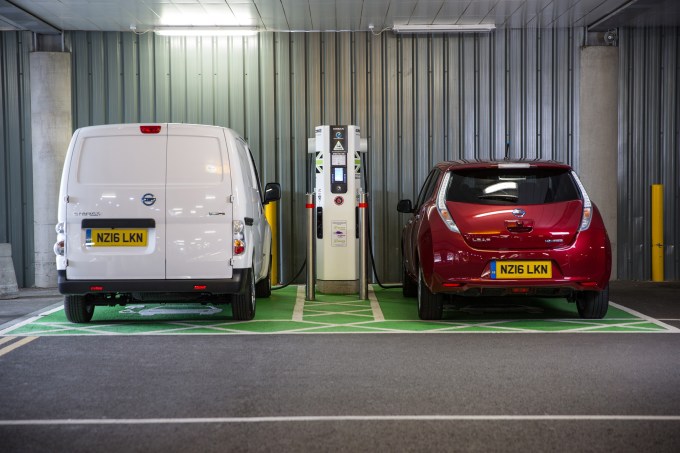 A new study by car maker Nissan predicts the UK will have more electric vehicle charging locations than gas stations by 2020. It’s a bold prediction to estimate that EV chargers will outnumber places to gas up in just four short years, but Nissan is counting on both a continued decline in the number of operational gas stations, as well as new charge points coming online. The attrition… Read More

