If you have an extra, nice-looking decorative button sitting around (or you find one at a thrift store or garage sale,) you can turn it into a fancy, good-looking hair tie in just a few seconds. Here’s how.
Grab a normal elastic hair tie—preferably one that can fit through the hole in the decorative button. Buttons with a loop on the back, rather than a traditional four hole type, will work best for this. Push the tie through the hole, thread the other end of the band through the tie and pull tight so the remaining loop is big enough to hold your hair up. Then tie your hair back as normal, just make sure the embellishment is on the outside, so it can be seen from the back. The video above has a quick demo of how it’s done.
Eye-Fi announced in July that its X2 line of Wi-Fi SD cards would stop receiving support and essentially be rendered useless starting in September. It encouraged people to instead upgrade to its Mobi line of SD cards. Now, however, the company is slightly backpedaling to say that it’ll help users keep using those older cards through new software called Eye-Fi X2 Utility. It’s referred to as X2U for short and will be given away as a free download for Macs. A Windows version is in the works, but Eye-Fi says it can’t guarantee that it’ll ever finish the product.
The software will let users continue transferring images to their PC through Wi-Fi. That’s about all it will do. The company says users won’t have the full range of functions that...
When this does this, that should that. To tell IFTTT to make this happen, you have to log into your account on the website or fire up the Android app. Now you will start seeing another choice. IFTTT is working with partners to bake integration into other apps.
It is, sadly, just for businesses, so slow your roll before you start daydreaming about what you’ll load onto yours. The company showed off a few new products at the Flash Memory Summit in Santa Clara, but nothing quite as jaw dropping as what the company is calling “the largest SSD ever demonstrated.” The 60TB SSD is firmly in demonstration mode, meaning it’s sort of… Read More
Lewis from Birmingham, UK is a young man who makes videos about tech support scammers. In this video, he interviews a scammer from Delhi, India who tells Lewis that he works in a call center with 50 or 60 other scammers. He says he is forced to do this crooked work because he signed a 5-year contract. He says he swindles about 10 people a day, and makes a better living than average. His dream is to move to the United States and get a legitimate job.
You may have heard about Nauru on a recent This American Life episode: the tiny Pacific island that was stripped of all vegetation and made virtually uninhabitable by phosphate mining, then turned into an international pariah by its desperate practice of selling citizenship to crooks, now an offshore detention centre for people seeking asylum in Australia, where cruelty and abuse are legendary.
(more…)
Email scams are as old as email itself, but Google is doing its best to help you make smart decisions. Starting this week, Gmail users will see some new tools that identify potentially dangerous messages. There are two new features here, but only one is coming to Android.
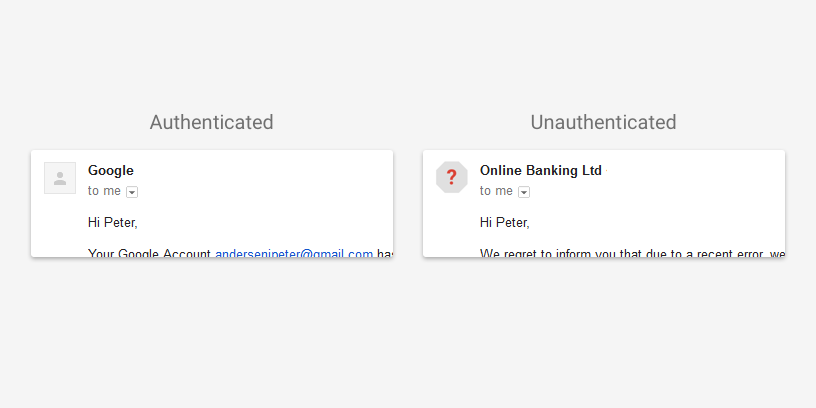
On both Android and the web, messages that cannot be properly authenticated will be marked with a question mark icon. This will be shown in place of the sender's avatar, but messages that follow the SPF or DKIM protocol will show up normally.
Feeling like you don’t measure up to those around you also makes you think you don’t belong, like you’re an impostor. A simple change in mindset can combat that feeling and remind you that we’re all—even your heroes—human.
The “key” here is to take a leap of faith, as this School of Life video describes, that we all experience similar insecurities, worries, and negative feelings. Yes, even the people you look up to, or see as successful in their fields, careers, or hobbies. Our views of others are often edited versions of who they really are, based entirely on what we see or hear of them, or what they choose to share with us. Reminding yourself that they are just as flawed as we are moves you past the idea that somehow, with your own flaws (which you are, of course, intimately acquainted,) you’re an imposter, and back to the mindset that you can accomplish your goals—or anything they can.
Rogue archivist Carl Malamud writes, "I just got back from the big debate on is free law like free beer that has been brewing for months at the American Bar Association over the question of who gets to read public safety codes and on what terms."
(more…)
As the highly controversial deaths of black people at the hands of American law enforcement officers has crept into our public discourse this decade, so too has the revelation that no federal agency maintains statistics on killings by police officers, prompting The Guardian -- a UK-based newspaper -- to launch The Counted, a project to piece together a national picture of death-by-cop from the fragmentary evidence of press reports and open records requests.
(more…)
Adobe Flash Player played a pivotal role in the adoption of video, gaming and animation on the Web. Today, sites typically use technologies like HTML5, giving you improved security, reduced power consumption and faster page load times. Going forward, Chrome will de-emphasize Flash in favor of HTML5. Here’s what that means for you.
Today, more than 90% of Flash on the web loads behind the scenes to support things like page analytics. This kind of Flash slows you down, and starting this September, Chrome 53 will begin to block it. HTML5 is much lighter and faster, and publishers are switching over to speed up page loading and save you more battery life. You’ll see an improvement in responsiveness and efficiency for many sites.
This is similar to a change we made last September, when some Flash content became click-to-play with Chrome 42. This had an immediate, positive impact for our users by improving page load times and saving battery power.
In December, Chrome 55 will make HTML5 the default experience, except for sites which only support Flash. For those, you’ll be prompted to enable Flash when you first visit the site. Aside from that, the only change you’ll notice is a safer and more power-efficient browsing experience.
Flash helped make the Web a rich, dynamic experience, and shaped the modern set of web standards. We continue to work closely with Adobe to ensure that your web experience is as fast and secure as possible and to help the Web transition to HTML5.
Posted by Anthony LaForge, curator of Flash in Chrome.
Last month, we found out that Kobo still exists, and that it's planning on releasing a new e-reader, called the Aura One. Now thanks to a product listing from a Dutch retailer that went live a bit early, we have a few more details on the upcoming e-reader.
Featuring a 7.8-inch Carta e-ink display with a 1872 x 1404 resolution, the Kobo Aura One is going to be one of the larger e-readers on the market when it becomes available (the current line of Amazon Kindle devices all come in at six inches). But thanks to that high resolution, screen quality on the larger device looks like it will stay on par with the competition, with a 300dpi, matching that of the Amazon Kindle Paperwhite.
Great news for booklovers coming soon from @kobo....
Facebook is making the HTML of its web ads indistinguishable from organic content so it can slip by adblockers. But in exchange for taking away this option for controlling ads from people, its allowing them to opt-out of ad targeting categories and Custom Audience customer lists uploaded by advertisers. Today all desktop users will see an announcement atop the News Feed explaining that while… Read More
Google Now, the intelligent personal assistant bundled into Android and Google’s search application, is already adept at bringing you the information you need at the right time, whether that’s traffic alerts, event reminders, sports scores, stock updates, weather, flight info, and much more. But one area where Google Now falls a little short is in customizing the assistant… Read More
Marvel's Luke Cage premieres on Netflix next month, so get ready for a whole lot more footage from the series. In this new spot, Luke tries to keep the peace in Harlem while his nemesis Cottonmouth starts an all-out war. But as Rosario Dawson's Claire Temple reminds Luke, "Sometimes, if you want justice, you have to get it yourself."
Luke Cage, starring Mike Colter in the title role, follows Luke in the aftermath of his arc on last year's Jessica Jones. The invulnerable hero has just returned to Harlem, where he must deal with his past while facing off against crime boss Cornell "Cottonmouth" Stokes (Mahershala Ali). Luke Cage premieres on September 30th.
Aaron Puzey says it started out of boredom. He'd been toiling away on his exercise bike for half an hour a day for years, and things were beginning to get tedious. "I'd been day dreaming for a while about the possibility of using VR to make it a bit more fun," Puzey told The Verge by email. "And now of course the technology has arrived to make it happen." His solution? Hooking a Galaxy Gear up to Google Street View and cycling the length of the UK — 1,500 kilometers from Land's End to John o' Groats — all from the comfort of his front room.
Puzey has been documenting his travels on his blog, Cycle VR, updating the site with edited video highlights of every 100 kilometers. He says he's been lengthening the amount of time he dedicates to...
NASA's Mars Reconnaissance Orbiter (MRO) has been orbiting the Red Planet for a decade, sending photos back to Earth every month as it goes around. This month's batch contains more than 1,000 photos of Mars' dunes, craters, mountains, ice caps, and other surface features. And they're particularly exciting for a couple of reasons.
Every 26 months, the Sun and Mars are on opposite sides of the Earth's sky — a phenomenon called opposition. During opposition, the MRO has unobstructed communication with Earth for a few weeks and can send huge amounts of data. This year's opposition, which happened in May, also overlapped with Mars' Equinox — a period when the Sun illuminates Mars from the north to the south pole.
It seems that two features of the Google Play Store app, the "People" area and the "+1" option on app listings, are disappearing. At this time, I've personally checked five of my devices, and only one which hadn't been powered on in months still had them.
There is a chance this is a bug or some kind of unforeseen consequence of Google making another change to the Play Store, but it seems much more likely that the removal of these features is completely intentional.
Welcome to the roundup of the best new Android applications, and live wallpapers that went live in the Play Store or were spotted by us in the previous 2 weeks or so.
Please wait for this page to load in full in order to see the widgets, which include ratings and pricing info.
Looking for the previous roundup editions? Find them here.
Featured App
AccuBattery
Today's roundup is presented by AccuBattery from Digibites.
Most automakers agree that your car is sooner or later going to take more control of primary functions over time. But how autonomous are the cars we know today, compared to the fully automated driverless cars we expect?
The National Highway Traffic Safety Administration (NHTSA) has classified vehicle automation into five different levels, ranking from no autonomy to complete autonomy.
By 2020, Google says its prototype can potentially be fully autonomous. Their competitor, Tesla, announced the same and Tesla’s autopilot is already a NHTSA level 2 automation.
Volvo’s senior technical leader of crash avoidance, Trent Victor says that “level 3 autonomy is an unsafe solution” because it will be unrealistic for the driver to take over the control on a moment’s notice, when the driver is already caught up with reading e-mails and news on the smart phone.
But yet. Volvo claims its driverless car which will be tested in 2017 is a level 4 automated car.
What are the levels?
Here is what you need to know about the five levels:
Level 0: No Automation Level 0 is what we already are used to, the driver is in full control of the vehicle and there is no automation.
Level 1: Function-Specific Automation This level involves only function specific automation. The driver is responsible for safe driving but can choose to limit authority to automated functions. An example is cruise control, crash avoidance technology or automatic breaking. If several automated functions are provided they operate independently.
Level 2: Combined Function Automation Compared to Level 1, Level 2 provides automation of at least two control functions. In certain situations, the driver can decide to limit primary control but will still need to be responsible for safe monitoring and take full control in short notice.
Level 3: Limited Self-Driving Automation At this level of automation, the driver can give up full control of functions that are safety-critical in certain traffic or environmental conditions. The driver has to be available to take control, but is not expected to constantly monitor the driveway. The self-driving car is constructed to operate independently until the driver can take over.
Level 4: Full Automation The driverless car is in full control of all operations and is responsible for safe driving the whole trip. The driver does not need to be available to take over control.
While these are the levels of autonomy defined by NHTSA, other corporations such as SAE International does also strive to find a common terminology for automated driving, where their ranking goes from Level 0 to Level 5.
Binge-watching a TV show with your sweetheart might not sound like the most exciting or romantic activity, but if your social circles don’t overlap very much, it could be the secret to a long-lasting relationship.
According to a recent study, published in the Journal of Social and Personal Relationships, watching the same TV shows, reading the same books, or scheduling regular movie nights can make couples feel like part of the same social world. The researchers found that couples who have mutual friends, or share the same friend group, tend to feel a stronger connection with each other. When couples are missing that social connection, however, TV shows, books, movies, and other “shared media experiences” can fill in the gap. Regularly partaking in those activities allowed couples to feel closer to each other, as if the characters they watched together on TV, or read about in books, were part of a shared group of friends. So if you and your significant other don’t run in the same social circles, that’s okay! Make some make believe friends by watching some TV shows together, or reading the same book and discussing it. If anything, this is a great excuse to watch lots of TV together.
Seriously, go. Enjoy yourself. It’s Monday. We’ll still be here when you get back. It’s bound to be a long week. The world is coming apart at the seams. Your boss won’t notice if you play a round or two of Bubble Bobble from the comfort of your own browser (Firefox seems to work best on my end). We can’t vouch for the quality of all of the Amiga titles that… Read More
Whether you’re in high school or college, you spend a lot of time taking notes. You have several excellent options for doing so, and which works best for you depends a lot on your note taking style. It’s best to pick software and stick to it so you don’t to worry about moving stuff around later. Here’s how to make the right choice from the outset.
Evernote’s the Most Feature-Packed Notes App, Provided You Don’t Mind Paying
Evernote has long been the go-to for students, and while it’s not always obvious how you’d use it, once you get the hang of it, Evernote’s a great place to dump everything, which means notes, to-do lists, audio, images, and more.
Evernote does a lot. On top of the basics, like rich text formatted notes and images, it has in-app image annotation, OCR support for scanning paper or whiteboards, email integration, easy notes sharing, a web clipper, and tons of organization tools. You can keep to-do lists with assignments, then add due dates to those assignments before you share that list with people involved in a group project. Evernote is a behemoth and because of that, it has a consistently improving interface on Windows and Mac, and mobile apps on Android and iOS that are updated with new features often. Evernote’s meant as a catch-all filing cabinet for every thought, idea, and image you come across in your daily school life.
The everything-bucket nature of Evernote means it’s overwhelming for some people and it takes some effort to really master it. It also has so many different organizational methods that it’s easy to spend more time trying to decide where to put a note than it does to actually write it. It can also be a bit slow and cumbersome, especially if you’re trying to use the mobile apps on older devices.
The other big catch with Evernote comes in the form of a recent price increase. Now, free users are limited to accessing Evernote on just two devices, like your phone and your computer. If you want more than that, you’ll need to shell out for a premium plan. Thankfully, premium plans are currently 75% off for students for a full year (which should translate to about $18 for the year).
Like just about every other Office application, at a glance, OneNote’s a complicated app to work with. You’ll find it has tons of menus, tabs, and options. While it’s overwhelming to start, OneNote’s great for anyone who likes to really dig in and organize notes. You can create separate notebooks for every class, add rich text formatting to text, draw on notes, highlight text, and tons more.
If you’re actively using the rest of Microsoft Office, OneNote really shines because the whole ecosystem is hooked together. You can embed tables from Excel, pull clips from emails, or link research to Word. OneNote also does a lot of the magic tricks that Evernote does, including importing images into notes, drawing directly on notes with a stylus, recording audio to notes, and easily saving links from any browser. You can also share notes with other classmates easily.
Like most of Microsoft apps, OneNote’s biggest downfall is its massive scope. It’s packed with menus, which means quickly scribbling down an idea is out of the question. It’s also not particularly pleasant to look at and between the awkwardly colored tabs and the vibrant purple color-scheme, a lot of people might be turned off by the design alone.
Google Keep is Google’s free note taking app that’s made to capture notes, lists, photos, and audio. On top of the web version, it’s available on both Android and iOS. We’re big fans of Google Keep because it sits in a middle ground between complex notes apps like OneNote or Evernote, and simple apps like Simplenote.
Google Keep does pretty much everything you expect of a notes app from Google. You can organize notes easily using a color coded system, look for anything with a powerful search engine, share notes with others, and everything is synced up to your Google account. Students will appreciate the simple voice recording options and the ability to scan images into text easily, which comes in handy when your teachers still give you handouts. Keep also has a clipping extension so you can add URLs to your notes, which should be a huge help when you’re researching different topics.
Unlike Evernote and OneNote, you don’t need to spend a significant amount of time learning how to use Keep. Just load it up and it immediately makes sense. It’s also well hooked into the Google ecosystem so do something like saving emails from Gmail work seamlessly, though there’s still no direct integration with Google Drive.
There are other downfalls that stem from that simplicity, like the fact you can’t format text, you can’t organize notes into different folders, and Keep doesn’t works great for larger blocks of text. Keep’s best for those who don’t mind using the search function to find notes and who aren’t too verbose with their note-taking in general.
Not everyone wants to take massive, complicated notes. Some people just like to write down a few sentences. For that, we’re fans of Simplenote. Simplenote is free on Windows, Mac, iOS, and Android.
Simplenote is basically a plain text editor with small organizational tools. You can only type text, with no formatting. You can’t add images, audio, or video. You can’t add web clippings or integrate emails. That said, you can organize notes with tags, and the simplicity of plain text means Simplenote’s search is robust and fast.
That’s it. That’s all Simplenote does. The scarcity of features is a feature in itself though, and if you’re taking classes where you’re just taking basic text notes, Simplenote is all you need.
Look, you’re probably spending an inordinate amount of time staring at your screen these days. You’re writing papers every other day, taking a couple of classes online, and when you’re not busy being crushed under a mountain of homework, you’re zoning out watching Netflix. Which is all to say, sometimes the best notes app is no app at all, it’s just a normal notebook.
Good old pen and paper can be useful for other reasons too. For one, if you’re easily distracted, a notebook has the benefit of not having access to the internet. Notebooks are also surprisingly customizable, with lots of different organization methods like Bullet Journal or line edges. Notebooks also allow you to take notes in any style you prefer for every subject, whether that’s creating columns, mind maps, or whatever else.
Pen and paper does have plenty of problems too. You can’t search through notes, easily share them with classmates, or access them from a variety of devices if you accidentally forget your papers at home. Many people can also type much faster than they can write, which means you’ll need to pay more attention to what you write to keep it short.
You’ll still need to pick out a good notebook and pen though. You have a ton of options here, but Moleskine’s are a popular favorite and come in a variety of sizes with different types of paper. Pens are perhaps less important to most people, but if you’re looking for a popular pick, Pilot pens are always a solid choice.
by Kristin Wong on Two Cents, shared by Andy Orin to Lifehacker
It’s hard to feel in control when your financial situation sucks, but control is absolutely crucial in getting your finances in order. Especially when you feel defeated, it’s important to build an internal locus of control—a belief that your actions can affect your destiny. Here’s how to work on it.
Charles Duhigg talks about this concept in his book Smarter Faster Better (we reviewed the book here). As a money writer, I couldn’t help but translate his concepts to personal finance. The idea of an internal vs. external locus of control is what money management is all about.
Duhigg explains that people with an external locus of control tend to credit or blame their successes or failures on luck. People with an internal locus of control, on the other hand, believe that their hard work can pay off, and they take responsibility for their failures. The problem is, when life throws a heap of crap your way, it’s incredibly easy to develop an external locus of control.
Your bills are overdue, your car breaks down, and your employer cuts back your hours. After a while of this, you start to feel like there’s nothing you can do to offset your bad luck. Most of us have been there, and you feel weak and powerless. In an interview, I asked Duhigg how to fix this. How do you develop a sense of control when you feel completely out of control of your situation? He explained that it comes down to making choices:
Carol Durack, a psychologist, what she says is – and, studies back her up on this – if a kid does really well on an exam, you shouldn’t say, ‘You must be really smart,’ because being smart is not something that a kid thinks that they control. Instead, you should say things like, ‘You must have worked really hard.’
...You make clear to people how their choices, how their actions have these positive outcomes. Then you put them into situations where they actually have to make controlled choices and in doing so they learn.
We’ve covered this method before when it comes to motivation: create a choice for yourself, then tie your actions to a larger goal. So in basic terms, the solution is to use choices to feel more in control. One simple choice won’t magically fix everything, but that’s not the idea. The idea is that, gradually, decisions will help you develop a sense of control. Here are a few examples of how you can apply this concept to your finances:
Hell, your choice could be as simple as deciding what day of the week you’ll sit down to look at your budget.
When it comes to managing your money, even a small sense of control can have an impact, especially over time. In other words, it helps to focus less on the things you can’t control and more on the things you can. It’s hard to do that when you feel defeated, but that’s when it’s most important.
You can read more about the concept of an “internal locus of control” at the link below.
Last month a 31-year-old Chinese man who was traveling through Germany realized he lost his wallet in Stuttgart, Germany. The tourist, whose name hasn't been disclosed, tried to ask authorities for a stolen goods form, but ended up filling out a refugee asylum application. This set "machinery in motion that he couldn't get out of," Christoph Schluetermannan, an official with the German Red Cross, told reporters. According to The Guardian:
From there, he was sent to Dortmund in northwestern Germany and on to the refugee home in Duelmen. “He simply did what he was told,” Schluetermann said.
Schluetermann said he quickly noticed the man because “he was different from the others – very, very helpless.”
With help from a translation app and then from a translator at a Chinese restaurant, it became clear that the man wanted to travel on to France and Italy, not seek asylum.
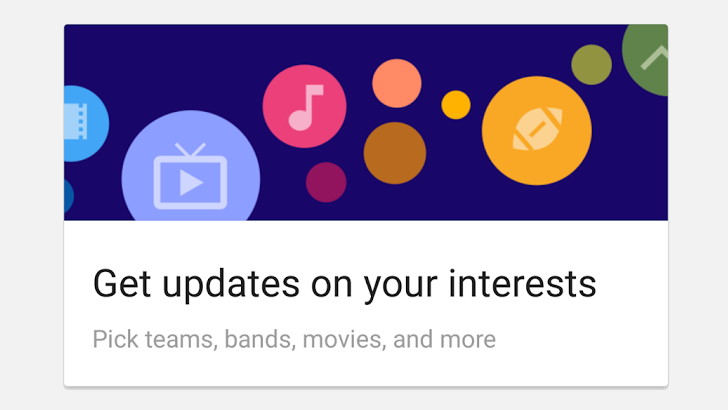
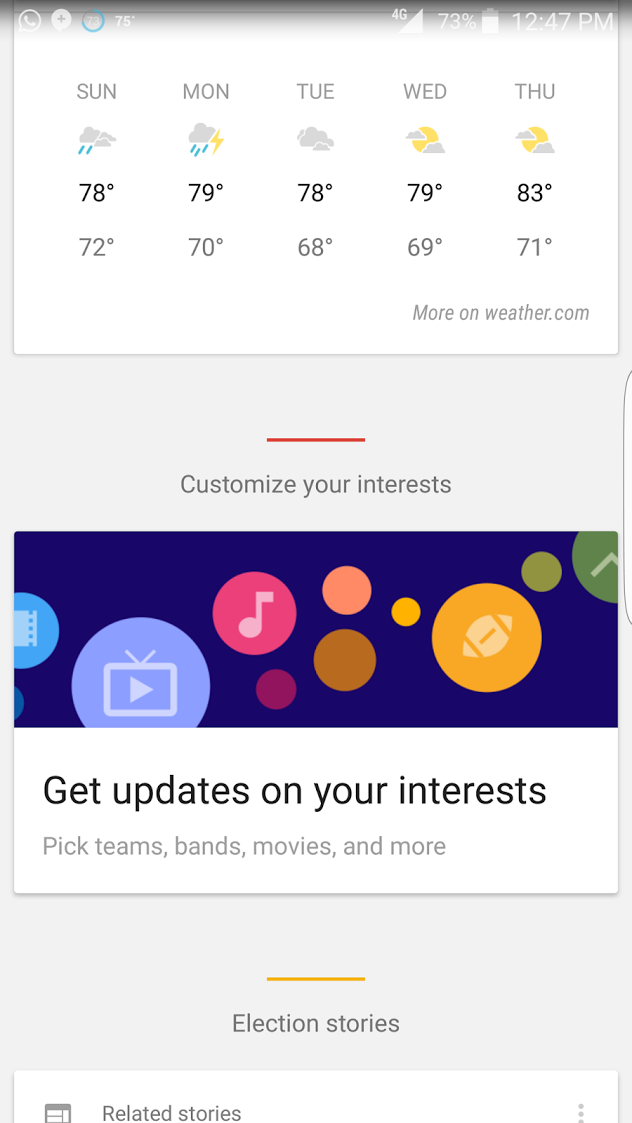
Google Now continues to get better and better (hands up if you're looking forward to Google Assistant) so it's only natural yet more features and improvements are being added for the predictive search facilities. A tipster has sent us four screenshots showing 'Explore Interests,' which appears to be a new way to add things you're interested in for Google to track and update you on.
Left: the initial Explore Interests card. Right: the different categories available.
Once upon a time, Lyft customers who needed to make multiple stops during a trip needed to explain this to their drivers using spoken words. Starting this week, such verbal interactions will be a thing of the past, thanks to a new feature offering riders the ability to input an extra destination within the app.
Like Uber, Lyft does allow passengers to change destinations mid-trip. But this new feature allows customers to add a second destination before the driver even arrives, removing the need to input a new stop during the ride.
Lyft says this will make for an easier ride for passengers, while offering more context for drivers, ultimately allowing them to shorten the time between rides. And because Lyft often pairs drivers who are...
Google today announced another acquisition that will help the company improve how it competes against Amazon’s AWS, Salesforce and Microsoft in the area of enterprise services, and specifically selling enterprise services in the cloud: it has acquired Orbitera, a startup that developed a platform for buying and selling cloud-based software. Terms of the deal have not been disclosed… Read More

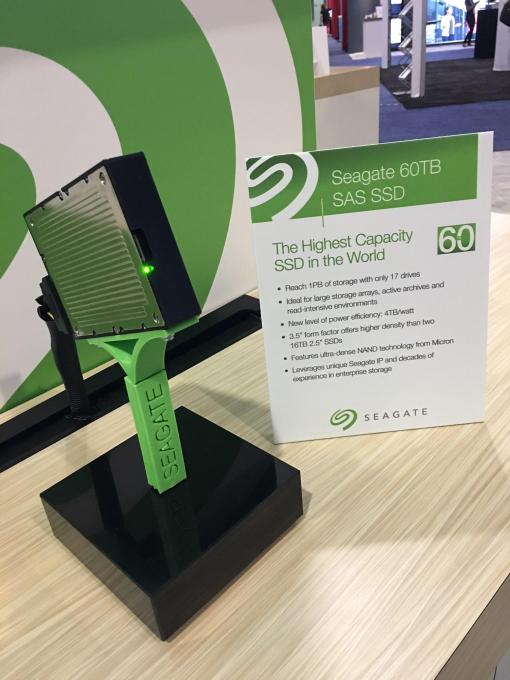 It is, sadly, just for businesses, so slow your roll before you start daydreaming about what you’ll load onto yours. The company showed off a few new products at the Flash Memory Summit in Santa Clara, but nothing quite as jaw dropping as what the company is calling “the largest SSD ever demonstrated.” The 60TB SSD is firmly in demonstration mode, meaning it’s sort of…



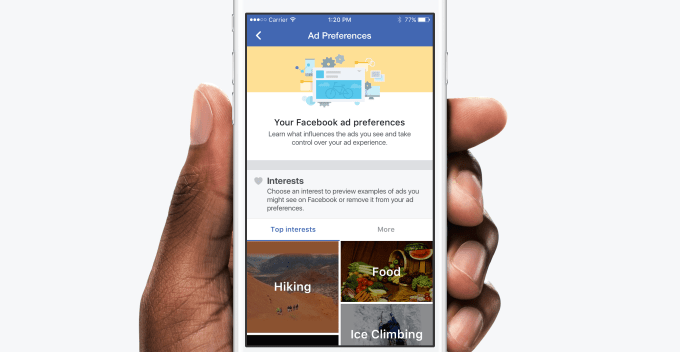 Facebook is making the HTML of its web ads indistinguishable from organic content so it can slip by adblockers. But in exchange for taking away this option for controlling ads from people, its allowing them to opt-out of ad targeting categories and Custom Audience customer lists uploaded by advertisers. Today all desktop users will see an announcement atop the News Feed explaining that while…
 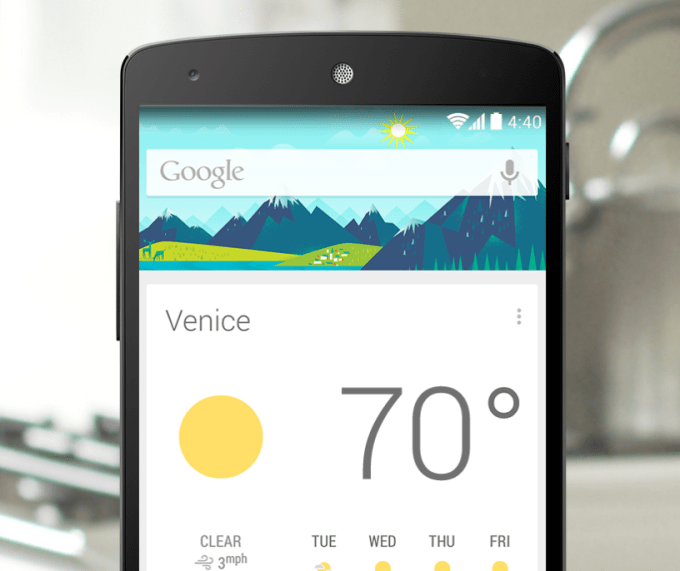 Google Now, the intelligent personal assistant bundled into Android and Google’s search application, is already adept at bringing you the information you need at the right time, whether that’s traffic alerts, event reminders, sports scores, stock updates, weather, flight info, and much more. But one area where Google Now falls a little short is in customizing the assistant…



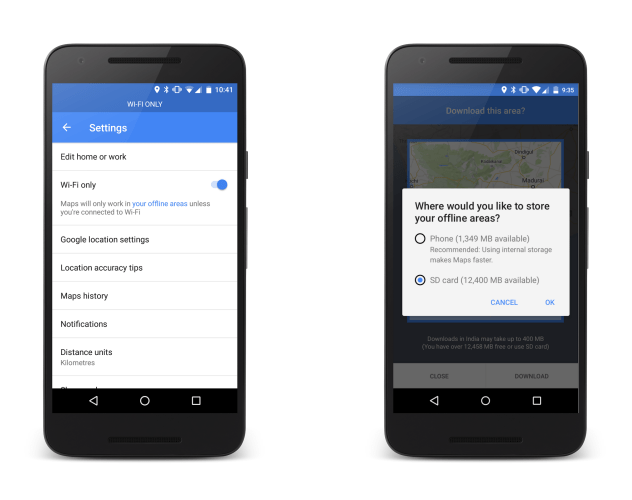 Google is making its Maps app more accessible to users in emerging markets with two nifty features for the Android version of the service.
 Seriously, go. Enjoy yourself. It’s Monday. We’ll still be here when you get back. It’s bound to be a long week. The world is coming apart at the seams. Your boss won’t notice if you play a round or two of Bubble Bobble from the comfort of your own browser (Firefox seems to work best on my end). We can’t vouch for the quality of all of the Amiga titles that…




 Google today announced another acquisition that will help the company improve how it competes against Amazon’s AWS, Salesforce and Microsoft in the area of enterprise services, and specifically selling enterprise services in the cloud: it has acquired Orbitera, a startup that developed a platform for buying and selling cloud-based software. Terms of the deal have not been disclosed…