YouTube’s most-viewed video of 2016 shouldn’t surprise anyone. It’s an episode of James Corden’s wildly popular Carpool Karaoke featuring a globally beloved pop star whose most recent album broke several sales records. Adele and Corden drawing a lot of attention isn’t unusual, but the rest of the videos in YouTube’s Top 5 are more surprising: there’s the video for the goofy parody song “Pen-Pineapple-Apple-Pen,” a clip of a little kid and an older guy cutting open a rattlesnake’s rattle, a Freaky Friday-like Nike commercial starring Cristiano Ronaldo, and an audition from an episode of America’s Got Talent.
Trying to extrapolate a coherent theme from these videos is challenging — there’s no common thread, outside the platform they all...
In March, Sony announced the formation of ForwardWorks, a new game studio that would focus on creating “full-fledged” mobile games based on PlayStation franchises. Today, it’s revealing the first batch of those games: new titles in the Hot Shots Golf, Wild Arms, Arc the Lad, and What Did I Do to Deserve This, My Lord? series.
In addition, games based on Parappa the Rapper, Doko Demo Issho, and Boku no Natsuyasumi will come later on. Square Enix is also collaborating with ForwardWorks on an as-yet unrevealed mobile project, as is Nippon Ichi Software with its Disgaea and Yomawari franchises.
The ForwardWorks initiative includes something called Project Field, a Sony-developed trading card platform that works together with a smartphone...
Way back in the day, app updates in Google Play would be the whole new APK. That changed back in 2012, and Google has been working to reduce the size of updates ever since. In its most recent triumph, the Google Play team has devised a system to reduce app update sizes by an average of 65%, but it won't be used all the time.
Android APKs are essentially ZIP archives with a number of special conventions.
Duo hasn't been the hit success that Google expected it to be, but that should only serve as motivation for engineers to make it better. The video-chatting app has just been updated to version 5.0, which not only fixes a few bugs, but also improves on the entire user experience.
First of all, here are the release notes (in tweet form) from Justin Uberti, Duo's technical lead:
Duo 5.0 relnotes (12/5): • Major video quality improvements • Simpler signup flow • Seamless camera rotation • Fix sound not playing issue
It's nice to see video quality being improved so much that it can be called "major," as that's obviously a big part of what makes a video-chatting app good.
If you're not familiar, Google's Accelerated Mobile Pages project aims to make the mobile web faster and less data-heavy. Websites that choose to support it offer AMP versions of their pages, which are then loaded in the place of the full site. Google mobile search and the mobile Google+ site already load AMP pages when available, and now the native Android app is joining in.
Links that support AMP will show a small lightning bolt icon, and upon tapping, will load the optimized version of the page.
Ideally, your boss will communicate with you over the course of a year to let you know what you’re doing right, what you’re doing wrong, and where you need to improve. If they’re not and you’re blindsided at your performance review, here’s how to recover.
Over at US News, Alison Green explains that the key to handling criticism you’ve never heard before when you’re sitting in a performance review is to make sure your manager acknowledges that they’ve never brought it up, and that they should have. She notes:
... sometimes managers don’t give as much feedback as they should. And sometimes evaluation time forces a manager to step back and reflect on how things are going, and prompts the realization that there are problems in your realm. If that’s the case, it’s legitimate for your manager to raise those issues as part of your evaluation, even if they haven’t come up previously. Of course, a thoughtful manager will acknowledge that and say something like, “I realize I haven’t raised this previously, and I should have.”
It’s also reasonable for you to ask to receive feedback on a more ongoing basis in the future so that you aren’t hearing about things for the first time in your evaluation.
Of course, you can’t just stop the criticism and force them to remove it from your review, but you can force them to acknowledge that they shouldn’t be bringing it up at this point, and you can ask them for more feedback in the future. Similarly, you should ask them for specific examples of where their criticism applies from the previous year, so you can be clear on whether it’s something that they really thing, or it’s something they made up for the review. Speaking of specific examples of criticism:
It’s frustrating to hear things like, “you need to take more initiative” or “you need to bring the quality of your presentations up” without being given any concrete specifics to help you understand what your manager is asking you to change. If this happens, don’t be shy about asking for more clarification; in fact, it’s important to do that because otherwise you’re not likely to be able to make the changes your manager is requesting. You can say it this way: “I really appreciate getting this feedback. So that I’m able to understand the issue and what you’d like me to do differently, could you give me an example or two of where I haven’t been hitting the mark and what it would look like if I was?”
Of course, that line is classic “written for a career blog and no one would say that in real life” language, but adjust it to your circumstance. For me, if someone just said “do you have a few times when I did that and should have done it differently?” would be enough and to the point. For more tips on how to survive that end-of-year performance review, hit the link below.
Whether your current mouse is giving you chronic wrist pain, or you just want to try something different, this 4.2 star rated wireless ergonomic vertical mouse from Anker is only $13 today. In addition to the clever design, it even comes with three adjustable DPI settings and forward/back buttons, which are pretty rare at this price level.
Commerce Content is independent of Editorial and Advertising, and if you buy something through our posts, we may get a small share of the sale. Click here to learn more, and don’t forget to sign up for our email newsletter. We want your feedback.
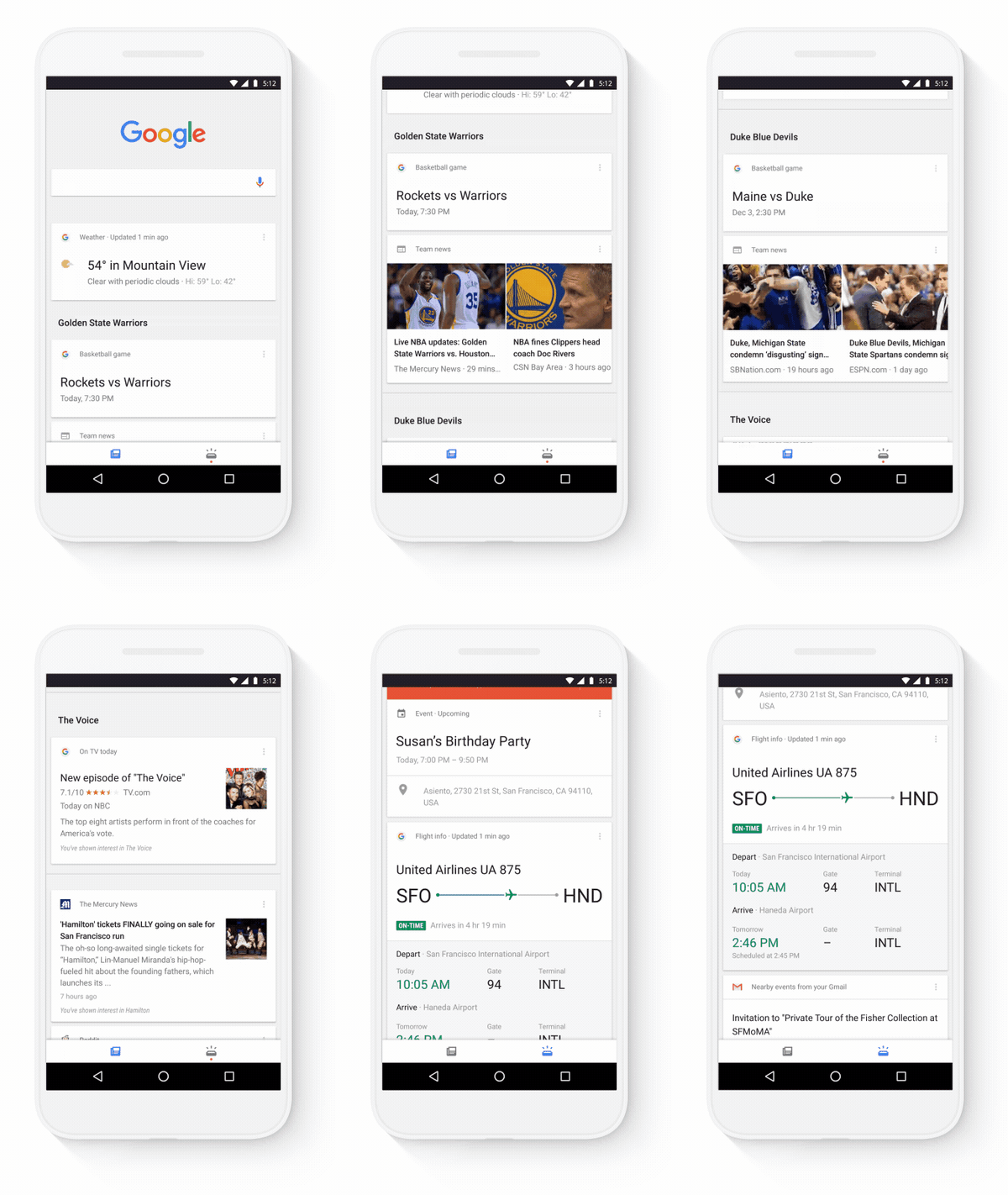
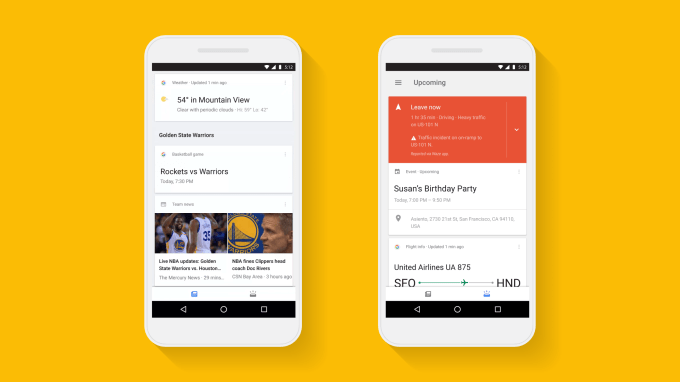
With constant news updates, changing schedules, and traffic delays, staying on top of everything can be challenging. The Google app has useful cards ready to help you keep track of everything you care about — from sports scores to that package you ordered — and we’ve been thinking up ways to make the experience even more helpful. That’s why we’re rolling out an update to help you stay organized and in the know about the things that matter to you. Starting today, in the Google app on Android (and coming soon to iOS), your cards will be organized into two sections: a feed that keeps you current on your interests like sports, news, and entertainment, and a section for your upcoming personal info, like flights, appointments and more.
Feed - To stay current on topics you care about
The feed is an ongoing and updated look at the things you care about, keeping you updated with the freshest info on your sports teams, people of interest, music, and news stories. The more you use Google, the more tailored and relevant your feed will become. To update your interests and add others at any time, just tap “Customize” in the Google app’s settings menu.
For those in the U.S. — and rolling out to other countries in the coming months — we’re also giving you an additional way to tell Google what you care about. You’ll see a card in your feed that lets you select topics of interest that you’d like to see more info and stories on.
Upcoming - To keep up with your day
You can also toggle over to your upcoming dashboard for a dependable view of your personal info — keeping details of your daily schedule, travel time for your commute, package delivery info and more, all in one place. With the holiday travel season upon us, you’ll never need to dig through your email to find your boarding pass or flight info. Tap to ta-da!
With this latest refresh of the Google app, a single tap will load your life’s interests and updates. We hope these go-to guides will help you stay organized and on top of the things you care about.
Google’s flagship mobile application is getting a big makeover today, with a focus on making it easier to separate the things you need to know about – like upcoming appointments or flights -from the things you’re interested in, like news, sports, and entertainment. The app still maintains its previous card-style design, but it now offers two different sections to better… Read More
Last summer, One Drop raised $8 million in Series A funding for its diabetes management app. At the time, the company said the money would go, in part, to developing hardware designed specifically for its mobile health software. The result is the Chrome, a glucose monitoring system that, well, looks pretty slick, so far as glucose monitoring systems go. It’s a four-piece set that… Read More
Every year people search on Google trillions of times; every minute people upload more than 400 hours of YouTube videos. All of that takes an incredible amount of processing power — which means energy. Our engineers have spent years perfecting Google's data centers, making them 50 percent more energy efficient than the industry average. But we still need a lot of energy to power the products and services that our users depend on. We began purchasing renewable energy to reduce our carbon footprint and address climate change — but it also makes business sense.
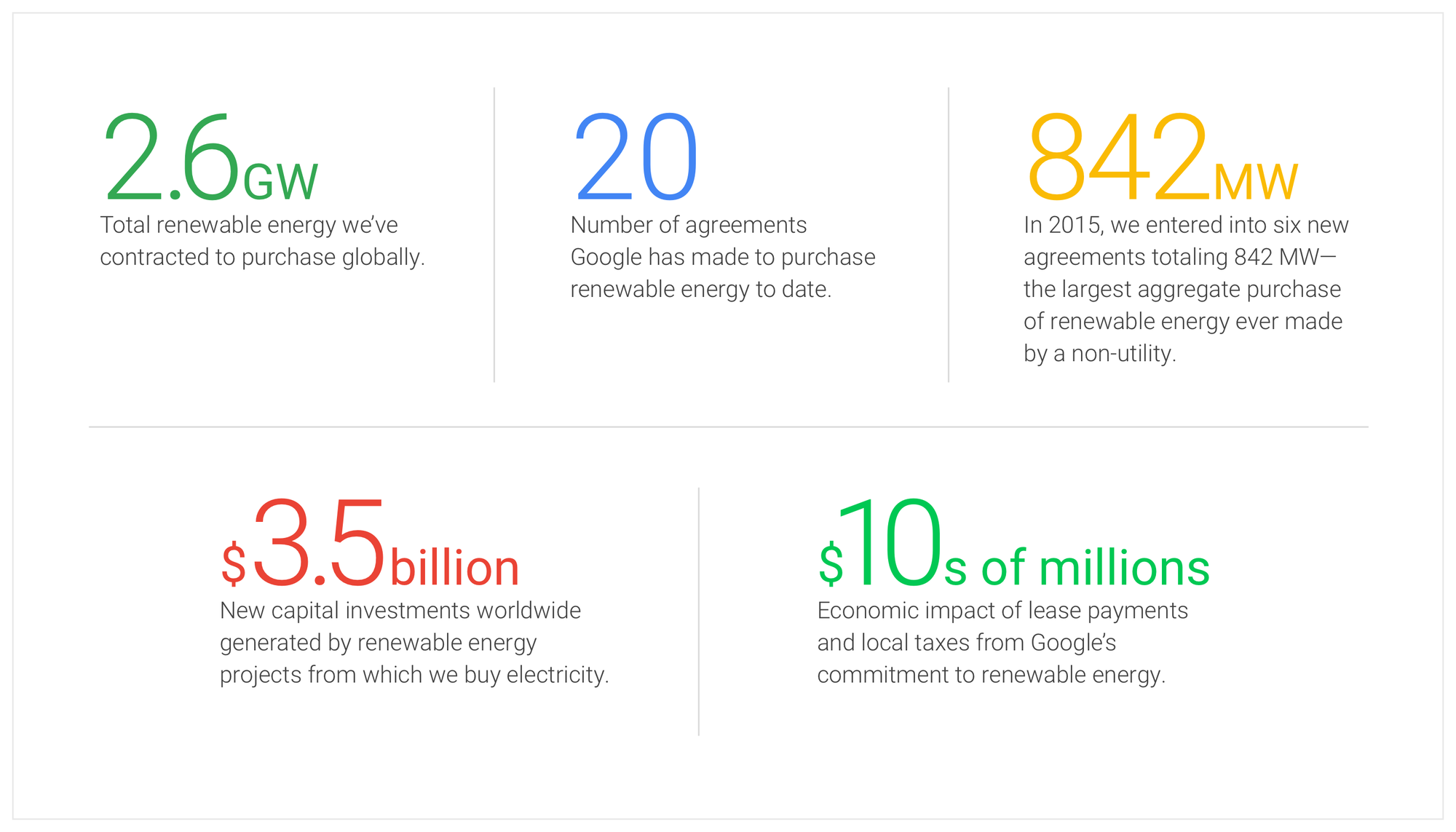
I’m thrilled to announce that in 2017 Google will reach 100% renewable energy for our global operations — including both our data centers and offices. We were one of the first corporations to create large-scale, long-term contracts to buy renewable energy directly; we signed our first agreement to purchase all the electricity from a 114-megawatt wind farm in Iowa, in 2010. Today, we are the world’s largest corporate buyer of renewable power, with commitments reaching 2.6 gigawatts (2,600 megawatts) of wind and solar energy. That’s bigger than many large utilities and more than twice as much as the 1.21 gigawatts it took to send Marty McFly back to the future.
To reach this goal we’ll be directly buying enough wind and solar electricity annually to account for every unit of electricity our operations consume, globally. And we're focusing on creating new energy from renewable sources, so we only buy from projects that are funded by our purchases.
Over the last six years, the cost of wind and solar came down 60 percent and 80 percent, respectively, proving that renewables are increasingly becoming the lowest cost option. Electricity costs are one of the largest components of our operating expenses at our data centers, and having a long-term stable cost of renewable power provides protection against price swings in energy.
Our 20 renewable energy projects also help support communities, from Grady County, OK, to Rutherford County, NC, to the Atacama Region of Chile to municipalities in Sweden. To date, our purchasing commitments will result in infrastructure investments of more than $3.5 billion globally, about two-thirds of that in the United States. These projects also generate tens of millions of dollars per year in revenue to local property owners, and tens of millions more to local and national governments in tax revenue.
So, we’re on track to match our global energy consumption on an annual basis by next year. But this is just the first step. As we look to the immediate future, we’ll continue to pursue these direct contracts as we grow, with an even greater focus on regional renewable energy purchases in places where we have data centers and significant operations. Since the wind doesn’t blow 24 hours a day, we’ll also broaden our purchases to a variety of energy sources that can enable renewable power, every hour of every day. Our ultimate goal is to create a world where everyone — not just Google — has access to clean energy. For more on these next steps, read our white paper.
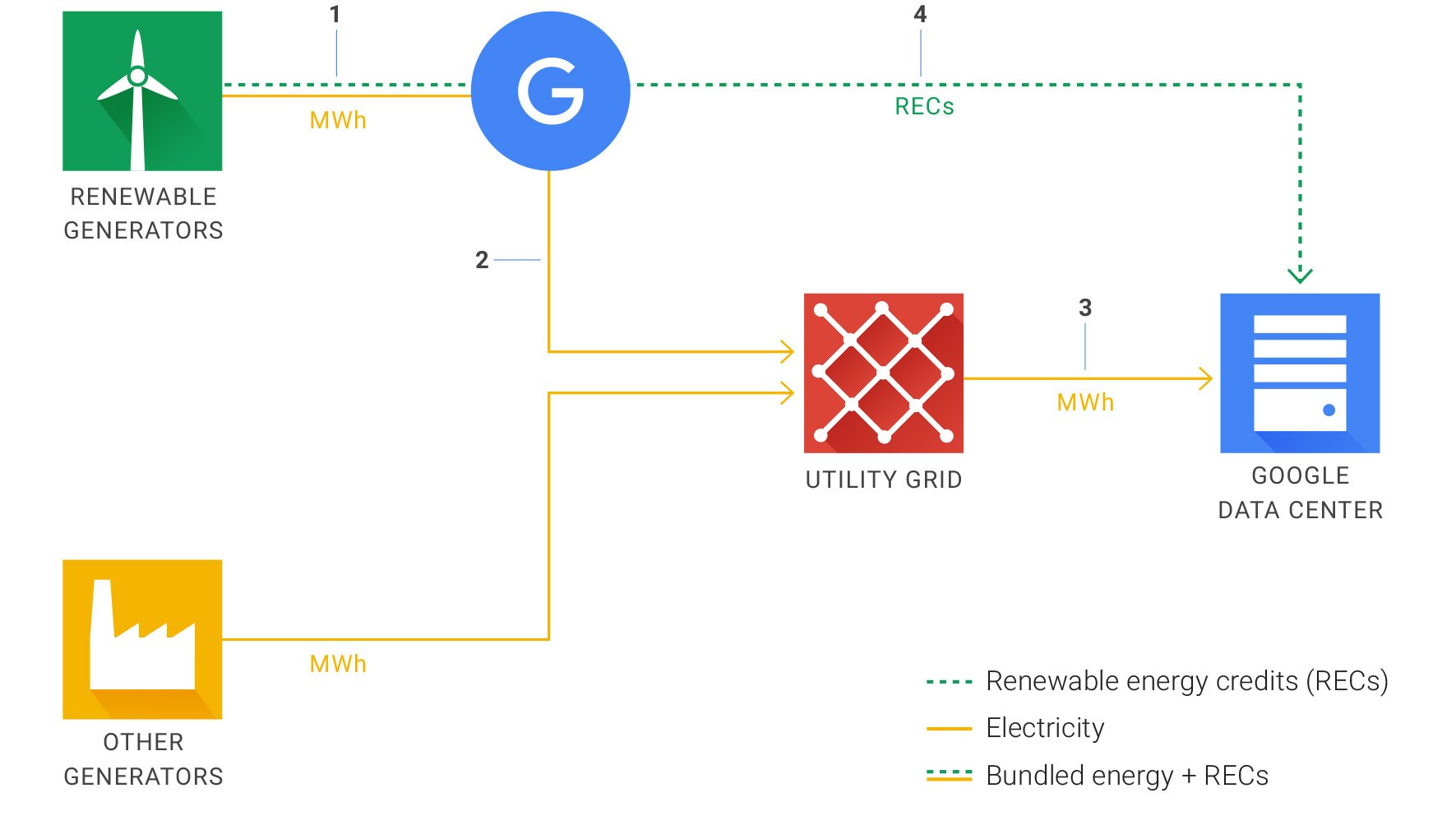
How Google purchases and uses renewable energy.
Operating our business in an environmentally sustainable way has been a core value from the beginning, and we’re always working on new ideas to make sustainability a reality — like enabling the building of healthy workplaces and creating a living, breathing dashboard for the planet. We’ve reported our carbon footprint and published information on our sustainability programs for many years in white papers, blog posts, and on our website. Now, we’ve put all this information together in a new Environmental Report.
You can also check out our new environment website, where we share stories of how we are finding new ways to do more while using less. Most of our on-campus sustainability initiatives were started by a few passionate Googlers, and have now grown into company-wide efforts. From the solar panels on our roofs to our bike-to-work program, these initiatives sit at the heart of our company culture and help both us and our users reduce our impact on the environment.
Google is the largest corporate purchaser of renewable energy in the world.
The science tells us that tackling climate change is an urgent global priority. We believe the private sector, in partnership with policy leaders, must take bold steps and that we can do so in a way that leads to growth and opportunity. And we have a responsibility to do so — to our users and the environment.
We have lots of progress left to make, but these achievements we're announcing today feel like a breath of fresh air. Now, back to work.
Google is teasing a next-generation ReCaptcha algorithm for websites to tell real visitors from bots which it promises will require no user interaction at all. The new system will be called Invisible ReCaptcha.
The earliest Captcha systems – an ancroynm for Completely Automated Public Turing test to tell Computers and Humans Apart – were one of the biggest annoyances on the web, requiring users to figure out numbers from messy graphics. Switching instead to simple additions was an improvement but still a nuisance, before Google raised the bar with a system where all we had to do was tick a box …
Many "progressives" looked the other way while the Obama administration asserted unprecedented presidential powers, like the right to murder anyone the president feels like, anywhere in the world, using drones and other technologies; and the right to spy on everyone, all the time. Now that Donald Trump is about to inherit those powers, the Obama administration has released a 61-page report insisting that the president's powers should be drastically curtailed and made accountable and transparent.
(more…)
Amazon Go, an 1,800-square foot min-supermarket in Seattle, doesn't have human cashiers or checkout lines. Sensors and cameras see everything you add to your cart or bag and charge your account when you walk out the door.
Our checkout-free shopping experience is made possible by the same types of technologies used in self-driving cars: computer vision, sensor fusion, and deep learning. Our Just Walk Out technology automatically detects when products are taken from or returned to the shelves and keeps track of them in a virtual cart. When you’re done shopping, you can just leave the store. Shortly after, we’ll charge your Amazon account and send you a receipt.
Web: Fantasy author Terry Prachett’s Discworld series has spanned over 30 years of books and short stories, and there’s no way for a newbie to know where to jump in and start. Luckily, All Timelines is a web service that will tell you, along with guides for virtually every other pop culture franchise.
The user-contributed site covers books, comic books, TV series, movies, and video games. The objective is to find any franchise’s canonical chronology, or the official timeline of events in that fictitious world. Based on its canon, All Timelines lists every book, movie, video game, or TV series that is officially a part of the franchise.
The site tries to keep things objective. For example, to catch up on Star Wars, most fans recommend the release order of the movies, and not the canonical order. But All Timelines is all about canon, and is an exhaustive resource worth checking out.
Netflix is making headway on its ambitions to fill half its library with original content. According to Netflix’s Chief Content Officer Ted Sarandos, the company is planning to release about 20 unscripted series next year, bringing it closer to its goal of having 1,000 annual hours of original programming available on its service in 2017.
That’s more than the amount of original… Read More
Muckrock has been sending Freedom of Information requests to state police forces to find out how they're using "cell-site simulators" (AKA IMSI catchers/Stingrays), and they hit the motherlode with the Virginia State Police.
(more…)
Whether it’s hiking alone or walking down a street after dark — sometimes you want to know someone's got your back. To help you feel safe and give your friends and family peace of mind, today we're launching Trusted Contacts. This new personal safety app lets you share your location with loved ones in everyday situations and when emergencies arise — even if your phone is offline or you can’t get to it.
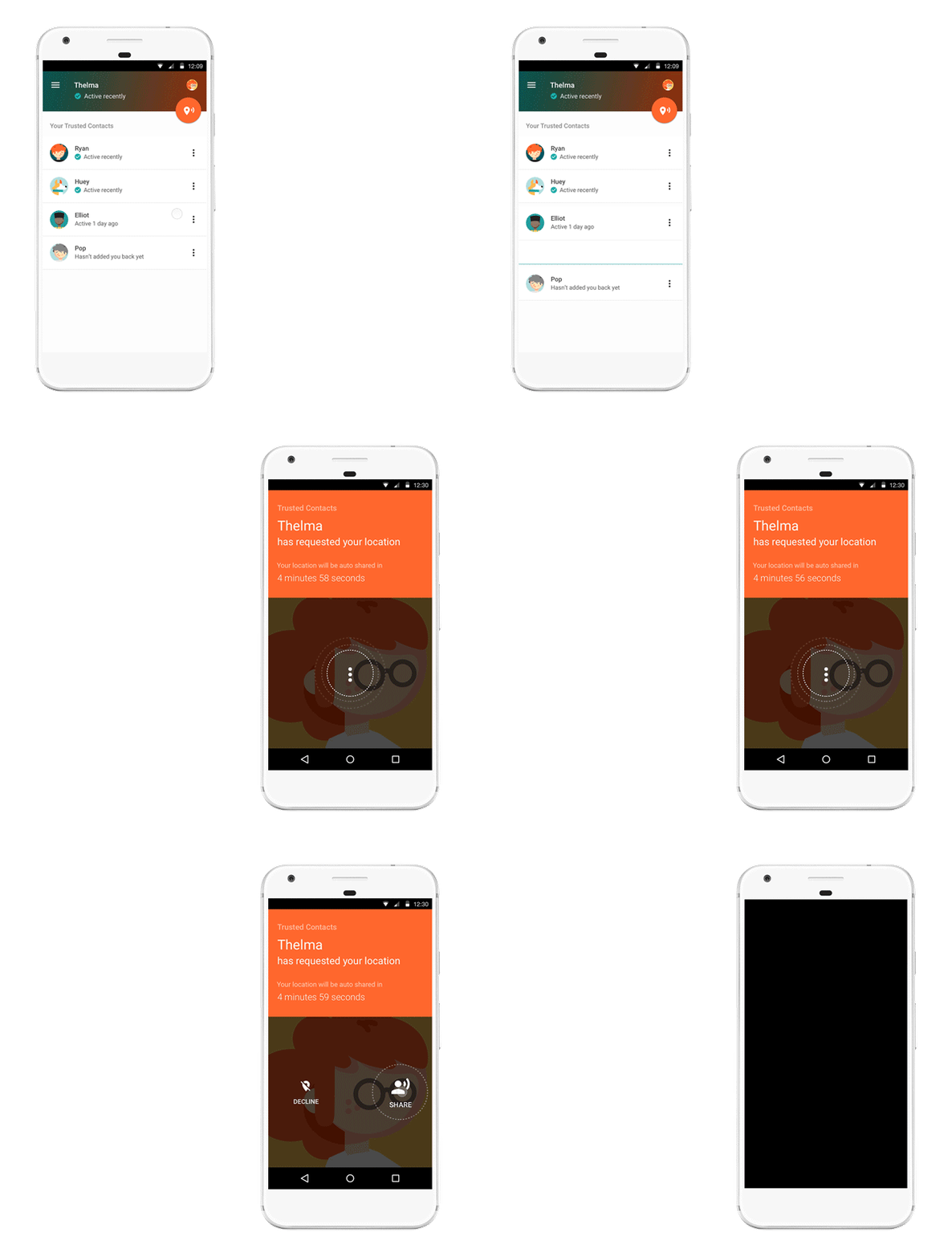
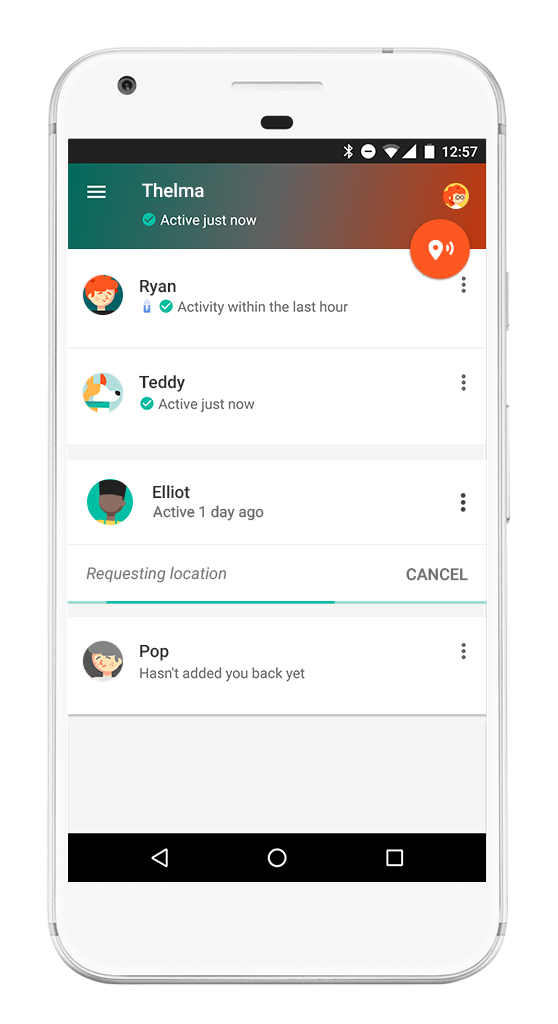
Here’s how it works: Once you install the Android app, you can assign “trusted” status to your closest friends and family. Your trusted contacts will be able to see your activity status — whether you’ve moved around recently and are online — to quickly know if you're OK. If you find yourself in a situation where you feel unsafe, you can share your actual location with your trusted contacts. And if your trusted contacts are really worried about you, they can request to see your location. If everything’s fine, you can deny the request. But if you’re unable to respond within a reasonable timeframe, your location is shared automatically and your loved ones can determine the best way to help you out. Of course, you can stop sharing your location or change your trusted contacts whenever you want.
Here’s a little more detail on how Trusted Contacts might work, starring Elliot and Thelma:
Get help even if your phone’s offline
Elliot heads out for a hike on his own, telling Thelma he’ll meet her for coffee later. About an hour in, Elliot realizes he’s strayed off the path and lost service. When Elliot doesn’t show up at the coffee shop, Thelma starts to worry. Because Trusted Contacts works even if a phone is offline, Thelma requests Elliot’s location and in five minutes can see that his last known location was in the middle of the canyon. Thelma calls the nearest ranger station, they send out a rescue party, and find Elliot in a few hours.
Invite a trusted friend to virtually walk you home if you feel unsafe
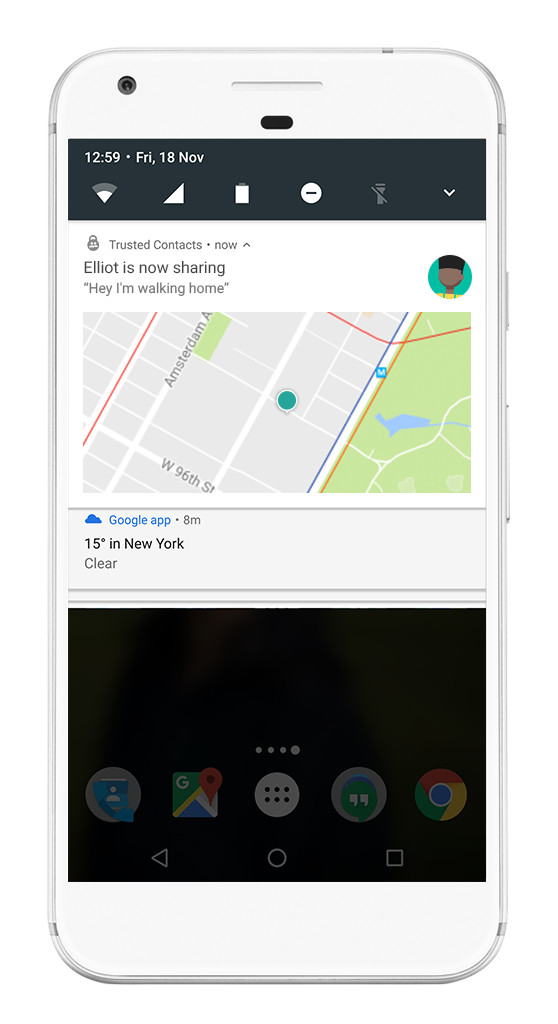
Elliot stayed at the office later than normal and notices it’s awfully dark out. He opens Trusted Contacts and shares his location with Thelma. Now Thelma can walk him home — virtually. When Elliot gets home, he simply taps the banner at the top of the screen or from the lockscreen and stops sharing his location.
Whether you just need a little reassurance or you’re actually in an emergency, Trusted Contacts helps connect you with the people you care about most — at the times you need them most. Download Trusted Contacts today from the Play Store and visit the help center for more info. If you're an iOS user, click here to get notified when the iOS app is available
With Trusted Contacts, Google is launching a new personal safety app today that allows others to ping you for your location when they think you may been in an accident or in danger. The idea here is that you define who these trusted contacts are and by doing so, you allow them to see where you are when they ping you. The twist here is that you can always decline to share your location, but… Read More
For chimpanzees, it’s all about the butt. You won’t find a female chimp going “My eyes are up here,” asit turns out that chimps often tell each other apart based on their behinds. Their brains even process butts in the same way that we process faces.
For a study published this week in the journal PLoS One (delightfully titled “Getting to the Bottom of Face Processing”), Dutch researchers recruited both humans and chimpanzees to match photos of various body parts and compared how they did.
Humans need to tell each other apart to survive, and we have specific brain areas for recognizing faces. We recognize people’s faces based on evaluating the whole face, not by putting together the individual parts. That’s why we get worse at...
Microsoft is planning to build a HomeHub feature into future Windows 10 updates to better compete against devices like Google Home and Amazon’s Echo. Sources familiar with Microsoft’s plans tell The Verge that the feature is currently in the planning stages, and the software maker is expected to introduce a “HomeHub” in updates due in 2017 and 2018, and not the upcoming Creators Update.
Windows Central reports that the feature will “crush” Google Home and Amazon Echo, but The Verge understands that HomeHub is designed to be a service and feature that will run on any Windows 10 PC and turn it into a machine where Cortana can be summoned from the lockscreen to provide useful information. Windows Central previously reported that the...
Marvel just released a new teaser trailer for Guardians of the Galaxy 2, and it’s packed with plenty of action, humor, and classic rock.
We got our first brief look at the movie back in October, but this new trailer gives us a great look at the entire gang: Star-Lord (Chris Pratt), Gamora (Zoe Saldana), Drax the Destroyer (Dave Bautista), Rocket Raccoon (Bradley Cooper), and even Baby Groot (Vin Diesel). The trailer opens with Drax jumping at a huge alien creature, while Rocket gives baby Groot some detailed instructions: don’t push this button.
From there, we’re treated to a further montage set to Sweet’s song Fox on the Run: the crew gets into a space battle, curse the skies, all with the same level of banter and humor that we saw...
UK police have a creative new solution to the encryption problem: just snatch the phone.
Today, the BBC reported on a recent fraud case in which Scotland Yard agents staged a pre-arrest mugging in order to make sure a suspect’s iPhone was seized in unlocked mode. Investigating a credit card forger, police waited for the suspect to make a call, then snatched the phone directly out of his hand before arresting him. The result was an unlocked phone — an open book for investigators, provided they didn’t let it slip into sleep mode.
The tactic itself isn’t new. In the Silk Road case, agents made a point to pull Ross Ulbricht away from his laptop before he could close it, which would have encrypted the hard drive and shut off valuable...
by David Nield on Field Guide, shared by Andy Orin to Lifehacker
Image: Gizmodo
As months and years pass by, even the most powerful computer can start to slow down and show signs of age, much like a car. But as with your automobile, there are steps to take that will minimize the creeping sluggishness and keep your laptop running as fast as possible for as long as possible. Here are a couple of easy steps you can take to keep your computer from slowing down.
1) Keep programs and extensions to a minimum
Image: Screenshot
Desktop applications and browser extensions are usually the main culprits when your computer starts slowing down. The more of them the OS has to deal with, the more work it has to do and the more system resources are used up.
Try and think twice before installing anything new and ask yourself whether you genuinely need it on your system. Perhaps there’s a web version you can use instead, say, or maybe you can run a portable version from a USB stick.
For those applications and browser plug-ins that you really can’t live without, make sure you’re cleaning them up regularly. Anything that’s sitting gathering dust on your system should really be uninstalled, for the reasons we’ve already mentioned—it means your OS isn’t always tripping up over them.
There are various third-party utilities available to help tidy up your applications and browsers and make sure bloat is kept to a minimum, and CCleaner is one of the best cross-platform, free ones we’ve found.
Another reason this is a good idea is to keep as much local storage space free as possible. Start running out of hard drive space and system sluggishness is sure to soon follow.
2) Don’t let anything auto-start
Image: Screenshot
A lot of programs are keen to start up at the same time as Windows or macOS, and while this enables them to load themselves quickly into memory when you need them, it also means your computer is taking more and more time to boot up and function.
To check what’s starting alongside the OS, go to the Startup tab of the Task Manager on Windows (right-click on the taskbar to launch it), or Users & Groups in System Preferences on a Mac (look under the Login Items tab).
It’s fair to say that auto-starting works well for some applications, particularly those that you always want to hand, but if you can keep this list of programs down to a minimum then you should see the benefit in overall performance. Some trial and error might be required to work out which are the biggest system resource hogs on your computer.
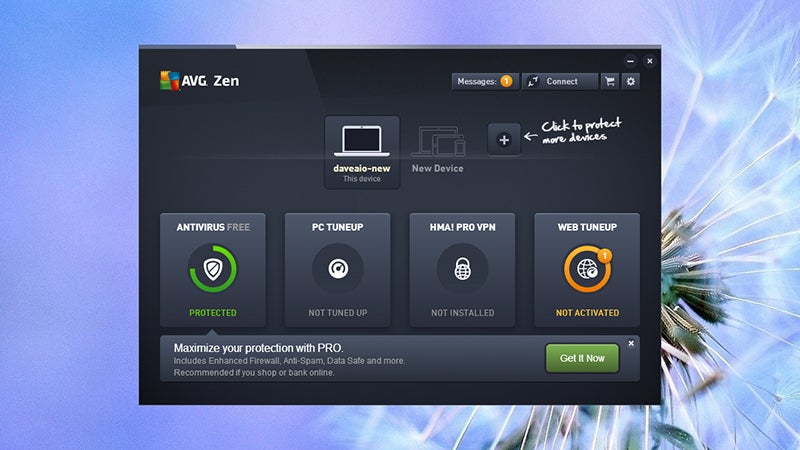
3) Make computer security a top priority
Image: Screenshot
Another common cause of system slowdowns are unwanted malware apps that sneak onto your system. Not just full-blown viruses but also browser extensions gathering advertising data and dodgy utilities that are bundled with genuinely useful software.
This feeds back into the point we made earlier, than being very selective about what you install is going to benefit you and your computer in the long run.
Of course unwanted malware and adware can install itself surreptitiously too, which is where a competent security package can really earn its keep. Freeware is very appealing for obvious reasons but this is one of those situations where spending a few dollars for something professional is a worthy investment, provided you pick the right package.
Our friends at Lifehacker have some quality recommendations for security software that will work on your Windows or Mac machine (you’re less likely to come across problems on the latter but it’s still worth considering).
4) Update everything regularly
Image: Screenshot
Updating your software and firmware can often seem like a chore, but it’s one of the keys to maintaining a healthy system for a number of reasons. It patches security bugs, it (usually) optimizes code, it adds new features, and it improves compatibility with all the other hardware and software you’ve got on your system.
Particularly with the modern versions of Windows, macOS, and all the applications that run on them, keeping software updated is crucial in avoiding slowdowns and crashes, which is why many apps now auto-update in the background.
On Windows, you can find the update settings behind the Update & security entry on the main Settings dialog (accessible from the Start menu); on macOS, head to the App Store and click on the Updates tab to see what’s available.
5) Refresh, reset, repeat
Image: Screenshot
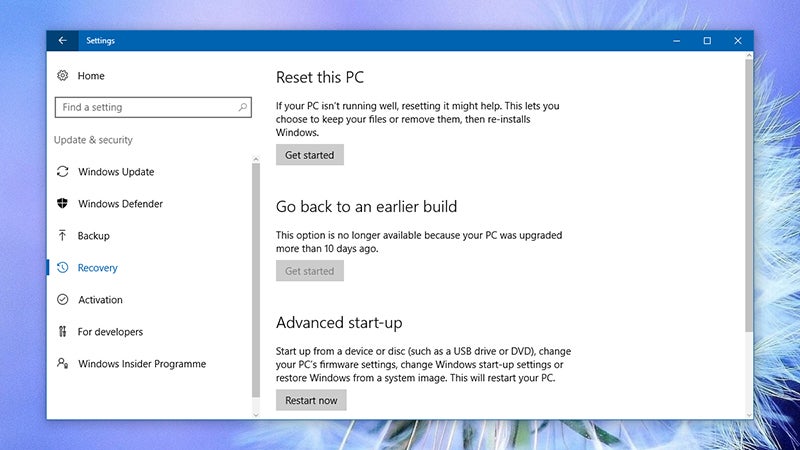
And on a point related to the last one, it’s often well worth resetting your entire computer back to its factory state on a regular basis, as you’ll usually get some significant performance boosts at the same time.
In the not-so-distant past the benefits of doing this were outweighed by the hassle of having to get everything reformatted and reinstalled, but the most recent versions of Windows 10 and macOS Sierra make the whole process much more straightforward. You can even reset the system without losing any of your personal data.
On Windows, head to Update & security in Settings to get started (there’s a fuller guide here); on a Mac, find the Disk Utility tool by rebooting your machine and holding down Cmd+R as it starts to boot up again (full guide).
You need to make sure you’ve got backups of all your important stuff, and that you can easily download and reinstall any software you need if necessary, but these small inconveniences aside it’s like a spring clean for your system and should stop ever-increasing slowness.
The UK lumpenproletariat will surely accept, nay, cheer, the fact that their betters are too well-bred to be expected to follow the same rules as the rabble.
Politicians have exempted themselves from Britain's new wide-ranging spying laws.
The Investigatory Powers Act, which has just passed into law, brings some of the most extreme and invasive surveillance powers ever given to spies in a democratic state. But protections against those spying powers have been given to MPs.
Most of the strongest powers in the new law require that those using them must be given a warrant. That applies to people wanting to see someone's full internet browsing history, for instance, which is one of the things that will be collected under the new law.
As J.R. "Bob" Dobbs said, "I don't practice what I preach because I'm not the kind of person I'm preaching to."






 Google’s flagship mobile application is getting a big makeover today, with a focus on making it easier to separate the things you need to know about – like upcoming appointments or flights -from the things you’re interested in, like news, sports, and entertainment. The app still maintains its previous card-style design, but it now offers two different sections to better…
  Last summer, One Drop raised $8 million in Series A funding for its diabetes management app. At the time, the company said the money would go, in part, to developing hardware designed specifically for its mobile health software. The result is the Chrome, a glucose monitoring system that, well, looks pretty slick, so far as glucose monitoring systems go. It’s a four-piece set that…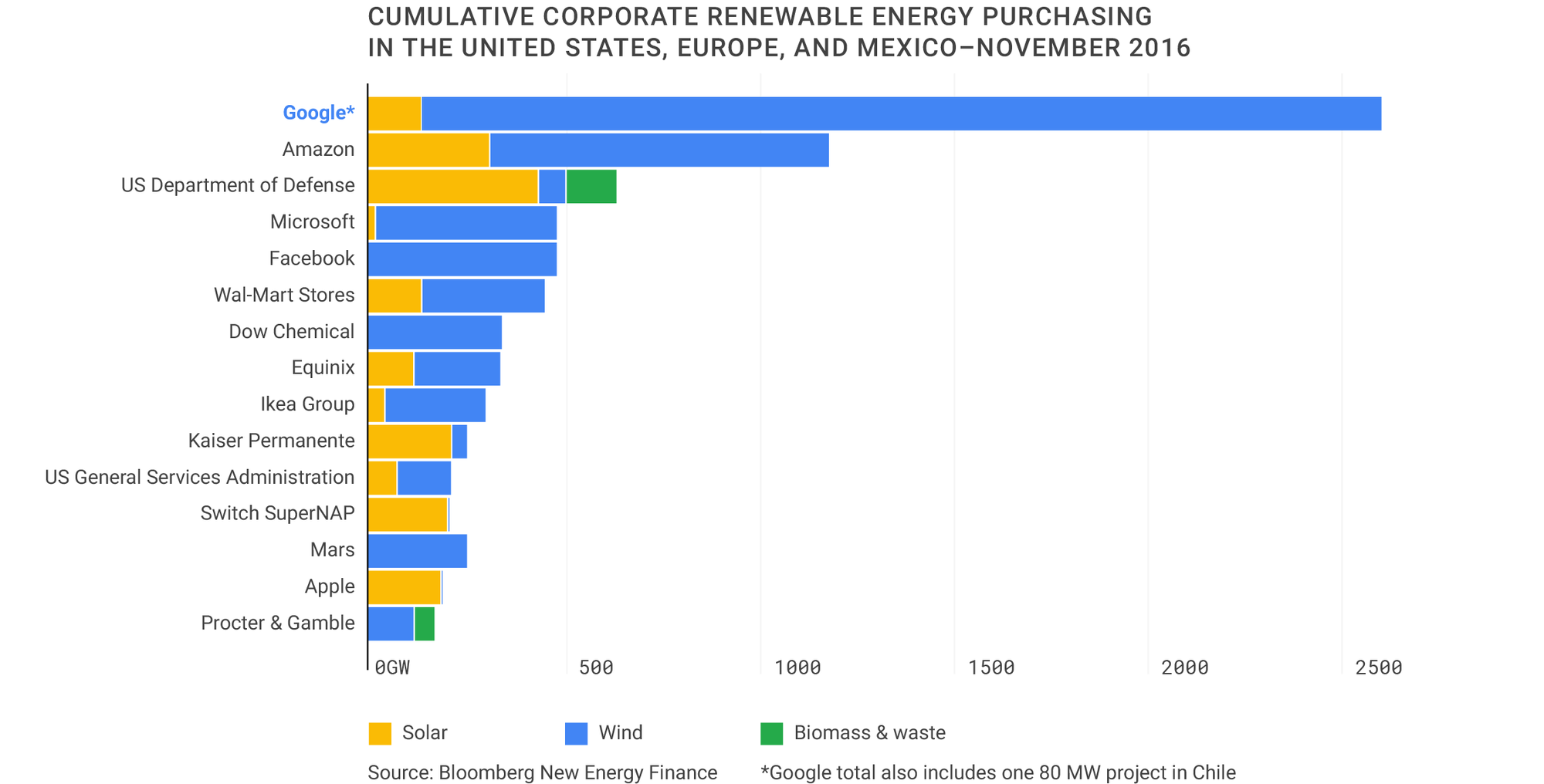


 Netflix is making headway on its ambitions to fill half its library with original content. According to Netflix’s Chief Content Officer Ted Sarandos, the company is planning to release about 20 unscripted series next year, bringing it closer to its goal of having 1,000 annual hours of original programming available on its service in 2017.
That’s more than the amount of original…
Netflix is making headway on its ambitions to fill half its library with original content. According to Netflix’s Chief Content Officer Ted Sarandos, the company is planning to release about 20 unscripted series next year, bringing it closer to its goal of having 1,000 annual hours of original programming available on its service in 2017.
That’s more than the amount of original… 


 With Trusted Contacts, Google is launching a new personal safety app today that allows others to ping you for your location when they think you may been in an accident or in danger. The idea here is that you define who these trusted contacts are and by doing so, you allow them to see where you are when they ping you. The twist here is that you can always decline to share your location, but…