The robots will serve you now: Greenwich, London residents have officially begun receiving deliveries from autonomous, six-wheeled rolling cooler bots, which are handling the “last mile” of food delivery from nearby takeout restaurants. Engadget notes that the robots are now in “active service,” after they completed a previous testing phase which began earlier this… Read More
by Kara BaileyDirector of MerchandisingGoogle Play
As the year draws to a close, we’re thrilled to announce Google Play’s most popular apps, games, music, movies, TV shows and books globally in 2016.
The Force and Harry Potter were no match for a different kind of superhero as Deadpool and “Deadpool Kills the Universe” dominated the movie and book charts this year. Game of Thrones kept The Walking Dead away to once again claim the Iron Throne as the most popular TV show of 2016. Twenty One Pilots had no need to feel “Stressed Out” as their single came in as the number one most streamed song of the year, but don’t feel “Sorry” for Justin Bieber who came in at number two. And, of course, Pokemon GO captured the top trending game spot.
Check out Google Play’s top five lists for the most popular content around the world in 2016 below. For complete local lists, visit Google Play.
Plex, a media server company that helps customers access files on a range of devices, is expanding its cloud service well beyond Amazon. Now, users of Plex Cloud can use Google Drive, Dropbox, or Microsoft’s OneDrive to store media and other files. That way, you pay any one of those companies for storage — and pony up $4.99 per month or $39.99 per year for a Plex Pass account — to access Plex’s app library to manage files and play media. The company’s software works on most major game consoles, smart TVs, and streaming devices.
Now you can store and access media with Amazon, Google, Microsoft, and Dropbox
Michael Geist writes, "The global music industry has spent two decades lobbying for restrictive DMCA-style restrictions on digital locks. These so-called "anti-circumvention rules" have been actively opposed by many groups, but the copyright lobby claims that they are needed to comply with the World Intellectual Property Organization's Internet treaties. Now the head of the RIAA in Canada admits that the treaty drafters were just guessing and that they guessed wrong."
(more…)
To be specific, it's a model of a first year Mustang coupe, known as a 1964 1/2 model. From LEGOLAND Florida Resort where it's on permanent display:
Made out of 194,900 LEGO and DUPLO® bricks, the giant model (named #BrickPony) took approximately 1,200 hours to assemble by a team of veteran Master Builders at LEGO Systems, Inc., in Enfield, Conn.
#BrickPony measures more than 15 feet long, nearly 6 feet wide and more than 4 feet tall. It weighs 1,712 pounds, of which 960 pounds are LEGO bricks and 752 pounds is its aluminum chassis.
A few surprises were added under its hood, including a virtual horn and the sounds of a real Mustang engine — a first for a life-size LEGO vehicle — plus working headlights and taillights.
This year is quickly drawing to a close, and as the company has done over the past few years, Google is today releasing (via its official blog) a few lists of the top trending content that was released on Google Play over the past 12 months. This year, that also includes the most popular songs, movies, TV shows, books, and games as well…
Paris-based artist Anastassia Elias created these papercraft cityscapes inside toilet paper cores. It was part of November's World Toilet Day, and it was commissioned to bring awareness to the sad state of toilet affairs in many large cities. (more…)
the empowerment plan is a detroit-based, nonprofit organization focused on permanently elevating families from the generational cycle of homelessness. it hires single parents from local shelters and provide them with training and full-time employment as seamstresses so that they can earn a stable income, find secure housing, and regain their independence. the individuals it hires manufacture a coat designed to meet the needs of those in the homeless community. the durable ‘EMPWR coat’ can transform into a sleeping bag at night or an over-the-shoulder bag when not in use. since 2012, it has provided employment to 34 homeless individuals—all of whom have now secured permanent housing for themselves and their families—and distributed over 15,000 coats to those in need across the US and canada.
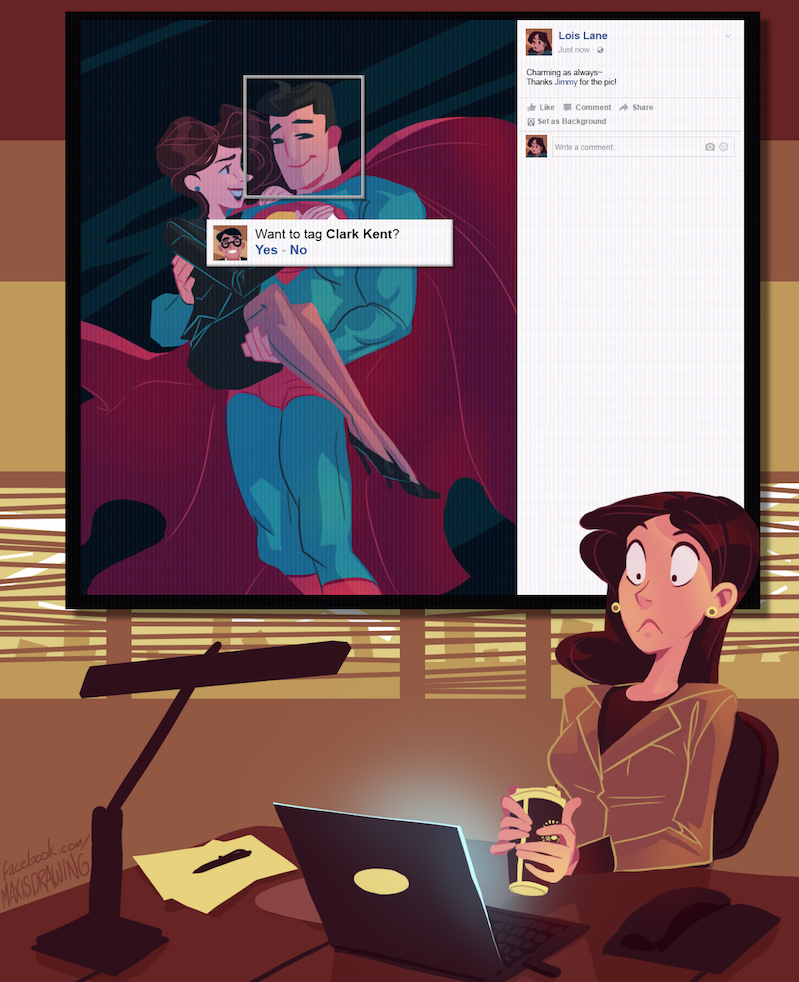
The perils of modern online life even affect the Man of Steel. Jimmy Olsen's snap run through Facebook's evil autotagging is more observant than Lois. Lots more brilliant stuff by Brakken here. (more…)
Nokia has been through the wash a bit recently, with Microsoft buying its phone business and Chinese companies using the Nokia name to sell devices by. The Finnish company announced a return to the tablet market in May, and now it is announcing it will return to smartphones in 2017, along with manufacturing partner HMD Global.
A new section devoted to phones has appeared on Nokia's website - you'll see that the website is operated by 'HMD Global Oy,' which is now the exclusive licensee of the Nokia brand.
According to a number of sources, Fitbit is on the verge of acquiring smartwatch maker Pebble. The deal comes as both companies are facing declining fortunes in the wearable industry. This acquisition will reportedly result in the Pebble brand being phased out.
The British Film Institute announced a five-year plan yesterday that includes the promise to digitize and preserve at least 100,000 “at-risk” TV shows. The shows span genres, and include comedies, dramas, documentary series, children’s TV, and “breakfast television.” You likely haven’t heard of most of these shows, as they date back to the 1960s, but just for fun, here’s a few: At Last the 1948 Show, Basil Brush,and Nationwide. The institute hasn’t determined all 100,000 titles yet, but plans to work with broadcast partners to assess the programs most in need of being digitized.
BFI’s creative director told the BBC that these videos are on old, one-inch and two-inch formats and that only a select group of people know how to handle these...
We’ve all had a lot of fun playing around with image recognition machine learning AIs from the likes of Google and Microsoft. Today, Amazon’s getting in the game with the launch of its own tool, Amazon Rekognition, which aims to provide deep-learning services to developers.
While the tool isn’t public-facing like Google’s drawing game or Microsoft’s age-guessing bot, Amazon Rekognition does appear to do much of the same: it can look at photos and recognize human faces, identify their emotions, and label objects. In a sample photo of a dog, the AI identified it as “animal,” “pet,” and even specifically labels it as a “Golden Retriever.”
The API will be available to all AWS users, even those on the free tier. Developers can use it to add...
Google seems to be slowly rolling out, via a server-side update, a new layout for the Play Store app that allows you to scroll through app listings via a new card-style layout.
Netflix has finally delivered on something users have been asking for basically since it first arrived; offline playback. The streaming media company announced that users will be able to download select Netflix content for use while they’re away from a data connection beginning Wednesday. Airplane mode. Road trip mode. Stuck-in-the-subway-for-20-minutes mode. Your favorite stories are… Read More
The death of the devoted e-reader has been foretold time and time again. But while there’s been an unquestionable thinning of the herd, the devoted few still continue to move devices. That’s due in no small part to the benefits offered by E Ink. When it comes to battery life and daylight reading, full color can’t compete, so Amazon keeps selling a lot of Kindles – and… Read More
You've probably asked Google Now, Siri, or Cortana to tell you a joke or to direct you to a destination, but this video takes the idea of conferring with voice assistants to another level - not necessarily a higher level, mind you, but at the very least, a funnier one.
In this silly video by Amazon Echo Dot and Google Home owner Adam Jakowenko, the two voice-activated speakers continuously respond to each other by including the other's activation phrase ("Hey, Google" and "Alexa") in a pre-set calendar event.
Clue, an app built on machine learning to track a woman’s monthly menstrual cycle, announced it has raised $20 million in Series B funding today. The money comes from several investors with a focus in the healthcare space and was led by Nokia Growth Partners (NGP). Other participants in the round include existing investors Union Square Ventures, Mosaic Ventures, Brigitte Mohn and… Read More
In an effort to curb online piracy, the movie and music industries reached an agreement with the UK’s leading ISPs to send warnings to alleged copyright infringers.
Mimicking its American counterpart, the copyright alert program will monitor the illegal file-sharing habits of UK citizens with a strong focus on repeat infringers.
The piracy alerts program is part of the larger Creative Content UK (CCUK) initiative which already introduced several anti-piracy PR campaigns, targeted at the general public as well as the classroom.
The plan to send out email alerts was first announced several years ago when we discussed it in detail, but it took some time to get everything ready. This week, a spokesperson from CCUK’s “Get it Right From a Genuine Site” campaign informed us that it will go live in first few months of 2017.
It’s likely that ISPs and copyright holders needed to fine-tune their systems to get going, but the general purpose of the campaign remains the same. This means that the focus lies on education.
While it may be quite scary for people to see that their piracy habits are being tracked and reported, the campaign stresses that they prefer the carrot over the stick.
“Educational emails will help account owners and others who use their accounts to do the right thing and get their content from legitimate sources,” the spokesperson informed us.
The alert emails will be similar to what we’ve seen in the United States, except that there are no direct punishments tied to them. They will, however, list details about the pirated files that were shared and how this can be prevented in the future.
“As well as providing links to help the customer find legal sources of content in future, the email will direct the user to further resources to answer any questions they may have about how the information was obtained and how to make sure their account is not used to infringe content again,” we were told.
“We realize that some people might not realize their account has been used to share files, for example if their children have been illicitly downloading content and then sharing it without their parent’s knowledge.”
Pointing people towards one of the many legal alternatives is a central goal, through which CCUK hopes to decrease piracy rates over time.
The “Get it Right From a Genuine Site” team is confident that they can drive some significant change. Several benchmark measurements were taken prior to the campaign, so its effectiveness can be properly measured once it’s underway.
Talks about this type of alert system have been on the agenda for almost a decade. Ironically, however, now that it’s getting close to finally being implemented, P2P file-sharing is on the decline.
Over the past years, most pirates in the UK have shifted towards direct download and streaming services. Since the copyright alerts only target P2P sharing, it will have less of an impact today than it would have a few years ago.
To what degree the new anti-piracy campaign will convert pirates into paying customers has yet to be seen. In any case, it won’t pass by unnoticed.
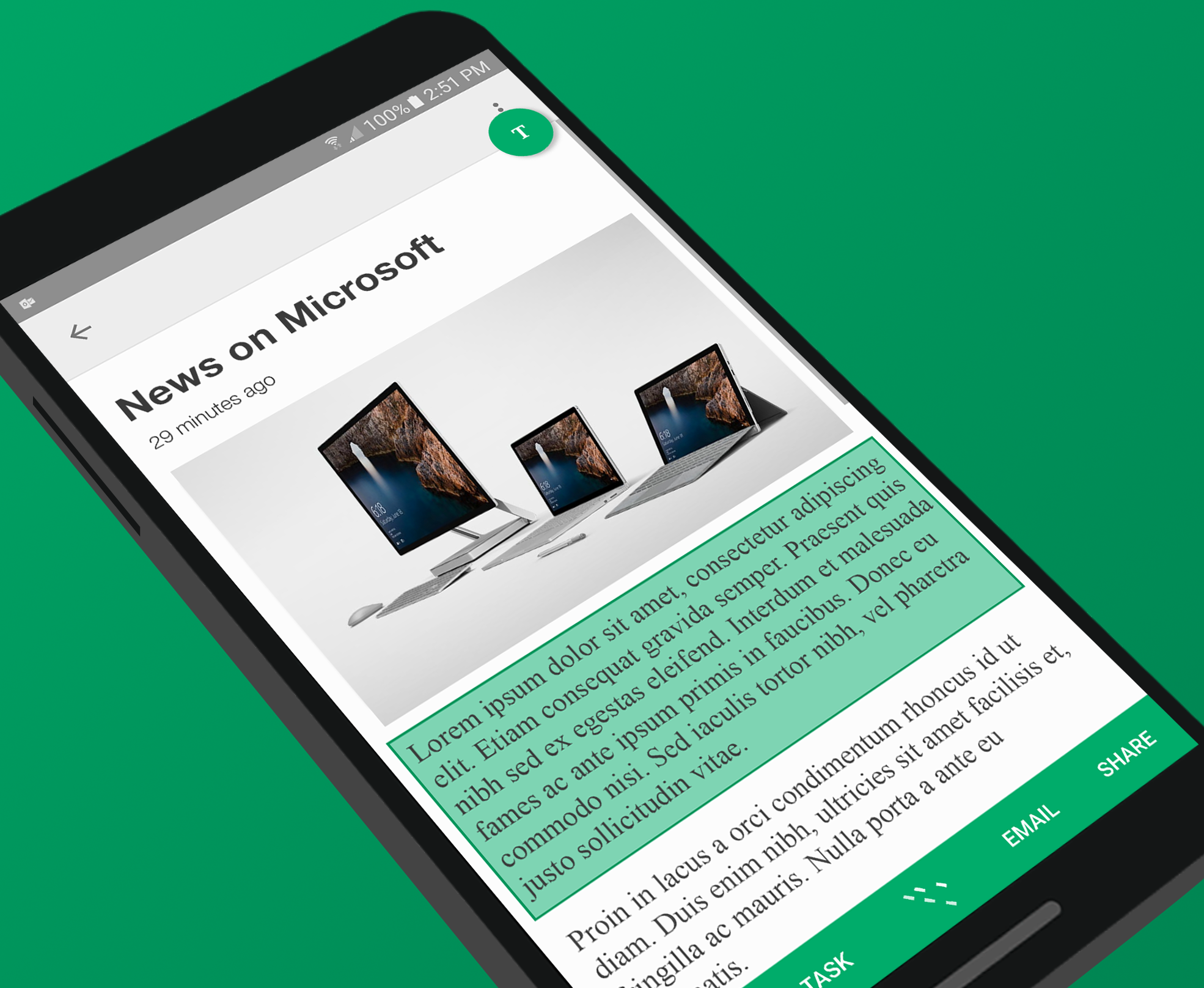
Remember back in the early days of Android when it had copy and paste, and the iPhone didn't? Those were strange times. Copy and paste is just something you expect to be able to do now, but there are plenty of places in Android where the text isn't accessible. Microsoft's Clip Layer app aims to change that by binding a universal copy option to the home button.
When you trigger Clip Layer, it reads all the text on your screen, making it accessible for copying.
Bored while you wait for friends to text back? Now you can challenge friends for high scores on Facebook Messenger’s new Instant Games, like Pac-Man, Space Invaders, and Words With Friends Frenzy. Available right from your message threads, they load in seconds since they’re built on the HTML5 mobile web standard, rather than having to be downloaded like clunky native apps. Read More
Launched in 2013, Timelapse is a global, zoomable map built on top of the Google Earth Engine that allows you to explore how a location has changed from 1984 to 2016. A huge update today adds petabytes of new data and an additional four years of imagery that makes for sharpest historical view of Earth ever.
Diabetic retinopathy — an eye condition that affects people with diabetes — is the fastest growing cause of blindness, with nearly 415 million diabetic patients at risk worldwide. The disease can be treated if detected early, but if not, it can lead to irreversible blindness.
One of the most common ways to detect diabetic eye disease is to have a specialist examine pictures of the back of the eye and determine whether there are signs of the disease, and if so, how severe it is. While annual screening is recommended for all patients with diabetes, many people live in areas without easy access to specialist care. That means millions of people aren’t getting the care they need to prevent loss of vision.
A few years ago, a Google research team began studying whether machine learning could be used to screen for diabetic retinopathy (DR). Today, in the Journal of the American Medical Association, we’ve published our results: a deep learning algorithm capable of interpreting signs of DR in retinal photographs, potentially helping doctors screen more patients, especially in underserved communities with limited resources.
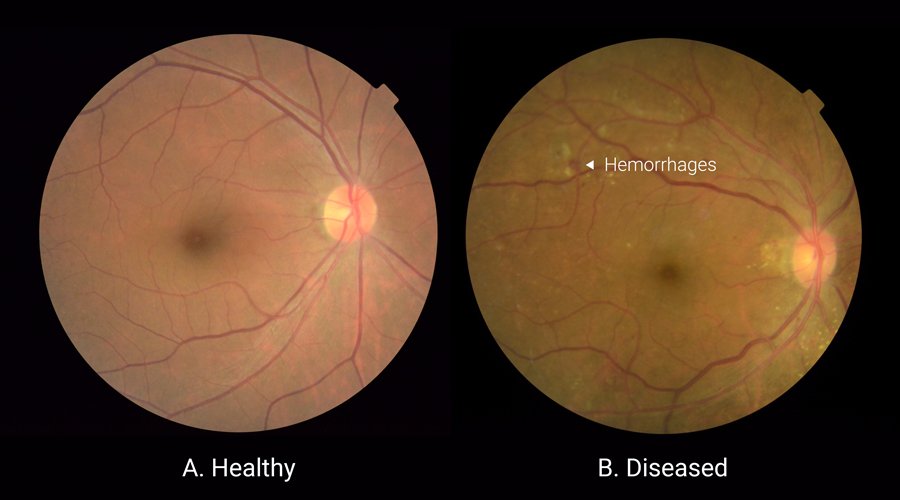
Examples of retinal photographs that are taken to screen for DR. A healthy retina can be seen on the left; the retina on the right has lesions, which are indicative of bleeding and fluid leakage in the eye.
Working with a team of doctors in India and the U.S., we created a dataset of 128,000 images and used them to train a deep neural network to detect diabetic retinopathy. We then compared our algorithm’s performance to another set of images examined by a panel of board-certified ophthalmologists. Our algorithm performs on par with the ophthalmologists, achieving both high sensitivity and specificity. For more details, see our post on the Research blog.
We’re excited by the results, but there’s a lot more to do before an algorithm like this can be used widely. For example, interpretation of a 2D retinal photograph is only one step in the process of diagnosing diabetic eye disease — in some cases, doctors use a 3D imaging technology to examine various layers of a retina in detail. Our colleagues at DeepMind are working on applying machine learning to that method. In the future, these two complementary methods might be used together to assist doctors in the diagnosis of a wide spectrum of eye diseases.
Automated, highly accurate screening methods have the potential to assist doctors in evaluating more patients and quickly routing those who need help to a specialist. We hope this study will be one of many examples to come demonstrating the ability of machine learning to help solve important problems in healthcare.
Recently, Chromecasts have developed a strange quirk. When you cast something from your phone to your TV, every single device on your network will get a notification to control it. If you find this annoying, here’s how to turn it off.
The network-wide notification is presumably a solution to a problem that Chromecasts have had since they first arrived on the scene. Namely, you don’t have a remote control you can just pick up and pause with. If one person’s device is connected to the Chromecast, you can control it with that, but they have a nasty habit of disconnecting if you don’t use them for too long. To remedy that problem, this new network-wide notification gives everyone basic controls.
The downside to this solution is, well, everyone has the notification. Even if you’re not watching TV, you get the notification, which is annoying. You’re also handing control over your stream to anyone in the house. While technically anyone on the network can take over the Chromecast at any time, this makes it easier to mess with other people’s streams, and it broadcasts to everyone that you’re watching something unnecessarily. To turn this feature off, follow these steps:
When the network-wide notification appears, swipe down on it with two fingers.
Tap the Settings icon.
Disable the toggle that reads “Show remote control notifications.”
Alternatively, you can disable it entirely under Settings > Google > Google Cast in your phone’s Settings app. Both methods will remove the notification entirely.
A couple of weeks ago, I got my hands on Google Home and immediately set out to use it and record my initial impressions. Now that I've given this odd little device a chance to prove its worth in my home, the time has come to finish the review. Out of the gate, I must confess to a little personal surprise at just how little my opinions have changed from the first 24 hours I had to spend with the device.
Nova Launcher has a lot of great settings for you to explore, and plenty of potential for awesome themes and customizable layouts. First things first, though, you have to actually download the launcher and get yourself used to it. Now, there is a learning curve to every launcher out there, but we have a few simple tips to help make your transition as smooth as possible.
Import your layout
You do not want to have to put everything back the way you had it on your old launcher, and Nova gets that. That's why before you go futzing with element styles and shaders, you should import your old launcher's layout so that you're starting out from what you had rather than scratch.
Open Nova Settings.
Tap Backup & import settings.
Tap Import.
Read the warning that comes up and tap OK.
Tap the launcher you wish to import from.
If the data summary from what Nova Launcher found looks correct, tap Import.
Now, given the limitations on how launchers read and share widget data, you might have to re-create a few of your widgets on your newly imported home screen, but if you're lucky, the placeholders will be the same size. Starting from the layout you had means that instead of fussing with getting back to speed, you can hit the ground running in Nova and start experimenting.
Desktop grid size (and subgrid positioning)
When screens were 4 inches, a 4x4 grid made sense. Screens are not 4 inches anymore. Home screens do not need to be confined to such a small grid. They waste space. They significantly limit the amount you can fit on a single screen. Here's how to change that.
Open Nova Settings.
Tap Desktop.
Tap Desktop Grid.
Slide the row and column numbers to the size you want.
Tap Done.
While 5x5 will allow your icons to better line up with your dock, don't be afraid to try out even bigger grid sizes — I use a 8x6 grid on my HTC 10 and it's worked out quite well for me. Also, did you notice the setting hiding in the Desktop Grid screen?
Subgrid-positioning allows you to place things between the regular grid spaces, helping you better resize widgets and line things up to your desires. You might not want it on right this second, but once you turn it on, placing elements on your home screen gets a whole lot easier.
Icons
Icons on Android have always been kind of a mess — that's how it is when you don't force everyone to be the same rounded rectangle. That doesn't mean we have to settle with the mishmash of icon styles that inevitably happens between your various apps. No, we have these wonderful things called icon packs to replace your boring old icons with something new, beautiful, and consistent.
Once you've got your icon pack, you can apply it like so:
Open Nova Settings.
Tap Look & feel.
Tap Icon theme.
Tap the icon pack you wish to use.
Beyond setting an icon pack, Nova Launcher can also take advantage of Android Oreo's Adaptive Icons, allowing you to instead shape your icons in one of five shapes, from squares and circles to teardrops and those confounded squircles. The feature is still in its early stages, and it interacts oddly with some icon packs, but if you're feeling brave, give it a try!
Hide unwanted apps
On most phones, there's a laundry list of apps you don't use and don't need cluttering up your launcher. On most launchers, your choices are simple: disable the app or stick it in a folder. Nova Launcher gives you another option for apps that you can't disable but still want to not look at: hide them from the launcher.
Open the app drawer.
Press and drag the app you wish to hide up towards the top of the screen.
Drag and drop the app you wish to hide on Edit.
Uncheck the Apps box to hide it from the drawer.
Tap Done.
Back it up once you're happy
Once you have things the way you want them, you should back up your Nova setup. This will make it easier to set things back up once you go to a new phone, or a error forces you to factory reset your phone. It's also helpful if you mess something up in your layout and want to get what you had back. Backups are easy, and we can send them directly to Google Drive so that they're available on every phone you set up.
Open Nova Settings.
Tap Backup & import settings.
Tap Backup.
Name your backup. It defaults to a date and timestamp, but that doesn't really tell you what the layout/theme is.
Tap the dropdown menu below the backup's name.
Select Share.
Tap OK.
Nova will create the backup and bring up the Android Share menu. Select Save to Drive or whichever cloud service you wish to store your backup on.
Ensure the account and folder listed are where you wanted to back up to, then tap Save.
If you need any more help getting acclimated to Nova Launcher, sing out in the comments below, and in our forums!
We also have a wonderful article to explain the rest of the Nova Launcher settings we ignored this go around.
Updated October 2017: This article has been updated to reflect advancements in Nova's features, especially in regards to icons.
Welcome to the roundup of the best new Android applications and live wallpapers that went live in the Play Store or were spotted by us in the previous 2 weeks or so.
Please wait for this page to load in full in order to see the widgets, which include ratings and pricing info.
Looking for the previous roundup editions? Find them here.
Chromebooks have come a long way over the past few years, but we still see a ton of misconceptions surrounding the platform from the average consumer. That’s a big hurdle for OEMs trying to market Chromebooks, but now Lenovo is firing back on Chromebook myths in a new ad for its ThinkPad 13 Chromebook.
With the passage of the Snoopers Charter earlier this month, the UK has become the most-surveilled "democratic" state in the world, where service providers are required to retain at least a year's worth of their customers' browsing history and make it searchable, without a warrant, to a variety of agencies -- and no records are kept of these searches, making it virtually impossible to detect petty vendetta-settling, stalking, or systemic abuses (including selling access to criminals, foreign governments, and institutionalised racism).
(more…)
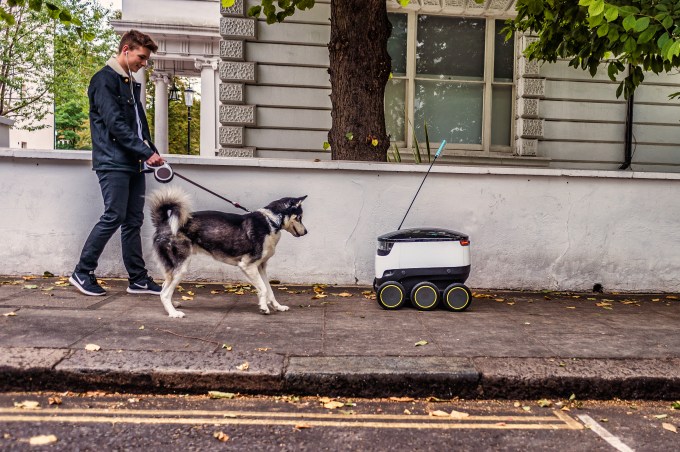 The robots will serve you now: Greenwich, London residents have officially begun receiving deliveries from autonomous, six-wheeled rolling cooler bots, which are handling the “last mile” of food delivery from nearby takeout restaurants. Engadget notes that the robots are now in “active service,” after they completed a previous testing phase which began earlier this… Read More








 Netflix has finally delivered on something users have been asking for basically since it first arrived; offline playback. The streaming media company announced that users will be able to download select Netflix content for use while they’re away from a data connection beginning Wednesday. Airplane mode. Road trip mode. Stuck-in-the-subway-for-20-minutes mode. Your favorite stories are… Read More
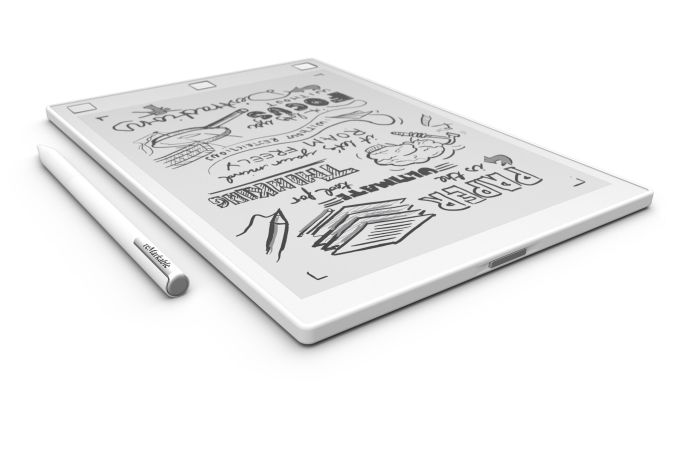 The death of the devoted e-reader has been foretold time and time again. But while there’s been an unquestionable thinning of the herd, the devoted few still continue to move devices. That’s due in no small part to the benefits offered by E Ink. When it comes to battery life and daylight reading, full color can’t compete, so Amazon keeps selling a lot of Kindles – and… Read More


 Clue, an app built on machine learning to track a woman’s monthly menstrual cycle, announced it has raised $20 million in Series B funding today. The money comes from several investors with a focus in the healthcare space and was led by Nokia Growth Partners (NGP). Other participants in the round include existing investors Union Square Ventures, Mosaic Ventures, Brigitte Mohn and… Read More


 In an effort to curb online piracy, the movie and music industries reached an agreement with the UK’s leading ISPs to send warnings to alleged copyright infringers.


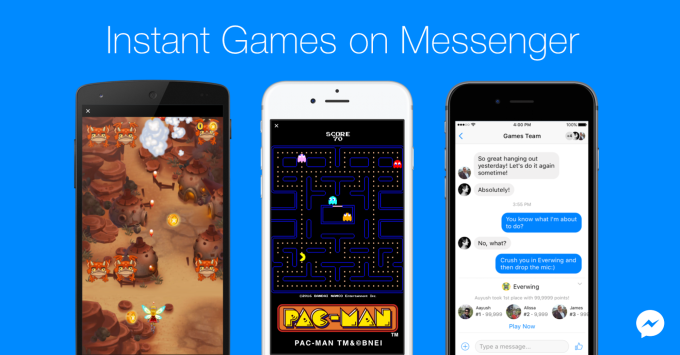 Bored while you wait for friends to text back? Now you can challenge friends for high scores on Facebook Messenger’s new Instant Games, like Pac-Man, Space Invaders, and Words With Friends Frenzy. Available right from your message threads, they load in seconds since they’re built on the HTML5 mobile web standard, rather than having to be downloaded like clunky native apps. Read More




 Welcome to the roundup of the best new Android applications and live wallpapers that went live in the Play Store or were spotted by us in the previous 2 weeks or so.


