Shared posts

08 Oct 11:15

double mixer согласование диода

Stepan

Хороший вопрос :)

Добрый день.

Есть гибридный 3дб каплер  C0810J5003AHFC на котором собран ,классический балансный смеситель  на диодах BAT62(900мгц)

Чтото типа такого как на рисунке

Вопрос по согласованию диодов с  каплером.   Как я понимаю мне надо входное сопротивление диода привести к активному 50 ом каплера ?

К диодам  есть S-парметры  для различныых напряжений. Собственно вопрос Можно ли эти  S параметры считать входным сопротивлением диода и использовать для расчета согласования или ... ?T6V500U0.S1P


image.png.f72ea4411a6d26f74af4d628fc2123ad.png

08 Oct 10:46

Деэмбидинг согласующей цепи

Stepan

Деембеддинг рулит! :)

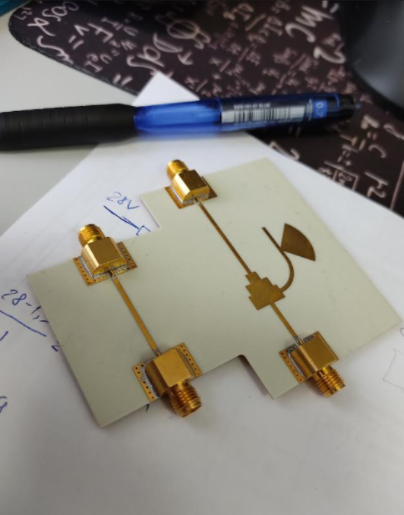
Провел деэмбидинг согласующей цепи (под катом) на ВАЦ ZNA. Первый порт анализатора подключался со стороны высокого импеданса платы (слева, там где длинная 50 омная дорожка), второй порт прибора подключался со стороны дорожки с низким импедансом (там где самая широкая дорожка).

Скрытый текст

image.thumb.png.af8e17130a5db613980c062d072b12a5.png

Получил:

Скрытый текст

image.thumb.png.8744b00e91fd298b69c66356ad9e020f.png

Ожидал:

Скрытый текст

image.thumb.png.6e9deebebf9b1a86fadd97669b87a362.png


Так же, по итогам деэмбидинга я получил 3 файла S-параметров:

- dut_plus_fixtures.s2p_left_DUT (подводящая линия, половина линии 2xthru, название от прибора);

- dut_plus_fixtures.s2p_right_DUT (подводящая линия, половина линии 2xthru, название от прибора);

- start - измерение цепи с согласующей цепью без деэмбидинга.

Пытаюсь повторить ту же самую операцию в CST:

Скрытый текст

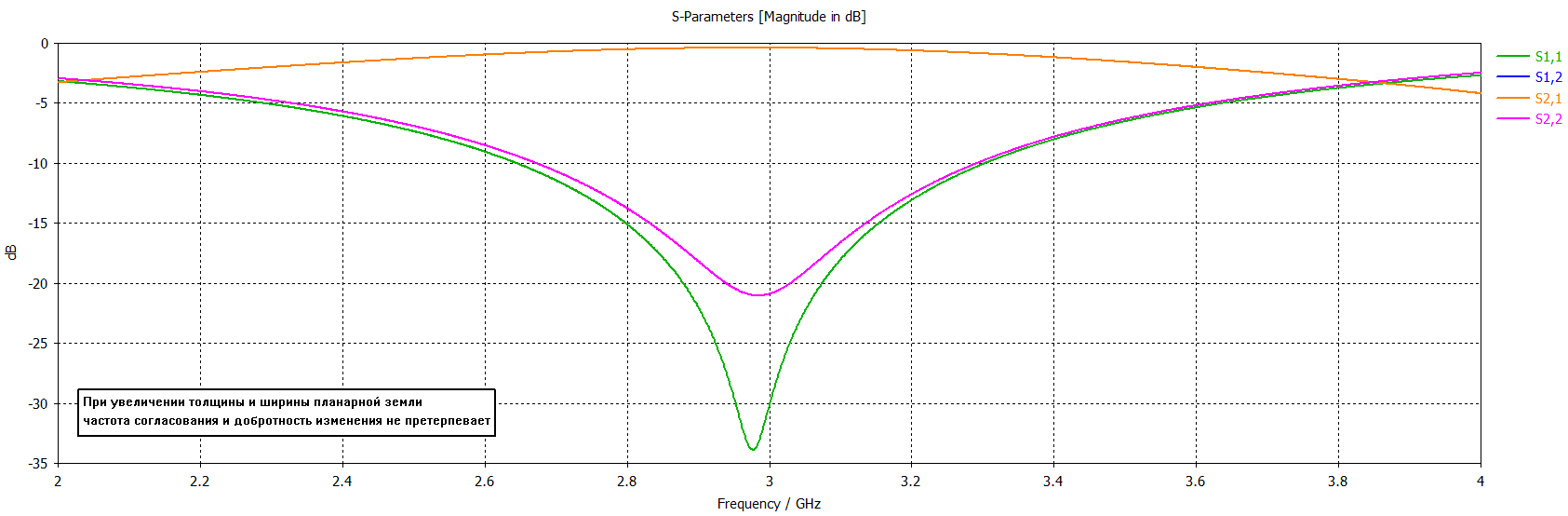
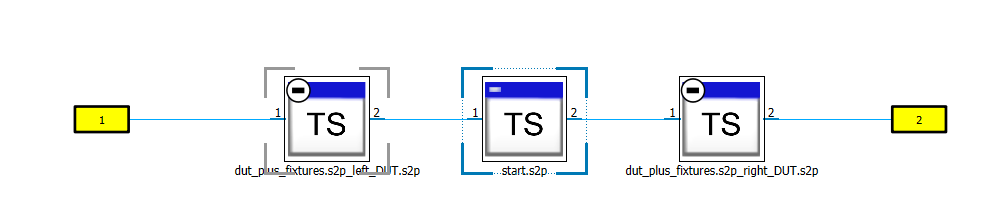
image.thumb.png.4cfb2f808e7953b82904824a3174d23e.png

image.thumb.png.1cd375c82ec591880af9653cf4551489.png

Получается что-то не похожее на результат работы прибора.

Меняю полоски местами:

Скрытый текст

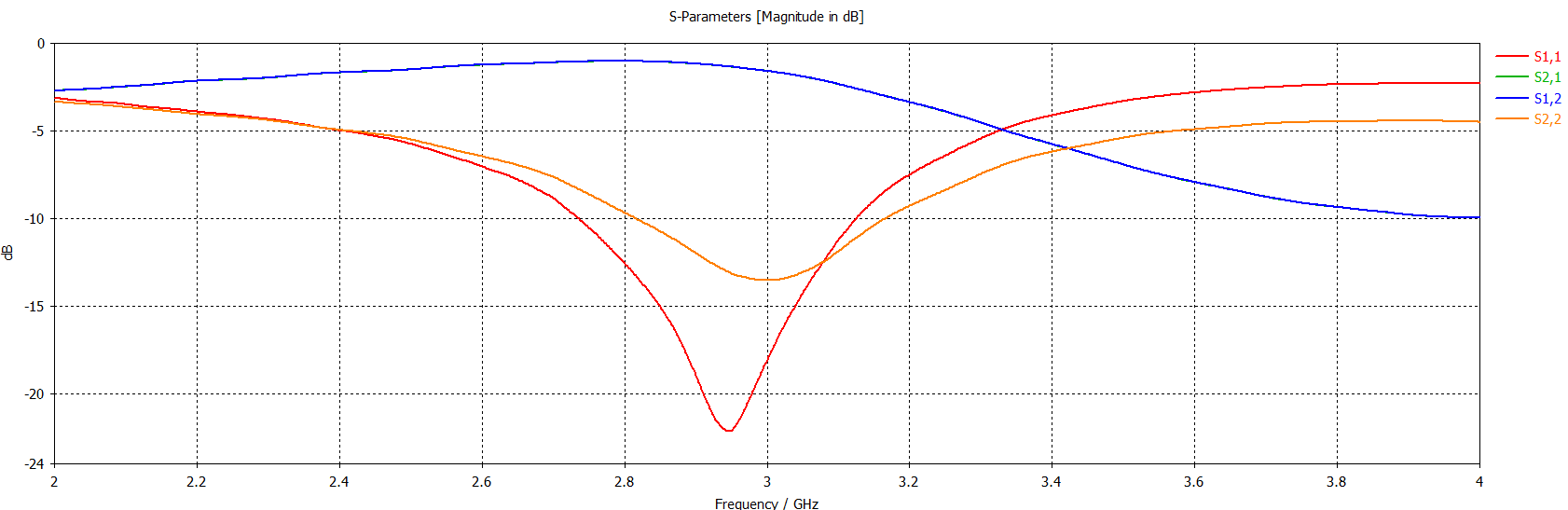
image.thumb.png.8974f27eba1e3c67622f7061f6ac36cc.png


image.thumb.png.b97f2c9b9cefaa5bf916435d7817c923.png


На прибор не похоже, но похоже на результат моделирования. 

Не посоветуете по поводу правильности подключения?

S-параметры, импеданс на который согласовывал 3.22+j*2.88 Ом на 3 ГГц.

08 Oct 10:44

Софт для 2xthru de-embedding'а

Stepan

Вообще, интересная тема...

Ищу софт для распиливания пополам S-параметров 50 омной дорожки. Платный софт знаю где достать. Есть ли вариант сделать это бесплатно? Из моих вариантов:

-1 раз написать в Ataitec. У них есть что-то типа пробной услуги на разок;

- самому написать в матлабе программу, которая перегонит S-параметры во временную область, потом разделит отсчеты во временной области пополам и перегонит обратно получившиеся две половины отсчетов в S-параметры. Вряд ли все так просто, худший вариант.

08 Sep 21:28

Как я выбирал комплексный тариф у операторов связи

by Алексей Захаров
Stepan

Да, нет в жизни совершенства...

Вот кого выбрал в итоге.
08 Sep 21:10

Куда вложить 500 000—600 000 ₽

by Виктор Джин
Stepan

Ну да...

Чтобы обогнать инфляцию и заработать
08 Sep 21:10

Какой бизнес можно открыть за 150 000 ₽: 10 историй предпринимателей

by Ольга Селиванова
Stepan

Неожиданно.

10 историй предпринимателей
08 Sep 20:48

«Любовь с первого прослушивания, прямо в сердечко»: 14 проверенных портативных колонок

by Соня Емельянова
Stepan

Интересно...

Выбор читателей Т—Ж
27 Aug 14:33

Опознать wifi антенну от ноутбука

Stepan

Да уж...

Разобрали ASUS,
антенна для wifi модуля выглядит как на картинке, подскажите, пожалуйста, аналоги, материал, как это считают?
Благодарю.
Сзади номер X521 в хухлах не нашёл.


wifiAsusX521.jpg

25 Aug 20:29

«Не звоните мне больше»: как избавиться от телефонных спамеров

by Света Чистякова
Stepan

Хорошее дело...

Каждый вызов с неизвестного номера — повод для сомнений: брать или не брать трубку. С одной стороны, жалко пропустить важный звонок, например от коллеги или курьера. С другой, не хочется тратить время на разговоры со спамерами. Звонков со спамом действительно много — по нашим данным, люди считают ненужными примерно половину вызовов с номеров, которых нет в адресной книге.

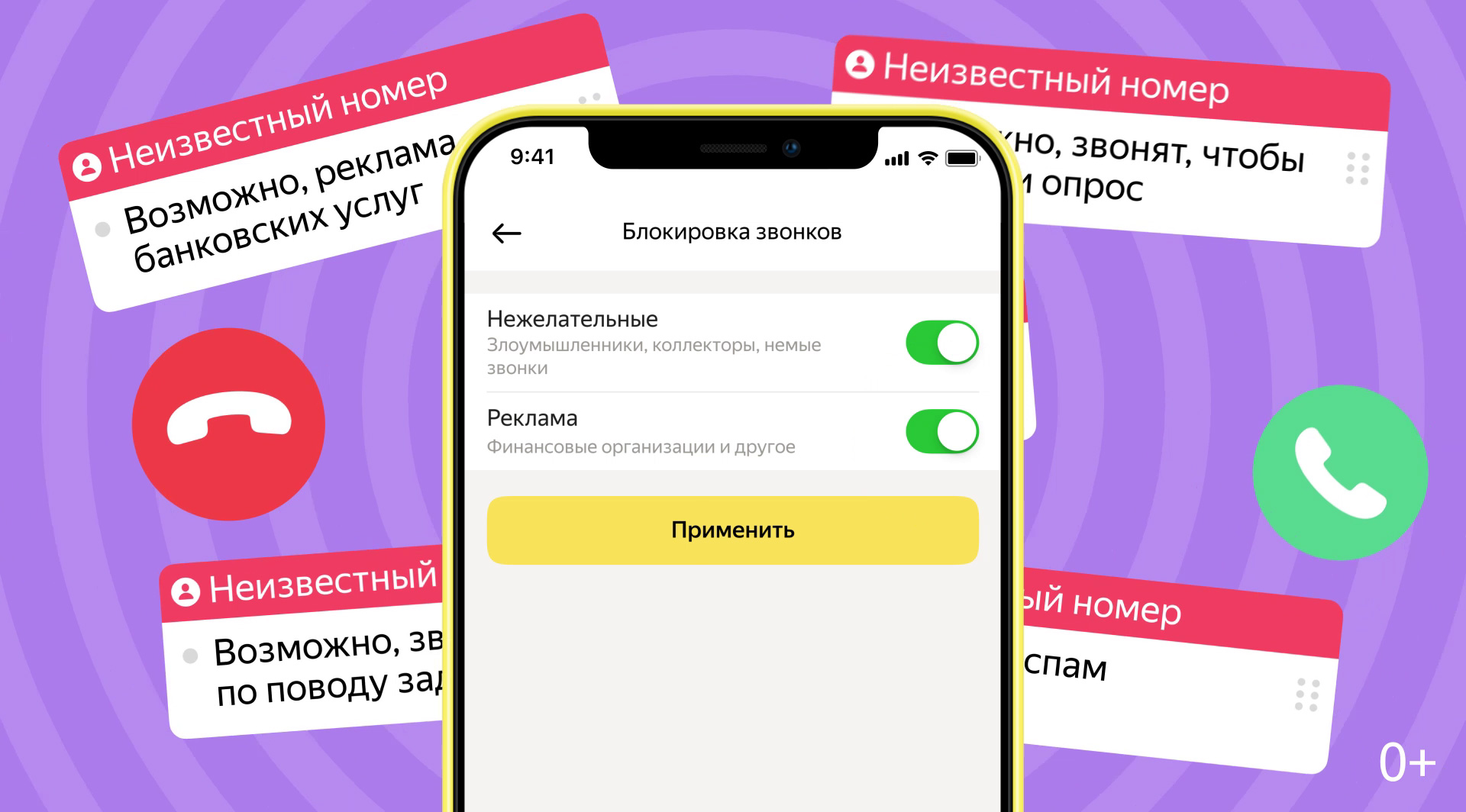
Чтобы избавить наших пользователей от необходимости выслушивать приглашения на «бесплатные обследования» или предупреждения от «службы безопасности банка», мы несколько лет назад добавили в приложение Яндекс бесплатный определитель номера — АОН. Он распознаёт, с какой целью вам звонят, и показывает вердикт на экране телефона — а вы решаете, стоит ли отвечать.

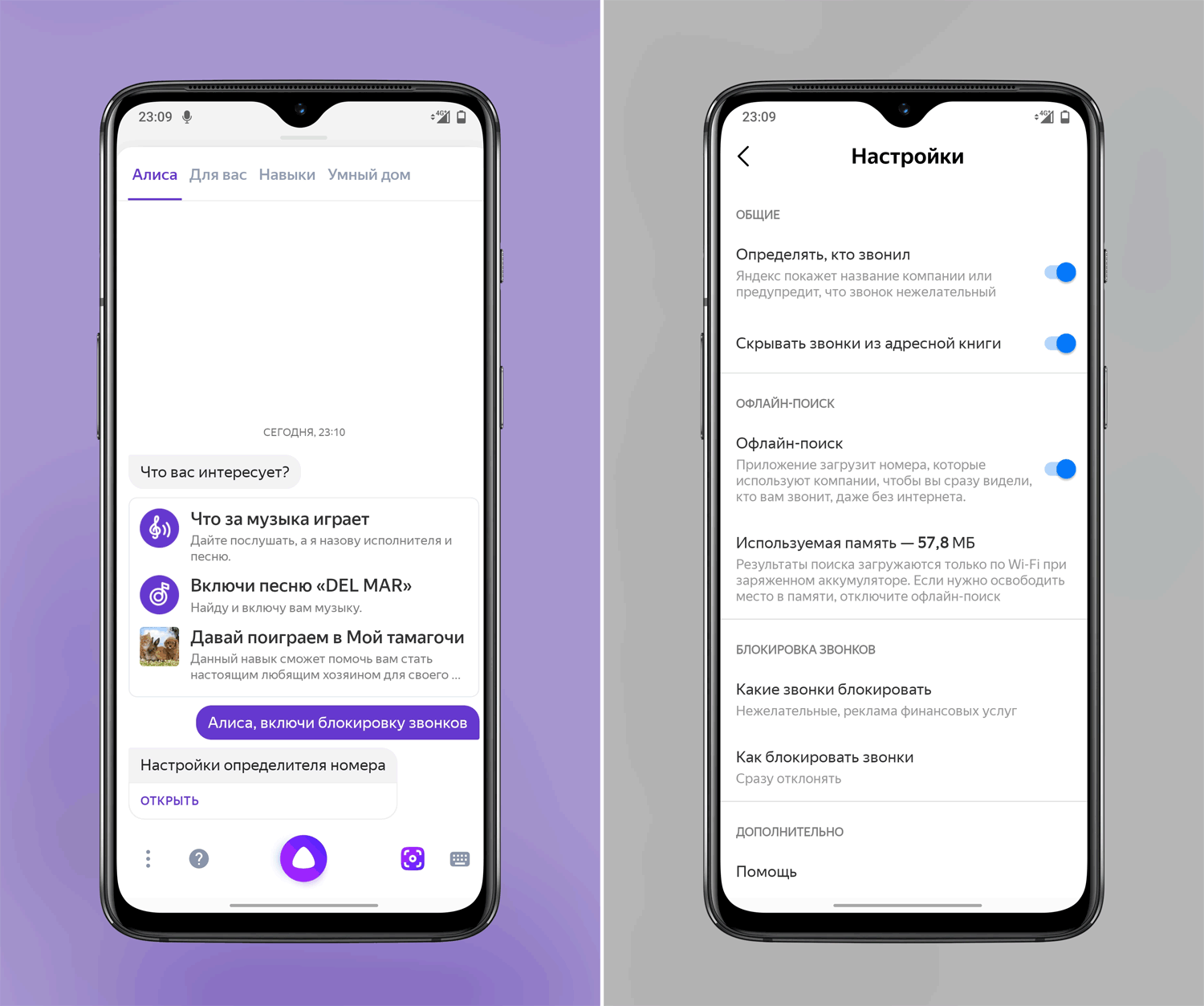
Сегодня — следующий шаг: мы научили наш АОН блокировать нежелательные вызовы. Теперь вам не придётся отвлекаться на звонки, которые заведомо не стоят вашего внимания. Чтобы поставить блокировку, откройте настройки определителя в приложении Яндекс (Главный экран → Сервисы → Определитель номера) или просто скажите Алисе: «Включи блокировку звонков».

АОН блокирует звонки с рекламой финансовых услуг и от коллекторов, «немые» звонки и звонки от злоумышленников — например, когда под тем или иным предлогом пытаются выманить данные банковской карты. За счёт блокировки можно сильно сократить поток входящих звонков. Мы подсчитали, что сейчас АОН избавляет в среднем от семидесяти процентов ненужных вызовов.

Как работает определитель номера в приложении Яндекс

У нашего АОНа есть постоянно пополняемая база номеров. Данные для неё поступают из разных источников. В их числе Яндекс.Справочник и отзывы пользователей на звонки — их можно оставлять прямо в приложении Яндекс. Если звонят из организации, номер которой есть в Справочнике, АОН покажет её название. Если номера нет в Справочнике, алгоритм на основе машинного обучения построит предположение о цели звонка. Он учитывает отзывы и дополнительные данные: частоту и продолжительность звонков и т. д.

Определитель номера доступен в приложении Яндекс для iOS и Android. Владельцы устройств на Android, кроме того, могут выбрать, как поступать с нежелательными звонками: блокировать или глушить. Если выбран второй вариант, информация о вызове появится на экране телефона, но звука или вибрации не будет.

11 Aug 21:37

«Сяоми» представила робопса CyberDog — почти как у Boston Dynamics, но в 50 раз дешевле

by Артем Калеев
Stepan

И что с ним делать?

Он стоит 114 000 ₽ и умеет делать сальто назад
28 Jul 10:18

Simulation of High Speed Backplanes

by Longfei Bai
Stepan

Интересный материал...

In this blog post I would like to show how SIMULIA true transient EM/circuit co-simulation can be used to design reliable backplanes. I will show how KPIs and figures of merit such as the eye diagram can be calculated in simulation without having to test a physical prototype, and demonstrate the benefit of transient co-simulation (tran-co) over a macromodel circuit simulation method.

Introduction to backplanes modeling with IBIS-AMI

Design of long reach backplanes is a challenging task. Typically the data rate is up to tens of gigabauds and the channel length is about 1 meter. Traditional dielectrics like FR4 with loss tangent = 0.02 will lead to significant insertion loss (IL) on such a long channel. New materials with lower loss are necessary to mitigate IL. Line impedances at transmitters, receivers and connectors should match to achieve low return loss (RL).

Input/output Buffer Information Specification (IBIS) [1] is widely accepted in the industry for the modeling of input/output (I/O) buffers. IBIS Algorithmic Modeling Interface (IBIS-AMI) [1] allows vendor specific equalizations and clock recovery algorithms, which are mandatory parts of a Serializer/Deserializer (SerDes) PHY. The first step of AMI simulations is to obtain the impulse response of the passive channel and I/O buffer models, which is equal to the derivative of the step response.

True transient EM/circuit co-simulation

In the traditional workflow, the scattering parameter (S-Parameter) of the passive channel is calculated first and then converted to a SPICE model via standard macromodeling. In the end, the step response is obtained by simulating the SPICE model.

In comparison to the traditional workflow, a new transient EM/circuit co-simulation (tran-co) method [2] is introduced to calculate the step response without using S-parameters and macromodels, which solves Maxwell’s equations and circuit elements (e.g. IBIS models or AC coupling capacitors) together in time domain. It turns out to be faster than the traditional workflow and can also avoid nonphysical behaviors.

Insertion loss on a backplanes passive channel

Before designing a 1-meter-long passive channel, three shorter test boards are investigated. Test board A: dielectrics with loss tangent = 0.02 and permittivity = 4.2 and mismatched impedance; Test board B: dielectrics with loss tangent = 0.008 and permittivity = 3.2 and mismatched impedance; Test board C: dielectrics with loss tangent = 0.008 and permittivity = 3.2 and matched differential impedance of 100 ohm at transmitter and receiver.

Three test boards – A and B have two diverging traces to create an impedance mismatch and C has two straight parallel traces. A uses a substrate with different characteristics to B and C as detailed above]

Fig. 1. Three test boards A, B and C with the same size and copper as metal materials.


The simulation results are summarized in the following figure. By comparing SDD21 of curve A and B in the following left figure, we can observe the effect of dielectric loss on the insertion loss. For a 1-meter-long channel, typical dielectrics like FR4 with loss tangent = 0.02 will result in significant insertion loss, which already drops to -12 dB for the 150 mm channel. So new materials with lower loss are preferred. Comparing SDD11 curves of B and C in the right figure shows that it is important to keep the impedance matched especially at vias and connectors, where the cross section of differential pairs may change significantly.

SDD21 and SDD11 curves for the three test boards. C shows better performance than A or B]

Fig. 2. Simulation results of test boards A, B and C (left: SDD21, right: SDD11)


Macromodel of SerDes step response

In the following, we calculate the step response of the SerDes channel, which contains IBIS Tx/Rx buffer models, AC coupling capacitors and 3D passive channel.

A schematic of IBIS Tx, 3D Passive Channels and IBIS Rx, connected on differential lines with a capacitance of 1 microfarad]

Fig. 3. The total simulated network includes a 3D model and circuit elements.


S-parameters of the 3D passive channel are calculated first and then converted to a macromodel, which can be simulated together with circuit elements (i.e. IBIS models and AC coupling capacitors) in the time domain to obtain the step response. In this blog this workflow is referred to as traditional or circuit workflow. However for a long passive channel (e.g. tens of λ, with free space wavelength of the maximum simulation frequency λ), S-parameter calculation could be time consuming and the standard macromodeling process might lead to inefficiencies (due to the large size of the final circuit) and accuracy degradation in the system level simulation (due to an inaccurate modeling of the propagation delay). For this reason, we introduce the tran-co workflow [2], which doesn’t need calculate S-parameter or macromodels and solves the 3D passive channel and circuit elements step by step together in the time domain to obtain the step response.  We apply circuit and the tran-co workflow to the test board C and summarize their performance in the following table.

Table Ⅰ.                Simulation statistics of Test board C

Max. Freq. Board Length Mesh Cells Circuit Tran-co
112 GHz 150 mm ≈ 56 λ 68,186,250 117 min 86 min


As shown in the table above, the tran-co workflow is faster than the circuit workflow. Simulations are run on a machine with a CPU @2.0 GHz, a GPU 2xKepler Tesla K40c+m and 256 GB RAM.

Comparing transient co-simulation and macromodel circuit simulation

The step response of the tran-co workflow is compared to the results obtained by simulating a macromodel synthesized by using a residues-poles form (Foster Pole-Residue [2]) in a circuit solver [3]. As shown in the following, when using a macromodel synthesized as lumped elements, nonphysical ripples appear at the beginning of the step response (red, 3_112 GHz). But results of the tran-co workflow (green, 6_112 GHz) and poles/residues-based macromodel in the circuit workflow (blue, Foster) match each other and can avoid the nonphysical behaviors.

Graphs of voltage over time for the circuit and tran-co workflows compared to a Foster pole-residue model. The tran-co results agree closely with the Foster model while the circuit simulation shows non-physical ripple]

Fig. 4. Comparison of step responses (a) and enlarged view around t = 0 (b).


Statistical eye diagrams are generated for the circuit and tran-co workflows. It can be observed that the eye diagram of the circuit workflow with a macromodel synthesized as lumped elements is deformed as shown in the left figure below. The right figure below is the eye diagram for the tran-co workflow.

Eye diagrams for circuit and tran-co workflows. The eye diagram for circuit workflows shows significant eye deformation]

Fig. 5. Statistical eye diagrams of the circuit (a) and tran-co (b) workflows.


Full 3D backplanes channel simulation

Finally we follow the tran-co workflow to simulate a 1-meter-long channel on the backplane as shown in the following figure. The differential impedance of the transmission line and connectors are optimized to 100 ohm. Loss free dielectrics with permittivity = 3.2 are used for the substrate.

A transmitter on a 220 mm riser board, connected to a 620 mm mother board, which is connected to a receiver on another 220 mm riser board

Fig. 6. Complete 3D passive channel on the backplane.


After obtaining the step response, 3-taps-FFE (Feedforward Equalizer) with 1 pre- and 2 post taps and 3-taps-DFE (Decision Feedback Equalizer) are used to improve the statistical eye diagram, which does not include random jitter. So the probability density (PD) of each level contains deterministic jitter only. We convolve the deterministic jitter of the eye diagram with a random noise  and obtain the PD with a signal-to-noise ratio (SNR) of 12dB as shown below.

Fig. 7. Statistical eye diagram and voltage probability density on the dashed line of the eye diagram.


Backplane simulation workflow overview

SIMULIA CST solutions for SerDes simulation are summarized in the following picture.

Fig. 8. SIMULIA CST SerDes Solution


CST Studio Suite® Time Domain Solver [2] with GPU acceleration can simulate electrical large passive interconnects in the SerDes channel efficiently. IBIS-AMI [1] and HSPICE [3] simulation can be run in CST Design StudioTM. In the version 2022, an IBIS-AMI demo will be added in the component library, so that the users can get start with the IBIS-AMI simulation smoothly. CST Studio Suite® IDEM [2] provides state-of-the-art macromodeling techniques, which convert S-parameters to SPICE models. With the Eye Diagram Tool, users can also apply common SerDes techniques (e.g. equalization, or four-level pulse amplitude modulation (PAM4)) to their passive channel designs. The Eye Diagram Tool supports user defined Random Jitter (RJ) and statistical eye diagram. Last but not least, simulation results (e.g. differential S-parameters or probability density function) can be easily accessed by the VBA Macro Editor in CST and Python. So users can perform further analysis with VBA and Python scripts, like Channel Operating Margin (COM) [4], Error Propagation (EP) and Forward Error Correction (FEC), which are not supported by the IBIS-AMI Standard [1].


References

  1. IBIS Open Forum, https://ibis.org/.
  2. Dassault Systèmes, https://www.3ds.com/simulia/.
  3. Synopsys Inc. https://www.synopsys.com/.
  4. IEEE Std. 802.3bj-2014.

SIMULIA offers an advanced simulation product portfolio, including AbaqusIsightfe-safeToscaSimpoe-MoldSIMPACKCST Studio SuiteXFlowPowerFLOW and more. The SIMULIA Community is the place to find the latest resources for SIMULIA software and to collaborate with other users. The key that unlocks the door of innovative thinking and knowledge building, the SIMULIA Community provides you with the tools you need to expand your knowledge, whenever and wherever.
18 Jul 11:00

Способ махараджей и немного антисанитарии: как перенести жару дома без кондиционера

by Елена Евстратова
Stepan

Интересно...

Рекомендации читателей Т—Ж
17 Jul 21:23

Будущее близко: стираем языковые границы

by Света Чистякова
Stepan

Огонь!

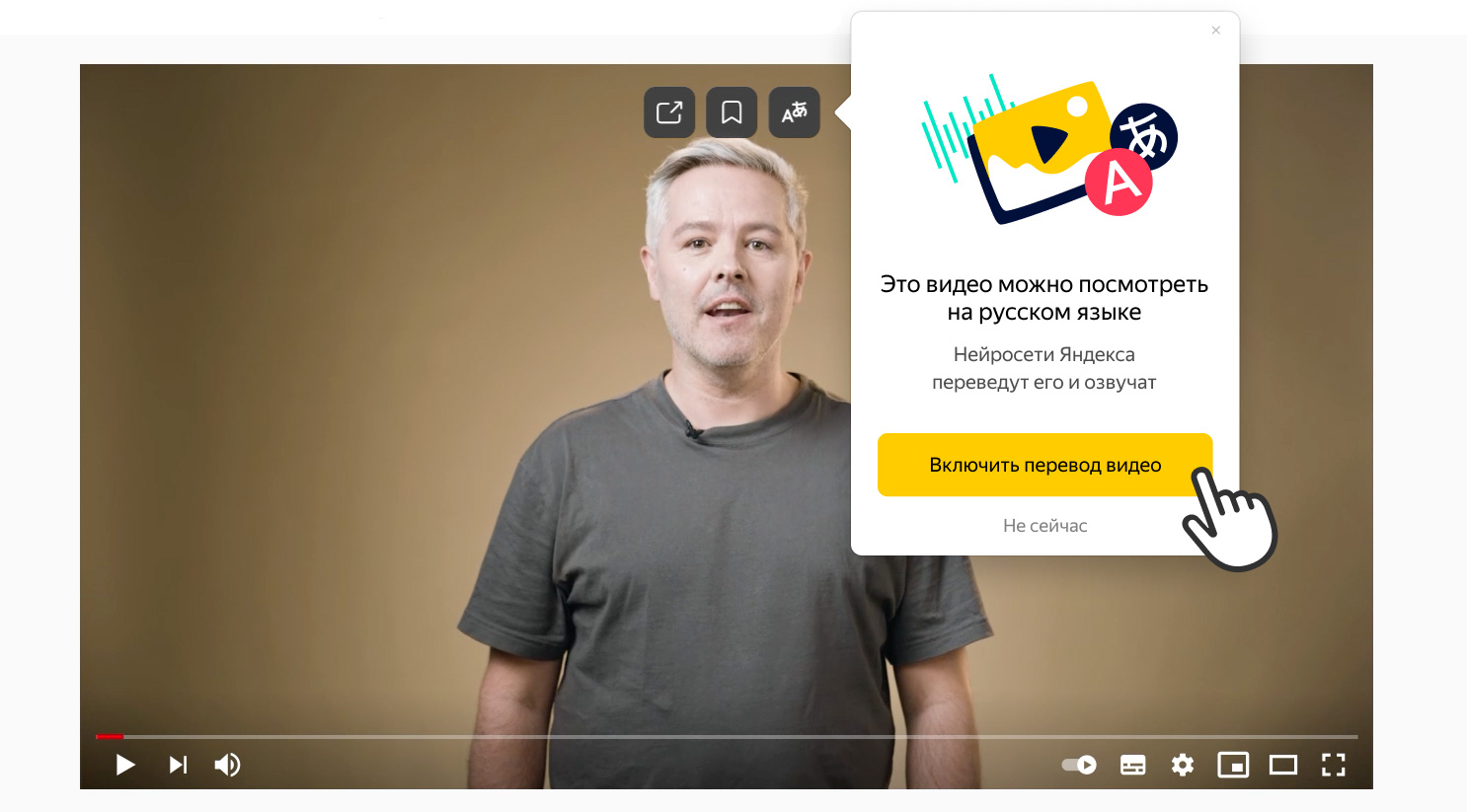
С каждым днём в интернете становится всё больше интересного и полезного видео: от развлекательных шоу до образовательных курсов. При этом большая часть материалов выходит на иностранных языках и недоступна пользователям из России из-за языкового барьера. Мы близки к тому, чтобы снять этот барьер, и представляем вам первую версию машинного перевода видео.

Перевод доступен в Яндекс.Браузере. Смотрите сами — вот как выглядят оригинальное и переведённое видео:

Оригинальное видео

Видео, переведённое Яндекс.Браузером. Мы записали скринкаст, чтобы посмотреть можно было в любом браузере

Перевод видео — это большая и сложная задача, для решения которой объединили усилия разные команды. Мы начали с перевода видео на английском языке. Для этого задействовали технологии Яндекс.Переводчика, речевые технологии и биометрию — она помогает определить пол говорящего, что важно и для перевода, и для синтеза речи. Женщин переводит женский голос, мужчин — мужской.

Переведённые реплики нужно наложить на видео. Это тоже не так-то просто — длина одной и той же фразы, произнесённой на разных языках, может отличаться. Например, в русском языке фразы обычно длиннее, чем в английском. Поэтому мы где-то ускоряем, а где-то замедляем речь или делаем паузы. В итоге получается самый настоящий закадровый перевод.

Яндекс.Браузер уже давно умеет переводить тексты. Недавно мы добавили в него перевод картинок, а сегодня — и перевод видео. Это последняя часть мозаики: теперь пользователи Браузера смогут переводить разные типы контента и свободно чувствовать себя на любых сайтах.

Разработка машинного перевода видео ещё продолжается. Каким он будет, во многом зависит от ваших отзывов и предложений. Чтобы вы могли оценить качество перевода, мы отобрали интересные англоязычные ролики и перевели их с помощью нашей технологии. Перевод доступен в Яндекс.Браузере для Windows и macOS. Открывайте Браузер, смотрите видео и делитесь впечатлениями.

15 Jul 14:49

«Из жалости перевел им одну копейку»: как избавиться от звонков мошенников и банков

by Соня Емельянова
Stepan

Есть интересные варианты.

7 советов читателей Т—Ж
15 Jul 14:49

Как я отменила платеж по карте с помощью чарджбэка

by Светлана Кочмина
Stepan

Это интересный вариант!

Личный опыт на примере карты «Мастеркард»‎
15 Jul 14:47

Два раза в год — бесплатно: 5 бюро, где можно запросить кредитную историю

by Мишель Коржова
Stepan

На заметочку...

И узнать кредитный рейтинг
15 Jul 14:46

Эксперимент: как я прожила неделю на 1000 ₽

by Юлия Свищёва
Stepan

Интересный опыт...

Попытавшись более рационально походить к питанию
15 Jul 14:40

«Беру то, что обычно не могу себе позволить»: лучшие программы лояльности и подписки

by Соня Емельянова
Stepan

Полезно...

Советы читателей Т—Ж
15 Jul 14:39

Как экономить на стройматериалах без риска для качества

by Екатерина Евдокимова
Stepan

Ну да...

Очевидные и неочевидные способы
15 Jul 14:27

Как установить заметки Samsung Notes на компьютер или ноутбук

by Dmitry
Stepan

Остроумно :)

Как скачать приложение заметок Samsung Notes для Windows 10 или Windows 11 для работы с заметками как на смартфоне, так и на компьютере или ноутбуке.

Прошу внимания подписчиков по E-mail: с июля 2021 используемый мной сервис рассылки — Google FeedBurner перестанет предоставлять возможность рассылки по электронной почте. Я не знаю, смогу ли я переехать на другой сервис (все они слишком платные при имеющемся количестве подписчиков), а потому рекомендую по возможности выбрать другой способ подписки из представленных на этой странице: https://remontka.pro/subscribe/
Статья Как установить заметки Samsung Notes на компьютер или ноутбук была опубликована на remontka.pro.

16 Jun 12:01

Mueller J.P., Sizemore J. MATLAB For Dummies [EPUB] (10,09 МБ)

Stepan

Посмотрим...

2nd edition. Wiley, 2021. 496 p. (For Dummies). ISBN 978-1119796886. Go from total MATLAB newbie to plotting graphs and solving equations in a flash! MATLAB is one of the most powerful and commonly used tools in the STEM field. But did you know it doesn't take an advanced degree or a ton of computer experience to learn it? MATLAB For Dummies is the roadmap you've been...
16 Jun 11:23

Диэлектрическая проницаемость RO4003c

Stepan

Конечно есть :)

Добрый день!

Нет ли программы которая высчитывает длину волны (коэффициент укорочения) в материале, например в RO4003c?

11 Jun 12:29

Finding Surrogate Models for IP Protected Antenna Designs in Placement Studies

by Stephen Jorgenson-Murray
Stepan

Интересный подход...

Screenshot of Antenna Magus UI where a Specification is set up using the Chart Tracer tool and the derived KPI values

Figure 1: Antenna Magus UI used for tracing graphs and setting up a specification


Antenna manufacturers protect their IP by providing only selective information to their customers. In order to analyze installed performance, surrogate antenna models are useful. We will describe how we use Antenna Magus to find surrogate models for placement studies.

IP protected antennas

Every antenna engineer knows the frustration of incomplete datasheets. To protect their intellectual property, many manufacturers don’t include details such as the geometry of the antenna or even the type of radiating structure. This leaves system design engineers unable to easily evaluate how the antenna will perform when installed without actually building and testing a physical prototype.

However, here is the solution that we can offer. From the information given in the datasheet – such as frequency, VSWR, radiation pattern and external views of the radome – we can work backward and generate a model that mimics the performance characteristic of the original antenna.. This surrogate antenna model can then be used in a virtual placement study.

How to find the surrogate antenna model

Our new Best Practices document, “Antenna Magus: from Farfield Cuts to Surrogate Model”, shows how Antenna Magus can take available information from a datasheet to find a surrogate antenna with similar performance characteristics.

This can be done in a few simple stages. First, the user inputs the data as a specification in Antenna Magus. Radiation pattern cuts can be scanned in and traced to automatically calculate KPI’s such as gain and beamwidth. Additional keywords such as “blade”, “monopole” or “wire” can also be used to narrow down the search.

Screenshot of the Compare Window in Antenna Magus where different designs can be compared to performance, shape and size.

Figure 2: Comparing different antenna candidates in Antenna Magus


Antenna Magus then searches its extensive library of antenna designs and suggests types of antennas that could have the properties specified by the user (Figure 2). The user can choose the most suitable of these and export the models into SIMULIA CST Studio Suite for detailed 3D modeling and simulation. The automatically generated models can be adjusted as needed (for example, radomes added or ground planes changed) and simulated to verify the antenna still performs according to the datasheet (Figure 3). This verified model can then be used for a detailed full system simulation in SIMULIA CST Studio Suite or using the Antenna Placement App on the 3DEXPERIENCE platform.

Figure showing the Teardrop PICA patterns compared with the datasheet patterns at 1.5 and 5.5 GHz for the φ = 0° cut.

Figure 3:  Simulated teardrop PICA and datasheet patterns at φ = 0°


For more information about the workflow and a detailed example for a 1.5 – 5.5 GHz Data Link Antenna, see “Antenna Magus: from Farfield Cuts to Surrogate Model”. 


SIMULIA offers an advanced simulation product portfolio, including AbaqusIsightfe-safeToscaSimpoe-MoldSIMPACKCST Studio SuiteXFlowPowerFLOW and more. The SIMULIA Community is the place to find the latest resources for SIMULIA software and to collaborate with other users. The key that unlocks the door of innovative thinking and knowledge building, the SIMULIA Community provides you with the tools you need to expand your knowledge, whenever and wherever.

31 May 14:39

SMD Test Solution Demonstration

by CopperMountainTech
Stepan

Симпатично сделали...

In this video, Subbaiah Pemmaiah reviews what is included in the SMD Test Solution and how to best use the features of the software to test SMD components. SMD Test Solution is a full kit hardware and software solution for manual, non-destructive, characterization of 0402 components. SMD Test uses fixtures with known topology in the 100 kHz to 20 GHz frequency range to make metrologically accurate measurements for discreet resistors, capacitors, or inductors under real-life installation conditions. The test doesn’t require soldering of components to make measurements, which saves time and is non-destructive. It is useful for design and test of components used in 5G communications and smart IoT devices. The solution allows for testing up to 20 GHz – an industry first! The software for SMD Test Solution is user friendly and easy to use and create reports. SMD Test Solution is compatible with CMT’s 2-port 20 GHz Cobalt vector network analyzers.
31 May 14:29

Focus Beam Fundamentals

by CopperMountainTech
Stepan

Вообще огонь!

In this video, John Schultz, Chief Scientist at Compass Technology Group and material measurement expert, discusses how to measure the free space properties of materials using their Focus Beam System and CMT's CobaltFx FET1854 mmWave modules.
31 May 14:23

Focus Beam Materials Measurement System with Compass Technology Group

by CopperMountainTech
Stepan

Молодцы ребята!

In this video, Zander shows how to take a measurement using the C4220 VNA and CobaltFx frequency extenders and the Focus Beam System from Compass Technology Group and their CTGcalc software.
20 May 13:20

Как научиться скорочтению: 6 работающих методов

by Виктория Рипа
Stepan

Да, это интересно...

6 работающих методов
20 May 13:06

Женщина купила квартиру у мошенницы, а потом взыскала стоимость жилья со страховой

by Наталия Сивонина
Stepan

Офигеть...

Так сказал Верховный суд
10 May 15:04

Как посчитать мощность "глушилки"?

Stepan

Нифига себе вопросики...

Всем доброго дня.

Пожалуйста помогите оценить (с погрешностью +/- в 2-3 раза, т.е. очень грубая оценка), какой мощности нужна глушилка, чтобы нарушить связь между объектами. 

Исходные данные такие:

чувствительность приемника : -117dbm

мощность передатчика: +30 dbm

Расстояние между приемником и передатчиком: 20м

Антенны на приемнике и передатчике : 3db штырь

Расстояние до глушилки от приемника и передатчика пусть одинаковое: 400 м

Пусть для простоты расчета прямая видимость приемника, передатчика и глушилки.


Хотел сам оценить, но боюсь что неверно посчитаю. А для спецов в этой области это несколько действий, и результат будет надежнее.


Заранее благодарен!

28 Apr 11:59

Chen Z., Qing X. Substrate-Integrated Millimeter-Wave Antennas for Next-Generation Communication and Radar Systems [PDF] (18,80 МБ)

Stepan

Спасибо. Качнул.

Wiley-IEEE Press, 2021. 315 p. (IEEE Press Series on Electromagnetic Wave Theory). ISBN 978-1119611110. The first and only comprehensive text on substrate-integrated mmW antenna technology, state-of-the-art antenna design, and emerging wireless applications Substrate-Integrated Millimeter-Wave Antennas for Next-Generation Communication and Radar Systems elaborates the...