Shared posts

30 Oct 07:59

Turn Training into a Profit Center – Here’s How

by Craig Weiss

L&D. Training.  Two departments known at most companies as dollars spent, show me the ROI.  Yet we all know that ROI in hard numbers isn’t an easy task. We push the productivity increases, sales increases, safety issue decreases, happy employees and retention as proof that Training or L&D is successful and thus here is the proof with ROI.

Tell people at your company, business, firm, association that you can make money with e-learning and make training a profit center, many times, you will get a “sure, sounds great”, with snickers behind the go for it. 

I’m here to tell you, not only can you establish revenue with B2B/B2C training via e-learning but do it in such a way, that it becomes RR – recurring revenue and customers/clients/members/partners into repeat buyers.  

Where you are running a profit center.  That’s right a profit center with training.  And what are the perks of achieving that?

  • More money for your budget –  If you generate 500K in a year (and I have, via e-learning), you will get a bigger budget for the following year, more line items approved and more support (if it is lacking).
  • Possible more resources – need marketing help – generate anything over 100K, and you are likely to get that help.  Perhaps you need an ID person,  generate 250K a year, the game changes – better for you and what you want to accomplish.  No, can become a thing of the past, after all, if you are profit center (thus in the “black” and not in the “red”), a company would be hard pressed to say, nah, let’s just stay the course, and sorry no funds for you. 
  • Procurement making the final decision on what you need, can disappear, especially when you start to cross 500K or even 1M a year (both are doable).  A C-Level is going to start noticing because you are generating revenue for the company, and thus you are a star.  Nobody likes to lose stars. 

The Mechanisms for revenue 

Before I start to cover everything,  for those non-profit folks reading this blog, I turned training via e-learning from “red to black” and into a profit center (by charging other agencies who attended our webinars, online courses, etc.). While you can’t be a standalone profit center in a non-profit, you can still make money.  And, all those items above (sans procurement which usually doesn”t exist in a non-profit), are in play. 

Where can you make money?

Here is a list of the ways to generate revenue with B2B/B2C, regardless of your brand name or lack thereof, in other words, it doesn’t matter if you are small or mid-size or super large or an association or initially all ILT with your clients, and now need a new way to make money.  Heck, you could be an e-learning company who provides online learning to your customers.  

  • Charge for online courses – An obvious one, and the one most follow – but what they forget is the idea that it is a one-off and thus, if you want to them to return, and upsell to do so, it’s a mixed bag – it comes down to the quality, which many in the B2B/B2C space tend to ignore. 
  • Charge for webinars – The days of a hybrid model where you did ILT (seminars) and did some webinars (via web conferencing) are gone.  The hybrid model worked for many, but unless your customer base are blue-collar, or front-line and thus have to physically be on site, then it is out the door.  Anyone who believes that in 2021, we are going to get back to normal in the business world, even association world, is going to find out the hard way, that’s it is not going to happen. 

On top of that, with the majority of your customer base working from home, there are more opps that ever before.  On-Demand is far better with usage, than going only live – whereas numbers will drop due to being on too many web meetings.   In the end though, webinars are money makers. 

  • Certification Program – A staple for the association space, regardless if you are a trade or professional, and a fantastic way with e-learning to make a lot of money.  Even if you are not an association, but want to create a certification program for your customers, it is doable.  Sure a Microsoft Certification for xyz is already out there, but most of us are not Microsoft nor offering a certification program in IT.  That said, it doesn’t mean it can’t work.

Put it this way, as I noted on social media the other day, I remember hearing from an association exec, who “laughing” was telling me how much money they were making in their certification program.  When people failed the “test” to move up to the next level, they had to buy more materials, and go all over again.   

  • Create Packages –  PDFs, online courses, webinars, and something else I will cover that many in the B2B/B2C space overlook.  A package can do wonders. 
  • Pricing strategy – The number one winner or bummer in terms of sales.  Too many folks think charge high because the content is from us, and therefore we will make a lot of money.  Clearly it depends on who you are, but even then, recurring revenue may be far different.  On top of that, we are in a new world with COVID-19, and a serious recession in the states is coming.  Globally, it is already here.  Companies are no longer paying to have their employee take a fee-based online webinar or e-learning course.  They are scaling back.  You think they are going to pay for $599 webinar?  

The strategy I will recommend, has from my experience a proven track record. On top of that, one of the biggest companies in the world, Apple, used this strategy when they launched iTunes.  The name of this strategy? Blue Ocean. 

Write that down – Blue Ocean. 

Certification Program

A topic that easily could be a separate blog post, with the amount to discuss, so with this post, I will focus more on key takeaways and approaches, rather than going into all the nuances of achieving success (which will be covered in Dec on certification programs through online learning).

Keys to Success

Any type of certification program has to be rigid.  I mean if over 80% of people are taking it, completing it and passing, that will water down and weaken the value of the certification program, on the other hand if only 2% are passing, there better be some major takeaways for doing so because a certification program will always be a WIFM (What’s in it for me).  

Items any certification program must have to get people to want to take it

  • Intrinsic value – A customer going through a certification program, again regardless if the are a member of an association, a client, a customer of your solution/product/services, there has to be a benefit for them, because a certification program takes time, commitment, and yes, challenging. 

When people go through certification programs they are likely doing it for one of the following reasons

  • Credentials open up more hiring opportunities. I get the certification credentials and if I am (an employee) at some company, I hope that it leads to a raise, better salary, promotions and/or more value for the company to retain me.  If it doesn’t come to pass, when I am looking for another job, those credentials will swing the job my way all things being equal.   
  • Credentials in some way, reinforce that you as an individual, spent the time to acquire them, expand your knowledge and will in some way help you.  Nobody goes through a certification program, just for the fun of it.  
  • Helps their business – if you as the business owner goes through a certification that enables you to attract more customers as a result of it, then it is worth it.  If you are brick and mortar or online only or a combo, showing that certification logo can be huge – but only if your customer base knows what it is. If they don’t then, you can still make a difference because you can say “this certification that my employees achieved makes us more qualified in blah blah” than those other places.  
  • Feel Successful.  Nothing wrong with this, so do not see it that way. But anyone who goes through a certification program of any sort, will feel better about themselves when they receive the certificate and credentials.  Look hard work is well hard.  And thus, by achieving something so few do, you are showing everyone you can not only do it, but you did.  That deserves in of itself a huge kudos. 

Certification Programs Best Practices with e-learning 

  • Have everything clearly defined – with deadlines to complete the work or specific requirements that the individual must do to get to the next step – the final assessment.  Some certification programs do a mix of project work (individual projects) and a final assessment, some just do the project options, find what works for you. 
  • Shows Extrinsic value.  Intrinsic we talked about, but it also must have an extrinsic value – especially with businesses, and even association members.  
  • Go Online Proctoring if you are doing a final assessment. There are some good ones out there, and from a learning system standpoint some vendors in the B2B/B2C market are adding this capability.  One e-learning vendor who has as part of their assessment solutions has an online proctoring component is Questionmark.  They can integrate with any learning system out there.  If your learning system vendor focuses on employees and also customers, they should be able to support an API or SSO with Questionmark or other online proctoring solutions.  Be aware that online proctoring doesn’t always mean someone is watching the test taker, in some cases it is a recording, which you, as the person overseeing the program, is watching. 
  • Consider stages. –  Okay, you complete and pass this stage you get this.  Now in the next stage, you can get this.  This best practice isn’t a one size fits all, but if you want recurring revenue, it is the way to go, as it relates to a specific certification program.  CFA is one entity, that has levels, but in their case, you have to pass all three levels to get that CFA designation.  And people pay a lot to do it. 
  • Don’t overcharge –  Nowadays people are not going to drop $1,500 for a certification program, you have to recognize the economics here.  Check out any site related to consumer spending indicies or the latest info on it.  Check out your own industry.  Consumer spending is a better route to assess.  If you are in a recession or if consumers are not buying, you think they will pay a grand plus for your program?
  • Most people – customers – go it alone – another reason not to try to bust the bank. 
  • Good Rates to charge – With one-time, I wouldn’t charge anything higher than $595 in current circumstances for members.  Economy improves, COVID-19 vaccines are available to the masses, then $795 or $995 could fly – but it depends on who you are, what is the certification and the value of it. 

If you are an association, you charge for a certification program.  Members pay this, non-members pay that.  Perhaps you offer the certification program for $275 for members, and $595 for non-members. You can state these are special rates due to the pandemic – nobody will find fault with this.  Then when things rebound you can boost up, so members it is $475, non-members $995. 

  • Failure rate –  50% is a good rate.  I mean no one is going to stay clear if your failure rate is 35%, but unless you are like the CFA, where a passing rate is around 2%, and thus a failure rate of 98%, your program isn’t going to get people to invest, especially when YouTube or Coursera is around with free online content, that folks think will suffice. 

Online Courses for customers/clients/partners/members (i.e. B2B/B2C) with Blue Ocean 

In a nutshell, Blue Ocean is all about building mass through a low price point. There are learning system vendors who use Blue Ocean to get, wait for it, you as the customer.  

Like I said about iTunes, Apple came out of the gate charging 99 cents per MP4, whereas the competition was multiple dollars and those who weren’t paying and going via Torrents, were staying clear. 99 cents is really in many eyes, not a lot of money.  Heck it costs a $1 (not including tax) for a McDonald’s soda (in the states).  

Don’t Forget – another reason to go Blue Ocean 

YouTube and folks like Coursera.  YouTube is where a lot of people go to check out “how to do” videos, which are done by folks who use the product often and call themselves “experts”.  You are really the expert because it is your product/service and thus you should know it inside and out, and even tips and tricks to go even further. 

Coursera is a MOOC offering that follows synchronous based learning, with low completion rates – a big minus on MOOCs. Engaging? No way. 

Competition 

Udemy isn’t cheap – another solution folks look at.  It’s fine for general – how to do cold calling, not how to do cold calling with Zig Ziglar for example.  OR with your product – how to close deals with Widget Grass – isn’t the same as how to close deals.  One is generic, one isn’t. 

Some companies look at what their competitors are charging and just follow.  Why? Do you think they have figured out the magic sauce and are making massive amounts?  

I don’t know how much money Intuit is making, but one course is $395 – Online on Quickbooks, the last time I looked.  Outrageous ripoff.  

You are a competitor, with your product, customer debates between you and QB – you offer a wealth of online courses, on-demand webinars for only X.   X is significantly lower than Quickbooks. 

Here is the Way I made e-learning training into a Profit Center 

I never charged more than $35 for an online course.  They received unlimited access, to take it as much as the way, as often as they want in a 12-month period.  The course was asynchronous  (i.e. non-linear, so a person can go right to whatever section, rather than having to complete the first section, before moving on). with a Table of Contents  (you want success? Go this route).  Additional resources were provided in the form of downloads.  

Most of the time, I went around $25.  

Here is how I came to these numbers. 

  1. In many places I worked at, they never had e-learning before, hence, no data to review Or worse, they did ILT only and still had no data of use.   If you have such data as it relates to e-learning, you will start to see a trend of usage, and thus this type of calculation will be much easier for you, because you have a starting point. 
  2. I projected conservatively my usage.  It will take you about three years to build mass in B2B/B2C usage.  Do not think, “if we offer it, they will come” – because it usually doesn’t happen that way, and then many people give up in offering it. 

First take the cost of the learning system you are using.  Let’s say based on your projections, you think in year one you will have 2,000 customers on the system.  The cost of the system to you is $50,000.  

The cost of you to build a course via a 3rd party authoring tool (base on the license and not, on your salary or whoever you have working in your company creating them) is $1,495 (the fee usually Articulate charges, since many use them.  I wouldn’t, but that’s just my take). 

If you hired someone outside of your business to create the course (I hope it is a couple for the rate),  then you will factor that in. 

Let’s though say you bought a 3rd party authoring tool, maybe some assets for say eLearning Brothers (est cost $400, but check with them, because I just whipped out that number).  Total cost 1,895.  

Total Cost with the system – 51,895

5,000 user base – The amount of money you need to break even per course (with a 5,000 user base) is $10.38 cents (USD).   Now, if you charge say $25,  the amount you will generate if you only 5,000 people take that course is $75,000 (USD).   Even if you were to go $19.95, the revenue you would generate will be about $48,300 (USD).  That is for just one course.  

Have three courses, and now you are starting to see how the revenue goes up.   

Let’s say you have 1,000 user projection and the system is $35,000. Frankly for the user base it is too high, but it is just an example. 

At this number, $36,895 – which means the cost for that course is $36.89, so yes, in this case, you are going to have to increase the fee for the course, and go above to break even.  Perhaps you go $49.95, or $49.75 per the course.  

What you can do though is play with the mind – it is called neuromarketing.   You plan to charge only $35 for the course.  I know you are thinking I am losing money here.  

But with that cost, you start to see higher numbers.  You end up with 2,000.  Now the fee to break even is $18.45 per end user. 

Or perhaps you say, for just $10 more you will receive our Webinar Series (with three webinars on blah blah and blah blah). Again, $10 is a low price point, and not one folks normally balk at.  Now, $35 goes to $45, and you are generating profit with the course. 

On the webinar side – let’s say you are using Zoom Video Webinar up to 100 attendees, the cost is $400 per license.  Just for kicks you buy two licenses, since two different folks are going to manage these for you. 

Total Cost for the year -$800.   Most of your webinar sessions probably you get 20 people, unless you get some famous person, you know like me – kidding, kidding. Or am I? HA. 

Anyway, at 20 people per session, you are going to say, okay Craig that means $40 per session.  Yes, but only if you are doing one session a month, and trust me, you will not want to do that. 

If you run four sessions a month, what is the cost now? $10 per session, with 20 people.   

You charge $19.95 – That is 9.95 per person profit.  

And that is if you only do four sessions a month.  Eight a month on different topics?  Even with only 20 people – $5 to break even.  And now you start to see how you can really make some money. 

Go Big or Go Home

I am going to propose something that many B2B/B2C do not realize, but could play and provide you a big win.  It is something I did at multiple places I worked at with B2B/B2C and e-learning. 

The usual MO (Mode of Operandi) is to train them on your product(s)/services and other proprietary information, which is of course the key purpose here.  Online courses, webinars with on-demand viewing (a must, which means they are not attending live, but will watch at a later point – oh, and a great way to upsell for the next on-demand session, even for just an additional $5 or $10!).  

And everyone does this, i.e online courses, webinars.  But, what if you went one step further. 

In addition to the proprietary, you also give them access to a library of free content for personal and professional development.  Maybe some online courses with Microsoft 365, Microsoft Teams, Reducing Stress, plus other topics across the board.  Maybe you provide them access to content curation in your system through a solution called Anders Pink (I highly recommend) or go directly to Anders Pink – which you can, and they can integrate into your learning system OR you just give your customers access to the solution (which some learning systems have already as part – for content curation, i.e. they didn’t build it, it is from Anders Pink). 

In other words, you are giving an additional value and incentive for that customer to come back, and use it. You do not care if they share their user name and password with their family members or significant others to take this content.  

This is about providing a plus for them as being a loyal customer, and you being a company that cares about their customers during these difficult times. 

There are plenty of 3rd party content providers that exist out there, some are better than others (feel free to reach out to me for suggestions OR you can view my Top 3rd party content provider Awards.  For content aggregators – the best is Open Sesame – which can add the content into your learning system, followed by GO1 and Biz Library.  Open Sesame and Biz Library will work with you to pick the content you only want and need, and not an all you can eat option.  Thus you get the bundle option)

Bottom Line

If you think making 500K via e-learning with your B2B/B2C Training is a fantasy, I am here to tell you it can be reality. 

I know.

I did it.

In under eight months

And during a recession. 

E-Learning 24/7 

Oh for those wondering, yes, I can provide a webinar for your company, business, organization, association, etc.  For transparency purposes, the fee is $1,200 for up to an hr.  If interested, please e-mail me. 

28 Oct 10:04

IEC and ISO present AI standardization work during event by European Commission

by Editorial Team

A webinar to discuss standardization for AI, which also considered requirements for high risk AI systems and conformity assessment and governance was organized by the European Commission on 29 September.

Wael William Diab leads the IEC and ISO work in standardization for artificial intelligence and gave an update during the event.

“It was a great forum with diverse participants in the standards development space. I was pleased to give an update on the joint work of IEC and ISO in SC 42. We are developing horizontal international standards for the entire AI ecosystem”, said Diab.

Participants from the Council of Europe, UNESCO, OECD and standards development bodies, ISO/IEC, ITU, CEN/CENELEC, IEEE and ETSI shared their perspectives and latest standards work on AI.

European Commission representatives welcomed the progress presented by ISO/IEC in the AI standardisation field.

Future cooperation between standardization organisations and the European Commission is key to ensure that future standards can serve regulatory purposes and hence support the AI framework in the EU.

The Commission signalled that its intention is to strengthen ties with standardisation organisations in order to ensure that high-quality standards can be made available to AI providers and the AI community by the time the AI framework will be applicable.

Approach to AI standardization and latest developments

The purpose of the webinar was to look at the state of play and approach to AI standardization, including what should the approach be, where are the gaps and how should they be addressed, what are the best ways to link EU efforts for standardization and possible regulation of AI with relevant activities in the rest of the world and should there be increased coordination between relevant standardization activities.

High-risk AI systems requirements

Diab presented the work of IEC and ISO joint technical committee, SC 42 during session 2 on the requirements for high-risk AI systems.

“We are a systems integration committee and we’ve grown to having 47 national bodies that participate in our work and about 21 active projects. We have established liaisons with many of the colleagues on the call today, including the EC and OECD over the past year. We also have a lot of collaboration internally, for example our work on AI and functional safety with IEC TC 65, and the extension of the square requirements for software engineering with ISO/IEC JTC 1/SC 7. We are seeing interest in both the technical aspects addressing issues coming up with AI as well as contextual ones like ethics and bias and so on”, said Diab.

SC 42 is structured with six working groups (WGs) including: AI foundational standards,  data standards related AI, Big Data and analytics, trustworthiness, use cases and applications, computational approaches and characteristics, and a joint WG on governance implications of AI with SC 40, which covers IT Service Management and IT Governance.

“There has been a lot of discussion on the idea of technical standards as well as the context of use of the technology SC 42 is taking that approach from the ecosystem. We are trying to assimilate the requirements from a technical perspective on the context of use of AI big data analytics by looking at some of these requirements from the application domain or regulatory or emerging societal and ethical requirements. We provide guidance to IEC and ISO committees looking at AI applications. IEC and ISO have many TCs that are looking at different application domains at various stages of roadmapping for AI inclusion”, said Diab.

Find out more about SC 42 achievements and new work for trustworthiness, approach to ethics and management systems standards in the full article.

26 Oct 17:36

Constructivist educational technology: Re‐examining the foundations and state of the literature

by David John Lemay, Tenzin Doleck

Abstract

With this special section, we hope to draw attention to educational technology designed for expanding human capability, that is, educational technology for accelerating and enabling our range of knowledge and agency. The four contributions to our special issue include the development of a location‐based history teaching app, a STEM inquiry platform, using Knowledge Forum for teaching self‐reflective practice to pre‐service teachers using as well as a review of computer‐supported collaborative learning. These special section articles show the promise of constructivist educational technology for expanding horizons.

26 Oct 17:34

Project Moca In Preview for Office 365 Users

by Tony Redmond
I.gardner.gb

Saw Moca as an offer on my personal O365 today - here's some context.

Moca project Moca project

On October 14, Microsoft announced that Project Moca, a new “productivity module,” is available as a public preview for Office 365 commercial tenants. The feature had previously been made available to Education tenants in August and to premium Outlook.com accounts in June. Moca is the “Outlook spaces project,” the first sights of which leaked in February.

If you want to enable Moca for users, you’ll need to run the Set-OWAMailboxPolicy cmdlet to update OWA mailbox policies and update the ProjectMocaEnabled setting to True. For example:

Set-OWAMailboxPolicy OwaMailboxPolicy-Identity OWAFullAccess -ProjectMocaEnabled $True


According to Office 365 notification MC224257, it can take up to 48 hours before Moca appears in the OWA module switcher (lower left-hand corner).

Information Scattered Everywhere Across Microsoft 365

The concept underpinning Moca is valid. Information is spread all over the place and it takes effort to assemble data together to form a coherent picture of what needs to be done to organize a project or some other work. To some degree, Microsoft is responsible for the state we find ourselves in, with information scattered across many different places in Microsoft 365:

  • Exchange Online mailboxes (personal tasks, email, and calendar).
  • Teams (personal chats and channel conversations).
  • Planner (group tasks).
  • Documents and files (OneDrive for Business and SharePoint Online).
  • OneNote.
  • Microsoft Lists.
  • Stream videos.

And so on. Every development group that deals with some aspect of collaboration has its own take on the topic and data keeps on piling up in different places.

New Approach Based on a New Context

Up to until recently, Outlook was the nearest thing to a coherent place to store and organize personal information. However, Outlook’s view of the world has tired and needed to be refreshed, which is why I think the Outlook team has taken a new look at how to organize information for personal consumption in Moca. Given the One Outlook vision announced at Ignite 2020, we can but hope that Moca eventually freshens up Outlook desktop too.

The advent of the Microsoft 365 substrate and the availability of Graph APIs create a new context for developers. Information is more easily accessible and can be presented in new ways. We’ve already seen this happen in the Tasks in Teams app, where data from To-Do (personal tasks) and Planner (group tasks) is presented in a unified manner. The fingerprints of the substrate and Graph are all over Moca.

Starting Moca

Moca is a personal application. It organizes information available to you and doesn’t share that information with others. I spend a lot of my time writing, so I decided to test Moca by seeing if it could replace all the scribbled jottings I normally use to track ideas for articles. I’ve been down this path before with To Do but was never satisfied at the outcome.

To start, I created a new Moca project (Figure 1). Microsoft makes several template projects available, like project plan or personal wellness, but none seemed to match my needs, so I elected to start from scratch. The keywords entered are for searching your mailbox for matching email and events which you might want to add to the project canvas. You can leave this blank if you want as searching can always be done later.

Image 1 Expand
Figure 1: Creating a new Moca project (image credit: Tony Redmond)


A new Moca project is a blank space or canvas, ready to be populated with the different elements supported by Moca, including:

  • Buckets: Logical divisions of information within the project.
  • Notes: Free-form notes about things relating (or not) to the project. These notes are Outlook notes and accessible in the Notes folder.
  • File: Links to files stored in your OneDrive for Business account.
  • Links: URLs to pages or deeplinks to objects such as a conversation in a Teams channel. Links are useful for referencing files in SharePoint too.
  • Task: These items are stored in To Do and accessible in To Do, Outlook, or the Teams tasks app.
  • Person: A link to an Outlook contact.
  • Goal: These items are stored in your calendar as all-day events.
  • Weather: Details about the weather in your chosen location(s). These items are stored in your mailbox.

Moca uses a set of folders in the non-IPMRoot part of the mailbox to store its data. A folder called OutlookSpaces holds an item for each space, and each space has an Assets folder to store its metadata (look for names like OutlookSpaceAssets22d2bae6-7d5e-4ffd-aaf3-4e75d7f79ef8). You can only use Moca if your mailbox is in Exchange Online. Two points flow from this – first, if you move a mailbox back to an on-premises server, their spaces will disappear. Second, backups of Exchange Online mailboxes probably won’t include the Moca data, meaning that you won’t be able to restore spaces if that need arises.

My Moca Space

It wasn’t difficult to transpose my scribbled reminders into a Moca project. I organized items into three buckets and added a couple of relevant emails and links and some irrelevant contacts and locations just to complete the picture (Figure 2). The canvas is scrollable and you can move to different parts of the screen to see items which don’t fit.

Image 2 Expand
Figure 2: A Moca project with a mixture of items (image credit: Tony Redmond)


Most of the time everything worked smoothly, and the user interface isn’t hard to work out. Sometimes items wouldn’t drag and drop into buckets (there’s a menu option to do this too) and I ended up with some notes hidden behind buckets (user incompetence). For whatever reason, I couldn’t rearrange the link I created to the Office365itpros.com site from the bottom to the top of the bucket (this worked for the link to Petri.com). Oddly, after I added a link to a OneDrive file, Moca insisted that I sign in again to open the file even though I owned it.

Another problem is that items occasionally seemed to refuse to be deleted (a refresh sorted this out). There’s no way to rescue a deleted item and put it back into a board or into a space. At least, I couldn’t find one. Searching finds Moca items from both OWA and Outlook, but the display of the retrieved items in OWA is odd to say the least. Let’s take it that these are all preview glitches which Microsoft will address as the app reaches general availability.

Subscribe to Petri NewslettersOffice 365 Insider

Our Petri Office 365 Insider is dedicated to sharing detailed knowledge from top Office 365 experts. Delivered once a month to your inbox.

Petri.com may use your contact information to provide updates, offers and resources that may be of interest to you. You can unsubscribe at any time. To learn more about how we manage your data, you can read our Privacy Policy and Terms of Service.

!Already a Petri.com member? Login here for 1-click registration.

No Mobile

Most Office 365 apps come along with a mobile version. Moca doesn’t, perhaps because of its focus on assembling bits of data drawn from other places within the ecosystem. If you to add something to a space when you’re on the move, you can run Moca on a mobile browser (Moca is definitely not optimized to view on mobile devices as there is no good way to navigate around the canvas) or send yourself email and import the message when you next connect on a workstation. You can’t import tasks from To Do or a note created outside Moca because there’s no way to connect the item to the resources attached to a space.

Moca Compliance

Like any data stored in Microsoft 365, it’s important that Moca data is available for compliance purposes. The good news is that like any other mailbox data, Moca items are indexed and discoverable by a content search. The bad news is that notes are returned in searches in a slightly obscure form (Figure 3). This isn’t a Moca problem as notes created by Outlook show up in the same way. However, if Moca makes notes more popular, it would be nice if content searches handled them better and stripped out the extraneous junk.

Image 3 Expand
Figure 3: Moca results show up in a content search (image credit: Tony Redmond)


It doesn’t seem like Moca activity like the creation of a new space results in any records in the Office 365 audit log. This might be because Moca is deemed to be a personal app.

The Big Question

I know many people who use OneNote as their personal organizer in much the same way as you might use Moca. It’s hard to know if Moca is interesting and functional enough to attract dedicated OneNote users. On the other hand, Moca is an app created to work in the cloud and exploit data already available to people and it’s easier to use than OneNote is.

MVP Luise Freese has some thoughts on using Moca that might help you to decide if this is an app for you. On a personal level, Moca won’t stop me scribbling notes about articles I might write, but it might just put some order on those thoughts later.

The post Project Moca In Preview for Office 365 Users appeared first on Petri.

26 Oct 07:57

25 Years of OU: 2009 – Learning Design

by mweller

via GIPHY

Before Jisc went all neo-liberal and started selling corporate services, they used to fund interesting schemes in UK further and higher ed. One of these was a round of Learning Design projects. With Patrick McAndrew I had some small funding via this route. Grainne Conole was the recipient of a larger grant, the OULDI project, which really helped kick off Learning Design at the OU.

Now we have a Learning Design approach that is embedded in all module production. It requires designers to consider student activities using six categories which arose from Grainne’s work in her time at the OU. There are also a set of other tools, and activities, which you can find here. But it was no easy path to get here.

The Learning Design project itself grew out of a previous one called Curriculum Business Models, which tried to rationalise the many different design approaches to courses we had at the OU. I was the Academic Director for a while after Grainne left, but the hard work was really done by Rebecca Galley and the LD team.

We didn’t have a uniform design approach at the OU, which may seem surprising, but we had a uniform production model. However, as new media became available, we wanted module teams to take a step back from deciding the what (the printed units, simulations, etc) and think about the how. We developed nice tools and after a long process, got it embedded in the stagegate process so all new modules have to go through a learning design step.

My experience is that the actual model you use isn’t as important as the step in thinking about different approaches. We retrospectively mapped a number of existing modules and academics were often surprised to see just how much they relied on assimilation. This is one of the six categories of student activity, and by creating a dynamic bar chart for these as you enter suggested study times, it has the implicit suggestion to create a more balanced approach.

Rebecca gave an excellent presentation on the trials of bringing Learning Design to fruition. It took something like 10 years to really get it embedded. Change in higher ed is no game for the impatient. Having learning design in place now though gives us a language and vehicle through which we can apply other developments, for instance designing for retention or designing for equity and inclusion. But without a shared framework it is difficult to implement these.

There was a lot of resistance to learning design (there may still be). Quite the most aggressive, unpleasant session I’ve ever run was in one faculty where the Dean introduced us by saying “we don’t need you telling us what to do” and then encouraged his staff to attack us. But in less than a year some of those same staff were asking if we could come in and help out with a module they were having problems with. So, institutional change requires thick skin and forgiveness as well as patience.

Covid 19 bit: Our learning design approach may not be perfect, but I think it stands us in good stead now for adapting to different demands, for example designing MOOCs or microcredentials. As many HEIs shift online now they often lack such a universal approach, and thus don’t have a shared language and model for thinking about how to design for things such as student engagement, interaction, new forms of assessment, support and diversity. I usually recommend they start adopting some form of learning design, which one doesn’t really matter, that allows them to take a step back from the ‘putting lectures online’ default.

26 Oct 07:56

Learning Transformation Map – Things to Leave Behind

by julianstodd

Over the last couple of weeks i have shared a few pieces around Learning in 2020, with a focus on things that Organisations need to do more or, be experimenting with, or learning how to do. I thought that i would counter that work with a Map that considers things that they should stop doing. As with the earlier maps, this is a fragment of thought: it represents the things on my mind right now, and is not intended as a definitive view. These fragments inform more structured work later.

I’ve very loosely grouped the ideas into four areas: aspects of ‘Structure’ and location, ‘Oversight’ and control, ‘Opportunity’ and access, and ‘Technology’ and communities. As per the other Maps, i will probably redraw this one to be cleaner and clearer fairly fast.

Some key aspects in this one: a general shift away from structure (as defined by the Org experts) to structure as moderated by community of practitioners. Technology diversified, but also differentiated by what you are doing, but with the focus on control and privacy, providing rehearsal and sense making space, not simply utility.

Perhaps Organisations leaving behind the close link of learning to current role, and vertical structure, towards more fluid models of opportunity, portfolio, and curiosity. Coupled with less focus on content, more on community, facilitation, and support.

26 Oct 07:54

Instructional Design: an eLearning powerhouse

by The Learning LAB
TheLearning+LAB+eLearning+Content+Development+Agency

Although online education has been around for only a relatively short time, it has garnered acceptance across the world as a reliable platform for both formal and informal learning. It is this widespread adoption that has brought the need for instructional design in eLearning to the forefront, as its success drives innovation and improvements at an incredible rate. 

According to the Online Learning Consortium, the number of students that have signed up for online courses in the last seven years has skyrocketed to include at least 25 per cent of students in conventional accredited college courses!

Even more incredibly, the study also revealed that millions of people are now enrolling in certificate programs, audited courses, and other eLearning programs provided by their employers. While these statistics are a welcome development, experts believe that they underscore the necessity for a few key elements to ensure the educational programs yield the maximum results and offer Learners the right opportunities.

One of these key elements is Instructional Design!

 
TheLearning LAB: Content Development Agency Geneva, Palo Alto, London and Paris.

TheLearning LAB: Content Development Agency Geneva, Palo Alto, London and Paris.

What is instructional design?

Also known as instructional systems design, instructional design is the systematic process through which learning materials or modules are designed, developed, and delivered. In simpler terms, it is the way in which learning materials are created so they are perfect for the Learners.

The process aims to analyse the Learners' needs and defines the best methods that will facilitate the transfer of knowledge and skills through the eLearning course. Developing instructional design begins by providing answers to four critical questions. Have a look below, where we’ve listed the four vital questions to ask during the Instructional Design process:

  
e-Learning Content Development Agency Content Lab Switzerland
  1. Who are the Learners, and what are their unique characteristics?

  2. What knowledge or skills should the Learner acquire after the program?

  3. What is the most effective method of transferring knowledge and skills to the Learner?

  4. How best can the program be evaluated to ensure it will achieve its objectives?

  
TheLearning+LAB+eLearning+Content+Development+Agency
  

Do you want to read a little more on Instructional Design? Have a look at our article on how it is used for Learner engagement or read through our Quick Guide! Or keep reading and learn about…


The four key factors


1) Understand the Learners 

The first stage (and probably the hardest) of instructional design is to understand the Learners. The reason it is taxing is that Learners typically come from different backgrounds and have different interests as well as varying demographics. Despite the individual differences, groups of Learners often share a few characteristics that are common to all of them. 

The purpose of identifying the traits of Learners is to help instructors know in advance the particular needs of some in the group, areas that may appeal to them, concepts that they may be unfamiliar with, and methods that are most suitable for delivery. A simple survey can help to provide the insights needed for this purpose, and it shouldn’t take much time or effort to gather the data you need. 

It’s important to note that eLearning adopts several concepts: ease of access, and self-paced learning for adult education. One of them requires a firm grasp on the Learners' preferences for learning, which will then be deployed into designing educational programs. These preferences show you the exact nature of your Learners' needs, which will, in turn, inform the design and delivery system.


2) Objectives are vital

Every educational program has a set of objectives, and this should be the major determining factor of the content. The instructional designer must be aware of what the Learner should know or be able to demonstrate to build a logical structure that supports learning and retention. 

Although there are various types of instructional methods, the Learner's needs must determine the ideal method for the program. This leads to another concern – how best to present the content. In this regard, the instructional designer also has a range of media to choose from, such as graphics, animation, and interactive applications, amongst several others. Your objectives are key to the process, and they need to be properly defined before you move further along in the planning phase.


3) Choices, choices, choices!

It is quite possible that two or more types of approaches may be needed to make sure your Learners benefit to the fullest extent. Some educational programs require a combination of eLearning and face-to-face training for optimum results, using a method called Blended Learning. Others may need to refer to additional online sources, and part of the instructional design will be creating forums for discussion among Learners, providing avenues to enlist the instructor's support, and other similar tools. With a good Learning Management System, the options are virtually endless, and choices need to be made. Arm yourself with the objectives, the Learners’ needs, and the principles of instructional design to determine which tools you need to incorporate into the course!

TheLearning LAB: Content Development Agency Geneva, Palo Alto, London and Paris.

TheLearning LAB: Content Development Agency Geneva, Palo Alto, London and Paris.


TheLearning+LAB+eLearning+Content+Development+Agency

4) Evaluating the learning curve

Evaluating your Learner’s progress and how the course is impacting their abilities is vital; obviously helps assess the progress made so far, but the true benefit of the evaluation is that it will give you every opportunity to improve the course effectiveness. The ultimate aim, of course, is that the progress recorded will match the learning goals and that the results of the eLearning programme knocks it right out of the park. If this isn’t the case, don’t fret! The beauty of eLearning is also in its ability to adapt and improve.

An excellent way to evaluate learning is by conducting quizzes, setting projects, asking for the Learner’s reflections, and conducting surveys at the conclusion of each section. The outcome will enable the instructor to provide feedback to Learners - both if it indicates that they are on the right track, or that more work needs to be done for the learning goal to be fully achieved. Both positive and critical feedback offer your Learners a boost! And if your results show you a specific section is posing a problem for a large portion of the Learners, you can go back to make sure their issues are resolved and their learning of the related materials is successfully completed.


Now it’s your turn!

Instructional design helps develop learning experiences and create the right environment to transfer knowledge and skills to Learners. Seeing as it guides the creation and development of learning programs, it may take some time and require a few adjustments and changes to ensure the best outcome - but this a normal part of the process! It shouldn’t be rushed, and proper thought needs to be given to this part of the process. Your Learners will benefit, and, in the long run, your organisation will benefit!

Contact us us for a FREE workshop. We can bring your eLearning vision to life, because education is our thing; we live and breathe it!

Here at TheLearning LAB, we don’t shy away from challenges and we don’t ever stop striving for the very best. Challenge us!


Resources:

https://elearningindustry.com/reasons-instructional-design-matters-elearning

https://www.knowbly.com/post/what-is-instructional-design-and-why-it-matters-to-elearning

https://www.eduflow.com/blog/the-top-challenges-for-e-learning-instructional-design-in-2020

12 Oct 12:39

Boosting Custom Learner Engagement: 6 tips

by The Learning LAB
 

Customising your Learners’ experience is a stepping stone to success. It is a must-have if you intend to offer an immersive learning environment that will genuinely engage Learners! Encouraging participation and producing a sense of commitment to the course and the content without overwhelming your Learners is an art. It takes a creative agency and skilled course designers to make it happen. The core tenets of building a custom learning experience, however, are child’s play if you understand what they aim to achieve! 

Your course needs to be capable of engaging your target audience even when the learning material covers complex or highly detailed topics, and that’s when custom content development is absolutely vital. 

Boosting Custom Learner Engagement

 
TheLearning+LAB+eLearning+Content+Development+Agency

1) Storytelling and your audience needs


Optimising the user experience (UX) has many facets, and you need to make sure all of them hit the nail on the head. Your course needs to be appropriate for your audience and suited to your topic, which means combining the proper wording, visuals and pace to suit both elements. You wouldn’t run a course on emergency procedures in a silly, cartoonish style, right?

e-Learning Content Development Agency Content Lab Switzerland
 

Whether your Learners are children, teenagers, young adults or seasoned professionals, you will have to adapt the storytelling and visual style to suit their needs. Presenting information through an engaging storytelling style also means providing the right types of context and real-world examples, so that the information becomes content your Learners actually want to engage with.

The ultimate aim is audience-appropriate content which is dynamic, emotive, and educational!

TheLearning LAB, Boosting Learner Engagement. Geneva, Paris, PaloAlto, London.

TheLearning LAB, Boosting Learner Engagement. Geneva, Paris, PaloAlto, London.

2) Gamification for success

Motivation drives all human interaction, and providing your Learners with the right level of motivation can make all the difference. Humans are innately driven by reward, whether real or virtual, and this is where gamification comes in strong! Allowing Learners to e.g. earn reward points which they can exchange for upgraded avatars for their profile can be incentive enough for them to want to continue. Even simple mini-games functioning as quick checks of their knowledge retainment can engage your Learners, as structuring tests in the form of games takes the stressful edge off of a course without reducing its respectability and value.

 
TheLearning+LAB+eLearning+Content+Development+Agency

Alternating between interactive quizzes and mini-games keeps Learners on their toes, and e.g. offering a leaderboard per department can encourage gentle competition between the groups within your organisation. Using gamification to trigger a positive sense of reward in Learners does wonders for the user experience (UX), and boosts their retention of knowledge and their satisfaction with their learning experience.


3) Graphics and eLearning video

Visuals have the power to make or break your course, so getting them right should be on everyone’s priority list. Multimedia-based learning has been shown to improve engagement, retention, and Learner satisfaction in one fell swoop. People want to see videos; they crave interactive and engaging visuals increasingly quickly grow bored with plain text. We live in an increasingly video-based environment in terms of marketing, social media, general information-seeking and many other aspects of our daily lives, and learning has to follow suit!

An eLearning course entirely laid out in plain text will perform significantly less well than an identically-worded course with added segments of video, such as recaps or scenario-based examples. Other visual elements which have a huge impact on your Learners are the use of infographics and ensuring your brand's visual identity shines through within the course. Visually engaging content performs far, far better with any audience; humans simply love eye-catching content, and we assure you your Learners will both perform better and be able to retain more information if you offer them a visually stunning course.

 
e-Learning Content Development Agency Content Lab Geneva Paris Palo Alto London

4) Scenario-Based Learning (SBL)

Scenario-Based Learning (SBL) is similar to storytelling, but it takes your content a significant step further. Rather than telling your Learner about a concept or showing them how it can be applied, this time you actually involve them in it and place the responsibility in their hands. An interactive scenario requires your Learner to solve a problem through brainstorming and application of their learned knowledge. They can be asked to offer real-world solutions, and through this process will learn about their own bias and knowledge gaps, and be able to test various outcomes to observe the consequences of their decision-making processes.

Scenario-Based Learning (SBL) provides them with a safe environment for testing their knowledge and their real-world application of learned concepts, as well as a deeper understanding of what happens as a result of their decisions. It puts the learning into perspective in a way no theoretical content ever could!

TheLearning LAB: interactive eLearning content design for the real world. Geneva, London, Paris and Palo Alto

TheLearning LAB: interactive eLearning content design for the real world. Geneva, London, Paris and Palo Alto


5) Blended Learning

TheLearning+LAB+eLearning+Content+Development+Agency

Not all Learners thrive when working alone; some need a sense of community. Combining the self-paced aspects of e-learning with real-time online sessions, or classroom sessions, or even planned chatroom discussions, can help those Learners who need that extra spark of motivation or whose learning style requires structured contact with others. This also allows you to incorporate creative and Learner-led assignments into the mix, such as pre-recorded audiovisual presentations to be submitted by your Learners. These assignments can then be discussed in real-time with one another during a structured classroom session, bringing a great learning experience through both receiving feedback and undertakingng peer analysis.

Depending on your Learners and their real-life connectedness, contact on course discussion forums may well be disjointed and inconsistent, with low engagement being a risk if the cohort doesn't feel sufficiently connected to one another. This dips into the realm of ensuring you have a healthy corporate learning culture where learning and interacting with the course are seen not only as a must but as also as a desirable activity to be undertaking.

Using Blended Learning in the form of live discussion sessions encourages the Learners to engage with the materials prior to the session, as they’ll have a chance to use it in a setting with peers, and when used in combination with elements such as gamification it helps to boost that healthy edge of friendly competition and desire for self-improvement that we ideally want to see among Learners!


6) Feedback and performance optimisation

Your Learners are individuals with their own specific needs, difficulties, skills and interests. This means that there may be aspects of your course which work particularly well for 80% of the Learners, but there's that 20% of Learners who aren't fully satisfied. Given the chance to do so, they may ask you if you could include more, e.g., infographics. Finding out what your Learners do or don't appreciate, where the common sticking points are, and if there are any quick fixes which can make their Learning experience even better takes having a dedicated feedback plan.


Allowing your Learners to e.g. provide anonymous feedback allows them to be entirely honest without fear of any repercussions, and provides you with valuable information. The feedback cycle should always be in effect, collating student feedback as you go along. As they explore their eLearning platform, you could request feedback at regular intervals and ensure you actually do improve any bugs or issues they report. Engagement rises when confidence in the course itself rises, so taking feedback into account and respecting the Learner perspective means empowering them to take charge of their own learning.

 
TheLearning+LAB+eLearning+Content+Development+Agency
 

Likewise, offering detailed feedback to your Learners when they complete an assessed piece of work, allows them to take full advantage of all the course materials on offer and refer to materials relevant to their knowledge gaps. A good paragraph of feedback does more for a Learner than a simple grade, that’s no secret! If you want to boost their performance within their role, feedback is a key part of the process of professional development.

TheLearning LAB, Boosting Learner Engagement. Geneva, Paris, PaloAlto, London.

TheLearning LAB, Boosting Learner Engagement. Geneva, Paris, PaloAlto, London.

 
e-Learning Content Development Agency Content Lab Geneva Paris Palo Alto London

And last, but not least..

7) Make navigating the course intuitive

The Learning Management System (LMS) you use for your course needs to be as user-friendly as can possibly be, with optimised navigation, an easy overview of all the Learner’s courses and modules, and easy to access quiz results and general progress information. Navigating the course should never be a challenge, which is why we personally recommend our own web-based, video-first Learning Management System LMS LAB. Whichever LMS your organisation makes use of should have a user experience (UX) optimised front end for the Learners as well as an optimised Back-end for the administrators who oversee the course.


Every navigational aid within your course needs to serve a proper purpose, be clearly visible, and indicate without a doubt where it will navigate the Learner to. Your materials should also be optimised for use on mobile devices, ideally through a dedicated application, so that your Learners can access it absolutely anywhere and at any time. Test it out a few times before it goes live, have someone who isn’t familiar with the system try their hand at it, and see whether their user experience (UX) is sufficiently smooth. If it isn’t, fix the flagged issues asap!


So, that’s the low-down on custom learning engagement!

There’s a lot more to custom learning engagement than initially meets the eye, as it exists across all levels of eLearning design and planning. Armed with these tips you’re on the right track for success, but if in doubt there are always agencies who can step in to help. Here at TheLearning LAB, we know how to engage Learners and how to optimise and customise your e-learning course to the highest possible level.

If you’d like to find out more topics such as infographics for eLearning, how much context actually matters within eLearning development, or how developing a healthy corporate learning environment can boost retention and performance, have a look at our other blog articles!

Contact us for a FREE workshop. We can bring your eLearning vision to life, because education is our thing; we live and breathe it!

Here at TheLearning LAB, we don’t shy away from challenges and we don’t stop striving for the very best. Challenge us!


Sources:

https://www.edelements.com/blog/feedback-for-every-teacher-to-boost-student-engagement
https://elearningindustry.com/secrets-gamification-success-corporate-elearning

09 Oct 10:43

Can We Boost Elaboration with Retrieval Practice?

by Cindy Nebel

By Cindy Nebel

Hot off the presses! This week I’m telling you about a new study that came out just last month which investigates how we could take generative activities like elaboration and give them the additional benefits of retrieval practice.

In this study (1), researchers were examining the interaction between two variables:

1)      Generative learning: This refers to any kind of learning activity that requires the learner to create something. This can include organization of material like pointing out main ideas or elaboration like asking how and why questions.

2)      Retrieval practice: Here they manipulated retrieval practice by giving students an open- or closed-book test that included the generative learning questions.

One of the main reasons the researchers were interested in this was that previous work had shown that a closed-book test could actually hurt the generative learning because of the failed retrieval. If you can’t remember the information you’re supposed to explain then you can’t explain it, right? If I ask you to provide an example of equilibrium but you can’t remember what that is, well… you’re not going to produce a very good example.

Image from Pixabay

Image from Pixabay

The other interesting thing they did was changing up the conditions of retrieval practice. Some students took an open-book test, where they literally had the text sitting in front of them while they answered the questions. Some took a closed-book test (no text available), but some were in a closed/open switch task. Essentially, students could either look at the text OR they could have the generative test questions, but not both at the same time. They could switch back and forth between them. Students were then given a delayed test to see the effects of the open- and closed-book testing.

The results were interesting:

1)      Closed-book tests resulted in worse performance on the generative learning activities. This was likely due to the effect I described above. If students were unable to retrieve the information they needed to complete the activities then they wouldn’t perform as well on those questions.

2)      Open- and closed-book tests resulted in the same performance levels. Because open-book tests had better generation and closed-book tests had better retrieval, each group got a boost for remembering information on a final test.

3)      The switch group had the highest long-term learning. This group likely got both a benefit of retrieval and a benefit of generation/elaboration. While the retrieval was of shorter duration than a pure closed-book test might be, they had more successful retrievals, making them more able to complete the generation activities as well!

There are a few important takeaways from this study.

Image from Pixabay

Image from Pixabay

  • Mechanisms matter. Just knowing that retrieval practice is good or knowing that elaboration is good for learning is just not sufficient. We need to look at why and then examine the learning activities that we’re using to make sure that students are processing things the way we think they are.

  • Assessment matters. If we assume that our retrieval practice is working because it’s retrieval practice then we’re doing a disservice to our students. We need to be objective and confirm that learning is taking place and continue to make improvements where needed.

  • Combining learning activities isn’t always straightforward. Again, we have to consider the mechanisms. In this study, just throwing elaboration and retrieval together without carefully thinking about what would happen resulted in worse learning! So the strategies can be really powerful when combined, but this always needs to happen intentionally and thoughtfully.

Bottom Line

If you want to combine elaboration and retrieval practice, don’t just have students answer elaborative questions without being able to retrieve the answers. Give them an opportunity to go back and look up more information before trying to retrieve again. In this way, they get the added boost of improving their metacognition and learning from errors!


References:

Waldeyer, J., Heitmann, S., Moning, J., & Roelle, J. (2020). Can generative learning tasks be optimized by incorporation of retrieval practice?. Journal of Applied Research in Memory and Cognition, 9. 355-369.

09 Oct 07:18

6 Ways in which an LMS is central to an effective e-learning strategy

by Graham Glass
LMS is central to an effective e-learning strategy

A version of this post was originally published on July 2, 2020, in Open Access Government.


In the context of the pandemic, many schools and universities turned to virtual learning environments as the only way of ensuring some continuity of education during these times of crisis. Even though enough educators and students — and the entire educational community — were at least familiar with online learning practices and educational technologies, the shift was sudden nevertheless.

Designing and implementing a successful online learning program takes time. Depending on the number (and age) of students, access to training and technologies, as well as on various other resources, it can take between a few weeks and up to a year. Most educators only had a few days to figure things out. Thankfully, educators are resourceful and students resilient. Solutions were improvised while dealing with rapid changes, and education continued to be done, remotely.

Many questions need to be answered, and the Government’s guidance remains vague, sometimes contradictory, and always changing. From physical measures and stricter hygiene rules in the same spaces, to how the curricula will continue, and to the mental health aspects of students and teachers/professors, educational institutions have thorny issues to untangle.

But one aspect remains clear: online education is here to stay. Students and teachers can rely on virtual learning environments to support all learning activities. The pandemic has made it clear for many that online education can be more than just an Emergency Plan B, but instead an integrated part of education as a whole.

Creating an effective edtech strategy for when schools reopen

The negative aspects and consequences of the invisible health threat that took over our world are unquestionable and undeniable. But we now have a once-in-a-generation opportunity to make things better: to design a better education system. A system that is more comprehensive and more inclusive, can be accessed anytime, anywhere, without compromising on quality and, most importantly, one that is future-proof.

Education technology — or edtech — is nothing new. It wasn’t created to compete against traditional education, even though some educators felt that way. It was meant to support it.

Edtech can massively reduce a school’s administrative strain through various systems and automated processes. For example, it can easily take care of all school schedules, alert school managers of any issues, giving them time to react before any escalation occurs, as well as providing valuable data, which is critical for a better decision-making process.

Also, edtech can be used in many ways to spark students’ curiosity, provide support during their learning process, assess their mastery of concepts, all while keeping them engaged every step of the way.

The only thing to keep in mind is that the mere presence of edtech in a school setting doesn’t guarantee anything. Instead, how it is used is the real indicator of successful results and outcomes. That’s why it’s paramount to identify and choose the right edtech that will meet the school’s needs, and why teachers need to use it effectively in their classrooms so that students can actually benefit from it from an academic standpoint.

6 Ways in which an LMS is central to an effective e-learning strategy

A learning management system — or LMS — is one of the most comprehensive edtech solutions that educational institutions can rely on when creating a future-proof strategy of education. Here’s how it can help:

  1. Centralize all learning resources

    Educators can use the school LMS as a central repository of all learning materials. Each teacher can upload any type of digital file (text, audio, video, graphic, weblink, etc.) for each lesson they create. Teachers can then make these resources available to their students on a need-to-know basis and also reuse (and update if necessary) the same materials every year. As an added bonus, these resources can be shared with other teachers teaching the same subject within the school or the group of schools using the same LMS.


    Read more: Adopting the asynchronous mindset for better online learning


  2. Increase student engagement

    Students have different learning needs and therefore learn in multiple ways, but they do learn better when they have an interest in a particular topic, and they also thrive when engaged in a little competition. Teachers can spark an interest in a topic by including various learning materials in their online lessons and making learning more interactive with the various collaboration tools of an LMS. They can also include gamified elements, such as points, badges, leaderboards, or trophies, throughout each lesson or the entire course, encouraging students to compete against each other or just against themselves.


    Read more: How an LMS can help teachers keep older students engaged


  3. Provide personalized recommendations

    Student progress is unique to each individual, and educators are supposed to support them at every step. But with so many students and so little time, topped with plenty of standard requirements that have to be met, teachers are in for a challenge. An LMS can ease their workload through the many automated rules that can be set up. For example, a teacher can be notified when a student struggles with a particular concept in a lesson and can intervene with extra resources and additional guidance to better support that student. What’s more, some systems come with several adaptive learning features and can provide personalized recommendations for students automatically.

  4. Provide more accurate evaluations

    Assessing students’ knowledge is one of the most time-consuming tasks a teacher has to do. Students benefit a great deal from getting a clear picture of their learning progress through the grades they receive. Teachers can create many types of assessments for students within an LMS, depending on the type of learning activity and other factors. They can even differentiate the assessments for each student. All of this, coupled with the more precise picture of a student’s progress, makes the process of evaluations far more accurate.


    Read more: 3 Teachers that are crushing assessments with ed-tech


  5. Centralize all student data

    An LMS gathers together all types of student data that is generated every time a student uses the system, and it can even incorporate more data from third-party tools. Generating reports is the next step in assessing and using all of this data. Having all student data in one place offers a bird’s-eye view of the student performance within the school. Both teachers and school managers can make more informed decisions, from the most granular, affecting the individual student, to the most extensive, affecting the entire school.


    Read more: The most important LMS analytics that teachers should know about


  6. Extend learning beyond the classroom

    With an internet connection and a computer (or even a mobile device), teachers and students can log in to the school LMS and engage in teaching and learning activities, almost just as they would in the regular classroom. Whether this is an independent decision or due to the government imposing it (due to natural disasters or a global pandemic, for instance), having access to an LMS as a distance learning platform ensures learning is not confined within the four walls of the classroom and can continue online without any disruption to the student experience.


    Read more: Distance learning during the pandemic: Improvise. Adapt. Overcome!


Closing thoughts

Schools can take advantage of the current situation to implement an effective edtech strategy and centralize all their learning resources and student progress data. This enables schools to save time, and crucially provide more accurate and informed evaluations, freeing up teachers to dedicate more attention to the individual student’s needs.

The post 6 Ways in which an LMS is central to an effective e-learning strategy appeared first on NEO BLOG.

09 Oct 06:43

when training is the wrong solution

by Harold Jarche

Training is too often the proverbial hammer in search of nails. It’s an easy check mark to show that action has been taken, assuming that improving individual skills is the core issue that needs to be addressed. But training does not improve diversity.

Firms have long relied on diversity training to reduce bias on the job, hiring tests and performance ratings to limit it in recruitment and promotions, and grievance systems to give employees a way to challenge managers … The positive effects of diversity training rarely last beyond a day or two, and a number of studies suggest that it can activate bias or spark a backlash. … That’s why interventions such as targeted college recruitment, mentoring programs, self-managed teams, and task forces have boosted diversity in businesses. Some of the most effective solutions aren’t even designed with diversity in mind. —HBR 2016-07

In another experiment with 10,000 employees of large global corporations, diversity training had little impact where it mattered.

We found very little evidence that diversity training affected the behavior of men or white employees overall—the two groups who typically hold the most power in organizations and are often the primary targets of these interventions. —HBR 2019-07-09

Neither does training address unconscious bias, as shown by Donald Clark, even though it continues to be sold and used in many organizations.

Unconscious is the wrong target — Apart from the dedicated racist, few will admit to being racist in surveys … As Tony Greenwald, one of the creators of IAT (Implicit Association Test) said, “I see most implicit bias training as window dressing … After 10 years working on this stuff and nobody reporting data, I think the logical conclusions is that if it was working, we would have heard about it.” … Even the people who work in this area warn against the inference that reducing unconscious bias reduces racist or sexist behaviour.

Training does not change attitudes. For example, a mandatory education class in Ontario, Canada — complete with videos and health care professionals as advisors — has been useless in getting parents to accept vaccinations for their children.

But since it was introduced in 2017, thousands of mothers and fathers have dutifully watched the video, collected their ‘Vaccine Education Certificate — then continued to duck the shots.

As one public health manager put it: “We had a zero percent conversion rate.” — National Post 2019-03-15

Training advisors today need a comprehensive view of the performance systems they are supporting. For example, in the case of preparing pilots to fly the Boeing 737 Max, simulator training was likely only part of the issue. Classroom training that promoted rote learning tended to result in rote pilots. Changes in aircraft design needed an understanding of all the resulting effects and perhaps required changes in the regulations for simulation time, checklists, and procedures, which was not done. Yes, the pilots were trained, but was their ability to safely fly this aircraft fully supported by the entire aviation system?

Removing barriers to learning should be the role of learning & development professionals. For instance, many organizations block access to resources, reserving critical information to certain departments or levels of authority. Some do not promote time and space for reflection. Often there is little accommodation to actually learn lessons from our collective actions.

Increasing the speed of organizational learning should be the new focus. Promoting self-directed learning, supporting social learning, and removing barriers to working and learning, should replace most course development and delivery. The focus should be on increasing insights.

So what about diversity training? Improving diversity is not really a learning issue. All the L&D department can do is work to improve diversity in knowledge-sharing, which is just one part of the solution.

07 Oct 07:09

Personalized and adaptive learning

by Clark

For reasons that are unclear even to me, I was thinking about personalized versus adaptive learning. They’re similar in some ways, but also different. And a way to distinguish them occurred to me. It’s kinda simplistic, but I think it may help to differentiate personalized and adaptive learning.
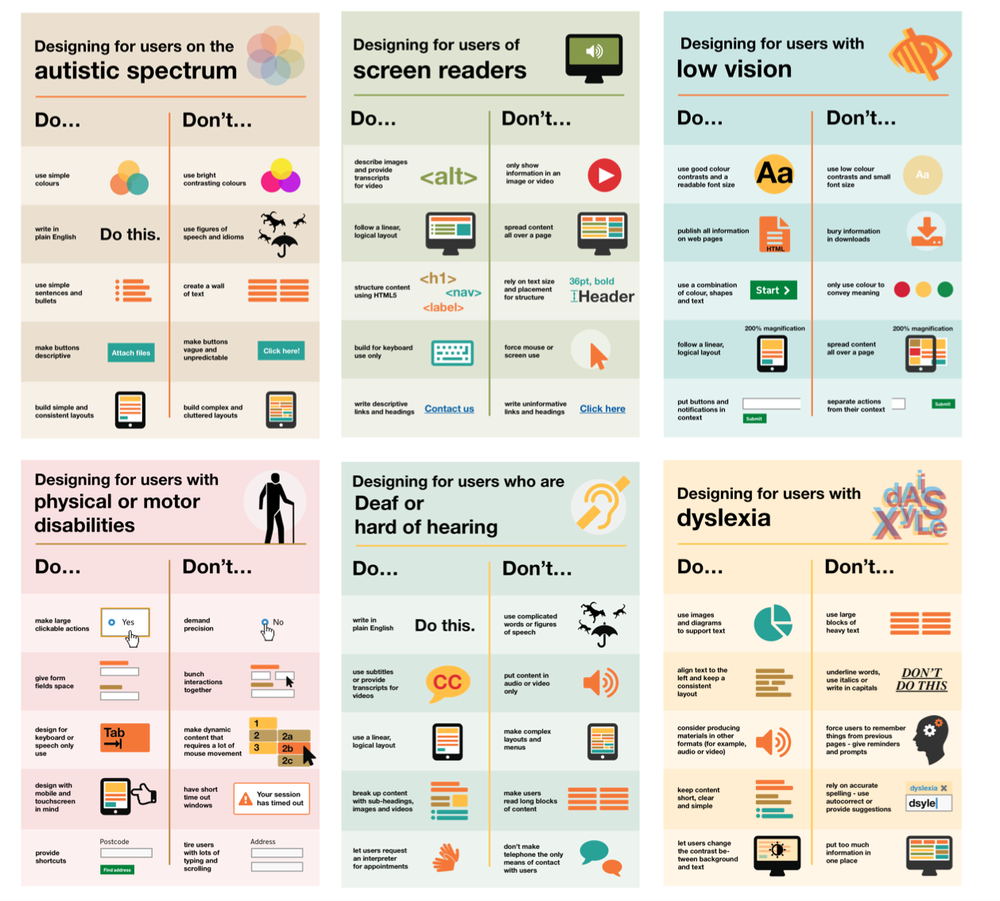
As background, I led a project to build an intelligently adaptive learning platform. We were going to profile learners, but then also track their ongoing behavior. And, on this basis, we’d serve up something appropriate for learner X versus learner Y. (We’d actually recommend something, and they could make other choices.)

It was quite the research endeavor, actually, as the CEO had been inspired by Guilford’s learning model. I dug into that and all the learning styles literature, and cognitive factor analysis, and content models around learning objectives, and revisited my interest in intelligent tutoring, and more. I was able to hire a stellar team, and create an approach that was scientifically scrutable (e.g. no learning ‘styles’ :). We got it up and running before, well, 2001 happened and the Internet bubble burst and…

In some sense, the system was really both, in the way I’m thinking about it. I’ve seen different definitions, and one has adaptive as a subset of personalized, but I’m going a different way. I think of personalized as pre-planned alternatives for different groups, whereas adaptive reacts to the learner’s behavior.

Our use of initial profiling, if we only used that, would be personalized. The ongoing adaptation is what made it adaptive. We had rules that would prioritize preferences, but we’d also use behavior to update the learner model. It’s something they’re doing now, but we had it a couple of decades ago.

So, my simple way of thinking about personalized versus adaptive is that personalized is based upon who you are: your role, largely. We’d swap out examples on marketing for people selling services versus those selling products, for instance. Or if we’re talking negotiation, a vendor might get a different model than a lawyer.

Adaptive, on the other hand, is based upon what you do. So, for instance, if you did poorly on the last problem, we might not give you a more difficult one, but give you another at the same level. Twice in a row doing badly, we might bring you another example, or even revisit the concept. This is what intelligent tutoring systems do, they just tend to require a rigorous model of expertise.

Of course, you could get more complicated. Personalization might have a more and less supportive path, depending on your anxiety and confidence. Similarly, adaptive might throw in an encouraging remark while showing some remedial materials.

At any rate, that’s how I differentiate personalized and adaptive learning. Personalized is pre-set based upon some determined differences that suggest different learning paths. Adaptive calculates on the fly and changes what the learner sees next.  How do you see it?

The post Personalized and adaptive learning appeared first on Learnlets.

02 Oct 07:00

Why Chairperson-cum-CEOs Have No Place in Today’s Capitalism

by Sacha Sadan

When it comes to separating the roles of company CEO and board chair, many arguments—both for and against activist calls to do so—have been made. Arguments against the idea generally insist that separating the roles needlessly complicates the business of running a business by creating two armed camps with blurred responsibilities. Meanwhile, arguments in favour of separation tend to highlight numerous perceived benefits, ranging from improved executive oversight to diversity of thinking.

Financial savings have also been highlighted as a reason to split the functions. As noted in the Harvard Business Review article “The Cost of Combining the CEO and Chairman Roles,” a 2012 study conducted by GovernanceMetrics International—which looked at 180 North American corporations worth US$20 billion or more—found that shareholders of companies with a combined CEO/chair pay a lot more in compensation without receiving any clear improvement in performance. In fact, over a five-year period, the study found that shareholders at companies with split roles received an average return of 39.96 per cent, while the average five-year return for shareholders at firms with combined leadership was a less impressive 31.3 per cent.

As far as the authors of this article are concerned, of course, governance improvements alone justify separating the CEO and board chair functions.

As investment industry professionals at Legal & General Investment Management, one of Europe’s largest asset managers, we have long been concerned by a worrying pattern of companies only splitting these functions after a scandal. And we believe that waiting for something to go wrong is not in the best interest of any business or its long-term shareholders. That is why we put our money where our mouth is during the most recent proxy season, voting against the board appointments of Darren Woods, CEO/chairman of ExxonMobil, and Jeff Bezos, CEO/chairman of Amazon, among many others.

To frame our thinking on the matter, we thought it instructive to observe that the United States government was based upon a political doctrine that originated during the Age of Enlightenment. In The Spirit of the Laws, published in 1748, French lawyer and political philosopher Charles-Louis de Secondat, Baron de Montesquieu, argued that liberty can best be maintained by forming constitutional governments with independent branches empowered to keep each other from abusing authority.

This line of thinking heavily influenced the crafting of the United States Constitution. As succinctly noted by John Adams—American Founding Father and second U.S. president—in the Adams–Jefferson letters, “Power must never be trusted without a check.”

Too grandiose an example? Perhaps. But the analogy has merit, especially considering the need for built-in checks and balances that exists in the States today.

“Just as the independent branches of the U.S. government carry their own defined powers, uncoupling the powers of the CEO and board chair represents a positive move away from self-interest, conflicts of interest, and power imbalances, toward more strategic, relevant, and inclusive decisions and company cultures.”

Just as the independent branches of the U.S. government carry their own defined powers, uncoupling the powers of the CEO and board chair represents a positive move away from self-interest, conflicts of interest, and power imbalances, toward more strategic, relevant, and inclusive decisions and company cultures.

In the United Kingdom, the Corporate Governance code does not allow for the combination of CEO and board chair functions. And while there has been some progress on this issue in other jurisdictions, the progress made has not been good enough.

As things stand, the proportion of global companies maintaining a combined CEO and board chair role remains astonishingly high—53 per cent of CAC 40 companies in France, and 48 per cent of IBEX 35 and other top 100 companies in Spain. In North America, according to the Spencer Stuart Board Index, 86 per cent of the 100 largest publicly traded companies in Canada had separated the roles by 2019, but almost half of the S&P 500 companies across the border in the United States remain led by a combined CEO/chair (although the U.S. number is down from 77 per cent in 2001, according to a Stanford study).

We find these numbers unacceptable because—like a U.S. government without functioning checks and balances—we believe any company with combined CEO and board chair roles is fundamentally incapable of governance best practices.

Good governance has never been more important because it can make or break a business, and good governance starts at the top. As laid out above, having distinct CEO and board chair functions provides a balance of authority and responsibility that we believe is in both the company’s and investors’ best long-term interests. Also—similarly to Congress’s legislative independence from the powers of the U.S. president and Supreme Court—a board’s independence from the CEO is equally important to ensure robust oversight over company strategy and executives’ decisions.

Why is it more important than ever before for hold-out companies to act? Put simply, we do not see how it’s possible for self-interested behaviours to be sustainable over the long term, not to mention the COVID-19 crisis.

Capitalism has hitherto been defined by what works in the marketplace. Left unchecked, with companies not having to answer to codes of regulation and conduct, the system can easily break. This generates justifiable backlash, whether public or governmental, against the idea of profit at any cost. Hence the need for checks and balances to mitigate corporate solipsism, which is where the concept of environmental, social, and governance (ESG) measures comes in.

The rise of ESG—along with last year’s commitment by the 181 CEOs who make up America’s Business Roundtable to lead their companies for the benefit of all stakeholders—reflects a deep schism with old-school capitalism. As a result, real change on the corporate governance front was needed even before the COVID-19 pandemic made it a matter of survival.

The roles of CEO and board chair exist for different purposes. Separating them doesn’t just reduce costs along with the risks of bad behaviour and scandal—it can help companies achieve and maintain profitability, mitigate potential challenges, and focus on growth to create long-term value—even, and perhaps more so, in times of crisis.

In today’s challenging world, diverse ideas and viewpoints may contain the seeds of survival, which is why we need diverse boards that can better challenge and support companies in making necessary changes and sustainable decisions. We need corporate boards led by chairs who can focus on their significant governance responsibilities, not CEOs/board chairs who can make their own rules—grade their own papers, as it were

At no time in recent memory has it been more incumbent upon businesses to lead by good example. In fact, we think there may be a structural fault line where non-sustainable corporate behaviour could be a predictor of eventual failure. Nevertheless, negative corporate behaviours can become structural, generating strong inertia against change while protecting fiefdoms or special interests and maintaining a biased conception of right and wrong. As a result, many companies need a helping hand to enact good and sustainable behaviours, which is why we have long viewed stewardship as an essential feature for asset managers seeking to generate sustainable long-term outcomes for their clients.

Earlier this year, LGIM updated its global proxy voting policy to step up our efforts to influence leadership structures. We also announced we will vote against any company in Japan with no women represented at the board level. In 2019, we logged 379 engagements with companies on governance issues. Using our considerable proxy voting power, we also voted last year against 159 directors in the United Kingdom due to concerns over independence. In Europe, we withheld support from 365 resolutions to confirm directors, boards, or committees. In 2019, we supported 51 shareholder-driven resolutions in the United States that asked for a split of the CEO and board chair functions. We also cast 40 votes against directors where the board’s decision to combine the roles was done without the prior approval of shareholders.

Our approach in advocating for governance (the “G” in ESG) measures—including separating the joint CEO and board chair positions—is twofold: on the one hand, we are acting to guide companies toward more responsible and sustainable behaviours; and on the other, we are acting out of self-interest to protect our shareholders as asset managers because we believe working to create a more inclusive and sustainable capitalist system is in the best interest of all investors.

But if we hope to maintain a habitable planet, the path forward must be one in which companies can be trusted to self-regulate (especially in the world’s largest economy, where environmental regulations designed to prevent catastrophes like the Deepwater Horizon oil spill are actually being rolled back). To effectively self-regulate on environmental issues, a company must have a diverse board and a separation of powers in place to ensure sound decision making. The same goes for unsafe and unequal work practices.

One lesson of the 21st century and its disruptions so far is that most progressive change comes from the outside. There can, however, be a different model for change—one coming from consenting, diverse, and active leaders within a firm. This model starts with corporate boards effectively serving as a balancing force to a company’s executive “branch.”

Unless otherwise stated, references to “LGIM,” “we,” and “us” are meant to capture the global conglomerate that includes Legal & General Investment Management Ltd. (a U.K. FCA authorized adviser), Legal & General Investment Management International Limited (a U.S. SEC registered investment adviser and U.K. FCA authorized adviser), Legal & General Investment Management America, Inc. (a U.S. SEC registered investment adviser) and Legal & General Investment Management Asia Limited (a Hong Kong SFC registered adviser). 


The post Why Chairperson-cum-CEOs Have No Place in Today’s Capitalism first appeared on Ivey Business Journal.

30 Sep 06:27

Online icebreakers

by rjhowe

This blog is a home for some of the links which provide useful ideas for icebreakers for online classes. If you have particular favourites/collections then please email them to rob.howe@northampton.ac.uk.

Equity Unbound / OneHE

Hyper Island Toolbox

Adding Some TEC-VARIETY: 100+ Activities for Motivating and Retaining Learners Online.

The post Online icebreakers appeared first on Learning Technology Blog.

30 Sep 06:27

How to use learning communities to improve student success

by Emil Hajric
use learning communities to improve student success

For educators, watching students learn is second only to watching them use what they’ve learned to improve their lives and the lives of those around them. After all, your ultimate goal is to prepare them for life after the school’s out, right?

Of course, there’s more to all this than just delivering the information your students need to pass their tests and earn their degrees. To reach this ultimate goal — and for students to reach theirs — your educational institution needs to create an environment in which meaningful learning is always taking place.

This is why learning communities have become such a hot topic in the educational world today.

What is a learning community?

The term “learning community” has different meanings depending on the context.

In terms of curriculum planning, a learning community is a program composed of multiple, interrelated courses designed for a specific cohort or student group. The idea is to bring all members of the cohort, and all faculty members, under one roof, so to speak, to create a more cohesive learning environment for the student.

In a broader sense, a learning community is a group of people who share common academic goals and attitudes, and who interact with one another for the purpose of learning and using what they learned for good. In short, we’re talking about social learning in a more holistic sense.


Read more: Classroom collaboration: Learning together


As we’ll discuss, the best way to ensure success within a learning community program is to build an actual learning community within your educational organization.

The benefits of creating a learning community

Whether we’re talking about curricular learning communities or more holistic learning communities, the benefits are similar.

However, a learning community in name only — that is, one that makes mere surface-level changes toward a more integrated curriculum — simply will not experience these same benefits.

At any rate, creating a true learning community is beneficial to all involved parties:

  • For students, learning communities lead to improved academic performance and an increased sense of purpose and belonging. This enables students to apply what they’ve learned to their future careers and lives and use these learnings for fruitful purposes.
  • For educators, learning communities allow for the effective and efficient transmission of knowledge and wisdom — which, of course, is what teaching is all about. Because the knowledge and wisdom being shared are amplified by other learnings within the community, educators inherently become even more effective. Also, belonging to a learning community means sharing ideas. This allows educators to improve their teaching methods and enhance their own knowledge of the subject matter.

    Read more: 8 Edtech organizations every teacher should know about [INFOGRAPHIC]


  • For educational institutions, success on the students’ and teachers’ parts means higher retention and graduation rates. This, coupled with past graduates’ overall positive outlook on their educational experiences, will lead to an improved reputation for the institution — allowing the learning community to continue growing as time goes on.

Again, if your organization isn’t actively striving to become a true learning community, there is no way for your team to fulfill your educational duties to the fullest possible extent.

But, by creating a community in which education and growth are the driving factors, there is no limit to what the members of the said community can do.

4 Key steps to building a thriving learning community

With the above in mind, let’s look at four things you must do to create a learning environment that guarantees student success.

  1. Develop shared learning goals and responsibilities

    In a learning community, everyone within the community is continuously learning, and knowledge is continuously being shared. This is in stark contrast to the traditional school setting, in which knowledge is transferred from teacher to student in a more linear fashion.

    Though they’re certainly not equals, both teachers and students within a learning community need to see purposeful learning and knowledge transfer as their main objective. Both parties also need to understand what they need to do to ensure the learning community moves forward as a whole.

    Looking at curricular learning community programs, both teachers and students must understand how each course interconnects with one another — and why these connections are so important to their learning.

    For teachers, this paves the way for better communication and collaboration between subject experts. This, in turn, leads to a more cohesive and comprehensive learning experience for the student — who will more clearly understand the “why” behind their assignments and their learning.

    It’s also vital that educational institutions as a whole share common goals for learning and growing, too. The aim is to instill in students the importance of lifelong learning, and the idea that learning doesn’t stop at the classroom door. To make this happen, all members of the learning community must create shared learning goals — and continue striving toward them at all times.

  2. De-silo classes, teachers, and students

    As we just discussed, learning communities aim to make intentional, purposeful learning a natural part of life. Put another way, the goal is to avoid falling into a regimented, compartmentalized approach to teaching and learning (which has proven to be ineffective by today’s standards).

    The key to doing all this: de-siloing courses, teachers, and students.

    In terms of coursework, it’s essential for the learning taking place in each class to help students form meaningful connections between ideas, concepts, and overall knowledge.

    Educators must also decompartmentalize their approach to teaching, in general. The goal is to transform from “a teacher of (English, History, etc.)” to “an educated leader of a learning community” — and in doing so, supercharge their ability to prepare their students for success.

    This goes back to sharing responsibility for student outcomes. In a learning community, teachers are responsible for their students’ overall success — not just success within their class. This makes collaboration with other teachers within the community an absolute necessity.

    Finally, students must also be able to openly engage with all members of the learning community for educational purposes. This applies to both other students, as well as to teachers. In connecting with peers working on different projects, or with educators specializing in various fields, students will be exposed to a vast amount of ideas and perspectives that will drastically enhance their learning experience as a whole.


    Read more: 4 ways to stimulate online learner engagement


    De-siloing the educational experience for both student and teacher is critical to the development of your learning community. In creating a more integrated and connected educational environment, you’ll enable truly organic learning to occur within each student you serve.

  3. Use the best approach for your learning community

    In developing a curricular learning community, and eventually expanding the community to the entire organization, teams typically use one of five common approaches:

    • Linked or clustered courses, in which students take classes to learn the required material, as well as lessons to learn how to use and apply the content
    • Thematic clusters, such as the program revolving around scientific advances mentioned earlier
    • Federated learning communities, which combine thematic learning with mentorships (with higher-level students taking on the role of mentor for students just entering the program)
    • Interest groups, which typically center around a cohort’s learning needs in addition to thematic coursework (e.g., a program consisting of three related courses, as well as a discussion group that meets regularly to tie course learning to students’ non-academic lives)
    • Developmental clusters or workshops that focus on enhancing basic academic skills within struggling learners as they prepare for more advanced studies

     
    Obviously, the cohort’s educational needs are the main deciding factor here. But you also need to consider which approach your academic team is best suited for.

    Think about:

    • What areas do your team members specialize in? What knowledge and abilities do they bring to the community?
    • What resources do we have access to within our organization and our geographic community?
    • How can we use what we know, and the resources we have on hand, to create a cohesive curriculum and overall learning environment for our students?

     
    As your team’s understanding of best practices within learning communities matures, you’ll be able to add more programs and try new approaches based on the needs of incoming students. Eventually, you’ll create a fully integrated learning community where all members empower each other through education and knowledge.

  4. Make ongoing, data-driven improvements

    As we said earlier, it’s unfortunately all too common to see educational institutions abandon their learning community initiatives and slide back into a traditional, linear mode of teaching.

    This happens when teams forget that students aren’t the only ones who need to be learning to create a true learning community. For the community to continue growing, teachers and administrators need to also be continuously learning and growing, as well.


    Read more: How to succeed with online PD for teachers


    Educational leaders must make specific improvements to their learning community that will positively impact student performance. For this to happen, educator teams need to become entirely data-driven.

    On the quantitative side, this means paying attention to metrics such as GPA, retention and passing rates, and graduation rates for students within your learning community programs (vs. the national averages for these metrics). You can also evaluate cohorts’ professional success post-graduation to determine the impact your program had on their lives.

    To get a complete sense of the value of your learning community, you’ll need to collect qualitative, experiential data from your students as they go through your programs. Some key areas of concern here include:

    • How engaged students feel throughout classes and the overall learning experience
    • Students’ levels of commitment to their studies and the learning community as a whole
    • The perceived value of the connections made between peers and teachers alike
    • Students’ levels of involvement in extracurricular activities within the learning community

     
    And, of course, you also want to get a clear idea of your students’ overall outlook of the program, your organization, and education as a whole.


    Read more: The most important LMS analytics that teachers should know about


    You can then use this data to identify strengths and weaknesses within your educational initiatives — and use what you learn to enhance your learning community for teachers and students alike.

Wrapping up

Every educational institution needs to create an environment where learning can happen at any time, in any circumstance, thus encouraging students to participate int heir own learning. By following the above steps, schools and universities can build strong learning communities, benefitting both students and educators, as well as the institution itself.

The post How to use learning communities to improve student success appeared first on NEO BLOG.

23 Sep 10:12

How standards help attain the goal of quality education for all

by Editorial Team
Kindergarten children learn with technology (Photo: acer)

Technology touches most aspects of daily life and brings many benefits to diverse fields, including education and training. For example, it can lower costs and adapt applications and programmes to individual needs and preferences.

“If more people have access to high quality educational resources and tools, it becomes easier to meet the goal of UN SDG 4: Ensure inclusive and equitable quality education and promote lifelong learning opportunities for all. With support of standards, technology has the potential of meeting these requirements within education,” said Overby, during the International Conference on Sustainable Development (ICSD) this week.

Overby is Chair of ISO/IEC SC 36 for Learning, Education and Training (ITLET), and participated in the session on ICT standards for the UN Sustainable Development Goals (SDGs). SC 36 standardization activities, which cover all aspects from formal education within schools and higher education, to training within industry and lifelong learning.

COVID 19 has put the spotlight on tech for education

COVID-19 caused governments to close schools and tertiary institutions overnight, and rethink how to deliver education. It also raised questions, such as how equipped are learning institutions to carry out entire curriculums remotely and how will learners be assessed, and teaching happen in this new set up? How do families without the appropriate hardware and/or an Internet connection manage? Seven months on, we live with the pandemic and its spikes.

“The education sector wasn’t ready for COVID 19, which forced schools, universities and training institutions to go virtual. The learning curve has been steep, but the pandemic has raised awareness of how IT can help education and that people can learn anywhere, so long as they have access to internet and appropriate technology and teachers who are prepared to teach them virtually. We also anticipate that the increased use of on-line tools will have an impact on how schools organize their education when the COVID 19 pandemic are under control.”

Benefits of global education standards

As IT becomes an integrated part of all aspects of our educational systems, there is an increased need for systems to exchange information about their learners, educators, curriculums, learning goals, grades and badges, achievements, attendance, and all other aspects of the schools activities, And support educators, while following learners as their education evolves in different educational institutions.

Global standards for interoperability between systems would mean that providers would only need to create one integration point for each service. This would lower costs and increase flexibility when choosing a service provider.

“In the longer run we’ll see the huge benefits of technology that supports teachers, students, parents and schools by providing tools that can be tailored to specific needs. There will be more vendors of educational IT tools and apps, more data being produced and more students. The ecosystem will need to have commonalities and we will need standards to ensure these tools are interoperable across institutions,” said Overby.

Important recommendation to the education sector

If global standards are to be implemented, school owners and ministries of education must request that standards are followed by all providers of technology for educational systems, to enable information to flow easily between systems.

Standards required by educational domains

Several standards are required to better meet the needs of educational institutions. These standards should specify how the different systems within these domains share and exchange information within the domain, but also across the domains.

“When systems within these domains have standardized their models for sharing, exchanging and governing data, we are more likely to get equal high-quality education for all,’ said Overby.

The four domains include:

1) School Administrative Systems (SAS) – systems used to manage all educators, learners, their classes and subjects, as well as most administrative information governing the educational institution.

2) Learning Management Systems (LMS) – systems used by educators to manage the work of learners, tasks they are assigned and submissions dates. The LMS also contains information about the learning paths of the individual learner and the resources they should access to meet the expected learning outcome.
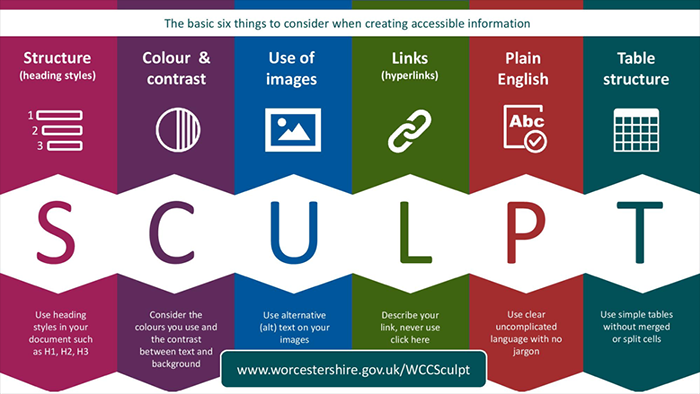
3) Digital Learning Resources (DLR) – resources accessed by learners to access the knowledge and insights required to acquire new skills and competencies. DLRs are usually designed to meet knowledge requirements as specified in different national curricula. They exist in many variants (plain text files, complex VR models).

4) Pedagogical Learning Services (PLS) – services that guide and support educational institutions to ensure that educators reach their learning and educational goals. Some examples include learning analytics and collaborative services which support learners.

About ICSD

The International Conference on Sustainable Development (ICSD) provides academia, government, civil society, UN agencies, and the private sector with the opportunity to share practical solutions to achieve the Sustainable Development Goals (SDGs).

The ICSD 2020 covered diverse topics, such as education, job opportunities and clean energy transition, multilateral financing for SDGs in Africa and Asia (examples), climate change adaptation and disaster risk reduction for cities, waste management and the circular economy and much more.

21 Sep 06:35

Pre-made Power Point Templates for Teachers

by Educatorstechnology
Inspired by this list of PowerPoint templates for efficient meetings, we went ahead and curated for you this collection of what we think are some helpful PowerPoint templates you use for a wide...

....read more
21 Sep 06:34

4 Questions About Online Program Development Answered

by Jessica Sheehan

Over the past five years, we’ve seen 1.5 million more students choose to study exclusively online. While higher education has been on a trajectory toward embracing more online learning, current events have pushed institutions to explore new possibilities with remote learning and online programs at an exceedingly faster pace than many originally conceived. As everything we once knew as normal shifts to our new reality, institutions see the growing opportunity to meet students’ needs and expectations through online programs.

If you’re considering beginning or growing online programs at your institution, review these important questions and answers around online program development to help set you—and your students—on a path to success.

Why should we think about growing our online programs?

While enrollment in higher education overall is down in recent years—a trend expected to continue well into the future—online enrollments have been up year-over-year. Before COVID-19 prompted even more shifts to online learning, the percentage of postsecondary students enrolled exclusively in online programs grew from 12.8% to 16.3% in the last five years, and those numbers continue to rise. Online enrollment rose at a faster pace last year than over the previous three years—marking the 14th year of online enrollment growth.

In other words, online enrollment is up year-over-year and at a growing pace.

Why? Today’s student is changing—and they’re turning to online programs to meet their needs.

What we know as the “traditional student,” those between the ages of 17-21 who attend four-year colleges and live on campus, make up only 15% of the undergraduate population in the U.S. today. Who are the remaining 85% of students? This overwhelming majority of students is considered non-traditional (or “post-traditional”). This is a diverse group of adult learners, full-time employees, low-income students, commuters, and working parents. These non-traditional students are more likely to enroll in fully online programs due to the flexibility it affords them as they juggle multiple personal and professional responsibilities.

How do we know which programs to put online?

Now that you see the value in online programs, you must determine which programs to put online. You can’t simply copy/paste your in-person programs to an online environment. Just like post-traditional students aren’t learning in the same ways as their traditional predecessors, the programs they’re studying will change too. Consider these three factors when choosing which programs to put online:

  1. Understand which programs are growing in demand both from a student perspective and workforce perspective. Where are jobs and workforce needs expected to grow over the next ten years?
  2. Determine what population you are trying to serve. Does your region have a need for increased bachelor’s degrees? Are there companies based in your state who need more engineers with master’s degrees? Is there a demand for shorter format certificates focused on professional development?
  3. Be realistic about which programs your institution has the brand permission to bring online and grow—if your institution is known for education and nursing, it may be hard to stand up an online cyber security program and convince prospective students they should come to your school.

Why would I outsource support for my online program development?

Developing and growing online programs and degrees takes specialized skills that may not be readily available at your institution. Working with a partner can help you stand up a new program or support and grow a current program more quickly than you could typically do on your own—especially if you don’t already have the resources hired in-house.

Partners who are deeply immersed in the higher education space can provide market insights and best practices that your institution may not have access to. When you find the right partner, you can continue doing what you do best while leaning on the best-in-category services of an outsourced partner to provide guidance and support where you need it.

What are my options for online program management partners?

Partnerships can be hugely advantageous to institutions, but you need to find the partner that’s right for you and your unique needs. Fortunately, institutions have options when it comes to finding the right partner.

Revenue-share model

Traditional Online Program Managers (OPMs) utilize what’s called a revenue-share model where the OPM makes the initial investment to stand up an online program as well as ongoing investment into marketing and enrollment for the program. They will then take a percentage (typically between 40-60%) of all incoming tuition dollars from that online program. Because the OPM has so much invested on their side, they tend to require a lot of control over which programs they are willing to work on along with the course content and delivery. They provide little transparency into the media placement they are making on behalf of the school. Rev-share models are relatively comprehensive in the services they provide, but it is difficult to opt-out of any services that you may be able to offer in-house. Contracts tend to be very long (up to eight or nine years), leaving little room for flexibility if anything changes as far as institutional capabilities.

Fee-for-service model

An alternative option is a fee-for-service model, an approach that requires more up-front investment but allows for more flexibility, transparency and ownership over your online program strategy and approach.

A fee-for-service approach provides the foundation for greater long-term growth and ROI.

This unbundled approach to supporting online programs allows you to provide the services in your area of expertise and outsource those where you need an outside skillset and scale—instead of requiring you to sign up for services you don’t need. Plus, with shorter contracts, an unbundled, fee-for-service approach provides more flexibility as your in-house services for online programs change and grow, allowing you to have an online program experience that is right for you rather than be managed by an OPM. Best of all, when you do grow your online programs, you keep 100% of the revenue.

What’s next

If you’re ready to take control of your online program development, learn more about Blackboard’s Online Program Experience (OPX) solutions, offering a flexible and transparent alternative to the traditional OPM. We’re helping institutions optimize their online efforts and achieve maximum ROI while meeting the demands of today’s students.

The post 4 Questions About Online Program Development Answered appeared first on Blackboard Blog.

18 Sep 07:22

Explainer video: Six phases of intranet evolution

by James Robertson

Over the last two decades, we’ve observed that intranets go through common stages of growth, as they move from newborn sites through to essential business tools. We’ve seen intranets wrestle with common issues and challenges, and have identified common traps and dead-ends that many teams encounter.

The end goal, as always, is to deliver an intranet that’s truly valuable for staff and their organisation, so how do we get there from here?

This video shares one of the first models created by Step Two: the six phases of intranet evolution. It’s one of a series of ‘explainer videos’ that we’re releasing to share the knowledge we’ve gained over 20+ years.

Watch this video to work out what stage your intranet is at, and where to go next. The model can also be highly effective at bringing your stakeholders along the journey, helping them to understand what pitfalls should be avoided.

The post Explainer video: Six phases of intranet evolution appeared first on Step Two.

16 Sep 07:06

Digital and soft skills – Microsoft on skills needed for an inclusive economy

by Kim Tasso

As today is the start of Microsoft’s Digital Skills Week (14th-18th September 2020) I joined a short digital event this morning (with speakers also from Catch 22 and LinkedIn) on skills for an inclusive economy. It was interesting to hear the latest research and trends on the digital and soft skills required for the future workforce. Here’s a summary of the key points (which may also be interesting to those conducting PESTLE analyses)

Digital transformation

Digital Skills Week is focused on the re-skilling needed to meet the needs of the tech-enabled economy. Particular issues explored during the week – aimed at senior management – are:

  1. Creating an inclusive economic recovery
  2. Cybersecurity skills
  3. Impact of Artificial Intelligence (AI)

There was also mention of the need for cultural and strategic change to increase the skills capabilities of the current and future workforce.

Impact of Covid-19

The speakers indicated that there were currently 3.4 million people unemployed. This was likely to increase when the furlough scheme for 5.5 million people ends in October. There are some groups who are particularly at risk of unemployment.

Young people – particularly those with few qualifications at entry level and/or in low income jobs – are particularly at risk. (The youth unemployment issue was highlighted in the BBC News the next day).

Older people are also at risk. Where people lose their jobs after 50 there is little chance of re-employment so it is essential that they are re-skilled while still employed. Older workers need to learn how to translate their experience and sell themselves in a new context.

In cities such as London, Manchester and Birmingham as many as a third to a fifth of individuals are at risk of unemployment.

There are also sector differences in employment opportunities. For example:

  • There are now more jobs in construction and healthcare
  • Sectors such as the professions (e.g. lawyers) and media are much the same as before Covid
  • Travel and entertainment jobs are down by as much as 30%. Other sectors that have been badly affected include hospitality, retail and the arts as well as the gig economy.

The speakers estimated that the Covid situation had prompted two to 10 years of digital transformation within two months. We are now in a hybrid economy.

Estimates suggest that there will be three million new tech jobs over the next five years.

Digital skills required

The speakers quoted research that suggests 30.5 million people have no digital skills.

They observed that with more virtual working most jobs now require a high level of digital skills.

They also commented that young people will have difficulty obtaining basic office skills as work experience opportunities are now so limited.

There was a discussion about the Digital Apprenticeship scheme. There were comments that this Government support for training is currently underutilised by employers. Trials this year had been effective at reaching BAME and female groups to develop employability skills and create aspiration-based career plans.

Soft skills required

The speakers said that attitudes towards learning and development needed to change. They argued that employers must take responsibility for upskilling the future workforce.

They indicated that both hard (digital) and soft skills development programmes were required. I was surprised to hear them describe soft skills as core skills too.

Amongst the soft skills most needed were:

(There is significant research about the demand for soft skills in my recent book “Essential soft skills for lawyers”)

Surge in on-line learning

They mentioned a surge in the uptake of online learning. The vast online training resources during Covid-19 had reduced the perceived cost barriers to entry.

And they stressed the need for affordable and flexible training that can fit around family commitments as working parents were particularly at risk. They mentioned the gender equality gap here indicating that 33% of working mums were having to reduce their hours. Flexible hours and job sharing were needed to help.

As the Covid situation has reduced employers’ ability to hire new skills in, the imperative will be for employers to train and re-skill their existing employees.

The speakers indicated that 75% of learning and development professionals said that training was now more on the CEO’s agenda. And 44% of CEOs now think it’s their responsibility to ensure the future employability of their work force.

The speakers said that there was a need for the development of  a learning culture in businesses – where people can learn from resources and also their colleagues, where training can be implemented in their work right away and where they can see the connection between training and reward and career progress.

There was now a demand for people to curate learning resources. I liked the idea of something like Spotify being created to help people navigate the vast training methods and resources available now on-line.


It was good to see major technology companies providing free advice and training for employers and employees – particularly the disadvantaged groups. Corporate Social Responsibility (CSR) in action.

Microsoft Digital Skills Week Twitter account @MSFTBusinessUK


The post Digital and soft skills – Microsoft on skills needed for an inclusive economy appeared first on Kim Tasso.

14 Sep 06:54

Learning Experience Designer... Who are they, what do they do?

by Donald Clark

Job titles 

Job titles in the world of online learning have been rather fluid over time. This is to be expected in a new field, where the technology moves at a fair clip. Technology is always ahead of sociology, so we find ourselves always in catch-up mode, or as some say, perpetual-beta. 

What do you call yourself?

Interactive Designer
Instructional Designer
eLearning Designer
Learning Designer
eLearning Instructional Designer
Online Learning Designer
Learning Engineer
Blended Learning Designer
Curriculum Designer
UX designer
UX & UI Designer
Learning Experience Designer 

To be fair, the roles vary in context, scope and responsibilities. In an organisation with just a couple of people delivering the whole online learning service, one person may have to handle everything including design, develop and deliver entire projects. This can involve client and stakeholder liaison, project management, solution design, writing, graphics and development. At the other end of the spectrum is the person who sits , say in a large online learning development company. When I ran such a company LXDs sat within a large team and could focus on what the learner saw, heard and did, as they had a highly differentiated team of writers, graphic designers, animators, video producers, audio producers, developers and testers. Between these two extremes, of DEY (Do Everything Yourself) and DIY (Do It Yourself), you have everything in-between. 

The titles have also changed as the vocabulary has changed, across time. The term e-learning has given way to online learning. Some object even to the use of the word e-learning or online, referring just to Learning Design. UI and UX have also come across from the general world of web design. The word ‘Engineer’ has also emerged from the learning engineering movement. It’s all got kind of messy. 

The technology has also changed. Over time, tools have been developed, that are usually template driven. This is a double-edged sword, as the tool frees the designed from having to build from scratch but also locks them into fixed structures. Some argue that this fossilisation has led to too much dependence of multimedia production and not enough on meaningful and effortful learner participation. There is a sense that everything is stuck in multiple choice, drag and drop and so on. More recently the LXP and LRS have emerged, giving rise to the obviously sympathetic term LXD. The job may have to change again, as more contemporary techniques such as AI and data are not possible in these environments. 

These linguistic spats are always on the go but there is a fundamental force at work here. Meaning is use. It is pointless trying to change the language, as it evolves through actual use by actual people over time This is why it is so varied, drifts and changes. So I tend to be relaxed about job titles, they will be what they will be. For the rest of this book, I’ll use LXD, short for Learning Experience Designer and Learning Experience Design. 
Whatever the job title, I tip my hat to anyone who does this work. It is a complex amalgam of art and science, head and heart. A curious mixture of organisational demands, learning demands, learning psychology, media mix, media production and technology. You must try to satisfy everyone, as everyone has a view on learning. They’ve been to school after all! Well, I’ve been on many aeroplanes but I wouldn’t pretend to have the skills to design or pilot the plane. 

Project management 

There is an illusion that LXD is purely a design activity but it is a much more complex role than many imagine. All design is in a context of an organisation and project. Sure the focus must always be on the user or learner but you will also have other internal and external stakeholders. You will also have some constraints such as budgets, schedules, resources, technology and organisational culture. 

There’s always a lot more of this project management malarky than you think. Any LXD project has to juggle people, costs, time, quality, resources and technology. With all of these balls in the air, one or two will fall during the project. The trick is to know that they will almost certainly fall, so expect it, stay calm and manage the situation. You may not be the project manager but you will, to some degree be managing your portion of the project. I have always preferred the job title ‘Producer’ to ‘Project manager’ as the role is a project that demands fiscal, creative and stakeholder management, similar to that of a Producer in the film industry. People You may think your sole focus is on users but there will be other people to think about; Shareholders, Board of Directors, Executive Management, suppliers, standards bodies, unions, subject matter experts, project managers, graphic artists, audio engineers, video teams, developers and testers. People run projects not designs. So you need to know who runs the project externally and internally, who signs of the various stages of the project. You need to know how to communicate with the relevant people in an appropriate way, knowing who to copy in. A lot of friction is caused by inappropriate communication. Communications with stakeholders has to be managed. You can’t speak to a client in the language you’d use online with your friends on Instagram. You may be asked to formally present to client, which needs careful preparation. You may even be asked to facilitate meetings with stakeholders. You will almost certainly have to troubleshoot and solve problems caused by the natural friction between stakeholders. This is perfectly normal. In this business, the learning business, everyone thinks they can do other people’s jobs. 

Iterations 

Iterations are normal in LXD. The aim is always to minimise these iterations. Some are necessary, such as further input from subject matter experts and clients, then there’s useful input from users. Some, however, will cause friction. These tend to be small, avoidable errors, such as spelling, punctuation and grammar. For some reason, people reviewing learning experiences are particularly sensitive n this issue. They will happily make mistakes in print but god forbid that you may make a spelling mistake on the screen. A particular source of such errors is on graphics, where someone whose background is not in writing, types in text. I used to demand that graphic artists never typed in text, that they only ever cut and paste. May seem harsh, but it saved a lot of potential aggro. Similarly with glitches on graphics, audio and bugs. Try to eliminate as many obviously avoidable error was possible. A good rule is get it right first time. You should feel responsible for quality control and not see others, like the project manager, QA folk or client as picking up the slack. 

Costs 

Commercial awareness matters. There will be a budget that determines the envelope in which you design. The budget has allocated resources in terms of people and just as you depend on people supplying your with the necessary information and resources to do your job, so there will depend on you. It is often useful to have a sense of the financial content of a project. The project manager and client will appreciate that you understand the pressures they are under on costs and margins. Coming back to the role of a LXD, cost restraints are usually expressed as time restraints. So you will have to manage your own time and outputs, so will need some project management skills around time, whether it is yourself or others, especially around estimating the time taken for tasks and being firm on extra tasks being lobbed into the project with no extra time given. That’s why contingency time is important.

In my next post on LXD I'll be looking at Emotion and Motivation as drivers behind Learning Experience Design...
04 Sep 07:43

YouTube Channels to Help Students with their Math Homework

by Educatorstechnology
In today's post we are sharing with you some Math Youtube channels as featured in Learn at Home with Youtube. Most of these channels have already been featured in previous collections of ours. The...

....read more
04 Sep 07:43

Web Tools to Help Teachers Transition from in Class to Online Teaching

by Educatorstechnology
As the current pandemic rages across the globe causing colossal social and economic damage and setting up new realities, the way education was delivered pre-pandemic will forever be changed. Distance...

....read more
04 Sep 07:20

Digest #147: Making Your Material Digitally Accessible

by Learning Scientists

By Dr Helena Paterson

HP.jpg

Dr Helena Paterson is a Lecturer in Psychology at the University of Glasgow. She is the Technology-Enhanced Teaching and Learning Lead for the School of Psychology. Her expertise lies in digital education and her research is about children and adults’ perception of difference as it pertains so first impressions and person perception. Dr Paterson was the guest host of the #LrnSciChat on Digital Accessibility on 25 August 2020. You can find the summary of that Twitter chat here: Digital Accessibility #LrnSciChat. You can follow her on Twitter @PatersonHelena.

To boost digital accessibility, the Public Sector Bodies (Websites and Mobile Applications) (No. 2) Accessibility Regulations 2018 came into effect in the UK in 2018. This law requires that all websites for organisations that benefit from public money must be digitally accessible to all users. This law also applies to teaching materials hosted in virtual learning systems in universities such as Moodle and Blackboard.  Extensive guidelines have been written to help organisations to make their websites digitally accessible and are known as the Web Content Accessibility Guidelines (WCAG 2.1). This law has sparked a wider discussion about how we make our content accessible to students and also to pupils because it has shone a spotlight on the different kinds of things that can be barriers to learners. More importantly, though, it made many people realize that digitally accessible also means better for all students. In starting to work with my own materials, I found that it is not a lot of effort and does not take much time to make materials accessible. I also really find the concept “Accessible by Design” very useful: Plan with accessibility in mind when you design new teaching materials. In today’s digest a collection of resources is provided to get you started with digital accessibility.

1.     Dos and don'ts on designing for accessibility by Karwai Pun 

This is an excellent summary article that discusses attention, social-emotional issues, and environmental context issues. While the article applies these issues to user experience research, the concepts are the same for all of us. This article features helpful posters that can be downloaded and used as a resource.

Image from Source (all posters can be downloaded and used)

Image from Source (all posters can be downloaded and used)


2.      SCULPT for Accessibility by Helen Wilson

This guideline was designed for Worcestershire County Council SCULPT and provides a quick guide to help people create documents that meet basic accessibility requirements.

Image from Source

Image from Source


3.     Dyslexia friendly style guide

The British Dyslexia Association produced this style guide to help people make screen and print materials more accessible to individuals with dyslexia.  However, it incorporates many of the guidance available elsewhere in a simple and easy-to-use guide.


4.      Make your content accessible to everyone with the Accessibility Checker

The most used Microsoft apps such as Word and PowerPoint include an accessibility checker tool in the 2016 and later versions of the software. This takes a lot of the legwork out of making your document accessible.

Image from Pixabay

Image from Pixabay


5.     Digital Accessibility Guidance by The University of Glasgow

This page is geared towards teaching materials and teachers, so it is exceedingly useful for answering may questions that you might have about the various kinds of materials that need to be accessible. Also, check the section on how to improve digitial accessibility when using social media.


From time to time, we pick a theme and provide a curated list of links. If you have a theme suggestion, please don’t hesitate to contact us! Occasionally we publish a guest digest, and If you'd like to propose a guest digest click here. Our 5 most recent digests can be found here:

Digest #142: (COVID-19 Edition): Online Teaching and Learning Resources

Digest #143: Using Podcasts

Digest #144: Talking to Kids about Race

Digest #145: Elaborative Interrogation

Digest #146: The Psychology of “Zoom Fatigue”

26 Aug 07:05

The Epic eBook of Web Tools & Apps

by Unknown

I'm very excited to have contributed to this amazing free ebook featuring over 250 pages of web tools and apps!

To access the ebook, click here!


21 Aug 09:06

Apprenticeships in NHS Libraries – get involved!

by Editor
The new Level 3 Library, Information and Archive Services Assistant (LIAS) apprenticeship was approved for delivery in December 2018. The standard covers a wide range of professional skills and defines the activities of a LIAS Level 3 apprentice as: “LIAS Assistants help users find the information and resources they need in order to resolve their … Continue reading Apprenticeships in NHS Libraries – get involved! →
07 Aug 06:47

Loops of Learning

by julianstodd

Where possible, we can shift learning from ‘event’ based and into ‘experience’, which can be as simple as shifting focus from the internally self referential activities of a workshop, into the externally moderated activity of our everyday reality. Creating spaces where people can bring their own case studies and experience into the learning means we need strong facilitation, and firm scaffolding, but relieves us of the need to build many assets, and of the need to believe that we must find a ‘truth’ to teach.

Sense Making is both an individual and collective activity: within experience based learning, we will run through continual ‘loops of learning’, where we move from the cognitive aspects of sense making, into action planning (with a focus on individual application in their real world), into action itself, and finally through guided reflection into further sense making. Those loops may take minutes or days.

Effective sense making will take place as part of a Community: we need to establish both safe and known Communities, but also divergent and disconnected ones that we can bridge between, to explore bias and difference. Planning is about the consideration of the links back into performance: what can we carry forward and do something with (which can include encouragement to consider measurement of this).

Action is not simply about getting something done: it can be about building new vocabulary. Not just words to share, but skills and actions too. Finding a common language to analyse and discuss things is a core strength for a team, and something we should invest in. It also supports shared sense making and a group finding shared vocabulary may be a sign of it becoming a functioning entity and taking on a life of it’s own.

Reflection is always a strange thing, but most importantly is not simply a factor of time. Our role may be to create loose structures of reflection, from the ‘sieves’ that we filter new knowledge through, to the mechanisms by which reflection is captures. Personally i favour using storytelling approaches, but that is just one of many options. We should certainly remember that a written artefact is not, per se, reflection. Reflection is the activity, and you can write a page without reflecting on anything except time till your coffee break.

Sharing should be included as an active part of reflection: to share into our Communities, and of course to share beyond them.

05 Aug 12:15

IEC approach to energy efficiency

by Natalie Mouyal

The efficient use of energy has long been considered an unexploited energy resource. According to the International Energy Agency (IAE), energy efficiency is the ‘first fuel of a sustainable, global energy system’. But how can this resource be better harvested?

05 Aug 12:14

William Hill to close 119 betting shops

by Katie Donaldson
I.gardner.gb

Not all bad news from Covid.

William Hill says 119 of its High Street betting shops will not re-open after the shutdown forced by the coronavirus outbreak.

The company, which has 1,500 UK outlets, said it did not expect customers to return in the numbers seen before the Covid-19 pandemic.

The news came as it posted profits of £141m for the first six months of 2020, compared with a loss of £63m last year.

It also said it would repay £24.5m received from the UK furlough scheme.

The business did not say how many jobs were affected by the shop closures but said “the majority of colleagues [would be] redeployed within the estate”.

Chief executive Ulrik Bengtsson said: “I am delighted with William Hill’s performance in these extraordinary times. Our team has been remarkable, supporting each other and our customers throughout the pandemic, and I would like to thank them for their continuing efforts.

“The furlough scheme provided welcome and timely support, and meant we could protect the jobs of our 7,000 UK retail colleagues. Therefore, given the strength of our recovery post-lockdown, we have decided to repay the furlough funds.”

The post William Hill to close 119 betting shops appeared first on Engage Employee.

03 Aug 13:36

Teams Advanced Communications License Now Available

by Tony Redmond

Teams Advanced Communications at $12/user/month

On August 1, Microsoft launched a new Teams Advanced Communications add-on license. Because the license is not of general interest, Microsoft has not bundled it in Office 365 E5 or Microsoft 365 E5. Instead, Advanced Communication is an add-on which must be purchased individually at $12/user/month (U.S. price). The new SKU won’t initially be available for GCC tenants.

Eclectic Set of Features

Microsoft has bundled an eclectic set of features into the Advanced Communications license. At launch, the license covers:

  • Scaling up for Teams Live Events. Meeting organizers with the license can run Teams Live Events with up to 20,000 participants. The tenant can run 50 concurrent events, each of which can last up to 16 hours. These are the same limits that Microsoft temporarily extended to all tenants to help enterprise and education tenants cope with the COVID-19 pandemic. The temporary limits will revert on 1 October 2020 to 10,000 participants, 15 events, with 4-hour duration.
  • Compliance Recording Integration: Users with the license can access ISV-sold compliance recording solutions through Teams APIs.
  • Contact Center Solution Integration: Users with the license can access ISV-sold call center solutions.

During 2020, Microsoft plans to increase the features licensed by the add-on to include:

  • Large meetings: Meeting organizers will be able to schedule Teams meetings with up to 1,000 interactive participants instead of the normal 300 limit.
  • View-only overflow: In addition to the 1,000 interactive participants, Teams meetings will be able to overflow to accommodate another 20,000 participants in a “view-only meeting experience.” I believe that the view-only users won’t be able to speak during the meeting but should have access to chat, just like participants in Live Events have.
  • Custom branded meeting lobby. Instead of going through the standard Teams meeting lobby with Microsoft branding, you’ll be able to apply corporate branding to greet meeting participants as they join.

Lack of Granularity in An Odd Add-On

There’s no granularity in the features. The one license covers them all. This poses a question of whether $12/month or $144/year is good value for what you get.

If you’re interested in organizing large meetings, the cost can probably be justified because only meeting organizers need the advanced communications add-on. Even in very large enterprises, it’s probable that relatively few people have the responsibility to organize meetings with more than 300 participants or live events with more than 10,000, so it should be easy enough to limit the cost by licensing a select bunch of users. Attendees don’t need an advanced communications license to attend a mega-meeting, even if they pass through a wonderfully-branded corporate lobby.

Teams Charges for an API

Value is less certain for those who need access from Teams to an ISV-created compliance recording or call-center solution. These solutions use the Teams compliance recording API to capture interactions between users and customers. Bots join calls to record the interaction and store it in the ISV solution, just like bots join regular Teams meetings when recordings are made to capture the audio and video streams for processing by Azure Media Services and (later) storage in Stream.

ISVs working in this space include ASC technologies, AudioCodes, CallCabinet, NICE, Numonix, Red Box, and Verint. Apart from call centers, the need to capture conversations is most evident in the financial sector but could also exist in medicine and education (or anywhere someone could be sued if their advice turns out to be faulty or illegal).

Monitoring solutions don’t tend to come cheap, so asking customers to cough up an extra $144 per user annually to connect a bot to an ISV solution seems steep (the users who need to be monitored are unlikely to organize large meetings). I’m sure Microsoft did some software engineering to bridge the gap between Teams meetings and ISV solutions, but I wonder why this aspect of Teams is so different as to warrant charging for access to an API.

Microsoft might have been better to have two add-ons; one for meeting organizers and one for those who need to be monitored. But then they couldn’t justify the $12/month charge by pointing to all the wonderful features bundled in the add-on.

No Minutes for E5 Licenses

Meanwhile, in other news released to partners, Microsoft says that their plan to bundle 120 minutes of PSTN calling in Office 365 E5 and Microsoft 365 E5 licenses has been cancelled. The reason given is “rapidly evolving market conditions,” which could mean anything. I think this is a pity because letting E5 licensees dial out to domestic PSTN numbers from Teams is a pretty good way to demonstrate the worth of Teams calling. But no doubt the numbers didn’t add up to sink the idea.

Advanced? Really?

Back to our original topic, I’m not sure that Microsoft can justify the “advanced” part of the Teams Advanced Communications license because there’s not much that is advanced in it. Maybe “bespoke” is a better term, albeit one that doesn’t quite have the same ring or excitement about it. In any case, the Teams Advanced Communication add-on is now available worldwide through Microsoft resellers, should you think you need it.

Subscribe to Petri NewslettersOffice 365 Insider

Our Petri Office 365 Insider is dedicated to sharing detailed knowledge from top Office 365 experts. Delivered once a month to your inbox.

Petri.com may use your contact information to provide updates, offers and resources that may be of interest to you. You can unsubscribe at any time. To learn more about how we manage your data, you can read our Privacy Policy and Terms of Service.

!Already a Petri.com member? Login here for 1-click registration.

The post Teams Advanced Communications License Now Available appeared first on Petri.