Note: This originally appeared as a "Nuts and Bolts" column in Learning Solutions Magazine, October 2012.
A good deal of my time is spent providing workshops and conference presentations on social learning and the use of social media to support and extend social learning in the workplace. In every session, it seems, someone comes just to challenge me to “prove” that all this isn’t a waste of time, that there is performance-enhancing value in social connections and interactions, particularly of the online variety.
They usually want some magic metric, some formula like, “two hours on LinkedIn + four comments in groups = tangible outcomes for the organization.” It doesn’t work that way. A great deal depends on how the worker chooses to spend that time in social channels, how well he filters and curates information, how she chooses the people with whom she’s interacting. The quality of those interactions depends in turn on many other issues, including trust, a willingness to ask for and offer help, and time invested in developing ties deeper than those purely at the surface. Likewise, a worker expected to improve performance and support organizational goals must know what the expectations are around that.
Value creation
Etienne Wenger (of CultivatingCommunities of Practice fame), Beverly Traynor, and Maarten De Laat have recently published a new conceptual framework for understanding and assessing value in such interactions. It includes a nice overview chart (figure 1) that I’ve found helpful in addressing concerns of my audience members.
Figure 1: Wenger, E., B. Traynor, and M. De Laat. Chart from Assessing Value Creation for Communities of Practice and Networks: A Conceptual Framework. Used with permission.
Immediate value
I’ll use myself as an example of how the chart helps shine light on real activity and outcomes. I spend a lot of time on Twitter because there are so very many smart people there, who at any hour of the day or night are talking about something I often didn’t even know I wanted to talk about.
I mostly follow learning, training, and eLearning people, but I also like some fiction authors and a few experts in other fields. Those people who only talk about what their cats had for breakfast? I don’t follow them. But it’s important to note: I am very active on Twitter. I engage, and talk, and interact with people. I drop in on several live Twitter chats a month. I try to contribute as much as I take. I like to think I help. So in looking at Wenger et al’s first column: I feel I get immediate value from the quality of interaction and reciprocity, I am given food for thought that I do reflect on, and I make it no secret that I am having fun.
Potential value
Moving across the chart to the second column: From my participation, what is the potential value? I’ve certainly developed a lot of connections, many in other parts of the world who offer very diverse viewpoints. I find I’m often inspired to read up on a new area or check out a new app or other tool.My views on learning have shifted considerably over the past five years as I’ve recognized firsthand the power and potential of increased support for social learning in the workplace.
Applied value
Now, moving to the third column, we look to see whether dots are connecting. I spend a lot of time on Twitter, I make a lot of connections,I read about things that interest me. But am I getting applied value? Do I leverage those connections? Have I engaged enough with my personal learning network so that, if I ask for help, some people might respond?
Let’s revisit an example I used in a previous column, one spurred by a phone call from one of our agencies.
I tweeted this (Figure 2):
Figure 2: Leveraging connections on Twitter: original tweet asking for help
In two minutes’ time I had several responses, including this one (Figure 3):
Figure 3: One of the many immediate responses
I found the document, scanned it to see if it seemed okay, and sent it on to the agency. They said it was just what they needed. This amounted to a four-minute interruption in my day.
So you tell me: Is there applied value? Am I using my connections and implementing advice?
Realized value
Moving to the next column on the chart from Wenger et al, “Realized value.” I gave the customer a good response in four minutes. Is that a reflection on my personal performance? How about my organization’s reputation? Let me ask it another way: when’s the last time you called a government agency and got a good answer in four minutes?
Reframing value
In terms of the last column of Figure 1, “Reframing value”: I don’t know that I’ve changed my institution (yet), but I’ve influenced ideas around new ways of working. And while I’m not asked for evidence that I am effective, whenever I get a solution or innovative idea via one of my social channels, I take a screenshot or write a quick note and send it on to management anyway.
So, in looking for value in online interactions, try to get past the idea of a magic metric. I can’t tell you that my spending x hours on LinkedIn and tweeting y times per day will get you the result I got in the example above. I can tell you that my choice of when, with whom, and how to engage is what helped drive that result.
What can we do?
So what can we do? Help workers begin to articulate the ways in which interactions have solved a problem, reflected on their personal performance, or reflected on the organization’s reputation or performance. Start asking, “What did you learn today/this week? How has that affected your performance? How does it help the organization?” Help connect dots between social interaction and access to expertise, and between those connections and new tools and reframing ways of working. And please do review the full text of the piece by Wenger, Traynor, and De Laat, available at https://www.betterevaluation.org/sites/default/files/Wenger_Trayner_DeLaat_Value_creation.pdf .
Breaking down knowledge silos requires recognizing how they form, understanding the operational and cultural damage they cause, and intentionally redesigning your culture, processes, and systems so information can flow freely across teams.
Note: Check out our corresponding infographic at the bottom of this post!
Knowledge silos rarely show up as a single, dramatic event. They creep in quietly as teams grow, tools multiply, and work becomes more specialized—until one day, it’s clear that everyone is operating with a different version of the truth. Fortunately, you have the power to defeat this behemoth for good. But to eradicate your internal knowledge silos, you first need to understand what they are, why they develop, and the specific harm they’re causing your business.
In this guide, we’ll walk through what knowledge silos look like in practice, the warning signs that your organization is too siloed, and their tangible impact on performance, culture, and the customer experience. From there, we’ll dig into practical strategies to break them down so your teams can move faster, stay aligned, and make better decisions together.
What Is a Knowledge Silo?
A knowledge silo is a situation in which one individual or team holds information that’s not shared or distributed with others. Instead of communicating and collaborating across the organization, each team or department is working in isolation.
A 2024 study in Data Management cited that 68% of organizations now cite data or knowledge silos as a top concern, and that number is growing year over year. When left unchecked, silos can negatively impact operations and the customer experience by slowing decision-making, driving inconsistent messaging, and hiding critical insights from the people who need them most.
Types of silos include:
Department silos. These occur when each different department or line of business has its own systems or tools for sharing information and fails to effectively communicate this information outside of these systems. Important context stays locked in team-specific platforms, and cross-functional work turns into a game of telephone.
Buyer’s journey silos. This problem occurs when departments aren’t in communication regarding what stage a customer or prospect is in their buyer journey. Sales may end up trying to sell a customer a product they already have, or giving them content that is irrelevant to their current needs. Either way, the customer becomes confused and frustrated.
Channel silos. These occur when there’s a disconnect between the teams and technologies supporting different customer channels, such as phone, chat, and social media. They can lead to brand inconsistencies and mixed messages for customers.
Think of silos like a series of windowless rooms divided by soundproof, concrete walls. Each department is stationed within one of these rooms. They collect data and use it to drive decisions but cannot transmit those insights to other departments. So, when the time comes to solve more complex organizational problems or align on a common goal, chaos ensues. No one understands what other departments are responsible for, multiple individuals are unknowingly doing the same work, everyone relies on different data, and communications are unclear.
What Causes Knowledge Silos?
Learn about the causes of knowledge silos.
Knowledge silos typically develop silently due to inaction rather than deliberate isolation. Usually, they form when organizations fail to support the transfer of information across teams and departments. It’s not due to a single-point-of-failure, either. In most cases, silos are the byproduct of several avoidable mistakes, which include the following:
1. Poor Cross-Team Communication and Collaboration
When teams don’t have clear, consistent ways to share information, they fall back on communicating only within their own group. When teams don’t have clear, consistent ways to share information, they fall back on communicating only within their own group. In fact, a Harvard Business survey on collaboration found that roughly 67% of collaboration failures are linked directly to organizational silos, not to lack of effort or tools. Poor collaboration will lead to duplicate work, conflicting priorities, and different versions of the right answer across the organization.
2. Misaligned Incentives and KPI Structures
Silos also thrive when teams are rewarded for local wins instead of shared outcomes. If each department is measured on its own narrow KPIs, people naturally prioritize hitting their numbers over sharing information. In practice, this can look like sales hanging onto prospect insights, marketing guarding campaign performance data, or support keeping customer feedback locked in their own systems.
3. Inadequate Onboarding of New Hires
When new employees join a team, their onboarding experience lays the foundation for their performance in their new role. If information is poorly documented and difficult to access, they’ll rely only on the people around them—thus establishing the silo. As the team grows, so do the walls around the silo.
As these employees ramp up, they unintentionally reinforce the same narrow information paths that kept them in the dark to begin with. Instead of all employees using the same well-documented and easily accessible knowledge base, each team will rely on its own disparate tools and methods.
4. Lack of a Clear Knowledge Management Strategy
When there’s no clear strategy for how knowledge should be captured, organized, and shared, information siloes quickly form across tools, teams, and channels. Documents, decisions, and insights end up buried in inboxes, chat threads, shared drives, and local folders, with no single source of truth or consistent structure. As a result, employees spend more time hunting for answers than actually applying what the organization already knows.
Different teams will eventually develop their own versions of key information, reinforcing silos and making it harder to coordinate around shared goals. In practice, a missing or weak knowledge management strategy doesn’t just create clutter; it quietly hardcodes silos into how people work every day.
Design a Strategy, Not Silos
See how Bloomfire helps you turn scattered content into a single source of truth.
Learn 4 reasons why knowledge silos are harmful to your organization.
Knowledge silos don’t just create minor inconveniences; they quietly undermine how your organization thinks, operates, and grows. When information is fragmented across teams and tools, it becomes harder to make smart decisions, innovate, and deliver a consistent customer experience. This friction will show up everywhere: projects slow down, initiatives stall, and employees feel like they’re constantly flying blind. Left unaddressed, silos turn into a structural problem that impacts performance and culture.
Here are some reasons why knowledge silos are harmful to your organization.
Slower, Less Informed Decision-Making
When information lives in silos, leaders and frontline employees rarely see the full picture before making a decision. Teams end up making decisions based on partial, outdated, or secondhand information instead of shared, verified data. That slows everything down: more status checks, more alignment meetings, and more rework when a missing detail surfaces later. These decisions will become more about who has the loudest voice or the most local context than what is actually best for the business.
Missed Opportunities for Innovation and Growth
Innovation almost always happens at the intersections between teams, disciplines, and perspectives. When knowledge is trapped in silos, those intersections never form.
Marketing doesn’t see the nuanced feedback support is hearing from customers, the product doesn’t get visibility into emerging market patterns, and sales can’t easily feed real-world objections back into messaging or roadmap decisions. The result is a stream of missed chances to launch better offerings, refine processes, or enter new markets because the right people never see the right insights at the right time.
Employee Frustration
Knowledge silos make everyday work harder than it needs to be. Employees waste time hunting for answers, pinging the same go-to people, or recreating work because they can’t find a previous version. That constant friction sends a clear message: the organization doesn’t value their time or make it easy for them to do their best work. Frustrations will turn into disengagement and cynicism, especially when people see other teams hoarding information or making inconsistent decisions.
They Cost Time and Money
Knowledge silos can cost you time and money. When tools, systems, and repositories aren’t integrated or centralized, teams lose hours every month just trying to locate, verify, and reconcile information.
In larger environments like contact centers, these inefficiencies compound quickly: every extra minute an agent spends searching for the right answer instead of resolving an issue turns into hard labor costs. As operational efficiency declines, overall employee engagement drops, and disengaged employees are more likely to make mistakes and deliver uneven service, leading to a poor customer experience.
4 Signs Your Organization Is Too Siloed
If your organization shows these signs, it might be too siloed.
When silos become the default way of working, the impact doesn’t stay hidden for long—it shows up in the way your teams operate and how your customers experience your brand. You will start to see patterns: projects dragging on for no clear reason, teams unintentionally stepping on each other’s toes, and employees feeling disconnected. These are symptoms of information getting trapped instead of being shared.
The following signs can help you diagnose whether siloed behavior has taken root in your organization and where it’s doing the most damage.
1. A Negative Customer Experience
A disjointed customer experience is one of the most obvious signs your company has become too siloed. For example, if customers complain that their experience with a product or service doesn’t live up to what a sales representative or marketing message promised, or if they receive conflicting information from different customer service representatives, silos may be at the root of the problem.
You might also notice longer resolution times because agents have to dig through multiple systems or ping other teams for answers. Over time, customers start to feel like they’re dealing with several different companies instead of one unified brand, and their trust and loyalty erode.
2. Frequent Task Duplication Across Departments
If you regularly discover that multiple teams are creating similar reports, building overlapping dashboards, or drafting nearly identical playbooks, you’re seeing silos in action. Each group works from its own limited view of what exists, so they reinvent the wheel rather than reusing or improving shared assets.
This duplication isn’t just inefficient—it also leads to conflicting versions of official documents, data, or information. When no one is sure which version to use, decisions slow down, and internal debates increase, all because the organization lacks a clear, shared knowledge base.
3. Low Employee Engagement
Siloed environments make it hard for employees to feel connected to a bigger mission. When people only see their team’s slice of the work and don’t understand how it fits into broader objectives, their motivation naturally dips. You may hear comments like “I have no idea what that other team does” or “No one tells us what’s going on.” That sense of disconnection can turn into frustration and disengagement: fewer ideas, less initiative, and a stronger tendency to do the bare minimum within a narrow job description.
4. Slow Cross-Department Approvals
If any project that spans more than one department stalls, that’s a strong indicator of silos. Simple approvals can require long email chains, multiple meetings, and repeated back-and-forth because each team is operating with different priorities and incomplete information.
Deadlines slip, momentum dies, and people start planning around delays as if they’re unavoidable. This will train teams to avoid cross-functional work altogether, reinforcing the very silos that caused the slowdown in the first place.
How to Break Down Knowledge Silos
Prevent silos before they begin; learn how to break down knowledge silos.
Knowledge silos don’t disappear on their own; they have to be phased out of your organization. That means changing both behavior and infrastructure: how people share information, how work gets documented, and where knowledge actually lives. The goal isn’t to eliminate specialization, but to ensure insights can move freely across teams rather than get trapped within them.
Below are some methods to destroy knowledge silos, so your organization can prevent the damage of silos before they appear.
Build a Knowledge Sharing Culture
Technology can support knowledge sharing, but it can’t replace culture. If people don’t feel safe, rewarded, and expected to share what they know, silos will always creep back in. Start by making knowledge sharing a visible norm: highlight examples in all-hands meetings, recognize people who document and share insights, and have leaders model the behavior by openly sharing their own thinking and decisions. The goal is to move from knowledge is power to shared knowledge is how we win.
Standardize How Insights Are Documented
Even when teams want to share, inconsistent documentation makes it hard to actually use what others have created. Establish simple, organization-wide standards for capturing insights, decisions, and processes through research summaries, meeting notes, and playbooks. Keep the standards lightweight but consistent, so employees know where to find the context, key takeaways, and next steps. The more predictable your documentation is, the easier it is for knowledge to travel beyond a single team.
Strategize Your Communication
Instead of sharing everything with everyone, be selective and intentional about what gets broadcast widely. Focus on communicating decisions, big shifts in priorities, and context that changes how people should work, not every minor update. Work by sharing decisions in writing, recapping key points from meetings, and proactively tagging or looping in adjacent teams that might be affected.
This doesn’t mean flooding everyone with noise, it means deliberately broadcasting the most important information to the audiences who need it, rather than assuming it will trickle out on its own. When in doubt, share one step earlier and one layer wider than you think is necessary so critical insights don’t stay trapped inside a single team.
Connect Knowledge in a Single, Searchable Platform
If your knowledge lives in ten different tools, you’re setting the stage for silos. Centralize critical institutional knowledge into a single, searchable platform like Bloomfire that’s easy for everyone to access. Make it the default home for source of truth content, and train teams to publish final versions there rather than burying them in email threads or local folders. When people know exactly where to look and can find trusted information in seconds, they’re far less likely to reinvent the wheel or retreat into team-specific knowledge silos.
Prevent Knowledge Silos to Expand Your Company’s Success
Ultimately, breaking down silos isn’t just an operational clean-up effort; it’s a growth strategy. Organizations that treat knowledge as a shared asset are better equipped to adapt, innovate, and scale without losing alignment. If you invest in the culture, processes, and systems that keep information moving, you’re not just preventing silos; you’re building a company that can learn faster than the challenges it faces.
Stop Letting Knowledge Go to Waste
See how a modern knowledge hub can break silos, speed decisions, and align every team.
What are some examples of policies that unintentionally create knowledge silos?
Several everyday policies quietly reinforce silos. Role or team-based access policies that over-restrict tools, folders, or data make it hard for adjacent teams to see or reuse existing work. Performance policies that reward only team-specific KPIs encourage departments to optimize locally and hoard information that helps them win. Even well-intentioned communication norms can limit cross-functional visibility and make collaboration feel like breaking the rules.
How do knowledge silos differ from data silos or information silos?
Knowledge silos focus on people and context: they occur when specific teams or individuals hold onto know‑how, insights, or explanations that others can’t easily access, even if the underlying data is technically available. Data silos are about raw data being trapped in separate systems or databases that don’t integrate well, making cross‑functional analysis difficult. Information silos sit in between: they involve reports, documents, and processed information being isolated in certain tools or departments, whereas knowledge silos are about human understanding and practical know-how locked inside those boundaries.
How often should we audit our organization for knowledge silos?
A lightweight audit at least once a year is a good baseline for most organizations. An annual review gives you enough time to implement changes and then see whether access, findability, and cross-team collaboration have actually improved.
What are the first three steps to start breaking down silos?
A practical starting sequence looks like this:
Map your current silos. Identify where knowledge lives today, which teams are most isolated, and where work frequently slows down or gets duplicated.
Align leaders on a shared goal. Get cross-functional leaders to agree that breaking down silos is a priority and define what better knowledge flow should look like in concrete terms (e.g., faster decisions, fewer escalations).
Standardize and centralize a few high-value areas. Pick one or two critical domains, like customer FAQs or sales enablement, and create clear documentation standards with a single system of record for those assets. Early wins here build momentum and make it easier to expand your efforts.
How can we keep knowledge up to date once it’s centralized?
Centralization is only step one; you also need governance and routines. Assign clear owners to key content areas and define review cadences (e.g., quarterly checks of customer-facing content, annual checks of internal processes). Use simple workflows or automation so stale content is easy to spot and fix. Lastly, make it easy for employees to suggest edits or report outdated information; when everyone can surface issues, your centralized knowledge base stays closer to reality.
Note: This post was originally published in 2018 under the title “Guide to Overcome Silos in the Workplace.” It was most recently expanded and updated in February 2026.
What is the spacing effect? Let’s start with a little quiz shall we?
Quiz
Which of the following involves spacing?
A. A new hire has a week-long onboarding. They learn the company’s pricing tiers on Monday morning. They see the same pricing chart again in a short quiz on Wednesday and again in a role-play activity on Friday.
B. Company A has traditionally had an 8-hour orientation on the first day of the month for all new hires. They are trying out a new system where they instead do 8 1-hour sessions spread out over the first two weeks of the month.
C. An instructor switches from teaching Chapter 1 for a week and then Chapter 2 the next week to instead teaching one concept from each chapter and then coming back and teaching the next concept from each chapter.
D. A music teacher lets students practice on their instruments for only half of the class before switching to reading music. The next class they do the same thing.
E. Instead of studying all five chapters on Thursday night, a student studies Chapter 1 on Sunday, Chapter 2 on Monday, etc. in order to prepare for the exam on Friday.
F. All of the above
Does this feel like a trick question to you? It might! Read on to find out the correct answer!
Today I’m reviewing a study that recently came out looking at how students choose to use spacing in their own study and how it relates to their performance (1). Importantly, the researchers recognized a limitation in the way students were being asked about their study habits in previous research on spacing. Here are common ways that students are asked about spacing their study habits:
Which of the following statements best describes when your studying occurred during the weeks leading up to this exam?
A. The majority of my studying occurred 1-2 days before the exam. B. The majority of my studying occurred during the 7 days before the exam. C. The majority of my studying occurred more than a week before the exam. D. My studying was pretty evenly spread out across the weeks.
This question is aimed at looking at cramming behavior in particular and research DOES show that students tend to cram and do most their studying just before any given exam (2). However, what students are doing when they do spread out that study matters quite a lot too.
The true spacing effect, as measured in experimental research, is a spaced review effect. That is, the same material is reviewed multiple times, spread out over sessions. It is not that everything is viewed once, spread out over time.
In this study, they added a new question:
Please rate your agreement with the following statement: When studying different concepts for this exam, I made sure that I studied the very same concepts more than once.
This question is targeted at the review part of spaced review, not just the distance between study sessions.
Results
Unsurprisingly, most students crammed in this study, but there was actually quite a bit of variability as to whether their cramming sessions involved reviewing the material more than once.
Image recreated from cited source. Numbers are approximate averages across both samples.
When looking at the exam scores, the degree to which students spread out their study vs. crammed wasn’t related much at all, BUT the degree to which they reviewed concepts was! The more that concepts were reviewed, the better students performed, even when controlling for total study time. That means some students spent the same amount of time studying, but the ones who cycled through material instead of studying one thing at a time in big chunks did better on the exam.
Quiz Results
Based on the literature on the spacing effect and the study described here, the correct answer to the question at the top of this post is….
A and D only
In B, C, and E, new material is spaced out over time, but it isn’t reviewed. That’s not going to result in a spacing effect.
There might be some other benefits to spacing out the acquisition of new knowledge. As we take in more and more information, we can become cognitively fatigued and experience something called proactive interference. Taking a break and coming back fresh may help us to encode that information more effectively than trying to sit through that 8-hour training session. But this isn’t a spacing effect. It’s about the importance of taking breaks.
Bottom Line
I found this study to be an important one to share because there is often a conflation between spreading out new information and spacing out review of old information. In order to maximize student retention, we want to make sure we are revisiting taught information instead of talking about it once and moving along to the next topic. This can be done through structured review sessions, but also through delayed homework (think about assigning Chapter 1 homework while teaching Chapter 2 in class) or retrieval practice opportunities (think bell work that covers old material or cumulative low-stakes quizzes). While it might be beneficial to cover material in smaller chunks, spacing is about making sure you come back to those chunks over time.
References:
(1) Malain, E. D., & Hartwig, M. K. (2026). Self-reported spaced study: Associations with college students’ grades and self-regulation. Journal of Experimental Psychology: Applied. Advance online publication. https://dx.doi.org/10.1037/xap0000562
(2) Hartwig, M. K., & Dunlosky, J. (2012). Study strategies of college students: Are self-testing and scheduling related to achievement? Psychonomic Bulletin & Review, 19(1), 126–134. https://doi.org/10.3758/s13423-011- 0181-y
Saying no isn’t easy. A 2023 study found nearly six out of ten people struggle to turn down requests, and even more consider themselves people pleasers. According to Cornell University organizational psychologist Sunita Sah, social conditioning and group dynamics make resistance emotionally difficult. Sah’s expertise is in compliance — the often overwhelming tendency to relinquish autonomy to a…
“The stream of truth flows through the channels carved by its errors.” Rabindranath Tagore
Teachers are trained to spot and correct mistakes. Errors are typically treated as signs of confusion, poor preparation, inattentiveness, or worse. But what if making mistakes — when done deliberately — could be an effective tool for learning? [Note: It’s not about productive failure!]
That’s the central claim of a recent study by Qiang, Ma, and Li (2025) – Learning from errors: Deliberate errors enhance learning – who found that deliberate errors, when used as a learning strategy, not only improve learner understanding but often outperform other methods like retrieval practice and, of course, rereading. In this post, I’ll do my best to walk you, the reader, through what deliberate errors are, why they work, how they relate to core theories of learning, and how teachers can apply them in the classroom.
A deliberate error is a plausible mistake a student makes on purpose — knowing it is incorrect — and then must correct. For example, a learner might write “Bats are birds” (they aren’t, they’re mammals) to deliberately encode a common misconception and then revise it. The key is that the student already knows the correct answer; they strategically generate the error to highlight contrast and deepen processing.
This deceptively simple act engages the brain’s error-monitoring and correction mechanisms, forcing the learner to attend more carefully to what distinguishes correct from incorrect. In cognitive psychology, such an activity is called a generative learning strategy (Fiorella & Mayer, 2016) . It requires the learner to construct knowledge – here a self-explanation – and not just receive it.
The question that now arises is why such deliberate errors (might) work. Qiang and colleagues propose several theoretical explanations for the power of deliberate errors. One is based on the Knowledge Revision Components (KReC) framework (Kenedeou, 2024), which describes how learners update prior knowledge when presented with conflicting information. A deliberately made and immediately corrected error triggers a semantic conflict — a contradiction that demands resolution — which in turn strengthens memory encoding.
The strategy also aligns with the theory of self-explanation from Micki Chi and her colleagues (1989): the idea that learners gain deeper understanding by explaining concepts to themselves. Generating an error and correcting it pushes the learner to ask, “Why is this wrong?” and “What makes the correct answer right?” These prompts force deeper cognitive engagement. BTW: Craig Barton has a website devoted to this idea of Diagnostic Questions (DQs) and also has been publishing weekly examples in his Eedi Newsletter recently.
Finally, the approach embodies the principle of desirable difficulties (Bjork, 1994) — learning conditions that feel harder in the moment but lead to stronger retention in the long term. Deliberate errors introduce complexity and discomfort, which paradoxically make learning more effective.
The Research
Across three experiments with over 470 undergraduate students, Qiang et al. tested three learning conditions:
Restudy: rereading and copying definitions (open-book)
Retrieval practice: recalling definitions from memory (closed-book)
Deliberate errors: writing an incorrect version of a definition, followed by a correction (open-book)
In Experiment 1, learners were tested immediately after studying. Both retrieval practice and deliberate erring produced better recall than restudy, with no significant difference between them.
In Experiment 2, learners were tested after one week. Here, deliberate errors led to significantly better performance than both retrieval practice and restudy. Even in Experiment 3, where retrieval practice was boosted with feedback and extra trials, deliberate errors retained their long-term advantage.
Perhaps most revealing was a consistent pattern: students underestimated the value of deliberate errors. They perceived them as less effective than restudy or retrieval practice — a classic example of a metacognitive illusion⁶.
The findings align closely with the results we would expect from three established cognitive theories, namely:
Generative learning, which emphasises that learners benefit from generating connections, inferences, and elaborations.
Self-explanation, which improves learning by prompting learners to clarify, justify, and connect concepts.
Desirable difficulties, which suggest that mental effort during learning enhances memory.
The 64,000 dollar question: How can you bring this strategy into your classroom?
If you intend to use this in the classroom, you first and foremost need to understand where it fits. Deliberate erring works after instruction, not before. In this way it is diametrically opposed to productive failure. Students need to already know the correct answer to create and correct a meaningful error.
Second, you need to design tasks that invite deliberate erring. Ask students to invent a believable but incorrect answer to a concept and then correct it.
Third, you also can choose to use it in group activities where you present deliberate errors for peer correction and discussion.
Finally, your feedback is really important. You need to talk explicitly about the why. Learners often avoid effortful strategies (pejoratively, the calculating student or as I dubbed them, the discipulus economicus) because they feel less effective. Show them the research. Let them reflect on what actually helps them remember. And let them experience it in their exams!
Yes, we can and do learn from our mistakes, especially when they’re deliberate.
Deliberate errors challenge our traditional beliefs about mistakes in learning. They show that error is not simply a sign of failure; that it can be a tool for learning. When used strategically, they help learners discriminate between similar ideas, activate related knowledge, and solidify what they know.
What Qiang, Ma, and Li offer is not simply a new learning strategy, but a new mindset (not in the Dweckian sense!): Mistakes can be designed and can be deliberate. In doing so, they bring together three very powerful ideas in cognitive science. Learning is deeper when it’s generative. It’s stronger when it’s explained. And it’s more durable when it’s difficult.
So let’s also teach learners how to use errors purposefully, reflectively, and productively. Because sometimes, the best way to get something right… might be to get it wrong first.
References
Fiorella, L., & Mayer, R. E. (2016). Learning as a generative activity. Cambridge University Press.
Kendeou, P. (2024). A theory of knowledge revision: The development of the KReC framework. Educational Psychology Review, 36(2), 44. https://doi.org/10.1007/s10648-024-09885-y
“The stream of truth flows through the channels carved by its errors.” Rabindranath Tagore
Teachers are trained to spot and correct mistakes. Errors are typically treated as signs of confusion, poor preparation, inattentiveness, or worse. But what if making mistakes — when done deliberately — could be one an effective tool for learning? [Note: It’s not about productive failure!]
That’s the central claim of a recent study by Qiang, Ma, and Li (2025) – Learning from errors: Deliberate errors enhance learning – who found that deliberate errors, when used as a learning strategy, not only improve learner understanding but often outperform other methods like retrieval practice and, of course, rereading. In this post, I’ll do my best to walk you, the reader, through what deliberate errors are, why they work, how they relate to core theories of learning, and how teachers can apply them in the classroom.
A deliberate error is a plausible mistake a student makes on purpose — knowing it is incorrect — and then must correct. For example, a learner might write “Bats are birds” (they aren’t, they’re mammals) to deliberately encode a common misconception and then revise it. The key is that the student already knows the correct answer; they strategically generate the error to highlight contrast and deepen processing.
This deceptively simple act engages the brain’s error-monitoring and correction mechanisms, forcing the learner to attend more carefully to what distinguishes correct from incorrect. In cognitive psychology, such an activity is called a generative learning strategy (Fiorella & Mayer, 2016) . It requires the learner to construct knowledge – here a self-explanation – and not just receive it.
The question that now arises is why such deliberate errors (might) work. Qiang and colleagues propose several theoretical explanations for the power of deliberate errors. One is based on the Knowledge Revision Components (KReC) framework (Kenedeou, 2024), which describes how learners update prior knowledge when presented with conflicting information. A deliberately made and immediately corrected error triggers a semantic conflict — a contradiction that demands resolution — which in turn strengthens memory encoding.
The strategy also aligns with the theory of self-explanation from Micki Chi and her colleagues (1989): the idea that learners gain deeper understanding by explaining concepts to themselves. Generating an error and correcting it pushes the learner to ask, “Why is this wrong?” and “What makes the correct answer right?” These prompts force deeper cognitive engagement. BTW: Craig Barton has a website devoted to this idea of Diagnostic Questions (DQs) and also has been publishing weekly examples in his Eedi Newsletter recently.
Finally, the approach embodies the principle of desirable difficulties (Bjork, 1994) — learning conditions that feel harder in the moment but lead to stronger retention in the long term. Deliberate errors introduce complexity and discomfort, which paradoxically make learning more effective.
The Research
Across three experiments with over 470 undergraduate students, Qiang et al. tested three learning conditions:
Restudy: rereading and copying definitions (open-book)
Retrieval practice: recalling definitions from memory (closed-book)
Deliberate errors: writing an incorrect version of a definition, followed by a correction (open-book)
In Experiment 1, learners were tested immediately after studying. Both retrieval practice and deliberate erring produced better recall than restudy, with no significant difference between them.
In Experiment 2, learners were tested after one week. Here, deliberate errors led to significantly better performance than both retrieval practice and restudy. Even in Experiment 3, where retrieval practice was boosted with feedback and extra trials, deliberate errors retained their long-term advantage.
Perhaps most revealing was a consistent pattern: students underestimated the value of deliberate errors. They perceived them as less effective than restudy or retrieval practice — a classic example of a metacognitive illusion⁶.
The findings align closely with the results we would expect from three established cognitive theories, namely:
Generative learning, which emphasises that learners benefit from generating connections, inferences, and elaborations.
Self-explanation, which improves learning by prompting learners to clarify, justify, and connect concepts.
Desirable difficulties, which suggest that mental effort during learning enhances memory.
The 64,000 dollar question is: How can you bring this strategy into your classroom?
If you intend to use this in the classroom, you first and foremost need to understand where it fits. Deliberate erring works after instruction, not before. In this way it is diametrically opposed to productive failure. Students need to already know the correct answer to create and correct a meaningful error.
Second, you need to design tasks that invite deliberate erring. Ask students to invent a believable but incorrect answer to a concept and then correct it.
Third, you also can choose to use it in group activities where you present deliberate errors for peer correction and discussion.
Finally, your feedback is really important. You need to talk explicitly about the why. Learners often avoid effortful strategies (pejoratively, the calculating student or as I dubbed them, the discipulus economicus) because they feel less effective. Show them the research. Let them reflect on what actually helps them remember. And let them experience it in their exams!
Yes, we can and do learn from our mistakes, especially when they’re deliberate.
Deliberate errors challenge our traditional beliefs about mistakes in learning. They show that error is not simply a sign of failure; that it can be a tool for learning. When used strategically, they help learners discriminate between similar ideas, activate related knowledge, and solidify what they know.
What Qiang, Ma, and Li offer is not simply a new learning strategy, but a new mindset (not in the Dweckian sense!): Mistakes can be designed and can be deliberate. In doing so, they bring together three very powerful ideas in cognitive science. Learning is deeper when it’s generative. It’s stronger when it’s explained. And it’s more durable when it’s difficult.
So let’s also teach learners how to use errors purposefully, reflectively, and productively. Because sometimes, the best way to get something right… might be to get it wrong first.
References
Fiorella, L., & Mayer, R. E. (2016). Learning as a generative activity. Cambridge University Press.
Kendeou, P. (2024). A theory of knowledge revision: The development of the KReC framework. Educational Psychology Review, 36(2), 44. https://doi.org/10.1007/s10648-024-09885-y
“The stream of truth flows through the channels carved by its errors.” Rabindranath Tagore
Teachers are trained to spot and correct mistakes. Errors are typically treated as signs of confusion, poor preparation, inattentiveness, or worse. But what if making mistakes — when done deliberately — could be one an effective tool for learning? [Note: It’s not about productive failure!]
That’s the central claim of a recent study by Qiang, Ma, and Li (2025) – Learning from errors: Deliberate errors enhance learning – who found that deliberate errors, when used as a learning strategy, not only improve learner understanding but often outperform other methods like retrieval practice and, of course, rereading. In this post, I’ll do my best to walk you, the reader, through what deliberate errors are, why they work, how they relate to core theories of learning, and how teachers can apply them in the classroom.
A deliberate error is a plausible mistake a student makes on purpose — knowing it is incorrect — and then must correct. For example, a learner might write “Bats are birds” (they aren’t, they’re mammals) to deliberately encode a common misconception and then revise it. The key is that the student already knows the correct answer; they strategically generate the error to highlight contrast and deepen processing.
This deceptively simple act engages the brain’s error-monitoring and correction mechanisms, forcing the learner to attend more carefully to what distinguishes correct from incorrect. In cognitive psychology, such an activity is called a generative learning strategy (Fiorella & Mayer, 2016) . It requires the learner to construct knowledge – here a self-explanation – and not just receive it.
The question that now arises is why such deliberate errors (might) work. Qiang and colleagues propose several theoretical explanations for the power of deliberate errors. One is based on the Knowledge Revision Components (KReC) framework (Kenedeou, 2024), which describes how learners update prior knowledge when presented with conflicting information. A deliberately made and immediately corrected error triggers a semantic conflict — a contradiction that demands resolution — which in turn strengthens memory encoding.
The strategy also aligns with the theory of self-explanation from Micki Chi and her colleagues (1989): the idea that learners gain deeper understanding by explaining concepts to themselves. Generating an error and correcting it pushes the learner to ask, “Why is this wrong?” and “What makes the correct answer right?” These prompts force deeper cognitive engagement. BTW: Craig Barton has a website devoted to this idea of Diagnostic Questions (DQs) and also has been publishing weekly examples in his Eedi Newsletter recently.
Finally, the approach embodies the principle of desirable difficulties (Bjork, 1994) — learning conditions that feel harder in the moment but lead to stronger retention in the long term. Deliberate errors introduce complexity and discomfort, which paradoxically make learning more effective.
The Research
Across three experiments with over 470 undergraduate students, Qiang et al. tested three learning conditions:
Restudy: rereading and copying definitions (open-book)
Retrieval practice: recalling definitions from memory (closed-book)
Deliberate errors: writing an incorrect version of a definition, followed by a correction (open-book)
In Experiment 1, learners were tested immediately after studying. Both retrieval practice and deliberate erring produced better recall than restudy, with no significant difference between them.
In Experiment 2, learners were tested after one week. Here, deliberate errors led to significantly better performance than both retrieval practice and restudy. Even in Experiment 3, where retrieval practice was boosted with feedback and extra trials, deliberate errors retained their long-term advantage.
Perhaps most revealing was a consistent pattern: students underestimated the value of deliberate errors. They perceived them as less effective than restudy or retrieval practice — a classic example of a metacognitive illusion⁶.
The findings align closely with the results we would expect from three established cognitive theories, namely:
Generative learning, which emphasises that learners benefit from generating connections, inferences, and elaborations.
Self-explanation, which improves learning by prompting learners to clarify, justify, and connect concepts.
Desirable difficulties, which suggest that mental effort during learning enhances memory.
The 64,000 dollar question is: How can you bring this strategy into your classroom?
If you intend to use this in the classroom, you first and foremost need to understand where it fits. Deliberate erring works after instruction, not before. In this way it is diametrically opposed to productive failure. Students need to already know the correct answer to create and correct a meaningful error.
Second, you need to design tasks that invite deliberate erring. Ask students to invent a believable but incorrect answer to a concept and then correct it.
Third, you also can choose to use it in group activities where you present deliberate errors for peer correction and discussion.
Finally, your feedback is really important. You need to talk explicitly about the why. Learners often avoid effortful strategies (pejoratively, the calculating student or as I dubbed them, the discipulus economicus) because they feel less effective. Show them the research. Let them reflect on what actually helps them remember. And let them experience it in their exams!
Yes, we can and do learn from our mistakes, especially when they’re deliberate.
Deliberate errors challenge our traditional beliefs about mistakes in learning. They show that error is not simply a sign of failure; that it can be a tool for learning. When used strategically, they help learners discriminate between similar ideas, activate related knowledge, and solidify what they know.
What Qiang, Ma, and Li offer is not simply a new learning strategy, but a new mindset (not in the Dweckian sense!): Mistakes can be designed and can be deliberate. In doing so, they bring together three very powerful ideas in cognitive science. Learning is deeper when it’s generative. It’s stronger when it’s explained. And it’s more durable when it’s difficult.
So let’s also teach learners how to use errors purposefully, reflectively, and productively. Because sometimes, the best way to get something right… might be to get it wrong first.
Fiorella, L., & Mayer, R. E. (2016). Learning as a generative activity. Cambridge University Press.
Kendeou, P. (2024). A theory of knowledge revision: The development of the KReC framework. Educational Psychology Review, 36(2), 44. https://doi.org/10.1007/s10648-024-09885-y
Organizations often struggle with selecting the right tools for information management, a dilemma comparable to choosing the best saw for a DIY project: while a circular saw might suffice, a jigsaw could offer greater efficiency and a superior outcome. This highlights the core distinction between content management vs. knowledge management.
Many businesses utilize content management solutions, while others opt for knowledge management solutions. Some even integrate both to manage their information assets and optimize business processes effectively.
Below, we break down the key differences between these systems. We also provide examples of both, so you can decide which would be the most beneficial for your business processes when looking into knowledge management vs. content management.
Content Management vs. Knowledge Management Key Differences
Content management and knowledge management both serve as frameworks to preserve information, which is essential for businesses. This enables companies to develop a knowledge transfer plan, preventing the loss of valuable knowledge when employees depart. Instead, they maintain a referenceable database for tackling problems that have been solved before, and they have a learning center that new hires can use to get up to speed quickly.
The key differences between content management and knowledge management lie in the types of assets they incorporate and the ways those assets are deployed. Content management is about organizing the books, while knowledge management is about extracting and applying the wisdom within those books.
A comparison table for content management vs. knowledge management
The differences between content management and knowledge management can be categorized as follows.
Objectives: Content management is primarily concerned with managing digital content to ensure it is easily accessible and relevant. Knowledge management focuses on capturing and utilizing organizational knowledge to drive innovation and decision-making.
Processes: Content management involves tasks such as content creation, storage, organization, and distribution. Knowledge management entails collecting, sharing, and applying knowledge within the organization.
Outcomes: The outcome of effective content management is streamlined content workflows and improved access to information. Knowledge management, however, aims to foster a culture of continuous learning and enhance organizational agility.
Audience: Content management systems primarily serve content creators, editors, and website administrators. In contrast, knowledge management systems cater to a broader audience, encompassing all employees to foster collaboration and information sharing.
Scope: The coverage of CMS includes organizing and retrieving digital assets, such as web pages, documents, and multimedia, which are crucial for industries like media and e-commerce. Meanwhile, knowledge management has a broader scope in both digital and non-digital information, including tacit knowledge and expertise.
To ensure both systems function as intended, understanding them as separate business tools can guide company leaders to assess their value.
In the following sections, you will learn the individual definitions and core characteristics of each system. These sections will explain knowledge management and content management as distinct, yet sometimes complementary, ways to organize an organization’s intellectual assets.
What Is Content Management?
Content management refers to the systematic handling of digital content throughout its lifecycle. This includes everything from creating and storing content to its distribution and archiving. The primary objective of content management is to ensure that information is easily accessible, up-to-date, and relevant to the target audience.
Content management tools function as the overarching repository where companies store information. It manages projects, websites, web pages, and documents. The focus here is on creating systematic, consumable content for a specific medium.
That said, many types of CMS have been increasingly popular in organizations. According to Storyblok’s State of CMS report in 2024, only 19% of companies rely on a single content management system (CMS), while 47% use two to three, and 27% utilize four or more.
For example, a team of content creators within the marketing department might plan, write, and publish blog posts designed to educate prospective customers. They will likely utilize a content management system (CMS) such as WordPress or HubSpot to manage and create this content.
Importance of a Content Management System in Organizations
Content management systems are commonly used to manage websites and other digital content. This type of software enables users to create, publish, and edit content through a single, central interface. The interface is typically intuitive, allowing users from all departments to use it, rather than just those employees with programming or IT knowledge.
A CMS can be a critical tool for managing websites. With a CMS, companies can easily update web pages, blog posts, and e-commerce pages, so your website is always up-to-date with the most recent information.
Advanced CMS platforms also offer opportunities for customer personalization and targeted marketing, allowing current and prospective clients to see the most relevant content, ultimately leading to a better customer experience.
What Is Knowledge Management?
Knowledge management (KM) is more multidimensional than content management, as it enables the search for, capture, update, and maintenance of relevant information within a single platform. While a CMS is primarily used for publishing external content, a KM platform can house both internal and external content.
Using a KM platform like Bloomfire, subject matter experts can curate or update information in real-time, sparking conversations and collaboration among peers and across departments. And while knowledge management systems can contain explicitly documented content (such as process documents and how-to guides), they can also capture implicit knowledge by enabling employees to comment on content and publish questions and answers.
When comparing content management vs. knowledge management, you could argue that both systems can store a 200-page training document. Still, only knowledge management systems can help capture the interactions and institutional knowledge surrounding that document.
Put your company knowledge to work!
Leverage your knowledge assets to get ahead of your competition.
What is a knowledge management system? Beyond simply storing documents, knowledge management frameworks and systems empower companies to preserve institutional knowledge and subject matter expertise. This benefits businesses in several ways, including:
Faster onboarding process: With access to one centralized source of information, new employees can get up to speed faster.
Consistent customer experience: A knowledge management system empowers employees to provide fast, accurate information to customers, delivering a better customer experience. Customers can resolve issues quickly without contacting customer support multiple times, improving the customer service experience.
Knowledge preservation: By documenting in-house expertise through a knowledge management system, businesses can ensure that they don’t lose valuable knowledge when employees decide to leave to pursue other opportunities or retire.
Increased efficiency and productivity: When employees know exactly where to find the knowledge they need to do their jobs, they can work faster and with fewer errors. They spend less time searching for information, allowing them to focus more on their core responsibilities.
Increased Enterprise Intelligence: Companies with robust knowledge management systems can identify subject matter experts and experienced, senior-level employees. They can also easily document their knowledge so the entire company can benefit.
A knowledge management system will only be helpful if employees use it regularly to capture and curate information. Otherwise, the system can become stagnant, inhibiting your company’s attempts to create efficiencies, help employees succeed, and drive change.
When a KM system seamlessly integrates with tools that are part of an employee’s daily workflow, the employee is more likely to adopt (and continue to use) the knowledge management system. This also helps prevent employees from waiting to document knowledge until “later,” which too often means that the knowledge is never actually preserved.
Knowledge Management vs. Content Management: Difference in Tools
The tools used for content management and knowledge management differ significantly, reflecting the unique requirements of each system. Selecting the right tools, whether it’s knowledge base software vs. content management systems, is crucial for maximizing the effectiveness of each approach.
The difference between the tools used for content management vs. knowledge management
For instance, content management systems like WordPress, Drupal, or Joomla are designed to handle creating, editing, and publishing digital content, often for public consumption. They excel at managing website pages, blog posts, images, and other media, focusing on workflow, version control, and presentation.
On the other hand, knowledge management systems such as Bloomfire or dedicated knowledge bases are built to organize, store, and retrieve internal organizational knowledge. Their features often include advanced search capabilities, collaborative document editing, wikis, and discussion forums, all aimed at fostering knowledge sharing and collective intelligence within an organization.
Content Management Tools
Content management tools enable individuals without extensive coding knowledge to build and maintain websites and other online platforms. These tools—whether they’re comprehensive content management systems, specialized digital asset managers, or insightful web analytics platforms—all serve a similar purpose: to empower users to create, manage, and optimize their digital presence effectively.
Complete content management systems (CMS): Platforms like WordPress, Joomla, and Drupal are popular CMS options that provide features for creating, editing, and organizing digital content.
Digital asset management (DAM): Tools like Adobe Experience Manager and Bynder help manage and store multimedia content, ensuring easy access and retrieval.
Web analytics tools, such as Google Analytics and Adobe Analytics, are used to monitor user engagement and optimize content for improved performance.
Some organizations configure their CMS platform to serve as both a company intranet and a dual-purpose platform for knowledge and content management. While this is possible, CMS platforms are not specifically designed for knowledge management and may pose a set of challenges related to scalability, information retention, and user adoption. Content management tools are essential to organizational success, but are not always the best tool for every job.
Knowledge Management Tools
Knowledge management tools involve diverse platforms that collectively empower organizations to cultivate a robust and available knowledge ecosystem. Organizations with optimized KMS reduce barriers to accessing information by nearly 59%. Leveraging them allows for streamlined information flow, enhanced collaboration, and more informed decision-making across all levels of an enterprise.
Knowledge bases:Platforms like Bloomfire help document and share knowledge within an organization, providing a centralized repository for information.
Collaborative platforms, such as Slack and Microsoft Teams, facilitate communication and collaboration among team members, promoting knowledge sharing and interaction.
Social networking tools: Platforms like Yammer and Workplace by Facebook enable informal knowledge exchange and networking within organizations.
Various KM tools incorporate CMS functionalities for creating and managing articles within a knowledge base. Similarly, some CMS platforms can be configured to serve as internal intranets and support basic knowledge sharing and collaboration. However, dedicated KM tools are designed with the broader objectives of knowledge capture, collaboration, and leveraging organizational intelligence in mind.
Content Management vs. Knowledge Management: Differences in Applications
When it comes to real-world applications, content management revolves around the creation, storage, organization, versioning, publishing, and archiving of explicit content. Meanwhile, the emphasis in knowledge management is on fostering organizational learning and ensuring that collective expertise is readily accessible and actionable.
To better illustrate the differences between content management and knowledge management, let’s look at two examples.
Example 1: Using a CMS
Let’s say that a professional services firm is building a resource center for its website to share educational articles, blog posts, and other content for current and prospective clients. Company leaders plan to use a content management framework to complete this project.
They have an editor who will serve as a project manager and several content creators who will write and review content. The editor and content creators utilize project management software to track their progress. When they complete new content, they upload it to their content management system and use it to publish information on the website. They can continue to update existing content and add new resources to the CMS platform as needed.
Example 2: Using a KMS
The same professional services firm from above requires its customer service representatives to quickly locate the necessary information to assist clients over the phone. The CMS platform isn’t designed to surface the specific knowledge they need quickly, so the company uses an internal knowledge management platform.
Designated knowledge or community managers may add customer-facing resources, policies, processes, and other formal documentation to the platform. Still, they may also encourage customer service representatives and subject matter experts to ask and answer questions on the platform so the company’s knowledge base grows over time.
Multichannel access to a wide variety of content forms, including videos, audio files, documents, and step-by-step procedures, provides all employees with a better understanding of—and easy, streamlined access to—company knowledge.
Do Businesses Need Both Content and Knowledge Management Systems?
When used for their intended purposes, content management systems and knowledge management systems fulfill distinct needs and serve different end-users. Generally, content management systems are used to create, publish, and manage various forms of digital content designed to be consumed by external users, including current and potential customers.
On the other hand, knowledge management systems can house both internal and external content, providing employees and customers with company knowledge. This may include information such as company policies, procedures, how-to guides, best practices, tips, and more.
With that in mind, businesses can benefit from implementing both content management and knowledge management systems. You will primarily use your content management system to manage web content and publish across multiple channels. In contrast, you will use your knowledge management system to source internal knowledge and curate content that empowers your employees to achieve business goals such as improved customer service, boosted productivity, and increased efficiency.
Ultimately, while the two systems both involve forms of content creation, that information is meant for different channels, so companies can and should use the two systems simultaneously for distributing knowledge and creating a great experience for both customers and employees.
A knowledge management strategy ensures that organizational knowledge is captured, preserved, and made searchable and accessible, enabling better decision-making and performance. With a CMS, you can develop additional educational and customer-facing content to further enhance your KMS.
Frequently Asked Questions
What is the difference between knowledge management and information management?
Information management involves the collection and storage of data, while knowledge management focuses on leveraging insights and expertise to drive innovation and decision-making. Information management is about getting the correct data, and knowledge management is about making the most of what you know.
What is website knowledge management?
Website knowledge management specifically applies KM principles to a website, providing self-service information, like FAQs, to enhance user experience and reduce support needs. It differs from content management, which handles the digital content lifecycle, and the broader knowledge management that captures and leverages all organizational knowledge.
What is the difference between knowledge and content?
When distinguishing “content vs knowledge,” content refers to the raw, explicit information like documents, images, and videos. Knowledge, however, covers a broader spectrum, including explicit content and the implicit and tacit understanding, experiences, and insights that reside within individuals and an organization.
Driving Change Through Knowledge and Content Management
Content management vs. knowledge management is an ongoing conversation, but at the core, the two systems should be interconnected. However, for these two tools to work together, designing and implementing a comprehensive knowledge management strategy is essential.
With well-organized content, whether it’s created for your customer-facing website or to preserve the knowledge of your employees, you can streamline your work processes and make progress toward a variety of business goals.
Note: This blog post was originally published in June 2017. It was most recently expanded and updated in June 2025.
Unleash the KM ROI!
Learn how investing in a KM system like Bloomfire can unlock success in new heights.
A robust knowledge base helps you unlock the full potential of your organizational knowledge, facilitating better decision-making and collaboration. Efficiently managing and organizing this knowledge can greatly enhance your organization’s productivity and innovation. This is also where knowledge management comes into play, providing the frameworks and strategies to transform raw data into actionable insights.
In this comprehensive guide, we will cover the steps to organizing your knowledge base, from setting your goals to choosing the right platform and structuring your content. We will also explore best practices, common pitfalls, and strategies for continuously improving your knowledge management system.
The key steps to organizing a knowledge base
Step 1: Define Your Knowledge Base Goals
Identifying your specific goals and objectives marks the first step to answering the question of “how to organize a knowledge base.” Without a clear understanding of what you aim to achieve, your efforts to organize your knowledge base may lack direction and impact. 37% of projects, including knowledge base implementations, fail due to unclear project objectives and milestones.
Start by identifying the primary objectives of your knowledge base. Are you looking to improve customer support, streamline internal communication, or enhance training programs?
Once you have established your primary objectives, consider the specific outcomes you wish to achieve. For instance, if your goal is to enhance customer support, you might aim to reduce response times or increase the rate of first-contact resolutions. If your focus is internal, aim to facilitate cross-departmental collaboration or improve onboarding processes. Defining these specific outcomes will provide a clear roadmap for developing your knowledge base.
It is also essential to align your knowledge management goals with your organization’s overall strategic objectives. This ensures that your efforts in knowledge management contribute directly to your broader business goals. Regularly revisit and refine your goals to ensure they remain relevant and aligned with your organization’s evolving needs.
Step 2: Identify and Collect Existing Information
With your goals clearly defined, the crucial next step involves identifying and gathering your organization’s existing information. This means performing a comprehensive audit of your current knowledge assets. Understanding what information is already available will help you prevent duplication of effort and ensure your knowledge base is both thorough and up-to-date.
Here’s how to approach this process:
Categorize information: Begin by classifying the various types of information your organization utilizes and generates. This could encompass product manuals, troubleshooting guides, FAQs, and standard operating procedures.
Gather resources: Once categories are set, collect all pertinent documents and data. This may require coordinating with different departments or teams to access their files and resources.
Assess relevance and accuracy: As you collect information, evaluate its relevance and accuracy. Obsolete or incorrect information can compromise your knowledge base’s effectiveness, so verify that all content is current and meets your organizational standards.
Taking these steps not only streamlines the development process for your knowledge base but also guarantees that it becomes a dependable resource for all users. Doing so allows for a more informed and efficient work environment.
Step 3: Choose Your Knowledge Base Platform
Choosing the ideal knowledge platform is crucial for the success of your knowledge base. The platform you select should align with your goals and support the types of content you plan to include. With numerous options available for building a knowledge base, ranging from open-source solutions to enterprise-level software, it’s essential to evaluate each one based on your specific needs.
When selecting a knowledge base platform, consider the following critical factors:
Usability: The user experience should be intuitive, allowing users to find the information they need easily. This includes a clean interface, effective search functionality, and straightforward navigation.
Scalability: The platform should be scalable and capable of accommodating future growth in both content volume and the number of users. This means it can handle increasing data and user loads without significant performance degradation.
Integration capabilities: Look for seamless integration with existing systems, such as CRM (Customer Relationship Management) or help desk software. This enhances functionality, streamlines workflows, and avoids information silos.
Security features: The platform must offer robust security features to protect sensitive information. This includes access controls, encryption, and compliance with relevant data privacy regulations.
Search and retrieval: Beyond basic search, evaluate advanced search options, filtering capabilities, and how effectively users can retrieve specific information from an extensive knowledge base.
Content creation and management: Consider the ease of creating, editing, organizing, and publishing knowledge base documents. Look for features like version control, content templates, and collaborative editing tools.
Analytics and reporting: The platform should provide analytics and reporting features to track usage, identify popular content, and pinpoint knowledge gaps. This data is crucial for continuous improvement.
Customization: The ability to tailor the platform’s appearance and functionality to align with your organization’s branding and specific needs is crucial for a personalized user experience.
Cost-Effectiveness: Evaluate the total cost of ownership, including licensing fees, implementation costs, maintenance, and potential training expenses.
Solve Your Internal Knowledge Chaos
Get a powerful internal knowledge base that enhances employee access to critical information.
To make an informed decision, involve key stakeholders in the selection process. This might include representatives from IT, customer support, and other departments that will frequently use the knowledge base. Their input can provide valuable insights into the features and functionalities that are most important for your organization. Once a platform is chosen, set it up in a way that aligns with your information architecture and organizational needs.
Step 4: Structure Your Content (Information Architecture)
Information architecture involves organizing content logically and intuitively, making it easy for users to navigate and find what they need. This step is critical in ensuring that your knowledge base is user-friendly and efficient.
A report by McKinsey found that employees spend, on average, 1.8 hours every day – or 9.3 hours per week–searching for information. This highlights the substantial time lost due to disorganized or hard-to-find internal resources.
Begin by defining a clear hierarchy for your content. This might involve grouping related topics into categories and subcategories. Use logical naming conventions and consider the user’s perspective when organizing content to ensure clarity and ease of use.
For a business organization, you might define a content hierarchy with a main category, such as “Employee Resources,” which could then have subcategories like “HR Policies,” “IT Support,” and “Training Materials.” Within the “HR Policies” section, you will find specific documents, such as “Leave Request Forms” and “Code of Conduct,” all organized logically for easy employee access.
Think about how users search for information and structure your content to match these patterns. A well-organized hierarchy simplifies navigation and enhances the overall user experience.
Step 5: Create and Format Your Content
Creating and formatting content is where the knowledge base truly comes to life. This step involves writing clear, concise, and accurate documentation that meets the needs of your users. High-quality content is essential for ensuring that your knowledge base is a valuable resource for your organization.
When creating content, such as articles for your knowledge base, focus on clarity and user comprehension. Here are the key steps to follow:
Prioritize simple and direct language: Use straightforward vocabulary and sentence structures. Steer clear of jargon unless it’s essential and your target audience readily understands it.
Break down complex information: Divide intricate topics into smaller, digestible sections. Use headings, bullet points, and numbered lists to significantly improve readability and allow users to scan for relevant information quickly.
Incorporate visual aids: Enhance understanding and engagement by including images, diagrams, screenshots, and videos. Visuals can convey complex processes or concepts more effectively than text alone.
Consider diverse formats and media: Don’t limit yourself to just text. Think about how multimedia elements can provide additional context and clarity. For instance, a written troubleshooting guide could be significantly enhanced by a short video demonstration of the steps.
Maintain consistency: Ensure a consistent tone, style, and terminology throughout your content to maintain a cohesive narrative. This helps build a coherent and professional knowledge base.
Focus on the user’s needs: Always write with your audience in mind. What questions are they trying to answer? What problems are they trying to solve? Tailor your content to directly address these needs.
Include calls to action (where applicable): If the content requires a user to act, clearly state what that action is. This could be “Contact Support,” “Download this form,” or “Click here for more information.”
Regularly review and update: Knowledge is constantly evolving. Schedule regular reviews of your content to ensure it remains accurate, relevant, and up-to-date.
To streamline the content creation process, assign roles and responsibilities to team members.
Our Value of Enterprise Intelligence Report shows that on average, companies typically have only one content contributor for every seven employees who access a knowledge management system. This ratio highlights a significant imbalance, underscoring the potential for a small group to bear a substantial burden in maintaining current and comprehensive information.
Encourage collaboration and peer reviews to ensure accuracy and comprehensiveness of the content. Remember, your knowledge base is a living document that should evolve with your organization.
Step 6: Establish a Review and Update Process
Develop a schedule for regular content reviews. This might involve quarterly audits or more frequent checks for high-priority information. Assign responsibility for content review to specific individuals or teams, ensuring accountability and consistency throughout the process.
During reviews, verify the accuracy of information, update outdated content, and remove any redundant or irrelevant material. In addition to scheduled reviews, establish a process for ad-hoc updates. This may involve a system for reporting inaccuracies or a protocol for incorporating user feedback.
Step 7: Promote and Train Users
A knowledge base is only effective if users know how to access and utilize it. Promote your knowledge base through internal communications, highlighting its benefits and available resources.
Consider offering training sessions or workshops to familiarize users with the knowledge base. These might include demonstrations of key features, navigation tips, and best practices for finding information. Tailor training to different user groups, such as employees, customer support teams, or external clients, to ensure that everyone can effectively use the resource.
In addition to formal training, provide ongoing support and resources to ensure continued learning and growth. This might include user guides, FAQs, and contact information for assistance. Encourage feedback and address any challenges users may encounter.
Step 8: Monitor and Iterate
Regular monitoring involves tracking usage metrics, gathering feedback, and identifying areas for improvement. This step is essential for maintaining a knowledge base that meets the evolving needs of your organization.
Utilize analytics tools to track how your knowledge base is being used. Key metrics might include the number of searches, popular topics, and user engagement levels. Analyzing these metrics can provide valuable insights into user behavior and help identify content gaps or areas for improvement. Use this data to prioritize updates and enhancements.
Encourage user feedback through surveys or feedback forms. This direct input can reveal user challenges, preferences, and suggestions for improvement. Act on feedback by making necessary changes and enhancements. Iterative improvement ensures that your knowledge base remains relevant, user-friendly, and aligned with organizational goals.
Best Practices in Designing Your Knowledge Base
An internal knowledge base, when well-implemented, has a significant impact on internal efficiency. Companies that effectively leverage knowledge bases can improve internal team productivity by an average of 35% by streamlining access to information.
Designing a knowledge base goes far beyond simply compiling articles; it’s about crafting a dynamic and user-centric information hub that directly contributes to organizational success. Following best practices in its creation and ongoing management is paramount for enhancing its usability and overall effectiveness.
Here are some key considerations to keep in mind for maximizing your knowledge base’s value:
User-centric design: Focus on the needs and preferences of your users. Design the layout and navigation with their experience in mind.
Consistency: Maintain a consistent style and format throughout your knowledge base. This includes language, tone, and visual elements.
Accessibility: Ensure your knowledge base is accessible to all users, including those with disabilities. This might involve providing alternative text for images and ensuring compatibility with screen readers.
Search optimization:Optimize your content for searchability. Use relevant keywords and meta tags to improve search engine performance within your knowledge base.
Feedback mechanisms: Implement mechanisms for user feedback and suggestions. This can help identify areas for improvement and enhance user satisfaction.
Incorporating these best practices means you can create a knowledge base that’s not just informative but also incredibly user-friendly and highly effective. You can transform your knowledge base into a dynamic asset, ensuring your team and customers can easily find the information they need, when they need it.
Common Mistakes to Avoid in Knowledge Base Documentation
When establishing a knowledge base, it’s crucial to steer clear of common pitfalls that can severely hamper its effectiveness and adoption. Overlooking these mistakes can lead to a resource that is underutilized, unreliable, or even detrimental to organizational efficiency.
Gartner reports that 47% of digital workers struggle to find the necessary information for their jobs. This highlights the significant impact that design flaws and maintenance neglect can have on productivity and employee satisfaction.
Here are some critical mistakes to watch out for:
Overloading with information: Avoid overwhelming users with too much information. Prioritize clarity and conciseness, focusing on essential content.
Neglecting updates: Failing to regularly update your knowledge base can lead to outdated and incorrect information. Establish a process for continuous review and revision.
Ignoring user feedback: User feedback is a valuable resource for improvement. Ignoring it can result in a knowledge base that doesn’t meet user needs.
Lack of training and promotion: Without proper training and promotion, users may not fully utilize your knowledge base. Ensure that users are aware of its existence and know how to use it effectively.
Poor navigation: Complicated navigation can hinder the user experience. Design a clear and intuitive knowledge base structure for easy information retrieval.
To forge a practical and user-friendly knowledge base, remember these common missteps. Addressing these pitfalls during development and ongoing management dramatically increases the likelihood of success. Neglecting them can lead to a resource that is underutilized, unreliable, and ultimately, a drain on organizational resources rather than a benefit.
Frequently Asked Questions: How to Organize a Knowledge Base
How do I create a knowledge base?
Creating a knowledge base involves several key steps, starting with defining your content strategy and understanding your audience’s needs. Next, choose a knowledge base builder, like Bloomfire. Then, organize and structure your information logically, employing clear hierarchies and user-friendly navigation. Finally, populate the knowledge base with well-written, accurate, and easily understandable content, utilizing various formats to enhance comprehension and engagement.
How often should I update my knowledge base?
You should update your knowledge base regularly, with the frequency depending on the dynamism of your information and user feedback. Aim for a proactive approach, reviewing and revising content whenever there are changes in products, services, policies, or common user queries. At a minimum, conduct a comprehensive audit and update at least annually to ensure all information remains accurate and relevant.
Can I incorporate multimedia elements into my knowledge base?
Yes, you can incorporate multimedia elements into your knowledge base to enhance understanding and engagement. For example, Bloomfire allows you to integrate various media types, such as videos demonstrating software functionalities, interactive diagrams, or audio files for quick tutorials. This rich media approach makes information more accessible and caters to different learning preferences, significantly improving the user experience.
Enhancing Your Organization with a Well-Structured Knowledge Base
Organizing your knowledge base enables you to build a powerful tool that significantly enhances organizational efficiency. Adhering to the steps in this guide helps you create a comprehensive resource, one that fully supports your company’s goals and meets user needs. Every aspect of knowledge management, from setting clear objectives to continuously monitoring and improving content, is crucial for your success.
Optimize Your Knowledge With AI
Use an AI-powered knowledge base for intelligent recommendations and seamless collaboration.
The research uncovers that stressors, specifically infrastructural hindrance, instructors’ incompetency and distractions, significantly impede student engagement within virtual classrooms. Furthermore, limited student engagement within online learning environments results in poor academic performance. (so same as offline then?)
This study aims to investigate the impact of limited student engagement in virtual classroom environments on their academic performance, examining key stressors including infrastructural hindrance, instructors’ incompetency and distractions.
A sample of 304 students from various Bangladeshi universities participated in this study. Using the partial least squares-structural equation modeling approach, the research assessed the proposed model and hypotheses.
The research uncovers that stressors, specifically infrastructural hindrance, instructors’ incompetency and distractions, significantly impede student engagement within virtual classrooms. Furthermore, limited student engagement within online learning environments results in poor academic performance.
This study holds implications for educational service providers, offering insights into enhancing the effectiveness of online classroom platforms. The findings can foster improved strategies that positively impact students’ academic performance.
The application of the stressor–strain–outcome framework to elucidate the complex interplay between stressors, limited student engagement and academic performance within virtual classrooms during a global pandemic contributes original insights to the field of educational research.
Information is arguably an organization’s most valuable asset in today’s data-driven world. However, without proper management, this asset can quickly become a liability. Microsoft Fabric, a revolutionary unified analytics platform, integrates everything from data engineering and data science to data warehousing and business intelligence into a single, SaaS-based environment. It provides powerful tools to store, process, analyze, and visualize vast data. But with great power comes great responsibility. To maintain trust, ensure security, uphold data quality, and meet ever-increasing compliance demands, implementing a robust data governance framework within Fabric isn’t just recommended—it’s essential.
Effective data governance ensures that data remains accurate, secure, consistent, and usable throughout its entire lifecycle, aligning technical capabilities with strategic business goals and stringent regulatory requirements like GDPR, HIPAA, or CCPA. Within the Fabric ecosystem, this translates to leveraging its built-in governance features and its seamless integration with Microsoft Purview, Microsoft’s comprehensive data governance and compliance suite. The goal is to effectively manage and protect sensitive information while empowering users, from data engineers and analysts to business users and compliance officers, to confidently discover, access, and derive value from data within well-defined, secure guardrails.
A well-designed governance plan in Fabric strikes a critical balance between enabling user productivity and innovation and enforcing necessary controls for compliance and risk mitigation. It’s about establishing clear policies, defining roles and responsibilities, and implementing consistent processes so that, as the adage goes, “the right people can take the right actions with the right data at the right time”. This guide provides a practical, step-by-step approach to implementing such a framework within Microsoft Fabric, leveraging its native capabilities and Purview integration to build a governed, trustworthy data estate.
The Critical Importance of Data Governance
Data governance is more than just an IT buzzword or a compliance checkbox; it is a fundamental strategic imperative for any organization looking to leverage its data assets effectively and responsibly. The need for robust governance becomes even more pronounced in the context of a powerful, unified platform like Microsoft Fabric, which brings together diverse data workloads and user personas. Implementing strong data governance practices yields numerous critical benefits:
Ensuring Data Quality and Consistency: Governance establishes standards and processes for creation, maintenance, and usage, leading to more accurate, reliable, and consistent data across the organization. This is crucial for trustworthy analytics and informed decision-making. Poor data quality can lead to flawed insights, operational inefficiencies, and loss of credibility.
Enhancing Data Security and Protection: A core function of governance is to protect sensitive data from unauthorized access, breaches, or misuse. By defining access controls, implementing sensitivity labeling (using tools like Microsoft Purview Information Protection), and enforcing security policies, organizations can safeguard confidential information, protect intellectual property, and maintain customer privacy.
Meeting Regulatory Compliance Requirements: Organizations operate under a complex web of industry regulations and data privacy laws (such as GDPR, CCPA, HIPAA, SOX, etc.). Data governance provides the framework, controls, and audit trails necessary to demonstrate compliance, avoid hefty fines, and mitigate legal risks. Features like data lineage and auditing in Fabric, often powered by Purview, are essential.
Improving Data Discoverability and Usability: A well-governed data estate makes it easier for users to find the data they need. Features like the OneLake data hub, data catalogs, business glossaries, endorsements (certifying or promoting assets), and descriptive metadata help users quickly locate relevant, trustworthy data, fostering reuse and reducing redundant data preparation efforts.
Building Trust and Confidence: When users know that data is well-managed, secure, and accurate, they have greater confidence in the insights derived from it. This trust is foundational for fostering a data-driven culture where decisions are based on reliable evidence.
Optimizing Operational Efficiency: Governance helps streamline data-related processes, reduce data duplication, clarify ownership, and improve team collaboration. This leads to increased efficiency, reduced costs for managing poor-quality or redundant data, and faster time-to-insight.
Enabling Scalability and Innovation: While governance involves controls, it also provides the necessary structure to manage data effectively as volumes and complexity grow. A solid governance foundation allows organizations to innovate confidently, knowing their data practices are sound and scalable.
Data governance transforms data from a potential risk into a reliable, strategic asset, enabling organizations to maximize their value while minimizing associated risks within the Microsoft Fabric environment.
An Overview of Microsoft Fabric
Understanding the platform itself is helpful before diving into the specifics of governance implementation. Microsoft Fabric represents a significant evolution in the analytics landscape, offering an end-to-end, unified platform delivered as a Software-as-a-Service (SaaS) solution. It aims to simplify analytics for organizations by combining disparate data tools and services into a single, cohesive environment built around a central data lake called OneLake.
Fabric integrates various data and analytics workloads, often referred to as “experiences,” which traditionally required separate, usually complex, integrations:
Data Factory: Provides data integration capabilities for ETL (Extract, Transform, Load) and ELT (Extract, Load, Transform) processes, enabling data movement and transformation at scale.
Synapse Data Engineering: A Spark-based large-scale data transformation and preparation platform primarily uses notebooks.
Synapse Data Science: Provides an end-to-end workflow for data scientists to build, deploy, and manage machine learning models.
Synapse Data Warehousing: Delivers a next-generation SQL engine for traditional data warehousing workloads, offering high performance over open data formats.
Synapse Real-Time Analytics: This technology enables the real-time analysis of data streaming from various sources, such as IoT devices and logs.
Power BI: The well-established business intelligence and visualization service, fully integrated for reporting and analytics.
Data Activator: A no-code experience for monitoring data and triggering actions based on detected patterns or conditions.
Shortcuts allow your organization to easily share data between users and applications without unnecessarily moving and duplicating information. When teams work independently in separate workspaces, shortcuts enable you to combine data across different business groups and domains into a virtual data product to fit a user’s specific needs.
A shortcut is a reference to data stored in other file locations. These file locations can be within the same workspace or across different workspaces, within OneLake or external to OneLake in ADLS, S3, or Dataverse, with more target locations coming soon. No matter the location, shortcuts make files and folders look like you have stored locally. For more information on how to use shortcuts, see OneLake shortcuts.
Underpinning all these experiences is OneLake, Fabric’s built-in, tenant-wide data lake. OneLake eliminates data silos by providing a single, unified storage system for all data within Fabric, regardless of which experience created or uses it. It’s built on Azure Data Lake Storage Gen2. Still, it adds shortcuts (allowing data to be referenced without moving or duplicating it) and a unified namespace, simplifying data management and access.
This unified architecture has profound implications for governance. By centralizing data storage (OneLake) and providing a familiar administrative interface (Fabric Admin Portal), Fabric facilitates the application of consistent governance policies, security controls, and monitoring across the entire analytics lifecycle. Features like sensitivity labels and lineage can often propagate automatically across different Fabric items, simplifying the task of governing a complex data estate. Understanding this integrated nature is key to effectively implementing governance within the platform.
Understanding Microsoft Purview: The Governance Foundation
While Microsoft Fabric provides the unified analytics platform, Microsoft Purview is the overarching data governance, risk, and compliance solution that integrates deeply with Fabric to manage and protect the entire data estate. Understanding Purview’s role is crucial for implementing effective governance in Fabric.
Microsoft Purview is a family of solutions designed to help organizations govern, protect, and manage data across their entire landscape, including Microsoft 365, on-premises systems, multi-cloud environments, and SaaS applications like Fabric. Its key capabilities relevant to Fabric governance include:
Unified Data Catalog: Purview automatically discovers and catalogs Fabric items (like lakehouses, warehouses, datasets, reports) alongside other data assets. It creates an up-to-date map of the data estate, enabling users to easily find and understand data through search, browsing, and business glossary terms.
Data Classification and Sensitivity Labels: Through integration with Microsoft Purview Information Protection, Purview allows organizations to define sensitivity labels (e.g., Confidential, PII) and apply them consistently across Fabric items. This classification helps identify sensitive data and drives protection policies.
End-to-End Data Lineage: Purview provides visualization of data lineage, showing how data flows and transforms from its source through various Fabric processes (e.g., Data Factory pipelines, notebooks) down to Power BI reports. This is vital for impact analysis, troubleshooting, and demonstrating compliance.
Data Loss Prevention (DLP): Purview DLP policies can be configured (currently primarily for Power BI semantic models within Fabric) to detect sensitive information based on classifications or patterns (like credit card numbers) and prevent its unauthorized sharing or exfiltration, providing alerts and policy tips.
Auditing: All user and administrative activities within Fabric are logged and made available through Microsoft Purview Audit, providing a comprehensive trail for security monitoring and compliance investigations.
Purview Hub in Fabric: This centralized page within the Fabric experience provides administrators and governance stakeholders with insights into their Fabric data estate, including sensitivity labeling coverage, endorsement status, and a gateway to the broader Purview governance portal.
Purview is the central governance plane that overlays Fabric (and other data sources), providing the tools to define policies, classify data, track lineage, enforce protection, and consistently monitor activities. The seamless integration ensures that as data moves and transforms within Fabric, the governance context (like sensitivity labels and lineage) is maintained, enabling organizations to build a truly governed and trustworthy analytics environment.
Step-by-Step Process for Implementing Data Governance in Microsoft Fabric
Implementing data governance in Microsoft Fabric is a phased process that involves defining policies, configuring technical controls, assigning responsibilities, and establishing ongoing monitoring. Here’s a practical step-by-step guide:
Step 1: Define Your Governance Policies and Framework
Before configuring any tools, establish the foundation – your governance framework. This involves defining the rules, standards, and responsibilities that will guide data handling within Fabric.
Identify Stakeholders and Requirements: Assemble a cross-functional team including representatives from IT, data management, legal, compliance, and key business units. Collaboratively identify all applicable external regulations (e.g., GDPR, HIPAA, or CCPA) and internal business requirements (e.g., data quality standards, retention policies, ethical use guidelines). Understanding these requirements is crucial for tailoring your policies.
Develop Data Classification Policies: Define clear data sensitivity levels (e.g., Public, Internal, Confidential, Highly Restricted). Map these levels to Microsoft Purview Information Protection sensitivity labels. Establish clear policies detailing how data in each classification level must be handled regarding access, sharing, encryption, retention, and disposal. For example, it mandates that all data classified as “Highly Restricted” must be encrypted and access restricted to specific roles. https://learn.microsoft.com/en-us/purview/sensitivity-labels
Configure Tenant Settings via Admin Portal: Fabric administrators should configure tenant-wide governance settings in the Fabric Admin Portal. This includes defining who can create workspaces, setting default sharing behaviors, enabling auditing, configuring capacity settings, and potentially restricting specific Fabric experiences. Many settings can be delegated to domain or capacity admins, where appropriate, for more granular control. Consider licensing requirements for advanced Purview features like automated labeling or DLP. https://learn.microsoft.com/en-us/fabric/admin/about-tenant-settings
Document and Communicate: Document all governance policies, standards, and procedures. Make this documentation easily accessible to all Fabric users. Communicate the policies effectively, explaining their rationale and clarifying user responsibilities. Assign clear accountability for policy enforcement, often involving data stewards, data owners, and workspace administrators.
Step 2: Establish Roles and Access Controls (RBAC)
With policies defined, implement Role-Based Access Control (RBAC) to enforce them.
Utilize Workspace Roles: Assign users or (preferably) security groups to Fabric workspace roles (Admin, Member, Contributor, Viewer) based on the principle of least privilege. Understand the permissions associated with each role to ensure users only have the access necessary for their jobs. https://learn.microsoft.com/en-us/fabric/fundamentals/roles-workspaces
Leverage Security Groups: Manage access primarily through Microsoft Entra ID (formerly Azure AD) security groups rather than individual user assignments. This simplifies administration as team memberships change.
Assign Admin Roles: Carefully assign higher-level administrative roles: Fabric Administrator (tenant-wide), Domain Administrator (for specific business areas), and Capacity Administrator (for managing compute resources)—delegate responsibilities where appropriate to distribute the governance workload. https://learn.microsoft.com/en-us/fabric/admin/roles
Establish Access Review Processes: Implement procedures for requesting, approving, and periodically reviewing access permissions, especially for sensitive data or privileged roles. Maintain logs of approvals for audit purposes.
Step 3: Configure Workspaces and Domains
Organize your Fabric environment logically to support governance.
Structure Domains: Group workspaces into logical domains, typically aligned with business units or subject areas (e.g., Finance, Marketing, Product Analytics). This facilitates delegated administration and helps users discover relevant data. https://learn.microsoft.com/en-us/fabric/governance/domains
Organize Workspaces: Within domains, organize workspaces based on purpose (e.g., project, team) or environment (Development, Test, Production). Use clear naming conventions and descriptions. Assign workspaces to the appropriate domain. https://learn.microsoft.com/en-us/fabric/fundamentals/workspaces
Apply Workspace Settings: Configure settings within each workspace, such as contact lists, license modes (Pro, PPU, Fabric capacity), and connections to resources like Git for version control, aligning them with your governance policies.
Step 4: Implement Data Protection and Security Measures
Actively protect your data assets using built-in and integrated tools.
Apply Sensitivity Labels: Implement the data classification policy by applying Microsoft Purview Information Protection sensitivity labels to Fabric items (datasets, reports, lakehouses, etc.). Use a combination of manual labeling by users, default labeling on workspaces or items, and automated labeling based on sensitive information types detected by Purview scanners. Ensure label inheritance policies are configured appropriately. https://learn.microsoft.com/en-us/power-bi/enterprise/service-security-enable-data-sensitivity-labels
Configure Data Loss Prevention (DLP) Policies: Define and enable Microsoft Purview DLP policies specifically for Power BI (and potentially other Fabric endpoints as capabilities expand) to detect and prevent the inappropriate sharing or exfiltration of sensitive data identified by sensitivity labels. (Note: Requires specific Purview licensing.) https://learn.microsoft.com/en-us/fabric/governance/data-loss-prevention-configure
Leverage Encryption: Understand and utilize Fabric’s encryption capabilities, including encryption at rest (often managed by the platform) and potentially customer-managed keys (CMK) for enhanced control over encryption if required. https://learn.microsoft.com/en-us/fabric/security/security-scenario
Step 5: Enable Monitoring and Auditing
Visibility into data usage and governance activities is crucial.
Enable and Review Audit Logs: Ensure Fabric auditing is enabled and integrated with the Microsoft Purview compliance portal. Regularly review audit logs to track user activities, access patterns, policy changes, and potential security incidents. https://learn.microsoft.com/en-us/fabric/admin/track-user-activities
Implement Endorsement: Establish a straightforward process for promoting and certifying high-quality, reliable data assets (datasets, dataflows, reports). Clearly define the criteria for certification and authorize specific reviewers. This builds user trust in endorsed assets. https://learn.microsoft.com/en-us/fabric/governance/endorsement-overview
Leverage Lineage and Impact Analysis: Use Fabric’s lineage view to understand data origins, transformations, and dependencies. Before changing upstream items, perform an impact analysis to understand potential effects on downstream reports or processes. https://learn.microsoft.com/en-us/fabric/governance/lineage
Gather Feedback: Solicit feedback from users and stakeholders on the governance processes and tools.
Adapt and Update: Update policies and configurations based on audit findings, user feedback, changing regulations, and evolving business needs. Stay informed about new Fabric and Purview governance features.
By following these steps, organizations can establish a comprehensive and practical data governance framework within Microsoft Fabric, enabling them to harness the full power of the platform while maintaining control, security, and compliance.
Real-World Examples: Data Governance in Action
The principles and steps outlined above are not just theoretical; organizations are actively implementing robust data governance frameworks using Microsoft Fabric and Purview to overcome challenges and drive value. Let’s look at a couple of examples:
Microsoft itself faced significant hurdles with its vast and complex data estate. Data was siloed across various business units and managed inconsistently, making it difficult to gain a unified enterprise view. Governance was often perceived as a bottleneck, hindering the pace of digital transformation. Microsoft embarked on its data transformation journey, leveraging its tools to address this.
Their strategy involved building an enterprise data platform centered around Microsoft Fabric as the unifying analytics foundation and Microsoft Purview for governance. Fabric helped break down silos by providing a common platform (including OneLake) for data integration and analytics across diverse sources. Purview was then layered on top to enable responsible data democratization. This meant implementing controls like a shared data catalog and consistent policies, not to restrict access arbitrarily, but to enable broader, secure access to trustworthy data. A key cultural shift was viewing governance as an accelerator for transformation, facilitated by the unified data strategy and strong leadership alignment. The outcome is a more agile, regulated, and business-focused data environment that fuels faster decision-making and innovation.
A leading bank operating in a highly regulated industry revolutionized its data governance with Microsoft Purview. While specific challenges aren’t detailed in the summary, typical banking concerns include operational efficiency, stringent compliance requirements (like GDPR), data security, and preventing sensitive data loss.
By implementing Purview, the bank achieved significant improvements. Operationally, automated data discovery and a centralized view allowed business users to find information faster and reduced manual effort in reporting. From a compliance perspective, Purview provided centralized metrics for monitoring the compliance posture and automated processes for classifying and tagging data according to regulations, strengthening overall security. Furthermore, implementing Data Loss Prevention (DLP) rules based on data sensitivity helped safeguard critical information and prevent unauthorized access or sharing. Purview acted as a unified platform, enhancing efficiency, visibility, security, and control over the bank’s data assets.
These examples illustrate how organizations, facing everyday challenges like data silos, compliance pressures, and the need for agility, are successfully using Microsoft Fabric and Purview to establish effective data governance. They highlight the importance of a unified data strategy, the role of tools in automating and centralizing controls, and the cultural shift towards viewing governance as an enabler of business value.
Conclusion
Microsoft Fabric offers a robust, unified platform for end-to-end analytics, but realizing its full potential requires a deliberate and comprehensive approach to data governance. As we’ve explored, implementing governance in Fabric is not merely about restricting access; it’s about establishing a framework that ensures data quality, security, compliance, and usability, fostering trust and enabling confident, data-driven decision-making across the organization.
The real-world examples, from Microsoft’s internal transformation to implementations in regulated industries like finance, demonstrate that these are not just theoretical concepts. Organizations are actively leveraging Fabric’s unified foundation and Purview’s comprehensive governance capabilities to overcome tangible challenges like data silos, inconsistent management, compliance burdens, and operational inefficiencies.
By integrating Fabric’s built-in features—such as the Admin Portal, domains, workspaces, RBAC, endorsement, and lineage—with the advanced capabilities of Microsoft Purview—including Information Protection sensitivity labels, Data Loss Prevention, auditing, and the unified data catalog—organizations can create a robust governance posture tailored to their specific needs.
The outlined step-by-step process provides a roadmap, but the journey requires more than technical implementation. Success hinges on several key factors, reinforced by real-world experience:
Key Recommendations for Success:
Strategic Alignment and Collaboration: As seen in Microsoft’s case, define clear governance objectives that are aligned with business goals before configuring tools. Data governance requires a cultural shift and strong leadership alignment. It’s a team effort involving IT, data, legal, compliance, and business units.
Leverage the Unified Platform (Fabric + Purview): Treat Fabric and Purview as an integrated solution. Use Fabric to unify the data estate and Purview to apply consistent governance controls across it, enabling responsible democratization and breaking down silos.
Prioritize Automation for Efficiency and Consistency: Automate governance tasks like sensitivity labeling, policy enforcement (DLP), and monitoring wherever possible. As the banking case study demonstrated, this reduces manual effort, ensures consistency, improves responsiveness, and boosts operational efficiency.
Focus on User Empowerment and Education: Balance control with usability. Provide clear documentation, training, and tools (like the OneLake Data Hub and Purview catalog) to help users understand policies, find trustworthy data, and comply with requirements – turning governance into an accelerator, not a blocker.
Implement Incrementally and Iterate: Data governance is an ongoing journey. Start with a pilot or focus on critical assets first. Monitor effectiveness, gather feedback, and continuously refine your approach based on evolving needs, regulations, and platform capabilities.
By taking a structured, collaborative, and tool-aware approach, informed by others’ successes, organizations can build a foundation of trust and control within Microsoft Fabric, transforming governance from a perceived burden into a strategic enabler that unlocks the actual value of their data.
Should you have any questions or need assistance about Microsoft Fabric or Microsoft Purview, please don’t hesitate to contact me using the provided link: https://lawrence.eti.br/contact/
Summary: Unlearning old ideas and ways of working is a critical yet challenging skill for adult learners. Neuroscience reveals that the complexity of our brains makes unlearning harder. L&D functions are presented with a unique opportunity: to support people as they overcome the cognitive, emotional and social barriers associated with unlearning.
——
In the medical field, many educators say that half of what students learn will eventually be proven false. That’s a daunting statistic! And yet, with the expediency at which new research, data and information is uncovered today, professionals across all industries are facing this reality. As knowledge must be constantly updated and replaced, one pressing challenge becomes clear for the L&D function: how can we help learners become better unlearners?
Let’s take a look at the neuroscience behind unlearning, and explore how Learning & Development can address these barriers over time.
The Neuroscience Behind Unlearning:
When we first learn something new, the brain builds neural pathways. Think of these pathways like following a hiking trail– you’ll have a much easier time walking through the woods if you follow the well-traveled path. And the more this path is used over time, the deeper and wider the trail becomes. This repetitive use of neural pathways leads to something called neural efficiency, where the brain uses established pathways to save mental energy.
But what happens when you find a faster path, cutting through the woods? Most people will still take the well-traveled path— it’s still the easier path. Your brain, too, will continue to prioritize the less demanding and most frequently used pathways. Therefore, the challenge of unlearning is not just to forge new neural pathways, but to inhibit dominant neural networks simultaneously. WDHB Studio’s Research Associate, Kübra Simsek, says about the unlearning process,“When we forget something, it results from synapses associated with certain circuits being weakened or less activated. This occurs through an inhibition process, where less frequently used neural connections are reduced in strength. However, they do not disappear completely.”
Why is Unlearning So Hard?
Beyond neural pathways, here are a few other reasons why unlearning can be a challenge.
1. Ego Protection
Much of what we learn consists of mental models– frameworks that help us understand the world based on socialization and lived experience. These mental models can become so engrained, they impact behavior, personality and even self-perception. To let go of old knowledge, therefore, can feel like a threat to the identity and perception of reality. Releasing these anchoring beliefs can often feel unsettling for learners— if not downright unsafe.
2. Cognitive Biases
Cognitive biases are errors in thinking that occur when your brain attempts to simplify how it processes new information. These biases are meant to help you reach speedy conclusions with less brain power, utilizing “rules of thumb” that seem to be true most of the time. A common example of cognitive bias is confirmation bias— the process of paying greater attention to information that aligns with currently held beliefs.
Cognitive biases fail us when they preclude alternate approaches in favor of familiar solutions. In simpler terms— you’ll never see that new path through the woods if you only pay attention to the familiar road ahead of you.
3. Social Reinforcement
Cultural norms within organizations often reinforce existing mental models, making it difficult to challenge established ways of thinking. When a company deeply values tradition or consistency, employees may hesitate to ask whether certain approaches are still effective. Without intentional reflection, teams can become resistant to questioning the status quo, even when change is necessary for growth. L&D can play a crucial role in creating structured opportunities for teams to reassess and adapt their mental models in a way that feels constructive rather than disruptive.
4. Emotional Attachment
When you have an emotionally charged experience, your emotional nervous system (aka your limbic system) activates to help create stronger neural pathways. This is because the brain prioritizes information that protects us in times of perceived danger. These emotional memories become “sticky” learnings that take 40% more cognitive effort to override.
How can L&D support the unlearning process?
While unlearning is challenging, it isn’t impossible. With targeted efforts by L&D teams, we can make the most of the brain’s neuroplasticity while integrating new mental models.
1. Create Safe Communities of Learning
Unlearning requires vulnerability. If people fear judgment, failure or repercussions for shifting their thinking, they will cling even tighter to their existing mental models. This is why psychological safety is a prerequisite for unlearning— without it, learners may struggle to challenge their own deeply held beliefs or step into the discomfort of change.
L&D teams can foster safety by creating structured spaces for open dialogue, curiosity, and respectful dissent. When learners see their peers openly grappling with new ideas— and when facilitators model this behavior— it normalizes the process of letting go and embracing the unknown. Techniques like peer coaching, reflective discussions and structured debates can encourage learners to challenge outdated perspectives without fear of criticism. We talk more about building learning communities in our latest research report, “The Future of L&D 2024.”
2. Catalyze an Innovation Mindset
If outdated mental models hold organizations back, then the ability to unlearn is directly tied to innovation. Many organizations claim to value innovation, yet they inadvertently reinforce rigid thinking patterns that make true change difficult.
One way L&D can drive this shift is by encouraging learners to adopt what psychologist Carol Dweck calls a growth mindset. Organizations that celebrate curiosity and experimentation create conditions where employees feel empowered to challenge their assumptions. Do you have a growth mindset? Take this short quiz to find out!.
L&D can support a growth mindset in the long term by designing learning experiences that push participants out of their comfort zones. Reverse mentoring, scenario planning and design thinking workshops all encourage people to question assumptions and reframe problems in new ways. The key is to create a culture where unlearning is not seen as a loss, but as a necessary step toward innovation and growth.
3. Experiential Learning:
If emotions create stickier learnings, then experiential learning is the key to building new neural pathways fast. Hearing impactful stories from inspiring people triggers a powerful emotional response, creating memorable “moments” in learning that participants will remember 10 years down the road.
Additionally, learning experiences often leverage embodied cognition— the idea that we store information in our bodies, which impacts our thoughts and actions. According to Dr. Andrew Huberman’s research, pairing physical movement with cognitive restructuring creates 68% faster unlearning compared to traditional learning methods. With engaging, hands-on activities and moments of reflection with peers, the possibilities for deeper processing and reflection go far beyond what you typically witness in the classroom setting.
Conclusion
Unlearning is fundamentally different from forgetting and relearning. In reality, unlearning is a complicated process that requires both neural inhibition and replacement. Neural inhibition can be a huge challenge for learners, especially when we consider the social and emotional impact knowledge can have on self-perception and lived experience. The role of L&D, then, is not just to teach new skills, but to create the conditions in which people feel safe to question, explore and ultimately replace their old ways of thinking.
By cultivating communities of learning, fostering innovation in the workplace and utilizing experiential learning, Learning & Development teams can uniquely position themselves to support employees as they create new neural pathways. In the end, the most successful learners are not just those who acquire new knowledge, but those who master the art of unlearning and relearning, time and time again.
If you work in a membership organisation, you already know the pain. Members need answers—about CPD requirements, industry standards, event bookings, or how to renew their membership. But where do they go? For many, it’s straight to your inbox or a phone call to your team. Despite all the carefully curated content, FAQs, and [...]
What drives exceptional content delivery in today’s organizations? While technology and tools play their part, the true foundation lies in having a Learning Content Management System (LCMS) that empowers teams to create, manage, and deliver content that resonates. The numbers tell a compelling story: according to Zion Market Research, the global LCMS market, valued at $28.15 billion in 2023, is projected to reach $54.16 billion by 2032 – growing at a CAGR of 7.54%. This surge reflects a fundamental shift in how organizations approach content management, recognizing that the right LCMS isn’t just a tool—it’s a strategic asset that drives business success.
As organizations navigate this evolving landscape, choosing the right LCMS becomes crucial for long-term success. Let’s explore the six essential features that separate transformative solutions from basic content development repositories, helping you make an informed decision that aligns with your organization’s goals.
LCMS vs. LMS: Understanding the Key Differences
When considering a content management system for your organization’s learning needs, it’s crucial to understand LCMS vs. LMS features. While these platforms might seem similar, their specialized roles can significantly impact your training and development strategy.
What is an LCMS?
An LCMS is a comprehensive tool designed for content creation, management, and delivery. It allows teams to develop, customize, and update content all within the same platform. Unlike traditional LMS platforms that focus primarily on delivering and tracking training, an LCMS is geared towards streamlining the entire content development process.
An LCMS offers:
Advanced content creation capabilities with integrated authoring tools.
Detailed analytics to track learner engagement at every step.
Real-time collaboration features, enable teams to co-author and review content seamlessly.
What is an LMS?
On the other hand, an LMS is a tool specifically for administering and delivering training programs. It manages a variety of learning experiences, from online modules to face-to-face workshops. The focus of an LMS is on learner management—tracking course completion, assessment scores, and overall progress.
LMS features include:
Integration with external content authoring software and tools.
Support for blended learning paths that combine various types of training.
Reporting and analytics focused on course completion rates and learner progress.
By understanding the key differences, organizations can make informed decisions about whether they need an LCMS for content development or an LMS for training delivery. In many cases, integrating both systems provides the best of both worlds—centralized content management and versatile learning administration.
7 Essential Learning Content Management System Features
1. Robust Content Authoring and Multi-channel Publishing Capabilities
At the heart of every successful content strategy lies the ability to create and distribute content efficiently across multiple channels. Picture this: Your technical writer, using advanced content authoring software, crafts documentation for a new product feature. Within moments of development, that same content automatically populates your knowledge base, enriches your training materials, and updates your customer support documentation—all while maintaining consistent branding and messaging across every platform and tool.
This isn’t just about convenience; it’s about addressing a critical business challenge plagues modern organizations. Recent research reveals that 92% of organizations struggle with maintaining consistency across different content platforms types and data. Without robust content authoring and multi-channel publishing capabilities, teams find themselves trapped in endless copy-paste cycles, wrestling with version control nightmares, and watching their content quality suffer under the weight of manual updates.
To transform this learning challenge into an opportunity, leading organizations are embracing LCMS solutions that offer:
A WYSIWYG editor for intuitive content creation
Single-source publishing that allows “write once, publish anywhere.”
Built-in templates to ensure brand consistency
Version control to track changes and streamline updates
2. Adaptable to Business Needs
Think of your LCMS as a well-tailored suit that grows with your organization, adapting seamlessly to new requirements without requiring a complete wardrobe overhaul. This adaptability becomes crucial as organizations evolve—a reality reflected in today’s complex content landscape. Research shows that 47% of organizations currently juggle 2 to 3 different learning content management systems, while 27% manage four or more. These statistics paint a picture of a common pitfall: organizations often end up with a patchwork of systems because their original CMS integrations couldn’t keep pace with their growth and development.
Consider a software company that starts with basic documentation needs but quickly expands to include features that require multilingual content, video tutorials, and interactive guides. An adaptable LCMS turns this potential challenge into a smooth evolution, saving organizations from becoming another statistic in the fragmented content operations landscape.
To ensure your LCMS can grow alongside your organization, look for these foundational elements:
Scalable architecture that handles growing content volumes
API integrations that connect with your existing tools
Customizable workflows that adapt to your processes
Support for multiple languages and localization
Regular updates that bring new features and capabilities
3. Enhances Team Productivity with Workflow Management
Imagine orchestrating a complex symphony of content creation across global time zones—your subject matter expert in Tokyo reviewing changes made by your technical writer in London. At the same time, your compliance team in New York needs to approve everything before publication. This isn’t just a hypothetical scenario; it’s the daily reality for modern content teams. Your LCMS serves as the virtual conductor, ensuring every learner player hits their mark at precisely the right moment.
The importance of this orchestration has become particularly evident in today’s distributed work environment. Research shows that remote work productivity increased by 47% during the pandemic, but this remarkable gain hinges on effective collaboration tools that manage workflows across time zones. Without proper workflow management, even the most talented teams can be trapped in a maze of delays, miscommunication, and frustration.
A well-designed LCMS transforms this potential chaos into a harmonious collaboration through essential capabilities:
Customizable workflows that adapt to your processes
Role-based permissions that ensure the right people handle the right tasks
Integration with common tools like Slack or Microsoft Teams
4. Enhancing Learner Engagement with Blended Learning
Today’s learners expect content management platforms to deliver more than static text. They want engaging, interactive, and personalized eLearning experiences. LCMS solutions that incorporate blended learning tools can transform the learning experience and improve retention rates.
Blended learning combines digital content with traditional classroom methods, offering a holistic approach to training. By using an LCMS platform, organizations can easily create and manage courses that integrate videos, interactive modules, and live webinars, providing learners with flexible and comprehensive learning paths.
Benefits of blended learning include:
Increased flexibility for learners to access training materials on their own schedule.
Opportunities for deeper engagement through interactive content.
The ability to cater to various learning preferences, ensuring broader reach.
5. Advanced Search and Metadata Management
Every piece of content in your organization tells a story, but these stories only matter if they can be found when needed. Think of your LCMS tools as a master librarian, not just storing content but understanding its context, relationships, and significance. This understanding transforms raw information into accessible knowledge, ready to be discovered and repurposed immediately.
The impact of effective content findability cannot be overstated. According to a study by OTRS Group, 82% of employees spend half an hour of their workday searching for the information they need to do their work. For a team of 50 people, that translates to over 500 hours per month lost to inefficient information retrieval. Now imagine turning those lost hours into productive time—that’s the power of advanced search and metadata management.
A robust LCMS makes this possible through sophisticated features designed to make content discovery intuitive and efficient:
Powerful search with filters and faceted navigation
Automated tagging that helps organize content
Custom taxonomies that match your organization’s structure
Content relationships that show how pieces connect
6. Security and Compliance Features
In an era where data breaches make headlines almost daily, your content’s security isn’t just about protection—it’s about trust, compliance, and organizational resilience. The stakes are exceptionally high in regulated industries like healthcare or finance, where a single compliance misstep can have far-reaching consequences. IBM’s 2024 Cost of a Data Breach Report puts this in stark perspective: healthcare organizations face the costliest breaches across all industries, with average breach costs reaching $9.77 million.
But security doesn’t have to come at the cost of accessibility. The right LCMS tools walks this delicate balance, protecting sensitive information while ensuring authorized users can access what they need when they need it.
This sophisticated approach to content security is achieved through a comprehensive set of features:
Granular access controls that let you manage permissions precisely
Audit trails that track who accessed what and when
Secure content storage with encryption
Regular security updates and patches
7. Performance Tracking and Analytics
Every piece of content you create is an investment in your organization’s future. But how do you know if that investment is paying off? This is where the power of performance tracking and analytics comes into play, facilitated by advanced content analytics software. When your team spends months creating comprehensive documentation, understanding its impact becomes crucial for strategic decision-making and resource allocation.
The potential impact of data-driven content management is substantial. According to McKinsey Global Institute, improving information sharing and collaboration through better analytics could increase productivity by 20% to 25%. This isn’t just about collecting data—it’s about gaining actionable insights that drive continuous improvement in your content strategy.
A sophisticated LCMS provides the tools needed to measure and optimize your content’s performance:
Usage analytics that track content performance
User behavior insights that show how content gets consumed
Custom reports that answer your specific questions
ROI metrics that justify-content investments
Why the Right Employee Training and Development Software Matters
Many organizations find themselves managing multiple disconnected tools for learning content, which slows productivity and fragments the learner experience. To avoid this, it’s essential to invest in the right employee training and development software—one that unifies authoring, delivery, analytics, and governance. A modern LCMS should do more than store content; it should empower your team to manage the entire content lifecycle efficiently, adapt to changing business needs, and deliver personalized learning at scale.
Make Your Decision Count
Choosing an LCMS is more than a technical decision—it’s a strategic investment in your organization’s future. Understanding the benefits of a content management system can help you determine the right solution for your needs. As you evaluate different solutions, consider how each feature aligns with your context and challenges. Ask yourself: What are your team’s current pain points? How might your content needs evolve in the next few years? What level of technical expertise does your team have? How will the LCMS integrate with your existing tools?
MadCap Software’s suite of content management solutions addresses these crucial features while providing the flexibility modern organizations need. Whether you’re managing technical documentation, training materials, or knowledge bases, our tools help you create, manage, and deliver content more effectively.
'the article combines contradictory research findings about employees’ engagement and emotions in a remote working environment' = everyone is different?
Given the massive increases in remote work, a new need has emerged for managers’ training focused on employees’ engagement and well-being. This viewpoint provides recommendations for this training.
Based on a literature review on the effects of remote work on employees’ engagement and emotions and on the experiences of those in my professional and personal circles who work in a remote environment, this viewpoint argues for the need to train managers to ensure employees’ engagement and well-being in this new mode of remote work.
In this viewpoint, I provide several solutions that managers can use to address the effects of remote work, aiming to maximize individual and organizational performance.
From an originality perspective, the article combines contradictory research findings about employees’ engagement and emotions in a remote working environment, demonstrating my unbiased position. Based on them, it generates substantial solutions for managers to tackle the negative impacts of remote work on their employees’ well-being and engagement.
Will Box become the content and context enabler of the agentic AI food chain? Box CEO Aaron Levie is betting on it.
With an investor day on tap, Levie laid out Box's AI and genAI master plan, which has been advancing over the last 18 months or so. With the rise of agentic AI, Box's vision is playing out.
The company reported in line fourth quarter earnings with a light first quarter outlook--largely due to a currency exchange headwind due to operations in Japan. Box reported fourth quarter earnings of $1.12 a share, on revenue of $279.5 million, up 6%. Non-GAAP earnings were 42 cents a share. For fiscal 2025, Box earnings were $1.36 a share on revenue of $1.09 billion.
As for the outlook, Box projected first quarter revenue of $274 million to $275 million with non-GAAP earnings between 25 cents a share and 26 cents a share. For fiscal 2026, Box projected revenue between $1.15 billion to $1.16 billion with non-GAAP earnings between $1.13 a share and $1.17 a share.
Box recently launched an Enterprise Advanced version of its platform along with a credit system as customers consume AI agents going forward. Box is also benefiting as systems integrators and services providers include the company in AI implementations.
"We are seeing companies start to adopt Enterprise Advanced to power intelligent metadata extraction from documents, automate workflows and dashboards with Box Apps, gain access to Forms, Doc Gen, and Archive, and create custom AI agents with the AI Studio," said Levie, who cited legal and public sector use cases in prepared remarks.
He added:
"AI Agents are entering the workforce and will augment and accelerate our work; our unstructured data is enabling intelligence that we can now use to gain new insights about business; and we can begin automating any workflow in the enterprise, especially the long tail of work that we couldn't automate before."
With Box adding context and insights to previously untapped unstructured data, it could become a cog in agentic AI workflows. Levie said that Box is using its own platform to boost productivity, give employees the ability to get HR and sales information, and use Box AI to write sales pitches, conduct code reviews and give the company more insights.
"Any employee can gain the same level of expertise as the most knowledgeable employee just by asking questions of the existing enterprise data that's already there; the hidden information inside of contracts, invoices, financial documents, and customer data turns into business critical insights that drive better execution; Agentic AI can automate workflows that were expensive and time consuming; and by understanding what's in our content, we can better secure and protect it at scale," said Levie.
Levie said that Box has multiple product announcements in fiscal 2026 focused on extracting data from documents, no-code Box Apps, workflow automation and AI platform advances for Box AI Agents. Levie said that Box will continue to add models to its platform.
"We believe we're an asset in this environment. In dynamic times, you want to have more leverage from your technology, you want to be able to retire more legacy systems, and you want to automate more workflows," said Levie.
Indeed, Box appears to be landing more high-level CxO interest as part of broader enterprise transformation plans.
"We were usually in core infrastructure within the CIO organization. But the Chief Data Officer realizes now that once you have AI on unstructured data, they can treat that as another data type to pull business insights from," said Levie. "We're having more conversations with company CTOs that are trying to deliver better experiences, and they know that if they can get data from within their unstructured information, they could go and automate a better client-facing experience."
This study investigates the impact of staff training on university performance (UP), focusing particularly on the mediating role of ISO 9001 implementation in the higher education (HE) sector.
Employing a quantitative research design, data were collected via online surveys using purposive sampling techniques from academic and administrative staff affiliated with ISO 9001-certified universities. Subsequent analysis utilized SmartPLS-4 software.
The findings indicate that staff training significantly influences both ISO 9001 standard implementation and UP. Additionally, the mediating effect of ISO 9001 in the relationship between staff training and UP was found to be positive and significant.
Limitations of the study include its cross-sectional design, reliance on purposive sampling and exclusive focus on academic and administrative staff from seven ISO-certified universities in Pakistan, potentially limiting generalizability. Nonetheless, the study enriches the discourse on quality management in HE by emphasizing the role of staff training in fostering knowledge creation and enhancing staff competencies within organizational learning theory (OLT), and by integrating ISO 9001 into the dynamic capability theory (DCT) framework.
The study provides practical insights for policymakers, administrators and quality managers, emphasizing the importance of staff training, resource allocation for compliance and continuous improvement efforts to effectively implement ISO 9001 requirements and enhance overall UP.
This study contributes by introducing ISO 9001 adoption as a mediator between staff training and UP while integrating OLT and DCT theories within the university context.
Industry 5.0 is considering a paradigm shift from mass production to mass personalization and a human-centric model of services using modern technologies. This study aims to examine the Industry 5.0 and its applications in various sectors. It also pinpoints the possible challenges and opportunities for libraries promoting library services, resources, infrastructure and spaces to attract the modern library users.
Relevant literature on the topic was searched using keywords including Industry 5.0, modern technologies, artificial intelligence, sustainability and green shift and libraries. The researcher also used his experience and the initiatives of the Punjab University Library, which is the oldest and largest university in Pakistan, to promote personalization and user-centered approaches.
Findings revealed challenges and opportunities for libraries. Using Industry 5.0, Libraries have the potential to understand users’ preferences, browsing history and information behavior, and accordingly design their services, resources, infrastructure and spaces. Libraries can serve their modern users through personalization and human centric approach such as content recommendations, alert and notification services, customized research assistant, inclusive and accessibility services, personalized event services and personalization through human books.
Professional library associations, library schools, library directors and libraries need to proactive learn and apply Industry 5.0 while establishing library services, resources, infrastructure and spaces. Library schools need to design their curriculum considering the Industry 5.0 technologies, tools, and platforms.
This study provides a pen picture of the Industry 5.0 and its impact on libraries. Potential challenges and opportunities are highlighted. These all initiatives required a visionary library leadership to take initiatives toward human-centered personalized services and attract the modern library users.
Open knowledge Development and Learning in Organizations, Vol. 39, No. 1, pp.67-68
This paper aims to review the latest management developments across the globe and pinpoint practical implications from cutting-edge research and case studies.
This briefing is prepared by an independent writer who adds their own impartial comments and places the articles in context.
Knowledge hiding within a firm is damaging and undermines attempts to gain competitive advantage. Knowledge sharing is the opposite of this and boosts competitive advantage.
The briefing saves busy executives, strategists and researchers hours of reading time by selecting only the very best, most pertinent information and presenting it in a condensed and easy-to-digest format.
This paper reviews the literature on digital transformation in SMEs. The general purpose of the paper is to provide an overview of the evolution of digital transformation research in SMEs globally and propose possible future research directions to advance digital transformation research in SMEs.
This study used a systematic review of the literature by conducting bibliometric analysis and content analysis. The research protocol included 51 articles collected in the Scopus database in the bibliometric analysis. The Scopus database was searched using Publish or Perish, while Excel and Mendeley assistance were used for quantitative investigation of the sample and bibliographic management. A bibliometric analysis was conducted by combining two software applications, Biblioshiny R Studio and VOSviewer.
Digital transformation (DT) research on SMEs has increased significantly especially after 2015. Using bibliometric analysis and science mapping, seven main research themes were found, namely digital technologies, dynamic capability, digitalization, small and medium enterprises, big data, manufacturing sector and innovation. Seven future DT research trends were also found, namely digital technology adoption, dynamic capability, adaptive leadership, digital literacy, sustainable innovation, managerial readiness and external support.
Compared to existing reviews, we adopt a broader approach and one that does not focus on specific aspects of DT, but adopts an integrated and holistic approach that provides a comprehensive overview of the DT literature in SMEs. In addition to quantitative analysis through bibliometrics, this study also integrated content analysis to determine future research opportunities and directions.
This paper is based on imported bibliographic data from Scopus. The findings of bibliometric analysis may be affected by the use of certain databases. Therefore, the results depend on the selected databases which may lead to different results. Although the literature review procedure was applied, it is possible that there were missed articles related to the topic discussed. The use of different indicators and depiction methods will also lead to different results. Therefore, future researchers should optimize these aspects.
Gaming the system Development and Learning in Organizations, Vol. 39, No. 2, pp.51-52
This paper aims to review the latest management developments across the globe and pinpoint practical implications from cutting-edge research and case studies.
This briefing is prepared by an independent writer who adds their own impartial comments and places the articles in context.
Gamification is a powerful tool that can encourage increased engagement and productivity in the workplace, yet without careful consideration and calibration of rewards, it can be open to exploitation or detrimental to the wellbeing of employees.
The briefing saves busy executives, strategists and researchers hours of reading time by selecting only the very best, most pertinent information and presenting it in a condensed and easy-to-digest format.
Under the dual influence of external data environments and growing internal demands, data visualization (DV) has become a crucial component of library services, introducing new trends in library practices. This study aims to: i) evaluate data visualization services (DVS) in Chinese academic libraries and ii) analyse the evolving roles and responsibilities of librarians within this context.
This exploratory study is based on an environmental scan of websites from academic libraries in China’s top-tier universities. Using purposive sampling, data were collected through semi-structured interviews from 24 experienced librarians across 16 academic libraries and analysed thematically using NVivo.
The findings reveal that libraries’ DVS practices are evolving to accommodate a broader user base, with librarians’ roles becoming more multidimensional, including stewards, trainers, collaborators and advocates. Emerging responsibilities, such as enriching DV resources, guiding users in data interpretation, developing users’ DV skills and promoting data-driven innovation, have become more prominent.
This research provides valuable insights into the evolving roles of librarians in the age of open data, while offering practical guidance and inspiration for libraries and librarians keen to implement DVS to support such initiatives. It assists libraries in better meeting user needs and promotes data-driven innovation.
To the best of the authors’ knowledge, this is the first study to examine the practice of DVS in Chinese academic libraries. The findings affirm the importance of DVS and offer practicable strategies to strengthen its implementation, which pave the way for future studies on library services and librarian competencies in DV-related fields.
This post provides resources to anyone interested in developing a university business curriculum. It includes elements such as: > Scheme of Work > Learning Outcomes > Learning Resources > Assessment Models
You can download the PDF version of the presentationvideo below. Please do contact me with any questions. I am happy to consult you or your organisation to apply this model. – Dr Anthony ‘Skip’ Basiel abasiel@gmail.com or WhatsApp +44(0)7771998799
Design really does matter — layout and page composition can make a critical difference in helping your customers get the most out of your documentation. Here are some formatting tips to help improve your knowledge base articles.
Read the full article
John Rowland, the award-winning public affairs advisor at H/Advisors Cicero provided a rapid update on the fast-moving political scene
Polls – with four years to the next election
Reform at 27% are the party polling best in the country – over several polls over several weeks “Gliding upwards”
Labour at 25% are descending gently (at the election they were at 33-34%)
Conservatives at 21% are drifting downwards – sustainable for Badenoch?
Reform hasn’t said a lot but are creating a mood – we are at the ceiling of Reform support which is not capable of forming a majority government but could form strong alliance. But they are setting the agenda – and professionalising their operation
The Government has its Spring Statement on 26th March – Rachel Reeves says it’s not a budget but might look like a Budget. There are public concerns about the economy and cost of living crisis and the fiscal gap (tax receipts lower, rates higher, growth not there yet)
The UK is not the “problem child” it was – there’s a focus on Germany and US economy. The UK may turn the corner on investor confidence – although Government action is needed to unpick damage done to business confidence
A more subtle issue is the Government exerts more control on the regulators to prioritise growth. Several heads of regulatory bodies have gone (CMA, Financial Ombudsmen and NHS England)
Starmer handled the trip to Washington well (as did President Macron of France). He announced an increase in defence spending (funded from overseas aid) before he went and handed over a letter from the King for an historic second State Visit. He appeared to be supported on the Chagos Islands deal. UK’s position outside the EU and the trade surplus with the US may be helpful in avoiding tariffs
More of a concern is the 5m UK people who are not working
Practice update – Alastair Beddow
Alastair Beddow, Managing Director at Meridian West , ran through the results of Strategy and Marketing Benchmark 2025 (conducted with the Managing Partners’ Forum and ICON.
He shared four headlines:
Despite a drop of economic activity and political uncertainty – the majority of firms anticipate continued growth this year
However, concerns about fee pressures and margin erosion mean that efficiency and commerciality dominate the management agenda
CMOs are planning for above inflation budget increases but they are under pressure to manage a diverse range of MBD investment priorities
Six in 10 firms are increasing their spend on client listening as this becomes more embedded in business as usual across firms with insights gained being used to inform future strategy
Then he looked at data supporting those trends.
Marketing/BD update – Alastair Beddow
With regards to the marketing and business development topics dominating the agenda, the following activities were highest up the priority list for the marketing and business development team
36% Improvements to client service and experience (CX- Client Experience)
34% Providing training and support to fee-earners
30% Enhancing team productivity and engagement
28% Investing in automation and artificial intelligence (AI)
25% Research into growth markets and segments
23% Establishing/improving account management
22% Creating thought leadership and insight campaigns
20% Obtaining feedback from clients (client listening)
19% Refreshing or relaunching the firm’s brand
13% Marketing via social and digital channels
13% Personalising more content to individual clients
8% Improving project management on client engagements
6% Launching new products and services
He added:
CX remains a clear focus for CMOs and BD leaders
Firms anticipate a 6.5% increase in marketing/BD budgets this year
57% firms saw their team headcount increase over the last year
A 5.5% increase in MBD team headcount
Six in 10 firms are increasing their spend on client listening (four in 10 have a structured approach to client listening)
Two thirds say their firm’s Managing Partner is a key CX champion
Technology disruption (but not AI)
Alex Hamilton, CEO of Radiant Law, was a partner in a top US law firm. Whilst technically a law firm, his tech-enabled, timesheet-free and fixed-price business welcomes market concerns about fee pressures as he has created great relationships with clients improved lawyer productivity.
“We’re not really using AI and not terribly excited by AI. We do things differently. We improve lawyer productivity and perform at a much higher level by using deterministic tech. We have a focus on continuous improvement and a lean approach. There’s a lot of waste in law”.
He reflected that client stakeholders want different things. The legal team wants stuff off their desk and to show they are adding business value. The business people want faster contracting. The legal and business people talk completely different languages – so who do we listen to?
Others points discussed
Decline in the number of people entering the accountancy market – will there be enough to support growth ambitions? Alastair reported that clients are concerned about capacity issues and the challenge of firms delivering great service.
Richard noted management’s focus on efficiency whilst at the same time, MBD teams are looking for growth. Alex suggested that it was not a clash between marketing and productivity as they are bringing down the budget in marketing but doing more – industrialising how we do that
John indicated that marketing was not an area where they are looking to trim – they see it as a core function of the business. The market has become more competitive – and marketing has a role to play in cutting through that. Having been through a sale, rebrand and acquisition, people need to know who we are
Alastair noted that firms are looking at new markets, service diversification and international expansion – and must learn the lessons of past economic recessions where marketing was slashed. Meanwhile, client satisfaction has decreased, there are capacity challenges, there’s people churn and firms have grown quickly with new services and markets – so it hard to be consistent. Ways of working have changed and more people are pushing back.
Jeremy commented on the need to have a strong management team around you – both operational heads as well as partners to ensure you continue to act for the right clients. . Richard asks Jeremy – video of how you start and end the day – how did you cope?
Big fall in EU immigration but increases in net migration from the rest of the world
The end of Freedom of movement affected tourists and business travellers. The impact of the new electronic Entry Exit System (EES) and European Travel Information and Authorization System (ETIAS) is unclear
According to the latest government count there were 6,901 individual pieces of retained EU law
The UK’s gross public sector contribution to the EU Budget in 2019-20, the final financial year before Brexit, was £18.3bn, equivalent to around £352m per week. It has not paid since December 2020. The net fiscal benefit to the UK from not paying into the EU Budget is closer to £9bn per year
TL:DR – Most onboarding efforts in online communities fail because they overload users with unnecessary steps and information while failing to address the real reasons people don’t engage.
Rather than adding more onboarding tactics, communities should simplify the experience, reduce clutter, and emphasise high-impact activities like personal messages, event sign-ups, and digest emails.
We Waste So Much Time On Onboarding Journeys
One of my (many) less popular opinions is that the vast majority of time and energy investing in onboarding journeys is wasted.
Commitment curves, engagement ladders, gamification, and automation emails sound like clever, intuitive ideas that should work—but they rarely do.
Many have the opposite impact—they make finding the signal amongst the noise harder, doing more harm than good.
Why Are Onboarding Journeys Rarely Successful in Communities?
There are three reasons for the failure of most onboarding journeys.
The vast majority of customer communities are transactional. Members visit, ask a question, and leave when they get an answer. Trust me, if your iPhone breaks, the only thing you want to do is find a solution. You don’t want to introduce yourself, personalise your profile, subscribe to the newsletter, etc…
It’s almost impossible to persuade members to do something they don’t want to. The reason most people don’t participate isn’t because they aren’t properly welcomed or don’t know how to use the site. It’s because they lack the time, knowledge, or motivation to participate. Onboarding journeys have a negligible impact on that.
Information overload. We’re overwhelmed by the relentless torrent of pings, messages, and notifications, and we’ve learned to ignore most of them. Automated messages (with a few exceptions) rank at the top of the list of messages we ignore.
Given how much attention is given to onboarding, there’s very little data showing the impact of changing/tweaking onboarding on engagement and retention.
This doesn’t mean all onboarding activities are a bust.
When we’ve seen significant improvements in onboarding, it’s usually because the original onboarding was so poor that it did more harm than good. This typically means removing as many steps as possible.
There are things you can do that impact when and how people engage. The problem is that these are rarely the things people do.
Go through the journey (or get us to do it) where you look at every page, click, and receive notifications to make your first post. You might be surprised how often a platform (or your organisation) has added something you didn’t expect.
Then, go through it with prospective members and see how they progress while they share their thinking.
I’ve conducted many UX interviews, during which we asked people to share their screens and show us how they engage with the community.
The results are always surprisingly similar.
If they don’t find the answer they want and want to ask a question, they click register, complete the details, click submit, see the link in the confirmation email, and then ask their question.
When we later asked what they thought of the welcome emails and subsequent emails, they either admitted they didn’t open them or couldn’t recall what they said.
You almost always cut a lot of activities out. This often includes:
Automated emails. We’ve experimented a lot with long automated email series. If you’re going to do this, this is still the best approach. But the impact of these declines with every passing year. If you’re going to use them, stop using them to explain how to use the platform and use them to highlight some immediate value people can get from the community. (signing up for events seems especially effective).
First badge notifications. Just remove these – they’re pure spam. People don’t need to be given a badge for making their first post, discussion, or getting their first like, etc…It’s incredibly patronising and should be removed.
Welcome emails can significantly impact smaller communities and have a negligible effect on larger ones. The problem is that they’re often written to be ignored. If you can’t surprise someone in a welcome email, it’s best to remove it. It’s more noise. The worst offenders in onboarding journeys are communities that automatically add subscribers to the company’s mailing list—and then they receive half a dozen emails in the first week.
The on-site tutorials do slightly better with less technical audiences, but most people click through them without reading anything. I’d try to make this more of an ‘opt-in’ experience or place it in the ‘troubleshooting’ area.
A good way of thinking about it is to remember any community you’ve joined. Did you honestly read and remember any of the above content? Did it have an impact on you?
For the vast majority of us, the answer is no.
The fundamental reason for this is that people would sooner give up on overly complex platforms than learn how to use them. If the platform isn’t intuitive, people quit.
Aside: If your platform is so complex that you need an email series to explain its use, you’re using the wrong platform (or need to improve the terminology).
The Problem With Commitment Curves
A quick aside on creating commitment curves/engagement ladders here.
Proponents of commitment curves believe in the learner-to-leader model. People join a community tentatively. They need to undertake small activities before moving on to bigger ones. Commitment increases over time. Many onboarding journeys are designed around this principle.
The problem with this approach is it runs contrary to the data.Whenever we study the data, we find it’s a total crapshoot. Almost nobody steadily engages up any ladder—most jump in sporadically. They do a few posts here and there, disappear on vacation for a month, come back and publish an article, then vanish for a while…People are just as likely to move down the curve as up it (or skip several steps altogether in either direction).
The Five Onboarding Areas Which Have A Real Impact
There are only five onboarding areas which we’ve seen have a real impact.
1) Genuinely personal messages from a real person (especially from a smaller community). If they get a well-researched, genuine email from someone – that has an impact. However, it is only feasible in a smaller community. We’ve been experimenting with AI recently to do the research and suggest a message the community manager adapts – it feels like it could work, but it’s early days.
2) Asking people to select groups and people to follow within a community. I’m saying this from a small dataset, but it seems to have a small impact on long-term engagement (this may be mixed up with personalisation, and it’s only correlational data). I suspect that getting people to sign up for a group, follow people’s updates, and opt-in to something they want to learn more about has an impact.
3) Signing up for an upcoming event. This is curiously successful – not quite sure why. I suspect it engages people in something at a specific date – and this causes more future visits to a community. They commit to engage at a particular time and place. The challenge is you need to keep this updated with upcoming events (too often, someone forgets, and newcomers are invited to sign up for a non-existent event).
4) Introduction threads. It is hard to separate correlation from causation on this. However, this may have a positive impact on smaller communities (especially the non-support type). The problem with these threads is they often become 50+ pages long, and no one reads them. You must ask people to share something about themselves that others want to learn about.
5) Ensuring members receive the digest and notifications. This is critical for ongoing engagement and participation. I constantly steer clients away from one community platform because it doesn’t offer digests. No digests or email notifications are a killer (aside: email notifications are becoming more complex due to GDPR laws, which let people opt out of receiving messages from an organisation).
In short, in larger communities, asking people to follow specific groups/people, sign up for events, and receive digests has the most significant impact.
Personal messages and introduction threads may have a small impact in smaller communities.
As I mentioned recently, we’ve had far better results removing things from the onboarding journey than adding them.
How FeverBee Would Improve Your Community Experience
One of the things FeverBee does is help clients improve the community experience to be better aligned with member needs (contact us if you want help).
This usually depends less on onboarding and instead focusing on the highest impact areas.
Around 90% of someone’s propensity to lurk (learn) depends entirely on whether they need to participate. You can only influence that so much. All that time and effort on onboarding can be better invested in improving the learning experience.
1) Simplify the taxonomy and navigation.
I can’t stress enough how powerful it is to get the taxonomy right. Are you going to structure the community by:
Generally speaking, I’d suggest a product category for smaller communities and a visitor type for larger communities. Too many people try to be clever with intent, but we’ve found this is less intuitive.
Even within this, the exact labelling you use for each section greatly impacts what people do. Often, simple tweaks help. For example.
Ask Questions > Forum
Tutorials > Knowledge Base
Contact us > Get Help
Introduction to […] > Get Started
Of all the things with the highest impact, improving the navigation and taxonomy is a winner.
Remove the majority of profile fields from member profiles.
Reduce the size of the navigation menu to a handful of simple options.
The metrics are somewhat arbitrary – ensure you can stand behind whatever figures you use.
Often, just cleaning out the clutter massively improves the member experience.
3) Sharing a regular ‘community best practices’ newsletter.
Earlier, I said most newsletters are ignored – and that’s true. That’s partly because of newsletter fatigue and partly because most newsletters are terrible.
They’re usually full of self-indulgent community news, which members don’t have the time or inclination to read about (see community narcissism).
The best newsletters do one of two things:
They become a beacon for what’s happening in the industry. The Overflow is a great example. This includes industry news, resources shared from experts across the web, upcoming events, etc…
They spread helpful tips and advice published in the community. What helpful advice in the community needs to be shared more widely? What tips and issues could be helpful to if seen by more people in the community?
4) Undertaking UX research to see where people get stuck and make improvements.
See where they get stuck and prioritise the severity of the issue.
Identify solutions and time/effort required.
Create a prioritised roadmap of issues to resolve.
This process always identifies unforeseen problems you can solve and ensures you’re concentrating your resources on the most significant wins.
5) Highlighting common issues/mistakes with 101 guides.
A hugely underrated activity is creating community-generated 101 guides where members are invited to submit their best advice for newcomers to a product or a topic. This is then published as a book/resource.
You can build up a whole collection of tips featuring the names and contributions of members. It naturally leads to social media promotion, too.
My favourite questions include:
What advice would you give to newcomers getting started in product/topic?
What’s the biggest challenge, and how did you overcome it?
What would you do differently if you were to go start again with product/topic?
This has the dual impact of generating a huge amount of engagement while creating valuable content for members.
This approach also benefits from the school play effect. People featured in it tend to promote it widely.
A Typical List Of High-Priority Activities
Generally, you want to spend most of your time on the things that have the most significant long-term impact on most members. Here are some common examples:
Summary
Let’s do a quick summary of how to improve the community experience.
Conduct an Onboarding Audit – Walk through the entire onboarding journey as a new member (or hire someone to do it) and identify unnecessary steps, confusing elements, and redundant messaging.
Eliminate Low-Impact Features – Remove automated emails, badge notifications, and tutorials that most users ignore. Simplify the experience by cutting out anything that doesn’t directly drive engagement.
Enhance Navigation & Taxonomy – Optimize the structure of the community by categorizing sections based on user needs (e.g., product categories for small communities, visitor type for large ones) and simplifying labels for clarity.
Encourage Early Engagement with High-Impact Activities – Guide new members to join relevant groups, follow key contributors, sign up for events, and opt into digest emails to increase long-term participation.
Personalize Outreach for New Members – Send genuine, well-researched welcome messages from a real person (or AI-assisted personalization in larger communities) to make new members feel valued.
Regularly Conduct UX Research – Interview non-participating members to understand where they get stuck, then prioritize and implement solutions to remove barriers.
Create and Promote Community-Generated 101 Guides – Encourage members to share their best advice for newcomers, compile these into a resource, and promote it widely to improve onboarding and engagement.
Creating a knowledge base is only half of the battle; you also need to keep it up to date. Help your customers get the most out of your content with regular knowledge base maintenance.Read the full article

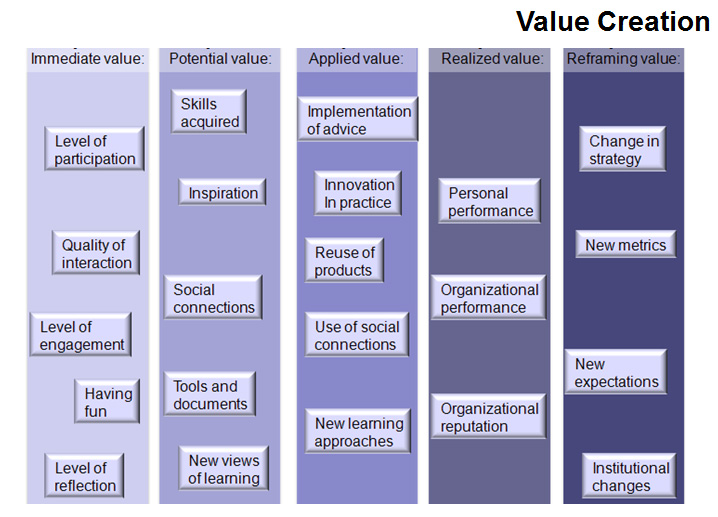


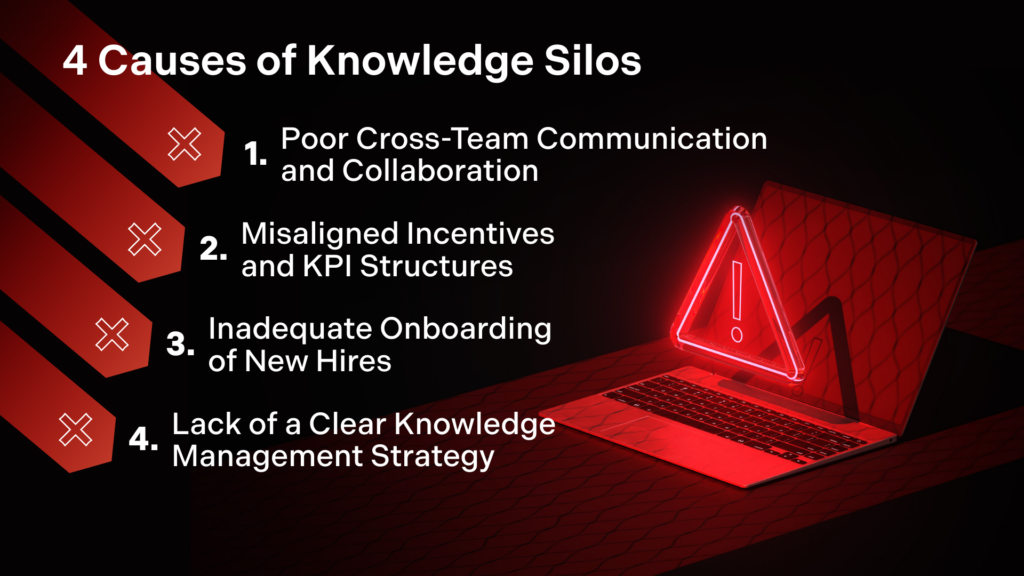

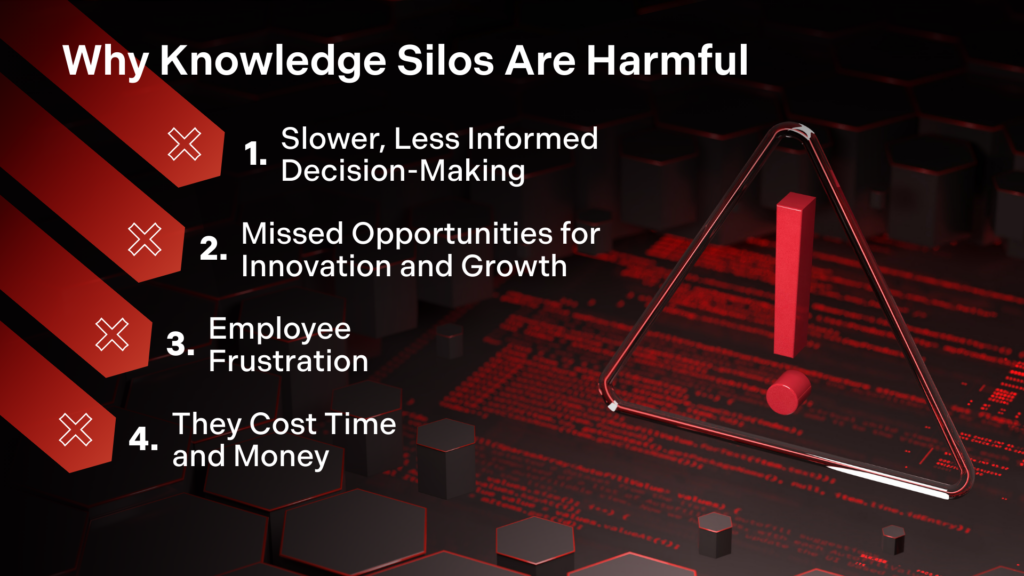
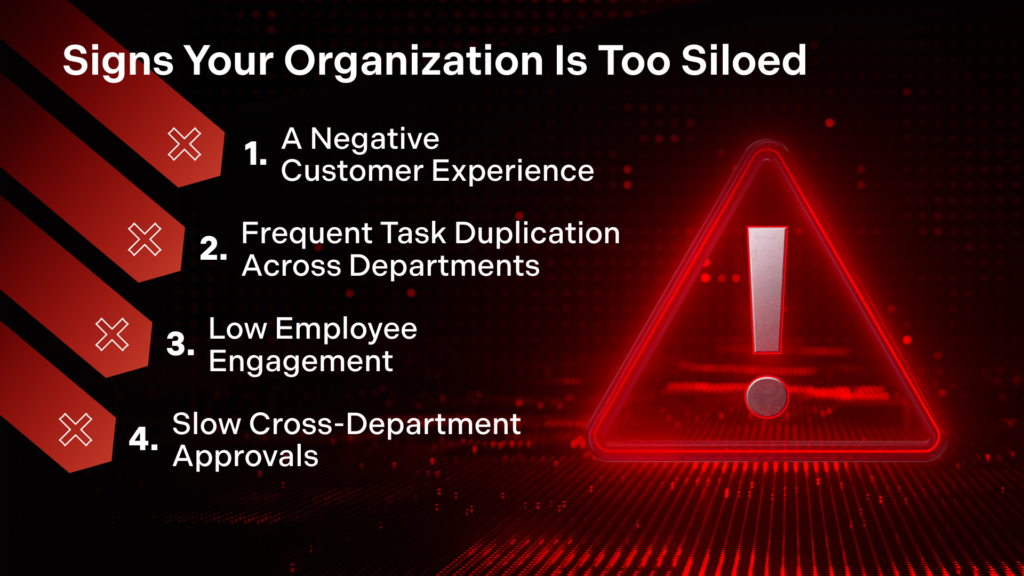
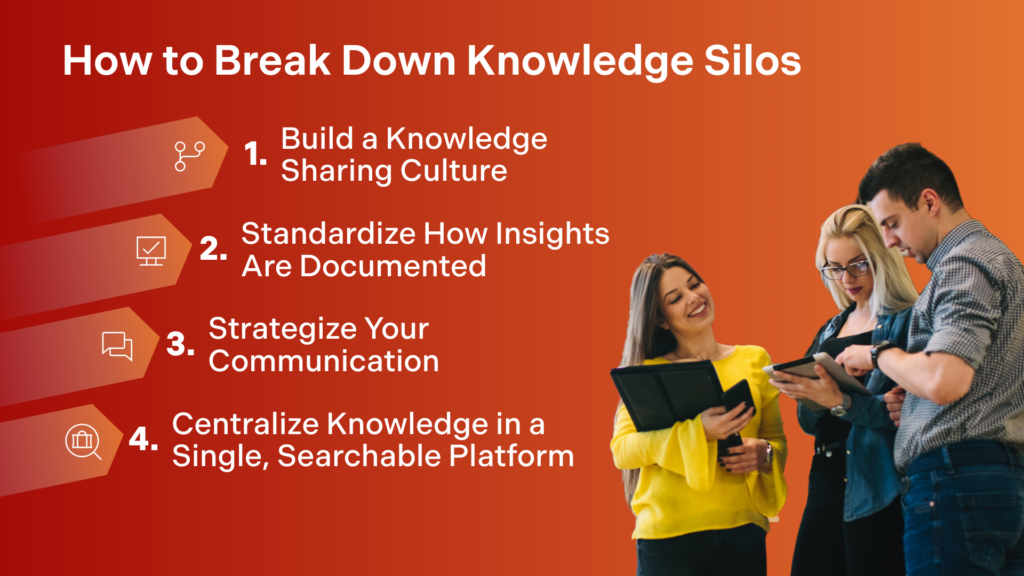






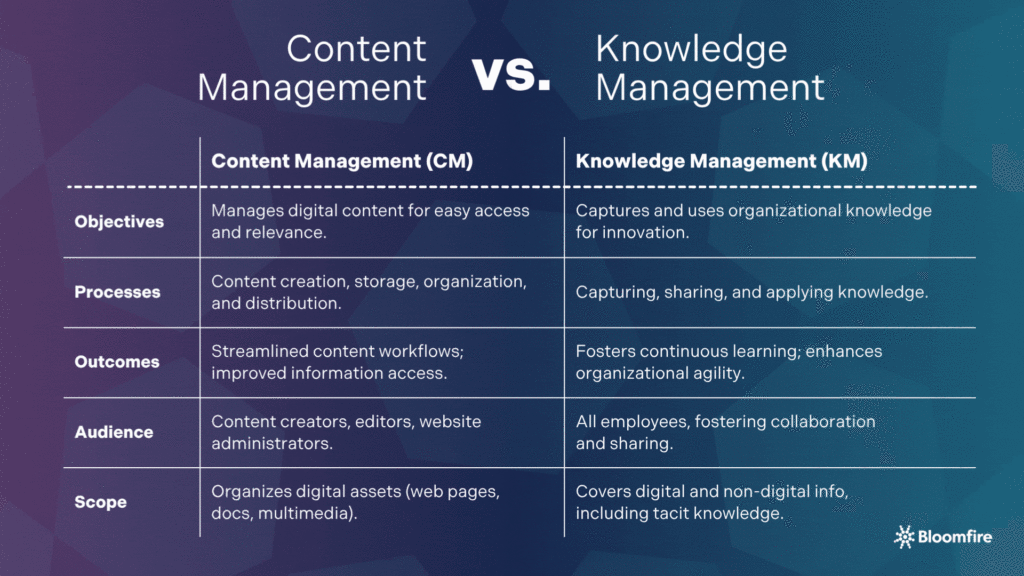

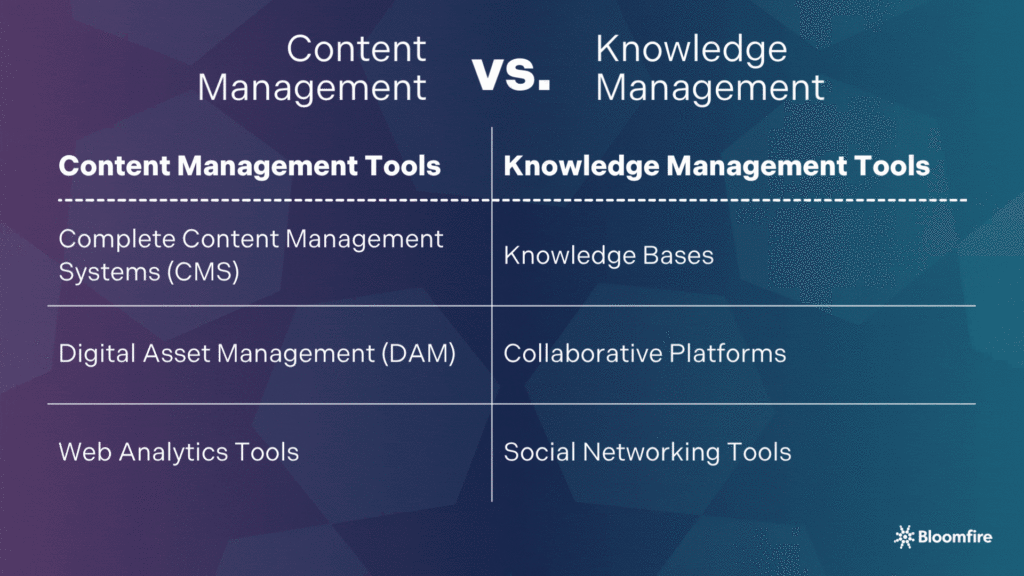
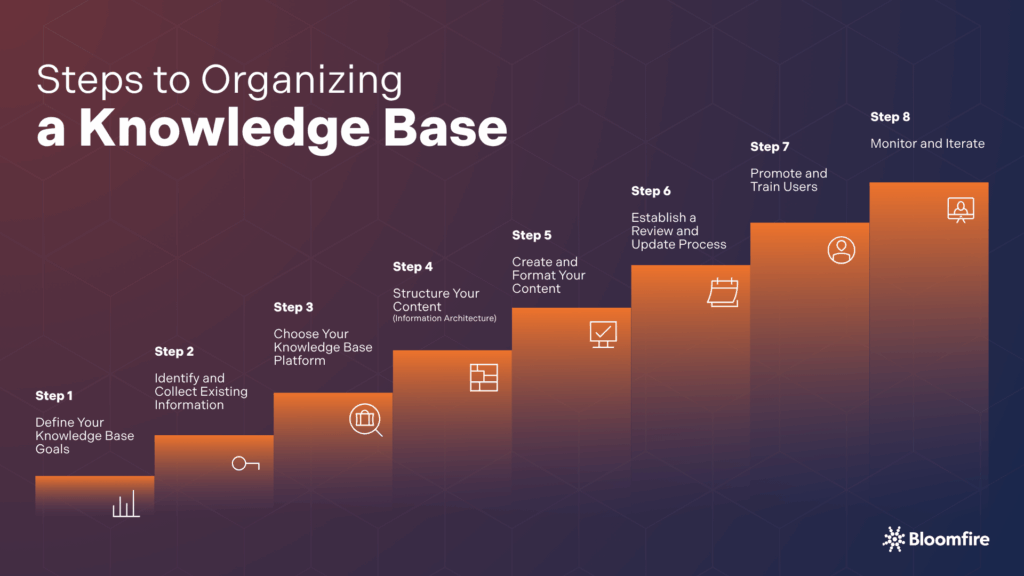

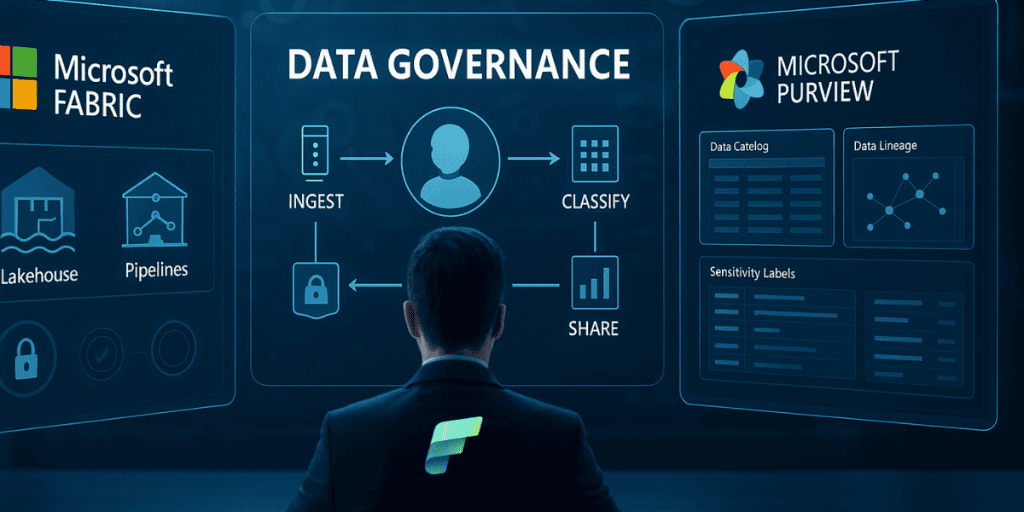


 Tech News & Insights