I.gardner.gb
Shared posts
Remembering piezoelectric pioneer Jacques Curie

Wales launches drive to keep young people in their homeland
Economy minister tells of ‘significant challenge’ of retaining and attracting talent to support country’s economy
The Welsh government is launching a drive to persuade more young people to remain in their homeland amid growing concerns that the percentage of working-age citizens is dropping to worryingly low levels.
Ministers fear that unless the “brain drain” is stopped – and more talented people can be tempted in – within a few decades the country may struggle to pay the bills to look after its ageing population.
Continue reading...
learning in the complex domain
Personal knowledge mastery (PKM) can be a lens to examine how knowledge flows in organizations and human systems, especially from a perspective beyond formal training and education.
“A model of curation for the digital era that is being used in health and care is Harold Jarche’s ‘Personal Knowledge Mastery’ (PKM). This is about individuals making the best use of their networks and other sources of knowledge so that they can keep up to date with the most effective thinking in their area and practice new ways of doing things. Leaders who take responsibility for their own effectiveness through PKM create leverage and value for their organisations. The underpinning framework for curation within PKM is ‘seek, sense, share’. ‘Seeking’ is about finding things out and keeping up to date; pulling’ information, but also having it ‘pushed’ to us by trusted sources. ‘Sensing’ is about making sense and meaning of information, reflecting and putting into practice what we have learned and plugging information into our own mental models and turning it into knowledge. ‘Sharing’ is about connecting and collaborating; sharing complex knowledge with our own work teams, testing new ideas with our own networks and increasing connections through social networks.” —UK National Health Service White Paper: The new era of thinking and practice in change and transformation
In addition, PKM is much more than a model of curation.
“Seek > Sense > Share are three elements at the core of Harold Jarche’s Personal Knowledge Mastery (PKM) Framework. With PKM, he shaped one of the most persuasive approaches to personal and professional development, combining natural ways of learning with an approach to sensemaking and contributing to a larger collective.” —GIZ.DE
Personal knowledge mastery is a framework that connects working and learning. Much of what professionals and most adults learn is from experience and interactions with other people, at work or outside of it. We learn from experiences and exposure to people and ideas.
The US-based Hearing First community “supports families and professionals to help children with hearing loss have the opportunity to take advantage of access to sound — a critical building block for future success”. It uses the PKM framework as a foundation for learning.
Our world has opened up, and traditional learning channels (while still completely valid) are no longer sufficient on their own. We need to embrace this new personal learning channel: the digital world.
There is a solution for personal learning in the Digital Age: Personal Knowledge Mastery (or PKM). By incorporating PKM into our new age behavior, we’ll be able to accomplish the goals we have to improve ourselves and our listening and spoken language practice. You may have heard of personal knowledge management, but we don’t want to just manage knowledge. We want to master it.
The first step to personal knowledge mastery is the Seek-Sense-Share learning model. It was created by Harold Jarche, connected learning specialist, and it’s a concept that Hearing First supports for learning through our personal and professional networks. This learning model helps us make that data meaningful by being productive in our work and in the world of LSL. So, how does Seek-Sense-Share work exactly?” —PKM at Hearing First
 Cynefin
“The Cynefin® framework was developed to help leaders understand their challenges and to make decisions in context. By distinguishing different domains (the subsystems in which we operate), it recognises that our actions need to match the reality we find ourselves in through a process of sense-making. This helps leaders cultivate an awareness of what is really complex and what is not and respond accordingly, so that no energy is wasted in overthinking the routine but they also never try to make the complex fit into standard solutions.” —Cynefin Centre
Cynefin can help us connect work and learning, especially for emergent and novel practices, for which we do not have good or best practices known in advance. When we want to create a conducive learning environment for knowledge workers, the Cynefin framework helps us to see the inherent weakness of instructional systems design (ISD) which works from the premise of predetermined learning objectives and activities, usually based on good and best practices observed in the workplace.

Image: Martin Berg
The Cynefin framework adds to PKM with levels of abstraction. Low levels of abstraction mean that information and knowledge are understandable to few people. The lowest level would be a person understanding something only to themselves. Higher levels of abstraction would make this more understandable to more people, but would lose nuance and context in the process. High levels of abstraction are good for things that everyone should understand, such as the symbols and markings on a map.
The image below takes the basic PKM model — with teams in blue, communities in red, and networks in green — along two axes: high & low structure, and low & high abstraction. These are split in half — one for the Complex domain, and the other for the ordered domains (Complicated & Clear). The Chaotic domain has unique conditions and requires a different approach, beyond this post.
There are (at least) two modes for each form required to work and learn.
Teams can be semi-permanent and collaborative in ordered domains but should be quicker-forming temporary negotiated hierarchies in the complex domain.
Formal communities can provide continuity in ordered domains but informal communities are needed to provide more flexibility in crossing expertise silos and disciplines.
Established knowledge hubs provide all the structured information that a discipline requires, like the Project Management Body of Knowledge, but open knowledge networks are better when facing the complexity of the SARS-CoV-2 pandemic as they need to quickly incorporate new findings and knowledge.
Given that all organizations are likely to face complex challenges at some time, these forms for complexity should be incorporated into how organizations are structured, how learning can be supported, and how professionals engage. For some aspects of this, an individual may need permission, but much of this can be done independently and especially interdependently between professionals.

Examples from the Complex Domain
MSF
Medecins sans frontières (MSF) has learned to deal with complexity and has come up with some guidelines to help those in the field.
- Everything is political and influences medical assistance.
- Gut feeling is very important to assess complex situations.
- Finding common ground between parties in conflict is very difficult and too often simple, but ineffective solutions are chosen.
- The situation is always changing and there is a need for constant reflection, as individuals and at an organizational level.
- Impartiality [trust] is the ‘red line’ that cannot be crossed.
- Every action is a compromise.
- Conflicts are messy & dirty – therefore the humanitarian assistance is messy & dirty.
- Learning through constant discussions is critical for all members of the organization.
- MSF has a culture of debate and exposing the truth and this lets the organization move forward.
‘Marie Noelle Rodrigue, operations director of MSF in Paris, said: “The time has come to explain the fragile equilibrium between the price it is necessary for an organisation to pay so that you are helping the victims.
“Often that means making a compromise to a degree where you are helping the authorities. This is a question that no-one has wanted to examine and it is good that MSF have looked into it and I think we are happy that we’ve done it honestly.”’ —The Guardian 2011-11-20
The Linux Kernel
“Hierarchies might let you make one-off decisions at a faster rate, but, ultimately, they’re just not as responsive in the long term … Today, [the Linux kernel] stands as the very best solution to a growing number of technological problems, but it didn’t spring from a single person’s head overnight. Decades of work made it the flexible, superior solution it is today. Local improvements and impassioned debates between key stakeholders continue to refine it.” —OpenSource 2016-03-29
The Chaordic Organization — VISA
chaordic [kay-ordʹ-ic], adj., fr. E. chaos and order. 1. The behavior of any self-organizing, self-governing, organ, organization, or system that harmoniously exhibits characteristics of both order and chaos. 2. Patterned by chaos and order in a way not dominated by either. 3. Blending of diversity, chaos, complexity and order characteristic of the fundamental organizing principles of evolution and nature. —DeeHock.com
“Our current forms of organization are almost universally based on compelled behavior — on tyranny, for that is what compelled behavior is, no matter how benign it may appear or how carefully disguised and exercised. The organization of the future will be the embodiment of community based on shared purpose calling to the higher aspirations of people.
Formation of a chaordic organization is a difficult, often painful process, but one also filled with joy and humor. Entirely different dynamics of judgment, behavior, capacity, and ingenuity can evolve. Small shifts in deeply held beliefs and values can massively alter societal behavior and results — in fact, may be the only things that ever have. That is my hope for our future.
I know it can happen. I’ve been there — or at least gone part of the way — during the formation of VISA and other chaordic organizations. It’s very difficult to put in words, for in truly chaordic organization there is no destination. There is no ultimate being. There is only becoming.” —Dee Hock 1999
Silo Thinking — Orthodoxy, illusio, and playing the scientific game
If this pandemic is teaching us anything, it’s that experts disagree, nobody has all the answers, and we are mostly making things up as we go. In a crisis it is important to act but even more important to learn as we take action. Add in the human factor that some people are always trying to take advantage of any situation and we start to float in a liquid surround of misinformation, propaganda, and half-truths.
Medicine is composed of many silos of expertise. They often see situations from quite different perspectives. Experts in all disciplines have to get out of their silos and connect in multidisciplinary subject matter networks. A lone expert, or even a lone discipline, is obsolete in the network era. Only cooperative networks will help us make sense of the complex challenges such as a pandemic.
“Three fields—political, state (policy and regulatory), and scientific—were particularly relevant to our analysis. Political and policy actors at international, national, and regional level aligned—predominantly though not invariably—with medical scientific orthodoxy which promoted the droplet theory of transmission and considered aerosol transmission unproven or of doubtful relevance. This dominant scientific sub-field centred around the clinical discipline of infectious disease control, in which leading actors were hospital clinicians aligned with the evidence-based medicine movement. Aerosol scientists—typically, chemists, and engineers—representing the heterodoxy were systematically excluded from key decision-making networks and committees. Dominant discourses defined these scientists’ ideas and methodologies as weak, their empirical findings as untrustworthy or insignificant, and their contributions to debate as unhelpful.” —Wellcome Research 2021-05-24
Open Sharing on Twitter
Here is an example of 13 people in various specialties — epidemiology, complexity, public health, sociology — from four countries (CA, UK, US, ZA) who share their knowledge in the open and by combining their views on a platform like Twitter, we are better informed about the current coronavirus pandemic
— Twitter Pandemic List.
Democratizing Knowledge
“The pandemic has empowered us to become co-creators, co-producers, and co-distributors of what we know — While each unique, these cases are all organic efforts to share useful knowledge and create new venues of access. The gains of the burgeoning knowledge commons in response to Covid-19 are twofold.
First, individuals are empowered to become co-creators, co-producers, and co-distributors of information for the benefit of their communities. The need for local knowledge in this pandemic, combined with the use of digital venues like Google Sheets or Minecraft, enables individuals to participate in knowledge production when ordinarily they would not … Second, the accessibility of these knowledge products enables innovation. The release of patents under an open license means that inventors and manufacturers can build needed solutions without the worry of a lawsuit.” —Wired 2020-05-27
• Did you find this post useful? Check out the perpetual beta series
Never compromise safety thanks to IECQ
Semiconductors rarely make headlines in the mainstream press – they are usually confined to trade magazines and specialized blogs. This has changed recently because of a shortage in the supply chain of chips that potentially affects all industry sectors whose products rely on electronics.

Latest standardization figures at SMB Meeting in Dubai

Welcoming SIRIM into the IECEx CB network

Risk prevention in the Ex sector
Nowadays, workplace safety is of major importance, regardless of business size or type of activity. Many countries around the world have put in place strict health and safety rules and regulations to protect their working populations.

IEC recognizes four experts with its Thomas Edison Award

6 Digital tools that help teachers create effective rubrics

The grading process is time-consuming. It can be overwhelming and frustrating. Grading can even influence what assignments they choose to give to students, anticipating the workload of marking each submission. A solution comes from rubrics, which are benchmarks used in grading to help assess students’ learning.
Rubrics include the criteria for evaluation and the level of performance with descriptions for each. They help students understand what is expected of them and therefore regulate their work according to the demands. Also, rubrics help teachers provide objective feedback to students, facilitating the desired outcome, which is deep learning.
Consequently, rubrics not only facilitate the marking process but they make it objective, concise, and reliable when grading assignments.
Read more: What is the role of rubrics in performance-based education?
The rubric’s features are essential because they provide clear guidelines for the teacher. The goal is to reach a consistent grading process.
6 Digital tools that help teachers create effective rubrics
Although pen-and-paper rubrics are generally time-consuming, web-based rubric generators are more efficient. Teachers can access templates that work across the curriculum, various subjects, and learning activities. They can also customize available templates to suit their classes’ needs and reuse rubrics anytime.
Here are six digital tools for creating effective rubrics:
-
Rubistar
Rubistar is a web-based rubric generator for PBL activities that allow teachers to create or customize premade rubrics for free. Teachers have to register to save and reuse their rubrics. Once created, they can view, edit, analyze or delete rubrics at any time.
The analysis feature provides information regarding how many students received the same rating, whether the assignment was complicated or straightforward, ambiguous or clear for students, and if the criteria of a certain level of performance were hard to reach. As a result, teachers can adapt their rubrics and lessons to suit the students’ needs and ensure progress.
Teachers can choose from various rubrics for oral presentations, research, writing, science, work skills, products, math, art, music, or reading. Then, they can establish each criterion from a list and the levels of performance with their description.
-
Rubric Maker
Rubric Maker is a tool that assists teachers in the assessment process, helping them articulate their expectations and how the students will be evaluated. Students receive a complete scheme of goals to reach success.
With this tool, teachers can create quality rubrics using pre-established quality ratings, such as “exceed expectations, meets expectations, needs improvement, and below expectations”, or customize them to suit the needs of each class.
-
Quick Rubric
Quick Rubric is a tool used to score assignments based on how students meet specific criteria. Rubrics can be used to evaluate various performance-based assignments, such as oral presentations, essays, or projects. Teachers can create rubrics that have different formats depending on the number of criteria and the levels of quality. The performance ratings can be numerical, descriptive, or both.
With Quick Rubric, teachers can eliminate grading bias due to the specific criteria laid out in the rubric. This translates into teacher scoring accuracy when multiple evaluators use the same rubrics for the same assignment.
The templates provide three scoring levels: proficient, emerging, beginner, but you can personalize the rubrics by editing them or adding new ones. The final rubric contains the title, description, and instructions.
-
OrangeSlice: Teacher Rubric
OrangeSlice: Teacher Rubric is a Google add-on that makes grading productive and professional. Teachers create, distribute and receive submitted assignments from students through Google Classroom, and Teacher Rubric facilitates the grading process. The rubrics appear in the right half of the Google Docs document to be assessed, and the final grade is a few clicks away.
This tool allows teachers to offer objective feedback to all students while benefiting from a consistent grading process.
When you open an assignment, the add-on assists the grading process. Teachers have to choose first between descending or ascending performance level progression, then between traditional scoring (A, B, C, D, E, F), “great, good, needs more” (which can be changed later), or create a new ranking. Also, teachers have to choose the categories to be evaluated or create new ones before generating the rubric.
Educators can alter the final score by using the options “extra credit,” “late penalty,” or “plagiarized penalty” and then automatically process and introduce the grade details into the students’ Google Docs assignment who can see in detail how they were evaluated. They can also generate holistic and analysis rubrics for a better understanding of student achievement.
-
TeAch-nology
TeAch-nology is a website full of resources for teachers, including a large selection of rubrics. Teachers can choose to generate numerous rubrics on different activities or create personalized ones. The templates make grading easy, especially when students can choose how to present their work. They can generate templates suitable for various products, such as essays, posters, or presentations, and ensure they stay objective and maintain fairness even when assessing different outputs for the same task.
Rubrics allow students to evaluate their work or their peers’. With more than five hundred printable rubrics and the general rubric generator, teachers have a rubric suitable for every assignment.
-
NEO LMS
NEO LMS has a rubrics feature that allows teachers to create, edit, save and reuse rubrics for a straightforward grading process. Rubrics are integrated within the assignment submission page. You can create a new rubric for each assignment or reuse the ones in your library.
NEO offers a personal library and access to school, organization, and district libraries with available resources such as rubrics created by fellow teachers. Schools can also ensure that grading is objective and consistent by using the same rubric for similar tasks. Moreover, they can ensure transparency and reliability regarding students’ learning levels.
Creating rubrics with NEO is easy since teachers can use the template provided by the platform or reuse the ones from the library. When grading, teachers need to select a rubric to automatically insert it into the students’ submission page. With only a few clicks, they can grade their submissions, adjust the grades by subtracting points, for instance, and leave a comment or an attachment as feedback. As a result, students understand their performance by receiving the full details of their evaluation.
To sum up
Rubrics are indispensable tools for a teacher, making grading time-efficient, objective and reliable. They also come with benefits for the students in terms of clear expectations and realistic performance analysis.
The post 6 Digital tools that help teachers create effective rubrics appeared first on NEO BLOG.
Instructional Design Research, Tools, & More: ID Links 8/10/21
As I read online, I bookmark resources I find interesting and useful. I share these links periodically here on my blog. This post includes links on instructional design research and principles, productivity, video, animation, visual design, an elearning example, and my article on scenario-based learning for TD Magazine.
Instructional design research and principles
Spaced learning
Space invaders – E-Learning Provocateur Ryan Tracey clarifies related and often confusingly overlapping terms related to the spacing effect for learning: spaced presentation, spaced practice, spaced retrieval, distributed practice, expanding practice, and more.
Learning objectives
Learning Objectives: GOAL!?! – 3-Star learning experiences Summary of research on the value of telling learners the objectives at the beginning of training. The research supports giving learners specific “focusing objectives” to help them recognize what’s important. However, that doesn’t mean those objectives need to be the same formal learning objectives we use as IDs. In fact, using objectives as multiple choice questions to show people what they don’t know yet may be effective.
As instructors and designers, we need to keep in mind that there can be other reasons to use objectives and we need to clearly distinguish between objectives that we use as instructional/learning designers versus the ones we might use for learners.
First Principles of Instruction
First Principles of Instruction summary • M David Merrill • myBRAINisOPEN A 12-part series on Merrill’s First Principles of Instruction
In First Principles of Instruction, Merrill identifies five core instructional design principles which he has synthesised from his review of all of these theories, frameworks, and models. He then sets out ways in which these principles can be systematically used to inform the design and development of learning activities, (both online and in a face-to-face context). Merrill then makes a case that following these principles should lead to effective, efficient and engaging learning experiences.
Problem-centred: Learning is promoted when learners acquire knowledge and skill in the context of real-world problems or tasks.
Activation: Learning is promoted when learners recall or apply existing knowledge and skill as a foundation for new skills.
Demonstration: Learning is promoted when learners observe a demonstration of the knowledge and skill to be learned.
Application: Learning is promoted when learners use their newly acquired knowledge and skill to solve new problems or carry out tasks.
Integration: Learning is promoted when learners reflect on, discuss and defend their newly acquired skill or integrate the skill into a real-world activity.
Selected quotes from the summary of Merrill’s First Principles
Instructional design job listings
How Instructional Design Is Operationalized in Various Industries for job-Seeking Learning Designers: Engaging the Talent Development Capability Model | SpringerLink Research comparing job listings to the ATD capability model.
Using the preferred reporting items for systematic reviews and meta-analyses (PRISMA) organizational framework as our method of reviewing job postings, we found that instructional design, talent delivery and facilitation, technology application, communication, and collaboration and leadership capabilities appeared the most frequently.
For corporate settings, more jobs than expected require bachelor’s degrees and fewer jobs than expected require a master’s degree or higher. On the contrary, for higher education settings, more jobs than expected required master’s degrees or higher and fewer jobs than expected required bachelor’s degrees. While this may not be surprising to some job seekers, it does indicate that job applicants with bachelor’s degrees already possess the educational requirements for a corporate role.
Improving productivity
Introduction to the Zettelkasten Method • Zettelkasten Method
A method for taking notes where you can link ideas together. This was originally designed as a method for taking paper-based notes but with effectively a hyperlink between ideas. This isn’t tagging per se, but a way to connect ideas and keep a large amount of notes organized over time.
85+ Most Useful Time Saving WordPress Keyboard Shortcuts
I want to learn to be more efficient using the blocks in WordPress, so I’m saving this list of keyboard shortcuts
Video, animation, and visual design
Free Stock Video Footage, Royalty Free Videos for Download
Free stock videos; commercial use is OK. These could be used as b roll, transitions, or backgrounds.
CreateStudio Animation Made Easy – CreateStudio
Tool for creating 2D and 3D animated videos. The basic plan is $99 for a lifetime license, with limited characters and templates.
Provide hex codes for colors and get tints (lighter) and shades (darker) of that color. Useful for staying within a color scheme while still providing some variety
Scenario-based learning
Survive an Earthquake – INSTRUCTIONAL DESIGN BY TRACY CARROLL
In this sample, Tracy used Storyline to simulate the look and feel of BranchTrack. The choices are styled with numbers and text like BranchTrack, and the push transition between slides mimics the effect between choices. If you don’t have BranchTrack but like that style, this shows how you can accomplish the same effect in Storyline. This could be used for a lot of branching scenarios or short sims.
My article on scenario-based learning for TD Magazine (members only)

The post Instructional Design Research, Tools, & More: ID Links 8/10/21 appeared first on Experiencing eLearning.
Goldman Sachs | Firm won't cut 95-hour week despite backlash - raises pay instead

This week, following complaints from junior workers of 95-hour working weeks, abuse from senior staff and no work-life balance, the finance giant Goldman Sachs said it would increase its base pay for first-year bankers to £80,000, with Second-year bankers seeing a rise to £89,000.
Earlier in the year, junior workers at Goldman Sachs spoke out about the extreme burnout being caused by “inhumane” working conditions and long working weeks, as reported by the Financial Times.
In a leaked 11-page presentation created by 13 Goldman Sachs workers back in March, research showed that the average amount of hours worked in a single week totalled 105, whilst the average amount of hours slept per night was just five.
“There was a point where I was not eating, showering or doing anything else other than working from morning until after midnight,” commented one of the anonymous creators of the document.
At the time, bosses at the firm pledged to change historic practices to prevent younger workers from getting burned out. Among the various touted improvements to working life promised by CEO David Solomon was ‘work free Saturdays’ – however he also warned that it was likely high volumes of work would continue across the company.
“In the months ahead, there are times when we’re going to feel more stretched than others, but just remember: If we all go an extra mile for our client, even when we feel that we’re reaching our limit, it can really make a difference in our performance,” he said, as reported by The Guardian.
‘It isn’t the plaster that can heal all issues’
Commenting on the news, Iain Thomson, Director at Sodexo Engage, noted that wage increases do not serve to solve the ‘underlying issue’ around the cases of burnout among Goldman Sachs’ younger workers.

“While salary is of course a small part of work incentives, it shouldn’t be the be all and end all, nor will it resolve the underlying issues that often drive top talent to leave, like burnout or poor management,” he said.
“Enhancing salary only papers over the cracks. Instead, employers should review their overall employee experience from workplace culture, to work-life balance and employee benefits.”
In addition, the outcry from workers has gained criticism from senior executives from within the banking institution. Xavier Rolet, who was head of the London Stock Exchange for eight years, called the young workers ‘entitled’, noting in a LinkedIn post that he would regularly work 130 hours a week, seven days a week in the 1980s.
Speaking to the Financial News, he said: "It's a free world. If you don't love what you're doing or think the hours don't suit your lifestyle, by any means do something else.”
Learning tech capability in L&D could be holding it back
No matter your role on a learning and development team or the structure of your organisation, it’s important to consistently review and evaluate innovative technologies, tools, and trends to determine if they make sense for your organisation.
Technology changes quickly, and if you don’t keep up, you’ll get left behind. Learning technologies (LT) do not just include new software and emerging tech. They also include the LT ecosystem, which is best described as a collection of people, processes and tools that deliver, integrate, and support the L&D function across your organisation. That whole ecosystem requires knowledge in assessing, defining, and articulating relevant requirements. Ensuring that the latest advancements help both the learner and the organisation means understanding the learners’ needs and overall experience.
What L&D capabilities are missing
Results from a recent L&D Capability Model self-assessment, where thousands of L&D professionals diagnosed their own skills and capabilities, showed technology application is one of the lowest-rated capabilities. In fact, of the 8,600 L&D professionals who took the assessment, only 40 percent received a high rating.
A recent report on L&D and Covid by the Ken Blanchard Companies cited concerns among L&D professionals on how to skillfully use new tools and platforms. Thirty-two percent of the 1,000 L&D respondents said e-learning and digital development tool proficiency is holding back their L&D staff.
It’s well documented, and has been for the past few years, that technology started playing an increased role in training delivery even before the pandemic halted face-to-face learning events. In 2019, more than 50 percent of all learning hours were delivered via technology-based methods, the highest percentage ever recorded.
The progress of tech in L&D
Just five years ago, 48 percent of organisations used technology-based simulations in learning and development programs, 75 percent used non-technology-based simulations, and 88 percent used scenario-based learning. Those numbers have increased to 75 percent, 87 percent, and 98 percent, respectively, reports Simulations and Scenarios: Realistic, Effective, and Engaging Learning.
“Technology should support learning, not dictate it,” Tareq Omairi wrote in a recent learning blog post.
Along with simulations, e-learning, and video, some of the technology and tools that can aid in training delivery include artificial intelligence (AI), augmented and virtual reality (AR, VR), and social learning.
L&D and artificial intelligence
According to JD Dillon, AI is defined as “a machine’s ability to perform cognitive functions typically associated with humans, such as perceiving, reasoning, learning, interacting, creating, and problem solving. AI commonly utilises machine learning algorithms to detect patterns and learn how to make predictions and recommendations by processing data and experiences, rather than by explicitly receiving programming instruction.”
Learning and development professionals can choose from a range of existing AI-enabled applications, including:
- Using data to proactively find individual employees’ knowledge and skills gaps. Then, supply the right support to the right person at the right time at the speed and scale of a global business.
- Applying data to improve measurement practices and, through the application of specialised machine learning, decide how L&D solutions are (or are not) affecting targeted business goals.
- Translating content in real time into any available language with rapidly increasing accuracy, and writing content faster and at a quality level that is similar to human authors.
AR and VR are not mainstream in learning but can be used for visualisation, immersion, and storytelling. Cost and digital literacy are factors in choosing to use them, and the time involved in prototyping AR and VR is still too long for the needs of many businesses and education providers.
To supply relevant and valuable training solutions to your organisation, you need to search for the most efficient tools to improve performance. Social media tools and new, creative ways to use them can help improve learning engagement and performance.
“L&D can move to a more proactive state with the newer tools now available,” Chad Udell wrote in ‘Shock of the New’. It’s a fun time to be in L&D, and “this new normal offers lots of opportunity to enable real change and improve performance in ways we have only dreamed about.”
About Avado
At Avado, we believe in unlocking potential and changing lives. Learning with us makes real, lasting change happen for individuals, and entire organisations. Through our connected learning experiences in Data, Marketing, People, and Agility, we can help you drive real change.
Going beyond just technical skills, our award-winning programmes help teams find success in an ever-evolving world. With a strong emphasis on the behavioural and mindset shifts needed to embed new capabilities, we’ll work together to develop leaders, teams and individuals through interactive learning experiences.
The post Learning tech capability in L&D could be holding it back appeared first on Avado.
5 things we learned from DfE’s final apprenticeship reform review
The Department for Education has today published its final review of its apprenticeship reform programme.
Officials established the programme, which has seen the launch of the levy and introduction of standards among other changes, in 2015 and was scheduled to be delivered by the end of the financial year 2020-21.
Today’s report reveals the government’s progress against key performance measures such as its 3 million starts target, diversity goals and public sector apprenticeship objectives.
FE Week has pulled out the five main findings.
1) 3m target missed by 600,000 starts
In the 2015 manifesto, the Conservative Party set an ambitious target of 3 million apprenticeship starts between 2015 and 2020. A target they kept in the 2017 manifesto.
Since the apprenticeship reforms began in May 2015, by January 2021 there had been 2,373,100 starts, representing 79.10 per cent of target.
The DfE’s report says that while the 3 million target was missed by 626,900 starts, over the same period apprenticeships have “become of longer duration and are now co-designed with employers” meaning that the starts now made on the programme are “into higher-quality training”.
2) Diversity and inclusion targets met
The DfE set a target to increase the proportion of apprenticeships started by people of black, Asian and minority ethnic (BAME) backgrounds by 20 per cent by 2020. This would result in 12.1 per cent of starts being by apprentices of BAME backgrounds.
This was exceeded, reaching 13.3 per cent starts from people with BAME backgrounds by 2019/20, which is higher than the BAME employment rate of 11.7 per cent, according to today’s report.
The DfE also set a target to increase the proportion of apprenticeships started by those declaring a learning difficulty or disability (LDD). They aimed to increase LDD starts by 20 per cent, uplifting starts to 12.5 per cent.
This was achieved in 2019/20, with 12.5 per cent starts declaring an LDD, the report states.
3) ‘More to do’ on achievement rates
The achievement rate for apprenticeship standards sat at just 58.7 per cent in 2019/20.
While this is an 11.8 percentage point increase from 46.9 per cent in 2018/19, the DfE admits “we know there is more to do”.
Additionally, official government data published in March showed that just 60.2 per cent of apprentices training on new-style standards stayed on their programme until the end in 2019/20. This figure sat at 48.3 per cent the year before.
Skills minister Gillian Keegan told FE Week’s annual apprenticeship conference in April that she has ordered an investigation into the “astonishingly” high drop-out rate.
4) Skills Index for apprenticeships falls – again
The principal measure the DfE uses for monitoring productivity impact is the Further Education Skills Index.
The Index estimates the aggregate value of the skills supplied by the FE system each year by aggregating earnings returns for all adult learners and apprentices who successfully complete their courses.
For apprenticeships, the Index increased every year from 2012/13 to 2017/18 but fell by 26 per cent in 2018/19 and a further 17 per cent in 2019/20.
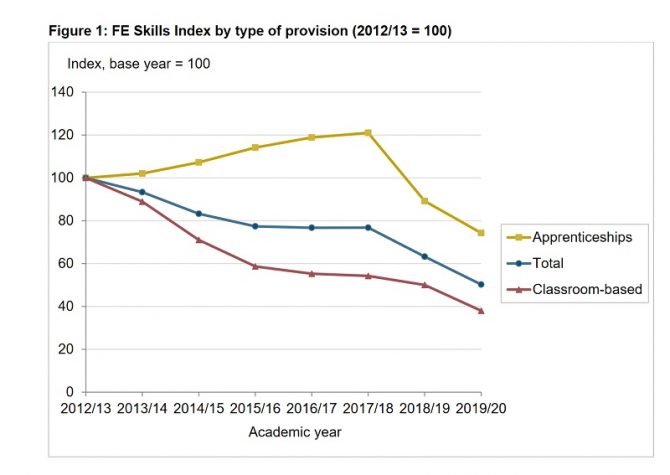
FE Skills Index report 2021
The DfE blames this recent decline on a “fall in participation, resulting in lower achievement volumes”. Activity in 2019/20 was also “impacted by Covid-19 restrictions, which led to an increase in breaks in learning and fewer achievements than expected”.
However, the average value-added of individual apprenticeships has increased each year, with each learner who completed an apprenticeship in 2019/20 generating 27 per cent more value than in 2012/13.
This has been driven by a shift from Intermediate towards advanced and higher apprenticeships, and towards sector subject areas associated with higher returns (engineering, construction, and ICT), the report says.
5) Public sector target missed
Public sector bodies in England with 250 or more staff have had a duty to aim to employ an average of at least 2.3 per cent of staff as new apprentices over the period 2017 to 2021.
Between that period, public sector employment of apprentices sat at an average of 1.7 per cent.
Following failure to hit the target and in “order to build on this success and continue to encourage public sector bodies to invest in apprenticeships”, the DfE has extended the public sector apprenticeships target for a further year from 1 April 2021 to 31 March 2022.
The post 5 things we learned from DfE’s final apprenticeship reform review first appeared on FE Week.
5 Key Takeaways from The Godel POD: Keeping Connectivity in a Hybrid World
I.gardner.gbGood summary.
Last month, I was excited to launch the first instalment of The Godel POD, an exclusive podcast by Godel Technologies. My three-part series is called “Keeping Connectivity in a Hybrid World”. Throughout the series, I invited my guests to talk about topics and trends surrounding hybrid working, a discussion that I’ve found to be having with everyone I speak to as people gradually return to the office.
While it’s hard to summarise all the insightful conversations that took place, here are my 5 key takeaways from my podcast series.
1. Flexible working is part of the new normal
Not only have we demonstrated how we now communicate with our teams, but also how many have been given some form of ‘life’ back. Reducing the hours of commuting, being able to nip out and pick the kids up from school, being able to self-isolated during the pandemic and it not being detrimental to the business, or spending time with the family. It’s about finding that balance and flexible working allows us to do that.
On the flip side, I also posed the question about burnout, and without that commute, are we having the wind down time we would have previously had. Paul Pilling, Engineering Experience and Process Principle at Covéa Insurance, definitely agreed as he described losing that 40-minute commute to listen to music or a podcast was a challenge at first, but it’s also given him the flexibility to see his family. In episode 1 Dan McNeil, Director of Engineering at Comply Advantage made a point to highlight “I think we need to manage burnout and we need to encourage people to have downtime,” which key to for us to remember the responsibility we have as people.
2. The water cooler conversations are here to stay
The podcast brought to life how frequently we had these ‘water cooler conversations’ and how important they are in the day-to-day life, something I think we all took for granted before the pandemic. It’s still possible to have these conversations in the hybrid world by blocking out that time to have those informal chats with your team. In episode 2, I asked Paul whether he thought these conversations would fizzle out, he said, “I think it depends on your workforce and the culture of your organisation, because those water cooler chats for us have been on slack or teams.”
It’s no surprise that people want that social interaction and these chats are important going forward. People are using their digital platforms such as LinkedIn and Instagram to stay connected about more than just work updates.
3. It’s more important than ever to check in on people’s wellbeing
Whether it’s from home, or within the office, I think something we can take away from the last 18 months is checking in on people, asking how they’re doing and communicating. And when I say communication, I don’t just mean “how are you feeling about this sprint”, it’s more “how are you feeling this week?”. Remembering your team are people too, with families at home, children up through the night and dogs that need walking in the rain. Sometimes, talking over the screen isn’t always enough, as Constantine Grishel, Agile Delivery Coordinator at Godel points out in episode 3. “I try to go to the office several days a week, and it really helps. Even with mental health because when you see real people, you see your teammates.”
4. Be sure to include those that haven’t returned to the office
I asked all my guests “how do we stop bias to those who aren’t working in the office” because I think it’ really important to remember that although people are gradually returning, a lot haven’t, and those people shouldn’t be excluded for being remote. I like the idea of some of the things discussed such as everyone doing the call from their computer and having their screen turned on, ensuring everyone has a voice in a meeting and making everyone feel involved, wherever they are. As Diana Grishel, Senior Agile Delivery Coordinator at Godel mentioned, we were all in this position last year, so there is an element of empathy and we have already been in those person’s shoes.
5. It really is possible to stay connected in the hybrid world
I think staying connected in a hybrid world is about picking up on the cues when you know a team member isn’t happy or feels disconnected. This relates nicely to something Diana mentioned in episode 3, saying, “those cues that the team isn’t communicating on a good level, or they didn’t have trust in the team, this is something that we, as ADC’s can try to engage in the team and find out what’s going on.”
Something we come across a lot here at Godel is CTO’s, Development managers and Heads of divisions talking about how they can get the most from their team. How can we have more storyboard points achieved? How can the velocity improve vs the overhead count? How can my team be happier? But the one thing which comes up about how to get the most out of any team is down to us as people – and the level and quality of communication we provide.
If you are interested in appearing in an upcoming podcast, please get in touch using the enquiry form.
The post 5 Key Takeaways from The Godel POD: Keeping Connectivity in a Hybrid World appeared first on Godel Technologies.
IEC issues new report on digital healthcare

A curriculum for a complex world – students’ views on digital literacy in the curriculum

Debbie McVitty reflects on the findings of a Wonkhe/Adobe qualitative study exploring student perceptions of the links between their curriculum, their future aspirations, and their development of digital literacy
The post A curriculum for a complex world – students’ views on digital literacy in the curriculum appeared first on Wonkhe.
Online and blended learning: Contexts and conditions for education in an emergency
THE FUTURE OF WORKPLACE LEARNING IS DIGITAL
5 Myths About Flexible Work
Companies often assume it just won’t work for them. They’re wrong.
Learning to effectively manage your emotions: the impact of Emotional Intelligence (EI) in caring roles
Smarty P. Mukundan, Dhanya M.
Development and Learning in Organizations, Vol. 36, No. 1, pp.11-13
Psychological constructs like emotional labor, emotional intelligence etc. are gaining importance now to understand employee outcomes such as job satisfaction in a health care setting. The study aims to investigate the relationship between Surface Acting (SA) an emotional labor strategy, and Job satisfaction, and the moderating effect of Emotional intelligence (EI) among practicing nurses.
The authors collected data through self-reporting questionnaires administered to a sample of 141 nurses working in multi-specialty hospitals in a prominent city in India and analyzed using structural equation modeling.
A negative relationship was found between surface acting and job satisfaction but was found positive when EI was introduced as a moderator.
The respondent population was females only and diversity in terms of gender was not obtained.
The study finds significant practical and theoretical contributions to the primary caregivers in a health care setting. It helps to understand the interplay of emotions in this job and use EI as an internal resource to mitigate the harmful effects of continued SA emotional labor strategy to job satisfaction.
It gains a better understanding of the emotion-related parameters in the nursing profession and gives inputs to the community. It throws light on how internal resources can be used for better job satisfaction which in turn leads to better quality care in the health care industry.
Extant literature has been discussing SA as a negative strategy for positive employee outcomes, but the present study gives insights on how this can be mitigated by using EI as a resource.
How to shape digital culture in higher education

A network of educators met in March sought to think through making digital culture change happen. Here are the results.
The post How to shape digital culture in higher education appeared first on Wonkhe.
Stop Plucking Community Targets From Thin Air
Too many community teams pluck targets out of thin air and it needs to stop.
Here’s a typical example. A community that attracts 15k visitors per week will set themselves a target of attracting 20k visitors per week within 6 months.
Why 20k you (hopefully) ask? ‘Because it’s a nice round number!’
Can you imagine a more ridiculous way to set a target for a community? You’re holding yourself accountable to a target that doesn’t relate to anything.
There are five things to consider when setting targets for a community.
1) Trendline. If your community engagement was 30k per week two years ago, 20k per week last year, and 15k per week this year – it’s silly to expect you can reverse the trendline and deliver a 20k uplift in the short-term. Simply halting the decline could be a big win. Equally, if the trend shows 100% monthly growth in the community, going from 15k to 20k might be far too small of a target.
2) Potential. One community team I worked with accidentally set themselves a goal of attracting more community participants than they had customers. Another had a goal of deflecting more support tickets than the company was receiving. You need a reasonable estimate of the community’s full potential and an appreciation that the greater the % of the total audience in your community, the harder it becomes to attract the remainder.
3) Ratios. How many customers typically contact support? Visit your website? Click on links in your newsletter. You need some estimate of how many people in the community you can meaningfully reach. If you want the community to outgrow the organisation’s growth rate, you have to figure out how to improve these ratios.
4) Resources. If you’re expected to achieve a 20% increase in participation with a 0% increase in resources, that’s not going to be easy. If you’re facing a resource cut, simply keeping what you have might be a win. If you’re expected to drive improvement without more resources, you have to be really clear about what new activity you’re going to undertake and the trade-offs you expect.
Organisation needs. In a perfect world, you can use the above four to set realistic targets. In reality, organisations like to believe setting higher targets (miraculously) drives better results. It doesn’t, but that doesn’t mean you shouldn’t be aware of what targets can feasibly be accepted. Make sure in meetings here you have data from the previous four bullet points.
p.s. If you’re just launching a community, here’s an overly simple resource to estimate how many members you should have (if this link doesn’t work, visit this post and click at the bottom)
The post Stop Plucking Community Targets From Thin Air first appeared on FeverBee.
Four ways to embed video microlearning into your training strategy
The post Four ways to embed video microlearning into your training strategy appeared first on Talentstorm.
Video analytics: What are academics looking for?
Keywords:
Target readers: Educators; Learning Technologists; Instructional Designers

Author: Amanda White
Position: Senior Lecturer and Deputy Head (Education) – Accounting Discipline, Business School, University of Technology Sydney.
Amanda’s research focuses on the teaching and learning aspects of accounting education and academic integrity. She received the 2021 Australian Awards for University Teaching Excellence Award for Business, Law, Economics and related fields, and was runner up Australian Teacher of the Year.
Video analytics: What are academics looking for?
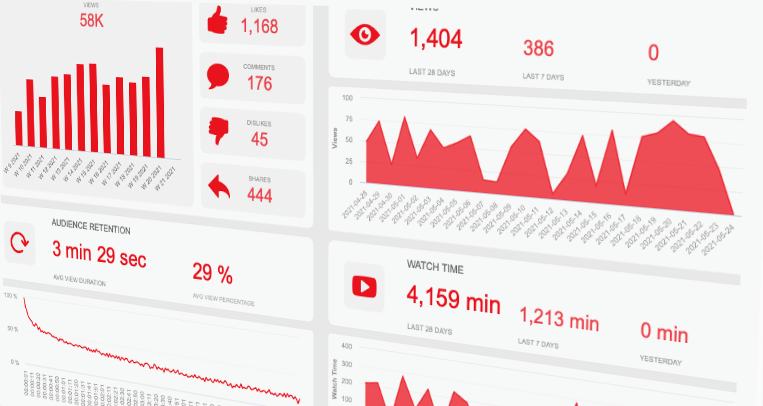
I’m a firm believer that video is a great way to supplement and augment my classroom teaching. But I don’t want to waste time producing resources that aren’t engaging students, or assuming that students are watching my videos end-to-end, when they bail out after 60 seconds. This makes video analytics a really important tool of the trade.
While I have always been a high user of educational video, the shift to online learning has resulted in a massive shift across higher education to video learning materials of all types – recorded lectures, short explainers or live class recordings. The question of “are they watching?” is even more important when most institutions are switching the delivery of knowledge content to online recordings (and saving synchronous or face to face time for active learning).
My “must have” features for a video analytics dashboard
The features in most LMS video analytics dashboards have come a long way in the last five years since I started digging into analytics more generally. The most developed video analytics dashboard (in my experience) is the YouTube Studio dashboard available to content creators. It is no surprise then that educational video platforms are modelling their dashboards on this. Here are the features it offers that I find most useful:
| Feature | Reason |
| Number of plays | For a quick mental comparison of the proportion of total students in the course (but it would be better to see the % students as well — except YouTube doesn’t know anything about my student cohort) |
| Number of students who have viewed | Again, to facilitate a quick mental calculation of what proportion of students in the subject/course have viewed the video (assuming the video is embedded in only one subject) — but again, a % figure would assist. |
| Average minutes viewed and % of the video viewed per unique student | To help me design better future videos |
| The number of views on a date timeline | To visually identify when students are watching the content – just prior to class? After class? |
| Filter function | Video analytics are stored per video, and since videos are likely to be used for multiple semesters, setting the date range is critical to see just the semester being taught. |
Features such as “impressions” (which is a fancy way for saying when students see the video embedded on a page) are less useful for educational institutions. Every time the student goes to a LMS page and scrolls past the video to get to another element (text, a different video, H5P interactive etc) – it will register an “impression”.
The Kaltura analytics are available on a per-video basis – there is no overview of analytics like you’ll see on YouTube. An example is below.
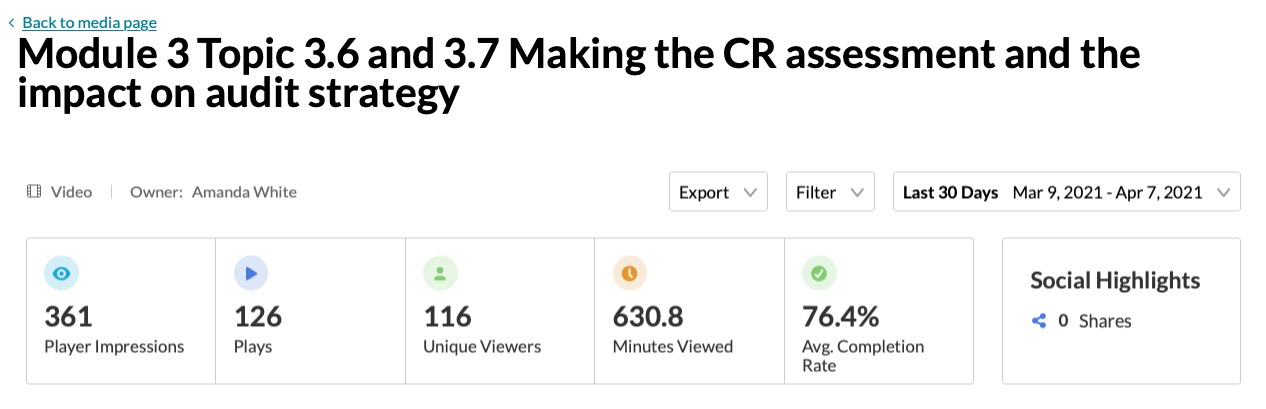
Kaltura overview analytics for a video
What is missing and where video analytics need to go from here
Analytics per video are great, but imagine you have a 12-week subject (our term for a course at UTS) that has 5-8 videos per week – that’s 60-96 videos that you’ll need to individually click on to see what is happening!
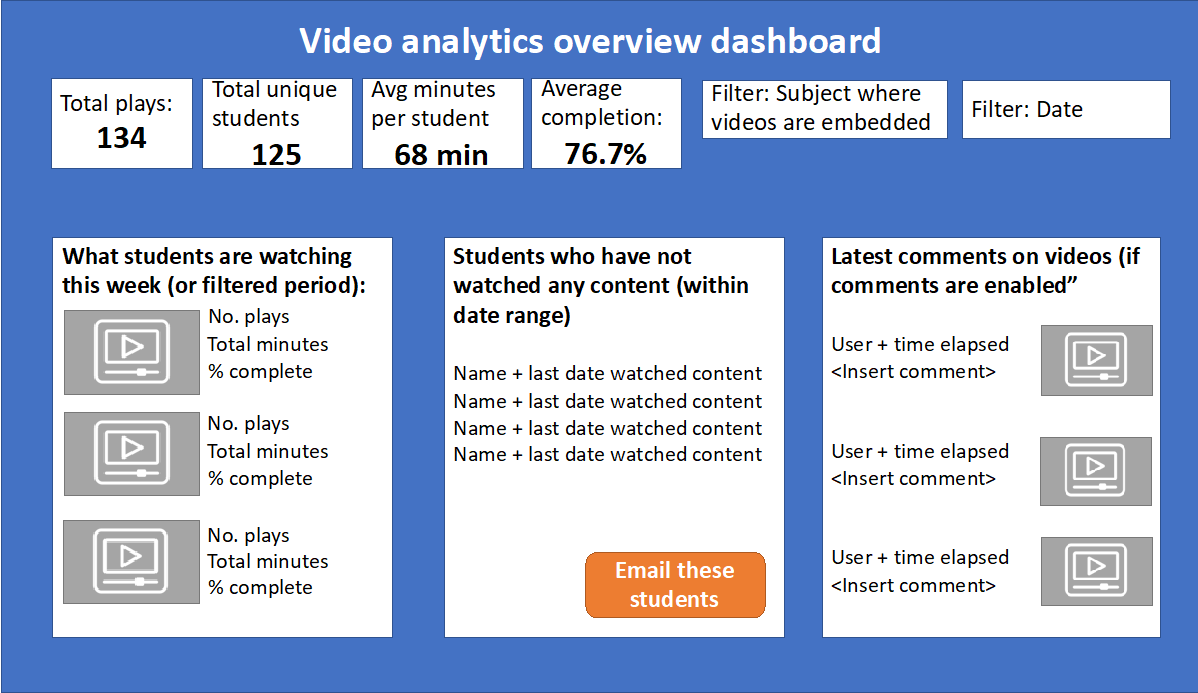
Video analytics now need to evolve to include aggregated dashboards and linkages to base LMS analytics data. LMS base data includes reporting on overall levels of student activity including pages viewed, hours spent on the platform and assignments completed. Integrating video data into these dashboards would be extremely beneficial. This would allow educators to review student video usage at a glance. My ideal aggregated dashboard would be something like the image below.
Amanda’s ideal overview dashboard
For a specified time period (defaulting to the most recent 7 days) – you could see total activity and average activity for students. Filters are of critical importance – the first being the date range, but the other being the subject where the video is embedded. Where videos are in multiple subjects, this would allow you to parse out the video analytic data for your students only.
The bottom left box displaying what students are watching now would help academics understand student behaviour. I only have 3 videos in that list – but I would envisage this as a Top 10 list. This type of display would also be very useful during the period where students have a study break before major assessments or exams – pin-pointing what topics or components students are revising the most, and potentially giving you insights into what you might cover in exam Q&A sessions or drop-ins.
The bottom middle box displays students who have not engaged with any of the video learning content. As much as we want to know what students ARE watching, we also want to know which students are not watching at all – a form of exception reporting – that would help us reach out to students who may be at risk of falling behind.
The bottom right box is useful where in-line video commenting has been enabled. I love this feature where I have seen it enabled, because it allows the video to become more interactive with questions and further commentary from students and staff. But knowing that these comments are appearing is critical – otherwise they end up as questions with no responses, resulting in student frustration.
So this is my ultimate video analytics dashboard – is there anything I’m missing? What would you add or delete? What do you think our chances are that we’ll have these types of tools from educational video hosting vendors?
I’d love to hear from you!
The post Video analytics: What are academics looking for? appeared first on Society for Learning Analytics Research (SoLAR).
How Managers Can Show Care for Remote Workers Who Live Alone
It’s no surprise that remote work during the pandemic is at an all-time high. Some employees enjoy the benefits of this new work-from-home life — including more time with family and friends, flexible work schedules and eliminating their daily commute. But for remote workers who live alone, the daily office interactions with coworkers offer a form of connection and community. This new world of remote work forced unwanted isolation and loneliness for many.
In 2019, 28.4% of U.S. households were single-person — but many organizations during the pandemic prioritized employees with more people under one roof such as caregivers and parents. The additional flexibility given to these employees due to stay-at-home orders and lack of childcare or school shutdowns were beneficial for these employees, but what about the employees who had to fill in the gaps, time and work?
A recent article in The Wall Street Journal surfaced interviews with 35 men and women from various countries who live alone — asking about their remote work experiences during the pandemic. It turns out employees who live alone felt that “they have to often work around the schedules of colleagues with childcare responsibilities — and that they were expected to be the flexible ones, because they lived on their own.” Other findings included that workers who live alone felt they had more pay cuts and less involvement in internal communications as they were focused on employees who had families or lived with others.
The pandemic has substantially increased types of loneliness in Americans — with a 2020 report by Making Caring Common finding that 1 in 3 Americans face “serious loneliness” during the pandemic including over 60% of young adults. Workers are lonely and stressed, and new Limeade Institute research found that when it comes to employee care, only 55% of employees feel like their organization cares about them.
How managers can help care for remote workers who live alone
There’s no magic solution to solve the loneliness remote workers face, but there are many best practices for employers and managers and even self-care practices that employees can put into place. In order to support remote workers who live alone and prepare for the ongoing future of remote work, here are a few ways managers can help care for these employees:
1. Promote employee well-being and care
Now that work and home life are intertwined, employee well-being and care should be at the top of your list. And in order to care for your employers, as a manager, you also have to care for yourself. Managers help foster employee motivation, well-being and engagement. It’s important for organizations to support managers and their well-being and provide resources for them to support their teams as well.
Check in with your team on a regular basis — and try to get a pulse on how they’re doing before diving into work topics. Consider asking how they’re feeling today, what’s on their minds or if there’s anything you can do to support them. Lead by example and take time off from work to step away and recharge, set boundaries to reduce stress and make time to get outside.
2. Create meaningful connections
Connection is key in the workplace — and due to the pandemic, many employees no longer have the daily in-person office interactions they once enjoyed. Boost team connection to help build community and culture with social sharing, team activities or challenges and peer recognition. Remember that quality connection is important — limit multitasking when communicating with your remote workers to show you’re not only listening, but you truly care.
You can also implement best practices like using video chat whenever possible, scheduling team happy hours or meetings focused on getting to know each other and encouraging employees to join virtual Employee Resource Groups. Promote group social activities for employees who live alone, such as virtual group workouts, impromptu chats or game nights.
3. Invest in employees’ home office space
Many workers were sent home to create their own professional workspace in whatever living circumstances were available. For people who live alone, that automatically meant isolated work in perhaps an environment not suitable to do their best work. It also limited access to necessary office supplies — monitors, keyboards, office chairs, internet, printers and so on.
In response to work-from-home orders, many companies took things into their own hands to support their employees. An Aon survey of around 1,400 U.S.-based companies found that nearly 1 in 5 companies are helping to pay for their workers’ home-office equipment. Consider a one-time stipend for employees to purchase home office items of their choice such as a new desk or chair. If monetary support isn’t an option, provide resources for employees to create a thriving work environment with ergonomic checklists, screen time best practices and healthy lunch ideas.
4. Improve communication
Create an environment where employees feel empowered to speak plainly, provide feedback and ask questions. An open dialogue with employees, especially those who live alone, will provide support, trust and care to keep them engaged. And there’s no limit to the discussions.
Talk about mental health to get a pulse on your employees, including the mental health benefits that are available to them. Show appreciation for employees’ work and say thank you. Provide resources to leadership Q&As or all-staff meetings where employees can receive company updates or voice their concerns. Leverage your well-being program to target personally relevant information to specific audiences or groups, such as HR resources, new benefits, events, polls and employee feedback.
Remote workers who live alone face serious potential problems if not addressed or supported by their managers. If you’re interested in learning more about amplifying care for your employees, request a demo today.
The post How Managers Can Show Care for Remote Workers Who Live Alone appeared first on Limeade.
‘Horrific’ cuts in pipeline for English universities and students
Treasury fights with No 10 over options to reduce student loan burden
Vice-chancellors in England say they are bracing for steep cuts in funding to be announced later this year, as the Treasury and No 10 battle over proposals to lower the government’s exposure to unpaid student loans, which are growing at about £10bn a year.
One vice-chancellor said the comprehensive spending review expected in the autumn was “looking horrific” for universities, with Downing Street and the Treasury competing over what to include in the government’s policy paper on funding, which is due to be published within the next two months.
Related: Plans for 50% funding cut to arts subjects at universities ‘catastrophic’
Related: Art students seek to take university to court over ‘heartbreaking’ clearout
Continue reading...
£250m of apprenticeship funding went back to Treasury in 2020-21
Apprenticeship funding to the tune of £250 million was handed back to the Treasury in 2020-21, FE Week can reveal.
The Department for Education said it had to surrender the money as demand for apprenticeships from employers was “lower than expected” partly due to the impact of Covid-19.
Government statistics show that apprenticeship starts were down 18 per cent in the 2019/20 academic year compared to the previous year, falling from 393,400 to 322,600.
AELP chief executive Jane Hickie said with workplaces closed, the pandemic was “always going to have an impact on starts and spend” but she sees no reason why “every penny” of the apprenticeships budget should not go to levy- and non-levy payers in future years as the economy recovers.
As per levy rules, businesses with a payroll of £3 million or more pay each month into the pot and have a rolling 24-month deadline to spend the funds.
The levy policy was designed so that large employers wouldn’t use all of their funds. The unspent money is meant to be recycled and made available to small businesses who do not pay the levy to use to train their apprentices. Unspent funds are also used to top up levy funds by ten per cent as well as pay for English and maths teaching for relevant apprentices, among other things.
But because government refuses to share annual spending data, there are many misconceptions in the sector and national media that all apprenticeship funding that expires from levy accounts goes back to the Treasury.
The actual sum of apprenticeship funding surrendered to Treasury each is year is published in the DfE’s annual “estimates memorandum”.
The memorandum for 2021/22 was published this week and states: “Unspent funding of £250 million was surrendered at the 2020/21 Supplementary Estimate (as the demand for apprenticeships from employers was lower than expected during 2020/21, partly due to the impact that Covid-19 had on employers’ recruitment plans).”
A DfE spokesperson confirmed the funding was returned to the Treasury, which is “usual practice” for “any underspends in overall departmental budgets by the end of the financial year”.
This isn’t the first time the DfE has handed back lumps of apprenticeship funding to the Treasury. In 2017/18 – the first year of the levy – around £300 million was surrendered.
The DfE claimed it did not surrender an apprenticeships underspend in 2018/19.
But £330 million was sent back to Treasury in 2019/20, despite concerns at the time that small employers had struggled to find providers with sufficient non-levy funds to train their apprentices, with some being turned away.
There have been numerous calls over the past year for unspent levy funding to be redistributed to other parts of the skills system or reinvested into apprenticeships.
The Labour Party, for example, wants any unspent levy funding to be used to subsidise the wages of apprentices as a way of boosting the number of people taking up the programmes.
Hickie said making use of the full apprenticeship budget in future can be “easily done if the government steadily lifts the limit on each small employers’ starts but more likely we can anticipate levy-payers spending their entitlements again so that we end up with a repeat of the ‘hard choices’ planning”.
“It is a major reason why AELP agrees with FE Week that there should be much more transparency surrounding levy funding,” she added.
The post £250m of apprenticeship funding went back to Treasury in 2020-21 first appeared on FE Week.
Google is Embracing RSS. Again.
I.gardner.gbGoogle's relationship with RSS is ... er ... odd?
It’s the technology that just won’t die, and for good reason: It works. So now Chrome is going to surface RSS feeds on websites to make it easier to follow them.
The post Google is Embracing RSS. Again. appeared first on Thurrott.com.
Technology is raising standards in conveyancing
John Espley, LEAP UK CEO, explains how conveyancers are using the latest technology and the LEAP Best Practice Standard to enhance their customer service and to win new business.
The post Technology is raising standards in conveyancing appeared first on Legal Futures.