The process of undergoing continuous professional learning is encouraged and attested by professional bodies and associations of which the Royal Medical Colleges (established in the 16th century) were the first.
It was only towards the end of the 18th century, however, that the demand for reskilling within the lifetime of a professional’s career exploded – with many professional bodies being founded during the first industrial revolution. And for good reason: the increasing specialisation of labour, coupled with the manufacturing boom which demanded frequent changes in production processes, meant that factory workers and their superiors needed to learn new skills continuously and in short spaces of time.
The rate of professional growth thus became more dynamic as society transformed, highlighted by the following two Industrial revolutions which spanned the 19th and 20th centuries.
From that point onwards, the rate of sector growth has sped up across the board (unless the profession became obsolete). The innovation of new sub fields for professionals to explore during their career lifetime has now gone so far as to introduce the possibility of an individual needing to be a part of multiple professional bodies or associations.
Today, there are currently over 1000 provisional bodies across the UK alone. A number that is expected to increase over the next 4th industrial revolution.
For this reason, professional bodies are now expecting more than ever that their members stay upskilled by ongoing Continued Professional Development (CPD).
The term CPD was born out of professional bodies who continue to regulate standards of practicing professionals in their fields. This occurred in parallel with many professional bodies moving from a more relaxed reskilling model, in which they allow their members to complete self directed CPD and only put forward a suggested amount of hours for the professional to complete, to a more demanding one where all CPD undertaken must be industry specific and many now have a mandatory minimum amount of hours.
This trend further reflects the speed at which society and the many professional sectors that make it up are evolving. So fast, in fact, that the lines between academia and professional application are blurring. CPD is the solution that naturally merges these two worlds.
CPD in The Age of The Degree
Let’s consider some of the ways in which CPD facilitates the growing need for efficient reskilling of an expanding workforce:
Course length – Courses are short and, more often than not, can be taken alongside work commitments
Relevance to current field demands – the training is written and led by practitioners rather than people that only know the theory
Flexibility of course creation – the course can be created and implemented in a streamlined way – with no need for red tape
Accreditation – Training providers can opt to get their training quality checked by a third party accreditation company to assure the delegates of the high standard of training they offer. Find out more
Ascribed worth – This is the worth that the delegates place on having completed the training
The last point is perhaps the only one in which a university degree has a clear inferred advantage. As mentioned in the definition this is not necessarily the worth an employer places on it but the worth ascribed by the delegate/professional themselves.
Degrees are converted accolades of life, known and respected ubiquitously for centuries. However, CPD training is much shorter and mainly undergone to gain applicable knowledge rather than a status. For this reason people are more interested in completing CPD training fast to gain the knowledge to apply to their role.
Fair enough, people do not want a stack of certificates in a drawer they rarely open. And the walls of professionals are usually filled with tools that help them outline the future, such as planning charts and visualisation boards. So not much space for the hundreds of CPD certificates one would amass over a lifetime of professional training upgrades.
Despite this, the relevance of CPD training remains and will continue to grow as a need for employees to perform and subsequently a demand for employers to supply.
Future-Proofing CPD in the Digital Age
Being in the digital age, this is of course a possibility that has been explored, created and one that the CPD Standards Office is supporting to establish as a systematic way to demonstrate skill growth to current and future employees.
In particular, we are looking to shift from today’s paper-based CPD certification model (which suffers from the problems highlighted above as well as a significant rate of document loss/damage) to a hybrid model, which combines paper certificates with their “digital twins”: secure, tamper-proof and always-available CPD certificates which can be instantly verified on-demand by employers and regulators. In this way, we are able to make the most of the advantages of paper-based certificates (more tangible and robust certifications) whilst also addressing the demands of a digital society which enables and favours greater efficiency.
The digital certificates we are offering all our members can be issued with ease thanks to an easy-to-use web application that accepts Excel spreadsheets. When a CPD provider issues their digital certificates in this way, each learner receives an email containing a QR code. This QR code can be easily shared on CVs, business cards, social media or on any other medium required. A simple scan of a given QR code will reveal the details of the matching certificate in a matter of seconds. No need to scan, hand over or present paper certificates any longer. Moreover:
Thanks to our use of Blockchain technology, the data in the certificate cannot be tampered with. Any attempt to alter its details will result in a mismatch with the genuine certificate fingerprint on the Blockchain and therefore a failed verification.
CPD verifiers can always be sure that the verification of the certificate is genuine, thanks to our use of public-key cryptographic methods when signing the certificate as well as a clear indication of the patronage of the platform by CPDSO.
In rolling out digital-twin certificates, we have thought carefully about the needs of learners too, especially the fact that CPD certificates are likely to fall in and out of relevance at different stages of their careers. As a result, loss or damage to a paper CPD certificate can result in significant hardship when proving suitability for a given job. Our “Portfolio” feature goes a long way in mitigating this risk: each digitally issued CPD certificate can be added by its recipient to their so-called “digital portfolio” on the platform as it is received. In doing so, the learner can build a digital record of their CPD certificates and points accrued over the course of their career. Each certificate can be downloaded on demand and even an entire CPD portfolio can be shared with just one QR code or link.
As this article has shown, professional attestation has undergone fundamental shifts over the course of the centuries, and this decade is no different. Paper-based certifications possess unique advantages which should not be lost. However, in an ever more decentralised and digital world of work, made even more so by the pandemic, a new, parallel certification paradigm is needed to cater for both the large volumes of highly-valuable CPD qualifications and the renewed needs of employers. The CPD Standards Office, together with its technical partner, Gradbase (https://cpdso.gradba.se) has made a fundamental move in this direction, by deploying a “hybrid” certification model which so far has provided value to many of its members and which we hope will continue to evolve and become the de-facto standard for CPD.
=======
This article was written by Kirstie Walker of The CPD Standards Office in conjunction with Alberto De Capitani at Gradbase. CPDSO are working with Gradbase, a startup based in London, UK that aims to digitise and tamper-proof all forms of personal certification using Blockchain technology. In so doing, hiring processes are made more efficient and fraud is minimised. If you would like to sign up to use Gradbase for free as part of your CPDSO membership please contact your designated account manager. If you wish to know more about Gradbase and its technology please contact Alberto De Capitani at alberto.de-capitani@gradba.se .
Virtual reality training offers the potential for an incredibly engaging and vivid experience that could introduce genuine opportunities for training, learning, and improvement. In past decades, many trends have arisen that keep on affecting the market for the proficient turn of events and deep-rooted learning. Training methods in learning innovations and techniques give new freedoms […]
In today's post we are sharing with you this collection of platforms that can help you make the best of your online education during this time of pandemic. These are websites that offer free...
Webinars are fast becoming a fundamental tool for eLearning during the Coronavirus (Basiel A, Howarth M, 2021). This paper explores some elements of webinar design to weave a tapestry of blended learning solutions. We look at the technical and pedagogical components of webinar eLearning. First, the instructional design of an online learning process is discussed. What are the pedagogical ingredients for the eLearning ‘Master Chef’ to apply in a live online educational event? Next, a learning word formula is presented to examine the relationship of the interactions between the learning stakeholders and the process to access the online eLearning event content. Finally, the balance of theory and practice in an eLearning event is offered as a dynamic multimedia tool providing an overview (gestalt) perspective of the 70:20:10 webinar design and its real-world application (Basiel A 2020). The reader is invited to contribute to an on-going virtual discussion and contribute their perspective to help build an online learning community[1].
This paper has offered several ways to represent the content and processes of an online learning event. The blend of theory and practice is illustrated through a chart to position praxis in the webinar design to support the online facilitator. Connecting these examples together is the 70:20:10 learning model, which sees informal learning as the place where most learning takes place.
Next Generation
Informal learning design can also be a brainstorming session. This may be conducted in a Socratic discussion circle (Basiel A. 2019a). Instead of rows of students or trainees in a traditional ‘sage-on-the-stage’ seating arrangement, there is a circular design. Experts sit in the inner circle to express their views on the discussion topic or problem to be solved. The audience sits in another circle of seats around them. When there is a question, the audience member and the expert being questioned swap seats. In an immersive webinar a 360* video camera is placed in the centre of the circle of chairs to capture all interactions.
Community roles – and their priorities – change not only by level of seniority and decision-making, but also by other factors; the use case, audience, community size, and community maturity.
Managing a new support community for a B2B company is very different than managing a mature, internal employee social network of 80,000 people who are all actively collaborating in hundreds of sub-communities during the day. Consider and emphasize these aspects in job descriptions, as they will determine who is the right fit.
The Anatomy of Community Roles
Community roles are differentiated by their focus on enabling and connecting others by architecting environments that make collaborative behaviors easy and rewarding. Most of community work is done under the waterline – the iceberg effect of community management – and typically does not prioritize the community professional as the primary leader, influencer, or support agent.
Community roles – and job titles – do often get confused with communication and support roles that are primarily tasked with responding directly to individuals and while that can be a part of a community role it is not the dominant priority. This can be evaluated by understanding the hiring managers’ objectives – and the level of engagement for which they are looking. If the role is predominantly about visibility and exposure of content, then it is likely not a true community building position.
Image Source Augmented reality is one of the cloud technologies that bridgesthe gap between what you see and what you imagine. To define it more realistically, it is a technology that enhances the...
[Please click on the post title to continue reading the full post. Thanks (and thanks for subscribing)!]
Being experts in this methodology, Liip was also able to pass these skills on to our teams. You coached us as we learned how to take on the roles of Scrum Master and Product Owner. You also taught those involved in the project all about how agility works. This all-round support was extremely beneficial for us.
In addition, you supported our internal developers to learn and get started with new technologies and still do so. Liip also temporarily bolstered the Romande Energie team, which initially consisted of just two developers.
How did your first agile project go for you? What were the initial results?
Our first sprints were very intense. We had to familiarise ourselves with the Scrum methodology and our respective roles, set up project monitoring tools, finalise our technology stack choice, and line up the first functions to be developed. And not to forget ensuring a good team spirit when the first lockdown arrived.
Given the challenges scale to be tackled, which went well beyond the client area redesign itself, we felt somewhat discouraged at the beginning of the project. Agile work requires a complete change of mindset. Contrary to what you might think, agility needs a great deal of discipline.
Adopting this methodology enabled us to focus on one problem at a time and not spread our efforts too thin. After ten sprints, we had sorted out the major bottlenecks and were progressing at a good pace with a better understanding of our roles. I want to point out that our team could solve every problem that came along and remained motivated despite working from home.
Agility requires us to be completely transparent and open across the team, enabling us to question our approach more frequently and ensure there is an ongoing improvement. A clear benefit of this methodology!
During the first sprints, we realised that creating a new client area has raised issues beyond improving the user experience for clients. How did you manage these additional challenges? How has Liip’s involvement helped you?
The project’s scope evolved to incorporate changes to our platform’s technical architecture by boosting the security of our customer data, and improving the integration into Romande Energie’s online ecosystem.
To prepare for the sprints in the best way possible, we had to revise our internal organisation so that we could integrate our technical SAP provider. This resulted in a significant amount of extra work in terms of analysis, development and coordination.
In my role as the Product Owner in this project, this represented an additional level of complexity that I was not familiar with, given that I am not a developer myself. We therefore had to prioritise purely technical developments so that we could implement the first functions that would offer tangible value for our end users.
Thanks to my exchanges with Thierry, my Product Owner coach in this project, I was able to gain new skills that enabled me to overcome these challenges. I am now much more autonomous in decision-making and prioritising my tasks.
Can you give us an example that best illustrates Liip’s agile approach to work?
I have three. You were able to:
Adapt the project as we went along to meet Romande Energie's additional technical requirements.
Shape a clear vision of the features we would offer our clients, and prioritise their deployment.
Integrate and train a new developer for the Romande Energie internal team in record time.
When you look back on your journey today, what do you think you will take away from this adventure? Would you do anything differently?
I was impressed by the quantity and quality of the work completed by the entire team. At Romande Energie, we started from scratch when introducing new technologies and a new working methodology (agility).
We were able to establish a strong team spirit during sprints. Agility also enabled us to continually find areas where we could improve, even after ten sprints!
I would do differently by undertaking less preparation and detailed work in advance on the functions to be implemented. It is important to have a vision of the elements that need to be developed during the next sprint, but no more than that. The project naturally adapts to changing requirements. If you plan too far ahead, you run the risk of reworking the same elements multiple times, thus of not making optimum use of your time.
And finally, how would you describe your collaboration with Liip in three words?
The Guardian reports …
University campuses in England will not reopen until mid-May, ministers are expected to confirm, depriving up to a million students of more face-to-face tuition after a year of disruption due to the pandemic.… Read the rest
Asked about why I used the word pedagogy instead of andragogy, I think it’s worth elaborating (since I already had in my reply ;) and sharing. In short, I think it’s a false dichotomy. So here’s my analysis of andragogy vs pedagogy.
Looking at Knowles’ andragogy, I think it’s misconstrued. What he talks about for adults is really true for all learners, taking into account their relative cognitive capability and amount of experience. So I fear that using andragogy will perpetuate the myth that pedagogy is a different learning approach (and keep kids in classrooms listening to lectures and answering rote questions). Empirically, direct instruction works (tho’ it’s interpretation is different than the name might imply, I once pointed out how it and constructivism properly construed both really say the same thing ;).
There was an article that posited five differences, and I see a major confound; the article’s talking about andragogy as self-directed learning, and pedagogy as formal instruction. That’s apples and oranges. It really is more about whether you’re a novice or a practitioner level and the role of instruction. Age is an arbitrary element here, not a defining factor. Addressing each point:
1. Adults are self-directing learners. No, in things they know they need, they can be, but also they may have their bosses or coaches pointing them to courses. Plus, for areas where the adults are novices, they still need guided instruction. Also, owing to our bad K12 and higher ed, we’re not really enabling learners to be effective and efficient self-directed learners. Further, kids are self-directed about things they’re interested in. But we make little effort to ground what we do (particularly K6) in any reason why this is on the syllabus.
2. The role of learner experience. Yes, this matters, but it’s a continuum. Also, you always want to base instruction on learner experience, because elaboration requires connecting to and building on existing knowledge. Yes, we do tend to do give kids abstract problems (particularly in math), which is contrary to good learning science. “Only two things wrong in education these days, the curriculum and the pedagogy, other than that we’re fine.” Ahem. We teach the wrong things, badly.
3. Adults generate interest in useful information. So does everyone, but that’s not a matter of developmental level. Kids also prefer stuff that’s relevant. We’ve developed a curriculum for kids that is out of date, and we don’t motivate it. Everyone has a curriculum, and there are degrees of self-direction, but it’s not a binary division.
4. Adult readiness to learn is triggered by relevance (yeah, kind of redundant).Kids also learn better when there’s a reason. Hence problem-based, service-based, and other such philosophy’s of learning. Even direct instruction posits meaningful problems. Again, the article’s comparing an ideal human learning model compared to a broken school model.
5. What motivates learners are real life outcomes. Really, we’ve covered this, everyone learns better when there’s motivation. Children learn for grades because no one’s made it meaningful for them to care! Kids will pursue their learning when it makes sense to them. John Taylor Gatto made the case that kids could learn the entire K6 curriculum in 100 hours if they cared! Kids do learn outside of what’s forced on them from schooling, be it Pokemon, polka, or porcupines.
Thus, in the comparison between andragogy vs pedagogy, I come down on the side of pedagogy. It’s the earlier term, and while ped does mean ‘kid’, I still think it’s really about learning design. Learning design should be aligned to our brains, not differentiated between child and adult. Yes, there are developmental differences, but they’re a continuum and it’s more a matter of capacity, it’s not a binary distinction. That’s my take, what’s yours?
Whether you use 5Di, ADDIE or another model for learning design, here are the 12 questions I’ve found most important to ask at the start of a learning and development project (and validated with my network via LinkedIn):
1. Who is the target audience? (total numbers and segments) 2. What would success look like? (evidence/metrics before and after) 3. How can we measure success? 4. Who (if anyone) demonstrates the target behaviour? 5. What has been tried so far? 6. What do you see as the main barriers to success? 7. Other than a learning intervention, what else needs to happen to achieve success? 8. What would happen if we did nothing? (what quick stop-gap solutions could the business mobilise?) 9. What is the budget? 10. Which stakeholders need to be involved? 11. What do the stakeholders and target audience care about? 12. What is driving the timelines?
Offering these questions up so that people can do more effective performance consulting. Of course there’s a skill to following up these questions with probing questions and insights…in much the same way that knowing “Tell me about a time when you demonstrated competency XYZ.” does not make you a skilled job interviewer.
As Senior Product Manager for Blackboard Learn, Dom Gore provides thought leadership and direction for Learn Ultra, Blackboard’s newest, fully responsive teaching and learning platform. Because of his deep experience in the world of Education Technology, Dom manages Blackboard’s integration strategy within Learn Ultra. He works closely with our clients and partners to gain a fundamental and deep understanding of the end user experience
At the heart of educational technology is a belief that open standards provide a mechanism to allow diversity and flexibility in respect to integrations, offer a means to support rich user experiences and continued innovation for the future. This was recently highlighted with the launch of the Standards First initiative from IMS Global Learning, which Blackboard is proud to be one of the first to support as it aligns clearly with our own values and practices.
We are no stranger to open educational standards and actively contribute to various technical working groups within areas such as the IMS Learning Tools Interoperability and IMS Caliper Analytics frameworks. A standards-first approach is at the foundation of our integration frameworks and our own architectures. We have long promoted standards as the basis for third-party developers and partners to customize and extend our EdTech platform.
Now more than ever, supporting deep and seamless integrations with the wider education community, while improving learning outcomes, is critical. This is a vital and central component of our vision and practices. Our deep commitment to standards such as LTI Advantage in Blackboard Learn and Blackboard Ally have proven the usability and adoption benefits of this approach.
As we focus on our mission of advancing learning, we have a strong commitment to driving innovation through new educational standards. An example of this is our work to help develop the latest IMS LTI Proctoring Services specification. Blackboard is the first LMS provider to achieve certification of this standard. The LTI Proctoring Services Standard will support a more secure workflow for our proctoring partners to deeply integrate their academic integrity solutions and enable institutions to build their own student validation workflows within our LMS.
Another strong example is our recent data privacy certification under the IMS TrustEd Apps scheme. The IMS TrustEd Apps Seal certifies that an application fulfils requirements for data privacy and security and assures responsible usage of the information gathered by the application.
As we look to the future, Blackboard remains committed to being a leader in open standards, working closely with the education community to further enhance existing specifications and contribute to the development of new standards.
It’s been a busy, productive couple of months. We announced a lot of exciting product updates and offerings at Ignite earlier this month, and many of these are now generally available.
For meetings you can now use PowerPoint Live and Live Reactions. Similarly for webinars and larger meetings, you can now host 20,000-person view-only broadcasts and download attendee reports after the webinar. When you are using a cellular connection and want to limit the used bandwidth, you can now use the low data calling mode. And if you happen to be mobile with spotty reception, you can still access your file offline. There are several updates to the Approvals app that lets you respond inline, as well as markdown and seamlessly attach files inside and outside of Microsoft 365 to your approvals. And to better manage your Android Teams Rooms devices you can now use remote device provisioning.
However, these aren’t the only new features and capabilities to launch in February and March. In fact, there’s a lot. So, grab a cup of something and let’s see what’s new in:
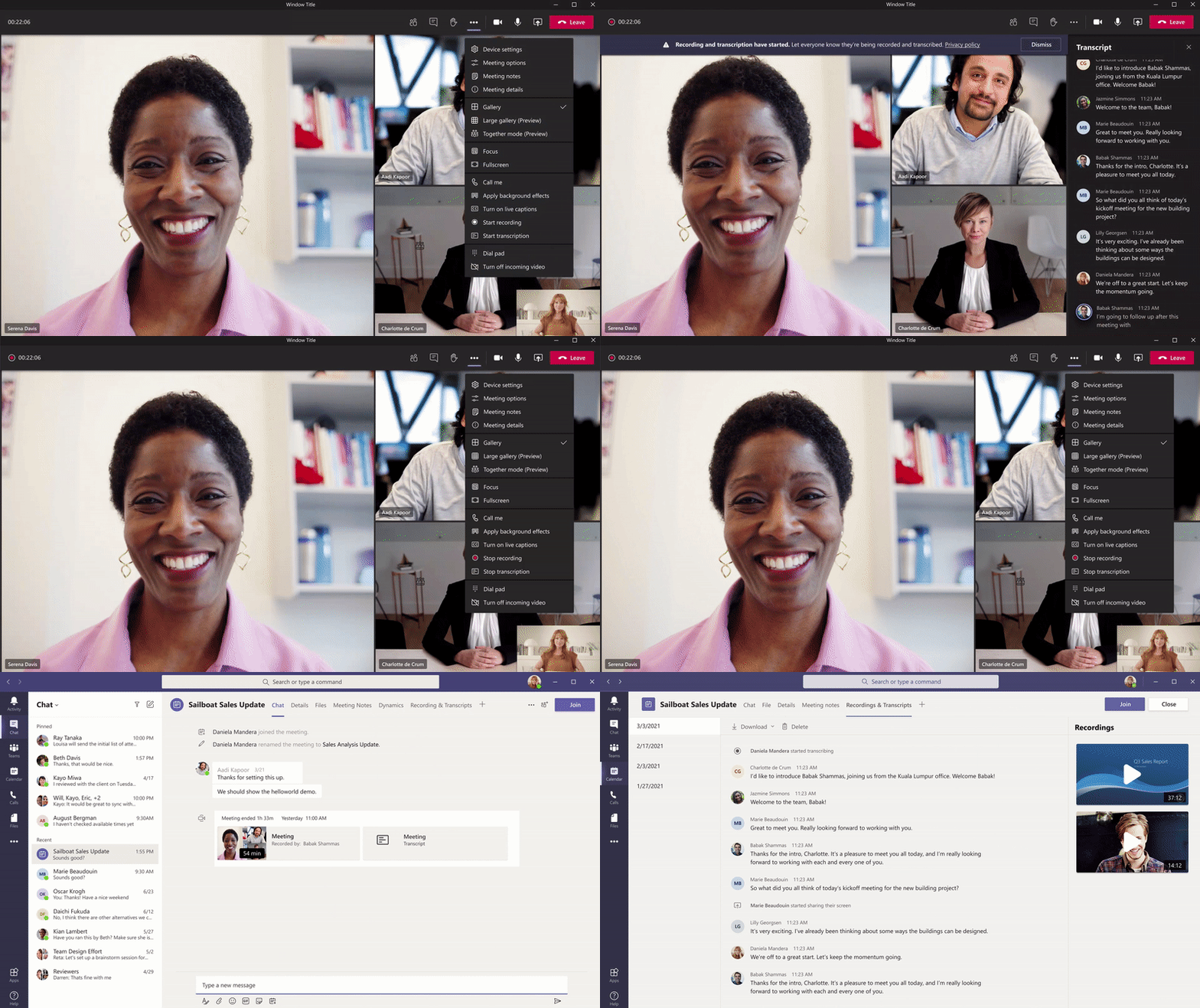
Live transcription with speaker attribution Live transcription allows you to follow and review conversations (in English-US) alongside the meeting video or audio in real time. This promotes inclusivity for participants who have hearing disabilities or different levels of language proficiency. Attendees who joined late, or missed the meeting, can easily catch up by reading what was discussed and searching the transcript by speaker. Tenant admins have to turn on the Allow transcription policy to enable this feature. Learn more
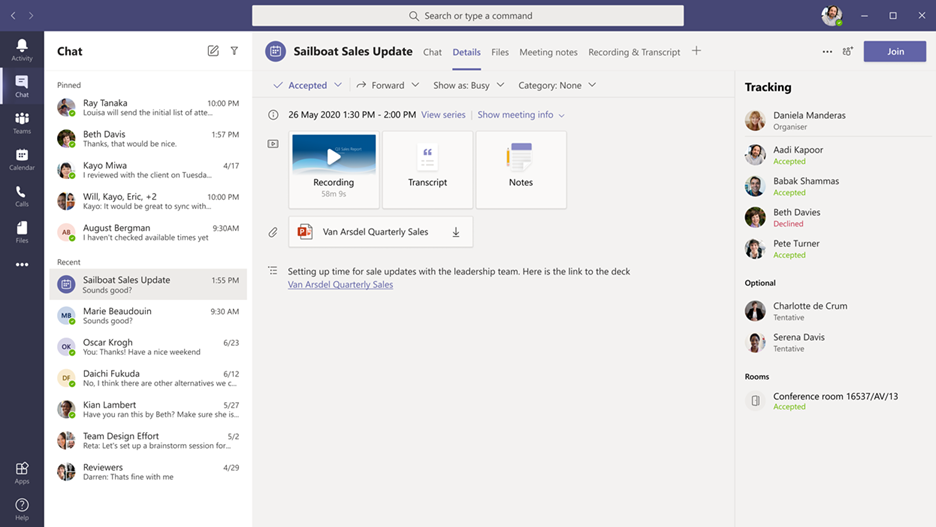
Meeting recap Meeting recap helps teams stay on track and keep their work moving forward after the meeting is over. It includes meeting recording, transcript, chat, attached files and more. The recap is shared with participants in the meeting Chat tab and viewable in the Details tab. Those who missed the meeting, joined late, or want to revisit what was discussed, can play the recording, or review the transcripts respectively.
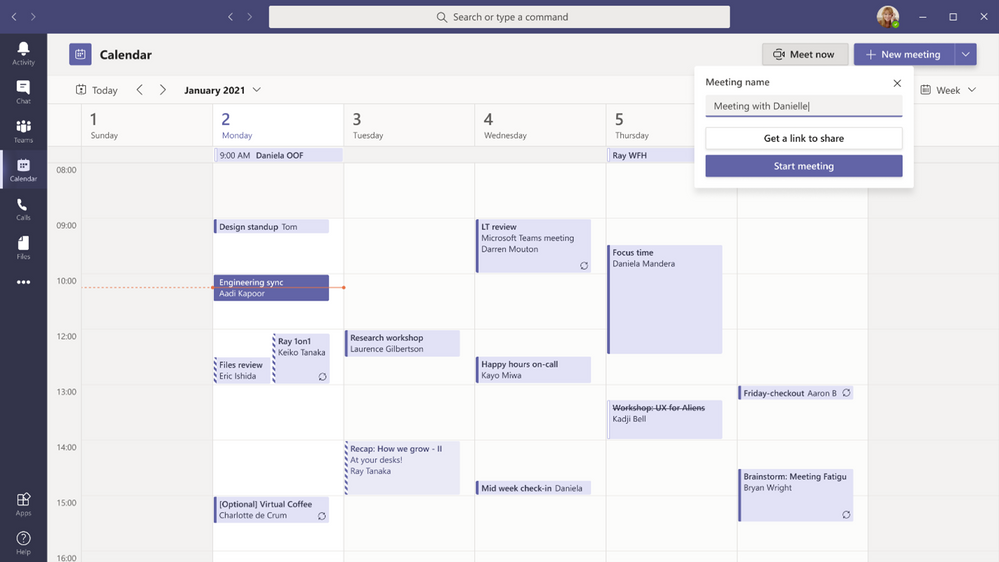
Meet Now in Outlook client for Windows You can now start an instant Teams meeting from the Calendar tab in Outlook for Windows by clicking Meet Now. To enable this feature, tenant admins just have to set the Allow Private Meet Now policy option to True in the admin console.
Get a Meet Now meeting link from the Calendar Users can now copy a Meet Now meeting link from the Calendar and share it out with others without starting the meeting. If you are in an email, chat, or channel conversation and agreed to meet at a certain time, this is an easy way to copy a meeting link and paste it into the conversation.
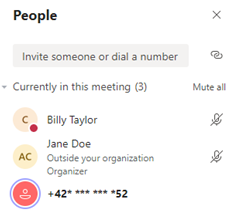
Masking PSTN participant phone numbers For customers who have Audio Conferencing enabled for their Teams meetings, their tenant administrators now have the ability to define how their participants' phone numbers appear in the roster view for meetings scheduled within their organization. The options include masked to external users, masked for everyone, or off (visible to everyone). This provides flexibility in securing PSTN participants’ phone numbers. This feature is currently available through PowerShell cmdlet. Learn more
New bypass lobby option The Teams meeting policy has a setting that allows certain groups of users to bypass the meeting lobby and join the meeting directly. This month’s update includes two additional options: “People in my organization” (which excludes guests) and “People in my organization, trusted organizations, and guests.” This provides another level of security and flexibility to Teams users.
Outgoing participant video in meetings in Safari browser Outgoing video in web meetings is now available to Safari users. Simply click the camera icon to start a sharing your video in the meeting. This requires Safari 14 or higher on MacOS BigSur.
Touch Bar meetings controls on Mac MacBooks with Touch Bars now have Teams Meeting controls that quickly allow users to access controls without clicking into the window. Users can open the ‘view participants’ panel, open meeting chat, use raise hand, enable video, mute/unmute, open shared tray, and leave the meeting from one place.
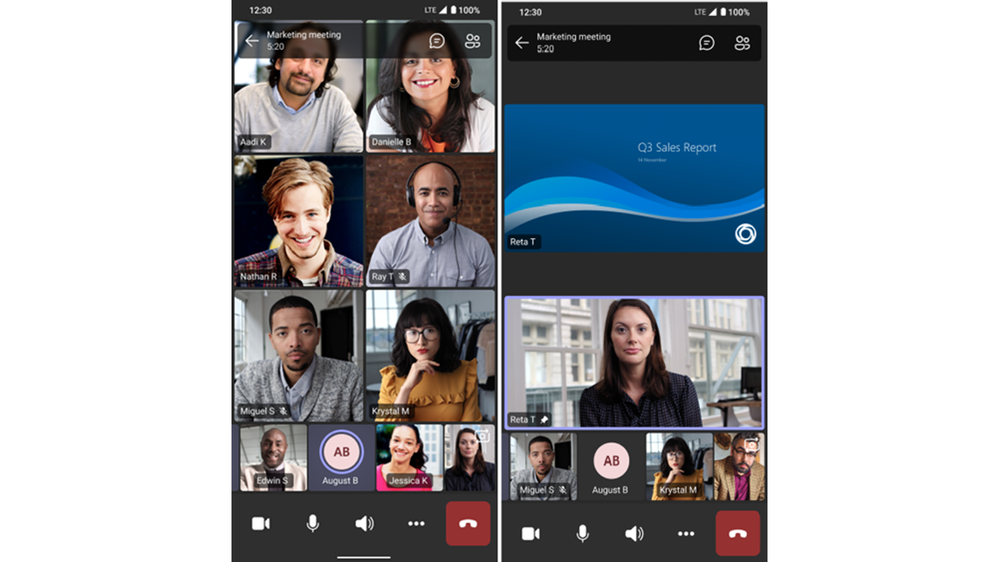
Dynamic meeting experiences on Android New meeting experiences on Android devices enables participants to view content, speakers, and attendees all on one screen. Attendees are now able to see up to 20 participants on mobile devices and up to 30 participants on tablets. In addition, attendees are able to view shared content and a spotlighted participant simultaneously, and no longer have to choose between content being presented or pinned speakers. Already available on iOS.
Live Event presenter for iPad
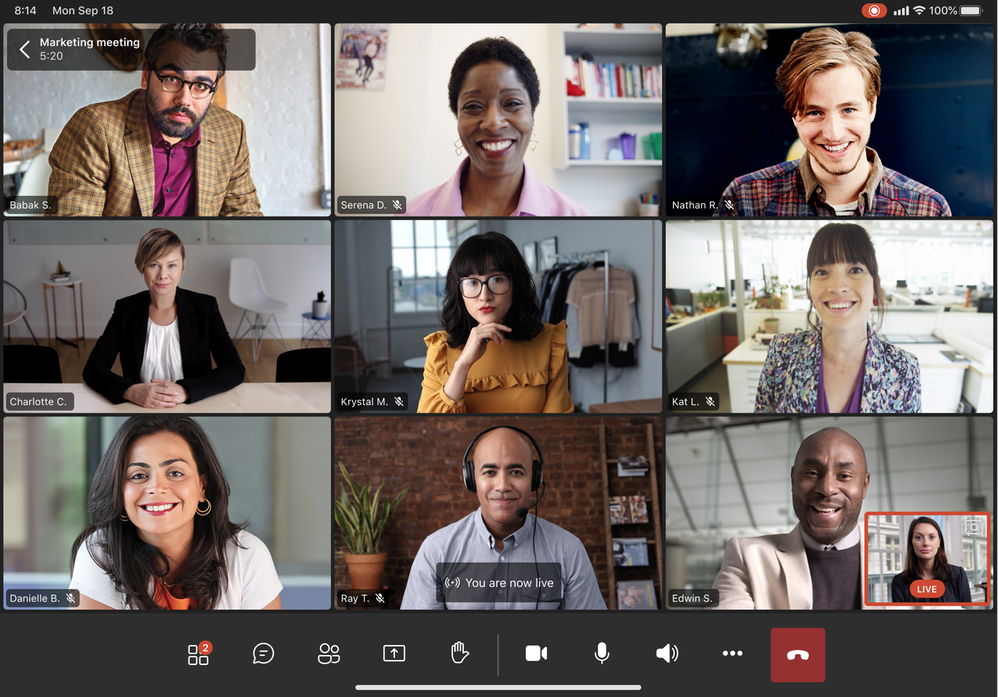
Sales teams, executives, and other iPad users now have the ability to present live in Teams Live Events. Just open the Teams for iPad app, join the Live Event as Presenter and broadcast your video or screen share to your audience. Learn more.
CVI support for Teams Live Events Support to join Teams Live Events on non-native Teams devices via Cloud Video Interop (CVI) is now available. Contact your CVI provider to get started! Learn more.
Teams Live Event GoLocal Data Center Support We are now enabling local data centers for Teams Live Events in the following countries: France, Germany, South Africa, South Korea, Switzerland, and United Arab Emirates. Any user with the eligible SKU and the appropriate IT admin policy is able to schedule a live event.
Calling Voice-enabled channels Voice-enabled channels allow connecting a call queue to a channel in Microsoft Teams. Users can collaborate and share information within the channel while taking calls in the queue. This feature is ideal for scenarios such an IT help desk or HR hotline. IT admins can quickly connect call queues to specific channels, and team owners can manage the settings. Learn more
Survivable Branch Appliance To support the most critical conversations in the event of an outage, a Survivable Branch Appliance (SBA) allows users to place and receive PSTN calls even in the event of a network outage. During an outage, the Teams client switches to the SBA automatically and ongoing calls continue without interruptions and no user action is required. Once the Teams client identifies that network connectivity has been restored, normal call functionality is resumed, and any call data records are uploaded to the cloud. Organizations can now take advantage of Survivable Branch Appliance capabilities by following the step-by-step configuration guidance provided by their SBC vendor. Learn more
Devices We've have newly certified devices for Microsoft Teams this month from EPOS and Poly.
EPOS ADAPT 100 Series Headsets from EPOS help meet the need for increased collaboration and seamless user workflows as they transition from tasks to meetings. The series encompasses many variants that are optimized for unified communications. Using the Teams button, you can easily join your Teams meetings and calls and their easy-to-use plug-and-play functionality makes getting started simple.
Poly Trio C60 The Poly Trio C60 is now certified for Microsoft Teams Rooms on Windows as USB audio peripheral. Previously certified as a Teams IP conference phone, the Poly Trio C60 can now be configured for use with a Teams Room system, such as Poly G85-T. The Trio C60 supports Poly signature audio innovation such as distraction-free NoiseBlock AI and rich 22kHz sound.
Poly Savi 7300 Office The Savi 7300 Office Series is the ultra-secure DECT™ wireless headset perfect for anywhere sensitive conversations happen. The series is designed to meet the highest-level DECT™ security Step C, with military-grade 256-bit AES encryption for maximum security. Combined with Poly Acoustic Fence technology and Microsoft Teams Open Office spec, conversations always stay clear, private and protected. A dedicated Teams button provides a seamless Teams experience.
Poly Studio P15 The Poly Studio P15 is a personal USB video bar that gives you everything you need to look and sound your best on video calls in one sleek device. High performance 4K image sensors and automatic camera framingallow you to be seen without staying glued to your chair. A powerful speaker and microphone array deliver rich, clear audio, while NoiseBlockAI and Acoustic Fence technology keep out distracting sounds.
Chat and Collaboration Android On-Demand Chat Translation Inline message translation helps ensure that every worker in the team has a voice and facilitate global collaboration. With a simple click, people who speak different languages can fluidly communicate with one another by translating posts in channels and chat.
Additional settings for multiple Accounts and Organizations You can now in the Teams desktop client add a personal account, along with one work/school account, change your profile picture, and switch between accounts and orgs through Settings.
250 GB file size support in Microsoft teams We have now increased the upload file size limit for Microsoft Teams from 100 GB to 250 GB. This also applies to all other Microsoft 365, services including SharePoint and OneDrive. You are now able to easily share large files like a 3D model of a new building, a client commercial shot in 8K video, a large dataset for a vaccine trial or research projects or large videos for educational projects. Learn more
Viva Connections on Teams desktop Viva Connections is your gateway to a modern employee experience. It is personalized and appears in the apps and devices your employees already use every day, such as Microsoft Teams. Viva Connections gives people a curated, company-branded experience that brings together relevant news, conversations, and other resources.
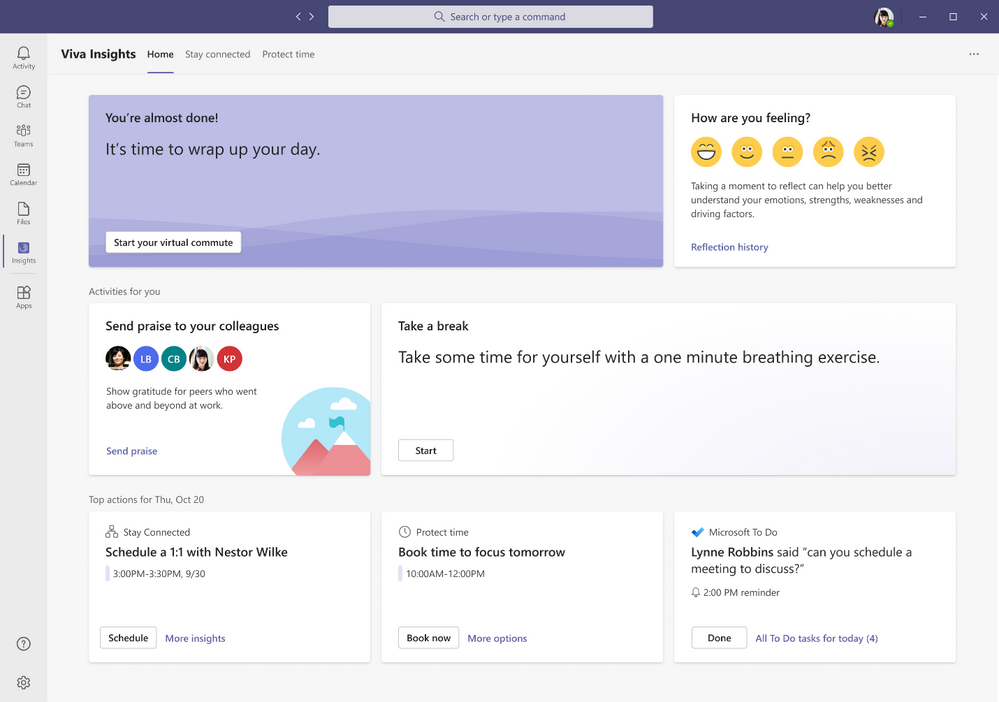
Balance productivity and wellbeing with Microsoft Viva Insights Viva Insights gives individuals, managers, and leaders personalized insights and actionable recommendations that help everyone in an organization thrive. This new app - discoverable directly in the Teams app bar by selecting the ellipsis (…) - makes it seamless for users with Exchange Online mailboxes to strengthen relationships with key people, follow up on to-dos, and protect focus time to work uninterrupted. For Workplace Analytics customers, manager and leader insights provide visibility into the impact of work patterns on people and the business and can help identify where a change in team and organizational norms could improve wellbeing and business outcomes. Personal insights are visible only to the individual, and for manager and leader insights, customers can rely on safeguards like de-identification, aggregation, and differential privacy by default. Learn more
PowerShell Support for team templates Admins can now manage team templates at scale with templates cmdlets in PowerShell. With this new set of templates cmdlets, admins are able to get a list of all available templates within their tenant, get details of a particular template, and create, edit, and delete a team template.
Manage team templates with template policies Admins can now choose which team templates are shown to the end user. In the Teams Admin Center, admins can create teams template policies and designate which team templates to hide or show. Once the policy was created, assign users to it so that each user sees only the team templates tailored to their role.
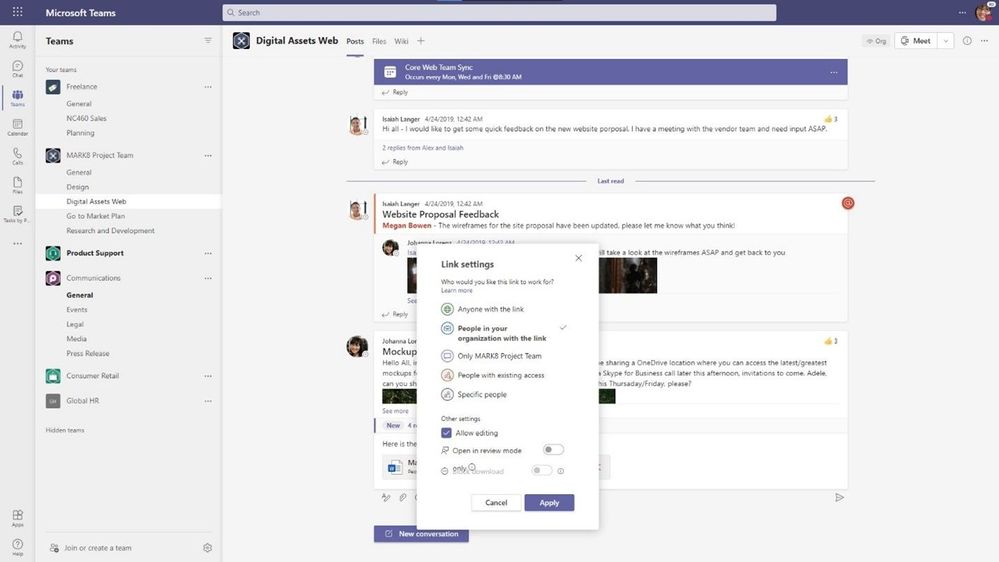
New file sharing experience We have streamlined file sharing in Microsoft Teams. You can now create a shareable link for any file stored in Teams and directly set the appropriate permissions. Additionally, you can also set permissions for files stored in SharePoint or OneDrive while composing a private chat or starting a channel conversation. Learn more
Add Microsoft Teams to your SharePoint team site We are making it even easier to bring SharePoint content into Teams, in the same motion of adding Microsoft Teams to your team site, aka #teamify. As you connect SharePoint to Teams, you choose what lists, libraries, and pages you want to bring into Teams as tabs in the new, default General channel. Learn more
Include up to 10,000 users in an org-wide team You can now create an org-wide team to promote collaboration and communications across the entire organization. Administrators who manage tenants that have less than or equal to 10,000 members can now create an org-wide team, which automatically syncs all the tenant’s members with the team. Learn more
25,000 person teams Team membership limit is increasing to 25,000 per individual team. With millions of employees working remotely or in hybrid environments, it’s more important than ever for employees to feel connected. Teams makes it easier to collaborate with others, chat, meet virtually, and integrate your business solutions, all in a single platform. The increased member limit enables you to easily communicate and collaborate with larger size teams.
Out of Office Let others know that you are not available by scheduling an Out of Office message in Teams. This helps set expectations with your colleagues, letting them know that you won’t be able to respond during this time and allows you to take the time off. During this time, your presence status is changed to "Out of Office" and your status message is displayed when someone reaches out to you via chat. Additionally, your Outlook calendar and automatic replies are updated accordingly.
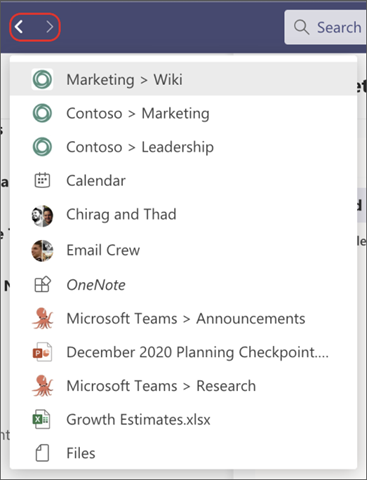
History Menu The History Menu for Teams desktop clients displays your recently visited locations when hovering over the backward and forward navigation options. Using the menu you can quickly jump back to previous locations, making it much easier to quickly get back to nested locations like tabs or documents. The menu is also accessible via keyboard shortcut. Learn more
Queue sent messages when offline When attempting to send messages while offline, Teams queues messages and send these once a network connection is re-established. This help ensure that your messages get to your recipients. If the message is in an unsent state for more than 24 hours, the message fails, and the user is prompted to resend or delete the message.
More labels in Microsoft Planner Labels are a quick, visual way to categorize similar tasks in Planner and we've increased the number of labels to help you get even more organized. You can now add up to 25 labels in all different colors to your tasks in Planner in Microsoft Teams and Planner across web and mobile. Learn more
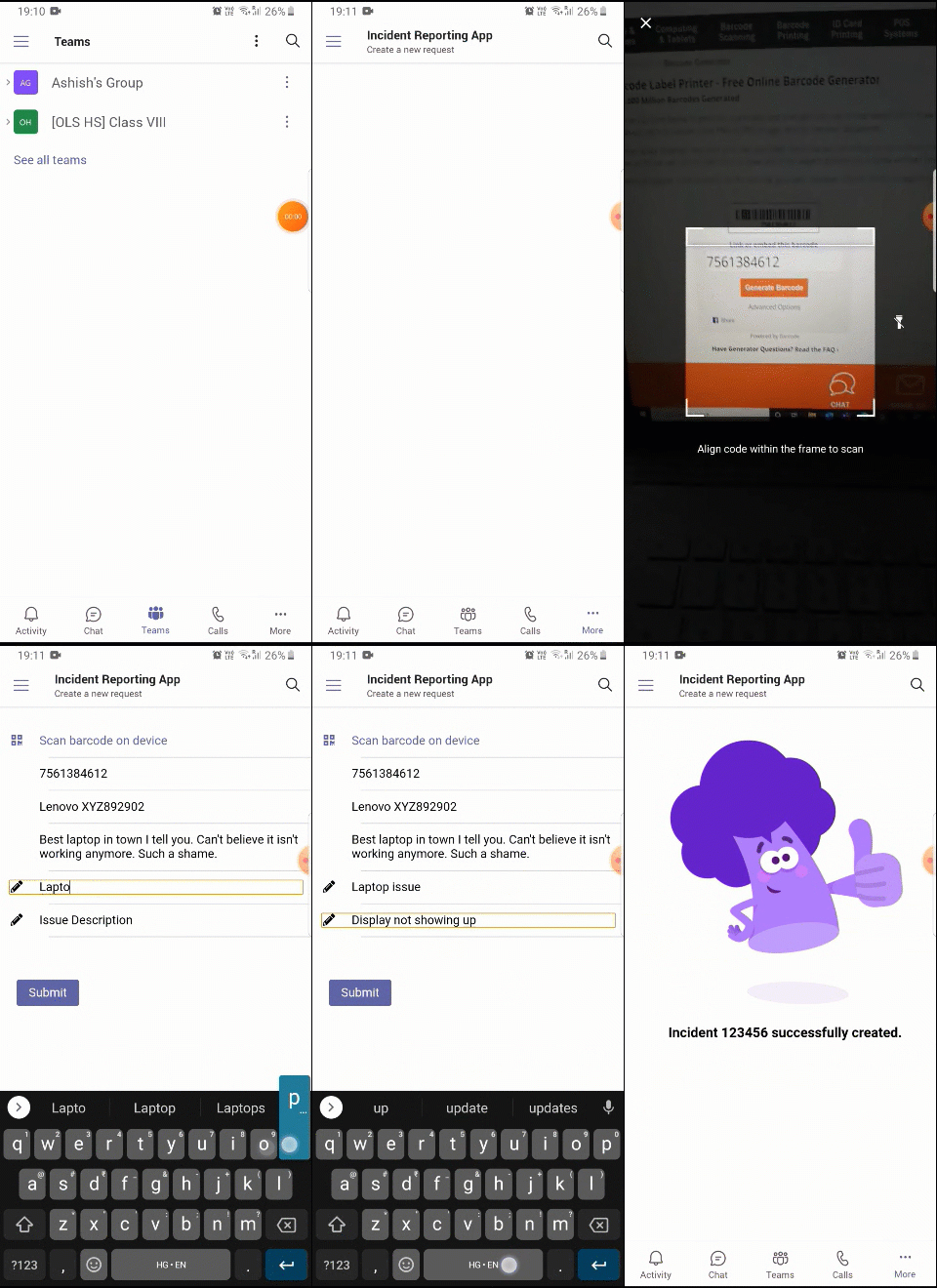
Power Platform and custom development New mobile device capabilities APIs – QR/Barcode Scanner and Location APIs We are excited to share new device capabilities – location and QR/Barcode scanner – that you can now utilize to light up new and compelling scenarios. These high-value experiences come out-of-box in the Teams Client JavaScript SDK and can be leveraged with minimal effort, reducing the barrier to app development. Learn more
SharePoint Framework (SPFx) version 1.12 for even more flexible and comprehensive extensibility options for both Microsoft Teams and SharePoint With the release of SPFx version 1.12, we are making it even easier to build Microsoft Teams extensibility with automatic hosting of your UX layer and we enable you to combine the SharePoint Framework pieces together with the other Microsoft Teams extensibility options. Learn more
Management Restricting Windows and Mac managed device sign-in to specific tenants You are now able to restrict Teams sign-in for Windows and Mac managed devices to ensure that employees cannot sign-in to another organization's tenant using the other tenant's credentials from the device they are authorized to use for work. This policy can also be used to configure access to personal accounts.
Manage Teams displays in Team Admin Center We are adding one more device category, the Teams Display, to the device portfolio that can be now managed within Teams Admin Center. This allows IT admins to simplify, customize, and automate Teams panel devices as well.
Simple Periodic review for guest users We have added scheduled access reviews for guests across all Teams and Groups by default. The system automatically schedules periodic guest access reviews across Teams, delivering better identity security hygiene.
Assign policy package to a group We have added the ability to assign policy packages to groups. Admins can now can easily assign a policy package to a group such as an entire retail workforce. This helps making your work more efficient in a simple friendly step. Learn more
Unifying the experiences of creating teams We have aligned the experience of creating a team via the Teams Admin Center to the experience of creating a team in the Teams client, both on the desktop and web, to provide a unified experience when a team is added, regardless of interface.
Updated Teams table of content on docs.microsoft.com To make it easy for our IT pro audience to find the right content at the right time we have launched an updated landing page for Teams on docs.microsoft.com. We have made it easier to find our MSLearn content and have reorganized the lifecycle content. Finally, we have dedicated content for our government and industry customers. Learn more
Security, compliance, and privacy Microsoft Information Protection: changes in display of sensitivity labels for Teams For Teams with hierarchical sensitivity labels applied, the channel headers only displays the parent label instead of showing the child label. For example, with a parent sensitivity label such as Confidential and a child sensitivity label of Finance, Teams only shows "Confidential" in the channel header.
Bounty Awards for Teams Desktop Client Security Research We are excited to expand our partnership with the research community and introduce bounty awards for Teams desktop client security research under the new Microsoft Applications Bounty Program. The Teams desktop client is the first in-scope application under the new Apps Bounty Program and you can learn more about the Bounty Awards for Teams Desktop Client here.
Government These features currently available to Microsoft’s commercial customers in multi-tenant cloud environments are now rolling out to our customers in US Government Community Cloud (GCC), US Government Community Cloud High (GCC-High), and/or United States Department of Defense (DoD).
PowerPoint File Sharing PowerPoint File Sharing allows you to share a PowerPoint file within a Teams Meeting without having to use Desktop or Window sharing. Available in DOD.
Multi-Window Meetings and Calling experiences Multi-window experiences are coming to Teams meetings and calling. Users will have the ability to pop out meetings and calling into separate windows to help them optimize their workflow. These experiences can be turned on directly within Teams for PC and Mac clients. Available in GCC-High and DOD as opt-in.
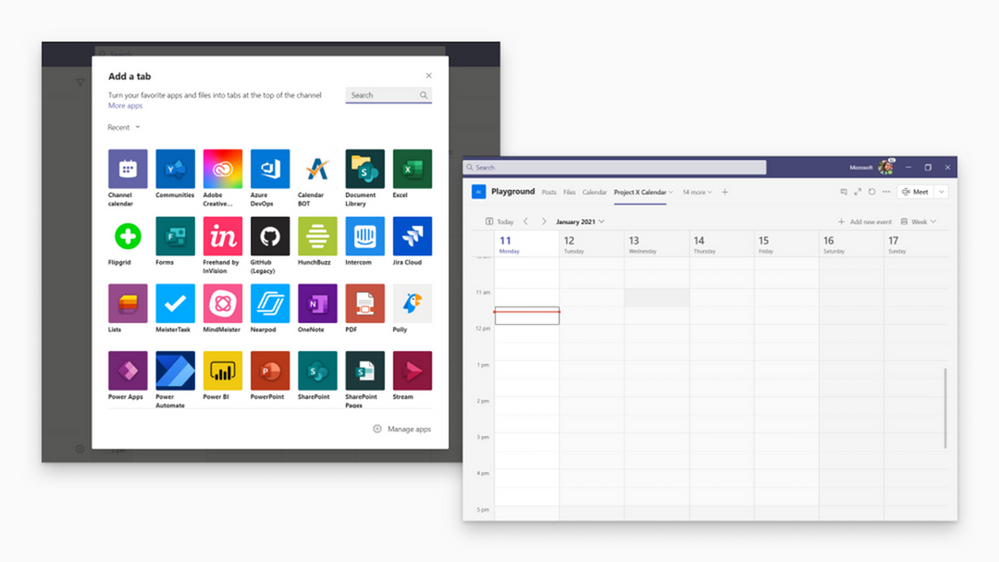
Add a shared calendar to a Teams channel Create and share a calendar with members of a specific channel. When a channel meeting is created, Teams automatically creates a new post in the channel’s activity feed. Users, who have notifications turned off, will see the event only when they open the channel’s calendar. Once a channel event is posted, you can add it to your personal calendar. This feature provides all members within the channel, except guest users, visibility to upcoming events. Available in GCC and GCC-High. Learn more
Virtual Breakout Rooms Breakout rooms allows meeting organizers to divide the meeting into smaller groups to facilitate discussions and brainstorming sessions. A breakout room can be created in a Teams meeting or a Teams channel meeting, allowing greater flexibility on how you want to meet. Organizers can easily jump in between breakout rooms, deliver announcements to all breakout rooms at once, and bring everyone back to the main meeting at any time. Any files from the breakout rooms can be shared in the main meeting and is available afterwards in the meeting chat. Available in GCC and GCC-High. Learn more
Outgoing participant video in meetings in Safari browser Outgoing video in web meetings is now available to Safari users. Simply click the camera icon to start a sharing your video in the meeting. This requires Safari 14 or higher on MacOS BigSur. Available in GCC.
Touch Bar Meetings Controls for Mac MacBooks with Touch Bars now have Teams Meeting controls that quickly allow users to access controls without clicking into the window. Users can open the view participants panel, open meeting chat, use raise hands, enable video, mute/unmute, open shared tray, and leave the meeting from one place. Available in GCC, GCC-High, and DOD.
Live Reactions in Microsoft Teams meetings All attendees can now use emojis to react during a meeting. These reactions help promote inclusivity in meetings and keep things upbeat and interactive. Available in GCC. Learn more
Get a Meet Now meeting link from the Calendar Users can now copy a meeting link from the Calendar tab and share it out with others without starting the meeting. If you are in an email, chat, or channel conversation and agreed to meet at a certain time, this is an easy way to copy a meeting link and paste it into the conversation. Available in GCC.
Masking PSTN participant phone numbers For customers who have Audio Conferencing enabled for their Teams meetings, their tenant administrators now have the ability to define how their participants' phone numbers appear in the roster view for meetings scheduled within their organization. The options include masked to external users, masked for everyone, or off (visible to everyone). This provides flexibility in securing PSTN participants’ phone numbers. This feature is currently available through PowerShell cmdlet. Available for GCC. Learn more
Enable tenant administrators to configure masking of PSTN participant phone numbers If a customer has Audio Conferencing enabled for their Teams meetings, their tenant administrators now have the ability to define how their Audio Conferencing participants' phone numbers appear in the roster view for meetings scheduled within their organization. The options include masked to external users, masked for everyone, or off (visible to everyone). This provides flexibility in securing PSTN participants’ phone numbers. This feature is only available through PowerShell cmdlet at this time. Available in GCC. Learn more
Live Event Presenter for iPad Live Event Presenters can now join and share content from their iPad. Select ‘Join as presenter’ to start broadcasting content to your audience. Available in GCC. Learn more
Set Presence Status duration for Government clouds Manage your availability with the new status duration option in the presence menu allows users to set a certain status for a specific period of time. For example, they will be able to set their status settings to “Do not disturb” for 30 minutes, one hour, two hours, or the entire day or whole week. Learn more
Offline Presence Status for Government clouds You can now change your presence to appear offline, signaling to colleagues that you are not available, while having a full access to Teams. The Offline presence status comes in handy for people who want to access Microsoft Teams outside of working hours and users who simply want to focus on their work. Learn more
Location picker support for security groups and distribution lists Data loss prevention (DLP) for Microsoft Teams will now support security groups and distribution lists as part of the Teams location picker, enabling more granular control of DLP policy scope (i.e. to include/exclude particular departments, business units, geo-specific security groups, etc.). Available in GCC.
Data loss prevention for Microsoft Teams Data loss prevention (DLP) capabilities in Microsoft 365 government clouds will be extended to include Microsoft Teams chat and channel messages, including private channel messages. If your organization has DLP, you can now define policies that prevent people from sharing sensitive information in a Microsoft Teams channel or chat session. Avaliable in GCC-High.
Channel notification settings updates Manage your notification settings to get only the notifications you want, and better manage your time. Through the teams and channels list or from the channel header, the users can quickly manage their notification settings by the means of a new fly-out design. Users can turn on all activity on or off with a single click or diving deep into custom to set their preferred permutations. Available in GCC.
Polls in Teams Meetings Forms polls for Teams meetings provides an easily discoverable and seamless experience that will help you conduct more engaging and productive meetings. With Forms polls, meeting presenters can prepare, launch, and evaluate polls before, during, and after meetings, respectively, all from one place under a tab in the Teams meeting. Avaliable in GCC.
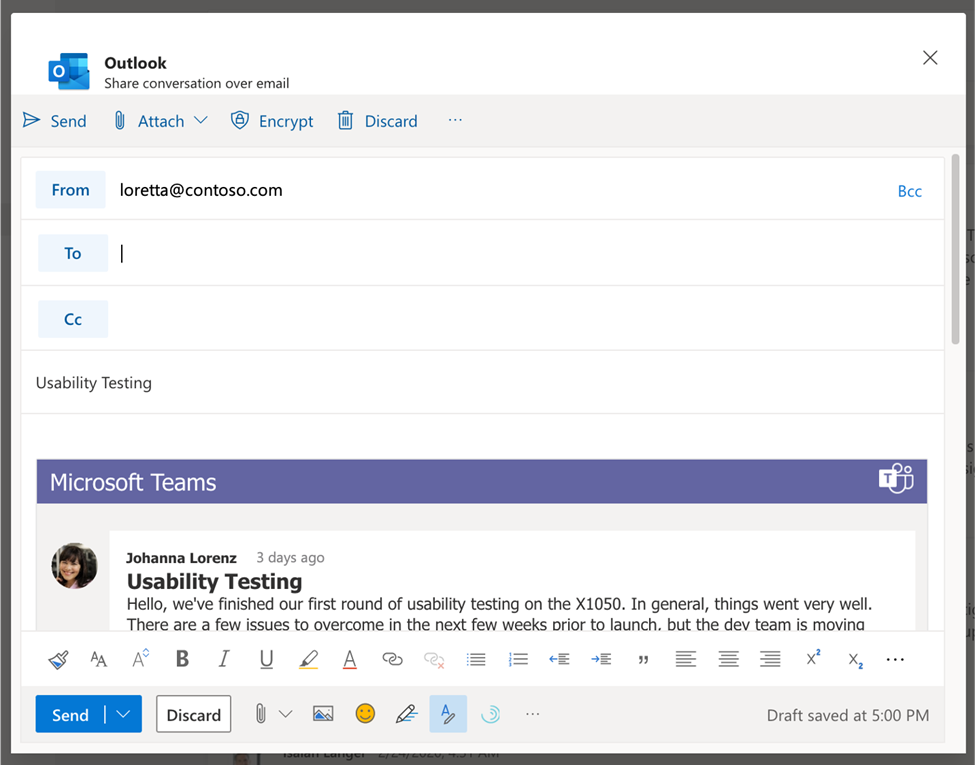
Share from Microsoft Teams to Outlook Sometimes not all your audience is in Teams. Leverage the information discussed over Teams messages and continue the conversation, without losing context, in email. Send a copy of a Teams chat message or an entire channel conversation into Outlook. The message will include rich text support. Avaliable in GCC.
Meeting recordings saved to OneDrive and SharePoint Ability to save Microsoft Teams meeting recordings to OneDrive and SharePoint for improved sharing capabilities, basic governance, automatic retention labels, go local, bring your own keys and, more that comes from recording video files and storing them in SharePoint and OneDrive. Avaliable in GCC, GCC-High and DoD.
Walkie Talkie Walkie Talkie, a push-to-talk experience that enables clear and secure voice communication over the cloud, enables teams to communicate instantly and always stay on the same page. This native built-in app in Teams turns employee or company-owned Android smartphones and tablets into a walkie-talkie, reducing the number of devices employees must carry and lowering costs for IT. Available in GCC.
Simplified Global Notification Settings Government users can now configure and customize their notification settings through a newly designed notification settings section. Available in GCC.
Follow or Mute Conversations This feature will empower users to have finer controls at a conversation thread level within a channel. Available in GCC.
Low data mode Whether you want to preserve data or are just in a location with a poor or limited network connection, sometimes it’s helpful to limit the amount of data you’re using during a video call. A new low data mode is now available, allowing users to cap the amount of data that will be used during Teams video calls as well as establish different settings based on network availability so that the setting can be turned on always, or only while on cellular networks. Available in GCC, GCC-High, and DOD.
Reporting and analytics in the Teams Admin Center for GCCH The reporting and analytic section in the Teams Admin Center was added in the left navigation bar, to enable them generating Teams usage reports. Available in GCC-High.
Jisc has announced that it will be using Unsub, an analytics dashboard, to help evaluate journal agreements that UK universities hold with publishers.
The dashboard, created in 2019 by the not-for-profit software company Our Research, can produce forecasts of different journal subscription scenarios, giving Jisc insight into the costs and benefits of subscription packages for each university and across the consortium.
Caren Milloy, director of licensing at Jisc, says:
“In this period of financial uncertainty, it is essential that we can support our members in evaluating the agreements they subscribe to. The new dashboard enables us to look at the value derived across all participating members and to assess the impact of different collection models. We are really pleased to support our members with centrally coordinated data provision, that will also provide insights to inform institutional decision-making.”
Jason Priem, co-founder of Our Research, says:
“We’re thrilled to help Jisc continue its tradition of information leadership in both the UK and worldwide. This new partnership helps further Unsub’s goal of supporting libraries in re-evaluating their Big Deals, giving them the opportunity to focus spending in support of the transition to open access.”
The Unsub dashboard will streamline workflows and add new data to Jisc’s ongoing analysis efforts. Of particular value is Unsub’s ability to estimate the extent to which Open Access (OA) scholarly articles can replace existing subscription access. Due to the growth of OA, more than half of newly-published articles are now free to read.
More than two in five apprentices on standards failed to successfully complete their qualification last year.
National achievement rate tables (NARTs) published this morning by the Department for Education show that the overall rate for all apprenticeships fell from 64.8 per cent in 2018/19 to 64.2 per cent in 2019/20.
The data shows that apprentices on old-style frameworks, which are being phased out, hit a 67.8 per cent achievement rate, but the new-style standards only achieved 58.7 per cent.
This is, however, an almost 12 percentage point increase on 2018/19 when just 46.9 per cent of apprentices on standards achieved.
The retention rate for standards continues to be low, sitting at 60.2 per cent.
Commentary published by the DfE alongside the statistics claims that a difference in apprenticeship achievement rates between framework and standards is “not, at least initially, an entirely unexpected consequence of our reforms”.
“Whilst some standards do have similar names to frameworks, standards are not designed to be a direct replacement for frameworks and as such, they should not be directly compared,” the document said.
“Department for Education reforms changed what an apprenticeship is: standards are longer, with more training and an independent end-point assessment to test occupational competency at the end. End-point assessment is a new assessment method, making achievements on standards more demanding and this could also impact the qualification achievement rate.”
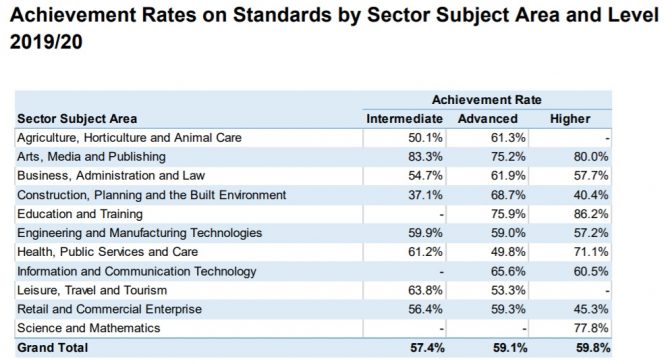
Breaking the data down by subject area, it shows that agriculture, horticulture and animal care had the lowest achievement rate at 50.9 per cent, followed by construction at 52.3 per cent, and then leisure, travel and tourism at 55.6 per cent.
While the DfE has released achievement rate data at a national level for 2019/20, they have not published it at individual provider level or by institution type this year due to the pandemic.
The data will also not be used by bodies such as Ofsted, local authorities or devolved authorities or within ESFA, to hold providers to account.
The DfE commentary warned that “care should be taken when comparing outcomes with previous years due to the effects of the pandemic”.
“A number of things will have impacted these data. For example there was an increase in the number of breaks in learning for those with 2019/20 expected end dates in which we can observe a large number of outcomes being delayed until 2020/21,” it added.
Responding to today’s figures, a DfE spokesperson said: “Our reforms to apprenticeships have made them longer and better, with more off-the-job training and a proper assessment at the end. As more and more apprentices are on the new, more rigorous standards, we are pleased to see that the achievement rate for apprenticeship standards has increased by 11.8 percentage points from 2018/19 to 2019/20.
“The recently published FE White Paper outlined the steps we are taking to ensure every apprentice has a high quality experience, including investing in a comprehensive package of professional development available to all apprenticeship providers and their workforce.”
But you know what else was happening nearly every time she spoke up? Weak words sabotaged her influence.
By changing the words surrounding her ideas, her ideas suddenly gained traction, and she had a seat at the table.
3 Communication Mistakes That Sabotage Your Leadership Influence at Work
Let’s talk about three categories of words that sabotage your influence at work and what to say instead.
1. Pre-Apologies
There’s no question that self-deprecating humor has a place at work. In fact, we often notice some of the most successful leaders in our leadership programs using self-deprecating humor brilliantly.
Poking a bit of fun at yourself and allowing others to have a good laugh at your expense can do wonders to break the ice, particularly if you’re the one with more position power.
And, of course, REAL apologies are vital in building trust, influence, and connection. If you screw up, admit it.
But, pre-apologies where you apologize for an idea you’re about to present, scream, “Don’t listen to me, wait for the next guy. I’m sure his idea will be better.”
It’s so sad to watch a manager with a great idea start with a pre-apology and then wonder why their voice isn’t heard.
Examples of Pre-Apologies
“I’m usually wrong about such things, but …”
“This is probably a bad idea …”
“In my feeble little mind …”
“In terrible at math, but …”
Note: If you are really terrible at math, double-check or get some help. But our experience is most people who start with “I’m terrible at math” have a gut instinct that tells us something is wonky on a spreadsheet or in a presentation even faster than the best math geek.
What to say instead:
“I have an idea …”
“In my experience …”
“Great thoughts, have you also considered?”
“Can we just double-check the numbers? Can you please walk us through how you got to that?”
2. Selling Past the Close
Back in my early HR days at Verizon, I (Karin) was really excited about a new mentoring program we had developed, but I had to convince the operations leadership that the time was right. I had carefully crafted my argument and all the reasons why we needed this now.
Three minutes in, the senior vice president of sales I was meeting with said “yes.”
But, I hadn’t yet shared all my talk points or data. So, I kept talking sharing my carefully crafted pitch. He quickly interrupted and shared, “Karin, you’re selling past the close.”
If you want better influence, know when to stop talking.
What to say instead:
“Great. Glad you agree. Game on. Here’s what I recommend we do next.”
3. Hedging
When I think of “hedging words,” I think of the scarecrow from the Wizard of Oz. “Well we could go this way, but we could also go that way.”
You present a perfectly good idea, and before people can respond you quickly jump in with all the alternatives as you waffle a bit about your recommendations.
What to say instead:
It’s perfectly reasonable to concisely show your work, and explain the alternatives you considered. If you want more influence you should also have a point of view.
“I carefully considered these three alternatives. And, this is why I recommend we go this way.”
Start Here to Be a More Influential Communicator at Work
It’s easy to fall into the trap of using these derailing words, and not even notice it. The easiest way to know is to ask for feedback from someone you trust. “I’m working on improving my communication to have more influence at work. If you see me starting my sentences with a pre-apology, would you let me know?”
Or you can even record one of your virtual meetings, play it back and watch for patterns.
Your turn:
What communication mistakes have you seen sabotage influence at work?
Gamification is considered a progressive advance in the realm of education, it has been being adopted in various sectors, corporate, aviation, human resources, and many more but it is being heavily used in the healthcare sector too. Gamification in nursing training is making learning experience improve with intelligence and interaction, and the possibility of gamification […]
Some valid points. A lot about the need to rethink and not repeat models and mistakes,
More than a year ago, in the context of the international health crisis we are still facing, the entire world had to deal with unique learning circumstances. With schools being shut down, stakeholders, faculty, and institutional bodies had to reinvent teaching, exploring adequate alternatives to ensure successful learning.
Experiencing this new reality in various ways, teachers and students around the globe tried their best to move education online almost overnight. Mostly unprepared for such a scenario, but eager and diligent, everyone got involved in the transition.
However, after months of screen time, a new phenomenon emerged in the educational system, called digital fatigue. This condition appeared as a consequence of overusing the digital tools in the learning process, causing a feeling of saturation that can lead to burnout.
In a three-part series, I’ll explore what digital fatigue is, how to deal with it as a teacher, and its impact on students and learning.
What leads to digital fatigue?
The abrupt shift from face-to-face to online teaching has left teachers and students struggling to adjust. Specialists have recognized digital fatigue as a concerning condition with significant physical and psychological impacts on both teachers and students.
While the causes of this phenomenon can vary, we can pinpoint the following:
Social inequalities regarding the quality of the technology used
Connectivity issues
Lower-resolution screens
Poor sound quality
Focusing on unclear images
The feeling of intrusiveness
The need for constant engagement
Too many visual and audio stimuli
Difficulty in setting time and space boundaries
A sense of overload because of the myriad of online resources
In the past year, online schooling has put a strain on vulnerable communities, especially those who have difficulties accessing technology or making the best out of limited resources.
Spending hours on end in front of low-resolution screens, doubled by poor sound quality, amplifies the feeling of digital fatigue. Nevertheless, everyone on the other side of the screen, be it low or premium quality, experiences a sense of intrusion, especially when the camera is on.
You are exposed 100%, which does not happen when teaching face to face. This is particularly true for students. At any given time during class, a student is seen by 15 to 25% of their peers. But online, whether it is real or not, there is this feeling of being watched uninterruptedly.
Such an experience can take a toll on a person because of the need for personal space and privacy. We mustn’t forget that many families have more than one child connected to online school in the same room.
Also, both teachers and students feel pressured to fill every second of the online class. This is caused by the discomfort created by silence. There’s the requirement — or so it’s perceived — to be engaged at all times, leading to fatigue.
Moreover, from the tendency to limit screen time for children, in particular, we’ve reached the need to spend enormous amounts of time in front of screens.
With the multitude of resources and formats that take time to adjust, there is fatigue generated by too many visual and audio stimuli.
The number one cause for digital fatigue is the inability to separate the school space from the rest of the house, mainly because of living conditions.
Another reason for digital fatigue could be the inability or unwillingness of some teachers and students to assign time limits and keep them when it comes to preparing and creating assignments or content.
The impact of digital fatigue in the educational system
Regarding teaching and learning, there are some significant consequences to consider as they impact the educational process directly:
Lack of focus
Knowledge absorption decrease
Disengagement
High dropout risk
Body dysfunctionality related to movement, posture, and eyesight
Anxiety and stress often associated with physical ailments
The risk of seclusion
Underdeveloped, unpractised, or suppressed social skills
Our bodies are not made to function in a seated position for long hours. Sedentarism triggers posture and movement issues, vision problems, and even digestive dysfunctionality.
Digital fatigue is also responsible for the lack of or inability to focus, thus lowering academic performance and knowledge retention levels.
This condition, combined with anxiety and stress, can lead to disengagement and increased dropout risk, in addition to self-isolation and poor social skills.
It is safe to say that digital fatigue is a serious condition that can’t be treated lightly. It can significantly change the outcomes of the learning process as a whole, or for each individual at a personal level.
Socially speaking, e-learning has changed how we interact tremendously. However, when digital fatigue can be disruptive on an inter and intrapersonal level.
Stay tuned!
Specialists advise everyone involved in teaching and learning online to educate themselves and others to recognize the signs of digital fatigue early on. This way, we can reverse its consequences or at least limit its damage.
In the following two parts, I’ll explore more aspects of digital fatigue, focusing on how teachers and students perceive it and how the less is more approach is the best practice. So keep an eye on the NEO Blog!
Some of you may remember a few excited announcements back in 2018 about Woolf University, a startup that was, and I paraphrase, going to blockchain the shit out of higher ed. The founder described it as “Uber for students, AirBnB for Professors”, thereby combining two terrible business models in one unholy mess.
David Gerard noted that by 2019 they had quietly dropped the whole blockchain tag, no longer describing themselves as The First Blockchain University. Founder Joshua Broggi had stated at the outset that “We literally could not do what we are doing without a blockchain,” so presumably it still figures in their system.
Looking at their site now, it’s hard to see what they do. They seem to offer courses from their own made up Ambrose College, and a couple of other institutions. Courses cost around $1500 each and offer personalised tuition with weekly video calls (attempting to replicate the Oxbridge seminar model). There are no student testimonials I can see. They haven’t tweeted anything since last October. In April 2020 the founder tweeted that “More than 20,000 universities have been forced online by COVID-19, and that has put Woolf in a unique position. So, after two years in development, Woolf University is now opening its platform to non-profit colleges and universities.”
I’m not sure what the ‘unique position’ is here, but it begins to look as though it may be a pivot to providing a platform for online learning rather than the world changing university model. That sounds kinda familiar from MOOC days.
Maybe Woolf are busy developing stuff and are about to launch in a new phase. I understand that this takes time and effort. But I would like to propose that when journalists run puff pieces on the latest thing that is going to kill the university, they are legally obliged to follow it up in 3 years time to see how it is all actually going. Maybe some more sober pieces might actually be useful in understanding how ed tech should, and should not, be implemented.
Employer investment in training has fallen since the introduction of an apprenticeship levy, an HR body says. The Chartered Institute of Personnel and Development (CIPD) said since the levy was introduced in 2017, apprenticeship starts have fallen and fewer have gone to young people.
“On all key measures the apprenticeship levy has failed,” its boss said.
The chancellor is set to announce an additional £126m for traineeships in England at his Budget on Wednesday. The study by the HR industry body found that total apprenticeship starts have fallen from 494,000 in 2016-17 to 322,500 in 2019-20.
The number of apprenticeships going to under-19s also fell from 122,800 to 76,300 in the same timeframe, said its report. It suggested that without reform, the apprenticeship levy will have a damaging effect on investment in skills.
The apprenticeship levy takes 0.5% of the salary bill from major employers in England – with the intention of using the money to improve skills and provide training. Any employer who spends more than £3m annually on wages has to put in 0.5% of its payroll above the £3m threshold. This money is then topped up with an extra 10% from government funds and kept in a digital account for that employer to deploy on its own training arrangements for apprentices.
Funds that are not used by the employer within 24 months expire and get passed back to the government. Some bosses have criticised the scheme, saying rules on how the funded apprenticeships must be organised, with a certain number of hours spent on-the-job versus in a classroom, do not suit their workforce and make the scheme harder to implement.
‘Handbrake on investment’
Peter Cheese, chief executive of the CIPD, said: “On all key measures the apprenticeship levy has failed and is even acting to constrain firms’ investment in apprenticeships and skills more broadly. “It appears to have achieved the opposite of its policy objectives. Without reform it will act as a handbrake on employer investment in skills, damaging firms’ ability to recover from the pandemic.”
He added that introducing more flexibility could see bosses fund their employees through technical or vocational courses in further education colleges, which do not currently fall under the scheme. The HR body is calling on the government to announce it is reforming the apprenticeship levy into a more broad one for training at this week’s Budget.
On Wednesday, Chancellor Rishi Sunak is set to announce a £126m “boost” for traineeships in England. The scheme will include a new “flexi-job” apprenticeship that will enable apprentices to work with a number of different employers in one sector.
The chancellor’s boost to existing apprenticeship and traineeship programmes will include playing up to double the current cash incentive to firms who take on an apprentice, regardless of age.
Currently, firms in England are given £2,000 for every new apprentice they take on under the age of 25, and £1,500 for those over 25, in addition to a £1,000 grant they are already getting under another project.
Mr Sunak will promise to increase the cash incentives for employers who take on any apprentice to £3,000. Unemployment is at its highest level in almost five years, with younger and typically lower-paid workers bearing the brunt of job losses.
A Department for Education spokesman said: “The levy is an important part of our reforms to apprenticeships which are vital for driving our economic recovery. “It supports employers of all sizes to invest in high-quality apprenticeship training. In 2020-21, funding available for investment in apprenticeships in England will remain around £2.5 billion – double that spent in 2010-11 in cash terms.”
They added the department had already committed “to improve the working of the levy and will be making improvements in response to employers’ feedback”.
As we prepare for spring, it is always good to have some new ideas to promote student engagement and foster more collaboration in the classroom. Whether we are in virtual, hybrid, or in-person learning, it is important to have a variety of tools that help us transition between these spaces and expand the when and where learning happens.
Although many of us are entering the last quarter of our school year, it’s still a good opportunity to keep on learning and also to be prepared to transition as we move forward through the remainder of this year and into the next.
How do we prepare?
We start by having a few options that we know will be beneficial regardless of learning space, and that will enable us to stay connected and learn together during what may become a challenging year.
4 Ways to promote collaboration in digital spaces
Some of the questions I continue to ask myself throughout the school year as I seek new ideas and tools are:
What will benefit students regardless of where learning takes place?
In what ways can I use digital tools to design more active learning experiences for my students?
What are some tools/strategies that will promote more communication and collaboration?
What are some big ideas that I can bring into my classroom and then find the right tools to promote more choices in learning?
Here are four ideas to promote collaboration:
Blogging
There are a lot of different tools out there for students to engage in blogging. It can be done through Microsoft Teams or using some of the other digital options available.
I love blogging because it creates a space for students to build writing skills and then share ideas with their teachers and peers and connect globally with classrooms from around the world. Blogging is useful for more than simply developing writing skills; students build digital citizenship skills as they learn to collaborate in the online space.
Blogging also fosters more communication between students and teachers as students can use it as a digital portfolio to track learning over time. We have used Kidblog as well as Edublogs in our classroom. Blogging helps students to also build relationships in the classroom as well as promote peer networking.
Breakout rooms
If you are using Microsoft Teams, Google Meet, or Zoom, allow students to collaborate in breakout rooms. We can use game-based learning and have students play on teams or create games for students to participate in these breakout room spaces.
One of my favorites is to have students work on a project and use breakout rooms to interact and ask questions, share their screens, and feel more closely connected to their classmates. It also gives me the chance to move into each of the breakout rooms and have those conversations with each group and with each student, similar to what I would do if we were all together in the physical classroom.
Collaborative storytelling
Especially in this school year, with working mostly in the virtual learning environment, it has been essential to find opportunities for students to work together. In my Spanish classes, students often write stories, and I encourage them to work with classmates. I have used several tools that promote collaboration.
For anyone looking for an innovative idea, perhaps explore Augmented and Virtual Reality through CoSpacesEDU, a great option that can be used for any grade level or content area. Students can read a book, create a book summary, use it for STEM projects, create an interactive story, and more. Students can be placed together in a group to work in the same collaborative space, similar to what you can do with Google Slides. And if you are using Microsoft Teams or Zoom, place students in breakout rooms so they brainstorm ideas while they’re creating at the same time.
Another collaborative storytelling option is Book Creator, which can be used to create digital books. Students can work together and create their own book to share what they are learning. Books include text, images, audio, and video, and students have fun adding their own stories to the class book. Some ideas include creating a class About Me yearbook, retelling a story, making a travel journal, or any idea that involves multimedia creation.
There are several collaborative whiteboard-type tools available to choose from, within Teams or Zoom, for example. However, there are more options available to educators that provide even more possibilities for greater collaboration.
One tool that is like a sticky note service is Lino. It is similar to using Padlet or a Trello board in that it offers a collaborative space to brainstorm ideas, curate class resources, and promote better workflow and organization. Using Padlet, students can post questions, comments, videos, images, and more. A favorite was creating a scavenger hunt by posting the list on a Padlet and using breakout rooms for the groups to plan their tasks to gather the items and then post to the Padlet.
Regardless of where we are, these options enable us to feel more connected to our classrooms and learning.
An essential skill for now and the future is collaboration. When we create opportunities for students to collaborate with classmates, whether in person or connect asynchronously, we help them to build skills that will benefit them in the future, regardless of the work that they’ll do.
These are just a few quick ideas to explore if you are looking for more ways to promote cooperation in and out of your classroom. I suggest exploring one of the ideas as a start to find the right one that works with your grade level or perhaps that has access to your school network.
Think about what your classroom experience might be missing if you are not all together in person. Is it the ability to have conversations more often? Then start with the breakout room or a collaborative board. Do you want students to work together on a project? Then explore the blogging or digital storytelling in Virtual Reality perhaps, and leverage some of these other tools for students to work together.
Asynchronous learning used to be a term that was rarely mentioned by anyone other than professionals in the fields of education, corporate learning and development, and instructional design. However, widespread changes to teaching and learning over the last few years have ushered asynchronous learning into the spotlight.
Blending Synchronous and Asynchronous Learning
In 2020, the COVID-19 pandemic thrust more than one billion students globally into the world of online learning. Teachers went above and beyond to adapt lesson plans designed for learning in a physical classroom to an online learning environment. With little time to prepare and a limited set of tools at their disposal, however, teachers spent much of their days educating students in real-time video conferences via Zoom, Microsoft Teams, WebEx and other popular services.
Asynchronous learning describes educational activities, discussions, and assignments that engage students in learning at their own pace, on their own time.
Examples of asynchronous learning:
Watching pre-recorded lecture videos or lessons
Viewing video demonstrations
Reading and writing assignments
Research projects
Student presentations
Online class discussions via course discussion boards
Individual or group projects
Learning activities such as quizzes, problem solving, and games
The Benefits of Asynchronous Learning
For remote students, asynchronous learning not only helps alleviate the “Zoom fatigue” that can lead them to disengage, but also offers flexibility to personalize learning to suit their specific needs. Asynchronous learning offers a decisively effective learning experience that enables students to benefit from the following:
Never miss a class
Learn at any pace
Personalize and optimize the learning experience
Revisit lessons as needed to improve comprehension and retention
Take advantage of extra time to process, practice, and respond
Adapt learning to self-accommodate for a disability
Of course, synchronous learning also offers advantages that contribute to student success. In live sessions, either in-person or online, students can engage in real-time social interactions and discussions, and they can get immediate feedback and guidance from instructors.
Synchronous Learning vs. Asynchronous Learning
Experts in online learning argue it’s the way a course is designed, not whether it’s asynchronous or synchronous, that determines whether students will succeed. Since students can benefit from both asynchronous and synchronous learning, many emerging pedagogies utilize both types of instruction.
In the flipped classroom, for example, instructors assign pre-recorded lessons to students to watch on their own before class instead of presenting a didactic lecture live. During synchronous class time, instructors engage students in active learning and discussions, guiding them through critical thinking activities in which they can apply what they’ve learned. According to the Flipped Learning Network, 71% of teachers who flipped their classes noticed improved grades, and 80% reported improved student attitudes as a result.
HyFlex or Hybrid course design models, which have grown significantly in popularity over the last few years, provide students with a flexible course structure that gives them the option of attending live sessions in the classroom (synchronous), learning online (asynchronous), or both, according to their personal need or preference. This model makes class sessions and course materials available so students can access them online at any time or in-person. All students can achieve the same learning objectives in a HyFlex course, regardless of the path taken.
Zoom University vs. Panopto University
TechCrunch credits the rise of the “Zoom University” to a pandemic response from universities that simply weren’t ready to support remote learning at scale. Now, universities are working diligently to build a better virtual classroom with the right mix of synchronous and asynchronous learning technologies.
In a study that analyzed students’ preferences for synchronous and asynchronous lectures, The Stanford Daily reported that as attendance waned in live Zoom classes throughout the semester, the decline in attendance was countered by the number of students viewing recorded classes in Panopto. The results suggest that a majority of students prefer asynchronous Panopto recordings to synchronous Zoom classes.
Panopto’s own data show a similar trend in demand for asynchronous video learning. Over the course of the Fall 2020 semester, the number of class recordings uploaded to Panopto increased 522% over the previous year, with over 3 billion minutes streamed by users. Additional data showed that over 37% of students who participated in a live, synchronous class also rewatched the class later on their own.
Watch an asynchronous video learning assignment in Panopto:
Pushing Innovation in Education Forward
The hardships that impacted teachers, students, and parents throughout the pandemic helped push innovation in education forward faster than ever before, and at unprecedented scale.
As schools across the globe continue to adopt innovative pedagogical approaches and educational technologies that allow for real-time transformation, it’s students who will ultimately come out ahead. The full breadth of skills and competencies they’ll acquire through this pivotal moment in their lives — from problem solving to collaboration — stands to make them successful lifelong learners, able to easily adapt to an ever-changing world.
Get To Know Panopto.
Learn more about how asynchronous video technologies are helping universities rapidly transform teaching and learning.
Our team will give you a personalized demonstration and get you set up with a free trial.
Games are by and at a large competition, challenging, fascinating, and quite engaging. What’s more, with the continually upgrading technology scene, games have been emerging and updating, they are no longer limited to have fun but also to learn and enhance skills. Game-based training for soft skills training is one way of training that is […]
Education is the backbone of a thriving society. Civilizations have focused on the transfer of knowledge since the beginning of time. As educators are always looking for new ways to transfer...
[Please click on the post title to continue reading the full post. Thanks (and thanks for subscribing)!]
Ignore the school focus and this is quite good from an org/team/indiv dev perspective.
There’s lots of superb discussion going on at the moment about the nature of professional development in schools and colleges. It’s great to see. In my day-to-day work, I engage with this all the time, encountering a wide range of approaches, attitudes and levels of confidence. Some places have mature systems supporting self-driven teachers embracing research engagement in a deep way; others are strongly driven by a centre-defined set of ‘non-negotiables’ and a firm monitoring culture; others are way down the road towards embedding systems of instructional coaching- a direction of travel I strongly advocate as in this recent post. Others are still firmly stuck in thinking primarily in terms of what to deliver on the next all-too-infrequent INSET day and what the lesson observation proforma should have in it. Nearly always, people want the same things – motivated, knowledgable, confident, reflective teachers – but plenty of school leaders are not sure how to begin or how to keep things going.
My advice to people is that they need to think about this at three levels: Whole School/College; Teams; Individuals. Each level consists of a stream of activity that has a vital role to play and needs different kinds of thinking, different inputs, structures and supports to keep them going – whilst all forming part of an integrated whole.
The key to getting this right is to recognise the role each of these streams of activity plays in teacher development and not to be fazed by the complexity of it. As a school leader or middle leader, it’s important to recognise how teachers’ behaviours are shaped by their interactions in each of these areas, not to take things for granted (things don’t just happen because you’d like them to) or try to micromanage (you just can’t control all the variables).
I have a schema for what ‘CPD’ means whenever I see those three letters; expressed graphically, it looks something like this.
It might look complicated – but that is the nature of the beast. The job of leaders is to make sense of this array and create both the culture and the systems that support a web of interactions that lead teachers to improve their practice leading to improving students’ learning and achievement.
Individuals: It starts by recognising that teachers are individuals with their own combination of motivations, knowledge, skills and confidence levels. All CPD systems ultimately need to lead to teachers’ changing their habits. So – a central feature of any system has to focus on how ideas translate into models and actions for each specific teacher. This has to encompass the range from those teachers who are superbly effective as self-driven autonomous individuals to those who need very close support and guidance, not just at the initial training stage. There are many ways for this to be done, instructional coaching being just one of them.
Teams: The core units of teacher identity and collegiate activity in most institutions are teams: curriculum teams or year-group teams. Team behaviours have a massive bearing on how teachers engage with professional learning, in terms of motivation and culture but also technical expertise, the effectiveness of meetings, the priorities for CPD content and the nature of feedback. It’s often the most neglected area in my experience; even though teams are usually the great drivers of school improvement, the dynamics of CPD processes within team meetings and systems are not always explored and trained-for explicitly.
Whole-School: Finally, whole school processes are essential for keeping all the teams and individuals aligned, with shared language and common purpose – alongside some pragmatic efficiencies around sharing expertise. The trick is to select the nature of inputs that have most impact across the rest of the system. What is the purpose of a one-off session on an aspect of curriculum or teaching? It can’t stand alone; it must feed into the processes for teams and individuals and that can’t be left to chance. If, when people hear ‘CPD’, they immediately think of sitting in the hall for a mandatory presentation that they’ll dread or a pick and mix offering of disconnected sessions – something is wrong. CPD is not an event; it is an ongoing process – or at least it should be. Designing CPD is about setting up and maintaining these processes. One-offs are easy; it’s sustaining focus over time that’s hard.
With the three streams in mind, when you come to plan CPD, you need to plan what happens at each level and it pays to get the calendar out early to lock in the time for things to happen at the appropriate frequency over the year.
Whole School:
Shared, evidence-informed framework articulating the elements of effective teaching, curriculum design, behaviour management
Alignment-building processes: shared goals; values; challenges; wider community of practice.
Occasional Expert inputs on common themes
Why and when do we need people together to hear or discuss common ideas? Can this be done asynchronously or does everyone need to be in the hall? What are the themes we need to explore? Do we have the expertise in-house or do we need to secure some external input? (As Sims and Fletcher-Wood suggest, it’s the ideas that matter, not who delivers them). How do we support individuals and teams to engage with these ideas after the sessions themselves?
Alignment-building processes: team culture; shared language; common understanding of learning and achievement issues; immediate community of practice.
Regular cycle of team processes run as CPD, responding to assessment information.
Informal processes supporting sustained focus on key issues and problem solving
What does it look like to run team meetings as part of CPD cycles, planned as a process rather than one-off events? Do we have a good rhythm eg fortnightly team meetings for CPD purposes? How do we use the time we have for maximum effect, exploring problems, identifying solutions and pushing ourselves forward as a group of individuals? Some teams have a superb organic culture with lots of ad hoc discussion such that the meetings are barely needed. However, this is hard to mandate or rely on. More often this just needs to be structured and planned. This table, for example, shows a suggested time-plan for a session following ideas from Dylan Wiliam’s Teacher Learning Communities model – and leaders of these sessions need training in how do them.
Like anything else, it takes time and practice and some people need more support than others. Some teams are genuine powerhouses of expertise in a school or college. Their leaders run great sessions; the agendas are well designed to improve learner outcomes and the culture is one of shared endeavour towards common goals, supporting consensus-building around a clear idea of how learning works in that subject or age-range. In others, leaders struggle with all of those things and they need much closer support and guidance. It’s classic territory for tight-loose balancing and it’s a mistake to treat all teams as if they are at the same point.
Individuals:
Individual teachers engaged in ongoing responsive process of reflection and practice, identifying problems and precise action steps. This can be supported by a range of processes:
Self –directed autonomous engagement with research, practice, data
Structured system of instructional coaching: each teacher has a coach engaged in cycles of planning and feedback over varying lengths according to needs.
Triads and pairs: teacher groupings supporting reflection, feedback, sustained focus.
As much of the literature suggests, ultimately teacher expertise rarely improves after the initial learning curve because habits become established and one-off CPD events just don’t penetrate. The work of Bambrick-Santoyo and Deans for Impact – as explored in this post – are must-reads in this area. CPD has to encompass the processes that teachers engage in week to week, between their team meetings, between any whole-school sessions…that drive them on, seeking to improve in the most focused and sustained way they can. For some schools this is pretty laissez-faire, albeit couched in terms of ‘trust’ and ‘autonomy’. In others, it’s basically driven by intensive SLT learning walks and feedback… a top-down approach. In other schools, sophisticated instructional coaching regimes are in place, with individual observations and action steps recorded at very regular intervals – eg using the impressive Powerful Action Steps platform. Other schools use peer driven approaches such as peer observation and triads – with varying levels of reporting back to leaders to keep them focused and rigorous.
One way or another, individual teachers’ professional learning needs attention as part of a wider CPD system. It can be helpful to track it all intensively, provided that the system mechanics don’t crowd out the actions themselves. (The core purpose of a CPD platform is not to allow the Deputy Head in charge to purr with satisfaction at the analysis allowing them to keep tabs on everyone, unless that supports better actions). There also needs to be scope to weave in access to external training – eg subject community courses, exam board sessions or visits to others schools – but it’s very old-school to think that CPD = planning attendance at courses; that’s just one tiny part of it. The in-house programme IS the CPD; that’s how it should feel. That’s how good it should be.
Take a look again at the crazy diagram: visualise those teams; those individual teachers; those whole-school sessions. Does it all fit together in a coherent way, each part reinforcing the other? Where are things going well? Where does it break down? What’s missing? Is there a strong shared language and model for learning that helps people to communicate about the issues? Does everyone understand their roles? Do you have enough internal expertise in each team? Does the accountability culture propel each stream positively, motivating people to move foward purposefully?
There’s a lot to consider and, where I see things going well, it’s where leaders really have taken this all onboard and each level of activity is given the attention it deserves. We often crave simplicity but at times you need to stare complexity in the face and make sense of it. Running a system that supports large numbers of adults to improve their professional practice is one of those times.
University students have wasted nearly £1bn on empty rooms in flat shares and halls of residence that they have been unable to use because of coronavirus restrictions this academic year, according to a new estimate.
The average student has so far paid £1,621 in rent for empty rooms for which they have not received a refund, according to an annual survey of 1,300 university students by money advice website Save the Student.