Rolandt
Shared posts
Living the Beta Life
Matter gets delayed
In May of this year, we saw a development path with first devices through certification by the end of the year in 2021. With the completion of several test events and forecasting, our members have updated the schedule to reflect a commitment to ensuring that the SDK, and related tools, are ready to meet the expectations of the market when launched and enable a large ecosystem of interoperable Matter products. Our refined plans include ongoing SDK and certification program development in 2H 2021, targeting a “pre-ballot” version of the technical spec available to members at year’s end. In the first half of 2022, we expect to see the SDK released, the first devices through certification, and our formal certification program opening.
Tobin Richardson, President & CEO, Connectivity Standard Alliance
The smarthome market is a mess. Incompatible products, lots of proprietary gateways, different architectures, privacy issues. You will need to replace everything in the future, and we can only hope for better interoperability with a standard. I was hoping to see products towards the end of the year, but now Matter is pushed out further into the future.
Datasette on Codespaces, sqlite-utils API reference documentation and other weeknotes
This week I broke my streak of not sending out the Datasette newsletter, figured out how to use Sphinx for Python class documentation, worked out how to run Datasette on GitHub Codespaces, implemented Datasette column metadata and got tantalizingly close to a solution for an elusive Datasette feature.
API reference documentation for sqlite-utils using Sphinx
I've never been a big fan of Javadoc-style API documentation: I usually find that documentation structured around classes and methods fails to show me how to actually use those classes to solve real-world problems. I've tended to avoid it for my own projects.
My sqlite-utils Python library has a ton of functionality, but it mainly boils down to two classes: Database and Table. Since it already has pretty comprehesive narrative documentation explaining the different problems it can solve, I decided to try experimenting with the Sphinx autodoc module to produce some classic API reference documentation for it:
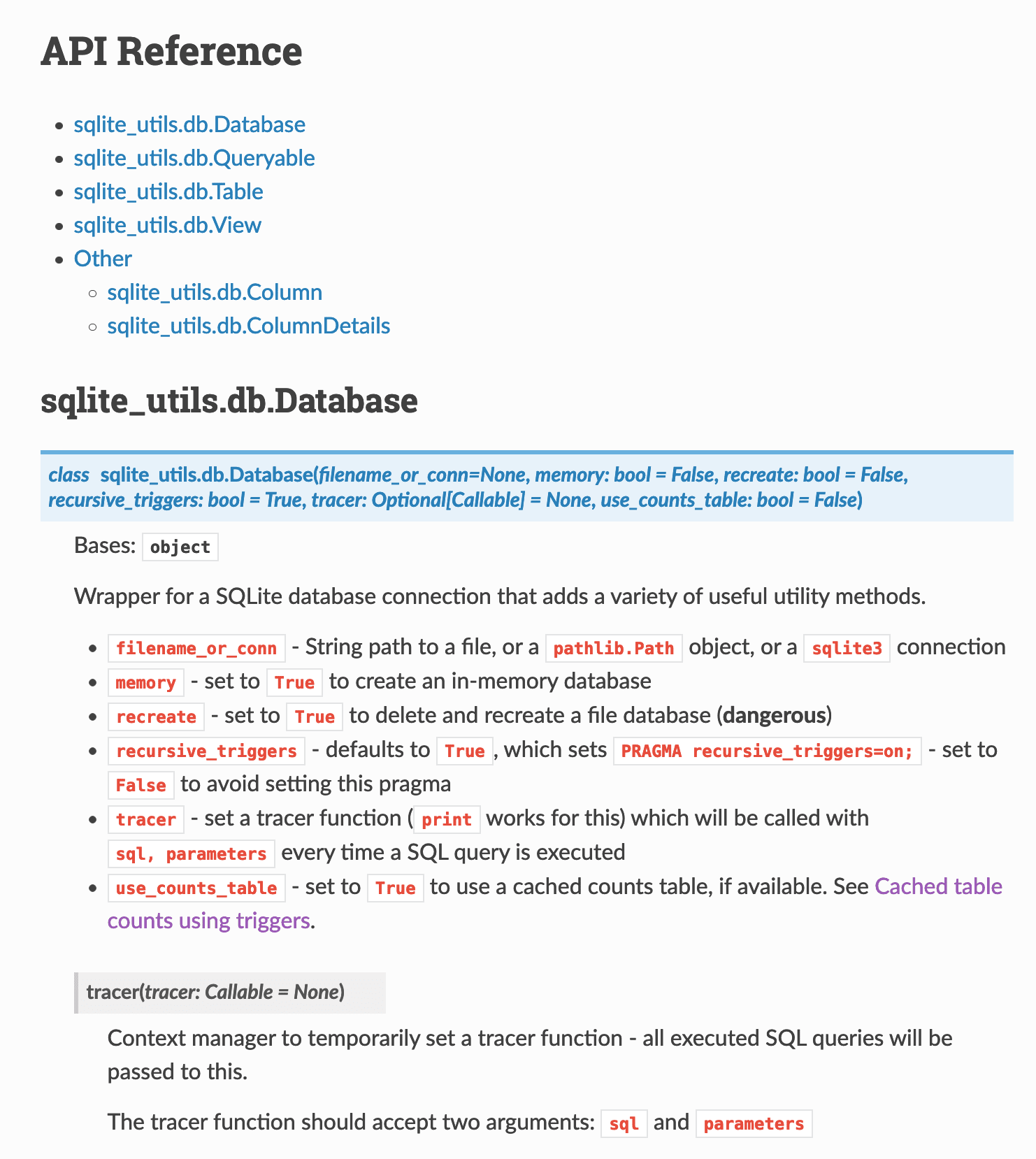
Since autodoc works from docstrings, this was also a great excuse to add more comprehensive docstrings and type hints to the library. This helps tools like Jupyter notebooks and VS Code display more useful inline help.
This proved to be time well spent! Here's what sqlite-utils looks like in VS Code now:
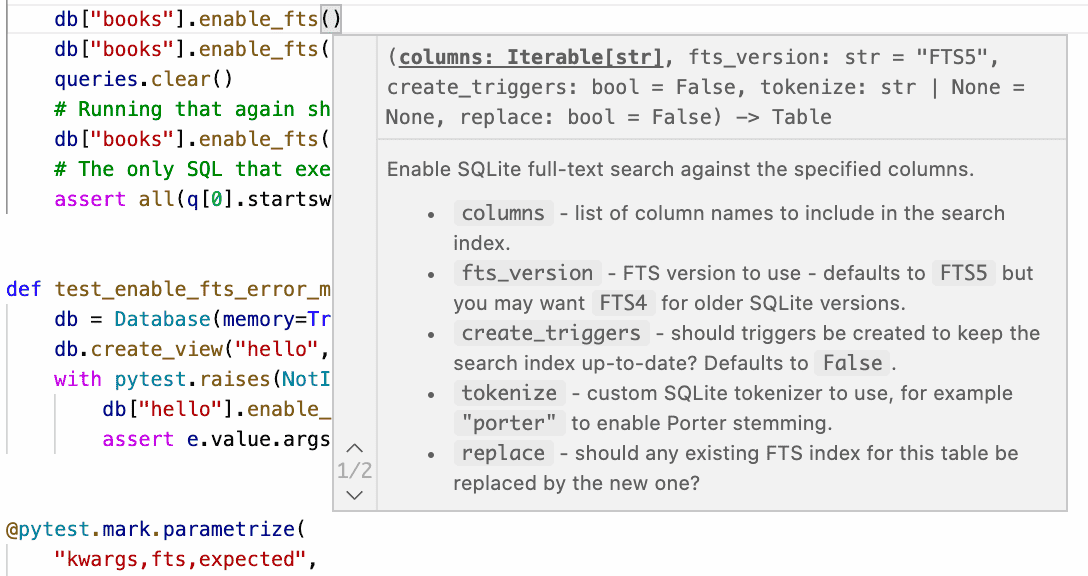
Running mypy against the type hints also helped me identify and fix a couple of obscure edge-case bugs in the existing methods, detailed in the 3.15.1 release notes. It's taken me a few years but I'm finally starting to come round to Python's optional typing as being worth the additional effort!
Figuring out how to use autodoc in Sphinx, and then how to get the documentation to build correctly on Read The Docs took some effort. I wrote up what I learned in this TIL.
Datasette on GitHub Codespaces
GitHub released their new Codespaces online development environments to general availability this week and I'm really excited about it. I ran a team at Eventbrite for a while resonsible for development environment tooling and it really was shocking how much time and money was lost to broken local development environments, even with a significant amount of engineering effort applied to the problem.
Codespaces promises a fresh, working development environment on-demand any time you need it. That's a very exciting premise! Their detailed write-up of how they convinced GitHub's own internal engineers to move to it is full of intriguing details - getting an existing application working with it is no small feat, but the pay-off looks very promising indeed.
So... I decided to try and get Datasette running on it. It works really well!
You can run Datasette in any Codespace environment using the following steps:
- Open the terminal. Three-bar-menu-icon, View, Terminal does the trick.
- In the terminal run
pip install datasette datasette-x-forwarded-host(more on this in a moment). - Run
datasette- Codespaces will automatically setup port forwarding and give you a link to "Open in Browser" - click the link and you're done!
You can pip install sqlite-utils and then use sqlite-utils insert to create SQLite databases to use with Datasette.
There was one catch: the first time I ran Datasette, clicking on any of the internal links within the web application took me to http://localhost/ pages that broke with a 404.
It turns out the Codespaces proxy sends a host: localhost header - which Datasette then uses to incorrectly construct internal URLs.
So I wrote a tiny ASGI plugin, datasette-x-forwarded-host, which takes the incoming X-Forwarded-Host provided by Codespaces and uses that as the Host header within Datasette itself. After that everything worked fine.
sqlite-utils insert --flatten
Early this week I finally figured out Cloud Run logging. It's actually really good! In doing so, I worked out a convoluted recipe for tailing the JSON logs locally and piping them into a SQLite database so that I could analyze them with Datasette.
Part of the reason it was convoluted is that Cloud Run logs feature nested JSON, but sqlite-utils insert only works against an array of flat JSON objects. I had to use this jq monstrosity to flatten the nested JSON into key/value pairs.
Since I've had to solve this problem a few times now I decided to improve sqlite-utils to have it do the work instead. You can now use the new --flatten option like so:
sqlite-utils insert logs.db logs log.json --flatten
To create a schema that flattens nested objects into a topkey_nextkey structure like so:
CREATE TABLE [logs] (
   [httpRequest_latency] TEXT,
   [httpRequest_requestMethod] TEXT,
   [httpRequest_requestSize] TEXT,
   [httpRequest_status] INTEGER,
   [insertId] TEXT,
   [labels_service] TEXT
);
Full documentation for --flatten.
Datasette column metadata
I've been wanting to add this for a while: Datasette's main branch now includes an implementation of column descriptions metadata for Datasette tables. This is best illustrated by a screenshot (of this live demo):
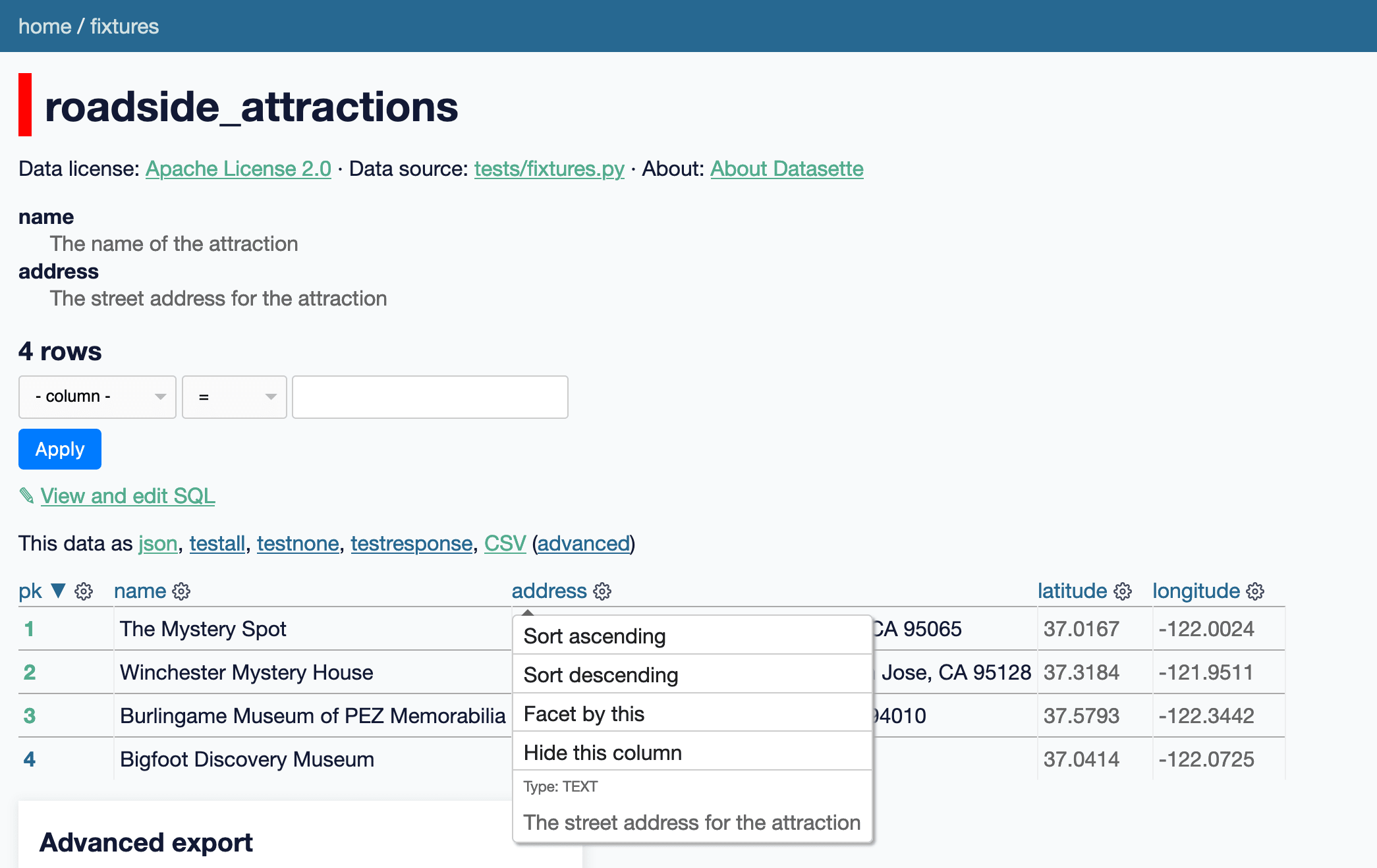
You can add the following to metadata.yml (or .json) to specify descriptions for the columns of a given table:
databases:
  fixtures:
    roadside_attractions:
      columns:
        name: The name of the attraction
        address: The street address for the attraction
Column descriptions will be shown in a <dl> at the top of the page, and will also be added to the menu that appears when you click on the cog icon at the top of a column.
Getting closer to query column metadata, too
Datasette lets you execute arbitrary SQL queries, like this one:
select
  roadside_attractions.name,
  roadside_attractions.address,
  attraction_characteristic.name
from
  roadside_attraction_characteristics
  join roadside_attractions on roadside_attractions.pk = roadside_attraction_characteristics.attraction_id
  join attraction_characteristic on attraction_characteristic.pk = roadside_attraction_characteristics.characteristic_id
You can try that here. It returns the following:
| name | address | name |
|---|---|---|
| The Mystery Spot | 465 Mystery Spot Road, Santa Cruz, CA 95065 | Paranormal |
| Winchester Mystery House | 525 South Winchester Boulevard, San Jose, CA 95128 | Paranormal |
| Bigfoot Discovery Museum | 5497 Highway 9, Felton, CA 95018 | Paranormal |
| Burlingame Museum of PEZ Memorabilia | 214 California Drive, Burlingame, CA 94010 | Museum |
| Bigfoot Discovery Museum | 5497 Highway 9, Felton, CA 95018 | Museum |
The columns it returns have names... but I've long wanted to do more with these results. If I could derive which source columns each of those output columns were, there are a bunch of interesting things I could do, most notably:
- If the output column is a known foreign key relationship, I could turn it into a hyperlink (as seen on this table page)
- If the original table column has the new column metadata, I could display that as additional documentation
The challenge is: given an abitrary SQL query, how can I figure out what the resulting columns are going to be and how to tie those back to the original tables?
Thanks to a hint from the SQLite forum I'm getting tantalizingly close to a solution.
The trick is to horribly abuse SQLite's explain output. Here's what it looks like for the example query above:
| addr | opcode | p1 | p2 | p3 | p4 | p5 | comment |
|---|---|---|---|---|---|---|---|
| 0 | Init | 0 | 15 | 0 | 0 | ||
| 1 | OpenRead | 0 | 47 | 0 | 2 | 0 | |
| 2 | OpenRead | 1 | 45 | 0 | 3 | 0 | |
| 3 | OpenRead | 2 | 46 | 0 | 2 | 0 | |
| 4 | Rewind | 0 | 14 | 0 | 0 | ||
| 5 | Column | 0 | 0 | 1 | 0 | ||
| 6 | SeekRowid | 1 | 13 | 1 | 0 | ||
| 7 | Column | 0 | 1 | 2 | 0 | ||
| 8 | SeekRowid | 2 | 13 | 2 | 0 | ||
| 9 | Column | 1 | 1 | 3 | 0 | ||
| 10 | Column | 1 | 2 | 4 | 0 | ||
| 11 | Column | 2 | 1 | 5 | 0 | ||
| 12 | ResultRow | 3 | 3 | 0 | 0 | ||
| 13 | Next | 0 | 5 | 0 | 1 | ||
| 14 | Halt | 0 | 0 | 0 | 0 | ||
| 15 | Transaction | 0 | 0 | 35 | 0 | 1 | |
| 16 | Goto | 0 | 1 | 0 | 0 |
The magic is on line 12: ResultRow 3 3 means "return a result that spans three columns, starting at register 3" - so that's register 3, 4 and 5. Those three registers are populated by the Column operations on line 9, 10 and 11 (the register they write into is in the p3 column). Each Column operation specifies the table (as p1) and the column index within that table (p2). And those table references map back to the OpenRead lines at the start, where p1 is that table register (referered to by Column) and p1 is the root page of the table within the schema.
Running select rootpage, name from sqlite_master where rootpage in (45, 46, 47) produces the following:
| rootpage | name |
|---|---|
| 45 | roadside_attractions |
| 46 | attraction_characteristic |
| 47 | roadside_attraction_characteristics |
Tie all of this together, and it may be possible to use explain to derive the original tables and columns for each of the outputs of an arbitrary query!
I was almost ready to declare victory, until I tried running it against a query with an order by column at the end... and the results no longer matched up.
You can follow my ongoing investigation here - the short version is that I think I'm going to have to learn to decode a whole bunch more opcodes before I can get this to work.
This is also a very risk way of attacking this problem. The SQLite documentation for the bytecode engine includes the following warning:
This document describes SQLite internals. The information provided here is not needed for routine application development using SQLite. This document is intended for people who want to delve more deeply into the internal operation of SQLite.
The bytecode engine is not an API of SQLite. Details about the bytecode engine change from one release of SQLite to the next. Applications that use SQLite should not depend on any of the details found in this document.
So it's pretty clear that this is a highly unsupported way of working with SQLite!
I'm still tempted to try it though. This feature is very much a nice-to-have: if it breaks and the additional column context stops displaying it's not a critical bug - and hopefully I'll be able to ship a Datasette update that takes into account those breaking SQLite changes relatively shortly afterwards.
If I can find another, more supported way to solve this I'll jump on it!
In the meantime, I did use this technque to solve a simpler problem. Datasette extracts :named parameters from arbitrary SQL queries and turns them into form fields - but since it uses a simple regular expression for this it could be confused by things like a literal 00:04:05 time string contained in a SQL query.
The explain output for that query includes the following:
| addr | opcode | p1 | p2 | p3 | p4 | p5 | comment |
|---|---|---|---|---|---|---|---|
| ... | ... | ... | ... | ... | ... | ... | ... |
| 27 | Variable | 1 | 12 | 0 | :text | 0 |
So I wrote some code which uses explain to extract just the p4 operands from Variable columns and treats those as the extracted parameters! This feels a lot safer than the more complex ResultRow/Column logic - and it also falls back to the regular expression if it runs into any SQL errors. More in the issue.
TIL this week
- Tailing Google Cloud Run request logs and importing them into SQLite
- Find local variables in the traceback for an exception
- Adding Sphinx autodoc to a project, and configuring Read The Docs to build it
Releases this week
-
datasette-x-forwarded-host: 0.1 - 2021-08-12
Treat the X-Forwarded-Host header as the Host header -
sqlite-utils: 3.15.1 - (84 releases total) - 2021-08-10
Python CLI utility and library for manipulating SQLite databases -
datasette-query-links: 0.1.2 - (3 releases total) - 2021-08-09
Turn SELECT queries returned by a query into links to execute them -
datasette: 0.59a1 - (96 releases total) - 2021-08-09
An open source multi-tool for exploring and publishing data -
datasette-pyinstrument: 0.1 - 2021-08-08
Use pyinstrument to analyze Datasette page performance
Shift in white population vs. people of color
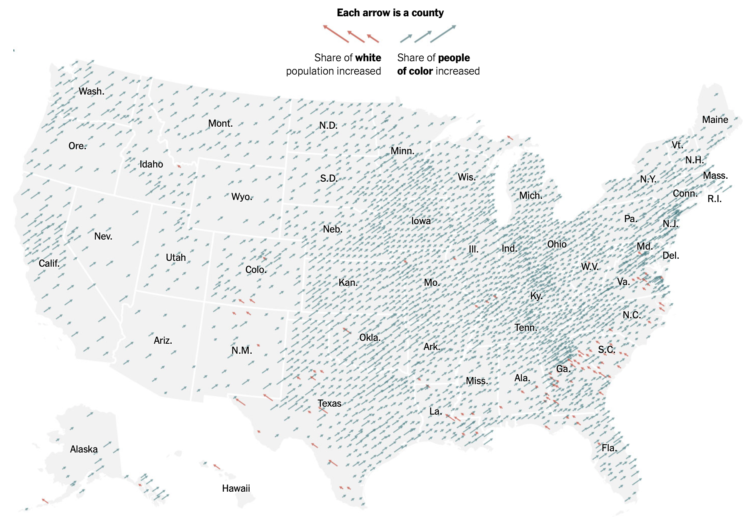
The New York Times go with the angled arrows to show the shifts in racial population. The red-orange arrows show an increase in the share of white population, and the teal arrows show an increase in the share of people of color. Longer arrows mean a greater percentage point change.
Whereas The Washington Post focused more on the changes for each demographic individually, NYT focused more on how two broad groups compared.
Tags: census, New York Times, race
Some Covid Donuts To End The Week
Vox grabbed some data from the Kaiser Family Foundation and did a story a few days ago on it, then posted a different visualization of it that attracted some attention:

I’m a pretty ardent donut detractor, but I have to also admit that they work pretty well for this use case, and we can reproduce the graphic in R quite nicely. The following code chunk:
- scrapes the datawrapper chart Vox embedded in their original article
- extracts the data from it using V8
- reformats it and uses some basic ggplot2 idioms for making the facets
library(V8) # we need to execute javascript to get the data
library(ggtext) # pretty ggtext
library(stringi) # some basic string ops
library(rvest) # scraping!
library(hrbragg) # remotes::install_github("hrbrmstr/hrbragg")
library(tidyverse) # duh

ctx <- v8() # init the V8 engine

pg <- read_html("https://datawrapper.dwcdn.net/jlEL9/6/") # get the data — this is embedded in the Vox article

# clean up the javascript so we can evaluate it
html_nodes(pg, xpath = ".//script[contains(., 'DW_SVEL')]") %>%
  html_text() %>%
  stri_replace_first_fixed("window.", "") %>%
  stri_replace_all_regex("window.__.*", "", multiline = TRUE) %>%
  ctx$eval()

# get the dat from the V8 engine and reshape it a bit, then join it with state abbreviations
ctx$get("__DW_SVELTE_PROPS__")$data %>%
  read_tsv(
    col_names = c(
      "state",
      "Reported cases among fully vaccinated",
      "Reported cases among not fully vaccinated"
    )
  ) %>%
  gather(measure, value, -state) %>%
  left_join(
    tibble(
      state = state.name,
      abbr = state.abb
    ) %>%
      add_row(
        state = "District of Columbia",
        abbr = "DC"
      )
  ) -> voxxed

# basic ggplot idiom for faceted donuts

ggplot() +
  geom_col(
    data = voxxed,
    aes(3, value, fill = measure), # play with "3" here and below to change width of the donut
    color = NA,
    position = position_stack()
  ) +
  ggtext::geom_richtext(
    data = voxxed %>% filter(measure == "Reported cases among not fully vaccinated"),
    # change 0.2 and 0 to see what they do
    aes(0.2, 0, label = sprintf("%s<br/><b><span style='color:#8a264a'>%s%%</span></b>", abbr, value)),
    size = 5, label.size = 0
  ) +
  scale_x_continuous(
    limits = c(0.2, 3 + 0.5) # this 3 links to the 3 above. tweak 0.2 and 0.5 to see what it does to the shape
  ) +
  scale_fill_manual(
    name = NULL,
    values = c(
      "Reported cases among fully vaccinated" = "#d59e67",
      "Reported cases among not fully vaccinated" = "#8a264a"
    )
  ) +
  coord_polar(theta = "y") +
  facet_wrap(~state, ncol = 6) +
  labs(
    x = NULL, y = NULL,
    title = "Breakthrough cases are not driving the US Covid-19 surge",
    caption = "Source: Kaiser Family Foundation\nNote: Case data in recent months, as of July\nOriginal chart by Vox <https://www.vox.com/22602039/breakthrough-cases-covid-19-delta-variant-masks-vaccines>"
  ) +
  theme_inter(grid="") +
  theme(
    axis.text.x = elb(),
    axis.text.x.top = elb(),
    axis.text.x.bottom = elb(),
    axis.text.y = elb(),
    axis.text.y.left = elb(),
    axis.text.y.right = elb()
  ) +
  theme(
    panel.spacing.x = unit(0, "npc"),
    panel.spacing.y = unit(0, "npc")
  ) +
  theme(
    strip.text = elb(),
    strip.text.x = elb(),
    strip.text.y = elb()
  ) +
  theme(
    legend.position = "top",
    legend.text = elt(size = 12),
    legend.justification = "left"
  ) +
  theme(
    plot.caption = elt(hjust = 0)
  )

Unneighborly
I once said that the Disciplinary Committee of the Democratic City Committee was a witch hunt. I regret that. The Disciplinary Committee has not been engaged on a witch hunt, but rather on something older and worse. To explain, let me tell you a bit about my family.
The Staroselskys
We were slaves. This is a story we all tell around the table in Spring. For my mother’s ancestors, it was literally and immediately true. Her people are Starrs and Starrels, but in the old country they were the Staroselskys, because that was the name of the fellow who owned the whole extended family. Time passed, hate increased, pogroms threatened them all. The whole village got up and ran off to New York — Yonkel, The Rabbi’s Son, my great-Uncle Max, and his tiny half-brother Joel, who would become my grandfather.
Years later, my uncle Timmy (Joel Jr.), who was then in high school, was searching the newspaper for a summer job. A Chicagoland family wanted a driver. He applied and got the job. His employer turned out to be the grandson of the fellow who had owned our whole family. It’s a small world.
But before they left for a new world, the Staroselskys in Spring surely sat around a table where they, too, told the tale that “we were slaves.” If you looked at them as they reclined around that meagre table, you might imagine that they had always been there.
1492
But they had not always been there. They hadn’t always spoken Yiddish. There hadn’t been Yiddish. Almost certainly, their ancestors had lived in the region we now call Spain. But it wasn’t Spain back then: it was a patchwork of local governments that we remember as al-Andalus. It was a place where Arabs, Christians and Jews pretty much got along.
That ended with the Reconquista: the entire land was now a Christian Nation, and illegal aliens were to be deported at once. Jews were, by definition, illegal. And so my ancestors lost everything — houses, businesses, friends — and headed East. How far? Not far: Barcelona to Poznań is roughly the distance from Jackson, Mississippi to Harlem. It’s the distance from the Oklahoma State Penitentiary to Weedpatch Camp near Bakersfield, California.
Immigration enforcement agencies were tasked with rooting out Jewish illegals. Some might be hiding in attics or basements. Some might be pretending to be Christian. For example, even if the local Democratic City Committee always met on Shabbat in a private club that discriminated against Jews, Blacks, and women, you could tell people you didn’t like politics. You could say you didn’t care for jámon Íberico, and besides, who can afford it? You could get stays and delays, continuances; with everyone tossed out of the country, calling witnesses or subpoenaing enforcement officials could take some time. They were slippery and tricky, those bad hombres the Jews.
Inquisition
This family saga echoes Trump’s deportation machine, but aspects hit closer to my home.
The Disciplinary Committee insists that I am guilty without dispute. We’ve heard that before.
The Disciplinary Committee insists that I must recognize their authority and that I increase my guilt each time I remind them that they do not possess the power they claim. We’ve heard that before.
The Disciplinary Committee asserts that I may address only “my behavior” and my beliefs, all of which are obviously very wrong, and that I must not mention that I have always obeyed our bylaws and rules. I am clearly in the wrong: everyone says so. We’ve heard that before.
The Disciplinary Committee demands that I confine my answer to their specific allegations, but they do not disclose these allegations or the evidence supporting them. We’ve heard that before.
The Disciplinary Committee asserts that the crimes of which I am already known to be guilty are not offenses against the bylaws or rules, but rather are things “detrimental to the mission of the MDCC.” Anything might be detrimental to the mission of the MDCC in someone’s view, but I must bow my neck before their (improperly) constituted power and accept whatever sentence it pleases them to bestow. We’ve heard that before.
The Disciplinary Committee demands proof of my beliefs, even those incapable of proof. We’ve heard that before.
I apologize: this was not a witch hunt. It was a Jew hunt, an inquisition. ( They didn’t think they were looking for Jews, I expect; perhaps they told themselves they were looking for a way to rid themselves of an unfriendly, upsetting, loud and unpleasant fellow with a funny accent.)
Here’s a description of another such affray, from exactly 79 years ago.
In August 1942, Germany’s Police Battalion 101 was commanded by Capt. Wohlauf, a career police officer. Wohlauf had recently been married, and his wife joined him in Poland for the sort of honeymoon that was possible that year. They weren’t political, or prominent, or well connected, or special. They weren’t Nazis. If you were at their Hamburg wedding the previous May, you'd have thought the policeman had found himself a nice young lady. But on August 25, Wohlauf’s new wife found an unusual local amusement.
They entertained themselves by flogging Jews with whips. Not only was Frau Wohlauf a party to all of this, but so were the wives of some of the locally stationed Germans, as well as a group of German Red Cross nurses. Frau Wohlauf, if conforming to her usual practice, probably carried that symbol of domination, a riding whip, with her. That day, she and the other German women got to observe firsthand how their men were purging the world of the putative Jewish menace, by killing around one thousand and deporting ten thousand more to their deaths. This is how the pregnant Frau Wohlauf spent her honeymoon.
Terrence, This Is Stupid Stuff
An old joke tells lawyers that, if the facts are on your side, you should pound the facts. If the law is on your side, you should pound the law. If neither is on your side, you should pound the table.
In this situation, the law, the facts, the Democratic Party, and the table are all on my side. All that is left for the Disciplinary Committee to pound, is me.
If, as I once believed and might still be persuaded, my critics were people of good will and sense, all this could easily have been avoided.
The Democratic Party is a party, not a social club. You may be a Democrat and hold beliefs that are wrong — even repellent beliefs, so long as you keep them private. You may secretly believe things that are racist, sexist, ageists, ableist, or wrong: vote with us, support our policies, keep your repellent beliefs to yourself, and you are welcome in the party. You may in your heart believe that Christ was made before he was born, or that Christ has always been and ever shall be, that he is or is not consubstantial with his Father. You may think P==NP, that AI is impossible, that Tolkien was not a great novelist or that Cobb would have caught it. In the Democratic Party, we do not inquire into or expound upon private belief.
We are not always friends, and after this affair some of us will never more be friends, but we can be Democrats. I have, throughout this mess, acted as a Democrat: it is time for the Committee to remember what it is.
If I have been abrasive, that was because that was the manner I thought best calculated to achieve my goals. There is no rule in the Democratic Party that says, Democrats must be well liked. That club meets down the street. Far from being grounds for expulsion, it was recently the policy of MDCC leadership to reduce membership by inviting members to resign. (One prominent activist bitterly protested these efforts, which she believed were directed at excluding gay people from the Democratic City Committee. Shortly before, a member of the Executive Committee had confided to another member that she supported the Pride Parade even though her religion considered homosexuality a sin. The speaker was surprised to learn that the woman to whom she addressed this remark was queer, and the radiant anger of her reply ought to have taught everyone present to take the greatest care of mixing private belief into political discussion.)
My opponents might have offered assistance, advice and support; they did not. They might have treated my proposals with scrupulous fairness, and treated me with respect; they did not. They might have sought common ground: that is what parties do. They might have sought to compromise. They might have traded horses. This they did not do.
Instead, my critics insist on this confrontation, and arrange this confrontation on grounds that are deeply offensive not only to me, but also to every Democrat and indeed to every American. In this, they harmed the party directly. Indirectly, they have created circumstances that have led members of the Party to reveal abhorrent prejudices that ought to have remained their private shame, and to say what never should have been spoken.

Photo: Denkmal für die ermordeten juden europas, Yoav Aziz on Unsplash.
Draft: Glossary of Jupyter Production Workflow Terms
Jupyter: an open source community project focused on the development of the Jupyter ecosystem (tools and architectures for the deployment of arbitrary executable code environment and reproducible "computational essay" documents). Coined from the original three programming languages supported by the IPython notebook architecture which was subsumed into the Jupyter project as Jupyter Notebooks: Julia, Python and R.
Jupyter Notebooks: variously: a browser based interactive Jupyter notebook; a textual document format (.ipynb); and (less frequently) the single user Jupyter notebook server. In the first sense, most commonly used sense, the Jupyter notebook is a browser based application within which users can edit, render and save markdown (text rendered as HTML), edit code in a wide variety of languages (including but not limited to Python, Javascript, R, Java, C++, SQL), execute the code on a code server and then return and display the response/code outputs in the interactive notebook. The Jupyter notebook document format is a text (JSON) document format that can embed the markdown text, code and code outputs. The cell based structure of the notebook format supports the use of metadata "tags" to annotate cells which can then be used to provide extension supported styling of individual cells (for example, colouring "activity" tagged cells with a blue background to distinguish them from the rest of the content) or modify cell behaviour in other ways.
JupyterHub: JupyterHub is a multi-user server providing authentication, access to persistent user storage, and a multi-user experience. Logged in users can be presented with a range of available environments associated with their user account. The JupyterHub server is responsible for launching individual notebook servers on demand and providing tools for users to manage their environment as well as tools for administrators to manage all users registered on the hub. JupyterHub can launch environments using remote cloud-hosted servers in an elastic (on-demand and responsive) way.
Jupyter server: a Jupyter server or Jupyter notebook server is a server that that connects a Jupyter served computational environment to a Jupyter client (for example, the Jupyter notebook or JupyterLab user interface or the VS Code IDE).
Jupyter kernel: a Jupyter kernel is a code execution environment managed by Jupyter protocols that can execute code requests from a Jupyter notebook environment or IDE and return a code output to the notebook. Jupyter kernels are available for a wide variety of programming languages.
Integrated Development Environment / IDE: a software application providing code editing and debugging tools. IDEs such as Microsoft’s VS Code also provide support for editing and previewing markdown content (as well as generated content, such as VS Code as an Integrated, Extensible Authoring Environment for Rich Media Asset Creation) and showing differences between file versions (see for example Sensible Diff-ing of Jupyter Notebook ipynb Documents Using VS Code).
BinderHub: BinderHub is a on-demand server capable of building and launching temporary / ephemeral environments constructed from configuration files and content contained in an online repository (eg Github or a DOI accessed repository). By default, BinderHub will build a Jupyter notebook environment with preinstalled packaged defined as requirements in a specified Github repository and populated with notebooks contained in the repository.
MyBinder: MyBinder is a freely available community service that launches temporary/ephemeral interactive environments from public repositories using donated cloud server resources.
ipywidgets: the ipywidgets Python package provide a set of interactive HTML widgets that can synchronise settings across interactive Javascript applications that are rendered in a web browser with the state of Python programmes running inside a Jupyter computational environment. ipywidgets also provide a toolkit for easily generating end user application interfaces / widgets inside a Jupyter notebook that can interact with Python programme code also defined in the same notebook.
Core package: for the purposes of this document, a core package is one that is managed under the official jupyter namespace under the Jupyter project governance process.
Contributed package: for the purposes of this document, a contributed package is one that is maintained outside of the official Jupyter project namespace and governance process by independent contributors but complements or extends the core Jupyter packages. Many "official" (which is to say core) packages started life as contributed packages.
Jupytext: Jupytext is a contributed package that supports the conversion of Jupyter notebook .ipynb files to/from other text representations (structured markdown files, Python or Rmd (R markdown) code files). A server extension allows markdown and code documents opened from within a Jupyter environment to be edited within the Jupyter environment. Jupytext also synchronises multiple formats of the same notebooks, such as an .ipynb notebook document with populated code output cells and simple markdown document that represented just markdown and code input cells.
JupyterLite: JupyterLite is a contributed package that removes the need for a separately hosted Jupyter server. Instead, a simple web server can deploy a JupyterLite distribution which provides a JupyterLab or RetroLab user environment that can execute code against a computational environment that runs purely in the web page/web browser using a WASM compiled Jupyter kernel. With JupyterLite, the user can run a Jupyter environment without the need to install any software other than a web browser and without the need to have a web connection once the environment is loaded in the browser.
Github: Github is an online collaborative development environment owned and operated by Microsoft. Online code repositories provide version controlled file archives that can be access individually or by multiple team members. As well as providing a git managed repository with all that involves (the ability to inspect different versions of checked in files, the ability to manage various code branches, management tools for accepting pull requests), Github also provides a wide range of project management and coordination tools: project boards, issue management, discussion forums, code commit comments, wikis, automation.
git: git is a version control system for tracking changes over separate file "commits" (i.e. saved versions of a file). Originally designed as a command line tool, several graphical UI applications (for example, Github Desktop and Sourcetree) or IDEs (for example, VS Code with the extensions make it easier to manage git environments locally as well as synchronising local code repositories with online code repositories. Many IDEs also integrate git support natively (VS Code, RStudio) as well as providing extended support through additional extensions (for example, VS Code GitLens extension). Notably, the VS Code environment provides a rich differencing display for Jupyter notebooks.
ThebeLab: Thebelab is a contributed package that provides a set of Javascript functions that support remote code execution from an HTML web page. Using ThebeLab, code contained in HTML code cells can be edited and executed against a remote Jupyter kernel that is either hosted by a Jupyter notebook server or launched responsively via MyBinder or another BinderHub server.
Jupyter Book: Jupyter Book is a contributed technique for generating an interactive HTML style textbook from a set of markdown documents or Jupyter notebooks using the Sphinx document processing toolchain. Documents can also be rendered into other formats such as e-book formats or PDF. Notebooks can be executed to include code outputs or rendered without code execution. Notebook cell tags can be used to hide (or remove) unwanted code cell inputs or outputs as well as styling particular cells. Inline interactive code execution is also possible using ThebeLab, although in-browser code execution using JupyterLite is not supported. Interactive notebooks can also be launched from Jupyter Books using MyBinder or opened directly in a linked Jupyter notebook server environment. Jupyter Book builds on several community contributed tools managed as part of the Executable Books project for rendering rich and comprehensively styled content from source markdown and notebook documents. Jupyter Book represents the closest thing to an official a rich publication route from notebook content.
Sphinx: Sphinx is a publishing toolchain originally created to support the generation of Python code documentation. Spinx can render a documents in a wide variety of formats including HTML, ebooks, LaTeX and PDF. A wide range of plugins and extensions exist to support formatting and structuring of documentation, including the generation of tables of contents, managing references, handling code syntax highlighting and providing code copying tools.
nbsphinx: nbsphinx is a contributed Sphinx extension that for parsing and executing Jupyter notebook .ipynb files. nbsphinx thus represents a simple publishing extension to Sphinx for rendering Jupyter notebooks, compared to Jupyter Book which provides a complete framework for publishing rich interactive content as part of a Jupyter workflow.
Docker: Docker is a virtual machine technology used to deploy virtualised environments on a user’s own computer or via a remote server. A JupyterHub server can be used to manage the deployment of Docker environments running individual Jupyter user environments on remote, scaleable servers.
Docker image / Docker container image: a Docker virtual machine environment is downloaded as an image file. An actual instance of a Docker virtual machine environment is generated from a Docker image. Public Docker images are hosted in a Docker registry such as DockerHub from where they can be downloaded by a Docker client.
Docker container: a Docker container is an instantiated version of a Docker image. A Docker container can be used to deploy a Jupyter notebook server and the Jupyter environments exposed by the server. Just like a "real" computer, Docker containers can also be hibernated / resumed or restarted. A pristine version of the environment can be created by destroying a container and then creating a brand new one from the original Docker container image.
Dockerhub: DockerHub is a hosted Docker image registry that hosts public Docker images that can be downloaded and used by Docker applications running locally or on a cloud server. Github also publish a Docker container registry. In addition, organisations and individuals can self-host a registry. Private image registries are also possible that only allow authenticated users or clients to search for and download particular images.
Python: Python is a general purpose programming language that is widely used in OU modules. A Python environment can be distributed via the Anaconda scientific Python distribution or inside a Docker container.
Anaconda: Anaconda is a scientific Python distribute that bundles the basic Python environment with a wide range of preinstalled scientific Python packages. In many instances, the Anaconda distribution will include all the packages required in order to perform a set of required scientific computing tasks. Anaconda can be installed directly onto the user’s desktop or used inside a Docker container to provide a Python environment inside such a virtualised environment. The appropriateness of using Anaconda as a distribution environment in a distance education context is contested.
IPython: IPython (interactive Python) provides an interactive "REPL" (read, evaluate, print, loop) environment for supporting interactive execution and code output display. In a Python based Jupyter environment, it is actual IPython that supports the interactive code execution.
R: R is a programming language designed to support statistical analysis and the creation of hight quality, data driven scientific charts and graphs. R is used in several OU modules.
Javascript: Javascript is a widely used general purpose programming language. Javascript is also available inside a web browser. Standalone interactive web pages or web applications are typically built from Javascript code that runs inside the web page/web browser. Such applications can often continue to work even in the absence of a network connection.
WASM: WASM (or WebAssembly) is a virtualised programming environment that can run inside a web browser. The JupyterLite package uses WASM to provide an in-browser computational environment for Jupyter environments that allows notebooks to execute Python code cells purely within the browser.
Markdown: Markdown is a simple text markup language that allows you to use simple conventions to indicate style (for example, wrapping a word in asterisks to indicate emphasis, or using a dash at the start of a line to indicate a list item or bullet point). Markdown is typically converted to HTML and then rendered in a browser as a styled document. Many Markdown editors, including Jupyter notebooks and IDEs such as VS Code, provide live, styled previews of raw markdown content within the application.
HTML: HTML (hyptertext markup language) is an XML based language used to mark-up text documents with simple structure and style. Web browsers typically render HTML documents as styled web pages. The actual styling (cplour selection, font selection) is typically managed using a CSS (cascading style sheets) which can change the look and feel of the page without having to change the underlying HTML. (When a theme is changed on a web page, for example, dark mode, a different set of CSS settings are used to render the page whilst the HTML remains unchanged).
CSS: CSS (cascading style sheets) control the particular visual styles used to render HTML content. Changing the CSS changes the visual rendering of a particular HTML webpage without having to change the underlying structural HTML.
nbgrader: nbgrader is a core Jupyter package providing a range of tools for manage the creation, release, collection and automated and manual marking of Jupyter notebooks.
Version Control: version control is a technique for tracking changes in one or more documents over time. Changes to individual documents may be uniquely tracked with different document versions (for example, imagine looking at "tracked changes" between two versions of the same document), and collections of versioned documents can themselves be versioned and tracked (for example, a set of documents that make up the documents released to students in a particular presentation of a particular module). In a distributed version control system such as git, mechanisms exist that allow multiple authors or editors to work on their own own copies of the same documents at the same time, and then alert each other to the changes they have made to the documents and allow them to merge changes in made by other authors/editors. If two people have changed the same piece of content in different ways at the same time, a so-called merge conflict will be generated that identifies the clash and allows a decision to be made as to which change is accepted.
Merge conflict: a merge conflict arises in a collaborative, distributed version control system when conflicting changes are made the same part of a particular file by different people, or when one person works on or makes changes to a file that another has independently deleted. Resolving the merge conflict means deciding which set of updates you actually want to to accept into the modified document.
Github Issue: a Github Issue is a single issue comment thread used to discuss a particular issue such as a specific bug, error or feature request. Issues can be tagged with particular users and/or topics. Github Issues are associated with a particular code repository. "Open issues" are ones that are still to be addressed; once resolved, they are then "closed" providing an archived history of matters arising and how they were addressed. When files are committed to the repository, the commit message may be used to associate the commit (i.e. the changes made to particular files) with a particular issue, and even automatically close the issue if the commit resolves that issue.
Github Discussion: a Github Discussion is a threaded forum associated with a particular repository that allows for more open ended discussions than might be appropriate in an issue.
Github/git commit: a git or Github commit represents a check-in of a particular set of changes to one or more documents. Each commit has a unique reference value allowing you to review just the changes made as part of that commit compared to either the previous version of those documents, or another version of those documents. Making commits at a low level of granularity means that very particular changes can be tracked and if necessary rolled back. A commit message allows a brief summary of the changes made in the commit to be associated with it; this is useful for review purposes and in distributed multi-user settings to communicate what changes have been made (a longer description message may also be attached to each commit). Identifying an appropriate level of granularity for commits is one of the challenges in establishing a good workflow, not least because of the overhead associated with adding a commit message to each commit.
Github/git pull request (PR): a git or Github Pull request (PR) represents a request that a set of committed changes are accepted from one branch into into another branch of a git repository. Automated checks and tests can be run whenever a PR is made; if they do not pass, the person making the PR is alerted to the fact and invited to address the issue. Merging commits from a PR may be blocked until all tests pass. PRs may also be blocked until the PR has received a review by one or more named individuals.
Automation: automation is the use of automatically or manually triggered events or manually issued commands for running scripted tasks. Automation can be used to run a spell-checker over a set of files whenever they are updated, automatically check and style code syntax, or automatically execute and text code execution. Automation can also be used to automatically update the building of Docker images or render and publish interactive textbooks. Automation could be used to automate the production of material distributions and releases and then publish them to a desired location (such as the location pointed to by a VLE download link).
Autonomation: autonomation (not commonly used in computing context) is a term taken from lean manufacturing that refers to "automation with a human touch". In the case of a Jupyter production system, this might include the running of automated tests (such as spell checkers) that prevent documents being committed to a repository if they contain a spelling mistake. The main idea is that errors should not propagate but be fixed immediately at source. The automation identifies the issue and prevents it being propagated forward, a human fixes the issue then reruns the automated tests. If they pass, the work is then automatically passed forwards.
Github Action: a Github Action forms part of an automation framework for Github. Github Actions can be triggered to run checks and tests in response to particular events such as code commits, PRs or releases, as well as to manual triggers. Github Actions can also be used to render source documents to create distributions as well as publishing distributions to particular locations (for example, creating a Docker image and pushing it to DockerHub, generating a Jupyter Book interactive textbook and publishing it via Github Pages, etc.). A wide range of off-the-shelf Github Actions are available.
git commit hook: a git commit hook is a trigger for automation scripts that are run whenever a git commit is issued. The script runs against the committed files and may augment the commit (for example, automatically checking and correcting code style / layout and automatically adding style corrections as part of the commit process, or using Jupytext to automatically create a paired markdown document for a committed .ipynb notebook document, or vice versa.
pre-commit: pre-commit is a general purpose contributed framework for creating git precommit scripts. A wide range of off-the-shelf pre-commit actions are defined for performing particular tasks.
Rendering: rendering a file refers to the generation of a styled "output" version of a document from a source format. For example, a markdown document may rendered as a styled HTML document.
Generative document: a generative document is a document that includes executable source code. The source code provides a complete set of instructions for generating media assets as the source document is rendered into a distribution document.
Generative rendering: a generative document is rendered as a styled document containing media assets that are created by executing some form of source code within the source document as part of the rendering process
Generated asset: a generated asset is a media asset that has been generated from a source code representation as part of the rendering process. Updates to the media asset (for example, text labels or positioning in a diagram) are made by making changes to the source code and then re-rendering it, not by editing the asset directly.
Distribution: a distribution represents a complete set of version controlled files that could be distributed to an end user. In a content creation content, a distribution might take the form of a complete set of notebooks, a complete set of HTML files, or a set of rendered PDF documents. A distribution might be used as a formal handover in a regimented linear workflow process or as the basis of a set of files released to students. A uniquely identifying hash value can be used to identify each distribution and track exactly which version of each individual file is included in a particular distribution.
Release: a release is a version controlled distribution that can be distributed to end users such as a particular cohort of students on a particular module. A release will be given an explicit version number that should include the module code, year and month of presentation as well as lesser version (edition) numbers that help track releases integrating minor updates etc.
Source / Source files: the source files are the set of files from which a distribution is rendered. The source files might include structural metadata, comment code that is stripped from the source document and does not appear in the rendered document, and even code that is executed to produce generated assets that form part of the distribution, even if the source code does not.
2021-08-11/12 General
Testing
Three dogs have been trained in Vancouver to sniff out COVID-19 with very high accuracy!
Transmission
Yow! This preprint says that 6.8% of COVID-19 patients in England caught it in the hospital.
Vaccines
Good news! Adolescents tolerated two doses of Moderna, and the vax arm had no cases vs. four in the placebo arm. (The numbers are probably too small to be entirely meaningful, but this gets us a step closer to have Moderna approved for teens.)
Variants
This study from Qatar looked at vaccine effectiveness against Delta.
| Pfizer | Moderna | |
| Against asymptomatic infection, 1 dose | 64.2% | 79.0% |
| Against asymptomatic infection, 2 doses | 53.5% | 84.8% |
| Against severe outcome, 2 doses | 89.7% | 100% |
This looks really strange to me. Pfizer worse after two doses?? The paper did say that there was a long time between doses, but still, this seems really anomalous.
This preprint from England says that Pfizer and AZ are still effective against Delta.
| vs. Alpha | vs. Delta | |
| Pfizer or AZ 1 dose | 48.7% | 30.7% |
| Pfizer 2 doses | 93.7% | 88.0% |
| AZ 2 doses | 74.5% | 67.0% |

Notwithstanding the previous paper, there have been a lot of papers which suggest that immunity against Delta is, well, crap. This tweet has this summary graphic:
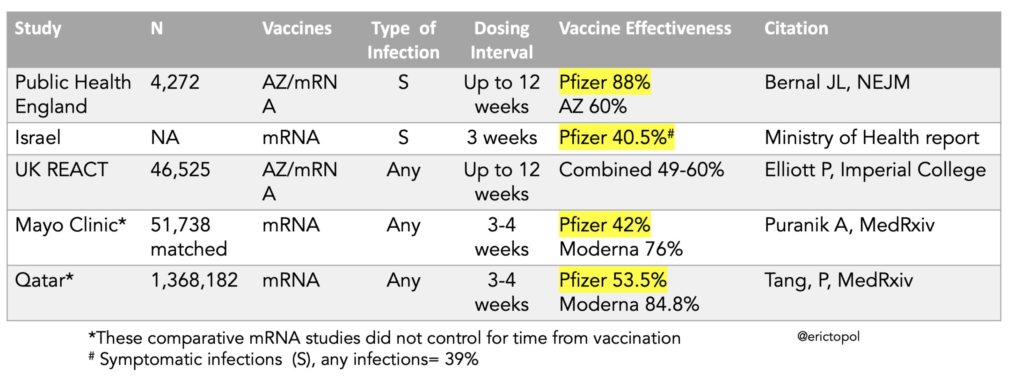
The Public Health England study is very good, from what I can tell, and it says that the effectiveness against Delta is fine.
The Israel study is confounded by the fact that the most recent outbreak happened to happen in a well-vaccinated area, and some more socially isolated/insular groups didn’t get hit until later.
The Mayo study’s vaccinated cohort was from Minnesota and the unvaxxed cohort was from Minnesota, Wisconsin, Arizona, Florida, and Iowa: areas with different case loads and prior infection possibility.
In the REACT study:
- They mailed testing swabs to random addresses in England and asked people to take swabs and return them. They might not have done it right. You can imagine them not sticking it in far enough, which would give a false negative.
- They asked people to self-report. When they used that data, they estimated a vaccine effectiveness of 62%. They asked the participants for permission to access their health records. For the ones who agreed, the vaccine effectiveness was 62% against asymptomatic infection, meaning either there was some self-selection, some underlying confounding variable, or I suppose people misremembering or lying.
- In England at that time, being vaccinated correlated strongly with age.
- This was the 13th such study. Over time, the percent of people actually responding has dropped from 30% to 11%. There are dangers that the sample is becoming less representative; It is also possible that mischief in reporting is more likely with the smaller sample return size.
The bottom line is… I don’t know. I would tend to trust the Public Health England numbers more, and those say that the vaccine effectiveness is still quite good. But it’s disquieting that there have been multiple studies which say the effectiveness has dropped.
NB: England and the US mostly had a short (3- or 4-week dosing interval), while Canada has mostly had a longer dosing interval (12- or 7-week). There isn’t a lot of data out on longer dosing intervals, but the data which is out plus everything they know from other vaccines is that the longer dose should give more durable/longer-lasting protection.
I have no explanation for the Qatar study and am out of time to dig deeper.
This preprint gives further evidence that breakthrough Delta cases carry as much Delta in their noses as unvaccinated people.
Recommended Reading
This article is on a radically different / cheaper / easier way to manufacture vaccines. (Paywalled)
This article talks about what the end game for the pandemic looks like.
This article talks about kids and Delta (USA focused).
2021-08-12 BC
Long-Term Care Homes
Today there was a press briefing where Dr. Henry/Minister Dix announced new orders for Long-Term Care Homes. They said that they were hoping that they could cope with unvaccinated workers by testing them frequently and having more stringent PPE requirements for them. Delta had other ideas, apparently, so they are now mandating that anybody who works in a nursing home has to get vaccinated by 12 October or they get fired. Volunteers and personal service providers (I think like people who cut hair in the nursing homes?) must get vaccinated effective immediately.
I think this is the right decision but I worry that it will lead to short-term staff shortages, ulp.
Vaccinations
The Weekly Data Summary for 5 Aug has information on infection/hospitalization/death by vax status:


Transmission
Also from the Weekly Data Summary, R is now 2.1 overall, although they caution that in areas with low case numbers it shows clusters and might not represent the community at large.

Statistics
+513 new cases, +1 death, +4,792 first doses, +22,154 second doses.
Currently 81 in hospital / 33 in ICU, 3,834 active cases, 148,702 recovered.
| first doses | second doses | |
| of adults | 83.1% | 73.3% |
| of over-12s | 82.3% | 71.6% |
| of all BCers | 74.9% | 65.1% |
We have 601,904 doses in fridges; we’ll use it up in 23.9 days at last week’s rate. We’ve given more doses than we’d received by 23 days ago.
We have 557,827 mRNA doses in fridges; we’ll use it up in 22.2 days at last week’s rate. We’ve given more doses than we’d received by 17 days ago.
94.1% of the people who had gotten their first dose by 7 weeks ago have gotten their second dose.
90.1% of the people who had gotten their first dose by 4 weeks ago have gotten their second dose.
86.9% of all people who have gotten their first dose have gotten their second dose.
Charts


Why most scientists think COVID did NOT leak from a lab
 |
mkalus
shared this story
from  Debunk the Funk with Dr. Wilson's YouTube Videos. Debunk the Funk with Dr. Wilson's YouTube Videos.
|
b'
\n
I rarely ever read YouTube comments these days, but this is how you can contact me:
dr.wilson.debunk@gmail.com or https://www.facebook.com/DocWilsonDebunks or Twitter @Debunk_The_Funk
Coronaviruses have been observed jumping from animals to humans for decades:
https://www.ncbi.nlm.nih.gov/pmc/articles/PMC7098031/pdf/ijbsv16p1686.pdf
https://www.ncbi.nlm.nih.gov/pmc/articles/PMC6357155/pdf/viruses-11-00059.pdf
Animals known to carry coronaviruses were sold live at the Huanan seafood market for years prior to the COVID-19 pandemic: https://www.nature.com/articles/s41598-021-91470-2.pdf
\n\nHistory of viral zoonotic origins: https://www.ncbi.nlm.nih.gov/pmc/articles/PMC7157474/pdf/main.pdf
\n\nEnvironmental samples taken from the Huanan seafood market tested positive for SARS-CoV-2 in areas consistent with an infected population of animals: https://www.who.int/publications/i/item/who-convened-global-study-of-origins-of-sars-cov-2-china-part
\n\nEarly SARS-CoV-2 sequencing reveals two lineages: https://www.who.int/publications/i/item/who-convened-global-study-of-origins-of-sars-cov-2-china-part
\n\nSeveral lines of evidence indicate that the virus was evolving to become better adapted to humans early in the pandemic (and continues to evolve):
https://www.cell.com/action/showPdf?pii=S0092-8674%2820%2930820-5
https://reader.elsevier.com/reader/sd/pii/S0960982221008782?token=D72C634E44ECA5528AE1999DBEB89C87F100C4718B61AFFE7EFD600710492F89B3B9F8C38DDF0A12E5ACA9E585E40334&originRegion=us-east-1&originCreation=20210806174251
https://journals.asm.org/doi/epub/10.1128/mSphere.00408-20
Good summaries of the data: https://zenodo.org/record/5075888#.YQ2PpC1h10s
https://virological.org/t/early-appearance-of-two-distinct-genomic-lineages-of-sars-cov-2-in-different-wuhan-wildlife-markets-suggests-sars-cov-2-has-a-natural-origin/691
There is no evidence that SARS-CoV-2 was engineered: https://www.youtube.com/watch?v=qk3eHZLChRE&t=3s
https://www.youtube.com/watch?v=HfqijNTK7AM&t=3s
Furin cleavage sites are common in beta-coronaviruses: https://www.virology.ws/2020/05/14/sars-cov-2-furin-cleavage-site-revisited/
https://www.ncbi.nlm.nih.gov/pmc/articles/PMC7836551/pdf/main.pdf
The \xe2\x80\x9cdeleted sequences\xe2\x80\x9d story has been sensationalized: https://www.microbe.tv/twiv/twiv-774/
https://www.sciencemag.org/news/2021/06/claim-chinese-team-hid-early-sars-cov-2-sequences-stymie-origin-hunt-sparks-furor
The \xe2\x80\x9csick WIV workers\xe2\x80\x9d story has been sensationalized: https://www.nature.com/articles/d41586-021-01529-3
\n\nThere was no gain of function research at the WIV and Fauci\xe2\x80\x99s emails added nothing new: https://journals.plos.org/plospathogens/article?id=10.1371/journal.ppat.1006698
\n\nLike to follow the money? China\xe2\x80\x99s wildlife animal trade market is worth $74 billion: https://www.businessinsider.com/china-bans-wildlife-trade-consumption-coronavirus-2020-2
 '
'
I tried out the Franklin Food Lab in my #EastVa...
I tried out the Franklin Food Lab in my #EastVan neighbourhood this week: frozen ramen!
I bought two & had the spicy tonkatsu for lunch, the yuzu shio in my freezer for another time. Very tasty, looking forward to trying all the flavours!


Doggerland
This exhibit at the Leiden national museum of antiquities about Doggerland seems worth a visit. The Guardian has a nice article about how many archeological finds from what is now the North Sea but was inhabited land eight thousand years ago, have been collected on the beaches (because Dutch beaches are replenished with sand brought in from further out at sea) by people walking on the beach.
Stephen Baxter wrote several books about a speculative history in which the inhabitants of Doggerland successfully defended against the rising sea and mesolithic tsunami that in our timeline created the southern North Sea. In his books Doggerland became an early and powerful centre of civilisation, taking on the role that ancient Rome had in our actual history. I enjoyed reading those books, and I think it might be fun to ‘backfill’ my memory of reading them with how the actual archeological finds connected to Baxter’s starting point look.
Stephen Baxter wrote Stone Spring, Bronze Summer and Iron Winter, aka the Northland trilogy, on this alternative history.

A 1929 German plan to turn the North Sea into a giant polder, basically recreating Doggerland, with dams from Norfolk to Jutland and across the Channel (shunting the Rhine and Thames southwards to the Atlantic). Image source Dutch National Archive, no known copyright restrictions.
"Software engineering should be known as ‘The Doomed Discipline’, doomed because it cannot even..."
Things Adds Extensive Markdown Support and Search for Extended Notes Attached to Tasks
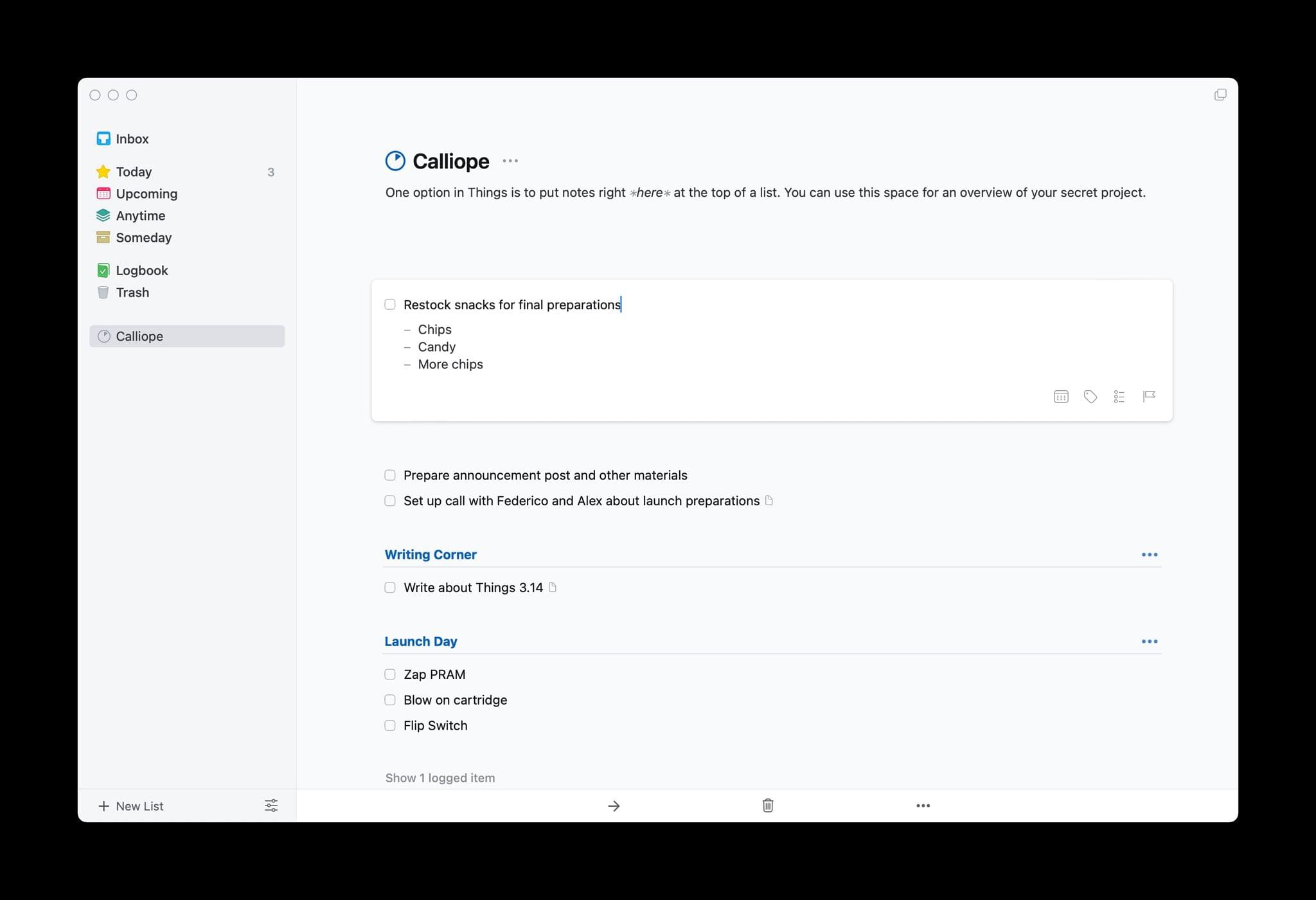
The intersection of tasks and notes poses an interesting problem. Often, a task requires notes for context and details that can’t be captured with a single line of text. Likewise, notes very often spawn tasks of their own. The difficulty is how to harmonize the two coherently.
If you’re a Club MacStories member, you know this is something that has bedeviled Federico’s annual iOS and iPadOS review for years. He solved the problem by combining Obsidian with Todoist’s web API linking the two apps together in a way that complements the way he writes.
Federico’s approach takes advantage of the web technologies underlying those apps. It’s a powerful solution, but it’s not a fully native approach technically or from a design standpoint. The technique is also less suited for someone who isn’t writing thousands of words most days, and instead, just needs to flesh out their tasks with context than the single line of text many apps offer. Fortunately, there are many alternative approaches to the task and note-taking conundrum, including a new one out today from Cultured Code, the maker of Things that I like a lot.
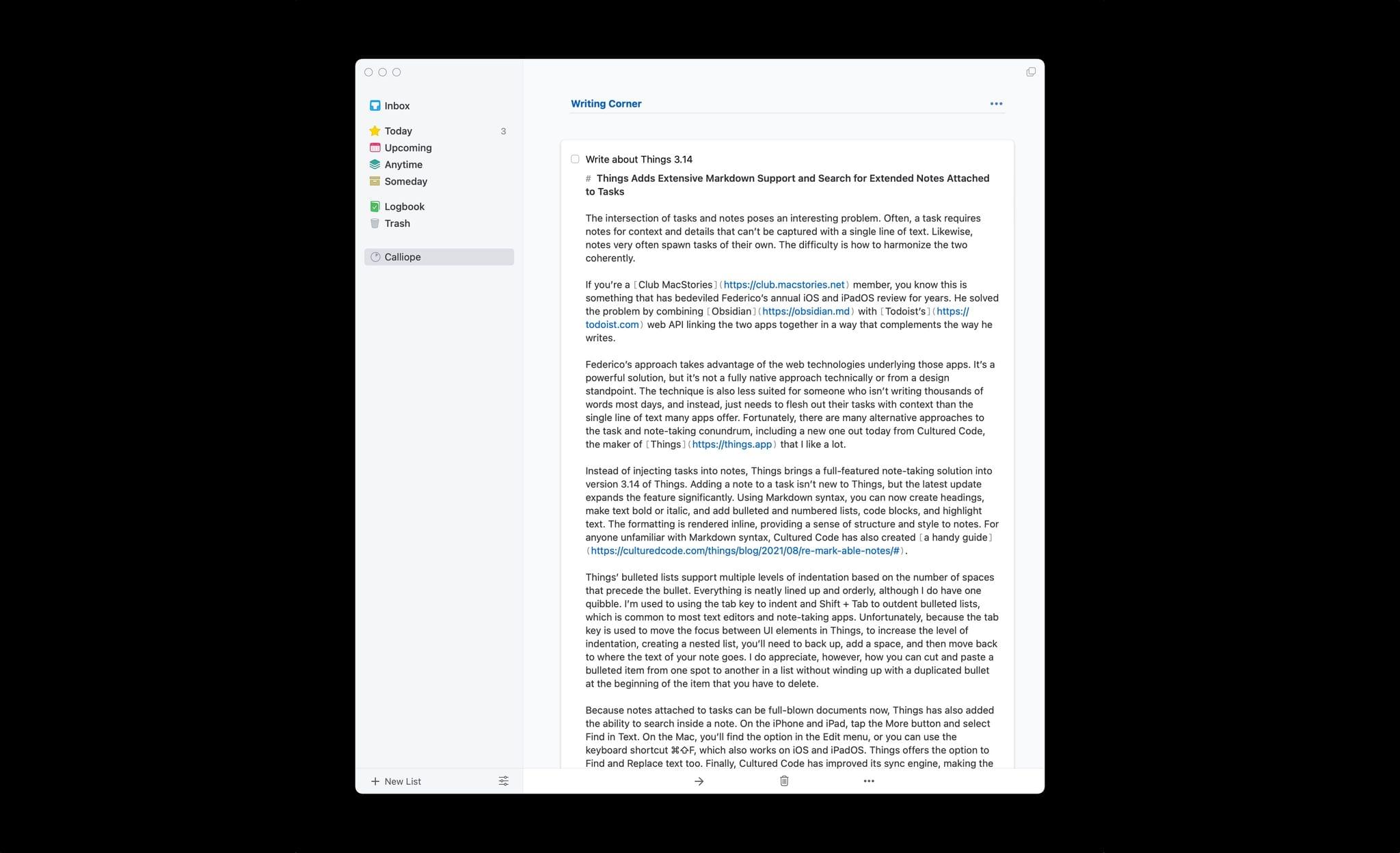
If you write in Markdown, Things is fully capable for a drafting a story like this one.
Instead of injecting tasks into notes, Things brings a full-featured note-taking solution into version 3.14 of Things. Adding a note to a task isn’t new to Things, but the latest update expands the feature significantly. Using Markdown syntax, you can now create headings, make text bold or italic, and add bulleted and numbered lists, links, code blocks, and highlight text. The formatting is rendered inline, providing a sense of structure and style to notes. For anyone unfamiliar with Markdown syntax, Cultured Code has also created a handy guide.
Things’ bulleted lists support multiple levels of indentation based on the number of spaces that precede the bullet. Everything is neatly lined up and orderly, although I do have one quibble. I’m used to using the tab key to indent and Shift + Tab to outdent bulleted lists, which is common to most text editors and note-taking apps. Unfortunately, because the tab key is used to move the focus between UI elements in Things, to increase the level of indentation, creating a nested list, you’ll need to back up, add a space, and then move back to where the text of your note goes. I do appreciate, however, how you can cut and paste a bulleted item from one spot to another in a list without winding up with a duplicated bullet at the beginning of the item that you have to delete.
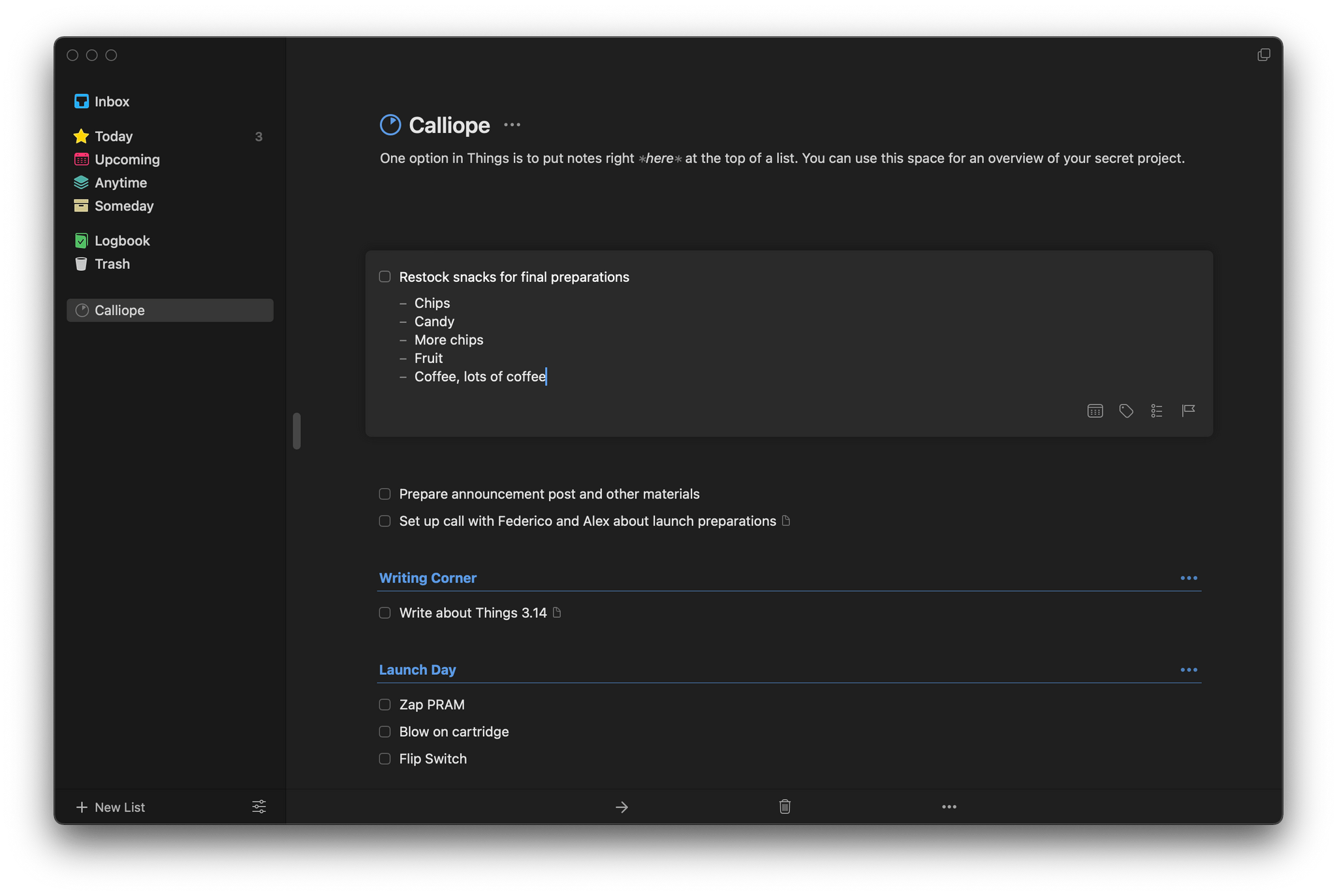
Bulleted lists are easy to reorganize in Things.
Because notes attached to tasks can be full-blown documents now, Things has also added the ability to search inside a note. On the iPhone and iPad, tap the More button and select Find in Text. On the Mac, you’ll find the option in the Edit menu, or you can use the keyboard shortcut ⌘⇧F, which also works on iOS and iPadOS. Things offers the option to Find and Replace text too. Finally, Cultured Code has improved its sync engine, making the syncing of notes more efficient and faster, which should benefit anyone who uses it to take extended notes.
I wish every developer that offered notes functionality in their app would put as much care and attention into them as Cultured Code. Few apps provide formatting, let alone what is effectively a mini Markdown text editor just for notes. It’s the sort of flexibility that sets Things apart from other task managers. I expect the new notes functionality will be perfect for anyone who has felt constrained by the typical one-liner plain text notes found in most alternatives.
Things is is sold separately for the iPhone, iPad, and Mac for $9.99, $19.99, and $49.99 respectively.
Support MacStories Directly
Club MacStories offers exclusive access to extra MacStories content, delivered every week; it’s also a way to support us directly.
Club MacStories will help you discover the best apps for your devices and get the most out of your iPhone, iPad, and Mac. Plus, it’s made in Italy.
Join NowGitHub’s Engineering Team has moved to Codespaces
GitHub’s Engineering Team has moved to Codespaces
My absolute dream development environment is one where I can spin up a new, working development environment in seconds - to try something new on a branch, or because I broke something and don't want to spend time figuring out how to fix it. This article from GitHub explains how they got there: from a half-day setup to a 45 minute bootstrap in a codespace, then to five minutes through shallow cloning and a nightly pre-built Docker image and finally to 10 seconds be setting up "pools of codespaces, fully cloned and bootstrapped, waiting to be connected with a developer who wants to get to work".
1Password 8 for Mac Bloats Up, drops iCloud Syncing
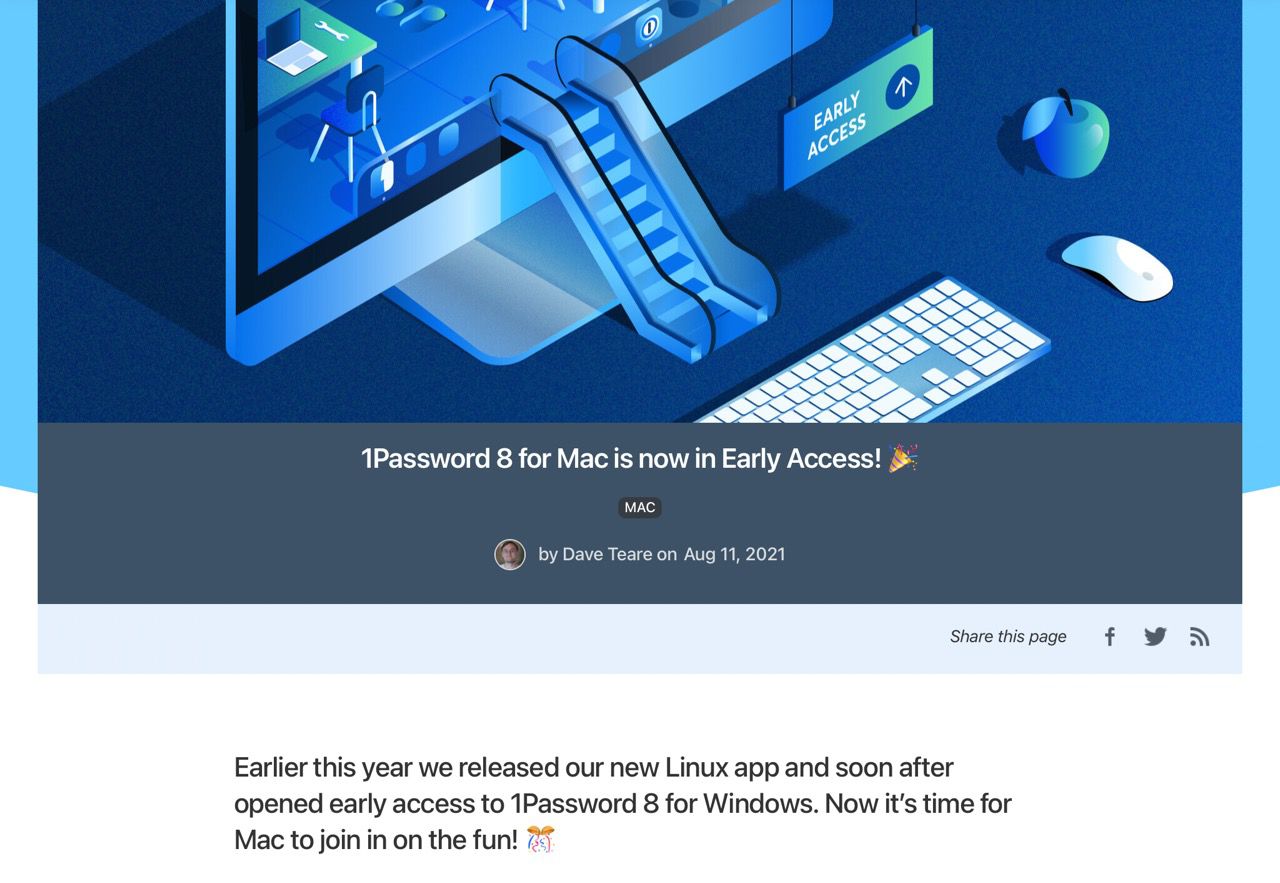
Electron and Rust may be cool (and also entirely the wrong things to tout in this context), but according to pretty much everyone who’s tried it the overall experience is vastly degraded and a far cry from the previous versions–to the point where the picture below is making the rounds on Twitter:

This shift away from fully native apps and the fact that they are removing iCloud support from version 8 in order to enforce the use of their cloud sync service (in an obvious lock-in ploy) was the last straw, so I just downloaded Secrets, paid for the Premium version ($19.99 for each platform) and imported all my 1Password data into it.
Full disclosure: I know the developer of Secrets, and I am glad to support him in building a fully native, well-designed and secure app.
The only thing missing for me (which I use dozens of times a day when on Windows, and is going to be a major pain to try to do without) is a watch app with TOTP tokens and some credit card info, but I hope enough people switch to Secrets to help fund that kind of development (WatchKit is a nightmare to debug, so it would be a significant time investment).
And yes, I know their company valuation is through the roof–that is just added incentive to grow a captive customer base even further.
How to Do Your Laundry Better

Laundry day doesn’t always have to be a major chore. With a few simple tweaks to your routine, you can transform a tedious activity into a satisfying ritual. The best part: Once you start doing your laundry correctly, you’ll likely do a lot less of it. Here’s how to get it right.
When hope kills
I shared updates about my cancer treatments with my friends on Facebook and it helped to get encouragement. But something else also happened on my timeline: Facebook’s advertising algorithms began targeting me for cancer ads from scammers selling phony treatments. These companies promised that I could cure my cancer “naturally without toxic chemotherapy or surgery” using vitamin IV therapy that allegedly had “the same mechanism as chemotherapy.” … I reported the ads to Facebook in the hope the platform would remove them (it didn’t). I also wrote about it, joining the legion of voices raising the alarm about mis- and disinformation on social media.
A year later, not much has changed on Facebook. While the mega-corporation has made promises to try to contain false news about COVID, it remains a massive problem on the platform, along with fake news on cancer. Although the Center for Countering Digital Hate (CCDH) identified 12 health disinformation “superspreader” accounts on Facebook in March, 59 per cent of the content still had not been removed by July.
12 disinformation superspreaders. Twelve!
It’s very grim situation. Facebook helps scammers sell phony treatments that will eventually lead to dead people. If you ever wondered why anybody would not want to be vaccinated, you found the money trail leading to the source of disinformation.
Collecting my thoughts about notation and user interfaces
I’m circling something to do with notation and software user interfaces and what connects them. And things aren’t quite cohering for me yet, so this is me just collecting my thoughts…
(I’m designing user-composable interfaces this week, so long term the goal is to figure out some principles.)
A good starting point is pirate maps, those sketched maps with minimal detail that can none-the-less lead you to the X that marks the spot on the right treasure island.
Or to be more specific, urbanist Kevin Lynch’s city maps from his 1960 book The Image of the City. I’ve described his approach here (March 2021) (where I also pick at the possible neurological underpinnings) so to briefly summarise:
Lynch puts forward five primitive elements: paths (e.g. streets); edges (e.g. uncrossable rivers); districts; nodes (e.g. street corners); landmarks (e.g. a recognisable building). Each element has an intuitive way to sketch it, as if on the back of a napkin.
The map of Boston (his first example) is immediately recognisable. Ask a person to sketch a city, or a route to a place, and they’ll automatically use something very like Lynch’s system.
So Lynch’s five primitives comprise a notation.
It’s composable. A small number of simple elements can be combined, according to their own grammar, for more complex descriptions. There’s no cap on complexity; this isn’t paint by numbers. The city map can be infinitely large.
Compositions are shareable. And what’s more, they’re degradable: a partial map still functions as a map; one re-drawn from memory on a whiteboard still carries the gist. So shareable, and pragmatically shareable.
Not only are maps in this notation functional for communication, but it’s possible to look at a sketched city map and deconstruct it into its primitive elements (without knowing Lynch’s system) and see how to use those elements to extend or correct the map, or create a whole new one. So the notation is learnable.
The idea of composability is worth digging into.
A pirate map is a drawing, and drawings are compositions of dots and lines and textures: A drawing is simply a line going for a walk
(Paul Klee). But these would be poor primitives. Why?
A good, composable notation has primitives which are semantic. A line doesn’t mean anything, it’s too abstract – but a path or an edge (in Lynch’s system) refer to qualities of things in the real world. I’m also going to say that a notation must be grammatical, which is to say that there are rules about how primitives can be combined.
There are also not too many primitives. You want a system which is efficiently expressive. Like, you can say complex things with the minimum of vocabulary. Why? Because then the person using the notation can hold it in their head.
Adam Wiggins is the co-founder of Heroku, the prescient cloud-based technology platforms. It was ahead of its time, incredibly simple to use, but powerful – with an almost toy-like interface (I say that as a compliment) the complexity of hosting, scaling and managing servers was almost completely hidden.
Here is Wiggins relating his philosophy:
The value of a product is the number of problems it can solve divided by the amount of complexity the user needs to keep in their head to use it. Consider an iPhone vs a standard TV remote: an iPhone touchscreen can be used for countless different functions, but there’s very little to remember about how it works (tap, drag, swipe, pinch). With a TV remote you have to remember what every button does; the more things you can use the remote for, the more buttons it has. We want to create iPhones, not TV remotes.
– Adam Wiggins, My Heroku values
(Via Simon Willison who picked out this quote.)
It matters what you can hold in your head because then the notation becomes a tool for the imagination. It is suggestive. Lego is suggestive. If you sit down and compose with the bricks, aimlessly, you will come up with new ideas that you wouldn’t have reached otherwise. The studs on the bricks are a grammar; the shapes are the semantics. You don’t get lost in complexity because the bricks are right there on the floor, so you play and, o ho!, there’s a novel kind of house you can build, you hadn’t thought of that.
At this point I’m slip-sliding between notation and interface, and this is maybe one of the things I’m trying to figure out. Perhaps a notation is always an interface to something?
Think of Feynman diagrams from physics. These are diagrams of particle interactions, like an electron hits a positron and both disappear while emitting a photon. The Wikipedia page shows examples.
But the lines, arrows, and squiggles have a grammar to them. And Feynman diagrams directly map to the fearsomely complex mathematics of quantum field theory. Manipulating the diagram is the same as performing the calculations.
So Feynman diagrams, as a notation, exist on the boundary of two realms; the interface between the scientific model (a representation of physical reality) and the imagination of the physicist.
Software user interfaces: let me try to draw the parallel.
I’ve been reading Steven Sinofsky’s first-person account of the rise of the Microsoft and the PC, which is astounding – it’s technology and strategy and history from someone who was right in the thick of it, at a pivotal time. Sinofsky is serialising the whole story as Hardcore Software: Inside the Rise and Fall of the PC Revolution.
He has this to say about the complexity of Microsoft Office (the first and much successful office software suite), and specifically about the buttons, menus, and commands,
and every icon, command name, tooltip, menu string, and keyboard accelerator
…
One of the most significant differences between Office and most other tools is the sheer breadth and simultaneous depth of features, something that would become even more apparent as web pages came to the forefront. Each application had over 1000 commands (buttons, menus, etc.) with something over 2500 unique commands in Office96.
– Steven Sinofsky, 041. Scaling the Office Infrastructure and Platform (Hardcore Software)
That was 25 years ago. I can only imagine that complexity has increased since.
Compare with the Xerox Star (1981) which introduced the desktop interface in the first place, together with the underlying metaphor of objects. Like, you could select a file or a paragraph or a printer and choose what do to with it, and that’s the ancestral idea behind our graphical user interfaces today.
One way to simplify a computer system is to reduce the number of commands. Star achieves simplicity without sacrificing functionality by having a small set of generic commands apply to all types of data: Move, Copy, Open, Delete, Show Properties, and Same (Copy Properties). Dedicated function keys on Star’s keyboard invoke these commands.
– IEEE Computer, The Xerox Star: A retrospective (Sept 1989)
As an example of this flexibility:
In Star, users simply Copy to a printer icon whatever they want to print. Similarly, the Move command is used to invoke Send Mail by moving a document to the out-basket.
…which is powerful! But only works because the user can see, on the desktop, the icon of a printer and the icon of an out-basket.
I’m stretching the definition of “notation” now, but let’s say that both Xerox Star and Microsoft Office present the user with a notation to their internals, made out of commands and also graphical components: windows, icons, menus, pointers.
There’s a quality to this “notation” which is suggestive, as with Lego bricks, in that you can experiment with trying different commands.
But I’ll go further as say that there’s a quality which is that the notation is intentional and that is essential to a good notation or a good interface.
That is, you can imagine a goal (being it printing your document or drawing a map of Boston), and you know the available primitives, and you can figure out a sequence or a composition to get from A to B.
Related to all of these points, a notation or an interface must be legible.
It’s no good with a desktop interface, say, if icons are draggable and buttons are clickable, but the user doesn’t know that these operations are possible. So we design icons and buttons with visual affordances: they look as if they are pick-up-able, press-able, and so on.
Legibility, consistency, and affordances: all of these contribute to creating a mental model of the notation system in the mind of the user, and that seems like a prerequisite for many of the other qualities above.
Perhaps HTML is a notation? (Or rather, maybe it was in the early days.)
When I wrote about the original ideas behind files and icons (back in February), it felt important that the file was a boundary object:
Files are meaningful to computers, but they are also meaningful to users, and both can manipulate the same object. The two of you inhabit different worlds, but you’re talking about the same thing.
So HTML, the language for making web pages, is a “notation” on an interesting boundary. It has a small number of primitive elements, and a grammar to compose with them. And it is…
- Easy to write: the creator can describe something simple or infinitely complex, with the same small set of rules. And given the set of rules is simple, it’s also good to imagine with.
- Machine-readable: the browser application uses the exact same notation to display the webpage.
- Obvious to interact with: buttons are clickable, hyperlinks are followable.
- Good for reading and sharing: a user may View Source with their browser and read the code behind a webpage, and from there they are able to copy, tweak, and learn.
(Those last points were more true in the early days of the web…)
HTML sits on a boundary between the machine, the creator, and the reader.
To summarise those desirable qualities, a good notation is:
- Composable
- Shareable
- Degrabable
- Learnable
- Semantic
- Grammatical
- Efficiently expressive
- Suggestive
- Intentional
- Legible
I can’t quite tell whether I’m trying to force together two concepts (notation and user interface) which are fundamentally different, or whether there is something fruitful in seeing them as aspects of the same thing.
And I’m still not quite sure whether there are indeed lessons here for designing a composable user interface, or a design system, or whatever it is I’m working on.
But since I’m working on something where
- engineers are building reusable components (which is the way of modern software and web development)
- users need to understand how to use, navigate, and achieve tasks with the interface they see
- and creators will compose these interfaces.
Then it seems like this is the right territory to be exploring.
Any recommended reading is appreciated.
1Password Alternatives
Having used 1Password since its very beginning, I grew increasingly distrustful of their product management and roadmap (the key point for me being that I will not subscribe to their cloud syncing service), so this is an attempt at putting together a systematic list of decent alternatives for my own use.
The features I need are:
- iCloud or OneDrive/Dropbox cloud sync across Mac and iOS (Windows and Linux are secondary).
- TOTP support.
- Having a subset of data (TOTP and credit card PIN codes) quickly available on the Apple Watch.
This will be turned into a proper table later, but here are the ones I’ve used and tested, as well as a few others of note:
Secrets
Secrets is my current choice. It does not have a Watch app, but:
- It has great import features–it can import from multiple other password managers, and imported my 1Password vault without a hitch, including TOTP tokens, notes and other metadata.
- It does native iCloud syncing between iOS and macOS.
- The UX is very smooth (on the phone, you can navigate pretty much anywhere with just your thumb).
It also has a number of “creature comforts” like displaying passwords in large type or spelling them out, tag support, and a browser extension for Safari (as well as TouchID/FaceID and Shortcuts support, as well as other native features).
Only thing I’m missing on the Mac is getting to my favorites to copy a password/TOTP straight from the menu item, which I could do immediately on 1Password Mini.
Full disclosure: I know the Secrets developer personally (as we both worked at Portugal Telecom), and I believe the security design to be very sound.
First-Party OS/browser options
The password management space is something that I see as being ripe for Sherlocking in various ways (at least for browser logins), so its worth keeping in mind that there are already some pretty usable options out there that do 80-90% of what most people need:
- Keychain Access (and iCloud keychain) work for browser logins and are getting TOTP in upcoming releases of iOS/macOS, but have no support for arbitrary secure fields, notes, etc. (and no Watch support for TOTP either). Interestingly enough, Apple now has a Windows app for managing passwords as well.
- Microsoft Authenticator provides mobile access to the Edge browser keychain and has TOTP support (and partial Watch support, since you can use it for MFA with Microsoft personal and corporate accounts) but also doesn’t go beyond that.
KeePass
The KeePass ecosystem seems like the best long-term option (given its maturity, stability, features and cross-platform support), but clients are kludgy and lack creature comforts.
Still, they might be the best solution for those of you who need full cross-platform, “local” vaults, and a great one if you want a third-party complement to the first-party options above.
And, of course, if you need something that works in Android (which I don’t these days) or Linux (which I might need in the future), this seems like the best way to go.
- Keepassium, an Open Source, KeePass-compatible app that can use any iOS cloud provider (works OK in cursory testing with iCloud, but am not sure how reliable it will be in the long run). They also have a beta (Catalyst) Mac app that mostly works.
- MacPass, a polished macOS counterpart that seems to have some issues under BigSur (which are getting fixed).
- Strongbox also has macOS and iOS apps that can sync in various ways, but I haven’t tested them yet.
-
KeePassXC is ugly as sin but great for converting your 1Password vaults, as well as installable via
brew install --cask keepassxc
Other Options
- PwSafe
- PasswordWallet
-
QtPass, a front-end for
pass - Passbolt, an intriguing option for teams
- vaultwarden, a self-hostable sync server for Bitwarden, another little ecosystem I’m aware of but which seems too complex.
At-Home COVID-19 Antigen Tests: What You Should Know

This article was originally published August 12, 2021.
For lower-stakes COVID-19 checks, rapid antigen tests offer a quick and simple way to screen for SARS-CoV-2 at home. They can be particularly helpful if you know or suspect you’ve been exposed to the coronavirus but can’t access professional testing (or wait for the results).
Running httpbin on CloudRun
httpbin is a developer utility web application that receives a request and spits out the request data as a response. httpbin is for testing your API requests, webhook requests, etc.
I usually use it when developing client-side applications to watch what I am sending and what the server is receiving. For example, if I am making a simple curl POST to the remote server and if I want to know exactly what the server is receiving, then I can do
curl -X POST "https://httpbin.org/post" -H "accept: application/json"
and it returns
{
  "args": {},
  "data": "",
  "files": {},
  "form": {},
  "headers": {
    "Accept": "application/json",
    "Host": "httpbin.org",
    "User-Agent": "curl/7.58.0",
    "X-Amzn-Trace-Id": "Root=1-6115338b-5a9fad6351af744531493045"
  },
  "json": null,
  "origin": "49.207.207.139",
  "url": "https://httpbin.org/post"
}
httpbin is very useful if you try to see what kind of headers or payload your application sends. You might be able to debug better. You could use the public instance at https://httpbin.org.
I know that, at least according to the code, httpbin doesn't do anything scary with your data posted. But if you want to be extra careful, you can build and run your instance.
Recently I did install it on Google's CloudRun so that I could use it for my personal use. There are two ways to do it. You can build a Docker image using the Dockerfile provided by the project. Just one thing make sure you expose $PORT instead of 80. And start the gunicorn command on $PORT. This is required because by default CloudRun listens on port 8080 or the value defined by $PORT.
The container must listen for requests on 0.0.0.0 on the port to which requests are sent. By default, requests are sent to 8080, but you can configure Cloud Run to send requests to the port of your choice. Cloud Run injects the PORT environment variable into the container. Inside Cloud Run container instances, the value of the PORT environment variable always reflects the port to which requests are sent. It defaults to 8080.
Listening for requests on the correct port
If you plan to use the existing Docker image, then you can deploy using the command.
gcloud run deploy my-httpbin --allow-unauthenticated --platform managed --image mirror.gcr.io/kennethreitz/httpbin
This command will deploy the public image from the DockerHub. But after deployment, it fails to start. Because CloudRun is exposing only 8080. To fix this issue, log into your Google Cloud Console. Go to CloudRun and your httpbin instance. Edit the container general details. Set its value to 80. This change should start the service.
Now you have your own instance of httpbin. Of course, it's open to the world once people get to know the URL. That is because if we did --allow-unauthenticated as part of our deployment. You can play with a different type of authentication if required.
You can subscribe to my blog using RSS Feed. But if you are the person who loves getting email, then you can join my readers by signing up.
Join 2,117 other subscribers
Email Address
Sign Me Up
Speed, Privacy, Exclusivity, And Convenience
In The Premonition, author Michael Lewis describes how a mixed group of experts would participate in weekly (and sometimes daily) email exchanges/zoom calls to discuss the spread of Coronavirus and the response to it.
Over time, the group became the best source of up-to-date knowledge and expertise in pandemic planning and response.
Consider the four factors that made this work:
1. Speed. The group was created quickly to respond to an urgent need.
2. Privacy. Even members didn’t know who else was there.
3. Exclusivity. There was no promotion of the group. Existing members simply invited others they felt should join.
4. Convenience. The creators used Zoom and email (tools that were most convenient for members to use).
These four factors make it easy for experts in any field to jump in and participate at scheduled times each week.
It’s sad these kinds of groups, the ones which deliver the most value, are precisely those most organisations would struggle to create.
Most organisations can’t move fast enough, select convenient tools, or keep it exclusive (often because they’re measured by engagement).
Perhaps one solution is to do this within a community. You might not be able to do the above for the community as a whole, but once you have a community up and running there’s nothing stopping you from providing all of the above to members within the community.
The post Speed, Privacy, Exclusivity, And Convenience first appeared on FeverBee.
pl/python metaprogramming
In episode 2 I mentioned three aspects of pl/python that are reasons to use it instead of pl/pgsql: access to Python modules, metaprogramming, and introspection.
Although this episode focuses on metaprogramming — by which I mean using Python to dynamically compose and run SQL queries — my favorite example combines all three aspects.
The context for the example is an analytics dashboard with a dozen panels, each driven by a pl/plython function that’s parameterized by the id of a school or a course. So, for example, the Questions and Answers panel on the course dashboard is driven by a function, questions_and_answers_for_group(group_id), which wraps a SQL query that:
– calls another pl/python function, questions_for_group(group_id), to find notes in the group that contain question marks
– finds the replies to those notes
– builds a table that summarizes the question/answer pairs
Here’s the SQL wrapped by the questions_and_answers_for_group(group_id) function.
sql = f"""
  with questions as (
    select *
    from questions_for_group('{_group_id}')
    ),
  ids_and_refs as (
    select
      id,
      unnest ("references") as ref
      from annotation
      where groupid = '{_group_id}'
  ),
  combined as (
    select
      q.*,
      array_agg(ir.id) as reply_ids
    from ids_and_refs ir
    inner join questions q on q.id = ir.ref
    group by q.id, q.url, q.title, q.questioner, q.question, q.quote
  ),
  unnested as (
    select
      c.url,
      c.title,
      c.quote,
      c.questioner,
      c.question,
      unnest(reply_ids) as reply_id
    from combined c
  )
  select distinct
    course_for_group('{_group_id}') as course,
    teacher_for_group('{_group_id}') as teacher,
    clean_url(u.url) as url,
    u.title,
    u.quote,
    u.questioner,
    (regexp_matches(u.question, '.+\?'))[1] as question,
    display_name_from_anno(u.reply_id) as answerer,
    text_from_anno(u.reply_id) as answer,
    app_host() || '/course/render_questions_and_answers/{_group_id}' as viewer
  from unnested u
  order by course, teacher, url, title, questioner, question
This isn’t yet what I mean by pl/python metaprogramming. You could as easily wrap this SQL code in a pl/pgsql function. More easily, in fact, because in pl/pgsql you could just write _group_id instead of '{_group_id}'.
To get where we’re going, let’s zoom out and look at the whole questions_and_and_answer_for_group(group_id) function.
questions_and_answers_for_group(_group_id text)
  returns setof question_and_answer_for_group as $$
  from plpython_helpers import (
    exists_group_view,
    get_caller_name,
    memoize_view_name
  )
  base_view_name = get_caller_name()
  view_name = f'{base_view_name}_{_group_id}'
  if exists_group_view(plpy, view_name):
    sql = f""" select * from {view_name} """
  else:
    sql = f"""
    <SEE ABOVE>
    """
    memoize_view_name(sql, view_name)
    sql = f""" select * from {view_name} """
  return plpy.execute(sql)
$$ language plpython3u;
This still isn’t what I mean by metaprogramming. It introduces introspection — this is a pl/python function that discovers its own name and works with an eponymous materialized view — but that’s for a later episode.
It also introduces the use of Python modules by pl/python functions. A key thing to note here is that this is an example of what I call a memoizing function. When called it looks for a materialized view that captures the results of the SQL query shown above. If yes, it only needs to use a simple SELECT to return the cached result. If no, it calls memoize_view_name to run the underlying query and cache it in a materialized view that the next call to questions_and_answers_for_group(group_id) will use in a simple SELECT. Note that memoize_view_name is a special function that isn’t defined in Postgres using CREATE FUNCTION foo() like a normal pl/python function. Instead it’s defined using def foo() in a Python module called plpython_helpers. The functions there can do things — like create materialized views — that pl/python functions can’t. More about that in another episode.
The focus in this episode is metaprogramming, which is used in this example to roll up the results of multiple calls to questions_and_answers_for_group(group_id). That happens when the group_id refers to a course that has sections. If you’re teaching the course and you’ve got students in a dozen sections, you don’t want to look at a dozen dashboards; you’d much rather see everything on the primary course dashboard.
Here’s the function that does that consolidation.
create function consolidated_questions_and_answers_for_group(group_id text)
  returns setof question_and_answer_for_group as $$
  from plpython_helpers import (
    get_caller_name,
    sql_for_consolidated_and_memoized_function_for_group
  )
  base_view_name = get_caller_name()
  sql = sql_for_consolidated_and_memoized_function_for_group(
    plpy, base_view_name, 'questions_and_answers_for_group', _group_id)
  sql += ' order by course, url, title, questioner, answerer'
  return plpy.execute(sql)
$$ language plpython3u;
This pl/python function not only memoizes its results as above, it also consolidates results for all sections of a course. The memoization happens here.
def sql_for_consolidated_and_memoized_function_for_group(plpy,
    base_view_name, function, group_id):
  view_name = f'{base_view_name}_{group_id}'
  sql = f""" select exists_view('{view_name}') as exists """
  exists = row_zero_value_for_colname(plpy, sql, 'exists')
  if exists:
    sql = f""" select * from {view_name} """
  else:
    sql = consolidator_for_group_as_sql(plpy, group_id, function)
    memoize_view_name(sql, view_name)
    sql = f""" select * from {view_name} """
  return sql
The consolidation happens here, and this is finally what I think of as classical metaprogramming: using Python to compose SQL.
def consolidator_for_group_as_sql(plpy, _group_id, _function):
  sql = f"select type_for_group('{_group_id}') as type"
  type = row_zero_value_for_colname(plpy, sql, 'type')
  if type == 'section_group' or type == 'none':
    sql = f"select * from {_function}('{_group_id}')"
  if type == 'course_group' or type == 'course':
    sql = f"select has_sections('{_group_id}')"
    has_sections = row_zero_value_for_colname(plpy, sql, 'has_sections')
    if has_sections:
      sql = f"""
        select array_agg(group_id) as group_ids
        from sections_for_course('{_group_id}')
      """
      group_ids = row_zero_value_for_colname(plpy, sql, 'group_ids')
      selects = [f"select * from {_function}('{_group_id}') "]
      for group_id in group_ids:
        selects.append(f"select * from {_function}('{group_id}')")
      sql = ' union '.join(selects)
    else:
      sql = f"select * from {_function}('{_group_id}')"
  return sql
If the inbound _groupid is p1mqaeep, the inbound _function is questions_and_answers_for_group, and the group has no sections, the SQL will just be select * from questions_and_answers_for_group('p1mqaeep').
If the group does have sections, then the SQL will instead look like this:
select * from questions_and_answers_for_group('p1mqaeep')
union
select * from questions_and_answers_for_group('x7fe93ba')
union
select * from questions_and_answers_for_group('qz9a4b3d')
This is a very long-winded way of saying that pl/python is an effective way to compose and run arbitarily complex SQL code. In theory you could do the same thing using pl/pgsql, in practice it would be insane to try. I’ve entangled the example with other aspects — modules, introspection — because that’s the real situation. pl/python’s maximal power emerges from the interplay of all three aspects. That said, it’s a fantastic way to extend Postgres with user-defined functions that compose and run SQL code.
—
1 https://blog.jonudell.net/2021/07/21/a-virtuous-cycle-for-analytics/
2 https://blog.jonudell.net/2021/07/24/pl-pgsql-versus-pl-python-heres-why-im-using-both-to-write-postgres-functions/
3 https://blog.jonudell.net/2021/07/27/working-with-postgres-types/
4 https://blog.jonudell.net/2021/08/05/the-tao-of-unicode-sparklines/
5 https://blog.jonudell.net/2021/08/13/pl-python-metaprogramming/
6 https://blog.jonudell.net/2021/08/15/postgres-and-json-finding-document-hotspots-part-1/
7 https://blog.jonudell.net/2021/08/19/postgres-set-returning-functions-that-self-memoize-as-materialized-views/
8 https://blog.jonudell.net/2021/08/21/postgres-functional-style/
9 https://blog.jonudell.net/2021/08/26/working-in-a-hybrid-metabase-postgres-code-base/
10 https://blog.jonudell.net/2021/08/28/working-with-interdependent-postgres-functions-and-materialized-views/
11 https://blog.jonudell.net/2021/09/05/metabase-as-a-lightweight-app-server/
12 https://blog.jonudell.net/2021/09/07/the-postgres-repl/
Twitter Favorites: [theJagmeetSingh] Nous allons avoir un bébé!!!! @gurkirankaur_ et moi sommes très excités par cette nouvelle aventure!🤰🏽🥰 https://t.co/bbmj8T0z1K

Nous allons avoir un bébé!!!! @gurkirankaur_ et moi sommes très excités par cette nouvelle aventure!🤰🏽🥰 pic.twitter.com/bbmj8T0z1K

Thunderbird 91 Available Now
The newest stable release of Thunderbird, version 91, is available for download on our website now. Existing Thunderbird users will be updated to the newest version in the coming weeks.
Thunderbird 91 is our biggest release in years with a ton of new features, bug fixes and polish across the app. This past year had its challenges for the Thunderbird team, our community and our users. But in the midst of a global pandemic, the important role that email plays in our lives became even more obvious. Our team was blown away by the support we received in terms of donations and open source contributions and we extend a big thanks to everyone who helped out Thunderbird in the lead up to this release.
There are a ton of changes in the new Thunderbird, you can see them all in the release notes. In this post we’ll focus on the most notable and visible ones.
Multi-Process Support (Faster Thunderbird)
Thunderbird has gotten faster with multi-process support. The new multi-process Thunderbird takes better advantage of the processor in your computer by splitting up the application into multiple smaller processes instead of running as one large one. That’s a lot of geekspeak to say that Thunderbird 91 will feel like it got a speed boost.
New Account Setup
One of the most noticeable changes for Thunderbird 91 is the new account setup wizard. The new wizard not only features a better look, but does auto-discovery of calendars and address books and allows most users to set them up with just a click. After setting up an account, the wizard also points users at additional (optional) things to do – such as adding a signature or setting up end-to-end encryption.
The New Account Setup Wizard
Attachments Pane + Drag-and-Drop Overlay
The attachments pane has been moved to the bottom of the compose window for better visibility of filenames as well as being able to see many at once. We’ve also added an overlay that appears when you drag-and-drop a file into the compose window asking how you would like to handle the file in that email (such as putting a picture in-line in your message or simply attaching it to the email).

Compose window with bottom attachment pane.

The new attachment drag-and-drop overlay.
PDF Viewer
Thunderbird now has a built-in PDF viewer, which means you can read and even do some editing on PDFs sent to you as attachments. You can do all this without ever leaving Thunderbird, allowing you to return to your inbox without missing a beat.
The PDF Viewer in Thunderbird 91
UI Density Control
Depending on how you use Thunderbird and whether you are using it on a large desktop monitor or a small laptop touchscreen, you may want the icons and text of the interface to be larger and more spread out or very compact. In Thunderbird 91 under the View -> Density in the menu, you can select the UI density for the entire application. Three options are available: compact – which puts everything closer together, normal – the experience you are accustomed to in Thunderbird, and touch – that makes icons bigger and separates elements.
Play around with this new level of control and find what works best for you!
UI density control options
Calendar Sidebar Improvements
Managing multiple calendars has been made easier with the calendar sidebar improvements in this release. There is a quick enable button for disabled calendars, as well as a show/hide icon for easily toggling what calendars are visible. There is also a lock indicator for read-only calendars. Additionally, although not a sidebar improvement, there are now better color accents to highlight the current day in the calendar.
Improved Calendar sidebar
Better Dark Theme
Thunderbird’s Dark Theme got even better in this release. In the past some windows and dialogues looked a bit out of place if you had Thunderbird’s dark theme selected. Now almost every dialogue and window in Thunderbird is fully styled to respect the user’s color scheme preferences.
Dark Theme
Other Notable Mentions
You really have to scroll through the release notes as there are a lot of little changes that make Thunderbird 91 feel really polished. Some other notable mentions are:
- Native support for macOS devices built with Apple Silicon CPU
- CardDAV Address Book Support (and CardDAV auto-detection support)
- Printing UI updated
- Ability to change order of accounts in UI
- Support opening of .ics files by double-click in calendar
A Bright Future
The new Thunderbird is a release that the team and community are proud of. Much of what was improved in this newest version was built upon the foundation we’ve been laying for the last three years. The next release will feature a new address book, further end-to-end encrypted email improvements, better Import/Export tools, a ton of calendar improvements and lots of amazing stuff that we’re not ready to talk about yet.
If you love Thunderbird and you want to see your favorite Email client get even better, we are supported by donations from our users and volunteer contributions from our community. Please consider helping us out with your expertise or with a donation if you appreciate the work that we are doing.
Click Here to Donate to Thunderbird
Click Here to Get Involved in Thunderbird’s Development
The post Thunderbird 91 Available Now appeared first on The Thunderbird Blog.
Internet of Snitches
Imagine an Internet of Snitches, each scanning whatever data they have access to for evidence of crime. Beyond the OS itself, individual phone apps could start looking for contraband. Personal computers would follow their lead. Home network file servers could pore through photos, videos and file backups for CSAM and maybe even evidence of copyright […]
The post Internet of Snitches appeared first on Purism.
Powered entirely by bicycles
I can't remember where I heard about Houses Slide but I'm fascinated by it.
It's a work of contemporary music/art by Laura Bowler which "describes one woman's intimate psychological journey to figure out her response to the climate crisis, from an initial depressing realisation of the gravity of the issue, through to her refusal to be overwhelmed and decision to take positive action."
And "With a text created by Cordelia Lynn using submissions from members of the public, this concert presentation conceived and directed by Katie Mitchell is an industry-first, being powered entirely by bicycles."
That's the bit that really struck me.
'A concert presentation powered entirely by bicycles.'
On the stage apparently. And at the back. Obviously, it's slightly gimmicky and perhaps obvious, the first thing you'd think of. But there's something powerful and clear about it.
Increasingly, we need to think about power and work and energy and seeing it embodied in some cyclists is useful. It takes a bunch of people, cycling for quite a while, to provide sound and light for a concert. (A review and pictures) We need to understand the scale of that kind of thing.
The Runway Drive In
The number of drive in movie theatres on PEI has doubled with the arrival of The Runway Drive In in Summerside.
It is, quite literally, almost right on the runway at Slemon Park (née CFB Summerside). The programming appears to be a mixture of films new and old: this weekend it will be Footloose, Grease, and The Secrets We Keep.
I still haven’t quite gotten over the closure of the Princess Pat Drive In in Cascumpec, and it seemed unlikely that the Island would see another in the west. I hope they do well.

A compassionate case for COVID vaccination
|
mkalus
shared this story
from Debunk the Funk with Dr. Wilson's YouTube Videos.
|
b'
\n
I rarely ever read YouTube comments these days, but this is how you can contact me:
dr.wilson.debunk@gmail.com or https://www.facebook.com/DocWilsonDebunks or Twitter @Debunk_The_Funk
Do I think COVID vaccines should be mandated? Not really, because I don\'t think that will solve the problem. Mandating vaccines is a forceful approach to the problem that not enough people are getting vaccinated. People aren\xe2\x80\x99t getting vaccinated due to hesitancy and misinformation. In my opinion, education is the solution. Here are the data that can help educate people.
\n\nVaccinated vs. unvaccinated data: https://context-cdn.washingtonpost.com/notes/prod/default/documents/54f57708-a529-4a33-9a44-b66d719070d9/note/7335c3ab-06ee-4121-aaff-a11904e68462.#page=1
\n\nCOVID vaccines reduce the length of the transmissible period of infection in the event of a breakthrough infection: https://www.medrxiv.org/content/10.1101/2021.07.28.21261295v1.full-text
\n\nVaccines are not likely to produce more infectious strains: https://www.ncbi.nlm.nih.gov/pmc/articles/PMC6304978/
\n\nCOVID vaccines reduce transmission of COVID, thus making the emergence of new variants or strains less likely: https://www.nejm.org/doi/full/10.1056/NEJMc2107717
https://pubmed.ncbi.nlm.nih.gov/33782619/
https://www.ncbi.nlm.nih.gov/pmc/articles/PMC7264640/
American Society for Virology town hall where you can ask experts anything: https://asv.org/vaccine-townhall/
 '
'