Shared posts

21 Sep 20:50

You Might Be Evil

Or at least, your employer might be. Over the years we in the tech sector have gotten used to being well-regarded. After all, we make people’s lives better, on balance. That’s changing. At the moment it’s rumblings from thought leaders, not pervasive popular anger. The other thing that’s new is that they’re thought leaders who are progressives and liberals; just like most of us in the tech professions. It notably involves the M-word and those of us on the inside need to be thinking about it.

The general public, by and large, love reading the news of their friends and the world on Facebook, buying stuff cheap on Amazon, using Google maps and mail for free, and using recent Windows releases at work.

But these days, it seems like every other day I read a chilling anti-tech rant, usually written by someone smart, articulate, and (like me) leftist. Here are a few recent offerings:

  • A Serf on Google’s Farm: About how the advertising end of the business fails to combine customer support and scalability, and what it feels like to be a minor customer: “It’s a bit like being assimilated by the Borg. You get cool new powers. But having been assimilated, if your implants were ever removed, you’d certainly die.” “Google is so big and so powerful that even when it’s trying to do something good, it can be dangerous and frightening.”

  • You can’t quit Facebook, a Twitter rant by Matt Stoller: “Your data and identity is trapped inside a machine that spends huge $$$ to addict and manipulate you, your friends, and your culture.” “We cannot as individual consumers resist the tens of billions spent to manipulate us. But we as citizens can do so through politics.”

  • Margrethe Vestager’s growing American fan club, on the savvy Eurocrat who’s been tormenting Google, Apple, and Facebook: “There is growing concern … about bigness and size, and power because power corrupts absolutely.”

  • There’s Blood In The Water In Silicon Valley: “This sort of political change happens slowly until it happens fast. Uber provided a new model for a transformative tech giant to crash through with a dark, negative brand.”

  • Facebook’s Heading Toward a Bruising Run-In With the Russia Probe, interesting not so much for the Russian angle but for the visceral contempt for Facebook: “Facebook’s ‘internal policies’ amount to a kind of Stepford Wives version of civic liberalism and speech and privacy rights, the outward form of the things preserved while the innards have been gutted and replaced by something entirely different, an aggressive and totalizing business model which in many ways turns these norms and values on their heads.”

Disclosures

I’m not going to claim my curation is unbiased. I left out Microsoft because, weirdly, nobody seems to hate Microsoft that much any more. I certainly don’t. I left out Twitter because it’s not actually a company, it’s a dysfunctional non-profit that accidentally provides a valuable service. I left out Amazon (although it appears in a few of those pieces) because I’d have no chance of coming anywhere near balance.

The M-Word

It’s “Monopoly” of course. If you follow the links above and read, the authors come at the tech giants from every which direction, but always ending up banging out the monopoly melody. Sometimes they say “corporate concentration” or another euphemism, because being anti-monopoly sounds kind of old-fashioned; and anyhow, shouldn’t you be talking about Comcast or United?

Not any more. A lot of smart people think it’s good economics, good policy, and good politics to aim the anti-trust gun at the tech sector. I’m not saying they’re wrong. I’m also not predicting that they’ll get any traction, particularly in the America where the short-term focus has to be on combating Nazis and pussy-grabbers.

But this is a trend that nobody in technology leadership should ignore.

21 Sep 20:50

iOS 11 Control Center does NOT switch off Bluetooth or Wi-Fi

by Rui Carmo

Who the hell thought, even for a second, that this was a good idea?

21 Sep 20:50

iOS 11: The MacStories Review

by Rui Carmo

Massively detailed, and nice to skim through even for folk who’ve been using the betas.

I’ve been running the GM for a week now, and was a bit sad to see that even though my iPhone 6 works fine (it was already getting a bit slow), my iPad mini 4 became noticeably sluggish even after the first few days of library rebuilds and whatnot.

I blame the new animations, which add considerable delay to multi-tasking gestures. Some animation timings seem to have changed throughout the OS, so many apps were “infected” by odd delays in scrolling and populating list views.

But it is a solid upgrade, even if I’d have preferred it to be a noticeably faster one.

21 Sep 20:49

Google Buys HTC’s Pixel Division for $1.1 Billion

by Rajesh Pandey
After years of working together on various smartphones and tablets, Google and HTC today announced that they have entered into a “definitive agreement” which will see certain HTC employees join Google. The agreement also provides Google with non-exclusive access to HTC’s Intellectual Property (IP). Google will be paying HTC $1.1 billion in return for this agreement. Continue reading →
21 Sep 20:49

Running a Pro Action Cafe for 300 people

by Chris Corrigan

Last week I was a guest keynote facilitator at Econous2017, the annual gathering of Canadian community economic development practitioners. In all, 450 people from across the country gathered together in a traditional conference of panels, workshops and tours to learn and develop their own practices of social entrepreneurship, community development, planning and research.

The conference organizers, led by the courageous Barb Davies of Momentum Consulting were resolved to make at least part of the conference a participatory plenary. The idea was to put the intelligence of the network to use and to ground and apply the learning and experiences of the previous three days on actual projects. We secured 250 small tables that only seated four, which is essential for doing participatory work in a conference setting. Rounds of 6, 8 or 10 people are useless as people cannot hear each other and they are seated too far apart. The inimitable Avril Orloff designed some templates for us and Matt Mayer and Brenna Atnikov were on hand to help hold space and to be good sounding boards for design and harvesting ideas. Team, tools, physical set up all in place.  We had a plan.

Pro Action Cafe is a method that was invented by Rainer von Leoprechting and Ria Baeck in Brussels in the early 2000s.  It is now a core method in Art of Hosting trainings worldwide, as it is a brilliant combination of the self-organizing nature of an Open Space Technology meeting with the constraints of time, space and questions of a World Cafe. You can learn more about the core method by watching a short video or by downloading a user-guide to the process. While there is lots of scope for variation, the basic flow of questions: from need and purpose, through to what’s missing, to next steps, are as simple a planning framework as one can imagine. I’ve used the process in groups as big as 120, so 300 was going to be a new challenge.

For the conference we needed to customize the process in our planning and in real time. The initial idea was to have participants at the conference post project topics all week long on a long clothesline outside the plenary room.  This was intended to save time, as having 80 or more projects hosts identify and name their projects in a plenary room would be massively time consuming and boring.

It quickly became very clear to me that everyone had a very different idea of what that clothesline was, and soon it became filled with information about things people were doing in addition to projects that people were working on. It was a cool news wall, but it wasn’t serving our function of being an emerging agenda wall for the final day’s plenary session.

This meant that we had to adjust our work on the fly.  One important lesson for keynote facilitators when working with a conference is never expect people to remember instructions. When you are working with a group of people who are moving in 400 different directions, they can only respond together to directions for the next thing to do.  Give them one instruction at a time.  Conferences are bubbly and chaotic and participants are there for individual learning. Group activities need to take place within a well managed but not overly controlled container.

When it came time to begin our Pro Action Cafe on Friday morning following a panel presentation and some great rhythmic improv by Troo Knot. I knew we had to change our plan.  Instead of asking people to remember what they had posted on the clothesline we took the 40 or so cards and laid them on the stage.  I then led the group through these steps:

  1. Everyone move to a table of four.
  2. Anyone who posted a project on the clothesline who wants to work on it, retrieve it from the front and return to your table and sit down.
  3. At all the other tables, the first person to sit down gets to host a project for the morning. Host write there project on a table card
  4. Once every table had a host, participants had two minutes to cruise the room and find a group to work with.
  5. We then proceeded through a normal Pro-Action cafe.

This wasn’t a 100% ideal situation, as there may have been more than one person at a group of four that wanted to champion a project, but when you are working with a group of 300 people in an on the fly design, you simply can’t accommodate a very nuanced approach to individual desires. At any rate, there were no complaints at the end of the morning that people didn’t get to champion a project. One quarter of the room got to bring projects into the space and everyone else fulfilled the role of listeners and advisors. I let people find the projects they wanted to work on, but only a maximum of three advisers could join any round. I also encouraged people to just randomly sit at a table and offer a naive perspective to the work, one which can be very valuable.

Following three rounds of work (which included a short break) we had a popcorn feedback session where people stood to offer reflections and gratitudes on what they had received during the morning to the plenary

We had a number of really interesting projects emerge on the day covering the full spectrum of community economic development from food production to access to capital for entrepreneurs to community renewable energy models to creating labyrinths in a city.  Participants left with filled in templates that captured their need and purpose, new ideas to improve the project and a list of resources and people that might help them move forward.

It takes attention and a small team, but creating participatory and productive sessions in large conferences is possible. It means disrupting traditional conference organizing and conference hosting, but the upside is that participants get to work with the people in the room, get to exert agency over their learning agendas and everyone gets a chance to participate. I can’t overestimate how important it is work with good physical space set ups and to build in more time than you think you need in order for participants to not be rushed. Moving three hundred people around a room is a lot of work, and the herd moves slowly!

Keynote facilitation is  something I have done lost of in the past ten years. I’d be happy to chat with you about making your next conference more interactive and truly participatory beyond accepting questions to a panel from the floor, or having people tweet on a back channel to be engaged. Pro Action Cafe might just be the perfect tool to bring a conference to action in a short period of time and put the inspiration and learning to work.

21 Sep 20:49

Google’s ‘big bet on hardware’ sees it acquire some HTC employees and IP for $1.1 billion

by Ian Hardy
HTC U11 Canada

The rumours were true.

HTC has announced a $1.1 billion USD ‘Cooperation Agreement’ that will see Google acquire the company’s intellectual property and a specific number number of employees joining Google as part of the tech giants hardware division.

According to the terms, Google reached a “definitive agreement” with HTC that will see the company score $1.1 billion in cash. As expected, this move is mainly a play to expand the company’s “big bet on hardware.” Google basically just ‘acqui-hired’ many employees who worked on the company’s Pixel line of smartphones.

There was no mention to the specific HTC IP that Google will have access to, but it reportedly will help “support the Pixel smartphone family.”

“These future fellow Googlers are amazing folks we’ve already been working with closely on the Pixel smartphone line, and we’re excited to see what we can do together as one team, said Rick Osterloh, Google’s senior vice President of hardware, in a press statement.

HTC will continue to design and develop its own smartphone strategy and virtual reality ecosystem, though the company says this monetary injection will simply help to enable “a more streamlined product portfolio, greater operational efficiency, and financial flexibility.”

Cher Wang, chairwoman and CEO of HTC, stated, “This agreement is a brilliant next step in our longstanding partnership, enabling Google to supercharge their hardware business while ensuring continued innovation within our HTC smartphone and VIVE virtual reality businesses.”

HTC and Google have a long history of working together in the Android space. HTC created the first Android smartphone, the HTC Dream (T-Mobile G1), the Nexus One, Nexus 9 tablet, and the first Pixel smartphone last year.

HTC also noted that it is “currently working on the next flagship phone.” No further details were revealed, however.

The transaction, which is subject to regulatory approvals and customary closing conditions, is expected to close by early 2018.

Source: Google, HTC

The post Google’s ‘big bet on hardware’ sees it acquire some HTC employees and IP for $1.1 billion appeared first on MobileSyrup.

21 Sep 20:49

Microsoft’s reported Andromeda OS is a modular platform that replaces old Windows 10 OS variants

by Dean Daley
windows 10 microsoft build

Microsoft Windows is reportedly working on a new modular platform called Andromeda OS that will be available across all of its devices, according to Windows Central.

The publication states that the new platform is part of Microsoft’s goal of making Windows 10 a more flexible operating system (OS) that will work across multiple products.

Windows 10 Mobile, Windows on Xbox and Windows 10 on desktop are all different variants of the Windows 10 OS which would be replaced by Andromeda OS.

Original equipment manufacturers (OEMs) such as Nokia and Dell, will have access to the Andromeda OS and then decide exactly what to add to the platform, instead of choosing from pre-defined Windows variants.

Further, Windows wants the Andromeda OS to function similarly to the Android Open Source Project (AOSP), which OEMs use as a base and skin with their own desired design and features. In this case, Andromeda OS would work with the Xbox, tablets, laptops, smartphones and wearables.

As of right now, OneCore and the Universal Windows Platform are the only parts of the Windows 10 operating system (OS) that are completely universal. Other components, such as Win32, used for desktops, are not universal and therefore likely components that Microsoft would like to get rid of in the future.

According to Windows Central, Andromeda OS is set to be mobile-focused and should be ready at some point in 2018. The rumoured Surface phone, if released, will potentially run Windows 10 on top of Andromeda OS, instead of Windows 10 Mobile. Andromeda OS for desktop and Xbox devices will supposedly come later.

Andromeda OS will work with Microsoft’s Composable Shell (CShell), which uses an adaptive UI across all of  Windows user interfaces.

It is possible that Microsoft may delay the Andromeda OS or even pull the plug on the OS. However, it’s similarly possible that with the release of Andromeda OS, Microsoft will unveil a new Windows product that will run the OS.

Source: Windows Central

The post Microsoft’s reported Andromeda OS is a modular platform that replaces old Windows 10 OS variants appeared first on MobileSyrup.

21 Sep 20:49

Making the Case for Children’s Independence in Cities

image

When I launched my Kids in the City series a few years back, Adrian Crook was the first parent I profiled. He is a single father living with his five children in a downtown Vancouver condo. Since then, I have been following his blog and have always been impressed with the dedication he puts into exposing his children to the joys of living in Vancouver - a city where they have access to nature, culture and excitement, while also being able to easily walk, bike, car share and take public transit to get around and explore.

Last year, Adrian began teaching his older children (ages 7, 8, 9 and 11) how to ride the bus together to get to school. 

“I’ve happily invested countless hours riding the bus with them, coaching them and answering their questions to ensure they’re capable transit riders…..Our 45-minute bus ride is straightforward. It begins with a bus stop visible from my window and ends at a stop directly in front of the kids’ school. We’ve had no issues over the last two years, unless you count losing a cell phone or getting off a stop too early (their GPS-tracked cell phones easily resolved that). The kids have even become friends with the bus drivers.”

Unfortunately, this all came to a halt when our province’s Ministry of Children and Family Development received a complaint from an anonymous citizen. It has since revoked his children’s right to ride the bus without a guardian. According to his recent blog post about the incident:

“The Ministry had checked with their lawyers “across the country” and the Attorney General, and determined that children under 10 years old could not be unsupervised in or outside the home, for any amount of time. That included not just the bus, but even trips across the street to our corner store, a route I can survey in its entirety from my living room window.“

image

Adrian’s kids waiting for the bus (Photo: Adrian Crook)

The whole situation is enough to make one lose hope that we will ever be able to give our children the freedom of childhood that we experienced. A time when we could ride our bikes freely through the neighbouhood, play with our friends until it got dark outside, and walk to and from school - all without the watchful eye of an adult.

Today,  children are within 10 metres of a guardian at all times, usually indoors due to fears of traffic and strangers, or over-scheduled in extra-curricular activities. 

This helicopter parenting trend encourages sedentary lifestyles and places children in a state of constant fear and anxiety that will have long-term negative consequences for society as a whole. Have we lost faith in the responsibility of all adults to look after children in our communities (this means watching over them, not ratting out those that are free range)?

Allan Richarz, a privacy lawyer in Toronto, posted an editorial on CBC today about the issue:

“If one ever wondered from whence helicopter parents sprang, it would seem that they take flight from the hangar of the government nanny-state. Not surprising, given that a government, with an inclination toward the Big Brother-esque, has a vested interest in creating a generation of anxiety-ridden children, helpless and fearful of their own shadows. After all, who will help them deal with that anxiety and the other perils of childhood but the government, of course……Incessant helicopter parenting and/or state intervention deprives children of important learning experiences and instead fosters a sense of learned helplessness.”

Adrian is currently planning to legally challenge the decision by the Ministry of Children and Families. You can support his legal campaign here.

image
21 Sep 20:48

Pixelmator for iOS makes it into an awesome iOS 11 tutorial video

by admin

Apple has been doing a series of super fun videos on iPad + iOS 11. And Pixelmator for iOS, together with its magical Repair Tool, made a fabulous appearance in one of the latest vids! Here it is just in case you missed it:

Being featured by Apple is always a really big deal and this really brightened up our week as we get closer to the Pixelmator Pro release.

For more info on Pixelmator for iOS click here.

21 Sep 20:48

Amazon reportedly working on Alexa-powered smart glasses

by Dean Daley
Amazon.com logo on building

Amazon is reportedly working on a pair of smart glasses powered by Alexa, the company’s digital assistant, according to the Financial Times.

The upcoming smart glasses will reportedly look like a regular pair of glasses and use bone-conduction technology that allows the user to hear Alexa without the use of speakers or headphones.

The glasses won’t have a screen or camera, says the report, an unusual choice that is especially odd considering Google Glass founder Babak Parviz has been working on the product since he was initially hired by Amazon in 2014.

Additionally, the report mentions that Amazon is also working on a home security camera that will be part of the Echo lineup of devices and could potentially pair with the Echo Show, which lets users view feeds from security cameras.

It’s possible that at least one of the products will arrive by the end of the year, according to the Financial Times’ sources. These products may come alongside a new Echo speaker considering the age of the previous one.

Until Alexa reaches north of the American border, however, it’s unlikely Canadians will see any of these products.

Source: Financial Times Via: The Verge

The post Amazon reportedly working on Alexa-powered smart glasses appeared first on MobileSyrup.

21 Sep 20:48

Stephen Fry at #goalkeepers17 pic.twitter.com/9MalH6J4Aq

by sapinker
mkalus shared this story from sapinker on Twitter.

Stephen Fry at #goalkeepers17 pic.twitter.com/9MalH6J4Aq


Posted by sapinker on Wednesday, September 20th, 2017 2:23pm


44 likes, 9 retweets
21 Sep 20:48

oops, i mistakenly attributed a WSJ editorial to WaPo. So i deleted that tweet, and repost the quote and link here wsj.com/articles/james… pic.twitter.com/W3B6PwGuvP

by JonHaidt
mkalus shared this story from JonHaidt on Twitter.

oops, i mistakenly attributed a WSJ editorial to WaPo. So i deleted that tweet, and repost the quote and link here
wsj.com/articles/james… pic.twitter.com/W3B6PwGuvP


Posted by JonHaidt on Wednesday, September 20th, 2017 5:43pm


71 likes, 31 retweets
21 Sep 20:47

USB Cables

mkalus shared this story from xkcd.com.

Tag yourself, I'm "frayed."
21 Sep 20:47

Congratulations America, You Gave Airlines $7.1B In Baggage And Change Fees Last Year

by Ashlee Kieler
mkalus shared this story from Consumerist.

For the better part of the last decade, airlines have been tacking on fees for everything from checking bags to allowing customers to cancel or change their flights. While spending $25 now and then for the convenience of not dragging your bags around the airport might not break the bank, those fees add up — to $7.1 billion. 

That’s according to a newly released report [PDF] from the U.S. Government Accountability Office that examined impact of airlines increasing optional service fees over the past six years.

While airlines have introduced a variety of new fees for optional services and existing fees over the past decade, the GAO report focuses on changes to checked baggage fees and change/cancellation fees.

According to the report, the revenue for 11 U.S. airlines made from these two fees increased from $6.3 billion in 2010 to $7.1 billion in 2016.

Specifically, baggage fees increased 12% from $3.7 billion in 2010 to $4.2 billion in 2016. Reservation change and cancellation fees increased 14% from $2.5 billion in 2010 to $2.9 billion in 2016.

In all, these fees made up 3.3% of airlines’ operating revenue in 2010 and 3.5% of revenue in 2016.

Why The Increase?

The GAO notes that the increase in revenue from baggage and cancellation and change fees can be partially attributed to an increase in passenger traffic.

Total passenger traffic for airlines in the U.S. increased 14% from 721 million travelers in 2010 to 825 million travelers in 2016.

Still, the report suggests that the increase in revenue from these fees also comes as airlines have “unbundled” airfare. Airline officials tell the GAO that this was done in order to allow passengers to customize their flights by paying only for services that they want.

Additionally, airline officials said that charging fees for optional services allows the airlines to offer lower base airfares to customers.

However, the GAO found that might not actually be the case.

Baggage Fees

In the case of baggage fees, GAO’s review of airlines showed that on average customers who paid for at least one checked bag paid more in total for the airfare and bag fees than they did when airfares included checked baggage.

The report found that of the five “network” airlines — Alaska, American, Delta, Hawaiian, and United — only Alaska increased its checked baggage fee from $20 to $25 over the past seven years.

However, Hawaii and Delta each eliminated a previous checked baggage discount of $3 that was provided to travelers who paid for checking bags online before arriving at the airport.

When it comes to low-cost carriers, the GAO found a different story.

Frontier, Spirit, and Allegiant each increased the fee range for first and second checked bags during this timeframe. The airlines charge varying baggage fees based on when the passenger pays the fee; specifically, paying a bag fee online and in advance of the flight is less expensive than paying the bag fee at the airport on the day of travel.

While the fees for first and second checked bags remained fairly stable, the GAO reports that more than half of the airlines examined increased charges for overweight bags. In 2010, overweight bag fees ranged from $50 to $175, and in 2017, they ranged from $30 to $200.

As for oversized bags, GAO found that six airlines increased the fees, while other narrowed them. For example, Delta changed between $175 and $300 for an oversized bag in 2010, while it switched to a flat fee of $200 for the bag by 2017.

In 2010, oversized bag fees ranged from $35 to $300, and in 2017, they ranged from $75 to $200.

Changing Or Canceling The Reservation

Baggage fees weren’t the only optional costs increasing for airlines. Six of the airlines examined by the GAO increased cancellation and change fees from 2010 to 2017.

In 2010, the airlines charged from $50 to $150 to change or cancel a domestic reservation; in 2017, this fee ranged from $50 to $200.

Of the five network airlines, the GAO found that each increased their fees from 2010 to 2016.

American, Delta, Hawaii, and United each increased the fee $50, while Alaska increased its fees between $25 and $50.

Low-cost carriers also increased fees. Allegiant increased its fee $25 for each segment; Frontier either increased or decreased its fee depending on travel from $50 to $100 to a flat $99; JetBlue’s fee went from $100 to a range between $75 and $150.

Southwest Airlines does not charge a change fee, while Spirit decreased its fees from a range of $100 to $110 to $90 to $100. Sun Country also decreased its charge from $75 to $50.

To confuse matters even more, some airlines’ change fees apply only to one segment of the trip, not the entire booking. For this reason, it is important to read up on your chosen airline’s policies.

The Future

The GAO report points out that the DOT has taken or proposed a range of actions to improve the transparency of airlines’ fees for optional services.

For instance, the DOT has taken steps to increase monitoring and enforcement of airlines’ compliance with existing transparency regulations; collecting, reviewing, and responding to consumers’ complaints; collecting additional data on revenue generated from fees; and educating airlines and consumers about existing regulations and consumer rights related to optional service fees.

Still, the agency notes that more could be done. To that end, the DOT has ongoing regulatory proceedings.


21 Sep 20:47

It seems like you can’t actually turn off Wi-Fi and Bluetooth through the Control Center in iOS 11

by Sameer Chhabra
iOS 11 control centre on iPhone 7

In what’s perhaps the strangest bit of Apple news to come out today, it seems that using Control Center to turn off Wi-Fi and Bluetooth doesn’t actually work in iOS 11. Not exactly.

According to a report from Motherboard, toggling off Bluetooth and Wi-Fi in Control Center doesn’t completely turn off those transmitting features.

Apparently, that works exactly as Apple intended.

According to Apple’s Bluetooth and Wi-Fi support page, “when you toggle the Wi-Fi or Bluetooth buttons in Control Center, your device will immediately disconnect from Wi-Fi and Bluetooth accessories. Both Wi-Fi and Bluetooth will continue to be available” so that users can still access AirDrop, AirPlay, as well as location services, personal hotspots, and the Apple Watch and Apple Pencil.

That means that your iPhone or iPad will disconnect from a Bluetooth speaker, but it won’t disconnect from your Apple Watch.

To be clear, you can still disable Wi-Fi and Bluetooth by navigating to the actual Settings app — it’s only Control Center that doesn’t completely shut off those services.

“For the best experience on your iOS device, try to keep Wi-Fi and Bluetooth turned on,” concludes Apple on its support page.

Source: Motherboard

Update: We’ve updated the title to better reflect the story.

The post It seems like you can’t actually turn off Wi-Fi and Bluetooth through the Control Center in iOS 11 appeared first on MobileSyrup.

21 Sep 20:39

Working Copy Integrates with the Files App and Drag and Drop

by John Voorhees

We use Working Copy every day to collaborate on articles for MacStories and Club MacStories. It’s an excellent tool for working as a group because it lets us easily track edits to documents and stay in sync with the latest version of an article. Ours isn’t the most common use for an iOS Git client – it’s usually used by developers – but it serves to illustrate the flexibility of Working Copy, which has only grown more useful with an update that incorporates new iOS 11 functionality.

Working Copy is a file provider in the Files app. This is a very big deal. Ulysses has had external file support for a while, but iOS 11 streamlines the process of accessing articles in our shared repos greatly. With a couple of taps in Ulysses, the document browser opens up with the familiar Files interface. There’s a folder for each of the repos I share with MacStories team members. All I need to do is select the document I want to edit, and any changes I make are saved to Working Copy. When I’m finished, I open Working Copy and commit my changes – that's it. You can do the same with any app that supports document providers like Textastic, iA Writer, and 1Writer.

Because Working Copy is a document provider, you can also access your repos from the Files app. There, you can move files into folders, drag new files in, and delete files. When you’re finished, just sync everything up in Working Copy. You can even add tags and assign favorite folders.

With drag and drop support, it’s easy to get files in and out of your repos. When we do Home screen features in Club MacStories, I typically get drafts and screenshots sent to me by email. Now, all I have to do is drag attachments from Airmail straight into the Club MacStories repo in the Files app then commit the changes in Working Copy. This is the sort of thing I used to prefer to do on my Mac or would do by pasting text into Ulysses and then adding the document to Working Copy with its share extension, which was cumbersome and fiddly.

You can also drag files out of Working Copy to send them by email or drop them into another app for editing in place. Though I haven’t needed to do this yet, ZIP archives can be dragged into Working Copy where you are given the option to extract them into your repo.

Working Copy continues to grow in its versatility. With each passing revision, there are fewer and fewer reasons for me to use the GitHub Desktop app on my Mac. My needs are relatively simple. I work with a relatively small set of Markdown files shared with one or two people at once, but even if you have more robust requirements from a Git client, take a look at Working Copy, you may be surprised at just how much you can accomplish on your iPad these days.

Working Copy is available on the App Store.


Support MacStories Directly

Club MacStories offers exclusive access to extra MacStories content, delivered every week; it's also a way to support us directly.

Club MacStories will help you discover the best apps for your devices and get the most out of your iPhone, iPad, and Mac. Plus, it's made in Italy.

Join Now
21 Sep 20:39

Weekly Photo Challenge: Layered

by Stephen Rees

IMG_6689

The sides of the canyon through Zion Nation Park in Utah shows how the rocks are layered. The erosion caused by wind and water reveals the rock “an immense sequence of sedimentary rock layers” over 250 million years old. There is a really nice infographic giving the names of the rocks on the NPS web site.


Filed under: photography Tagged: layered, photo challenge, WordPress, WPC
21 Sep 20:39

Calgary: The Blue Period

by pricetags

Vancouver may be a city of green glass (it’s called Solexia; very Low E, very ’90s). But Calgary clearly went through a blue period in its corporate core.

Leaving faddishness aside, anyone have an explanation?


21 Sep 20:34

Announcing Node.js on Acquia Cloud

by Dries

Today, Acquia announced that it expanded Acquia Cloud to support Node.js, the popular open-source JavaScript runtime. This is a big milestone for Acquia as it is the first time we have extended our cloud beyond Drupal. I wanted to take some time to explain the evolution of Acquia's open-source stack and why this shift is important for our customers' success.

From client-side JavaScript to server-side JavaScript

JavaScript was created at Netscape in 1995, when Brendan Eich wrote the first version of JavaScript in just 10 days. It took around 10 years for JavaScript to reach enterprise maturity, however. Adoption accelerated in 2004 when Google used JavaScript to build the first release of Gmail. In comparison to e-mail competitors like Yahoo! Mail and Hotmail, Gmail showed what was possible with client-side JavaScript, which enables developers to update pages dynamically and reduces full-page refreshes and round trips to the server. The benefit is an improved user experience that is usually faster, more dynamic in its behavior, and generally more application-like.

In 2009, Google invented the V8 JavaScript engine, which was embedded into its Chrome browser to make both Gmail and Google Maps faster. Ryan Dahl used the V8 run-time as the foundation of Node.js, which enabled server-side JavaScript, breaking the language out of the boundaries of the browser. Node.js is event-driven and provides asynchronous, non-blocking I/O — things that help developers build modern web applications, especially those with real-time capabilities and streamed data. It ushered in the era of isomorphic applications, which means that JavaScript applications can now share code between the client side and server side. The introduction of Node.js has spurred a JavaScript renaissance and contributed to the popularity of JavaScript frameworks such as AngularJS, Ember and React.

Acquia's investment in Headless Drupal

In the web development world, few trends are spreading more rapidly than decoupled architectures using JavaScript frameworks and headless CMS. Decoupled architectures are gaining prominence because architects are looking to take advantage of other front-end technologies, most commonly JavaScript based front ends, in addition to those native to Drupal.

Acquia has been investing in the development of headless Drupal for nearly five years, when we began contributing to the addition of web service APIs to Drupal core. A year ago, we released Waterwheel, an ecosystem of software development kits (SDKs) that enables developers to build Drupal-backed applications in JavaScript and Swift, without needing extensive Drupal expertise. This summer, we released Reservoir, a Drupal distribution for decoupled Drupal. Over the past year, Acquia has helped to support a variety of headless architectures, with and without Node.js. While not always required, Node.js is often used alongside of a headless Drupal application to provide server-side rendering of JavaScript applications or real-time capabilities.

Managed Node.js on Acquia Cloud

Previously, if an organization wanted to build a decoupled architecture with Node.js, it was not able to host the Node.js application on Acquia Cloud. This means that the organization would have to run Node.js with a separate vendor. In many instances, this requires organizations to monitor, troubleshoot and patch the infrastructure supporting the Node.js application of their own accord. Separating the management of the Node.js application and Drupal back end not only introduces a variety of complexities, including security risk and governance challenges, but it also creates operational strain. Organizations must rely on two vendors, two support teams, and multiple contacts to build decoupled applications using Drupal and Node.js.

To eliminate this inefficiency, Acquia Cloud can now support both Drupal and Node.js. Our goal is to offer the best platform for developing and running Drupal and Node.js applications. This means that organizations only need to rely on one vendor and one cloud infrastructure when using Drupal and Node.js. Customers can access Drupal and Node.js environments from a single user interface, in addition to tools that enable continuous delivery, continuous integration, monitoring, alerting and support across both Drupal and Node.js.

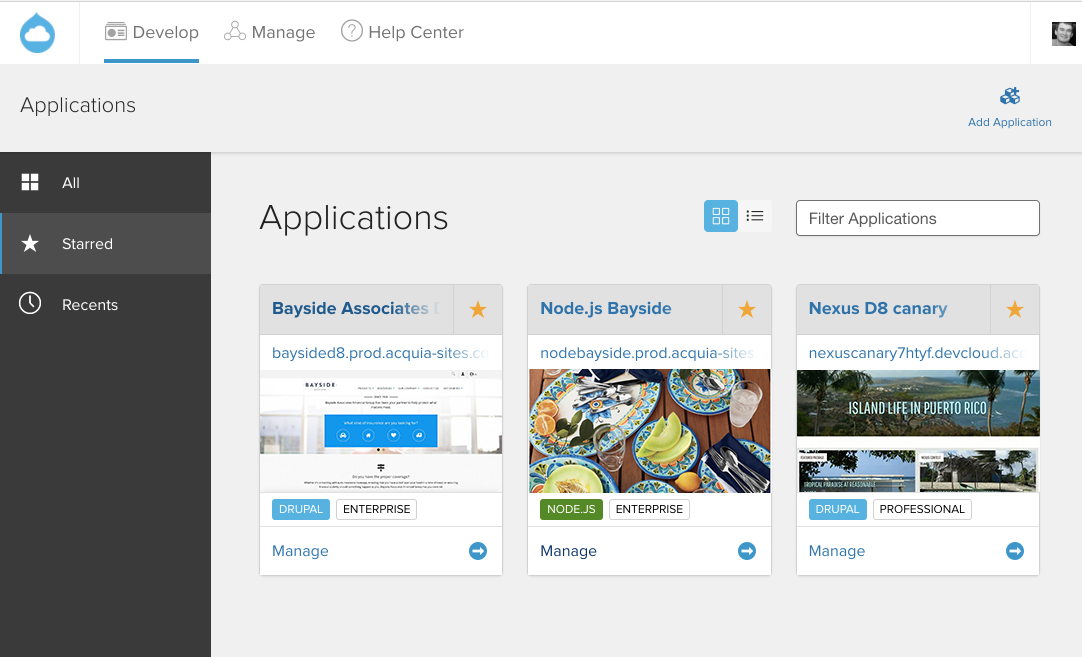
Acquia Cloud now supports Node.js for Headless Drupal
On Acquia Cloud, customers can access Drupal and Node.js environments from a single user interface.

Delivering on Acquia's mission

When reflecting on Acquia's first decade this past summer, I shared that one of the original corporate values our small team dreamed up was to "empower everyone to rapidly assemble killer websites". After ten years, we've evolved our mission to "build the universal platform for the world's greatest digital experiences". While our focus has expanded as we've grown, Acquia's enduring aim is to provide our customers with the best tools available. Adding Node.js to Acquia Cloud is a natural evolution of our mission.

21 Sep 20:34

Interaktive Fotokarte, die durch das New York City der 80er Jahre klicken lässt

by Ronny
mkalus shared this story from Das Kraftfuttermischwerk.

Ähnlich wie Googles Streetview haben Brandon Liu und Jeremy Lechtzin mit 80s.NYC eine interaktive Fotokollektion ins Netz gebracht, durch die man sich nun klicken kann. Dabei kann man sich dann New York City so ansehen, wie es in den 80ern ausgesehen hat. Das könnte ich mir auch für andere Städte gut vorstellen.

80s.nyc is a map-based street view of 1980s New York City, organizing publicly accessible building imagery into an easy-to-browse glimpse of the streetscape 30 years ago.

Over 5 years in the mid-1980s, the City of New York photographed every property in the five boroughs. The project had a bureaucratic origin: the photos would be used by the Department of Finance to estimate real property values for taxation purposes. Buildings as well as vacant lots were photographed, as they’re both taxed – and because it was difficult to distinguish while shooting between taxable and tax-exempt buildings like religious institutions or government offices, the photographers just shot everything. The result was a remarkable body of imagery – over 800,000 color 35mm photos in both negative and print formats.

(via Laughing Squid)

20 Sep 18:08

Opening Up Higher Education against the Policy Backdrop of the ‘Knowledge Economy’ – Navigating the Conflicting Discourses

files/images/OE_discourse.PNG

Gabi Witthaus, SlideShare, Sept 23, 2017


Icon

Once again I find myself wishing people would record their conference sessions - even an audio recording would be far better than slides, padlet and an outline. And this looks like an interesting one. While I don't believe counting words will lead us to a deep understanding of the discourse, it nonetheless points us in some interesting directions, and that's what happens here with this discussion of the discourse around open education. The paper asks, "to what extent does the Discourse of groups arguing for a market-driven approach to higher education overlap with, or diverge from, that of groups who are seeking to open up education?" It's a question I wrestle with. Market principles are very similar to network principles, and yet market principles are subject to failures where the poor and vulnerable are most impacted. So the way we talk about open education is an important indicator of whether or not we think this is a problem. I do - I think it's the problem. 

[Link] [Comment]
20 Sep 18:08

AndroidBeat Daily Brief (Sep 20, 2017): HTC Halts Trading of Stocks Ahead of Potential Takeover, Google Home Mini Leaked, and More

by Chethan Rao
HTC has been going through a tough time since 2016, and news about a possible takeover has been floating around for quite some time. This news might get a lot more traction soon as the company announced some big news. Meanwhile, Chinese manufacturer Meizu unveiled the successor to the M5. Continue reading →
20 Sep 18:08

Here’s what’s coming to Netflix Canada in October

by Dean Daley
cast of stranger things

This month, Netflix Canada will gain the iconic Godzilla movie starring Matthew Broderick, the highly anticipated Stranger Things 2 and the follow-up to another hit Netflix Original, Riverdale season 2.

Here’s a full list of all of the television shows and movies coming to Netflix Canada this October:

October 1st

October 2nd

October 3rd

October 5th

October 6th

October 7th

October 10th

October 11th

October 12

October 13th

October 14th

October 15th

October 16th

Deep Undercover Collection: Collection 1 (available for download)

October 17th

October 19th

October 20th

October 21st

October 24th

  • The Hunt: season 1
  • Wanted: season 1 [Netflix Original] (available for download)
  • Wanted: season 2 [Netflix Original] (available for download)

October 25th

October 26th

October 27th

October 30th

  • Judah Friedlander: America is The Greatest In The United States [Netflix Original] (available for download)

October 31st

This is your last chance to watch

October 1st

  • Romeo+Juliet
  • The Dark Knight
  • Titanic

October 9th

  • Mad Max: Fury Road

October 10th

  • 300

October 15th

  • Happy Feet
  • P.S. I Love You
  • The Lord of the Rings: The Fellowship of the Ring

October 16th

  • Entourage

Image Credit: Netflix

The post Here’s what’s coming to Netflix Canada in October appeared first on MobileSyrup.

20 Sep 18:08

watchOS 4 ist einfach besser

by Volker Weber

7e4e28e64fefad2febb130879a8a1358 03affada4329dec20ae79c2d241b435b

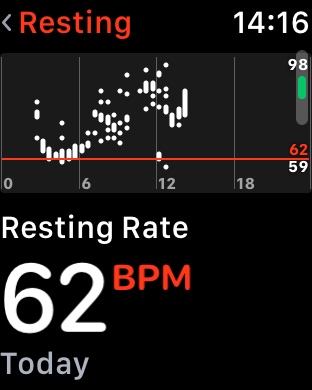
Eine bessere Auswertung der Herzfrequenzmessung oder ein schnellerer Zugriff auf die Musiksteuerung, hier Spotify mit Sonos. watchOS 4 ist an vielen Stellen verbessert, ohne dass auch die ersten Apple Watch ausgebremst werden. So entwickelt man ein Produkt sauber weiter.

Apple beweist bei der Watch eine ruhige Hand.

20 Sep 18:08

After the iOS 11 Upgrade :: Choose your file formats

by Volker Weber

1353140126e1d5e593c0386e61e8c4f0

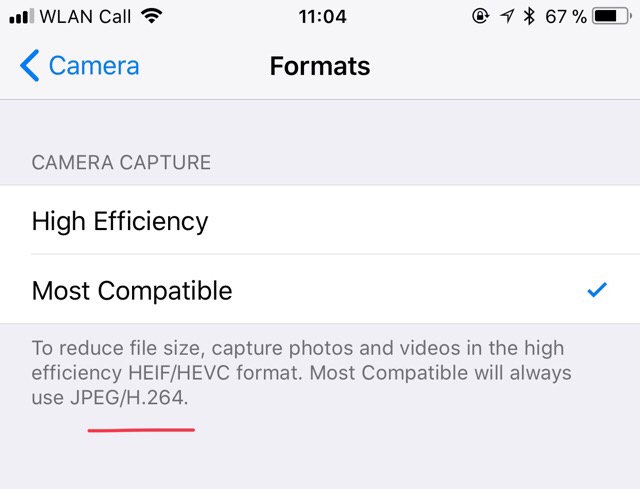
iOS 11 uses new container formats for photos and videos. For the time being I prefer the old more ubiquitous formats, although they are larger. Set in Settings/Camera/Formats.

20 Sep 18:08

Resigning from Fedora Ambassadors

by elioqoshi

After a good home run of over 1 year as a Fedora Ambassador and more than that as a contributor, I have decided to resign from Fedora Ambassadors. I’m not going to bore you with stories of the past. However, I’m resigning in good spirit, knowing that the local Fedora Community is in a better place compared to before I joined. Especially with our newest Ambassador, Mariana, I am convinced Fedora Albania will have a solid future.

While I am a bit worried about diversity in the community (I was the only male Ambassador) I look forward to be more on the sidelines and help mentor contributors into other projects at Open Labs Hackerspace. I am convinced that in the same way I have been supported and mentored by fellow contributors, I should give back to the community in a similar way, by allocating more time to that.

I am grateful for the support we had from Fedora and Red Hat, especially during OSCAL and look forward to shape the next edition with an even more solid presence.

The post Resigning from Fedora Ambassadors appeared first on Elio's Corner.

20 Sep 18:07

Learning as Artifact Creation

files/images/clicking.PNG

George Siemens, elearnspace, Sept 23, 2017


Icon

"One aspect of connectivism that has great potential for development is the role of the artifact in learning," writes George Siemens. "he web had its velveteen rabbit moment and became real to people who had previously been unable to easy share their creative artifacts. Eventually we were blessed with the ugly stepchildren of this movement (Twitter, Facebook) that enabled flow of creative artifacts but in themselves where not primarily generative technologies." Quite so. This has been one of the aspects oif the internet that has always fascinated me. It represents an explosion of creativity. We haven't seen the end yet. "Change is happening, often under the radar of enthusiasts because it’s harder to sell a technology product or draw clicks to a website when being nuanced and contextual."

[Link] [Comment]
20 Sep 18:07

Updates on the Dropbox Bug Bounty Program

by Devdatta Akhawe

We first launched our bug bounty program in 2014, with initial bounties for critical bugs in the range of $5,000, ramping up to (currently) over $10,000 for critical bugs. Over the past three years, leading security researchers from around the world have participated in our programs with some amazing, often original research. Beyond just the individual bugs, we have learned many a lesson, uncovering unique, interesting threats, exploit vectors, and new research as well as rejigged our priorities based on the bug bounty reports. From Dropbox and all our users, a big THANK YOU to all the researchers that help secure Dropbox for our users!

Today, we’re excited to announce a number of improvements to the program, as well as highlight the progress we’ve made internally, in terms of both response and fix times.

We know that researchers value quick response and rewards. We recently measured our response times since 2014 and learned that 75% of our responses were within 2 days and 2 hours, with the quickest response being around 50 minutes. We have been working hard to improve our responsiveness and our reward latency even more. Over the last 12 months, we’ve drastically reduced our 75th percentile response time to under 16 hours of the report. For high-quality reports, we usually reward as soon as we reproduce the bug. In fact, we have sometimes paid out within minutes of receipt of a bug.

Fastest triage payout tweet
Fast triage payout acknowledgement

Through the bug bounty program, we have found a pool of incredible researchers who consistently do high-quality work. To further encourage such research, we’ve invited these researchers to a VIP program where we provide early access to upcoming features. Since the start of this program, 75% of our VIP reports got responses within 16 hours, and over the last year, we have reduced this time to 9 hours.

Talking to the community, we also know that hackers really value quick resolution of reported bugs. We typically aim to resolve high and critical bugs as soon as possible. We have resolved some bugs in under an hour of the report; for reports with bounties of more than $1,000, we resolved (fixed and out to the world) more than half of them in under 16 days.

Fast bugfix response acknowledgement from Frans Rosen

Dropbox users trust us with some of their most sensitive data, and we work ceaselessly to provide the best possible security for our users. Security researchers participating in our bug bounty program are a critical partner in this effort, and we are excited to announce three new updates to our program.

Tripling bounties

Starting right now, we are delighted to announce that we are more than tripling our bounties, with the reward for critical bugs — for example, bugs that could lead to remote code execution (RCE) on our servers — now topping out at $32,768 and bounties for RCE affecting our desktop/mobile clients at $18,564. To help kickstart this, we have also topped up any critical reports in the last 6 months with the equivalent increased bounty, paying out an additional bounty of over $28,000 for high/critical bugs reported this year.

Special Bonus for Great Research

Additionally, we have instituted a process to review particularly novel, high-quality research submitted to our program. At least twice a year, Dropboxers will go through high-quality submissions and award bonuses. Typical factors going into a decision include quality of report/research, interaction with researcher, and so on. With these bonuses, we also aim to encourage novel research. We just went through submissions this year and awarded an additional $14,000 in bonuses. Here are some examples of interesting bugs that we rewarded:

  1. Neex reported a local file disclosure vulnerability via ffmpeg HLS processing. While the impact on Dropbox was minimal since we sandbox all our video processing, we were impressed with the quality of research in the submitted vector: A video file that reads file contents is a pretty advanced vector.
  2. Mdv reported an XSS in the outbound chat vendor we use on our marketing pages. While the XSS was on the vendor’s domain, we pay based on impact, not based on whose fault it is. Mdv’s report was of a very high quality and thoughtfully explained how the XSS could impact our customers’ security.
  3. Frans reported a mailgun misconfiguration on email.gateway.dropbox.com. We fixed the bug within half an hour of the report. Since this is an unused domain, the impact was low. But, we loved the quality of the report, the clear description of the impact, and identifying issues in integrations is pretty innovative.

Matching donations

We have also started matching bounty donations to charity made through HackerOne. We recently matched a donation to Doctors Without Borders and look forward to supporting many a good cause with this matching.

Dropbox loves partnering with the security researchers to protect our users. Thank you to all the researchers who help make Dropbox secure for everyone!

Devdatta Akhawe manages the bug bounty program at Dropbox on top of his day job as engineering manager of the Product Safety team. If you’re a security researcher interested in participating in our bug bounty program, please contact us on HackerOne. We are also hiring.

20 Sep 18:07

tvOS 11: The MacStories Review

by Ryan Christoffel


WWDC was big this year, introducing new iPad and Mac hardware, Apple’s arrival into the smart speaker market with HomePod, and a variety of exciting software releases across iOS, macOS, and watchOS. But one of Apple’s main platforms was almost entirely overlooked: tvOS. During the WWDC keynote we received word that Amazon Prime Video would be coming to the Apple TV, but nothing else. Sessions held later in the conference revealed that a new version of tvOS did exist, and that it would be coming this year, but the details prove that it’s the smallest release in the OS’s young life. You could say that the focus of tvOS 11 is incremental improvements; the updates here are nice, but they hardly merit a major numbered release.

Automatic Appearance Switching

When the fourth-generation Apple TV launched in late 2015, it came with a bright, white-dominated interface that many found less than ideal for home theater setups. I’ve always been a fan of the original tvOS interface personally, but I know many Apple TV owners celebrated the advent of a new dark appearance option last year in tvOS 10. Though tvOS 10 gained the TV app and Single Sign-on later in the year, when it initially launched, dark mode was its hallmark feature. Perhaps as a sad indicator of tvOS’s slow progress as a platform, this year’s hallmark feature is simply another iteration on the platform’s appearance: automatic switching between light and dark appearance.

While it could be argued that this feature should have been available a year ago, automatic appearance switching is a nice option to have. When enabled in Settings ⇾ General ⇾ Appearance, it makes the tvOS interface light during the day and dark at night, granting users the benefits of enjoying both beautiful interfaces at appropriate times of day. I flipped it on instantly.

Home Screen Syncing

Before now, if you had multiple Apple TVs in your home, or if you had to replace a faulty unit at some point, the absence of Home screen syncing was likely a significant pain point for you. We’ve all grown so used to the benefits of features like iCloud backups on iOS that when we find ourselves needing a tvOS backup and it doesn’t exist, it’s hard to believe. That problem is now remedied with tvOS 11.

Home screen syncing, like many other aspects of iCloud, is mostly an invisible feature. Thanks to the Apple TV’s persistent connection to power, battery drain isn’t a concern, so syncing works in the background without any need for user action. If you want to turn syncing off, you can do so from Settings ⇾ Accounts ⇾ iCloud ⇾ One Home Screen, but otherwise it will work as advertised, keeping Home screens signed into the same iCloud account consistent with each other in every way. Add, delete, or rearrange an app on one Apple TV, and the same will happen on your other Apple TVs.

While I’m sure the majority of Apple TV owners don’t have multiple units, the recent introduction of the Apple TV 4K may change that in the near future. Personally, I’ve grown accustomed to moving my single Apple TV between the living room and bedroom – partly because I didn’t want to pony up for a second unit, but also because I didn’t want to bother with having to manage a second unit. Home screen syncing solves the latter concern.

Expanded Single Sign-on Support

Last year’s much-anticipated Single Sign-on feature arrived late, and had minimal impact. Due to the lack of support from most major television providers, only a tiny percentage of Apple TV users were able to benefit from Single Sign-on’s streamlined approach to authenticating your TV service in various video apps. Consider tvOS 11 the true arrival of the feature, which now sports a huge number of supported television providers, including a couple big hitters like DIRECTV and PlayStation Vue.

Everything Else

There are no other major user-facing features in tvOS 11, but a few smaller things are worth mentioning.

Time of Day in Progress Bar. Tapping, but not clicking, the touch-sensitive area of the Siri Remote while a video’s playing has always shown a progress bar counting down the video’s remaining length. In tvOS 11 that behavior remains, but now if you perform a second tap on the Siri Remote, the bar’s countdown changes to show the current time of day along with the exact time when the video will end, removing the need for user calculations.

AirPods Support. When AirPods launched last year, tvOS was the one modern Apple platform lacking automatic setup of the wireless earbuds; if you wanted to use AirPods with your Apple TV, you had to connect them as a new Bluetooth device. With tvOS 11 that changes, so now if AirPods have been set up on any of your other devices, you’ll be able to easily connect to them from an Apple TV too. AirPods can be selected from a couple different places: by swiping down on the Siri Remote’s touch surface to view audio source options1, or from Settings ⇾ Video and Audio ⇾ Audio Output.

Music and Podcasts. In the area of OS compatibility, the Music and Podcasts apps have been updated with features borrowed from their iOS counterparts. For Podcasts the update is extremely minor: the Unplayed and My Podcasts tabs have been renamed to Listen Now and Library respectively, matching the accompanying tabs in the iOS app. Apple Music gains social sharing and My Chill Mix, enabling you to see what music your friends are listening to, and access a new, weekly personalized playlist, all from the For You tab.

Right-to-Left Language Support. There is now native system support for right-to-left languages in tvOS, joining existing support on iOS and macOS.


Later this year, Apple’s TV app will gain support for live sports and news, but until then, Apple TV owners are left with a minor software update with a couple nice features, and not much else.

Following the unveiling of the Apple TV 4K – a significant upgrade in sheer power over its predecessor – the Apple TV finds itself in an awkward place: with advancing hardware, but little change to the software. I use my Apple TV every day, almost exclusively in the TV app, but Apple’s 2015 vision for the product was bigger than making it merely a place to watch television: it included games, apps for shopping and vacation planning, and more. Since that time, there’s little Apple has done to foster a healthy ecosystem of apps on the platform. Maybe that Apple-designed gaming controller is still in the works, along with other improvements to apps on tvOS – but for now, tvOS 11 brings positive change, but nothing revolutionary.


Support MacStories Directly

Club MacStories offers exclusive access to extra MacStories content, delivered every week; it's also a way to support us directly.

Club MacStories will help you discover the best apps for your devices and get the most out of your iPhone, iPad, and Mac. Plus, it's made in Italy.

Join Now
20 Sep 18:07

iOS 11 Review Extras: Audiobook, eBook, Making Of, and More

by John Voorhees

Federico’s annual iOS review has blossomed into something much bigger than just another review on MacStories. In fact, there is more happening around the release of the iOS 11 review this year than ever before. In addition to the review itself, we have lots of fantastic extras that extend beyond MacStories to Club MacStories, AppStories, and Relay FM’s Connected, only some of which were announced yesterday.

The Audiobook

For the first time this year, Federico’s iOS review is available as an audiobook narrated by Relay FM co-founder Myke Hurley. Myke’s narration brings Federico’s review to life in a way that you’ve never experienced a MacStories review before. It’s perfect for commuters or to take with you to the gym or on a long flight. The audiobook, which is over 5 hours long, features a single MP3 file with chapter markers for easy navigation.

Overcast, Bound, and VLC are all good choices for enjoying the iOS 11 review audiobook.

Overcast, Bound, and VLC are all good choices for enjoying the iOS 11 review audiobook.

Overcast Premium subscribers can upload the audiobook, which I've found is an excellent way to listen. Another great option on iOS is Bound, an audiobook player that supports Dropbox, Google Drive, and OneDrive. You can also use a more general-purpose media player like VLC.

The audiobook version of the iOS 11 review is available for $9.99 (plus VAT for EU customers), but Club MacStories members can get it for 60% off the regular price – just $3.99. Instructions on how to use the exclusive Club promo code are available in the member Downloads area.

Now is a great time to join Club MacStories, especially if you are interested in the audiobook. By joining and taking advantage of the audiobook discount, you can enjoy your first month of Club MacStories, which costs $5/month or $50/year, and the audiobook for less than the price of the audiobook to non-members. That’s a bargain by itself, but by joining, you also have access to the free review eBook, past eBooks, the full archive of back issues and new issues of our weekly and monthly newsletters, plus hundreds of dollars of discounts on apps and services being announced through the end of the month, and other perks. We’d love you to be part of our growing community, so please consider joining the Club.

The eBook

This is a special time of year for all of us at MacStories because Club MacStories just passed its second anniversary, which we are celebrating through the end of the month with discounts on apps, services, and other surprises. One of the perks members of the Club enjoy is complementary eBooks of Federico’s iOS reviews and other longform articles. The eBook looks great in iBooks and features all the media and layout options you’ll find on the MacStories version, including interactive footnotes and video players.

The eBook version is available for free exclusively to our Club MacStories members, and can be downloaded in the members-only Downloads area.

The Making Of

More than ever before, Federico’s iOS 11 review is a collaboration with a team of talented people who helped bring it and the extras to life. In this week’s edition of the Club MacStories Weekly newsletter, the people who contributed to the review will tell the story behind their roles. Among the stories Club members can look forward to is Myke Hurley’s tale of transatlantic narration as he recorded sections of the audiobook in New York and London throughout August and into September.

The Podcasts

In keeping with tradition, this week Federico, Stephen Hackett and Myke Hurley have released a special episode of Relay FM’s Connected dedicated to the review. Among other things, expect to hear Federico’s thoughts on iOS 11 now that it has launched and an inside look at the process of creating the audiobook from Myke.

This is the first iOS review released since Federico and I launched AppStories, and we’ve got two episodes for listeners this week. The first is Episode 23, the regular weekly episode of AppStories, that we released alongside Federico’s review. This week, we focus on the apps Federico used to create the review from the day he landed in San Jose for WWDC to today when he hit the publish button. We also discuss some of the third-party apps featured in the review that highlight iOS 11’s marquee features.


The second episode is something entirely new for AppStories that we’re calling AppStories Unplugged. It’s a casual, more free-form, and longer version of AppStories that we plan to release periodically as an exclusive perk to Club MacStories members. In the inaugural episode, Federico and I discuss some of our favorite iOS 11 apps and what writing at MacStories during the summertime review season is like.

Club members can download AppStories Unplugged from the members-only Download area now.


This is the most exciting time of the year for all of us at MacStories. We’re a small team that grows a little each summer to accomplish all that the iOS review adds to the day-to-day of running MacStories, Club MacStories, and AppStories. We make it through propelled by Federico’s enthusiasm and inspired by his dedication to creating the very best for our readers and listeners.

Now, after many long months, it’s nice to take a moment to catch our breath and share it all with you. I hope you enjoy it as much as Federico and we did making it.


Support MacStories Directly

Club MacStories offers exclusive access to extra MacStories content, delivered every week; it's also a way to support us directly.

Club MacStories will help you discover the best apps for your devices and get the most out of your iPhone, iPad, and Mac. Plus, it's made in Italy.

Join Now