Shared posts

10 Nov 03:27

Feeling locked in by open source

Ton wrote a post about his usage of the Post Kinds plugin for WordPress and used the word “lock in”.

I understand what he is trying to reference by using the phrase “lock in” but I think it’s problematic. It’s open source software (as is WordPress itself) — you are not locked in, you just have to decide where to invest resources of time, money, and energy.

A user has (at least) two options that work with the plugin:

1) Fork it

Find likeminded users and support a fork that does what you want.

Maintain it over time, either as a full fork or cherry picking updates from upstream.

2) Add features to the current plugin

Suggest the feature. Find like minded users. Find a developer to make a PR or compensate David to do it.

And of course for plugins like this, compatibility with the “host” system means keeping up with major architectural changes over time, too.

I don’t mean to suggest that Ton should do either of these two things, just that lock in is not the right phrase at all.

His plan is to store the Post Kinds data directly in the “main” WordPress content:

Over time I can replace the existing Post Kinds dependent postings (about 900 in this blog) in the same way, clearing the way for switching it off entirely. This should increase the autonomy of keeping this blog, and decrease dependencies.

And so the dependency is just on (open source) WordPress, which has a very large user and developer base and is likely to be maintained for a long time.

Also via Ton is a good read on Permacomputing, which has themes I’m thinking about with respect to user agency and maintenance of software over time.

Currently, I think we are entering into a post-open-source world. Large corporates are behind a vast majority of maintained software that happens to be licensed as open source. Software is built dependent on proprietary cloud platforms in such a way that being open source doesn’t make it portable.

I am interested in non-commercial open licensing as a new default I want to encourage for software developers, such as the Prosperity Public License or IndieCC.

And on the user agency side, I want to encourage collectivism: pool your time, energy, and resources to #BuildSoftwareTogether. Not as a “user”, but as an owner or member that wants to see a piece of software thrive.

For this collectivism, new tools like Open Collective exist. I have a handful of projects there running to bootstrap a few pieces of collective software myself.

Anyway, thanks Ton for the writing prompt. Don’t feel locked in!

10 Nov 03:24

Was Trump right — and the media wrong — about these ten claims?

by Josh Bernoff

Donald Trump’s campaign people send me incendiary emails every day. Most of it is just baiting to get money, but I was intrigued by one of these emails that claimed he was right about ten things that “the media” got wrong. Was Trump actually telling the truth and we missed it? Let’s put it to … Continued

The post Was Trump right — and the media wrong — about these ten claims? appeared first on without bullshit.

10 Nov 03:24

I read Facebook’s Widely Viewed Content Report. It’s really strange.

by Ethan

What content is popular on Facebook?

This is a surprisingly difficult – and very important – question to answer. Facebook is the most popular social network in the world, and is used by roughly 7 in 10 Americans, roughly half of whom visit the site multiple times a day. 36% of Americans report that they regularly read news on Facebook. This means that Facebook could be a powerful vector for sharing misinformation or extremism that readers interpret as news.

Journalist Kevin Roose began publishing a Twitter feed in July 2020 that showcased the 10 “top performing” links on Facebook as determined by Facebook’s Crowdtangle analytics tool. Most days, the “top performing” links come from right-wing commentators and provocateurs like Dan Bongino, Ben Shapiro, Fox News and others. This seems to contradict the popular narrative that Facebook is biased against conservatives and suggests, instead that conservatives – and particularly incendiary ones – thrive on the platform.

Facebook really doesn’t like this feed. A few weeks after Roose began the project, John Hegeman – the head of Facebook’s news feed – took to Twitter to explain that Roose was tracking “engagement” – the number of people who liked, commented on or shared a given story. A better way to understand popularity of stories on Facebook was “reach”, i.e., the number of feeds a story appeared in. Facebook’s reach statistics show that mainstream news content is far more common on Facebook than the far-right content Roose was featuring. In my personal favorite part of the Twitter thread (now deleted) Hegeman conceded that Roose came to reasonable conclusions given the data he had, and that Hegeman couldn’t share the data that illustrated his points, though Facebook was exploring making it public.

Well, now that data’s public. Sort of. A little bit of it. And it’s pretty interesting, though not always in the way Facebook may have meant it to be.

Facebook is now publishing a quarterly transparency report – the Widely Reviewed Content report – which includes some helpful high level information about what US Facebook users are seeing in their news feeds. It’s interesting to see that 57% of posts in news feeds come from the friends users have chosen to follow – arguably the core value proposition of Facebook. 19.3% come from Groups and 14.3% from Pages followed (brands, public figures, and content providers, like news outlets.) 9.5% is attributed to “unconnected posts” or “other” – I believe these are not ads (“sponsored posts” as opposed to “organic posts”, which Facebook is revealing in this report), but includes posts Facebook is recommending to users above and beyond the interests they’ve stated due to subscription to pages, groups or friend feeds. (“Content that did not come from friends, Pages people followed, or Groups that they were a part of, also referred to as unconnected posts, made up a relatively minor percentage of content views.”) Why am I harping on this? It will make more sense once we start looking at the top 20 domains section of the report.

Facebook’s report make the important point that most content encountered on the news feed is not “news”, in the sense of breaking news – usually, its friends updating each other on the cute thing their baby/dog/robot vacuum cleaner did. The top 20 domains represented in the Facebook data represent only 1.9% of the stories in Facebook feeds, and those associated with traditional news sites represent only 0.3%. So, news as traditionally thought of is an ingredient in the Facebook news feed, but not a big one.

So what’s in there? Well, Facebook gives us only the top twenty domains, and most of them aren’t super informative. YouTube is the top domain that appears in Facebook’s news feed… which tells us basically nothing. That could be a handful of wildly popular videos, the low hum of GenXers sharing music videos from the 1980s or boatloads of innocuous content intermingled with QAnon propaganda. 13 of the 20 domains shared by FB are essentially information free: Vimeo, Eventbrite, Google, Etsy, Google Docs, Linktree, Spotify, Tiktok, GoFundMe, Twitter, Amazon and MediaTenor, a GIF hosting site. So far we’ve learned that big web companies are popular and people share GIFs on Facebook.

What about the other seven? Five are mainstream news sites – ABC, NBC and CBS News, CNN and the UK Daily Mail. It’s interesting that Fox isn’t in there, and notable that the Daily Mail, a conservative leaning publication notorious for sensationalism and poor fact checking, ranks higher than all but one mainstream news outlet.

And then there’s the other two. Unicef captures the third spot, briefly leading me to believe that Facebook was emulating FC Barça before they lost their soul and providing the international agency with free publicity. Roose on the Facebook Top 10 feed suggests a different explanation – UNICEF posts routinely appear on Facebook COVID-19 info panels, likely driving a great deal of traffic to the site – here is an example of a popular post, the #3 URL on the Facebook newsfeed in Q2 2021.

But who the hell is playeralumniresources.com? They’re the #9 most common domain in the Facebook news feed, and their homepage is the #1 most common URL in Facebook’s set, with 87.2 million views. Well, they’re a speaking agency of former Green Bay Packers players, who are available to join you for a round of golf, a fishing expedition or to sign autographs. And while I personally would be willing to pay a good deal of money to catch walleye with William Henderson (#33, legendary Packers fullback and Superbowl champion), the popularity of this page suggests that there’s something wacky about this data set.

The obvious hypothesis is that Player Alumni Resources is buying a boatload of Facebook ads and perhaps either people are organically sharing those ads or FB is putting a thumb on the “unconnected post” feed to boost their results. Fortunately, Facebook has an archive of ads on the site, and we can see that Player Alumni Resources is a known Facebook advertiser. But they’re not running ads at this point, so we can’t get data on them. Did they run a shitload of ads last quarter? Dunno – I’d need to scrape and store Facebook Ad Library data to answer that question. At least we know that Player Alumni Resources is not likely generating the single most popular URL on Facebook through their organic reach – they’ve got 4109 followers of their Facebook page.

I repeated the same searches for popular URLs #2, #4 and #5, the universally well known Pure Hemp Shop, MyIncredibleRecipies.com and ReppnforChrist. (The latter sells stylish, pro-Jesus apparel.) The CBD seller and the t-shirt maker look like the Packers speakers bureau – they’re past Facebook advertisers, maintain very small FB pages and are not running ads. Nothing for the recipe site. (Should I have searched for myinediblerecipies?)

Unless there’s a data error here, I’m guessing that Player Alumni Resources shows up in your “suggested for you” part of your feed pretty damned often if Facebook knows you’re a Packers fan or from Wisconsin. (Or both, but the set of Wisconsonites who are not Packers fans is blissfully small.) What’s the suggested for you” feed? I liked an article on McSweeney’s once – probably the piece about the snake fight portion of the PhD defense – and I now get suggestions for McSweeney’s articles incessantly in my news feed. They aren’t marked as sponsored content, so they’re not ads, I guess? But they sure feel like ads.

What’s going on here? Dunno. And that’s my overall reaction to Facebook’s transparency report. It shares a few interesting figures that reinforce the narrative that Facebook is more about posts from friends and family than news. But it doesn’t share enough data that we can come to any meaningful conclusions. If the domain list included a thousand URLs, perhaps, we might be able to compare attention to a mainstream news site like CNN to a fringe newssite like the Dan Bongino podcast. But with only 20 domains – 13 of which should probably not appear in the set, as they’re generic to the point of meaninglessness – it’s very hard to know what’s going on.

This data exists, by the way. Facebook generated a set of shared URL data through data partnership Social Science One. That set includes URLs shared at least 100 times, and it is accessible only to a set of researchers who’ve applied for access through a process that’s been criticized as slow and ultimately unsatisfying, due to concerns about data quality.

I am genuinely glad that Facebook is releasing more data about what’s popular on their platform. I am also genuinely astonished that this is what Facebook produced for their first effort. The data is accompanied by a thoughtful “companion guide” that helps explain how the newsfeed algorithm works. Did no one think to offer some marginal notes on why FB released only 20 top domains and URLs? Why obscure advertisers somehow emerge as the most popular URLs on the platform? The cynical side of me reads this report as transparency theatre – a chance for FB to tell critics that they’re moving in the direction of transparency without releasing any of the data a researcher would need to answer a question like “Is extreme right-wing content disproportionately popular on Facebook?”

Earlier this year, my colleagues and I released a 65 page report written for funders who support research on the media ecosystem about access to data about the big social media platforms. I will spare you the long read and offer my personal executive summary (not necessarily endorsed by my coauthors): Stop fucking waiting for the platforms to give us data. They’re not going to give us data. We need to get our own data.

Creative researchers are finding ways to generate data sets that we cannot currently – and perhaps may not ever – get from social media platforms. Jason Baumgartner’s desperately under-resourced Pushshift.io has scraped a full archive of Reddit and has become indispensable for researchers of that platform. At least three groups are recruiting panels of Facebook users and asking users to donate their data so researchers can better understand what they’re seeing on Facebook. Facebook has responded to this effort by shutting down the accounts of one team of researchers in such a heavy-handed fashion that the acting director of the FTC’s consumer protection bureau felt compelled to weigh in.

Maybe the next quarterly report will share 100 URLs instead of 20. Maybe Facebook will explain that I somehow missed a wildly popular post about someone’s weekend golf game with placekicker Chris Jacke. But it’s frankly pathetic that, given the importance of these questions, researchers wait for these tiny snippets of information from behemoths like Facebook. It’s time for us to figure out how – respecting user privacy and research ethics – to get the data we need to understand what’s going on with these platforms.


Update: as folks are discussing the report and my analysis of this on Twitter, Kevin Roose has weighed in with theories about these oddly popular URLs. The most plausible explanation: they’re spam. Wonderfully, in one case, they’re spam that appears to be being posted by an account associated with Jaleel White, the actor who played Urkel on Family Matters.

Perhaps it’s admirably honest that Facebook is admitting its spam problems through this transparency report? Or perhaps we should be surprised – disturbed? – that a company with a trillion dollar valuation, releasing a report to document its transparency efforts, would make an unforced error of not filtering spam out of their site statistics?

I’m guessing the original version of this FB report may not remain up permanently – here’s a copy as of 6pm today on perma.cc just in case it’s cleaned up in the future.

The post I read Facebook’s Widely Viewed Content Report. It’s really strange. appeared first on Ethan Zuckerman.

10 Nov 03:23

Do You Name Your Bike?

by noreply@blogger.com (VeloOrange)

By Scott

Sometimes the objects we own become more than just things. Bikes aren't just tools or a device, but for a lot of us, a source of joy and pride. When my wife bought a Pass Hunter frame this spring, she named the bike Diana, after the Roman goddess of the hunt. 


It makes it easy when she has names for bikes. When we are getting ready for a ride, she can say that she is taking Diana or Mari (her other road bike) out and I know which to prep and ensure it is ready for the ride.

Back when I worked for GU in 2007/2008, I rode my touring/brevet/sportif/only bike to work most days. My boss there had a very nice Lightspeed road bike. He would refer to my bike as "the truck". With fenders, racks and lights on it, it was certainly more "truckish" then his svelte road bike. I went out for a staff lunch ride one day, and my bike certainly felt more of a truck than either of their two lightweight road bikes over the Berkeley hills.

I started calling it The Truck after that. Eventually I got a lighter road bike to ride and that bike became "The Jag" - lighter, smoother, and more reliable than the car.

(The "Jag" . Sorry for the non drive side photo, but I was 400 miles into a 750 mile ride)

So here's the question - do you name your bike and what sort of convention do you use?

Ps. If you're interested in the complete build list of Melissa's Pass Hunter, you can find it here: https://velo-orange.com/pages/pass-hunter-build-list-sportif-with-whisky-carbon-fork

10 Nov 03:23

Postgres functional style

by Jon Udell

My dual premises in this series are:

– Modern SQL is more valuable as a programming language than you might think (see Markus Winand’s Modern SQL: A lot has changed since SQL-92)

– Postgres is more valuable as a programming environment than you might think. (see R0ml Lefkowitz’s The Image of Postgres)

As the patron saint of trailing edge technology it is my duty to explore what’s possible at the intersection of these two premises. The topic for this episode is Postgres functional style. Clearly what I’ve been doing with the combo of pl/python and pl/pgsql is very far from pure functional programming. The self-memoization technique shown in episode 7 is all about mutating state (ed: this means writing stuff down somewhere). But it feels functional to me in the broader sense that I’m using functions to orchestrate behavior that’s expressed in terms of SQL queries.

To help explain what I mean, I’m going to unpack one of the Postgres functions in our library.

count_of_distinct_lms_students_from_to(_guid text, _from date, _to date)

This is a function that accepts a school id (aka guid), a start date, and an end date. Its job is to:

– Find all the courses (groups) for that school (guid)

– Filter to those created between the start and end date

– Find all the users in the filtered set of courses

– Filter to just students (i.e. omit instructors)

– Remove duplicate students (i.e., who are in more than one course)

– Return the count of distinct students at the school who annotated in the date range

The production database doesn’t yet store things in ways friendly to this outcome, so doing all this requires some heavy lifting in the analytics data warehouse. Here’s the function that orchestrates that work.

create function count_of_distinct_lms_students_from_to(_guid text, _from date, _to date) 
  returns bigint as $$
  declare count bigint;
  begin
 1  -- all groups active for the guid in the date range
 2  with groups as (
 3    select pubid from groups_for_guid(_guid)
 4    where group_is_active_from_to(pubid, _from, _to)
 5  ),
 6  -- usernames in those groups
 7  usernames_by_course as (
 8    select
 9      pubid,
10      (users_in_group(pubid)).username 
11  from groups 
12  ),
13  -- filtered to just students
14  students_by_course as (
15    select * from usernames_by_course
16    where not is_instructor(username, pubid)
17  )
18  select 
19    count (distinct username) 
20  from students_by_course
    into count;
    return count;
  end;
$$ language plpgsql;

If you think pl/pgsql is old and clunky, then you are welcome to do this in pl/python instead. There’s negligible difference between how they’re written and how fast they run. It’s the same chunk of SQL either way, and it exemplifies the functional style I’m about to describe.

Two kinds of chunking work together here: CTEs (aka common table expressions, aka WITH clauses) and functions. If you’ve not worked with SQL for a long time, as I hadn’t, then CTEs may be unfamiliar. I think of them as pipelines of table transformations in which each stage of the pipeline gets a name. In this example those names are groups (line 2), usernames_by_course (line 7), and students_by_course (line 14).

The pipeline phases aren’t functions that accept parameters, but I still think of them as being function-like in the sense that they encapsulate named chunks of behavior. The style I’ve settled into aims to make each phase of the pipeline responsible for a single idea (“groups active in the range”, “usernames in those groups”), and to express that idea in a short snippet of SQL.

As I’m developing one of these pipelines, I test each phase. To test the first phase, for example, I’d do this in psql or Metabase.

-- all groups active for the guid in the date range
with groups as (
  select pubid from groups_for_guid('8anU0QwbgC2Cq:canvas-lms')
  where group_is_active_from_to(pubid, '2021-01-01', '2021-05-01')
)
select * from groups;

And I’d spot-check to make sure the selected groups for that school really are in the date range. Then I’d check the next phase.

-- all groups active for the guid in the date range
with groups as (
),
-- usernames in those groups
usernames_by_course as (
  select
    pubid,
    (users_in_group(pubid)).username 
  from groups 
)
select * from usernames_by_course;

After another sanity check against these results, I’d continue to the next phase, and eventually arrive at the final result. It’s the same approach I take with regular expressions. I am unable to visualize everything that’s happening in a complex regex. But I can reason effectively about a pipeline of matches that occur in easier-to-understand named steps.

Ideally each phase in one of these pipelines requires just a handful of lines of code: few enough to fit within the 7 +- 2 limit of working memory. Postgres functions make that possible. Here are the functions used in this 20-line chunk of SQL.

– groups_for_guid(guid): Returns a table of course ids for a school.

– group_is_active_from_to(pubid, _from, _to): Returns true if the group was created in the range.

– users_in_group(pubid): Returns a table of user info for a course.

– is_instructor(username, pubid): Returns true if that user is an instructor.

Two of these, groups_for_guid and users_in_group, are set-returning functions. As noted in Working with Postgres types, they have the option of returning an explicit Postgres type defined elsewhere, or an implicit Postgres type defined inline. As it happens, both do the latter.

create or replace function groups_for_guid(_guid text)
  returns table(
    pubid text
  ) as $$
create or replace function users_in_group (_pubid text)
  returns table (
    groupid text, 
    username text, 
    display_name text
  ) as $$

The other two, group_is_active_from_to and is_instructor, return boolean values.

All this feels highly readable to me now, but the syntax of line 10 took quite a while to sink in. It helps me to look at what users_in_group(pubid) does in a SELECT context.

select * from users_in_group('4VzA92Yy')

groupid   | username    | display_name
----------+-------------+----------------
4VzA92Yy  | 39vA94AsQp  | Brendan Nadeau

Here is an alternate way to write the usernames_by_course CTE at line 7.

-- usernames in those groups
usernames_by_course as (
  select
    g.pubid,
    u.username
from groups g 
join users_in_group(g.pubid) u on g.pubid = u.groupid
)
select * from usernames_by_course;

Both do exactly the same thing in very close to the same amount of time. Having mixed the two styles I’m leaning toward the first, but you could go either way or both. What matters more is the mental leverage you wield when writing CTEs and functions together to compose pipelines of transformations, and that others wield when reading and debugging.

I hope I’ve made the case for writing and reading. There’s a case to be made for debugging too, but that’s another episode.


1 https://blog.jonudell.net/2021/07/21/a-virtuous-cycle-for-analytics/
2 https://blog.jonudell.net/2021/07/24/pl-pgsql-versus-pl-python-heres-why-im-using-both-to-write-postgres-functions/
3 https://blog.jonudell.net/2021/07/27/working-with-postgres-types/
4 https://blog.jonudell.net/2021/08/05/the-tao-of-unicode-sparklines/
5 https://blog.jonudell.net/2021/08/13/pl-python-metaprogramming/
6 https://blog.jonudell.net/2021/08/15/postgres-and-json-finding-document-hotspots-part-1/
7 https://blog.jonudell.net/2021/08/19/postgres-set-returning-functions-that-self-memoize-as-materialized-views/
8 https://blog.jonudell.net/2021/08/21/postgres-functional-style/
9 https://blog.jonudell.net/2021/08/26/working-in-a-hybrid-metabase-postgres-code-base/
10 https://blog.jonudell.net/2021/08/28/working-with-interdependent-postgres-functions-and-materialized-views/
11 https://blog.jonudell.net/2021/09/05/metabase-as-a-lightweight-app-server/
12 https://blog.jonudell.net/2021/09/07/the-postgres-repl/

10 Nov 03:23

Histogram with tooltips in Observable Plot

by Simon Willison

Given an array of datetime objects, I wanted to plot a histogram. But I wanted to automatically pick a bucket size for that histogram that resulted in something interesting, no matter what range of time the individual points covered.

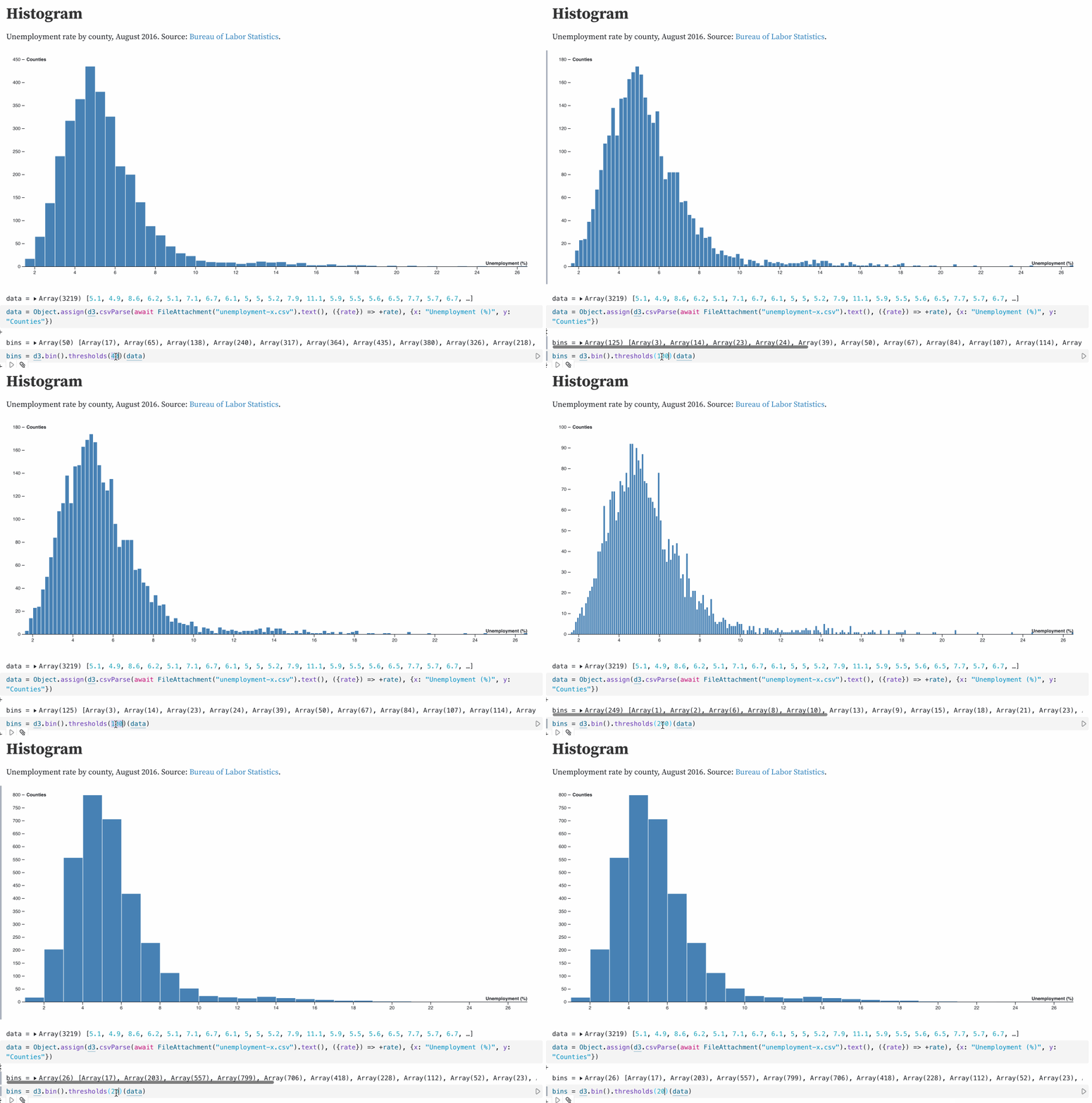
I figured out that d3 has a mechanism for this: d3.bin().thresholds() (docs here). This defaults to using Sturges' formula but has various other options.

This d3 Histogram notebook helped me figure this out:

Animation showing what happens when I pass different values to the .thresholds() method

Implementing this in Observable Plot

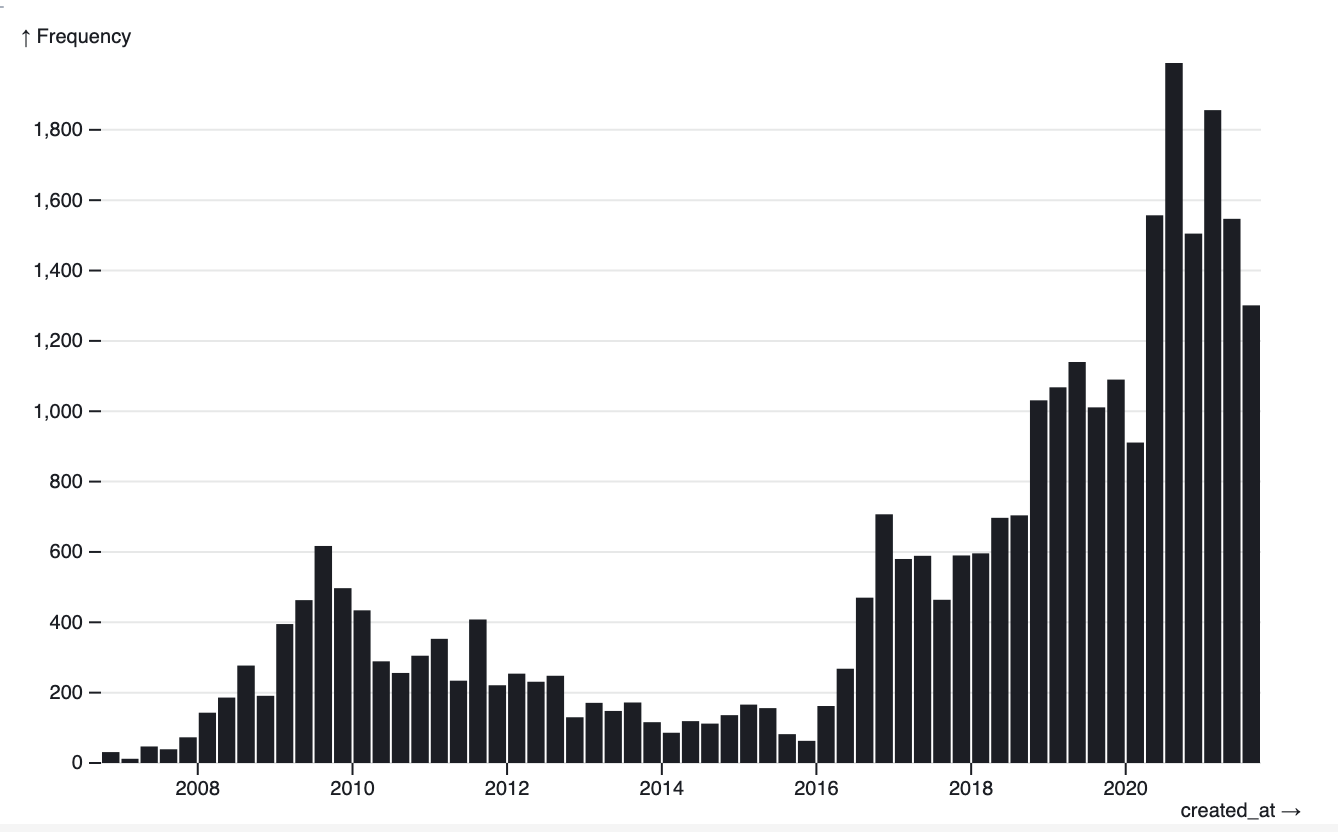
The higher level Observable Plot library provides binning. Here's the recipe I figured out for generating a histogram with that, in my Histogram of my tweets over time notebook:

Plot.plot({
  y: {
    grid: true
  },
  marks: [Plot.rectY(tweets, Plot.binX({ y: "count" }, { x: "created_at" }))]
})

My histogram of tweets

It turns out that while d3 uses Sturges' formula Observable Plot instead uses Scott's rule:

D3 chose Sturges’ formula because it was the popular choice (at the time) but Observable Plot defaults to Scott’s rule, with a max of 200 bins, which tends to perform better. Related: https://robjhyndman.com/papers/sturges.pdf

Mike Bostock - @mbostock

Adding tooltips

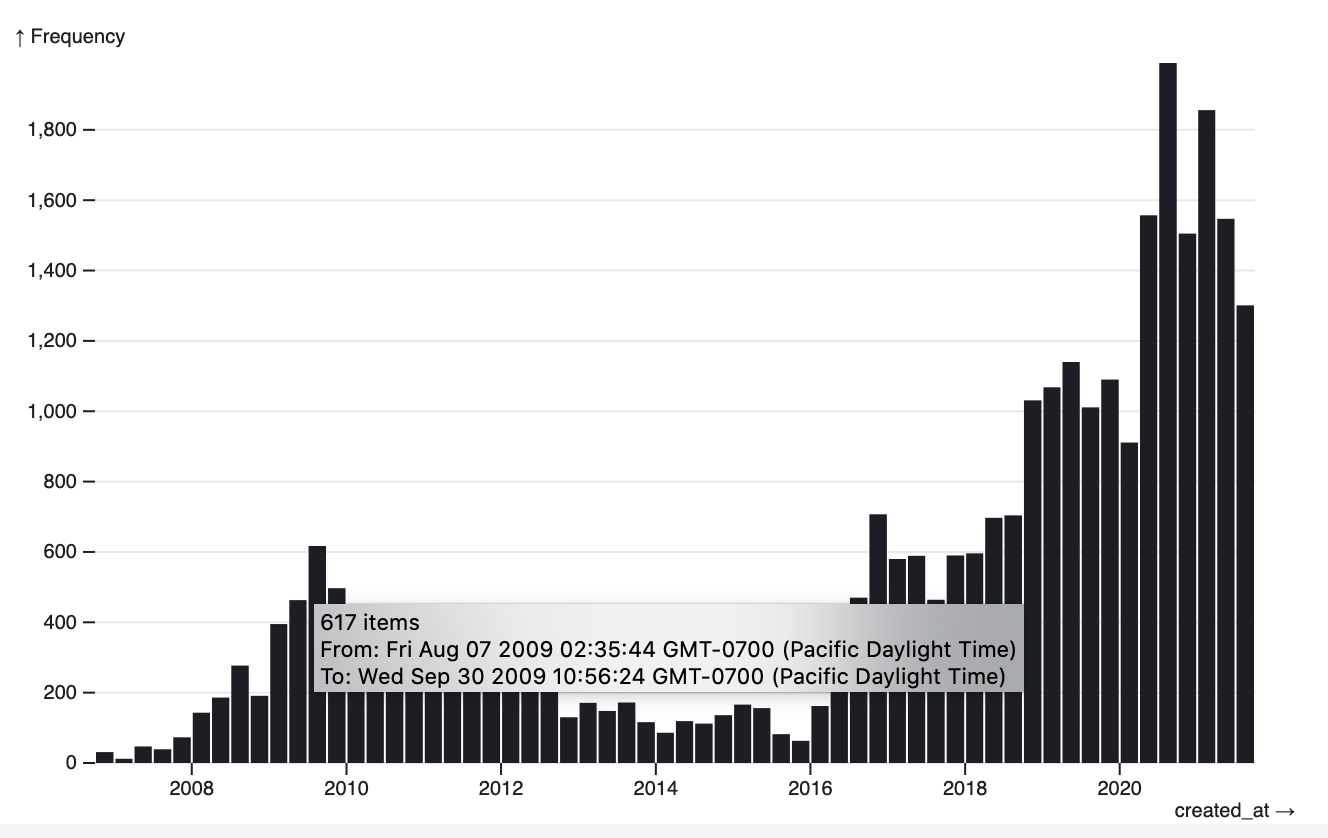
I wanted to add tooltips to the above chart. This was the hardest part to figure out - it turns out that second argument to .binX() can take a title option, which can be a function that accepts a bin array of items and returns a title.

This is what I ended up using:

Plot.plot({
  y: {
    grid: true
  },
  marks: [
    Plot.rectY(
      tweets,
      Plot.binX(
        { y: "count" },
        {
          x: "created_at",
          title: bin => {
            let sorted = [...bin.map(t => t.created_at)].sort();
            let min = sorted[0];
            let max = sorted.slice(-1)[0];
            let count = sorted.length;
            return `${sorted.length} item${
              sorted.length == 0 ? '' : 's'
            }\nFrom: ${min}\nTo: ${max}`;
          }
        }
      )
    )
  ]
})
  • [...bin.map(t => t.created_at)].sort() is a recipe for creating a sorted copy of an array of values
  • max = sorted.slice(-1)[0] gets the last item in that array

Then I compose and return the string.

Screnshoot showing the generated tooltip

Here's my Twitter thread where I figured this out.

10 Nov 03:00

Favorited Feeling locked in by open source by B...

by Ton Zijlstra

Favorited Feeling locked in by open source by Boris Mann

I see your point, Boris. I think the phrasing in this case comes from over time having tried some of the actions you suggest, where some weren’t well received and others are well outside my capabilities. That over time builds up to a sense of powerlesness very reminiscent of your definition of lock-in. From a regular software user point of view, closed or open source isn’t much of a meaningful difference when it comes to their everyday experience with the functionality, design patterns and practicality of a tool. Of course with open source it’s a more reasonable assumption that one has a way out, and I’m not without agency here. I can in fact remove this particular dependency altogether with a certain level of effort that ís within my capabilities.

Don’t feel locked in!

Boris Mann

06 Nov 04:07

Why The Economics of Climate Change Spell Doom

by Volker Weber

Nobody is going to do much about global warming, and our civilisation is more or less doomed to burn, drown, starve, and otherwise perish.

Let me ask you a question. It’s going to illustrate why, and then I’ll explain why technically and formally.

Umain Haque

More >

20 Sep 02:53

Beyond the Web

by Doc Searls

The Web is a haystack.

This isn’t what Tim Berners-Lee had in mind when he invented the Web. Nor is it what Jerry Yang and David Filo had in mind when they invented Jerry and David’s Guide to the World Wide Web, which later became Yahoo. Jerry and David’s model for the Web was a library, and Yahoo was to be the first catalog for it. This made sense, given the prevailing conceptual frames for the Web at the time: real estate and publishing.

Both of those are still with us today. We frame the Web as real estate when we speak of “sites” with “locations” in “domains” with “addresses” you can “visit” and “browse”—then shift to publishing when we speak of “files” and “pages,” that we “author,” “edit,” “post,” “publish,” “syndicate” and store in “folders” within a “directory.” Both frames suggest durability, if not permanence. Again, kind of like a library.

But once we added personal movement (“surf,” “browse”) and a vehicle for it (the browser), the Web became a World Wide Free-for-all. Literally. Anyone could publish, change and remove whatever they pleased, whenever they pleased. The same went for organizations of every kind, all over the world. And everyone with a browser could find their way to and through all of those spaces and places, and enjoy whatever “content” publishers chose to put there. Thus the Web grew into billions of sites, pages, images, databases, videos, and other stuff, with most of it changing constantly.

The result was a heaving heap of fuck-all.*

How big is it? According to WorldWebSize.comGoogle currently indexes about 41 billion pages, and Bing about 9 billion. They also peaked together at about 68 billion pages in late 2019. The Web is surely larger than that, but that’s the practical limit because search engines are the practical way to find pieces of straw in that thing. Will the haystack be less of one when approached by other search engines, such as the new ad-less (subscription-funded) Neeva? Nope. Search engines do not give the Web a card catalog. They certify its nature as a haystack.

So that’s one practical limit. There are others, but they’re hard to see when the level of optionality on the Web is almost indescribably vast. But we can see a few limits by asking some questions:

  1. Why do you always have to accept websites’ terms? And why do you have no record of your own of what you accepted, or when‚ or anything?
  2. Why do you have no way to proffer your own terms, to which websites can agree?
  3. Why did Do Not Track, which was never more than a polite request not to be tracked off a website, get no respect from 99.x% of the world’s websites? And how the hell did Do Not Track turn into the Tracking Preference Expression at the W2C, where the standard never did get fully baked?
  4. Why, after Do Not Track failed, did hundreds of millions—or perhaps billions—of people start blocking ads, tracking or both, on the Web, amounting to the biggest boycott in world history? And then why did the advertising world, including nearly all advertisers, their agents, and their dependents in publishing, treat this as a problem rather than a clear and gigantic message from the marketplace?
  5. Why are the choices presented to you by websites called your choices, when all those choices are provided by them? And why don’t you give them choices?
  6. Why would Apple’s way of making you private on your phone be to “Ask App Not to Track,” rather than “Tell App Not to Track,” or “Prevent App From Tracking You”?
  7. Why does the GDPR call people “data subjects” rather than people, or human beings, and then assign the roles “data controller” and “data processor” only to other parties?*
  8. Why are nearly all the 200+million results in a search for GDPR+compliance about how companies can obey the letter of the law while violating its spirit by continuing to track people through the giant loophole you see in every cookie notice?
  9. Why does the CCPA give you the right to ask to have back personal data others have gathered about you on the Web, rather than forbid its collection in the first place? (Imagine a law that assumes that all farmers’ horses are gone from their barns, but gives those farmers a right to demand horses back from those who took them. It’s kinda like that.)
  10. Why, 22 years after The Cluetrain Manifesto said, we are not seats or eyeballs or end users or consumers. we are human beings and our reach exceeds your grasp. deal with it. —is that statement still not true?
  11. Why, 9 years after Harvard Business Review Press published The Intention Economy: When Customers Take Charge, has that not happened? (Really, what are you in charge of in the marketplace that isn’t inside companies’ silos and platforms?)

It’s easy to blame the cookie, which Lou Montulli invented in 1994 as a way for sites to remember their visitors by planting reminder files—cookies—in visitors’ browsers. Cookies also gave visitors a way to remember where they were when they last visited. For sites that require logins, cookies take care of that as well.

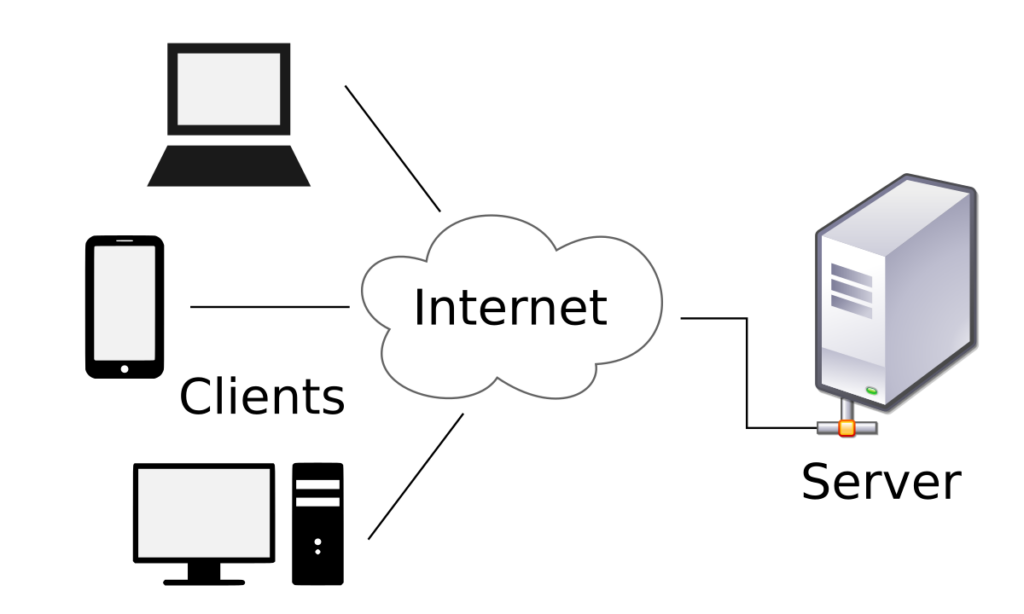
What matters, however, is not the cookie. It’s what makes the cookie necessary in the first place: the Web’s architecture. It’s called client-server, and is represented graphically like this:

client-server model

This architecture was born in the era of centralized mainframes, which “users” accessed through client devices called “dumb terminals”:

On the Web, as it was in the old mainframe world, we clients—mere users—are as subordinate to servers as are calves to cows:

(In fact I’ve been told that client-server was originally a euphemism for “slave-master.” Whether true or not, it makes sense.)

In the client-server paradigm, our agency—our ability to act with effect in the world—is restricted to what servers allow or provide for us. Our choices are what they provide. We are independent only to the degree that we can also be clients to other servers. In this paradigm, a free market is “your choice of captor.”

Want privacy? You have to ask for it. And, if you go to the trouble of doing that—which you have to do separately with every site and service you encounter (each a mainframe of its own)—your client doesn’t keep a record of what you “agreed” to. The server does. Good luck finding whatever it is the server or its third parties remember about that agreement.

Want to control how your data (or data about you) gets processed by the servers of the world? Good luck with that too. Again, Europe’s GDPR says “natural persons” are just “data subjects,” while “data controllers” and “data processors” are roles reserved for servers.

Want a shopping cart of your own to take from site to site? My wife asked for that in 1995. It’s still barely thinkable in 2021. Want a dashboard for your life where you can gather all your expenses, investments, property records, health information, calendars, contacts, and other personal information? She asked for that too, and we still don’t have it, except to the degree that large server operators (e.g. Google, Apple, Microsoft) give us pieces of it, hosted in their clouds, and rigged to keep you captive to their systems.

That’s why we don’t yet have an Internet of Things (IoT), but rather an Apple of Things, a Google of Things, and an Amazon of Things.

Is it possible to do stuff on the Web that isn’t client-server? Perhaps some techies among us can provide examples, but practically speaking, here’s what matters: If it’s not thinkable by the owners of the servers we depend on, it doesn’t get made.

From our position at the bottom of the Web’s haystack, it’s hard to imagine there might be a world where it’s possible for us to have full agency: to not be just users of clients enslaved to as many servers as we deal with every day.

But that world exists. It’s called the Internet, and it can support a helluva lot more than the Web, with many ways to interact other than those possible in the client-server world alone.

Digital technology as we know it has only been around for a few decades, and the Internet for maybe half that time. Mobile computers that run apps and presume connectivity everywhere have only been with us for a decade or less. And all of those will be with us for many decades, centuries, or millennia to come. We are not going to stop living digital lives, any more than we are going to stop speaking, writing, or using mathematics. Digital technology and the Internet are granted wishes that won’t go back into the genie’s bottle.

So yes, the Web is wonderful, but not boundlessly so. It has limits. Thanks to the client-server architecture that prevails there, full personal agency is not a grace of life on the Web. For the thirty-plus years of the Web’s existence, and for its foreseeable future, we will never have more agency than its servers allow clients and users.

It’s time to think and build outside the haystack. Models for that do exist, and some have been around a long time.

Email, for example. While you can look at your email on the Web, or use a Web-based email service (such as Gmail), email itself is independent of those. My own searls.com email has been at servers in my home, on racks elsewhere, and in a hired cloud. I can move it anywhere I want. You can move yours as well. All the services I hire to host my email are substitutable. That’s just one way we can enjoy full agency on the Internet.

My own work outside the Web is currently happening at Customer Commons, on what we call the Byway. Go there and follow along as we work to toward better answers to the questions above than you’ll get from inside the haystack.

[Later…] More on the Web as a haystack is in FILE NOT FOUND: A generation that grew up with Google is forcing professors to rethink their lesson plans, by Monica Chin (@mcsquared96) in The Verge, and Students don’t know what files and folders are, professors say, by Jody MacGregor in PC Gamer, which sources Monica’s report.


*I originally had “heaving haystack of fuck-all” here, but some remember it as the more alliterative “heaving heap of fuck-all.” So I decided to swap them. If comments actually worked here, I’d ask for a vote. But feel free to write me instead, at first name at last name dot com.


20 Sep 02:52

A happy 75th anniversary

by Doc Searls

My parents (that’s them, Eleanor and Allen Searls) were married on 17 August 1946, seventy-five years and two days ago. I would have posted something then, but I was busy—though not too busy to drop something in Facebook, where much of the readership for this blog, plus the writership of others listed in my old blogroll, has drifted in the Age of Social Media. Alas, blogging is less social than Facebook, Twitter, Instagram and the chatterteriat. But that doesn’t stop me from blogging anyway.

The wedding took place in Minneapolis, for the convenience of Mom’s family of second and third generation Swedish members of the homesteading diaspora, scattered then around Minnesota, North Dakota and Wisconsin. Pop was from New Jersey, and all his immediate kin were there and in New York. After the wedding the couple came east to briefly occupy the home they rented in North Bergen, New Jersey while mostly hanging at Grandma Searls’ house in Fort Lee (where Pop grew up with his two sisters), and then a short drive west of there in Maywood, where Jan and I grew up. I was born less than a year later, and my sister Jan less than two years after that.

In a comment under my Facebook post, Jan writes,

Mom from ND and Pop from NJ met in Alaska in the middle of WWII. He’d already served in the Costal Artillery in the early 30s but after D-Day came home to join up. They courted by mail after the war while he was with SHAEFE (he loved that acronym: Supreme HQ Allied Expeditionary Forces Europe), and Mom with the Red Cross at a Naval Hospital in Oregon. When he got home, she flew to NJ for 6 days of courtship – at a small shack at the NJ shore with Pop’s entire family! He came to MN the night before the wedding. They fell in love with the dream of having a family and future together, and always said they really fell in love with each other on their honeymoon and were devoted to each other. Mom was 33, Pop was 38, and they’d already lived lives of adventure, full of friends and family. We grew up knowing were blessed to have them as our parents.

I’ve added links. The Shack is still there, by the way.

Alas, Mom passed in ’03 and Pop in ’79. But they were exceptionally fine parents and grandparents. Not all kids are so lucky.

So, a belated toast, in pixels.

19 Sep 17:12

Quoting Chris Jones, original Internet Explorer team

There’s three ways to handle work assigned to you. If you say you’ll do it, do it. If you say you can’t, that’s ok. But if you sign up for work and drop the ball, the team fails. Learn to say no.

Chris Jones, original Internet Explorer team

19 Sep 17:12

Product Hunt Engineering Principles

Product Hunt Engineering Principles

Product Hunt implement "Collaborative Single Player Mode", which they define as "A developer should be able to execute a feature from start to finish -- from the database to the backend, API, frontend, and CSS. The goal is never to get blocked." I've encountered this principle applied to teams before (which I really like) but not for individual developers, which I imagine is more likely to work well for smaller organizations. Intriguing approach.

They also practice trunk driven development with feature flags: "Always start a feature with a feature flag and try to get something to production on day 1."

And "If a product decision is missing, try to make this decision yourself - it's better to ask for forgiveness rather than permission."

Via @mscccc

19 Sep 17:12

Weeknotes: Getting my personal Dogsheep up and running again

I gave a talk about Dogsheep at Noisebridge's Five Minutes of Fame on Thursday. Just one problem: my regular Dogsheep demo was broken, so I ended up building it from scratch again. In doing so I fixed a few bugs in some Dogsheep tools.

Dogsheep on a Digital Ocean droplet

The latest iteration of my personal Dogsheep runs on a $20/month 4GB/2CPU Digital Ocean Droplet running Ubuntu 20.04 LTS.

It runs a private Datasette instance and a bunch of cron jobs to fetch data from Twitter, GitHub, Foursquare Swarm, Pocket and Hacker News.

It also has copies of my Apple Photos and Apple HealthKit data which I upload manually - plus a copy of my genome for good measure.

Some abbreviated notes on how I set it up, copied from a private GitHub Issues thread:

  1. Create a new Ubuntu droplet, and configure its IP address as the A record for dogsheep.simonwillison.net

  2. Install Python 3 and NGINX and SQLite: apt-get install python3 python3-venv nginx sqlite -y

  3. Use letsencrypt to get an HTTPS certificate for it: apt-get update and then apt install certbot python3-certbot-nginx -y, then certbot --nginx -d dogsheep.simonwillison.net

  4. I had to remove the ipv6only=on; bit from the NGINX configuration due to this bug

  5. Created a dogsheep user, useradd -s /bin/bash -d /home/dogsheep/ -m -G

  6. As that user, created a virtual environment: python3 -mvenv datasette-venv and then datasette-venv/bin/pip install wheel and datasette-venv/bin/pip install datasette datasette-auth-passwords

  7. Created a /etc/systemd/system/datasette.service file with this contents

  8. Created a set of blank SQLite database files in WAL mode in /home/dogsheep using the following:

    for f in beta.db twitter.db healthkit.db github.db \
      swarm.db photos.db genome.db simonwillisonblog.db \
      pocket.db hacker-news.db memories.db
    do
      sqlite3 $f vacuum
      # And enable WAL mode:
      sqlite3 $f 'PRAGMA journal_mode=WAL;'
    done
    
  9. Started the Datasette service: service datasette start

  10. Configured NGINX to proxy to localhost port 8001, using this configuration

It's a few more steps than I'd like, but the end result was a password-protected Datasette instance running against a bunch of SQLite database files on my new server.

With Datasette up and running, the next step was to start loading in data.

Importing my tweets

I started with Twitter. I dropped my Twitter API access credentials into an auth.json file (as described here) and ran the following:

source /home/dogsheep/datasette-venv/bin/activate
pip install twitter-to-sqlite
twitter-to-sqlite user-timeline /home/dogsheep/twitter.db \
  -a /home/dogsheep/auth.json
@simonw [###############################-----] 26299/29684 00:02:06

That pulled in all 29,684 of my personal tweets.

(Actually, first it broke with an error, exposing a bug that had already been reported. I shipped a fix for that and tried again and it worked.)

Favourited tweets were a little harder - I have 39,904 favourited tweets, but the Twitter API only returns the most recent 3,200. I grabbed those more recent ones with:

twitter-to-sqlite favorites /home/dogsheep/twitter.db \
  -a /home/dogsheep/auth.json

Then I requested my Twitter archive, waited 24 hours and uploaded the resulting like.js file to the server, then ran:

twitter-to-sqlite import twitter.db /tmp/like.js

This gave me an archive_like table with the data from that file - but it wasn't the full tweet representation, just the subset that Twitter expose in the archive export.

The README shows how to inflate those into full tweets:

twitter-to-sqlite statuses-lookup twitter.db \
  --sql='select tweetId from archive_like' \
  --skip-existing
Importing 33,382 tweets [------------------------------------] 0% 00:18:28

Once that was done I wrote additional records into the favorited_by table like so:

sqlite3 twitter.db '
  INSERT OR IGNORE INTO favorited_by (tweet, user)
  SELECT tweetId, 12497 FROM archive_like
'

(12497 is my Twitter user ID.)

I also came up with a SQL view that lets me see just media attached to tweets:

sqlite-utils create-view twitter.db media_details "
select
  json_object('img_src', media_url_https, 'width', 400) as img,
  tweets.full_text,
  tweets.created_at,
  tweets.id as tweet_id,
  users.screen_name,
  'https://twitter.com/' || users.screen_name || '/status/' || tweets.id as tweet_url
from
  media
  join media_tweets on media.id = media_tweets.media_id
  join tweets on media_tweets.tweets_id = tweets.id
  join users on tweets.user = users.id
order by
  tweets.id desc
"

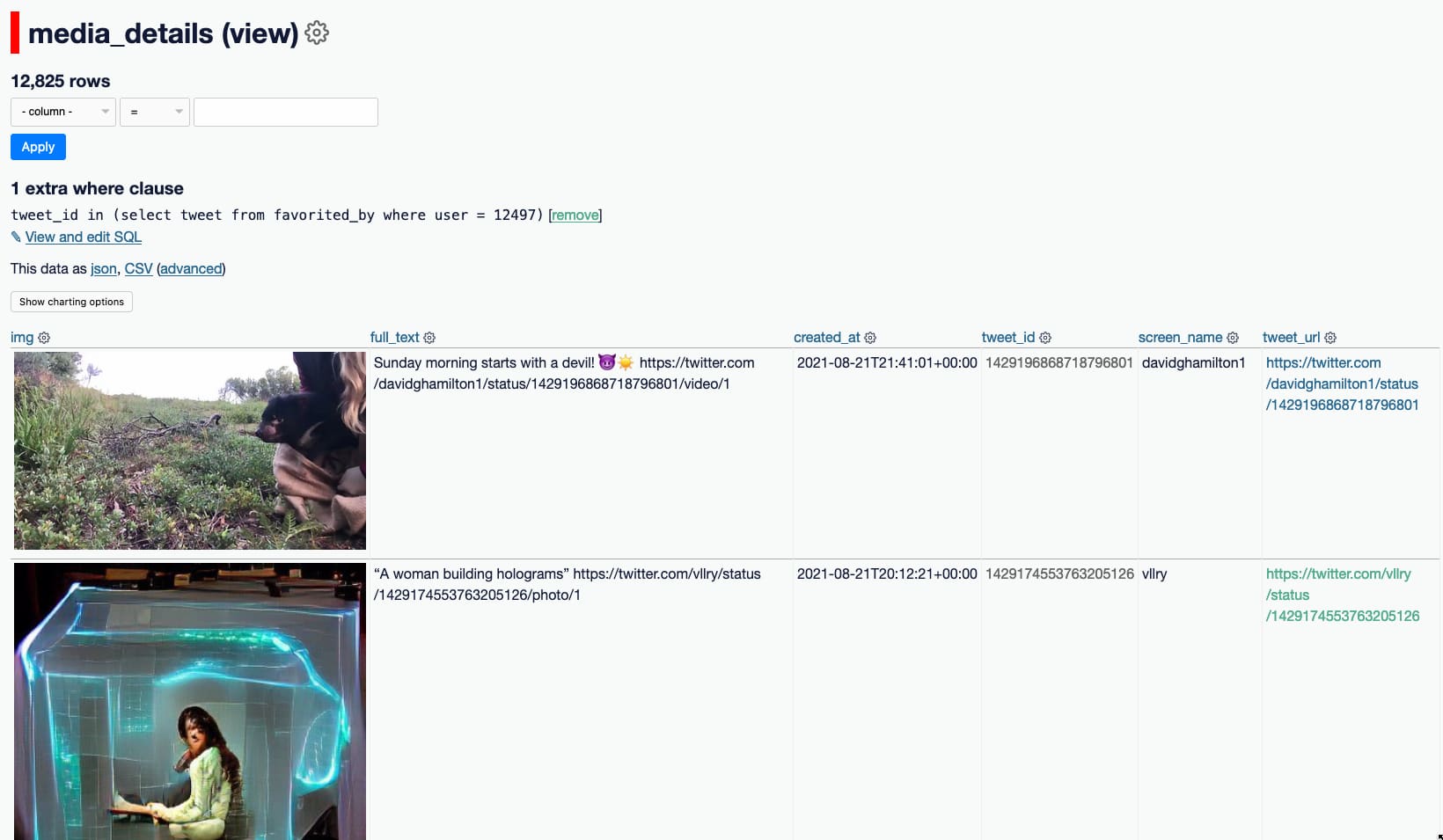
Now I can visit /twitter/media_details?_where=tweet_id+in+(select+tweet+from+favorited_by+where+user+=+12497) to see the most recent media tweets that I've favourited!

media_details view showing Twitter media I have liked

Swarm checkins

Swarm checkins were a lot easier. I needed my previously-created Foursquare API token, and swarm-to-sqlite:

pip install swarm-to-sqlite
swarm-to-sqlite /home/dogsheep/swarm.db --token=...

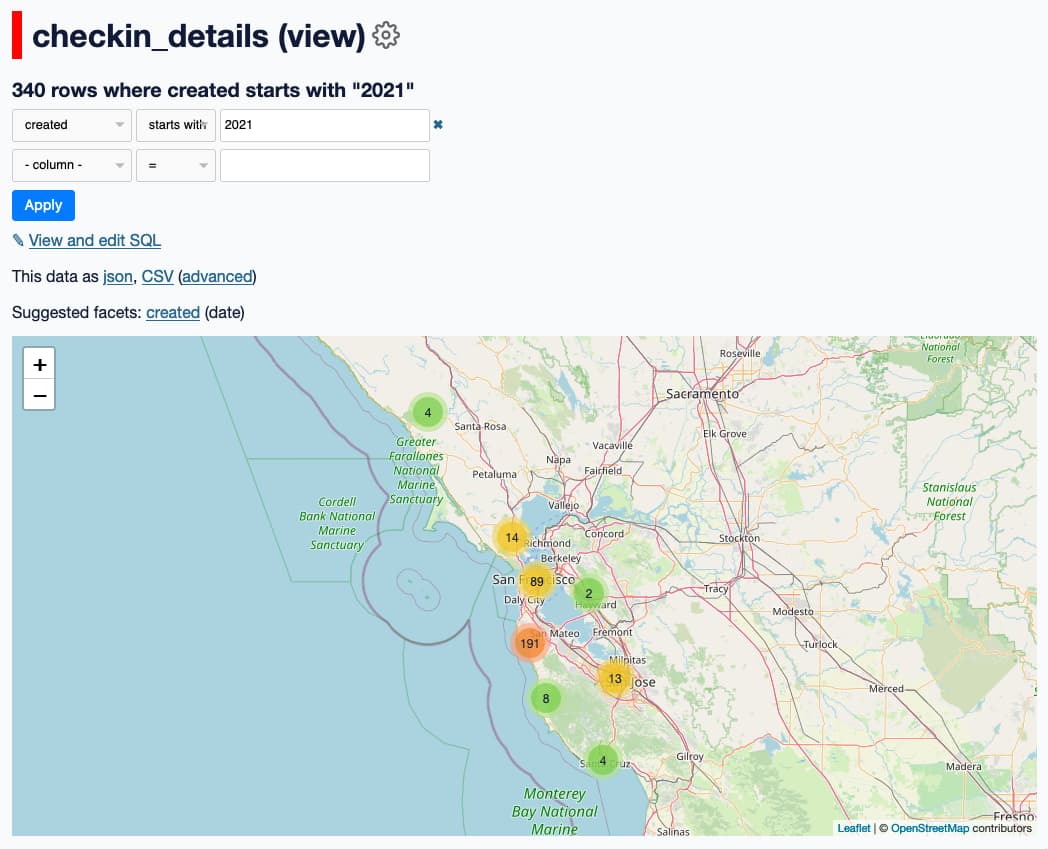
This gave me a full table of my Swarm checkins, which I can visualize using datasette-cluster-map:

Map of my 2021 Swarm checkins

Apple HealthKit

I don't yet have full automation for my Apple HealthKit data (collected by my Apple Watch) or my Apple Photos - both require me to run scripts on my laptop to create the SQLite database file and then copy the result to the server via scp.

healthkit-to-sqlite runs against the export.zip that is produced by the Apple Health app on the iPhone's export data button - for me that was a 158MB zip file which I AirDropped to my laptop and converted (after fixing a new bug) like so:

healthkit-to-sqlite ~/Downloads/export.zip healthkit.db
Importing from HealthKit  [-----------------------------]    2%  00:02:25

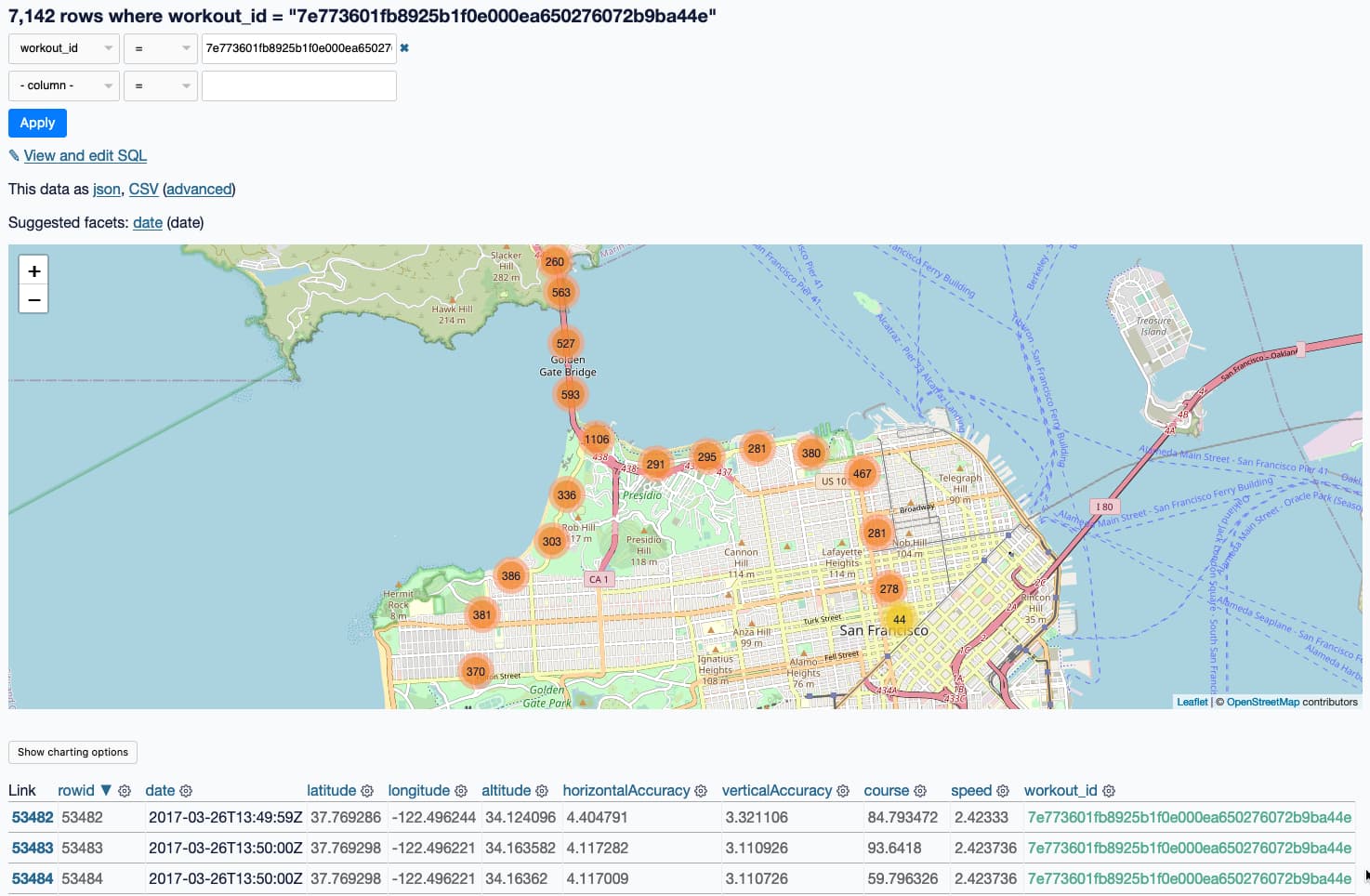
I uploaded the resulting 1.5GB healthkit.db file and now I can do things like visualize my 2017 San Francisco Half Marathon run on a map:

A map of the half marathon I ran

Apple Photos

For my photos I use dogsheep-photos, which I described last year in Using SQL to find my best photo of a pelican according to Apple Photos. The short version: I run this script on my laptop:

# Upload original photos to my S3 bucket
dogsheep-photos upload photos.db \
  ~/Pictures/Photos\ Library.photoslibrary/originals
dogsheep-photos apple-photos photos.db \
  --image-url-prefix "https://photos.simonwillison.net/i/" \
  --image-url-suffix "?w=600"
scp photos.db dogsheep:/home/dogsheep/photos.db

photos.db is only 171MB - it contains the metadata, including the machine learning labels, but not the photos themselves.

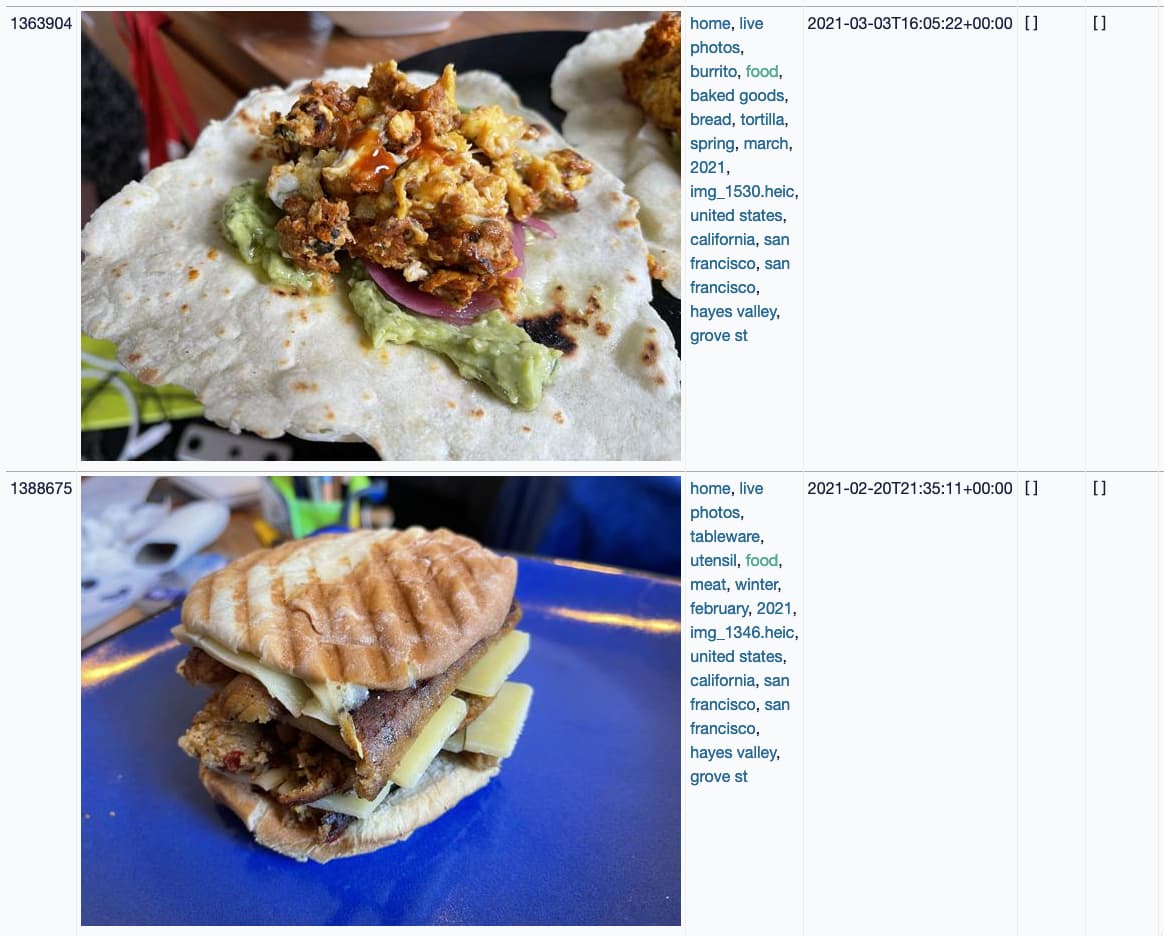
And now I can run queries for things like photos of food I've taken in 2021:

Some photos of food

Automation via cron

I'm still working through the last step, which involves setting up cron tasks to refresh my data periodically from various sources. My crontab currently looks like this:

# Twitter
1,11,21,31,41,51 * * * * /home/dogsheep/datasette-venv/bin/twitter-to-sqlite user-timeline /home/dogsheep/twitter.db -a /home/dogsheep/auth.json --since
4,14,24,34,44,54 * * * * run-one /home/dogsheep/datasette-venv/bin/twitter-to-sqlite mentions-timeline /home/dogsheep/twitter.db -a /home/dogsheep/auth.json --since
11 * * * * run-one /home/dogsheep/datasette-venv/bin/twitter-to-sqlite user-timeline /home/dogsheep/twitter.db cleopaws -a /home/dogsheep/auth.json --since
6,16,26,36,46,56 * * * * run-one /home/dogsheep/datasette-venv/bin/twitter-to-sqlite favorites /home/dogsheep/twitter.db -a /home/dogsheep/auth.json --stop_after=50

# Swarm
25 */2 * * * /home/dogsheep/datasette-venv/bin/swarm-to-sqlite /home/dogsheep/swarm.db --token=... --since=2w

# Hacker News data every six hours
35 0,6,12,18 * * * /home/dogsheep/datasette-venv/bin/hacker-news-to-sqlite user /home/dogsheep/hacker-news.db simonw

# Re-build dogsheep-beta search index once an hour
32 * * * * /home/dogsheep/datasette-venv/bin/dogsheep-beta index /home/dogsheep/beta.db /home/dogsheep/dogsheep-beta.yml

I'll be expanding this out as I configure more of the Dogsheep tools for my personal instance.

TIL this week

Releases this week

04 Sep 04:07

How to Set Up Your Turntable to Sound Its Best

by Chris Heinonen
A turntable with a purple vinyl record playing, set up on a wooden bookshelf.

One of the pleasures—or problems, depending on your viewpoint—of listening to music on a turntable is that it takes a bit more work to make the pointy end of a stylus deliver sweet tunes to your ears. Whether you’ve recently bought a new turntable or are using a vintage model, you can probably make some adjustments (often for little to no cost) to help it sound better. Doing so could also reduce the wear on your records, helping them last longer.

01 Sep 18:35

Race and ethnicity map of dots

by Nathan Yau

CNN goes with the dot density map for their first pass on the 2020 decennial. Each dot represents a certain number of people depending on your zoom level. Color represents race or ethnicity.

Does CNN have a limited color palette that they’re allowed to use? I would’ve gone for more contrast between the light blue for white and darker-but-still-light blue for American Indian/Alaskan Native.

See also: Dustin Cable’s racial dot map from 2013 and Erica Fischer’s dot maps of the same flavor from 2010.

Tags: census, CNN, population, race

01 Sep 18:32

Generative art with R

by Nathan Yau

Generative art seems to be having a moment right now, so it’s only appropriate that there’s an R package to help you make some. The aRtsy package by Koen Derks makes algorithms more straightforward to use. Set parameters and you’re off.

Tags: generative art, R

25 Aug 02:44

Farewell to Bowen, Part Two: Creating Community

by Dave Pollard

In Part One of this article, I described the global economic forces that have largely defeated Bowen Islanders’ attempts to create a sustainable, livable, long-term home for its diverse, long-term residents. I explained that the only future for the Vancouver exurban island I can now see is as a combination of a multi-millionaires’ playground, a retirement sanctuary (for those pension- and property-rich enough to afford it), and a grinding commuter bedroom community for those with young families. I predicted that the underclass of local workers and artists will be slowly forced out.

This is a shame, but it reflects the reality faced by many similar exurban communities near the world’s most desirable cities. There is no easy, or local, fix.

In this part, I want to talk about what it means to be a true community, and how I learned so much about what community really means from Bowen Islanders.

Many of the 20 sq. mi. island’s residents (and ex-residents) came here looking for sanctuary, and saw its relative isolation as a benefit, not a drawback, to living here. It contains the largest forested area of Metro Vancouver by a mile, and is so popular with day tourists that their arrival in summer wreaks havoc on ferry traffic, with commensurate overloads, delays and disruptions to schedules.

Islanders are heavily dependent on the ferry — travel by and on it constitutes half of the island’s total carbon footprint, and the ferry is essential for most jobs (about half of the adults on the island commute to the mainland), and for most purchases, including many foods.

The island is mountainous. Its three largest mountains, 1300-2400 ft in elevation, take up nearly half the island’s area and create rapid runoff of rainwater and soil; dry wells and low lake levels are a recurring and worsening problem. The very hilly terrain, and the sprawl of subdivisions around the perimeter, make travel by bicycle or on foot impractical, unpleasant, and sometimes dangerous for most. The island’s soil is volcanic, which is not great for growing food, and the richest growing areas, in the valleys between the mountains, have been paved over and built upon.

So the island is, except right in the cove where the ferry docks, heavily car-dependent. The ferry dock on the mainland is another exurb, which entails additional transportation by car or bus once off the ferry, to get to Vancouver itself. And when you return you may well find yourself in a convoy of dozens of cars, each with a single passenger, crawling along the cross-island roads, stuck behind a bicycle, slow-moving car or construction vehicle (passing is not possible on any of the roads, due to their narrowness, steep ditches, blind hills and sharp curves). You can expect waits in the ferry lanes averaging 40 minutes going both ways, in order to make the 20-minute-long crossing. As I write this, there have been overloads and/or 20+ minute delay alerts the last sixteen days in a row.

But, if you want to live in a paradise, it can be worth the hassle. The 100-car ferry trip itself is, pandemic notwithstanding, delightful, and scenically stunning. The island’s forest and/or ocean views, from most houses on the island (there are very few apartments), are enchanting. If you’re not in a hurry, or in urgent need (the island has very limited medical services), it really can be a place of sanctuary, with the ferry home a kind of decompression chamber.

It’s a do-it-yourself kind of place. Lots of home-made additions and projects on the mostly-sizeable lots, many of which have proceeded without building permits since they’re secluded from view. Islanders will help you if you ask, but otherwise they will leave you to your privacy and your own devices. That includes dealing with often-frequent power outages (lines are above-ground in heavily-treed areas), storm damage, treacherous conditions when the ice and snow comes, especially on the hills, rain damage, insect and rodent infestations, water supply problems, sub-zero temperatures (most homes rely on electrical, gas, oil and wood heat, each with its own supply vagaries), appliance breakdowns, and medical issues (there is an ambulance service but no 24-hour clinics, and the closest hospital is a ferry/helicopter trip to the mainland away.

And if there were a significant forest fire, catastrophic windstorm, or earthquake/tsunami, well…

At one time, most islanders took this in stride, and were quite self-sufficient. But newer arrivals (like me), who are used to being able to flip open the ‘yellow pages’ and pay for any desired repair and maintenance services quickly, can find it nerve-wracking. I could feel my blood pressure rising on cold icy nights when the lights began to flicker.

What I learned, though, is that this presumption of self-sufficiency does not mean islanders don’t care about or help each other out. But since it’s a very ‘British’ culture, it does mean that you have to seek out your neighbours and others in the community, let them know what you can handle yourself and what, under some circumstances, you would need help with, and what you can offer in return.

In short, it means if you want to be part of the community, you have to ask. You can’t expect your neighbours to show up at your door with a welcoming bottle of wine and an open invitation to drop by (as just happened this week when I moved to Coquitlam). But if you need something, and ask, almost assuredly if the person you ask can’t help you themselves they know exactly who on-island can.

My first experience of community was in a small village in Belize, during a visit with Joe Bageant. There, when young people paired up and left their parents’ home, the whole family and neighbourhood pitched in to find a piece of land, build a small house, and hook it up to the local utilities. There, if there was a (rare) crime, the community knew exactly who was likely responsible, tracked down the perp and forced reparations. There, if there was a medical issue, they knew who to call, and the issue was dealt with quickly. There, orphans and homeless people were simply adopted, by community agreement, and the duties of looking after them were shared. There, everything from tools to TVs were shared, even if they were in a family’s home — doors were always open, and borrowed items were promptly returned in good condition (or passed on to the next borrower). As Joe never tired of saying: Community is born of necessity.

It was not a utopia, and it wouldn’t work in our culture, but it worked, and it was very instructive. Nine-year-olds there knew how to do and fix things that in our infantilized, dependent culture most adults are clueless about, and they learned mostly by just watching and paying attention.

So why, you may be thinking, do I say I learned so much about community from my 3800 fellow Bowen Islanders during the twelve years I lived there? It’s mainly because, while the residents of the Belizean village knew how to do things for themselves and each other, and most of those in our modern northern cities have no idea, the residents of Bowen Island knew (or learned) what they didn’t know, and they knew who did know. Or who would know who did know.

They knew who had an AWD vehicle to get to and transport an accident victim stranded up an icy hill. They knew who had what power tools, who could fix an old computer, and which local repair people to trust and not gouge you (and thanks to word of mouth, the incompetent and the gougers quickly went out of business). They knew who knew about ailing fruit trees and how to make and can jam and how to select and install solar panels and how to deal with bats in the chimney and moths in the cupboards and fruit flies in the kitchen.

When you live on an island with only 190 people per square mile (a tenth the density of Vancouver), with the daytime-only ferry between you and the rest of the world, you know who you can turn to, no matter what happens. And if you don’t, or don’t want to ask, and aren’t self-sufficient, then you probably self-select off the island.

It’s a strange thing, this reluctance to ask, to admit you can’t completely look after yourself. We’re used to picking up the phone and calling people who know, and we pay them for what they do. So we have this illusion that we’re self-sufficient, an illusion we essentially buy. In previous places I lived, I had a list of suppliers, and when they didn’t come right away to do or fix what needed doing or fixing, I complained that “you can’t get good help anymore”.

On Bowen, instead I had a contact list, of people on island who knew who knew what to do. I had to call them, confess that I ‘needed’ help. It was uncomfortable. But it’s essential learning about what living in community means. Having become used to being considered a success and an expert in my field, admitting I ‘needed’ help was like an admission of failure (and, indeed, one islander, responding to a post from me suggesting we needed an online list of local suppliers for every imaginable situation, described my post as ‘pathetic’).

An eye-opener for me was Bowen in Transition’s Sharing Circles (aka Gift Circles). These events, which entail people taking turns saying to the group what they have to offer for free (surplus or lendable stuff, a particular skill or talent, free time, a shareable space etc), and then what they would love to receive but don’t know where/how/who to get it from. And then, one on one, where there’s a match the potential sharers and receivers chat and make arrangements. These events are designed to encourage more candour and comfort in acknowledging what we need (or just want), and more self-awareness and generosity in what we could offer others at little or no cost, but don’t normally think to find out if they would be useful to the community.

As I noted at the time:

There was considerable initial reluctance from some [Sharing Circle] attendees who thought the process intimidating and a little too intimate for them. In fact, a few people who were put off by the description of the activity chose not to come to the meeting at all. But the reluctant attendees participated enthusiastically and said afterwards they were absolutely sold on the value of the process.

This is what community is all about.

And it’s about:

  • Potlucks: When I arrived, a bachelor, on the island, I got three invitations the first month to potlucks from the small number of people there I already knew. I didn’t even know what potlucks were, and was anxious about what to bring, and how much. But I figured it out. There are no rules, but in true communities, they always seem to work out.
  • Adapting in Place: The nature of any successful community depends on an appreciation of what’s available locally (natural and human-created resources), and on the skills, capacities (including time and space), and needs of the members. If there are more needs than available skills and capacities, and a mismatch between them (as is true in most places) creating community will be a struggle. Adapting the community to the place enhances it; terraforming the place to suit the community members destroys it.
  • Always thinking about doing things for others when you do things for yourself: On Bowen, many people would never think of taking a trip to the mainland without first canvassing several community members to see what they could pick up for them while they’re over there. “I’m going anyway…”.
  • Shared labour: As with true ‘work bees’, real communities ask others to help them do the work that needs to be done, rather than hiring. My Bowen friends Mike and David helped me disassemble and pack my treadmill desk (with a stripped bolt, yet) — a really tough job that ended up needing tools I don’t own. Did I feel guilty about asking them? Yeah. But I got over it. I still tend to keep a mental ‘ledger’ of what I’ve done for others vs what they’ve done for me. But in real communities this isn’t an issue — you learn who asks for too much and offers too little relative to their capacities, and then you learn to say no. Which is almost as difficult for most people as learning to ask.
  • A motley mix of ‘accidental’ and ‘gravitational’ members: Communities have a mix of people who ended up there by accident and those who were drawn there and went there purposefully. You need both. If all your members are gravitational, you may have a cult instead of a community. If none of your members is gravitational, it may still be a community, but it will likely be an unhappy and un-cohesive one.
  • Self-managing: Local governments often try to ‘manage’ and mould successful communities by offering amenities like community centres, neighbourhood groups etc. These can be very valuable resources, but they will only work if the community embraces them as their own, and if the community members collectively manage them to meet their needs. And they won’t know what they need until they try things out and tinker with them. The world is full of infrastructure and tools that people thought were needed but actually weren’t.
  • Play: You can’t stay a cohesive community unless it’s fun and relatively easy. If keeping the community together is work and arduous, the organizers are going to begrudge doing it. In intentional communities, they figure out how to dole out and simplify the un-fun work (clean-up, finding volunteers, dealing with delinquent kids and pets etc).

There aren’t many examples of sustained, successful communities to draw on. But I’ve seen a few intentional communities, thanks largely to Kavana, that continue to adapt and evolve and show us the way. And Bowen Islanders have taught me so much about how communities can work, even though that learning may mostly be lost if the island is overwhelmed by development and ‘market’ forces.

Thanks to all my Bowen peeps for showing me what’s possible.

25 Aug 01:52

Instapaper Liked: Biden Is Betting Americans Will Forget About Afghanistan

“I don’t believe Americans are going to evaluate Joe Biden on whether Afghanistan is a stable democracy,” a Democratic pollster tells @PeterAtlantic. “They’re…
24 Aug 18:48

Funding, Buyback, and Hiring

by Matt

In February of this year, Automattic closed a new primary funding round of $288M, bringing in some great new partners including BlackRock, Wellington, Schonfeld, and Alta Park. Existing investors ICONIQ and Aglaé (Bernard Arnault) also participated. This round was common stock, and like all funding since 2011, included a proxy assigning me the right to vote the shares.

Automattic was very busy during this time frame, as we were working on what would become the Parse.ly, Day One, and Pocket Casts acquisitions, our investments in Element and Titan, plus more acquisitions and partnerships we haven’t announced yet, so we haven’t mentioned the February funding round until now. And while we are a bit surprised the fundraise did not leak to the press, it’s now been an awkwardly long time since February and I’m pleased to formally announce it now.

And since then, Automattic has continued to grow at a rapid pace and we recently took the opportunity to do a $250M share buyback at a $7.5B valuation that just closed last week. The buyback was primarily targeted at current and former employees. 

We’ve grown and increased our valuation at a rate higher than most other alternate investments available to investors. However, some of Automattic’s employees and former employee shareholders have been part of our journey for a very long time. Selling a bit of their equity holdings could have a significant impact on their lives. 

Automattic was founded 16 years ago and is still private, so it’s important for us to try to provide liquidity to any shareholder who wants it. We do the same with our internal A12 stock plan where we let our employees buy our shares and also offer an opportunity for all holders to sell them back to Automattic, every quarter. (I need to do a longer post on that.)

One interesting thing we’ve been doing in these buybacks is holding the shares as treasury stock within the company instead of canceling the shares at purchase. This allows us to buy shares that come onto the market, and then when an investor comes and wants to put a larger quantum of capital into the company, we can re-sell the treasury shares that the company bought earlier. In effect, we are providing both a sell-side and buy-side for Automattic stock, serving previous and new investors and making money on these trades since we bought and took the risk earlier. We’ve established a logical valuation methodology, which is based on a simple multiple of the last twelve month’s revenue, so shareholders can track and anticipate performance.

All of this has been a lot of fun and we’ve seen a great amount of success, but it’s not all smooth sailing; we still have our share of challenges, probably the biggest being hiring. We have significantly scaled up our ability to find and hire great folks, with 371 accepted offers already in 2021 and it’s only August. However, with the growth of WooCommerce (hiring a Head of Payments) and our enterprise business, WPVIP, in particular, we need to move faster to keep up with the opportunity. For me and many other of the most-tenured Automatticians within the company hiring is the top priority. To that end, I’m also looking for someone to partner with me and our top executive group (which we call Bridge) in Creative Talent Development, an executive recruiter to help craft the highest performing teams of executives for each of our businesses. 

We have a multi-decade opportunity ahead of us to create the best solutions for the open web platform of WordPress, and WooCommerce is doing the same thing for commerce; growing together over the long-term with people passionate about the same mission is my favorite part of my job.

22 Aug 02:21

Why Top Experts Shun Brand Communities

by Richard Millington

It’s hard to engage genuine experts in a public community.

Which is a shame, because this is the audience which could offer the most value to other members.

The problem is usually simple; the community doesn’t offer enough value to top experts. Points, badges, and gamification appeals to a very narrow segment of any audience.

In my experience, top experts typically want a few very specific things:

1) To improve their expertise by gaining exclusive access to the organisation.
2) Access to other experts in a private, exclusive, environment.
3) Increase the size of their following and control over that following.

This is why at the highest levels, experts prefer either private WhatsApp groups, zoom meetings, or to post content on platforms they control.

If you want to engage top experts, you need to offer the above. Provide support to verified experts with direct access to members of your team (not just the community manager). Create and host private working sessions (in person is ideal). And link to the preferred channels (twitter, blogs, medium etc…) of top experts in your community providing they keep participating in the community.

The post Why Top Experts Shun Brand Communities first appeared on FeverBee.

22 Aug 02:15

I Assembled A Home Audio Thingy

by chuttenc

Or, how to use Volumio, an old Raspberry Pi B+ (from 2014!), and an even older Denon stereo receiver+amplifier to pipe my wife’s MP3 collection to wired speakers in my house.

We like ourselves some music in our house. We’re not Hi Fi snobs. We don’t follow bands, really. We just like to have tunes around to help make chores a little less dreary <small>and to fill the gaping void we all hide inside ourselves</small>. Up until getting this house of ours a half decade ago we accomplished this by turning our computer speakers or CD player up to Rather Loud and trying not to spend too much time too close to it.

This “new” house came with a set of speakers in the kitchen and a nest of speaker wires connecting various corners of the main floor to a central location via the drop ceiling in the basement. With a couple of shelf speakers I ripped the proprietary connectors off of, plus two more speakers and a receiver donated by a far-more Hi Fi snobbish (though not really. But he does rather care about the surround, and waxes poetic about Master and Commander and House of the Flying Daggers for their sound fields) friend of ours, I had six speakers in four rooms.

But I had nothing to play on it. No audio source.

For fun I hooked up the PS4 via toslink/spdif/that optical thingy so I could play Uncharted in surround… but it seems Sony’s dream of the PlayStation being the command center of your home entertainment centre never really got off the ground as it can’t even play one of our (many) audio CDs.

(For the youngins: An audio CD is like a Spotify Playlist that is at most an hour long, but doesn’t require an Internet connection to play).

The PS3 was closer to that vision and had the hardware to play CDs, so it got unmothballed and used as a CD Player? Disc Deck? An audio source that did nothing but play audio CDs. The receiver had a 5CH Stereo setting so we had left+right channels in the rooms that had multiple speakers (and the two that only had single speakers I threw on L because Mono)…

Suffice to say we had a “okay” setup, given I spent a grand total of zero dollabux on it.

But my wife and I? We have MP3 collections that far outstrip our CD collections.

(For the youngins: An MP3 is like a stream of audio that you don’t need the Internet to play.)

(I’m ignoring the cassette tape collection, which play only in the basement on the Hi Fi Enthusiast Hardware of the Late Eighties that the previous owners of the house didn’t deign to take with them. It’s delightful.) How was I going to hook those MP3s up so they could play through the house as easily as the Audio CDs?

For a while I tried to get it to work via the Home Theatre PC.

(For the youngins: A Home Theatre PC is a computer which you connect to a TV so you can do computer things on your TV. Like a Smart TV in two pieces, both of which I control. Or like a laptop, but with a much larger screen that has a remote control.)

Unfortunately the HTPC’s dock is acting up when it comes to audio, and even the headphone jack was giving me grief. Plus, the HTPC’s media software stack was based on Kodi which, though lovely and has remote control capabilities over local network via both their web interface Chorus2 and official app Kore, is far more interested in video than audio. (for example: playlists don’t exist in Kore, and can’t really be managed in Chorus2).

But I learned a lot about what I wanted from such a system in trying to squish it into the HTPC which already had a job to do, so I decided to try making the audio player its own thing. Do one thing and do it well, jacks of all trades are masters of none. That sort of thing.

That’s when I remembered I had an old Raspberry Pi B+ in my closet. 700MHz CPU. 512MB RAM. Not the fastest machine in the park… but all it had to do was supply an interface in front of a largish (8k tracks) MP3 collection.

I found this project called Volumio which aimed to catalogue and provide a good, network-aware frontend on an audio collection (and do other stuff). It even had a plugin for playing Audio CDs so I could finally return the PS3 to game playing duty in the basement with the other previous generations of video gaming hardware.

It was a bit fiddly, though. Here’s the process:

  1. Install stock Volumio onto a microSD card which you then insert into the Raspberry Pi
    • This was very straightforward except for when I learned that the microsd card I wanted to use actually had bad-sector-ed itself to unusability. Luckily I had a spare.
  2. Adjust Volumio’s settings
    • Be sure to change playback to “Single” from “Continuous” or when you press play on a single track in a long list it’ll add every track in that list to the queue… which, on the B+’s anemic processor, takes a goodly while.
  3. Install the NanoSound CD Plugin
    • This is where it gets tricky. You could “just” pay for a subscription to Volumio and get first-party audio CD support including upsampling and other Hi Fi things. I’m using the B+’s headphone jack for output so Hi Fi is clearly none of my concern. And I’m too frugal for my own good, so I’m gonna do this myself.
    • Don’t install the plugin from the repository because it won’t work. Install the dependencies as described, then use the install script method. This will take a while as it compiles from source, and my B+ is not fast.
    • I’d like the CD to autoplay when inserted. There are instructions on the support page for how to script this: don’t use them. They have fancy quotation marks and emdashes which confuse both bash and curl when you try. Use instead the instructions on the source comment but don’t reset the volume.
  4. Install the Volumio App on your phone for remote control.
    • The “App” appears to be a webview that just loads http://volumio.local/ — for whatever reason my phone won’t resolve that host properly so I can’t just use the browsers I have already installed to access the UI.
  5. Move all the MP3s to a computer that is always on
    • You could use a USB drive attached to the Pi if you wanna, but I had space leftover on the Home Theatre PC, so I simply directed Volumio at the network share. Note that it demands credentials even for CIFS/Samba/Windows shares that don’t require credentials, so be prepared to add a straw account.

This was when we learned that our MP3 collection isn’t exactly nicely organized. Like Napster or eDonkey or Limewire or Kazaa, there were multiple slightly-different copies of some tracks or entire albums. Tracks weren’t really clear about what album, artist, and title they had… and the organization was a nightmare.

I’ve turned to Picard to help with the metadata challenges. So far it’s… fine? I dunno, AcoustID isn’t as foolproof as I was expecting it to be, and sometimes it decides to not group tracks into albums… it’s fine. So far.

Also, the gain levels of each track were different. Some were whisper-quiet and some were Cable TV Advertisement Loud. I’d hoped Volumio’s own volume normalization would help, but it seemed to silence already-quiet tracks and amplify high-gain recordings in the exact opposite of what I wanted. So I ran MP3Gain (yes, on sourceforge. Yes it hasn’t had a non-UI-language update since like 2008) for a few hours to get everyone singing at the same level, and turned off Volumio’s volume normalization.

And that’s where we are now. I’m not fully done with Picard (so many tracks to go). I haven’t added my own MP3 collection to the mix, with its additional duplicates and bad gain and whatnot…

…but it’s working. And it’s encouraging my wife and I to discover music we haven’t played in years. Which is wonderful.

If only because it annoys our preteen for her to learn that she kinda likes her parents’ tunes.

21 Aug 18:43

OpenBSD on the Huawei MateBook X (2020)

My old 2017 Huawei MateBook X has been my most reliable laptop and continued to be my daily-use workstation despite trying half a dozen others (and a desktop or two) in the past four years. Every time I’d try a new laptop, certain components wouldn’t work properly, or the keyboard would feel strange, or the screen quality would be poor, or a constantly-running fan or some coil-whine noise would drive me nuts. And every time, I’d return to my trusty MateBook X and everything would just work silently.

I finally have a newer model of the MateBook X and I’m happy to say it lives up to its predecessor and has replaced my 2017 model.

huawei matebooks x

Table of Contents

  1. Hardware
  2. Comparison Chart
  3. Disassembly
  4. Power and Heat
  5. OpenBSD Support Log
  6. Current OpenBSD Support Summary

Hardware

Huawei updated the MateBook X last year, but due to a US ban in 2019, Huawei stopped serving the US market. I acquired this new 2020 model from overseas, though I’m still not sure if I should have been allowed to.

I opted again for an i5 version of the fanless Intel Core processor, now quad-core in its 10th generation. The old model was available with an i5 processor only in a purpleish “space gray” color, and with an i7 only in a gold color which I wasn’t too fond of. The new i5 model is offered in a boring silver color or this “forest green” which I think looks quite unique, and the i7 model is available in silver and dark blue.

RAM now comes 16GB standard, up from 8GB previously, and is still soldered on. The removable SSD is now 512GB instead of 256GB, and in a more common m.2 2280 form factor instead of m.2 2242 which severely limited upgrade options in the previous model.

The 3:2 screen is the same size, though the resolution has increased from 2160x1440 to 3000x2000 and is now a touchscreen. The large resolution allows applications like Firefox to be used in full 2x HiDPI mode rather than 1.5x. The hinge seems a bit stiffer, presumably to accommodate having to be poked, which makes the laptop no longer able to be opened fully with just one hand. Perhaps this will loosen up slightly over time.

The webcam has moved from the top of the screen bezel to a clever pop-up mechanism that hides under a key between F6 and F7. Moving the webcam makes the new model slightly shorter but thicker. Most reviews have criticized the webcam placement since it now provides a much more upward view of the user (or their nose) rather than front-facing when at the top of the screen. I never use the webcam and my old MateBook X always had a vinyl decal over the camera anyway. The ambient light sensor which was next to the camera in the top of the screen bezel is now located in the bottom of the bezel about 1/4 from the left.

The chassis is now a “magnesium aluminum alloy” and feels a bit different than the old model. It has a slightly rougher texture, though it still feels high quality and solid with zero flex. The rubber feet on the bottom of the case have been replaced with harder, plastic feet which make it easier to move around on one’s desk without being too slippery.

The branding on the laptop is the same as before; Huawei logotype at the bottom of the screen bezel (which I have covered with a vinyl decal) and at the center of the back of the lid.

The touchpad on the old model was my biggest complaint and unfortunately remains my biggest complaint but for a different reason. On the 2017 model, the pad surface had a bit of vertical play in it before the button would click, which I eliminated with some electrical tape between the two. I found the button required too much physical force to press which made me never want to use it, preferring to use a wireless mouse at my desk.

The touchpad on the 2020 model is Huawei’s “Free Touch” mechanism which poorly emulates the Force Touch trackpad on the Apple MacBook by eliminating the vertical movement and instead relying on a force sensor to register a click to the computer and simulating it to the user with haptic feedback. The haptic click sounds somewhat cheap and hollow compared to Apple’s very solid feeling, deep-sounding “thunk”. The level of pressure needed to register a click, and the amount of haptic feedback given are configurable from within a Windows app and these settings persist across power cycling. The sunken touchpad surface also extends all the way to the edge of the laptop which I kind of like, especially since I had to press so hard on the old model and the raised lip of the keyboard deck would hurt the side of my thumb after extended use, but it occasionally causes false clicks from my palm when typing.

The MateBook X still has just two USB-C ports, one on each side, and a headphone jack and white charging LED on the left side. While the old model only supported charging through the USB-C port on the left, the new model can be charged from either port which is a very welcome change. A USB-C MateDock that was included with the old model is no longer included.

Wireless connectivity is provided by an Intel AX201 802.11a/b/g/n/ac/ax WiFi and Bluetooth 5 chip which is not removable.

The keyboard feels largely the same as the previous version and is very good with a roomy layout and a precise, clicky tactile that is perhaps very slightly softer and quieter than the old model. It is backlit with two levels of adjustment (plus off) which automatically turns on when typing and off again after 15 seconds (though this timeout is now configurable in their Windows app). The webcam button between F6 and F7 is not backlit, presumably because of space constraints, which makes the key look a tad out of place.

As with the previous model, the indicator lights on the Caps Lock and Fn keys light up when the screen is powered off (via DPMS) which is handy for knowing that the laptop is still powered on. The fingerprint reader remains under the power button.

The speaker grille is no longer located above the keyboard since the speakers are now firing downward on both sides of the laptop. The sound is a bit muffled compared to the previous model, but still sounds great.

The MateBook X’s UEFI/BIOS firmware menu can be accessed by holding down F2 at boot. Most of the peripherals like the Webcam, audio, WiFi, etc. can be disabled from this menu and the boot order of devices can be adjusted. A temporary boot device can be selected by pressing F12 at boot.

Comparison Chart

  2020 MateBook X 2017 MateBook X
Processor Fanless Intel Core i5-10210U Fanless Intel Core i5-7200U
RAM 16GB 8GB
Screen 13” 3000x2000 Touchscreen, 400 nits 13” 2160x1440, 350 nits
Footprint 284mm x 206mm x 13.6mm, 2lbs 286mm x 211mm x 12.5mm, 2lbs
Battery 42 Wh 41 Wh
Graphics Intel UHD (Comet Lake) Intel HD 620 (Kaby Lake)
Audio Realtek ALC256 Realtek ALC298
SSD 512GB YMTC PC005 NVMe (m.2 2280) 256GB Lite-On NVMe (m.2 2242)
WiFi Intel AX201 802.11ax Intel 8265 802.11ac

Disassembly

Removal of the bottom cover can be done by removing three visible Torx screws, then removing the four Phillips-head screws under each of the plastic feet. These feet can be hard to remove the first time but are just held on with adhesive.

Once unfastened, the bottom case removes quite easily without tools, unlike the previous model which had many clips and required a suction cup.

The entire motherboard and components are covered by a large heat spreader and there is now a heat pad on top of the m.2 2280 SSD. No other components are upgradeable.

Power and Heat

The 2020 MateBook X has a 42 Watt-hour battery and idles at about 7 watts with the screen at 40% brightness and connected to WiFi. It seems to dissipate heat much better than the 2017 model, especially in the palm area where the 2017 model would often stay slightly warm just at idle. This change in heat buildup is probably the most welcome change to the laptop in my opinion.

OpenBSD Support Log

2021-08-20: The only component that didn’t seem to work well out of the box was the touchpad. Once X11 started, I saw numerous dwiic timeouts logged, indicating it was timing out trying to fetch HID packet data. The touchscreen worked fine, however.

After some hours of debugging and tracing driver information in Linux, it appears to be an issue with ihidev and possibly my mis-reading of the specification when initially creating the driver. By forcing a read size of a particular length that is not what the device advertises, it eliminates the timeouts though the touchpad response is still rather jerky and laggy. By forcing the driver to use polling, it works very smoothly, which seems counterintuitive. I’m not sure if this is sluggishness is in the dwiic or the GPIO interrupt driver pchgpio. The touchpad also doesn’t work after a suspend and resume with interrupts enabled but does when polling, which also happens on the Framework laptop. I’ll need to keep working on it.

2021-08-22: After a weekend of debugging, I figured out the problem with the touchpad. The pchgpio driver that the touchpad uses to register for interrupts was mapping the requested GPIO to the wrong pin, which somehow still worked but was not triggering on every touchpad input. This was fixed in the pchgpio driver. I also corrected the issue with ihidev requesting too much data which was causing dwiic timeouts.

2021-09-21: A fix to the pchgpio driver has been committed to restore interrupts to the touchpad after S3 resume.

Current OpenBSD Support Summary

Status is relative to OpenBSD-current as of 2021-09-21.

Component Works? Notes
Ambient Light Sensor Yes Supported by acpials.
Audio Yes Intel audio with Realtek ALC256 codec supported by azalia. Microphone input (near the touchpad) works with the kern.audio.record sysctl enabled.
Battery status Yes Shows up through acpibat.
Bluetooth No Shows up as a ugen device, but OpenBSD does not support Bluetooth. Can be disabled in the firmware menu.
Fingerprint sensor No Goodix SPI-connected sensor embedded in the power button. No OpenBSD (or Linux) compatibility, can be disabled in the firmware menu.
Keyboard backlight Yes Supported natively by the EC, including auto-dimming. Can be toggled with Fn+F3.
Hibernation Yes Works with ZZZ.
NVMe SSD Yes YMTC PC005 512GB M.2 2280 SSD supported by nvme.
Suspend / resume Yes Works as expected in response to lid closing or zzz.
Touchscreen Yes I2C, supported by the imt driver.
Touchpad Yes I2C, supported by the imt driver.
USB Yes The USB-C ports work fine.
Video Yes Comet Lake video supported via inteldrm for accelerated video, DPMS, gamma control, integrated backlight control, and proper S3 resume.
Webcam Yes Supported by the uvideo driver, can be disabled in the firmware menu.
Wireless Yes The Intel AX201 802.11n wireless card is supported by the iwx driver. It works on 2.4Ghz and 5Ghz channels.
21 Aug 18:41

2021-08-20 General

by Ducky

Mitigation Measures

This article says that masking was responsible for a 68% reduction in transmissions and that regular testing got the reduction up to 77%.


This preprint looked at different mitigation measures in schools in Switzerland. Some highlights of the reductions in viral dosage they saw:

  • Keeping all the windows open in winter: 14x
  • Universal masking: 8x
  • One HEPA filter: 2.5x
  • Two HEPA filters: 4x
  • Natural ventilation, masks, and HEPA filtration: 30x

Vaccines

This article says that some Canadians have lost jobs because some entities (*cough* USA *cough*) don’t recognized mixed vaccines.


This preprint is highly technical and difficult for me to understand, but I think it’s saying that there’s a risk of antibody-dependent enhancement from the Delta strain. In other words, being vaccinated could make things worse. The obvious counter-argument to that is that in the real world, we don’t see vaccinated people faring worse than unvaccinated people.


There’s a preprint which came out of Oxford a few days ago which is very very dense, and I, in my foolishness, was trying to understand it all before I posted something about it. I give up. The preprint is basically good news, but go read this thread where someone dissects what is in the paper.

Disease Mechanisms

This preprint shows that levels of autoantibodies against interferons correlate somewhat with COVID-19 severity, and that sometimes people had those autoantibodies before COVID-19. (Reminder: autoantibodies are those which attack the body’s systems instead of the virus’ systems. Here’s an older, non-technical article which speculated that autoantibodies might be implicated.) I think that means that having certain types of autoantibodies makes COVID-19 worse.

This preprint found that a very rare genetic mutation associated with type 1 interferons was found in 1% of men with severe COVID-19.

Treatments

This article says that the UK approved a new antibody cocktail which reduced the risk of hospitalization or death in high-risk, non-hospitalized patients by 70%. Also: it can be injected (vs. infused), which is a LOT easier.

Recommended Reading/Viewing

This movie shows the spike protein opening up, an important step to infecting. (This preprint explains what’s going on.)

This article talks about why Israel’s spike in cases, despite being heavily vaccinated.


This article talks about a mutation, P681R, in Delta that seems to be related to its greatly enhanced infectiousness. (There is more to it than that, however, because just making that one mutation to COVID-Classic doesn’t make COVID-Classic super-infectious.)

21 Aug 18:41

2021-08-20 BC

by Ducky

Press Briefing

The biggest news from today’s snap press briefing was that Interior Health has announced a new set of health-authority-wide restrictions to combat the rising case counts there. This supplements the previous orders which were only for the Central Okanagan. Also, everybody is asked to avoid non-essential travel into the Interior.

The next biggest piece of news in the briefing was a hint that BC might not move to Stage 4 on 7 September. I’m not terribly surprised, as one of the original criteria was that cases be “low and stable”.

Finally, something which made data nerds like me rejoice, they promised to break down the cases by vaccination status.

Hospitals

This article says that nurses are burning out in the Interior and quitting in large numbers.

Variants

The Variants of Concern report is very boring this week: it’s almost all Delta. That’s it.

Statistics

+663 cases, +1 death, +4,196 first doses, +11,065 second doses.

Currently 129 in hospital / 59 in ICU, 6,345 active cases, 150,657 recovered.

first doses second doses
of adults 83.8% 75.3%
of over-12s 83.0% 75.5%
of all BCers 75.5% 67.5%

We have 482,104 doses in fridges; we’ll use it up in 25.5 days at last week’s rate. We’ve given more doses than we’d received by 25 days ago.

We have 438,514 mRNA doses in fridges; we’ll use it up in 23.2 days at last week’s rate. We’ve given more mRNA doses than we’d received by 25 days ago.

Reminder that these numbers do not take into account expired, spoiled, dropped, or stolen doses.

95.7% of the people who got their first dose by 7 weeks ago have gotten their second dose.

92.4% of the people who got their first dose by 4 weeks ago have gotten their second dose.

89.4% of the people who have ever gotten a first dose have gotten a second dose.

Charts

It’s Friday, which means we get an update on first and second doses by age:


And yay, the Interior is turning around! From this tweet:

21 Aug 18:40

Self-Management: Take Two

by Dave Pollard


estuary, a new artwork by my friend Di 

I‘ve written a lot about this subject over the years. It seems to me that, since we can’t know how grim the ongoing collapse of our civilization is going to be, or how it’s going to unfold for us personally, a personal self-management practice probably makes more sense as a means to help us cope with what’s to come, than attempts to prepare or plan ahead for whatever we guess may happen.

In recent years, I’ve also come to doubt we have free will over what we do, which is to say that I really had no alternative but to pursue the self-management practice I’ve pursued, and certainly have no business prescribing one, or any course of action, to anyone else.

My practice has been honed down to some pretty simple steps:

  1. Monitor and manage my own health and fitness. I collect and track lots of personal health and fitness data, get regular blood tests and monitor the results and trends, and research and get second opinions when anything adverse occurs.
  2. Make it easier and more fun to do healthy, useful things. My treadmill desk lets me work out while multitasking. I listen to podcasts while I do upper body/core workouts. I try to simplify and add an element of fun to important tasks and routines, so I don’t skip them.
  3. Eat well. What has worked for me is a varied, whole-plant-based diet, supplemented with a half-dozen vitamins and nutrients that such diets, for those in temperate rainforest climates, often lack.
  4. Monitor my personal stress and psychological well-being. I am learning to be aware of when I am getting reactive to a situation, and let others help with that awareness. I still get easily stressed, but being aware of it helps temper my reactivity.
  5. Stay aware that what I want to believe and what is most likely actually true are rarely the same thing. We are reactive creatures, prone to confirmation bias and a preference for simplicity, and we have difficulty dealing with uncertainty and ambiguity. I’m learning, at last, to recognize and hold my idealistic beliefs (what I think should be) apart from an open, curious, constantly self-challenging sense of what might actually be. My new radical non-duality perspective has heightened the cognitive dissonance in my life but actually made this tension easier to manage. I am no longer as invested in my beliefs.
  6. Be aware of my judgements and expectations. Of myself, others, and the world. I still have them, but I am more inclined to laugh at their absurdity.
  7. Be aware of what I am ‘choosing’ to pay attention to. The ‘choosing’ is in quotes since we don’t really have a choice, but it seems being aware of what I pay attention to is helping me learn to tune out and ignore what I can’t do anything about, and focus my attention where it’s actually useful, to me and to the world.

That’s it. No momentous change or self-improvement miracle. Still as lost, scared and bewildered as ever. Still anxious about the future and all the things that could go wrong, or be worse than they are. Still struggling with the existential precarity that is life in the 21st century. Still haven’t learned how to take things less seriously, how to live lighter, how to laugh more.

But I’m a little more aware of what’s going on inside this foolish, overly-earnest, deluded self, and not quite as hard on it as I once was. And I’m taking a little better care of the body it presumes to inhabit. That will have to be enough for now.

21 Aug 18:39

Waiting for Olivia

by peter@rukavina.net (Peter Rukavina)

Late last night Olivia got concerned that she wouldn’t be able to vote as Olivia in the federal election.

In a drive to help clarify, I pored through the Elections Canada FAQ on identification, and was perplexed to find, highlighted in yellow, in ALL CAPS, a passage:

WAITING FOR OLIVIA TO CONFIRM IF WE KEEP THE LAST TWO FAQS

In my late-Friday, concerned-parent, tired state, I had no idea what was happening to make Elections Canada’s website talk to me.

21 Aug 18:37

It is what it was be

by russell davies

This Word of Mouth episode about the language of cults introduced me to the idea of the Thought Terminating Cliche: a bit of language used to stop further discussion or questioning. It was first used to describe language structures of the Chinese Communist Party. In everyday life it's things like: 'it is what it is' or 'I'm just saying' or 'that's just your opinion'.

It struck me that corporate life is full of these things too. Injunctions to, basically, please stop asking questions and just get on with stuff. 'Carpe diem'. 'JFDI'.

And in some senses, and in regular life too, a thought-terminating cliche might have some utility. Sometimes the thinking has to stop. Sometimes we need something to gee us out of our analysis paralysis. 

21 Aug 18:37

A Wider View

by Rui Carmo

Given my recent iMac woes, I decided to accelerate the transition to a new “desktop” setup before Summer break was over. And, to cut a long story short, this is probably the first time I’ve been without a “normal” desktop Mac in over fifteen years, but it seems to be worth it.

My iMac setup was great, but had a major flaw–I couldn’t use most of my monitors with other machines, since besides the iMac‘s built-in 27” panel, I had a Thunderbolt-only, original 22” LG UltraFine 4K1 and a LG 29WL500-B ultra-wide I got soon after the pandemic started, which had the only spare HDMI port on my desk.

Together with a bit too much hardware, these monitors made for extra clutter and wasted desk space, so cutting down on them was a side goal.

Long Term Planning

Like I pointed out the very day I wrote about my iMac, I don’t really like all-in-ones.

My philosophy around home hardware was always about having the least possible amount of stuff and making it as inexpensive and modular as possible, and ever since the M1 Macs came out I’ve been pondering possible upgrade paths–so my recent troubles were effectively the last straw2, and I decided to get rid of my iMac and start rebuilding my desktop setup sooner than originally planned.

There was a massive blocker, though: Besides the RAM and GPU limitations of early Apple Silicon, replacing the iMac‘s built-in 5K display with a “normal” monitor would need to satisfy a few deceptively simple criteria, with just three “must haves”:

  • Retina (or HIDPI) panel
  • At least as big as my 27” iMac
  • Thunderbolt with Power Delivery so that anyone in the family can plug in a single cable and get their laptop going

…and three “nice to haves”:

  • Some form of HDR support
  • Built-in USB hub
  • Internal Speakers

Market Research

As it happens, the current monitor market seems to be focusing on gaming (which makes sense, since that’s a segment with insane amounts of disposable income), so I had to wade through dozens of PC monitors with high refresh rates, sub-4k resolutions and increasingly weird designs.

So my deceptively simple criteria were in fact quite demanding, and my shortlist soon came down to:

I mulled the 49” displays for a long while since they would let me have both a PC and a Mac displayed side-by-side, but I soon realised any of them would completely take over most of my desk.

Even considering I currently have an unusually large (180x90cm) desk, I really wanted to have less stuff on top of it, so 34” seemed like the better option.

Add to that a nice (but not overwhelming) Summer discount on Amazon, and it was almost a no-brainer. A somewhat expensive no-brainer, but well worth it.

The LG 34WK95U-W

They call this a 5K2K display. I call it quite good.

As it turns out, 34” is actually quite large in practice.

It is probably the widest panel I can comfortably use without some sort of curve, and the 5120x2160 resolution is almost directly comparable to the iMac‘s 27” 5120x2880–but it feels much wider, and the 7” increase in diagonal certainly makes up for the “loss” of 720 vertical pixels.

The display has nice, thin bezels and a matte surface (both of which are quite welcome changes from the iMac). It is very, very crisp, with a dot pitch that is almost retina grade–and since I sit farther away from it than with my iMac, the overall effect is the same.

Incidentally, one of the reasons the display sits farthest from me (besides a general rearrangement of my desk layout) is its large, curved stand, which is somewhat inconvenient and adds to its depth.

But the final result is great: I set display scaling to “smallest” and can comfortably get 3 Safari windows (or other apps) side-by-side without any issues. If anything, fonts might be just a tad smaller in practice, but the amount of effective real estate is glorious, and maybe a bit overwhelming at first.

Compatibility

I plugged in my kids’ M1 Air, and it was initially confused at first (why Apple defaults to mirroring rather than extending the desktop is a mystery to me), but had zero trouble driving the display. Far from it, really.

I played around with the machine and both Blender and Final Cut Pro ran effortlessly, with fast, buttery smooth full screen updates across the full resolution of the display. Very impressive, really.

Something worthy of note here is that MonitorControl cannot, at this point, let you manage brightness or volume control for this monitor from your keyboard, although it’s being worked on (but not important for me, as you’ll see later).

I then tried my older Surface devices (a Surface Pro 4 and a Surface Laptop 2), and they can also drive the panel at full 5120x2160 resolution via DisplayPort, but only at 30Hz.

This is borderline OK for light office work, and good enough if I have to rely on either of them as my main machine in a pinch.

I haven’t tried the Surface Book 3 yet (which am pretty sure can drive the display at 60Hz), but will eventually get around to it when I can be bothered to move the Surface Dock 2 from its current location and try it out.

Current Setup

I’m now using the LG 34WK95U-W with my 2016 MacBook Pro hooked up via a single Thunderbolt cable and propped up on a cheap laptop stand with the lid open for extra cooling, easy access to Touch ID and use of the internal display (you soon realize that you need a smaller display for doing presentations, and the internal panel works just fine for that).

Since the MacBook has 2 cores less than my iMac, some things aren’t as snappy (and I will have to cut down on doing any heavy audio or video handling), but it should be good enough for a few months (maybe even a year) until new hardware comes out.

Creature Comforts

I ended up using the monitor’s two built-in USB 3 ports to hook up my Logitech Brio webcam (directly) and my Yamaha AG-06, a Microsoft Gigabit Ethernet adapter and my Arturia KeyLab Essential 61 via a tiny Anker USB 3 hub, which leaves me one port free and allowed me to put aside my bulky Anker USB 3 powered hub for the moment.

Since the built-in ambient brightness sensor is placed exactly midway through the top (remember, this monitor was launched in 2018, in the Before Times when webcams weren’t a vital necessity), I had to disable it and set the Logitech Brio on top of it, but I seldom feel the need to tweak monitor brightness anyway.

The internal speakers are OK (I guess), but I just plugged in the audio jack to my (not brilliant, but serviceable) Logitech Z333 subwoofer and speaker set and am routing all my audio through the monitor’s audio device and into the Z333, which affords me a nice rotary knob for volume control, with a very convenient built-in headphone jack.

I’m back to my old (AAA-powered) set of Magic Mouse, Keyboard and Trackpad, which feels weird (especially the keyboard, which feels clunkier than the svelte modern variants) but will also have to do until I get a new desktop machine.

I originally thought of using my trusty Logitech K380 keyboard and (very nice, and quite under-appreciated) Logitech M720 mouse combo to control both my Surface and the MacBook, but I remembered I had a Synergy license from a few years ago, so I’m trying that out with satisfactory results3.

For Mac window management, I’m using Phoenix with my own custom window tiling script, which works well enough but needs a few tweaks–I’m now quite partial to 3-up and 3x2 layouts, which afford different ways to manage windows.

Next Steps

I will be looking at mounting the LG 34WK95U-W on a monitor arm, but that will take a few months yet–I’ve identified this one as a possible solution, but since I would also like to replace my desk I am biding my time and weighing all my options.

For now, though, I mostly plan on waiting for new Mac hardware to be released while enjoying these new, wider vistas.


  1. The Ultrafine is the only LG monitor I can’t recommend to anyone, since mine developed a purple haze all around and shows temporary burn-in-like effects when I leave windows on it for too long. Which is a shame, really, as it was quite nice. ↩︎

  2. Right now the jury is out on whether I wait for the M2, go for a holiday deal on a 16GB M1 mini or just get a M1X MacBook Pro, but the gist of things is that I while can wait for an upgrade, I couldn’t wait to have a functioning desktop setup, even if built around a temporary machine. ↩︎

  3. It can be a little glitchy at times (mouse acceleration varies, and my mouse cursor sometimes ends up back in my main display for no apparent reason), but works quite well in practice and, like most good tech, is almost invisible. ↩︎


21 Aug 18:34

Jeff Bezos has soft-serve ice cream on tap in his house, instead of literally anything else

by Jonathan Lamont
Jeff Bezos

Jeff Bezos apparently has soft-serve ice cream on tap in at least one of his homes.

According to an Instagram post from ice cream machine maker CVT Soft Serve, the former Amazon CEO is the company’s first residential client. CVT posted a picture of an ice cream delivery outside of what is allegedly Bezos’ house along with a caption expressing surprise that the multi-billionaire would do such a thing.


View this post on Instagram


A post shared by CVT Soft Serve (@cvtsoftserve)

Considering Bezos’ track record of spending, however, this seems right up his alley. I mean, we are talking about the guy who spent hundreds of millions of dollars to spend a few minutes just past the boundary considered ‘outer space.’ Having soft-serve on tap 24/7 in his house is nothing compared to the cost of going to space, which itself hardly put a dent in the absurd amount of wealth Bezos has.

As The Verge points out, there have been some very funny reactions to the news so far. For example, The Washingtonian compared Amazon’s HQ2 design to a cone of soft-serve (but we all know the truth: it’s a big old poop). And Vice tweeted that “Big boy Jeff no longer has to leave his house for ice cream.”

There are plenty of easy criticisms on the table here. I could write about how Bezos could do significant good by putting his wealth towards things like ending world hunger or lifting people out of poverty. Or, you know, maybe Amazon could pay employees a living wage instead of busting unions, exploiting people and making them pee in bottles.

But, a soft-serve ice cream machine isn’t all that expensive, and the real question is why someone with the wealth Bezos has would settle for soft-serve. He could afford to have his own personal Ben & Jerry’s, Kawartha Dairy or countless other, better frozen treats, and he chose soft-serve? Disappointing, really.

Source: CVT Soft Serve Via: The Verge

The post Jeff Bezos has soft-serve ice cream on tap in his house, instead of literally anything else appeared first on MobileSyrup.

21 Aug 17:01

Dell unveils new display line with a compact 14-inch portable monitor

by Karandeep Oberoi

Dell has unveiled a new series of monitors and displays for use with laptops and desktops, including a portable screen with a design slimmer than Apple’s iPad Air.

The new monitors include a 14-inch portable display, 24-inch and 27-inch video conferencing monitors, a 27-inch 4K UHD monitor and a 27-inch USB-C monitor.

Dell 14 Portable Monitor (C1422H)

The $350 (about $450 CAD) portable display is simply a second screen that you can slip into your backpack when you leave your home and is your laptop’s best companion. The monitor features a Full HD IPS display with a 16:9 aspect ratio and is attached to a tilt stand, allowing you to bend the display up to 90 degrees.

Weighing 1.30 lbs, the display can reach a peak brightness of 300 nits, allowing you to use the portable display outdoors too.

The monitor connects to your laptop or desktop via USB-C without requiring HDMI or power source connections.

The 14-inch Dell Portable Monitor (C1422H) will be available worldwide on August 31st for $349.99 (about $450 CAD)

Dell 24 and 27 Video Conferencing Monitor (S2422HZ and S2722DZ)

Next, we have the 24 (FHD), and 27-inch (QHD) monitors that Dell is positioning to be used as the ideal video conferencing displays.

Both displays have built-in pop-up 5-megapixel webcams on the top, noise-cancelling microphones, and 5W speakers on the bottom, so you don’t necessarily have to wear headphones through video calls or online classes. The displays have Dell’s ComfortViewPlus, an always-on, built-in low blue light screen that improves eye comfort by lowering harmful blue light emissions while maintaining outstanding colour accuracy.

While these aren’t advertised as gaming monitors, they feature AMD FreeSync and have a 75Hz refresh rate, allowing for smooth casual gameplay.

The video-conferencing monitors will be available in North America on September 7th, with the global release scheduled for October 12th. The 24-inch FHD monitor is priced at $439.99 (approximately $565 CAD), whereas the 27-inch QHD monitor will set you back $599.99 (about $770 CAD).

Dell 27 4K UHD USB-C Monitor (S2722QC) and Dell 27 USB-C Monitor (S2722DC)

Lastly, we have two 27-inch USB-C supported displays, one of which has 4K UHD quality (S2722QC). Both displays have dual 3W speakers on the bottom and can stream sound and video through the USB-C port while charging the connected laptop at up to 65W.

Both the displays are height-adjustable and can be tilted, swivelled and pivoted as per your comfort. Both feature AMD FreeSync for smooth casual gameplay at 75 (S2722DC) and 60Hz (S2722QC).

27-inch Dell-S2722QC 27-inch Dell-S2722DC

According to Dell, the 27-inch S2722QC and 27-inch S2722QC are available worldwide now for $499.99 (about $642 CAD) and $619.99 (roughly $796 CAD), respectively, though the monitors aren’t listed on Dell’s website as of August 20th, 12:30 pm.

The post Dell unveils new display line with a compact 14-inch portable monitor appeared first on MobileSyrup.