The Greenway, in Vancouver’s third season, hosting a trio of giggling school kids.


Maha Bali,
DML Central,
Oct 29, 2017

The only criticism I have of this post is the idea that you can put 'humanity' into the computer science curriculum and that students will learn it and all will be good thereafter. That's the solution implicit in this tweet: "If I have to learn to code, why don't the geeks have to learn social theory?" And it's the solution implicit in this suggestion: "I think there should be an element of infusing discussions of ethics, humanity and social consequences into computer science curricula." And this: "There has been far too little focus on enabling young people to appreciate the social consequences of code and algorithms…" So while I certainly agree that coding without an eye to the social consequences is a problem, I think that our appreciation of the way to address problems like this has to be deeper than "teach them social theory."
[Link] [Comment]

Eric Jensen,
EdSurge,
Oct 29, 2017

If EdSurge continues to publish articles like this it will lose whatever credibility it has. The article feels like paid placement, though there's no indication that it is so. It is most certainly marketing trash. How do students "reverse poverty's impact?" In a nutshell: "pay attention and work harder". The author's secret? "Instead of telling students what to do—like 'pay attention' or 'work harder'—teach students how to do it." There's a lot of jargon but no actual evidence. We aren't actually told what the program is - for that you would have to go to the author's website and pay $79 for some PowerPoint slides. Or maybe buy the product being marketed in the article (it's the only link - easy to find). I sincerely doubt it is endorsed by the academic institutions it lists, and I know (because I checked) that its not even close to the top intervention in the What Works Clearinghouse. Garbage. Just garbage.
[Link] [Comment]
The third edition is now available. Thoroughly revised for Tinderbox 7.3, with lots of entirely new material including a series of design notes exploring key issues in the design and evolution of Tinderbox.

 Like any kind of exercising, cycling dehydrates your body, especially in hot weather. This post aims to tell you all you need to know about keeping your body adequately hydrated before, during, and after cycling.
The post Hydration for Cycling – How Much Fluid do You Need? appeared first on Average Joe Cyclist.
Mulling over committee treemaps – code which I really need to revisit and package up somewhere – I started wondering…

…can we use the idea of treemap displays as a way in to help think about how interest groups may – or may not – reveal themselves in Parliament?
For example suppose we had a view over Parliamentary committees, or AAPGs. Add another level of structure to the treemap display showing members of each each committee with cells of equal area for each member. Now, in a debate, if any of the members of the committee speak, highlight the cell for that member.
With a view over all committees, if the members of a particular committee, or particular APPG, lit up, or didn’t light up, we might be able to to start asking whether the representation from those members was statistically unlikely.
(We could do the same for divisions, displaying how each member voted and then seeing whether that followed party lines?)
From mulling over this visually inspired insight, we wouldn’t actually need to use treemaps, of course. We could just run a query over the data and do some counting, creating “lenses” that show how particular interest groups or affiliations (committees, APPGs, etc) are represented in a debate?


 Earlier today, Google released the first Developer Preview of Android 8.1 Oreo for its entire lineup of Nexus and Pixel devices. The update is all about bug fixes and some minor enhancements to help improve the overall Oreo experience.
Continue reading →
Earlier today, Google released the first Developer Preview of Android 8.1 Oreo for its entire lineup of Nexus and Pixel devices. The update is all about bug fixes and some minor enhancements to help improve the overall Oreo experience.
Continue reading →

Illustration by Warren Wheeler for dandyhorse magazine.
What's all the ABBA noise about?
By Albert Koehl
The dilemma faced by local merchants who oppose the Bloor bike lane was obvious to cycling advocates long before it became apparent to the opponents themselves. It took time for some merchants to realize that fighting the bike lane would mean offending a portion of their own customer base. In short, opposing the bike lane as being bad for business, would likely be bad for business.
Studies in Toronto over the past decade have shown that the percentage of customers arriving by bike at local shops along Bloor and The Danforth --- despite the absence of bike lanes --- is substantial. (In fact, studies everywhere now illustrate that bike lanes are good for local business.) The patronage of cyclists rivals or exceeds either or both the number of motoring customers or their spending on Bloor. So, what merchant would want to tell cycling customers that their safety, and their business, is of no interest to them?
By the time the Annex Business Bike Alliance (ABBA) --- the de facto opponent of the current Bloor bike lane --- spoke to the public works committee on October 18, it purported to fully support a permanent bike lane, albeit with design changes, even though City staff were already recommending that changes be considered as part of the process moving forward. Indeed, improvements had already been made during the pilot, in answer to merchants’ complaints, including the addition of new loading zones. At the public works meeting, ABBA focused largely on a lack of consultation about the bike lane, questions about an economic impact study undertaken by the Toronto Centre for Active Transportation (TCAT), and the scope of Moneris data collected by the city.
In a letter to local councillors in mid-September, Barry Alper, co-owner of Fresh on Bloor, suggested that ABBA represented 70 businesses, although only six --- BMV, Greg’s Ice Cream, Risqué, Theodore 1922, and Midoco --- were identified at the October 18 public works meeting. (Midoco’s owner is actually a board member of the Bloor Annex BIA, which recently endorsed the bike lane. Midoco also supports the public space magazine, spacing.) Alper’s letter said that one-third of merchants surveyed by his group in July wanted the lanes removed. ABBA recommended, among other proposals, removing the bike lane for one year as a pilot to assess the impact on business. Yet, this proposal was no longer being pushed at the works committee meeting.
As the public voice of ABBA, Alper was in an awkward, and curious, position for a variety of reasons. He says his business is down by 2% - a decline he admits isn’t necessarily attributable to the bike lane. Alper’s clientele at Fresh, a popular vegetarian restaurant, is presumably health-conscious and hence more likely than shoppers at large to be drawn to active modes of transportation like cycling.
If ABBA was actually a “business bike alliance” --- as its names suggests --- it was odd that the group didn’t try to engage the cycling community. At the public works meeting, ABBA included the lack of curb access for cars to drop off the elderly, the disabled, and children among its main preoccupations. If ABBA was sincere in this concern, it could easily have found allies in the cycling community, among local councillors, and in the Annex and Koreatown neighbourhoods.
What we do know is that when Alper attended the meeting of the Bloor Annex BIA in March 2017, he appeared to be concerned with his own parking problems. The BIA minutes note his complaint that “he could no longer park by The Common for his own coffee.” This coffee shop is a mere four blocks from his own restaurant. In any case, if parking is a major concern of merchants their attention would more productively be directed at fellow merchants, 49% of whom drive to work, according to the TCAT study. These merchants tie up local parking spots to the detriment of their motoring customers, including the disabled, seniors, and adults with children.
When ABBA spoke at the public works meeting its proposals had been narrowed to converting the Bloor bike lane into a part-time one -- retaining the bike lane only for peak hours (defined as 7-10 a.m. and 4-7 p.m.) and removing the bike lane for an undefined wintertime period. Both these design proposals, however, are largely non-starters because of the adverse impact on cyclists’ safety and the confusion such changes would cause for road users. In short, this is not considered best practice...anywhere. It’s worth noting that about half of cycling trips are outside of these peak hours while wintertime cycling activity is significant, even if lower than summertime levels.
ABBA’s ambiguous opposition to the bike lane even created a challenge for the committee’s motor vehicle champions, councillors Stephen Holyday and Georgio Mammoliti. How could these councillors advocate for eliminating the bike lanes when this wasn’t what the merchants were demanding? (Holyday nonetheless proposed a motion to take out the bike lanes, supported only by Mammoliti.)
The 4-2 vote in favour of the bike lanes at public works means the final hurdle for a permanent bike lane will be the upcoming City Council meeting session beginning on November 7, 2017. The findings of the TCAT study and Moneris data showing a healthy local business environment, post-bike lane installation; Mayor John Tory’s endorsement of the bike lane; and the support of two local BIAs, bodes well for the outcome of the council vote, though cyclists know that cycling infrastructure is never a sure thing in our city. It’s worth remembering that a permanent Bloor bike lane is a step closer only after what Toronto’s transportation manager, Barbara Gray described at PWIC as one of the most comprehensively studied road projects in North America.
In the debate about bike lanes --- at least the Bloor bike lane --- it may now be the opponents who find themselves in a defensive posture. Traditional arguments about arterial roads as the exclusive domain of motorists, merchants supposed inability to survive without on-street parking, or cycling numbers being too small have been put to rest. Merchants who oppose bike lanes like the one on Bloor will now have to come up with new arguments about why their cycling customers aren’t entitled to their fair share of a safe public roadway.
Albert Koehl is an environmental lawyer and founding member of Bells on Bloor. The group was a partner in the Tour de Bloor passport – an initiative to promote local businesses to cyclists.
Related on dandyhorsemagazine.com
Public Works moves Bloor bike lane forward to Council vote Nov. 7
Meet the new plan, same as the old plan?
Bike lane inventory 2016-2017 - as of September 2017
Here’s pix from a show put on via the new light system on the Burrard Bridge. A small crowd started forming at around 6:45, on a beautiful night, to enjoy a crowning touch to the Burrard Bridge project.
Click any photo to see larger versions of them all.


Facebook’s News Feed shows both what your friends share and what companies that you follow share. In some countries, Facebook is ripping the company stuff out of the news feed. But publishers need not worry, because as it says in its patronizing, arrogant, and ultimately meaningless statement, it has “no plans” to make those changes … Continued
The post Facebook’s arrogant and patronizing statement about changes to the News Feed appeared first on without bullshit.
mkalus
shared this story
from  concept ships. concept ships.
|

David Delos Santos was killed last Wednesday while riding his bike in Parkdale, shortly after dropping off his daughter at school. From all accounts, he was a beloved husband, father, brother, and friend, as well as being a popular resident manager for a local building.
Today was his memorial ride. There was a very large turnout.

The ghost bike


Joey explains tonight’s route

Lined up on Spadina and ready to roll.

On Harbord


Now turning south on Ossington.

West on King.

Arriving at the crash site.


A sizeable shrine had already been set up.

Geoffrey and Yvonne set up the ghost bike.


After a moment of silence, others join in to decorate the bike.


Thanks to everyone who rode with us tonight. Deepest condolences to the family and friends of David Delos Santos.
Video of tonight’s ride.
UPDATE (Nov 3): the driver has been charged.
On Wednesday, October 18, 2017, at 9:06 a.m., police responded to a call for a personal injury collision on Cowan Avenue at King Street West.
It is reported that:
– a man, 26, was driving a Ford Ranger pickup, southbound on Cowan Avenue, at King Street West.
– a man, 53, was operating a streetcar, westbound on King Street West, approaching Cowan Avenue
– the pickup entered the intersection and collided with the westbound streetcar
– the pickup then struck a male cyclist, 39, who was on King Street West, west of Cowan Avenue
The cyclist was taken to hospital where he was pronounced.
The 26-year-old driver of the Ford pickup has been charged with:
1) Careless driving
2) Start from stopped position not in safety
He is scheduled to appear in court at Old City Hall on Thursday, December 14, 2017, 1:30 p.m., courtroom C.


Welcome to the future - Kubernetes as a service with zero setup hassles, and you only pay for agent nodes.
Put this together with burstable VMs and Azure Functions for low-hanging fruit and you have the makings of amazingly cost-effective infrastructures…

“Who is the Pixelbook for?”
I’ve seen that question posed again and again in early coverage of Google’s new high-end Pixelbook.
It may sound like a dig – and I’m sure some intend it as such – but there’s an element of genuine curiousity there, as well. Techies can’t figure out why exactly someone would want an expensive version of something that is intentionally limited in its capabilities as a workstation.
I’ve been among those ranks, but after asking members of the Pixelbook and Chrome teams and brainstorming with my co-workers to no avail, I found the answer closer to home.
My grandmother is in her eighties and is learning to love tech. It all started with a fourth-gen iPad. When she’d mastered that (in the humblest sense of the word) — she moved on to an Alcatel Idol 4. Now she wants a laptop.
I’ll admit, I’m a little hesitant. She may enjoy using tech, but she already gets into enough trouble with her mobile devices. I’m just not sure I want to troubleshoot a laptop running macOS or Windows.
This is where the Pixelbook starts looking really good. She’d be familiar with the apps and the concept of how to install them and the keyboard would be much easier for her to navigate than on her mobile devices. The only real downside is the price, but starting at $1,299 CAD, it’s a significant one.
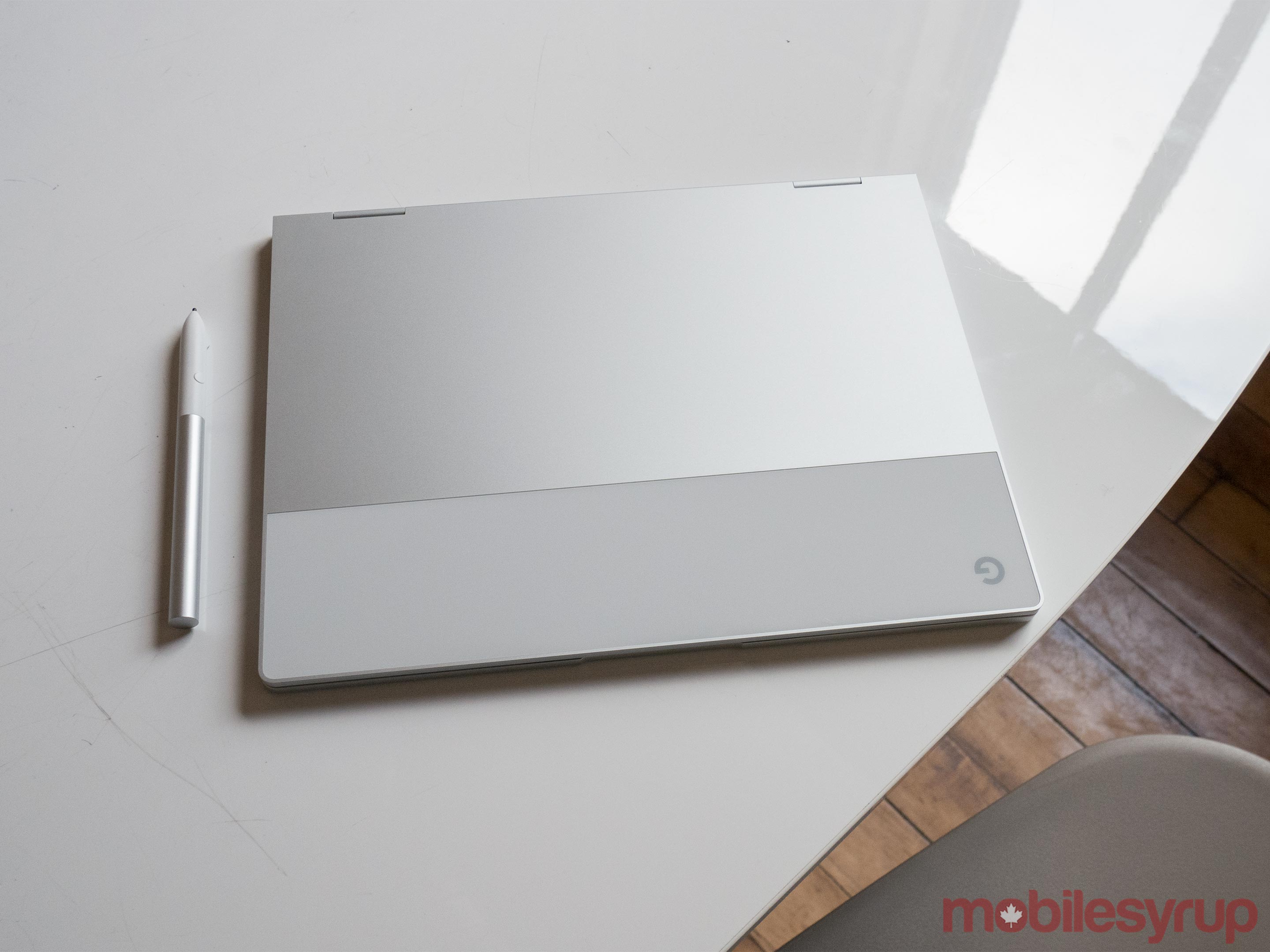
I don’t think the price is necessarily a hard-stop for every potential buyer, however, and while I’m aware there are other, less-expensive Chromebooks on the market that might be better suited to our particular situation, I also think there are consumers that will pay a premium for a marriage between excellent performance and complete simplicity.
The person the Pixelbook doesn’t work for, it turns out, is me. Like most tech reviewers, I need to edit photos and video on my machine and the Pixelbook stops just short of giving me what I need in that respect. For instance, I can use Adobe Lightroom to edit RAW photos, but I can’t use it to size them properly.
In speaking with Chrome OS product director Kan Lui, however, he told me that Adobe is committed to tweaking its apps for Chromebooks, and that the next version of Photoshop that hits the platform will be significantly more “desktop-y.”
In any case, in this review I’ve attempted to put this issue into its appropriate context. It may be frustrating for me, but for many it’s not an issue.
The essential questions are: does this 2-in-1 do what it sets out to do? And is it worth the price tag?
The second we’ll leave to the end of the review, but let’s dive into the first question.

According to Lui, the pitch is this: “It marries the best of beautiful hardware, a fast processor, simple to use computing experience and a secure experience.”
In many respects, the 2-in-1 succeeds in the construct of these guidelines.
The Pixelbook’s design is one of its strongest elements – but there are a few quirks.
To start with an immediately apparent one: the bezels around the screen are quite chunky, at a time when competitors are striving to reduce. In a practical sense, it’s not a huge detractor, but it makes the display look smaller and certainly detracts from overall appearance.
Another minor detractor is the fact that there are only two USB-C ports on the device. It’s the way of the future, but for many the lack of USB 3.0 is likely to cause some difficulties.
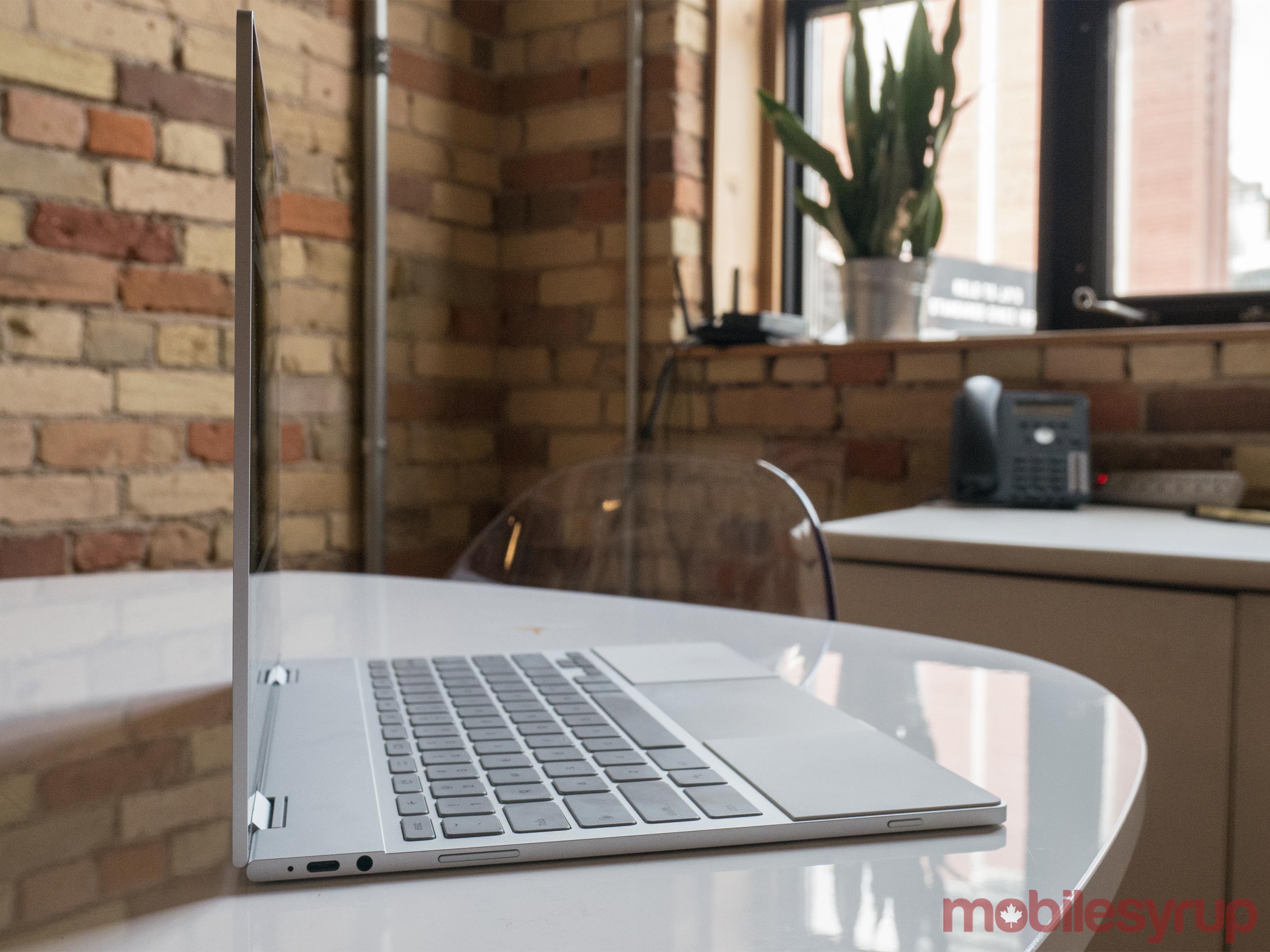
It does feature a bonus 3.5mm headphone jack on the left-hand side of the base, however, which allows users to avoid the dongle life or purchasing wireless headphones if they’d rather put off the inevitable. Also on the left-hand side is a volume rocker and a button for locking the screen.
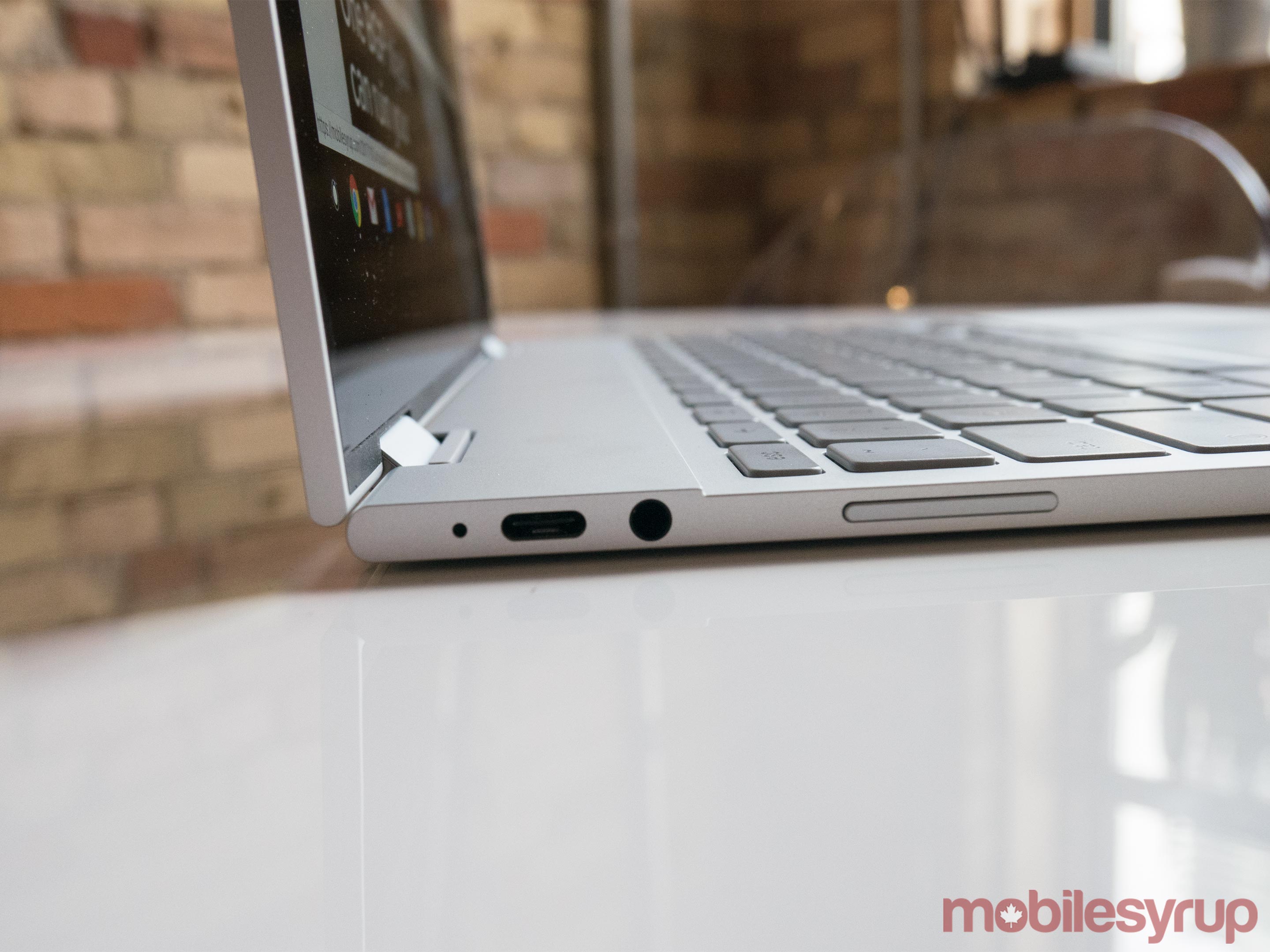
Delving into more of the good stuff: the little 2-in-1 feels exceedingly small and light. In reality, it doesn’t win the featherweight crown at just under 2.5 pounds — the MacBook Air and 12-inch MacBook weigh in at around 2 pounds. However, that’s still lighter than many competitors, including the Surface Laptop and Lenovo Ideapad 710S.
Meanwhile, its thinner than all the above listed competitors, making it extremely easy to slip into an over-stuffed backpack.
I also found the trackpad was exceptionally smooth and responsive, and enjoyed the ease of using the Pixelbook’s dedicated keys for bringing up the system menu, Google Assistant and Google search.
The lack of cushion on the keys (0.8mm of travel) was unpleasant for long-term typing projects, however, and I felt somewhat constricted by the small size of the keyboard.
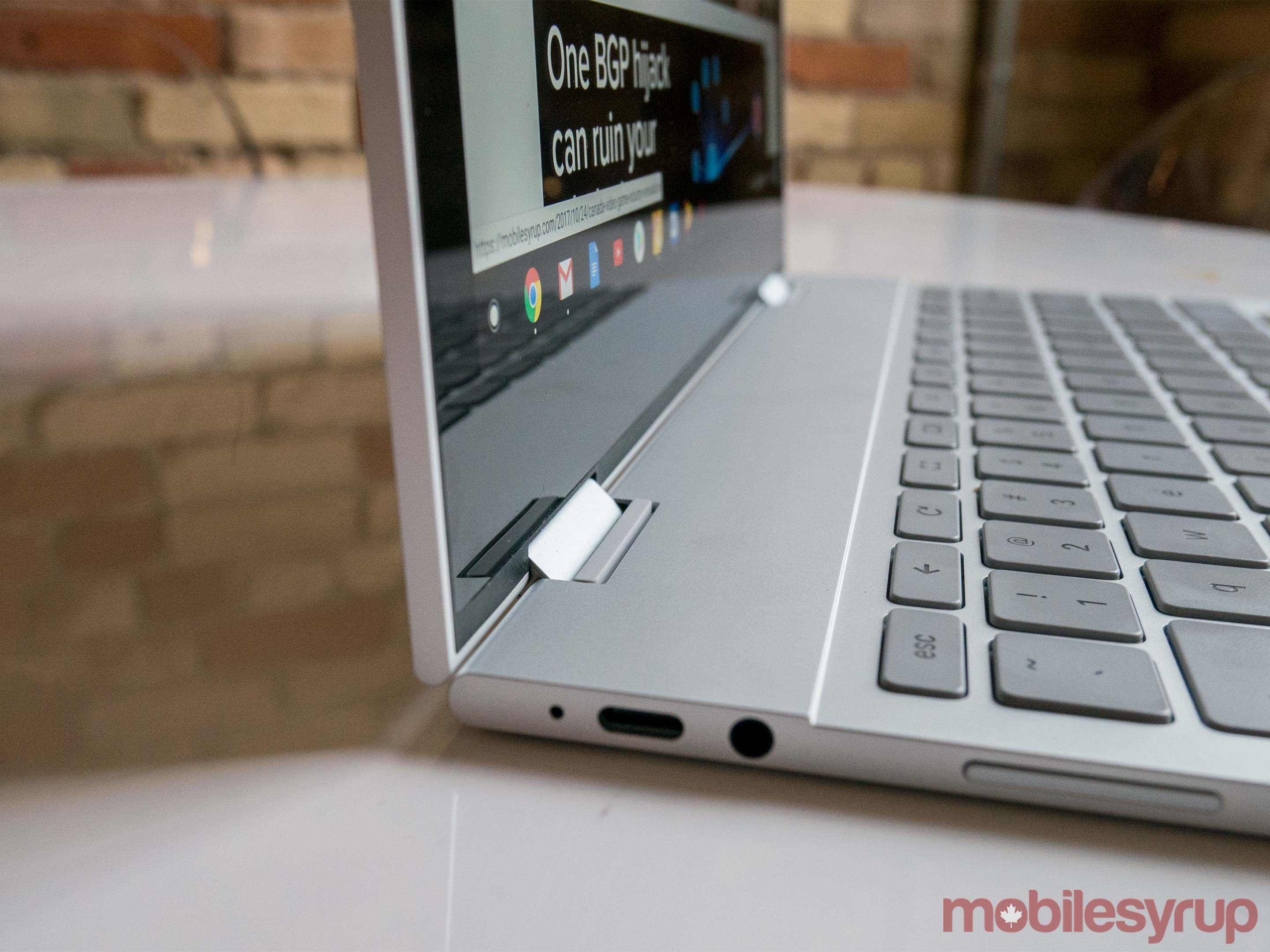
On the flip side (literally), I was very impressed by Google’s small and unobtrusive 360-degree hinge, which moved smoothly when rotated, but also remained solidly locked in any given position. To my mind, this is the perfect form factor for a 2-in-1, giving it a flexibility that most of Microsoft’s Surface creations fail to achieve.
In fact, pitting the Pixelbook against the similarly priced and positioned Surface Laptop, I’d have to say I prefer the Pixelbook’s design. It’s not necessarily prettier – the Surface Laptop’s sleek exterior, classy collegiate colour options and Alacantara fabric come together to make a very handsome laptop – but it does have more flexibility of form.
Additionally, the Pixelbook’s silicone palm rests which rest on either side of the glass trackpad offer the same warm-to-the-touch benefits that the Alacantara fabric does, and may be easier to clean.
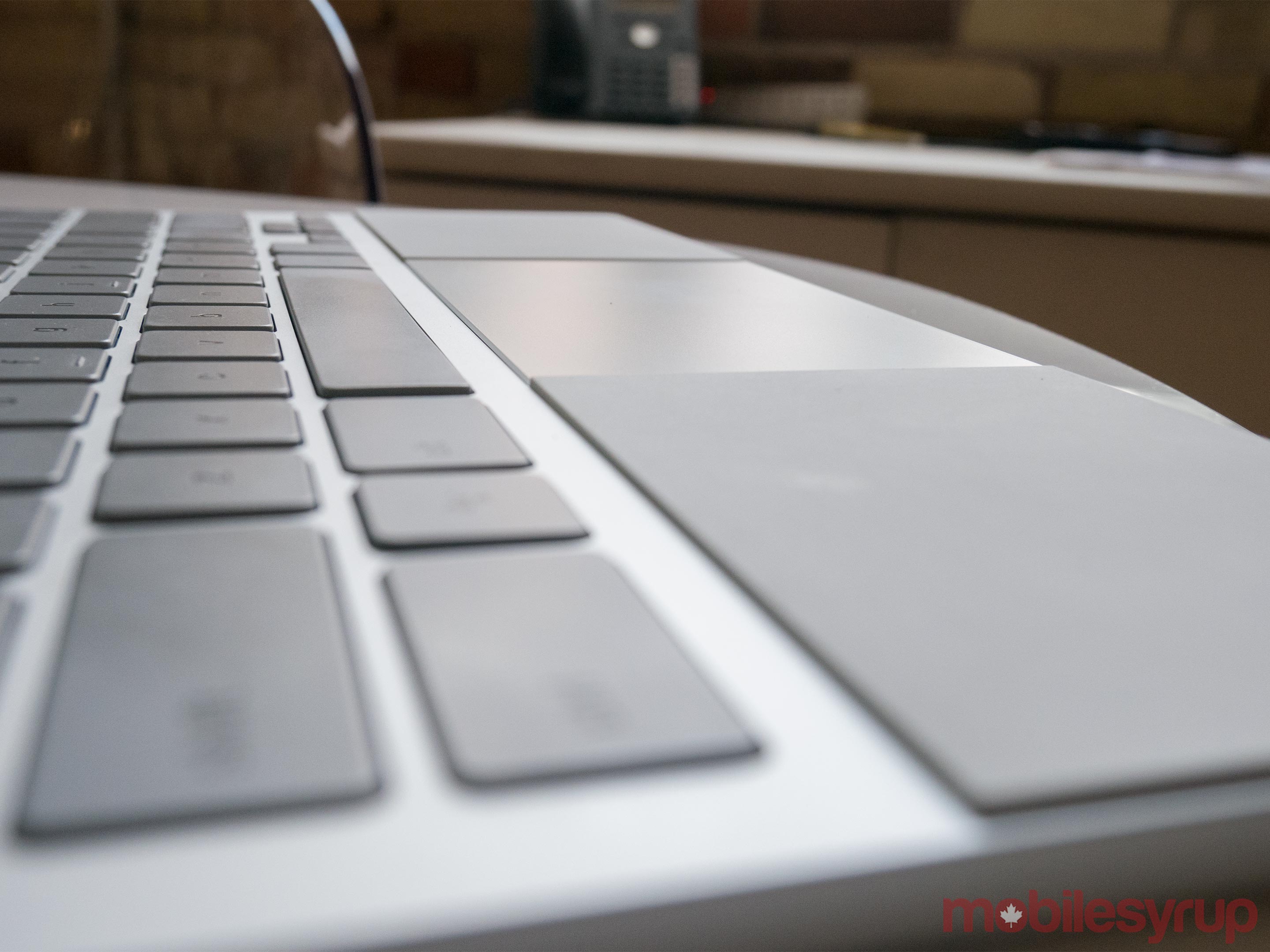
Having said that, after several days of use they’re far from the pristine pads they once were. Most noticeably, a grease stain has marred one side.
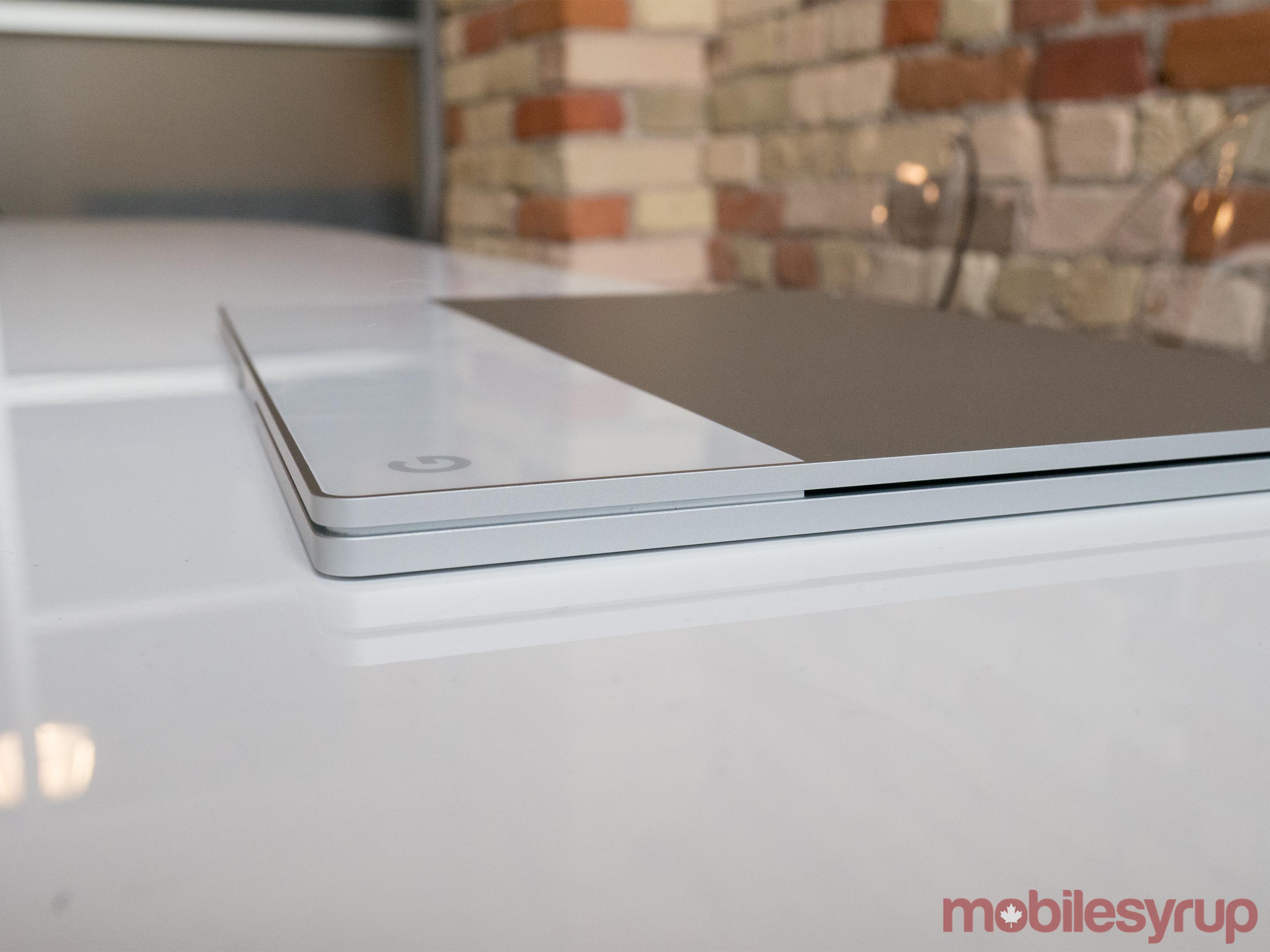
The palm rests aim to provide other benefits, too. They’re raised high enough that they should keep the keyboard from pressing into the screen and making dust marks when the laptop is closed — unfortunately, in practice you still end up seeing those imprints.
They do, however, provide a secure surface for when the Pixelbook is in ‘entertainment mode’ – i.e. when the keyboard is folded underneath as a base and the screen faces up.

In terms of other configurations, there’s the aptly named ‘tent mode,’ and of course ‘tablet mode’ in addition to the standard laptop setup.
While I didn’t find much need for using tent or entertainment mode (though they’d clearly be useful in the tight confines of a plane), I occasionally used tablet mode, either for viewing video, reading or taking notes with the Pen – sold separately for $129 — during a meeting, and the switch between modes was seamless and quick.

At this point, I should note the performance of the Pen with the Pixelbook — which was created by Wacom – showed more lag than I had expected, and even caused one of the more significant slow-downs I experienced with the Pixelbook. Google says this is a known issue and states a fix is expected to release by October 31st.
For the most part, though, it was more than adequate for jotting down notes and casual sketching, and I enjoyed the fact that it doesn’t require any fussy Bluetooth pairing. My main gripe is the fact that it doesn’t come packaged with the Pixelbook, even at the laptop’s premium price point.
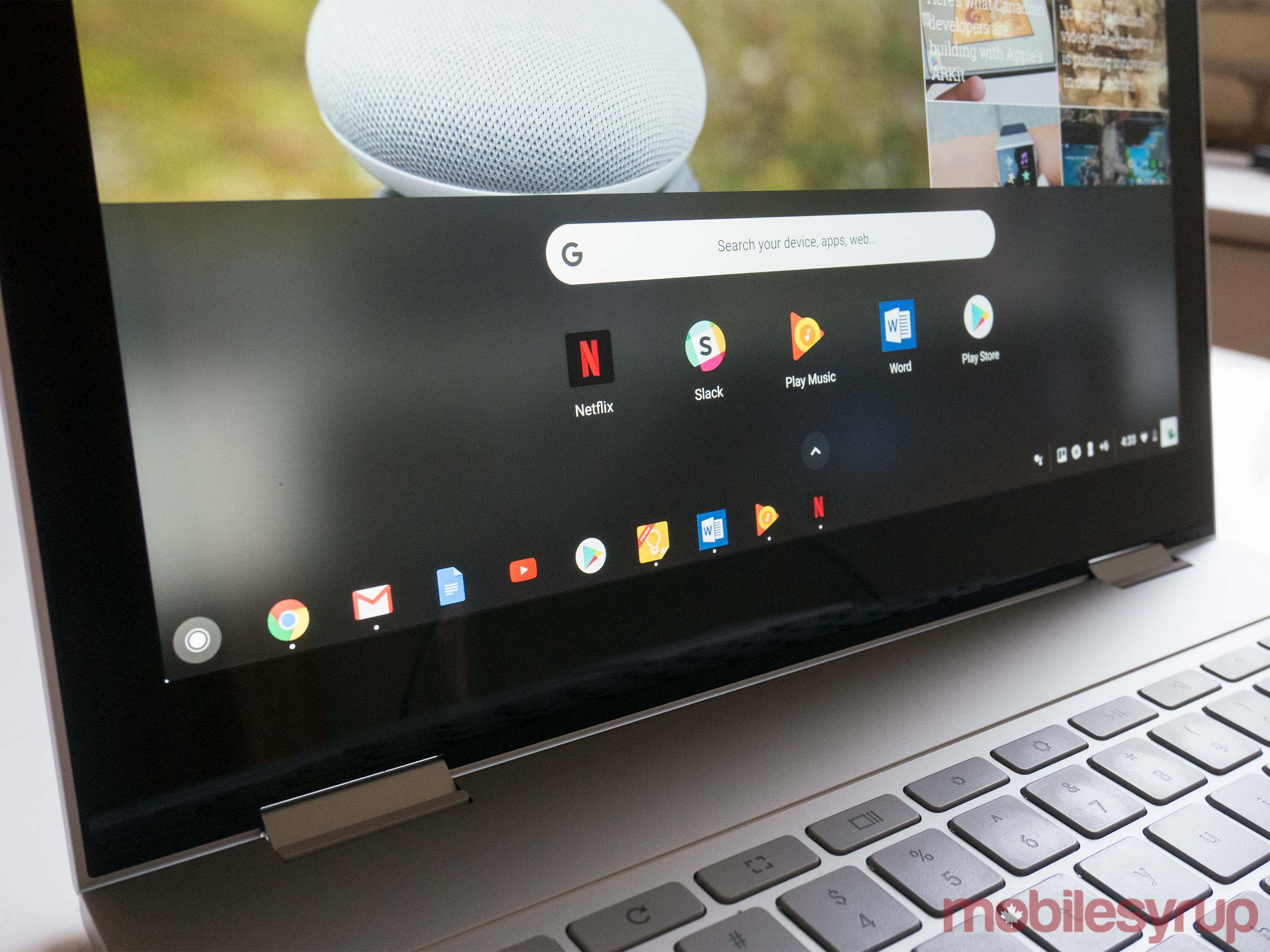
While bezels were my main issue when it came to design, what they contain is a pleasant, if slightly yellow-toned, display.
As is the case with the Pixel 2, the display offers vibrant colours, but with a warmth that goes just slightly overboard. It’s quite bright, however, and seemed to outshine, by a small margin, the 2016 Surface Book I usually use to work. All this made for a solid streaming device, and content on Netflix expanded to the full size of the display, making the most of the not exceptionally large real estate.
As for internals, my device – the base model – stocks a seventh-generation Intel Core i5 processor, 8GB of RAM and 128GB of SSD, which paired with Google’s operating system led to a buttery smooth experience.
It consistently zipped along even with multiple productivity apps open and many tabs running in my browser. During my time with it I only experienced two minor instances of lag.
The first occurred when using the pen in the Google Keep app, and the second while writing in Microsoft Word. Other than that, the experience was fantastic — though I think if the Pixelbook offered the ability to use more processing-intensive apps, performance would begin to suffer.
One of the highlights of the Pixelbook, for me, was battery life — a benefit of having a limited operating system. The 2-in-1 was able to last me almost an entire eight to nine-hour work day, though I switched to my Surface Book when I needed to edit photos.
Still, with almost constant use for word processing, browsing and using productivity apps (and the display two notches away from full brightness) I was able to work from 9:30am to 5pm without plugging in for a charge.
Once it was out of charge, the fast charging 45W charger was able to bring it back up to full at an impressive speed – about 60 percent in just over 40 minutes, for instance.

But while long-lasting battery is a wonderful advantage for a mobile device like this, it doesn’t mean much if you aren’t able to complete essential tasks — so lets dive into the software and what you can and cannot do on the Pixelbook.
You can operate any Android app on the Pixelbook — a feature that’s been in beta for quite a while — but that doesn’t mean that all those apps are optimized for the device. Some appear so stretched in full-screen mode that they’re confusing to read and navigate. Images shared in Slack, for instance, show up in the feed as enormous blocks that take up almost the entire window.
This is somewhat curious considering that Slack, like Adobe Lightroom, Netflix and VLC, worked with Google on optimization. But the explanation may be that Google doesn’t see full-screen as a normal use case for Slack. Lui noted that for messaging platforms, a window roughly the size of a smartphone display, which can overlap other screen content but not fully obscure it, makes sense for multi-tasking.
Speaking of multi-tasking — in desktop mode, switching between multiple apps was pretty easy. Android apps can be dynamically resized like any other window, though not all can be snapped to the side by long-pressing on the ‘maximize’ icon as Chrome tabs can. For example: Google Keep could, but Slack could not.
In tablet mode, unfortunately, you cannot resize windows — though in practical terms there’s likely not many times when you would need that capability and couldn’t just shift back to desktop mode.
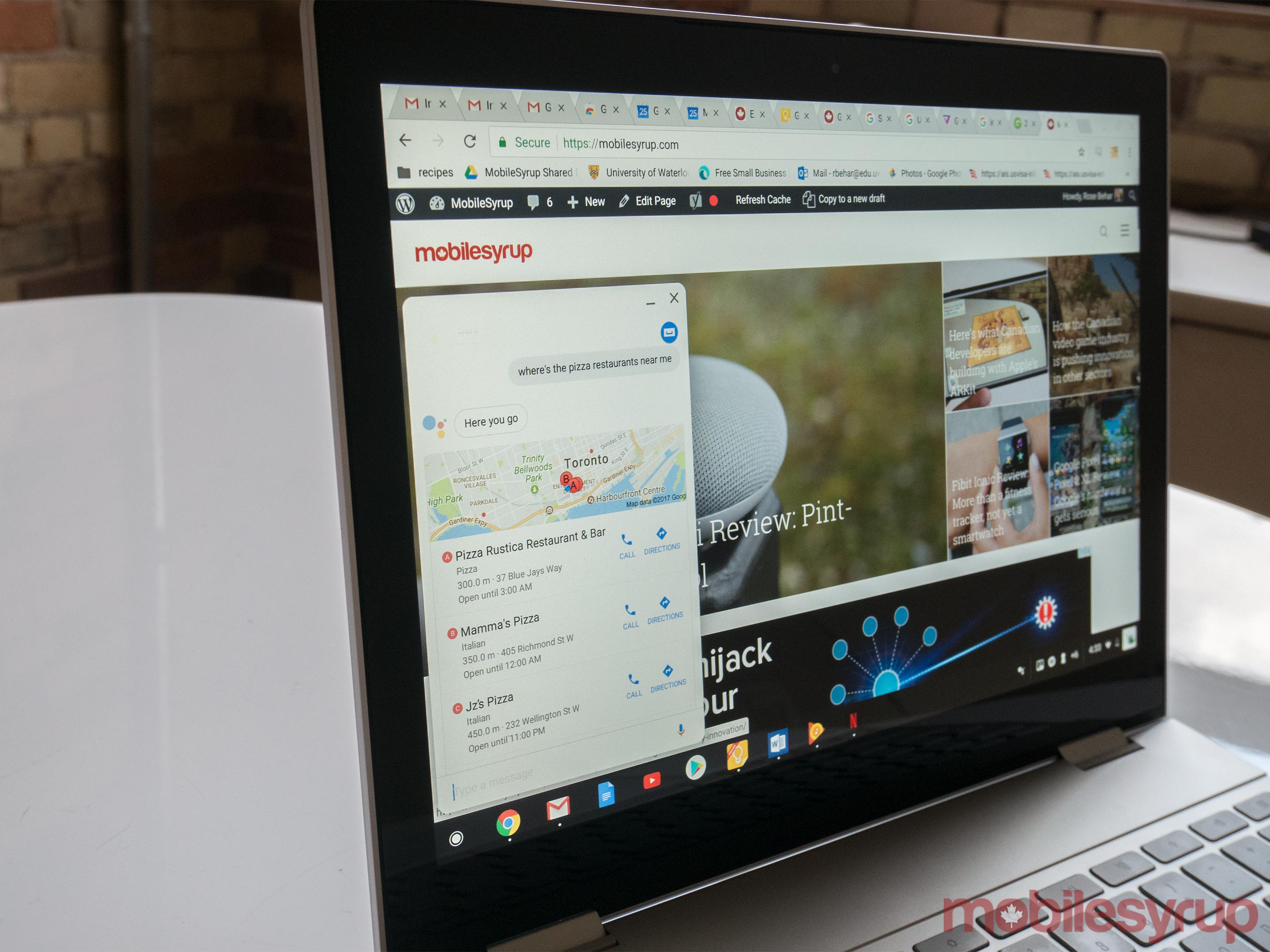
Another marquee feature is Google Assistant. The Pixelbook is the first laptop to have it built-in, and there are three ways to take advantage of what is arguably the best personal assistant on the market: say “Ok Google,” press the dedicated Assistant key or hold down a button on the Pen.
This allows you to circle something of interest on the screen in order to get more information or perform certain actions. The most useful example of this is receiving an email with event details and circling it to create a calendar event. It wasn’t perfect — you still had to tweak certain details before adding the event to your calendar — but it was a handy head-start.
The Pixelbook’s answer to easy unlocking is also a software-based feature. The laptop uses ‘Smart Unlock,’ an existing feature of Android, to let users unlock their Pixelbook by unlocking their smartphone. In testing this out, I found it worked with the Pixel 2 XL seamlessly, but I wasn’t able to get the Sony Xperia XZ1 to connect — I’ve reached out to Google for more information on this.
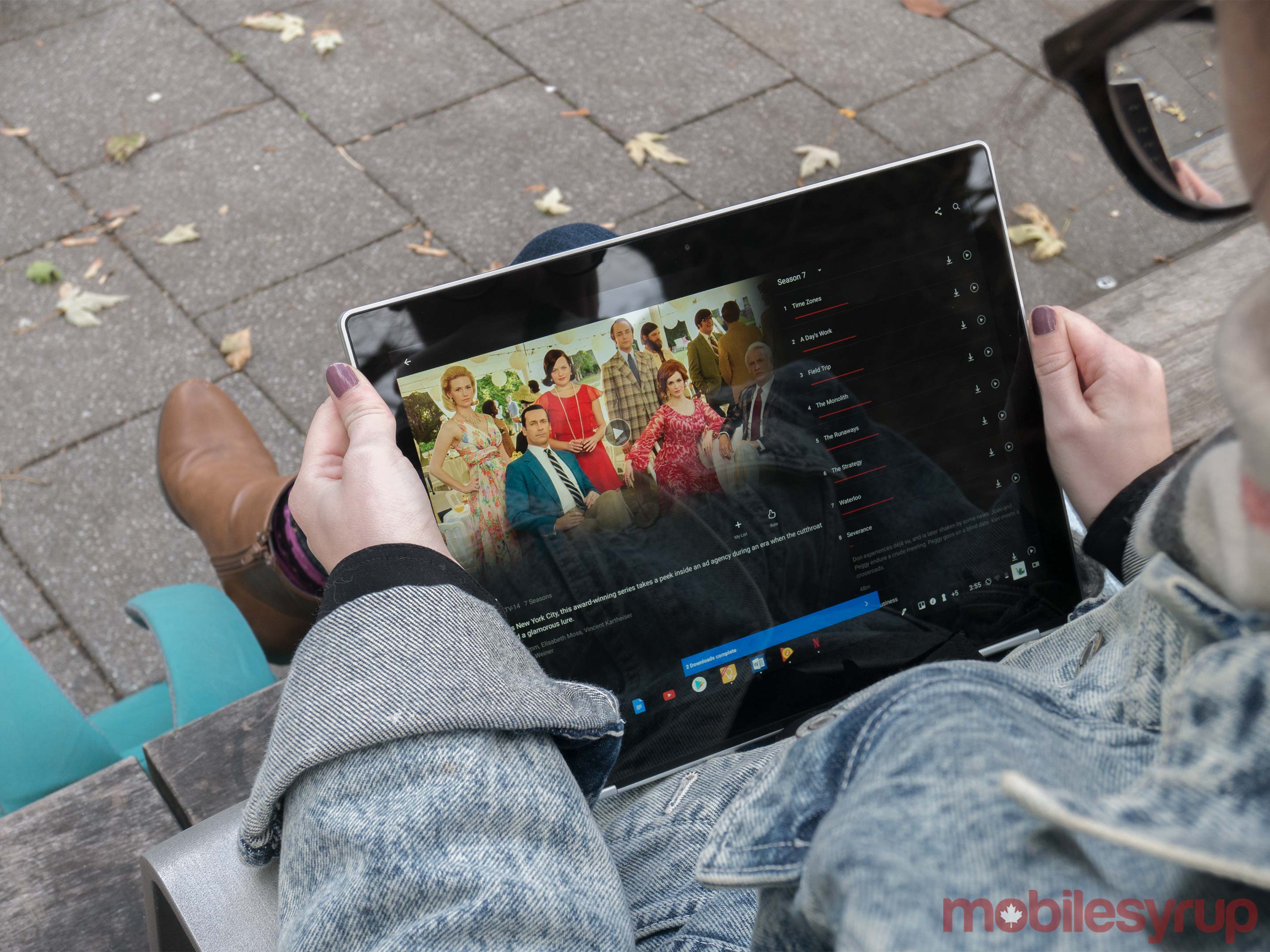
Another touted feature is ‘Instant Tethering,’ which lets Pixelbook users move seamlessly to a hotspot connection from their phone if they lose Wi-Fi. I wasn’t able to test this, as the feature wasn’t quite ready yet. Google says an update will go out on or before October 31st, along with improvements to assistant set-up and Pen latency. The company says the ability for the laptop to recognize the ‘Ok Google’ command while the display is off is also coming soon.
All in, I really enjoyed my experience with Chrome OS and desktop Android apps, but I wouldn’t say it operates as a workstation. In fact, even calling the Chromebook a productivity device is pushing it. The lack of processing-intensive photo and video editing apps makes it a difficult sell for professional creatives. Meanwhile, coders will most likely stay away because many tools and software development kits won’t run on webpage-based integrated development environments.
The post Google Pixelbook Review: Next-level Chromebook appeared first on MobileSyrup.

‘Freemium’ games — titles that are free to download but contain in-app purchases — are becoming increasingly popular across a wide variety of platforms.
A recent poll of 1,534 Canadians by the Angus Reid Institute revealed that six in ten (62 percent to be exact) of Canadians believe that parents are to blame for children making in-game/in-app purchases.
However, 48 percent of Canadians believe there should be federal regulations aimed at preventing children from making in-app purchases without parental supervision.
The survey also found that one in seven Canadians experience children buying things they weren’t supposed to, via a mobile device. Four percent had someone in their own household do this, while nine percent said the child of a family member or close friend made the purchase. This is even more common for adults under the age of 35, where the likelihood increases to one-in-five.
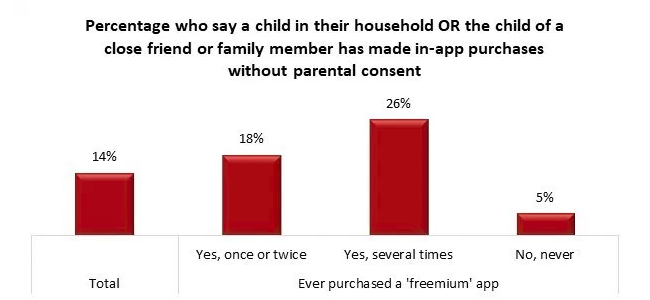
Three-quarters of those surveyed believe that games that are meant for all-ages should not allow in-app purchases, though only 11 percent blame app developers for unauthorized purchases by children ages four to ten. While oddly enough, 61 percent of users who regularly download apps that feature in-app purchase believe that government intervention is not needed.
Lastly, 72 percent of those surveyed believe that children over the age of ten should know better than to make in-app purchases, while three percent of Canadians say children under that age are at fault for this.
For methodology regarding the institute’s study, follow this link.
Source: Angus Reid Institute
The post Many Canadians believe that parents are to blame for children making in-game purchases, says survey appeared first on MobileSyrup.
And no, it’s not cookin’ down those heritage blackberries
Instead, it’s a multi-day workshop to move closer to a “… clear and detailed design . . .” for the Greenway. Two open houses will bring the public into contact with the background material (19-page PDF) being used by the 100 volunteer “Arbutus Champions” and project team.
The Champions will work over the weekend, and then — a big public Reveal to see what they came up with.
All held at:
Public Open Houses:
The Big Reveal:


You’ve rehearsed your presentation. You’ve got a smart outfit picked out. You’re ready to give some firm handshakes, smile, and make eye contact. And you’re probably more than a little amped up on adrenaline. Your client, on the other hand, has been in meetings all day, feels pressed for time, and has a million other concerns on their mind. To avoid looking at blank faces while you try to make your case, you need to go beyond the usual preparation tactics. Here’s how to break through the boredom barrier and make a memorable impression in your next pitch meeting.
You know you have great idea, and you’re eager to share it. That excitement is key to a great pitch. But it’s even more important to show genuine enthusiasm for your client’s business and their needs. Don’t make the mistake of just talking about yourself and your product.
Before the meeting, research your client’s company and discover what challenges are facing their industry. Look at trade and business publications and analyst reports, find out what their competition is doing, and, of course, read through your client’s external communications. Talk to them ahead of your pitch to get a better sense of their priorities, goals, and what problems they’re hoping you can solve.
Ready to really impress your clients? Tell a story they’ll remember with Dropbox Showcase
Understanding how you can best meet customers’ needs requires analytical research as well as a healthy dose of empathy. People don’t make decisions—even business decisions—on stats and metrics alone. They might not be consciously aware of it, but underlying emotional desires are likely driving your client as well.
Figuring out these emotional needs can be a bit tricky. You won’t find the answer announced in a press release or on the corporate blog (although you may find clues there). However, you don’t need to carry out a covert investigation to uncover some probable answers.
Ask questions and listen carefully to what they say in conversations ahead of the pitch meeting. Try to glean as much insight into their psyche as possible. How are they feeling about their work? How do they measure success? What are their thoughts on shifts in the industry and where do they see opportunities opening up? Maybe your point person is angling for a promotion. Or maybe the whole team wants to score a win against a key competitor, but they’re not confident that they can pull it off. Whether your client wants to feel secure in their job or build something new and bold, put yourself in their shoes and communicate how you can help them achieve these deeper desires.
Once you have a good grasp on what keeps them up at night, craft your pitch to specifically address those challenges. First, think back to your high school essay writing days and sharpen your solution into a succinct thesis statement, such as “Our tool can improve your search engine rankings” or “We can increase your inbound marketing leads.” Then back that up with supporting evidence. This will give your pitch clarity and make it easier for the client to understand the value of your proposal.
Remember that your client isn’t interested in just hearing about all of your product’s wonderful features or your particular talents. They want to know how your proposal will benefit them. Demonstrate that you understand their problem and explain why your solution is the best fit by continually connecting your offering to their unique business and emotional needs.
If all goes well, you’re about to embark on a journey together, and your client needs to know that you’re invested in them, too. No one wants a travel companion who’s only interested in their own objectives. By proving that you understand where they’re coming from and where they want to go, you’re much more likely to win their trust and close the deal.
People remember information when it’s woven into a narrative “up to 22 times more than facts alone,” says Stanford professor Jennifer Aaker. Whether you’re pitching potential customers or investors, don’t just explain what you do; share why you do it. This is especially important when trying to win a new client. Any number of people in your field can rattle off similar services and statistics, but only you can tell the personal story behind you or your product.
Although you may be tempted to relate the rosiest version possible, that’s likely to induce yawns. “As a storyteller, you want to position the problems in the foreground and then show how you’ve overcome them,” screenwriting lecturer and business consultant Robert McKee told the Harvard Business Review. “When you tell the story of your struggles against real antagonists, your audience sees you as an exciting, dynamic person.”
Research has repeatedly suggested that we remember what we see better than what we hear. In a University of Iowa study that compared auditory, visual, and tactile memory, auditory memory came in last. And as time delays grew longer, participants’ ability to recall what they heard fell even further behind their visual and tactile memories.
To combat this “Achilles’ ear,” add bold visuals to your boredom-busting arsenal. Not only will graphics and videos help people remember your pitch, but these visual aids will also increase their concentration during your presentation, which is extra good news given the dismal statistics around adult attention spans.
No one wants to be held captive by a self-centered or aggressive sales pitch. Clients want to be captivated by an engaging presentation that reflects their needs and taps into their emotions. By employing a little research, empathy, and good old-fashioned storytelling techniques, you can create a pitch that will hold clients’ interests and, more importantly, inspires them to say yes.


Don Luxton, the heritage consultant for the Burrard Bridge project, reflects back on how we got here – and how we almost didn’t.

There was no doubt the Burrard Bridge and its intersections were going to change. That had been true since the 1970s when the expectation was that the intersections should function as much as possible like freeway interchanges – as did the Granville Bridge.
At the beginning of the 1990s, the City purchased the ‘Kettle of Fish’ restaurant and some adjacent land at the southeast corner of Pacific and Burrard in order to construct a separate exit ramp that would seamlessly join with Hornby, rather like the Seymour ramp does on the Granville Bridge. An upgrade of the southern intersection maintained as much as possible the freeflow of traffic on curving arterials.
A capital plan passed by voters approved $50 million for reconstruction and seismic upgrade of the bridge – which was by now visibly deteriorating. Pieces of concrete would fall off; rebar was exposed; sidewalks were eroding.
There was sufficient money to serve cyclists by widening the bridge with outriggers if council considered that a priority. In response, the heritage community (being led by people like Don Luxton) sounded the alarm. Such a change to the physical look of the bridge would hopelessly compromise one of the only art deco bridges in North America.
But one of the NPA councillors (yup, me) concerned with both changes in the look of the bridge and unnecessary costs for widening convinced a bare majority of his colleagues to at least try out an experiment: close one of the lanes for cyclists to see if that could work.
It didn’t. The 1996 closure, pushed forward without sufficient planning and notification, was a media gong show. Cell phones were just coming in, and affluent motorists, stuck in traffic, had time to call up the mayor’s office with their harshly stated opinions.


While the one-week experiment was a considered a failure (even though traffic, by the end of the week, had adjusted fairly well), it at least stopped any proposal for widening the bridge until further study has been done. And boy, were there studies – seemingly endless ideas for different configurations and even additional crossings.
However, a study around 2000 of all the False Creek crossings concluded that cycling and pedestrian lanes were needed in both directions on each side of the bridge. In the meantime, costs were escalating: outriggers went from $13 to $60 million in price. But no decision was made – until a new council decided to try another lane-closure experiment:
By the time the Gregor Robertson’s Vision council tried new trial bike lanes in 2009, Price believes a few important things had changed.
The city had created a network of non-separated lanes on side streets, helping to support a growing community of cyclists who now wanted to use the bridge safely.
The engineering and planning departments also had a better understanding of how to integrate bike lanes without completely infuriating drivers.
And the people at City Hall knew that they needed to do a much better job of informing the public about the change.
- CBC
All through the debate, Luxton and the heritage community were vocal in their insistence on not widening the bridge, reinforcing a change that was already occurring in the engineering department. As Don notes, “Engineers are not monolithic in their thinking; they can be extraordinarily creative, given the mandate and resources.”
Finally they were. The bridge would be have to be seismically upgraded, the deterioration addressed, bike lanes and sidewalks installed on both sides of the right-of-way, traffic capacity maintained, intersections redesigned for safety and separation – and all within in the original footprint of the span.
And of course, the heritage of the bridge enhanced, to bring it back more to the original look. Except for one thing: there was no money to reinstall the decorative pedestrian lights and the posts on which they sat.


BuzzFeed News profiles Apple Senior Vice President of Retail Angela Ahrendts in an in-depth feature today. Ahrendts, who took over Apple’s online and physical retail operations in 2014 and manages over half of Apple’s workforce, is portrayed in each of her roles within the company starting with the launch of iPhone 8 pre-orders online:
At midnight, the war room's server activity chart ticks abruptly from green to red under a flood of incoming iPhone orders. On the wall, blinking red lights begin flashing across a digital world map with a concentrated flurry of activity in China and South Asia.
As author Nicole Nguyen explains, Ahrendts' first order of business when she took over retail operations was to update Apple’s online experience. Those efforts included better integration between Apple’s online and physical stores, which reports say are now second only to Amazon in sales revenue.
However, the majority of Nguyen’s story is focused on Apple’s physical stores, which have been the focus of Ahrendts’ attention most recently. BuzzFeed News was on hand for the opening of Apple’s new Michigan Avenue store in Chicago last week. That store, like ones coming to Paris and Milan, represents Apple’s strategy to target cities worldwide:
…the core of the strategy is doubling down on metropolitan areas. Ahrendts’s team conducted an extensive study of cities, looking at factors such as tourism, technology usage, and demographics, an approach taken from her roots in high-end fashion. “One of the things I took from luxury is you look at the top cities in the world; you don't just look at the countries. We did a lot of analysis, really studying the top 100 cities in the world, and not just now, but by 2020 and by 2025. Because you really need to target your investment,” she said.
In addition, Ahrendts is overseeing the renovation of 400 existing stores and expanding the benefits of employees who work at them.
The feature ends with Ahrendts overseeing the distribution of iPhone 8s and other pre-ordered items from a UPS facility in Kentucky. Like many things with Apple, the scale of the operations that Ahrendts manages is almost too vast to comprehend, but Nguyen does an excellent job of capturing both the scope of those operations and the personality that Ahrendts brings to her role.
→ Source: buzzfeed.com


Nintendo has announced that Animal Crossing: Pocket Camp will be released on iOS and Android. The game, which follows a free-to-play model like Fire Emblem Heroes that debuted earlier this year, will be familiar to anyone who has played other titles of Nintendo’s Animal Crossing franchise. Originally expected by March 2017 along with three other games, Nintendo’s latest iOS game will be released in late November 2017, although it is already available in Australia.
Based on the Nintendo Direct, Animal Crossing looks like a substantial release on par with Super Mario Run. The new title draws on Nintendo’s 3DS title Animal Crossing: New Leaf - Welcome amiibo, with some of the same characters populating both games. You play as the manager of a campground, building your campsite and interacting with animal friends. There are four areas to explore, island, beach, forest, and river. Along the way, you collect items that will help you build items to decorate your campsite and complete tasks for animals you meet.
Materials you collect, like wood and cotton, are used to craft items for your campsite. There are also in-game currencies that can be used to purchase a deep catalog of items or speed up the construction of complex items. The currency can be earned by completing tasks in the game or purchased as an In-App Purchase. In addition to your campsite, your character and camper are customizable.
Interacting with the animals you meet in the game and completing tasks for them levels up your friendship, so the animals will visit your campsite. At launch, the game will include 17 different characters you can befriend.
There are also other campsites to visit, and you can invite friends to visit your campsite by sending them your Nintendo player ID. To keep the game interesting, Nintendo says it will offer seasonal and limited-time items, which will be announced in-game and on the game’s website.
Like Super Mario Run, Animal Crossing: Pocket Edition requires a persistent internet connection to play. The requirement, which was criticized after Super Mario Run launched, means the game will not be playable if you are unable to connect your iOS device to a WiFi or mobile network. Although the limitation may not seem burdensome in theory, in practice, it has been a major sore point for fans of Super Mario Run because, in addition to being unavailable in places without an internet connection like on a subway, the game often fails where network connections are weak.
With the release of Animal Crossing: Pocket Camp, Nintendo will have released all four titles disclosed during its earnings call in April 2016. No additional titles have been announced yet, but I wouldn’t be surprised if new games are revealed as early as next week when Nintendo announces its earnings.
Animal Crossing: Pocket Camp requires iOS 9 and higher and will be available on the App Store in late November 2017.
Club MacStories offers exclusive access to extra MacStories content, delivered every week; it's also a way to support us directly.
Club MacStories will help you discover the best apps for your devices and get the most out of your iPhone, iPad, and Mac. Plus, it's made in Italy.
Join Now
While the vast majority of devices haven’t even updated to Android 8.0 Oreo, Google’s moving forward with the next iteration of their mobile operating system.
Android users with compatible Nexus or Pixel devices — the Nexus 5X and 6P, as well as the Pixel, Pixel XL, Pixel 2 and Pixel 2 XL — can try out Android 8.1 now.
Nexus and Pixel users can sign up for the Android Beta Program and wait to receive an over-the-air update for Android 8.1. If they don’t want to wait, however, they can also download and flash the Android 8.1 system image to their devices.
Be warned, manually flashing a system image removes all data from your device. Additionally, manually installed system images do not receive over-the-air updates to future developer previews.
Don’t forget that, according to Google, you need an unlocked bootloader to install this developer preview.
Android 8.1 doesn’t bring any major revisions to Google’s mobile operating system.
According to Android Authority, “the biggest thing that stands out is the set of Pixel Visual Core features for the Pixel 2 and Pixel 2 XL.”
The Pixel Visual Core (PVC) is Google’s custom imaging chip that ships with every Pixel 2 and Pixel 2 XL device. As MobileSyrup’s Igor Bonifacic explained, the PVC will eventually allow third-party app developers to “enhance the HDR capabilities of their own photography apps, according to the company.”
The PVC is also incredibly useful when it comes to compiling HDR photos.
Other Android 8.1 updates include improved notification alert settings that prevent apps from generating more than one notification alert sound per second. This will no doubt be an incredibly welcome revision for those users sick of messaging apps constantly announcing new messages.
Other changes include an update to how apps manage wallpaper colours — which will no doubt allow future bezel-less devices and notched devices, like the Essential Phone, to better distinguish between an app’s boundaries and the notification bar.
This is the first of two Android 8.1 develop previews.
Source: Google, Android Authority
The post Google releases Android 8.1 developer preview appeared first on MobileSyrup.

Samsung may be looking to return the fingerprint scanner to the front of its flagship device with the Galaxy S9.
A Samsung patent application found by GalaxyClub shows a fingerprint scanner built into a little notch near the bottom of the screen — somewhat like the Essential Phone or iPhone X.
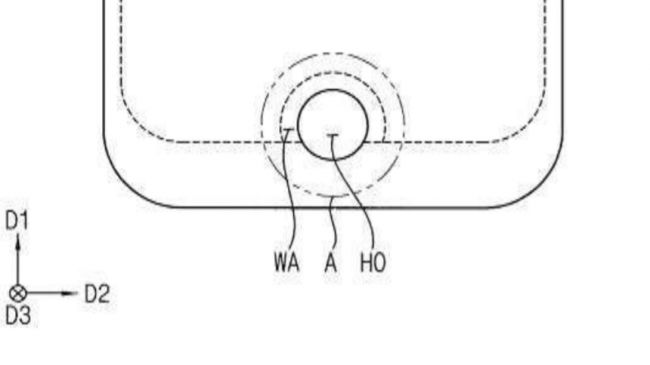
On the Galaxy S8 and S8+, the fingerprint scanner is located next to the rear camera — a placement MobileSyrup senior editor Patrick O’Rourke found to be strange in his review. He noted that having the scanner in this location caused the occasional smearing of the back camera lens, discouraging him from using the feature altogether.
It’s important to note that this is only a patent — one that was filed in 2016 at that. Samsung may not end up integrating this front fingerprint scanner design into the final Galaxy S9 product.
In any case, the S9 won’t be released until at least 2018, although reports suggest that Samsung may reveal the flagship phone in January.
Back in July, Patrick and MobileSyrup staff writer Dean Daley discussed the pros and cons surrounding the various locations a manufacturer can place a fingerprint scanner on a smartphone.
Where would you prefer the fingerprint scanner on the Samsung Galaxy S9 to be located? Sound off in the comments.
Via: TechRadar
The post Samsung Galaxy S9 may feature front fingerprint scanner appeared first on MobileSyrup.

Apple has responded to rumours suggesting that the company told its manufacturers to lower the quality of the iPhone X’s Face ID facial recognition feature in order to meet market demands for the company’s latest flagship smartphone.
The rumour was published in an October 25th, 2017 Bloomberg article, which cited a number of anonymous sources.
Bloomberg wrote that the iPhone X’s dot projector is at the heart of Apple’s production woes. The dot projector is responsible for flashing a 30,000-dot framework onto users faces in order to determine whether or not the phone unlocks.
The dot projector is also a “fragile…easily broken” piece of hardware made out of gallium arsenide and glass that needs to be precision manufactured.
“If the microscopic components are off by even several microns, a fraction of a hair’s breadth, the technology might not work properly, according to people with knowledge of the situation,” reads an excerpt from the Bloomberg story.
Bloomberg further wrote that “to boost the number of usable dot projectors and accelerate production, Apple relaxed some of the specifications for Face ID…As a result, it took less time to test completed modules.”
In an email to Gizmodo, Apple responded to the Bloomberg piece, stating:
“Customer excitement for iPhone X and Face ID has been incredible, and we can’t wait for customers to get their hands on it starting Friday, November 3. Face ID is a powerful and secure authentication system that’s incredibly easy and intuitive to use. The quality and accuracy of Face ID haven’t changed. It continues to be 1 in a million probability of a random person unlocking your iPhone with Face ID.”
“Bloomberg‘s claim that Apple has reduced the accuracy spec for Face ID is completely false and we expect Face ID to be the new gold standard for facial authentication.”
Rumours that Apple will be unable to meet iPhone X demand have been circulating since the Cupertino giant announced their breakthrough flagship device on September 12th, 2017.
Noted Apple analyst and KGI Securities employee Ming-Chi Kuo was one of the first few dissenting voices, expressing concerns that “market demand won’t be fully met before 2018.”
Just this week, Japanese daily newspaper the Nikkei published a report claiming that it learned that “initial shipments of Apple’s highly anticipated iPhone X are expected to total around 20 million units, only have the planned amount for this year.”
In response to rumours that iPhone X supply won’t be demand, Apple CEO Tim Cook told BuzzFeed that the company will “see what happens.”
In spite of these rumours — as well as Cook’s response during the BuzzFeed interview — Apple has announced that early customers might be able to snag an iPhone X in-store when the phone launches on November 3rd, 2017.
The post Apple responds to report claiming iPhone X supplies are low because of Face ID issues appeared first on MobileSyrup.

Microsoft has officially ceased production on the Xbox and PC motion sensing device Kinect. Alex Kipman, creator of the Kinect, and Matthew Lapsen, GM of Xbox devices marketing, confirmed the news to The Fast Company in an interview.
Microsoft told The Fast Company that 35 million Kinect devices have been sold throughout the device’s lifetime.
The Kinect was originally teased under the codename “Project Natal” at the Electronics Entertainment Expo (E3) in 2009, with Microsoft fully unveiling the sensor at E3 the following year. The device launched later that year in November in North America as an accessory to the Xbox 360 and featured a massive $500 million marketing campaign.
The Kinect was originally positioned as a “Nintendo Wii Killer,” since the Japanese game giant’s massively successful system’s main selling point was motion-controlled gaming. Kinect also came to Windows PCs in February 2012.
The next iteration of the Kinect played a significant role in the reveal of the Xbox One in 2013, with Microsoft saying that the system would need to be connected to the sensor in order to run. However, the company later changed this requirement following feedback from consumers.
The Kinect remained as a pack-in with each Xbox One, though, offering dozens of voice and motion control options when the system released in November 2013. Including the Kinect came at a cost, though, as Microsoft priced the Xbox One at $499 CAD — a marked $100 more than rival system PS4, which released one week prior.
Six months after launch, Microsoft announced it would release Kinect-less Xbox One bundles for $399 CAD, with the sensor subsequently offered as a standalone accessory. Ever since, the system’s relevance has continued to dwindle.
Developers have all but ceased support for Kinect, with some even saying the device’s removal offered some additional processing power. Microsoft, meanwhile, continued to speak increasingly less often about the Kinect, instead pushing the Xbox One in other directions, such as the enhanced 4K-capable Xbox One X.
However, the core technology inside the Kinect lives on through other devices and endeavours. For example, according to the Entertainment Software Association of Canada, the Quebec-based Jintronix uses the device in rehabilitative services.
Microsoft also uses the Kinect’s core sensor in its self-contained mixed reality HoloLens headset, which was also created by Kipman. The HoloLens, while currently only intended for developers, has served as a starting point for Microsoft to release a series of consumer-ready Windows Mixed Reality headsets.
As well, the Kinect’s development team went on to produce other tech for Microsoft, such as the Cortana voice assistant and the Windows Hello biometric facial ID system.
Some tech gurus have also likened the Face ID tech that Apple uses in the upcoming iPhone X to the sensors in the Kinect.
Image credit: Wikimedia Commons
Source: The Fast Company
The post ‘Xbox off’ — Microsoft has officially discontinued the Kinect appeared first on MobileSyrup.


.jpg)