Shared posts

03 Nov 22:42

A Drive Through 1966 Vancouver

by Sandy James Planner

IMG_2680

The Ministry of Transport has released this gem of a 1966 car trip from Horseshoe Bay to New Westminster. Already garnering over 19,000 views,  it is one of a series of YouTube videos the Ministry has released of “drives” around the province undertaken a half century ago.

In 1966 there were 410,000 people in Vancouver.   Gasoline  was 32 cents a gallon. If you look closely you can see the toll booth at the entrance of the Lions Gate Bridge, and  watch the vehicle cross the bridge at a breathless rate. You can marvel at the low scale buildings in the downtown,  with a few pedestrians on sidewalks. There are some familiar landmarks like The Bay on Georgia, and a surprising plethora of  large format automobile oriented advertising for car related products, gasoline and of course tobacco.

Take a look at the video and post your personal finds in the comments section below.


03 Nov 22:42

Apple Reports 4Q 2017 Results

by Rui Carmo

There are better results breakdowns out there by now, but this one has a full transcript of the earnings call too. Impressive figures, some fancy footwork regarding the performance of different product lines.

03 Nov 22:42

Reviews And Valuable Behaviors

by Richard Millington

The simplest behaviors are often the most effective.

Getting members to write reviews, for example, consistently ranks as one of the highest-impact tasks a member can undertake.

One study shows why:

Results show that users look for simple and quick reviews and content about products in online brand communities (i.e., guides developed by users, comments, artwork and screenshots). However, results also show that users do not guide their purchases based on user-generated content when the process of gaining understanding is more time-consuming (i.e., reading discussions, watching videos) or requires more active involvement (i.e., workshop presence).

Essentially, getting lots of members to submit simple, quick, reviews is a bigger win than getting members to engage in long, detailed, discussions.

It’s a bigger win than members crafting long-form articles like user guides.

The conversation with your boss might be very different if you can show how you’re getting members to create and respond to reviews on multiple sites.

03 Nov 22:42

New York Activists Have Been Asking for Bollards to Protect Cyclists for More than a DECADE

by Average Joe Cyclist

Here is a press release from Transalt in New York – find out how the tragedy could have been prevented, and what you can do going forward. Attend or support the World Day of Remembrance for Road Traffic Victims on 19 November.

The post New York Activists Have Been Asking for Bollards to Protect Cyclists for More than a DECADE appeared first on Average Joe Cyclist.

03 Nov 22:40

The Next Big Thing: Free-Floating Bike Share

by pricetags

I was amazed.  Having not been in Seattle for a few months, I didn’t realize what was happening with bike share – until I saw this:

Bikeshare seattle (1)

And then this:

They’re Spin and Lime Bikes – two of three bikeshare companies that have, since July, started business in Seattle as private-sector initiatives after the failure of the city-subsidized Pronto system.  They don’t need docking stations; they’re just standing there – free floating – waiting for a rider to come by and unlock them with a phone.

Seattle Bike Blog provides the details here.

Within the downtown and inner neighbourhoods, they’re everywhere.

There’s a third one too – ofo, which is China-based (where all the GPS-enabled bikes come from, by the thousands). Apparently they’re doing pretty well, according to the Seattle Bike Blog, (though no one I talked to could figure out the economic model):

Free-floating bike share is working in Seattle. Or at least it sure appears that way according to the city’s first analysis of anonymized private bike share data.

In just two months, people have already taken 120,000 trips on the bikes. And because companies are steadily increasing the number of bikes on the streets, the number of rides each day continues to grow at a steep rate. 6,000 bikes are currently permitted, but SDOT’s Kyle Rowe told the Committee that he estimates the actual number on the ground now is closer to 4,000 and increasingly daily.


“Mobike (a China-based bike share giant that rivals ofo), Spin and LimeBike,” according to the blog, “are launching in Washington DC. …”  So, if they’re successful, is it just a matter of time before they arrive in Vancouver?

Will they displace Mobi or – like Car2Go and Evo compared to MoDo – will they complement each other, grow the market, add choice, and, once again, frustrate those who can’t believe that cycling is really a serious option and why do we need those damn bike lanes anyway …


03 Nov 22:40

Overcast 4.0 Brings UI Optimizations for iOS 11 and iPhone X, Drag and Drop, and New Advanced Settings

by Federico Viticci

The combination of iOS 11 and iPhone X is pushing developers to reconsider many of their interaction paradigms and interface affordances that predated the Super Retina display and drag and drop. In a span of two months, iOS 11 made custom implementations of multiple item selection and reordering effectively obsolete, while the iPhone X now requires apps to embrace its display and novel status bar design.

Overcast 4.0 is a good example of how Apple's biggest releases of the year impacted apps that needed a lot of work to be updated for the iPhone X and iOS 11. Released today on the App Store, Overcast 4.0 bears no groundbreaking additions to the experience; instead, developer Marco Arment focused on design refinements and simplifying the app's navigation, modernizing Overcast's appearance and flow while bringing smaller enhancements to the listening and browsing experience.

There are some notable changes in this version – drag and drop is present, albeit in a limited fashion – but Overcast 4.0 is primarily aimed at foundational improvements and laying the groundwork for the future. Despite this "Snow Leopard approach", however, heavy Overcast users should still find the many optimizations as well as the "by popular demand" tweaks more than welcome.

The most visible departure from Overcast 3.0 is the replacement of the "stacked card" visual metaphor (of which I was a fan) with a more traditional horizontal navigation. Show pages and episode details are now always pushed into view from the side of the app; the Now Playing screen has gone back to the Overcast 2.0 style, abandoning the Apple Music-inspired card design of version 3.0.

From left to right: Overcast 2.0, 3.0, and 4.0.

From left to right: Overcast 2.0, 3.0, and 4.0.

According to Arment, these were necessary changes to take advantage of the iPhone X's screen and increase the reachability of all navigation controls throughout the app. It's hard to tell without an iPhone X in my hands, but I assume that "embracing the notch" with a unified title bar should look better than blocking out the device's status bar with a black background, which Overcast's old stacked card UI (pictured in the image above) would have done.

There are plenty of design tweaks in Overcast 4.0 that are relatively small in isolation, but add to the experience over time. An episode's description page now features a play button in the center of the title bar, which makes it easy to start listening without navigating back to the episode list. The Now Playing widget at the bottom of the screen has been slightly redesigned with the inclusion of a chevron that suggests the UI element can be swiped or tapped to open vertically. Swipe gestures on individual episodes use the new full-swipe iOS 11 API to play a subtle tap via the Taptic Engine when you swipe all the way across the cell to delete or download an episode.

Some of the UI tweaks in Overcast 4.0.

Some of the UI tweaks in Overcast 4.0.

There are dozens of other small optimizations in Overcast, but there are also a couple of new features worth pointing out. In the Nitpicky Details screen in Settings, those who don't like Overcast's "episode bar" can turn on a One-Tap Play option that immediately plays an episode in a list when tapped, instead of expanding it to reveal contextual actions. When this setting is enabled, the bar can be opened by tapping a downward-facing arrow on the right side of an episode.

When One-Tap Play is enabled (right) the info button replaces the share button in the episode bar.

When One-Tap Play is enabled (right) the info button replaces the share button in the episode bar.

I don't use One-Tap Play (I listen to podcasts in Overcast by adding them to a catch-all Queue playlist, so having easier access to the bar is more convenient for me), but I know that thousands of users prefer this behavior. It makes sense to make it a Nitpicky Detail in the app for those who want it.

The biggest feature addition to Overcast 4.0 is drag and drop to reorder episodes in a playlist. Thanks to iOS 11's drag and drop framework, Arment has been able to replace his old custom implementation of episode reordering and adopt a system-wide behavior that is consistent with other iOS 11 apps. On both the iPhone and iPad, you can hold down on an episode in a playlist to lift it up and drop it elsewhere in the current playlist or in another playlist altogether. Native drag and drop means Overcast benefits from all the options Apple baked into the framework: you can pick up multiple episodes at once with multi-select; dragging doesn't block interactions with the rest of the interface (so you can tap around and open other playlists as you're holding an episode); and, on the iPad, you can even drag an episode out of Overcast and drop it in another app (this will export the episode title and URL).

Dropping an Overcast episode into Gladys for iPad.

Dropping an Overcast episode into Gladys for iPad.

As someone who likes Castro's triage-based system but prefers Overcast's audio experience, I find drag and drop support in Overcast particularly effective. In my Queue playlist, I can quickly reorder episodes based on what I want to play next, and I can also pick up multiple episodes at once from the All Episodes list and drop them into the Queue without having to tap the 'Add' button multiple times in a row.

Unfortunately, as also mentioned in Overcast's release notes, support for drag and drop is extremely basic at this point, especially when compared to a rich implementation of the technology such as Supertop's. There's no haptic feedback when reordering episodes, and no custom item previews for in-progress drags; Overcast doesn't visually communicate drop areas with UI highlights (something that Castro does well with its queue), and the app doesn't support spring-loading either. And more importantly, you cannot pick up episodes from every screen in Overcast: right now, only episodes inside playlists support drag and drop. However, Arment is promising "more coming later" for drag and drop in Overcast, which suggests the app's new foundation should unlock more advanced uses of the feature in the months ahead.

Speaking of drag and drop, Overcast 4.0 turns off 3D Touch by default to avoid possible interference with the long-tap gesture to start dragging episodes. Personally, I never had this kind of problem, but I understand why the difference between a normal long-tap and a 3D Touch press requires fine motor skills that can be an issue for many. There's a Nitpicky Detail to re-enable 3D Touch to open an episode's info; I've kept it disabled for now as Overcast prominently features an info button to quickly open show notes next to an episode's title.


Overcast 4.0 may not have a splashy new design or major feature changes, but I believe Arment made a good call in rewriting the app's UI for iOS 11 and the iPhone X and focusing on refinements and overall polish for now. I'd rather have Overcast look great on my iPhone X this weekend than wait for months and use it in letterboxed mode.

Overcast's audio experience continues to be unparalleled (I've tried other clients' versions of Smart Speed; they don't sound nearly as good as Overcast's) and it feels like, after months of work, Arment has a better foundation to build upon. As I suspected, after my annual stint with Apple's Podcasts app, Overcast is back on my Home screen, and I'm excited to see where Arment will take it next.

Overcast 4.0 is available on the App Store.


Support MacStories Directly

Club MacStories offers exclusive access to extra MacStories content, delivered every week; it's also a way to support us directly.

Club MacStories will help you discover the best apps for your devices and get the most out of your iPhone, iPad, and Mac. Plus, it's made in Italy.

Join Now
03 Nov 22:39

Voice Interfaces Will Revolutionize Patient Engagement

by agupta

The healthcare industry is abuzz over consumer engagement and empowerment, spurred by a strong belief that when patients become more engaged in their own care, better outcomes and reduced costs will result.

Nevertheless, from the perspective of many patients, navigating the healthcare ecosystem is anything but easy.

Consider the familiar use case of booking a doctor’s appointment. The vast majority of appointments are still scheduled by phone. Booking the appointment takes on average ten minutes, and the patient can be on hold for nearly half of that time.

These are the kinds of inefficiencies that compound one another across the healthcare system, resulting in discouraged patients who aren’t optimally engaged with their care. For example, the system’s outdated infrastructure and engagement mechanisms also contribute to last-minute cancellations and appointment no-shows—challenges to operational efficiency that cost U.S. providers alone as much as $150 billion annually.

Similarly, long waits for appointments and the convoluted process of finding a doctor are among the biggest aggravations for U.S. patients seeking care. A recent report by healthcare consulting firm Merritt Hawkins found that appointment wait times in large U.S. cities has increased 30 percent since 2014.

It’s time for this to change. Many healthcare providers are beginning to modernize, but moving from phone systems to online scheduling, though important, is only the tip of the iceberg. Thanks to new platforms and improved approaches to integration of electronic medical records (EMR), the potential for rapid transformation has arguably never been greater.

Read the full article in VentureBeat.

Blog homepage image: Noun Project / Xinh Studio

03 Nov 22:38

Announcing PCI Compliance for Heroku Shield

by Jesper Joergensen

In June we announced Heroku Shield with new high compliance features for Heroku Private Spaces. Heroku Shield enables businesses like AlignTech to deploy apps that handle protected healthcare information (PHI) in accordance with government regulations.

Today, we are proud to announce that Heroku Shield Services have been validated as PCI Level 1 Service Provider compliant. This designation helps our customers understand how Heroku's systems and human processes work together to safeguard customer data. It helps security and audit teams in choosing Heroku as a platform for running a company's most critical apps.

Further Strengthening Trust with PCI

The Payment Card Industry Data Security Standard (PCI DSS) is one of the most widely known, industry-defined security standards. It mandates explicit security controls and requires certified organizations to be audited by a qualified security assessor. The combination of rigor and broad adoption makes PCI a valuable tool for building trust between Heroku and our customers.

The Security + Agility Challenge

Growing a successful business and acquiring satisfied and trusting customers is a significant feat and is something to protect carefully. It is only natural that as a business grows, it becomes more risk averse. But when risk aversion leads to resistance to change it creates another existential risk when the business is no longer adapting to the market.

Businesses rely on Heroku to drive change. Heroku gives dev teams a way to rapidly evolve the customer experience while meeting complex compliance requirements around change control, OS system patching, access controls, encryption, intrusion detection, business continuity and more. Heroku's platform acts as an interface between continuous delivery teams and centralized security and compliance functions that makes life easier for both. For example, when an app runs in a Shield Private Space, the security team knows that all access to production is keystroke logged and that vulnerable TLS protocols are not used, etc. No ongoing audit of the tooling or infrastructure is needed because no one had to build any tools or infrastructure. Code reviews and audits are simpler because the app code has to perform fewer security functions. Because production access can be safely granted to the dev team, developers can properly monitor their production applications, quickly diagnose bugs and performance problems, and deploy fixes right away.

Learn More

Come meet members of our security team at our Dreamforce technical session on Heroku Shield on Wednesday November 8. For more information on Heroku Shield Services and our approach to compliance, see the Dev Center article, or contact Heroku.

03 Nov 22:37

Android One :: So wird ein Schuh draus

by Volker Weber

Aus einer Pressemitteilung von HTC:

das Gütesiegel Android One garantiert drei Jahre lang monatliche Sicherheitsupdates und mind. zwei Jahre lang das jeweils aktuellste Android Betriebssystem. Das HTC U11 life läuft unter Android Oreo und bringt damit das aktuellste unverfälschte Software-Erlebnis von Google in die Mittelklasse.

So wird Android für Otto Normalbenutzer endlich brauchbar. Keine Crapware, aktuelle Sicherheitspatches und Software Upgrades.
03 Nov 22:37

Wireless headphones I use

by Volker Weber

5d227c00dc05813404f0620c92ca9a59

These are not recommendations but simply headphones I use for various reasons:

  • Apple Airpods are my go-to headphones for everything. They live in my pocket. I use them for phone calls and playing music. They don't run very long but quickly recharge in their case which always lasts me a day.
  • Marshall Monitor Bluetooth is my favorite headset when I want to hear music and nothing else. They run for at least 24 hours, no matter how far you crank them up. I hardly ever go beyond 50% volume. Very tight fit over the ears, not particularly comfortable, and still my favorite cans for listening to rock.
  • Plantronics BackBeat Fit is the only headset I wear on a bike. Not a very good sound but you can hear what is going on around you so you don't get run over by a car coming from behind. I don't do workouts, but I would use these since they seem to resist moisture very well.
  • I use Jaybird X3 on my Android devices. They are ear-canal headphones that complelely seal your ears. They run for about six hours on a single charge which is pretty long for earbuds this light.
  • Before I got the Marshall headset I used the Urbanears Plattan ADV Wireless a lot. They are on-ear headphones and don't provide good isolation, but they are very comfortable and inexpensive. Marshall Headphones, which is like Urbanears a Zound Industries company, has the Major II Bluetooth headset which is technically similar, also very comfortable. I prefer the knob control over the touchpad on the Plattan.

There are quite a few headsets that are probably better. Sennheiser has excellent gear, so does beyerdynamic. I don't like the sound of Beats and I have no experience with B&O Play, Audio-Technica, or Bowers & Wilkins.

If you need good headphones for travelling and don't mind spending a lot of money, Bose QC 35 is the headset of choice. QC 30 is an interesting alternative because they let you sleep easier. Bose is the master of noise cancellation.

What are your favorites?

03 Nov 22:37

watchOS 4.1 :: Listening to Beats 1

by Volker Weber

IMG 1339

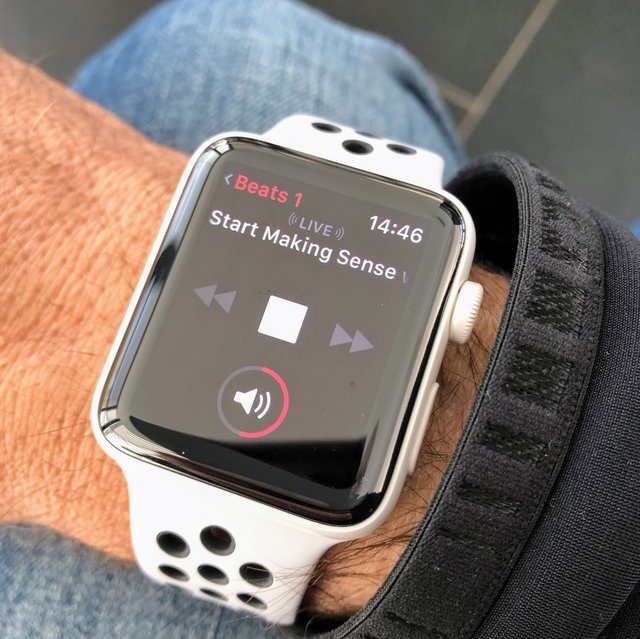
That was easy. Upgraded to watchOS 4.1 last night, opened the new Radio app and started the free Beats 1 station. Watch connected to Airpods and it just works, over WiFi or cellular. I am not an Apple Music subscriber, so I am hoping that Spotify might one day come out with a watchOS app.

03 Nov 22:37

Signal Desktop

by Volker Weber

Sketch

Signal finally gets a desktop client which replaces the Chrome extension. Halleluja.

More >

03 Nov 22:37

Choosing color palettes for choropleth maps

by Nathan Yau

Choropleth maps, the ones where regions are filled with colors based on data, grow easier to make. However, choosing colors, the number of colors, and the breakpoints is often less straightforward, because the answer is always context-specific. Lisa Charlotte Rost, now at Datawrapper, provides a rundown of the decision process.

The explanation is in the context of the Datawrapper tool, but you can easily apply the logic to your own workflow.

Tags: choropleth, color, mapping

03 Nov 22:37

Time Saved Per Person

by Richard Millington

Have a few people track how long they spent asking around and looking for a document (or answer) outside of the community.

You can use a survey if you want broad guesstimations.

Now, look at how long people spend getting answers or finding documents in the community.

What’s the difference in time saved? 10 minutes? An hour? 10 hours?

Once you take the time and effort to answer these two very simple questions, you can start to quantify just how valuable the community is (no. questions/resources found * minutes saved * avg. salary per minute etc…).

If you’re working to prove the value of an internal community, this is a good place to start.

03 Nov 22:37

Twitter Favorites: [vb_jens] Quick post on dangers of overly relying on medians, Simpson's paradox and incomes in cities of Vancouver vs Toronto. https://t.co/4r07aSMAWu

Jens von Bergmann @vb_jens
Quick post on dangers of overly relying on medians, Simpson's paradox and incomes in cities of Vancouver vs Toronto. doodles.mountainmath.ca/blog/2017/11/0…
03 Nov 22:36

6 Steps to Gently Train Your Dog to Go On Bike Rides With You

by Average Joe Cyclist

How to Gently Train Your Dog to Go On Bike Rides With YouHere is a step by step process to gently train your dog to go on bike rides with you. Follow these steps, and soon your dog should be enjoying going on bike rides with you!

The post 6 Steps to Gently Train Your Dog to Go On Bike Rides With You appeared first on Average Joe Cyclist.

03 Nov 22:36

Lessons From the First 5,000

by rands

Earlier this week, it was my distinct pleasure to invite the 5000th human to the Rands Leadership Slack. This endeavor has greatly exceeded my expectations while also continuing to teach me about community management and leadership.

Started on June 1st, 2016, the Slack is now 5000+ members with roughly 1700 of those humans being weekly active. We have 361 public channels. On daily basis, our users are posting 4000+ messages on work days. As measured by number of members, our five most popular non-required public channels are: #1-1s, #daily-challenge, #help-and-advice, #hiring-and-interviews, and #engage-and-retain.

Other observations:

  • Most of the original rules of the Slack remain include my favorite: “channels are free.If a member wants to create a channel, go for it.
  • We continue to make integrations and emoji community accessible and with few incidents, but we have created #rands-tech-support with a set of volunteers responsible for keeping an eye on these important cultural moving parts.
  • It’s a leadership Slack dedicated to understanding the learned skills of leadership. This might be a reason incidents amongst the community are relatively rare over the past year and a half. Even so, I can not understate the value of our community-built Code of Conduct. Not only has this document served as as useful rubric for informing our actions, it’s presence helps define who we are as a community. We’re on our third iteration of this document and it improves with each iteration.

More importantly, I love hearing the stories about what this collective group of humans are accomplishing. Regional meet-ups are regularly happening, members are finding jobs, and members are attending conferences for the time in their lives because of the connections they make within this community.

The internet is full of… colorful humans. As the Leadership Slack continues to grow, I continue to be impressed by how the community treats itself. It’s all there in the FAQ:

“We expect that we’ll treat others with respect. We encourage debate; we ask for patience, and we remind you that you’re here to learn and that means being open to a diverse set of ideas.”

03 Nov 22:35

Twitter Favorites: [jm_barrett] I left #Vancouver because Vancouver left me. A few thoughts I wrote for @thetyee https://t.co/Afcjaf5api

Jessica Barrett @jm_barrett
I left #Vancouver because Vancouver left me. A few thoughts I wrote for @TheTyee thetyee.ca/Opinion/2017/1…
03 Nov 22:34

The First Micro Four Thirds Lenses You Should Buy

by Amadou Diallo
The First Micro Four Thirds Lenses You Should Buy
After more than a dozen hours of new research including reaching out to a panel of lens experts, we’ve found the best lenses with which to start building a collection for any Micro Four Thirds camera. Whether you’re looking to do portraiture, street photography, or extreme closeups, these lenses will deliver better-looking images than you get from the 14-42mm kit lens that came with your camera.
03 Nov 21:15

The Next Big Thing: Free-Floating Bike Share

by pricetags
mkalus shared this story from Price Tags.

I was amazed.  Having not been in Seattle for a few months, I didn’t realize what was happening with bike share – until I saw this:

Bikeshare seattle (1)

And then this:

They’re Spin and Lime Bikes – two of three bikeshare companies that have, since July, started business in Seattle as private-sector initiatives after the failure of the city-subsidized Pronto system.  They don’t need docking stations; they’re just standing there – free floating – waiting for a rider to come by and unlock them with a phone.

Seattle Bike Blog provides the details here.

Within the downtown and inner neighbourhoods, they’re everywhere.

There’s a third one too – ofo, which is China-based (where all the GPS-enabled bikes come from, by the thousands). Apparently they’re doing pretty well, according to the Seattle Bike Blog, (though no one I talked to could figure out the economic model):

Free-floating bike share is working in Seattle. Or at least it sure appears that way according to the city’s first analysis of anonymized private bike share data.

In just two months, people have already taken 120,000 trips on the bikes. And because companies are steadily increasing the number of bikes on the streets, the number of rides each day continues to grow at a steep rate. 6,000 bikes are currently permitted, but SDOT’s Kyle Rowe told the Committee that he estimates the actual number on the ground now is closer to 4,000 and increasingly daily.


“Mobike (a China-based bike share giant that rivals ofo), Spin and LimeBike,” according to the blog, “are launching in Washington DC. …”  So, if they’re successful, is it just a matter of time before they arrive in Vancouver?

Will they displace Mobi or – like Car2Go and Evo compared to MoDo – will they complement each other, grow the market, add choice, and, once again, frustrate those who can’t believe that cycling is really a serious option and why do we need those damn bike lanes anyway …


03 Nov 21:15

B.C. ski resort can be built on land held sacred by Indigenous: Supreme Court

03 Nov 21:14

A lot of civilization is just learning to take advantage of water. pic.twitter.com/cjFsOUeMhI

by primalpoly
mkalus shared this story from primalpoly on Twitter.

A lot of civilization is just learning to take advantage of water. pic.twitter.com/cjFsOUeMhI


Posted by primalpoly on Thursday, November 2nd, 2017 7:43am


136 likes, 32 retweets
03 Nov 21:14

Track Your Writing Time with Ulysses and Timing (Giveaway Inside!)

by Götz
mkalus shared this story from Ulysses Blog.

Whether you’re a professional writer or just have some small side projects, you may be interested in how much time you spend on writing. Maybe it’s just your own curiosity – how long did it take you to write that chapter or blogpost? Or you may be working on a client project, and you need to bill the hours spent on writing a report or article. On macOS, you can use Timing to automatically track time spent on basically any activity of your Mac: researching, communicating, procrastinating – and most importantly – writing. Starting with Ulysses 12 and Timing 2.2.1, these apps have a much tighter integration.

Timing automatically tracks the time you spend in applications, categorizes these activities and lets you assign them to specific projects. You can categorize your activities per app or in more granular ways. For instance, you can assign certain websites or communication with specific contacts to client projects. This lets you figure out exactly how much time you spent on that project – including all the tiny bits of work here and there you’d normally forget to track.

Generally, you can just keep Timing running in the background, and it will track the time spent in your apps. However, you might not only want to know how many hours you used Ulysses, but how many hours you spent writing in a certain group (or even a certain sheet). Imagine you are working on a novel and have set up the project similar to David Hewson’s group structure:

You’ve got a top-level group called “My Writing Project”, which contains two sub-groups “Manuscript” and “Management”. The first group contains your actual writing, whereas the second group contains things like notes or descriptions of characters.

Apart from these groups, you might have other writings in Ulysses, such as reports, shopping lists or poetry. When tracking time, you don’t want all of that to count towards the same “time bucket“. What’s more, you may want to track the actual writing and your notes separately. Fortunately, Timing can do all this for you. Open up Timing and switch to the “Review” section, where you can create your own projects. For instance, I’ve set up a simple “Writing Project” here:

It has three subgroups: “Web Research”, “Writing” and “Character Descriptions”. I’d like to track my usage of Safari into “Web Research”, working in my Manuscript group into “Writing” and working in the “Characters” group into “Character Descriptions”.

You can automatically categorize activities by creating rules for them. For instance, if you want to consider all surfing activities in Safari as “Web Research”, select the “All Activities” project, hold the (alt/option) key and drag Safari from the Applications card onto “Web Research”. Now, all surfing in Safari will automatically be counted towards that project.

Next, all writing in the “Manuscript” group should be counted towards my “Writing” activity. Again, select “All Activities”. In the “Paths” card, find “Manuscript” and drag it (while holding the key) onto “Writing”:

Finally, you can do the same for Character Descriptions by dragging the path “Characters” on the activity. Please note that for the paths to show up in Timing, you first need to create at least one sheet in the groups so that Timing can pick up the paths.

From now on, every time you work in these groups, Timing will track the activity and add it to your projects, helping you find out how much time you spent writing in a group or on a sheet. That way, you know exactly how much time you spent writing that book or even a particular chapter!

Get Timing

Timing for Mac is available with three different feature sets with price tags ranging from $29 to $79. All licenses contain free updates for 12 months and can be purchased directly via Timing’s website. There you can also download a free 14-day trial.

Timing is also available with Setapp, the subscription service for Mac apps.

Your Chance: Win Timing Expert!

As a reader of our blog, you also have the chance to get Timing for free! We have partnered with Timing to give away 5 Expert licenses (value €79 each).

Enter the giveaway by performing one or more of the actions below until Friday, November 10, 2017.

Good luck!

Timing & Ulysses — 5 Timing license giveaway

03 Nov 21:12

Galaxy S8 Oreo Beta Program Launches with Samsung Experience 9.0

by Rajesh Pandey
Just as the leaks had pointed out, Samsung today announced that it is starting the Android 8.0 Oreo beta program for the Galaxy S8 and Galaxy S8+. Apart from bringing all the new features introduced by Google in Oreo, Samsung is also bumping its skin to Samsung Experience 9.0 with the update. Continue reading →
03 Nov 21:11

Tim Cook says purchasing an iPhone X is like buying premium coffee once a day

by Bradly Shankar
iPhone X header

The iPhone X is now available in Canada, as evidenced by the many Apple fans waiting in lines for many hours to get the tenth anniversary smartphone.

Starting at $1,319 CAD, the iPhone X features an OLED True Tone display with Super Retina, an A11 Bionic chip processor, 3GB of RAM, 12-megapixel dual cameras and Face ID for facial recognition controls.

While that’s certainly a high price tag for a phone, Apple CEO Tim Cook says he doesn’t think the cost is all that significant — at least, when broken down in a different way.

In a recent earnings call with Steven Milunovich, managing director at UBS Securities, Cook defended the iPhone X’s steep price when it came up in their conversation.

“I think a couple years ago, nobody would’ve imagined selling a phone at this price and obviously, you’re pretty confident that you can do it,” Milunovich said to Cook.

In response, Cook likened purchasing the iPhone X to buying a daily cup of premium coffee. “I think it’s important to remember that a large number of people pay for the phone by month,” said Cook. “And so if you were to go out on just the U.S., since that tends to be more of the focus of this call, you look at the U.S. carriers, I think you would find you could buy an iPhone X for $33 a month,” said Cook.

“And so if you think about that, that’s a few coffees a week. Let’s say it’s less than a coffee a day at one of these nice coffee places.”

He added that he feels the price reflects the quality of the product.

“In terms of the way we price, we price to sort of the value that we’re providing,” Cook said. “We’re not trying to charge the highest price we could get or anything like that. We’re just trying to price it for what we’re delivering.”

This isn’t the first time Cook has openly stood behind the price of the iPhone X. Back in September, the Apple executive said the iPhone X is actually being offered at a “value price” based on the technology found in the phone. “As it turns out, most people are now paying for phones over long periods of time,” Cook said in a Q&A segment on Good Morning America. “And so very few people will pay the price tag of the phone initially. Also, most people actually trade in their current phone, and so that reduces the price further, and some carriers even throw in subsidies and discounts.”

In related news, Apple recently published its fourth quarter financial earnings, posting a $52.58 billion net income, which was up 12 percent from the previous quarter.

Via: CNBC

The post Tim Cook says purchasing an iPhone X is like buying premium coffee once a day appeared first on MobileSyrup.

03 Nov 21:11

Amazon plans on opening a new office in Vancouver by 2020

by Sameer Chhabra

American e-commerce giant Amazon has announced that it will open a second office in Vancouver by 2020.

The new space will allow Amazon to double its existing workforce in British Columbia’s most populated city, from roughly 1,000 to roughly 2,000.

Amazon is excited to continue growing our workforce throughout Canada,” said Alexandre Gagnon, vice president of Amazon Canada and Mexico, in a November 3rd, 2017 media release.

The company currently has 5,000 full-time employees across Canada, “spanning site in British Columbia, Ontario and Quebec,” according to the same release.

It’s important to note that this announcement should not be taken as an indicator about Vancouver’s bid for HQ2, Amazon’s second North American headquarters.

Image courtesy of Amazon.

The post Amazon plans on opening a new office in Vancouver by 2020 appeared first on MobileSyrup.

03 Nov 21:11

Canadian-made Alto’s Adventure updated to support the iPhone X

by Patrick O'Rourke
Altos Odyssey

One of my main criticisms of the iPhone X is that so few apps support the smartphones unique notch at launch. While the situation improved in the days leading up to the iPhone X’s release, there are a number of major holdouts, including Transit and even Spotify.

Now I can knock one of my favourite mobile games off that list, Alto’s Adventure. Snowman, the team behind the critically acclaimed mobile title, has updated Alto’s Adventure with optimization for the iPhone X’s 2436 x 1125 pixel display, but more importantly, also the phone’s notch.

This means that whether you’re playing in portrait mode or landscape, version 1.6 of Alto’s Adventures rolling, snow covered hills now extends across the Phone X’s entire display.

Hopefully more developers begin updating their apps to fully support the iPhone X’s display in the coming weeks. Snowman recently pushed back the release of Alto’s Odyssey, the sequel to Altos’s Adventure, to an unspecified later date. The game was originally slated to be released in “summer 2017.”

Alto’s Adventure is $6.99 in the iOS App Store and free in the Google Play Store.

The post Canadian-made Alto’s Adventure updated to support the iPhone X appeared first on MobileSyrup.

03 Nov 21:11

Distributel continues acquisitions, purchases IPTV service provider Zazeen

by Sameer Chhabra
Telephone wires

Ottawa-based telecom reseller Distributel is continuing its acquisition streak with yet another major purchase.

In a November 2nd, 2017 media release, Distributel announced that it had received CRTC approval to fully acquire Zazeen Inc. —  an IPTV service provider that operates in Ontario and Quebec.

“Distributel is once again taking a leadership role in Canadian telecommunications with this acquisition, which will allow our continued strategic investment in TV,” said Matt Stein, CEO of Distributel, in the same release. “With this acquisition, we improve our ability to make long-term strategic pricing moves, continue developing the service and accelerate the introduction of new features and consumer benefits.”

Stein also reiterated that Distributel has been a Zazeen partner since the service launched, offering Zazeen TV “as a real alternative to the television offerings of the country’s big cable and phone companies.”

Distributel has already announced lower prices on its internet and television bundles, and the company now offers Zazeen TV in addition to its high-speed internet and Yak home phone services.

This is Distributel’s second major expansion in three months. The company acquired the Navigata-Westel division of Toronto-based wholesale and carrier services provider TNW in October.

Source: CNW

The post Distributel continues acquisitions, purchases IPTV service provider Zazeen appeared first on MobileSyrup.

03 Nov 21:11

Apple updates GarageBand with sound library and Asian instruments

by Sameer Chhabra
iOS iMovie, iwork Garageband

Apple’s GarageBand software on iOS is receiving a major update.

GarageBand 2.3 — available on iPhone and iPad as of November 1st, 2017 — brings a series of updates to the audio workstation app, including a new ‘Sound Library,’ as well as a ‘Beat Sequencer.’The Sound Library allows users to “browse and download free new sound packs directly in GarageBand.”
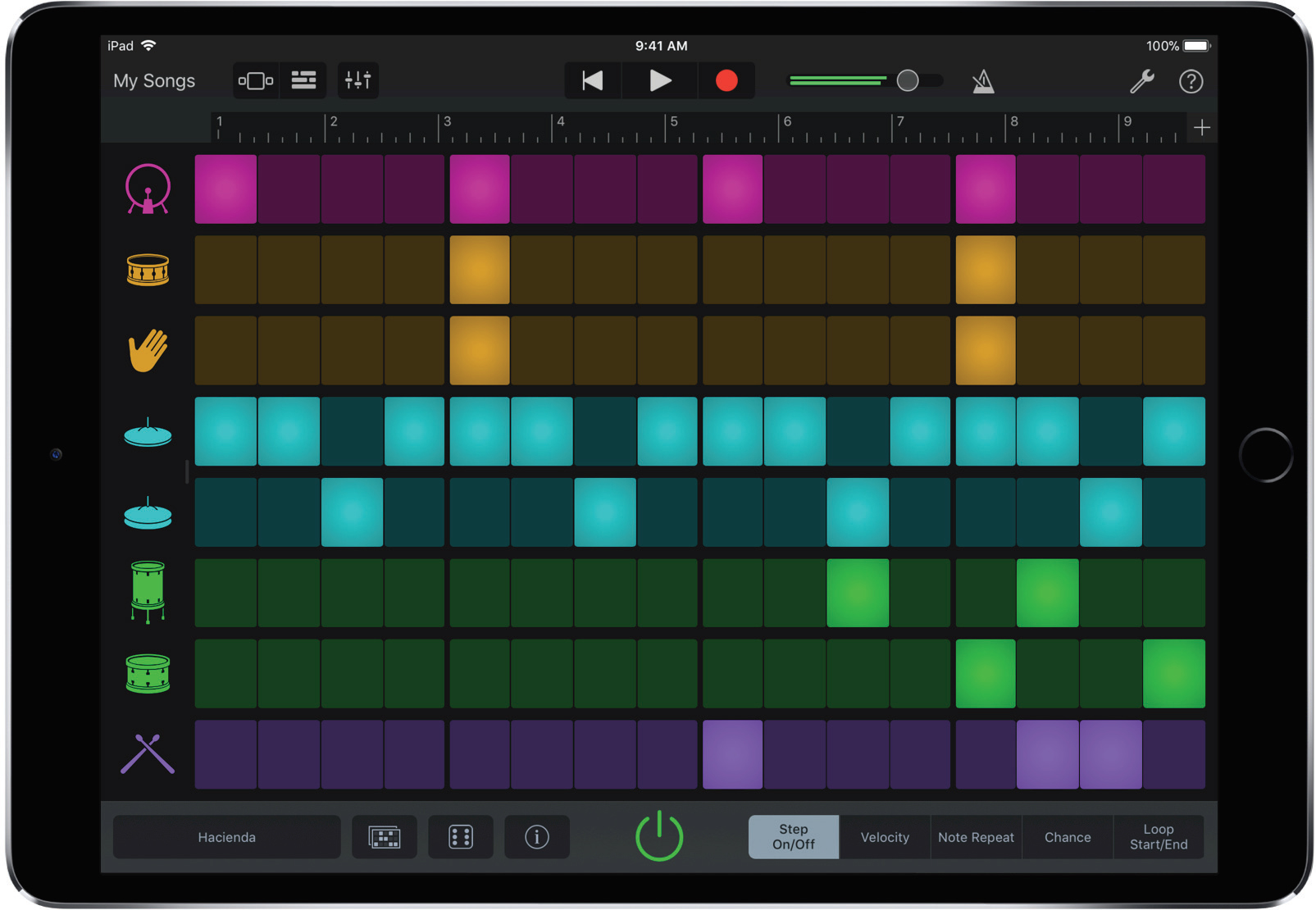
Each sound pack features a combination of different touch instruments as well as ‘Apple-designed sounds”‘and instrument presets. GarageBand will also alert users when new instrument packs are available.

The Beat Sequencer allows musicians to “choose drum sounds from a collection of classic and modern electronic drum kits, then easily build up a looping beat in seconds by tapping a combination of steps on each track.”

There are 12 Apple-designed drumkits to choose from, “each with their own unique sound and 25 beat patterns,” according to a November 1st, 2017 media release.

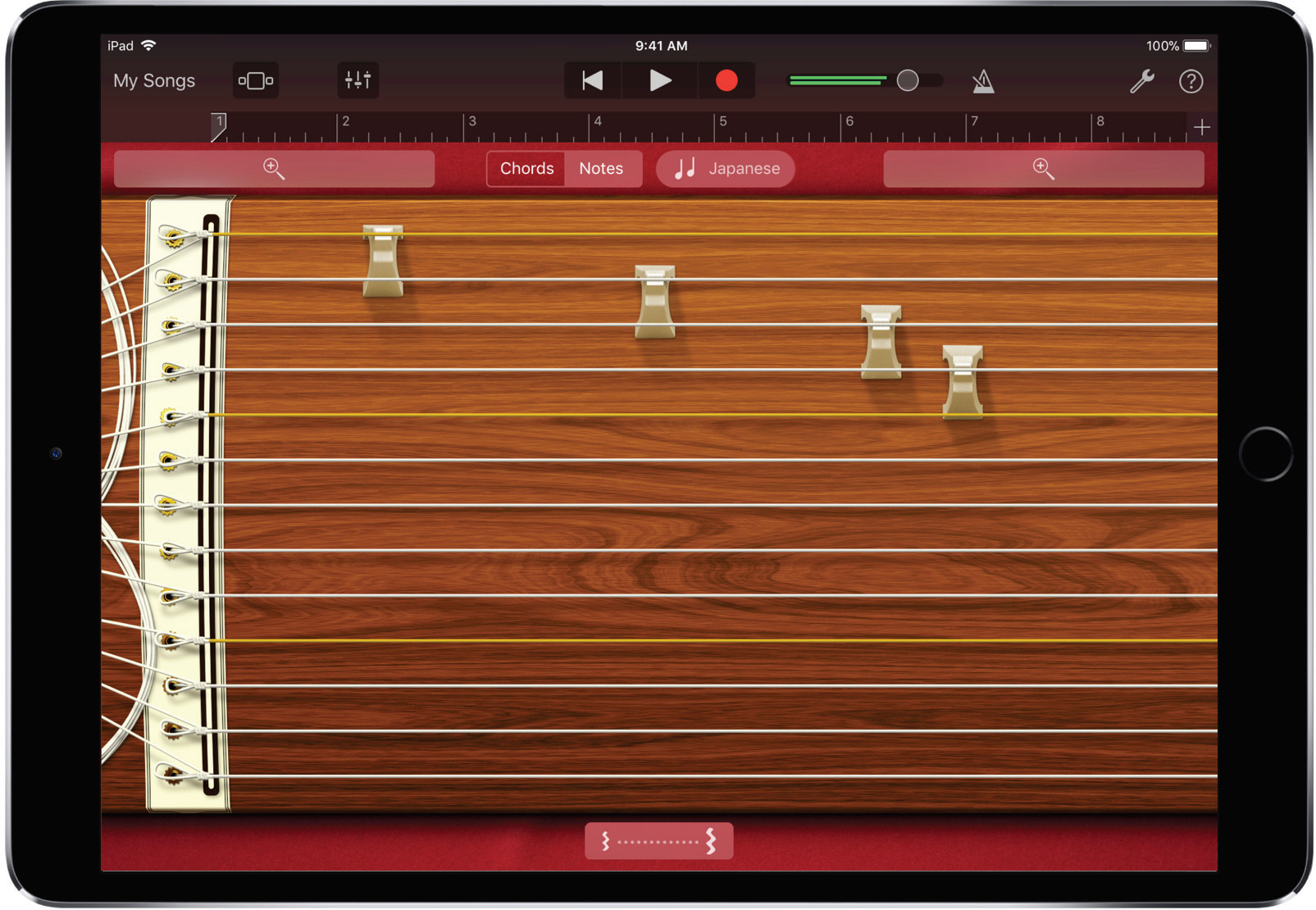
As for the additional instruments, Apple has introduced a series of Asian instruments, including a Japanese Koto (shown below) and a Chinese Guzheng.

Source: Apple

The post Apple updates GarageBand with sound library and Asian instruments appeared first on MobileSyrup.

03 Nov 21:10

Microsoft Vancouver will create 50 new jobs, education partnerships in mixed reality market

by Bradly Shankar
Alex Kipman Windows Mixed Reality

Microsoft has announced that an additional 50 mixed reality-related jobs will be created in British Columbia to help grow the province’s tech ecosystem.

Company president Brad Smith made the announcement at the annual Business Council of British Columbia’s Business Summit in Vancouver.

To further develop the tech industry in British Columbia, Microsoft also announced that two new education-related partnerships have been made. The first is a plan to pilot TEALS, a Microsoft Philanthropies program that supports high schools in building and growing sustainable computer science programs. This marks the first time that the TEALS pilot will expand outside of the United States.

Under the program, trained computer science professionals from across the tech industry will be paired with classroom teachers to team-teach computer science in classrooms. TEALS uses a curriculum adapted from U.C. Berkeley and the University of Washington and has worked with 500 companies to help teach 12,000 students across 348 U.S. schools.

TEALS says it’s currently deciding which school it will partner with to bring the program to the province for the 2018-2019 school year.

Microsoft’s second educational collaboration, meanwhile, will be with the British Columbia Institute of Technology (BCIT). Microsoft and the BCIT will work together on a “first-of-its-kind” curriculum for mixed reality, geared towards training students and developing local talent in this field.

“Vancouver is becoming a world-class hub for mixed reality and digital innovation,” said Smith in a press statement. “By continuing to partner with British Columbia’s business and education community, we’re excited to play a part in helping British Columbians enter the growing technology workforce. Students in Vancouver will become leaders in this next wave of innovation that reinvents how we work, learn and play.”

Microsoft’s initiatives follow a similar mixed reality-related announcement from earlier this month — Canada’s first-ever mixed, augmented and virtual reality space. Known as The Cube, the 6,000-square-foot, Vancouver-based facility is designed to help create new startups and grow 3D technology development in the city.

Mixed reality technology is also being used in Canada to help businesses develop new products. For example, the Port Coquitlam, BC-based Finger Food Studios has figured out how to use Microsoft’s HoloLens mixed reality tech to help build large trucks and other vehicles.

Canadians interested in mixed reality can also now buy Microsoft’s series of Windows Mixed Reality headsets — PC-tethered devices that offer immersive entertainment and social experiences. For more on Windows Mixed Reality, check out MobileSyrup hands-on impressions here.

The post Microsoft Vancouver will create 50 new jobs, education partnerships in mixed reality market appeared first on MobileSyrup.