The common belief is you can grow a community by improving the community experience.
For example, you might add new features, improve the experience, make members feel better connected etc.
Improving the community experience does help (it can reduce churn), but it doesn’t drive more people to visit the community in the first place. Long-term growth and sustainability in a community requires you to find eternal sources of new members.
That eternal part matters. A big promotional push can be great for getting a community going, but it’s not an eternal source of new members, i.e. there are only so many times you can send a mass email to your audience to persuade them to join.
To make a community thrive, you have relatively few sources of eternal community growth. These are (by order of importance):
1) Search traffic. For most communities, search is by far the biggest source of growth. However, it comes with risks. Sudden changes to the Google algorithm or Google keeping more traffic for itself is going to make this harder. If you’re a private community, you’ve lost 80%+ of potential visitors before you begin.
2) Customer/topic journey. This is when the community is naturally integrated with the customer or topic journey. As part of being a customer or becoming engaged with your organisation (or the topic) people are naturally introduced to the community. How and where the community is featured on the homepage/product/support really matters here.
3) Platform recommendations/referrals. This is when a major technology platform naturally recommends or drives traffic to your community from others (most common in Facebook Groups, LinkedIn, StackOverflow, Reddit etc…).
4) Links and partnerships. Getting links and referrals from major websites/publications can be a huge win. Community.co built an entire business doing this. If you reach out to others in your sector and persuade them to drive people to your community, that can be a sustainable source of new members.
5) Staff/member advocacy. By far the most underutilized asset is advocacy from existing staff and community members. If members and staff share posts on their social media profiles, you can attract a large number of members quite easily.
The best way to grow a community is to build the relationships, processes, and incentives to make each of the channels which are relevant to you work as best as they can.
Sure, other things can help, but these are the big wins.
My blog tells me it’s 18 years ago today I installed Skype and made my first call with Dina Mehta and Stuart Henshall the same day. That was three weeks after Skype launched in public beta. I don’t remember, nor does my blog for me, when my last Skype call was. Sometime after the 2011 Microsoft acquisition for sure. Maybe when they switched from the original peer to peer to a central server model? More likely it was around the time when they confused the world by having Skype and Skype for Business as completely separate things yet using the same name, from the fall of 2016. I uninstalled it by 2019 I think. My meeting and conversation notes mention ‘skype call’ for the last time somewhere during 2015.
Are there any current p2p voip applications that can capture the fascination that Skype held in 2003? Has it gone ‘under the hood’ as a protocol, living in different silos? Or is there an existing ecosystem of apps and users still around? Is Skype p2p voip a thing that could be useful to recreate?
[UPDATE: I should have thought to look for it in my blog: I did ask the same questions about what the Skype of now would be, a little under a year ago.]
This piece appeared in Campaign Magazine UK one week after the riot at the Capitol in Washington DC
There
is nothing ambiguous about the role the marketing and advertising
industry has played in the radicalisation of US politics and the
horrifying events of recent days. There is a clear line connecting
adtech and radicalisation.
While it has been widely reported and
acknowledged that social media has played a significant role in the
schism in US society, there is a deeper, more nuanced truth behind the
deterioration of our politics.
The wedge that has been driven
into the fabric of US society has been driven in part by information
gathered about American citizens by the adtech ecosystem and fed into
algorithms that are employed by platforms and online publishers.
The
purpose of these algorithms is primarily to keep visitors “inside the
corral” of the publisher or the platform. The more time a visitor spends
in the corral, the more money the platform can realise from selling ad
space.
To do this, the platforms feed visitors ever more “engaging” content.
Experience has taught the algorithms that the more juicy the material,
the more likely they are to retain the visitor.
Consequently, the
algorithms feed us incrementally more lurid notions of our own
predispositions and connect us ever more closely with others who share
them.
In May 2020, the Wall Street Journal reported
that after the presidential election of 2016, a team of Facebook
executives undertook an internal study to understand how its policies
shaped the behaviour of its users.
The study concluded
that algorithms they use “to gain user attention and increase time on
the platform” were driving people apart.
According to the report,
“64% of all extremist group joins are due to our recommendation tools...
Our recommendation systems grow the problem.”
A slide from the
presentation said: “Our algorithms exploit the human brain’s attraction
to divisiveness.” If left unchecked, it warned, Facebook would feed
users “more and more divisive content in an effort to gain user
attention and increase time on the platform”.
According to the WSJ story, “Facebook
is under fire for making the world more divided. Many of its own
experts appeared to agree – and to believe Facebook could mitigate many
of the problems. The company chose not to.”
This report revealed
the truth that Facebook and friends are more than a “bulletin board”
where people express their opinions. It unambiguously describes the way
these platforms actively direct people into extremist groups whose
purpose is to divide us.
But there’s more to this story. We need to be honest with ourselves.
For years, we have been hiding behind the skirts of Facebook and other
online platforms.
While these companies have taken the heat, it
has been largely unrecognised by the public that it is for the sole
benefit of the advertising and marketing industry that Facebook and
others do their squalid work. We are the hidden hand that guides and
finances these dangerous practices.
In light of the murder and
mayhem at the Capitol in Washington on 6 January, it has been suggested
that some in the Republican Party need to stop pretending they didn’t
understand the consequences of standing by quietly while dangerous,
irresponsible lies were being promulgated by members of their party.
I
would like to suggest that we in the advertising industry are no less
guilty of standing by quietly and pretending we don’t understand the
consequences – in our case, of our dangerous addiction to adtech and the
concomitant destruction it engenders.
For years, many of us have
described adtech as dangerous. It is now time to upgrade that
description to disastrous. The leaders of our industry – the ANA, the 4As, IAB, and the chief marketing officers of our biggest advertisers – must face up to what adtech is doing to our society and act immediately and decisively to reform it.
The company’s own research reveals that Instagram harms teens, that it can’t control anti-vax misinformation, and that there is a secret double standard for VIPs. In short, the problem with Facebook is Facebook
"Being independent without being eccentric and doubting without being a curmudgeon are some of the most difficult things a person can do."
Not really about strategy but definitely important. And things I find hard. Which further reminded me of one of the best strategy / interview questions:
"What can you do really well, that it also really hard?"
Spyware has been in the news recently with stories like the Apple security vulnerability that allowed devices to be infected without the owner knowing it, and a former editor of The New York Observer being charged with a felony for unlawfully spying on his spouse with spyware. Spyware is a sub-category of malware that’s aimed at surveilling the behavior of human target(s) using a given device where the spyware is running. This surveillance could include but is not limited to logging keystrokes, capturing what websites you are visiting, looking at your locally stored files/passwords, and capturing audio or video within proximity to the device.
How does spyware work?
Spyware, much like any other malware, doesn’t just appear on a device. It often needs to first be installed or initiated. Depending on what type of device, this could manifest in a variety of ways, but here are a few specific examples:
You could visit a website with your web browser and a pop-up prompts you to install a browser extension or addon.
You could visit a website and be asked to download and install some software you weren’t there to get.
You could visit a website that prompts you to access your camera or audio devices, even though the website doesn’t legitimately have that need.
You could leave your laptop unlocked and unattended in a public place, and someone could install spyware on your computer.
You could share a computer or your password with someone, and they secretly install the spyware on your computer.
You could be prompted to install a new and unknown app on your phone.
You install pirated software on your computer, but this software additionally contains spyware functionality.
With all the above examples, the bottom line is that there could be software running with a surveillance intent on your device. Once installed, it’s often difficult for a lay person to have 100% confidence that their device can be trusted again, but for many the hard part is first detecting that surveillance software is running on your device.
How to detect spyware on your computer and phone
As mentioned above, spyware, like any malware, can be elusive and hard to spot, especially for a layperson. However, there are some ways by which you might be able to detect spyware on your computer or phone that aren’t overly complicated to check for.
Cameras
On many types of video camera devices, you get a visual indication that the video camera is recording. These are often a hardware controlled light of some kind that indicates the device is active. If you are not actively using your camera and these camera indicator lights are on, this could be a signal that you have software on your device that is actively recording you, and it could be some form of spyware.
Here’s an example of what camera indicator lights look like on some Apple devices, but active camera indicators come in all kinds of colors and formats, so be sure to understand how your device works. A good way to test is to turn on your camera and find out exactly where these indicator lights are on your devices.
Additionally, you could make use of a webcam cover. These are small mechanical devices that allow users to manually open and shut cameras only when in use. These are generally a very cheap and low-tech way to protect snooping via cameras.
Applications
One pretty basic means to detect malicious spyware on systems is simply reviewing installed applications, and only keeping applications you actively use installed.
On Apple devices, you can review your applications folder and the app store to see what applications are installed. If you notice something is installed that you don’t recognize, you can attempt to uninstall it. For Windows computers, you’ll want to check the Apps folder in your Settings.
Web extensions
Many browsers, like Firefox or Chrome, have extensive web extension ecosystems that allow users to customize their browsing experience. However, it’s not uncommon for malware authors to utilize web extensions as a medium to conduct surveillance activities of a user’s browsing activity.
On Firefox, you can visit about:addons and view all your installed web extensions. On Chrome, you can visit chrome://extensions and view all your installed web extensions. You are basically looking for any web extensions that you didn’t actively install on your own. If you don’t recognize a given extension, you can attempt to uninstall it or disable it.
If you recall an odd link, attachment, download or website you interacted with around the time you started noticing issues, that could be a great place to start when trying to clean your system. There are various free online tools you can leverage to help get a signal on what caused the issues you are experiencing. VirusTotal, UrlVoid and HybridAnalysis are just a few examples. These tools can help you determine when the compromise of your system occurred. How they can do this varies, but the general idea is that you give it the file or url you are suspicious of, and it will return a report to you showing what various computer security companies know about the file or url. A point of infection combined with your browser’s search history would give you a starting point of various accounts you will need to double check for signs of fraudulent or malicious activity after you have cleaned your system. This isn’t entirely necessary in order to clean your system, but it helps jumpstart your recovery from a compromise.
There are a couple of paths that can be followed in order to make sure any spyware is entirely removed from your system and give you peace of mind:
Install an antivirus (AV) software from a well-known company and run scans on your system
If you have a Windows device, Windows Defender comes pre-installed, and you should double-check that you have it turned on.
If you currently have an AV software installed, make sure it’s turned on and that it’s up to date. Should it fail to identify and remove the spyware from your system, then it’s on to one of the following options.
Run a fresh install of your system’s operating system
While it might be tempting to backup files you have on your system, be careful and remember that your device was compromised and the file causing the issue could end up back on your system and again compromising it.
The best way to do this would be to wipe the hard drive of your system entirely, and then reinstall from an external device.
How can you protect yourself from getting spyware?
There are a lot of ways to help keep your devices safe from spyware, and in the end it can all be boiled down to employing a little healthy skepticism and practicing good basic digital hygiene. These tips will help you stay on the right track:
Be wary. Don’t click on links, open/download attachments from unknown senders. This applies to both messaging apps as well as emails.
Stay updated. Take the time to install updates/patches. This helps make sure your devices and apps are protected against known issues.
Check legitimacy. If you aren’t sure if a website or email is giving legitimate information, take the time to use your favorite search engine to find the legitimate website. This helps avoid issues with typos potentially leading you to a bad website
Use strong passwords. Ensure all your devices have solid passwords that are not shared. It’s easier to break into a house that isn’t locked.
Delete extras. Remove applications you don’t use anymore. This reduces the total attack surface you are exposing, and has the added bonus of saving space for things you care about.
Use security settings. Enable built in browser security features. By default, Firefox is on the lookout for malware and will alert you to Deceptive Content and Dangerous Software.
During the lockdowns I used his videos as a way to travel around the world in my imagination while it was impossible to do so in real life, and I re-watched the whole series via this handy playlist of all 131 episodes.
There’s no shortage of security people who will tell you that passwords are broken. It’s also not a coincidence how many of them sell products to supplement or replace passwords. Microsoft just announced that the passwordless future is here. In their announcement they make it clear that passwords are broken, and they should know–they broke […]
I am bringing the constructs and principles of Information Systems (IS) with those of Connectivism since the previous studies rarely consider the learning theories’ principals, especially the learning theory for the digital age.
In conducting my study, I have confronted a construct in the IS, collaboration quality, which it seems a bit baffling because I cannot completely tell this factor apart from interactivity that is a principle of connectivism.
I'm not sure I understand your question exactly, but let me try a few comments to see if I can provide some useful advice.
To begin with, 'interactivity' is based on interaction, that is, the sending and receiving of messages from one entity to another.
Where Information Theory (IT) and Connectivism (C) agree is that we can talk about the quality of interaction. This is what your questionnaire addresses when it talks about easy and comfortable or effective and efficient sharing of information and documents. Both IT and C would thus be interested in, say, the 'FAIR' principles - information that is Findable, Accessible, Interoperable and Reusable. https://www.go-fair.org/fair-principles/ I would add that to a large degree, Openness is essential to ensure good quality of information, but there are other considerations as well.
Where IT and C differ is in the role information plays in how and what we learn.
In IT, learning is transactional. It is based on transmission. That is to say, one person sends some informational content to another person. The content is what the person learns.
In C, learning is emergent. It is based on patterns of connectivity. The content is merely a tool used by one person to create a change in the other person, which will prompt that person to send content to even more people, creating a network of interactions, and it is this network that is learned.
In IT, success in learning is based on the fidelity of the transmission. For learning to be effective, the content must be properly and accurately received. Things like noise and distraction may interfere with the signal. Mechanisms like checksum are used to verify the transmission. This is the basis for theories like Moore's theory of transactional distance. Memorization is key in an IT approach to learning.
In C, success in learning is based on being able to recognize patterns of connectivity. The fidelity of the transmission doesn't matter nearly as much; what counts is the effect, and noisy transmissions are expected, because interaction never happens in a noiseless environment. In C it is common for there to be many transmissions of different content, and the learner becomes able to recognize the patterns in them by working with them. Practice is key to a C approach to learning.
So, the sorts of questions you would ask to evaluate 'interactivity' in the two approaches would be different.
In IT, you would ask a lot about quality, as you have, and about ways to ensure that the transmission is accurate, the quality high, that the information is true, is the source authoritative, etc. because the person is focused on receiving and duplicating whatever was sent.
The concept of 'collaboration' is based to a great degree on IT concepts of interaction. We can see this because in a lot of cases, we expect people to follow 'the same' agenda, practices, definitions, etc. So fidelity of transmission is very important. But in C, the model is 'cooperation', where people share an infrastructure (that is, they share a communications system), but each individual has its own objectives and its own way of understanding, interpreting or evaluating the information.
There are not to my knowledge any existing questionnaire items for the concept of interactivity in C - I very rarely do surveys in my own work. But if there were such items, they would ask a lot about whether there were multiple sources of information, whether information represented various perspectives, whether the information was actionable (ie., could whether people could act on it), whether everybody had roughly equal opportunity to both send and receive information, whether people could modify it and shape it according to their needs, etc.
The questions, in other words, would not ask so much about the quality of the information being sent, but about the properties of the information network, to ensure that information is not merely transmitted from one single authoritative source, but rather, created and exchanged throughout the entire network.
I wrote a paper on “Art, Kitsch, and the Totalitarian Gamer”. The referees hated it. I’m pretty sure I sent it to the wrong conference.
Perhaps, the correct conference does not exist. Perhaps this really is of no interest to anyone. If you have ideas, though, Email me.
The 2014 alt-right uprising against women in the game industry known as Gamergate [8; 42] foreshadowed the style and the substance of Trumpism. Notable features of Gamergate — its fondness for shadowy conspiracy mediated through online fora, its rhetoric of grievance, its propensity for interminable arguments, its recrudescence of anti-semitism and misogyny, its iconography — seem accidental and arbitrary, unrelated to anything we find in games or in game studies. To scholars of digital storytelling, Gamergate appeared to be an arbitrary anticipation of misfortune. Someone was bound to be first, and it has seemed that game developers simply had bad luck.
A careful look at 20th-century art history and criticism, and at the history of the formation of mobs and totalitarian movements, shows how these facets of Gamergate are not stylistic quirks, but that they are rooted in the totalitarian aesthetics and in long-standing intellectual movements. We shall see why Roger Ebert said that “video games can never be art,” why this was in fact a remarkable claim for Ebert to have made, and why the claim was not bigoted, essentialist, or daft. We shall see why the Gamergate mascot is a thick-lipped frog. I believe, further, that this can satisfactorily be understood through established ideological and critical concepts, and without adducing any novel terminology.
This is part 1 of a series on Art, Kitsch, and the Totalitarian Gamer.
Looking ahead a few years I will be able to retire from NRC and live and work more or less independently. But what will that look like? This article gives me some indication of what to expect if I focus on OLDaily and the work as a journalist I have done over the years. Previous experience suggests that I should not expect a lot from voluntary donations; Casey Newton reports that only five percent of his readership chose a paid subscription, and I imagine the rate is even lower if you don't have to pay. Buy it's possible to create incentives with things like live Discord sessions and such. In terms of content, the article convinces me not to focus on interviews, to keep things fresh (and opinionated), and to take advantage of my flexibility to run sideprojects.
This is clear practical advice for someone who is planning to do some public speaking, and there's enough in there to help just about everyone. And it's written from what is very clearly a wealth of practical experience, from the horror-story that leads off the book (not to be missed) to really practical advice like "arriving earlier than necessary for the event to rest up and feel more like yourself before the big day." That's why I always scheduled a 'jet-lag day' when I traveled. Best of all, the book is free for anyone to read, out there on the open web, in plain HTML. Awesome.
David Wiley says his departure from academia was "most certainly not 'an advancement in career'". Agreed, it was not an advancement in his academic career. But if you look at what he says, it seems clear he feels it was an advancement in every other way:
"there wasn’t a way to make the next impact I felt I needed to make while staying on that path.. It was about doing work I felt compelled to do"
"it was absolutely the right decision. I love working at Lumen."
"the impact we’re having are more rewarding than I ever imagined they could be."
"and WOW am I energized and excited and inspired by the things we’re working on now!"
That sounds to me like 'advancement' in every way that matters. And Wiley is quite right that he doesn't need to explain his decision to anyone, let alone "armchair quarterbacks." But my point was - and is - a lament, if you will, that the only way he (and others) see to move forward is to go commercial and obtain VC funding.
This post takes Seth Godin's recent post on education reform as a point of departure. Godin proposes scrapping the existing set of courses and suggests a new se including: "statistics, games, communication, history and propaganda, citizenship, real skills, the scientific method, programming, art, decision making and meta-cognition." I agree with Chris Kennedy that it's a good list, though I don't think Godin has mastered the turn from 'subjects' to 'skills'. But I digress. The key point here, writes Kennedy, is that while British Columbia "is doing much of what Godin proposes," it has kept the existing boxes. "The realist in me says that this is actually the only way," writes Kennedy. " I like how David Albury recently described this work, 'One of the tricks of transformation is to combine urgency and passion with courageous patience.'"
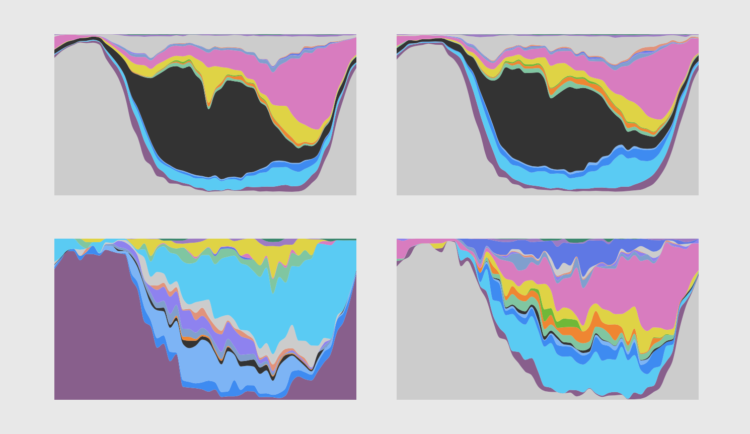
For the employed, unemployed, and those not in the labor force, these charts — using an oldie but goodie visualization layout — show the percentage of people doing an activity over a day in 2020.
I spoke with someone earlier this year who had been using the Unix shell for several years
but had never used the man command.
Whenever they had a question they went to Stack Overflow:
experience had taught them that they could find their answer there
more quickly than by hunting through comprehensive breadth-first documentation
written by people who are guessing what the reader wants to know
rather than responding to the actual gaps in their knowledge.
(See this post
for more on documentation types and their audiences.)
The answers on Stack Overflow are only part of the story, though.
As Zhang2020 shows,
a lot of the value is in the comments.
Most of these are added after an answer is accepted;
half are fast responses (added within one day of an answer being posted),
but later comments tend to be more informative.
Question posters rarely integrate comments back into answers,
and inexperienced users tend to raise limitations and concerns
while experienced users tend to enhance the answer.
Stack Overflow is not a level playing field:
as Ford2016 showed,
it is a less friendly place for women than it is for men,
which means its growing importance has only exacerbated tech's deep-seated biases.
Hopefully,
studies like Zhang2020 that give us more insight into how it's used
will also help us make it a more level playing field.
Stack Overflow is one of the most active communities for developers to share
their programming knowledge. Answers posted on Stack Overflow help developers
solve issues during software development. In addition to posting answers,
users can also post comments to further discuss their associated answers. As
of Aug 2017, there are 32.3 million comments that are associated with answers,
forming a large collection of crowdsourced repository of knowledge on top of
the commonly-studied Stack Overflow answers. In this study, we wish to
understand how the commenting activities contribute to the crowdsourced
knowledge. We investigate what users discuss in comments, and analyze the
characteristics of the commenting dynamics, (i.e., the timing of commenting
activities and the roles of commenters). We find that: 1) the majority of
comments are informative and thus can enhance their associated answers from a
diverse range of perspectives. However, some comments contain content that is
discouraged by Stack Overflow. 2) The majority of commenting activities occur
after the acceptance of an answer. More than half of the comments are fast
responses occurring within one day of the creation of an answer, while later
comments tend to be more informative. Most comments are rarely integrated back
into their associated answers, even though such comments are informative. 3)
Insiders (i.e., users who posted questions/answers before posting a comment in
a question thread) post the majority of comments within one month, and
outsiders (i.e., users who never posted any question/answer before posting a
comment) post the majority of comments after one month. Inexperienced users
tend to raise limitations and concerns while experienced users tend to enhance
the answer through commenting. Our study provides insights into the commenting
activities in terms of their content, timing, and the individuals who perform
the commenting. For the purpose of long-term knowledge maintenance and
effective information retrieval for developers, we also provide actionable
suggestions to encourage Stack Overflow users/engineers/moderators to leverage
our insights for enhancing the current Stack Overflow commenting system for
improving the maintenance and organization of the crowdsourced
knowledge.
Sometimes software engineering research is like studying supernovas:
repeatability isn't feasible (at least, not given current technology),
so you have to study the ones you can find.
Other times, though,
researchers can do controlled experiments and replicate the experiments of others.
Kosar2018 is an example of that:
in it,
the authors replicate an experiment reported in Kosar2011
with several improvements to remove some threats to validity.
Their conclusion:
developers are signfiicantly better at tool-based program comprehension when using a DSL
than when using a general-purpose language.
This is an important result,
though the adjective "tool-based" does qualify it a bit.
Kosar2018 required developers to use an IDE while trying to complete tasks
rather than (for example) reading printouts;
on the other hand,
their subjects were new to the DSL being used,
so if anything the results underestimate the possible performance improvement.
There is still lots of room for further analysis—I'd like to see someone look at well-designed versus poorly-designed DSLs,
for example,
because there are certainly lots of the latter—and
we can still argue about how scalable DSLs are in the absence of customized debuggers,
but at this point,
I think the onus is on people who argue that DSLs don't make life better
to prove their case.
Domain-specific languages (DSLs) allow developers to write code at a higher
level of abstraction compared with general-purpose languages
(GPLs). Developers often use DSLs to reduce the complexity of GPLs. Our
previous study found that developers performed program comprehension tasks
more accurately and efficiently with DSLs than with corresponding APIs in
GPLs. This study replicates our previous study to validate and extend the
results when developers use IDEs to perform program comprehension tasks. We
performed a dependent replication of a family of experiments. We made two
specific changes to the original study: (1) participants used IDEs to perform
the program comprehension tasks, to address a threat to validity in the
original experiment and (2) each participant performed program comprehension
tasks on either DSLs or GPLs, not both as in the original experiment. The
results of the replication are consistent with and expanded the results of the
original study. Developers are significantly more effective and efficient in
tool-based program comprehension when using a DSL than when using a
corresponding API in a GPL. The results indicate that, where a DSL is
available, developers will perform program comprehension better using the DSL
than when using the corresponding API in a GPL.
Earlier this month
we reviewed Becker2019,
which found that most of the error messages produced by compilers aren't particularly helpful.
One response was, "Well, but nobody reads them anyway."
Barik2017 showed that this isn't true:
based on an eye-tracking study of 56 students writing Java with Eclipse,
they found that:
"participants read error messages,
and the difficulty of reading these messages is comparable to the difficulty of reading source code",
"difficulty reading error messages significantly predicts participants' task performance"
(i.e., the harder the messages are to read, the longer it takes to fix the problem),
and
"participants allocate a substantial portion of their total task to reading error messages (13%-25%)."
13-25% of someone's time roughly a day a week.
While the actual gain would be smaller (because programmers do a lot more than write code),
reducing this time would certainly make work more enjoyable,
and I suspect it would reduce the fault rate in shipped code as well.
As we've said before
(paraphrasing Dobzhansky),
nothing in software engineering makes sense except in light of human psychology;
the more attention researchers and developers pay to that,
the faster our profession will make real progress.
Barik2017
Titus Barik, Justin Smith, Kevin Lubick, Elisabeth Holmes, Jing Feng, Emerson Murphy-Hill, and Chris Parnin:
"Do Developers Read Compiler Error Messages?".
2017 IEEE/ACM 39th International Conference on Software Engineering (ICSE),
10.1109/icse.2017.59.
In integrated development environments, developers receive compiler error
messages through a variety of textual and visual mechanisms, such as popups
and wavy red underlines. Although error messages are the primary means of
communicating defects to developers, researchers have a limited understanding
on how developers actually use these messages to resolve defects. To
understand how developers use error messages, we conducted an eye tracking
study with 56 participants from undergraduate and graduate software
engineering courses at our university. The participants attempted to resolve
common, yet problematic defects in a Java code base within the Eclipse
development environment. We found that: 1) participants read error messages
and the difficulty of reading these messages is comparable to the difficulty
of reading source code, 2) difficulty reading error messages significantly
predicts participants' task performance, and 3) participants allocate a
substantial portion of their total task to reading error messages
(13%-25%). The results of our study offer empirical justification for the need
to improve compiler error messages for developers.
Like bacon, stories will make everything you write more compelling. They are the most important element of your nonfiction book. (If eating bacon is offensive to you, this metaphor won’t work for you, so don’t read on.) Here is why stories are like bacon: A little goes a long way No one wants a meal … Continued
A beta version of the new site is now running. If things check out (please let me know if you see any issues), https://shape-of-code.com will become the official home next weekend, and the DNS entry for shape-of-code.coding-guidelines.com will be changed to point to the new address.
The existing coding-guidelines.com website has been hosted by PowWeb since June 2005. These days few people will have heard of PowWeb, but in 2005 they often appeared in the list of top hosting sites. I have had a few problems over the years, but I suspect nothing that I would have experienced from other providers. Over time, the functionality provided by PowWeb has decreased, compared to what they used to offer and what others offer today. But since my site usage has been essentially hosting a blog, I have not had a reason to move.
While I have had a nagging feeling I ought to move to a major provider, it was not until a post caused the site to be taken off-line because of a page-views per-hour limit being exceeded, that I decided to move. The limit was exceeded because an article appeared on news.ycombinator and became more popular, more rapidly, than my previous article appearances on ycombinator (which have topped out at 20K+ hits). Customer support were very responsive and quickly reset the page counter, once I contacted them and explained the situation. But why didn’t they inform me (I rarely hear from them, apart from billing, and one false alarm about the site sending spam), and why no option to upgrade?
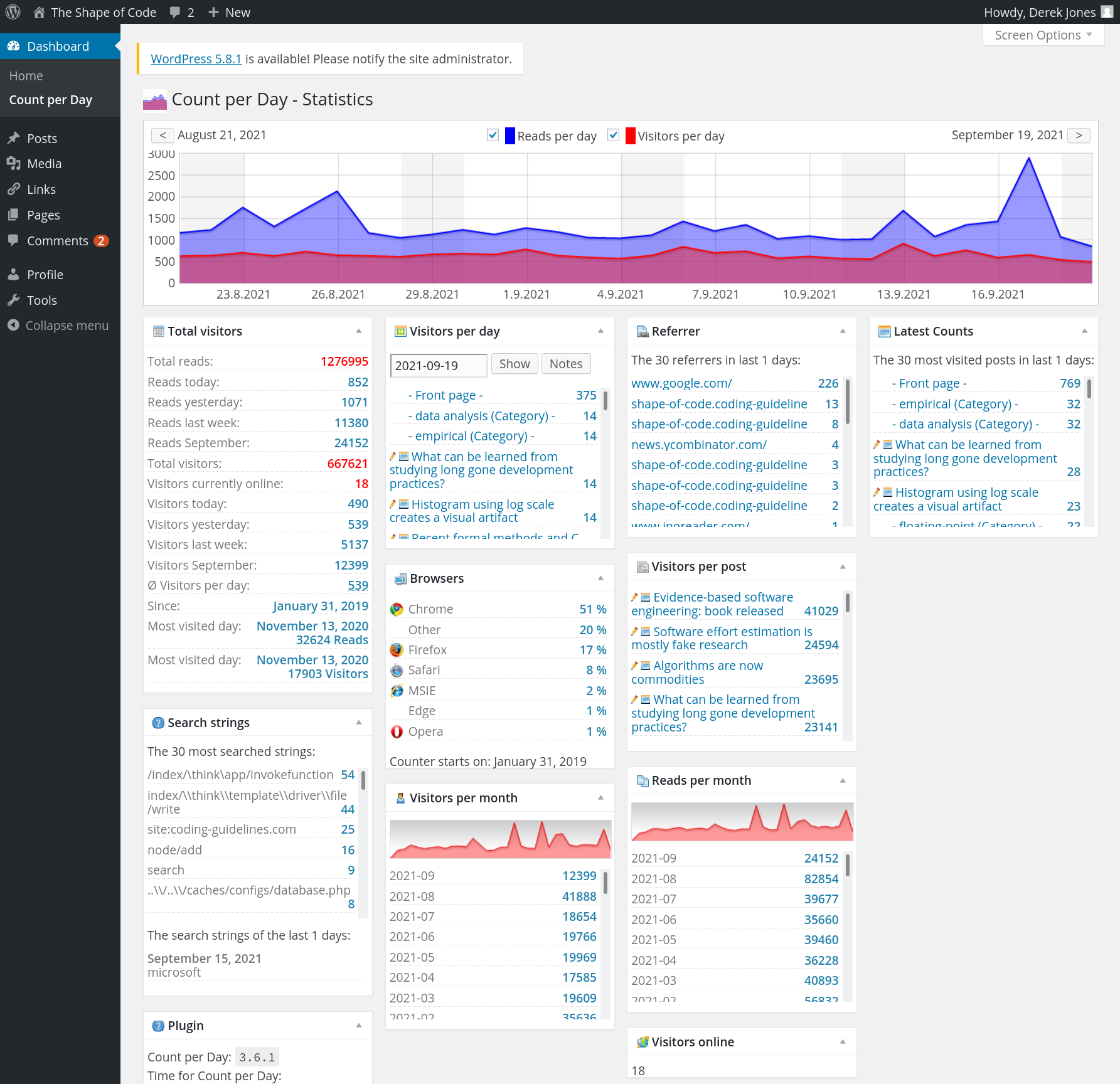
The screenshot below shows that the daily traffic is around 1K views (mostly from Google searches), with 20k+ daily peak views every few months (sometimes months after the article was posted):
Eight months later, the annual fee is due; time for action. HostGator is highly rated by many hosting reviews, and offered site migration (never having migrated a website before, I did not know it was essentially ftp’ing the contents, and maybe some basic WordPress stuff). I signed up.
As you may have guessed, my approach to website maintenance is: If it’s not broken, don’t fix it. This meant the site was running the oldest version of WordPress (4.2.30) and PHP (5.2, which reached end-of-life 10 years ago) that PowWeb supported.
As I learned about website and WordPress migration, I thought: I can do that. My Plan B was to get HostGator to do it.
WordPress migration turned out to be straight forward:
export blog contents. WordPress generates an xml file,
edit the xml file, replacing all occurrences of shape-of-code.coding-guidelines.com by shape-of-code.com,
create WordPress blog on HostGator (to minimise the chance of incompatibilities I stayed with version 4, HostGator offers 4.9.18), selected a few options, and installed a few basic add-ons,
ftp directories containing images and code+data to new site,
import contents of xml file (there is a 512M limit, my file was 5.5M).
It worked
I was not happy with the theme visually closest to the current blog (Twenty Sixteen), so I tried installing the existing theme (iNove). Despite not being maintained for eight years, it works well enough for me to decide to run with it.
I’m hoping that the new site will run with minimal input from me (apart from writing articles) for the next 10-years.
Since lockdown I've been getting up early most days and doing writing. First at home, before the rest of the house stirred, then sitting outside cafes and sitting scribbling in in my Alwych ALL WEATHER notebooks. I'm now very familiar with what time Central London cafes open.
I started off with something a bit like Morning Pages - just unfiltered random noodling, not intended to be read. That was incredibly satisfying for a long time and it undoubtedly helped to keep me a little bit saner. But after about a year it started seeming a little bit sterile and samey. I find it hard to write for myself. There's less pressure to find the right words, to make the right effort. I don't really care what I think. I care what you think. Even if I don't want you to tell me. So it was less satisfying.
Then I tried to make it more like a diary. Maybe the audience can be Future Me. But that didn't really work either. I care even less about Future Me. what's he ever done to me?
So, I thought, maybe my daily writing can be blogging. That's what I really like. Random (mostly) unfiltered noodling but with some vague sense of an audience*.
But, I further thought, I don't want to take a typing device to coffee. I have also enjoyed the manual pleasures of scribbling in a notebook. So, I have surrendered to the instagram advertising algos and bought myself a Remarkable 2.
I am currently scribbling on that. Testing the limits of its handwriting recognition.
And that will be the plan. I guess this is Day Zero. I will be writing inane thoughts and sending them from coffee to internet. Though probably with some filtering in between to correct mis-recognition and to add pictures and footnotes if necessary.
For the record: it's 8:05 AM. I'm at Bar Italia in Soho, London. There is opera in the background and the smells of waste and autumn mingling in the air. Ronnie Scott's are taking a delivery of vegetables. Outside Caffe Nero a man attempting to connect to a Lime bike and swearing at his phone.
*As Clive Thompson says: “Even if I was publishing it to no one, it’s just the threat of an audience.” and "I’d argue that the cognitive shift in going from an audience of zero (talking to yourself) to an audience of ten people (a few friends or random strangers checking out your online post) is so big that it’s actually huger than going from ten people to a million people."
He was my father but did not manage to become my dad. A sense of home in me and love are from my mother, but the drive for an adventure and the fight for freedom are from him. I hope his next adventure will be the one worth it.
Grateful for my life, time together, and all that adventures bring.
This was a shorter working week, as my wife and I went away (a week late) to celebrate our 18th wedding anniversary. We stayed, and were upgraded at, the Crowne Plaza in Newcastle. We both really like this hotel for its location, amenities, and comfort. We ate at The Muddler, which was good but not excellent; the service was slow and my vegetarian options mediocre compared to what Hannah had.
Still, we had an enjoyable time. It was slightly odd given the Great North Run happened last Sunday and the hotel was full of runners and their families. Still, as our upgraded room gave us access to the Club Lounge we were able to remain somewhat aloof.
This wasn’t my only trip. As with last week, I walked and camped on Friday night. This time, instead of being picked up, I walked a couple of hours on Friday night and then back on Saturday morning. It was pretty spectacular, especially now that I’ve got my Jetboil to make some Firepot meals.
I’m writing this with a sore shoulder. I wrote my last weeknote, and several before that also with a sore shoulder. It’s affected my sleep for the last couple of months, but it was only yesterday that I realised how I damaged it.
Sometimes at the gym I use the Smith machine to do squats. Back in late June, I accidentally placed three 20kg weights on one side, and one on the other (instead of two and two). I’m not exactly sure how I managed this, other than I must have been distracted listening to an audiobook. After a set of 10 squats, I realised my mistake, moved one of the weights to the other side, and continued.
After some research and conversations with people who know about these things, it seems I may have damaged my rotator cuff. So I’ve booked a physio appointment for the week after next. It’s frustrating knowing that I’ve caused the injury, as is reading this on the website I’ve linked to:
You can also have a combination of wear and tear with an injury, which is why shoulder injuries or pain can become more common over the age of 40.
Ah well. It could be worse.
Work this week has been mainly two streams of work for Julie’s Bicycle, one of which I can discuss publicly (the digital strategy stuff), and the other which WAO is working on with Outlandish. It’s fascinating working with organisations who are putting together a product team for the first time: Laura and I really enjoy the challenge.
Other than that we’ve started a new contract with Participate. We’ll share details soon about an online event we’ll be running next month which is an outflow of our Keep Badges Weird (KBW) project. I’ve also been meaning to spend time writing up a potentially-fundable idea I’ve got about Open Badges + ActivityPub, but didn’t get around to it this week.
We had a co-op day this week, which Laura wrote up on our blog. All of the members were there, plus Anna (our intern) and we managed to get through quite a few proposals. It’s so good being part of an organisation that you own, with processes in place to ensure consensual decision-making. We’re doing well, and are in a much better place than we were this time last year.
Finally, there has been a lot of coming and going of parcels this week as we got Hannah set up with an external monitor, webcam, keyboard and mouse to go with her MacBook Pro. Her office space in our loft conversion doesn’t really give her space for anything other than a 24-inch monitor, and there are precious monitors of that size with 4K resolution. (Anything less looks fuzzy given the MacBook display) We eventually settled on this LG model, although disappointingly it doesn’t have speakers and also required a USB-C to DisplayPort cable.
In terms of webcam we went for the Logitech C-925e as it has a privacy shutter — unlike my (otherwise brilliant) Logitech C920. Then, for the keyboard and mouse, anything other than the official Apple versions doesn’t really cut it with a Mac. I unapologetically ordered most of these from Amazon as their returns process is so fantastic. The only one I ordered from eBay caused me a right hassle.
Next week looks like it will be remarkably similar to this week. I’m hoping to get another wild camp in somewhere!
Image from a photo I took during my overnight camping trip.
The rest of the industry may be ready to catch up to Apple, who lost the lead architect and some hundred engineers to a new startup, that was bought by Qualcomm.
Regardless of the paltry CPU gains and potential core architecture delays, Apple is still the leader in performance per watt. With Intel design teams starting to get back on track, AMD executing almost flawlessly, and Qualcomm coming in soon like a hammer with Nuvia cores, we aren’t sure if this lead will be sustained. The A11 to A12 generation was seen as Apple starting to asymptote out on gains with only a 15% gain, and the A13 to A14 looked even more weak with 8.3% gains, but now with no CPU gains, let’s cross our fingers and hope the A16 brings a large architectural change.
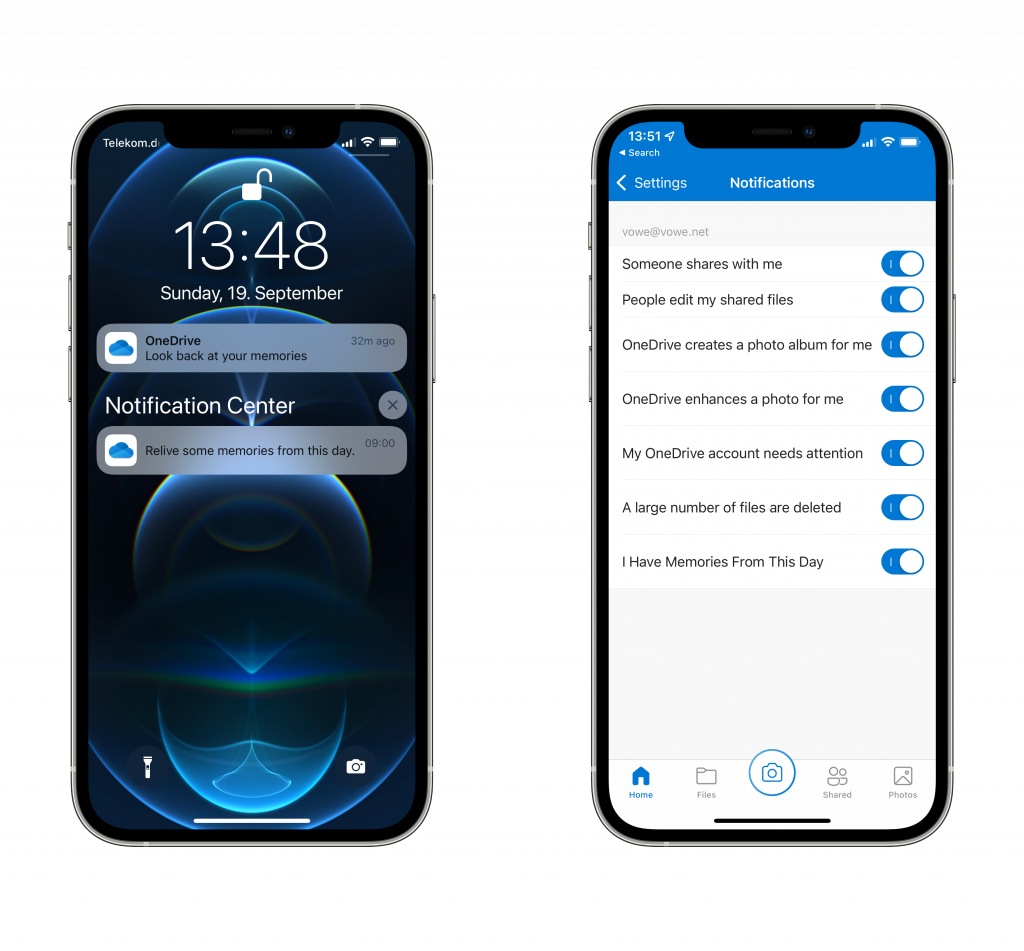
Grumpy mode on. Why does every app need to bother me with unimportant events? Yeah, cool, I shot some photos 365 days ago. Big deal. For a while I have been dismissing these messages, but eventually I was fed up. Yes, I could turn off all notifications, but I want to know when an editor starts working on my manuscript or when I deleted a large number of files. Time to hunt for the options. I now have disabled “OneDrive creates a photo album for me” and “I Have Memories From This Day”?
Do you notice how the last option is all capitalized and the others are not? This seems like a hot new feature somebody squeezed in. Next up: find out how I can disable the automatic creation of albums. Yeeez. You are a file replication service. I don’t want to talk to you, ever. Just do your thing and replicated files.









 Words will follow.