Shared posts

10 Nov 02:35

Hands-on with the iPhone 13 Pro

by Neil Cybart

For the past few days, I’ve been using an iPhone 13 Pro (Gold - 1TB). In order to give the device a crash course in handling real world experiences, I took the device with me to the Big E, the third-largest state fair in the U.S.

iPhone 13 Pro (Above Avalon)

Before we get to the iPhone 13 Pro’s day at the fair, there is value found in setting the stage a bit. In 2021, there are a handful of iPhone features and attributes that I truly care about and need:

  1. Reliability. This item is designed to be a catch-basin feature that includes everything from performance-related items that allow me to get through my workflows with ease to good enough durability so that a drop or fall doesn’t lead to a cracked screen. 

  2. Consistent and carefree cameras. It’s been years since cameras evolved to be just as much about communication as memory capture. I want to be able to quickly take an iPhone out of my pocket and take fuss-free good photos.  This includes everything from taking photos of static scenery to trying to capture my 5-year-old and 3-year-old boys (one of the hardest tests for cameras).

  3. Good battery life. There is no worse friction point than having an iPhone turn off in the middle of the day because I forgot to charge it that morning. 

I can base my iPhone 13 Pro impressions and reviews on how the device compares in those three categories to the iPhone 12 Pro. A list of objective items can be created to determine if the iPhone 13 Pro is “better” than its predecessor. For me, such an activity is incomplete since it doesn’t reflect what really matters - user experiences. We are very good at identifying good and bad experiences. Accordingly, a more realistic test is to simply use the iPhone 13 Pro for a few days and then ask myself if I would be OK with going back to my previous iPhone. If the answer to the preceding question is “yes,” Apple has a problem on its hands since the newest flagship is in essence leading to a worse user experience. If the answer is “no,” then the various multi-disciplinary teams responsible for developing iPhones succeeded this year and can continue putting the finishing touches on next year’s flagship. 

After a few days with the iPhone 13 Pro, I’m perfectly OK with letting the iPhone 11 Pro Max and iPhone 12 Pro be ignored and collect dust. That is one of the best tests for determining that Apple has succeeded with the iPhone 13 Pro.

Here are my initial Impressions:

Setup. The days of needing to set aside a good hour or two for setting up a new iPhone and pairing it with an Apple Watch are over. Setting up the iPhone 13 Pro was a breeze. The number of onboarding screens has been cut significantly. The overall setup process (from iCloud) took about 15 minutes while pairing an Apple Watch Series 6 to the device took a few additional minutes. The biggest hassle was found with signing back into a handful of iOS apps (which isn’t a big deal). 

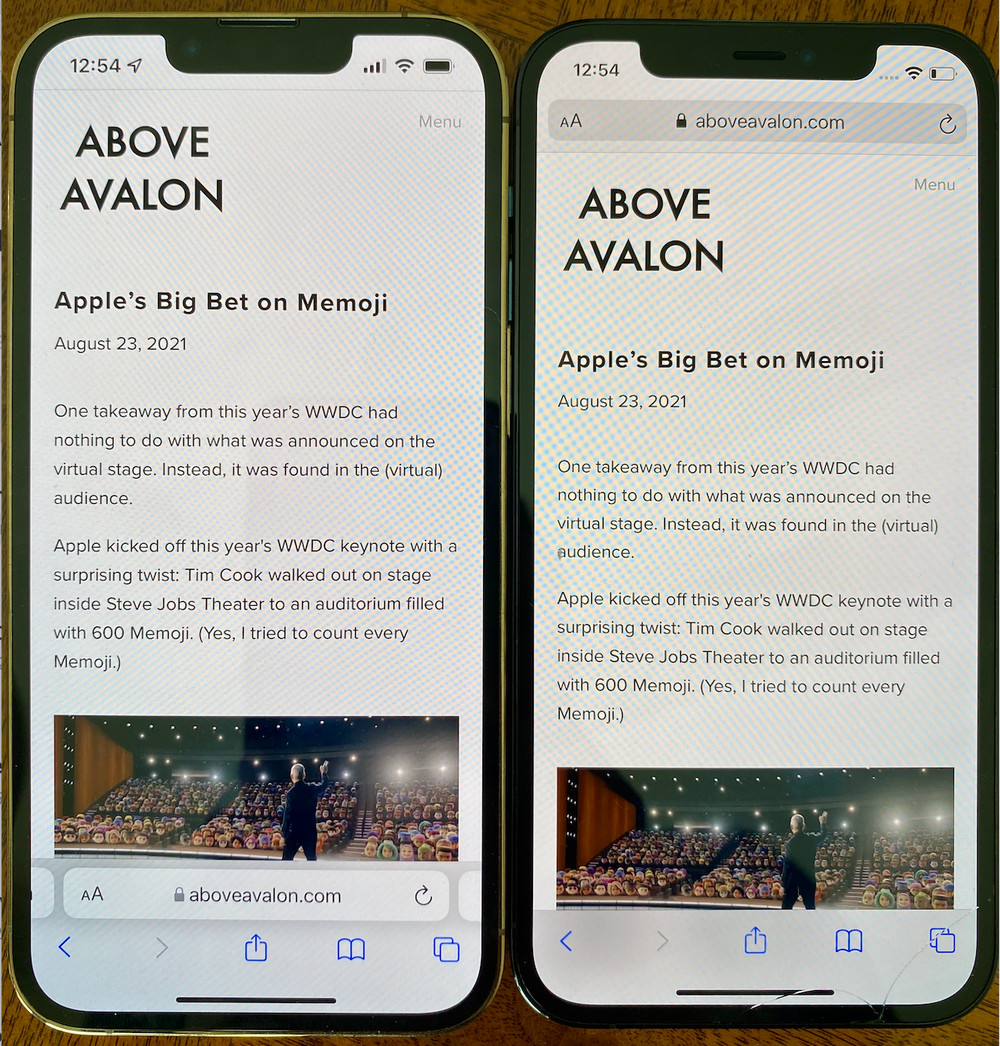
The Front Notch. The iPhone 13 and 13 Pro have a 20% smaller TrueDepth Camera System with much of the volume reduction in the horizontal dimension. Since I never noticed the front-facing notch in the past, the 20% smaller notch was similarly hard to notice. (I watch my videos in landscape mode with black bars on either side.). The notch remains a total nonfactor for me, although I appreciate Apple’s efforts in making it smaller over time. 

Screen Shot 2021-09-21 at 1.26.24 PM.png

iPhone 13 Pro (left) vs. iPhone 12 Pro (right)

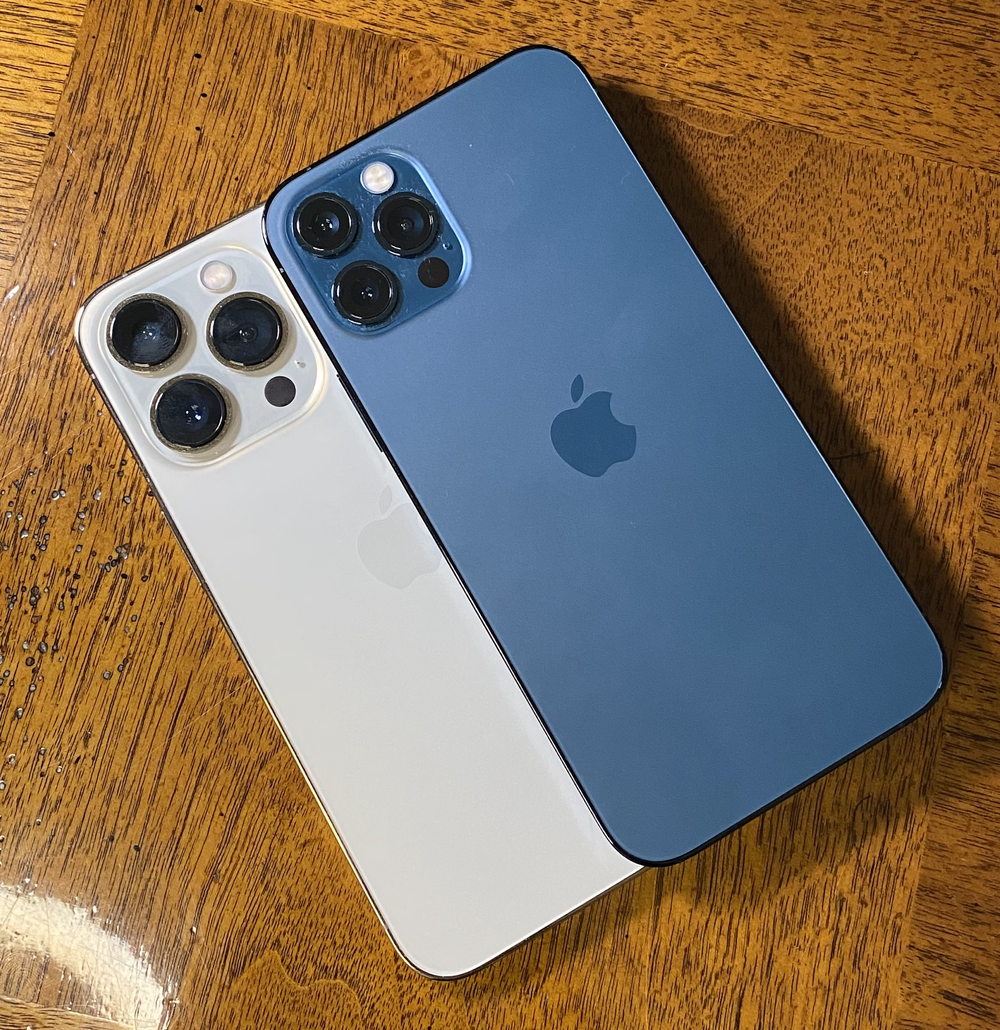
The Back Cameras Trifecta. While the front notch got smaller, the three cameras located on the back of the iPhone 13 Pro, a setup I’m referring to as the back cameras trifecta, got bigger. Noticeably bigger.

iPhone 13 Pro (left) vs. iPhone 12 Pro (right)

iPhone 13 Pro (left) vs. iPhone 12 Pro (right)

Camera physics adds credibility to the need for physically larger cameras. Apple is right in not trying to hide the camera budges by making the overall iPhone thicker. The thing is, depending on how you hold the iPhone 13 Pro in your hand, the back camera trifecta gets in the way. Based on the way I naturally hold iPhones, my index finger rests very close to the lowest camera. Using an iPhone 13 Pro case (a first-party leather one) actually helps A LOT given that it includes a small lip that my index finger rests on. One can’t help but wonder if Apple’s recent push with first-party cases is partially driven by this fact. 

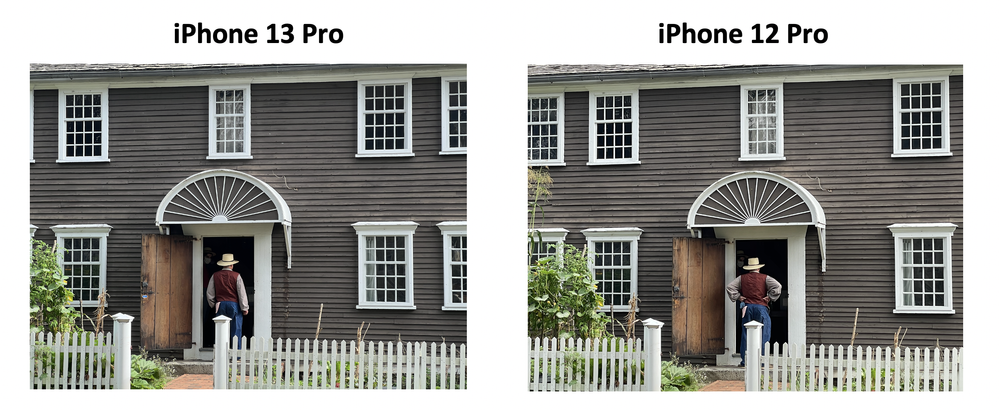
As for the actual cameras found on the iPhone 13 Pro, they are scary good. The era of computational photography involves having the iPhone itself do all the heavy lifting while I just point and tap.

Photograph taken on iPhone 13 Pro.

Photograph taken on iPhone 13 Pro.

However, the iPhone 12 Pro and 11 Pro cameras were scary good too. Here is a comparison between the iPhone 13 Pro and 12 Pro. If you can tell the difference, let me know. 

Above Avalon iPhone 13 Pro

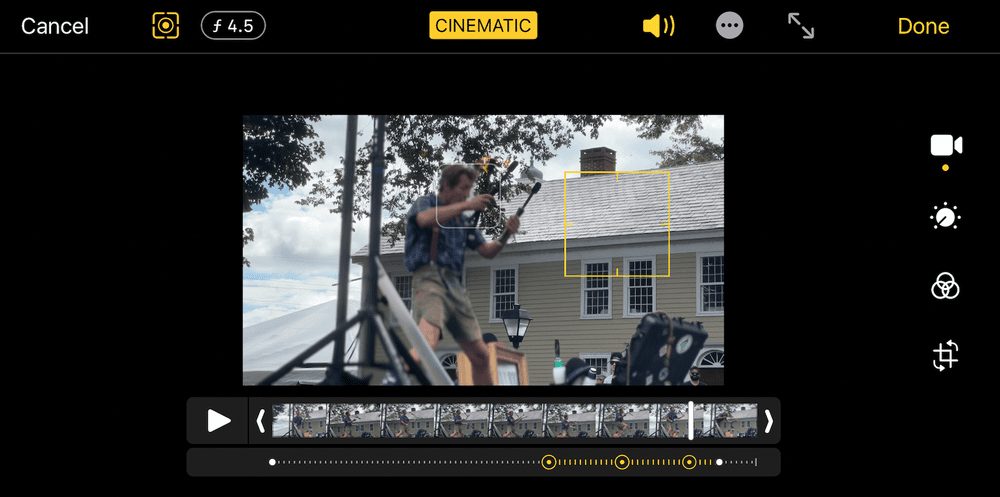
Cinematic Mode. By bringing depth of field to video, Cinematic Model is Apple’s latest effort to democratize photography and videography. Based on my tests using the performer Hilby The Skinny German Juggle Boy at the Big E, Apple’s ML and computational photography chops live up to expectations. Results were impressive. (Hilby appears at 8:48 in the video below.) 

It is important to point out that the preceding video is a result of simply swiping to Cinematic Mode and pointing a camera at a moving subject. There was no additional work, effort, or knowledge required on my part. Hilby is a good 20 to 25 feet away for me, 3x optical zoom was utilized, and there is unknown in terms of what is going to happen both in terms of what will be filmed and how.

Cinematic Mode is not perfect. When objects, like knives and fire sticks, were added to the scene, I found that Cinematic Mode struggled to determine what to keep in focus. Not surprisingly, when it comes to capturing a scene that is more like 50 to 75 feet away, Cinematic Mode, while still available as a choice, did not produce any discernible focus / bokeh effect.   

Another useful feature found with Cinematic Mode is being able to adjust the video after recording. Based on my testing, the edit functionality worked fine.

There is a minor learning curve involved in figuring out what exactly is going on and what to edit but aftera few minutes of playing around, and the average consumer should pick it up. Cinematic Mode feels very much like Portrait Mode in terms of usefulness and utility. My expectation is that I will use it just as much as Portrait Mode, which is pretty often. 

ProMotion. For the first time, Apple brought ProMotion (120Hz adaptative refresh display technology) to the iPhone. Comparing an iPhone 13 Pro with ProMotion to an iPhone 12 Pro without ProMotion, I was not able to make out any discernable difference between the two. Even though I may not have noticed a difference visually, an added benefit found with ProMotion is power savings, which impacts all users in one way or another.

Battery Life. According to Apple, the iPhone 13 Pro has 1.5 more hours of battery life in real world usage. This means you will be able to get about 90 minutes more usage before needing a recharge. That exact claim was difficult for me to test based on the limited amount of time with the device. I was able to get about eight hours of battery life at the fair on Saturday, which included going to and from it, before clunking out. Nearly half of my battery usage consisted of use by the Photos app. I spent nearly an hour in this app. Since that is far from normal usage for me, I was not able to compare this performance to that of other iPhones. 

Screen Size. When it comes to one of the most subjective debates found with the iPhone, screen size, I remain torn on the topic. I’ve been switching between a 6.5-inch and 6.1-inch screen for the past year. The additional screen real estate found with the iPhone Pro Max is great for video. However, the overall larger form factor needed to support that additional screen real estate is a negative for mobility. I totally understand why the iPhone Pro Max form factor is too large for most people. 

Pricing. The iPhone 13 Pro starts at $45.79 per month (before trade-in). That’s $8 more per month than the iPhone 13 (or the price of two Starbucks coffees). For some users, the LiDAR Scanner (for Night mode portraits) or better battery life (22 hours video playback with the 13 Pro vs. 19 hours playback with the 13) are worth that difference.

The iPhone business is all about continuous refinement and advancement with new features aimed at improving the user experience. The iPhone business in 2021 is not dependent on year-over-over upgrades and changes that are so shocking and momentous that a billion iPhone users run out and upgrade. Apple would not be able to handle that kind of demand. In addition, it’s not reflective of the iPhone installed base’s heterogenous nature. What may be important to me may not matter as much to you. Trying to satisfy both of us in the same exact way is a fool’s errand. 

Receive my analysis and perspective on Apple throughout the week via exclusive daily updates (3 stories per day, 12 stories per week). Available to Above Avalon members. To sign up and for more information on membership, visit the membership page.

10 Nov 02:34

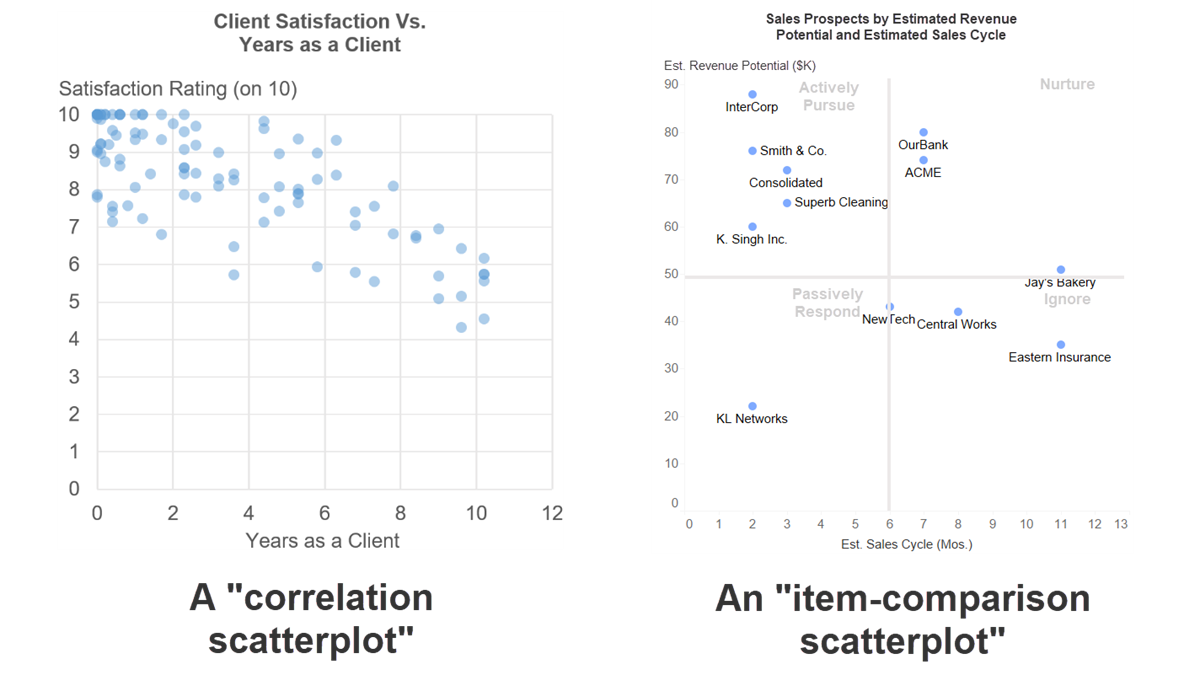
The two completely different chart types that are called "scatterplots"​

by Nick Desbarats

tl;dr: Should you label the individual dots in a scatterplot? Should you add a trendline? Should you divide the chart area into quadrants? The answers to these—and most other scatterplot design best practice questions—depend on which type of scatterplot you’re designing; a “correlation scatterplot”, or an “item-comparison scatterplot”.


I’m going to assume that, if you’ve decided to read this post, you know what a scatterplot (a.k.a., a “scatter chart” or “scatter graph”) is and how to read one. If that’s not the case, Google is your friend (well, not really).

As with any chart type, there are design best practices that we can follow to make our scatterplots more effective. What, exactly, are those design best practices? Well, that depends almost entirely on what type of scatterplot we’re creating.

Heywhatnow? “Scatterplot” is just a single chart type, like “bar chart” or a “line chart”, right? Well, IMHO, there are two fundamentally different types of scatterplots, and the design best practices for each type are quite different. In fact, I think of them as two entirely separate chart types, even though that isn’t a common perception.

What are the two types of scatterplots? Well, I’m glad I assumed that you asked…

Type 1: “Correlation” scatterplots

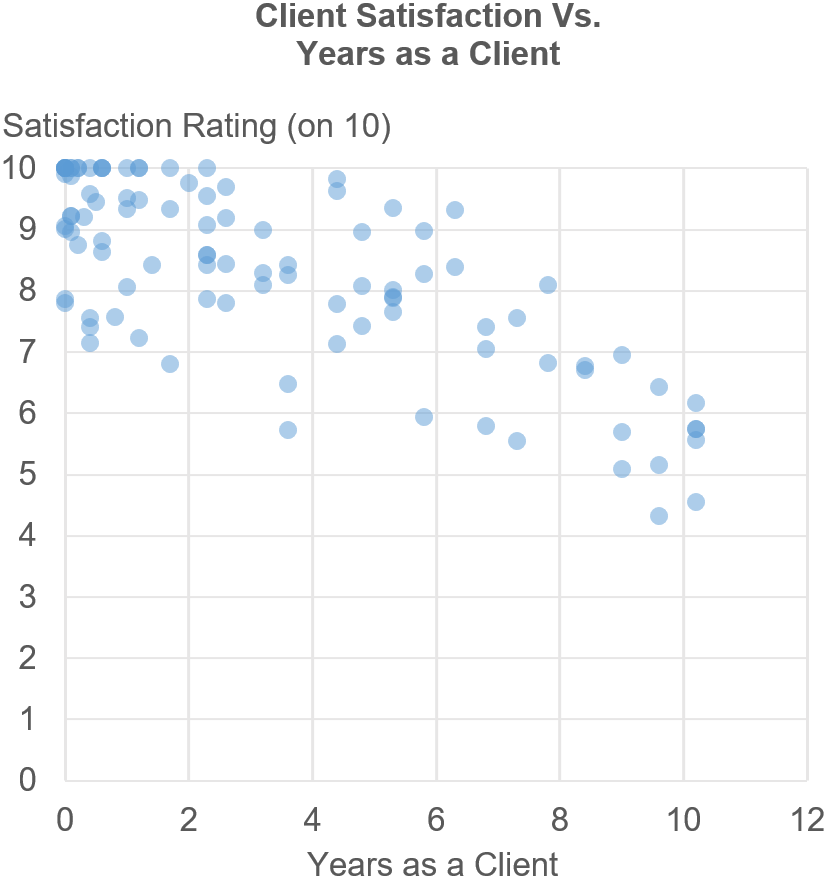
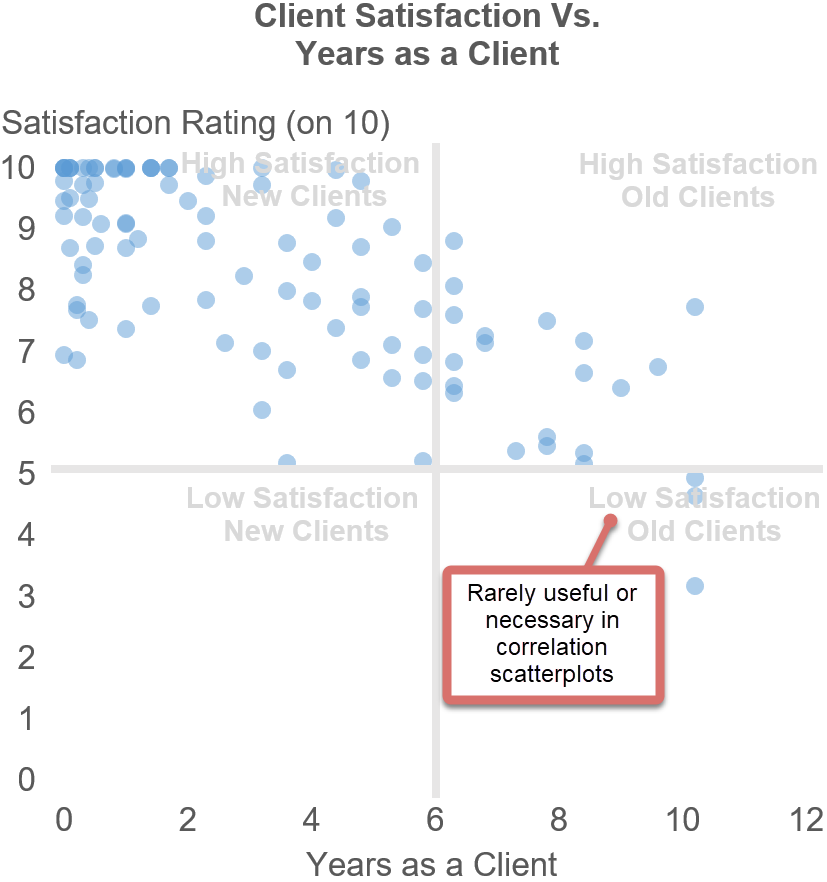
Consider this scatterplot:


If you know how to read a scatterplot, you know that the most obvious insight here is that clients who’ve been with us longer tend to have lower satisfaction ratings, suggesting that we may need to pay more attention to clients who’ve been with us for a long time. More generally, the purpose of this scatterplot is to show how one variable (e.g., Satisfaction Rating) is (or isn’t) related to another variable (e.g., Years as a Client). When the main purpose of a scatterplot is to show the relationship between two quantitative variables like this, I call it a “correlation scatterplot”.

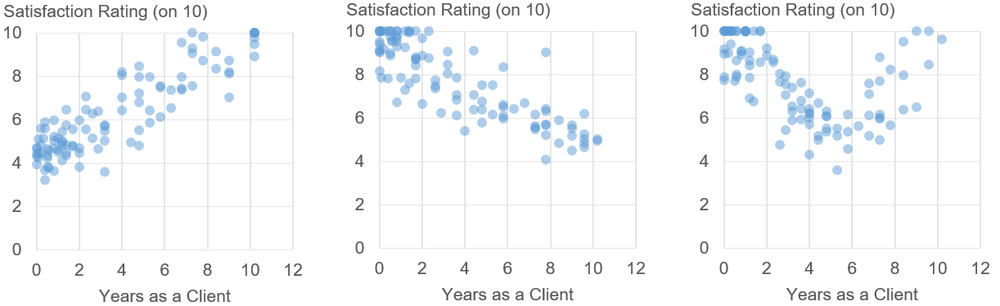
In correlation scatterplots, the important thing is the pattern that the dots form, since different patterns indicate different types of relationships that can exist between two variables, for example:

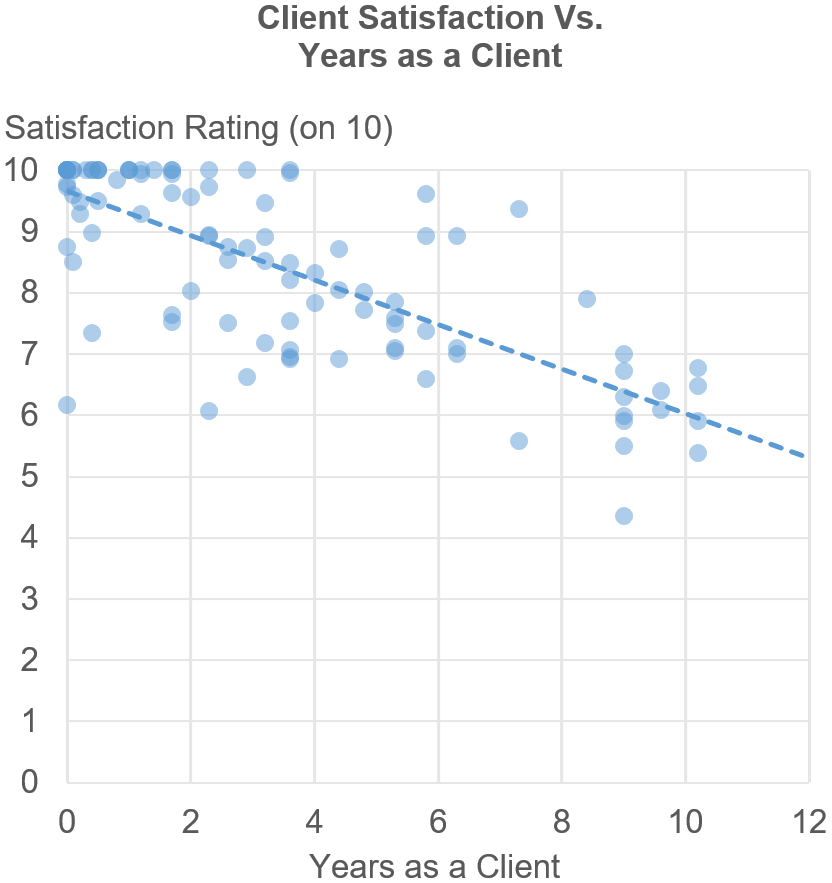
To better visualize these dot patterns, it can be useful to add features such as trend lines, confidence intervals, etc. to correlation scatterplots, such as the trendline in the chart below:


Now, let’s look at the second type of scatterplot. As we’ll see, everything that I just said about correlation scatterplots goes out the window when we’re talking about…

Type 2: “Item-comparison” scatterplots

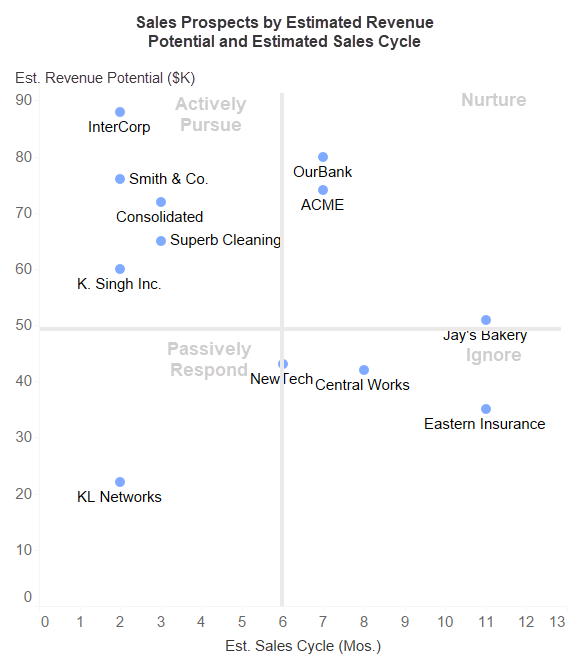
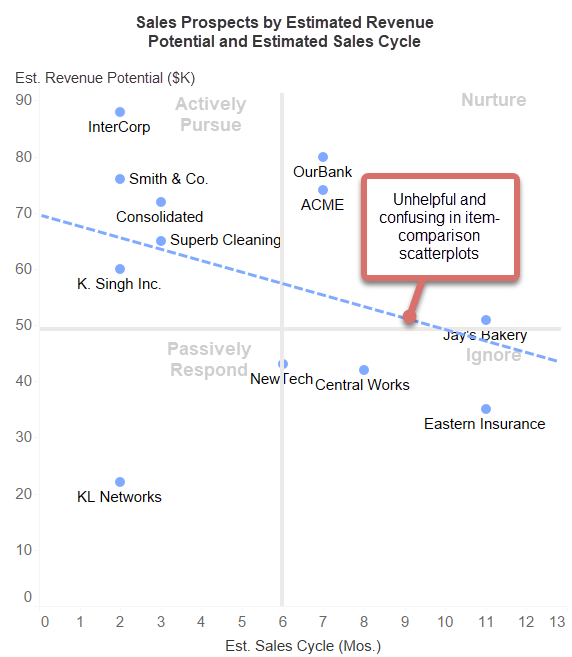
Consider this scatterplot:


The main purpose of this scatterplot is to show how a set of items (e.g., sales prospects) compare with one another. For example, we can see that InterCorp (in the upper left) has a relatively high revenue potential and short sales cycle and so we should probably focus more of our sales efforts on them, and stop spending time on Eastern Insurance (in the lower right).

The point here isn’t to show the general relationship between the “Estimated Revenue Potential” variable and the “Estimated Sales Cycle” variable. Indeed, the general relationship between the two variables is largely irrelevant in a chart like this. Sure, we can see that relationship as a pattern of dots, but that’s not what this chart is for.

If the main purpose of a scatterplot is to show how a set of individual items compare with one another (and not how two variables relate to each other in general), I call it an “item-comparison scatterplot”. This fundamental difference in purpose impacts most of the best practices that we’d use to design each type of scatterplot, for example…

Dot labels

Because item-comparison scatterplots are all about comparing individual items with one another, it’s virtually always necessary to label the dots individually so we know what each dot is (e.g., which sales prospect each dot represents). In fact, item-comparison scatterplots are basically useless if the dots aren’t labeled. In correlation scatterplots, however, it’s rarely useful or necessary to label individual dots.

Quadrants

Item-comparison scatterplots almost always benefit from being divided into regions (e.g., quadrants) with helpful labels for each region. The “Sales Prospects” scatterplot above, for example, is divided into useful regions labelled “Actively Pursue”, “Nurture”, etc. Indeed, item-comparison scatterplots are sometimes called “two-by-two matrices” because they’re so often divided into a two-region by two-region matrix. In correlation scatterplots, however, dividing the chart area into regions is rarely useful or necessary:


Trend lines, confidence intervals, etc.

In an item-comparison scatterplot, the pattern formed by the dots is usually of only incidental interest or irrelevant. Therefore, adding features to make dot patterns clearer, such as trend lines, confidence intervals, etc. is rarely necessary or useful in item-comparison scatterplots, and may not even make sense:


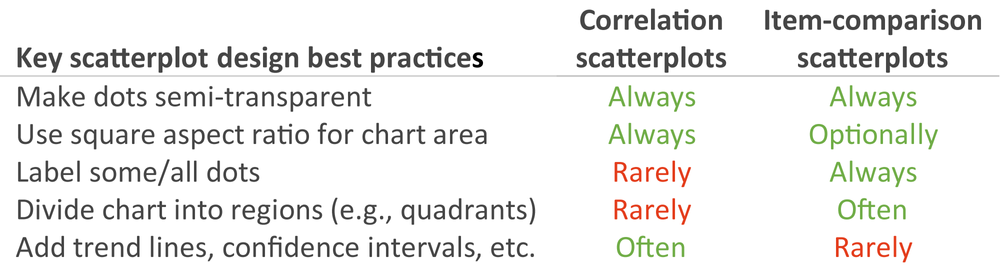
Yes, there are some design best practices that apply to both types of scatterplots, but most only apply to one type or the other, for example:


Now what?

While both types of scatterplots are based on the same basic idea of plotting dots in a 2-D space based on two quantitative measures (thanks, René!), the similarities pretty much end there. Both types of scatterplots can be very useful, though, and I see both “in the wild” all the time. This means that it’s important for data viz practitioners to know which design best practices apply to each type so that they don’t apply the right best practices to the wrong chart type. The first step, though, is to recognize that there aren’t “scatterplot design best practices”, only “correlation scatterplot design best practices” and “item-comparison scatterplot design best practices”.

Unfortunately, however, many articles and books that discuss scatterplot design best practices only discuss one of the two types of scatterplots without even mentioning the other, and this can be confusing (or worse) if you happen to be designing a scatterplot of the other type. Hopefully, this article will help clear up any such confusion, but please let me know in the comments if any of the above doesn’t jibe with you.

By the way…

If you’re interested in attending my Practical Charts or Practical Dashboards course, here’s a list of my upcoming open-registration workshops.

10 Nov 02:32

Data Science Deployed

The good folks at Data Science Deployed gave me a chance this morning to talk about what I think the real challenges in data science are: you can see the results at https://www.youtube.com/watch?v=EYE8F3i2HHM.

10 Nov 02:31

Confirmation of Canada as a Progressive Country

by Ken Greenberg

Andrew Coyne has made the observation that this is the second consecutive minority government, the 5th of the last 7 and 11th of the last 22. In that time we’ve gone from 3 parties, to 4, to 5, and now to 6. While the first past the post system was supposed to do two things: deliver majority governments and drive out smaller parties, it is doing neither. What is this telling us is that given this political landscape it may be increasingly difficult to get to majority government in our system.   

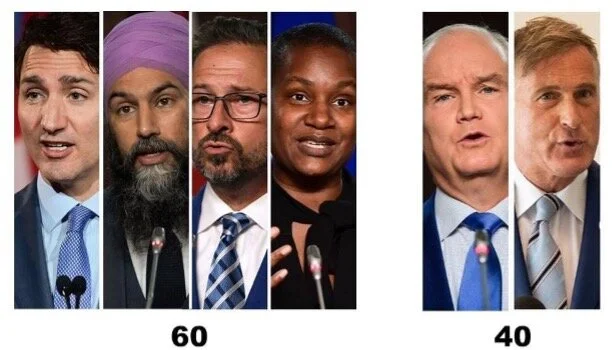
So who speaks for Canadians? This is also the 5th election in the last 6 that the Liberals have finished slightly behind the Conservatives in the popular vote. But claims that that statistic suggests the thwarted will of the population are misleading. In fact 4 of the 6 parties: the Liberals, NDP, Bloc and Greens share a general overlap (with some differences to be sure) on a broad range of progressive issues including but not limited to: the existential challenge of climate change and the need to tax carbon; the need to shift to a green economy; the reality of Covid and the need for vaccine passports; the need to provide more affordable housing and affordable quality child care; reconciliation and renegotiation of relationships with first nations; gender equity and LGBTQ rights: the need to address systemic racism; women’s choice and the right to abortion; gun control; the primacy of public health and more resources for long term care. These four parties taken together represent a fairly stable 60+ % of Canadians.   

Two parties, the Conservatives and the new Peoples Party do not agree with these priorities and have a very different agenda. Together they represent less than 40% of Canadians across a right wing spectrum.  My take from the election is that it is time for the 4 parties on the progressive side to stop devoting their energies to attacking each other and concentrate on advancing on that progressive agenda pooling best ideas to move expeditiously on urgent shared priorities. Call it a loose informal ‘coalition’ or collaboration; it is the only way to move forward.   

I believe that is what is what Canadians have asked for.  

  
10 Nov 02:30

Disc Brakes 101

by noreply@blogger.com (VeloOrange)

by Scott

Disc brakes have really made major inroads into road cycling since they were first introduced about 15 years ago. Where once the idea of a road bike using disc brakes was laughable, we've now reached the point where a large percentage of road bikes come with disc brakes. We'd done a blog post about the pro/cons of disc brakes awhile back, so we're not here to rehash an old argument, but rather try to explain what you need to get in terms of brakes and bits if you want to build up a new bike that takes disc brakes.

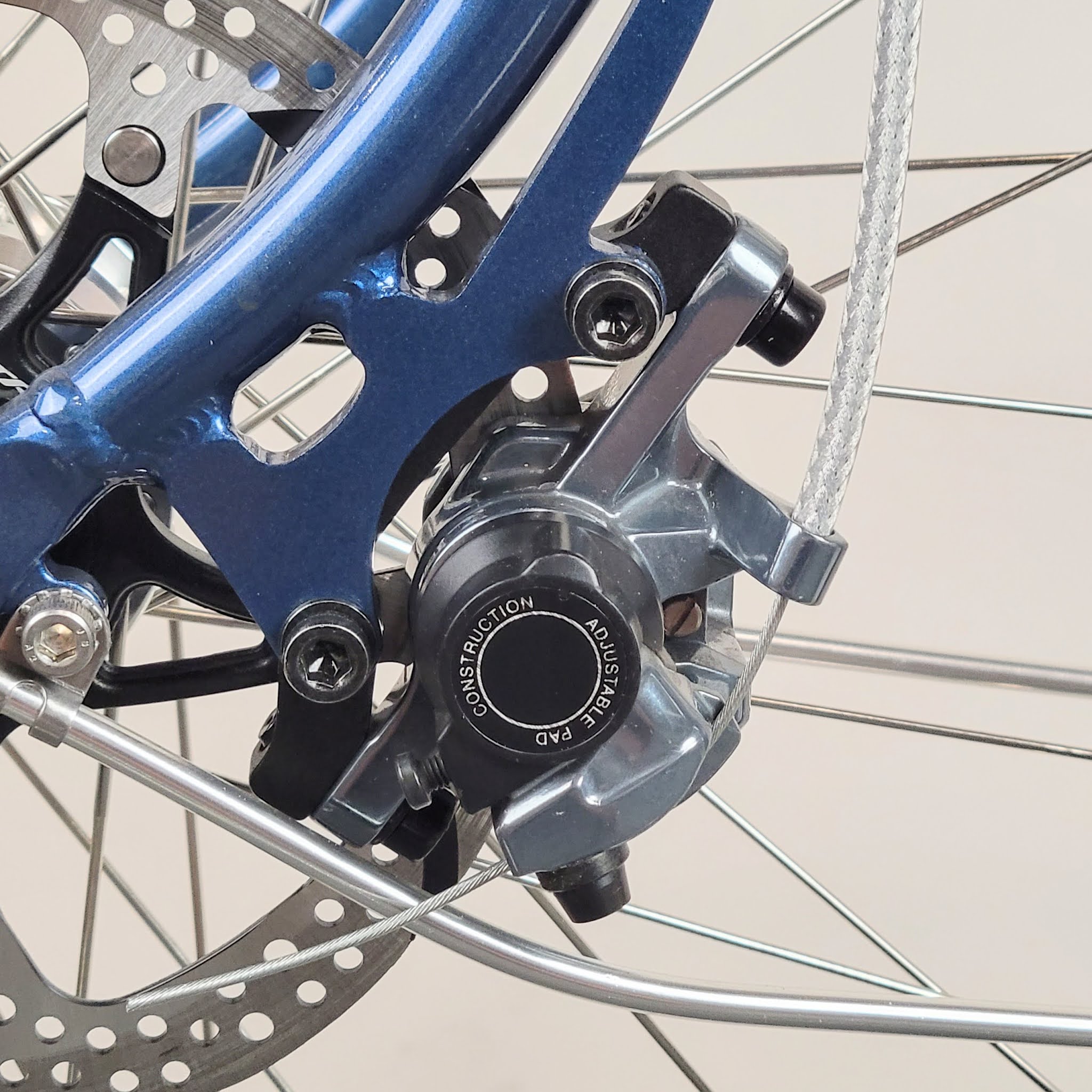
Let's start with the mounting style of the brake caliper. This is the key to buying the right parts for your bike. There are three main styles you'll read about: IS, Post, and Flat mount. In your bike's description, it should state what sort of disc brake system the frame and fork uses.

Frame and Fork Mounts

  • IS mount uses an unthreaded tab welded to the frame or fork. "IS brakes" do not exist anymore. The Polyvalent and Piolet use IS mounts. What you need to buy is a post-mount brake and an IS adaptor for your rotor size. Generally speaking, when you choose the rotor, use the adapter the company who makes the rotor suggests. 
  • Post mounts are welded tabs that have internal threading. The brake screws right into the mount in the frame. You get adaptors to account for the size of the rotor. These were designed for mountain bikes, so you can get adapters to work with rotors from 160 mm to 203 mm. Our Neutrino mini velo uses this system for the rear brake and an IS for the front.
  • Flat mount is flush/flat with the chain stay or fork. It was designed for road and gravel bikes but is making its way into MTB. Typical rotor sizes are either 140 and 160 mm. Our Pass Hunter has flat mount brakes.


Moving on to Calipers...

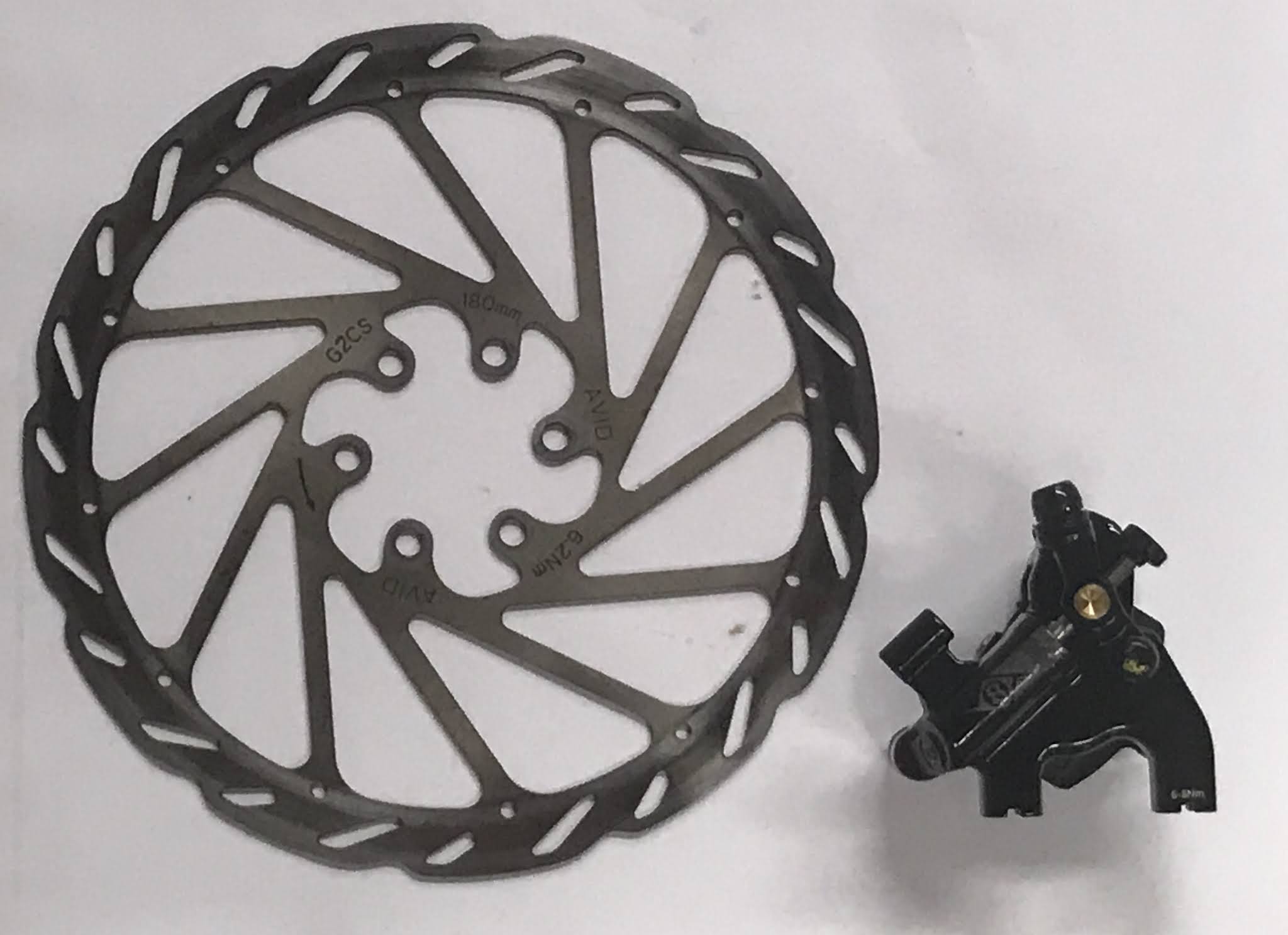
There are generally two styles of caliper. The first is single piston, where one side moves the brake pad and pushes the rotor against the other pad on the opposite side of the caliper. The other is dual piston where a single arm actuates pistons on both sides of the rotor (more like your car's brakes). Either is fine, but we prefer to use dual piston for more consistent wear and performance of brake pads and rotors.


There are several types of actuation among disc brakes. Perhaps the most common are mechanical, cable-actuated calipers. These are nice for swapping cockpits and brake components. Alternatively, you can also get hydraulic brake calipers. These offer greater stopping power and better modulation, though you generally can't mix and match components from different companies, or even series from the same company. There are also more specialized tools for installation since you're dealing with hydraulic fluid. The third type is a cable actuated brake with a hydraulic reservoir. This type of brake offers the benefit of being able to mix and match calipers and brake levers, while also offering greater stopping power and modulation than a standard mechanical caliper. Simply put:
  • Cable actuated: easy to install and service, able to mix and match, good braking
  • Hydraulic actuated: harder to install and service since you need specialized tools, essentially no ability to mix and match, superior performance and modulation
  • Cable actuated with hydraulic reservoir: easy to install and service, able to mix and match, great braking, though more bulky than the other options because of the added reservoir

And Rotors...

The rotor is the actual disc that the brake caliper pinches to allow you to stop. Generally speaking, when choosing rotor size, larger rotor equals better heat removal and better stopping over short/intense braking (MTB) and longer downhill braking. Smaller rotor equals less weight and fewer parts. Generally speaking, the bikes we built fluctuate between 160mm or 180mm depending on the application and bike. The next size up is 203mm, but that is pretty exclusively for MTB and downhill.


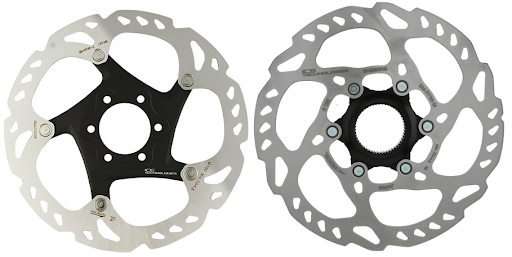
Rotors come in two mounting styles - 6 bolt (on left) or center lock (on right). 6 bolt is the style we use on our hubs. The big advantage to 6 bolt is that you can easily remove the rotor if you are packing the bike up or need to replace the rotor out in the wilds of Iceland's interior, using only a T25 Torx head wrench.

The center lock system, which is primarily used and licensed by Shimano, uses a center spline with a lock ring to keep the rotor in place. You need a cassette lockring tool plus a good size wrench to get it off. This is nice for installation but is a pain for traveling.

Finally Adaptors...

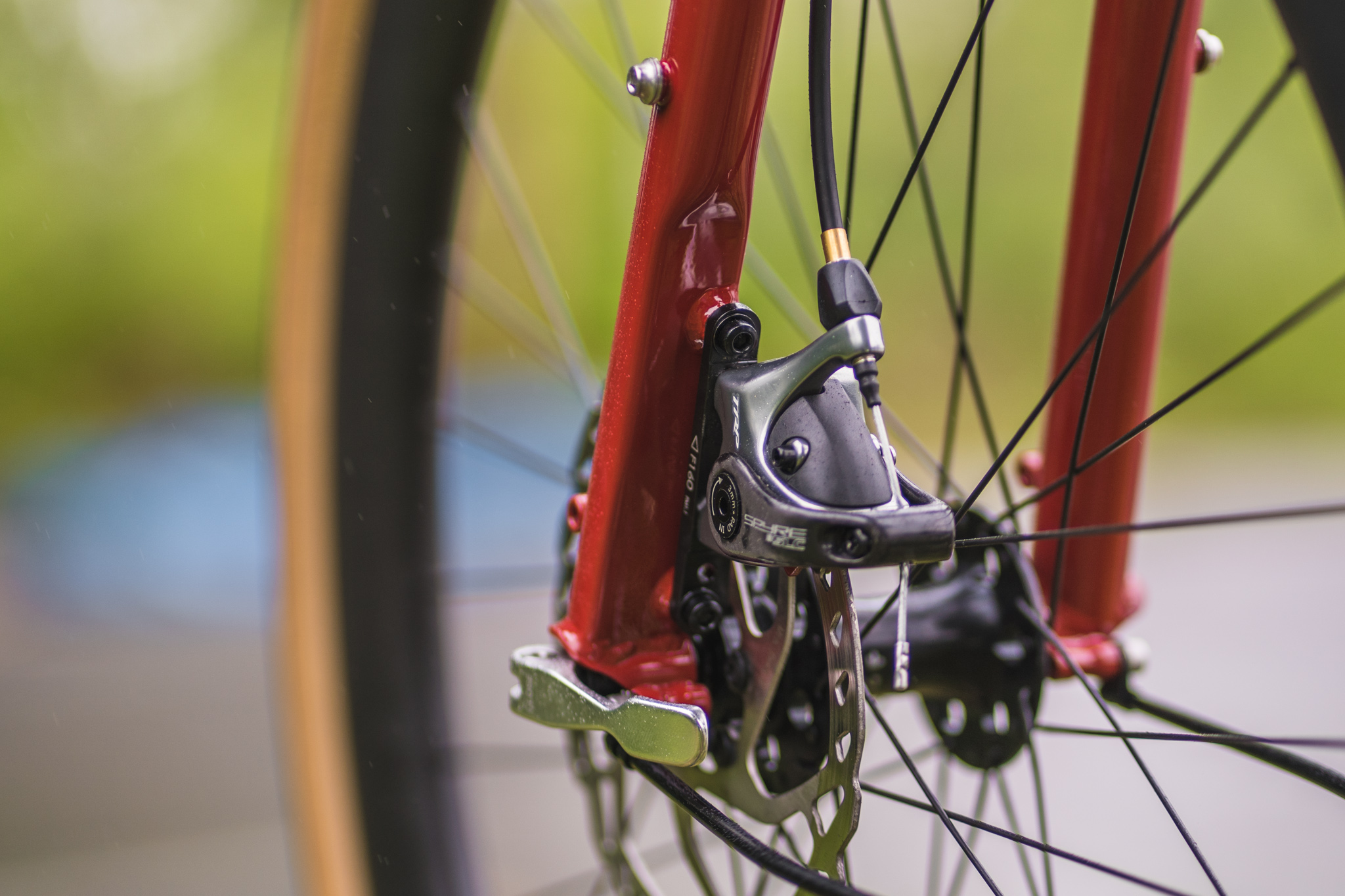
So let's look at a fork to get an idea of the parts needed for it. This fork uses IS mounts, so we went with a set of Post mount TRP Spyres and the mounts for a 160 mm rotor. Notice that the fork mount is unthreaded, and the adaptor is threaded in two directions: left and right to attach the caliper to the fork mount, and front and back to attach the caliper to the adaptor.


Flat mount is a little different. For the frame, you need bolts that pass through the frame and screw into the caliper. Depending on the frame design, you may not need any shims for a 140mm rotor. For a 160mm rotor, you'll very likely need one. For the front, it also screws directly into the fork and uses a special mount. Some brake sets come with all of the hardware and others don't come with any (and you have to buy a la cart). 


Post mount is the easiest as the caliper screws directly into the frame or fork mount. You should only need shims to accommodate the rotor size.


So, those are the basics of disc brakes! You're welcome to debate the pros and cons of each style of brake mount in the comments or tell us what sort of set up you've used on your disc brake bike build. 


08 Nov 06:45

More Thoughts on Document Compilers

I let fly with some half-baked complaints about the state of document compilers on Twitter yesterday, so I’d like to try to get some more organized thoughts down before I’m distracted again.

  1. By now we should all be using WYSIWYG tools. We don’t because version control tools refuse to diff and merge them. I’ve ranted about this before; I no longer believe it’s going to be fixed in my working lifetime, so I’ll move on.

  2. Jamstack’s list of open source static site generators (SSGs) currently has over 300 entries. Most of them are designed with blogging in mind, which means they don’t meet a lot of other authorial needs out of the box:

    • Numbering chapters, sections, and subsections consecutively across files (e.g., across chapters).
    • Numbering figures, tables, examples, exercises, and everything else an author might want. (No matter what counters you provide, people are going to need another one—for example, did you notice that “theorems” wasn’t in the previous sentence’s list?)
    • Not requiring document names in cross-references, because content often moves between files.
    • Not requiring manual numbering (e.g., an order number or weight in each chapter) because ditto.
    • Handling bibliographic citations, glossary references, index references, and a bunch of other things without requiring a lot of typing.

    Most SSGs are extensible if you speak the language (more on this below), but many insist on a page-at-a-time processing model so that (for example) consecutive sequential numbering of figures across rather than within chapters simply isn’t doable without external processing.

  3. There are layers on top of SSGs that handle some of these things, but in my experience they’re very fragile. (Go ahead, try to figure out which of Bookdown’s several configuration files you need to modify to change the way pages are numbered.) A large part of that fragility comes from reliance on LaTeX and/or Pandoc. These are both powerful tools, but like FORTRAN, the startup costs for casual users are prohibitive and the number of expert users is slowly but steadily dwindling. (Try to get the LaTeX templates of any of the major publishers to work nicely with the SSG of your choice and tell me how long it took you. Now go to someone who hasn’t used LaTeX as long as you have and see how long it takes them.)

  4. “Everybody should use the right tool for the job” isn’t a solution for the people I want to help, any more than “everybody should use the right programming language for the job,” because most people don’t have the free time I had in my twenties to master obscure technologies. If you don’t agree, we’re probably thinking about different audiences.

One thing yesterday’s Twitter exchange helped me realize is that I think user-level in-tool extensibility is a must-have. For all its quirks, most people can build the customizations they want for LaTeX in the tool itself. If you want to extend Pandoc you have to write in—well, you get to pick, which means that someone else who wants to use your extension has to install that language’s toolchain. (Have fun.) You also have to work at the parse tree level rather than by slinging bits of text around; I recognize that the former is more general, but so is assembly code.

At this point I’d like to put forward a proposal that solves all these problems at once, but I don’t have one. “Simple things are easy and hard things can be approached gradually without switching paradigms” is what every tool builder aspires to, but that doesn’t mean it’s always achievable. I think that LaTeX-style text splicing is enough for a lot of common cases, but a Turing-complete extension language is needed for more complex things, and that language should be one that people use anyway instead of (for example) the bastardized Ruby that things like Jekyll provide. I’ve played with some SSGs that use JavaScript as the extension language, and liked them, but they don’t provide a simpler mechanism equivalent to LaTeX’s \newcommand with a couple of string parameters.

And of course my perspective is heavily biased by my background and I might completely misunderstand the problems that most people face. If anyone knows of a comparative usability study of different document compilers (something more than just one person’s drive-by based on misreading those tools’ home pages), I’d be grateful for a pointer.

08 Nov 06:39

New tool: an nginx playground

New tool: an nginx playground

Julia Evans built a sandbox tool for interactively trying out an nginx configuration and executing test requests through it. I love this kind of tool, and Julia's explanation of how they built it using a tiny fly.io instance and a network namespace to reduce the amount of damage any malicious usage could cause is really interesting.

08 Nov 06:39

Why not replace bitcoin’s proof of work with proof of astrophysics

Cryptocurrency is interesting, may precipitate the collapse of civilisation, and is extremely troubling re: carbon.

Interesting because: NFTs allow rights (such as ownership but not exclusively) to be attached to digital objects; crypto techniques underpin a newly centralised internet swept free of gatekeepers from identity, to payment, to data centres.

May precipitate collapse because: the centralisation of handling money has led to giant and powerful financial institutions, and the decentralisation of money smells like the shift from centralised bronze production (which led to captured trade routes and giant palace kingdoms) to decentralised iron, arguably leading to the Late Bronze Age collapse, as previously discussed. LOOK: I don’t honestly think we’ll see a collapse of civilisation, but the banks may well reconfigure to become smaller and more numerous. Besides I find a potential decentralisation of energy production more fundamental and intriguing.

Extremely troubling: cryptocurrency takes a lot of electricity to run. And that creates a lot of carbon. Really not good.


Crypto is underpinned by a technique called proof of work (PoW) and I understand that this is the troubling carbon bit that needs to be replaced?

Hand-waving alert, obv. I’m not close enough to crypto to understand, but if I give the broad outlines of what I mean then someone else may fill in the gaps…

Proof of work relies on some mathematical technique which is hard to figure out for the first time, but then easy to verify. For example:

  • A hashing algorithm generates essentially a random number from a known starting number (it’s the same each time for a giving starting number). This is quick and cheap
  • Some hashes will be rare, say ones that start with the number “99”. So finding a starting number that leads to a rare hash requires running the algorithm a bunch of times. This is slow and expensive (and produces a bunch of carbon because it uses electricity)
  • So finding a rare hash is expensive to do but cheap to check.

I don’t entirely understand how this ladders up to consensus over an entire transaction history, as recorded in the shared blockchain, but a technique like this is key.

Because of the essentially wasted electricity and carbon cost, there are a couple of other replacement techniques being mooted, instead of crunching numbers.

  • Transactions are verified by parties with authority – let’s say central banks. Well that seems counter to the decentralised nature of the beast.
  • Transactions are verified by parties with skin in the game, ie wealthy people. This is called Proof of Stake and it sounds like it just puts the power in the hands of the rich.

Neither seems like a solution in the spirit of cryptocurrency. So what is to be done?

HOW ABOUT:

Replace the Proof of Work function with something which follows the exact same form (expensive to perform, cheap to verify: a zero-knowledge proof) but that outgasses socially useful work as a side-effect instead of carbon.

But what should it be?


Scientific conferences in pharma versus astronomy, the difference:

Pharma conferences are full of scientists playing their cards close to their chest. They don’t want to give even the tiniest hint about their research because somebody else, knowing what is being chased down, could get there first. So they don’t talk about their work or what they’re trying to figure out.

Astro conferences, on the other hand, are free and open. Seen a weird blob in the sky that might be a novel black hole or an alien superstructure? Show everyone the printout of the telescope image, it doesn’t matter! The night sky is so colossally huge that nobody will ever be able to find the same spot without you telling them the coordinates. And without knowing that, they can’t publish so your research is safe.

(I can’t remember who shared this anecdote with me, sorry.)

What I learn from this:

  • Pointing a telescope at the night sky is a essentially hashing algorithm. Give the telescope coordinates, you get back a random but consistent constellation of stars.
  • Hunting to discover a constellation that matches a particular, rare pattern (say: an equilateral triangle between the three brightest stars in the square) would be hard and slow.
  • But verifying that given coordinates lead to a given constellation is easy (or at least, as easy as pointing a telescope).

Aha!


What if… looking at the night sky is a drop-in replacement Proof of Work function?

The side-effect of loads of crypto miners scraping the night sky with telescopes won’t be carbon, it will be a map of the stars.

That hyper-detailed and growing map of the stars becomes a public resource for scientists to better understand the cosmos, and also increases our chance of spotting aliens.

Currently crypto miners are incentivised to re-activate coal power stations to get electricity. Now they’ll be incentivised to fund new space telescopes instead.

Bonus: the current crypto PoW method has the concept of “difficulty” built in, and it is ramped up over time basically to account for computers getting faster. With telescopes you can increase difficulty by requiring that you look at smaller and smaller patches of sky. It takes longer to collect the photons to see fainter stars, or it requires building new and larger telescopes, both of which correspond to increasing difficulty parameters.


Caveat: I clearly don’t know what I’m talking about.

BUT

could we invent new underpinnings of cryptocurrency that pump out social good, rather than pumping out carbon? It would be good to assemble a committee of smart people to figure that out.

In the meantime we could just get started. NASA and SETI should create a coin. The James Webb Space Telescope (Hubble replacement) launches in December. Dedicate an hour a day of telescope time to this crypto project (for pay) and fund the development of the next telescope with the proceeds.

Let’s power the new global financial machine by searching for extra-terrestrials.

08 Nov 03:42

Nature Fakers

by Leo Kim

In the opening pages of Dark Ecology, philosopher and eco-theorist Tim Morton writes about “a 12,000-year structure” that has led us into the maw of the current climate crisis. This structure, they argue, is “the slowest and perhaps most effective weapon of mass destruction yet devised” — something so ingrained into the way we interface with the world that it has instilled in us a teleology of ecological ruin. The culprit: “nature” itself.

They’re not referring to the trees, bugs, elephants, water lilies, birds, and others that we encounter when we step outside. Rather, their target is the idea of nature: the conceptual expanse that contains all those elements and is always, in Morton’s words, “‘over there,’ underneath, just round the corner… definitively outside the human.” Morton isn’t alone in their view; over the past few decades, a skeptical eye toward nature-as-concept has been finding an ever-growing base of support among those seeking environmental justice.

Cutting-edge techniques allowed us to look “closer than ever before,” implying a link between looking and preservation

Framed as something that exists outside the human domain, this concept has made it easy for us to neglect and exploit the world around us. After all, if nature lives outside of us, what have we got to do with it? Of course, as we look at our impact, it’s clear that we have everything to do with it. There never was a separation between humans and nature. Instead, we are, and always have been, tangled up in it, part of it such that it is impossible to tell where one ends and the other begins. The advocates pushing for recognition of the Anthropocene as the current geological epoch hope to emphasize precisely this entanglement when they argue that we are in an ecological moment primarily defined by human impact on the climate and ecosystem.

This concept of nature is sustained by the media that surrounds us. My understanding of planet Earth was formed not just through direct experience of the outdoors, but through the books I read, the art I engaged with, the films I digested. It took shape when I first watched March of the Penguins, gained solidity when I was introduced to the paintings of the Hudson River School, and established its edges as I flipped through the image-saturated pages of National Geographic. It’s a concept we’ve largely inherited from the Romantics, who viewed the natural world as a space of transcendence, separate from the human world, where we could catch glimpses of the sublime by engaging with aesthetics — “mend[ing] the bridge between subject and object” severed by industrialization, as Morton summarizes.

Today, the transcendent view of nature is still linked with, and disseminated through media and aesthetics. The “transcendent” representational mode — one that reinforces “nature” as boundless, expansive, separate from human affairs — has become standard, adapting and refining itself with each media paradigm, from painting to print to TV. In this moment of ecological collapse, it becomes critical for us to engage with these representations, to understand the ways of seeing that have led us here, and to explore how new representations could take their place. From filmmakers to artists to hobbyists, there are those seeking to articulate new ways of seeing in the Anthropocene. In doing so, they’re working to dissolve the conceptual boundaries that have led us to the precipice of cataclysm, constructing new visions of ourselves enmeshed in the world we live in.


In 2016, some friends and I crammed into a room together to watch the first episode of Planet Earth 2. As we readied the popcorn, Sir David Attenborough — with his familiar, sagely voice — came onscreen. Flying above an icy mountain range in a hot air balloon, draped in a blue puffer jacket, he began the show with a promise: “We can now show life on our planet in entirely new ways, bring you closer to animals than ever before, and reveal new wildlife dramas for the very first time.” The world had changed in the 10 years since the first Planet Earth, he went on; the stakes were higher than ever before, and technology had improved. The natural world had fallen into a new state of precarity, while cutting-edge techniques allowed us to look closer than ever before; a link was implied between looking and preservation, ignoring the link between technology and this state of precarity.

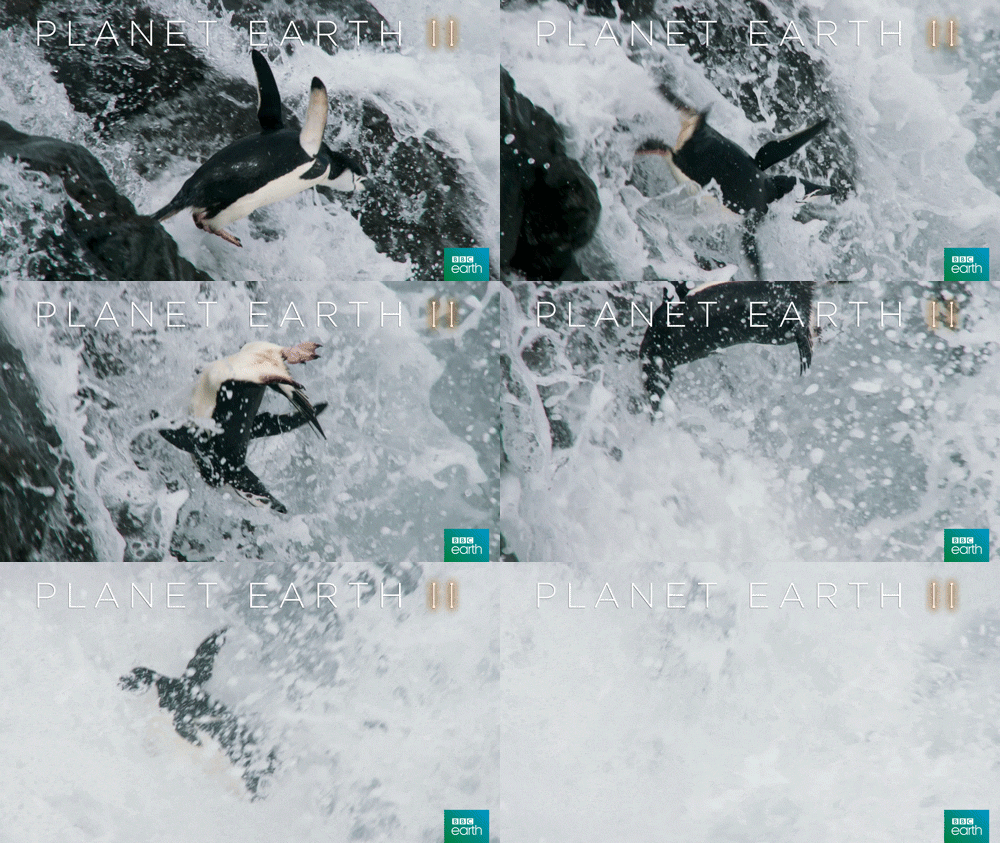
The program we were about to watch, Attenborough said, would take us to “every corner” of the globe and show us the wildernesses that remained. As he spoke, the score crescendoed into a majestic peak, and clips showing savage dramas of survival filled the screen: a lioness hunting a giraffe, colossal waves crashing against a rocky cliff, a battle of snow leopards. I got goosebumps. Now here was nature, not the mundane stuff I saw when I looked outside, but the real deal — and served to me on a silver platter, in the comfort of my own home.

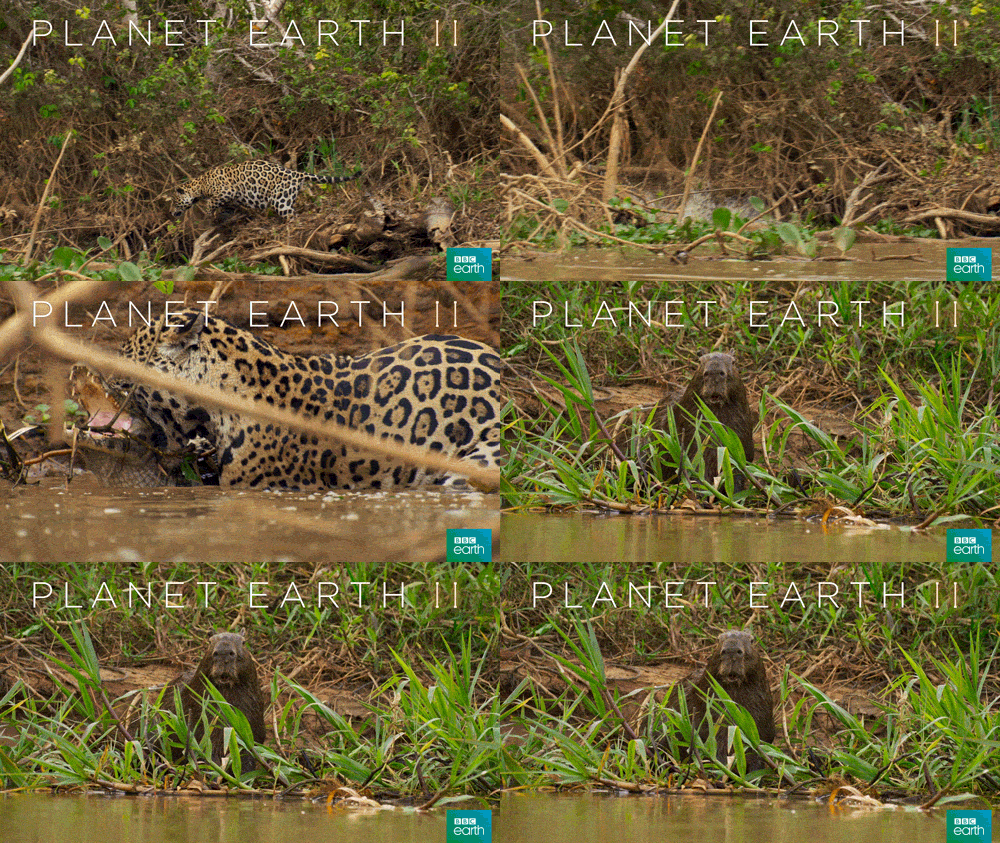
Nature, Planet Earth wants us to believe, is a space filled with mythic struggles that transcend time, bearing greater resemblance to a Greek epic than a day at the national park

This transcendent style of “nature” programming is not wholly new. Before technology had progressed to the point where producers could reliably film wildlife, novelists like Ernest Thompson Seton and Williams J. Long wrote gripping stories about animal life in fantastic form, leaning on suspense, drama, and charm at every turn. Because these stories were written as if purely observational, they were able to position themselves as research and align themselves with the sciences. Debates around this form of representation are not new, either: Then president Teddy Roosevelt called it an “outrage” that these stories were presented as truth rather than as “fables,” and railed against the “nature fakers.” At heart was a concern that these stories would create a fundamentally flawed relationship with nature itself.

As print transitioned into video, the equation of dramatized accounts with empirical observation only solidified. Seeing was believing. Disney’s True-Life Adventures series, started in 1949, promised a “story strange as fantasy, yet a story straight from the realm of fact,” while purposefully downplaying the extent to which their narratives were constructed. Like Planet Earth, these Disney productions featured a narrator speaking over wildlife footage, structuring raw and unrelated footage into easily digestible narratives and morality tales. “Nature writes the screenplays,” they claimed, and “we add the words for the narrator to say.”

If this “nature-transcendent” genre has a torchbearer today, there’s little doubt it’s Sir Attenborough and the BBC’s Natural History Unit. Though the BBC NHU was founded in 1957, it would gain unprecedented popularity in the 2000s and 2010s with its Planet Earth and Blue Planet series, and dozens of imitators and lookalikes would follow in its wake.

Flourishes vary by series and episode, but the style the NHU honed more recently is defined by a few consistent pillars. First, its aesthetic: Grounded in realer-than-real imagery, the NHU style promises to give us “never before seen” sights at every turn. This perspective would be impossible to capture without the aid of ultra-HD lenses, military-grade night vision, and millions of dollars in funding. As a result, we get an effect that is, as Emma Marris writes in the Atlantic, “impossible to achieve in person with our soft, imperfect, biological eyes. What I am watching from beneath my blankets is in some measurable way more beautiful than real life.” The camera here doesn’t aim to make it feel as if you were there. Rather, it strives for omniscience, a perspective in which nothing is out of reach, nothing too distant, veiled, or small to remain unseen. We soar through skies, stalk the brush, glide across seemingly impossible scenes, slicing through the wild with an effortlessness unattainable in any embodied experience.

Another of NHU’s pillars is its narrative style: As Luis Vivanco writes, this is an “entertainment-driven mode of cinema existing somewhere between representation and simulation.” Here, drama reigns supreme. If you’ve ever gone camping after watching one of these programs, you might be shocked at the sheer mundaneness of the natural world. In Planet Earth, the hunt, the chase, life and the possibility of death saturate every move with meaning — with the occasional light gag to keep things from becoming too morose. Nevermind that clips of different animals are often edited together for narrative continuity, or that musical cues and orchestral backing are used to elicit predetermined emotional responses, or that diegetic sounds are often added after the fact by sound designers. Nature, the program wants us to believe, is a space filled with mythic struggles that transcend time, bearing greater resemblance to a Greek epic than a day at the national park. We can bear witness to them thanks to the show’s producers and their cutting-edge technologies.

While the “transcendent nature” genre has a long lineage, the NHU brings it to its apex, crafting a vision of nature that is “hyper-real.” That is, a vision of “nature” above and beyond any encounter we’re likely to have with nature, overflowing with beauty and conveniently free of mosquitoes, boredom, or feet sore from hiking. In doing so, however, it severs us from the natural world, our human experience forever falling short of the constructed/simulated nature we’re assured is out there. As Sean Cubitt notes in his 2005 book Eco Media, where he analyzes contemporary popular media through an ecological lens, “the model of pristine nature is as politically responsible for the division of humans from nature as humanity’s assaults on the green world.” In watching, we are assured that despite our continued decimation, these spaces still flourish in an Edenesque state, teeming with activity. We can sit back and let “nature” do its own thing, a world apart from ours.

It doesn’t help that these series rarely, if ever, depict any actual people, or the destruction they leave in their wake. In fact, it’s only toward the end of Planet Earth 2, in an episode titled “Cities,” that we see any humans that aren’t Attenborough, an exception that proves the rule. Despite the occasional reminders of man-made climate change that bookend many episodes, everything else (visually, narratively) seems to urge us to forget the human — going from the episodes alone, you wouldn’t even know that we existed on the same planet.

As Vivanco notes, this style, with its “decontextualized visions of sublime nature devoid of humans,” encourages the viewer to situate themselves as an “observer, not an interpreter” — a passive viewer, not an active subject tasked with critically engaging with the scene at hand. Satiated by these images of a prelapsarian nature that appears to be thriving outside the domain of human life, we easily forget those ecosystems that actually surround us, the network of responsibilities that we are implicated in everyday. As William Cronon puts it, we begin to believe that “the place where we are is the place where nature is not,” and “if this is so… then also by definition [human life] can offer no solution to the environmental and other problems that confront us.”

What would an alternative mode of seeing look like? When we look at the field of alternative eco-media today, we see a manifold approach, situated in different contexts, mediums, and responding to different concerns. Yet one thing ties these approaches together. They all center the greatest natural disaster the planet has witnessed in millennia: us.


A critical challenge facing us in the Anthropocene is the simple difficulty of seeing ourselves at scale. Western thought has long focused on carving us out as individuals — the Christian soul, the Cartesian ego — a self-formed subject first and foremost, with relations falling secondarily. Understanding ourselves and the role we play within this ecological moment, however, requires a radical reversal in self-perception. Morton articulates this challenge well:

Every time I start my car or steam engine I don’t mean to harm Earth, let alone cause the Sixth Mass Extinction Event in the four-and-a-half billion-year history of life on this planet… Furthermore, I’m not harming Earth! My key turning is statistically meaningless…. But go up a level and something very strange happens. When I scale up these actions to include billions of key turnings and billions of coal shovelings, harm to Earth is precisely what is happening. I am responsible as a member of this species for the Anthropocene.

Thinking about the magnitude of what we’ve done — and are doing — to this planet isn’t just hard because it forces us to reckon with the wrongs we’ve committed. It’s hard because our brains are poorly equipped to conceptualize large numbers, a fact that underlies our inability to grasp concepts like federal budget or Covid deaths as well as our role in climate change. But a corpus of films, arising in response to the “transcendent” mode encapsulated by Planet Earth, tackles this representational challenge by visualizing human life in a way that gives us a glimpse of the massive organism we collectively belong to.

Koyaanisqatsi  — a Hopi word for “crazy life,” as we are told at the end of the film — opens with flames, the awesome and terrible conflagration of a rocket launch. Though we may have seen rocket launches from afar (on TV, the camera a safe distance away), director Godfrey Reggio takes us close. Images of hellfire fill the screen, while a score by Philip Glass, composed of chanted repetitions of the word “Koyaanisqatsi,” accentuates the sublime horror of the scene. As the rocket launches, we cut to a mountain range as grand as anything we might find in an NHU production. Mythic shots of clouds, sky, sand, earth, and water fill our vision. Suddenly, an explosion, a cascade of rubble, and the elemental shots give way to images of steel and glass. We’re whisked away to man-made towers as massive as those mountains, and the images resonate in uncanny synchronicity: buildings referring back to windblown carved rock, rivers that echo against the mass movement of human bodies.

There were some, like the late Roger Ebert, who thought the film an overly sentimental “mankind bad/nature good” film. For him, the fact that these images of nature and humankind stood in parallel, rather than in contrast, was an unintended flaw. “All of the images in this movie are beautiful, even the images of man despoiling the environment,” he writes. “The first shot of smokestacks is no doubt supposed to make us recoil in horror, but actually I thought they looked rather noble.” Yet I’d argue this is the point of Koyaanisqatsi. Rather than present a reductive view of the man/nature dichotomy, the film challenges the validity of those categories.

The film takes many visual elements from the “transcendent” mode of nature representation — the emphasis on scale, the realer-than-real imagery, impossible perspectives that hint at omniscience — and applies them to humanity. It positions our human creations in the same way that Planet Earth might position its mountains, forests, and jungles. In doing so, it elevates us to the realm of the sublime, thought to be the purview of nature, and gives us glimpses of the “hyper-object” (as Morton coins it), that “massively distributed thing” that is our species. Scaled up, humanity is seen as a force of nature, with all the wonder and horror that entails. Koyaanisqatsi is a nature documentary about humans.

This filmic strategy has been repeated through the intervening decades. Anthropocene: The Human Epoch, released in 2018, uses a similar visual schema to show the ways human activity is impacting the Earth at a truly global scale. Though this film is more structured than Koyaanisqatsi, and shows the occasional interview along with voiceover, the backbone is also composed of massive imagery: industrial machinery carving the Earth more powerfully than any river or volcano, a poetics of steel and flame that ties us to geologic forces. What Koyaanisqatsi did through poetry, Anthropocene does more linearly, through a mix of visual marvel and exposition.

While this strategy of “humanity-as-nature” filmmaking can help us collapse the human/nature divide, this mode has its flaws. In relying so heavily on a non-embodied, non-human perspective, it can alienate us from our own affairs, just as nature-transcendent documentaries can alienate us from the natural world. When I see shots of highways as wide as any river, an assembly line of faceless men and women roaring down the paved road, I may acknowledge rationally that I am one of them, while finding it hard to locate myself in the mass. I feel a fissure between myself and the whole, and these alien images only inspire despair. To internalize these scenes, we need a medium that emphasizes the minute, the banal, the everyday.


Michael Wang is a New York–based artist who confronts global, dispersed systems by attending to the local and particular. One of his pieces, World Trade, brought steel from the wreckage of the World Trade Center, sold and recycled in the aftermath of the attack, back to New York, “along the same pathways (container ships, trucks) that it left.” In this way, the local becomes a synecdoche for the global currents of trade and capital that flow through it. His most recent piece, Extinct in New York, applies this logic to the environment by reintroducing species formerly native to New York, but which no longer grow wild in the five boroughs. He cultivates them in carefully controlled biomes, which are presented to viewers in a series of closed-off greenhouses.

When he talks about Extinct in New York — as well as a similar piece, Extinct in the Wild, for which he cultivated plants now grown solely in captivity — he emphasizes the fact that he “wanted to show the double-edged effect of Homo sapiens on other species. On the one hand, nearly all the species’ extinctions in this project are related in some way to human actions. But their survival is also contingent on human preservation.” For Wang, these pieces explore the complicated relations of dependence and exploitation that make up our relationship to the green world. The local leads us back to the complex and systemic.

Wang’s pieces are intensely intimate and place-bound, but interrogate distributed systems as effectively as any grand “humanity-as-nature” film like Koyaanisqatsi or Anthropocene. Moreover, by supporting these organisms with man-made materials (glass, steel) in an “artificial” environment, Wang shows the interdependence of those terms while employing a logic of care. The delicacy of these plants — which we might otherwise ignore on the street or in a park — preserved in special settings shows how precarious they are, and how valuable. Invoking the human labor and care that was necessary to bring these plants (so mundane, so miraculous) to us encourages us to see the world around us differently, take it less for granted.

Despite the occasional reminders of man-made climate change, everything else seems to urge us to forget the human

Care may seem like an overly saccharine or insufficiently radical principle around which to formulate an eco-ethics, but by doing so, Wang attaches himself to a philosophical tradition pioneered by ecofeminists, long attuned to the ways in which false binaries have been used to justify domination. This tradition focuses on an “ethics of caring friendship, or ‘a loving eye,’ as a principle for relationships with nature,” as Margarita Estévez-Saá and María Jesús Lorenzo-Modia write in Women’s Studies. The interpersonal components of care find rhyme and rhythm in Wang’s work, which uses the particular to reckon with the global.

As we look through the fringes of eco-media, care arises again and again as a common thread. Filmmakers like James Benning emphasize it in works like Ten Skies, a 100-minute affair composed solely of 10-minute single takes of 10 different skies in California. By focusing so intently on something we encounter daily, we begin to appreciate the nuance, range, and dynamism of this object we call “sky.” This attention isn’t without political bite, as it lets us begin to notice the ways that “skies and cloud formations chosen by Benning are affected by pollution from an industrial factory, jet trails, and smoke from an accidental wildfire,” as Acropolis Cinema notes. Perhaps that is why the Slow Cinema movement— a school of filmmaking based on long takes, slow plotting, and stylistic opposition to the fast cuts and rapid narratives popularized by Hollywood —  has been so closely linked to Eco-Media. By emphasizing sustained attention and durational immersion, the Slow Cinema style has proven to be a valuable ally when it comes to helping audiences see, and care, differently. As the famous José Ortega y Gasset quote goes, “tell me to what you pay attention and I will tell you who you are.”

Interestingly, elements of this “Eco-Care” genre can be found in popular online media, where attention is normally held hostage by speed and spectacle. One YouTube account, Foo the Flowerhorn, has attracted 1.66M subscribers by posting updates on a series of nano-aquariums — small ecosystems populated by krill, mollusks, and fish that read as distant cousins of Michael Wang’s installations. Here, attention and care is applied at a pond-scum-scale (“this guy takes care of his shrimps better than most parents take care of their child,” one top comment reads). Though these videos are often slow, at least by YouTube standards, they have attracted a loyal following.

Viewers often express surprise at just how engaging this content is. “Me usually: has no patience whatsoever / me watching this video: watches the whole thing patiently with no idea of what’s happening,” claims another comment, with 21k likes. There seems to be a thirst for sustained engagement with the “unremarkable” organic world that surrounds us, an unarticulated desire stemming from the sense of disengagement we feel with that world overall.

Artists like Wang, filmmakers like Benning, and YouTubers like Foo might seem to form an unlikely school, but their work enables a perceptual shift that allows us to see the world around us in slightly different hues. Theorists like Scott Macdonald gesture toward this shift when they write that “the job of an ecocinema is to provide new kinds of film experience that… help to nurture a more environmentally progressive mindset.” They remind us that we should care for nature, not because it is transcendent or majestic, but because it performs the simple, everyday miracle of existing.


As we continue to negotiate our visual culture in the Anthropocene, these dialogues help us explore and assess new ways of seeing and relating to the ecosystems around us. The nature/humanity dichotomy has structured our relationship to this planet for so long that unseating it is difficult to imagine. To this day, some of the most popular programming perpetuates this separation. But it’s encouraging to see new provocations, moving out of the insular worlds of art and academia and onto more accessible platforms like YouTube.

The slowness and narrative opacity these alternative modes employ requires a critically engaged audience. Otherwise, these works risk becoming visual furniture, commoditized vibes — one can easily imagine Benning’s films played in a crowded cocktail bar as backdrop. The gravity of the moment might make it seem frivolous to focus on media and art. But little perceptual shifts can add up over time — small changes in what we pay attention to, and how. These alone aren’t enough to collapse the systems that created and perpetuate the climate crisis. Yet by suggesting even the capacity to see and care differently, they gesture toward possibility. Imagining better ways of relating to the natural world, and the possible futures they entail, has never been more important — and that, after all, is what art is for.

08 Nov 03:18

Service Recipe

by Bryan Mathers
service recipe

Is it – A) – Our context is totally unique, therefore the solution required will be bespoke or B) Another organisation has had a similar problem, and figured out an effective solution. If only somebody out there was collecting these service “recipes” so others can remix them. Oh, they already are for the charity sector? […]

The post Service Recipe appeared first on Open Visual Thinkery.

08 Nov 03:18

Doing to vs Doing with

by Bryan Mathers
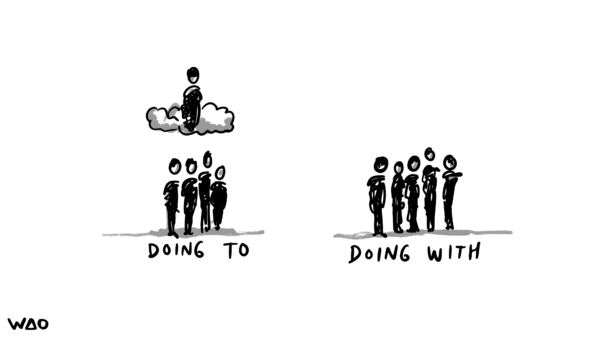
Doing to vs Doing with

How shall we do our research and product building? Shall we do it to the users? Or do it with them? I wonder how many ‘orgs’ start with the intention of doing it with users, but inevitably end up doing it to them? This Thinkery was captured live during a series of workshops by We Are […]

The post Doing to vs Doing with appeared first on Open Visual Thinkery.

08 Nov 03:18

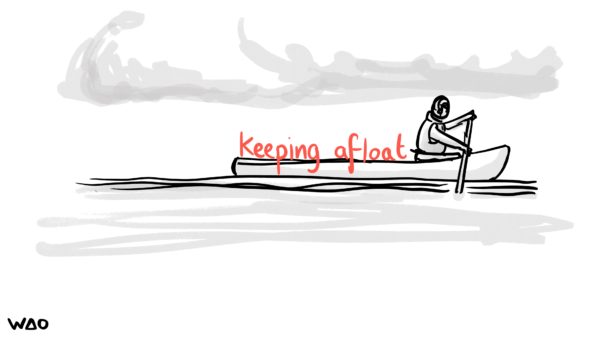
Keeping Afloat

by Bryan Mathers
keeping afloat

It’s easier to keep your idea afloat when you can see others working to keep their ideas afloat too. You are not alone. (Phew!) This Thinkery was captured live during a series of workshops by We Are Open, for Catalyst.

The post Keeping Afloat appeared first on Open Visual Thinkery.

06 Nov 19:50

A flag planted for every Covid-19 death

by Nathan Yau

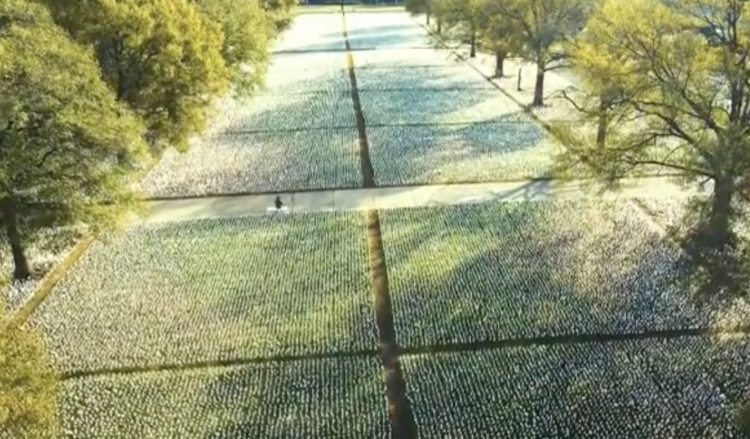
In fall 2020, Suzanne Brennan Firstenberg planted a flag for each American who died from Covid-19. There were over a quarter of a million flags at the time. The art installation is back at the National Mall, but this time there are over 660,000 flags. The scale is just…a lot.

Tags: coronavirus, flags, physical, Suzanne Brennan Firstenberg

06 Nov 04:06

The mother of all iPhone camera reviews

by Volker Weber

We’ve spent the last week in southern Tanzania, exploring this vast natural habitat and capturing all its beauty with the iPhone 13 Pro’s camera. As I watched Apple’s keynote about this year’s iPhone release, I was most excited about the new macro capability, increased telephoto zoom, and Cinematic mode.

Check this out. I do not want to spoil the pleasure with just one photo. You have to see it yourself.

More >

06 Nov 04:06

iPhone 13 Pro vs iPhone 12 Pro :: First impressions

by Volker Weber

I am moving my stuff from an iPhone 12 Pro to an iPhone 13 Pro. And I am shooting some quick photos with a Fujifilm camera. I apologize for the bad photo quality, but I cannot shoot the iPhones with the iPhones. We will return to the old quality after this. 🙂

Here are some quick observations:

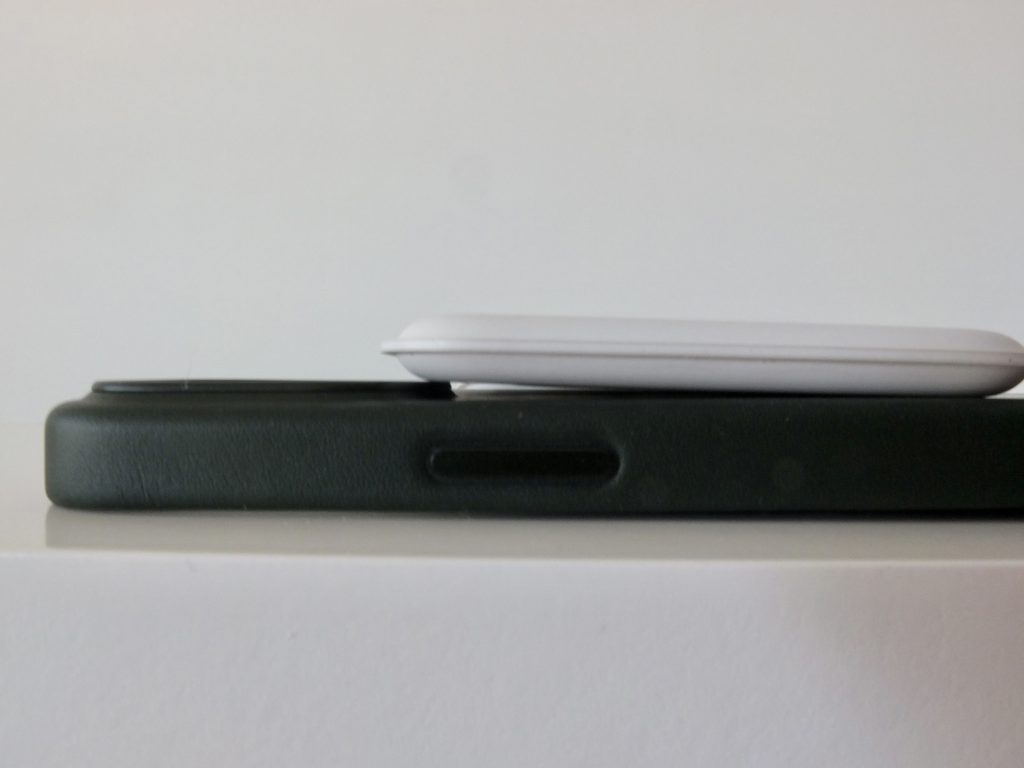
I knew that the new camera is bigger than the old camera. I did not imagine how much larger it is. Very hard to see in a photo, I used perspective to make the difference more pronounced. Just by looking at the camera I know which iPhone I am holding.

Although the iPhones look very similar at first glance, the iPhone 13 Pro is noticeably thicker and heavier. All buttons have moved slightly towards the bottom and that is a very good thing for my fingers. Also, the SIM card slot has moved quite a lot towards the bottom left side, but I only touch that twice, when I put the card in and when I finally remove it.

The bigger camera, the thicker case, the moved buttons all mean you cannot use an old case. That was to be expected.

I use a MagSafe Duo charger and I was worried it would collide with the new camera hump, but it does not. It has actually become easier to put the phone down on the charger. Just place it face up, a little bit too high, and then draw towards you. Bamm. I always have to do this in complete darkness and it worked better on the first try then did after months with the iPhone 12 Pro.

However, if you get the Apple leather case, you will get a collision between the high lip that protects the camera and the Duo charger. The normal MagSafe works just fine.

This collision is purely cosmetic. The charger works just fine and it does not apply to me since I have used the iPhone 11 Pro and the iPhone 12 Pro without a case, and will also do the same with the iPhone 13 Pro.

This is just a first impressions before getting too much use out of the iPhone. I only got it yesterday but I am already liking it. Moving data and apps from one phone to the other was a breeze. The only thing that always worries me is the TAN generator one of my bank uses. You have to enroll it again on the new phone. For those who don’t move iPhones as often as I do: you basically place the old phone next to the new one and follow the default options. After that it moves the data, reinstalls the apps, pairs the Apple Watch and the Apple headphones. Only the information stored in the secure element needs to be recreated.

24 Oct 18:06

EU plans to force OEMs to use USB-C

by Rui Carmo

Although I’m not really crazy about Lightning and would indeed like some uniformity in connectors, this seems completely pointless for two practical reasons:

  • Lightning is pretty much bulletproof physically, whereas USB-C has a different (arguably more failure-prone) pinout that stops working with tiny amounts of pocket fluff.
  • Mandating USB-C on the phone is dumb simply because the industry will be four or five connectors down the road in a few years, and politicians have no business mandating technical requirements – that’s what standards bodies and the market at large are for.

That said, I’m also relatively OK with standardizing wireless fast charging. I just hope this doesn’t turn out to give us a fully sealed, portless iPhone, because that is not a device I want to travel with.


30 Sep 19:07

The Approximate Number System and software estimating

by Derek Jones

The ability to perform simple numeric operations can improve the fitness of a creature (e.g., being able to select which branch contains the most fruit), increasing the likelihood of it having offspring. Studies have found that a wide variety of creatures have a brain subsystem known as the Approximate Number System (ANS).

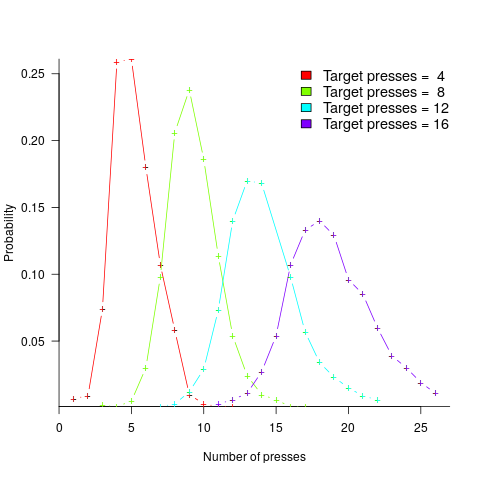
A study by Mechner rewarded rats with food, if they pressed a lever N times (with N taking one of the values 4, 8, 12 or 16), followed by pressing a second lever. The plot below shows the number of lever presses made before pressing the second lever, for a given required N; it suggests that the subject rat is making use of an approximate number system (code+data):

Daily article counts for blog.

Humans have a second system for representing numbers, which is capable of exact representation, it is language. The Number Sense by Stanislas Dehaene was on my list of Christmas books for 2011.

One method used to study the interface between the two language systems, available to humans, involves subjects estimating the number of dots in a briefly presented image. While reading about one such study, I noticed that some of the plots showed patterns similar to the patterns seen in plots of software estimate/actual data. I emailed the lead author, Véronique Izard, who kindly sent me a copy of the experimental data.

The patterns I was hoping to see are those invariably seen in software effort estimation data, e.g., a power law relationship between actual/estimate, consistent over/under estimation by individuals, and frequent use of round numbers.

Psychologists reading this post may be under the impression that estimating the time taken to implement some functionality, in software, is a relatively accurate process. In practice, for short tasks (i.e., under a day or two) the time needed to form a more accurate estimate makes a good-enough estimate a cost-effective option.

This Izard and Dehaene study involved two experiments. In the first experiment, an image containing between 1 and 100 dots was flashed on the screen for 100ms, and subjects then had to type the estimated number of dots. Each of the six subjects participated in five sessions of 600 trials, with each session lasting about one hour; every number of dots between 1 and 100 was seen 30 times by each subject (for one subject the data contains 1,783 responses, other subjects gave 3,000 responses). Subjects were free to type any value as their estimate.

These kinds of studies have consistently found that subject accuracy is very poor (hardly surprising, given that subjects are not provided with any feedback to help calibrate their estimates). But since researchers are interested in patterns that might be present in the errors, very low accuracy is not an issue.

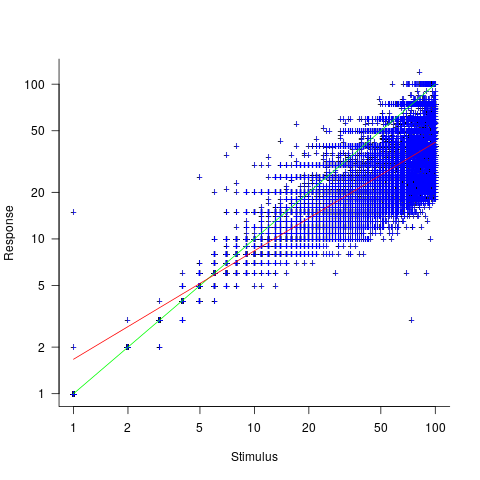
The plot below shows stimulus (number of dots shown) against subject response, with green line showing Response==Stimulus, and red line a fitted regression model having the form Response=1.7*Stimulus^{0.7} (which explains just over 70% of the variance; code+data):

Response given for given number of stimulus dots, with fitted regression model.

Just like software estimates, there is a good fit to a power law, and the only difference in accuracy performance is that software estimates tend not to be so skewed towards underestimating (i.e., there are a lot more low accuracy overestimates).

Adding subjectID to the model gives: Response=1.8*Stimulus^{0.7}*SubjectID, with SubjectID varying between 0.65 and 1.57; more than a factor of two difference between subjects (this model explains just under 90% of the variance). This is a smaller range than the software estimation data, but with only six subjects there was less chance of a wider variation (code+data).

The software estimation data finds shows that accuracy does not improve with practice. The experimental subjects were not given any feedback, and would not be expected to improve, but does the strain of answering so many questions cause them to get worse? Adding trial number to the model suggests a 12% increase in underestimation, over 600 trials. However, adding an interaction with SubjectID shows that the performance of two subjects remains unchanged, while two subjects experience a 23% increase in underestimation.

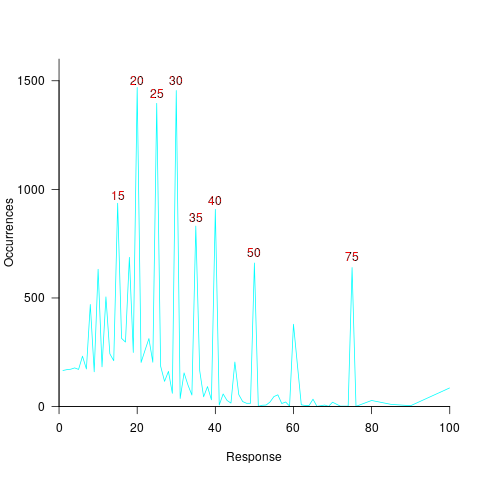
The plot below shows the number of times each response was given, combining all subjects, with commonly given responses in red (code+data):

Number of occurrences of response values, over all subjects.

The commonly occurring values that appear in software estimation data are structured as fractions of units of time, e.g., 0.5 hours, or 1 hour or 1 day (appearing in the data as 7 hours). The only structure available to experimental subjects was subdivisions of powers of 10 (i.e., 10 and 100).

Analysing the responses by subject shows that each subject had their own set of preferred round numbers.

To summarize: The results from an experiment investigating the interface between the two human number systems contains three patterns seen in software estimation data, i.e., power law relationship between actual and estimate, individual differences in over/underestimating, and extensive use of round numbers.

Izard’s second experiment limited response values to prespecified values (i.e., one to 10 and multiples of 10), and gave a calibration example after each block of 46 trials. The calibration example improved performance, and the use of round numbers as prespecified response values had the effect of removing spikes from the response counts (which were relatively smooth; code+data)).

We now have circumstantial evidence that software developers are using the Approximate Number System when making software estimates. We will have to wait for brain images from a developer in an MRI scanner, while estimating a software task, to obtain more concrete proof that the ANS is involved in the process. That is, are the areas of the brain thought to be involved in the ANS (e.g., the intraparietal sulcus) active during software estimation?

30 Sep 19:07

Rock Decades

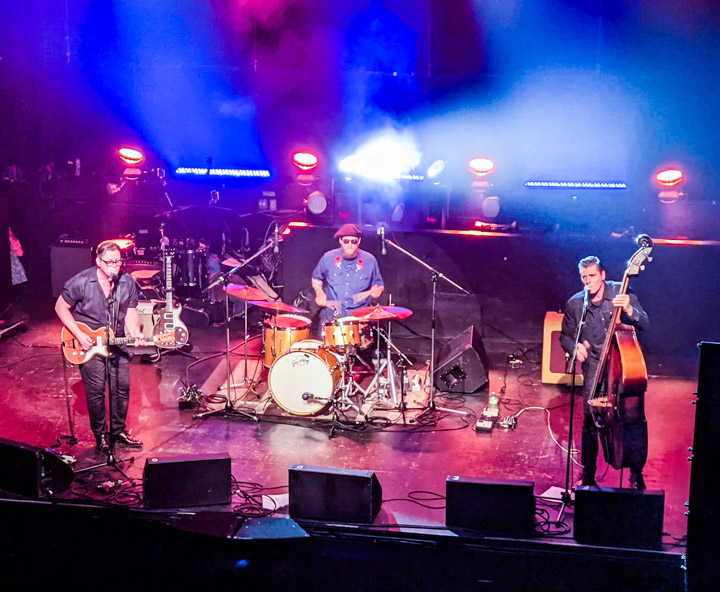
On Saturday September 25th, 2021, we went to a concert by Cousin Harley featuring Paul Pigat. The last live indoor music we’d seen was March 8, 2020, which is to say a gap of 566 days. Speaking of gaps, 2021 marks, more or less, both seventy years of Rock ’n’ Roll and 50 years of my loving it.

Weird coincidence: That last pre-Covid concert was by Coco Montoya “and Paul Pigat”, my calendar says, but I’ll be honest, I remember almost nothing of that evening.

Cousin Harley, live at the Rickshaw

Live at The Rickshaw.

Cousin Harley

This was the first event at the lovable but ratty old Rickshaw Theatre run under the latest Covid protocols: Max audience 250, vaccine passport required, stay in your seat, mask on unless you’re actually drinking, no dancing. The organizers apologized but also rejoiced in the return of live music. And yeah, when the guitar struck up, I found myself a little emo.

The band is one of two Paul Pigat projects; its musical center is rockabilly, but they sprawl pretty far across the guitar-trio landscape. Pigat himself is a fine axeman in a whole lot of styles, wasn’t boring for a moment. He got an exceptionally beautiful tone out of some little amp I didn’t recognize, particularly in a slightly-surfy instrumental.

This music is played fast, which means you need a strong drummer, and he was, but the web site doesn’t mention who he is, which seems kind of churlish.

Pigat, in between-song banter, mentioned that he not only writes songs, he builds guitars, although I can’t turn up any evidence online. On the strength of last night’s show, I’d say they’re good.

One last footnote: I notice, on Pigat’s website, a tip o’ the hat to the Canada Council, the Canadian government’s arts-funding organization. Which shocked me a bit; I’d always seen the Council as focused on big-budget grownup stuff like opera and ballet. It’s cool that some of my tax dollars are going to keep Rock music alive during these hard times.

Anyhow: We had a wonderful time. It felt exotic and grown-up to go out to an evening concert. Live music, yeah! And if you care about music and musicians, and if your local Covid conditions allow, go out and buy some damn concert tickets already. In this era of music streaming (which means, basically, musicians starving) the best way to route a few bucks to the artists is going to shows.

And, it beats the fuck outta doomscrolling.

History

The conventional wisdom is that the first Rock ’n’ Roll record was Rocket 88 in 1951, featuring Jackie Brenson on vocals in front of Ike Turner’s band. The argument isn’t crazy, but the song lacks a backbeat, which troubles me. How about Wynonie Harris’ take on Good Rockin’ Tonight, from 1949? Anyhow, close enough for Rock.

I’m sixty-six, which is pretty old. But the music I love is older. I discovered Rock in 1971 when I got the Beatles’ White Album for my birthday. Oh wait, the evidence on this blog says that it was ’68, when my Dad turned me on to Cream. (No, really!) Whatever, once again close enough.

Anyhow, by the time I started listening, the Beatles were breaking up, Joplin and Hendrix were about to die; I pretty well missed the glory days. That’s how old the genre is.

My parents (despite my Dad’s contribution) hated Rock and hated me listening to it. In my room I had a record player, the kind you could stack the vinyl up on and it’d play a side then drop the next record and play that. In only had one speaker, but it was pretty big and pretty loud.

Thus started the trend, which continues to this day, of the women in my life telling me to turn down the damn music. One time, Mom showed me an article she was reading saying how some Eminent Musicologists had done A Thorough Analysis of Moderm Pop Music and Determined Authoritatively that it was Pretty Well All Trash. I objected that I really liked it and she said “You’re discounting the value of education!” To which I had no come-back. But I kept listening.

I feel like a Proust character, because in my mind Rock still feels fresh and new and enjoyably offensive. But in fact it’s the stomping grounds of the much-reviled Boomer generation who, to quote Mose Allison’s Young Man Blues, have all the power and all the money. But I dunno, I keep seeing young folk wearing T-shirts with Aerosmith and Zeppelin and Tom Petty on them.

Anyhow, I’ll be going to lots more concerts (Covid allowing) and so should you.

30 Sep 19:05

Starbucks vs. Olivia

by peter@rukavina.net (Peter Rukavina)

Olivia and I have been in the habit of going to Starbucks every Sunday afternoon for the last year. Starbucks offers some advantages that trump the moribund coffee and aggressive capitalism:

First, we can order online, from the car, through its well-designed app (which Olivia can use without a credit card, as Starbucks essentially has its own currency). The app mitigates the usual choice-making cauldron that brews up when waiting in line, and Olivia has used this to good effect and has broadened out her order and tried a lot of new things (including that time she added every syrup and sprinkle and topping on the menu to her order, and almost exceeded the length of the cup-sticker printer).

Second, Olivia, over time, has gained the confidence to go in and pick up our orders by herself, which is a huge deal, inasmuch as it involves wading across a tricky line of caffeine-deprived drivers, going into the store, lining up, communicating with the staff, and making her way back.

Today, though, things went off the rails.

We found the app wouldn’t allow us to place an online order, meaning Olivia had to go inside and place the order face to face. That she was willing to level up to this new challenge is a credit to her burgeoning bravery and skills.

So far so good.

Except that when she got to the door, she found it locked, with a sign saying the store was closed for renovation, and directing customers to order at the drive-thru.

So that’s what she did: she walked over to the drive-thru speaker and placed her order. Without any problem.

Then she came to fetch me, as the logistics of making it to the pickup window were too much for her.

We made it around to the back together, wading through puddles and avoiding cars, only to be told that they couldn’t hand Olivia her order because she wasn’t in a vehicle. “It’s a liability issue,” the manager told us. While we were standing 3 feet away. To pick up an order. That Olivia had placed. At the drive-thru speaker. As the sign on the door instructed.

We were in no position to argue, as the manager was just following orders. So we bounced back through the cars and the puddles.

And drove down the street to the Atlantic Superstore. Where brave Olivia, undeterred, went in, placed her order at the in-store Starbucks, successfully, emerged to find us MIA, hidden in the parking lot, and persevered until we appeared.

We drank our coffee.

Olivia 3. Starbucks 0.

30 Sep 19:04

Gnome Launchers: Two Takes

by peter@rukavina.net (Peter Rukavina)

I thought this post on GNOME launchers would cover the same ground as this 1980 Maclean’s article on gnome launchers. But it didn’t.

30 Sep 19:04

Pondering: Stories Not Accounts

by Tony Hirst

Chatting with Island Storytellers convener Sue Bailey last week, I commented that I really need to put more time into getting the end of the stories I try to tell much tighter. If you have a good opening, and a really strong ending, then you can generally get from one to the other. But if the ending isn’t as solid as it should be, you start to worry about how to close as you get closer to it, and may even finish without anyone realising.

A good title can also help, and often captures a key scene or storypoint from somewhere in the middle.

We also chatted about sourcing stories from local histories. I’ve started trying to pull together a small set of Island history stories I can tell, and I’ve also got a longer tale about the Yorkshire Luddites; but as much as anything, they’re told as accounts rather than stories (thanks to Sue for introducing the distinction of an account into the discussion).

So pondering a handful of stories I’ve not quite got round to pulling together yet into a form that I can tell, I think I’m going to have a go at quickly summarising first the account, which will give me lots of facts and footnotes and depth behind the tale, and then try to to turn them into stories by taking a particular perspective – a particular person, or place, or animal, for example – whose journey we can follow (because a good story is often about something or someone).

For my own reference (so I can keep track of progress, as much as anything), the tales I’ll work on are:

  • the wrecking of the St Mary and the building of The Pepperpot by Walter de Godeton; this could be told from de Godeton’s perpective, but it might also be interesting to try it as a story about a barrel of communion wine, or the Abbey that was expecting the wine…; [story and account]
  • when the Island invaded France, a tale of Sir Edward Woodville (probably; or maybe a story about Diccon Cheke, the sole returning survivor…);
  • The Worsley trial: it could be interesting to be able to tell this two ways: as a story about Richard Worsley, or a story about Seymour Fleming;
  • Odo’s gold, perhaps from the perspective of Odo, perhaps from the perspective of Carisbrooke Castle…

I’m also going to have a go at recasting my Yorkshire Luddite account, I think as a story about George Mellor…

30 Sep 19:03

Current Project List

I’m starting a new job as a software engineer with Deep Genomics next week. I’m looking forward to writing Python for a living again after a decade of doing other things, but hope I’ll be able to wrap up these side projects soon as well:

30 Sep 19:03

How iPadOS 15 Ruined Chris Welch’s iPad Home Screen

by Federico Viticci

Chris Welch, writing for The Verge, covers an aspect of iPadOS 15 I also pointed out in my review: iPadOS 15 no longer keeps the same icon grid layout in portrait and landscape orientations, and, if you place widgets on the Home Screen, its density is reduced.

Welch concludes:

Some will see this as a very minor inconvenience and carry on with updating to iPadOS 15 for all of the other benefits. Since the App Library is now there, you can even go in the complete opposite direction and load your homescreens up with widgets everywhere and only a few app icons. If that’s you, don’t let me stop you. On the whole, it’s a very good release.

But I’m really hoping in a future software update, Apple will add a setting to restore the old layout that kept everything more consistent. It’d be even better if the company made the grid more customizable on the whole. If we’re letting people choose between new and old Safari designs, why not offer a choice between having more things on-screen or a less dense grid that’s better optimized for widgets? There’s already a “Home Screen and Dock” section in settings, after all. Letting you adjust the grid to your liking is something that Android phones and tablets already get right. It’s not a huge ask.

I think the point about customization is exactly right, and also why I’m not complaining about the ability to choose a layout in Safari. As iPads are used by a variety of less tech-savvy and more experienced pro users, it’s now increasingly challenging for Apple to cover the platform’s full spectrum of workflows with non-customizable features. Welch makes a great point about the Home Screen grid’s rigidity and lack of control; I hope Apple provides more options for this in the future, along with a denser grid if you have widgets placed on the iPad Home Screen.

→ Source: theverge.com

30 Sep 19:02

Assessment of the Covid-19 dashboards

by Nathan Yau

Researchers evaluated 158 Covid-19 dashboards, assessing design, implementation, and usefulness. Marie Patino for Bloomberg CityLab reports:

“All of these dashboards were launched very early in the pandemic,” said Damir Ivankovic, a PhD student at the University of Amsterdam. “Some of them were developed literally overnight, or over three sleepless nights in certain countries.” With Ph.D. researcher Erica Barbazza, Ivankovic has been leading a set of studies about Covid-19 dashboards with a network of researchers. For an upcoming paper that’s still unpublished, the pair have talked to more than 30 government dashboard teams across Europe and Asia to better understand their dynamics and the political decisions at stake in their creation.

In 2020, suddenly governments at all levels required an online dashboard that showed data at least near real-time, but there were constraints with software, design, and data sources, along with people to implement. So groups worked with what they had.

On the other end, everyone checking these dashboards on the daily were getting their own lessons in interpreting trends, missing data, and variation.

Tags: Bloomberg, coronavirus, dashboard

22 Sep 03:06

watchOS 8: The MacStories Review

by Alex Guyot

We’ve come a long way from the Wild West of watchOS’ early versions. Changes in recent years have been thoroughly iterative in nature, suggesting that Apple believes that the platform has reached maturity. watchOS 8 heralds no deviation from this path, but as usual, a host of features bring new minor excitements for us to explore.

Health and fitness are established pinnacles of any good watchOS update, and this year’s offerings include a new Mindfulness app, sleep tracking improvements, and expanded workout types. Since Complications can now communicate with Bluetooth devices, health and fitness data from Bluetooth accessories will be more accessible than ever.

The usual host of first-party app updates are back this year too, with Home and Timers getting the most interesting changes. As for watch faces — another common source of easy feature additions — Apple seems to have dropped that ball this time around. Only two new faces are joining the ranks, and existing faces have remained stagnant.

Supported By

Pillow

Pillow: Sleeping better, made simple.

At the system level, text input has received some nice updates. While still a bit clunky, some of the strictest limitations have been lifted, making the Apple Watch useable in more situations where I would previously have never considered it. The always-on display in Apple Watch Series 5 and higher will be far more useful in watchOS 8 as well, as third-party apps are finally able to utilize it.

Despite a lot of tidbits scattered throughout, watchOS 8 is easily the smallest annual update in the Apple Watch’s short history. This shouldn’t be a surprise given that we’re in the second year of a global pandemic, but it still feels disappointing.

Hopefully next year Apple will devote a bit more time and effort to watchOS, but for now let’s dig into the new additions that we do have to explore. Despite the small size of watchOS 8, its features are all positive improvements, and it’s still the best iteration of the Apple Watch operating system to date.

[table_of_contents]

Health and Fitness

As we soldier on through our second pandemic year, maintaining mental health is more important than ever. With watchOS 8, Apple is looking to help us out in this department. The Breathe app has been renamed to “Mindfulness,” and now includes a new “Reflect” feature alongside Breathe.

Mindfulness and Reflect
Reflect prompt and mesmerizing meditation glob pattern.

Reflect prompt and mesmerizing meditation glob pattern.

Reflect is a meditation practice. When you start a new Reflect session watchOS will show you a random prompt, such as: “Recall a time when you learned a new way of doing something and what it felt like to think in a new way.” Once you press begin, you’ll spend a minute meditating on the contents of your prompt. As you meditate, the Mindfulness app shows a peaceful and somewhat mesmerizing pattern of floating globs, which slowly morph and change colors over time. When your minute has elapsed, you’ll get a summary view with your total time spent reflecting, your average heart rate over this time, and the number of “Mindful Minutes” that you’ve spent using this feature during the course of the day.

I’m not much of a meditator myself, but I gave this feature the ol’ college try. I didn’t find it particularly for me, but I can confirm that the floating globs are entrancing. Some of the prompts are simple — along the lines of “just sit and try not to feel like you need to do anything.” Others are more intricate, like thinking of a lesson you once learned and trying to apply it to your life today.

One thing I realized pretty quickly when trying Reflect was that one minute really didn’t feel like enough time to get the job done. A minute is the same default amount of time as the Breathe feature uses, and I think it works well there for people new to breathing exercises. Meditation, though, is harder to adjust to than simply breathing. As someone who hadn’t practiced meditation before, I am not skilled at quieting my mind on command. With only a minute to do so, I felt stressed about the timeframe, which was counterproductive.

Thankfully, the duration is easily adjustable from the main screen of the Mindfulness app. Just tap the ‘…’ button in the top-right corner of the Reflect button, and then set your desired reflection time between one and five minutes. I switched to three minutes, and definitely felt like I was able to get a bit more out of my Reflect sessions. It’s still not quite my jam, but I definitely see the potential benefits, and I recommend anyone reading this to at least give it a try. Increase the duration too, and see if your brain enjoys some (probably much-needed) down time.

On the other side of the Mindfulness app, Breathe is effectively unchanged. There are all-new animations for breathing in and out though, and they’re also fun and relaxing to look at while taking time out of your day to breathe.

Sleeping Respiratory Rate

Apple introduced sleep tracking to the Apple Watch last year. It’s a great feature addition, although I had some quibbles with the implementation. Mainly, I didn’t appreciate how much it wanted to be structured around a set sleep schedule. As someone whose job has no set hours, my sleep schedule is somewhat erratic. While I’m interested in sleep tracking, I didn’t feel like the first-party sleep tracking system was set up to cater to my needs.

Unfortunately, watchOS 8 hasn’t changed the basic implementation of this system at all. While there are some workarounds that I hadn’t noticed last year — such as pressing the Do Not Disturb button in Control Center to manually enable/disable Sleep mode — there’s still no way to have the Apple Watch just automatically figure out when you’re asleep and track it.

As I mentioned in my watchOS 7 review, third-party apps have been able to accomplish this task for quite some time, so it certainly isn’t outside the realm of possibility. Alas, another year has gone by and Apple has not added automatic sleep tracking support.

With the above said, if you are someone who uses Apple’s first-party sleep tracking system, then there’s one new feature for you to enjoy. watchOS can now track your sleeping respiratory rate (your number of breaths per minute) throughout each night of sleep. This task is accomplished using the Apple Watch’s accelerometer, meaning it should work for all Apple Watch models that support watchOS 8. No particular hardware required. You can view your respiratory rate over time in the Health app on your iPhone, along with all of your other tracked sleeping trends.

Workouts
New Pilates and Tai Chi workouts.

New Pilates and Tai Chi workouts.

As we’ve come to expect in new watchOS updates, watchOS 8 has introduced some new types of workouts in the Workouts app. New built-in workouts are interesting because they generally entail special algorithms for tracking the particular movements associated with them. In this case, Apple is introducing fine-grained tracking of Tai Chi and Pilates workouts. If you do either of these, then you’ll be able to take advantage of more accurate metrics during your workouts.

In the case of Pilates, Apple’s Fitness+ service is also introducing new guided workouts with Pilates instructors. Pilates enthusiasts can take advantage of these starting September 27th.

According to Apple, they’re also adding special fall detection for various workouts (including cycling workouts) to watchOS. These features haven’t shipped yet though. On Apple’s watchOS 8 marketing page they’re marked as “coming soon.”

Watch Faces
The new interface for creating watch faces in watchOS 8.

The new interface for creating watch faces in watchOS 8.

In watchOS 8, Apple has taken another shot at reworking the watch face creation view on the Apple Watch. It begins as usual: tap and hold on your watch face to get to the selection screen, then swipe all the way to the far-right side of the list until you reach the ‘New’ button. Press that to see the new face selection view.

The selection view shows a special “New Watch Faces” section at the very top. Below this section, types of watch faces with multiple options can now be grouped together.

The above feels like a nice change, except that it also seems entirely unfinished. The only actually grouped set of watch faces are the Pride series. Others that would logically be grouped together — like Activity Analog/Digital and Numerals Mono/Duo — are still separate entries. I’m not sure why these haven’t been joined together, because the growing list of watch faces is more manageable in groups than in one giant list.

The only other grouped section is the ‘New Watch Faces’ section, which contains the most recent watch face additions. In a world where Apple continues to not allow third-party developers to create watch faces, it has now dwindled to creating only two new watch faces on its own in an entire year. One of these — the Portraits face — can’t even be created from your Watch.

Presumably when the Apple Watch Series 7 ships later this fall, Series 7 users will see the new “Dynamic Contour” watch face in this section, as well as the lightly updated Modular face. Neither of these faces is shipping with the current version of watchOS 8 though, and both will require the Series 7 watch to use.

Despite the overall state of watch faces feeling increasingly lethargic, let’s take a look at the new faces.

Portraits Face

With Portraits, Apple wants to utilize the depth layering effect from iPhone Portrait mode photos on the Apple Watch. When you create a Portraits watch face, you pick a selection of Portrait mode photos, and the Apple Watch “intelligently” separates out the layers and displays the photo in a way that it thinks is optimal. Based on Apple’s marketing images, the watch face is supposed to layer the subject of the image slightly on top of the actual time numerals. You can then scroll the Digital Crown to zoom the face in, causing it to creep even further on top of the time. The subject of the image zooms faster than the background, making them appear to leap out of the bounds of the image.

Unfortunately, the cool layering effect often doesn’t work by default. I threw over 25 photos at this watch face, some brand new off of my iPhone 12 Mini’s Portrait mode camera, and some older from throughout the last several years of Portrait photos that I had on my iPhone. Only two of these photos successfully created the depth effect where the subject was shown on top of the numerals.

Both of the functional photos were taken in 2017 using my original iPhone X. At first I thought it might have something to do with the iPhone Mini’s camera, but other photos from my iPhone X did not work, nor did any of the photos from my year with an iPhone 11 Pro. The problem seems to be with the way the Portraits face tries to crop the images. Using photos with lots of headroom definitely helps, but I found examples where this still didn’t work either. When it does work though, the effect is pretty cool.
It seems slingshots and grandparents are the keys to successful depth layering — at least by default.

It seems slingshots and grandparents are the keys to successful depth layering — at least by default.

The Portraits watch face can only be created from the Watch app on your iPhone. I discovered this after spending an embarrassingly long amount of time tapping on the face in the New Watch Face section on my Apple Watch. Tapping it there does absolutely nothing — you’re just supposed to read the fine print beneath it which informs you that you can only create this face on your iPhone.

Assuming you know that “on your iPhone” means “from the Watch app on your iPhone,” you’ll probably open the Watch app and tap the ‘Edit’ button in the “My Faces” section. Unfortunately, you can’t add faces by editing your faces. You need to back out of that section and instead go to the ‘Face Gallery’ tab at the bottom. Then you can finally add a Portraits face.

Portraits faces accept up to 24 photos at a time. You choose these photos from the Watch app, and they then sync to the watch face on your Apple Watch. If you want to change the photos on this face after you’ve created it, you’ll need to tap into it from the My Faces section in the Watch app rather than going back to the Face Gallery. This whole face creation and editing process is overcomplicated. There’s just no reason that the Watch app should be required to create a new watch face in watchOS 8.

Adding to the frustration is that the Portraits face actually has a pretty advanced editing interface, but it’s ridiculously hidden. It allows you to zoom photos in and out to adjust the depth effect and positioning of each one, which is exactly what this watch face needs. Here are a few examples of the Portrait face’s bad default layouts:

The Portraits watch face displays the time in one of two places: either at the very top, or in the lower third — right above the complication. Presumably it’s trying to intelligently avoid covering up an important part of the photo. As you can see from these examples though, it sometimes decides to stick the time right on top of your subject’s face, even when there’s more than enough room at the top of the image for the time to fit unencumbered. These failure examples occurred in the first set of 25 photos that I tried with this watch face — this is not the result of me trying tons of different photos until I managed to find some that were wonky.

I include the photo of the dog here to show the most abject failure where the watch face just entirely missed the photo’s subject. I understand that Portrait mode is meant for humans and not animals, so this is a slightly unfair comparison in that regard, but I still think it’s foolish. Even if the face can’t find a human subject, the Portrait photo is still blurred correctly, and thus the depth data should make it clear that the object in the foreground is the primary focus of the image. But nope, the dog is still shoved off to the side.

Thankfully, there’s a solution to most of these problems. From the Watch app for iOS, when you are selecting photos to add to the Portraits watch face, each photo is actually a secret button. Tap on any of them to open this excellent editing interface, where you can align the photo, zoom it, set the positioning of the time numerals, and even try to fix the depth layering when it fails.

This interface is everything I wanted, but I can’t quite believe how hidden Apple made it. Even if you tap ‘Select’ and then select a photo, the only option you get is to remove it from the watch face. Apple should absolutely add an ‘Edit’ button somewhere in the selection interface so that users can conceivably figure out that these photos can be edited.

While the editing interface is enormously helpful, it’s still not perfect. It really doesn’t like to allow depth layering on images of dogs, for example. I’m not entirely sure why this is, as some of these images would clearly look great with the depth effect in place. Still though, even without the layering, the Portraits face is a great way to display our animal friends.
The depth layering option does not show up for these, but we can still fix alignment issues and the position of time numerals.

The depth layering option does not show up for these, but we can still fix alignment issues and the position of time numerals.

All things considered, I think Portraits is a very nice new watch face. It’s very similar to the existing Photos face, but has much cooler transitions. I wouldn’t have high hopes that the depth layering effect will work everywhere you want it to, but the offset zoom looks cool even without successful layering. You can tap in the middle of the face to manually cycle through your photo choices, but they’ll also cycle themselves automatically each time you lower and raise your wrist.

There’s only one complication choice (technically two, but the second one is either the current date or nothing), and it’s my least favorite style of complication (the long one that is just text). While I always wish for more complications, that’s ultimately just not what this watch face is about. It wants to display your images in an interesting way, and I think it mostly succeeds at that task. I recommend checking all the image you select though, as some might be so poorly laid out that you need to swap them for other options.

World Time Face

The World Time face is highly reminiscent of last year’s GMT watch face, with a circular outer dial showing detailed information. For World Time, the outer dial displays various world time zones at their correct offset from the timezone you’re currently in. You can use this face to get a sense of the hour-offset between time zones.

If you tap on the globe in the center of the World Time face, it rotates to a different angle. Nothing else on the face changes, so as far as I can tell this effect is just for show.

Personally, I find this watch face to be way too cluttered. It’s trying to pack in a lot of information, but I think the text is so small and cramped that the face’s utility is reduced. A version of this watch face where you could choose which time zones were displayed and hide all of the others might be better. For now, if you really want time zones on your wrist, the GMT face seems like a nicer implementation of this idea.

First-Party Apps

Despite its relative diminutiveness, watchOS 8 still includes a handful of updates to Apple’s first-party apps. Changes are mostly minor, but there are some definite improvements to take note of.

Timers

Let’s start with an easy win: the Timers app in watchOS 8 supports multiple simultaneous timers. When you start a timer from within the app, you can now hit the back button to return to the main view. Your timer will be shown counting down at the top, and you can proceed to start more timers or pause any running ones.

You can set timers using Siri as well, and in this case you can even give them names. For instance, saying “hey Siri, start a pasta timer for 12 minutes” will create a new timer in the Timers app and label it “Pasta.” Timers created manually from the app’s interface do not support labels.

When timers complete, you’ll get a full-screen interface which includes the timer’s label if it has one. You can then choose to end or repeat the timer.

Home

The Home app for watchOS has been supercharged with Apple’s favorite buzz words: machine learning. Surprising no one, I haven’t found this to be particularly effective. As usual though, since it’s machine learning, your mileage may vary.

In my apartment, I have twelve smart lightbulbs connected to HomeKit. Of these, I interact with seven of them multiple times each day via scenes. These seven bulbs are always on and always connected. The other five I use sparingly. They are generally turned off at the switch, and thus disconnected.

The new watchOS Home app reserves the top third of the screen for three circular “status symbol” slots. These slots are supposed to intelligently display device statuses, and grant access to devices.

Since five of my light bulbs are almost always disconnected, the top third of my Home app’s interface in watchOS 8 is usually worthless to me. It constantly utilizes the first of the three status symbol slots to inform me that five devices are offline. The other two slots are left entirely empty, wasting valuable screen real-estate. Below the status symbol slots, the Home app now “intelligently” displays a scrolling list of devices and scenes which it thinks I might want to use at any given time.

The more I’m exposed to machine learning, especially on watchOS, the more I wish in nearly every circumstance that Apple would just give me some manual controls. Or at least allow manual overrides for power users who want them. I think the new Home app’s redesign is great. I love the idea of having quicker access to device statuses, device controls, and scenes. But as long as machine learning is involved, I’ll never be able to reliably know what options exist there.

Apple just can’t know what I want before I want it as well as I can, and I wish they’d stop trying and let me take control. Instead of device status symbols, if I could set three light bulbs (or better yet, three scenes) to always show up at the top of the Home app, then I’d be using the app all the time. I’d even use it more if I could just set a standard sort order for the scrollable list of devices and scenes below the line of symbols. But alas, as it is, I almost never open the Home app on my Apple Watch.

If your HomeKit setup includes video cameras, then the watchOS 8 Home app might have some legitimately useful new functionality for you. The new update includes the ability to view live security camera footage, and even use your Apple Watch’s microphone and speakers to access two-way audio capabilities on supporting camera models. I don’t have cameras to test this with, but it sounds like a great new feature addition for the Watch.

Photos
Featured photos album and photo sharing in watchOS 8.

Featured photos album and photo sharing in watchOS 8.

The watchOS 8 Photos app has been updated to include new featured photos and Memories. Featured photos show up automatically in the app, and there seems to be a rotating selection of ten of them which change over time.

Memories are also now supported on watchOS. You won’t see as many Memories as you see in Photos for iOS, but they’ll show up randomly. You can tap into each Memory to see a nice new mosaic-style grid view of that Memory’s photos.

Memories come and go without any control, and often there are none present at all. If you don’t see any right away on your own Apple Watch, try checking back the next day and hopefully one will have appeared.

Photos in watchOS 8 also supports sharing photos for the first time. When you tap into a photo, you’ll see a share button in the bottom-right corner which you can tap to share the image via Messages or Mail, or to create a new Photos watch face with it.

Wallet

The Wallet app in watchOS 8 has been updated alongside the iOS 15 Wallet app to support new card and key types. You’ll be able to store a digital key to your home, your official state driver’s license, and your car key in Wallet.

Of course, all of these features require more infrastructure around you to work. The lock on your home needs to support digital keys, as does your car. Your state needs to join Apple’s new program, which hasn’t fully launched yet.

It’s great to see the watchOS version of Wallet keeping up with its iOS counterpart, but it will probably be a few years at least before most of us can make use of most of these features.

Find My
watchOS 8's three Find My variants.

watchOS 8’s three Find My variants.

Apple rebranded its watchOS Find My Friends app to “Find People” in watchOS 6. This year, it has added two more split-offs from the iOS Find My app to the Apple Watch.

Find Items is an app for tracking your AirTags or any alternative third-party devices enrolled in the Find My program. Find Devices tracks all of the Apple devices that you have connected to your iCloud account.

I get that Apple is trying to keep the complexity of its watchOS apps to a minimum, but having three apps for the same set of features feels even more confusing to me. Especially since these features are all found in the single Find My app on iOS and iPadOS. When you’re using the List view for navigating your Apple Watch apps this seems fine, since all three of the Find My app variants appear in a row. On the honeycomb view though, I don’t know how anyone is expected to figure out that there are three separate apps for these somewhat related tasks.

Assuming you can find the right app, all three of these are well-designed watchOS apps that I have no complaints about. Each offers a scrolling list of the people/items/devices that you can track, and allows you to tap into an individual entry to access a detailed view.

In the Find Devices app, the details view includes a map of where your device is (or was the last time it checked in), information on the device’s last known battery level, and buttons for interacting with it. You can play a sound from the device, put it into Lost mode, or kick off directions to the device via Maps.

Find Devices also supports notifications in watchOS 8, and will ping you if you leave a device behind in an unusual location. While I haven’t left my devices anywhere unexpectedly yet, I like the peace of mind that comes from these notifications. If I ever leave my iPad at a coffee shop, I expect a notification to come through when I’m just a few blocks away. It seems to work with enough accuracy that you’ll have time to head back and grab your forgotten device.

Weather

The watchOS Weather app itself hasn’t seen any significant changes, but in watchOS 8 you can receive detailed weather event notifications. These include severe weather alerts, and notifications of upcoming rain or snow. You can set these up in the Weather app on your iPhone in iOS 15.

Contacts
Creating and viewing contacts in watchOS 8.

Creating and viewing contacts in watchOS 8.

watchOS 8 includes a first-party Contacts app for the first time. The app is as straightforward as it gets, but handles everything I’d want from it. You can create, edit, view, and delete contacts all from your Apple Watch. Viewing them gives you quick access to making a phone call, sending a text or email, or connecting via the watchOS Walkie-Talkie feature (in case anyone remembers what that is).

For contacts that you are following on Find My, you’ll see a map of their location in the Contacts app, and can launch the Find People app from there.

Creating a new contact is somewhat clunky, but also as good as you could expect from the wrist. In most cases you’ll probably want to pull your phone out to do this amount of text input, but when you’re in a pinch the Apple Watch can now get the job done. The ‘New Contact’ button can be found at the very top of the Contacts app. You have to swipe up from the default position to see it, because it lives above the top contact entry.

Messages and Text Input

Speaking of text input, it has been improved significantly in watchOS 8 because you can now mix-and-match content. In previous versions, tapping any emoji from the emoji list would send it immediately as its own message. Now you can swap back and forth between Scribble, dictation, and emoji inputs to compose a full message. You can also spin the Digital Crown to move the cursor input around (to get to the autocorrect suggestions you now need to tap a word in your message before spinning the Digital Crown). This change applies to the system text input interface, so it works in Messages, Mail, Contacts, and more first-party apps. Third-party apps can access this feature as well, but they may need to be updated by their developers first.

The Messages app itself now provides access to Apple’s #Images iMessage app. You can access this from the App Store icon in the Messages app in watchOS 8, and it fully supports searching for and sending animated GIFs just like its iOS counterpart.

Control Center
Control Center's new status icons.

Control Center’s new status icons.

Control Center is mostly the same in watchOS 8, but now you’ll find a new set of status icons at the very top of it. These are the same tiny icons that have always flashed in the top center of the watch face. These icons are much easier to see when they’re all together, and you can tap on them to open up a detailed view that explains what each icon means and why it’s present.

I always found those tiny icons difficult to notice and sometimes hard to understand, so I love this change. It’s nice to tap in and see exactly which app is using the microphone on my watch, what the connection status to my iPhone is, and what Focus mode I’m currently in.

Focus Modes
The Do Not Disturb button in Control Center now opens Focus settings, and the icon and color changes based on which Focus mode is active.

The Do Not Disturb button in Control Center now opens Focus settings, and the icon and color changes based on which Focus mode is active.

On that note, Focus modes are new feature in iOS 15. They’re essentially custom Do Not Disturb setups, and you can create them on your iPhone. Once you have some Focus modes created, you can turn them on or off from your Apple Watch in watchOS 8.

Focus modes can be accessed from the Do Not Disturb icon in Control Center on the Watch. Just tap the icon and then choose from your list of Focus modes. You can select an amount of time that you want to mode to last for, or just choose “On” to keep it on until you turn it off.

The easy access to Focus modes is great, and I’m glad that Apple chose to put it in Control Center rather than making a new watchOS app specifically for this. The one item that might confuse watchOS users is that the watchOS Sleep mode has been moved to a Focus mode, so you now enable it via the Do Not Disturb icon rather than from its own icon in Control Center. Once you figure this out, it isn’t much more difficult to enable or disable Sleep mode than it was previously.

Hearing Protection
The green check on the ear icon quickly informs you that your volume levels aren't too high.

The green check on the ear icon quickly informs you that your volume levels aren’t too high.

The final new feature of Control Center is hearing protection. This is a new icon in the shape of an ear, and you can tap it to set the current volume of sound playing through your headphones. Below the current volume, you’ll see a slider that shows the impact this volume setting will have on your hearing over time.

I really like this feature as a way to double check that I’m not listening to music so loud that it might damage my hearing. The only unfortunate part is that the feature only works from your Apple Watch when you are playing audio from the Watch itself. If you’re playing audio from your iPhone then the hearing protection interface in watchOS’ Control Center will just show that nothing is playing.

The iOS Health app still shows a high-level overview of how recent headphone volume levels are affecting your hearing, but I wish that the live view on my Apple Watch would work even when audio is flowing from my phone.

Always-On Display
On the right is the Timers app's adjusted interface for when the screen dims. Now rich data can be displayed instead of just a blank screen that shows the time.

On the right is the Timers app’s adjusted interface for when the screen dims. Now rich data can be displayed instead of just a blank screen that shows the time.

In watchOS 8, developers finally have access to the appearance of the Apple Watch when its always-on display is dimmed. In previous versions, the display would cloud over with a dull gray color, and only the system time would be shown. Now, third-party apps will be displayed with their interfaces dimmed out. Developers will be able to control what shows up on the dimmed version, and what data should be updated over time or just removed altogether.

One common example that can be seen in Apple’s first-party apps is that minutes will continue to be displayed and updated, but seconds will be replaced with unmoving dashes. You can see this in the examples below, where the Timers app and the Workouts app replace seconds with dashes.

It will be interesting to see how developers take advantage of this, but it’s an objectively great improvement for any users of the Apple Watch Series 5 and beyond.

Conclusion

watchOS 8 is the sleepiest update we’ve seen for the Apple Watch thus far. The always-on face changes are excellent, but otherwise there’s not much to get excited about here. While there’s nothing explicitly wrong with a slow year of iteration, I can’t help but feel a bit disappointed.

The Apple Watch still seems to me like a platform with unrealized potential. Apple is killing it in the health and fitness department, but I think they’re dropping the ball in the “computer on your wrist” area. This year, they could only be bothered to make two new watch faces.

The good news is, I do like the Portraits face, and I think it will be a popular pick for new users. I’m worried that the vast majority of users won’t find the editing interface for this watch face, and thus might be more frustrated with it than necessary. Even then though, people should be able to find enough photos that look fine for the face to work for them. Ultimately I like more complications to be present, and I prefer analog faces, so Portraits isn’t for me. I wish Apple would have given me some other intriguing new options (World Time has way too much going on for my tastes), but I still like my classic Infograph face, so I’ll stick with it for another year.

watchOS 8 has plenty of small iterative improvements, making it the best watchOS update to date. While I’m pleased that I can say that, I still wish I could shower it with praises for some bigger, more interesting new features. While it may be a mostly mature operating system, I still think it’s far from done. Time will tell, but hopefully Apple agrees.


Support MacStories Directly

Club MacStories offers exclusive access to extra MacStories content, delivered every week; it’s also a way to support us directly.

Club MacStories will help you discover the best apps for your devices and get the most out of your iPhone, iPad, and Mac. Plus, it’s made in Italy.

Join Now
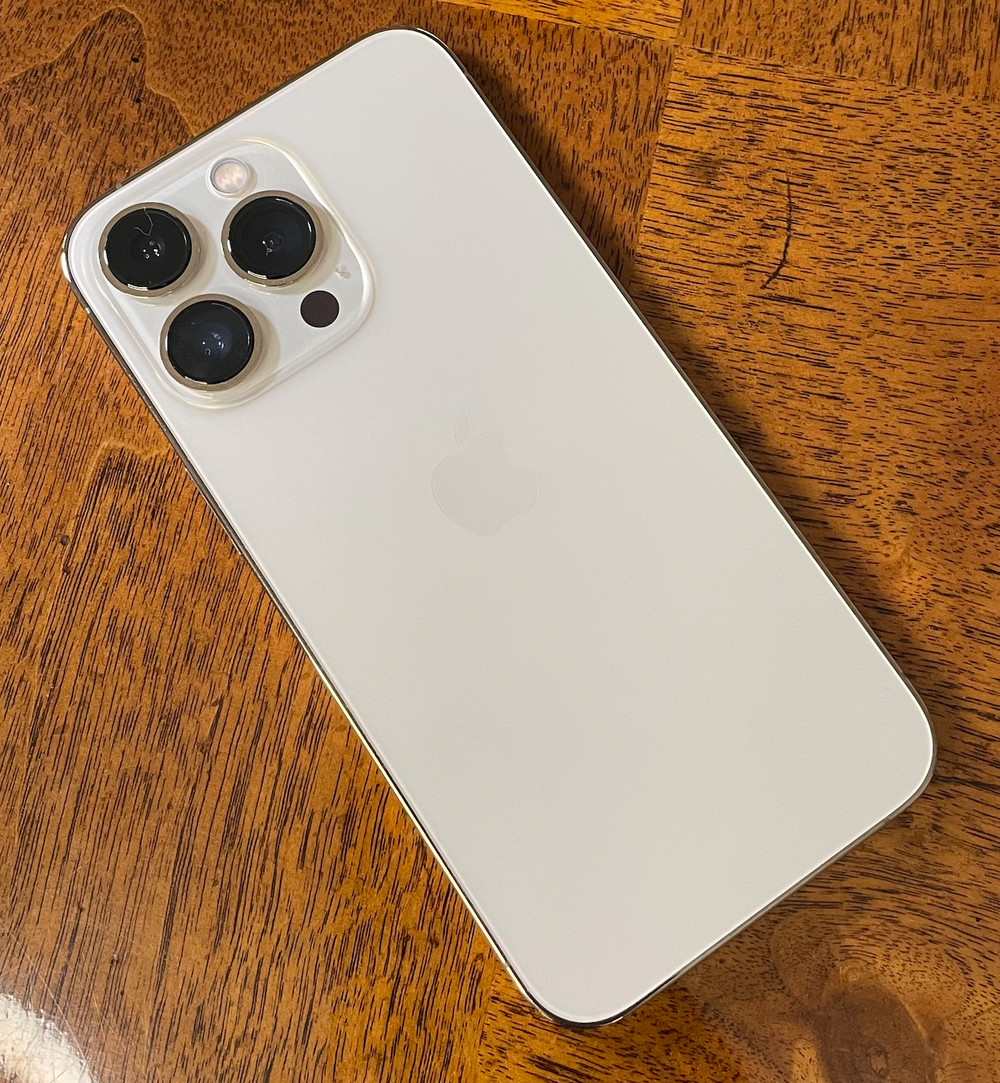
21 Sep 19:55

Telling the computer what to think about

There’s a subtle interaction in Apple’s new “Live Text” feature which I think is clever (though I would like to know how deliberate it is). We could call it focus and perhaps it’s a tiny clue for how we’ll interact with future intelligent machines.

Text in photos is detected automatically in the new iOS 15 for iPhone, released this week. (I believe Android has had this functionality for some time, but I’m not sure exactly how it works as I’ve been iPhone-only for a couple years.)

Live Text (that’s the Apple support doc) lets you copy and paste text from saved photos or even the live camera and it’s pretty magical: phone numbers from billboards, paragraphs from pics of books, even handwriting on post-its.

Here’s the subtlety, using the built-in Photos app:

  • An indicator icon appears when your phone sees text. Tap the icon to highlight the words
  • Sometimes the icon doesn’t appear! No text has been automatically recognised. This seems to especially happen with handwriting
  • Long press anyway on the text in the photograph - the phone will, if it can, select the text so you can copy/spell check/translate/etc.

I don’t know what to call this “long press and try again even though it didn’t work the first time” mechanic.

Perhaps: try harder?

It’s like the algorithm didn’t have enough confidence first time round to bring it your attention, but with some reassurance it can go ahead.

Tap to focus?


What is focus?

The brain has scarce realtime processing capacity. Attention is the feeling of it being directed.

I think of the attentional system as a pyramid. At the top is focus: it’s singular, you’re conscious, tuned it.

At the bottom is everything you’re not aware of. Your brain throws away background sounds, peripheral vision, the texture of clothes on your skin and the feel of the tongue in your mouth.

In the middle is what your brain is keeping tabs on. It’s unconscious, but if you hear your name spoken or a light flashes in the corner of your eye, the source of the perception will jump up to focus.

There is a catalogue of heuristics that your brain uses to move things up and the down the pyramid. An object growing from a point in your visual field will bring it to attention automatically, for example, but the same object fading in will not. But you can consciously choose to focus too.

So “attention” is this collaboration between the conscious mind and unconscious processes.


The analogy here is to centaurs, Garry Kasparov’s model for AI symbiosis: half intuitive human, guiding up top; half brute force machine providing the horsepower.

With Live Text there is a collaboration between the conscious human user who can step in and focus the show, and the algorithm which keeps tabs on absolutely everything but may need a confidence boost from time to time if it doesn’t automatically bring something to attention. The algorithm, always running, plays the role of the unconscious.

You need both working together.

Live Text without the ability to step in would feel frustrating and disempowering. You would have moments, as a user, where you could plainly read some text, but the computer wasn’t detecting it for whatever reason, and you would lack the ability to say – dammit right there!

But Live Text without automatic detection would be cumbersome, having to point and tap on every single photo to tell it to do something.

There’s a similar interaction in Apple’s new Cinematic Mode, which semi-automatically pulls focus as you shoot video. From this Engadget review: You can tap on parts of your viewfinder to change focal points as you shoot or let the iPhone decide for you by analyzing who and what’s in the scene.

Centaur film director!


So I want to generalise: every always-running algorithm should have the ability to be steered. Even, sometimes, when it doesn’t think it ought to run, to try harder, focus where it’s told to, execute the next lines of code anyway and to just do its best.

And given our future with machines will be all about these always-running algorithms and processes, maybe this should be a standard user interface widget?

Like: we have tap, swipe, pull to refresh, toggles, lists, and all the rest… can we have a visual representation that says “this is where the algorithm is looking” and what’s more “this is where I want the algorithm to look next.”

Focus is the right underlying metaphor, given the connection to the attentional system and resource allocation, but it feels too abstract.


AN IDEA for that standard UI widget: the playhead.

This is a bit of a reach, so a tangent…

Azlen Elza’s project, Geological Phonograph:

Just like a needle of a phonograph moves along the grooves of a record, what would it sound like to move a needle along the grooves and topology of the Earth? Each mountain, valley, field, or ocean might have its own unique sound, a special timbre or series of harmonics never before heard but waiting to be discovered in the very land beneath our feet.

– Azlen Elza, Geological Phonograph (2019)

The project is unfinished, but there is a tantalising photograph of a tiny screen showing a topographical map, twisting contour lines, with neat circles drawn on it - playheads - and a breadboard with four rotary encoders by way of sonic control.

Music is generated and plays as the circles drift over the topography.

There’s something gorgeous here about the collision in scales: ridges on the earth that would take hours to traverse treated as the ridges on a vinyl record, microscopic.

BUT, to me, what’s most thought-provoking is the playhead.

A point of focus that says to the machine: hey, out of the entire surface of the planet, play this exact bit right here.


Go back to what computers are all about, deep down – the Turing machine is a strip of tape filled with data and symbols, and the tape is moved back and forth and executed by, well, a playhead.

All that code running on the phone is a thousand processes and a thousand playheads.

Sometimes the detection algorithm gatekeeps the interaction code, and if the text or face or object isn’t detected, then the playhead never reaches the code for the pop-up menu and the user never sees it.

So I’m imagining a visible playhead, somehow, which the user can can direct to anything on the screen and say, hey, run the code you would run if you detected a phone number right here (or a face, or a block of text, or whatever).

Maybe it’s a long press? And then every available detection algorithm runs in turn.

Maybe you pull down a shade over the screen, and everything that has been detected but at low confidence takes on a little shimmer somehow, like a side mission in a video game?

Maybe it’s a tiny bird that lives behind the notch, and you drag down a trail of seed.

How do we tell the computer where to look? (And then there’s sound.)


SEPARATELY:

Elza’s Geological Phonograph makes me imagine an equivalent Sky Phonograph that is a camera pointing up at the dome of the sky, playing what it sees as it sees it, 24 hours a day, 365 days a year.

It would do a 2D Fourier transform to pick out frequencies, radially, I think, and play according to that. So a clear or gently overcast sky would have a low hum, but with broken clouds you would hear an orchestra of higher frequency tones, whipping this way and that as the wind picked up.

At night, the stars would sound electronic – a mix of frequencies sure, but clear bright tones layered on one-another, evolving slowly, analogue sounds coming in as clouds appeared, satellites like sliding whistles.

The music of the firmament.

21 Sep 18:12

Henry Giroux

Donald Clark, Donald Clark Plan B, Sept 21, 2021
Icon

I know of Henry Giroux less for his books and much more for his work online, includinge especially his many articles on Truthout and AlterNet. Donald Clark writes that he is "in favour of critical democracy that includes critiques of ideologies such as authoritarianism, capitalism and neoliberalism," which is a bit of an understatement. Giroux's criticisms were relentless and (to my view) pointedly accurate. Clark's summary suggests that "Giroux put Critical Pedagogy on the map. Whether it has ever come off the map onto the rocky roads of real life education is debatable." That, though, would depend on how you define "real life education".

Web: [Direct Link] [This Post]
21 Sep 18:09

Unravelling generator expressions

by Brett Cannon

In this post on Python's syntactic sugar, I want to try to tackle generator expressions. If you look at the language definition for generator expressions you will see that it says, "[a] generator expression yields a new generator object" for what is specified (which is essentially a compact for loop with an expression for the body). So what does that look like if you take away the Python "magic" and unravel it down to its core Python semantics?

The bytecode

Let's take the following example:

def spam():
    return (b for b in a)
Example generator expression

The bytecode for this is:

  1           0 LOAD_CONST               1 (<code object <genexpr> at 0x10076b500, file "<stdin>", line 1>)
              2 LOAD_CONST               2 ('spam.<locals>.<genexpr>')
              4 MAKE_FUNCTION            0
              6 LOAD_GLOBAL              0 (a)
              8 GET_ITER
             10 CALL_FUNCTION            1
             12 RETURN_VALUE

Disassembly of <code object <genexpr> at 0x10076b500, file "<stdin>", line 1>:
  1           0 LOAD_FAST                0 (.0)
        >>    2 FOR_ITER                10 (to 14)
              4 STORE_FAST               1 (b)
              6 LOAD_FAST                1 (b)
              8 YIELD_VALUE
             10 POP_TOP
             12 JUMP_ABSOLUTE            2
        >>   14 LOAD_CONST               0 (None)
             16 RETURN_VALUE
Bytecode for the example generator expression

You may notice a couple of things that are interesting about this:

  1. The generator expression is very much just a for loop in a generator.
  2. The generator expression is stored as a constant in the function.
  3. a gets explicitly passed into the generator expression.

The semantics

The explicit passing of a is the surprising bit in how generator expressions work, but it actually makes sense when you read the explanation as to why this occurs:

... the iterable expression in the leftmost for clause is immediately evaluated, so that an error produced by it will be emitted at the point where the generator expression is defined, rather than at the point where the first value is retrieved. Subsequent for clauses and any filter condition in the leftmost for clause cannot be evaluated in the enclosing scope as they may depend on the values obtained from the leftmost iterable.

So by passing a in, the code for a is evaluated at the time of creation of the generator expression, not at the time of execution. That way if there's an error with that part of the code the traceback will help you find where it was defined and not simply to where the generator expression happened to be run. Since subsequent for loops in the generator expression may rely on the loop variant in the first clause, you can't eagerly evaluate any other parts of the expression.

The unravelling

There's a couple of details that required  to make unravelling a generator expression successful, so I'm going to build up a running example to cover all the various cases.

With only one for loop

Let's start with (c for b in a) where c can be some expression. To unravel this we need to make a generator which takes in a as an argument to guarantee it is eagerly evaluated where the generator expression is defined.

def _gen_exp(_leftmost_iter):
    for b in _leftmost_iter:
        yield c
        
_gen_exp(iter(a))
Unravelling (c for b in a)

We end up with a generator function which takes a single argument for the leftmost iterator. We call iter() outside of the generator to control for scoping. We should also technically unravel the for loop, but for readability I'm going to leave it in place. Now let's see what this looks like in some code that would use the generator expression:

def spam(a, b):
    func(arg=(str(b) for b in a))
Example of using a generator expression

This would then unravel to:

def spam(a, b):
    def _gen_exp(_leftmost_iterator):
        for b in _leftmost_iterator:
            yield str(b)
    
    func(arg=_gen_exp(iter(a)))
Unravelling the generator expression usage example

With multiple for loops

Now let's toss in another for loop: (e for b in a for d in c). This unravels to:

def _gen_expr(_leftmost_iterator):
    for b in _leftmost_iterator:
        d in c:
            yield e
(e for b in a for d in c) unravelled

Since only the leftmost iterable is evaluated eagerly we can rely on the scoping rules for closures to get all of the other variables from the call site implicitly (this is where Python's simple namespace system comes in handy).

Putting this into an example like:

def spam():
    x = range(2)
    y = range(3)
    return ((a, b) for a in x for b in y)
Example using multiple for loops in a generator expression

lead to an unravelling of:

def spam():
    x = range(2)
    y = range(3)
    
    def _gen_exp(_leftmost_iterable):
        for a in _leftmost_iterable:
            for b in y:
                yield (a, b)
                
    return _gen_exp(iter(x))
Unravelling of a generator expression with multiple for loops

The generator expression needs x passed in because it's the leftmost iterable, but everything else is captured by the closure.

Assignment expressions

Let's make life complicated and throw in an assignment expression:

def spam():
    list(b := a for a in range(2))
    return b
Example of a generator expression with an assignment expression

The bytecode for this becomes:

  2           0 LOAD_GLOBAL              0 (list)
              2 LOAD_CLOSURE             0 (b)
              4 BUILD_TUPLE              1
              6 LOAD_CONST               1 (<code object <genexpr> at 0x1008393a0, file "<stdin>", line 2>)
              8 LOAD_CONST               2 ('spam.<locals>.<genexpr>')
             10 MAKE_FUNCTION            8 (closure)
             12 LOAD_GLOBAL              1 (range)
             14 LOAD_CONST               3 (2)
             16 CALL_FUNCTION            1
             18 GET_ITER
             20 CALL_FUNCTION            1
             22 CALL_FUNCTION            1
             24 POP_TOP

  3          26 LOAD_DEREF               0 (b)
             28 RETURN_VALUE

Disassembly of <code object <genexpr> at 0x1008393a0, file "<stdin>", line 2>:
  2           0 LOAD_FAST                0 (.0)
        >>    2 FOR_ITER                14 (to 18)
              4 STORE_FAST               1 (a)
              6 LOAD_FAST                1 (a)
              8 DUP_TOP
             10 STORE_DEREF              0 (b)
             12 YIELD_VALUE
             14 POP_TOP
             16 JUMP_ABSOLUTE            2
        >>   18 LOAD_CONST               0 (None)
             20 RETURN_VALUE
Bytecode for example of generator expression with an assignment expression

The key thing to notice is the various *_DEREF opcodes which are what CPython uses to load/store nonlocal variables.

Now we could just add a nonlocal statement to our unravelled generator expression and assume we are done, but there is one issue to watch out for: has the variable previously been defined in the enclosing scope? If the variable doesn't exist when the scope with the nonlocal is defined (technically the compiler walking the AST has not seen the variable yet), Python will raise an exception: SyntaxError: no binding for nonlocal 'b' found.
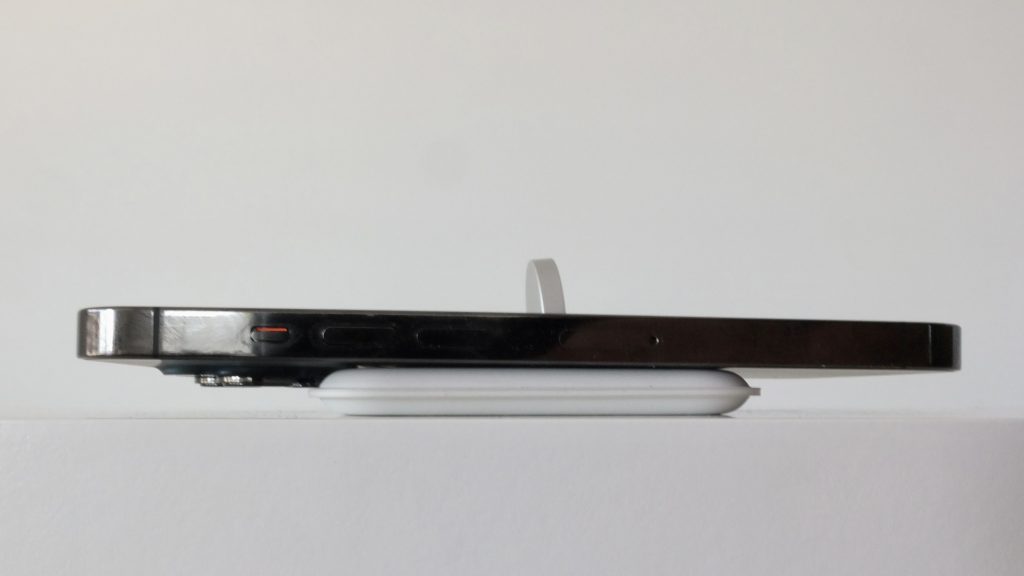
Python gets to take a shortcut when it comes to a generator expression with an assignment expression and simply consider the nonlocal as implicit without regards as to whether the variable was previously defined. But we don't get to cheat, and that means we may have to define the variable with a dummy value to make the CPython compiler happy.

But we also have to deal with whether the generator expression is ever run or runs but never sets b (i.e. the iterable has a length of 0). In the example that would raise UnboundLocalError: local variable 'b' referenced before assignment. To replicate that we need to delete b if it never gets set appropriately.

What all of this means is our example unravels to:

def spam():
    b = _PLACEHOLDER
    
    def _gen_expr(_leftmost_iterable):
        nonlocal b
        for a in _leftmost_iterable:
            yield (b := a)
            
    list(_gen_expr(range(2)))
    if b is _PLACEHOLDER:
        del b
    return b
Unravelling of generator expression example with an assignment expression

But remember, we only want to do any of this nonlocal work if there are assignment expressions to worry about.

The best laid plans ...

I actually wrote this entire post thinking I had solved the unravelling of generator expressions, and then I realized assignment expressions thwarted me in another way. Consider the following example:

def spam():
    return ((b := x for x in range(5)), b)
Example where the result of an assignment expression is relied upon in the same statement

If you run that example you end up with UnboundLocalError: local variable 'b' referenced before assignment. Now let's unravel this:

def spam():
    b = _PLACEHOLDER
    def _gen_expr(_leftmost_iterable):
        nonlocal b
        for x in _leftmost_iterable:
            yield (b := x)
            
    return _gen_expr(iter(range(5))), b
Unravelling of the assignment expression reliance example

Unfortunately calling this function succeeds. And since del is a statement there's no way to insert ourselves into that expression to prevent b from being resolved. But luckily Guido told me of a trick to still get the UnboundLocalError: insert the initial assignment into an if False calls. If we do if False: b = _PLACEHOLDER it essentially tricks the compiler into doing the what we want and causing UnboundLocalError to  be raised when the variable isn't set while still having nonlocal allow for assigning to the variable.

def spam():
    if False:
        b = _PLACEHOLDER
    def _gen_expr(_leftmost_iterable):
        nonlocal b
        for x in _leftmost_iterable:
            yield (b := x)
            
    return _gen_expr(iter(range(5))), b
Triggering UnboundLocalError

Taking our earlier unravelling that was successful, it change into the following:

def spam():
    if False:
        b = _PLACEHOLDER
    
    def _gen_expr(_leftmost_iterable):
        nonlocal b
        for a in _leftmost_iterable:
            yield (b := a)
            
    list(_gen_expr(range(2)))
    if b is _PLACEHOLDER:
        del b
    return b
Using if False with our earlier assignment expression example

Aside: what came first, the expression or the comprehension?

If you have not been programming in Python for more than 15 years you may think generator expressions came first, then list comprehensions. But actually it's the other way around: list comprehensions were introduced in Python 2.0 and generator expressions came in Python 2.4. This is because generators were introduced in Python 2.2 (thanks to inspiration from Icon), and so the possibility of even having generator expressions didn't exist when list comprehensions came into existence (thanks to inspiration from Haskell).

Acknowledgements

Thanks to Guido for pointing out the if False trick to make unexecuted assignment expressions work. This was not part of the original post and so I initially thought the unraveling had failed.

Thanks to Serhiy Storchaka for pointing out that the scoping was off if you didn't call iter() outside the generator and you needed to unravel the for loops.

21 Sep 18:09

Gates Gully

by jnyyz

I’ve been meaning to check out Gates Gully for a while since it has the reputation of being one of the more interesting gravel climbs in the city. I was particularly taken by this route on RidewithGPS. Here is a picture of the eastern part of the route.

Here are a few notes from my ride this past Sunday. The first non obvious bit comes after you turn north from St. Clair and go through a neighbourhood to Jeanette Park. The route tells you to turn just past the houses, and not onto the clear paved path across the park.

Turn north here.

Lo and behold, a path opens up through a field of wildflowers.

When you reach Brimley Rd, you actually have to jog to the left to join onto this path. I complimented the nice lady on her vintage Apple hat.

Crossing McCowan.

At the end of the path, you are directed onto Eglinton headed east, but it is not bad since there is one of those new lanes for buses and bikes.

You continue to Kingston Rd, then Guildwood Parkway to the Guild Inn. Ride into the grounds past the building entrance and you will see an entrance to a path.

Note that the first part of the path had some switchbacks that were steep and tight enough that I couldn’t ride down with my gravel bike. I elected not to ride on the paths that cut across the switchbacks either.

This section of path was rideable but the eroded gully made it a bit tricky.

Shortly after this bit, you join onto a descending part of the Doris McCarthy trail. The next time, I’m going to descend on that trail rather than what was suggested by the GPS route.

Turning right at the lake, you are treated to some wonderful flat riding along the lake with great views of the bluffs as well.

After several kilometres you begin to see more people, and there is this sculpture called “Passage” that I’ve seen many times in photos.

Facing away from the lake at this point, you see Gates Gully.

According to Strava, it is about a kilometre with about 90 m elevation gain. It was easier than I expected although I certainly didn’t set any speed records. I will note for those of you that use climb detection on a Garmin that it behaved a little strangely. The first thing is that it announced the climb very early, including at least a kilometre of flat riding before the real climb. The second thing is that the climb segment ended with about 20% of the climb to go, which was a bit annoying since the last bit was steeper than the middle.

Looking back at the top.

I’m going to have to do a few more reps of this climb before I feel I’m ready for Side Road 7b.

21 Sep 14:46

Twitter Favorites: [hinakalam] The nice poll officer asked me if it was my 1st time voting. I mumbled that I became a citizen Friday. She stood u… https://t.co/eu2ByOc5LD

Hina Alam @hinakalam
The nice poll officer asked me if it was my 1st time voting. I mumbled that I became a citizen Friday. She stood u… twitter.com/i/web/status/1…