Shared posts

17 Jan 21:19

In defense of social technologies

by Josh Bernoff

Many of us who promoted social media when it was young are now wondering if we made a mistake. For example, former Facebook executive Chamath Palihapitiya has said “The short-term, dopamine-driven feedback loops that we have created are destroying how society works: no civil discourse, no cooperation, misinformation, mistruth.” So I decided to take a look … Continued

The post In defense of social technologies appeared first on without bullshit.

17 Jan 21:19

Google likes my idea of the TSP

by pricetags

I’ve been predicting for some time that we will see the rise of the Transportation Service Provider: a single company or agency that will integrate every conceivable mode of transportation that has the potential of a cash flow, and then package them in the way that telecommunications is offered – a range of services, all integrated, never separately charged, accessed with, likely, your phone, and billed monthly and almost invisibly through your credit or bank account.

Well, here we go.

From Geekwire, via Peter Berkeley:

… Google’s sister company, Sidewalk Labs, is convinced it can also be part of the solution — if we bridge the digital-urbanist divide.

Earlier this month Sidewalk Labs secured a massive workshop to test its theory on the Toronto waterfront. The project is a partnership between Sidewalk Labs and Waterfront Toronto — an organization created by the local government to represent the public’s interests. …

(Sidewalk Labs CEO Dan Doctoroff) used transportation as an example of a system that could be more affordable with improved technology. He envisions a network of self-driving cars, bike paths, and smart mass transit that are packaged and sold as a single service. He predicts it would save the average Canadian family $6,000 per year.

.

Now is the time for government to think about how this service is going to emerge and be regulated.  This should not come as an Uber-like surprise.  In particular, who will control the data? How will these services be charged for the use of public infrastructure?  How will they (or consumers) be taxed?

If the Mobility Pricing Independent Commission’s mandate was expanded and extended, these would be useful questions to address.  Road pricing is just one the issues related to TSPs, and secondary to the jursidictional ones.

The commission, for example, should as a recommendation establish the principle that TSPs, or any company like Uber, must as a condition of operating provide the public managers and regulators with their data – just as New York has.  Data is power, and without it, we’d be ceding one of the critical functions of cities to the private sector – and the behemoths like Google.

17 Jan 21:19

iPad Diaries: Transmit Replacements and FTP Clients

by Federico Viticci

iPad Diaries is a regular series about using the iPad as a primary computer. You can find more installments here and subscribe to the dedicated RSS feed.

You can download my wallpaper here.

Even though I never depended on Transmit for my daily iPad file management needs, I was sad to read that Panic couldn't find a market for it on the App Store. Thousands of iPad owners use Panic's app to manage their FTP servers and Amazon S3 buckets; integration with the latter is particularly important as it's hard to find apps that combine FTP access with S3 support and aren't hindered by questionable interface choices or a lack of updates.

Transmit for iOS was (and, until it is removed from the App Store, still is) one of a kind. Its excellent Mac foundation was adapted to iOS with taste and elegance, leveraging a split-pane UI long before iPad users were comfortable with Apple's native Split View; thanks to Panic's penchant for beautiful and intuitive design married to power-user functionalities, the Mac-like approach worked surprisingly well on iPad too.

It's difficult to pin down what, exactly, made Transmit for iOS unprofitable. The iOS counterpart always lagged behind the cloud integrations from the Mac app (Backblaze B2 and Rackspace Cloud Files, for instance, never made it to iOS); Panic didn't update Transmit to take advantage of major additions to iOS 11 such as Files and drag and drop; perhaps more importantly, Transmit for iOS is a product of the pre-iOS 11 era, back when the concepts of desktop-like file management and drag and drop were alien to the platform. Ultimately, I think Transmit for iOS lived and (slowly) died because we had it too soon.

But this isn't a post-mortem for Transmit on iOS, which, according to Panic, may even relaunch as a new app on the Store someday. Instead, I'd like to take a quick tour of some of the alternatives for Transmit available on iPad today. In case Panic decides to pull Transmit from the App Store, or if the app stops working in a future release of iOS, these FTP clients and file managers should compensate for the features of Panic's app. Most of them don't offer the same sophisticated and polished UI design, but some of them may even turn out to be more flexible and better integrated with iOS than Transmit.

Get More iPad Productivity Tips and Workflows

With a Club MacStories subscription, you'll gain access to weekly iPad workflows, iOS app recommendations, and other exclusive extras.

Starting at $5/month, Club MacStories includes MacStories Weekly – a newsletter delivered every Friday with a focus on iOS productivity and showcasing new and interesting iOS apps. One of MacStories Weekly's regular sections is the Workflow Corner – a weekly assortment of iPad workflows, iOS automation tips, and tutorials curated by Federico and the MacStories team.

As a new member, you'll also receive complete access to our back catalogue of over 120 newsletters starting from September 2015.
 
You can find out more about Club MacStories here, or subscribe directly below.


Replacing Transmit

Since Panic's announcement two weeks ago, I've heard from dozens of fellow iPad users who rely on Transmit for a variety of tasks – from uploading media and new posts to their static blogs, to photographers who back up hundreds of files to their private servers and folks who use Transmit as a prettier front-end for Synology's FTP access. In spite of missing some of the more advanced options from the Mac, Transmit for iOS is a powerful and versatile file transfer utility that is hard to replace for many.

When considering alternatives to Transmit in 2018, we should look for modern FTP clients and file transfer utilities that, besides core functionality, adopt the latest encryption standards, iOS technologies and design conventions, and integrations with external services. I came up with the following list of features I'd like to have in a modern FTP client/file transfer app for iPad:1

  • Encrypted connections via SFTP;
  • Support for SSH keys (RSA and, ideally, ED25519);
  • iOS 11 drag and drop to import (upload) and export (download and share) files;
  • Integration with the Files app;
  • A share extension to upload files to a configured server from other iOS apps;
  • Integration with other server types and cloud services (e.g. WebDAV, Amazon S3, Rackspace Cloud Files, Backblaze B2).

The solution to all this would be a modernized Transmit for iOS with support for all the features seen in Transmit for Mac. If you work on macOS, I highly recommend Transmit 5 (and Cyberduck, which hasn't come to iOS yet).

Alas, Panic's announcement has only made things more complicated on iOS. After a couple of weeks of research and tests2, I settled on three apps that work well enough for managing FTP servers and file transfers on iPad. None of them are as good as the aforementioned Mac apps, but they have room for improvement going forward.

Coda

If you're coming from Transmit, Panic's other iOS app, Coda, is an obvious replacement. From a design and interaction standpoint, Transmit and Coda for iOS are nearly identical: both apps employ a split-pane layout for local documents and server connections, both allow you to connect to your server via FTP or SFTP, and both have a file detail view where you can act on the currently selected item. For existing Transmit users, Coda has almost no learning curve and roughly the same feature set for connecting to and managing FTP servers.

Transmit (left) and Coda share the same underlying structure and design.

Transmit (left) and Coda share the same underlying structure and design.

Even though Coda is a code editor that lets you browse servers like a file manager, it can also be used as a file transfer utility (like Transmit) without ever editing any code. You can connect to FTP, SFTP, and WebDAV servers, and even log into your S3 and DreamObjects accounts, just like Transmit. You can change permissions (read/write/execute) from a file's detail view, set a remote path and root URL for FTP connections, and drag documents from the local file manager into the remote location "mounted" on the right side of the screen. The close resemblance between Transmit and Coda – to the point where Coda feels like a "deluxe" version of Transmit given the addition of code editing – might be one of the reasons why Panic decided to abandon Transmit to focus on Coda alone.

Coda adopts a split-view layout for local documents and remote connections.

Coda adopts a split-view layout for local documents and remote connections.

Unfortunately, the similarity with Transmit is a double-edged sword: like its sister app, Coda hasn't been updated for iOS 11. Let aside the fact that, UI-wise, Coda looks like an app that predates iOS 11 and Files, the most notable issue is the absence of inter-app drag and drop to import files into Coda and export them from a server to another app. Coda still comes with its own custom, in-app-only flavor of drag and drop, which Panic should replace with Apple's superior system behavior in iOS 11.

Furthermore, sites configured in Coda do not appear as locations in the Files app because Coda doesn't come with a file provider extension like Dropbox, Gladys, or DEVONthink. The remote-based nature of Coda's locations seems ideal for Files' third-party framework, and I hope Panic is considering the ability to browse locations and view remote documents from Files. Right now, not even the basic Files picker to import documents into Coda has been fully updated for iOS 11.

Coda's Files picker in iOS 11. I'm not sure what's going on with the search field, and I couldn't dismiss the picker after taking this screenshot.

Coda's Files picker in iOS 11. I'm not sure what's going on with the search field, and I couldn't dismiss the picker after taking this screenshot.

Despite the lack of iOS 11 updates and issues I've had with the Panic Sync feature (which hasn't been syncing locations for me at all), I like Coda for iOS because it's a more powerful version of Transmit. As you'll see below, it's rare to find an FTP client that combines great design with handy options such as the ability to copy the URL of a file uploaded to an FTP server or edit your .htaccess file without leaving the app.

If Panic is going to centralize their efforts on Coda going forward, I'd like them to consider a share extension to upload files to servers (Transmit had one) and better integration with iOS 11. Coda, like Transmit, still works well, but it's showing signs of its age in key parts of the experience.

iFiles

I used to manage my local and cloud documents with iFiles years ago – all the way back in 2010 and 2011, it was the only decent iOS file manager with native support for Rackspace Cloud Files (the CDN we use at MacStories). Funnily enough, several years, a couple of design languages, and a new app version later, iFiles is still the only file manager that integrates with Cloud Files. Some things never change.

What I wrote eight years ago still holds true for iFiles, which is now at version 2.0: iFiles is an iOS file manager built for cloud workflows, which it facilitates through a bevy of web integrations for services that can be added as locations in the app's sidebar. In addition to FTP, SFTP, and Cloud Files, iFiles supports:

  • iCloud
  • OwnCloud
  • Google Photos
  • SugarSync
  • Box
  • Facebook
  • Amazon S3
  • CloudApp
  • OneDrive
  • Flickr
  • PogoPlug
  • SoundCloud
  • Dropbox
  • 4Shared
  • SMB
  • Google Drive
  • AFP
  • WebDAV

It's an impressive list of integrations, which, combined with iFiles' compatibility with dozens of different file formats (including .zip archives), a built-in media viewer and music player, and support for multiple tabs makes it a professional-grade alternative to simpler apps such as Documents and, arguably, Apple's Files. The difference with 2010, though, is that in the age of Files as a system-wide layer, an app like iFiles can only aspire to be a standalone file manager you use for a specific, limited purpose; in my case, that would be SFTP and Rackspace Cloud Files.

iFiles 2 has a more utilitarian approach than Coda.

iFiles 2 has a more utilitarian approach than Coda.

There's a lot to like in iFiles: you can view files and folders in list or icon mode, and pinch-to-zoom to increase the size of thumbnail previews. By long-pressing an item in the file browser, you can open a contextual menu that, among other actions, lets you mark directories or files as favorites, which are collected in a dedicated view next to services in the sidebar.

This action menu is also how you open the Properties panel for an item, which reveals a variety of metadata and actionable information that isn't typically exposed in more simplistic iPad apps. In addition to standard file size, modified date, and renaming options, you can change permissions for files and folders, apply tags (iFiles' own tags, not Files' native ones), and, for images, view details about bits, color space, and dimensions.

Alas, can't copy an item's URL from iFiles' Properties popover for FTP uploads.

Alas, can't copy an item's URL from iFiles' Properties popover for FTP uploads.

These features are both iFiles' biggest strengths and aspects I'd like the developers to refine in the future. The vast selection of compatible services and ability to create a list of favorites for fast access has allowed me to configure my own dashboard of frequently accessed cloud sub-folders across multiple services – something that no other iOS app can do. However, iFiles' Properties popover doesn't have a button to copy the URL of an item from my FTP server; and when it does have a 'Copy URL' button, it doesn't work, as is the case with the ever-spinning 'Content Delivery Network' section that keeps loading when inspecting a file uploaded to Rackspace. I've been using iFiles as an upload utility for our CDN, but I'd like to have a way to copy file URLs from the app too.3

iFiles' support for iOS 11 is only partial at this point. The app can import and export files with drag and drop: to upload a file, just pick it up in any iPad app and drop it into a location in iFiles; to download a remote file into an external app, pick it up from Files and drag it out. I tested uploads and downloads based on drag and drop using Gladys and iFiles, and there isn't a lot to say – this is exactly how I'd expect any file manager to work on iPad at this point.

Sadly, iFiles lacks integration with Files as it only ships with a legacy document provider extension that opens in compatibility mode on top of Apple's app. Along with the issues I had with copying URLs, this is the biggest limitation of the app.

iFiles doesn't look as pretty as Panic's Coda, but it better caters to my needs in terms of service integrations and customization. I hope the developers can fix the problems with copying URLs as well as extend the app to become a native Files provider.

FileBrowser

The last app I want to highlight is FileBrowser, which has been around for years as a powerful utility to connect to cloud services as well as local servers such as NAS devices, drives on your local network, or shared directories from other computers in your office. FileBrowser comes in three versions (standard, business, and educational) with the primary difference between standard and business being that business users can browse the contents of a SanDisk iXpand Drive from the app, and set up automatic sync for remote folders. Neither feature is essential for me, so I kept testing the regular version I originally purchased years ago.

Of all the apps I tested for this article (including those I didn't include today), FileBrowser is the one with the least appealing design. FileBrowser has a spartan, utilitarian look that reminds me of Synology's DS apps. However, despite its unexciting interface and handful of limitations, FileBrowser is the app I keep using to connect via SFTP to my two servers (viticci.net and my local Synology NAS) thanks to its integration with iOS 11 and thoughtful navigation features.

First, the bad stuff. FileBrowser can't change permissions for FTP directories (there is no permissions menu, which both Coda and iFiles have) and, strangely enough, it doesn't have a button to copy the public URL of a file. The app can generate filebrowser:// URLs to reopen specific files in the app4, and it can even add these launchers to the Home screen (like Workflow does), but it doesn't have a simple button to copy the link to a file uploaded to an FTP server.

What FileBrowser gets right is support for iOS 11's drag and drop and Files app. With drag and drop, you can import items into FileBrowser (and thus upload them to any configured location) as well as export files from a server you're browsing in FileBrowser. The app supports multi-item drag and drop so you can pick up multiple files in a single drag session and drop them into another iPad app, and it correctly implements lazy delivery (asynchronous transfers) for large files. For instance, I was able to drag a .aif song (30 MB) and a .zip archive (160 MB) from FileBrowser and drop them into Gladys and, while it took a few seconds (particularly for the 160 MB file), it worked just fine; as the file was being copied after I let go of it, I could continue using Gladys as normal.

Dragging multiple files from an FTP connection in FileBrowser into Gladys.

Dragging multiple files from an FTP connection in FileBrowser into Gladys.

The best way to integrate FileBrowser with other iOS apps, though, is by enabling its Files extension, which lets you browse network folders previously set up in FileBrowser from the Files app. This has proven to be a great solution for uploading items to an FTP server from apps that don't support FTP but that do offer Files integration. As long as an app can bring up a Files picker, you'll be able to tap on FileBrowser in the Locations area of the sidebar, then select one of your configured network locations.

You can access FTP servers in the Files app thanks to FileBrowser.

You can access FTP servers in the Files app thanks to FileBrowser.

The only caveat is that to use FileBrowser in Files the app has to be connected to the server in the background. However, the Files extension makes it easy to relaunch FileBrowser directly from the error message if the app isn't currently connected to a remote location.

Once you're connected (and FileBrowser supports simultaneous connections to different servers) you can keep using the Files extension without interacting with FileBrowser at all.

Because Files is integrated everywhere in iOS 11, my Synology and FTP servers are now, by extension (no pun intended), system-wide locations as well thanks to FileBrowser. This is a fantastic showcase of iOS 11's multitasking and Files extensibility, and it's exactly the path I wanted Panic to embark on with Transmit. I can now save FTP sub-directories as Favorites in Files for quick access from any iPad app and, thanks to drag and drop, perform straight-to-FTP uploads simply by picking up a file and dropping into a folder in Files, with FileBrowser acting as the middleman in the background.

FileBrowser's integration with Files is worth the price of the app alone, and I believe all iPad file managers that connect to cloud services should consider this kind of integration. I wish the developers could find a way to authenticate to external services without opening the main app, but it's a trade-off I can accept given the convenience of Files.

Finally, I want to mention FileBrowser's distinction of Favorites and Bookmarks. Because the app supports a variety of services and server connections (including passwordless logins with private/public keys), a Favorites view lets you filter your most frequent or important ones without the clutter of the main Locations view.

Specific directories, on the other hand, can be saved as bookmarks, which are listed in a popover or in the sidebar. Tapping a bookmark connects to the server and immediately navigates to the saved location, which is a nice way to save time when managing files and folders across multiple directories.


None of the apps I covered above are "perfect": each prioritizes different aspects of FTP connections and file transfers, whether it's design, support for dozens of services, or superior integration with iOS 11. Ideally, Transmit for iOS could have been all of this: a file transfer app based on Coda's beautiful design, with support for a plethora of services and iOS 11's latest APIs.

For now, I'm keeping Coda, iFiles, and FileBrowser on my iPad Pro because they all serve different purposes. If you absolutely need to pick just one, however, I suggest you ask yourself what aspect is most important for your iPad workflow – there is a lot of overlap between these three apps, but also clear differences in terms of design and functionality. If you know what you're looking for, choosing a Transmit replacement shouldn't be impossible these days.

Funnily enough, researching this column made me realize that most of my needs – drag and drop, SFTP/SMB connections, and Files support – could be easily fulfilled by Apple with an update to Files later this year. As it turns out, the company's other file manager – the desktop Finder – has offered all these features for years. I'll probably still have to use dedicated apps for more advanced options, but I'd love the ability to connect to my FTP server and NAS directly from Files in iOS 12.


  1. Thanks to everyone who sent me suggestions about this topic. ↩︎
  2. Which I performed with a private Synology NAS configured for FTP access as well as a new personal server I'm going to use for public file uploads. ↩︎
  3. I can manually create the public URL of an item by combining the base folder URL (which is always the same) with the file's name and extension, but this process requires a snippet or another workflow. ↩︎
  4. Which is a convenient way to create launchers for folders containing TV shows or movies on a local NAS, as the app can then natively queue them to a Chromecast, stream them via AirPlay, or send them to Infuse for playback. ↩︎

Support MacStories Directly

Club MacStories offers exclusive access to extra MacStories content, delivered every week; it's also a way to support us directly.

Club MacStories will help you discover the best apps for your devices and get the most out of your iPhone, iPad, and Mac. Plus, it's made in Italy.

Join Now
17 Jan 21:16

Apple Announces New Campus in the Works, Pledges Significant Investments in US Economy

by Ryan Christoffel

Today in a press release Apple shared an update on its contributions to the US economy. One significant piece of news shared as part of that broader story was the surprise announcement of a new Apple campus in the works.

The company plans to establish an Apple campus in a new location, which will initially house technical support for customers. The location of this new facility will be announced later in the year.

Despite many employees' transition into the newest campus, Apple Park, not yet being complete, it makes sense for a company of Apple's scale and growth to continue expanding its corporate footprint. No further details on the new campus were shared, other than that it will open within the next five years.

Apple expects to invest over $30 billion in capital expenditures in the US over the next five years and create over 20,000 new jobs through hiring at existing campuses and opening a new one.

The announcement of a new campus was only a small portion of the overall press release, which presented several financial details regarding Apple's five year plan for economic contribution.

  • $350 billion will be contributed to the US economy over those five years.
  • $5 billion is committed to Apple's Advanced Manufacturing Fund, up from the previously announced $1 billion.
  • $55 billion is estimated to be spent in 2018 alone with domestic suppliers and manufacturers.
  • $38 billion is the expected tax payment when Apple repatriates overseas profits under new tax law.

These are huge numbers, clearly reflecting Apple's current financial success. With numbers like these, and an anticipated 20,000 new hires over five years, it's no surprise the company will need another campus.


Support MacStories Directly

Club MacStories offers exclusive access to extra MacStories content, delivered every week; it's also a way to support us directly.

Club MacStories will help you discover the best apps for your devices and get the most out of your iPhone, iPad, and Mac. Plus, it's made in Italy.

Join Now
17 Jan 21:15

Tweets In Search of a Base

by Ken Ohrn

As we have all become aware, the blunt tweet has emerged as a tactic in political circles.

Right here in Vancouver, two NPA members of city council have taken a lesson from a certain famous Twitt-o-phile. And the resulting tweets use SHOUTING and an angry GIF, it seems, to rile up a shrinking segment of the electorate in the City of Vancouver (motor vehicle operators) at the expense of a rapidly growing segment (people who ride bikes).   Oh yeah, and ignoring DVBIA support for the new Cambie Bridge bike lane.

In any case, these are clearly divisive efforts that failed miserably in 2011 and 2014.  It’s worth a glance at the replies, which (at the time of writing this) strongly support more safe and effective infrastructure for people riding a bike.

17 Jan 21:14

Item from Ian: Tiny Homes in Austin (and not in Vancouver)

by pricetags

Ian: Good solution for Vancouver. Instead of just putting community gardens on vacant lots, let’s put some actual communities there.

From KUT:

As Austin’s housing prices continue to climb, developers are tapping into the trend of building tiny homes. ….

Kasita was started in 2015 by Jeff Wilson, an Austin college professor who gained notoriety when he spent a year living in a dumpster. Wilson wanted to challenge himself to live small while furthering the conversation on sustainable living.

At a model home in the Community First! Village in East Austin, the kitchen and bathroom are built on a platform above the living room. A built-in sofa can be rolled out from under the kitchen floor to become a queen-size bed.

In general, the city considers anything between 100 and 400 square feet to be a tiny home. Those homes can be placed on any parcel of land zoned for residential use, Rusthoven says.

On a single-family lot, tiny homes have to meet many of the same standards as larger houses, things like minimum lot size and the number of units allowed on the property. Multiple tiny homes can be placed on land that’s zoned for a multifamily residence, and any tiny home that’s placed on a foundation has to meet the standards of the International Residential Code.

In 2014, the Austin City Council asked staff to explore the rules governing tiny homes to find ways to make them easier to build. That effort didn’t lead to changes for tiny homes in the zoning code, but it did identify one specific constraint.

“If they are on wheels and they have a license plate attached to them, then they’re considered to be a vehicle and not considered to be a home,” Rusthoven says.

More here.


Here’s the view from Kieryn Matthews – (tiny) homeless in Vancouver:

So what exactly is a tiny home and why aren’t they allowed in Vancouver? A tiny home is typically less than 400 sq./ft on wheels and has all amenities to live in permanently. They are completely customizable and can be built for as little as $10,000 in comparison to a minimum of $400,000 for a new apartment.

The problem surrounding tiny homes in Vancouver is there are no laws or regulations specific to building and living in them. City bylaws pertaining to laneway homes and recreational vehicles are used to prohibit people from living in them. Bylaws state a house must be a minimum of 398 sq./ft, with a few zoning exceptions downtown for social housing. The other problem is a house on wheels is considered an RV or trailer which you are not allowed to park and live in permanently. …

The B.C. Tiny House Collective is an organization working on engagement, research and pilot projects surrounding the tiny house movement and they have some great resources. Tiny homes are not for everyone and on their own are not going to solve Vancouver’s housing crisis but we need to talk about incorporating them into our city legally

More here.


Ian: I certainly don’t think tiny is the answer to affordable, there are a whole host of equity issues surrounding any assumptions that they work for more than a small subset of the population.

But… We are so far from equitable now that I think opposing the tiny house is making the perfect the enemy of the good. In a greater sense they are the wrong answer to many problems, but in an immediate sense they are a very real answer to a very real problem.

There are so many empty lots receiving tax credit for planting gardens, I fail to see how planting a temporary garden of tiny houses is in any way a bad thing on these same lots.

I would love to see a day when tinyhouse aren’t needed as an answer to Vancouver’s issues of affordability. Until that day, I think they should be allowed here also.

17 Jan 17:58

I’VE GOT BLISTERS ON MY FINGERS! pic.twitter.com/RYxPVoWZot

by museumofcomm
mkalus shared this story from museumofcomm on Twitter.

I’VE GOT BLISTERS ON MY FINGERS! pic.twitter.com/RYxPVoWZot


Posted by museumofcomm on Tuesday, January 16th, 2018 4:29am


18 likes
17 Jan 17:58

Ghosts

by Eric Karjaluoto

Effective marketing depends on identifying what you’re doing. It’s also dependent on knowing who you’re speaking to. This should be common sense, but—as Amhurst said: “there is not a more uncommon thing in the world than common sense.” (Voltaire later said, “common sense is not so common”—which I say makes him a waaaaay better copywriter.)

You know, that’s not a bad segue into the meat of this post: Knowing who you’re communicating with. So, let’s bite into that.

Marketing is communication. You make an ad, a direct mail piece, or an email offer. Maybe you blog or “content market” (as the young people like to say). In any event, you’re working to convey a notion that results in an action. Simple enough.

The thing with communication, is that it works best when it’s personal. Saying “I love you” to your spouse is more meaningful than if you were to shout it into a crowd. (Unless you’re The Biebs, but the rules are different for that kid.) The problem is that marketers often think their job is to shout at crowds.

They write generic messages. They make promises they can’t keep. Or, they spout advertising-babble that means pretty much nothing. “Be your way.” “Travel takes you places.” “Impossible is nothing.” “Moisture is the essence of wetness, and wetness is the essence of beauty.” (Thank you, Derek.)

Companies often outline who they’re writing to, but remain vague. They say, we’re producing content for creative directors, brand managers, and marketers. Or, they pick an nondescript audience that looks impressive in a slide deck. For example: “We’re focusing on the coveted 18-to-34 demographic”.

Sometimes the writing isn’t bad, so much as it’s directionless. Companies write blog posts about staff outings. They make web pages in which they explain how their company is “different”. Or, they send boring emails about incremental product updates. Sure, it’s all content, but it’s not written for anyone. Worse yet, they might not even know who they want reading it.

I’m as guilty of this as anyone. Sometimes I blog for fellow designers. At others, I blog for my friends. This might sound weird, but often I write for myself—just because I like writing. Sometime last year, I stopped. Writing without direction was leaving me tired and adrift.

I started blogging again, last week. I did so after compiling a list of ideas I considered valuable for business owners. Then, I realized most of these articles were for one specific business owner: Gary.

Gary and his wife Amber run Saltspring Soapworks. Amber focuses on product development and customer support. Gary and I work more on shaping the brand. For the past three years, Gary and I have talked weekly. We’ve clarified the brand, introduced systems, and re-imagined their path forward. In our phone conversations, we cover all kinds of subject matter. All of this falls under the umbrella of what actions are suitable for their company.

If I’m honest, I’m not only writing this for Gary. I’m also writing it for Amber, Will, Regina, Todd, Carl, Meighan, Kim, Candice, and Withanie. I’m also writing it for any business owner who wants to be better at telling their company’s story. But, by focusing on Gary, I keep my head straight, my writing on point, and my examples relevant.

I used to write for ghosts. These ghosts were ideas of people—or groups—who I couldn’t explicitly describe. Now, I focus on Gary. I do so because the more specific I make my audience, the sharper my communication.

The post Ghosts appeared first on Eric Karjaluoto.

17 Jan 17:57

Mozilla Files Suit Against FCC to Protect Net Neutrality

by Denelle Dixon

Today, Mozilla filed a petition in federal court in Washington, DC against the Federal Communications Commission for its recent decision to overturn the 2015 Open Internet Order.

Why did we do this?

The internet is a global, public resource. It relies on the core principle of net neutrality (that all internet traffic be treated equally) to exist. If that principle is removed — with only some content and services available or with roadblocks inserted by ISPs to throttle or control certain services — the value and impact of that resource can be impaired or destroyed.

Ending net neutrality could end the internet as we know it. That’s why we are committed to fighting the order. In particular, we filed our petition today because we believe the recent FCC decision violates both federal law as well as harms internet users and innovators. In fact, it really only benefits large Internet Service Providers.

What is next?

As we have said many times over the years, we’ll keep fighting for the open internet to ensure everyone has access to the entire internet and do everything in our power to protect net neutrality. In addition to our court challenge, we are also taking steps to ask Congress and the courts to fix the broken policies.

As a process note, the FCC decision made it clear that suits should be filed 10 days after it is published in the Federal Register, which has not yet occurred. However, federal law is more ambiguous. Due to the importance of this issue, even though we believe the filing date should be later, we filed in the event a court determines the appropriate date is today. The FCC or a court may accept this order or require us and others to refile at a later date. In fact, we’re urging them to use the later date. In either instance, we will continue to challenge the order in the courts.

What can you do?

It is imperative that all internet traffic be treated equally, without discrimination against content or type of traffic — that’s the how the internet was built and what has made it one of the greatest inventions of all time.

You can help by calling your elected officials and urge them to support an open internet. Net neutrality is not a partisan or U.S. issue and the decision to remove protections for net neutrality is the result of broken processes, broken politics, and broken policies. We need politicians to decide to protect users and innovation online rather than increase the power of a few large ISPs.

The post Mozilla Files Suit Against FCC to Protect Net Neutrality appeared first on The Mozilla Blog.

17 Jan 17:57

Google Memory Loss

files/images/potd.png

Tim Bray, Ongoing, Jan 19, 2018


Icon

My experience is oddly the opposite: I am constantly setting Google to search only the last year because I keep getting irrelevant results from 2002. This is because the things I am searching for are often truly obscure. Tim Bray notwithstanding, Lou Reed’s Rock n Roll An­i­mal al­bum is not obscure. But the main point here is that Google "cares about giv­ing you great an­swers to the ques­tions that mat­ter to you right now." It keeps track of things like how popular a page is. Bray says Google "it needs to be in­dexed, just like a li­brary." It does not.

Web: [This Post]
17 Jan 17:57

UBC Strategic Plan

files/images/tankhcat.jpg

Alex Usher, Higher Education Strategy Associates, Jan 19, 2018


Icon

Alex Usher captures an item of significance in UBC's new strategic plan. "Under Draft Strategies for Transformative Learning (page 14) it says: ”Reframe undergraduate academic program design in competencies rather than credit hours: we will move towards competencies as a primary metric of program structure and completion." I think this is areflection of a wider trend. Usher advocates caution. "Trying to move an entire major institution from one system to another in one go is like trying to do wheelies in a Sherman tank." Actually it's not that hard tp pop a wheelie in a tank; you just have to be going fast enough (pictured).

Web: [Direct Link] [This Post]
17 Jan 17:56

Is the city doing enough to clear snow from bike lanes?

by jnyyz

City TV just did a short piece on clearing snow from bike lanes.

Screen Shot 2018-01-16 at 7.59.47 PM.png

For my portion, I was interviewed for about 10 minutes on all manner of subjects related to winter biking, including what to wear (just regular winter clothes are enough), what bike equipment to have (fenders are good, and lights. They took close ups of my studded tires, but I tried to make the point that 90% of the winter, roads are clear of snow and ice.) etc. I didn’t really grok to the fact that they were focusing on what the city could do better. When they asked that question, I talked about the need for more infra, and to make a connected bike network.

At least they included my plug for the Bloor bike lanes. Oh, and I had the foresight to remove my helmet mirror so that I only looked 90% Fred.

Update: I posted some pictures of good and bad bike lane snow clearance at Dandyhorse.

17 Jan 17:56

Well, Long Ago, It Was Legs

by Ken Ohrn
mkalus shared this story from Price Tags.

But now, that’s so passe. This time, it’s a hydrogen fuel cell.  With thanks to Reuters.

French startup launches hydrogen-powered bicycle.

Hydrogen.Bike

[Ed:  note the small box-like object near the bike’s front wheel.  It’s the fuel cell.]

Pragma Industries, which is based in Biarritz, France and makes fuel cells for military use, has sold some 60 hydrogen-powered bikes to French municipalities including Saint Lo, Cherbourg, Chambery and Bayonne.

. . .   “Many others have made hydrogen bike prototypes, but we are the first to move to series production,” said founder and chief executive Pierre Forte.

The firm’s Alpha bike runs for about 100 km (62 miles) on a two-litre tank of hydrogen, a range similar to an electric bike, but a refill takes only minutes while e-bikes take hours to charge. One kilo of hydrogen holds about 600 times more energy than a one-kilo lithium battery.

. . .   With bike’s range limited by the size of the hydrogen tank, Pragma is also working on a bike that will convert plain water into hydrogen aboard the bike, using a chemical reaction between water and aluminum or magnesium powder to produce hydrogen gas.

“In the next two-three years we want to enter the consumer market and massively increase the scale of our operations,” said Forte.


17 Jan 17:56

French startup launches hydrogen-powered bicyles

mkalus shared this story .

PARIS (Reuters) - A French start-up has become the first company to start factory production of hydrogen-powered bicycles for use in corporate or municipal fleets.

Pragma Industries, which is based in Biarritz, France and makes fuel cells for military use, has sold some 60 hydrogen-powered bikes to French municipalities including Saint Lo, Cherbourg, Chambery and Bayonne.

At about 7,500 euros per bike, and at least 30,000 euros for a charging station, the bikes are too expensive for the consumer market, but Pragma is working to cut that to 5,000 euros, which would bring their price in line with premium electric bikes.

“Many others have made hydrogen bike prototypes, but we are the first to move to series production,” said founder and chief executive Pierre Forte.

The firm’s Alpha bike runs for about 100 km (62 miles) on a two-litre tank of hydrogen, a range similar to an electric bike, but a refill takes only minutes while e-bikes take hours to charge. One kilo of hydrogen holds about 600 times more energy than a one-kilo lithium battery.

Pragma also sells refueling stations that produce hydrogen through the electrolysis of water as well cheaper tank-based stations.

The bikes, which look and ride the same as any normal bicycle, are aimed at bike-rental operators, delivery companies, and municipal or corporate bicycle fleets with intensive usage.

Pragma, which produced 100 hydrogen bikes last year, plans to manufacture 150 this year. It has received demand from Norway, the United States, Spain, Italy and Germany, Forte said.

With bike’s range limited by the size of the hydrogen tank, Pragma is also working on a bike that will convert plain water into hydrogen aboard the bike, using a chemical reaction between water and aluminum or magnesium powder to produce hydrogen gas.

“In the next two-three years we want to enter the consumer market and massively increase the scale of our operations,” said Forte.

Reporting by Geert De Clercq; editing by Luke Baker, William Maclean

17 Jan 17:55

Twitter Favorites: [dbarefoot] Fun concept for a column: partners deconstruct that one fight they always have: https://t.co/OxLmlY8Sav https://t.co/GSbkIWm2UI

Darren Barefoot @dbarefoot
Fun concept for a column: partners deconstruct that one fight they always have: slate.com/human-interest… pic.twitter.com/GSbkIWm2UI
17 Jan 17:55

Twitter Favorites: [theJagmeetSingh] She said yes💍 https://t.co/5n2RSjV6U2

Jagmeet Singh @theJagmeetSingh
She said yes💍 pic.twitter.com/5n2RSjV6U2
17 Jan 17:55

Twitter Favorites: [shawnmicallef] In the 90s we were obsessed with crypto currency but it was called AOL-coin.

Shawn Micallef @shawnmicallef
In the 90s we were obsessed with crypto currency but it was called AOL-coin.
17 Jan 17:55

Leak: Moto X5 To Adopt an iPhone X-like Notch; Moto G6 Family Design and Specs Detailed

by Rajesh Pandey
2018 has just started and Motorola’s entire smartphone lineup for the year seems to have leaked. Thanks to the folks over at Droid-life, we get to have our first look at the Moto X5, Moto G6, Moto G6 Plus, and the Moto G6 Play along with some details about their specs. Continue reading →
17 Jan 17:53

Monad Tutorial

by Julie Moronuki

A consequence of the focus on taxonomies in 17th and 18th century was the creation of museums, which present the studied objects neatly organized according to the taxonomy. A computer scientist of such alternative way of thinking might follow similar methods. Rather than finding mathematical abstractions and presenting abstract mathematical structures, she would build (online and interactive?) museums to present typical specimen as they appear in interesting situations in the real-world. – Tomas Petricek, Thinking the Unthinkable

I had this idea to enter the monad tutorial fray some time ago, after a conversation with Ben Lesh. Essentially, I aim to present a (maybe only slightly) interesting example of a pattern we see often enough in real-world code, rather than a mathematical abstraction.

I will assume as little knowledge of Haskell (and abstract algebra and category theory) as I possibly can to demonstrate the pattern. In that way, I hope to make the gist of the thing accessible to as many people as possible, and I’d love to hear from you if you think there are things I could add or clarify in order to do so.

A Few Notes about Haskell

I’m going to hand-wave away very large things about Haskell here in order to focus on the things that matter. Many readers can probably happily skip this section, as I will annotate the code below

The first thing important thing about Haskell is that all data in Haskell is (statically) typed. Types can be constructed out of other types. There are a few ways of doing this, but the way that will concern us here is by applying a type constructor to a type argument – the same way a function would get applied to an argument and then evaluated. So, we have a type, called Maybe that looks like this:

This datatype says that a value of type Maybe a is constructed by applying Maybe to another type; a is a variable so it could be almost any other type that we apply it to. We could have a Maybe Integer or a Maybe String, for example. It says that we have either a Nothing value, in the case where there was no a that we could construct a Maybe a value from, or (this is an exclusive disjunction, or sum type) a Just a value, where the a has to be the same type as the a of Maybe a. That is, if we’re making a Maybe String value then we can either return a Nothing (where there is no String – a kind of null or error value) or a Just <String>. We use this type very often in cases where we want to validate something and the possibility of not having a value to return from some computation exists – a String might appear, on which we can perform some future computation, or it might not (Nothing).

Functions have type signatures in Haskell; they should be written down (I will be sternly prescriptive about this), but they may also be inferred by the GHC compiler’s rather powerful type inference system. We can tell a lot of things about a function from reading its type signature, and I will annotate the signatures in the code that follows.

Let’s Validate some User Input!

For the purposes of our example, let’s say we have a need to validate some passwords, surely the most exciting programming task we can imagine for ourselves today. We’ll start by picking some dimensions along which we will validate passwords that our users have input.

We’re going to use what we call case expressions here. I personally find the syntax slightly awkward but they are common in Haskell and, in my experience, many people who already know other programming languages find them fairly readable, so it’s what I’ll be using here.

That Nesting Instinct

Got a Sequential Series of Computations where each new one depends on the successful result of the one before it? Hey, use >>=!

>>= is monadic

An algebra is a set together with some operation(s) that can be defined over that set. In this case, >>= is the symbol for an operation that can be defined over many (not all) sets (or types). This operation acts like a pipeline to allow us to compose other computations directly, rather than having to nest them as we did with the case expressions.

Sometimes Haskellers use the word monad to refer to this operation; often they use it to refer to the type, such as Maybe, that constitutes the set in this algebra.

Reasoning algebraically about code.

Why do Haskellers care so much about this?

I’m not going to go too much into typeclasses here, how they work and how we leverage them to good effect in Haskell. So what else can we say about this? That by recognizing a common pattern and giving it a name, we can gain some intuition about other times we might see it and what to expect when we use them. In particular, Haskelllers like the opportunity to reason algebraically about things – reasoning about code in terms of sets (types) and operations we can define over those sets without having to think too much about the persnickety details of each and every set that we could ever make. Can this type that we have here be used in sequential computations where the performance of the next computation depends in some way on the result of the one before it? Cool, you might have a monad then and recognizing that might give you some extra power to reason about and understand and predict what your code will do.

17 Jan 17:50

Reviving A Struggling Online Community

by Richard Millington

I’d estimate around 90% of community problems we see are concept problems.

This means the very idea for a community you begin with wasn’t strong enough.

Alas, it might not be your fault, but it’s now your responsibility to deal with it.

The problem is a weak community idea can survive for a really long time on a handful of posts a day. It can be propped up by staff members creating dozens of posts per day to give the illusion of activity. It can be given spasms of promotion in the desperate hope that if it reaches just enough members everything will be ok.

But adding more members to a weak community idea won’t work, you need to completely relaunch or revamp the community.

In this post, I’m going to try and guide you through what our consultancy process looks like here using case studies and templates.

(Note: If you run a customer support community, you can skip this post entirely. Many of these principles will be different).


The Honest Appraisal

By far the hardest part here is being honest with yourself and the people running the community.

On the (rare) occasions we fail, we fail because we can’t get people to be honest with themselves and their company about the true state of the community.

A failing community is like a bad business. A bad business locks up capital which could be deployed elsewhere. A bad community locks up people who could be better engaged and active elsewhere. It’s also highly damaging for your career.

Your community concept is probably wrong if you match any of the following:

  • After a few months you’re still initiating and responding to most of the discussions.
  • Very few members stick around.
  • You have a dozen posts a day or less.
  • Very few people seem excited by the idea of the community.
  • Word of mouth isn’t spreading and bringing in more people.
  • The level of growth and activity isn’t increasing, yet you haven’t reached critical mass.

There are some exceptions here, but you’re probably not one of them.

Please don’t waste your career, your members’ potential, and your company’s resources propping up a bad community indefinitely. Be honest and do a proper revamp. Take the hard decisions you need to take.

Quick Case Study: Health Meets Wealth

One example might come from the Health meets Wealth community. This is a community based upon Lithium designed for people to talk about health and wealth. Yet with two staff members participating there still isn’t enough activity to justify the high investment.

This could be a promotion problem, but I’d bet it’s a concept problem. There are better communities to talk about health and wealth. No matter how hard you try to push a weak concept, it’s always going to be a struggle.

However, an exclusive community focused entirely on the health routines of wealthy people might succeed. It targets the right demographic and fits in with what wealthy people usually want (privacy and exclusivity).

There are plenty of examples here.

You can spend the next few years’ of your life feeling miserable trying to make a bad idea work or you can spend that time feeling excited about a community that will explode to life. Please choose the latter.

(aside, this is exactly where it makes a lot of sense to get consultancy support).


Be Brutal With Cutting Anything Holding You Back

Now you have to decide between a hard and soft change.

A hard change means closing your current community and starting a new one.

A soft change means working with your current platform and members to make things work.

In the past, I’ve advocated for the latter. Recently, I’ve found the former to be far better. You need a fresh start here. You will upset some members, but it’s far better to do a complete relaunch than try to gradually shift things. You tend to keep too many legacy attributes to do what you want. Don’t let the old stuff that caused you to fail repeat the same trick.

This is almost certainly going to mean changing or completely redesigning the community platform too. Be prepared for this. You can archive the old community so the content is still accessible, but don’t allow any further posts to the site.

Communicate this clearly in advance and explain the reasons why. Never blind side members, regardless of how few people are there.

Your colleagues will also try to push you to keep most of what you have and make minor tweaks rather than the profound change you need. This is the sunk costs fallacy. Stay strong and focused on making the big change you need.

Now you have to go through the concept phase of the community lifecycle to find and test the right community idea.


Conceptualization/Pre-Launch Phase

Last year, I was contacted by a car brand about revamping their community. They had already mapped out the community and hired creative companies/developers to build out the community. But they hadn’t built any relationships, undertaken any interviews, nor tested their new idea.

They wanted us to explain how to get people to join and participate in the community. Alas, that’s not how it works.

You need to identify what members need and ensure the community is perfectly designed to deliver on those needs. This is what the conceptualization phase does. The conceptualization process is to figure out the concept, build relationships, and having some sort of platform you can leverage to drive early activity.

You need to go through this process too.

If you think you’re going to develop a hit community idea without any feedback from the community, you’re delusional.

This means working at the micro one to one level. There are three core things to achieve at this stage:

  1. Build credibility among your early target audience.
  2. Nurture relationships with prospective members.
  3. Identify and validate what members really want.


Step 1) Building Credibility (CHIP process)

The first step is to build some credibility among your audience. This means you achieve positive awareness.

It’s very difficult to persuade people to join your community if they’ve never heard of you. Being from a big brand can help, but it’s not an all access pass to get everyone to love the community idea.

You probably ignore most of the blind outreach messages you receive right? People will ignore your messages too unless they recognise you. You need to be individually recognised here.

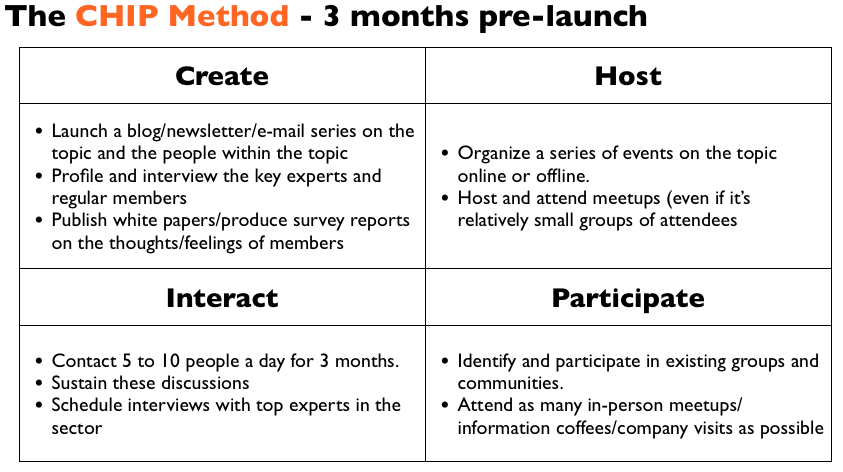
You need to use the CHIP process below:

Spend 2 to 6 months participating in other communities, attending events, asking questions, and interacting with people online. Be curious and friendly. Don’t try to get anyone to do anything for you at this stage.

Next, start a platform. This might be an Instagram account, a blog, podcast, whitepaper, or any medium that best suits your interests. You want people coming to you for information. This gives you the added advantage of starting to test and experiment with the idea. Share what you’re learning. Test ideas if you like.

Better yet, interview or feature people for this platform. Now you get the benefit of learning and connecting with smart people. The same people who won’t give you time of day for a coffee will give you hours for an interview. This is how Ryan Hoover built relationships for ProductHunt.


Step 2: Nurture Strong Relationships and Identify Key Themes

If you’ve succeeded in the above stage, you should have a few hundred subscribers/followers at this stage. These are now people who will recognise your name and be happy to speak with you.

Directly reach out to this group. Schedule coffees or calls with them. Travel to where they are if you need to. Try to have private, 1 to 1 discussions with at least 50 people (if you don’t enjoy this process, consider a different occupation).

Ben Munoz launched BensFriends by participating in other communities, responding to questions on Q&A sites, and meeting people. It’s very hard work but it is the single most reliable way to get great results.


Step 3: Identify and Validate The Community Idea

You should be able to sustain relationships with at least 50 people at this point and have a very good idea of what they have said. I prefer to use a spreadsheet and look for patterns in the data, but you can use whichever method works for you.

Make sure you ask people about their challenges, hopes and ambitions. Find out what they like or don’t like about the scene or their work. Find out where else they interact with each other (you don’t want to copy what already exists).

You should be able to identify a few topics that people really care about.

You’re looking for topics a handful of people really care about and don’t have a great place to talk about it today. One of these topics will become your concept.

Developing Your List of Community Concepts

Let’s use the TransAmerica example above and pretend we have interviewed 50 people in the wealth space. We might discover a few common themes:

  • Never having enough time to do anything.
  • Not being able to maintain a consistent fitness routine.
  • Not feeling part of the elite group or know how to join exclusive events.
  • Not spending enough time with friends.
  • Not spending enough time with family.
  • Uncertainty about the future.
  • Concerns about status.
  • Embarrassed by wealth.
  • Wants to spend less time doing routine tasks.
  • Who to trust when outsourcing projects/ideas.

At this point we can take this list and either;

a) do a survey asking people to rank which of these they might care about (easy to do on SurveyMonkey).
b) start testing some community concept ideas directly.

If you do the survey, use it as a rough guide and discard those at the bottom rather than pick those that the top. People find it difficult to articulate what’s most important to them.

Community Concept

A community concept is essentially the community topic (what the community is about), target audience (who the community is for), and type (action, circumstance, support etc…).

Any one of the themes can serve as a possible community and each can also yield multiple community ideas.

Let’s imagine we find health and fitness is a problem for wealthy people. You can quickly build 5+ concepts from that:

  • An exclusive community sharing the health and fitness regimes of the ultra wealthy. Members would each share their diet/food recipes, read content from celebrities and others, and be able to sign up for programs named after superstars.
  • A complete optimization community. For the wealthy to get personalized food support, training regimes, and automate/optimized every aspect of their health and fitness.
  • A peer group of wealthy people to set themselves goals with financial forfeits to charity if they don’t achieve them. Similar to Stikk, but for wealthy people.
  • A community for people with $10m in assets to share their advice on personal chefs, trainers, holidays, and the best gyms.
  • A bodybuilding club for the ultrawealthy. Members work out together or at the same time and record/share their results/photos with each other.

Not all of these ideas are good (some are terrible), but you should be able to find and validate at least one of your ideas for one of your themes.

You launch a community by focusing on just one of them!

There are more options here for a concept than you might imagine. Kaggle, for example, began as a community for data scientists who wanted to participate in competitions.

That’s a really narrow focus, but the audience loved it and word spread.

Run them past a few of the target audience to find which they like and which they really dislike. This should narrow your 30+ ideas (across all topics) to five to ten which you can test.


How to Test Your Community Concept

You want to test your idea as fast and as cheaply as possible. You can do this in multiple ways:

  • Create an item of content/whitepaper and see how popular it becomes. If you’re thinking of a community about the fitness regimes of wealthy people, write an article or two about it and send it to your audience.
  • Create a mailing list or Facebook group about the topic. Invite some of the members you spoke to before, start a few discussions, create some content, and see if the idea takes off. Keep it simple and quick.
  • Host an event for the topic. Host an event for the topic (or even a webinar) and see how many people attend. Have a speaker if you can and gauge the reaction. Better yet, have two events and see how many people attend twice and how enthusiastic they are.

You’re really looking for the instant win, the one idea that explodes with popularity.

What gets people to attend and generates the most positive feedback? If you’re not sure if your idea was an instant win, it wasn’t.

It’s far better to have 10 people who really love the idea than 1000 who are mildly interested by it.

Almost all of the struggling communities we see today skipped the conceptualization stage.

If you get the concept wrong, you will forever be paying hundreds of thousands of dollars in platform and staff costs on a community that will never succeed. Don’t let that happen to you. If you don’t have a hit, test more ideas down the list until you get one right.

By the end of this stage you should have achieved three things:

  1. Built a (content) platform from which you can invite people to join a community. This should have at least 100+ followers/subscribers.
  2. Nurtured 20+ strong relationships with people in the field who you know will love the idea.
  3. Tested and validated this is a great idea for the community. You know this because your community already exists via a FB group, event series, or a small mailing list.

If you don’t have all three, keep working at it until you do.


Inception Stage

Now you properly enter the inception phase of the community lifecycle below:
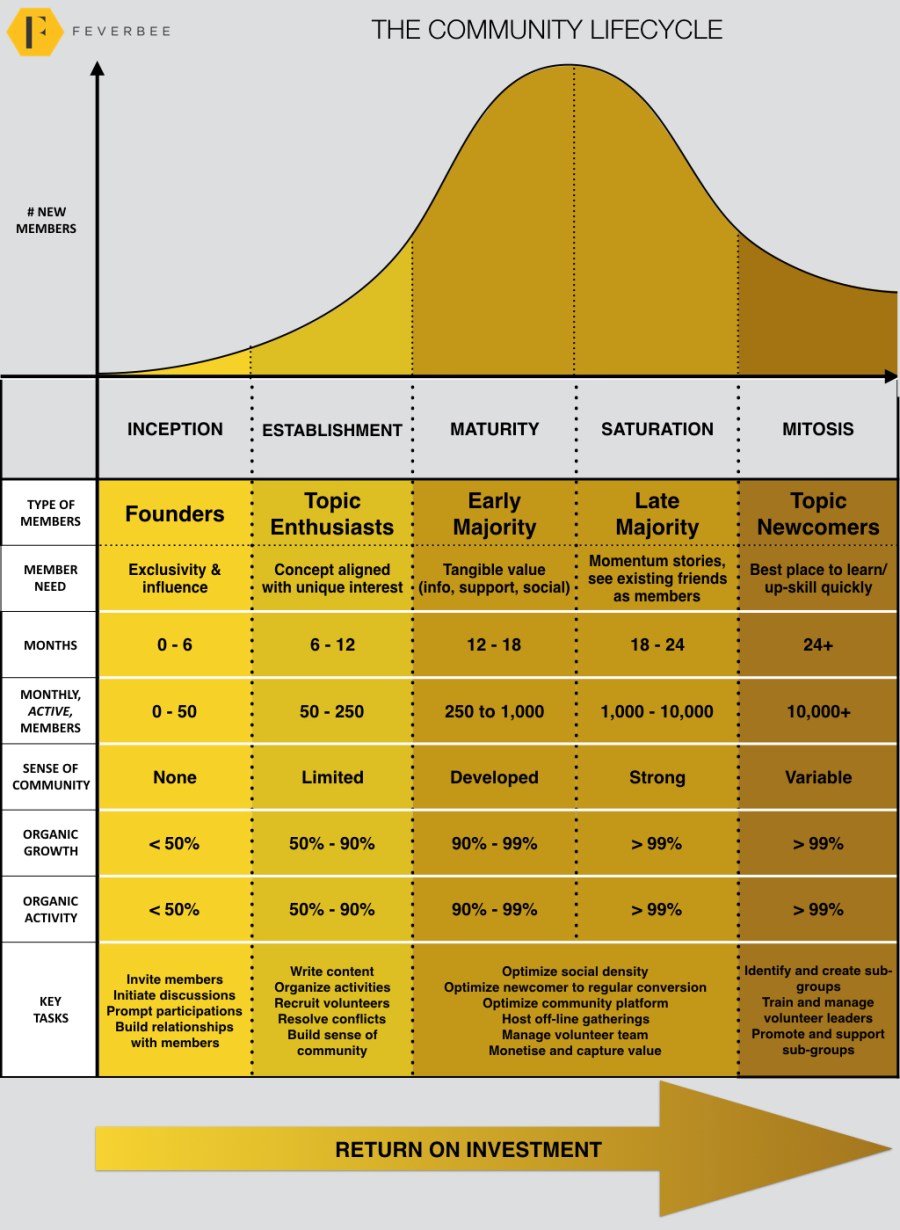
If you’ve got the concept right, this stage should be much easier than you imagined.

Your goal at this stage is to increase awareness, sustain rising activity, and develop the community platform.


1) Identify and develop early sources of growth

In the early days, you’re not going to get much organic search traffic or referrals, instead you need to identify and drive sustainable sources of growth.

You usually have three options here:

  1. Your existing website traffic. Most companies promote and try to drive traffic from their website or mailing lists to the community. This is the easiest and most common way to expand . However, it only succeeds if you have an existing audience. If you don’t, you have to follow one of the paths below:
  2. Existing groups. This means means subtly promoting the community on other sites and meetups. Anthony, Kaggle’s CEO, spent plenty of time in the early days promoting his online community in existing groups and speaking at as many meetups as he could across the country. Ben from BensFriends, as you might recall, participated in existing groups. This helped build a platform and attracted the earliest members to the community. Respond to every question, participate in existing communities, attract people in the 2s and 3s.
  3. Direct invites. This is you personally identifying people interested in the topic and reaching out to them. You have to use a status-based invite/approach to get someone to join and check out the community. This takes time but is often quite effective when it’s done well. This works best when you have strong relationships with a small number of people. The secret here is to get referrals from previous people you’ve contacted. This will save you a lot of time.

Later you can do the mass-promotional tactics. But, for now, you need to know you can sustainably bring in new traffic to the community to get things started.

It’s often smart to ask people to participate in discussion topics they mentioned in your interviews to get things going.

(note: some platforms, e.g. Facebook Groups, currently have an in-built source of new members via referrals to others on the platform.)


2) Platform

There are plenty of online community platforms to choose from. Begin with something relatively small and simple to use. Invest more in the community as the community grows (unless, as noted, you’re running a customer support platform).

Platforms vary enormously, but depending on your budget you’re probably looking at: Facebook Groups, Mobilize, MightyNetworks, Vanilla Forums, Discourse at the cheaper end and HigherLogic, Lithium, Telligent, Jive, and Salesforce at the premium level.

I’d recommend to begin at the former and later decide if you need to move to the latter.

You can develop something yourself too if the concept is really unique, but you will need a budget to hire a really top tier team. This worked for Producthunt and Kaggle. This is high-risk, high-reward territory. Go for it if you’re confident you can get the technology right.

The secret here is to focus entirely on the unique aspect of the community concept and ensures the community is perfectly suited for that.

Critically, make sure by the time you launch a new platform you have a large group of motivated people eager to use it.


3) Sustain and develop activity

Whichever activity your community is pursuing (discussions, tips, solutions, sharing photos, action plans etc…), you want to be able to see high-quality discussions taking place. High-quality discussions usually mean a few specific things:

  1. Very specific and relevant topics. You need discussions about topics which are relevant to the day to day lives of members. If you have done your interviews, you should be able to create these kinds of discussions.
  2. Clearly different types of discussions. You need to have discussions which expand beyond just a single niche topic. What is the next level up?
  3. Broad interest and participation. Discussions should be popular with members. People should be happy to participate in them and interact with one another.
  4. Good information being shared. You want to see new perspectives and facts being shared.

If you don’t have at least the above four, you probably need to rethink the community concept and the kinds of members you’re inviting. You either have the wrong concept or the wrong people participating in the topic.

You can test a lot of different things here. Limited-time webinars, AMAs, featured discussions, collaboration projects, predictions, leaderboards, open debates, and anything else that adds to the community concept. You will usually need a mix of things for this to work.

If things have gone well, by the end of this stage you should have something close to:

  • At least 50 active participants (people who make a contribution).
  • At least 30 discussions with 5+ responses.
  • More than 50% of the growth/activity being initiated by members.


Going Forward

All the metrics should be heading in the right direction by now.

Most importantly, the community should feel rejuvenated. You should sense members are more positive, happy, and excited about the community. You should also find yourself being more excited about working on the community.

Now you can start exploring some sense of community tactics, exploring more promotional efforts, and more interesting events to drive more growth, activity, and a stronger sense of community.

The secret to rejuvenating a community isn’t to try harder or big tech changes, it’s to force through the really tough decisions and let go of the thinking that dragged you into the state you’re in today. This frees you up to identify what members really want and build an entire community around them.

Good luck!

17 Jan 17:50

SotD: Pärt’s Cantus

Since I’ve been rocking the house the last couple of days, let’s do serenity instead. Specifically, Cantus in Memoriam Benjamin Britten, for string orchestra and bell, by Arvo Pärt, one of my musical heroes. Here’s how good this is: It just about got me killed, the first time I heard it. Which was on a rented car’s radio in England, heading up the M3, where they drive fast; I was jet-lagged and I caught myself closing my eyes at 85mph to savor the fading tones of the church bell.

Arvo Pärt

Arvo Pärt is an Estonian, elderly but still active. He Believes In God, big-time, and knowing this may help you enjoy his music. I find that Not Believing In God Or The Easter Bunny doesn’t get in the way of enjoying it. But it’s mostly all-serenity-all-the-time; except when it isn’t, and Pärt gets good musical mileage out of the shock value on those occasions. But the Cantus, Pärt’s biggest hit, stays in Calmsville. On first listen, it’s an endless sweet-sounding descending line that gets lower and loader for six-ish minutes, with a churchy-sounding bell floating its chimes softly over the descent.

But listen closely. There’s plenty happening under the surface of that phat descending line. A visit to this YouTube is recommended for those who can read an orchestral but you can hear it if you listen; Pärt is going to a lot of work to paint a simple picture. I’m pretty sure that listening to this is a good investment for six minutes of your life.

There’s a lot of musical mileage in that descending line; Bach used it all the time, and so did a guy I bet you haven’t heard of named Jake Holmes, who wrote a song called Dazed and Confused, which I bet you have.

The Cantus is included in a beautiful all-Pärt record called Tabula Rasa which I heartily recommend and dedicated a whole blog piece to..

Pärt is an interesting guy; there have been any number of documentaries, all good, and some intermittently available on YouTube. There’s also an interview by Bjork that’s worth hearing - starts a couple minutes into the clip. In Estonia, there’s an Arvo Pärt Centre, with concert listings and an interesting Twitter feed.

This is part of the Song of the Day series (background).

Links

iTunes, Amazon, Spotiry. As for live video, it seems like every orchestra in the world has posted one to YouTube. As a service to you, dear reader, I watched lots of them, and these stuck in my memory: Järvi with the Orchestre de Paris (watch the conductor’s arms shaking as he tries to pull more and more out of the violin section) and the Baltic Sea Orchestra, whose string players are almost all women.

17 Jan 17:49

Twitter Favorites: [DenimAndSteel] @MelissaDeGenova Count us in for supporting the Cambie bike lane! Our staff often cycle to work and love the safety… https://t.co/f7mYq1UKzK

Denim & Steel @DenimAndSteel
@MelissaDeGenova Count us in for supporting the Cambie bike lane! Our staff often cycle to work and love the safety… twitter.com/i/web/status/9…
17 Jan 17:49

No Way, JOSE! Javascript Object Signing and Encryption is a Bad Standard That Everyone Should Avoid

files/images/JWT_vulns-680x400_1.jpg

Scott Arciszewski, Paragon Initiative Enterprises Blog, Jan 20, 2018


Icon

I have no position on the issue described in this post because it's all new to me. But because it's all new to me it's inherently interesting, and the discussion perhaps points the way to the future of signing and encrypting Javascript objects (such as data or executable code). The argument here against Javascript Object Signing and Encryption (JOSE) is that it is often abused, and that it makes forgery trivial. The options allowed for JSON encryption have security issues, according to the article. More. From my own work recoding gRSShopper I can see that this will be directly relevant to learning systems in the near future that intend to exchange data and executable code. 

Web: [Direct Link] [This Post]
17 Jan 17:49

Underdash

by Joe Gregorio

Underdash is neat project in the same vein as my VanillaJS. While VanillaJS shows you how to build common web framework sample apps using just vanilla JS, the Underdash site shows you how to make the most of JS intrinsics without the need for a JS utility library.

17 Jan 17:49

Firefox Telemetry Use Counters: Over-estimating usage, now fixed

by chuttenc

Firefox Telemetry records the usage of certain web features via a mechanism called Use Counters. Essentially, for every document that Firefox loads, we record a “false” if the document didn’t use a counted feature, and a “true” if the document did use that counted feature.

(( We technically count it when the documents are destroyed, not loaded, since a document could use a feature at any time during its lifetime. We also count top-level documents (pages) separately from the count of all documents (including iframes), so we can see if it is the pages that users load that are using a feature or if it’s the subdocuments that the page author loads on the user’s behalf that are contributing the counts. ))

To save space, we decided to count the number of documents once, and the number of “true” values in each use counter. This saved users from having to tell us they didn’t use any of Feature 1, Feature 2, Feature 5, Feature 7, … the “no-use” use counters. They could just tell us which features they did see used, and we could work out the rest.

Only, we got it wrong.

The server-side adjustment of the counts took every use counter we were told about, and filled in the “false” values. A simple fix.

But it didn’t add in the “no-use” use counters. Users who didn’t see a feature used at all weren’t having their “false” values counted.

This led us to under-count the number of “false” values (since we only counted “falses” from users who had at least one “true”), which led us to overestimate the usage of features.

Of all the errors to have, this one was probably the more benign. In failing in the “overestimate” direction we didn’t incorrectly remove features that were being used more than measured… but we may have kept some features that we could have removed, costing mozilla time and energy for their maintenance.

Once we detected the fault, we started addressing it. First, we started educating people whenever the topic came up in email and bugzilla. Second, :gfritzsche added a fancy Use Counter Dashboard that did a client-side adjustment using the correct “true” and “false” values for a given population.

Third, and finally, we fixed the server-side aggregator service to serve the correct values for all data, current and historical.

And that brings us to today: Use Counters are fixed! Please use them, they’re kind of cool.

:chutten

bfcbd97c-80cf-483b-8707-def6057474e6
Before
beb4afee-f937-4729-b210-f4e212da7504
After (4B more samples)
17 Jan 17:49

We’re moving

by George Oates

After a fun three-ish years in fancy Bloomsbury, we’re off further east, to Hoxton. It’s been lovely being in the middle of everything, and down the street from the British Museum (and that excellent currywurst place), but our landlord, in all their wisdom, is ending our lease because they want to refurbish. We keep wondering whether they’ll uncover any of Hans Sloane’s collection buried in the garden!

We’ll be at:
Unit 9, The Energy Centre
Bowling Green Walk
London, N1 6AL

During our Bloomsbury tenure, I took a bunch of panoramas of the office in whatever state it was in, for the record.

17 Jan 17:49

Literary Greenway

by Ken Ohrn

Someone has built a nifty library on the Arbutus Greenway (near 49th Avenue).

Arbutus.Greenway.Library

Click to enlarge

17 Jan 17:48

Codex

An early book by the author of The Magicians, this thriller thrusts a timid and rather bored young Wall Street broker into the race to locate a mysterious ancient book. There’s an immersive video game in the mix, too — one that seems peculiarly tailored to the pursuit of this tome, and there’s an icy but beautiful young scholar, a beguiling duchess, and a rent-controlled Manhattan apartment. A castle, too. What’s not here, unfortunately, is the wonderful mix of street grit and wonder that occasionally illuminates The Magicians; too often, this is just an American Possession without the scholarship.

17 Jan 17:48

iMac Pro

The new iMac Pro builds Tinderbox from scratch in 30sec — about 6x my trusty MacBook Pro 15. In other respects, it’s just fast, but for compiling and running code, it’s blazing. The biggest performance leap I’ve seen in a long time, and worth the inconvenience of losing portability.

The keyboard is driving me nuts, but we’ll sort that out eventually.

17 Jan 17:48

Previous Provincial Gov’t. Meeting with Engineers for a Submersive Twinned Massey Tunnel Building~An “Eye-Opener”

by Sandy James Planner

consortium-van-ramboll-arup-en-tec-verwerft-consultancycontract-fehmarnbelttunnelt

Price Tags Vancouver has reported on the fact that the previous Provincial Liberal Government did not release documentation that they had met with  Tunnel Engineering Consultants (TEC) who are top experts on immersed tunnel design and construction over the Massey Tunnel replacement. Formed in 1988, TEC has designed and managed some of the world’s “most challenging and innovative tunnel projects. “

The memo below was suppressed from a previous Freedom of Information request to the former Liberal Provincial Government for these type of materials. The memo below dated April 8 2013 outlines that Delcan, an engineering company  approached TEC to “make a presentation to the client the Province of British Columbia” and to update the client on the state of art in immersed tunnelling.”

The memo outlines that “a meeting was organized with 11 attendants from the Ministry of Transportation among which a few important decision making officials, like the regional director, regional managers and the program director for the Massey Tunnel replacement…besides general information about immersed tunnelling, special attention has been given to tunnel safety, earthquake resistance design and comparison with bridge solutions, which are among the important issues the Ministry is dealing with.”

And here is where it gets interesting~”At the end of the meeting attendants, especially the high-ranking officials said the presentation was an eye-opener to them. They further indicated that with this information a tunnel option, either as a full replacement or an additional to the existing one, again had become a viable option, where before they had disregarded that  option, with a new bridge being the only viable solution”.

You can read the full memo below.

M130046 Visit report George Massey Tunnel


grouw-290x140